A game by Stefan Bauer - for 1 to 4 players, aged 12 and up - Capstone Games
←
→
Page content transcription
If your browser does not render page correctly, please read the page content below

A game by Stefan Bauer

for 1 to 4 players, aged 12 and up

RULE BOOK
Object of the game
 Smiling, you stand in the center of your factory: the sweet sounds of metal clattering and engines rattling are
 warming your entrepreneurial heart. Your goal is to build diversified scoring and production engines in order to
 outrival the other factory owners. However, in the steam-filled air, your biggest enemy is time, because most
 machines and gears rust away quickly. So you are well advised to also produce rustproof chrome gears and invest
 in powerful chrome machines.
 To be successful, you must think carefully about when to deploy your engineers and when to turn your corrosion
 wheel. Whoever manages this best and scores the most points with their machines and awards wins the game.

 Components
1 display board                               4 player boards                           4 factory boards             Before your first game, attach a
                                                1 for each player                         1 for each player          corrosion wheel to each factory
 front: multi-player side                                                                                            board with a rivet:

 back: solo side

48 engineer cards
 24 starting engineers (4 sets of 6 cards each)                                                 24 qualified engineers
    front:                      back:     set A       set B        set C        set D                front:                         back:

30 chrome machines                                                                              22 one-shot machines
  12 basic chrome machines                        18 advanced chrome machines                          front:                       back:
                                                                                                 uncompleted                    completed
                                  front:                                                                 side                        side
                                  uncompleted
                                  side

                                                                                                20 turning machines
                                  back:
                                  completed
                                  side                                                                      front:                    back:

16 award tokens                                                                                         8 watch tokens          1 wrench
  8 with a watch chain                               8 without a watch chain                                front:

  front:              back:                           front:                  back:                                                  to mark the
                                                                                                            back:                    active player

24 chrome           24 medium           24 small              20 water         60 point markers                        36 special           1 score pad
   gears               gears               gears                 tokens         24 x          12 x                        point
                                                                                                                          markers
                                                                                      12 x           12 x

                                                                          2
Setup
    Below, you can find the setup for 2 to 4 players. For solo mode, see page 15.

1
    Place the display board, multi-player side
    up, in the middle of the table and set up                                         3) Shuffle the 12 basic chrome machines
    the general display:                                                                 and place them as a refill stack,
                                                                                         uncompleted side up, above the advanced
     1) Shuffle the 18 advanced chrome                                                   chrome machine refill stack.
        machines and place them as a
        refill stack, uncompleted side up,
        above the refill stacks label in the
        top left of the display board.                                                                  Windows
                                            Refill stacks labels

     2) Shuffle the 24 qualified                                                      4) Shuffle the 22 one-shot machines and place
        engineers and place them as a                                                    them as a refill stack, uncompleted side up,
        face-up refill stack below the                                                   below the qualified engineer refill stack.
        refill stacks label in the bottom
        left of the display board.
                                                                                      5) Shuffle the 20 turning machines and place
                                                                                         them as a face-up refill stack below the
                                                                                         one-shot machine refill stack.

2   From each of these 5 refill stacks, take the top 3 tokens/cards and display them (without turning them over) in a row to
    the right of their stack, forming 3 columns running through the windows of the display board.

3   Depending on the player count, place a number of special point markers
    directly above the chrome machines as the special point supply:
      In a 2-player game, place 22 markers and return the remaining 14 to the box.                 Special point supply
      In a 3-player game, place 29 markers and return the remaining 7 to the box.
      In a 4-player game, place all 36 markers.
    Afterwards, add 1 marker from this special point supply to each of the
    2 rightmost chrome machines above window C.

4   To the left of the general display, set up
    the award supply:
    Shuffle the 8 award tokens with ‘A’s on
    their backs face down. Draw as many as
    indicated below, and place them face up
    in a column:
      In a 2-player game, display 4 tokens.
      In a 3-player game, display 5 tokens.
      In a 4-player game, display 6 tokens.
    Return the spares to the box.

    Then take the other 8 award tokens (with
    a chain on their front). Find among them
    the duplicates of the tokens displayed and
    place each duplicate face up to the left of its
    match. Return the spares to the box.                               Award supply

5   Shuffle the 8 watch tokens and place a random token
    face up on the chain of each left award token.
    Return the spare watch tokens to the box.

                                                                   3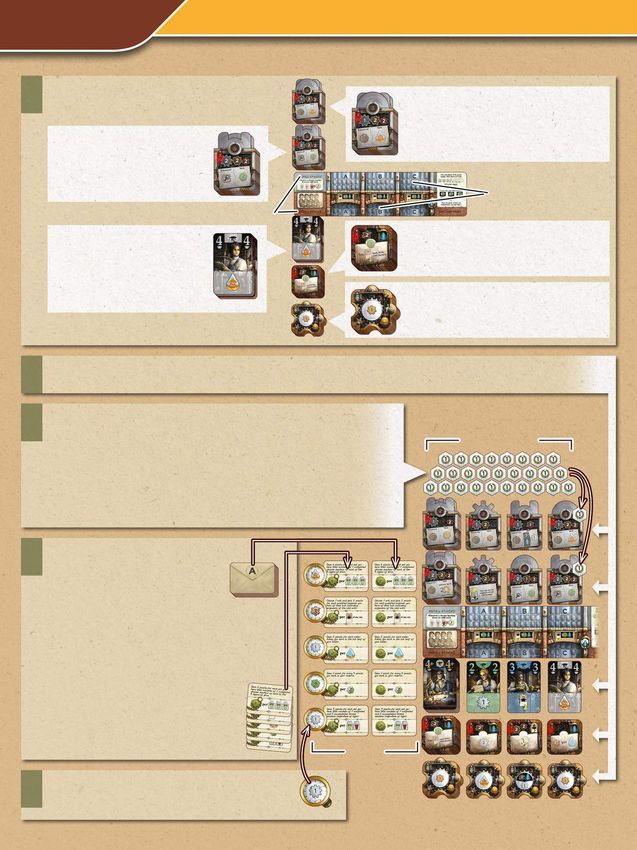
6   Each player:
     Place a       In its top right corner, place a
                                                                                             Take the 6 starting engineers of one set
                                                                                             (A, B, C or D) and put them in your hand.
     player        factory board.
     board in      If possible, make sure that
     front of      on each side of your factory
     you.          board, there is plenty free
                   table space (about the size                                               The starting engineers of each set are
                   of your palm).                                                            identical in their actions and grades. Only
                   Make sure that the                                                        their suits are different.
                   of your corrosion wheel
                   is pointing towards you.

                                                                                             Return any spare player boards, factory
                                                                                             boards and sets of starting engineers to the
                                                                                             box.

7   In easy reach of all players, set up the general supply of the resources:
    24 chrome gears         24 medium gears           24 small gears         20 water tokens             The green point markers

8   Each player:
     Take 1 chrome gear and                                            Take 1 medium gear                    ...and place them onto your
     3 green 1-point markers                                           and 1 small gear...                   factory board in sector 3.
     from the general supply and place them above
     your player board in your reserve.
                                                                                                                    Note:
                                                                                                                    Your factory board has
                                                                                                                    4 sectors.
        Take 3 water tokens.
                                                                                                                    Throughout the
        Place 1 of them in the hot half of your boiler                                                              game, each sector
        and the other 2 in the cold half.                                                                           is named according
                                                                                                                    to which quarter of
                                                                                                                    the corrosion wheel
                     Reserve                                                                                        is currently in that
                                                                                                                    sector.
                                                                                                                    For example, at the
                                                                                                                    start of the game:
                                                                                                                    this is sector 3
                                                                    Hot half                                        and this is sector X.

                                                                   Cold half                                        This will change
                                                                                         Corrosion wheel            whenever you turn
                                                                                                                    your corrosion wheel.
                                                                        Boiler

9   Place the score pad
    ready for later.                                            10        Determine a starting player
                                                                          (for example, whoever is first
                                                                          to spot a rusty object) and give
                                                                          them the wrench.

                                                                    4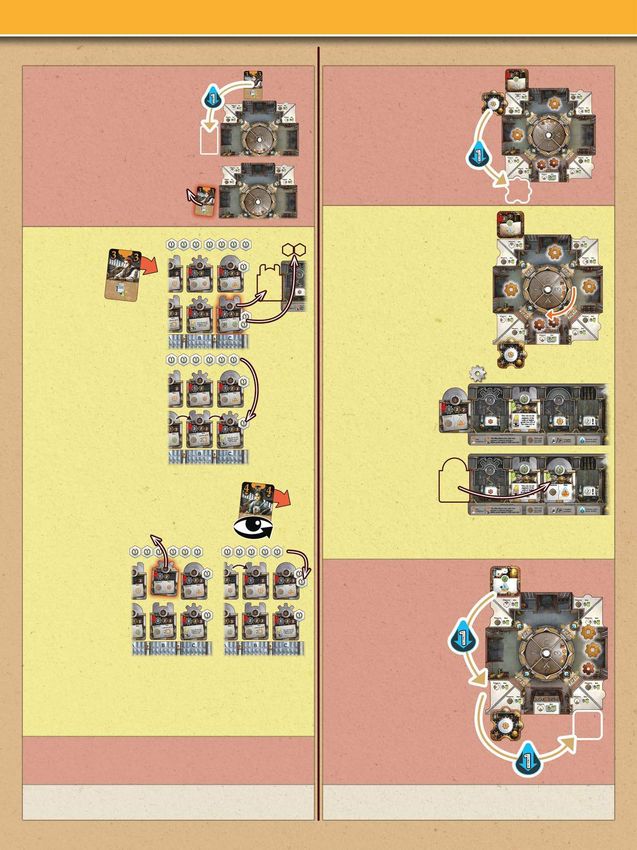
Overview of the game’s resources
The main resources in this game are gears and steam, which are mostly
needed to complete one-shot machines and chrome machines.
Gears and steam (and point markers) are primarily produced by
activating certain machines and performing the actions of engineers.

Steam                                                                     Small gears and medium gears
Steam is simulated by moving the water tokens in your boiler              Whenever you produce small or medium gears,
up and down between its upper hot half and its lower cold half:           take them from the general supply
                                                                          and place them directly onto your factory
               Moving a                            moving it              board in sector 3.
               water token                         down is called         There is no limit to how many gears you
               up is called                        consuming              may have in any sector. However, you
               generating                          steam.                 may never move them from one sector to another.
               steam,
                                                                          Whenever you spend small or medium gears (e.g. to complete
The most common icons mean:                                               a machine), return them from any of your sectors to the
                                                                          general supply.
                                Generate maximum steam by
         Generate                                                         The most common icons mean:
                                moving all “cold” water tokens
         1 steam.
                                to the hot half of your boiler.                     Produce                     Produce
                                                                                    1 small gear.               1 medium gear.
                                Gain 1 water token from the
         Consume                general supply and add it to
         1 steam.                                                                   Produce                     Produce 2 gears in
                                the hot half of your boiler.
                                                                                    1 small or                  any mix of small and
If you have all your water tokens in the hot half of your                           1 medium gear.              medium gears.
boiler, you cannot generate any more steam.
If you have all your water tokens in your cold half, you cannot                     Spend                       Spend
use any actions or effects that consume steam.                                      1 small gear.               2 medium gears.
       This icon refers                    This icon refers to
       solely to water                     all of your water                        Spend                       Spend 2 gears in
       tokens in the hot                   tokens, whichever                        1 small or                  any mix of small and
       half of your boiler.                halves they’re in.                       1 medium gear.              medium gears.

Chrome gears                                           Point markers
Whenever you produce chrome gears, take                There are 2 types of point marker: special point markers
them from the general supply and place them            and green point markers in different denominations.
in your reserve above your player board.               The special point markers are distinct from the green because when the special
Whenever you spend chrome gears, return                point supply runs out, the end phase of the game begins (see page 11).
them to the general supply. There is no limit to
                                                       Whenever you gain point markers, place them in your reserve.
how many chrome gears you may have in your
                                                       Whenever you spend green point markers, return them to the general supply.
reserve.
                                                       At any time, you may exchange green point markers in your reserve for ones of
The most common icons mean:                            equal value in the general supply to gain different denominations.
                                                       However, you may never spend or exchange special point markers.
          Produce                 Spend
          2 chrome                1 chrome             The most common icons mean:
          gears.                  gear.                             Gain 3 green
                                                                                                     Gain 1 marker from the special
                                                                    points (in any
                                                                                                     point supply.
                  Produce 1 chrome gear                             denominations).
                  by spending 1 small or
                  1 medium gear AND                                                                  Gain either 1 marker from the
                                                                    Spend 1 green
                  consuming 1 steam.                                                                 special point supply or 1 green
                                                                    point.
                                                                                                     point.

Unlike the special point supply, the general supply is limitless. If you run out of any item there, use something else as a replacement.

                                                                      5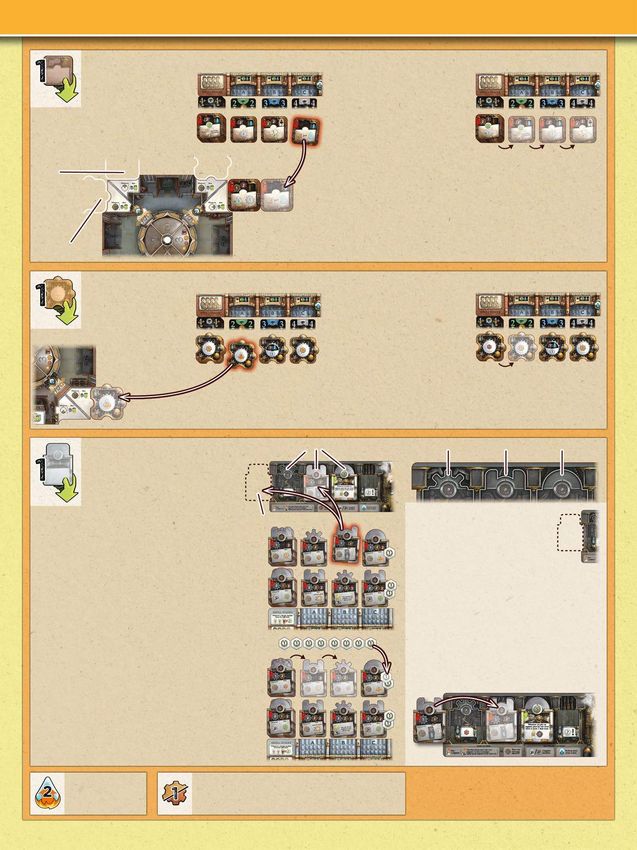
Playing the game
The starting player begins the game by taking a turn. Then play proceeds clockwise with the players taking one turn each until the
end phase of the game begins (which happens when the special point supply or the award supply has almost run out - see page 11).
At the beginning of your turn, take the wrench from the player on your right and place it in front of you. This is to indicate that you
are the active player. Then carry out the following phases in this order:

Phase 1: Maintenance                  Phase 2: Main action                    Phase 3: Maintenance                   Phase 4: End of turn
Phases 1 and 3 are maintenance phases in which you may perform secondary actions and must clear sector X of you factory board.
This will be explained in detail on page 8.

Phase 2: Main action
Perform one of these two actions:

EITHER   Play 1 engineer from your hand		                                OR    Turn your corrosion wheel

         Playing engineers mostly gains you new machines and qualified         Turning your corrosion wheel puts your machines to work and
         engineers. Other players can copy your engineer’s action by           returns engineers to your hand. It also causes old gears and
         playing an engineer of a higher grade.                                machines to rust.

Play 1 engineer from your hand                                                                                                           Suit
Step 1: Choose 1 engineer from your hand, play her face up in front of you and announce her suit and grade.                             Grade
        Then perform her action once.
Step 2: Afterwards, in a clockwise direction, each of the other players may choose                                                      Action
        to copy (     ) the action of the engineer that you just played. To copy it, the
        player must play an engineer from their hand that has the same suit as yours
        and a higher grade. They place that engineer face up in front of them and
        perform the action printed on the engineer that you played.
Step 3: Once everyone has had a chance to copy, place your engineer beside your factory board in the
        sector that corresponds to her grade. Here she waits for her shift to end (which will happen when
        she’s in sector X). If you have multiple engineers in one sector, keep them in an overlapping row,
        so that you can see their grades. Any player who played an engineer to copy yours places their
        engineer likewise in their factory (in the sector that corresponds to the grade of their engineer).
        Afterwards, proceed to your phase 3 (“Maintenance”).
• There are three main suits: blue, green and orange. In                    Main suits
  addition, there is a gray suit and a wild suit among the
  qualified engineers. An engineer of the wild suit can
  be played to copy the action of a lower-grade engineer                                                          Gray suit          Wild suit
  of any of the three main suits but not of the gray one.
• Conversely, if you play an engineer of the wild suit on your turn, the other players can copy her action
  with a higher-grade engineer of any of the three main suits or the wild suit.
• The grade 4+ engineer is considered the highest-grade engineer and thus can copy grade 4 engineers.
• Played engineers of grade 4 or 4+ must be placed in sector X. Turn them upside-down
  to show that they have not yet ended their shift. When the X of your corrosion wheel
  leaves their sector, turn them upright again.
Actions of the starting engineers:
             Hire a qualified engineer:                                          Then refill the empty spot
             From the general display,                                           by sliding any cards on its
             choose 1 of the three                                               left one spot to the right
             qualified engineers below                                           and placing the top card
             windows A, B, C and put her                                         of the refill stack below
             in your hand.                                                       window A.
                             Attention: Hiring an engineer of grade 4 or 4+ has an additional cost of 1 point (green!) AND
                             1 steam. If you cannot pay that cost, you cannot hire her.

                                                                     6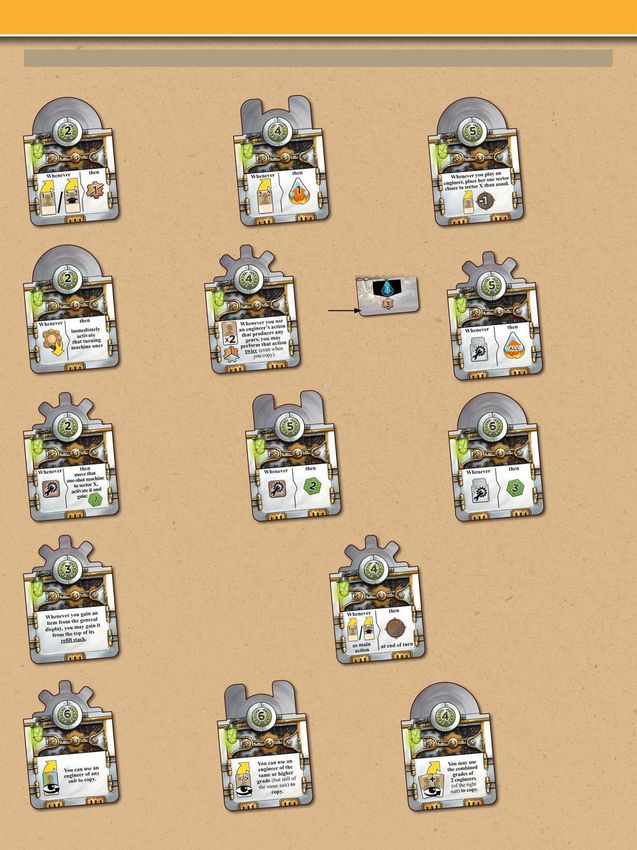
Build a one-shot machine:                                   Then refill the empty spot by sliding any one-shot
             From the general display,                                   machines on its left one
             choose 1 of the three                                       spot to the right and
             one-shot machines                                           placing the top token of
             below windows A, B, C                                       the refill stack in the vacant
and place it, uncompleted side up,                                       spot below window A.
in its slot in your sector 3.

 Slot for                                                       • If you have several one-shot machines in one sector, line them
one-shot                                                          up in a row. There is no limit to how many you may have.
machines
                                                                • One-shot machines have their name because they can only be
                                                                  activated once (when they reach sector X). But you will only be
   Slot for                                                       able to activate a one-shot machine if you manage to complete
   turning                                                        it first (see “Complete machines” on page 9).
  machines

            Build a turning machine:                                     Then refill the empty spot by sliding any turning
            From the general                                             machines on its left one
            display, choose 1 of the                                     spot to the right and
            three turning machines                                       placing the top token of
            below windows A, B, C                                        the refill stack in the vacant
                and place it face up                                     spot below window A.
                in its slot in your
                sector 3.
                                                           • If you have several turning machines in one sector, line them up in a
                                                             row. There is no limit to how many you may have.
                                                           • Turning machines are already completed when you build them. You
                                                             can activate them whenever you turn your corrosion wheel.

            Build a chrome machine:                  The 3 types of drive space:        Cog-wheel drive   Piston drive   Chain drive
            From the general display, choose
            1 of the six chrome machines
            above windows A, B, C and take it.
            If you choose either of the
machines above window C, also take all         Storage spot                               Your storage spot
special point markers on that machine and                                                 To the left of your player board,
place them in your reserve.                                                               you have a storage spot for one
Place the machine itself, uncompleted side                                                uncompleted chrome machine.
up, on your player board: either in your free                                             If this storage spot is unoccupied
storage spot or on the drive space of its                                                 when you build a new chrome machine,
type. If there is already a machine or a stack                                            you can place it here. If it is occupied,
of machines on that drive space, place the                                                you can vacate it at any time by moving
new machine on top of them. You are not                                                   the occupying uncompleted machine
allowed to change the order of the stacked-                                               (without flipping it over) to the matching
up machines on any of your drive spaces.                                                  drive space on your player board, covering
                                                                                          any machines below it. Once a chrome
After placing the chrome machine, refill the                                              machine has entered its drive space, it
empty spot in the general display by sliding any                                          remains there for the rest of the game.
chrome machines on its left one spot to the
right and placing the top chrome machine of the
refill stack in the vacant spot above window A.
Afterwards, add 1 marker from the special point
supply to the rightmost chrome machine (above
window C) of that row.

                                       Produce 1 small or 1 medium gear. (Whoever         You can find an overview of the engineers
       Generate up to
                                       copies this action has the same choice between     on page 14. An example of a full turn can
       2 steam.
                                       1 small and 1 medium gear, of course.)             be found on page 10.

                                                                 7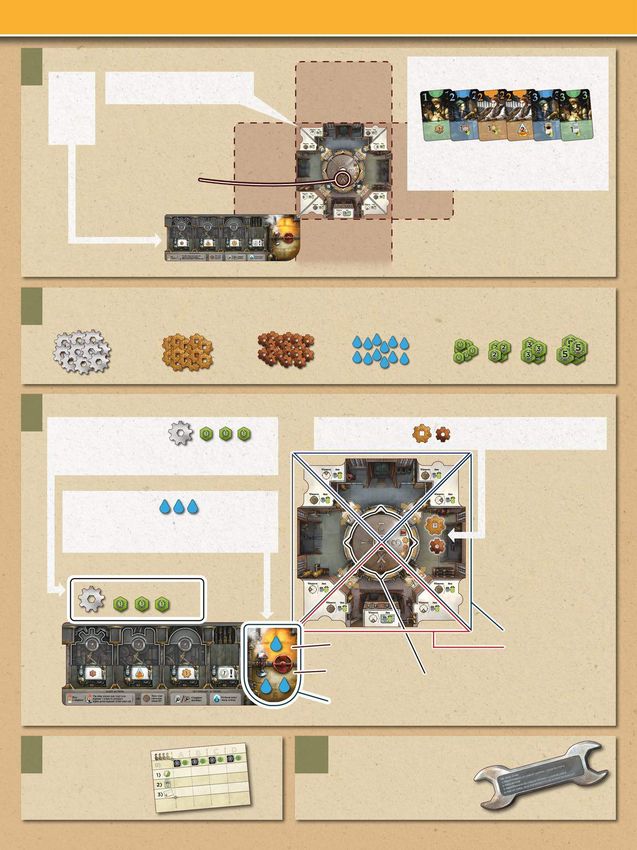
Turn your corrosion wheel
         Turn your corrosion wheel 90 degrees clockwise.
         This switches on all of the following
         machines:

          Your turning machines, whichever
          sectors they’re in.

          Your completed one-shot machines
          in sector X.

          Your visible completed chrome
          machines showing this icon.

 Your visible prototype machines but only                                       Prototype machines
 if sector X is at the bottom, i.e. the X of the                                Prototype machines
 corrosion wheel is pointing towards you.                                       are printed on your player board. The visible ones are
                                                                                switched on whenever the X of the corrosion wheel is
Now, in the order of your choice, activate each of these switched-on            turned to the bottom sector.
machines once (i.e. use its effect).
At any time between these activations, you may complete any of your uncompleted one-shot machines and chrome machines (see
section “Complete machines” on page 9). If this includes one-shot machines in sector X or chrome machines with the       symbol,
they are immediately switched on as well and thus can be activated in this phase. You cannot use “extra steam actions” (see page 9)
in this phase.
You may forfeit any activations that you cannot or do not                 Attention: If a chrome machine
want to use during this phase.                                            says “at end of turn”, it cannot be
Exception: Whenever this prototype machine                                activated during the main action
is switched on, you must activate it                                      but only in phase 4 of that turn
(gain 1 marker from the special point supply).                            (see page 9).
You can find an overview of the machines on pages 12 to 14. An example of a full turn can be found on page 10.
Once you’ve activated all the switched-on machines that you wanted once, proceed to phase 3 (“Maintenance”).

Phase 1 and 3: Maintenance
Step 1: First, you may perform as many secondary actions as you want and can afford in the order of your choice (see next page for
        the types of secondary actions).
Step 2: Afterwards, check if your sector X is empty. If it is not, you must immediately clear it (as its machines and gears have rusted
        and its engineers have ended their shifts):
                                                                                                                 Engineer discard pile
    a Discard any one-shot machines from sector X, completed side
        up, onto the one-shot machine discard pile of the general display                       a
        (whether or not those machines have been completed and
        whether or not they’ve been activated).
    b Discard any turning machines from sector X face down onto the                     c
       turning machine discard pile of the general display.                                       d
    c Return any gears from sector X to the general supply.
    d Return any engineers from sector X to your hand.                                                      One-shot
       Exception: Engineers that have a grade of 4 or 4+ remain in this                       b             machine
       sector if the X of the corrosion wheel has not left it since they were                              discard pile
       placed here (they should be upside-down to mark this). They will
       only end their shift once all quarters of the corrosion wheel have
       passed them.                                                                                      Turning machine discard pile
                                                                   8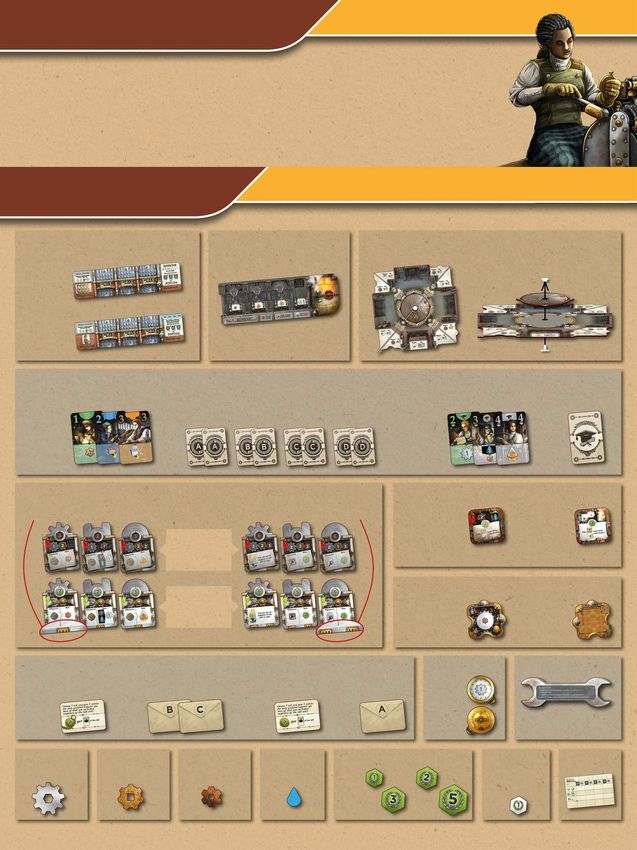
Secondary actions
                    Complete machines
                    Chrome machines and one-shot machines are uncompleted when you build them.
                    In order to activate them, you must complete them first by means of this action.

        To complete one of your chrome machines, it must be either in your storage spot or on
        top of its drive space. Pay the gears shown at the top of its uncompleted side.
        Then flip it and place it on top of its matching drive space (if it’s not there already), covering up any
        machines below it. The effects of covered machines cannot be used for the rest of the game. However,
        at the end of the game, you will get the points printed at the top of each completed chrome machine.

        To complete one of your one-shot machines, pay the cost printed at the top of its uncompleted side. This cost may include:
        • Spending gears.
        • Consuming steam.
        • Discarding 1 qualified engineer face down to the engineer discard pile of the general display.
          This engineer can either come from your hand or any sector of your factory.
        After paying the cost, flip the one-shot machine. It can be activated when it enters sector X.

         Perform extra steam actions
         There are 2 types of extra steam actions:

           Discard an item from the general display
           Consume 1 steam and choose:
               • the engineer
           OR • the one-shot machine
           OR • the turning machine
           below window C and discard it to its discard pile.
           Then refill the empty spot by sliding the items on its left one spot to the right and
           placing the top item of its refill stack in the vacant spot below window A.

                    Speed up an item in your factory
                    Consume 1 steam and move:
                         • 1 of your engineers
                    OR • 1 of your one-shot machines (completed or uncompleted)
                    OR • 1 of your turning machines
                    to the next sector in a counter-clockwise direction. If it is already in
                    sector X, you cannot move it.
                    Moving it has no further effect except in the following cases:
                    • Whenever you move a turning machine, immediately activate it once.
                    • Whenever you move a completed one-shot machine to sector X,
                      immediately activate it once.

  Note: You only carry out maintenance on your own turns, never on other players’ turns.

Phase 4: End of turn
You may now activate any “end of turn” chrome machines that you switched on in your main action phase. To do
so, pay any costs and perform their additional action (turning the corrosion wheel or playing an engineer). This is
done in the same way as in the main action phase and is then followed by another maintenance phase.
Attention: These “end of turn” actions are considered additional actions, not main actions - so you cannot perform
them in an infinite loop. However, if you have both of these completed chrome machines,
you may activate them one after the other in the order of your choice (with a maintenance
phase between them).
Once you have completely finished your turn, pass the wrench to the player on your left.

                                                                   9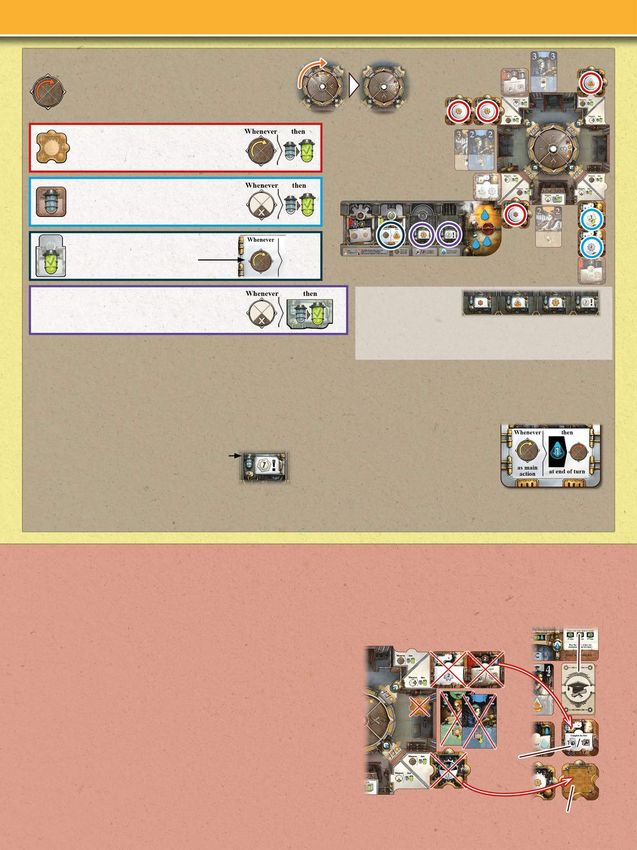
Example turn: Play 1 engineer from your hand                                   Example turn: Turn your corrosion wheel
1) Maintenance                                        a                        1) Maintenance
 a First, you choose to perform an                                              a First, you choose to perform
extra steam action by consuming                                                an extra steam action by                                b
1 steam and moving the orange                                                  consuming 1 steam and moving
engineer from sector 1 to sector X.                                            a turning machine from                a
                                                                               sector 2 to sector 1.
                                                                                b This produces a medium
                                                                               gear that you place in sector 3.
 b Afterwards, you clear sector X by
                                                                               Since sector X is empty, you
returning the orange engineer to your
                                                                               don’t need to clear it.
hand.
                                                 b
                                                                               2) Main action
                                                                                c You turn your corrosion wheel.
2) Main action
Step 1:                                                                         d First, you choose to activate
 c You play the c
                                                                  e            your turning machine, which
orange engineer                                                                produces 1 medium gear                                            e
                                                                                e that you place in sector 3.
(that you just
returned to your                                                               Since the X of your corrosion wheel
hand) in front of you and                             d                        is in your bottom sector, you then                            c
 d perform her action by taking                                                choose to activate each of your
the chrome machine above                                                       visible prototype machines:
window C along with the 2 special
                                                                                 f You produce 1 small gear,
point markers on it.                                                            g 1 medium gear and
 e You place the points in your                                                                                                d
                                                                                h gain a marker from the
reserve and the chrome machine                                                 special point supply.
in your storage spot.
 f Then you refill the display and                                               i Then you choose to                 f                  g      h
 g add a marker from the special                                               complete the chrome
point supply to the now rightmost                 f
                                                              g                machine in your storage        i
chrome machine of that row.                                                    spot by paying its cost
                                                                               (2 medium gears, 2 small
Step 2:
                                                                               gears and 1 chrome gear).
In a clockwise direction, each of the other                                      j You flip that chrome                                  j
players may now copy your engineer’s action:                                   machine and place it onto
The player to your left does not want to copy.            h                    its drive space. Since
h The third player chooses to copy the action by                               you’re still in the phase
playing an orange engineer of grade 4.                                         in which you turned your corrosion wheel, this machine is also
                                                                               immediately switched on. So you choose to activate it (generating
 i That player takes
the chrome machine                                                             1 steam).
above window B from
                                                                               3) Maintenance
the top row,                                              j                                                                        k
 j then refills the              i                                              k You choose to complete the
display and
                                                                      k        one-shot machine in sector 2,
 k adds a marker from                                                          which costs your remaining gears.
the special point supply
to the rightmost chrome
                                                                                 l Then you choose to
machine of that row.                                                           perform two extra steam
                                                                               actions by consuming 2 steam
The fourth player does not want to copy either.                                and moving that one-shot
                                                                               machine from sector 2 to sector X,
Step 3:                                                                        where you immediately activate
As your engineer has a grade of 3, you place her in your sector 3. The         it once (gaining 3 points and
                                                                                                                     l
third player places their grade 4 engineer in their sector X (and turns        adding a water token to your
her upside-down to mark that she has not ended her shift yet).                 boiler).
                                                                               Afterwards, you clear sector X by
3) Maintenance                                                                 discarding the turning machine
Since you do not want to perform any secondary actions and your                and the one-shot machine.
sector X is empty, you skip maintenance.

4) End of turn                                                                 4) End of turn
You end your turn by passing the wrench to the player on your left.            You end your turn by passing the wrench to the player on your left.

                                                                          10
End of the game
The end phase of the game begins when at the end of any player’s turn one or both of the following conditions are met:
There are 3 or fewer markers left in the special point supply.
There are 3 or fewer award tokens left in the award supply.
In the end phase, play proceeds clockwise as before.
However, on each of your turns, you must decide whether you want to:
a) take that turn as usual OR b) pass for good.
Taking your turn as usual costs green points from your reserve. Your first turn in the end phase costs
1 point, your second costs 2 and your third costs 3. Once you’ve taken 3 turns, you must pass for good
on you next turn. 1st turn 2nd turn 3rd turn
When you pass for good, carry out one more maintenance phase (but no main action). Afterwards, your turn is skipped for the rest
of the end phase and you are not allowed to copy engineer’s actions.
Once all players have passed for good, the game ends. Now, take the score pad and carry out the final scoring:
First, any player may spend spare chrome gears: For every 2 chrome gears that you return from your
reserve to the general supply, gain 1 green point.
Then, on the score pad, tally each player’s score in the following categories:
Sum the values of the point markers in your reserve (special
and green combined). =17
Take all chrome machines from your player board and line them up in front of you without flipping them
over. Sum the points at the top of each completed chrome machine.
=20
Sum the points you get
from any award tokens
you have collected
during the game.
(See the blue box on =29
page 12 on how to
collect them.)
12 12 5
Finally, total the points of the 3 categories. Whoever has the most points wins the game. In the case of tie, the tied
___
player who has more special point markers wins. If there is still a tie, the victory is shared. 66
Additional notes:
• Whenever you must refill a vacant spot below window A but the refill stack is empty, shuffle the
corresponding discard pile and place it as the new refill stack. Then refill the vacant spot.
• In the unlikely case that there is no discard pile, any vacant spots remain empty. Refill them
immediately as soon as any new discards become available.
• If either of the chrome machine refill stacks run out, refill the vacant spot with a chrome machine
from the other chrome machine stack.
• If the special point supply runs out during the end phase of the game, use green 1-point markers
from the general supply instead.
11Overview of the machines and engineers
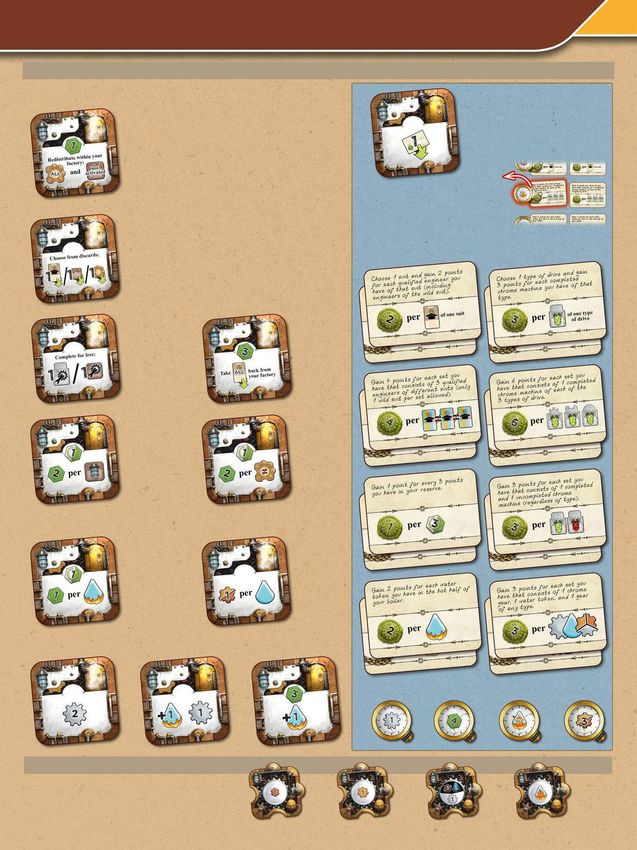
One-shot machines
There are 12 types of one shot machine (for icons that are not explained
here, see page 5): Choose one of the award tokens in the
award supply and place it face up in
Gain 1 green point. Then move to any of your sectors: front of you. If there is a watch token
• any number of your turning machines and attached to it, take it too and use its
• any number of your uncompleted one-shot machines and 6x
effect immediately.
• any number of your completed one-shot machines that Then discard the watch token to the
1x you have not yet activated. game box.
If you move completed one-shot machines to sector X,
activate them immediately (in any order). You do not
activate turning machines when you move them. Award tokens give you points during
the final scoring depending on how
well you have fulfilled their tasks.
Go through the discard piles of the general display and There is no limit to the number of
choose 1 item from them. If it’s an engineer, put her award tokens you can collect. You can have tokens with identical
in your hand. (Pay the usual additional cost if she’s an tasks. Both will give you their points when scored.
engineer of grade 4/4+.) There are 8 tasks:
1x If it’s a one-shot or turning machine, place it in sector 3
as usual.
Complete Gain 3 green
one of your points. Then
uncompleted return all your
chrome or one- engineers
2x shot machines 1x from your
free of charge. factory board
to your hand.
Gain either a Gain either a
marker from marker from
the special the special
point supply or point supply
1x 1 green point.
1x or 1 green
Then gain point. Then
2 green points gain 2 green
for each of points
your completed one-shot machines for each different type of turning
(including this one). machine in your factory.
Gain either a Produce as
marker from many gears
the special (in any mix
point supply or of small and
1x 1 green point.
1x medium) as
Then gain you have
1 point for water tokens
each water in your
token in the hot half of your boiler. entire boiler.
There are 4 types of watch token (for their effects, see page 5):
3x 2x 2x
2x 2x 2x 2x
Turning machines
There are 4 types of turning machine (for their effects,
see page 5): 6x 6x 5x 3x
12Chrome machines
You can only use the effects of chrome machines that are both completed and visible. As soon as you cover a chrome machine, its effect is immediately lost
for the rest of the game. (For the effects of icons that are not explained here, see page 5.)
Whenever you play Whenever you This applies whenever
your engineer of play an engineer you play an engineer
grade 1 or a qualified of grade 2 (even (even when you use it
engineer of grade 2 when you use to copy). For example,
(even when you use it it to copy), engineers of grade 4
to copy), produce generate are placed in sector 3,
1 small or 1 steam. your engineer of
1 medium gear. grade 1 in sector X.
Whenever you build For example,
a turning machine, if you use Whenever you
immediately this engineer’s complete a
activate its effect action, chrome machine,
once. Then place you can consume 2 steam to generate
it in sector 3 as produce 6 gears. maximum steam.
usual. This does not apply to the gray (This does not
engineer of grade 3. apply to this
machine itself.)
Whenever you complete Whenever you Whenever you
a one-shot machine, you complete a one- complete a
may immediately move shot machine, chrome machine,
it to sector X (if it’s not gain 2 green gain 3 green
already there), activate points. points. (This
it once and gain 1 green does not apply
point. to this machine
itself.)
Whenever you hire a qualified engineer, you may This machine is switched on whenever you play
take the one on top of the refill stack instead of any your engineer of grade 1 or a qualified engineer
of those below the windows (paying the usual cost of grade 2 as your main action. At the end of
if it’s an engineer of grade 4/4+). that turn, you may turn your corrosion wheel
Whenever you build a machine, you may take the and proceed as you do when you turn it as
one on top of its refill stack instead of any of those your main action (see page 8). However, this
above/below the windows. If you take the top is considered an additional action, not a main
machine of a chrome machine stack, don’t forget action (see the bottom of page 9).
to add a special point marker to the rightmost
chrome machine of that row.
For example, if a For example, if a For example, if a player plays
player plays an orange player plays an an orange engineer of grade 4,
engineer of grade 2, orange engineer of you can copy that engineer’s
you can copy that grade 2, you can action by playing an orange
engineer’s action by copy that engineer’s engineer of grade 2 and an
playing a grade 3 (or action by playing an orange engineer of grade 3.
4) engineer of the orange engineer of Each of these engineers
blue, green, orange, grade 2. then goes to the sector that
gray or wild suit. corresponds to her grade.
Naturally, you can use all of these copy effects in combination.
13Whenever you Whenever you pay the cost Whenever you pay the cost
pay the cost of a of a one-shot or chrome of a one-shot or chrome
chrome machine machine while completing machine while completing
while completing it, that cost is reduced by it, that cost is reduced by
it, that cost is up to 2 medium gears. up to 2 small gears. This
reduced by This reduction also applies reduction also applies to
1 chrome gear. to machines with a machines with a
cost. cost.
All of the following completed chrome machines are switched on whenever you turn your corrosion wheel (see page 8):
You may activate
once more up
to two separate
turning machines
that you have
already activated
this phase.
If there are At the end of your turn, you At the end of your turn, you
at least may consume 1 steam to may consume 1 steam to play
2 engineers turn your corrosion wheel 1 engineer from you hand.
of grade 2 in again. Proceed in the same Proceed as though you had
your sector X, way as in your main action played her as your main action
you may (see page 8). However, this (see page 6). However, this is
consume is considered an additional considered an additional action,
1 steam to gain action, not a main action not a main action (see the
3 green points. (see the bottom of page 9). bottom of page 9).
Engineers
For icons that are not explained here, see pages 5 to 7.
Starting engineers Qualified engineers
Without actually Move any
turning the corrosion number
wheel, activate any of your
Set A: of your turning one-shot
machines and visible machines
completed chrome (completed
machines in any and/or un-
order as though completed)
you had, following to any
Return up to the rules described on page 8. (This sectors of your factory board.
Set B: 2 engineers from any includes being able to complete If you move completed one-
of your sectors to your machines in between.) shot machines to sector X,
hand. (You cannot One-shot machines and prototype activate them immediately (in
return this one.) machines cannot be activated this way. any order).
Build either a turning
machine or a one-shot
machine. (Whoever
Set C: copies this action does
not have to build the
same type of machine,
of course.)
Set D:
14Solo mode
Hello! Do you want to play Corrosion alone? I’m happy to step in as your opponent.
Setup
Set the game up as described on pages 3 and 4, making the following changes during these steps:
1 Place the display board with the
solo side up.
3 Place all 36 special point markers in the
special point supply.
4 In the award supply, display 3 random award tokens and their duplicates.
Then take from the remaining award tokens one with an ‘A’ on its back, one with a ‘B’
on its back and one with a ‘C’ on its back. Place these face down in front of the three
award rows to mark them as rows A, B, C. Return the rest to the game box.
6 Take the cards of set D and put them in your hand as your starting engineers.
Then shuffle the 18 cards of sets A, B and C to form a combined deck. Place this
deck face down to the right of the display board as my draw deck. Then flip the
top card and place it face up beside it. This is my discard pile.
My My
draw discard
deck pile
Playing the game
You and I take alternating turns. You are the starting player. Carry out your turn as usual (the only difference is that I will never copy
your engineers’ actions).
When it is my turn, carry out these steps for me in this order:
1) Flip 2 cards
Flip the top card of my draw deck and place it face up on my discard pile. Then flip the next card of my draw deck and place it also
face up on my discard pile. That second card is my action card.
2) Perform my discard action
According to the icon shown on my action card, remove an item from the general display:
Remove the engineer/one-shot machine/turning
machine from below the window that matches
the letter on top of my draw deck. Discard
that engineer/machine to its discard pile in the
display. Then refill the display as usual.
There is one exception: If you remove this type of one-shot machine,
place it, completed side up, below my draw deck.
Take 5 water tokens from the supply and place them onto that one-
shot machine. (This is to track when an award token will be removed
from the award supply - see step 4).
Remove a chrome machine from the display, according to the letter and
arrow shown on top of my draw deck:
If it’s an up arrow, remove the upper chrome machine from
above the window of the matching letter.
If it’s a down arrow, remove the lower chrome machine
from above the window of the matching letter.
Discard the chrome machine to the game box, along with any special
point markers on it.
Then refill the display as usual (including placing a special point marker
on the rightmost chrome machine).
If it is either of these icons, nothing is discarded.
153) Copy the action of my action card
Next, you may choose to copy the actual printed action of my action card, following the usual rules on pages 6 and 7.
4) Check for award token removal
If there are any of these one-shot machines below my draw deck,
return 1 water token from each of them to the general supply.
Whenever you remove the last water token from such a one-shot
machine, discard that machine to its discard pile in the display and
immediately do the following:
Remove from the award supply the leftmost face-up award
token in the row that matches the letter on top of my draw
deck. Discard that award token to the game box, along
with any watch token attached to it.
• If that row is already empty, check the arrow on top of my draw deck:
If it’s an up arrow, remove the leftmost award token from the remaining row that is farther up.
If it’s a down arrow, remove the leftmost award token from the remaining row that is farther down.
• If there is only one row left, remove the leftmost token from it.
• If all award tokens are gone, this type of one-shot machine has no effect any more.
Reshuffle space
Then it’s your turn again.
Note: Whenever my draw deck runs out (which happens every nine turns when flipping
the first card), mark this by placing a water token from the supply onto the leftmost free
reshuffle space in the upper right corner of the display board. Then shuffle my discard pile
and place it as my new draw deck. Flip its top card as the second card of this turn to form
my new discard pile. Then proceed as usual.
End of the game
The end phase of the game begins when my draw deck runs out for the 4th time. Reshuffle the deck one last
time and finish my turn as usual. Then proceed with your turn as described in the rules on page 11 (spend
points or pass for good). If you choose to carry out your turn as usual, also carry out my turn afterwards and
so on. When you finally pass for good, the game ends.
Tally your score as usual. How well did you do?You can also read


