ACE APPLICANT GUIDE Covid-19 Update 2020/2021 - For New Zealand and Australian medical graduates applying for a first year - ACE RMO Website
←
→
Page content transcription
If your browser does not render page correctly, please read the page content below
ACE APPLICANT GUIDE
                           Covid-19 Update

                                2020/2021

      For New Zealand and Australian medical graduates applying for a first year
                       House Officer position in New Zealand

                             https://www.facebook.com/RMOACE/

Page | 0
Contents
Introduction........................................................................................................................................... 3
   Overview ....................................................................................................................................................... 3
   How it works ................................................................................................................................................. 3
   ACE Principles ................................................................................................................................................ 3
   First Time Applicants ..................................................................................................................................... 4
   Eligibility ........................................................................................................................................................ 4
   2020 Intake Timeline – Key Dates (Covid-19 Update) .................................................................................. 5

Part One: Overview of the Application Process ....................................................................................... 6
   Step 1: Complete your ACE Application ........................................................................................................ 6
   Step 2: ACE assesses and scores all complete applications .......................................................................... 6
   Step 3: Employer’s shortlist and rank their preferred graduates ................................................................. 6
   Step 4: ACE performs the algorithm match .................................................................................................. 7
   Step 5: ACE match result released and offers made ..................................................................................... 7
   Summary ....................................................................................................................................................... 7

Part Two: ACE Application Step-by-Step Guide ........................................................................................ 8
   Overview ....................................................................................................................................................... 8
   New Applicants: Register Profile ................................................................................................................... 8
       Re-Applicants ............................................................................................................................................ 9
       Eligibility Criteria for Re-Applicants ........................................................................................................ 10
       Finish Registration .................................................................................................................................. 10
   Application for ACE ..................................................................................................................................... 11
   Personal Details........................................................................................................................................... 11
       Paired Applications ................................................................................................................................. 11
       Residency Information ............................................................................................................................ 12
   Education .................................................................................................................................................... 13
       Academic Transcripts .............................................................................................................................. 13
       Clinical Results and Dean’s Commendations .......................................................................................... 13
   Declaration .................................................................................................................................................. 13
       Health and Criminal Declarations (VCA) ................................................................................................. 13
   Employer Preferences ................................................................................................................................. 14
   Documents .................................................................................................................................................. 14
       Curriculum Vitae (CV)* ........................................................................................................................... 14
       Cover Letters ........................................................................................................................................... 14
       Academic Transcript ............................................................................................................................... 14
       Education Documents ............................................................................................................................. 15
Page | 1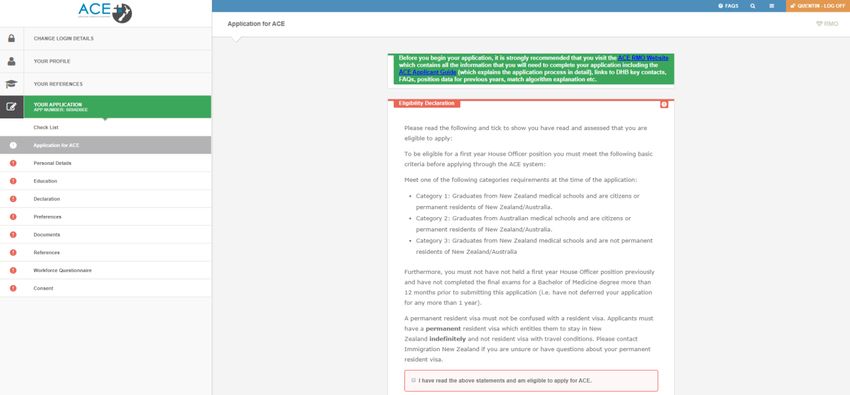
Identification Documents* ..................................................................................................................... 15
       Saving a Word document as a PDF ......................................................................................................... 15
   References................................................................................................................................................... 16
       ACE References Policy............................................................................................................................. 16
       Exemption Policy..................................................................................................................................... 16
       ACE Reference Flowchart........................................................................................................................ 17
       How to Submit References ..................................................................................................................... 18
       Online Reference Requests..................................................................................................................... 18
       Create Reference Request ...................................................................................................................... 19
       Manual Reference Requests: File Upload Request to ACE ..................................................................... 19
       Reference Status ..................................................................................................................................... 20
       Assigning References to Your Application .............................................................................................. 21
   Workforce Questionnaire ........................................................................................................................... 22
   Consent ....................................................................................................................................................... 22

Part Three: ACE Match ......................................................................................................................... 24
   ACE Algorithm Priorities .............................................................................................................................. 24
   About the ACE Match Process..................................................................................................................... 24
   ACE RMO Match Algorithm Walk-Through Video:...................................................................................... 24

Part Four: Talent Pool .......................................................................................................................... 25

Key Dates for ACE 2020 Intake .............................................................................................................. 26

ACE 2020 Checklist for Applicants ......................................................................................................... 27

DHB and Employer Information Sheets ................................................................................................. 28

Frequently Asked Questions ................................................................................................................. 29

Useful Links ......................................................................................................................................... 30

Contact ACE ......................................................................................................................................... 30

Page | 2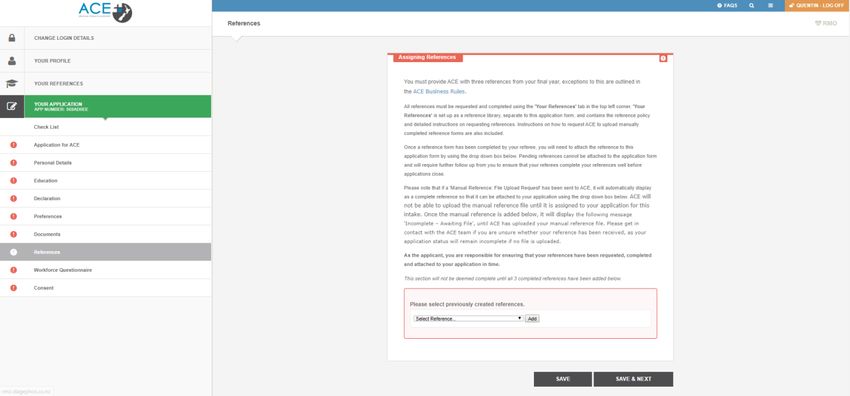
Introduction
The Advanced Choice of Employment (ACE) programme facilitates the application and recruitment process
for final year Australian and New Zealand medical students applying for their first year House Officer
position. This process is coordinated on behalf of the 20 District Health Board (DHB) employers across New
Zealand that employ first year House Officers.
Since its inception, ACE has assisted thousands of New Zealand and Australian medical students to obtain
their first position in a DHB across New Zealand. Applying via ACE is the most successful way of gaining a
first year House Officer position commencing in November of the training year.
Overview
Advanced Choice of Employment (ACE) is for New Zealand and Australian Medical Graduate applying for a
first year House Officer position in New Zealand.
ACE is a single application tool that allows graduate doctors throughout the country to put in one
application which is then distributed to up to 20 DHB’s throughout the country according to which
employers they most prefer to work.
Please note that this is not the only way to find a House Officer position. You are still able to apply for
positions directly to employers and other employers via their career webpages or the Kiwi Health Jobs
website and other job search sites.
How it works
You have 4 months between 10 February and 31 July 2020 to submit your application to ACE including
cover letter(s), CV, residency documents and references. You will also select up to 20 employers, minimum
of 6, that you would most like to work for, ranking them in preference order.
ACE will then distribute your application to the employers you’ve ranked. Employers will assess all
applications, interview their preferred applicants and then rank their applicants in preference order.
ACE will take the list of ranked applicants from each employer and then perform a complex matching
algorithm that aims to match you to one of your highest preferred employers provided they have also
ranked you as a preferred candidate. The algorithm aims to match you to your highest preferred employer
where possible.
Following this, you will be sent a single offer letter from the employer you’ve been successfully matched to
OR, if not successfully matched in the first instance, you will be placed into a talent pool of candidates and
sent to all the employers (not just your preferred ones) and they will use that talent pool to fill any
remaining vacancies and positions that may become available outside of the ACE application timeframe.
The ACE process may at first seem a little overwhelming but throughout the ACE process you can find help
via multiple avenues. You can visit the ACE RMO Website, download the ACE Applicant Guide, ask questions
on the ACE RMO Facebook page or contact the ACE consultant via email or via phone Monday - Friday
between 8am - 4.30pm on 0800 223 236.
ACE Principles
1. All DHB employers have agreed to implement the ACE scheme and to work within the ACE process.
   Employers will not pre-match applicants to first year House Officer Positions.
2. All applicants seeking first year House Officer Positions for the start of the training year (November)
   should apply through the ACE programme.
3. Applicant employer preferences and employer ranking of preferred graduates are private and
   confidential. As per the Business Rules the applicants are not required to disclose their preferences to
   the DHB’s so DHB’s are advised not to ask the applicants to disclose their preferences for their ranking
   process.

Page | 3

4. Neither party in the recruitment process should make independent contracts prior to the notification of
   the match results.
5. Having been matched to an employer, there is an expectation that the applicant will accept a position
   with that employer, as declining a position will see that applicant excluded from the intake. Similarly,
   employers may not appoint House Officers matched to another employer without the express consent
   from that employer and ACE.

 Applicants and employers are asked to report to ACE should there be any instances of breaches of
                                      the above principles.

First Time Applicants
If this is your first time applying through ACE, please read ALL the information in this guide. The first thing
you should do is review the information available on the ACE RMO Website.
After reviewing all the information on the ACE RMO Website, you should be ready to start applying for a
House Officer position.
Eligibility
To be eligible to apply to ACE RMO for a House Officer position you must meet all of the following basic
criteria:
1. Category One Graduates from New Zealand medical schools and are citizens or permanent residents of
   New Zealand/Australia.
2. Category Two Graduates from Australian medical schools and are citizens or permanent residents of
   New Zealand/Australia.
3. Category Three Graduates from New Zealand medical schools and are not permanent residents of New
   Zealand/Australia.

Applicants should be able to commence employment at the start of the relevant training year. The details
of applicants who are not able to start on time will be sent to the DHB’s and clearly marked as late start
applicants. DHB’s will then have the option to rank these applicants.
Incomplete applications will be excluded from the match.

Page | 4
If there are unfilled positions the DHB’s will be required to inform the ACE Consultant, who in turn will
contact all unsuccessful applicants. The ACE Consultant will work proactively with both parties to ensure all
positions are filled.
Graduates that do not meet these basic ACE criteria should apply directly to individual employers for
private positions. We recommend checking the Job Search page on the Kiwi Health Jobs website as a first
point to see which employers may be looking for RMO positions and also by checking the career web pages
of each DHB.
2020 Intake Timeline – Key Dates (Covid-19 Update)
Date                                                   Milestone
Monday 10 February                                     Applications open
Friday 31 July                                         Applications close
Monday 10 August                                       Complete applications sent to employers
Tuesday 11 August                                      Interviews and ranking process begins
Wednesday 2 September                                  DHB’s submit rankings
Wednesday 2 Sept – Thursday 17 Sept                    Full Match Process and Audits completed
From 17 Sept                                           Match complete and issued to employers
Monday 21 September                                    Match results emailed to all applicants
Monday 28 September                                    Offers sent to successfully matched graduates
Tuesday 29 September                                   2020 Talent Pool opens
Monday 5 October                                       Matched applicants accept or decline offers
Monday 30 November                                     Graduates begin employment

Page | 5
Part One: Overview of the Application Process There are 5 key steps within the ACE application process. Each of these steps is outlined in detail below. Step 1: Complete your ACE Application In order for your application to progress to the next step it must read complete at the time applications close at 12noon (NZT) Friday, 31 July 2020. There is no submit button for ACE; provided your application is deemed complete it will automatically be eligible for the next stage of the process. ACE requires all applicants to complete the following processes: Upload your current resume (CV) Upload a copy of your certified academic transcript Upload your clinical results/dean’s commendations Attach certified copies of your citizenship or residency documents Supply three clinical references Preference in order the employers you wish to work for Attach cover letters for the employers you wish to work for (optional) Step 2: ACE assesses and scores all complete applications ACE first ensures each application meets the eligibility requirements and then uses a set of nationally agreed criteria to assess and score each application prior to sending them to employers. ACE reviews at the following components as part of their assessment: Academic transcript Publications and presentations Other degrees Prizes, awards or scholarships References DHB’s are provided with the ACE Score given to applicants; however, use of this information varies across DHB’s. Some DHB’s incorporate the ACE Score into their selection criteria, others use it as a reference point and some only use their own selection criteria. Step 3: Employer’s shortlist and rank their preferred graduates Employer shortlisting and selection takes place over a three week period. During this time, employers are entirely responsible for their own processes. Note that each employer will follow their own process and may place value on different attributes. ACE therefore recommends you review the employer information Page | 6
sheets found in the Employer Information section of the ACE website for more information regarding each employer’s prerequisites. The DHB’s will review and assess all the applications that they receive, however they will only rank applicants who they think are suitable to work at their DHB’s. This means that even if you have preferred a DHB, they might not rank you. This is very important to remember when you get your match results. Step 4: ACE performs the algorithm match In accordance with the ACE algorithm priorities (outlined in the ACE Match section below), the algorithm matches graduates to their highest preferred employer wherever possible. Where an applicant is unable to be matched to their first preferred employer, the algorithm will work to match them to their second, then third and so on. The ACE algorithm will continue until all positions have been filled or there are no further graduates available to be matched. Step 5: ACE match result released and offers made Once the ACE match has run and employers have been notified of their successfully matched graduates, ACE will inform all applicants of the outcome of their application. For the 2020 intake, ACE will inform all graduates on 21 September 2020. Employers will then have one week to carry out safety checking as required under the Children’s Act before formally offering to their matched graduates on 28 September 2020. Summary Please note that employer processes between 21 September and 28 September 2020 will vary. Some employers may contact you to carry out the checking, others may do this after they have extended a conditional offer. As such, do not be alarmed if you are not contacted during this period. Questions relating to an employer’s safety checking process should be directed to the key contact at each employer. You will find this information in the Employer Information section of the ACE website. Most of the employers send the offer letters via email so it’s really important to have the correct email address in the online application. If you are going to be on your elective at the time the offers are sent out and are not able to accept your offer, then you can nominate someone on your behalf to accept the offer. You just need to add their name in your application and fill the statutory declaration form (available under the additional resources on the ACE website). Your nominated person will return the statutory declaration form along with the signed offer letter to your matched employer to accept the offer on your behalf. Applicants will be excluded from the match if they: Fail to submit a complete application by 12 noon (NZT) Friday, 31 July 2020 Do not meet the eligibility criteria as set out above Please DO NOT send original documents to ACE as they will not be returned. There is no need to send any hard copy documents to ACE as all documents can be uploaded to the specified slot or as an appendix to the CV, except for hard copy reference forms. All the steps above and the required documents must be completed and/or uploaded to your ACE application by the closing date. There will be no exception to this as we are working within national timeframes. You must notify ACE if you gain employment during the course of the application process to withdraw your application. Page | 7
Part Two: ACE Application Step-by-Step Guide
Overview
In order for your application to progress to the next step it must read complete at the time applications
close 12noon (NZT) Friday, 31 July 2020. There is no submit button for ACE; provided your application is
deemed complete it will automatically be eligible for the next stage of the process.
The online ACE application process consists of the following:
1. Register and Create Your profile
a. Eligibility for ACE RMO
2. Personal Details
a. Citizenship and Residency
3. Education
4. Declaration
a. Health and Criminal Declarations
5. Employer Preferences
6. Documents
a. CV
b. Cover Letter(s)
c. Academic Transcript
d. Clinical Results/Dean Commendations
e. Citizenship and Residency Documents
7. References (nominate three referees and send reference requests)
8. Workforce/Diversity Questionnaire
9. Consent
New Applicants: Register Profile
Before you can commence your application you must first register within the site and create a profile. The
information held within your profile (email address, contact numbers, postal/residential addresses etc.) can
be updated at any time, even when applications have closed!
Visit http://rmo.acenz.net.nz
Register as a new ACE applicant or log in if you already have a profile registered
To register a profile with ACE you will need to create a unique username and email address. Note that as
your email address is unique, should you forget your password you will be able to use your email address to
access this again. Therefore, it is vital you use an email address which can be regularly accessed throughout
the duration of the intake and ensure that this email address is correct as we receive a high number of
applications from candidates who make mistakes when entering their email address.
While we do capture postal and residential addresses, due to the tight timeframes, our requirement is to
be able to communicate with everyone electronically and therefore it is vital you ensure your email address
is always up to date.
Your preferred contact phone number should be a number that you can be reached, or a message left,
during normal business hours of 8am to 4.30pm.
Page | 8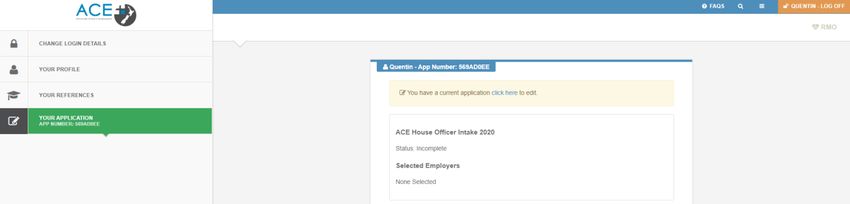
If you are going to be away during the course of the application process we ask that you authorise an
alternate person for us to communicate with. Due to the Privacy Act 1993 requirements, ACE will not
communicate with anyone other than yourself or your nominated alternative with regards to your
application.
If you entered your email address incorrectly when registering your account, you can amend this under
change login details.
If you have any issues logging in or lose your username, please contact the ACE Centre on 0800 223 236.

Re-Applicants
All re-applicants who still meet the eligibility criteria must login to the ACE RMO website with their existing
user name and password as you don’t need to register again. Click on LOGIN on the right hand corner of the
front page of the website and use your existing user details to login and complete the application.
If you cannot remember your password, click on ‘Forgot your Password?’ and follow the instructions to
reset it.

When you have logged in, on the right hand panel you will see 'Applications for RMO are open' start your
new application. All re - applicants need to click and commence their application as though applying for the
first time. ACE will transfer key parts of your previous application details (you can edit this information if
you like to) and documents like references, transcripts etc., when you re-apply. It is your responsibility to
re-apply and complete the rest of your application. Please contact ACE if you would like to upload new
references.

Page | 9
Eligibility Criteria for Re-Applicants
You are a NZ Medical School graduate and are a NZ or Australian Citizen/Permanent Resident (Category
1).
You are re-applying in the intake immediately following their first application.
You have not held a first year House Officer position previously.
You have not previously been matched through the ACE process.
Re-applicants are encouraged to participate in an ‘observership programme’ for nine months while they
wait for the next ACE intake to open.
Finish Registration
Once you have registered and created your profile you will be able to start your ACE application. There is
no ‘submit’ button for the ACE process, provided your application status is complete at the time
applications close it will progress to the next stage of the process.
Your ACE application is made up of the following nine sections, these sections appear down the left hand
side of your page once you have commenced your ACE application.
Page | 10Application for ACE
This section includes your eligibility and privacy declarations. Note that if you do not meet the Eligibility
Criteria your application will not be able to be deemed complete. Applicants in this position should
approach employers directly. Details of the key contact people at each employer can be found in the
Employer Information section of the ACE RMO Website.
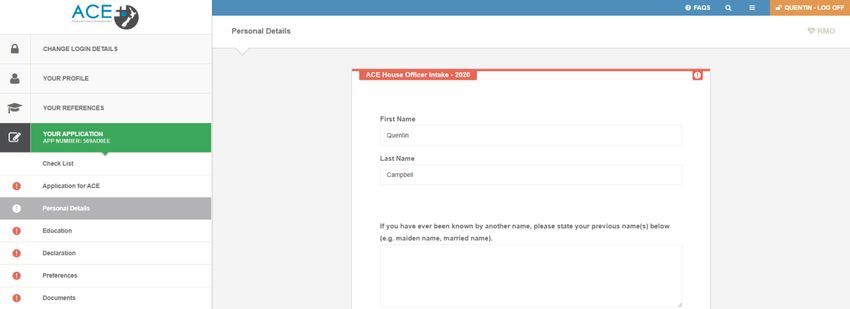
Personal Details
This section contains questions relating to residency, electives and any special circumstances for
applications such as applicants applying as a pair.
Paired Applications
ACE allows for couples who wish to work together at the same DHB and who are both applying via ACE in
the same intake, to submit their applications as a pair. However, there are potential consequences you
should consider before deciding to apply as a pair as these may impact your match outcome!
The ACE algorithm will consider the pair based on the lowest eligibility category of the two applicants.
The ACE algorithm will consider the pair based on the lowest employer ranking of the two applicants.
A match can only be facilitated where there are 2 PGY1 positions still available at the time the
algorithm considers the pair.
To apply as a pair, both applicants must:
Page | 11Detail your wishes to apply as paired applicants on the online ACE application form in the Personal Details section (as below). To do this you will need the applicant number of the other applicant you wish to pair with. This will ensure that the DHB’s are aware that you are applying as a pair. Detail in cover letter(s) your wishes to apply as a paired applicant so employers can identify your reasons for this. Make sure your employer preferences are identical (i.e. Preference the same number of employers in the same order) – if your preferences are different ACE will not be able to pair your application in the system and you will not be put through the ACE Match process as a pair. Please note that once applications close, paired applications cannot be unpaired. Residency Information Please note that to be eligible to apply through the ACE programme you are required to be either a New Zealand citizen or have been granted either a permanent resident visa or a resident visa by New Zealand Immigration. We will need to verify your residency (even if you are a New Zealand Citizen) and are required to view certified copies of the relevant documents. New Zealand Citizens: The photo page of New Zealand Passport plus either a New Zealand Tertiary Student Identification Card or New Zealand Driver Licence. For New Zealand Citizens in lieu of a New Zealand Passport, ACE will accept a New Zealand Citizenship Certificate or New Zealand Full Birth Certificate that is issued on or after 1 January 1998 and that carries a unique identification number. Australian Citizens: The photo page of Australian Passport plus either a New Zealand Tertiary Student Identification Card or New Zealand Driver Licence. Permanent Resident Visa or Resident Visa Holders: The photo page of an Overseas Passport plus the relevant Visa Document plus either a New Zealand Tertiary Student Identification Card or New Zealand Driver Licence. All forms of photographic ID must be current, with the exception of passports. An expired passport can be supplied as a valid form of primary ID, as long as it will have only expired within 5 years or less from the time that you would be expected to commence employment. Page | 12
Bear in mind that it is imperative that your residency documents are certified by one of the parties outlined
below.
Justice of the Peace
Lawyer
Court Registrar
Police Officer
Education
This section asks where and when you completed your medical degree, where and when you did/will
complete your Trainee Intern (TI) year and whether you have been awarded any prizes, scholarships,
awards or additional degrees.
Please note that you are required to enter the year you completed your degree not the year you will
graduate (i.e. not the year you appear at your graduation ceremony to collect your physical degree
certificate as many universities hold their graduation ceremony early the year after you complete your
degree).
The ACE application site also provides you with the opportunity to outline information regarding any
Prizes/Scholarship, Publications/Presentations and Additional Degrees which will be considered as part of
your application process.
Note: If any prizes, scholarships, publications, presentations or additional qualifications are not indicated
within this section of your ACE application, and supporting documents are not supplied to ACE as additional
documents, ACE will be unable to consider these when assessing and scoring your application.
Academic Transcripts
New Zealand Graduates: If you are graduating from a New Zealand medical school you will be asked to sign
a consent form at the end of your fifth year allowing the faculty of medicine at your school to send your
transcript directly to ACE. ACE will start attaching this document to your application in April. ACE might not
receive transcripts for some students for various reasons e.g. unpaid fees etc. If your transcript has not
been attached to your application by the end of May, please contact the ACE Centre.
NB: If you do/did not give your consent your transcript will not be provided to ACE. You will then need to
individually request this document from your University, have it certified and upload it to your ACE
application.
Australian Graduates: You will need to attach a certified copy of your Official University Academic
Transcript to your ACE application before the closing date. For more information on who can certify your
documents see the residency information above.
Clinical Results and Dean’s Commendations
You have the opportunity to supply copies of dean’s commendations or overall distinction in clinical results
that you may have received during your final years at medical school. These may be considered by
employers and contribute to your overall ACE score.
NB: These documents must be uploaded to your ACE application in order to be considered by ACE and
employers.
Declaration
Health and Criminal Declarations (VCA)
All RMOs (House Officers and Registrars) are deemed to be ‘Core’ Children’s workers. The Children’s Act
2014 sets clear expectations for consistent safety checking across the children’s workforce so that people
who work with children will keep them safe. The DHB’s nationally are committed to having all of their
children’s workforce safety checked, and if applying for a position with DHB’s via ACE you can expect that
safety checking will be completed prior to employment. From a Police Vetting perspective, if an applicant's
Page | 13role predominantly involves the care and protection of a child, or youth (aged 16 or under) then they must be vetted under Exception to Clean Slate vetting criteria. The Children’s Act 2014 has amended the Criminal Records (Clean Slate) Act 2004 to facilitate the operation of the Workforce Restriction. Where a person has a conviction for a specified offence, and is applying for (or continuing in) a role as a core children’s worker, any convictions for offences specified in Schedule 2 of the Children’s Act (2014) will be disclosed in the vetting result. All applicants must declare in their ACE application whether they have been convicted including discharged without conviction as a result of criminal charges in New Zealand or any other country. Under NZ law, employers are able to conduct police vetting checks on all successful applicants who accept a position. Prior to employment the employer will ask the applicant to sign a ‘consent to disclosure’ form allowing the police to release all information re: that individual. To find out more go to NZ Legislation website. To read more about the Children’s Act 2014 click here. Employer Preferences Rank, in order of preference the employers you would like to work at. Note a minimum of 6 employers is mandatory. ACE recommends applicants preference 10 employers or more to facilitate a positive match outcome. Rank the hospitals in order of your preference. Once you have saved your preferences you will be sent an email confirming your employer preferences. You are able to change your employer preferences at any time up until applications close. Applicants are discouraged from preferring an employer they would not be prepared to consider an offer from as there is an expectation that the applicants will accept a position with the employer they are matched to. Should an applicant choose to decline their offer, that applicant will be excluded from the intake and will be ineligible to re-apply. As per the ACE business rules agreed by all the DHB’s, applicants DHB preferences are confidential and you are not required to disclose this to the DHB’s at any stage of ACE RMO Intake. Documents All mandatory (*) and any supplementary documents need to be uploaded in this section. All documents need to be uploaded as PDF documents and cannot exceed 4MB in size. The documents section is split into the following: Curriculum Vitae (CV)* This is a required document. The ACE CV template can also be downloaded from the ACE website in the ACE Resources section. This can be used as a guide when putting together your CV. Cover Letters Cover letters are optional. DHB Preferences need to be selected first to upload DHB specific cover letters. A generic cover letter can also be uploaded. This will be sent to all DHB’s of preference that do not have a specific cover letter uploaded. Note: Should you choose to upload a generic cover letter as well as several cover letters that are DHB specific, only the employers who you have not uploaded a specific cover letter for, will see the generic cover letter. The specific cover letter supersedes the generic cover letter for these employers. Academic Transcript This is a required document. ACE will upload academic transcripts for all NZ Graduates who have signed a consent form allowing their university to release their academic transcript to ACE. All other applicants will need to upload a certified copy of their academic transcript in this section. Page | 14
Education Documents
This section is optional, and requires all documents to be combined into one PDF file prior to being
uploaded. Without proof of these, ACE will not be able to consider them during the scoring process. You
can include evidence of:
Scholarships and prizes awarded during your medical degree only
Publications and presentations
Clinical Results (University of Auckland): 4th and 5th year only demonstrating overall distinction (not end
of run marks).
Dean’s Commendation Letter (University of Otago): 4th and 5th year only.
Identification Documents*
Certified primary and secondary identification documents are required.
Primary Document (One of)
o New Zealand Passport (preferred)
o New Zealand Full Birth Certificate issued on or after 1998
o New Zealand Citizenship Certificate
o Australian Passport
o Overseas Passport photo page plus evidence of Permanent Resident Visa
Secondary Document (One of)
o New Zealand or Australian Driver Licence
o New Zealand Student Photo Identification Card
Supporting documentation for name change is only required if your name differs from any of the names
that appear on your primary or secondary documents.
Saving a Word document as a PDF
All of the 20 DHB’s who participate in the ACE process requires that each of your personal and
identification documents be uploaded in PDF format. The reason for this is simply due to compatibility and
that PDF formatted documents can be opened safely by all of our employers.
Most Office Programs let you save documents as PDF. Click ‘File’ at the top left corner of the word
document, then click ‘Save as PDF’ and then click ‘Save’.
In some programs you may need to click ‘print’ and when given the option to 'choose a printer' you will
need to select ‘print to PDF’ and ‘create/save’ your PDF that way.
There are file size limits, if you get an error message saying that your PDF file size exceeds the limit, this
means that you must compress that particular document. You may try the following:
Convert your documents
Optimize your Scanner Settings
Optimize the PDF file using Adobe Acrobat
Reduce the size of the PDF file using Adobe Acrobat
Use an online PDF compression service
If you take a photo of your verified identification document(s), the best way to convert this to PDF is to
‘copy and paste’ the photo into a word document and then convert that into PDF using some of the steps
outlined above.
You can also find loads of free programs on the internet which let you convert your documents to PDF for
free; there are many options available on the internet for you to explore. If in doubt, use the computer
suite at your university to save your files to PDF.
Page | 15Alternatively as a last resort, you can scan your identification documents to your email which would
normally be exported in PDF format.
It is recommended that each of your identification documents are uploaded independently to your ACE
application and not as one single file. The reason for this is that each DHB will have their own filing
conventions, so please follow this instruction. We also recommend that you save your files locally or to the
cloud for your own reference in case ACE or your employers ask you to access these promptly for any
reason.
Uploading documents to your application
Select ‘Choose File’ under each document field to browse and select the relevant file for upload.
Ensure each file for upload has a (.pdf) extension.
Ensure each file for upload is 4MB or smaller in size.
Name all files accurately to avoid uploading the wrong file in the wrong section.
Note: Once files have successfully uploaded to your application, the name of the file will change to reflect
the space they have been uploaded into – E.g., Primary ID, Cover Letter (generic cover letter), or Hospital
Name (DHB specific cover letter). To check that the document you have uploaded is correct, click on the
link for the uploaded document.
References
As part of your online application, you will be required to nominate three referees to complete references
for you. All three references must be complete in order for your application to be deemed complete. ACE
recommends that you personally approach your referee – prior to sending an online reference request – to
ensure that they are happy to provide a reference for you, that they are eligible to act as a referee and you
have the correct contact details for them. More information about who is eligible to act as a referee can be
found in the ACE references policy below.
ACE References Policy
Referees must be a (vocationally registered) Consultant, SMO or a GP who has observed the applicant's
clinical work in a New Zealand health setting or in a comparable health setting (as defined by the Medical
Council of New Zealand). Here’s a link to MCNZ comparable health settings: MCNZ list of comparable health
system countries.
References must be obtained within two years of graduation and from placements the applicant has
completed in their final year of study.
Exemption Policy
Ordinarily you must obtain a minimum of three references from your final year in order for your ACE
application to be deemed complete. ACE will allow an exemption to this if you are completing an elective
overseas during the first half of your final year. If this is the case for you, ACE will allow:
1. One of the 3 references to be from the second half of the fifth year (penultimate year).
Or
2. One reference from the elective provided it is from a hospital that is included in the MCNZ list of
comparable health system countries. Applicants completing an elective in a non-comparable health
country can use a reference from that placement if their clinical supervisor possesses a current
Page | 16practising certificate and holds vocational scope of practice with either the New Zealand Medical
Council, Australian Medical Council, General Medical Council (GMC) or Irish Medical Councils.
ACE Reference Flowchart
If you are unable to nominate three referees, please contact ACE as soon as possible.
Once you have entered a referee’s details into your application and they have completed your reference
online, you will not be able to make any changes.
You will be unable to view references through the ACE application process. If you wish to view your
reference, you must arrange this directly with your referee.
Applicants are allowed to choose references from different settings e.g. mix of GP, hospital based (different
clinical attachments), laboratory based, community setting.
Online reference requests can be sent before applications open via your ACE profile. Referees will be sent a
unique link to complete your references electronically when you enter and submit their details through the
ACE application website.
Page | 17Applicants are encouraged to choose references from different settings e.g. mix of GP, hospital based
(different clinical attachments), laboratory based, community setting.
If your referee cannot complete your reference form online, you must contact ACE immediately.
How to Submit References
It is your responsibility to identify and obtain references from three referees that meet the ACE references
Policy. It is advisable to contact your potential referees as soon as possible to ask if they would be happy to
provide a reference and avoid any possible delays in obtaining your references.
There are two parts to completing references:
1. Requesting the reference in the ‘Your References’ tab - this can be done before the ACE RMO intake
opens in February, and until the intake closes in June.
2. Assigning completed references to your application form – this can only be done after the ACE RMO
intake opens in February, and until the intake closes in June.
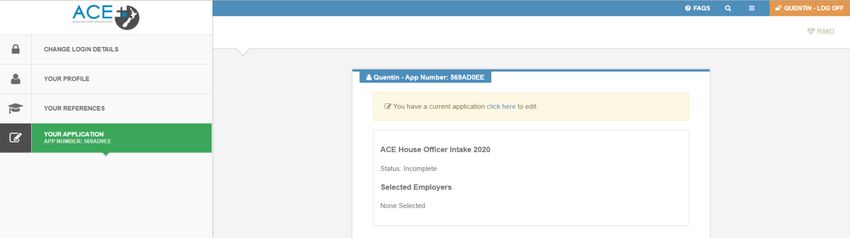
‘Your References’ sits outside of the application form. Once you log in to your ACE account, you will find it
the top left hand corner of the page.
There are two types of reference requests:
Online Reference Requests – unique link to complete reference sent directly to your referee.
Manual Reference: File Upload Requests – sends email request to ACE to upload a reference
manually completed by your referee to your application. You must contact ACE to employ this
process on 0800 223 236.
Online Reference Requests
To send a reference request directly to your referee, once you are in the ‘Your References’ tab, complete
all the required details in the box directly under ‘Create Reference Request’.
Page | 18Create Reference Request Reference requests need to be created one at a time, with all fields completed for each reference request before you can click the ‘Send Request’ button. Once you click the ‘Send Request’ button, your referee will receive a unique electronic link and instructions to complete your reference. Repeat this process for the next two referees until you have successfully sent all three reference requests. If your referee has manually completed the reference form and forwarded this to ACE via email, post or fax, please scroll down the page to the ‘Manual Reference: File Upload Request to ACE’ section. Manual Reference Requests: File Upload Request to ACE Note: ACE does not encourage applicants to submit manual references. Therefore, if you have exceptional circumstances meaning that you need to upload a manual reference, you must contact ACE to request the form to be emailed to you or your referee. If your referee has manually completed a reference form and forwarded this to ACE via email, post or fax, you need to use the ‘Manual Reference: File Upload Request to ACE’ section under ‘Your References’. Complete all the below fields and click the ‘Send Request’ button to send the request to ACE. Please note: ACE can only upload manual references once the intake is open. If you have asked more than 1 referee to provide a manual reference, a ‘Manual Reference: File Upload Request to ACE’ needs to be sent for each referee. Page | 19
Once you click the ‘Send Request’ button, the ACE team will receive an email to upload the specified
reference to your application; and your reference will display under ‘completed reference requests’ – so
that it can be assigned to your application. Please refer to page 21.
Once the intake is open and you have assigned the manual upload reference to your application, the
reference status within your application will be displayed as ‘Incomplete – Awaiting File’ until ACE has
uploaded the manual reference file to your application.

If ACE has not received a completed reference form from your referee, your application status will remain
incomplete. Please get in contact with the ACE team if you are unsure whether your reference has been
received.
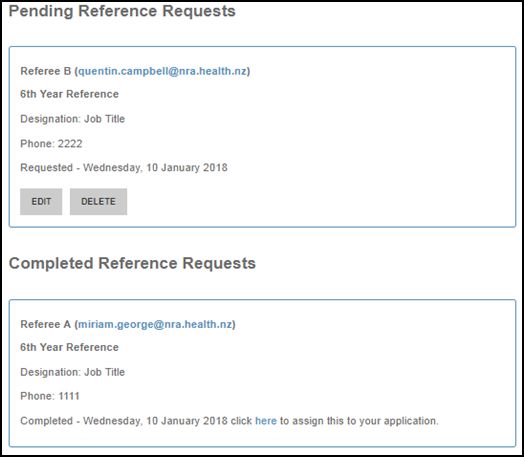
Reference Status
Once reference requests have been sent to the referee or to ACE, the status of the references will be
displayed as ‘Pending or Completed Reference Requests’ at the bottom of the page.
Reference requests that are pending can be edited or deleted – however, please note that your referee will
be notified if the reference request is deleted.
Once a referee has completed a reference for you, the status of the reference will change to completed and
no further changes can be made. You will then need to assign the completed reference to your application.
Important to Note: Once a Manual Reference: File Upload Request has been sent to ACE, the reference will
display as a completed reference request so that it can be assigned to your application for this intake.
Please note that the reference request will not be deemed complete until ACE has uploaded the manual
reference file to your application.

Page | 20
Assigning References to Your Application
Completed references cannot be assigned to applications until the intake opens in February.
References can be assigned by clicking the hyperlink provided for all completed references, or going into
‘Your Application’ and then going into the ‘References’ section of the check list.
To assign a reference:
Pick the completed reference from the drop down box
Click the ‘Add’ button
Three completed references need to be assigned to your application, for the references section of your
application to be deemed complete.
Your referees must complete the online reference form and ensure they click submit before the application
close date. Make sure you have enough time to assign the completed reference to your application.
Alternatively if you have downloaded the ACE Reference Form and sent this to your referee, they can then
send the completed hard copy of their reference directly back to ACE via email, fax or post. Once
applications open, you will need to request ACE to upload your manual reference file.
Note: ACE will NOT upload these references until you have notified them to do so.
It is your responsibility to ensure ACE receives three completed references. The supply of incorrect referee
details or nominating referees that have not agreed to act as your referee may mean your application will
be incomplete at the close date. We will send you regular reminders noting which documentation including
references, are missing.
Page | 21Workforce Questionnaire This section is optional; however, we strongly recommend that you fill this section in as it provides the DHB’s, Ministry of Health and Health Workforce NZ valuable information which they use at different levels. To mark this section as complete, you need to scroll down to the bottom of the page and tick the check box. Consent Under this section you need provide your consent to take part in the ACE match and to be included in the ACE Talent Pool if you are not matched to a DHB. All you need to do is to read this section and select the two checkboxes under the consent section in your application. Page | 22
You should now be finished! Go to your ‘Check List’ and ensure your application is COMPLETE!

Please note that the employers (DHB’s) receive the complete application, including all documents
submitted and all information entered in the online application. Everything included in your application
under each section is accessible to the DHB’s for the ranking process. ACE does not hold back any
documents or any information included in the online application.

Page | 23
Part Three: ACE Match ACE runs the match algorithm based on the below priority order, simultaneously ensuring as many graduates are successfully matched as possible and matched to the highest preferred employer where possible. ACE Algorithm Priorities Graduates preference of employers is the algorithms highest priority Employer ranking of preferred graduates is the algorithms second priority Graduates may only be matched to one employer About the ACE Match Process The matching process starts by looking at all applicants who meet the Category 1 eligibility criteria (i.e. NZ graduates who are NZ/Australian Citizens/Permanent Residents). The algorithm looks at each employers list of ranked graduates and starting at the top, works its way down the list, matching the employer to graduates who have ranked that employer first. It continues this process for each employer until all vacancies for that employer are filled or the algorithm has exhausted the list of ranked graduates who preferred the employer first. When a graduate is matched to their first preferred employer they are then removed from all other employer lists, preventing them from being matched to more than one employer. After all the matches possible have been made when considering the first preferences of each graduate, the next pass of the algorithm considers the graduates' second preference and later passes down to their lower preferences (third, fourth etc.). The matching process continues until all positions have been filled or all Category 1 graduates have been matched. It then performs the same process for Category 2 and then Category 3 graduates. Once the electronic match is complete, if some positions have still not been filled, any category 1 graduate who is not successfully matched to an employer will be contacted by ACE and given the opportunity to extend their employer preference list to include additional employers. All unmatched applicants are placed in the national Talent Pool automatically after the match. The DHB’s consider applicants in the Talent Pool to fill any positions that may become available during the year after the ACE match has been completed. ACE RMO Match Algorithm Walk-Through Video: https://www.youtube.com/watch?v=twMsNJOCFec&feature=youtu.be Page | 24
Part Four: Talent Pool
The Talent Pool is a list of all unmatched applicants maintained by ACE and available to all DHB’s to fill any
subsequent positions that may arise during the year after the ACE match. Unsuccessful applicants can
contact any DHB they are interested in working with directly to indicate their interest after the Talent Pool
is released. ACE recommends that applicants keep an eye on DHB careers websites and Kiwi Health Jobs for
any positions that become available.
ACE will accept any new/updated documents including references from the applicants who are in the
Talent Pool and will add it to their application on the ACE system. All new documents will be available to
the DHB’s via the Talent Pool. Please note that any new references that are submitted must be completed
on the ACE reference form. Once the new references are added to your talent pool application, the old
reference forms will no longer be accessible.
Please note that all unmatched applicants are automatically placed in the national Talent Pool as soon as
the match process has been completed. All DHB’s have access to all information for candidates in the
Talent Pool.

Page | 25
Key Dates for ACE 2020 Intake

             ACE RMO 2020 Applicant & Employer Timeline (Revised for COVID-19)
                                                             Pre-application Preparation
                                    ACE Communications: ACE begins scheduled communications via the ACE RMO website and Facebook page
        November 2019
                                    5th Year Presentations: ACE begins 5th Year student presentations to each of the Medicine Schools nationwide

                                                                ACE RMO Intake Opens
                                    Applications Open: The application process for the 2020 intake opens, allowing students to start applying online.
 9am Monday, 10 February 2020
                                    Applicants can register and create an ACE RMO profile prior to this

                                    ACE and DHB Roadshow: The ACE and DHB Roadshow will be held at venues in Auckland, Wellington, Christchurch and
        9 - 13 March 2020
                                    Dunedin

                                    Registration Cutoff: Applicants should have started their application and have already sent three reference requests
      Friday, 17 July 2020
                                    prior to this time to allow sufficient time for referees to respond

                                    Applications Close: Applications are open for 5.5 months. Once applications have closed, ACE assesses all applications to
12noon (NZT) Friday, 31 July 2020
                                    ensure they meet the eligibility criteria and then score them on a set of nationally agreed criteria

                                    ACE Application Assessments: ACE has 5 working days to assess all completed applications against the national
        3 - 7 August 2020           framework criteria and create spreadsheets for each employer of those applicants who have nominated them as one of
                                    their preferred employers. These spreadsheets list the applicants in order of highest score to lowest

                                    Applications Sent to Employers: Once ACE assessment and scoring has been completed ACE makes all applications
  5pm Monday, 10 August 2020
                                    available for viewing/downloading by the employers for the selection and ranking process

    Tuesday, 11 August 2020         Ranking Process Begins: Employers have 3 weeks to make their selections to hire and submit these to ACE
                                    Employers Send ACE PGY1 Vacancy Numbers and Ranked Applicant Lists: Employers input their rankings in order of
 Wednesday, 2 September 2020
                                    preference and their final number of graduates to be hired into the ACE website

                                    Electronic Match and Audit Conducted: ACE conducts the electronic match, audits match results and compile matched
      2 - 4 September 2020
                                    candidate spreadsheets for each employer

                                    ACE Contacts Employers with Vacancies & Unmatched Category 1 Applicants: ACE will contact all employers who have
                                    vacancies remaining after the electronic match and request that they rank any unmatched Category 1 applicants. ACE will
      4 - 7 September 2020
                                    also contact unmatched Category 1 applicants and advice them to preference any employers who have vacancies after
                                    the electronic match

 12noon Monday, 14 September Employers and Unmatched Applicants Return Additional Ranked Options: Employers and Category 1 applicants who have
            2020             been asked to rank additional options must return their subsequent rankings by 12pm

                                    Manual Match Process: ACE has 4 days to perform the final manual match process and compile spread sheets for
     14 - 17 September 2020
                                    distribution to employers nationwide on Thursday, 17 September 2020

                                    Final Match Results Sent to Applicants: ACE emails all applicants letting them know if successful or not. ACE notifies ALL
  Monday, 21 September 2020
                                    applicants simultaneously via email whether they have been successful or not

                                    Employers Offer Letters: Employers send offer letters directly to successfully matched applicants formally offering them
                                    their position. These must be sent by 5pm. Employers also have one week to complete any pre-offer safety checks
  Monday, 28 September 2020
                                    required before releasing official offers to matched candidates. All matched graduates must be offered on this
                                    nationally agreed date, unless there are exceptional circumstances

                                                                ACE RMO Intake Closes

                                    National Talent Pool Opens: ACE compiles and opens the national talent pool for employers. ACE also sends excel copy
                                    of spreadsheet to employers manually as this excel spreadsheet includes the ACE scores while the live TP spreadsheet
  Tuesday, 29 September 2020
                                    doesn't. This involves compiling a single spreadsheet of all remaining applicants who have not yet been matched and
                                    sending this to all employers. Employers use this list to fill any remaining or subsequent PGY1 positions

                                    Candidates Accept or Decline Employer Offers: Successfully matched graduates have 1 week to accept or reject offers
                                    and respond to the employer. If they have not responded by this time they are assumed to be rejecting the offer and the
    Monday, 5 October 2020
                                    position will be offered to another applicant. The applicant who did not respond will then also be removed from this
                                    intake altogether as per the rules following rejection of an offer

  Wednesday, 7 October 2020         Acceptances/Declines: Employers must notify ACE any applicant who has declined or not responded to their offer
  Monday, 30 November 2020          Successfully matched RMO graduates begin work with employers, starting dates may vary

                                                           Talent Pool Closes 13 June 2021

Page | 26
You can also read


