Best Backup Solution at Lowest Price - Just what you need to protect all data - Ahsay
←
→
Page content transcription
If your browser does not render page correctly, please read the page content below

Best Backup Solution
  at Lowest Price
 Just what you need to protect all data
Robust Cloud & Local Backup Software
Ahsay Cloud Backup Suite (AhsayCBS) is an advanced client-server based on-premises and cloud
backup solution for Businesses and MSPs. The whole solution can be deployed within a company to
back up all virtual machines, servers, desktops and laptops. MSPs can also use it for offering secure
managed backup service to their clients.

                                                  Core Components
    Ahsay Cloud Backup Suite consists of 4 core software components, AhsayOBM, AhsayACB, AhsayMOB and AhsayCBS.

     AhsayCBS
                                                              Cloud Storage
AhsayCBS is a server component to be
installed on a physical server or virtual
machine. It comes with a web based
                                                               Replication
central management console for
system administrator to easily manage
the whole backup system, as well as all
AhsayOBM / AhsayACB backup users                                                                Replication Module
and their backup data through any web                            INTERNET

browser. Users can also login to the          Server / VM                       Server / VM
                                                                                                With the Replication module enabled,
User Web Console to manage backup                                                               backed up data and system settings can
set, perform backup/restore and                                                                 be replicated to another AhsayCBS
monitor live activities.                                                                        machine, FTP / SFTP server, and cloud
                                                                                                storage.
Users' backup data can be hosted on         Centralized Web                   Local / Network
                                             Management                          Storage
AhsayCBS internal storage, FTP / SFTP          Console
server, and cloud storage (e.g. Amazon
S3, Google Cloud Storage, Microsoft
                                                                                                     AhsayOBM
Azure, etc.).
                                                                                                AhsayOBM is a comprehensive client
                                                                                   Server
                                                                                                agent for backing up servers, databases
     AhsayACB                                                                                   and virtual machines.

AhsayACB is an easy to use client agent       Desktop / Laptop
                                                                            Various add-on modules can be used in conjunction with
for backing up PCs and Macs.
                                                                            AhsayOBM for backing up VMware, Hyper-V, Microsoft
                                                                            Exchange Server, Microsoft SQL Server, Oracle Database,
It is equipped with modules for backing
                                                                            MySQL Database, Lotus Domino, Lotus Notes, Windows
up File, Lotus Notes, and Windows
                                                                            System, Windows System State (Active Directory), and File.
System.

                                                                            Data can be backed up to AhsayCBS storage, local /
Data can be backed up to AhsayCBS
                                                                            mapped network storage (e.g. USB drive, NAS, and file
storage, local / mapped network
                                                                            server), FTP / SFTP server, and cloud storage (e.g. Amazon
storage (e.g. USB drive, NAS, and file
                                                                            S3, Google Cloud Storage, Microsoft Azure, etc.).
server), FTP / SFTP server, and cloud
storage (e.g. Amazon S3, Google Cloud
Storage, Microsoft Azure, etc.).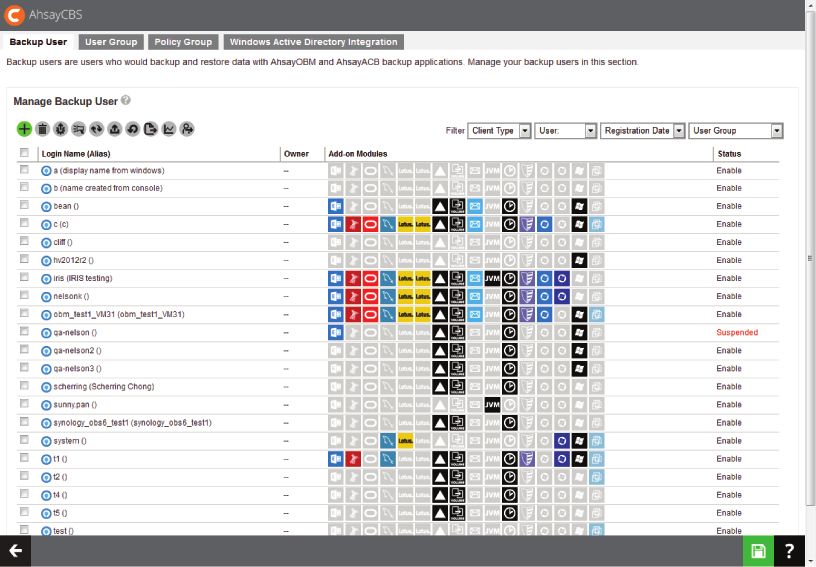
AhsayCBS

             Manage Backup Users and System
                   Anytime, Anywhere
Ahsay Cloud Backup Suite (AhsayCBS) is an advanced client-server based on-premises and cloud
backup solution for Businesses and MSPs. The whole solution can be deployed within a company to
back up all virtual machines, servers, desktops and laptops. MSPs can also use it for offering secure
managed backup service to their clients.

        Real Time Status Monitoring                                        Flexible Destination Management
Real time status of the system, current backup and restore         AhsayCBS supports the use of local drive, mapped network
jobs, errors and warnings, etc. are available at a glance for      drive, FTP / SFTP server, public cloud object storage as the
administrator to monitor the health of the backup system           backup destination for storing the backup data.
and troubleshoot quickly when needed.                              Administrator can add as many destinations as required.

        Runs on Cloud Platform                                             Simple User Management
AhsayCBS can be run on common cloud platforms including            Managing backup users is simply a breeze. New users can be
Amazon EC2, Microsoft Azure and Google Cloud Platform,             created automatically with our Windows AD integration. Bulk
which enables you to deploy the whole backup solution              accounts can be created with our special tool. Customized
quickly and economically.                                          policies can be applied to different group of users through
                                                                   Group Policy Manangement.

        Instant Replication                                                High Scalability
If backup data are hosted on-premises, you can use the             As the number of your backup users grows, you can always
built-in Replication Module to replicate them to an offsite         scale up the whole backup system easily by using the built-in
destination, such as an FTP/SFTP server or cloud storage for       Redirection Module for redirecting the extra user traffic to
additional protection.                                             other AhsayCBS servers.

        Centralized Administration for Users                               Reseller Management
Without agent installation, end users can access AhsayCBS          If you're an MSP, the built-in Reseller Account Management
anytime, anywhere, on any Internet-connected device to manage      tool can allow you to recruit unlimited resellers to resell your
their own backup sets, back up/restore cloud data, monitor live    backup service. Each reseller can have their own branded
activities and even restart the backed up VM directly on server.   client agents and backup URL.

        Unlimited Trial Accounts Creation                                  Fully Rebrandable
AhsayCBS supports the auto-creation of unlimited backup            All graphics and wordings in AhsayCBS are rebrandable and
trial accounts for MSPs to entice potential customers. Most        customizable for MSPs. Thus, you can use a rebranded
importantly, these trial accounts will NOT be charged for          AhsayCBS to build your branded backup appliance for
license usage by us! So you don't need to buy any license for      customers who preferred on-site backup solution.
offering trial.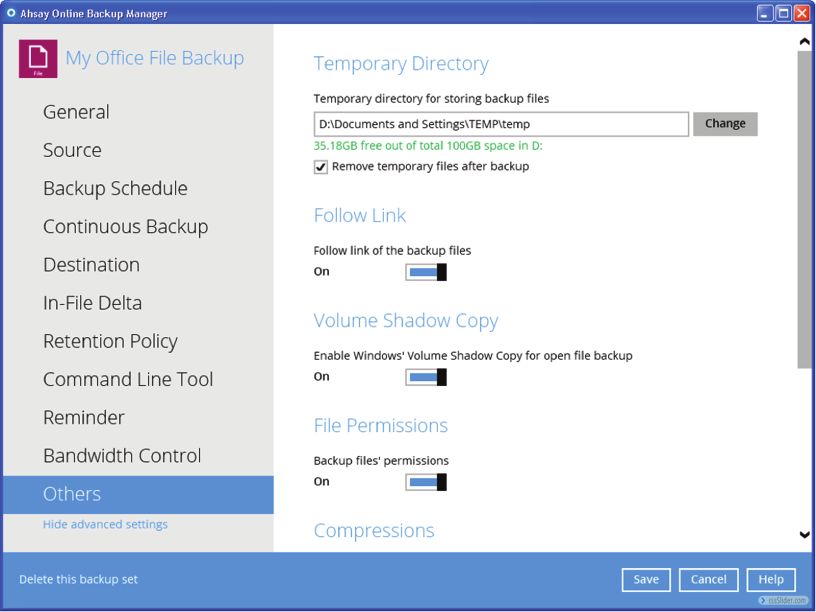
Comprehensive Features
AhsayCBS comes with comprehensive features for centrally managing the whole backup system and
users.

Monitoring
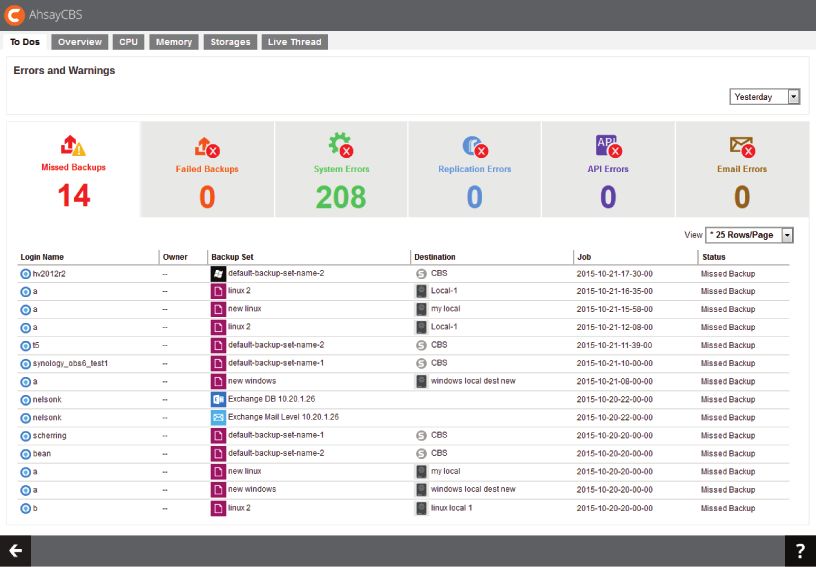
 Errors and warnings summarized under a To-Dos tab
 (Including missed / failed failed backups, system / replication / API / email errors)

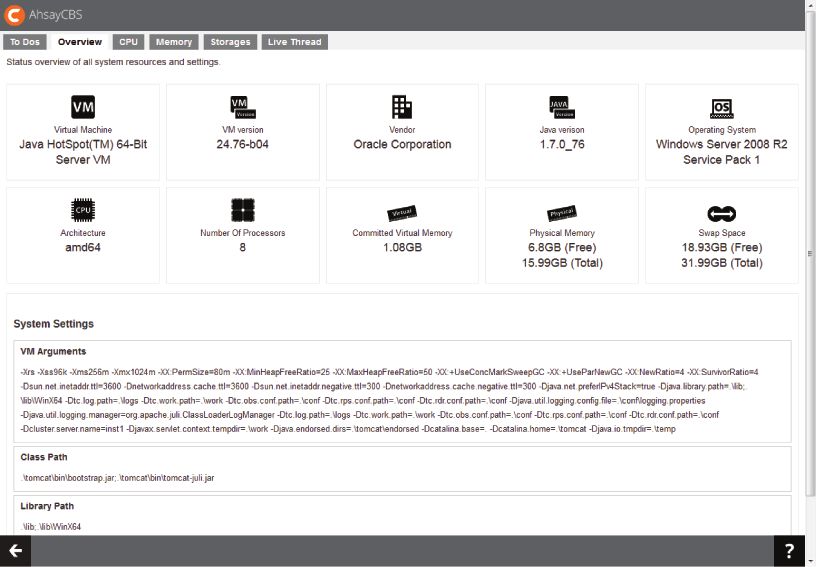
 Clear overview of system resources information
 (Including Java virtual machine, underlying operating system, CPU architecture, number of processor,
 committed virtual memory, pysical memory, and swap space)

 Current CPU usage, memory usage, storage usage and live thread monitoring

 Live activities monitoring
 (Including statuses of backup, restore, replication, receiver, and redirection)

 Administration logs monitoring
 (Including SNMP log, message history, activities log, and audit trails)

 Backup and restore logs monitoring
 (Including backup jobs, restored jobs, backup errors, backup set log, and activities log)

 Replication logs monitoring
 (Including replication sent, replication received, and activities log)

 AhsayOBM / AhsayACB redirection logs monitoring

System Configuration
 Support of using public cloud, FTP / SFTP servers, and local / mapped drives as storage backend

 Configurable host name, system home directory, connectors and SSL certificate

 Support of multiple SMTP servers and administrator contacts for sending outbound email reports to users

 Creation of administrators with different roles
 (Including super administrator, read-only administrator, API user, and sub-administrator)

 31 languages support

 Automatically save all the server settings to the Ahsay's cloud

 Proxy support

 Support IP exclusion for Proxy connection

 Publish system and error messages to third parties' monitoring tools through SNMP

 Publish system logs to Windows Event Log

 Retrieve system related files for troubleshooting through built-in file explorer

 Java runtime options configuration
 (Including maximum and minimum heap sizes, thread stack size)

 Blocking of IPs from accessing AhsayCBS

Backup User Management
 Auto backup user creation via Windows AD

 One user assignable to multiple user groups

 Push user to update client software from server

 Broadcast message to all / selected users
Backup User Management
  Trigger backup for selected backup sets from server

  Auto backup user creation via Windows AD

  Export selected users' statistics to CSV file

  Export user's profile and backup data

  Rebuild storage statistics for selected users

  Force users to upload encryption key in encrypted file to AhsayCBS
  (System administrator won't be able to decrypted the encrypted file. If needed, the file can be sent to Ahsay and
  we will send the decrypted data to the backup user's registered email address)

  Set a user as paid or trial user type

  Assign storage quota to individual users

  View effective policies of a user if multiple policies have been applied to him/her

  Assign a user to multiple user groups

Group Policy Management
  Assign multiple group policies to a user group

  Define the backup destinations which are visible to users

  Define the features in GUI which are visible to / usable by users

  Set the default values for all user configurable fields

  Preempt values to specific fields

  Enforce users to run preempted backup sets

  Windows Active Directory integration for new account creation

Replication to Cloud / Another AhsayCBS
  Close to real time replication of the whole AhsayCBS or selected backup sets to cloud or another AhsayCBS

  Set traffic limit for sending data during different time intervals

  Set replication down to backup set level

Receiving Data Replicated from Multiple AhsayCBS Servers
  Creat multiple receivers on AhsayCBS for receiving replication data from multiple AhsayCBS servers

  Define ranges of IP address that will be restricted to access this receiver

  Run Cyclic Redundancy Check on the 2nd and 4th Saturdays every month

  Set traffic limit for receiving data during different time intervals

High Scalability
  Achieve High Scalability by building a farm AhsayCBS servers to serve growing number of customers

  Redirect AhsayOBM / AhsayACB users to their corresponding AhsayCBS servers by built-in redirector

Features for MSPs
  Unlimited free trial accounts creation

  Fully rebrandable

  Reseller management, each reseller can have its own branding on web console and client agents

  Build rebranded AhsayOBM and AhsayACB installers through AhsayCBS web console
  (under Admin or Sub-Admin account)
AhsayCBS Screenshots

Login screen                Home control panel

Download page               Dashboard

System overview             Live monitoring
Backup storage monitoring   Live threads

Backup Status               User management

User group management       Policy management
Modules for Enhanced Protection and Scalability
  Need better protection on the backed up data, or high scalability for serving more backup users?
  These modules are for you.

                          Replication Module for AhsayOBM / AhsayACB
  The Replication Module for AhsayOBM / AhsayACB is for immediate replication of backed up data and backup server settings to
  cloud storage or to another AhsayCBS for additional protection on the backed up data. The price of Replication Module is per
  AhsayOBM / AhsayACB backed up device to replicate.

      Close to real time replication                                     Quickly convertible to a backup server
      After data are backed up to AhsayCBS backup server,                When a corresponding AhsayCBS backup server is
      replication will be triggered almost instantly.                    down, the replication server can be quickly converted
                                                                         into a backup server to keep serving the backup users.

      Retention policy for replicated data                               Zero hardware investment by
      Retention period and restore point interval can be
                                                                         cloud replication
      configured for keeping multiple replication versions.               Cloud storage can be used as the replication destination
                                                                         for saving hardware and hosting investments.

      Individual backup sets replication                                 IP restriction
      System administrator can choose individual and more                IP restriction can be set to prevent unwanted IPs from
      critical backup sets to replicate.                                 accessing the replication server.

      Traffic limit                                                        CRC data integrity verification
      Traffic limit can be set for specific period of time to               Cyclic redundancy checking (CRC) can be set to run
      reserve bandwidth for other purpose.                               automatically for verifying the integrity of the replicated
                                                                         data.

      Protecting many backup servers                                     SSL and proxy server support
      One AhsayCBS replication server can be used for                    Both SSL and proxy server are supported for enhancing
      receiving data replicated from multiple backup servers.            the security and compatibility of the replication server.

      Real time replication status tracking                              Detailed replication log
      Real time replication and receiver status can be tracked           Detailed replication logs are available for troubleshooting
      in the System Panel of AhsayCBS.                                   purpose.

                                                  Redirection Module
  The redirection module for AhsayCBS (previously known as AhsayRDR) is a high scalability module for building a farm of multiple
  AhsayCBS backup servers to serve a large number of backup users.

      Redirecting to multiple backup servers                             Single public backup server URL
      When AhsayCBS is configured as a redirection server, it             User management can be simplified as all backup users
      can redirect backup users to multiple backup servers.              on different backup servers just need to use a single
                                                                         URL as the backup server URL.

      Duplicated user checking                                           Real time redirection status tracking
      When creating users, user names will be checked on all             Real time redirection status can be tracked in the
      backup servers in the farm to prevent duplication.                 System Panel of AhsayCBS.

      Detailed redirection log
      Detailed redirection logs are available for troubleshooting
      purpose.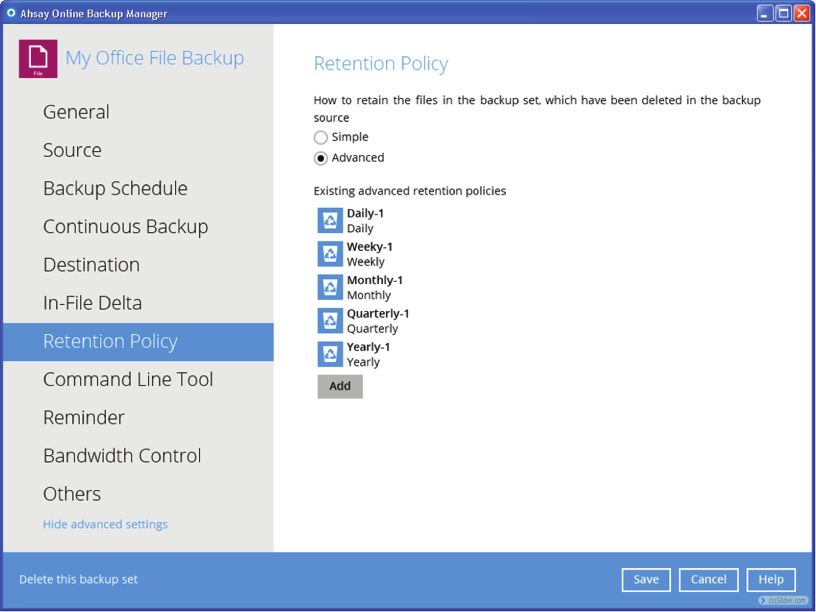
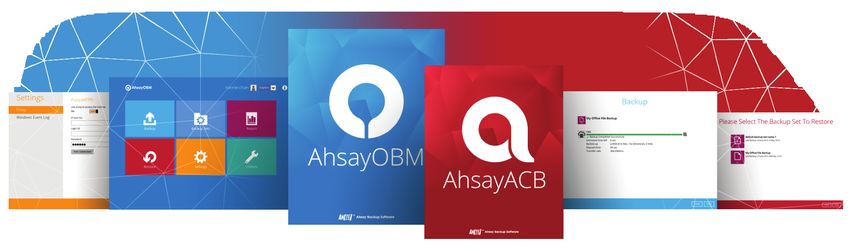
AhsayOBM                                       AhsayACB

            Advanced Backup Agents for
       VM, Database and Workstation Backup
Ahsay offers 2 client backup agents. AhsayOBM is for backing up servers, databases and virtual
machines. AhsayACB is for backing up workstations. Both of them support local, cloud and hybrid
backups. They are fast and equipped with many dedicated database and virtual machine modules for
you to properly backup your Office 365, databases, VMs and email applications. They are fully
rebrandable for MSPs to integrate into their service offering mix.

        Ransomware Protection                                             Various Dedicated Backup Modules
The quickest method to get back your mission critical files        Dedicated backup modules can be used in conjunction with
after a ransomware attack (e.g. WannaCry) is to restore from      them to let you back up VMware, Hyper-V, Microsoft
the recent backup. Therefore, after regularly backing up your     Exchange Server, Microsoft SQL Server, MySQL Databases,
data with AhsayOBM / AhsayACB to your specified offsite             Windows System, System State and Office 365 Exchange /
destinations, no ransomeware can threaten you anymore.            SharePoint / OneDrive professionally.

        Multi-Destinations Backup                                         Super Secure Encryption
Both AhsayOBM & AhsayACB supports backup to multiple              Both AhsayOBM and AhsayACB can generate a truly
local and cloud destinations, e.g. USB hard drive, mapped         randomized 256-bit full length AES encryption key to encrypt
network drive, private FTP / SFTP servers, and public cloud       the backup data by default. Such encryption is simply
storage such as Microsoft Azure and Amazon S3.                    unbreakable by any super computer.

        Run VM Directly from Backup                                       High Speed
With our new VM Run Direct feature, backed up VMware and          They are the fastest backup applications equipped with all
Hyper-V VM can be run directly from backup within minutes. You    speed optimizing technologies, such as multi-threading,
can also choose to play and migrate the VM simultaneously.        In-File Delta, fast indexing, small files optimization, etc. Speed
                                                                  hungry customers will definitely love them.

        Restorability Guaranteed                                          Show / Hide Features from GUI
No one wants to experience trouble during restore.                Both AhsayOBM & AhsayACB are rebrandable for MSPs. All
Therefore, you need a backup solution that can guarantee          the graphics and wordings are customizable. You can even
the restorability of your backed up data. With the built-in CRC   hide the features that you don't want your customers to use
data integrity checking, verification and rectification, your       through setting appropriate group policy.
backup data are 100% restorable.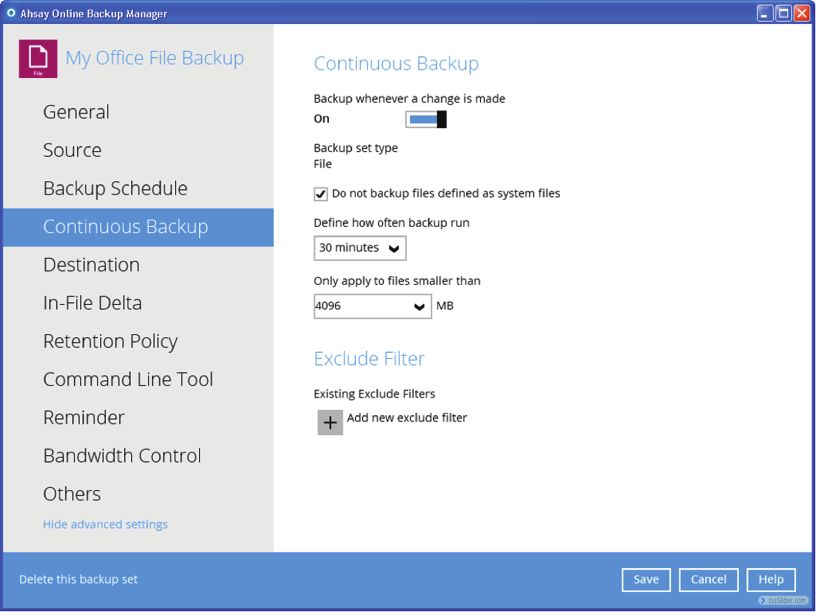
Comprehensive Features
Among all backup software available in the market, AhsayOBM and AhsayACB comes with the most
comprehensive features for virtual machine, server and workstation backup. Remember, AhsayOBM
is a comprehensive client backup application designed for backing up servers, databases, VMs,
Windows System and System State, while AhsayACB is a simplified version designed for backing up
files, Windows System, and Lotus Notes in workstations.

Support Cloud & Local Destinations                                           AhsayACB   AhsayOBM

 AhsayCBS storage

 Alibaba Cloud (Aliyun)

 AWS S3

 Amazon Cloud Storage

 Blackblaze B2

 CTYun

 Dropbox

 Google Cloud Storage

 Google Drive

 Microsoft Azure

 Microsoft OneDrive / OneDrive for Business

 OpenStack

 Rackspace

 Wasabi

 FTP / SFTP

 USB drive / local drive / mapped network drive

Backup Various Data Types
 File

  Cloud file backup

 Outlook / Outlook Express / Windows Live Mail

 Windows System

 Office 365 Exchange / SharePoint / OneDrive

 Microsoft Exchange Server (database, brick-level, DAG)

 Microsoft SQL Server

 MySQL Database

 QNAP / Synology NAS

 VMware

 Hyper-V

 Windows System State
Comprehensive Backup Features                                          AhsayACB   AhsayOBM

 Combine multiple cloud and local destinations as one pooled storage

 Sequential or concurrent backup to multiple destinations

 Configurable maximum concurrent backups

 Run Cyclic Redundancy Check (CRC) in client

 Write backup/restore logs to Windows Event Log

 Flexible backup schedules

 In-File Delta incremental / differential backup

 Remove server-side backup data from client

 Proxy server support

 Windows open file backup through VSS

 Seed-load utility

 Multiple backup sets

 Backup filter

 Simple retention policy by days or backup jobs

 Continuous backup for files in Windows

 Continuous backup for VMs and databases

 Advanced flexible retention policy

 Command line tool

Easy Restoration

 Point in time restore

 One time restore multiple versions

 Search for files or folders to restore

 Restore anywhere through green client

 Run backed up VMware / Hyper-V Guest VM directly in AhsayOBM

 Directly restore backed up database to original location

Friendly Reminders

 Backup reminder during system logout

 Off-line reminder

 Storage quota alert

Speed Boosting

 Multi-threading

 In-File Delta

 User configurable compression
Uncompromised Security / Privacy                                                               AhsayACB   AhsayOBM

 Password protection

 256-bit SSL transmission

 Lost encryption key recovery if this feature is enabled on AhsayCBS

 Auto-generate 256-bit truly randomized encrypting key for each backup set

 Filename and content encryption

In-App Reporting Tools

 Graphical usage report by destination / backup set

 Backup report

 Restore report

 Write backup/restore logs to Windows Event Log

Features Specifically Designed for MSPs

 Direct rebranding and customization in AhsayCBS

 Customize AhsayOBM/AhsayACB application name and icon shown in cloud storage

 Show / hide in-app features through group policy

 Create trial account from client application (if trial registration is enabled on AhsayCBS)

 Auto-upgrade client application pushed from AhsayCBS

Support Common Operating Systems

 Mac

 Windows for Desktop

 Windows for Server

 Linux

 UNIX
Modules for Office 365, VMs and Databases Backup
 Need to backup VMs of VMware and Hyper-V? Or databases and email applications, such as Microsoft
 Exchange Server, Office 365, Microsoft SQL Server, MySQL? Or Windows System / System State? Or
 mobile devices? Use these add-on modules.

 Available Add-on Modules                                                       AhsayACB       AhsayOBM

   File

   Cloud file

   Windows System

   AhsayMOB for mobile devices

   Office 365
                                                                              (Max. 2 users)

   Microsoft Exchange Server Mail-level

   Microsoft Exchange Server Database

   Microsoft Exchange Server DAG

   Microsoft Hyper-V Guest VM

   Microsoft SQL Server

   MySQL Database

   VMware Guest VM

   Windows System State
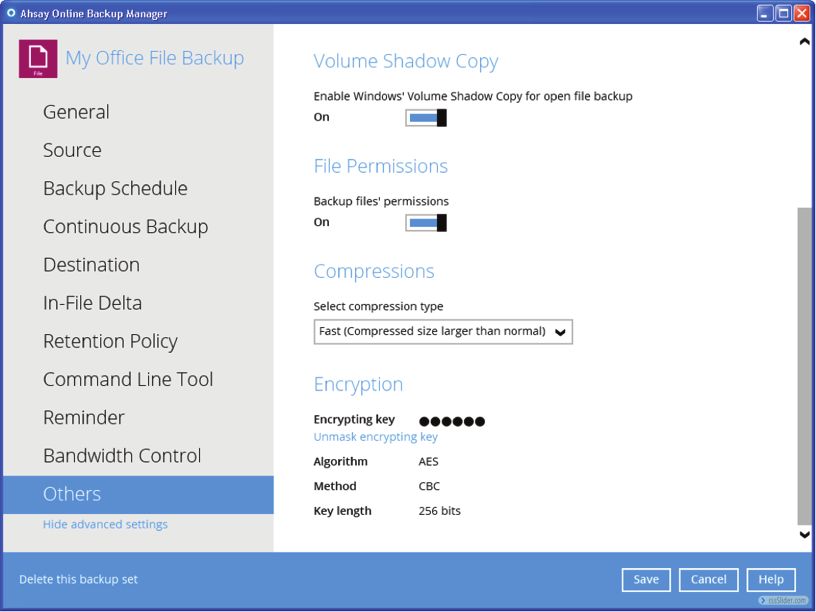
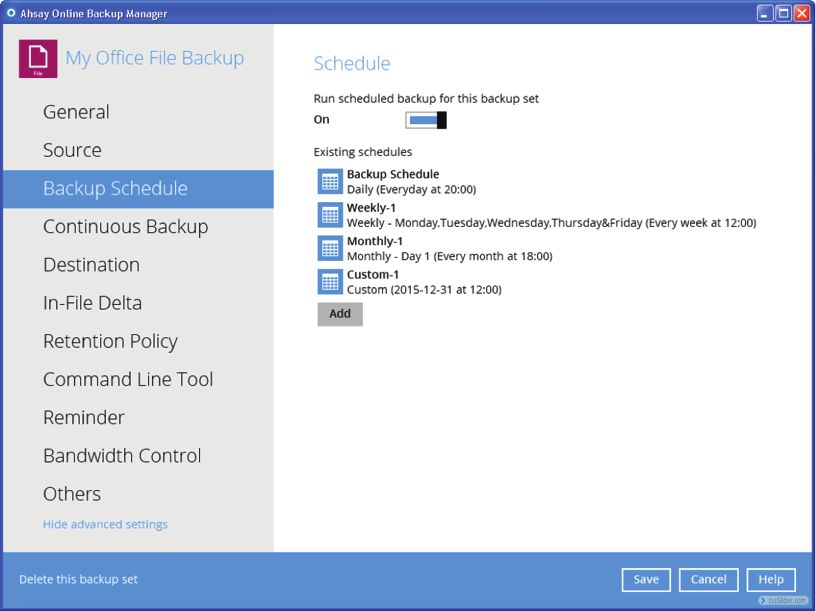
AhsayOBM/AhsayACB Screenshots Login screen Home control panel Define backup sources Define backup schedule Continuous Backup setting Define backup destination In-File Delta setting Define retention policy
Bandwidth control setting   Other options 1

Other options 2             Backup

Restore                     Windows event logs

Comprehensive reports       CRC Data Integrity Check function
AhsayUBS

Install AhsayCBS on Bare Server in 5 Minutes
AhsayUBS (Ahsay Universal Backup System) is a low price yet powerful operating system for a backup
server machine to operate with. It has been optimized for AhsayCBS and AhsayRPS to run smoothly
on it. With AhsayUBS, you can setup AhsayCBS as well as AhsayRPS on a bare comptuer in 5 minutes.

       Save Time on Installation                                         Save Spending on OS
With AhsayUBS, the installation of operating system as well      The price of AhsayUBS is much lower than a regular
as AhsayCBS on a machine can be completed in one simple          operating system. Therefore, you can save a significant
step within a few minutes. As opposed to using Windows or        amount of money in purchasing other operating platforms,
Linux, which the installations of the operating system and       such as Windows or some commercial distributions of Linux,
AhsayCBS have to be carried out separately, it thus saves you    and paying for the related maintenance fees.
a great deal of time.

       Tuned for the Best Performance                                    Fully Rebrandable and Customizable
AhsayUBS is customized with kernel memory consumption,           AhsayUBS is fully rebrandable, thus enabling our partners to
file system block size, buffer size, cache size, and other         build their own branded backup appliances easily. All the
parameters tuned for the best performance of running             interface wordings are customizable.
AhsayCBS. It saves you time for doing these tunings by
yourself when using other operating platforms.

                                        Rich Features for Hardware
We develop AhsayUBS with the purpose of helping our partners instead of profit making. Therefore, we offer it at an extremely
low price so that partners are able to use this optimized operating system for running their AhsayCBS machines without costing
an arm and a leg.

    Web Management Console                                                  Auto-detection of local hard-disks
    RAID0, RAID1 and RAIDZ support                                          Archiving configuration to tape
    SSH support                                                             UFS storage model support
    ZFS storage model support                                               SFTP support
    iSCSI support                                                           NTP synchronization
    Hostname table                                                          2 DNS servers
    Proxy support                                                           SSHD remote console access
    Uninterrupted Power Supply support                                      SNMP support
    Backup and restore of system configuration
Software Compatibility List (SCL)
for version 8.1 or above
Operating Systems compatibility
AhsayCBS AhsayCBS AhsayCBS AhsayPRD AhsayOBM AhsayACB AhsayOBR
(Replication Module) (Redirection Module)
Support
Supported End Date
Operating System Supported Application Version (YYYY/MM/DD)
Windows platforms: [1, 2, 3]
XP (Home / Professional)* 8.1.0.0 or above EOS reached
2003 (Web / Standard / Enterprise / Data Center)* 8.1.0.0 or above EOS reached
Vista (Home Basic / Home Premium / Business / Enterprise / Ultimate)* 8.1.0.0 or above EOS reached
7 (Home Basic / Home Premium / Business / Enterprise / Ultimate) 8.1.0.0 or above EOS reached
8 (Pro / Enterprise) 8.1.0.0 or above 2023/01/10
8.1 (Pro / Enterprise) 8.1.0.0 or above 2023/01/10
10 (Home / Pro / Enterprise)[4] 8.1.0.0 or above 2025/10/14
Server 2008 (Standard / Enterprise / Datacenter) 8.1.0.0 or above EOS reached
Server 2008 R2 (Standard / Enterprise / Datacenter) 8.1.0.0 or above EOS reached
Server 2012 (Standard / Essentials / Datacenter) 8.1.0.0 or above 2023/01/10
Server 2012 R2 (Standard / Essentials / Datacenter) 8.1.0.0 or above 2023/01/10
Server 2016 (Standard / Essentials / Datacenter) 8.1.0.0 or above 2027/01/11
Server 2019 (Standard / Essentials / Datacenter) 8.3.4.0 or above 2030/01/08
Small Business Server 2003 (Standard / Essentials / Datacenter)* 8.1.0.0 or above EOS reached
Small Business Server 2008 (Standard / Essentials / Datacenter) 8.1.0.0 or above EOS reached
Small Business Server 2011 (Standard / Essentials / Datacenter) 8.1.0.0 or above EOS reached
[1] AhsayCBS is only supported on 64 bit Windows platforms.
[2] For AhsayACB installation on Windows, you can only install it on a Windows desktop operating system such as Windows Vista, 7, 8, 8.1, and 10.
[3] For AhsayOBM installation on 64 bit Windows platforms, Adobe Flash Player 11 - 64 bit version for Internet Explorer must be installed: http://get.adobe.com/flashplayer/otherversions
[4] Windows 10 Home Edition is supported since version 8.1.0.50.
Linux platforms: [5, 6, 7]
CentOS 7 8.1.0.0 or above 2024/06/30
CentOS 8 8.3.2.0 or above 2029/05/31
Red Hat Enterprise Linux 7 8.1.0.0 or above 2024/06/30
Red Hat Enterprise Linux 8 8.3.0.0 or above 2029/05/31
Ubuntu 14.04 LTS 8.1.0.0 or above EOS reached
Ubuntu 16.04 LTS 8.1.0.0 or above 2021/04
Ubuntu 17.04 * 8.1.0.0 or above EOS reached
Ubuntu 18.04 LTS 8.1.0.0 or above 2023/04
Ubuntu 19.04 8.3.0.0 or above EOS reached
Ubuntu 20.04 LTS 8.3.4.0 or above 2025/04
[5] AhsayCBS is only supported on 64 bit Linux platforms. AhsayOBR is only supported on Linux platforms with GUI.
[6] Other Linux distributions such as SUSE or Fedora are not officially supported, but should work.
[7] GNU GLIBC 2.14 Library is required for all Linux platforms.
UNIX platforms: [8, 9]
FreeBSD (9.0 / 9.1 / 9.2 / 10.0) [10, 11] * 8.1.0.0 or above EOS reached
FreeBSD 10.1 [11] * 8.1.0.0 or above EOS reached
FreeBSD 10.2 [11] * 8.1.0.0 or above EOS reached
FreeBSD 10.3 [11] * 8.1.0.0 or above EOS reached
FreeBSD 10.4 [11] * 8.1.0.0 or above EOS reached
FreeBSD 11.1 [11] * 8.1.0.0 or above EOS reached
FreeBSD 11.2 [11] * 8.1.0.0 or above EOS reached
FreeBSD 11.3 [11] 8.3.0.0 or above 2020/09/30
FreeBSD 12 [11] 8.1.0.0 or above 2023/06/30
Solaris 10 x64 * 8.3.0.0 or above EOS reached
Solaris 11 Express x64 8.1.0.0 or above --
Solaris 11 x64 8.1.0.0 or above 2024/11/30
[8] AhsayCBS is only supported for 64 bit Unix platform. AhsayOBR is only supported on Unix platforms with GUI.
[9] Support system with graphical environment only. GUI support for Gnome, but KDE should work.
[10] Limited support, no intensive testing has been performed on this platform, but should work. Best effort support will be provided.
[11] GNU GLIBC 2.14 Library is required for all FreeBSD platforms.
Mac OS X platforms:
Mac OS X 10.7.3 or above 8.1.0.0 or above EOS reached
Mac OS X 10.8 8.1.0.0 or above EOS reached
Mac OS X 10.9 8.1.0.0 or above EOS reached
Mac OS X 10.10 8.1.0.0 or above EOS reached
Mac OS X 10.11 8.1.0.0 or above EOS reached
Mac OS X 10.12 8.1.0.0 or above EOS reached
Mac OS X 10.13 8.1.0.0 or above Supported
Mac OS X 10.14 8.1.0.0 or above Supported
Mac OS X 10.15 8.3.4.0 or above Supported
* EOS reached, Ahsay will provide best effort support.Applications and Database Compatible With AhsayOBM (1/2)
Support End Date
Application Supported Version (YYYY/MM/DD)
MS Exchange:
Exchange Server 2007 (Standard / Enterprise) † * 8.1.0.0 or above EOS reached
Exchange Server 2010 (Standard / Enterprise) [14]* 8.1.0.0 or above EOS reached
Exchange Server 2013 (Standard / Enterprise) [14] 8.1.0.0 or above 2023/04/11
Exchange Server 2016 (Standard / Enterprise) [14] 8.1.0.0 or above 2025/10/14
Exchange Server 2019 (Standard / Enterprise) [14] 8.1.0.0 or above 2025/10/14
† mail level backups are only supported in EWS backup mode on MS Exchange Server 2013 Cumulative Update 23 or above.
[14] Support both MS Exchange Server Backup and MS Exchange Mail Level Backup Module, for Stand-alone Exchange Server and Exchange Server in Database Availability Group (DAG).
MS SQL:
SQL Server 2005 (Standard / Express / Enterprise)* 8.1.0.0 or above EOS reached
SQL Server 2008 (Standard / Express / Enterprise)* 8.1.0.0 or above EOS reached
SQL Server 2008 R2 (Standard / Express / Enterprise)* 8.1.0.0 or above EOS reached
SQL Server 2012 (Standard / Express / Enterprise) 8.1.0.0 or above 2022/07/12
SQL Server 2014 (Standard / Express / Enterprise) 8.1.0.0 or above 2024/07/09
SQL Server 2006 R2 (Standard / Express / Enterprise) 8.1.0.0 or above 2026/07/14
SQL Server 2017 (Standard / Express / Enterprise)[15] 8.1.0.0 or above 2027/10/12
SQL Server 2019 (Standard / Express / Enterprise)[15] 8.3.4.0 or above 2027/10/12
[15] Support for SQL Server 2017 on Windows only.
MS SharePoint:
SharePoint Server 2007 [16]* 8.1.0.0 or above EOS reached
SharePoint Server 2010 [16] 8.1.0.0 or above 2020/10/13
[16] Backup performed using file backup set with pre-backup command.
Office 365:
Exchange Online 8.1.0.0 or above --
SharePoint Online 8.1.0.0 or above --
OneDrive 8.1.0.0 or above --
Oracle: [17, 18]
Oracle Database 11g Release 2 * 8.1.0.0 or above EOS reached
Oracle Database 12c Release 1 8.1.0.0 or above 2021/07/01
[17] Due to insufficient demand in the Oracle Database Backup Module, starting from version 8, support for the modules will be discontinued. Ahsay will not put any further development and QA
efforts in enhancing this module. However, to allow existing users to keep using it after upgrading to version 8, the module will still be available in AhsayOBM's backup set type option list. Ahsay
support team will continue to provide best effort support for the module until further notice.
[18] Advanced Oracle database setups, e.g. Clusterware or RAC (Real Application Clusters), ASM (Automatic Storage Management), Data Guard etc. are NOT supported. **Oracle Database 12c is only
supported on Windows platforms.
MySQL:
MySQL 5.5.x (Standard / Enterprise) 8.1.0.0 or above --
MySQL 5.6.x (Standard / Enterprise) 8.1.0.0 or above --
MySQL 5.7.x (Standard / Enterprise) 8.1.0.0 or above 2023/10/21
MySQL 8 (Standard / Enterprise) 8.1.0.0 or above --
Lotus Domino / Notes: [19, 20]
Domino / Notes 8.5.x 8.1.0.0 or above --
Domino / Notes 9.0.x 8.1.0.0 or above --
[19] Due to insufficient demand in the IBM Lotus Domino / Notes Backup Modules, starting from version 8, support for these modules will be discontinued. Ahsay will not put any further development
and QA efforts in enhancing these modules. However, to allow existing users to keep using them after upgrading to version 8, these modules will still be available in AhsayOBM's backup set type
option list. Ahsay support team will continue to provide best effort support for these modules until further notice.
[20] Domino and Notes version 8.5.2 are not supported, and Notes is only support on Windows platforms by AhsayOBM and AhsayACB.
MS Virtualization Platforms: [21, 22]
Hyper-V Server 2008 8.1.0.0 or above EOS reached
Hyper-V Server 2008 R2 8.1.0.0 or above EOS reached
Hyper-V Server 2012 8.1.0.0 or above 2023/01/10
Hyper-V Server 2012 R2 8.1.0.0 or above 2023/01/10
Hyper-V Server 2016 8.1.0.0 or above 2027/01/11
Hyper-V Server 2019 8.1.0.0 or above 2029/01/09
Hyper-V Server 2008 Stand-alone Server 8.1.0.0 or above EOS reached
Hyper-V Server 2008 R2 Stand-alone Server 8.1.0.0 or above 2023/01/10
Hyper-V Server 2012 Stand-alone Server 8.1.0.0 or above EOS reached
Hyper-V Server 2012 R2 Stand-alone Server 8.1.0.0 or above 2023/01/10
Hyper-V Server 2016 Stand-alone Server 8.1.0.0 or above 2027/01/11
Hyper-V Server 2019 Stand-alone Server 8.1.0.0 or above 2029/01/09
[21] Run Direct feature is not available on Hyper-V Server 2008 and Hyper-V Server 2008 Stand-alone Server.
[22] Granular Restore is not available on Hyper-V Server 2008 and Hyper-V 2008 R2 Stand-alone and Cluster Server.
* EOS reached, Ahsay will provide best effort support.Applications and Database Compatible With AhsayOBM (2/2)
Support End Date
Application Supported Version (YYYY/MM/DD)
VMware Virtualization Platforms:
VMware Player 6.x [23]* 8.1.0.0 or above EOS reached
VMware Player 7.x [23]* 8.1.0.0 or above EOS reached
VMware Workstation 10.x [23]* 8.1.0.0 or above EOS reached
VMware Workstation 11.x [23]* 8.1.0.0 or above EOS reached
VMware Workstation 12.x [23]* 8.1.0.0 or above EOS reached
VMware Workstation 14 [23]* 8.1.0.0 or above EOS reached
VMware Workstation 15.x [23] 8.1.0.50 or above 2020/12/19
VMware Fusion 6.x * 8.1.0.0 or above EOS reached
VMware Fusion 7.x * 8.1.0.0 or above EOS reached
VMware Fusion 8.x * 8.1.0.0 or above EOS reached
VMware Fusion 10.x 8.1.0.0 or above 2020/03/24
VMware Fusion 11.x 8.1.0.50 or above 2020/03/12
VMware ESXi Server 6.0 [24, 25] 8.1.0.0 or above 2020/03/12
VMware ESXi Server 6.5 [24, 25] 8.1.0.0 or above 2021/11/15
VMware ESXi Server 6.7 [25, 26] 8.1.0.0 or above 2022/10/15
VMware ESXi Server 7.0 [25, 27] 8.3.4.0 or above 2025/04/02
VMware vCenter Server 6 [24, 25] 8.1.0.0 or above 2020/03/12
VMware vCenter Server 6.5 [24, 25] 8.1.0.0 or above 2021/11/15
VMware vCenter Server 6.7 [25, 26] 8.1.0.0 or above 2022/10/15
VMware vCenter Server 7.0 [25, 27] 8.3.4.0 or above 2025/04/02
[23] VMware Player 6.x or above, and Workstation 10.x or above is only support on Windows platforms.
[24] Granular Restore for VMware ESXi/vCenter Backup Sets is only supported on 64 bit Windows platforms.
[25] VMware vSAN (VMware Virtual SAN) storage is not supported.
[26] Run Direct feature is not available on VMware ESXi Server 7.0 and VMware vCenter Server 7.0.
[27] Non-VDDK backup mode is only supported if the guest VM is powered off during backup.
StorageCraft ShadowProtect: [28]
ShadowProtect 5.2.7 (Desktop / Server) 8.1.0.0 or above --
[28] Due to insufficient demand in the ShadowProtect System Backup Modules, starting from version 8, support for the module will be discontinued. Ahsay will not put any further development and
QA efforts in enhancing this module. However, to allow existing users to keep using them after upgrading to version 8, the module will still be available in AhsayOBM's backup set type option list.
Ahsay support team will continue to provide best effort support for the module until further notice.
System State Backup Module:
Server 2008 8.1.0.0 or above --
Server 2008 R2 8.1.0.0 or above --
Server 2012 8.1.0.0 or above --
Server 2012 R2 8.1.0.0 or above --
Server 2016 8.1.0.0 or above --
Server 2019 8.1.0.0 or above --
Small Business Server 2008 8.1.0.0 or above --
Small Business Server 2011 8.1.0.0 or above --
MS Windows System Backup Module:
Vista 8.1.0.0 or above --
7 8.1.0.0 or above --
8 8.1.0.0 or above --
8.1 8.1.0.0 or above --
10 8.1.0.0 or above --
Server 2008 8.1.0.0 or above --
Server 2008 R2 8.1.0.0 or above --
Server 2012 8.1.0.0 or above --
Server 2012 R2 8.1.0.0 or above --
Server 2016 8.1.0.0 or above --
Server 2019 8.1.0.0 or above --
Small Business Server 2008 8.1.0.0 or above --
Small Business Server 2011 8.1.0.0 or above --
* EOS reached, Ahsay will provide best effort support.Cloud Storage Services Compatibility
AhsayCBS AhsayOBM AhsayACB
Support
Supported End Date
Cloud Storage Service Supported Application Version (YYYY/MM/DD)
Microsoft Azure 8.1.0.0 or above --
Google Cloud Storage 8.1.0.0 or above --
Amazon S3 8.1.0.0 or above --
Amazon Drive 8.1.0.0 or above EOS reached
AWS Compatible Cloud Storage 8.1.0.0 or above --
Rackspace 8.1.0.0 or above --
OpenStack 8.1.0.0 or above --
Google Drive 8.1.0.0 or above --
Microsoft OneDrive 8.1.0.0 or above --
Microsoft OneDrive for Business 8.1.0.0 or above --
Dropbox 8.1.0.0 or above --
FTP / SFTP [29] 8.1.0.0 or above --
Aliyun 8.3.4.0 or above --
CTYun 8.1.0.0 or above --
Wasabi 8.3.0.0 or above --
Blackblaze B2 8.3.0.0 or above --
[29] AhsayCBS is only supported on 64 bit Windows platforms.Cloud Storage Region Compatibility (1/2)
AhsayCBS AhsayOBM AhsayACB
Supported
Cloud Storage Service Supported Application Version
Amazon S3: [30]
US East (N. Virginia) 8.1.0.0 or above
US East (Ohio) 8.1.0.0 or above
US West (Northern California) 8.1.0.0 or above
US West (Oregon) 8.1.0.0 or above
Africa (Cape Town) 8.3.4.0 or above
Asia Pacific (Hong Kong) 8.1.0.0 or above
Asia Pacific (Mumbai) 8.1.0.0 or above
Asia Pacific (Osaka-Local) 8.1.0.0 or above
Asia Pacific (Seoul) 8.1.0.0 or above
Asia Pacific (Singapore) 8.1.0.0 or above
Asia Pacific (Sydney) 8.1.0.0 or above
Asia Pacific (Tokyo) 8.1.0.0 or above
Canada (Central) 8.1.0.0 or above
China (Beijing) 8.1.0.0 or above
China (Ningxia) 8.1.0.0 or above
EU (Frankfurt) 8.1.0.0 or above
EU (Ireland) 8.1.0.0 or above
EU (London) 8.1.0.0 or above
EU (Milan) 8.3.4.0 or above
EU (Paris) 8.3.0.0 or above
EU (Stockholm) 8.1.0.0 or above
Middle East (Bahrain) 8.1.0.0 or above
South America (Sao Paulo) 8.1.0.0 or above
AWS GovCloud (US-East) 8.1.0.0 or above
AWS GovCloud (US-West) 8.1.0.0 or above
[30] Only Amazon S3 Storage Classes STANDARD, STANDARD_IA, RRS (REDUCED_REDUNDANCY), and One Zone - Infrequent Access are supported. INTELLIGENT_TIERING is supported from v8.3.0.0
or above.
Google Cloud Storage: [31]
Location Type:
Region 8.3.4.0 or above
Multi-region 8.3.4.0 or above
Dual-region 8.3.4.0 or above
Location:
North America-Northeast1 (Montreal) 8.3.4.0 or above
South America-East1 (So Paulo) 8.3.4.0 or above
US-Central1 (Iowa) 8.3.4.0 or above
US-East1 (South Carolina) 8.3.4.0 or above
US-East4 (Northern Virginia) 8.3.4.0 or above
US-West1 (Oregon) 8.3.4.0 or above
US-West2 (Los Angeles) 8.3.4.0 or above
US-West3 (Salt Lake City) 8.3.4.0 or above
Europe-North1 (Finland) 8.3.4.0 or above
Europe-West1 (Belgium) 8.3.4.0 or above
Europe-West2 (London) 8.3.4.0 or above
Europe-West3 (Frankfurt) 8.3.4.0 or above
Europe-West4 (Netherlands) 8.3.4.0 or above
Europe-West6 (Zurich) 8.3.4.0 or above
Asia-East1 (Taiwan) 8.3.4.0 or above
Asia-East2 (Hong Kong) 8.3.4.0 or above
Asia-Northeast1 (Tokyo) 8.3.4.0 or above
Asia-Northeast2 (Osaka) 8.3.4.0 or above
Asia-Northeast3 (Seoul) 8.3.4.0 or above
Asia-South1 (Mumbai) 8.3.4.0 or above
Asia-Southeast1 (Singapore) 8.3.4.0 or above
Australia-Southeast1 (Sydney) 8.3.4.0 or above
US (multiple regions in United States) 8.3.4.0 or above
EU (multiple regions in European Union) 8.3.4.0 or above
US (NAM4 (Iowa and South Carolina) 8.3.4.0 or above
EUR4 (Netherlands and Finland) 8.3.4.0 or above
[31] Only Google Cloud Storage Classes Standard Storage, Durable Reduced Availability (DRA) Storage, Nearline Storage, Coldline Storage, and Archive are supported.Cloud Storage Region Compatibility (2/2)
AhsayCBS AhsayOBM AhsayACB
Supported
Cloud Storage Service Supported Application Version
Aliyun:
Hangzhou (oss-cn-hangzhou) 8.1.0.0 or above
Shanghai (oss-cn-shanghai) 8.1.0.0 or above
Qingdao (oss-cn-qingdao) 8.1.0.0 or above
Beijing (oss-cn-beijing) 8.1.0.0 or above
Zhangjiakou (oss-cn-zhangjiakou) 8.1.0.0 or above
Huhehaote (oss-cn-huhehaote) 8.3.0.0 or above
Shenzhen (oss-cn-shenzhen) 8.1.0.0 or above
Heyuan (oss-cn-heyuan) 8.3.4.0 or above
Chengdu (oss-cn-chengdu) 8.1.0.0 or above
Hong Kong (oss-cn-hongkong) 8.1.0.0 or above
US Sillicon Valley (oss-us-west-1) 8.1.0.0 or above
US Virginia (oss-us-east-1) 8.1.0.0 or above
Asia Pacific (Singapore) (oss-ap-southeast-1) 8.1.0.0 or above
Asia Pacific (Sydney) (oss-ap-southeast-2) 8.1.0.0 or above
Asia Pacific (Kuala Lumpur) (oss-ap-southeast-3) 8.3.0.0 or above
Asia Pacific (Jakarta) (oss-ap-southeast-5) 8.3.0.0 or above
Asia Pacific (Japan) (oss-ap-northeast-1) 8.1.0.0 or above
Asia Pacific (Mumbai) (oss-ap-south-1) 8.3.0.0 or above
EU (Frankfurt) (oss-eu-central-1) 8.3.4.0 or above
London (oss-eu-west-1) 8.3.0.0 or above
Middle East (Dubai) (oss-me-east-1) 8.1.0.0 or above
Rackspace:
Chicago (ORD) 8.1.0.0 or above
Dallas/Ft. Worth (DFW) 8.1.0.0 or above
Hong Kong (HKG) 8.1.0.0 or above
London (LON) 8.1.0.0 or above
Northern Virginia (IAD) 8.1.0.0 or above
Sydney (SYD) 8.1.0.0 or above
Microsoft Azure:
Global 8.1.0.0 or above
China 8.1.0.0 or above
Germany 8.1.0.0 or above
US Government 8.1.0.0 or above
Storage Account Types:
General Purpose v1 8.1.0.0 or above
General Purpose v2 8.3.2.0 or above
Wasabi:
us-west-1 8.3.0.0 or above
eu-central-1 8.3.0.0 or above
us-east-1 8.3.0.0 or above
us-east-2 8.3.4.0 or above
OpenStack: [32]
Keystone v3 8.1.0.0 or above
TempAuth v3 8.1.0.0 or above
[32] These are the supported Authentications for OpenStack from v8.1.0.0 or aboveGet Served by Our Support Engineers
Our professional customer support team is dedicated to help our customers solve any problems
encountered through one of the following services.
Standard Support Premium Support Priority-1 Support
Eligibility
Valid maintenance Valid maintenance
Eligibility Valid maintenance + +
Premium Service Fee #1 US$600 per case #2
Resolution
Urgent known issue resolution 2 business days 1 calendar day 1 business days
Urgent unknown issue cause identification 5 business days 3 calendar day 3 business days
Non-urgent issue cause identification 8 business days 5 calendar day 5 business days
4 hours
(during Ahsay office hours *)
First response 8 business hours 4 business hours
8 hours
(outside Ahsay office hours)
Support Hours
Support hours 16 x 5 24 x 7 16 x 5
(0900 to 0200 GMT+8) (0900 to 0200 GMT+8)
Priority Escalation
Jump the queue, Support case escalated to the
N/A N/A
1st Senior Tier-2 position
Proactive Support
Continuous system monitoring
Free usage of monitoring software **
Problem Solving
Scheduled remote support
Communication Channel
Support Ticket
Live Chat
International Hotline: +852 3580 8037
Dedicated support engineer
Work in your time zone
WhatsApp
Direct email communication
Exclusive - New Premium Support Subscriber
Welcome Reward : Priority-1
N/A N/A
Support Service Coupon x 1 #3
Remarks:
* Ahsay's office hours are from 0900 to 1800 (GMT +8) Monday to Friday and Hong Kong business days.
** Use of Zabbix monitoring tool. #1 Premium Service Annual Fee = Valid maintenance + Premium Service Fee variable based on the valid license, minimum US$1,200/year (or US$100/month), capped
at maximum US$9,600/year. For 100% meter customers, we will make offer based on average consumption. Please contact us to work out the details of the offer. Please contact our Sales for quotation.
#2 Create a Support Ticket if you want to purchase the Priority-1 Support Service. If within 14-days you subscribe to Premium Support plan after purchasing the Priority-1 Support Service, you can apply
$300 USD from the Priority-1 Support Service to the cost of the Premium Support subscription fee.
#3 Welcome Reward is only applicable to New Premium Support Subscriber who have never rebate from Priority-1 Support Service.Ahsay Systems Corporation Limited
(A wholly owned subsidiary of Ahsay Backup Software Development Company
Limited [HKEx Stock Code: 8290])
Address 28/F., Ford Glory Plaza, 37 Wing Hong Street, Lai Chi
Kok, Kowloon, Hong Kong.
Opening Hours Monday - Friday 09:00 - 18:00 (GMT + 08:00)
International Hotline +852 3580 8091
Online Enquiry www.ahsay.com/jsp/en/contact/kbQuestion.jsp
Free Trial www.ahsay.com/freetrial
Website www.ahsay.com
2012You can also read


