Financial Aid
 Application Info
   2020-2021

Dependent Student
←
→
Page content transcription
If your browser does not render page correctly, please read the page content below
Financial Aid Application Info 2020-2021 Dependent Student
Which FAFSA do I submit?
   2020/21 FAFSA
 covers financial aid for    Fall   Spring   Summer
the following semesters
   *use 2018 income/tax     2020     2021     2021
        information

   2021/22 FAFSA
 covers financial aid for    Fall   Spring   Summer
the following semesters
   *use 2019 income/tax     2021     2022     2022
        information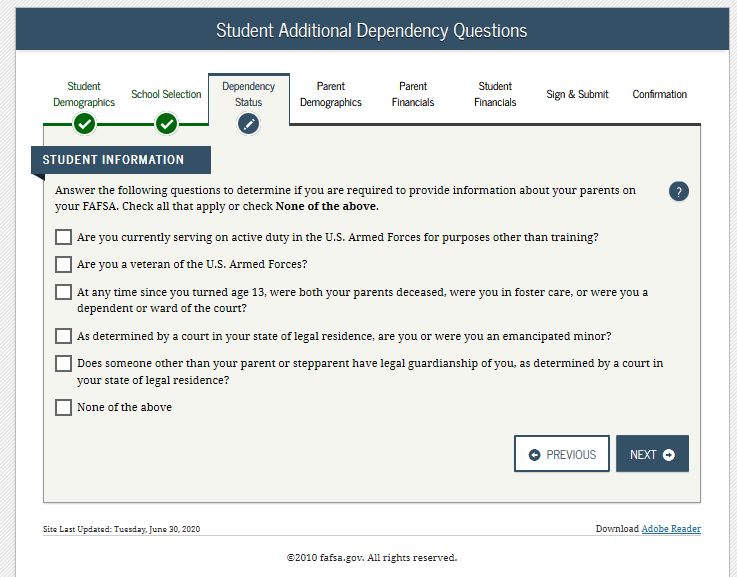
Federal Student Aid ID – FSA ID

What is an FSA ID?
The FSA ID is a username and password used to log into various U.S. Department of Education
websites. The FSA ID also acts as your legal signature when completing the FAFSA- the Free
Application for Federal Student Aid. You will use the same FSA ID each year that you complete the
FAFSA.
Each student must create an FSA ID. If parent information is required on the FAFSA, one parent will
also need to create an FSA ID to electronically sign the student’s FAFSA.
Note: A student and a parent cannot share an FSA ID. When created, the FSA ID is associated with
your social security number and name and therefore cannot be shared. Also, if you have already
created an FSA ID before, you will not be able to create a new one.

How do I create an FSA ID?
   1. Go to studentaid.gov and click on “Create Account”. Click “Get Started” on the next page.

   2. Enter your personal information – name, date of birth, and social security number. Be sure to
      enter this information accurately and exactly as it appears on your social security card.

   3. Create a username, enter your email address, and create a password. Note that an email address
      can only be associated with one FSA ID so two people cannot create an FSA ID using the same
      email address.

   4. Enter your contact information. If you would like to use your phone to recover your account if you
      get locked out, enter your phone number and check the appropriate box. Similar to the email
      address, each phone number can only be associated with one FSA ID.

   5. Choose how you want to receive communications from the US Department of Education.

   6. Select and answer challenge questions. These can be used to reset your account.

   7. Review your information and agree to the terms and conditions.

   8. Verify your mobile phone number (if you provided it) and your email address. You will receive a
      text message and/or an email with a secure code that you must enter.

   9. After creating an FSA ID, you (the student) can go to fafsa.ed.gov, click “Log In”, and choose the
      option to enter your FSA ID to begin completing the FAFSA.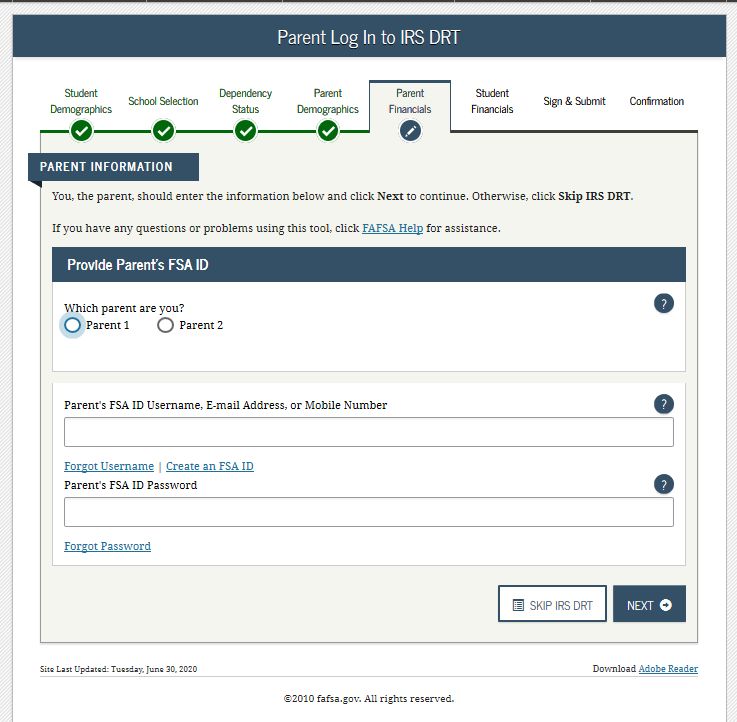
Federal Student Aid ID – FSA ID

Complete this form to keep track of your FSA ID and other required information related to your ID.
This information should be kept confidential and stored in a secure location.

Student Information

Email Address: ___________________________________________________________________
Use an email address you will have access to throughout college. Do not use your high school email.

Username: ___________________________ Password: _________________________________

Challenge Question/Answer 1: _______________________________________________________

Challenge Question/Answer 2: _______________________________________________________

Challenge Question/Answer 3: _______________________________________________________

Challenge Question/Answer 4: _______________________________________________________

Parent Information

Email Address: ___________________________________________________________________

Username: ___________________________ Password: _________________________________

Challenge Question/Answer 1: _______________________________________________________

Challenge Question/Answer 2: _______________________________________________________

Challenge Question/Answer 3: _______________________________________________________

Challenge Question/Answer 4: _______________________________________________________

Save Keys: ______________            _______________         ______________         ________________
*This is used as a secondary password to access the FAFSA application each year. If you have to save the FAFSA
without submitting or if you need to make a correction, you will be required to enter the Save Key. You can use
the same one or create a new one each year.
FAFSA on the Web Worksheet 2020 – 2021
fafsa.gov
Pay attention to any symbols listed after your state deadline.
DO NOT MAIL THIS WORKSHEET. States and territories not included in main listing below:
AL, AS*, AZ, CO, FM*, GA, GU*, HI*, KY^$, MH*, NC^$, ND^$,
NE, NH*, NM, OK^$, PR, PW*, RI*, SD*, UT$*, VA*, VI*, VT^$*,
The FAFSA on the Web Worksheet provides a preview of the questions WA^$, WI and WY*.
that you may be asked while completing the Free Application State Deadline
for Federal Student Aid (FAFSA®) online at fafsa.gov or via the AK
Alaska Performance Scholarship – June 30, 2020 # $
myStudentAid mobile app. Alaska Education Grant ^ $
Academic Challenge – June 1, 2020 (date received)
You must complete and submit a FAFSA form to apply for federal student AR Workforce Grant
Higher Education Opportunity Grant – June 1, 2020 (date received)
aid and for most state and college aid. Write down notes to help you For many state financial aid programs – March 2, 2020 (date postmarked) + *
easily complete your FAFSA form anytime on or after October 1, 2019. For additional community college Cal Grants – September 2, 2020 (date
CA postmarked) + *
See the table to the right for state deadlines. Your application must Contact the California Student Aid Commission or your financial aid
administrator for more information.
be submitted by midnight Central time. Also pay attention to the CT February 15, 2020 (date received) # *
symbols that may be listed after your state deadline. Check with your FAFSA form completed by May 1, 2020 #
high school counselor or your college’s financial aid administrator DC For DCTAG, complete the DC OneApp and submit supporting
documents by May 31, 2020. #
about other deadlines. The Federal deadline is June 30, 2021. DE April 15, 2020 (date received)
FL May 15, 2020 (date processed)
• This Worksheet is optional and should only be completed if IA
July 1, 2020 (date received) – Earlier priority deadlines may exist for
certain programs. *
you plan to use fafsa.gov or the myStudentAid mobile app. ID Opportunity Grant – March 1, 2020 (date received) # *
Refer to the Illinois Student Assistance Commission’s web site for
• Sections in purple are for parent information. IL Monetary Award Program (MAP) renewal deadline. ^ $
Frank O’Bannon Grant – April 15, 2020 (date received)
• This Worksheet does not include all the questions from the 21st Century Scholarship – April 15, 2020 (date received)
IN
FAFSA form. The questions that are included are ordered as Adult Student Grant ^ $ – New applicants must submit additional form.
Workforce Ready Grant ^
they appear on FAFSA on the Web. When you are online, you KS April 1, 2020 (date received) # *
may be able to skip some questions based on your answers to LA July 1, 2021 (July 1, 2020 recommended)
STATE AID DEADLINES
earlier questions. MA May 1, 2020 (date received) #
MD March 1, 2020 (date received)
ME May 1, 2020 (date received)
Applying is easier with the IRS Data Retrieval Tool! MI March 1, 2020 (date received)
MN 30 days after term starts (date received)
Students and parents who have filed their 2018 federal tax return February 3, 2020 # Applications accepted through April 1, 2020 (date
MO
may be able to use the IRS Data Retrieval Tool to easily, accurately received).
and securely transfer their tax information into the FAFSA form. MP April 30, 2020 (date received) # *
MS June 1, 2020 (date received)
MT December 1, 2019 # *
Sign your FAFSA form with an FSA ID! 2019-2020 Tuition Aid Grant recipients – April 15, 2020 (date received)
All other applicants:
NJ
For information about the FSA ID, including how to apply, go to - Fall and spring terms – September 15, 2020 (date received)
- Spring term only – February 15, 2021 (date received)
StudentAid.gov/fsaid. Nevada Promise Scholarship – April 1, 2020 * $
NV Silver State Opportunity Grant ^ $
Your FSA ID allows you to electronically sign your FAFSA form. If you All other aid *
are providing parent information, one parent must also sign your NY June 30, 2021 (date received) *
FAFSA form. To sign electronically, your parent should also apply for OH October 1, 2020 (date received)
an FSA ID. OR
OSAC Private Scholarships – March 1, 2020 *
Oregon Promise Grant – Contact state agency. *
Oregon Opportunity Grant ^ $
Free help is available! All first-time applicants enrolled in a: community college; business/
trade/technical school; hospital school of nursing; designated
PA Pennsylvania Open-Admission institution; or non-transferable two-year
You do not have to pay to get help or submit your FAFSA form. program – August 1, 2020 (date received)
Submit your FAFSA form free online at fafsa.gov. Federal Student Aid All other applicants – May 1, 2020 (date received) *
provides free help online at fafsa.gov or you can call 1-800-4-FED-AID SC
Tuition Grants – June 30, 2020 (date received)
SC Commission on Higher Education Need-based Grants ^ $
(1-800-433-3243). TTY users (hearing impaired) can call State Grant – Prior-year recipients receive award if eligible and apply by
1-800-730-8913. February 1, 2020. All other awards made to neediest applicants. $
TN Tennessee Promise – February 1, 2020 (date received)
State Lottery – Fall term, September 1, 2020 (date received); spring and
summer terms, February 1, 2021 (date received)
NOTES: January 15, 2020 # *
TX Private and two-year institutions may have different deadlines.
PROMISE Scholarship – March 1, 2020. New applicants must submit
WV additional form. Contact your financial aid administrator or state agency.
WV Higher Education Grant Program – April 15, 2020
* Additional forms may be required. ^ As soon as possible after October 1, 2019.
Check with your financial aid administrator. # For priority consideration, submit by date specified.
$ Awards made until funds are depleted. + Applicants encouraged to obtain proof of mailing.
The Federal Student Aid logo and FAFSA are registered trademarks of Federal Student Aid, U.S. Department of Education.
FAFSA.GOV 2020-2021 FAFSA ON THE WEB WORKSHEET PAGE 1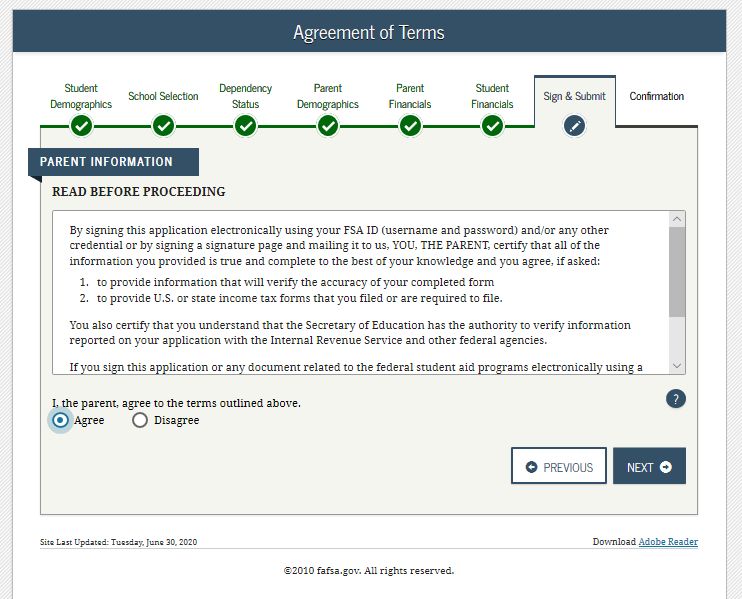
SECTION 1 - STUDENT INFORMATION
  After you are online, you can add up to ten colleges on your FAFSA form. The colleges will receive the information from your
  processed FAFSA form.

 Student’s Last Name 		                                                      First Name                                           Social Security Number

  Student Citizenship Status (check one of the following)
  � U.S. citizen (U.S. national)		           � Neither citizen nor eligible noncitizen
  � Eligible noncitizen (Enter your Alien Registration Number in the box to the right.)			 Your Alien Registration Number

     Generally, you are an eligible noncitizen if you are:
     • A permanent U.S. resident with a Permanent Resident Card (I-551);
                                                                                                                                A
     • A conditional permanent resident with a Conditional Green Card (I-551C);
     • The holder of an Arrival-Departure Record (I-94) from the Department of Homeland Security showing any of the following designations: “Refugee,” “Asylum
        Granted,” “Parolee” (I-94 confirms paroled for a minimum of one year and status has not expired), T-Visa holder (T-1, T-2, T-3, etc.) or “Cuban-Haitian Entrant;” or
     • The holder of a valid certification or eligibility letter from the Department of Health and Human Services showing a designation of “Victim of human trafficking.”

 Student Marital Status (check one of the following)
  � Single		 � Married or remarried		                                          � Separated			 � Divorced or widowed
 You will be asked to provide information about your spouse if you are married or remarried.

 Selective Service Registration
 If you are male and 25 or younger, you can use the FAFSA form to register with the Selective Service System.

 What is the highest school parent 1 completed? � Middle school/Jr. high		                                                            � College or beyond
 								 � High school			                                                                                                            � Other/unknown

 What is the highest school parent 2 completed?		 � Middle school/Jr. high		                                                          � College or beyond
 								 � High school			                                                                                                            � Other/unknown

  SECTION 2 - STUDENT DEPENDENCY STATUS
 If you can check ANY of the following boxes, you will not have to provide parental information. Skip to page 4.
 If you check NONE of the following boxes, you will be asked to provide parental information. Go to the next page.
 � I was born before                        � I am married                              � I will be working on a master’s or doctorate program (e.g., MA, MBA,
   January 1, 1997                                                                        MD, JD, PhD, EdD, graduate certificate)

 � I am serving on active duty in           � I am a veteran of the U.S. Armed          � I now have or will have children for whom I will provide more than half
   the U.S. Armed Forces                      Forces                                      of their support between July 1, 2020 and June 30, 2021

 � Since I turned age 13, both of           � I was in foster care since turning        � I have dependents (other than children or my spouse) who live with
   my parents were deceased                   age 13                                      me and I provide more than half of their support

 � I was a dependent or ward of             � I am currently or I was an                � I am currently or I was in legal          � I am homeless or I am at risk of
   the court since turning age 13             emancipated minor                           guardianship                                being homeless

     NOTES:

For Help — 1-800-433-3243                                                                                          2020-2021 FAFSA ON THE WEB WORKSHEET                 PAGE 2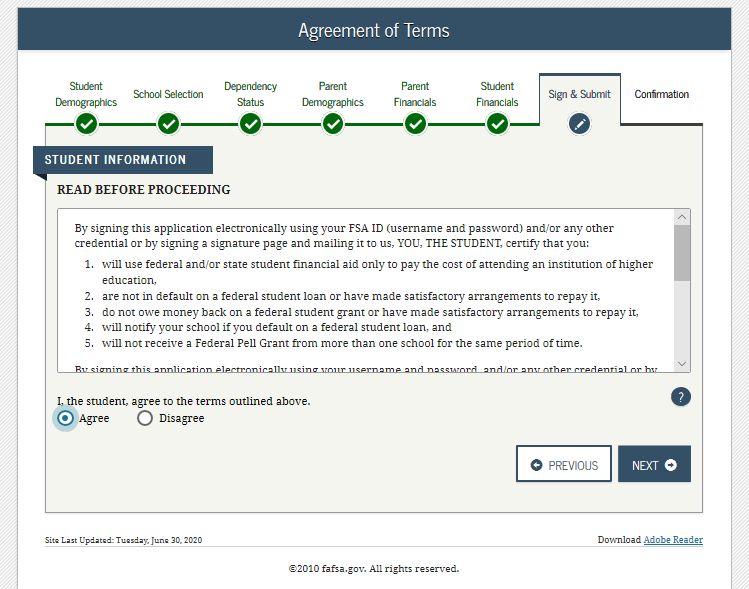
SECTION 3 - PARENT INFORMATION
  Who is considered a parent?
  “Parent” refers to a biological or adoptive parent or a person determined by the state to be a parent (for example, if the parent is listed on the birth
  certificate). Grandparents, foster parents, legal guardians, older siblings, and uncles or aunts are not considered parents on this form unless they
  have legally adopted you. If your legal parents are living and married to each other, answer the questions about both of them. If your legal parents
  are not married and live together, answer the questions about both of them. In case of divorce or separation, give information about the parent
  you lived with most in the last 12 months. If you did not live with one parent more than the other, give information about the parent who provided
  you the most financial support during the last 12 months or during the most recent year you received support. If your divorced or widowed parent
  has remarried, also provide information about your stepparent.

  Providing parent 1 information? You will need:                                Providing parent 2 information? You will need:
  Parent 1 (father/mother/stepparent) Social Security Number                    Parent 2 (father/mother/stepparent) Social Security Number
  Parent 1 (father/mother/stepparent) name                                      Parent 2 (father/mother/stepparent) name
  Parent 1 (father/mother/stepparent) date of birth                             Parent 2 (father/mother/stepparent) date of birth
    � Check here if parent 1 is a dislocated worker                                � Check here if parent 2 is a dislocated worker

  Did you know?                                                       Did your parents file or will they file a 2018 income tax return?
  If your parents file a federal tax return, they may be able to
  use the IRS Data Retrieval Tool. This tool enables your parents           � My parents have already completed a tax return
  to easily, accurately and securely transfer their tax return              � My parents will file, but have not yet completed a tax return
  information into the FAFSA form.
                                                                            � My parents are not going to file an income tax return

  What was your parents’ adjusted gross income for 2018?
  Skip this question if your parents did not file taxes. Adjusted gross income is on IRS Form 1040—line 7.                    $

  The following questions ask about earnings (wages, salaries, tips, etc.) in 2018. Answer the questions whether or not a tax return was
  filed. This information may be on the W-2 forms or on the IRS Form 1040—line 1 + Schedule 1—lines 12 + 18 + Schedule K-1 (IRS Form
  1065)—Box 14 (Code A).
  How much did parent 1 (father/mother/stepparent) earn from working in 2018?                                                 $

  How much did parent 2 (father/mother/stepparent) earn from working in 2018?                                                 $

  In 2018 or 2019, did anyone in your parents’ household receive: (Check all that apply.)
  � Medicaid					� Free or Reduced Price School Lunch
  � Supplemental Security Income (SSI)		                      � Temporary Assistance for Needy Families (TANF)
  � Supplemental Nutrition Assistance Program (SNAP)          � Special Supplemental Nutrition Program for Women, Infants, and Children (WIC)
  Note: TANF may have a different name in your parents’ state. Call 1-800-433-3243 to find out the name of the state’s program.

  Did your parents have any of the following items in 2018?
  Check all that apply. Once online, you may be asked to report amounts paid or received by your parents.
 Additional Financial Information                           Untaxed Income
 � American Opportunity Tax Credit or Lifetime              � Payments to tax-deferred pension and      � Housing, food and other living allowances
    Learning Tax Credit                                        retirement savings plans                   paid to members of the military, clergy
 � Child support paid                                       � Child support received                      and others
 � Taxable earnings from work-study, assistantships         � IRA deductions and payments to self-      � Veterans noneducation benefits
    or fellowships                                             employed SEP, SIMPLE and Keogh           � Other untaxed income not reported, such
 � Taxable college grant and scholarship aid                � Tax exempt interest income                  as workers’ compensation or disability
    reported to the IRS as income                           � Untaxed portions of IRA distributions and   benefits
 � Combat pay or special combat pay                            pensions
 � Cooperative education program earnings

  Your parents may be asked to provide more information about their assets.
  Your parents may need to report the net worth of their current businesses and/or investment farms.

      NOTES:

FAFSA.GOV                                                                                               2020-2021 FAFSA ON THE WEB WORKSHEET            PAGE 3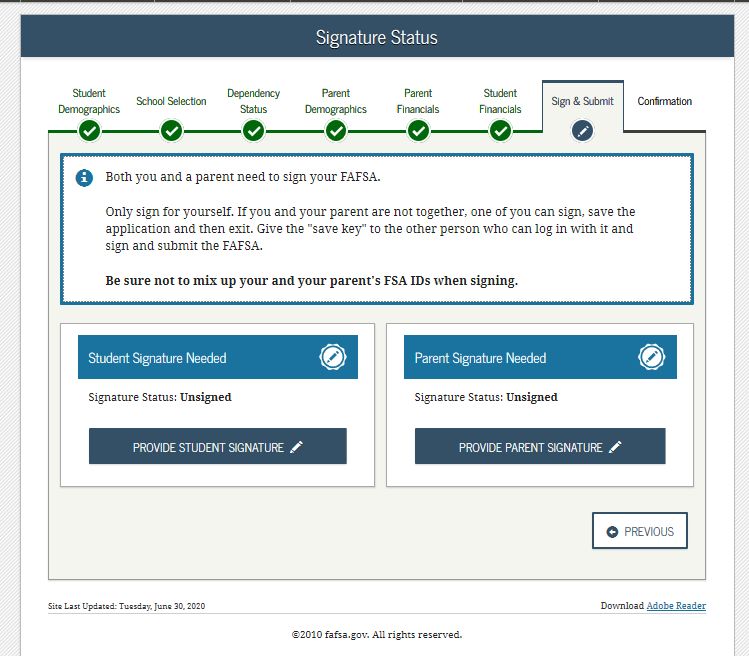
SECTION 4 - STUDENT INFORMATION
  Did you know?                                                                Did you file or will you file a 2018 income tax return?
  If you file a federal tax return, you may be able to use the IRS Data                 � I have already completed my tax return
  Retrieval Tool. This tool enables you to easily, accurately and securely
  transfer your tax information into the FAFSA form.                                    � I will file, but I have not completed my tax return
                                                                                        � I’m not going to file an income tax return

  What was your (and spouse’s) adjusted gross income for 2018?
  Skip this question if you or your spouse did not file taxes. Adjusted gross income is on IRS Form 1040—line 7.           $

  The following questions ask about earnings (wages, salaries, tips, etc.) in 2018. Answer the questions whether or not a tax return was filed. This
  information may be on the W-2 forms or on the IRS Form 1040—line 1 + Schedule 1—lines 12 +18 + Schedule K-1 (IRS Form 1065)—Box 14 (Code A).

  How much did you earn from working in 2018?                                                                              $
            � Check here if you are a dislocated worker
  How much did your spouse earn from working in 2018?                                                                      $
            � Check here if your spouse is a dislocated worker

  In 2018 or 2019, did anyone in your household receive: (Check all that apply.)
  � Medicaid					                                             � Free or Reduced Price School Lunch
  � Supplemental Security Income (SSI)		                      � Temporary Assistance for Needy Families (TANF)
  � Supplemental Nutrition Assistance Program (SNAP)          � Special Supplemental Nutrition Program for Women, Infants, and Children (WIC)
  Note: TANF may have a different name in your state. Call 1-800-433-3243 to find out the name of the state’s program.

  Did you or your spouse have any of the following items in 2018?
  Check all that apply. Once online, you may be asked to report amounts paid or received.
   Additional Financial Information                          Untaxed Income
   � American Opportunity Tax Credit or Lifetime             � Payments to tax-deferred pension and        � Housing, food and other living allowances
      Learning Tax Credit                                       retirement savings plans                     paid to members of the military, clergy
   � Child support paid                                      � Child support received                        and others
   � Taxable earnings from work-study, assistantships                                                      � Veterans noneducation benefits
      or fellowships                                         � IRA deductions and payments to self-
   � Taxable college grant and scholarship aid                  employed SEP, SIMPLE and Keogh             � Other untaxed income not reported, such
      reported to the IRS as income                          � Tax exempt interest income                    as workers’ compensation or disability
   � Combat pay or special combat pay                                                                        benefits
                                                             � Untaxed portions of IRA distributions and
   � Cooperative education program earnings                     pensions                                   � Money received or paid on your behalf

  You may be asked to provide more information about your (and your spouse’s) assets.
  You may need to report the net worth of current businesses and/or investment farms.

      NOTES:

      Do not mail this Worksheet. Go to fafsa.gov to complete and submit your application.
                               For more information on federal student aid, visit StudentAid.gov.
         You can also talk with your college’s financial aid office about other types of student aid that may be available.

For Help — 1-800-433-3243                                                                            2020-2021 FAFSA ON THE WEB WORKSHEET        PAGE 4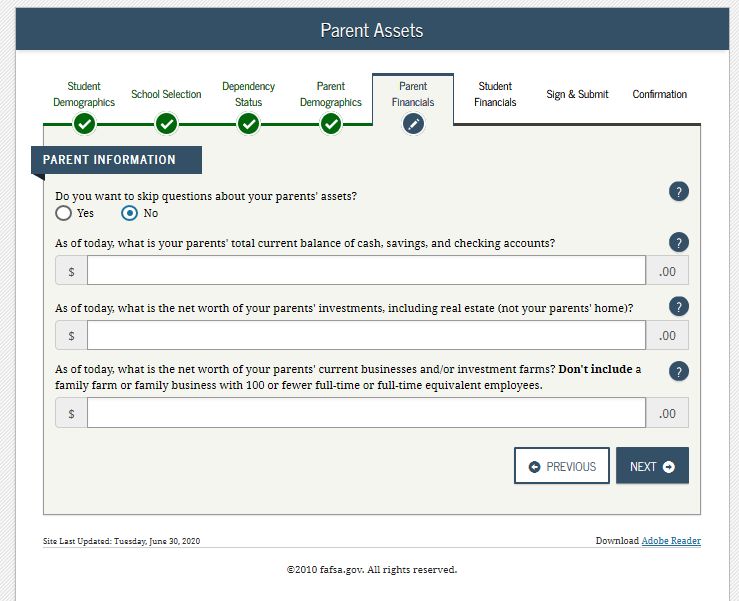
www.fafsa.gov                    DEPENDENT
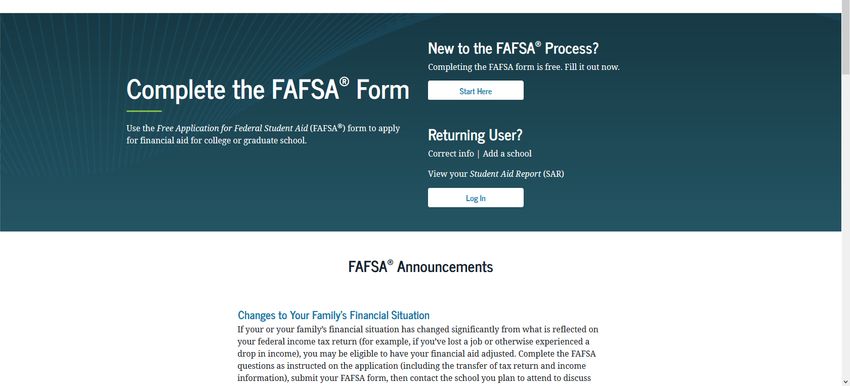
Log in and click “Start Here”.

Click on “I am the student”.
                                             1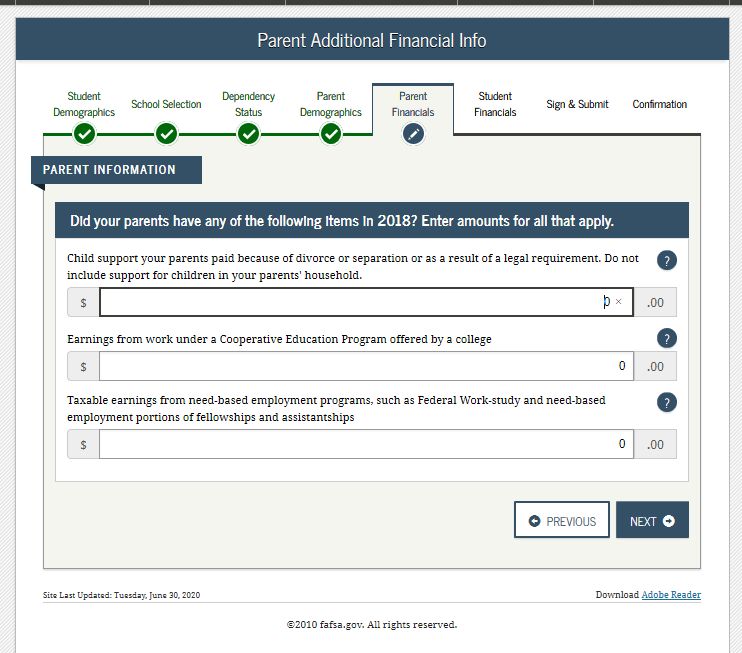
Type in FSA username and Password (If you are a new student and don’t have one, click “Create one” to create
one).

Click “Accept”.

                                                                                                               2
2021-2022 2020-2021
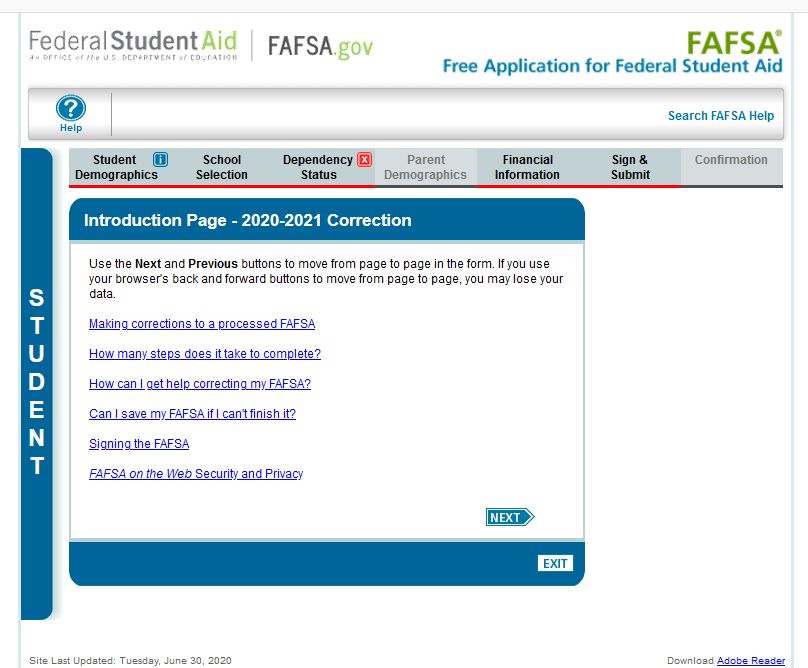
Click on the “2020-2021” tab and click “start Over” or “Continue”.
Create a Save Key (You must remember this safe key IF you don’t submit your FAFSA today) but if you forget, you
just have to enter your zip code. Click “NEXT” when done, then Click “OK”.
3Click “NEXt”.
4Type in your info then click “NEXT”.
5Enter your email address, re-enter your email address, enter your telephone number then click “NEXT”.
Enter your mailing address then click “NEXT”.
6Enter your state of legal residence.
Are you a U.S. citizen? Answer question then click “NEXT”.
7Answer all questions then click “NEXT”.
Check the appropriate box and click “NEXT).
8Enter driver’s license number and state (this is OPTIONAL). Click “NEXT”.
9Enter question and list highest grades Parent 1 (father) and Parent 2 (mother) completed. If you don’t know, use
“Other/Unknown” then click “NEXT”.
Answer questions and then click “NEXT”.
10Search and enter school codes for colleges you want to attend. You can enter up to 10 colleges. If you don’t
know the school code, you can search by school name and state/city. Click “SEARCH”.
11Select box next to name of college from search result. If you have more college to add to your application, click
“ADD MORE SCHOOLS” if you don’t click “NEXT”.
12Select your housing plan then click “NEXT”.
Answer Marital Status question pertaining to YOU then click “NEXT”.
13Answer dependency questions then click “NEXT”.
14Answer what applies to you, if none, check “None of the above” then click “NEXT”.
Answer question then click “NEXT”.
15Click “NEXT”.
16Enter your parent’s marital status and date if necessary then click “NEXT”.
17Enter information for your first parent (typically your father) then click “NEXT” and do the same for your parent 2
(mother) then click “NEXT”.
18Answer questions then click “NEXT”.
Answer questions then click “NEXT”.
19Answer question and check appropriate filing status then click “NEXT”. (It’s best to use DRT-click “LINK TO IRS”.
FSA ID must be used to be able to use DRT.
20Enter parent’s adjusted gross income (AGI), Line 7 of 1040.
Enter income earned from work for parent 1 and parent 2, then click “NEXT”.
21Answer question regarding Schedule 1 then click “NEXT”.
Answer question then click “NEXT”.
22Answer questions then click “NEXT”.
23Answer questions then click “NEXT”.
24Answer questions then click “NEXT”.
Answer “NO’ to parent’s asset, answer following questions then click “NEXT”.
25Answer question then click “NEXT”.
Answer question then click “NEXT”.
26Answer questions then click “NEXT”.
27Answer questions then click “NEXT”.
28Answer “YES” and click “NEXT”.
Select “No” and click “NEXT”.
Application Summary will pop up, review it and click “NEXT”.
29Click on “PROVIDE STUDENT SIGNATURE”.
Read and click “Agree” then click “NEXT”.
30Click “SIGN THIS FAFSA”.
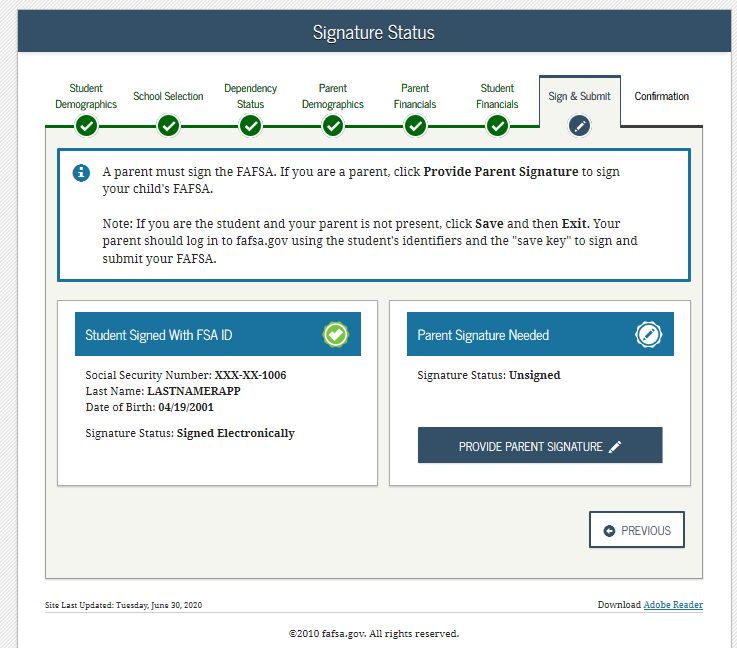
31Click “PROVIDE PARENT SIGNATURE”.
32Select the parent with the FSA ID.
Read, click “Agree” the click “NEXT”.
Enter selected parent’s FSA ID and password to sign FAFSA or click ‘OTHER OPTIONS TO SIGN AND SUBMIT” if they
don’t have one.
33After student and parent signed FAFSA click on “SUBMIT MY FAFSA”.
34You can also read


