ISD J.F. Parnell Elementary - Home Learning Plan 2020-2021 - Jasper ISD
←
→
Page content transcription
If your browser does not render page correctly, please read the page content below
J.F. Parnell
Elementary
Home Learning Plan

      ISD

      2020-2021
Parnell Elementary
Mission Statement & Guiding Principles
The Mission of Parnell Elementary is to provide an excellent education for all students.
The vision of Parnell Elementary, in partnership with families and the community, is to
inspire, nurture, and empower students to achieve their full potential.

 *2020-2021 Home Learning will not mirror Spring 2020 Home Learning. *

Parents will be able to choose face to face learning or asynchronous learning (home
learning) for their student(s) for the 2020-21 school year.
Asynchronous instruction refers to instruction in which students receive instruction
and complete assignments remotely. Instruction is designed to meet the needs of the
students based on grade level and content area. Engagement is addressed in the section
entitled “Campus Norms and Expectations.” JISD will conduct most Home Learning
(HL) asynchronously.
*Please note that, while in the asynchronous plan, instruction is delivered remotely, dependent upon the
course, students may be required to take assessments and/or complete tasks in a designated location
within the district

Learning Management System(S)*
4th &5th:        Google Classroom
*Learning Management Systems subject to change

Methods of Implementation
Parnell leadership will collect data via online registration and deploy staff based on the
number of students participating in F2F and HL. Google Classroom will be utilized with
all students, both F2F and HL, in order to ensure a smooth transition for staff and
students in the event of a districtwide shutdown.

 JISD has ordered devices for each student; however the devices will not be available until after the beginning of
 the school year. Until the devices are received, students participating in HL will have to use devices that are
 available in the home. (In the event this is not possible, paper packets will be provided as a last resort; however,
 paper packets do not provide the richness and depth of online instruction. Paper packets will have to be picked up
 at child’s campus and returned to the campus. No packets will be mailed.)

Updated: 8/3/2020                                                                                                       2
2:00pm
Parnell Elementary Plans for Learning
                                 Learning Plan A                              Learning Plan B
                              Face-To-Face Learning                    Asynchronous Online Instruction
Teachers will:        Receive required safety training                 Monitor student progress through: Google
                      Wear masks                                       classroom, email, phone calls, etc.
                      Observe student health                           Plan ahead, but offer flexible arrangements
                      Maintain safety protocols                        Be available during conference times for
                      Keep doors open                                  Google Hangouts Meets, provide
                      Record lessons                                   assignments that are a reasonable amount
                                                                       with reasonable rigor and clear instructions

Support Staff will:   Sanitize often                                   Work with teachers to assure students are
                      Wear masks                                       being served, including helping with
                      Know student boundaries                          attendance and verification.
                      Limit movement                                   Modify assignments as needed

Students will:        Wear masks                                       Plan ahead and adhere to learning schedule
                      Respect boundaries                               Communicate needs and questions
                                                                       Maintain a work log/schedule
                                                                       Engage in any training to utilize the
                                                                       Chromebook/Google classroom
                                                                       Complete assignments on time and Adhere
                                                                       to due dates

Parents will:         Limit school visits and wear masks when          Monitor student engagement
                      present                                          Join students in training activities
                      Provide current contact information              Maintain a schedule and space for
                      Proactively communicate with staff about         productive student work
                      student health                                   Ensure that attendance check-ins occur in a
                                                                       timely fashion

Daily Time            Procedures for traditional school will be        Maintain a daily schedule
Requirement:          adhered to with modifications, including lunch   Check – in to verify attendance
                      in classrooms.                                   Log into Google classroom and complete the
                      Formal restroom schedule to limit hallway        day’s assignment
                      exposure

Attendance:           Regular attendance procedures will be in place   Will be required to log in at specific times to
                                                                       verify attendance (by 1: oo pm.)

Training Support:     Eduhero                                          Google classroom training provide by
                      Chromebooks training (once devices are           teachers via recorded videos and scripted
                      available)                                       lessons
                      Google classroom training

Technology:           SD cards for staff                               Chromebooks (once devices are available)
                      Chromebooks for students (once devices are       Google classroom
                      available)
                      Individual headphones for students

Communication:        Virtual open house                               Communication with teacher via Skyward,
                      Recorded sessions available on social media      Google Hangout Meets, phone calls, email,
                      Call line for questions: technology              etc.

Additional            Morning and afternoon
Procedures:             4th grade in gym with social distancing
                           seating in place
                        5th grade in the cafeteria with social
                           distancing in place
                      Restrooms will be scheduled, one class at a
                      time

Updated: 8/3/2020                                                                                                   3
2:00pm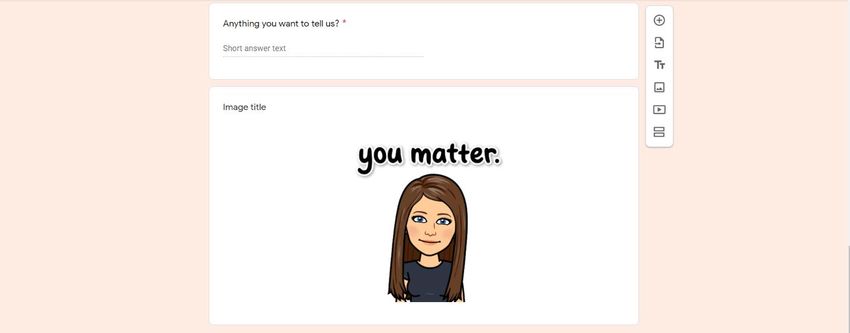
Material Design
Parnell staff will implement TEKS Resource System, Texas Home Learning 3.0 and
other TEKS-based materials to support student instruction. The sources ensure
alignment is maintained and teachers are adhering to standards for each content area
and grade level. Student understanding of the content and mastery of the standards will
be monitored in accordance with the district assessment calendar. To ensure coherence
and continuity, Parnell will utilize each resource in the following way:
 Resource            Primary Use in Material Design
 Texas Home          For adopted grade levels and content areas, THL 3.0 will serve as the primary
 Learning 3.0        instructional materials for both in-person and remote learning. JISD will
                     leverage THL 3.0 materials in the order of the provided module/unit scope and
                     sequence.
 TEKS Resource       JISD will use the Vertical Alignment and TEKS Clarification tools from TRS to
 System              support teacher content knowledge development through professional
                     development prior to the start of each new THL module/unit.

                     JISD will use the Gap Implementation Tool from TRS to identify potential
                     unfinished learning gaps that can be addressed and insert additional prerequisite
                     lessons into the THL scope and sequence as needed and as appropriate for the
                     order of the content.

                     JISD will use the TRS Year at a Glance and Instructional Focus documents for
                     content areas for which we are not adopting THL.
 Other TEKS-         JISD will leverage other TEKS-based, state-adopted instructional materials
 based               primarily for grade levels and content areas that do not have THL 3.0 offerings,
                     or for which we have chosen not to adopt THL 3.0. In addition, JISD will
 instructional       leverage other TEKS-based, state-adopted instructional materials to support
 materials           addressing unfinished learning within the THL scope and sequence and as
                     personalized digital learning tools.

Progress Monitoring & Feedback
Feedback will be provided via Skyward, Google Classroom, and other learning platforms
designated by each subject area, such as Achieve3000. Those with no internet access
will receive feedback via phone conferences and return of paper packets. At minimum,
feedback will be provided weekly to HL students. Both HL and F2F students will receive
three-week progress reports and report cards at the end of each grading period via
Family Access. If you would like a hard copy, it may be requested by contacting Mrs.
Vargas at 384-2212 ext.115.

Office Hours

Each teacher will have Office Hours in which to provide feedback and support to
students and parents. Please contact the school’s front office to schedule a conference in
person or virtually with your student(s) teacher.

Updated: 8/3/2020                                                                                   4
2:00pm
Instructional Materials

                                                Science
 Instructional    Grade        TEKS      What resources are            What resources are               Print or Online
 Materials/       Level(s)     aligned   included to support           included to support              Instructional
                                         students with                 ELs?                             or Data Tool
 Assessment                              disabilities?

 Texas Home       Elementary   Yes       The product includes          The product includes built-in    Print and Online,
 Learning 3.0     Secondary              built-in supports for         supports for ELs in each         Instructional Tool
                                         students with disabilities    lesson. For elementary, the
                                         in each lesson.               product is in both English
                                                                       and Spanish.

 TEKS Resource    Elementary   Yes       This tool helps teachers      This tool helps teachers         N/A (teacher
 System: Gap      Secondary              identify gaps and adjust      identify gaps and adjust         planning tool only)
 Implementation                          based on student needs.       based on student needs.
 Tool

 Science Fusion   Elementary   Yes       Teacher’s discretion to       Teacher’s discretion to          Print
                                         support students and          support students and modify
                                         modify the resource on a      the resource on a student by
                                         student by student basis      student basis according to
                                         according to IEPs, 504        IEPs, 504 Plans, etc.
                                         Plans, etc.

 STAAR interim    Elementary   Yes       Supports available, based     Supports available, based on     Online
                                         on IEPs, 504 Plans, etc.,     IEPs, 504 Plans, etc., to read
                                         to read questions and         questions and answers,
                                         answers, highlight text,      highlight text, mark-up the
                                         mark-up the text,             text, calculator, etc.
                                         calculator, etc.

 BrainPOP         Elementary   No        Teacher’s discretion to       Teacher’s discretion to          Online
                                         support students and          support students and modify
                                         modify the resource on a      the resource on a student by
                                         student by student basis      student basis according to
                                         according to IEPs, 504        IEPs, 504 Plans, etc.
                                         Plans, etc. The videos
                                         make excellent
                                         supplements.

 NWEA MAPs        Elementary   Yes       Used to measure level.        Can assign supports to read      Online
                                         Can assign supports to        questions and answers,
                                         read questions and            highlight text, mark up the
                                         answers, highlight text,      text, etc.
                                         mark up the text, etc.

 Achieve 3000     Elementary   Yes       Achieve Level Set             Achieve Level Set                Online
                                         automatically assigns         automatically assigns
                                         students stories based on     students stories based on
                                         Lexile level. Can add         Lexile level. Can add
                                         supports for reading          supports for reading
                                         questions and                 questions and highlighting
                                         highlighting for individual   for individual learners based
                                         learners.                     on IEPs, 504 Plans, etc.
                                                                       There are pictures with
                                                                       captions available for most
                                                                       stories.

Updated: 8/3/2020                                                                                                      5
2:00pm
Social Studies
 Instructional       Grade        TEKS      What resources are             What resources are               Print or
 Materials/          Level(s)     aligned   included to support            included to support              Online
                                            students with                  ELs?                             Instructional
 Assessment                                 disabilities?                                                   or Data Tool

 Texas Home          Elementary   Yes       The product includes built-    The product includes built-      Print and Online,
 Learning 3.0        Secondary              in supports for students       in supports for ELs in each      Instructional Tool
                                            with disabilities in each      lesson. For elementary, the
                                            lesson.                        product is in both English
                                                                           and Spanish.

 TEKS Resource       Elementary   Yes       This tool helps teachers       This tool helps teachers         N/A (teacher
 System: Gap         Secondary              identify gaps and adjust       identify gaps and adjust         planning tool only)
 Implementation                             based on student needs.        based on student needs.
 Tool

 My World textbook   Elementary   Yes       Teacher’s discretion to        Teacher’s discretion to          Print
                                            support students and           support students and modify
                                            modify the resource on a       the resource on a student by
                                            student by student basis       student basis according to
                                            according to IEPs, 504         IEPs, 504 Plans, etc.
                                            Plans, etc.

 Achieve 3000        Elementary   Yes       Achieve Level Set              Achieve Level Set                Online
                                            automatically assigns          automatically assigns
                                            students stories based on      students stories based on
                                            Lexile level. Can add          Lexile level. Can add
                                            supports for reading           supports for reading
                                            questions and highlighting     questions and highlighting
                                            for individual learners        for individual learners based
                                            based on IEPs, 504 Plans,      on IEPs, 504 Plans, etc.
                                            etc.                           There are pictures with
                                                                           captions available for most
                                                                           stories.

 Texas Daily         4th Grade    Yes       Teacher’s discretion to        Teacher’s discretion to          Print
                                            support students and           support students and modify
                                            modify the resource on a       the resource on a student by
                                            student by student basis       student basis according to
                                            according to IEPs, 504         IEPs, 504 Plans, etc.
                                            Plans, etc.

 BrainPOP            Elementary   No        Teacher’s discretion to        Teacher’s discretion to          Online
                                            support students and           support students and modify
                                            modify the resource on a       the resource on a student by
                                            student by student basis       student basis according to
                                            according to IEPs, 504         IEPs, 504 Plans, etc.
                                            Plans, etc. The videos
                                            make excellent
                                            supplements.

 STAAR interim       Elementary   Yes       Supports available, based      Supports available, based on     Online
                                            on IEPs, 504 Plans, etc., to   IEPs, 504 Plans, etc., to read
                                            read questions and             questions and answers,
                                            answers, highlight text,       highlight text, mark-up the
                                            mark-up the text, etc.         text, etc.

 NWEA MAPs           Elementary   Yes       Used to measure level. Can     Can assign supports to read      Online
                                            assign supports to read        questions and answers,
                                            questions and answers,         highlight text, mark up the
                                            highlight text, mark up the    text, etc.
                                            text, etc.

Updated: 8/3/2020                                                                                                          6
2:00pm
Math
Instructional Grade TEKS What resources are What resources Print or Online
Materials/ Level(s) aligned included to support are included to Instructional
students with support ELs? or Data Tool
Assessment disabilities?
Texas Home Elementary Yes The product includes built-in The product includes Print and Online,
Learning 3.0 Secondary supports for students with built-in supports for Instructional Tool
disabilities in each lesson. ELs in each lesson. For
elementary, the
product is in both
English and Spanish.
TEKS Resource Elementary Yes This tool helps teachers This tool helps teachers N/A (teacher
System: Gap Secondary identify gaps and adjust identify gaps and planning tool only)
Implementation based on student needs. adjust based on
Tool student needs.
Go Math! Elementary Yes Teacher’s discretion to Teacher’s discretion to Print
support students and modify support students and
the resource on a student by modify the resource on
student basis according to a student by student
IEPs, 504 Plans, etc. basis according to
IEPs, 504 Plans, etc.
Wowzers! Elementary Yes Students are assigned tasks Students are assigned Online
based on their MAPs RIT tasks based on their
score and progress through MAPs RIT score and
the program. progress through the
program.
BrainPOP Elementary No Teacher’s discretion to Teacher’s discretion to Online
support students and modify support students and
the resource on a student by modify the resource on
student basis according to a student by student
IEPs, 504 Plans, etc. The basis according to
videos make excellent IEPs, 504 Plans, etc.
supplements.
Discovery Elementary No Teacher’s discretion to Teacher’s discretion to Online
Education support students and modify support students and
Secondary the resource on a student by modify the resource on
student basis according to a student by student
IEPs, 504 Plans, etc. basis according to
IEPs, 504 Plans, etc.
STAAR interim Elementary Yes Supports available, based on Supports available, Online
IEPs, 504 Plans, etc., to read based on IEPs, 504
questions and answers, Plans, etc., to read
highlight text, mark-up the questions and answers,
text, calculator, etc. highlight text, mark-up
the text, calculator, etc.
NWEA MAPs Elementary Yes Used to measure level. Can Can assign supports to Online
assign supports to read read questions and
questions and answers, answers, highlight text,
highlight text, mark up the mark up the text, etc.
text, etc.
Updated: 8/3/2020 7
2:00pmELAR
Instructional Grade TEKS What resources are What resources are Print or Online
Materials/ Level(s) aligned included to support included to support Instructional
students with ELs? or Data Tool
Assessment disabilities?
Texas Home Elementary Yes The product includes The product includes built-in Print and Online,
Learning 3.0 Secondary built-in supports for supports for ELs in each Instructional Tool
students with disabilities lesson. For elementary, the
in each lesson. product is in both English
and Spanish.
TEKS Resource Elementary Yes This tool helps teachers This tool helps teachers N/A (teacher
System: Gap Secondary identify gaps and adjust identify gaps and adjust planning tool only)
Implementation based on student needs. based on student needs.
Tool
Texas Wonders Elementary Yes Teacher’s discretion to Teacher’s discretion to Print and Online
support students and support students and modify
modify the resource on a the resource on a student by
student by student basis student basis according to
according to IEPs, 504 IEPs, 504 Plans, etc.
Plans, etc.
Achieve 3000 Elementary Yes Achieve Level Set Achieve Level Set Online
automatically assigns automatically assigns
students stories based on students stories based on
Lexile level. Can add Lexile level. Can add
supports for reading supports for reading
questions and questions and highlighting
highlighting for individual for individual learners based
learners. on IEPs, 504 Plans, etc.
There are pictures with
captions available for most
stories.
Gretchen Bernabei Elementary Yes Teacher’s discretion to Teacher’s discretion to Print
support students and support students and modify
modify the resource on a the resource on a student by
student by student basis student basis according to
according to IEPs, 504 IEPs, 504 Plans, etc.
Plans, etc.
Brain Pop Elementary No Teacher’s discretion to Teacher’s discretion to Online
support students and support students and modify
modify the resource on a the resource on a student by
student by student basis student basis according to
according to IEPs, 504 IEPs, 504 Plans, etc.
Plans, etc. The videos
make excellent
supplements.
STAAR interim Elementary Yes Supports available, based Supports available, based on Online
on IEPs, 504 Plans, etc., IEPs, 504 Plans, etc., to read
to read questions and questions and answers,
answers, highlight text, highlight text, mark-up the
mark-up the text, etc. text, etc.
NWEA MAPs Elementary Yes Used to measure level. Can assign supports to read Online
Can assign supports to questions and answers,
read questions and highlight text, mark up the
answers, highlight text, text, etc.
mark up the text, etc.
Updated: 8/3/2020 8
2:00pmSchedule for At-Home Learning
*JISD recognizes that the needs and availability of time is unique to each family. The following schedules
are suggestions only. Each family participating in Home Learning will determine how and when best to
access the instructional activities within the Engagement Guidelines of each campus.
4 Grade
th
7:40-8:00 8:00- 11:00- 11:30- 2:30-
11:00 11:30 2:30 3:30
Monday Daily Math Block Lunch Writing Block Google Hangout w/Teacher
Review
Tuesday Daily Reading Lunch Social Studies/Science Google Hangout w/Teacher
Review Block Block
Wednesday Daily Math Block Lunch Writing Block Google Hangout w/Teacher
Review
Thursday Daily Reading Lunch Social Studies/Science Teachers respond to questions submitted
Review Block Block via email and phone.
Friday Daily Catch-up on week’s assignments…. all assignments due by 11:59 pm each Friday…Teachers
Review provide needed supports for 504, Special Education, ESL, RtI, etc.
5 Grade
th
7:40-8:00 8:00- 11:00- 11:30- 2:30-
11:00 11:30 2:30 3:30
Monday Daily ELAR Block Lunch Science Block Google Hangout w/Teacher
Review
Tuesday Daily Math Block Lunch Social Studies Block Google Hangout w/Teacher
Review
Wednesday Daily ELAR Block Lunch Science Block Google Hangout w/Teacher
Review
Thursday Daily Math Block Lunch Social Studies Block Teachers respond to questions submitted
Review via email and phone.
Friday Daily Catch-up on week’s assignments…. all assignments due by 11:59 pm each Friday…Teachers
Review provide needed supports for 504, Special Education, ESL, RtI, etc.
Google Hangout times will vary by pod and grade level. The schedule will be communicated weekly with parents and students via email
and Google Classroom by Friday at 4:00pm for the upcoming week. Teacher on the student's schedule may not be the teacher
presenting the lesson as staff are collaborating on the design and delivery of Home Learning Materials.
Rotation Classes
Physical Education: Coach Bronson and Coach Diggles will provide videos that will
engage students in physical activity at home. Links to videos will be shared with
students through Parnell’s P.E. Google classroom.
Music: Mrs. Dillahunty will provide videos with engaging Music instruction for
students. Links to videos will be shared with students through her Google classroom.
Library: Mrs. Hoyle will provide a Google classroom with an E-book library for all
students to access.
Updated: 8/3/2020 9
2:00pmAttendance
Parnell student’s attendance will be checked daily. Students will be expected to log into
Google Classroom by 1:00 p.m. to notify school that they are in attendance for the day.
If a student fails to log in by 1:00, a representative from the school will attempt to
contact the parent/student. Truancy guidelines apply for both F2F and HL.
Student Access and Daily Engagement
Students will access assignments (including assessments), projects and communication
through Google Classroom. Students are expected to engage with the instructional
materials each day. All assignments are due by 11:59 pm each Friday.
Student Progress and Engagement
Parnell teachers will administer standards-aligned, leveled pre-assessments to collect
data to be used as a starting point. Using the assessment data, personalized learning
pathways will be developed.
Teachers will use the following resources: NWEA MAP BOY assessments, Texas
Education Agency Beginning of the Year Assessments, Achieve 3000 level set
assessments
Student Interventions
Students demonstrating lack of progress:
Parent contact
Increased instructional support in Google Meets (as needed)
Face-to-face instruction during teacher conference time (scheduled ahead of
time)
Enrichment Resources: Extended activities through Achieve 3000, Wowzers,
Stemscopes, and other teacher resources will be made available to students that are
ready for more challenging instruction.
Ensuring on-campus and virtual support to students, families, and teachers in
both academic and social-emotional areas.
Lesson Design
Parnell Elementary believes that there is no one-size-fits-all approach that will work for
every student, class, subject, or grade level. Instead, we will focus on high-quality
lessons and instruction that are focused on individual student needs and on the state
standards.
Updated: 8/3/2020 10
2:00pmResponse to Intervention The RTI committee will meet on the 1st and 4th week of each six weeks to address students’ academic and/or social emotional concerns based on gathered data. Special Education Protocol: Students with IEPs will continue to receive supports and/or modifications as specified by each student’s individual plan. If a student or parent/guardian has any concerns, they will contact the school and request a call back from the Special Education department. Special Education teachers will design differentiated assignments during PLCs to meet the needs of the IEP for each student they support, whether instruction is virtual or face- to-face. Special Education staff will check in with each parent/child for progress review every other week. If assistance is needed by the parent or student, a phone follow-up call will be scheduled at that time. Family Wellness Check Team Wellness checks will be performed by the teacher if a student has been absent/ not checked in or if the student is having trouble adjusting to the school year. If a pattern emerges, they will be contacted by the Parnell Wellness Check Team, led by Counselor, Bonita Todd. Parnell will be participating in Capturing Kids’ Hearts (CKH) to support the social- emotional growth of all students. CKH activities will be shared virtually with HL students. If you have any concerns about your child’s social emotional needs, please contact Bonita Todd at 384-2212 ext. 108. Family Wellness Check Team is led by Bonita Todd, counselor. Team members: Jasmine Hafford, CIS and Gabriela Carter, Assistant Principal. Updated: 8/3/2020 11 2:00pm
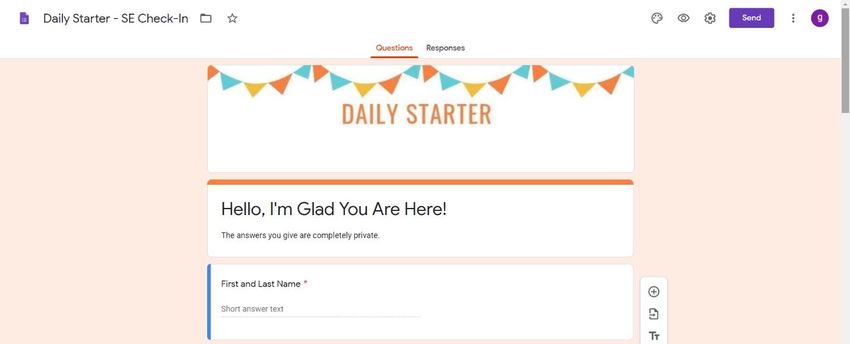
Sample SE Check-in Google Doc

Teachers would be able to gather responses into a spreadsheet. The document can also
be changed to where the student’s responses are entered by the student instead of
choosing a response.

Updated: 8/3/2020                                                                  12
2:00pm
Updated: 8/3/2020   13
2:00pm
Roles and Responsibilities
STUDENTS
Establish daily routines for engaging in the learning process.
Identify a space in home where you can learn and study comfortably.
Establish a daily routine to log into Google Classroom for assignments.
Complete assignments with integrity and academic honesty. Instructions
should be followed and work/thought processes shown (in Math class
specifically).
Communicate with your classroom teachers or school when you need
assistance.
Submit assignments as instructed. All assignments are due by 11:59pm
each Friday that school is in session.
PARENT
Establish partnership with classroom teachers to ensure a smooth
transition with on-campus and remote learning.
Establish routines and expectations.
Assist your student in locating a space in the home that is ideal for
learning.
Monitor communication from teachers and school.
Monitor completion and submission of class assignments.
Take an active role in helping your child process their learning.
Attend (virtually or in person district/campus trainings for
implementation supports.
Use teacher office hours to help strength asynchronous learning.
Contact teacher, administrators, and counselor for additional needs and
supports for student learning.
CONTACT FOR ASSISTANCE
For assistance regarding a course, assignment, or resource:
Relevant classroom teacher
For assistance regarding a technology-related problem or issue:
Reid Smith or JISD Technology Department
For a personal, academic or social emotional concern:
Bonita Todd, Counselor
For other issues related to distance learning:
Pamela Edwards, Campus Principal
Updated: 8/3/2020 14
2:00pmasper
Home Learning Parental Agreement
Parents understand and agree that they will ensure their student(s) follow the at-home
learning plan.
Parents that choose at-home learning understand that internet service/connection must
be available for their students OR parents will be required to pick up and drop off
weekly work each Friday.
School attendance policy will be enforced for at-home learners via completion of the
daily engagement form. Students will be responsible for following their assigned daily
schedule.
Parents will be asked to make a commitment for their student(s) to choose either in-
person or at-home learning. Students will be expected to remain in their chosen option
through at least a 6-week grading period in order to limit scheduling and staffing
complexities.
Grading for the at-home learning plan will follow the district grading policy.
Parents AND students understand and agree that it is their responsibility to contact
their teacher of record if/when a student needs assistance with an assignment. Note:
teacher response may not be immediate, but will be handled in a timely manner.
Parents AND students understand that no extra-curricular activities will be allowed if
enrolled in the at-home learning model, this includes U. I.L.
Printed Parent Name _______________________________
Parent Signature __________________________________
Printed Student Name __________________________________
Student Signature ________________________________
Updated: 8/3/2020 15
2:00pmTechnology Training for Parents & Students We will provide written instructions with a video component on: How to log in to Google classroom for the first time 1. Go to classroom.google.com and click Go to Classroom. 2. Enter the email address for your Classroom account and click Next. Your email address is: first name.last name@jasperisd.net 3. Enter your password and click Next. 4. Your password is: lunch # Updated: 8/3/2020 16 2:00pm
5. If there is a welcome message, review it and click Accept.

6. If you're using a G Suite for Education account, click I’m A Student or I’m A Teacher.

     Note: Users with personal Google Accounts won’t see this option.

7. Click Get Started.

How to find Google Apps:

1.   Open the Google Play Store app. Note: you can also go to play.google.com.
2.   Search or browse for Google Classroom.
3.   Select Google Classroom.
4.   Tap Install – it’s free!

Updated: 8/3/2020                                                                       17
2:00pm
5. Follow the onscreen instructions to complete the transaction and get the content.
Looks like this
Where to find their Google classrooms
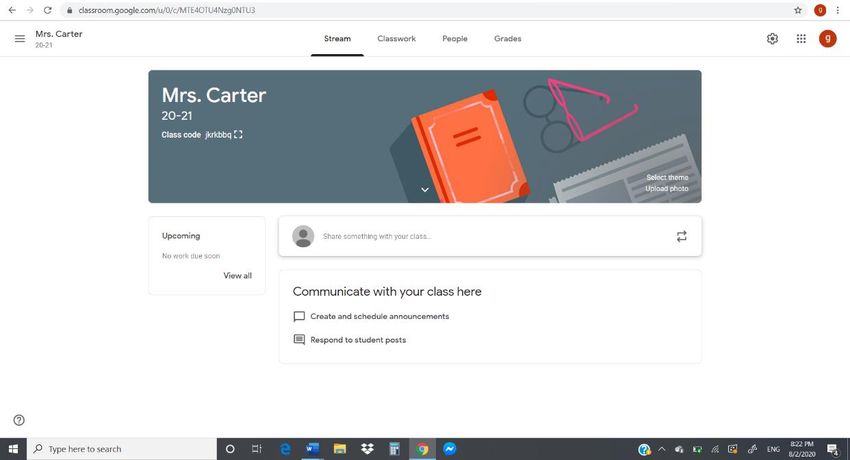
When students log in to Google classroom, they should already see their teachers’
classrooms set up. Click on the class. It will take you to a screen that looks like this.
How to use Google classroom
Under the classroom banner, there will be messages from your teacher. Sometimes it
will just be information, and other times it will be links to activities to complete. When a
teacher posts an activity/worksheet for you to do, you will click on the link. It may give
you the option to save your own copy. Click YES to save your own. Google will
automatically save your document into your Google Drive (it’s like your home directory
or h: drive) – where you save all your documents when you are at school. The really
COOL thing about Google Drive is that you can access it from anywhere!! Any device!!!
Even your smart phone!!!! Once you have completed the assignment, you will “Turn
assignment in” to your teacher by just going back to that assignment and clicking the
appropriate button.
If you have trouble with this, we will have videos posted on the school website very soon
to take you through the process step-by-step.
Updated: 8/3/2020 18
2:00pmYou can also read


