Remote Maintenance, Support, Home Offi ce and Presentations - The friendly All-In-One solution for
←
→
Page content transcription
If your browser does not render page correctly, please read the page content below

More than
                                            10 0 million
                                                users

The friendly All-In-One solution for
Remote Maintenance, Support,
Home Office and Presentations
Simple, fast and secure over the Internet

                                                           1
Simple and fast
    over the Internet
    Control any computer remotely or share your desktop!

                                         The All-In-One solution for any application

                                         While most competitors offer different packages for spontaneous support,
                                         server administration, home office, presentations, meetings, online
                                         training and teamwork, TeamViewer combines all of these modules in a
                                         single, extremely affordable application. You can also find further details in
                                         our meeting brochure or on www.teamviewer.com.

                                         Smooth operation – even behind firewalls

                                         The biggest problems in using remote maintenance software are
                                         generally caused by firewalls, disabled ports and NAT routers for local IP
                                         addresses. When you use TeamViewer, these problems no longer exist:
                                         TeamViewer finds your partner even through firewalls.

    More than 100,000,000 users all
                                         Highest security standards
    over the world rely on TeamViewer!
    When will you join?                  TeamViewer is a very secure solution for remote maintenance. Your
                                         connections utilize completely secured data channels featuring 1024-bit
                                         RSA key exchange and 256-bit AES session encoding.

       Spontaneous support
                                         Much more than competitively priced
       Server administration
                                         TeamViewer‘s pricing is unbeatable. It is sold as an inclusive standalone
       Remote access of unattended
                                         package for a permanent use of the purchased licence. There are no
       computers or servers
                                         monthly or hidden costs, such as service contracts.
       Home office / remote office

       File transfer over the Internet   Simple to install and use

       VPN                               Neither an installation nor administrator rights are required by the
                                         customer; your customer merely runs a small program and you are ready
       Teamwork
                                         to go.
       Presentations / meetings

2
Spontaneous Support
with TeamViewer
You want to provide support effortlessly? We show you how.

        What you do

1       Download TeamViewer to your computer. The full version is
        required to be able to control remote computers. You install
        it by following the instructions of the installation routine and
        subsequently starting TeamViewer.

        What your partner does

2       Ask your partner at the remote computer to download TeamViewer QuickSupport and
        to start it. TeamViewer QuickSupport does not have to be installed and can be executed
        even without Windows administrator rights.

        Establishing a connection

3       Ask your partner for the TeamViewer ID (see image on right). Enter it in the “Partner ID“
        field. Click on “Connect to partner“ and enter the partner‘s password in the next dialog to
        establish the connection.

    Control the remote computer as if you were sitting directly            Spontaneously change the direction at any time if you
    in front of it. This includes the dialogs from the user                want to present your local computer to your customers.
    accounts control of Windows 7®, Vista and Server 2008.
                                                                           Use TeamViewer Manager as the basis for billing your
    Conveniently transfer files from or to the remote                      services. The time and duration of all connections are
    computer – easily via drag & drop.                                     automatically logged.

    Show your corporate design! Offer your own TeamViewer                  You spend a lot of time on the road? Use TeamViewer
    module on your website – together with your company                    Portable, the web-based version or the TeamViewer apps
    logo.                                                                  to help your customers!

                                                                                                                                    3
Server Administration & Remote Office
    Around the clock
    24/7 access to your computers!

                                     Save 100 % with every additional host!

                                     Customary in the market: If you install         TeamViewer: If you licensed
                                     hosts on remote computers that you              TeamViewer, you can install any number
                                     want to reach on a permanent basis,             of hosts and connect with them –
                                     additional costs are generally incurred.        without additional costs!

    Windows system service: Install TeamViewer as a                 Online status: Manage computers in the TeamViewer
    Windows® system service and access remote computers             computers & contacts list so that you can see at any time
    directly after starting Windows and before the Windows          which ones of your computers are online.
    login.
                                                                    Black screen: Deactivate the monitor display and control on
    Remote reboot: Restart computers remotely – even in safe        the remote computer during your TeamViewer session, e.g.
    mode.                                                           when using remote office.

    MSI package: Operating a larger network? Then you can           Windows® authentication: Use Windows logins as an
    distribute TeamViewer Host in your domains using our MSI        alternative to log into the remote computer.
    package.

4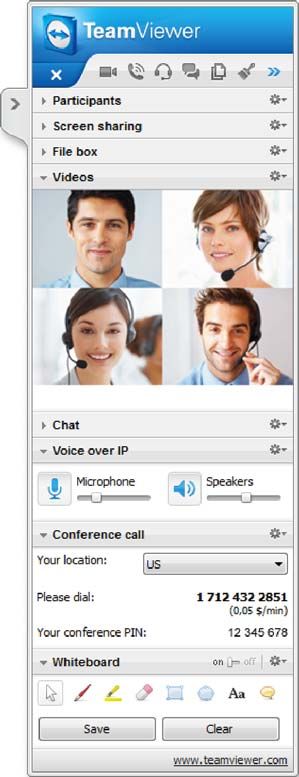
Presentations, Meetings & Teamwork
Visualize your ideas!
Save up your travel costs and time!

Video: Simplify the communication in       Voice over IP: Use Voice over IP to
meetings and create a relationship with    communicate with one another.
customers via the video function.
                                           Application selection: Select the
Conference call: Want to present           application you want to demonstrate
your ideas and call several participants   to your presentation participants. This
at different locations at the same time?   reduces your message to the essential
TeamViewer offers an easy and              information and no confidential
inexpensive solution.                      information (e.g. your e-mail software) is
                                           being transmitted.
Computers & contacts list: In the
TeamViewer computers & contacts list,      QuickConnect: Easily start a
you can always see which one of your       TeamViewer connection directly from
contacts is accessible at any given time   within the software with which you are
– one click with the mouse and you are     currently working to present its image.
connected. Extensive Instant Messaging
on a business level rounds off the team
package.

                                                                                        5
International Top Companies
    trust TeamViewer
    Maximum security and excellent quality

    Secure!
    TeamViewer offers you the best possible quality –
    namely online banking quality. RSA Public/Private
    Key Exchange and AES-256 Session Encoding
    ensure that absolutely no one can view your
    session data. With every start of TeamViewer,
    a new dynamic session password is being
    generated which prevents any permanent access
    for the application Spontaneous Support.

    Excellent quality and speed!
    Worldwide distributed routing servers in combination with intelligent
    routing via local servers make TeamViewer very fast in international use.
    In many cases, the intelligent connection implements direct and fast
    point-to-point connections. Our redundant high-availability network with
    24/7 monitoring ensures very high reliability.

    Certified!
                        Qualitäts-Siegel

                        Bundesverband der
                        IT-Sachverständigen
                        und Gutachter e.V.

6
Excellent Software
at fair prices
You pay only once for permanent use of your license!
TeamViewer combines applications such as remote                      And the best of all: A single purchase with permanent use
maintenance, support, teamwork, home office, online                  and no update requirements. Decide for yourself without
meetings and presentations in a single software.                     any risks, because you will have a 7-day money-back
                                                                     guarantee.

Licensing models                                                        Business          Premium            Corporate
One-time purchase price for long-term use of the purchased license

All-In-One: Support, remote maintenance, home office, teamwork,
presentations and online meetings combined in a single software
For Windows, Mac, Linux, iOS and Android –
incl. cross-platform connections

TeamViewer account with computers & contacts list

Communication tools: VoIP, video, chat, teleconferencing, etc.

File transfer and real VPN channel

Works properly behind firewalls and routers

24/7 remote maintenance of unattended computers / servers

Installation on server operating systems

Multilanguage: TeamViewer is available in more than 30 languages

Customer module does not require installation and can be
individually customized free of charge

Number of licensed workstations from which remote control               1 (expandable
                                                                                             unlimited          unlimited
sessions can be run                                                      installations)
                                                                                                              3 (expandable
Channels: Number of simultaneous remote control sessions                      1                  1
                                                                                                                 channels)

Number of hosts                                                           unlimited          unlimited          unlimited

Outstanding high performance through multichannel routing

Includes TeamViewer Manager, Web Connector, Portable

Includes TeamViewer MSI Package

Priority Support (12 months)

                                                                                                                                 7
TeamViewer overview
    Scope of performance
    Just compare and see for yourself TeamViewer´s range of
    features and performance.

    General Features                              •   Black-screen function: switch the        Meetings / Presentations
                                                      remote computer monitor dark, e.g.
    •   A complete solution for all                   if you do not want anyone to watch       •   Schedule and organize meetings
        scenarios: a single software for              while you are accessing your office
                                                                                               •   Integration of the meeting dates into
        support, administration, meetings,            PC.
                                                                                                   Outlook
        presentations, teamwork, home             •   Changing sides: simply reverse the
                                                                                               •   Send invitations with corresponding
        office, and training purposes in real         viewing direction during an on-going
                                                                                                   session data via your email client -
        time                                          session.
                                                                                                   easy participation
    •   For Windows, Mac, Linux, iOS and          •   Drag & drop functionality for file
                                                                                               •   Starting meetings is possible even
        Android systems, incl. cross platform         transfers - in both direction, to any
                                                                                                   without participants - for optimal
        connections                                   desired location
                                                                                                   preparation
    •   Works without configuration, even         •   Comprehensive file manager for the
                                                                                               •   Meeting can be started with a click;
        through firewalls and proxy servers           file transfer to and from the remote
                                                                                                   simple and spontaneous
    •   Simple management of your                     computer (including resume function)
                                                                                               •   Detailed rights management:
        connection partners via your              •   Restart of the remote computer and
                                                                                                   differentiate between presenter,
        computers & contacts list with simple         subsequent automatic reconnection -
                                                                                                   organizer and participants; presenter’s
        1-click connections                           even in safe mode
                                                                                                   role can be changed during a meeting.
    •   The presence display in your              •   Remote update possible (update
                                                                                               •   All meeting participants can
        computers & contacts list indicates           TeamViewer version remotely) -
                                                                                                   communicate with each other
        which of your computers and contacts          including automatic reconnection
                                                                                                   interactively via VoIP, video, telephone
        are currently online and available        •   Multi-Monitor Support - flexible             conference, and chat
    •   Instant messaging functionality in the        navigation between multiple monitors.
                                                                                               •   Whiteboard for spontaneous drawings
        computers & contacts list - including         Display multiple remote screens
                                                                                                   during presentations, including several
        group chat and offline messaging              simultaneously on your local screens
                                                                                                   shapes, pens, markers and speech
                                                      (e.g. 2 windows for 2 monitors).
    •   Terminal server support                                                                    bubble, as well as the option of saving
                                                  •   Record remote sessions as videos,            screenshots
                                                      including AVI format converter
                                                                                               •   Make documents available for
                                                  •   Free scaling of remote control window        download during a meeting
    Remote Control                                •   Save individual connection settings      •   Interaction between participants can
                                                      for all future connections to the same       be individually set
    •   Installation as system service possible       computers by group, contact or
        at no additional costs, thereby                                                        •   Individually select the applications you
                                                      computer
        allowing 24/7 access to destination                                                        want to share
                                                  •   Integrated screenshot feature within
        computers. Example: remote server                                                      •   An image of your local screen shows
                                                      the remote control session
        maintenance or administration                                                              you what your participants are
                                                  •   View system information of the               actually seeing during meetings and
    •   Direct LAN connections possible               remote computer
        via TCP/IP even without an Internet                                                        presentations.
        connection                                                                             •   Participants can also take part in
    •   Transfer of special keys (e.g.                                                             meetings from their iOS or Android
        Ctrl+Alt+Del)                                                                              device.
    •   Synchronization of clipboard                                                           •   Viewing presentations / training
                                                                                                   sessions in the browser without
    •   Supports UAC (user account control)                                                        installing software (pure HTML and
    •   Including a true VPN (virtual private                                                      Flash) is also possible
        network) channel – in addition to the
        pure desktop sharing

8
Modules                                      •   Permanent and distinct computer-            •   TeamViewer has been released for
                                                 related IDs for remote control                  use at the banking locations based
•   Customer modules (QuickSupport,              sessions (just like phone numbers;              on the security testing by Fiducia IT
    QuickJoin) can be used without               they do not change with every phone             AG and GAD eG.
    installation, no administrator rights        call either)
    are required                             •   Session-related IDs for meetings,
•   Link the customer module                     to plan and execute computer-               Availability
    (QuickSupport) with your computers           independent meetings
    & contacts list: your partners appears   •   Optional QuickConnect button in all         •   Redundant, distributed high-
    in your computers & contacts list            Microsoft windows, to enable them               availability network
    after opening the customer module,           for spontaneous presentations and           •   Due to many million installations,
    and you can connect to them without          teamwork.                                       possible problems show up
    exchanging ID and password.              •   International keyboard support                  immediately and can therefore be
•   Exchange chat messages via the                                                               corrected immediately.
                                             •   A user interface that is clearly
    customer module (QuickSupport),              arranged, simple and quick to               •   24/7 monitoring of all critical
    even before a connection is                  operate                                         components
    established. Your customers can
    thereby, e.g. report problems            •   User manual and online help
    immediately without needing to           •   Ideal for international use (available in
    contact you via telephone.                   more than 30 languages)
                                                                                             Investment security
•   User-defined exclusion of liability
    (disclaimer) possible in the customer                                                    •   Lifetime licenses – use is possible
    module (QuickSupport), which                                                                 without time restrictions
    the partner must accept prior to a       Performance                                     •   Guarantee of satisfaction of 7 days
    connection
                                             •   In many cases, intelligent connection       •   Internationally and nationally
•   Separate customer module                                                                     renowned customers
    (QuickJoin) for online presentations         enables direct and very fast point-to-
    and meetings for easy use                    point connections.
•   Permanent access to unattended           •   Worldwide distributed routing
    computers/servers (use the free              servers make TeamViewer very fast
    TeamViewer host module).                     in international use.                       Costs / licensing model
•   The customer modules                     •   Intelligent routing via the closest         •   You can support as many customer
    (QuickSupport, QuickJoin, Host) can          server using geolocalization                    computers or servers as you like with
    be visually modified                     •   Connections are even possible in                one license. Hosts do not incur any
•   Web Connector - do you have to               slow environments (ISDN, modem)                 costs.
    carry out critical tasks while you are   •   Display quality and color depth with        •   Only one party in a connection
    on the road (e.g. from the hotel or          intelligent automatic mode                      requires a license, i.e. in a home
    an Internet café while on vacation)?                                                         office use scenario, the licensed
    Simply control remote computers via                                                          office computer can be accessed by
    the web browser without software                                                             any computer you want to use.
    installation (pure HTML and Flash).                                                      •   Single payment: no ongoing costs
•   Portable version: bring your
                                             Security                                            represent an unrivaled attractive
    personally-configured TeamViewer         •   Automatically changing random                   solution.
    along and call up the software, e.g.         passwords allow secure on-time              •   Fair update prices for major release
    directly from a USB stick at any             access                                          changes of main versions - without
    computer.                                                                                    any pressure to upgrade to the new
                                             •   Security in home banking quality
•   TeamViewer Manager – the database            (SSL): RSA public/private key                   version
    application offers extensive options         exchange and AES 256-bit session            •   Free telephone support for license
    for partner management and session           encoding                                        holders
    logging – e.g. for your invoicing.
                                             •   Program options can be protected            •   Delivery of the license key directly
•   Easy distribution of the software and        with a password or changes can be               upon ordering - payment by credit
    the settings in the domain network           explicitly reserved for administrators          card, PayPal, invoice or check
    with the TeamViewer MSI package              only.
                                             •   Blocking unwanted access via the
                                                 blacklist, explicit permission is
                                                 possible via the whitelist
Usability                                    •   Security-oriented company, certified        Friendly
                                                 in accordance with the Quality
•   Start and use it directly, without                                                       •   Telephone consultation and
                                                 Management Standard DIN EN ISO
    configuration                                                                                support via competent TeamViewer
                                                 9001
•   Automatic detection of the proxy                                                             employees, no call centers, no
                                             •   Quality seal of the Federal                     aggressive sales
    configuration/proxy script readouts
                                                 Association of IT Experts and
•   In case of a temporary network                                                           •   Keep-it-simple approach - user-
                                                 Consultants (Bundesverbandes der
    failure, you do not have to call                                                             friendly software management
                                                 IT-Sachverständigen und Gutachter
    up your customer again since                 e.V.) (maximum point score)                 •   Fair price model, incl. right of return
    the connection is automatically                                                          •   Test the software for free, without
                                             •   Software is uniquely identifiable
    reestablished.                                                                               giving any information.
                                                 using code signing from VeriSign

                                                                                                                                           9
USA / Canada
                                                                               Telephone +1 800 951 4573

                                                                               UK
                                                                               Telephone +44 (0)20 809 97265

                                                                               Australia
                                                                               Telephone +61 (0) 8 7325 6900

                                                                               Germany
                                                                               Telephone +49 (0) 7161 60692 50

                                                                               E-mail sales@teamviewer.com

                                                                l
                                                vise you in al
                               d expertly ad                      gy.
                 We gladly an            en sing and  te ch no lo
                            er ni ng lic
               matters conc
                                  Call us!                        u
                                                 ll center – yo
                                   not reach a ca
                    Your call will                directly  w ith
                                       connected
                     will always be                  ecialists.
                                   r TeamViewer sp
                       one of ou

     Experience TeamViewer live
     It only takes two minutes ...
     Call us – we will gladly establish a TeamViewer connection with you
     and in two minutes you will know what our software can do for you!

     Telephone +1 800 951 4573
     Or order TeamViewer from our website on account
     with a full 7-day money-back guarantee.

     www.teamviewer.com

     Address: TeamViewer GmbH | Kuhnbergstr. 16 | 73037 Goeppingen | Germany

10
You can also read


