(Singapore Citizen) ONSITE-ENROLMENT e-GUIDE AY2019
←
→
Page content transcription
If your browser does not render page correctly, please read the page content below
ONSITE-ENROLMENT e-GUIDE AY2019
       (Singapore Citizen)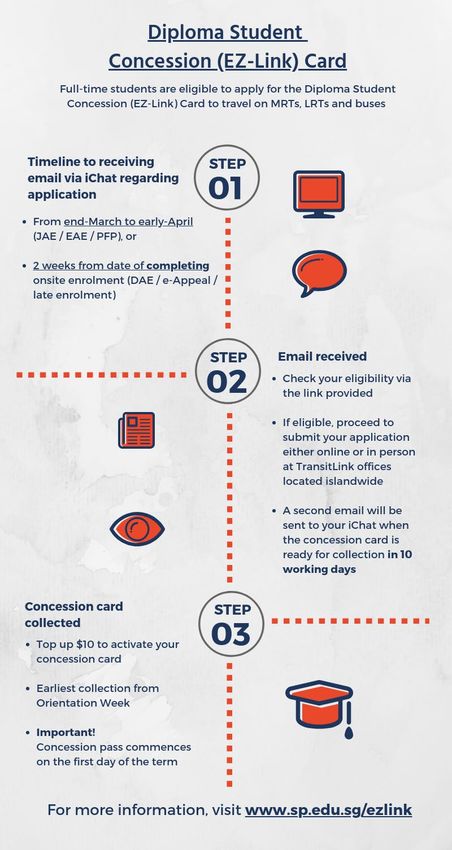
Academic Calendar for AY 2019/2020

Orientation Week (for first-year students only)                    8 Apr - 12 Apr 2019            1 week

Term 1                                                             15 Apr - 31 May 2019           7 weeks

Vacation                                                           1 Jun - 23 Jun 2019            3 weeks

Term 2                                                             24 Jun - 16 Aug 2019           8 weeks

Vacation                                                           31 Aug - 13 Oct 2019           6 weeks

Term 3                                                             14 Oct - 6 Dec 2019            8 weeks

Vacation                                                           7 Dec 2019 - 5 Jan 2020        3 weeks

Term 4                                                             6 Jan - 21 Feb 2020            7 weeks

Vacation                                                           7 Mar - 19 Apr 2020            6 weeks

Vacation -Subject to any polytechnic activities, e.g. internship

Good Friday : 19 Apr 2019                                          National Day : 9 Aug 2019
Labour Day : 1 May 2019                                            Hari Raya Haji : 11 Aug 2019
Vesak Day : 19 May 2019*                                           Deepavali : 27 Oct 2019*
*   The following Monday will be a public holiday.

                                      Enrolment Hotline: 6775-1133

       Monday to Friday: 8.30am to 5.30pm (Excluding Saturdays, Sundays & Public Holidays)

                                                      2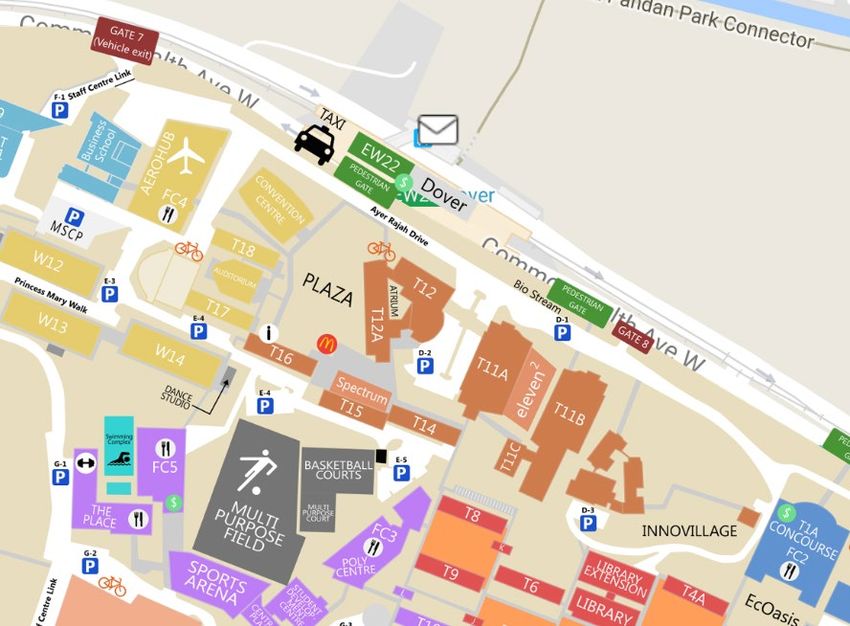
Congratulations!
 You have been offered a place to study in Singapore Polytechnic.
   To accept this offer, you are required to complete the tasks
                   indicated in your Offer Letter

    Please follow this guide to complete your enrolment. This book consists of 2 sections:

          •     Step by step to complete enrolment tasks will guide you to complete the
                enrolment tasks. You need to read this book together with the Offer Letter
                for the DATES to complete the tasks.

          •     Enrolment Information provides the detailed enrolment information that
                you may refer to from time to time when necessary.

Information in this book is correct at the time of publication. SP reserves the
right to discontinue any class, to alter courses, to amend the scale of fees, or
to amend any other information without prior notice. Admission is based on
merit.

                                                3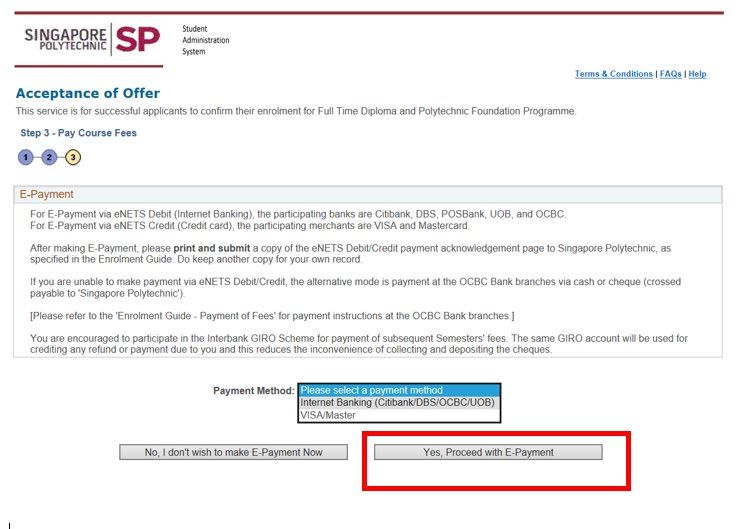
Contents
Academic Calendar for AY 2019/2020 .............................................................................................................. 2
Step by Step to complete enrolment tasks ...................................................................................................... 6
   Enrolment Flowchart 2019 ................................................................................................................................. 6
Task 1 Acceptance of Offer............................................................................................................................ 7

   Step 1          Verify / Provide Your Particulars ..................................................................................................... 7
   Step 2          Create Computer Accounts .............................................................................................................. 8
   Step 3          Pay Course Fees ................................................................................................................................ 9
   Financial Schemes (FS) ....................................................................................................................................... 9
   Online Process .................................................................................................................................................. 10
   Modes of Payment ........................................................................................................................................... 11
Task 2 Go for Colour Vision Test / Medical Examination ............................................................................. 12
Task 3 Submit Documents ........................................................................................................................... 13
   Finance Documents .......................................................................................................................................... 13
   Admissions Documents.................................................................................................................................... 14
Enquiry on Enrolment Status ......................................................................................................................... 15
What’s Next ................................................................................................................................................... 16
Enrolment Information .................................................................................................................................. 17

Conditions of Admission ................................................................................................................................ 18
   1.              The Offer of Admission is Conditional upon the Candidates: ......................................................... 18
   2.              Declaration of Undertaking by Student .......................................................................................... 18
   3.              Declaration of Undertaking by Parent ............................................................................................ 19
   4.              Medical Report / Colour Vision Test Report ................................................................................... 21
   5.              National Service .............................................................................................................................. 21
   6.              Rules and Regulations ..................................................................................................................... 21
Financial Matters for Full Time Diploma Course - Singapore Citizen .............................................................. 22
   1.              How much is the Course Fees? ....................................................................................................... 22
   2.              What are the available Financial Schemes?.................................................................................... 23
   3.              Payment of Fees ............................................................................................................................. 23
Financial Schemes for Full Time Diploma Course-Singapore Citizen ............................................................... 24
   How to Apply for Financial Schemes?............................................................................................................... 24
        1.     Mendaki Tertiary Tuition Fee Subsidy (Mendaki TTFS) ....................................................................... 24
        2.     SkillsFuture Credit (SFC) ...................................................................................................................... 25
        3.     Post-Secondary Education Account (PSEA) ......................................................................................... 26
        4.     CPF Approved Education Scheme (CPF-AES) ....................................................................................... 26

                                                                                 4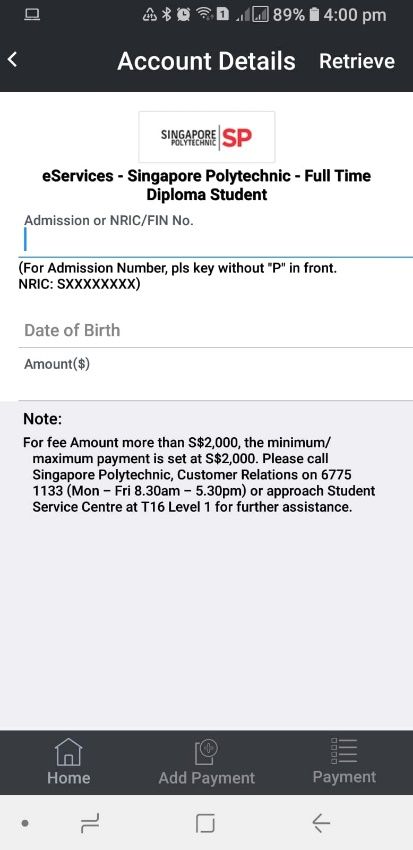
5.     Tuition Fee Loan (TFL) ......................................................................................................................... 28
Interbank GIRO (IBG) ..................................................................................................................................... 29
             30
What is Tuition Grant (TG)? ........................................................................................................................... 31
   How to Apply? .................................................................................................................................................. 31
Financial Assistance @ SP .............................................................................................................................. 32
   1.              Financial Aid for Fees & Living Expenses ........................................................................................ 32
   2.              Financial Aid for Notebook PC ........................................................................................................ 32
SP Notebook PC Scheme ................................................................................................................................ 33
   Overview of the Notebook Configuration Process ........................................................................................... 34
   Allocated Dates of Notebook PC Sales by Courses ........................................................................................... 35
Application for Diploma Student Concession Card ......................................................................................... 36
Withdrawal from Course and Course Transfer ............................................................................................... 37
   Withdrawal from Course .................................................................................................................................. 37
   Course Transfer ................................................................................................................................................ 37
School/Department Directory........................................................................................................................ 38
SP Map 39
Student Service Centre T16 Level 1 ............................................................................................................... 40

                                                                                 5
Step by Step to complete enrolment tasks
                         Enrolment Flowchart 2019
    Please scan QR code or go to www.sp.edu.sg/enrolment for Enrolment details and
    read the eGuide before you proceed to complete the following steps.

                                                             Acceptance of Offer
                                             Complete all 3 steps on the online enrolment
1                                                  (http://enrolment.sp.edu.sg)
                                                           Step 1 Verify / Provide Your Particulars
                                                           Step 2 Create Computer Accounts
                                                           Step 3 Pay Course Fees

                                      Go for Colour Vision Test or Medical
                                                 Examination
                                          This is not required for every student.
                                                                                                       2
                                            Please refer to your Offer Letter.

                                            Finance Documents                 Admissions Documents

3            Submit Documents

         What’s Next - 1                          Optional
                                                  •       Make new friends! Sign up for the Freshmen
         All Students                                     Camp 2019 (http://freshmencamp.sp.edu.sg)
         •   Check Enrolment status
         •   Buy notebook and install software    •
                                                          by 1 March 2019
                                                          Apply for Financial Assistance Schemes
                                                                                                           4
         •   Apply for Diploma Student                    www.sp.edu.sg/financialassistance
             Concession (EZ-Link) Card            International Students Only (compulsory)
                                                  •       Apply for ICA Student’s Pass

                         What’s Next – 2                  All Students
                         •   Go to http://fop.sp.edu.sg for details to attend Freshmen Orientation
                             Programme (compulsory)
5                        •   Refer below for Information on Tuition Grant
                             https://tgonline.moe.gov.sg/tgis/normal/studentViewTuitionGrantSubsidyInfo.
                             action
                         •   Check class timetable
                                                      6
Task 1 Acceptance of Offer
Step 1 Verify / Provide Your Particulars

                                  Visit SP Online Enrolment -
                                  http://enrolment.sp.edu.sg, enter your
                                  Admission No., NRIC / Passport No. and
                                  Birth Date to login

              Select Step 1: Acceptance of Offer

                            Please verify the information on the displayed
                            Name, Citizenship, NRIC / Passport and indicate
                            your changes, if any, in the “Admissions
                            Documents Checklist” (to detach from your Offer
                            Letter).

           Follow the instructions on the screen and enter
           the following information: Personal Data,
           Household details, Contact information,
           Parents’ particulars, Emergency contact,
           Medical conditions and Offences committed
           (please declare, if any).

                                      7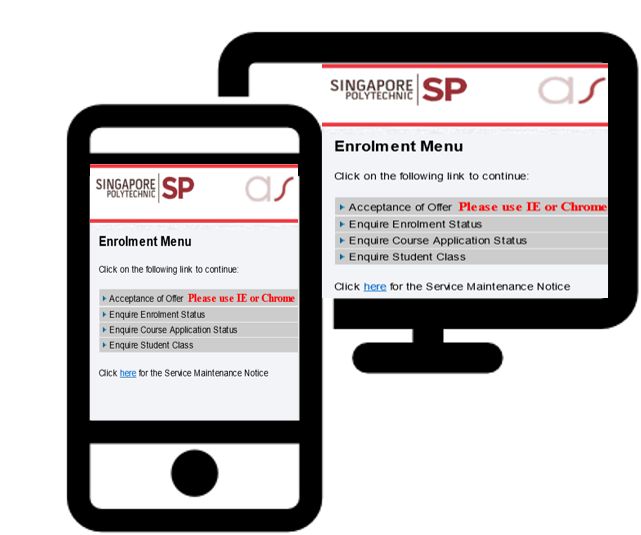
Step 2 Create Computer Accounts

               Visit SP Online Enrolment - http://enrolment.sp.edu.sg,

               Select Step 2: Create Computer Accounts

    This step requires you to:
       1. Create iChat email address
       2. Create the password for your SPICE account
       3. Set a 6-digit Library Pin

                                                               is an account provided by
                                               Microsoft for SP students. All official emails
                                               from SP will be sent to your iChat account. It is
                                               also used to access e-learning system and
                                               PolyMall.

                                                              is a SP computer account that
                                               enables you to access SPICE services provided
                                               by SP.      These services include wireless
                                               network, library, computer labs, etc.

                                                             is required to borrow physical
                                               materials from the Library using the self-check
                                               machine and self-pickup locker. Set your 6-
                                               digit PIN (numbers only) during your SPICE
                                               account creation.

                                           8
Step 3 Pay Course Fees
       Financial Schemes (FS)
FULL-TIME DIPLOMA STUDENT (SINGAPORE CITIZEN)
                                        Tuition Grant (TG)*

              Accept TG
 (Singapore Citizen should accept TG)
                                                                              Reject or Not Eligible
                                                                                     for TG
  You can apply for the following FS:

                             Mendaki Tertiary Tuition Fee
                              Subsidy (Mendaki-TTFS)                         You are not eligible to
                                                                               apply for any FS.
                                   SkillsFuture Credit (SFC)

                                         Post-Secondary
                                        Education Account
                                             (PSEA)

             CPF Approved Education Scheme (CPF-AES)

                               Tuition Fee Loan (TFL)

        Amount ($) will be displayed on the Online Enrolment screen
     * Please refer to the Enrolment Information – What is Tuition Grant (TG) for details.
       View video guide for more information on FS.

                                                        9
Step 3 Pay Course Fees
Online Process
Visit SP Online Enrolment - http://enrolment.sp.edu.sg
Select Step 3: Pay Course Fees
At [Do you want to Accept / Reject Tuition Grant (TG)?], Please select:
Option 2: Reject or Not Eligible
Option 1: Accept TG
for TG
At [Application of Financial Scheme] You are not eligible to apply for
where applicable any financial schemes and
Select [FS] i.e. Mendaki-TTFS, SFC, need to pay the course fees
PSEA, CPF-AES or TFL that you wish to using your own source of
apply funds.
The amount payable will be displayed and you can pay by
Option 1: e-Payment
Option 2: AXS 1
1 AXS Station - one-stop multi-application and interactive self-service terminal
AXS e-Station - payment over the internet
AXS m-Station - payment on Mobile and Tablet devices
10Step 3 Pay Course Fees
Modes of Payment
Option 1
• For E-Nets Debit, you need to have
Internet Banking from Citibank, DBS,
OCBC, POSB, or UOB.
• For E-Nets Credit, you can use Visa or
Master
• Follow the instructions on the screen to
make payment.
Option 2
• Choose “Education” (AXS Station) or “eServices”
(AXS e-Station and m-Station), then “Singapore
Polytechnic”.
• Follow the instructions on the screen to make
payment.
For payment in campus, please proceed to Student Service Centre located at Block T16 Level 1. The payment options are Credit
Card (VISA OR MASTER), Nets, Nets Flashpay, Nets QR code or Money Order/ Cheque. For Cash, please proceed to Finance Counter
located at Administration Building Level 2.
11Task 2 Go for Colour Vision Test / Medical Examination
(only required for selected Groups of students)
Student who is offered
Singapore Citizen Diploma in Nautical Studies (DNS)
Complete Part A of the following form and Complete Part A of the following form and go for
go for Colour Vision Test, if applicable: medical examination:
• MPA Shipping Division Record of Medical
• SP Colour Vision Test Form (Note 1)
Examination of Seafarer, and
• Seafarer Medical Certificate
Option 1 Option 2
Visit one of the clinics listed on the above form. Visit any Medical Practitioner registered in Singapore.
You are required to submit the completed report to Student
Clinic will send the completed report to SP Admissions Office Service Centre @ SP, Block T16 Level 1 or mail to SP
directly. Admissions Office (Note 2)
Should you have any Colour Vision Deficiency or Medical Conditions/Special Needs
that prohibits you from pursuing the offered course, please email to contactus@sp.edu.sg
IMMEDIATELY so that SP may try to arrange for a course transfer.
Email Subject: Colour Vision Deficiency Email Subject: Medical Conditions / Special Needs
Provide: 1. Your Full Name Provide: 1. Your Full Name
2. SP Admission Number 2. SP Admission Number
3. Name of the course offered 3. Name of the course offered
4. Indicate “Partial Colour Vision Deficiency” 4. Give details of your medical conditions /
OR “Complete Colour Vision Deficiency” special needs
Note 1 Students from the following courses are required to undergo a Colour Vision Test.
- Aeronautical Engineering - Chemical Engineering
- Aerospace Electronics - Common Engineering Programme
- Applied Chemistry - Electrical & Electronic Engineering
- Biomedical Science - Food Science & Technology
- Biotechnology - Marine Engineering
Note 2 Mailing Address for SP Admissions Office:
Admissions Office, Singapore Polytechnic, 500 Dover Road, Singapore 139651
12Task 3 Submit Documents
Finance Documents
• Check for your appointment date and time stated in the Offer Letter.
• Refer to the SP map for the location of the Enrolment Centre.
• You are required to complete and bring along the following documents (where
applicable) on your appointment date as stated in your Offer Letter.
Forms can be found in Finance Forms Folder
Finance Documents Checklist (Detach from the Offer Letter)
MOE - PSEA Standing Order Form (for Singapore Citizen)
Interbank GIRO Form
(must be signed, or thumb-printed by account holder(s) & endorsed by the Bank)
Please bring the following Forms / documents if you have applied for any of the following Financial Schemes
Mendaki – TTFS Acknowledgement Email (for Singapore Citizen and Singapore Permanent Resident -
Malay student)
SkillsFuture Acknowledgement Page with status “Your application has been submitted” (for Singapore
Citizen)
CPF – AES Acknowledgement Page with status “Approved in Principle” (for All Nationalities).
Photocopy of endorsed DBS – Tuition Fee Loan Application Form (for All Nationalities).
13Task 3 Submit Documents
Admissions Documents
• Check for your appointment date and time stated in the Offer Letter.
• Refer to the SP map for the location of the Enrolment Centre.
• You are required to complete and bring along the following documents (where
applicable) on your appointment date as stated in your Offer Letter.
Original Certificate(s) / Documents for Verification where applicable
GCE ‘O’ / GCE ‘A’ / IP / IB / GCSE / IGCSE / GCE
SPM /STPM/ UEC / Other qualifications
NRIC / IC (for Singapore Citizen, Singapore Permanent Resident & Malaysian)
Forms can be found in Admissions Forms Folder
Photo/Student’s/Parent’s Declaration Form
Tuition Grant Application Form (for Singapore Citizen)
Tuition Grant Letter (for ex-polytechnic student)
Supporting Documents from you
Photocopy of NRIC / IC - front & back (for Singapore Citizen, Singapore Permanent Resident & Malaysian)
Photocopy of Birth Certificate
Photocopy of Deed Poll for change of name, if any
Completed SP Colour Vision Test Form
(for Singapore Citizen and Singapore Permanent Resident offered selected diploma courses ), if available
Completed MPA Shipping Division, Record of Medical Examinations of Seafarer and MPA Seafarer Medical
Certificate (for all students offered the Diploma in Nautical Studies) if available
14Enquiry on Enrolment Status
Once you have successfully enrolled into your course,
you will collect the Admission Card on the day at the SP
Enrolment Centre.
Please login to http://bit.ly/AcceptAdmissionCard
to acknowledge Receipt of Admission Card after you
have received.
Adm No. Expiry Course
XXXXXXX XX/XX/XXXX DXXXX
Xxx Xxx Xxx
15What’s Next
TIMELINE FOR NEXT ACTIVITIES
01
20 to 23 March 2019
Notebook PC Roadshow
• Please refer to SP Notebook PC Scheme, or visit http://www.sp.edu.sg/notebook for details.
• For enquiry, please call 6775-1133, or email: contactus@sp.edu.sg
02
From end March 2019 (excluding weekends
& Public Holidays
Notebook Software Installation
• Please refer to SP Notebook PC Scheme, or visit http://www.sp.edu.sg/notebook for details.
• For enquiry, please call 6772-1260, or email: ServiceDeskMail@sp.edu.sg
03
From end March 2019
Diploma Student Concession (EZ-Link) Card
• If you wish to apply for the EZ-Link Card, please pay $8.10 at any Transitlink Ticket Office within
2 working days after you received an email from SP.
• Please refer to Application for Diploma Student Concession Card for details.
From 8 April 2019 onwards
04 Class Timetable
Download the SP Mobile v2 app to access the class timetable. Search for “SP Mobile v2”
05 8 to 12 April 2019
Freshmen Orientation Programme (FOP)
• You can check the details of your Freshmen Orientation Programme at http://fop.sp.edu.sg before the FOP
period.
• A Freshmen Orientation pack specially prepared by the Singapore Polytechnic Students’ Union (SPSU) will be
given out during your school’s Welcome / Mass briefing session. If you miss the collection, you may collect it
from your school’s office after the FOP. Please refer to the School/ Department Directory on this e-Guide
for your school’s office location.
16Enrolment Information
(AY2019)
17Conditions of Admission
1. The Offer of Admission is Conditional upon the Candidates:
• Having applied for admission through the proper application procedures
• Having provided the Singapore Polytechnic (SP) with true and accurate information in the
Application / Enrolment Forms
• Submitting to SP the required supporting documents during enrolment
• Not being a student in any other Full-Time or Part-Time course when the semester
commences
• Being physically and medically fit to pursue the course
2. Declaration of Undertaking by Student
All students enrolled into the Singapore Polytechnic have signed a declaration of undertaking in
the enrolment form, as shown below:
2.1 I affirm that all the statements given in this enrolment form are true and accurate to
the best of my knowledge. I have not deliberately omitted any relevant fact. Should I
be admitted to the Singapore Polytechnic (SP) on the basis of the information given
which may turn out to be false or inaccurate, I understand that I will render myself liable
to appropriate action, including civil action, dismissal from course, forfeiture of fees, fine,
and other disciplinary action.
2.2 If accepted, I agree to abide by any / all Polytechnic rules and regulations (available in the
SP Website: http://www.sp.edu.sg/handbook) that are enforced from time to time,
affecting my conduct and study. I am fully aware that failure to do so may result in my
dismissal. If admitted I will behave honourably and endeavour to maintain and raise the
good name of the Polytechnic.
2.3 I understand that my enrolment is subject to my being declared physically / mentally fit
to pursue the course.
2.4 I undertake to absolve SP, its servant and / or agents from any claims arising out of any
injury, loss or damage caused to myself during the period of any training and activity in
the course of my study at SP. I further undertake to indemnify SP against all claims which
may be made against it by reason or in connection with:
(i) Any damage to property whether of the company, an employee of the company,
the student or a third party.
(ii) Any damage, injury, illness, or accident (whether fatal or otherwise) caused
to any person, whether an employee of the company, the student or a third party,
being damage to property, injury, illness, or accident (whether fatal or otherwise)
occurring to any person which is caused by the student or is the direct
consequence of the provision of such facilities mentioned above.
182.5 (For male Singaporean & Permanent Residents who are 19 years old & above as of 01
Jan 2019). I declare that I have checked with the Deferment Office, CMPB, and that I am
eligible to pursue a course in the 2019/2020 academic session. If I am not eligible for
deferment, I will inform Admissions Office (in writing) of my status.
2.6 I understand that any personal data that I provide to SP or that arises or is collected by
SP during my course of study will be treated as Confidential but may be used or disclosed
for the purposes set out below. Such data may include personal particulars, family data,
assessment records, special needs and medical information, sound, video or CCTV
recordings etc. The data could be used or disclosed for the following purposes:
(i) To facilitate the execution of activities by the Polytechnic as an academic institution
in support of my learning journey and will include, but is not limited to, release of
information for the securing of internship / Industrial Training Programme
placements.
(ii) To facilitate the execution of activities by the Polytechnic in dispensing its duties to
ensure the safety and welfare of its staff / students and will include, but is not
limited to, judicious release of information to personal tutors who are charged with
monitoring and caring for students with special needs and / or medical conditions.
(iii) Monitoring of premises and / or persons within premises for security reasons and /
or to regulate student discipline or behaviour.
(iv) For publication in areas that is customary by educational institutions, including but
not limited to awards of prizes, medals, scholarships, and other marks of distinction,
and student or graduation status.
(v) For prescribed evaluative purpose that may include, but is not limited to, evaluation
for admission to institutions of higher learning (e.g. the autonomous universities),
for scholarships / bursaries / loans and other support schemes.
(vi) Shared with government ministries, statutory boards and agencies or external
parties where SP is required to do so by law or in order to fulfil a statutory obligation
or for the purposes of Education and Career Guidance (ECG).
2.7 I understand and accept that SP has the right to withhold the issuance of my diploma and
/ or certificate, in the event that I do not make full payment of any outstanding school
fees, library fines, or any other fines or penalties owed by me to SP.
3. Declaration of Undertaking by Parent
A parent of student under 21 years of age has also signed a declaration of undertaking in the
enrolment form, as shown below:
3.1 I have no objection to my child being admitted to the course conducted by SP.
3.2 I undertake to absolve SP, its servant and / or agents from any claims arising out of any
injury, loss or damage caused to my child during the period of any training and activity
in the course of his / her study at SP.
19I further undertake to indemnify SP against all claims which may be made against it by
reason or in connection with:
(i) Any damage to property whether of the company, an employee of the company,
the student or a third party.
(ii) Any damage, injury, illness, or accident (whether fatal or otherwise) caused to any
person, whether an employee of the company, the student or a third party, being
damage to property, injury, illness, or accident (whether fatal or otherwise)
occurring to any person which is caused by the student or is the direct consequence
of the provision of such facilities mentioned above.
3.3 I understand that any personal data that my child provides to SP or that arises or is
collected by SP during his / her course of study will be treated as Confidential but may
be used or disclosed for the purposes set out below. Such data may include personal
particulars, family data, assessment records, special needs and medical information,
sound, video or CCTV recordings etc. The data could be used or disclosed for the
following purposes:
(i) To facilitate the execution of activities by the Polytechnic as an academic institution
in support of his / her learning journey and will include, but is not limited to, release
of information for the securing of internship / Industrial Training Programme
placements.
(ii) To facilitate the execution of activities by the Polytechnic in dispensing its duties to
ensure the safety and welfare of its staff / students and will include, but is not
limited to, judicious release of information to personal tutors who are charged with
monitoring and caring for students with special needs and / or medical conditions.
(iii) Monitoring of premises and / or persons within premises for security reasons and /
or to regulate student discipline or behaviour.
(iv) For publication in areas that is customary by educational institutions, including but
not limited to awards of prizes, medals, scholarships, and other marks of distinction,
and student or graduation status.
(v) For prescribed evaluative purpose that may include, but is not limited to, evaluation
for admission to institutions of higher learning (e.g. the autonomous universities),
for scholarships / bursaries / loans and other support schemes.
(vi) Shared with government ministries, statutory boards and agencies or external
parties where SP is required to do so by law or in order to fulfil a statutory obligation
or for the purpose of Education and Career Guidance (ECG).
3.4 I understand and accept that SP has the right to withhold the issuance of my child’s
diploma and / or certificate, in the event that my child does not make full payment of
any outstanding school fees, library fines, or any other fines or penalties owed by my
child to SP.
204. Medical Report / Colour Vision Test Report
(Where is applicable, as indicated in the Offer Letter)
Completed form must be received by SP before the commencement of the new academic
session.
Failure to submit your medical report and x-ray result / colour vision test report will result in you
being de-registered from the course.
5. National Service
National Service liable persons are required to apply for deferment from full-time National
Service. Those who are 19 years old and above as at 1 January of the year are to seek deferment
from Deferment Office, Central Manpower Base before they enrol for the course. They must
obtain approval from Deferment Office, Central Manpower Base if they intend to:
• Change the course of study
• Change the institution
6. Rules and Regulations
You are strongly advised to familiarise yourself with the rules and regulations in the student
handbook that is available in the SP website http://www.sp.edu.sg/handbook. When one is
found flouting the rules, ignorance will not be accepted.
21Financial Matters for Full Time Diploma Course - Singapore Citizen
1. How much is the Course Fees?
You must state your citizenship status correctly during enrolment as this will determine the course
fees that you have to pay.
Students who inform SP of their change of citizenship to Singapore Citizen after the
commencement of a semester, will pay the fees for Singapore Citizen with effect from the next
semester.
The Tables below show the Course Fees for Full time diploma course and are subjected to changes
for Academic Year 2019/2020.
Table 1: Annual Course Fees (inclusive of GST) for student who accepts Tuition Grant^
Annual Course Fees Singapore Citizen
Subsidised Fee $ 3,103.00
Other Fees (refer to Table 3) $ 91.09
GST Subsidy on Tuition Fee $ (203.00)
Total $ 2,991.09
Amount to pay before Enrolment for Semester 1* $ 1,541.09
Amount to pay in Semester 2 # $ 1,450.00
Table 2: Annual Course Fees (inclusive of GST) for student who rejects / not eligible for
Tuition Grant^
Annual Course Fees Singapore Citizen
Non subsidised Fee $ 21,721.00
Other Fees (refer to Table 3) $ 91.09
Total $ 21,812.09
Amount to pay before Enrolment for Semester 1* $ 10,951.59
Amount to pay in Semester 2 # $ 10,860.50
Table 3: Breakdown of Other Fees
Breakdown of Other Fees Singapore Citizen
Sports $ 25.68
Insurance $ 3.40
Miscellaneous $ 14.98
Statutory License (CLASS) $ 8.03
Students Union (not subjected to GST):
Entrance $ 5.00
Subscription $ 18.00
Freshmen Orientation Packet $ 16.00
Total Other Fees $ 91.09
* Semester 1 fees include Tuition Fee and Other Fees
# Semester 2 fees include Tuition Fee only
^ Please refer to What is Tuition Grant (TG) for details.
222. What are the available Financial Schemes?
A student who accepts Tuition Grant is eligible to apply for Financial Schemes to pay for the course
fees. You may apply for one or more of the Financial Schemes depending on your financial needs.
Upon approval from the respective authorities, the approved amount will be used to pay for your
course fees in the following sequence:
1st - Mendaki Tertiary Tuition Fee Subsidy (Mendaki TTFS)
2nd - SkillsFuture Credit (SFC)
3rd - Post Secondary Education Account (PSEA)
4th - CPF Approved Education Scheme (CPF-AES)
5th - Tuition Fee Loan (TFL)
View video guide for more information on financial schemes.
Amount to pay for
3. Payment of Fees Semester 1 course fees
during Enrolment
Complete PSEA Standing Order Form S0.00
____________________________________________________________________________________
You may also apply for the following Financial Schemes by 30 April 2019 to pay for your fees. They will
only take effect after the amount in your PSEA is exhausted.
Submit Online $
Application & Print and submit a copy of the Amount will be
supporting acknowledgement email to SP displayed on
documents at Finance Department the Online
MENDAKI Mendaki website: (refer to submit documents) Enrolment
- TTFS www.mendaki.org.sg screen
$
Submit Online Print and submit a copy of the Amount will
Application at acknowledgement page to SP be displayed
SkillsFuture Finance Department on the Online
website: (refer to submit documents )
SFC www.skillsfuture.sg/credit Enrolment
screen
$
Submit Online Print and submit a copy of the Amount will
Application at CPF acknowledgement page to SP be displayed
website: Finance Department
www.cpf.gov.sg
on the Online
CPF - AES (refer to submit documents) Enrolment
screen
1.Complete the TFL $
Application Form Submit a copy of the endorsed
Amount will
2.Visit any DBS Application Form to SP Finance
be displayed
Branch with your Department (refer to submit on the Online
TFL
guarantor for documents) Enrolment
endorsement screen
23SP will send the e-bill to your iChat email account for the remaining amount after the semester has
commenced if:
• your application for Financial Scheme(s) is / are not approved; or
• the approved amount is insufficient to pay for the course fee.
Financial Schemes for Full Time Diploma Course-Singapore Citizen
How to Apply for Financial Schemes?
1. Mendaki Tertiary Tuition Fee Subsidy (Mendaki TTFS)
Tertiary Tuition Fee Subsidy scheme is administered by Yayasan Mendaki. Once approved, the
amount will be used to pay for your Tuition Fee only. You need to pay your Other Fees using your
own source of funds before enrolment.
Eligibility Criteria
• Singapore Citizen - Malay
• Singapore Permanent Resident Malay
• Household Per Capita Income (PCI) less than $2,000
Per Capita Income (PCI) Subsidy
$1,400 and below 100% of Tuition Fee
$1,401 - $1,700 75% of Tuition Fee
$1,701 - $2,000 50% of Tuition Fee
• Details of eligibility criteria please log on to:-
http://www.mendaki.org.sg/mendaki/programmes/educational-assistance/tertiary-
tuition-fee-subsidy-ttfs
Application
• Please log on to http://tfas.mendaki.org.sg/ to make an application. Only online application
will be accepted by Mendaki.
• Submit the acknowledgement page together with other financial documents to SP Finance
Department.
Contact
For further enquiries, you can:
• call Yayasan Mendaki at Tel: 6551 2840
• email to ttfs@mendaki.org.sg
• visit website at
http://www.mendaki.org.sg/mendaki/programmes/educational-assistance/tertiary-
tuition-fee-subsidy-ttfs
242. SkillsFuture Credit (SFC)
SFC is applicable to work-skills related education and training courses to empower
Singaporeans in their learning and development, to deepen and broaden their
skills. Government will provide periodic top-ups, so you may accumulate your credit
which will not expire. SFC can be used on selected courses offered by polytechnics.
Please find the full list of available courses at www.skillsfuture.sg/credit .
Eligibility Criteria
• Singapore Citizen
• Aged 25 and above
Application
• Please log on to http://www.skillsfuture.sg/credit by using your own SingPass
through SFC portal. If you do not have a SingPass account, you may apply at
https://www.singpass.gov.sg/
• You can view a summary of your SkillsFuture credit that is available.
• For more details on claim submission, you may visit
https://www.myskillsfuture.sg/content/portal/en/header/faqs/skillsfuture-credit.html
• Print a copy of acknowledgement page, with Claim ID, Claim Amount and Date
Submitted, after your submission.
253. Post-Secondary Education Account (PSEA)
The PSEA scheme is administered by MOE. If a Singaporean has an Edusave account, the balance
amount will be transferred to PSEA when he is 16 years old or when he leaves Secondary School,
Junior College, Centralised Institute or Vocational Training Center, whichever occurs later.
Your PSEA money can be used to pay for your Course Fees (includes Tuition Fee and Other Fees).
Eligibility Criteria
• Singapore Citizen
Application
• Complete the “Standing Order for Use of the Post-Secondary Education Account” form.
• Submit the completed form to SP Finance Department.
• SP will forward your application to MOE (PSEA) for their approval.
• Once approved, MOE (PSEA) will pay the approved amount directly to SP.
• The closing date for application is 30 April 2019.
Contact
To find out your PSEA balance, you can:
• call MOE Customer Service at Tel: 6260-0777
• email to contact@moe.gov.sg
• visit website at http://www.moe.gov.sg/
To print the Standing Order form, go to PSEA website at
http://www.moe.gov.sg/initiatives/post-secondary-education-account/
4. CPF Approved Education Scheme (CPF-AES)
The CPF-AES is a loan scheme which enables you to use your own, your parents’ or siblings’ CPF
savings from their Ordinary Account. The approved amount will be used to pay for your Tuition
Fee only. You need to pay for your Other Fees before enrolment.
Interest on the CPF savings withdrawn will be computed from the date the CPF savings are
deducted from the CPF member’s Ordinary Account. The interest rate will be pegged at the
prevailing CPF interest rate.
You have to repay the amount withdrawn plus interest, in cash subsequently into your own or
your parents’ Ordinary Account. Repayment commences one year after you graduate or leave the
educational institution.
26Eligibility Criteria
• All Nationalities
You and the CPF member (e.g. parents or siblings) must have SingPass and email
accounts to apply for CPF – AES.
To apply for SingPass, Please refer to www.singpass.gov.sg for details.
Student
Login to CPF website CPF member
(e.g. parents or siblings)
(www.cpf.gov.sg) using your
website (www.cpf.gov.sg)
Login to CPF website (www.cpf.gov.sg) using
SingPass using his /SingPass
her SingPass within 14 days from
his / her within 14 days from the
the date
date of of application to endorse your
to endorse your
application
Go to [my cpf Online Services]:
- select [My Requests]
- select [Education / Dependants’ Student
Education], click [proceed] Login to CPF website using your SingPass
- select [Apply to use CPF for my
education], click [proceed]
- provide details in the online forms Go to [my cpf Online Services]:
- select [My Activities]
- print a copy of the acknowledgement
1. An email will be sent within 2 days page with status “Approved in Principle”
to the CPF member’s email
address provided in your
application for his / her
endorsement Submit the acknowledgement page
• together with other financial documents
•2. If you are using your own CPF to SP Finance Department
savings, no endorsement is
required
• The closing date for application is 30 April 2019.
Contact
For further enquiries on e-application for use of CPF monies, you can:
• call CPF Call Centre at Tel: 1800-227-1188 (Fax: 6229-3243)
• email to education@cpf.gov.sg
• refer to FAQ link
https://www.cpf.gov.sg/Members/Schemes/schemes/other-matters/cpf-education-
scheme
275. Tuition Fee Loan (TFL)
DBS-TFL is a government funded education loan which is administered by DBS Bank. You can apply
up to 75% of the Tuition Fee only. You need to pay for the remaining 25% of the Tuition Fee using
your own source of funds or apply for the CPF-AES scheme before enrolment. You need to pay
your Other Fees before enrolment.
The loan is interest-free during the course of study. You have to repay the loan plus interest,
charged at average prime rate of DBS, OCBC and UOB, after graduation.
Eligibility Criteria
• All Nationalities
Application
• Complete the application.
• Visit any DBS branch (not POSB bank) personally with your guarantor to submit the following
documents:
- Original Application Form
- Offer Letter/Student Card
- Copy of Borrower and Guarantor NRIC/Passport (Validity of Passport as at date of
signing > 6 months)
- Notary Public Stamp if borrower/guarantor is not in Singapore
- Proof of residential address (Student with no account with POSB/DBS at the point of
application)
• Obtain a photocopy of the Bank endorsed loan agreement and submit together with your
enrolment documents to SP Finance Department. Retain a copy of the Bank endorsed loan
agreement for your own record.
• Once approved, DBS Bank will pay the approved amount directly to SP.
• The closing date for application is on 30 April 2019.
Standard Guarantor Requirements
• Guarantor must be above 21 years old and below 60.
• Singapore Citizen (SC) applicants must find a SC to stand in as guarantor. Singapore Permanent
Resident (SPR) and Foreign applicants must find a SC or SPR to stand in as guarantor.
• Guarantor must not be an un-discharged bankrupt.
• A person cannot be guarantor for more than 2 loans unless
Student cannot find another guarantor, and
Guarantor acknowledges that they are aware of the role and financial implications as a
guarantor.
Contact
For further enquiries on application for TFL, you can:
• call DBS customer hotline at: 6333-0033
• email to customerservice@dbs.com
• visit website http://www.dbs.com.sg/sites/personal/loans/tuition-fee-loans/polytechnic/default.page
28Interbank GIRO (IBG)
Payment of Fees for billings After Enrolment
All students are to participate in the IBG Scheme which is an easy and convenient way to
pay your fees. The IBG form is to authorise Singapore Polytechnic (SP) to deduct the fees payable by
you directly from your authorized bank account through GIRO.
The same GIRO account will be used for crediting any refund or payment due to you, which
effectively reduces the inconvenience of collecting and depositing cheques. Refund or payment can
be for any of the following matters:
• Excess payment of fees made by you;
• Scholarships and Bursaries awarded; and
• Any other payment due to you.
If you are applying for any Financial Schemes such as Mendaki-TTFS, SFC, PSEA, CPF –AES and/or
DBS-TFL, you also need to submit this form. As the schemes may not be able to cover your fees
(Tuition and Other fees) in full, the remaining outstanding fees for the 1st semester (if any) and
subsequent semesters will be deducted by GIRO.
Application
• Complete Part I of the “IBG Application Form”. You may use your own/parent’s/guardian’s bank
account.
• Ensure the signature(s) on the Application Form is/are the same as in the bank records.
• For account operated using thumbprint, you have to go to the bank with your identification to
have your thumbprint verified.
• Submit the completed form to Student Service Centre or SP Finance Department.
• SP will forward your application to your designated bank for approval.
• Trust accounts are not eligible for GIRO deduction.
29Interbank GIRO (IBG) - Application Status
You may check the GIRO application status online via Student Mobile @
https://portal.sp.edu.sg/sites/eservices/HomePage.aspx
Select “Finance Matters” > “Giro Account” and Enter “User ID & Password”.
Application Status
Successful Unsuccessful
Notified of the deduction
date via your Ichat email
account in the form of ebill Notified of the rejection
at least 1 week before the reason (by Banks)
Giro deduction date
Ensure sufficient fund is
maintained in the
designated Bank Account Submit a new IBG form
Bank charges are applicable
for unsuccessful deduction
Termination /Change of GIRO account
You are required to submit SP’s “Termination of IBG form” and visit the designated Bank to
terminate your existing IBG arrangement if you do not wish to maintain the record with the Bank.
For change of GIRO account, you are required to submit a new IBG form.
30What is Tuition Grant (TG)?
The Singapore Government subsidises a substantial portion of the total tuition fees payable for your
full-time diploma course at the Polytechnic. This subsidy is known as the Tuition Grant (TG).
TG for full-time diploma programme is capped at maximum allowance of 10 semesters.
For Diploma in Nautical Studies and 2nd-Year Direct entry students, the numbers of semesters that
you will be eligible for TG will be capped at 8 semesters.
Students who have received TG subsidy from any Singapore Government subsidised institution of
Higher Learning, and before graduation, take up a new course at a polytechnic, will be eligible for TG
subsidy for the semesters in their new course less the number of subsidised semesters for which they
had previously enjoyed TG.
Students who have graduated from a Singapore Government subsidised diploma or degree course are
not eligible for Tuition Grant.
For more information on TG, visit
https://tgonline.moe.gov.sg/tgis/normal/studentViewTuitionGrantSubsidyInfo.action
How to Apply?
Singapore Citizens:
Complete the Tuition Grant Eligibility Declaration Form (SG) in the Admissions form folder and submit
it to SP together with your enrolment documents.
31Financial Assistance @ SP
1. Financial Aid for Fees & Living Expenses
Which one to apply?
Eligibility Criteria
Award Application
Schemes
Per Capita Gross Monthly Amount Period
Nationality
Income (PCI)* Income (GHI)
Up to
SP Donors’ Bursary Any ≤ $2,250 OR ≤ $9,000 Apr 2019
$3,000
≤ $690 ≤ $2,750 $2,350
CDC/CCC Bursary Singaporean OR Apr & Oct 2019
$691- $1,000 $2,751 - $4,000 $2,150
$1,001 - $1,725 $4,001 - $6,900 $1,650
Jun – Sep 2019
MOE Bursary Singaporean OR
Nov – Feb 2020
$1,726 - $2,250 $6,901 - $9,000 $800
2. Financial Aid for Notebook PC
Which one to apply?
Eligibility Criteria Award
Application
Schemes Per Capita Gross Monthly Amoun
Nationality Period
Income (PCI)* Income (GHI) t
IMDA Neu PC Singaporean Pay up
≤ $900 OR ≤ $3,400
Plus Programme or PR to $900
Apr – May
Notebook Receive 2019
Subsidy (1st year Singaporean ≤ $1,000 OR ≤ $4,000 up to
students only) $800
*Buy first, then apply for Notebook Subsidy for reimbursement up to $800
Total Gross Monthly Household Income (GHI)
*Monthly Per Capita Income (PCI) =
No. of People Living in Applicant's Household
For details, please refer to SP website (www.sp.edu.sg/financialassistance), scan the
QR code, email the Student Service Centre at contactus@sp.edu.sg or call 6775-1133.
32SP Notebook PC Scheme
You will be using notebook PC during your study at SP, e.g writing reports, researching assignments,
class presentations, project discussions, e-learning, etc.
We have arranged for selected PC vendors to put on a roadshow in SP during 20 - 23 Mar 2019
from 9 am to 6 pm.
If you do not have a notebook PC, visit the roadshow to check out the models at very attractive
prices.
Information on recommended notebook PCs are given in Notebook PC Corner
(http://www.sp.edu.sg/notebook). There you will also find more information for the promotions,
financial assistance scheme and insurance.
You can configure and install software for your notebook PC from home after you have completed
your online enrolment. Please refer to Notebook PC Corner at http://www.sp.edu.sg/notebook for
more details.
33Overview of the Notebook Configuration Process
I have an Configure
Start Yes your Completed Yes Notebook /
existing
notebook Successfully? MacBook is ready
Notebook /
from home by 15 April 2019
MacBook
No No
Purchased a Notebook / Call SPICE Service Desk
MacBook from @ 6772-1260 for help
1. Any Vendors
or
2. SP appointed vendors Yes
at SP Notebook PC Problem Resolved?
Roadshow.
No
Refer to your course recommended Visit SPICE Service Desk
to get help
hardware requirements
Useful Information: Important Dates:
SP Notebook PC Corner Notebook PC Roadshow
• http://www.sp.edu.sg/notebook Date: 20 – 23 Mar 2019
Time: 9:00am to 6:00pm
SP Notebook PC Scheme (Roadshow and Financial Venue: SP Convention Centre, Level 1
Assistance)
• Hotline: 6775-1133 Notebook Software Installation
Available online from End Mar 2019
Notebook Hardware and Software Support
http://www.sp.edu.sg/notebook > under
• Email: ServiceDeskMail@sp.edu.sg Software tab
• Hotline: 6772-1260
Academic Year 2019 (AY2019) starts on 15 Apr
2019. Please ensure that your notebook is ready
before AY2019.
SPICE Training
To help you to get familiar with SPICE
(Singapore Polytechnic Intelligent Computing
Environment), it is recommended that you also
learn from the videos in
http://www.sp.edu.sg/notebook > under
Support tab before AY2019. Then click on the
FAQs link and select SPICE Essentials (Videos)
icon.
34Allocated Dates of Notebook PC Sales by Courses
Please remember to bring your Admission Card/NRIC and SP offer letter for purchase of Notebook PC
Notebook Road Show Dates Courses
20 March 2019 (Wednesday) Accountancy
Architecture
Banking & Finance
Business Administration
Common Business Programme
Common Infocomm Technology Programme
Creative Writing for Television & New Media
Financial Informatics
Human Resource Management with Psychology
Infocomm Security Management
Information Technology
Landscape Architecture
Music & Audio Technology
Polytechnic Foundation Programme
21 March 2019 (Thursday) Aeronautical Engineering
Aerospace Electronics
Bioengineering
Common Engineering Programme
Computer Engineering
Electrical & Electronic Engineering
Food Science & Technology
Games Design & Development
Marine Engineering
Mechanical Engineering
Nautical Studies
22 March 2019 (Friday) Applied Chemistry
Applied Drama & Psychology
Biomedical Science
Biotechnology
Chemical Engineering
Civil Engineering with Business
Digital Animation
Engineering with Business
Experience & Communication Design
Facilities Management
Integrated Events & Project Management
Interior Design
Maritime Business
Mechatronics & Robotics
Media & Communication
Nutrition, Health & Wellness
Optometry
Perfumery & Cosmetic Science
Visual Effects & Motion Graphics
23 March 2019 (Saturday) For students who are not able to come on the scheduled dates, and
for students whose courses are not listed.
35Application for Diploma Student Concession Card
Link to TransitLink's website, Eligibility Check (For Full-time Diploma students ONLY)
https://www.transitlink.com.sg/eservice/econcession/tertiary_enquiry.php
36Withdrawal from Course and Course Transfer
Withdrawal from Course
1. Students who intend to discontinue with their studies must inform the Admissions Office by
submitting “Notification of Withdrawal from Course” form. This form is available at the
Student Service Centre (SSC) and on the Internet at: https://www.sp.edu.sg/docs/default-
source/student-services-docs/ad-notification-of-withdrawal-from-course.pdf
2. Charging of Fees: Students withdrawing from SP are liable to pay fees depending on when the
withdrawal is submitted. See the table below. New students withdrawing before the
commencement of the semester are also liable for an administrative fee of $50.
Withdrawal Date Tuition Fees Students’ Union Entrance Other Fees
and Subscription Fees
Before commencement of semester Full refund No refund Full refund
Within the 1st week Refund 75% No refund Full refund
After the 1 week
st
No refund No refund No refund
3. Students are not allowed to withdraw during the official examination period. For any
withdrawals received upon the start of and during the conduct of the semestral exams, the
student will be considered to have sat for the exam and may be removed. If the student is not
removed, the withdrawal date will be post-dated to the day the semestral results are released.
4. Students must return all property belonging to SP and settle all outstanding bills prior to the
submission of the form. Students with outstanding fees are not allowed to withdraw before
they have paid the fees. Any withdrawals received will be processed after the outstanding fees
have been cleared by the Finance Department. For withdrawals received during the official
semestral exam period, refer to Point (3).
5. Students who have been paying their fees by GIRO should submit their Bank’s relevant
‘termination form’ to their Bank to cancel their GIRO payment order.
6. Students under 21 are to obtain their parent’s / guardian’s signature. Full-time students are
also to see their Course Chair and obtain their Director’s signature. All students must then
proceed to the Library for clearance and submit the form to Student Service Centre personally
or mail the form to Admissions Office.
Course Transfer
New students who wish to transfer to another course may submit a SP e-Appeal via
http://courseapplication.sp.edu.sg Submit an Appeal for a Full-time Diploma course. Such
appeals may be considered subject to individual merit and vacancies.
37School/Department Directory
Academic Schools
School
School Name Location Telephone/Email
Code
School of Architecture & The Built
ABE T3A Level 4 Room T3A412
Environment
Business School
SB School of Business (next to Aero Hub) Level
7 Room SB711
T11A Level 6 Room
CLS School of Chemical & Life Sciences
T11A601
6775-1133
SoC School of Computing T19 Level 4 Room T1949 contactus@sp.edu.sg
School of Electrical & Electronics
EEE T14 Level 7 Room T1472
Engineering
MS School of Mathematics & Science T7 Level 4 Room T741
SMA Singapore Maritime Academy T1A Level 7 Room T1A711
MAD School
MAD Media, Art & Design School
Level 1 MAD106
School of Mechanical &
MAE T16 Level 7 Room T1671
Aeronautical Engineering
School of Life Skills &
LAS T19 Level 2 Room T19210
Communication
Student Service Support Contact No. Email Visit Us
Enrolment Matters 6775-1133 contactus@sp.edu.sg Block T16 Level 1
SPICE Service Desk 6772-1260 ServiceDeskMail@sp.edu.sg T17 Level 1 Room T1711
Singapore Polytechnic
500 Dover Road Singapore 139651
Enquiries: contactus@sp.edu.sg
Website: www.sp.edu.sg
Operating Hours: Monday to Friday, 8.30 am to 5.30pm
(Closed on Saturdays, Sunday and Public Holidays)
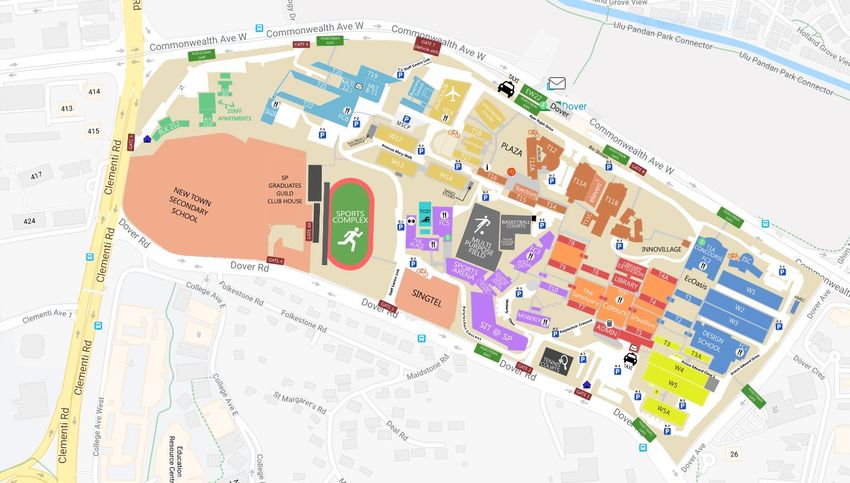
38SP Map
Enrolment Centre – Block T15 (To enter from Commonwealth Avenue West (Gate 8)
Gate 8
39Student Service Centre T16 Level 1
40You can also read


