WM FIBERGLASS WALL MOUNT FAN - WITH DAMPER DOOR - 6 PACK MODELS: WM36XKXCB-6PK - WM36K - MUNTERS
←
→
Page content transcription
If your browser does not render page correctly, please read the page content below
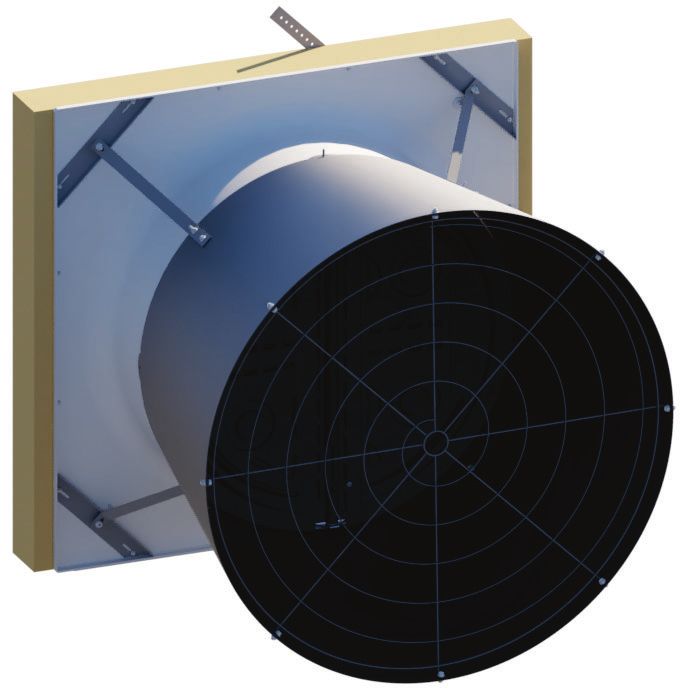
WM36K
                                           Wall Mount Fan
                                          with Damper Door
Instruction Manual
                                                6-pack

WM Fiberglass Wall Mount Fan
with Damper Door - 6 pack
Models: WM36xKxCB-6PK

     © Munters Corporation, August 2021               QM1077r16   1
WM36K Fiberglass Wall Mount Fan with Damper
Instructions for Use and Maintenance
Thank You:
Thank you for purchasing a Munters Wall Mount Fan with Damper. Munters equipment is designed to be the
highest performing, highest quality equipment you can buy. With the proper installation and maintenance it will
provide many years of service.
Please Note:
To achieve maximum performance and insure long life from your Munters product it is essential that it be installed
and maintained properly. Please read all instructions carefully before beginning installation.
Warranty:
For Warranty claims information see the “Warranty Claims and Return Policy” form QM1021 available from the
Munters Corporation office at 1-800-227-2376 or by e-mail at aghort.info@munters.com.
Conditions and Limitations:
• Products and Systems involved in a warranty claim under the “Warranty Claims and Return Policy” shall have
been properly installed, maintained and operated under competent supervision, according to the instructions
provided by Munters Corporation.
• Malfunction or failure resulting from misuse, abuse, negligence, alteration, accident or lack of proper
installation or maintenance shall not be considered a defect under the Warranty.
2 QM1077r16 © Munters Corporation, August 2021Index
Chapters Page
1. Unpacking the Equipment 4
1.1 Parts List 4
1.2 Fan Dimensions 6
1.3 Tools for Installation 6
2. Installation Instructions 7
2.1 Wall Framing 7
2.2 Fan Assembly 8
2.3 Damper Door Installation 11
2.4 Cone Installation 17
2.5 Motor Mounting 21
3. Electrical Wiring 26
3.1 Recommended Wiring 27
4. Operation 28
5. Maintenance 29
6. Winterizing 31
6.1 Winterizing 31
6.2 Winter Weather Protection 31
7. Troubleshooting 32
8. Exploded View and Parts List 33-35
© Munters Corporation, August 2021 QM1077r16 3Unpacking the Equipment
1.
1.1 Parts List
Each Crate Includes Parts to build 6 fans:
Each WM36K Fan Requires:
1 – Orifice Panel, Fiberglass
1 – Propeller
1 – Tube Strut, PWDCTD
1 – Motor
1 – Drip Shield, AL
1 – Main Frame Assembly, AL
1 – Door Assembly, PL
4 – Cone Sections, PL
1 – Cone Guard
1 – Inlet Guard
½ – Bulk Parts Package (BK1150) For 2 Fans
BK1150 – ½ of Bulk Parts Package needed for 1 – WM36K
1 – Motor Base Bracket, CTD-GZ
1 – Belt Tensioner Bracket, CTD-GZ
4 – Cone Support Brackets, PC Type, GZ
4 – Cone/Strut Mounting Brackets, GZ
1 – V-Belt, A-Section
1 – Hub with Bearings and Shaft
1 – Motor Sheave, CI
1 – Prop Sheave, CI
1 – Prop Adapter, ZP STL
1 – 3” Idler Pulley, A-Section C.I., Blue
1 – Rotary Tensioner Arm, AL
1 - Motor Mount Stiffener Bracket, GZ
2 – Tension Springs, 11.0”L., SS
1 – Hardware Package (HP1390)
1 – Coated Cable with ferrule, 100”L.
2 – Wing for Damper Door, HDPE, BLK
4 QM1077r16 © Munters Corporation, August 2021Chapter 1 Unpacking the Equipment
HP1390 – Hardware Package for 1 – WM36K
ID Qty. Cat. No. Description
[B] 1 KS1901 6.3mm x 19mm Tapping Screw, ZP
[C] 4 KS1928 M8-1.25 x 25mm Hex Bolt, ZP
[D] 4 KW4906 M8 Star Lock Washer, BLK [B]
[E] 4 KN1849 M8-1.25 x 8mm Hex Nut, ZP
[F] 4 KS1926 M6-1.0 x 30mm Hex Bolt, ZP [C]
[G] 4 KW4901 M6 x 12mm Flat Washer, ZP
[H] 4 KN1855 M6-1.0 x 6mm Hex Nut, ZP [D]
[J] 1 KS1931 M10-1.5 x 25mm Hex Bolt, ZP
[K] 1 KW3509 10mm Splitlock Washer, ZP [E]
[L] 1 KN1860 M25-2.0 x 10mm Hex Nut, ZP
[M] 1 KX1130 Shaft Shield for Prop Sheave, AL [F]
[N] 1 KX1208 40mm Cover Cap, Black PL
[R] 8 FH1968 1-Hole Pivoting Shutter Clip, PL [G]
[T] 1 AC0211 & AC0212 Azuma Bolt & Nut, Blue PL
[X] 1 KS1046 M10-1.5 x 50mm Hex bolt, ZP [H]
[Y] 2 KX1059 1" S-Hook, ¹⁄₁₆" Wire, SS
1 HK1001 Hardware Kit WM_K Fan Assembly, #1 of 2 [J]
1 HK1002 Hardware Kit WM_K Fan Assembly, #2 of 2
1 LB2646 Specification Label for WM36K [K]
HK1001 – Hardware Kit for 1 – WM_K Fan [L]
ID Qty. Cat. No. Description
[AA] 18 KS1007 5
⁄16”-18 x 1.25” Hex Head Bolt, SS
[BB] 4 KS1029 5
⁄16”-18 x 1.75” Hex Head Bolt, SS
[CC] 7 KS1075 5
⁄16”-18 x 2.75” Hex Head Bolt, SS [M]
[DD] 37 KN0704 5
⁄16”-18 SRTD Flange Nut, SS
[EE] 10 KW3011 5
⁄16” x 1¼”O.D. Flat Washer, SS
HK1002 – Hardware Kit for 1 – WM_K Fan
[N]
ID Qty. Cat. No. Description
[FF] 4 KS2258 #10-16 x ⁵⁄₈” TEK Screw, SS
[GG] 7 KS1400 #10-12 x 3⁄4”, SLTDHX, Seal-Washer Screw, ZP
[HH] 1 KW3012 ¹⁄₄” x 1”O.D. Flat Washer, SS [R]
[JJ] 2 AC1381 1
⁄8” Dia. Cable Clamp, ZP
[KK] 2 KX1158 Hole Plug, 0.73”-0.76” Dia., BLK PL
[LL] 1 KS2463 1
⁄4” x 1.5” HEX Lag Screw,ZP [T]
[AA] [FF] [X]
[BB] [GG]
[Y]
[CC] [HH]
[DD] [JJ]
[KK]
[EE]
[LL]
© Munters Corporation, August 2021 QM1077r16 5Chapter 1 Unpacking the Equipment
1.2 Fan dimensions
Fan Specifications: 60Hz shown (50Hz available)
Power: 115/230 VAC* or 208-230/460 VAC
Phase: 1 or 3
*Available voltages vary depending on HP
B A
E
C
Wall Opening (W.O.)
D - Dia.
A
Guard
F
Dimensions:
Size A B C* D - Dia. E F Wall Openings
36” 48”W. x 48”H. 40” 61⁄2” 483⁄8” 13⁄4” 13⁄4” 441⁄2”W. x 441⁄2”H.
*Dimension varies depending on wall construction and motor configuration.
1.3 Tools required for installation
10mm [3⁄8”] Socket
13mm [ ½”] Socket
17mm [11⁄16”] Socket or Wrench
27mm [11⁄16”] Wrench
36mm Socket or Wrench
⁄16” Socket or Wrench
5
⁄16” Socket
7
Phillips Screwdriver, #3 Size
⁄8” Drill Bit
1
⁄32” Hex Wrench
5
Wire Cutting Pliers
6 QM1077r16 © Munters Corporation, August 2021Installation Instructions
2.
2.1 Wall framing
Step 1
Construct framed opening to correct size according to the Wall Opening listed in chart A below.
See Figure 1A and 1B. When installing exterior sheet metal before fan, leave 2” of the framing
exposed on all sides so the orifice can mount flush to the frame.
Chart A
Center To Center Note:
Wall Opening Minimum Spacing
Fan Dia. Dimension Damper doors should
(W. x H.) 'Z'
be carefully set aside
36” 44½” W. x 44½” H. 12” recommended; 3½” minimum 48” Minimum
out of direct sunlight
Ceiling until needed.
12" Stud Wall
Sheet Metal Opening
W x H Wall Opening
(see chart A)
See minimum Z W
spacing notes in (see chart A)
H
Chart A
Framing
Figure 1A Frame Construction
Top View
44½" W.
48” W. O.C.
2 x 8 Header boards Ceiling
4 x 4 or 4 x 6 Posts
4 x 4 or
4 x 6 Posts
2x4
Framing
(see chart A)
W
(see chart A)
H
2 x 8 Banner boards
Figure 1B 4 x 4 Post Construction - Elevation View
© Munters Corporation, August 2021 QM1077r16 7Chapter 2 Installation Instructions
2.2 Fan Assembly
Step 2
Place tube strut on saw horses or a flat work surface. The large center hole should be pointing horizontally.
Attach the Motor Base Bracket and the Belt Tensioner Bracket to the Tube Strut using (3) Long Bolts [CC],
(2) Washers [EE] and (3) Nuts [DD]. The Motor Bracket and the Tensioner Bracket share the middle hole.
See Figure 2A.
Tube Strut
Motor Bracket
Long Bolts [CC]
Washer [EE]
Nuts [DD]
Tensioner Bracket
Figure 2A
Step 2B
Attach the 3” Idler Pulley to the Tensioner Arm using Bolt [X]. Then attach the Tensioner Arm assembly to the
Tensioner Bracket using Bolt [J] and Washer [K]. Finger tighten only at this time. See Figure 2B. Next attach
the Specification Label to the Tube Strut as shown, and then mark the box for the appropriate model fan.
Bolt [J]
Washer [K]
Label
Tensioner Arm
Bolt [X]
Idler Pulley
Figure 2B
8 QM1077r16 © Munters Corporation, August 2021Chapter 2 Installation Instructions
Step 3
Attach Prop Sheave to Hub using (4) Bolt [F], Washer [G] and Nut [H]. See Figure 3A. Attach Prop Adapter
to Prop Sheave/Hup Assembly using (4) Bolt [C], Washer [D] and Nut [E]. See Figure 3B.
Washer [G]
Nut [H]
Prop Adapter
Prop Sheave
with Hub
Bolt [C]
Hub
Washer [D]
Prop Sheave Nut [E]
Bolt [F]
Figure 3A Figure 3B
Step 4
Rotate Tube Strut on saw horses so Motor Bracket is pointing up. Slide Shaft Shield [M] over hub shaft
as shown in Figure 4. Attach Sheave/Hub Assembly to Tube Strut using (1) Hex Nut [L] and tighten to
52 ft-lbs [70 N-m] torque. See Figure 4. Place Plastic Cover Cap [N] over Hex Nut and fasten in place
with (1) Tapping Screw [B]. See Figure 4. Set aside the Strut Assembly for use in a later step.
Tapping screw [B]
Cap Cover [N]
Hex Nut [L]
Shaft Shield [M]
Hub Assembly
Figure 4
© Munters Corporation, August 2021 QM1077r16 9Chapter 2 Installation Instructions
Step 5
Place Orifice Panel on saw horses with the round orifice pointing up and place (1) Cone/Strut Mounting
Bracket in each corner of the Orifice Panel. See Figure 5.
Orifice Panel
Mounting Bracket
Figure 5
Step 6
Corners of Orifice Panel with 2 holes are corners where Strut Assembly attaches. Secure Strut Assembly using
(4) Long Bolts [CC], (6) Washers [EE] and (4) Nuts [DD]. In the opposite corners attach Cone/Strut Mounting
Bracket to the orifice using (1) Short Bolt [AA], Washer [EE] and Nut [DD]. See Figure 6.
Nuts [DD]
Washer [EE]
Drain Hole
Nuts [DD]
Washer [EE]
Long Bolt [CC] Washer [EE]
Short Bolt [AA]
Figure 6
10 QM1077r16 © Munters Corporation, August 2021Chapter 2 Installation Instructions
Step 7
Place Propeller on Prop Adapter Shaft so the Set Screw is lined up with the flat side of shaft. Adjust Propeller
so that ¾” of the shaft is showing above the Propeller and fasten Propeller in place by tightening Set Screw
to 140 in-lbs [16 N-m] of torque. See Figure 7.
Propeller
Prop Adapter Shaft
Set Screw
Flat Side of Shaft
Figure 7
2.3 Damper Door Installation
Step 8
Slide Main Frame Assembly onto Orifice Panel with pin on Main Frame opposite the drain hole.
See Figure 8A. Line up 4 holes in Main Frame with holes in the Orifice and fasten using (4) TEK Screws [FF].
See Figure 8B.
Main Frame
Pin Hole in orifice panel
TEK Screw [FF]
Orifice Panel
Drain Hole
Figure 8A Figure 8B
© Munters Corporation, August 2021 QM1077r16 11Chapter 2 Installation Instructions
Step 9
Attach Drip Shield to bottom of framed opening using (3) Barn Screws (Not Provided). See Figure 9A and 9B.
If a 4” wall is used a support board must be installed as shown in Figure 9B. Be sure not to deform Drip Shield
when installing screws.
Barn Screw Barn Screw
(not provided) (not provided)
Drip plate Drip plate
Barn Screw
(not provided)
6” Wall Support board 4” Wall
Drip Shield
Figure 9A Figure 9B
Step 10
Locate Drain Hole in Orifice Panel. This is the bottom of the Panel. Set bottom edge of panel on Drip Shield
ledge and center panel on opening. Secure Panel to wall using (16) Barn Screws (Not Provided).
See Figure10A and 10B.
Orifice Panel
Drain Hole
Barn Screws
(Not Provided)
Drip Shield ledge
Figure 10A Figure 10B
12 QM1077r16 © Munters Corporation, August 2021Chapter 2 Installation Instructions
Step 11
Carefully remove folded door assembly from box. Open doors and lay them flat on solid surface with the
Munters Logo down. The Bottom of the doors has the Hinge Pin with the Nylon Washers. For the WM36 and
WM54 the Wing sits down in the Groove of the upper right and lower left doors. For the WM36 the Wing
will be in the groove centered on the half-circle shape. For the WM54 the Wing will start just after the last
spring mounting dimple and follow the Groove. Make sure Wing is seated in bottom of Groove and fasten in
place using (3) Seal-Washer Screws [Y] per wing. Make sure Hinge Pins do not fall out. See Figure 11.
Wing
Groove in Door
Seal-Washer Screw [Y]
Wing
Figure 11
© Munters Corporation, August 2021 QM1077r16 13Chapter 2 Installation Instructions
Step 12
Carefully turn doors over and pull upper Latch Pin down until the end is flush with top of doors. Make sure
Long Hinge Pin (bottom) does not fall out. See Figure 12.
Latch Pin
Long Hinge Pin
Figure 12
14 QM1077r16 © Munters Corporation, August 2021Chapter 2 Installation Instructions
Step 13
Being careful not to let pin fall out, set Doors into Main Frame with Hinge Pin in hole at bottom plate of
Main Frame and push top of Doors into place. See Figure 13.
Door
Hinge Pin
Figure 13
Step 14
Separate doors and push them into closed position. Push Latch Pin up into place, then turn short leg of
Latch Pin into recess of door. Secure in place using Seal-Washer Screw [GG] and Flat Washer [HH].
Latch Pin should extend up through upper plate in Main Frame. See Figure 14.
Latch Pin
Latch Pin Leg
Flat Washer [HH]
Seal-Washer Screw [GG]
Figure 14
© Munters Corporation, August 2021 QM1077r16 15Chapter 2 Installation Instructions
Step 15
Find Coated Cable and insert end opposite ferrule into small hole in upper plate of Main Frame. Pull it
through until ferrule stops at the plate. See Figure 15.
Ferrule End
Hole in Main frame
Figure 15
Step 16
On room side of each door drill a 1⁄8” dia. hole in each door through the 7th dimple in upper left and lower right
quadrats (not in the same quadrant as the Wings). See Figure 16.
Drill 7th Dimple
Drill 7th Dimple
Figure 16
16 QM1077r16 © Munters Corporation, August 2021Chapter 2 Installation Instructions
Step 17
From the inside attach S-Hooks [Y] to hole in upper or lower plate of Main Frame, from the door side through the
Main Frame toward the outside. Then attach each Tension Spring to S-Hook [Y] using end of spring with Hook.
Stretch spring and insert opposite end into hole drilled in door previously. See Figure 17.
Hole in upper plate
S-Hook [Y]
Tension Spring
Drilled Hole in
Damper Door
S-Hook [Y]
Tension Spring
Tension Spring
Drilled Hole in Damper Door
Figure 17
2.4 Cone Installation
Step 18
Place all 4 cone sections on a flat surface with tabs from one facing slots of the next. See Figure 18A.
Curl up tab end of first cone section and insert tabs up into slots in the next cone section. A mallet may be
needed to seat slots over tabs completely. See Figure 18B. Repeat this step until all 4 cone sections are
connected and laying flat.
Figure 18A
Figure 18B
© Munters Corporation, August 2021 QM1077r16 17Chapter 2 Installation Instructions
Step 19A
Fasten each of the joints in the single outer hole using (1) Short Bolt [AA] and Nut [DD], with the nut on
the side with the tabs. At the inner pair of holes of each joint attach (1) Cone Support Bracket to the inner
hole using (1) Bolt [AA] and Nut [DD] with the bolt head on the side with the tabs. See Figure 19A.
Nut [DD]
Short Bolt [AA]
Outer hole
Short Bolt [AA]
Inner hole
Nut [DD]
Cone Support Bracket
Figure 19A
Step 19B
Stand cone sections on end and curl ends around to form cone with Cone Support Bracket on outside and tabs
on inside. Insert remaining tabs into slots so tabs are inside cone and fasten final joint using (1) Short Bolt [AA]
and Nut [DD], with nut on inside of cone. At the inner pair of holes attach (1) Cone Support Bracket to the
inner hole using (1) Short Bolt [AA] and Nut [DD] with bolt head on inside of cone. See Figure 19B.
Short Bolt [AA]
Cone Support Bracket
Nut [DD]
Short Bolt [AA]
Nut [DD]
Figure 19B
18 QM1077r16 © Munters Corporation, August 2021Chapter 2 Installation Instructions
Step 20A
Install cone onto fan by putting top of cone over top of fan. The hole in tab of one cone section should slide
down over the Frame Pin in the Main Frame assembly. Allow remainder of cone to slide over orifice panel
making sure cone support brackets remain on outside of cone. See Figure 20A.
Hole in Tab of Cone Section
Frame Pin
Figure 20A
Step 20B
Place end of Cone Support Bracket with slot over bolt holding Cone/Strut Mounting Bracket to the orifice and
secure with Nut [DD]. See Figure 20B. Secure Cone to Fan installing Medium Bolt [BB] through the remaining
hole in the Cone Support Bracket and fasten with Nut [DD]. A long screwdriver may be needed to help align
the holes through Cone Support Bracket, Cone, Main Frame and Orifice. Repeat process for all 4 Cone
Support Brackets. See Figure 20B.
Nut [DD]
Medium Bolt [BB]
Use this hole for WM36K
Nut [DD]
Figure 20B
© Munters Corporation, August 2021 QM1077r16 19Chapter 2 Installation Instructions
Step 21
Insert guard into cone with the eyelets facing you. Install eyelets over bolts already installed in cone and fasten
with Nut [DD]. Secure remaining eyelets using Short Bolt [AA] and Nut [DD]. See Figure 21.
Previously installed - Bolt and Nut
Nut [DD]
Short Bolt [AA]
Nut [DD]
Figure 21
Step 22
Loop Coated Cable that was installed in a previous step, around the lower, middle joint in guard and fasten to
itself with Azuma Bolt and Nut [T]. Make sure cable is pulled snug. See Figure 22.
Note:
When installing cable in
temperatures BELOW 60°F,
leave cable slightly slack
(do not overtighten).
Azuma [T]
Coated Cable
Figure 22
20 QM1077r16 © Munters Corporation, August 2021Chapter 2 Installation Instructions
Step 23
If Fans are to be installed 60” O.C., cut the 3 o’clock and 9 o’clock guard wire in the position shown. Push the
side of the cone in as far as possible and fasten the cut guard wire to the attached guard wire using Clamp [JJ].
See Figure 23.
Cut Guard Wire Here
Clamp [JJ]
Figure 23
2.5 Motor Mounting
Step 24
Find the Key provided with the Motor and place it in the Keyway on the motor shaft. Place the Motor Sheave
on the Motor shaft with the hub facing towards the motor. See Figure 24. ONLY tighten the set screw enough
to hold the Sheave in place at this time.
Note:
Motor Sheave
When wiring motor, check rotation of propeller.
Internal wiring of motor may need to be changed
Motor Key to assure proper rotation of propeller.
Motor
Figure 24
© Munters Corporation, August 2021 QM1077r16 21Chapter 2 Installation Instructions
Step 25
Set Motor on Motor Bracket so Motor base rests against lower Motor Bracket flange. Align middle and front
slots in Motor base with holes in Motor Bracket. See Figure 25.
Front and Middle Slots
Holes in Motor
Bracket
Lower Motor Bracket Flange
Figure 25
Step 26A
Secure Motor to Motor Bracket and Motor Bracket Stiffener using (4) Short Bolts [AA] and Nuts [DD]. The rear
upper bolt is where Motor Bracket Stiffener is attached. See Figure 26A.
Stiffener
Short Bolts [AA]
Nuts [DD]
Figure 26A
22 QM1077r16 © Munters Corporation, August 2021Chapter 2 Installation Instructions
Step 26B
Using channel locks and/or a hammer twist the Motor Bracket Stiffener so that the holes in the bracket lay
flat against the framing. Then attach Stiffener to framing using (1) Lag Screw [LL]. See Figure 26B.
Frame
Stiffener
Lag Screw [LL]
Level
Motor Sheave
Tensioner Pulley
Propeller Sheave
Figure 26B
Step 27
Use a straight edge or level to check alignment
Figure 27
of Propeller Sheave, Tensioner Pulley and Motor
Sheave. If needed, adjust position of Motor Sheave
so the 3 pulleys line up. Once Motor Sheave is
aligned tighten the set screw to 75 in-lbs [9 N-m]
torque. See Figure 27.
Step 28A
Slide V-belt over Propeller and install by wrapping
it around 2 smaller pulleys and starting it over
larger Sheave. Continue rolling it onto the larger
Sheave until it fits into groove. See Figure 28A.
Figure 28A
© Munters Corporation, August 2021 QM1077r16 23Chapter 2 Installation Instructions
Step 28B
To adjust belt tensioner to proper setting, loosen 10 mm bolt (using 17mm end wrench) to allow tensioner arm
to rotate. Working from inlet/motor side of fan, place a 27 mm (11⁄16”) wrench onto the hex on the tensioner.
Turn wrench clockwise until the single mark on base of belt tensioner is aligned with the Mark 3 on tensioner
arm. Hold tensioner at this setting and tighten the 10mm bolt to 40 ft.-lbs [54 N-m] torque. See Figure 28B.
Mark 3 on Tensioner Arm
Hex on Tensioner Arm
10mm
Bolt
Single Mark on Base
Figure 28B
Step 29A
Cut a section of the inlet guard out to fit over the motor as shown below for the appropriate fan. When
cutting the guard wires make sure to cut them as close to the other wires as possible. See Figure 29A.
48”
4”
10” 12”
12”
48”
Figure 29A
24 QM1077r16 © Munters Corporation, August 2021Chapter 2 Installation Instructions
Step 29B
Place guard against framing and fasten guard in place using (8) Shutter Clips [R] and Barn Screws (not provided),
2 per side. See Figure 29B.
Position for Securing Guard Position for Guard Removal
Shutter Clip [R]
with Barn Screw
(not provided)
Shutter Clip [R]
with Barn Screw
(not provided)
Position for Securing Guard Position for Guard Removal
Figure 29B
© Munters Corporation, August 2021 QM1077r16 25Electrical Wiring
3.
All wiring should be installed in accordance with National, State, and Local electrical codes. Fans used to ventilate
livestock buildings or other rooms where continuous air movement is essential should be connected to individual
electrical circuits, with a minimum of two circuits per room. For electrical connection requirements, refer to diagram
on motor nameplate and to information enclosed with the Munters environmental control to be used. After wiring
check for proper motor rotation.
Single Phase Fans: motor overload protection should be provided for each fan. A Circuit Breaker Switch or slow
blow motor type fuses must be used, See Figure 30A. See form QM1400 for proper size.
Three Phase Fans: motor overload protection should be provided for each fan. A three-pole motor starter or slow
blow motor fuses must be used. See Figure 30B.
If a frequency drive (inverter) is used, confirm that motors are rated for inverter duty at the voltage used. Shielded
power cable between frequency drive and each motor is highly recommneded. Installation of line reactors is
recommended to reduce voltage spikes and harmonic distortion. Supplemental motor overload protection is also
recommended.
NOTE: A safety cut-off switch should be located adjacent to each fan.
Circuit Breaker Switch
L1 (H) L1 (H) T1 (H) T1 (H)
120 or 240 VAC L2 (N) L2 (N) T2 (N) T2 (N) 120 or 240 VAC
Power Supply for Power Out
Fan G G to Fan
Figure 30A
Single Phase - Motor Overload Protection with Disconnect
(SY2000 or Equivalent)
Safety cut-off
Motor Starter switch
L1 L1 T1 T1
L2 L2 T2 T2
Three Phase Three Phase
Power Supply for L3 L3 T3 T3 Power Out
Fan to Fan Motor
G G
Figure 30B
KEY:
Three Phase - Motor Overload Protection with Disconnect
L1=Line 1
L2=Line 2
L3=Line 3 NOTE: Information in parenthesis refers to 120 VAC control.
H=Hot
N=Neutral
G=Ground
26 QM1077r16 © Munters Corporation, August 2021Chapter 3 Electrical Wiring
3.1 Recommended wiring
Step 1
As the power cable exits the back of the motor form a drip loop and then run cable to power source.
See Figure 31A and 31B.
Drip loop
Figure 31A
Drip loop
Figure 31B
© Munters Corporation, August 2021 QM1077r16 27Operation
4.
4. Operation ! WARNING
1) INITIAL START-UP: With electrical power off, verify that the fan propeller
turns freely and that all fasteners are secure. Turn on electrical power and
confirm that the fan operates smoothly.
Disconnect Power
Before Servicing
2) ADJUSTMENTS: Set fan control to temperature shown on your Aerotech
ventilation system drawing, or to a value which will provide the desired ! WARNING
environmental conditions.
Single Phase Fans: Single phase fans are designed for single speed operation only. Moving Parts, Disconnect
Power Before Servicing.
Three Phase Fans: If a frequency drive is used, the minimum operating frequency is 30 Hz.
! WARNING
Moving Parts: Disconnect
Power Before Servicing.
! WARNING
Do Not Power Wash
Electrical Devices.
28 QM1077r16 © Munters Corporation, August 2021Maintenance
5.
5. Maintenance ! WARNING
The following inspection and cleaning procedures should be performed monthly:
Tools Needed for Maintenance:
wrenches: 10mm, 13mm, 17mm, 27mm, ½", 6mm Hex
Disconnect Power
Before Servicing
1) INSPECT PROPELLER: Check that propeller is secure on drive hub and that ! WARNING
there are no signs of damage. The blades are of a self-cleaning design and should
not require maintenance.
2) CLEAN regularly for best results: Moving Parts, Disconnect
Power Before Servicing.
• FAN MOTOR: Remove any dust accumulation from motor using a brush or
cloth. (DO NOT use a pressure washer). A clean motor will run cooler and last ! WARNING
longer. At the same time, verify that the motor is secure in its mount.
• DAMPER: Carefully clean dust from damper doors and frame so that doors
open and close freely. A brush or cloth should be used.
• GUARD: Clean any dust or feathers from fan guards using a brush. Dirty Moving Parts: Disconnect
Power Before Servicing.
guards can reduce airflow.
! WARNING
3) CHECK FASTENERS: For safety, all fasteners should be inspected 1 month after
initial operation and yearly thereafter. Tighten any loose connections.
4) INSPECT FAN CONTROL: With power disconnected, inspect all electrical
connections. Wiring should be secure and in good condition. Remove any dust Do Not Power Wash
Electrical Devices.
build-up from control case and sensor using a soft brush or cloth. NEVER CLEAN
ELECTRICAL EQUIPMENT WITH A PRESSURE WASHER!
© Munters Corporation, August 2021 QM1077r16 29Chapter 5 Maintenance
5) CHECKING PULLEYS: Roll the belt off and look at all pulleys. If a pulley has grooves in it or is ! WARNING
no longer smooth, it needs replacement. A loose or slipping belt will reduce fan performance
up to 60% and cause premature belt failure.
Smooth Grooved
Do Not Power Wash
Pulley Pulley Electrical Devices.
! WARNING
6) CHECK DRIVE ALIGNMENT: Check alignment of belt on idler pulley, it should be centered
on the idler pulley. The belt tensioner idler pulley and propeller sheave are fixed in position,
therefore, alignment must be obtained by adjusting the motor sheave. If an adjustment is
needed, remove the belt, then loosen the set screws in the sheave and move as necessary to
achieve proper alignment. Remember to tighten Moving Parts: Disconnect
Propeller Idler Pulley Motor Power Before Servicing.
Sheave Sheave the set screws after making an adjustment. Drive
Belt
alignment is very important for long belt life and proper
operation.
Straight Edge
7) BELT TIGHTENING: To adjust belt tensioner to the proper setting, loosen 10 mm bolt (using
17mm end wrench) to allow tensioner arm to rotate. Working from inlet/motor side of fan, place
a 27 mm (11⁄16”) wrench onto the hex on tensioner. Turn wrench clockwise until the single mark
on base of belt tensioner is aligned with Mark 3 on tensioner arm. Hold tensioner at this setting
and tighten 10mm bolt to 40 ft.-lbs [54 N-m] torque.
Mark 3 on Tensioner Arm
Hex on Tensioner Arm
10mm
Bolt
Single Mark on Base
30 QM1077r16 © Munters Corporation, August 2021Winterizing
6.1 Winterizing
6.
In most climates, it is probable that the ventilation system will never need to operate at a total capacity
during the colder winter months. Consequently, it is advisable to “winterize” those fans which will not
be used in cold weather to avoid unnecessary heat loss and condensation.
To winterize, turn fan control “off”. Install the insulated closure panel over the fan intake. If you don’t
have an insulated closure panel, a piece of rigid insulation material can be used. Remember the
insulation panel must be removed before warmer weather returns.
NOTE: At least one single speed fan should be left uncovered and with power available to provide air
movement in the event of variable speed control difficulties.
6.2 Winter weather protection
To prevent cone or fan damage from snow or ice sliding off building roof, weather protection must be
provided. A weather shelter may be constructed to cover the entire fan, See Figure 32, or snow guards
may be placed on the roof, See Figure 33.
Snow Guards located
per manufacturers
recommendations*
Provide Weather
Shelter Over Fans
Building
Wall 6" Min. Ceiling
Fan with Fan with
Discharge Discharge
Cone Cone
Figure 32 Figure 33
*Snow Guard Suppliers
Company Name Phone No. Fax No. Web Site
Snojax, Inc. 800-766-5291 717-697-2452 www.snojax.com
Polar Blox 800-298-4328 814 629-9090 www.polarblox.com
LM Curbs 800-284-1412 903 759-3598 www.lmcurbs.com
Alpine Snow Guards 888-766-4273 888-766-9994 www.alpinesnowguards.com
! IMPORTANT Note: Snow guards are designed to prevent sudden, dangerous snow
and ice slides when attached to the building roof according to
Munters Product and System manufacturers recommendations. The supplier listing above is given
Warranties do not cover cone or fan as a reference only. Munters does not endorse any specific snow
damage from external sources. guard product and no performance warranty is implied.
© Munters Corporation, August 2021 QM1077r16 31Troubleshooting
7.
7.1 Troubleshooting
! WARNING ! WARNING ! WARNING
Disconnect Power Moving Parts, Disconnect Moving Parts: Disconnect
Before Servicing Power Before Servicing. Power Before Servicing.
SYMPTOM POSSIBLE CAUSES CORRECTIVE ACTION
Fan Not Operating 1. Fan control set above room 1. Set to a lower temperature
temperature
2. Blown fuse or open circuit breaker 2. Replace fuse or reset breaker
3. Propeller blade contacting fan housing 3. Realign propeller in fan housing
4. Fan control defective 4. Repair or replace control
5. Motor defective 5. Repair or replace motor
Fan Operating- 1. Damper door jammed 1. Clean damper door & fan housing
Insufficient Airflow 2. Guard dirty 2. Clean guard
Excessive Noise 1. Propeller blade contacting fan housing 1. Sand fan housing to remove high spot
Excessive 1. Motor loose on mount 1. Tighten fasteners
Vibration 2. Propeller damaged 2. Replace propeller
3. Motor or propeller shaft bent 3. Repair or replace motor or propeller shaft
Fan Never Turns Off 1. Override thermostat set incorrectly 1. Set to the correct temperature
2. Control set for continuous operation 2. Set control correctly
32 QM1077r16 © Munters Corporation, August 2021Exploded View
8.
Fan Components
© Munters Corporation, August 2021 QM1077r16 33Chapter 8 Exploded View
Damper/Cone Components
34 QM1077r16 © Munters Corporation, August 2021Chapter 8 Parts List
Catalog No.
Item WM36K Part Name/Description Qty.
1 FH1637 Orifice Panel, FG 1
2 FP1041 Prop Assembly, 3-Blade, GZ 1
3 various* V-belt, A-section, Aramid Fiber 1
4 FP2060 Hub with Bearing and Shaft 1
5 FH1993 Propeller Sheave, CI 1
6 KX1130 Shaft Shield, AL 1
7 KN1860 Hex Nut, M25x10mm, ZP 1
8 various* Motor Sheave ⁵⁄₈” bore with keyseat, CI 1
9 various* Motor, 56 Frame 1
10 FH2855 Motor Bracket Support Stiffener, GZ 1
11 FH2831 Mounting Plate for NEMA 56 Motor, CTD-GZ 1
12 FH2505 Mounting Bracket for Belt Tensioner, CTD-GZ 1
13 FH2402K Belt Tensioner Assembly with 3” Idler Pulley 1
FH2406 3” Idler Pulley only, with Bolt 1
FH2459 Tensioner Arm only, AL 1
14 FH1968 1-Hole Pivoting Shutter Clip, BLK PL 8
15 FH1344 Inlet Guard, 2” x 2” Mesh, GZ 1
16 FH1673 Tube Strut, Center, PWDCTD 1
17 FH1658 Drip Shield Plate, AL 1
18 FP2065 Hub, Prop Adapter, ⅝" O.D. x 3"L. Shaft, ZP 1
19 FH1980 Cone/Strut Mounting Bracket, GZ 4
20 FH1436 Outlet Guard, Round, CTD BLK 1
21 FH4636 Discharge Cone Section, PL 4
22 FH2431 Cone Support Bracket, PC type, GZ 4
23 FA2036 Door Assembly w/ Latch (2 Doors), PL 1
24 FA2837 Main Frame Assembly, AL 1
25 KX1059 1” S-Hook, ¹⁄₁₆”Wire, SS 2
26 KX1465 Tension Spring, 0.5”OD x 11.0”L , SS 2
27 FH1365 Wing Add-on Kit, 2 Wings w/ Hardware 1
* Parts listed are for specific fan configuration. Contact office for replacement part numbers for your fan configuration.
© Munters Corporation, August 2021 QM1077r16 35WM36K is developed and produced by Munters Corporation, Lansing, Michigan U.S.A. 1-800-227-2376
Munters Europe AB, Isafjordsgatan 1, P.O. Box 1150, SE-164 26 Kista, Sweden. Phone +46 08 626 63 00, Fax +46 8 754 56 66.
Munters Corporation 2691 Ena Drive Lansing, MI 48917 U.S.A. Phone +1 800-227-2376, Fax +1 517-676-7078
www.munters.us
Australia Munters Pty Limited, Phone +61 2 6025 6422, Brazil Munters Brasil Industria e Comercio Ltda, Phone +55 41 3317 5050, Canada/US Munters
Corporation Lansing, MI Phone +1 517 676 7070, China Munters Air Treatment Equipment (Beijing) Co. Ltd, Phone +86 10 80 481 121, Denmark Munters A/S,
Phone +45 9862 3311, India Munters India, Phone +91 20 3052 2520, Indonesia Munters, Phone +62 818 739 235, Italy Munters Italy S.p.A., Chiusavecchia,
Phone +39 0183 52 11, Japan Munters K.K., Phone +81 3 5970 0021, Korea Munters Korea Co. Ltd., Phone +82 2 761 8701, Mexico Munters Mexico, Phone
+52 818 262 54 00, Russia Munters AB, Phone +7 812 448 5740, Singapore Munters Pte Ltd., Phone +65 744 6828, South Africa and Sub-Sahara Countries
Munters (Pty) Ltd., Phone +27 11 997 2000, Spain Munters Spain S.A., Phone +34 91 640 09 02, Sweden Munters AB, Phone +46 8 626 63 00, Thailand
Munters Co. Ltd., Phone +66 2 642 2670, Turkey Munters Form Endüstri Sistemleri A.Ş, Phone +90 322 231 1338, USA Munters Corporation, Lansing MI Phone
+1 517 676 7070, Vietnam Munters Vietnam, Phone +84 8 3825 6838, Export & Other countries Munters Italy S.p.A., Chiusavecchia Phone +39 0183 52 11
Munters reserves the right to make alterations to specifications, quantities, etc., for production or other reasons, subsequent to publication.
© Munters AB, 2015
36 QM1077r16 © Munters Corporation, August 2021You can also read


