MS Advanced Placement Update for School Administrators - Planning and Preparing for the 2020-21 School Year
←
→
Page content transcription
If your browser does not render page correctly, please read the page content below
MS Advanced
Placement Update
for School
Administrators
Planning and Preparing for the 2020-21
School Year
Updates from the
MDE & IHL
                                   Wendy Clemons,
        Executive Director, Office of Secondary Education
                    and Professional Development, MDE

                                  Heather Morrison,
        Director P20 Partnerships / Student and Academic
         Affairs, Mississippi Institutions of Higher Learning
2020-21 AP Exams &
What’s Included for
2020-21 School Year

         Cale Golden & Cassi Barker-Carr,
           College Board, State & District Partnerships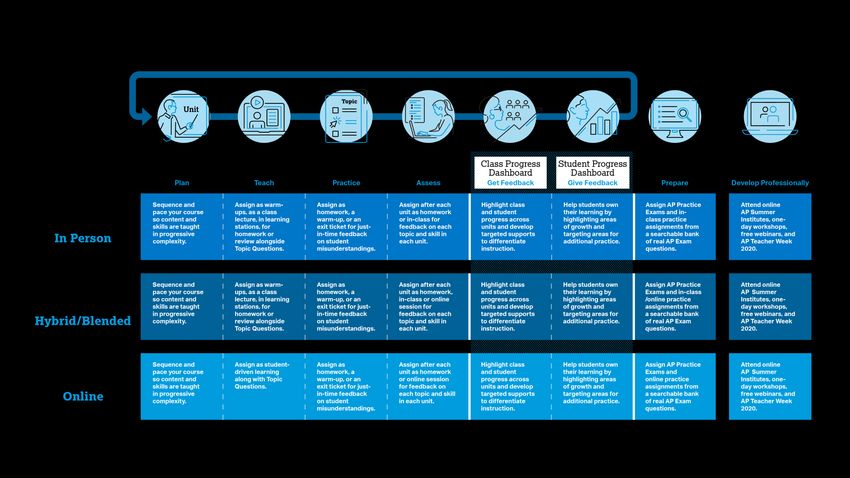
2021 AP Exams

•   The 2021 exams will match the traditional, published exam
    descriptions—colleges expect the AP Exam to cover the full spectrum
    of the corresponding AP course.
•   We’ll support in-school testing in 2021 because administering exams
    in schools maximizes access and opportunity.
•   Any school that needs to socially distance in May 2021 can divide
    testing across two test dates, reducing the number of students
    convening for any one exam.
•   If schools close in May 2021 because of safety concerns, we’ll share a
    contingency testing option—that contains full course content—in early
    2021.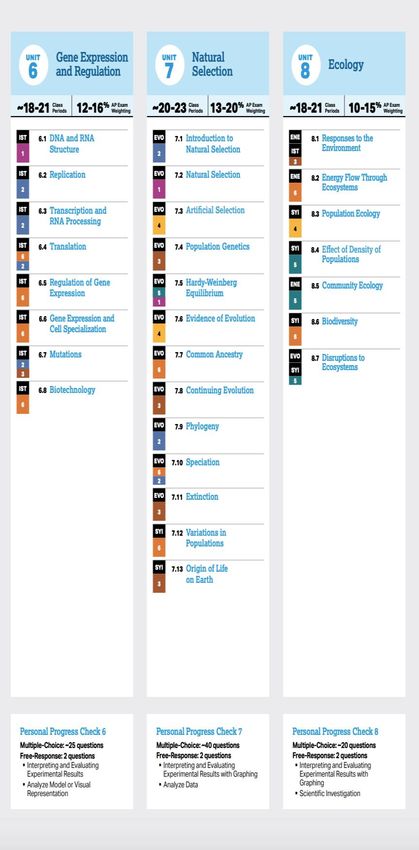
AP Coordinator & Teacher Processes

    Upload Course       Ensure that         Use AP
     Authorization    Students have a   Classroom with
    Form (AP Audit)    College Board       Students
                         Account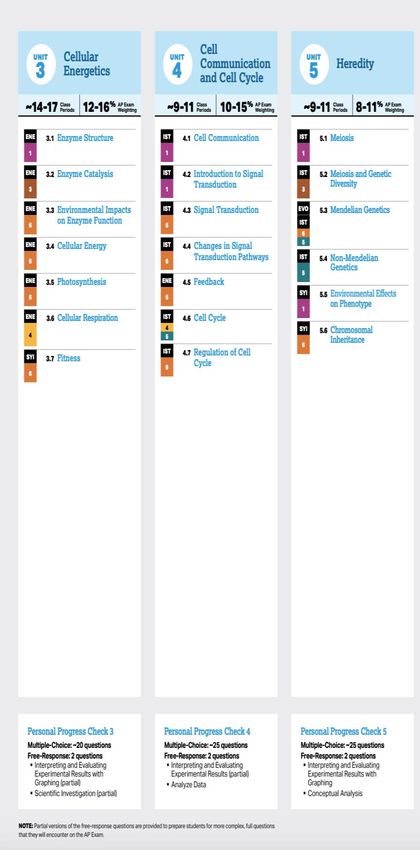
What’s Included for 2020-21

                           1   Resources Built for Any Learning Environment

                           2   Anytime, Anywhere Instruction
            Key Features
                           3   Continuous Practice and Feedback

                           4   Targeted Exam Preparation

                           5   Year-Round Teacher Support

                           6   No-Risk Registration
Resources Built for Any
Learning Environment
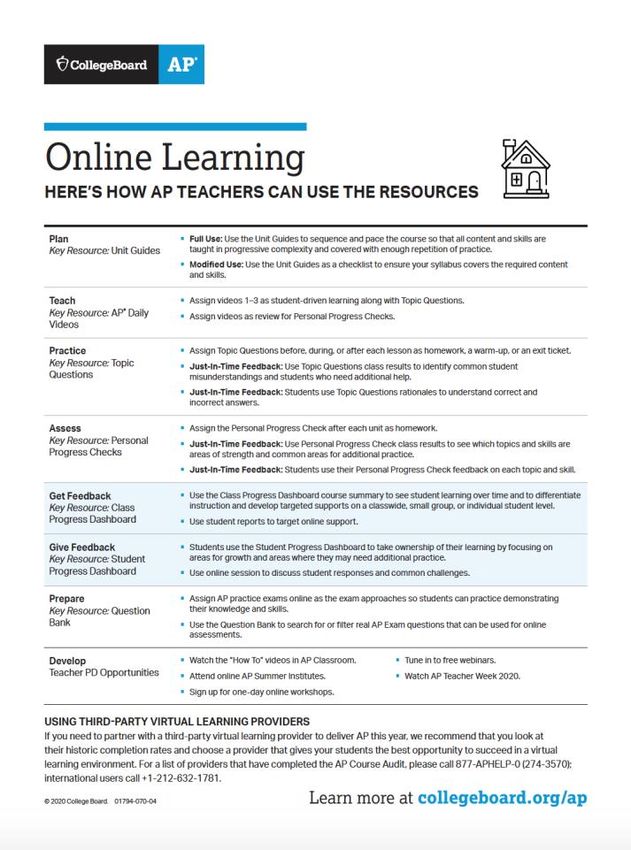
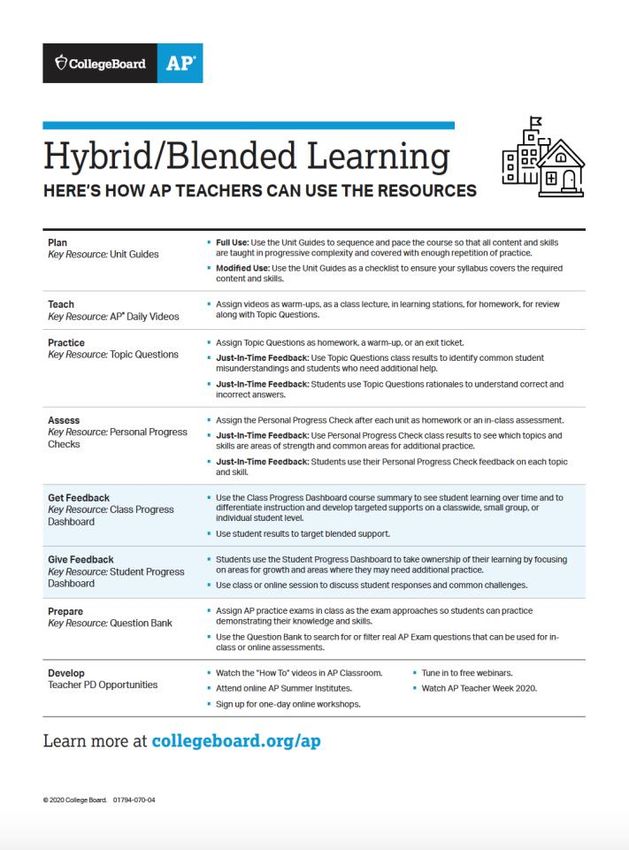
Resources for In-Person, Hybrid/Blended, and Online
Learning
AP Resources: Supporting Teaching and Learning
                             1. Plan
                                Unit Guides

                             2. Teach
                                AP Daily Videos

                             3. Practice
                                Topic Questions

                             4. Assess
                                Personal Progress Checks

                             5. Get Feedback
                                Class Progress Dashboard

                             6. Give Feedback
                                Student Progress Dashboard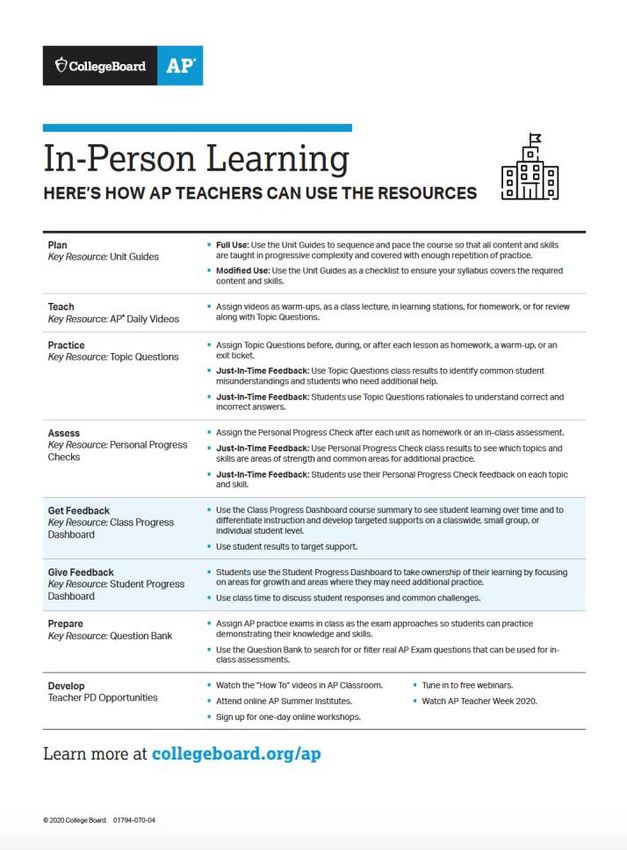
AP Resources: Built for Any Learning Environment
AP Resources: Flexible for use across environments
Sign in to access
AP Resources
myap.collegeboard.org
Anytime, Anywhere
    Instruction
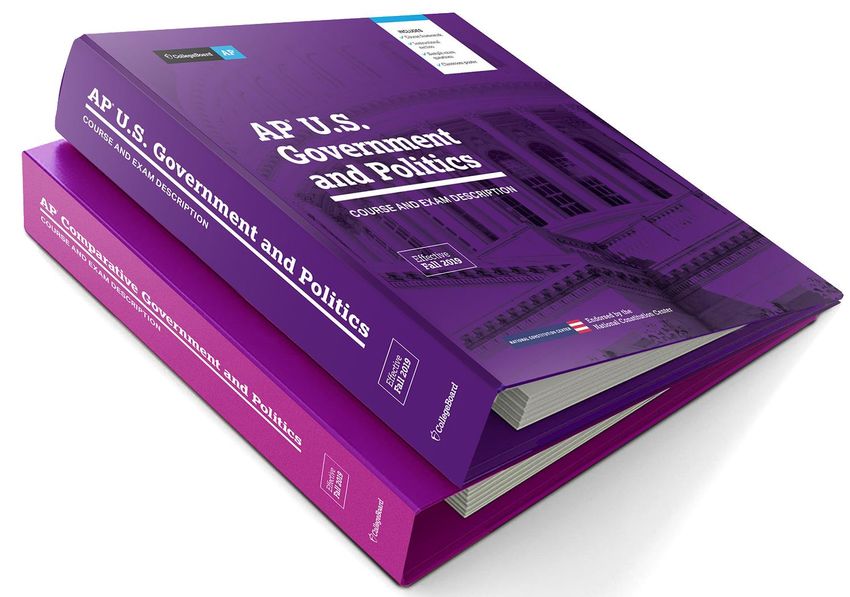
Course and Exam Description binders with Unit Guides
provide flexible instruction and pacing to reach all students.
How to Use
• The units organize content
with sequence and pacing
teachers adopt or modify.
• The sequence enables
skill practice in progressive
complexity from unit to unit.
• The pacing is ~140
classes (45 mins each),
accounting for non-
instruction days.
• Instructional strategies
model how to effectively
build knowledge and skills
relevant to each unit topic.1 1 1 1 1
1 1
1
1
1
1
Structured support to build skills each day, and by exam dayUnit Guides
In Person Hybrid/Blended Online
• Full Use: Use the Unit Guides to sequence and pace the course so that all content and skills
are taught in progressive complexity and covered with enough repetition of practice.
• Modified Use: Use the Unit Guides as a checklist to ensure your syllabus covers the
required content and skills.AP Daily Videos How to Use • Daily support for AP teachers and students on each topic and practice applying relevant skills in every unit. • Short segments enable in-person, online, and hybrid/blended learning. Starting on September 1, AP Daily videos will be available in AP Classroom. We’ll launch Unit 1 videos first and continue to release on a rolling basis.
AP Daily Videos

          In Person                Hybrid/Blended                                   Online
• Assign videos:              • Assign videos as warm-ups, as a        • Assign videos as student-driven
                                class lecture, in learning stations,     learning along with Topic
    • as warm-ups,              for homework, or for review.             Questions.
    • as a class lecture,     • Assign videos as student-driven        • Assign videos as review for
                                learning along with Topic                Personal Progress Checks.
    • in learning stations,
                                Questions.
    • for homework, or
    • for review.
Continuous Practice and Feedback
Topic Questions: Insight into student misunderstandings

How to Use
Teachers have thousands of formative
questions they can:
• Combine on their own custom quizzes
• Assign students online or on paper
• Use to check understanding as they teach

Keep in Mind
•   Topic questions are scaffolded AP
    questions that get progressively harder
    and more like AP exam questions as the
    exams approach.
Topic Feedback: Common misunderstandings explained
Topic Questions for Just-in-Time Feedback

        In Person                           Hybrid/Blended                                 Online

 • Assign Topic Questions before, during, or after each lesson as homework, a warm-up, or an exit ticket.
 • Teachers use class results to identify common misunderstandings and students who need additional help.
 • Students use personal results including rationales to understand every correct and incorrect answer.
Progress Checks: Gauge progress unit by unit
How to Use
• Teachers assign after students have learned
each unit’s topics and skills to:
• gauge progress and improvement
• highlight areas of strength, and
• pinpoint areas for additional practice.
Keep in Mind
• Personal Progress Checks are formative
assessments of college-level knowledge and
skills. They shouldn’t be used to assign
letter grades nor to monitor teacher
effectiveness.Progress Check Feedback: Signals for every topic, skill
Personal Progress Checks for Just-In-Time Feedback

         In Person                           Hybrid/Blended                                   Online

 • Assign after each unit as             • Assign after each unit as              • Assign after each unit as
   homework or an in-class                 homework, an in-class, or                homework or an online
   assessment.                             online assessment.                       assessment.

 • Teachers use class results to view which topics and skills are areas of strength or need additional practice.
 • Students use personal results to view personalized feedback on each topic and skill.
Class Progress Dashboard: Prioritize additional practice How to Use • Educators chart school, class, and student progress from unit to unit. • Highlight strengths to expand upon and target practice as the exam approaches. Keep in Mind • The Progress Dashboard summarizes Personal Progress Check results. • Use this feedback to help students stay motivated and continuously improve— not as a grading tool.
Class Progress Dashboard

         In Person                          Hybrid/Blended                                 Online

 • Teachers use the course summary to see student learning over time, to differentiate instruction, and develop
   targeted supports for the class or by small groups.
 • Teachers can also use every student’s personal progress dashboard to target individual support.
Student Progress Dashboard: Motivate students How to Use • Students view their own progress, unit by unit. • Students use their personal progress check results, and optional teacher feedback, to target additional practice. Keep in Mind • Use this feedback to help students stay motivated and continuously improve—not as a grading tool.
Student Progress Dashboard

         In Person                          Hybrid/Blended                                 Online

 • Teachers can encourage students to monitor their progress, celebrate success, and target additional practice.
 • Students use their Progress Dashboard to take ownership of their learning by focusing on areas of growth and
   areas where they may need additional practice.
Targeted Exam Preparation
Question Bank: Targeted and customizable practice
How to Use
• Practice Exams are ready-made for
  online or paper assignment as the
  exam approaches.
• Thousands of real AP questions are
  easily searched by unit, topic and skill
  to create targeted, custom practice.

Keep in Mind
• Teachers create custom practice in-
  class or as homework assignments.
• Students only see questions
  assigned by their teacher.
AP Resources: Supporting Teaching and Learning
                             1. Plan
                                Unit Guides

                             2. Teach
                                AP Daily Videos

                             3. Practice
                                Topic Questions

                             4. Assess
                                Personal Progress Checks

                             5. Get Feedback
                                Class Progress Dashboard

                             6. Give Feedback
                                Student Progress Dashboard
Year-Round Teacher Support
24/7 Teacher Support
       For all AP Teachers                                     By AP Course
     Tune in to free webinars.                         Attend online AP Summer Institutes.
     • Getting Started: Teachers New to AP
     • Instructional Resources
                                                       Sign up for online one-day workshops.

     Watch AP Classroom Quick Start Videos
                                                       Watch AP Teacher Week 2020.
                                                       • New Video Resources: AP Daily
                                                       • Topic Questions
                                                       • Progress Checks and Dashboard
                                                       • Question Bank

                                                       Participate in your AP Teacher Community

                       apcentral.collegeboard.org/learning-development
Learn More: Getting Ready for Back to School
For AP Teachers For AP Coordinators
youtube.com/advancedplacement apcentral.collegeboard.org/
ap-coordinators/learning-developmentAP Student Guide to AP Classroom A guide to help school leaders support AP teachers • Guides users through how the AP Classroom works from a student perspective • Supports students through AP Classroom student experience – from joining a class to accessing/taking online assessments to reviewing results/progress throughout their AP Course
AP Teacher Guide to AP
                   Classroom
A guide to help school leaders support AP teachers

• Guides teachers through how to perform all the
  steps necessary to use the AP Classroom
  effectively
• Helps educators identify and utilize the
  available resources (including Process
  Checks, Progress Dashboard, and Question
  Bank) in an AP classroom
• Leads AP teachers to additional learning
  opportunities through Professional
  Development Modules, including a new FRQ
  item and scoring guidelines, teacher handouts
  and student handouts
Checks for Student Understanding A guide to help school leaders support AP teachers • Companion guide to the new AP course and exam descriptions • Helps school leaders identify the “look-fors” in an AP classroom • Can be used to help AP teachers see the extent to which learning activities focus on what students should know and be able to do to succeed in an AP course
This guide was designed to help focus
instructional conversations on the content
and skills students need for success in an AP
course and on an AP Exam.
No-Risk Registration
No-Risk Registration*
                                        Description                                       Cost/exam
Fall registration                       Exam ordered by Nov. 13, 2020                      $95

Late registration                       Ordered Nov. 14, 2020 – March 12, 2021            $95 + $40 fee

Unused/canceled exam                    No fees for unused/canceled exams                 $0

•   Every AP student should register for the exam before November 13 because there is no risk to do
    so: given this year’s unusual circumstances, we’ll waive the $40 per exam cancellation or unused
    exam fee for any student who decides not to test.

•   Students who don’t register by November 13 and then decide they want to test will incur the usual
    $40 per exam late order fee.

                                                             * by March 12 for courses that start after Nov 13, 2020
Important Dates for Your School Community
1 2 3
AP teachers plan lessons AP Coordinators should All schools submit their
and start setting up class ensure that all students are 2020-21 exam orders for
sections to take advantage enrolled in their course and full-year and first-semester
of AP resources when the every class section created. courses.
school year begins.
By the end of
Pre-planning first week of By November 13, 2020
classesAP Coordinator & Teacher Processes
Upload Course Ensure that Use AP
Authorization Students have a Classroom with
Form (AP Audit) College Board Students
AccountTools for AP Coordinators Downloads: collegeboard.org/apdownloads • The AP Coordinator's Manual – Part 1 • Guides for setup, enrollment, and ordering Trainings: collegeboard.org/apcoordinatortraining • Online tutorials (available now) • Online workshops (now through September 10) • Online webinars (beginning August 18) Discussion Groups: apcommunity.collegeboard.org • AP Coordinator Community
AP Services for K-12 Educators

Questions?                                  877-274-6474
                                            Email: apexams@info.collegeboard.org

Visit apcentral.collegeboard.org for more   AP Services for Students & Parents
information and to view the new CEDs
                                            888-225-5427
                                            Email: apstudents@info.collegeboard.org

                                            Account Help for All College Board Programs
                                            866-315-6068
Follow-up from Today…
• A posted recording of this presentation
• A copy of today’s presentation
• The handouts shared in the presentation today regarding
the AP Instructional resources and how they can be used in
The updated will be various environments
made on the MDE AP
• The Administrator’s Checks for Understanding digital
page: binder
• The teacher and student guides to AP Classroom
https://www.mdek12.or
g/ESE/Accelerated-
ProgramsThank You! Have a wonderful start of your school year!
You can also read


