Teamsters Local 1932 Health & Welfare Trust Enrollment Changes - Qualifying Life Event(s)
←
→
Page content transcription
If your browser does not render page correctly, please read the page content below

Teamsters Local 1932 Health & Welfare Trust
Enrollment Changes – Qualifying Life Event(s)
Dear Member:
Visit the Trust website at https://teamsters1932.zenith-american.com to complete your enrollment
updates/changes online and for access to additional plan information.
For your convenience, attached are the following documents to assist you with enrollment changes
due to qualifying life events:
QLE Enrollment Form
Premium Deduction Election Form
Online Enrollment Instructions
If you prefer to complete the enclosed enrollment form, please choose from the options below to
submit your completed enrollment form:
• Secure Upload: Upload your Enrollment Form and supporting documentation on the
website at https://teamsters1932.zenith-american.com
• E-mail: Teamsters1932Eligibility@zenith-american.com
• Fax: (909) 789-1311
• Mail: Teamsters Local 1932 Health & Welfare Trust
P.O. Box 571
San Bernardino, CA 92402-0571
Should you have any questions or need assistance with your enrollment updates/changes, contact
your dedicated Customer Service Department at (909) 494-2916 or (866) 484-1337. Customer
Service is available Monday through Friday 8am to 5pm PDT.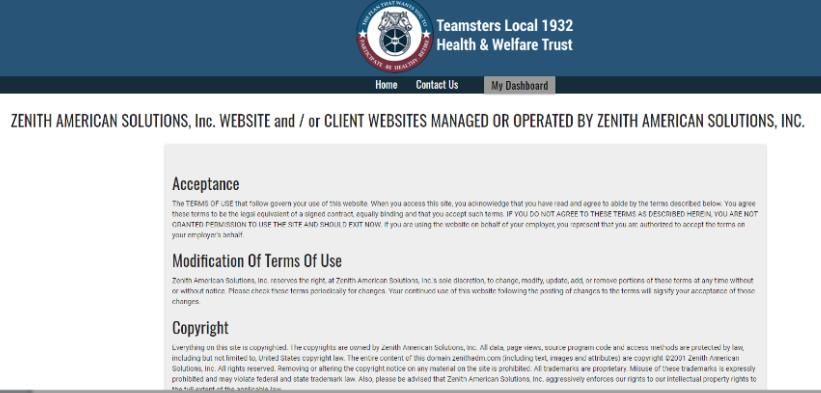
ENROLLMENT CHANGE FORM – LIFE EVENT
                             2021-2022 PLAN YEAR
                             TEAMSTERS LOCAL 1932 HEALTH AND WELFARE TRUST
                             Teamsters Trust Fund Administrative Office:                            Mailing Address:
                             433 N. Sierra Way, San Bernardino, CA 92419-4831                       P.O. Box 571
                             P 909-494-2916 | P 866-484-1337 | Fax 909-789-1311                     San Bernardino, CA 92402-0571

 SECTION 1: EMPLOYEE INFORMATION
 Employee ID             Last Name, First Name, Middle Initial                             □ Male        Date of Birth     Social Security Number

                                                                                           □ Female          /      /
 Home Address                                              City                            State         Zip Code          Telephone
                                                                                                                           (       )
 Mailing Address    □ Same as Home Address                 City                            State         Zip Code          Date of Hire
                                                                                                                                       /   /
 County of San Bernardino - Department                     Email Address

 Qualifying Life Event                                     Eligibility requires proof of dependency, such a copy of the certified birth or marriage
                                                           certificate or domestic partnership, adoption or placement paperwork, complete
 □ Add         □ Change         □ Remove                   requirements are found in the Summary Plan Description located on the Trust’s website at
                                                           https://Teamsters1932.zenith-american.com.

 SECTION 2: ENROLLMENT DECISION - TEAMSTERS LOCAL 1932 HEALTH PLAN

 □ As a dues paying member of Teamster’s Local 1932, I “Elect to Enroll” in the Teamsters Local 1932 Health and
   Welfare Trust. I previously opted out of coverage and my other coverage recently (within the last 60 days)
   terminated. Proof of the termination of coverage is enclosed with my Enrollment Form.

 SECTION 3: ELECT MEDICAL AND DENTAL COVERAGE | SELECT ONE : ■ Pre-Tax or ■ Post-Tax

        BLUE SHIELD HMO                                KAISER HMO                       BLUE SHIELD PPO                    OPT-OUT/WAIVER

  □ HMO Platinum Plan                        □ HMO Platinum Plan                     □ PPO Non-Needles                   □ Medical
    $10 copay                                  $10 copay                                                                   Opt-Out/Waiver**
    $0/admit; no charge                        $0/admit; no charge
    Network: Access+

  □ HMO Gold Access+ Plan                    □ HMO Gold Plan                         □ PPO Needles
    $40 copay                                  $40 copay
    $100/admit; plus 20%                       $100/admit; plus 20%
    $3,500 copay max Cal-yr                    $3,500 copay max Cal-yr
    Network: Access+

  □ HMO Gold Trio Plan
    $25 copay
    $100/admit; plus 20%
    $3,500 copay max Cal-yr
    Network: Trio

2021-2022 Enrollment Change Form – Life Event - Teamsters Local 1932 Health and Welfare Trust                                                  Page 1 of 4
INITIAL HERE

 SECTION 4: ELECT MEDICAL AND DENTAL COVERAGE                                 (Continued)

                               DELTA DENTAL                                                                     OPT-OUT/WAIVER

                  □ Delta DHMO*                □ Delta PPO                                              □ Dental Opt-Out/Waiver**

         *Delta DHMO enrollees will continue with your current Delta-assigned Dentist if applicable, see Section 5.
      Alternately, a dentist located near your home will be assigned to you. Contact Delta Dental to change Dentists.

    **Employees selecting to Opt-Out/Waiver of Medical and/or Dental Coverage are required to submit a completed &
  signed “Opt-Out/Waiver” Form; the Opt-Out/Waiver Form must be submitted, with all required documents as listed on
                 the Form, to the Trust Administrative Office for Review and Approval/Deny Decision.

 SECTION 5: EMPLOYEE ENROLLMENT – CHANGE DUE TO QUALIFYING LIFE EVENT
 Paperwork must be received within 60 days of the qualifying life event.
 Elections made within 30 days will be processed retroactively.
 Last Name, First Name, Middle Initial                                                         Marital Status

                                                                                               □ Single □ Married □ Domestic Partner
                          Med. Group Name                    Physician Name                    Physician PCP ID#                            Existing Patient?
 BLUE SHIELD HMO
 ENROLLEES ONLY                                                                                                                             □ Yes □ No
                          Dentist Name                                                         Facility #                                   Existing Patient?
 DELTA DHMO
 ENROLLEES ONLY                                                                                                                             □ Yes □ No

 SECTION 6: DEPENDENT ENROLLMENT
 List all dependents to be covered; dependent verification documentation is required for all dependents.
 Provide the Social Security Number of each dependent you enroll.
 Federal regulations require health plans to report the names and Social Security Numbers of every covered individual to the IRS.

 SPOUSE / DOMESTIC PARTNER:

 Enroll in all products selected by Employee: □ Yes       □ No (if no, describe coverage selection)

 Relationship             Last Name, First Name, Middle Initial                                □ Male           Date of Birth       Social Security Number

 □ Spouse □ D.Ptnr                                                                             □ Female            /     /
                          Med. Group Name                    Physician Name                    Physician PCP ID#                            Existing Patient?
 BLUE SHIELD HMO
 ENROLLEES ONLY                                                                                                                             □ Yes □ No
                          Dentist Name                                                         Facility #                                   Existing Patient?
 DELTA DHMO
 ENROLLEES ONLY                                                                                                                             □ Yes □ No

 CHILD(REN) / STEPCHILD(REN):

 Enroll in all products selected by Employee: □ Yes       □ No (if no, describe coverage selection)

 Relationship             Last Name, First Name, Middle Initial                                □ Male        Date of Birth          Social Security Number

 □ Child □ Stepchild                                                                           □ Female            /     /
                          Med. Group Name                    Physician Name                    Physician PCP ID#                            Existing Patient?
 BLUE SHIELD HMO
 ENROLLEES ONLY                                                                                                                             □ Yes □ No
                          Dentist Name                                                         Facility #                                   Existing Patient?
 DELTA DHMO
 ENROLLEES ONLY                                                                                                                             □ Yes □ No

2021-2022 Enrollment Change Form – Life Event - Teamsters Local 1932 Health and Welfare Trust                                                       Page 2 of 4
INITIAL HERE

 SECTION 6: DEPENDENT ENROLLMENT                          (Continued)

 CHILD(REN) / STEPCHILD(REN):

 Enroll in all products selected by Employee: □ Yes         □ No (if no, describe coverage selection)

 Relationship              Last Name, First Name, Middle Initial                                  □ Male       Date of Birth        Social Security Number

 □ Child □ Stepchild                                                                              □ Female          /    /
                           Med. Group Name                     Physician Name                     Physician PCP ID#                           Existing Patient?
 BLUE SHIELD HMO
 ENROLLEES ONLY                                                                                                                               □ Yes □ No
                           Dentist Name                                                           Facility #                                  Existing Patient?
 DELTA DHMO
 ENROLLEES ONLY                                                                                                                               □ Yes □ No

 Enroll in all products selected by Employee: □ Yes         □ No (if no, describe coverage selection)

 Relationship              Last Name, First Name, Middle Initial                                  □ Male       Date of Birth        Social Security Number

 □ Child □ Stepchild                                                                              □ Female          /    /
                           Med. Group Name                     Physician Name                     Physician PCP ID#                           Existing Patient?
 BLUE SHIELD HMO
 ENROLLEES ONLY                                                                                                                               □ Yes □ No
                           Dentist Name                                                           Facility #                                  Existing Patient?
 DELTA DHMO
 ENROLLEES ONLY                                                                                                                               □ Yes □ No

 Enroll in all products selected by Employee: □ Yes         □ No (if no, describe coverage selection)

 Relationship              Last Name, First Name, Middle Initial                                  □ Male       Date of Birth        Social Security Number

 □ Child □ Stepchild                                                                              □ Female          /    /
                           Med. Group Name                     Physician Name                     Physician PCP ID#                           Existing Patient?
 BLUE SHIELD HMO
 ENROLLEES ONLY                                                                                                                               □ Yes □ No
                           Dentist Name                                                           Facility #                                  Existing Patient?
 DELTA DHMO
 ENROLLEES ONLY                                                                                                                               □ Yes □ No

 Enroll in all products selected by Employee: □ Yes         □ No (if no, describe coverage selection)

 Relationship              Last Name, First Name, Middle Initial                                  □ Male       Date of Birth        Social Security Number

 □ Child □ Stepchild                                                                              □ Female          /    /
                           Med. Group Name                     Physician Name                     Physician PCP ID#                           Existing Patient?
 BLUE SHIELD HMO
 ENROLLEES ONLY                                                                                                                               □ Yes □ No
                           Dentist Name                                                           Facility #                                  Existing Patient?
 DELTA DHMO
 ENROLLEES ONLY                                                                                                                               □ Yes □ No

 Enroll in all products selected by Employee: □ Yes         □ No (if no, describe coverage selection)

 Relationship              Last Name, First Name, Middle Initial                                  □ Male       Date of Birth        Social Security Number

 □ Child □ Stepchild                                                                              □ Female          /    /
                           Med. Group Name                     Physician Name                     Physician PCP ID#                           Existing Patient?
 BLUE SHIELD HMO
 ENROLLEES ONLY                                                                                                                               □ Yes □ No
                           Dentist Name                                                           Facility #                                  Existing Patient?
 DELTA DHMO
 ENROLLEES ONLY                                                                                                                               □ Yes □ No

If you have more dependents to enroll, print out additional copy(ies) of page 3 and attach to your form.

2021-2022 Enrollment Change Form – Life Event - Teamsters Local 1932 Health and Welfare Trust                                                         Page 3 of 4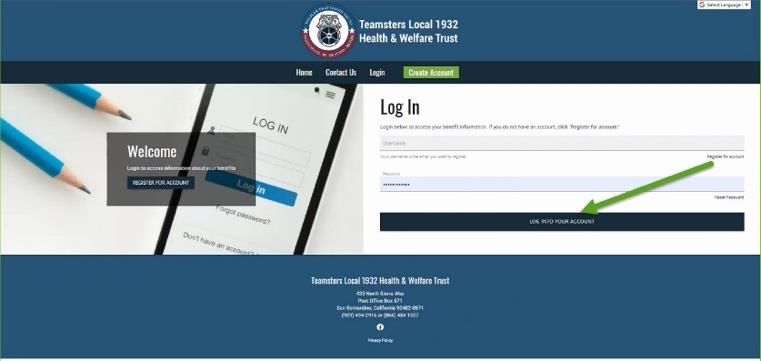
INITIAL HERE

 SECTION 7: NEEDLES PLAN ENROLLMENT - COUNTY OF SAN BERNARDINO, NEEDLES SUBSIDY ELIGIBLE

 I understand that Needles Plan Enrollment Eligibility and the County of San Bernardino "Needles Subsidy" are entirely
 contingent on my work-assignment to Needles, Trona, or Baker as my work location. I understand that it is my responsibility to
 notify both the Trust Administrator and the County Human Resources Department - Employee Benefits and Services Division
 (HR-EBSD) should my assigned work-location change to an area other than Needles, Trona, or Baker.

 I further understand that should it be discovered that the Needles Subsidy has been paid to me in error, the Employer (County
 of San Bernardino) may collect, through payroll deduction, any amount of subsidy for which I received and was not eligible.

 SECTION 8: ARBITRATION AGREEMENT

 I understand that (except for Small Claims Court cases, claims subject to a Medicare appeals procedure or the ERISA claims
 procedure regulation, and any other claims that cannot be subject to binding arbitration under governing law) any dispute
 between myself, my heirs, relatives, or other associated parties on the one hand and the Health Plan and Dental Plan selected
 above, any contracted health care providers, administrators, or other associated parties on the other hand, for alleged violation
 of any duty arising out of or related to membership in the Plan, including any claim for medical or hospital malpractice (a claim
 that medical services were unnecessary or unauthorized or were improperly, negligently, or incompetently rendered), for
 premises liability, or relating to the coverage for, or delivery of, services or items, irrespective of legal theory, must be decided
 by binding arbitration under California law and not by lawsuit or resort to court process, except as applicable law provides for
 judicial review of arbitration proceedings. I agree to give up our right to a jury trial and accept the use of binding arbitration. I
 understand that the full arbitration provision is contained in the Evidence of Coverage.

 Your signature indicates that you have completed all requested information as accurately as possible and understand all
 agreements implied including your agreement to submit disputes to binding arbitration.

 I have read and made the appropriate corrections and changes to the information on file with the Teamsters Local 1932 Health
 and Welfare Trust Administrative Office.

 Employee Signature                                                                                                         Date

                                                                                                                        /          /

2021-2022 Enrollment Change Form – Life Event - Teamsters Local 1932 Health and Welfare Trust                                          Page 4 of 4
Ensure the most current form is submitted. Refer to EMACS Forms/Procedures website.

                                              PREMIUM DEDUCTION ELECTION
Must print in Black or Blue ink ONLY
  Employee ID           Rcd No.                                                     Last Name, First Name

                                       Department                                                 Department ID                          Telephone

                                                  REASON FOR ELECTION AGREEMENT
     Date                                 Event                                   Date                                       Event
                      New Hire                                                                   Moved in/out of the HMO area

                      Adoption/Guardianship*                                                     Needles Subsidy/Change in Subsidy Eligibility

                      Birth*                                                                     Open Enrollment

                      Death*                                                                     Reduction in Hours for Employee or
                        Update AD&D from Employee + Spouse to Employee Only                      Spouse/Domestic Partner*
                     Disabled Over-Age Dependent                                                 Return from Unpaid Leave of Absence
                     (Please provide required Disabled Dependent
                      Certification form)
                     Divorce/Dissolution of Domestic Partnership*                                Unpaid Leave of Absence Taken by Employee or
                     (Please provide required mailing address of                                 Spouse/Domestic Partner*
                     ex-spouse/domestic partner)

                  Mailing Address:

                  City, State, Zip:

                    Gain/Loss Spouse’s/Domestic Partner’s                                        Other:
                  EEEmployment or Other Group Coverage *
                      Marriage/Domestic Partnership*

*Documentation is required for evidence of qualifying event (i.e.; Birth Certificate, Certificate of Marriage/Domestic Partnership, Court
Orders, Final Divorce Decree, Benefit Confirmation Statement, COBRA Notice, Loss of Coverage Letter, and Termination Notice)

                                                                   BENEFIT ELECTIONS
                               Check the appropriate tax elections and list all dependents you wish to enroll in benefits.
                                                                                                                   Tax              Domestic Partner/
                     Before           After                                                                     Dependent           Domestic Partner’s
      Plan                                                          Name of Dependent
                      Tax             Tax                                                                                                  Child
                                                                                                                Yes          No    Before Tax After Tax
     Medical
     Dental
 Voluntary Life
      AD&D
     Vision*
* Tax election for vision coverage applies
  only to Firefighters, Nurses, Probation,
  Specialized Peace Officer - Supervisory
  units
                                                                               HR Use Only
                                                                      Comments
                                                              Enroll:    Vision          Life

DISTRIBUTION: Original - EBSD-HR (0440)                                                         Reviewed By           Date          Keyed By        Date
                                                                                                (Employee ID)                      (Employee ID)

REV. 8/09/2016                                                        1 of 2                                                      (Premium Deduction Election)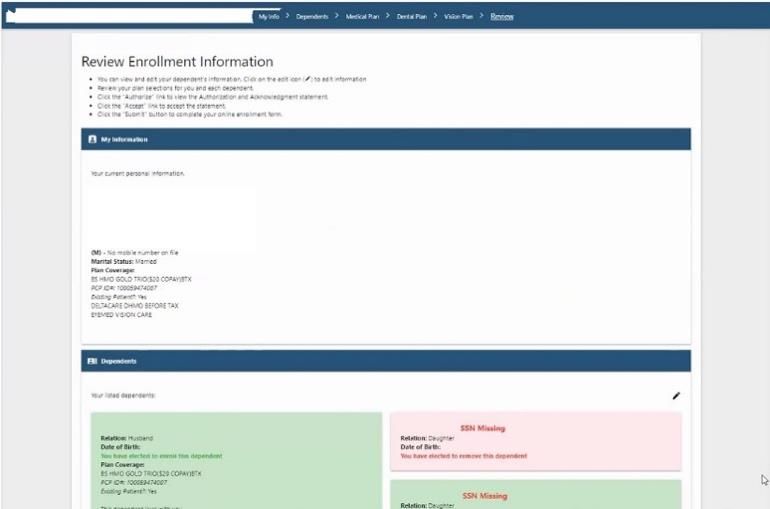
Authorization and Certification
                                    Employee signature is required for all qualifying events

I understand my share of the plan coverage cost may be adjusted to reflect any rate change. I acknowledge that my
election is irrevocable unless there is a qualifying event in my family status and that in the absence of a family status
change, my next opportunity to change this election will be during Open Enrollment. If I do not complete and return a new
election form during Open Enrollment, the elections specified on page one of this Premium Deduction Election form will be
maintained for the new plan year.

I hereby authorize the County of San Bernardino to obtain eligibility dates of coverage from previous Medical Plans for the
exclusive purpose of determining my eligibility f or the County of San Bernardino’s Premium Conversion Benefit Plan as
required under Internal Revenue Code Section 125. I understand this authorization is only in effect for 60 days from the
date of my signature.

Needles Subsidy Eligible Employees: I understand that my eligibility for the “Needles Subsidy” is entirely contingent upon
being assigned to Needles, Trona, or Baker as my work location. I understand that it is my responsibility to notify the
Employee Benefits and Services Division (EBSD) should my assigned work location change to an area other than Needles,
Trona, or Baker. I further understand that should it be discovered that the Needles Subsidy has been paid to me in error,
that the County will collect, through payroll deduction, any amount of subsidy for which I received and was not eligible.

________________________________             _____________________________________                 _______________________
Signature of Employee                        Print Employee Name                                   Date

I understand my options in the Benefit Plan. I understand the County will reduce my salary in the amount of the plan
coverage cost on either a before tax or after tax basis.

I understand that if at any time my or my family’s eligibility changes, I will notify EBSD or department payroll specialist within
60 days of the change in order to make the appropriate changes to my benefit deductions. For example, if I get divorced I
am required to remove my ex-spouse from County sponsored Benefit Plans.

I understand that I will be taxed on the fair market value of any benefits for any individual who is not my Federal/State tax
dependent.

                                       Employee Signature                                                          Date

                  Payroll Specialist (Print & Sign)                              Telephone                         Date

                                                         Office Use Only

   Approved                           Authorized Representative Signature                                          Date

   Denied

 REV. 8/09/2016                                           2 of 2                                         (Premium Deduction Election)
INSTRUCTIONS                                         SCREEN

1. The website is secure – The first time you log
   on, you must register for an Account.

2. You will register by calling Customer Service
   at 909-494-2916 or toll-free, 1-866-484-1337,
   to set up your account; they will help you
   enroll, or assist you with registering so that
   you can enroll yourself at a later time.

3. Once you have activated your account, you
   can enroll through the Teamsters Local 1932
   Health & Welfare Trust online enrollment
   module at https://Teamsters1932.zenith-
   american.com; or Customer Service can
   help walk you through enrollment.

YOUR ACCOUNT IS ACTIVATED                            YOU ARE READY TO ENROLL

1. Once you have activated your account, and
   you choose to self-enroll; visit
   https://Teamsters1932.zenith-american.com;
2. Key in your user name and password and
   click on the button, Log into Your Account.

    Important note: The online session will
    expire after 30 minutes of inactivity. Any
    changes you have made will be lost if you
    have not completed the enrollment
    process.

3. The first time (only) you log into your
   account; you will see the Terms of Use
   language.

       a. To continue with the enrollment process,
          check the box to agree with the terms
          and use, and click continue.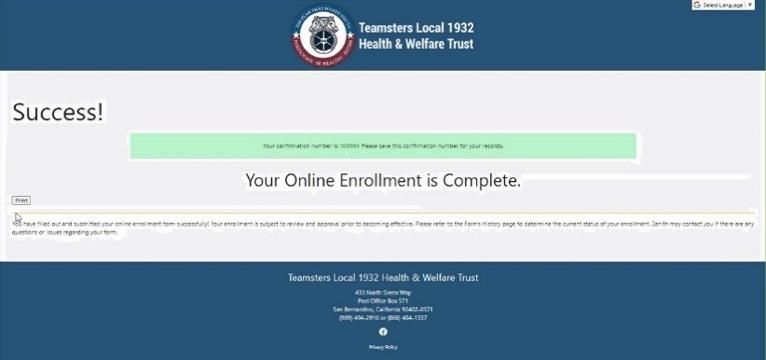
YOUR ACCOUNT IS ACTIVATED                             YOU ARE READY TO ENROLL

4. Click on the Enroll Now button, or Enrollment
   Form. You will be directed to the Online
   Enrollment page.

5. Review the Participant Information page for
   accuracy. This is the information you
   provided to Customer Service. If any portion
   is inaccurate, please contact the Customer
   Service department to update, once your
   enrollment has been completed.

      b. Click continue.

6. On the Dependent screen, if you have
   dependents to add to your Plan, click the
   Add New button located at the bottom of the
   page.

      a. Enter your dependents information, as
         requested in the fields displayed.
              i. If the dependent you are adding
                 has a different address than you,
                 scroll down using the gray bar on
                 the right side of the text box and
                 key in their address.
      b. Click the Save button
      c. The new dependent will now display on
         your dependent screen. Click the Enroll
         button.
      d. You can continue to add dependents.
         Once completed, click Continue.
YOUR ACCOUNT IS ACTIVATED                           YOU ARE READY TO ENROLL

7. Medical Plan Selection – When selecting the
   Medical Plan option of your choice, you
   must select Before Tax (BTX) or After Tax
   (ATX). When selecting Before Tax or After Tax
   for your medical plan, the same choice must
   be made for your dental plan.

      a. Blue Shield HMO Gold Trio ($20 co-
         payment) – New Option
      b. Blue Shield HMO Platinum POS ($10 co-
         payment)
      c. Blue Shield HMO Gold Access+ ($40 co-
         payment)
      d. Blue Shield PPO (Non-Needles)
      e. Blue Shield PPO Needles
      f.   Kaiser Gold Choice
      g. Kaiser Platinum Plus

8. Select the medical plan option that best suits
   you and your family’s needs and click the
   button, Choose This Plan.

      a. Once selecting your plan, you will need
         to click on the box next to each family
         member to be enrolled under your plan.
      b. If you are selecting a Blue Shield HMO
         or POS Plan, you will need to enter the
         Primary Care Provider (PCP)
         Identification Number, or click on the
         option for Blue Shield to pick a PCP for
         you and/or your dependents.
      c. If you request Blue Shield to select a
         PCP for you, one will be chosen in your
         geographical area.
      d. Scroll to the bottom of the page and
         click Continue.
YOUR ACCOUNT IS ACTIVATED YOU ARE READY TO ENROLL
9. If you want to Waive/Opt Out of medical
coverage, scroll to the bottom of the page
and click on the Waive/Opt Out button.
a. You will be required to provide the
Fund’s Administrative office proof of
other coverage at the time the waive
or opt-out is elected
b. You can submit the documentation via
one of the below methods:
Email:
teamsters1932eligibility@zenith-
american.com;
Mail:
Teamsters Local 1932 Health and
Welfare Trust, P.O. Box 571, San
Bernardino, CA, 92402-0571.
Fax: (909) 789-1311
10. Select the Dental coverage that best suits
you or your family’s needs.
a. Once you’ve selected your Plan, click
on each family member you are
enrolling in your Dental Plan.
b. Click Continue.YOUR ACCOUNT IS ACTIVATED YOU ARE READY TO ENROLL
11. Vision Plan
a. Employee only coverage is paid for by
the County. Click Continue.
12. Review your enrollment information.
a. Review the Plan selections for you and
each of your family members.
b. Review your bi-weekly benefits cost,
based upon your Plan selections.
c. If there are no changes, click the
Authorize box at the bottom of the
screen verifying you have reviewed all
information.
d. An Authorization box will display; scroll
down using the gray bar on the right
side of the text box. Click the Accept
button.
e. Click the Submit button.
f. You will receive a message noting that
your enrollment is complete. The
message will include a reference
number.
13. There is a dashboard on the left side of the
screen that will appear each time you log
into your account.YOUR ACCOUNT IS ACTIVATED YOU ARE READY TO ENROLL
14. You can upload supporting documents, such
as marriage certificates or birth certificates
when adding new dependents, and have
them attached to your electronic file.
a. There are Customer Service
Representatives to assist you in
completing your enrollment form, and
answer any questions you may have.
Contact us at 909-494-2916 or (866) 484-
1337 Monday through Friday from 8:00
a.m. – 5:00 p.m. PDT.
b. Other benefits are available to you
through your employer. Make sure you
also review your other benefit
enrollment opportunities on the
Employee Benefits section of the
County’s portal.You can also read


