Arduino: interactive lego police car - kevin flick mengyao zhao
←
→
Page content transcription
If your browser does not render page correctly, please read the page content below
arduino: interactive lego police car

              kevin flick
            mengyao zhao
A   t the heart of a child’s toy is the interaction that the child has with the toy. It is this engage-
    ment of activity where the child’s imagination is lived out in their mind that true interactivity
takes place. We strove to capture the imagination of a child and implement the interactivity that
they might have with a particular toy. Our aim is to bring this imagination to life using Arduino
technology, with two physical inputs and two outputs.
1

                 toy observation
Before we began the process of design, we both observed toys in toy stores. We noted how toys reflect societal
expectations on boys and girls. We photographed toys during this process, then shared the photographs and
notes with each other. After the toy store observations, we decided to work on an existing Lego set.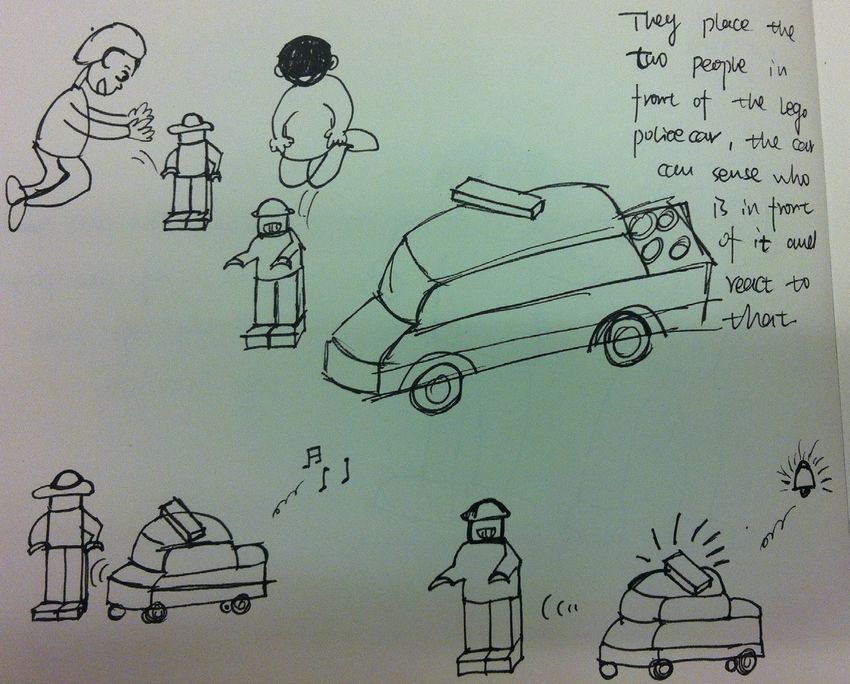
2

                 observation
Kevin has two small daughters, ages six and three. He observed them playing with Legos, watching how they
interacted with them, and what their process was of building with Legos.

                                                                           Initially, the children dumped a tub
                                                                           of Legos on the floor. First, they
                                                                           searched for the pieces they wish to
                                                                           build with. They typically began with
                                                                           a large base to build onto, whether
                                                                           it was a large green Lego platform,
                                                                           or a smaller flat Lego piece. By this
                                                                           point they had determined what
                                                                           they wanted to build. When they
                                                                           finished their Lego creation, they
                                                                           either played with it for a short
                                                                           period of time, or they tore it apart
                                                                           and created something different.
                                                                           Lego creations that tended to be
                                                                           kept in tact were houses and cars. If
                                                                           an adult created something for the
                                                                           child, the Lego creation was typi-
                                                                           cally kept in tact for several days.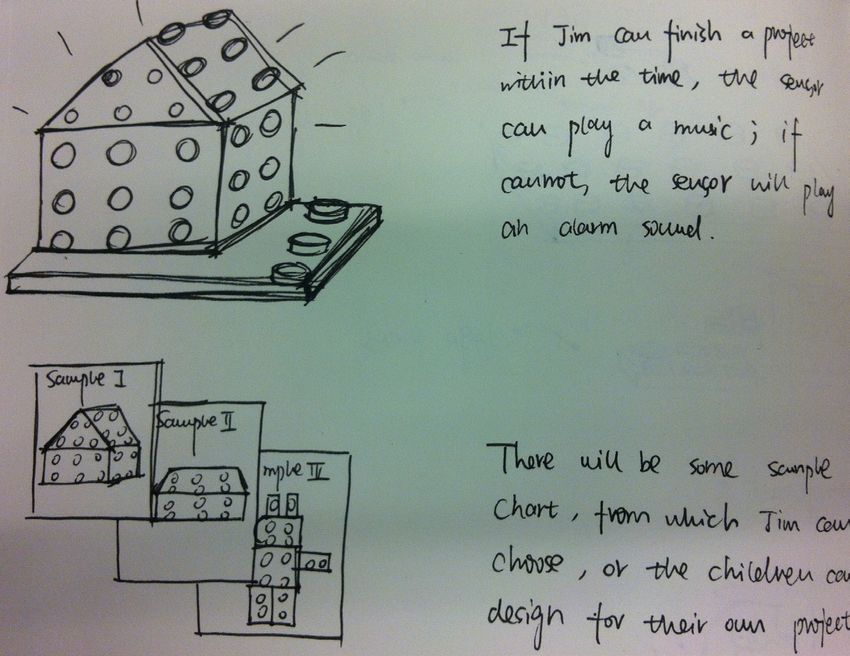
3
              literacy

    W     e also gathered a number of articles on Legos. One article in particular was about DigiBlox,
          research that combined Lego-like blocks and Arduino interactions. Their research suggest-
    ed that when these blocks were constructed that interactions would be created. This article was
    also an inspiration in our approach.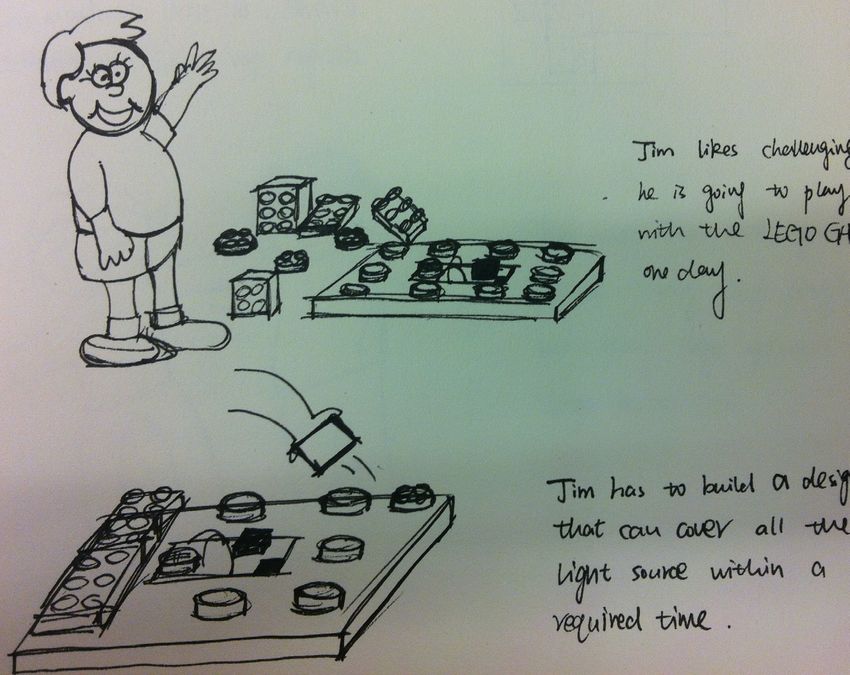
children need interactions between toys and them, as well as the
other people and themselves.

children have expectations of the toys they interact with, like a
“should be” reaction, place or sound.

parents need a chance to participate in children’s playing with
toys, and they need educational toy sets.
1

                    lego parent
L
LEGO
   EGOParent
arethere
parents.
        Parentisisdesigned
    threeare
           separate
ton for parents.
                   designedfor
             three separate
          This design
                  This concept
                              forenhancing
                                  enhancingthe
                     parts: regular
                              parts:LEGO
                       design concept
                                      regular
                                 allows parents
                                               thecommunication
                                            pieces,
                                                    communicationbetween
                                              LEGOLEGOpieces,
                                         allows parents
                                                           plate
                                                   to control
                                                              LEGO
                                                          to control
                                                                    betweenchildren
                                                                 withplate
                                                                       a LED
                                                              the button,
                                                                           with
                                                                               childrenand
                                                                              and
                                                                                a LED
                                                                      the button,
                                                                                         andparents.
                                                                                   a speaker
                                                                           which enables
                                                                                             parents.AsAsshown
                                                                                        and a and
                                                                                              speaker
                                                                                   which enables
                                                                                                           is shown
                                                                                                   interactive
                                                                                           the LEDthe
                                                                                                                  below,
                                                                                                        and interactive
                                                                                                     to blink
                                                                                                        LED to
                                                                                                                       below,
                                                                                                                          there
                                                                                                                 button for
                                                                                                               and
                                                                                                                 blink
                                                                                                                    theand
                                                                                                                          but-
                                                                                                                        speaker
                                                                                                                            the
to
speaker
   sing atosong,
            sing in
                  a song,
                    whichinwaywhich
                                 to give
                                     waychildren
                                          to give children
                                                    encouragement
                                                            encouragement
                                                                     and praise
                                                                              andwhen
                                                                                   praise
                                                                                        children
                                                                                           when children
                                                                                                 finish a project.
                                                                                                            finish a project.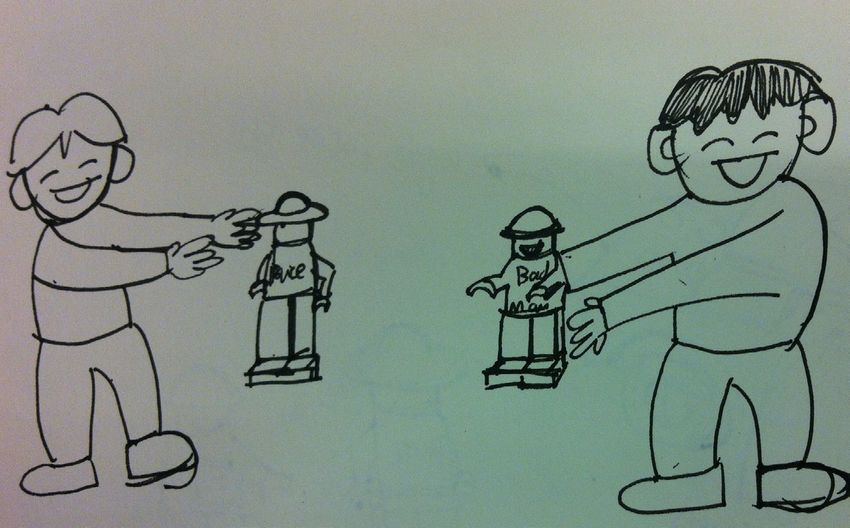
1

                  lego parent
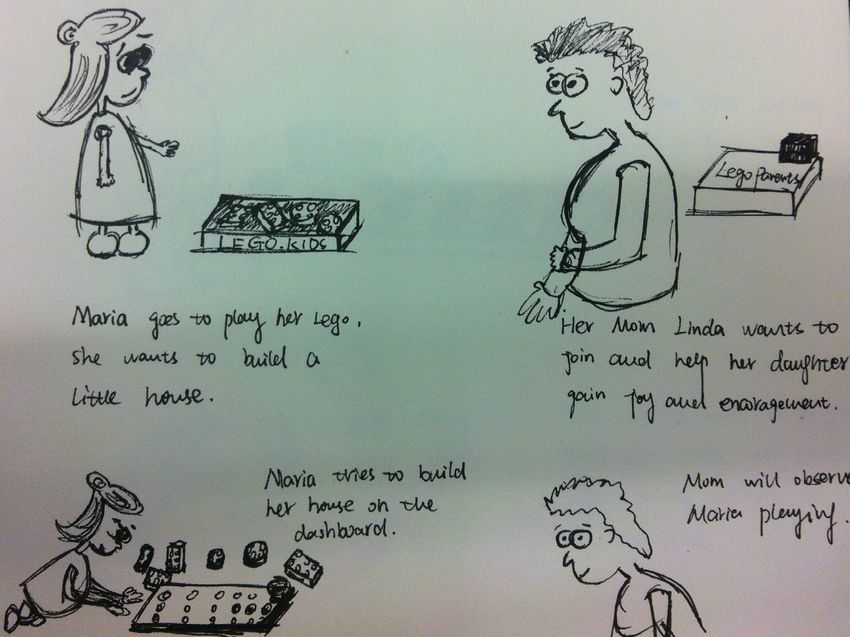
L  EGO Parent is designed for enhancing the communication between children and parents. As is shown below,
   there are three separate parts: regular LEGO pieces, LEGO plate with a LED and a speaker and interactive but-
ton for parents. This design concept allows parents to control the button, which enables the LED to blink and the
speaker to sing a song, in which way to give children encouragement and praise when children finish a project.
                                                                              storyboard
                                                                              Maria goes to play her LEGO, she
                                                                              wants to build a little house. Her
                                                                              Mom, Linda, wants to join and help
                                                                              Maria gain joy.

                                                                              Maria tries to build her house on the
                                                                              LEGO plate and Linda is observing
                                                                              Maria playing.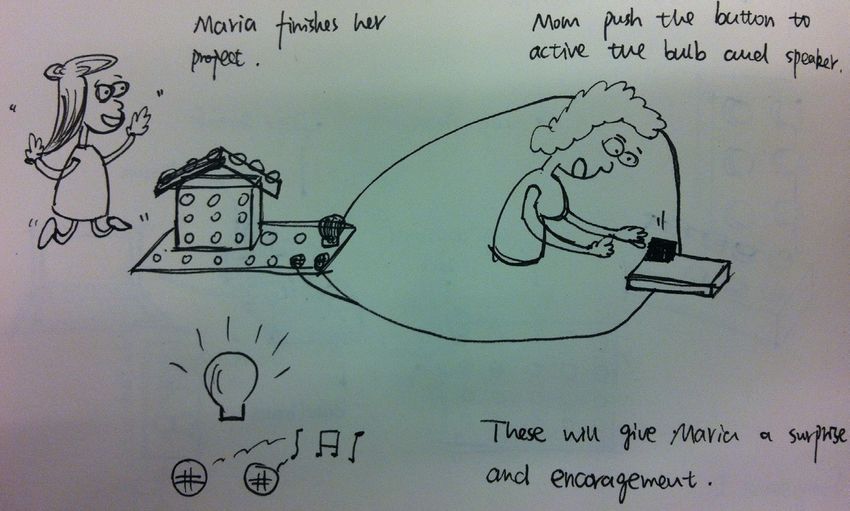
1

                  lego parent
L  EGO Parent is designed for enhancing the communication between children and parents. As is shown below,
   there are three separate parts: regular LEGO pieces, LEGO plate with a LED and a speaker and interactive but-
ton for parents. This design concept allows parents to control the button, which enables the LED to blink and the
speaker to sing a song, in which way to give children encouragement and praise when children finish a project.

                                                                              storyboard
                                                                              When Maria finishes the project,
                                                                              Linda pushes the button to activate
                                                                              the LED and the speaker.

                                                                              The song and the lit light give Maria
                                                                              a surprise and encouragement.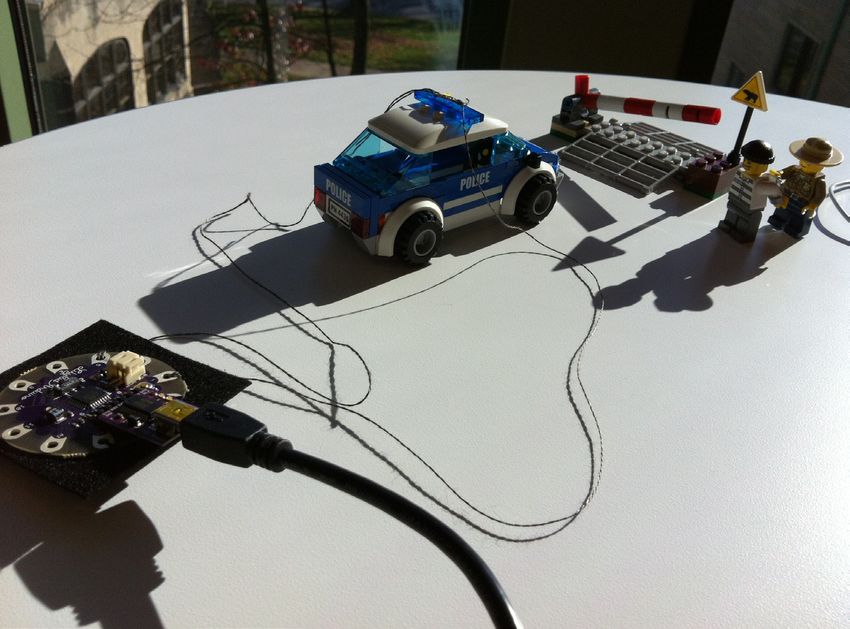
2

                     lego game
LEGO Game is designed for enhancing the interaction between LEGO and children. As shown below, there is an
Arduino pad within the regular LEGO plate, on which there will be a speaker, a light sensor and a time tracker. If
children can finish a project on the plate which can cover the light sensor within a required time, the speaker will
sing a song.
2
lego game
storyboard
Jim likes a challenge. He is going to
play with LEGO Game one day.
Jim has to build a project that can
cover the light sensor within a
required time.2
lego game
storyboard
If Jim can finish the project within
the required time, the speaker will
sing a song, if Jim cannot, the
speaker will play a siren.
There will be some sample project
charts, from which Jim can choose,
or Jim can design his own project.3
lego pol ce i
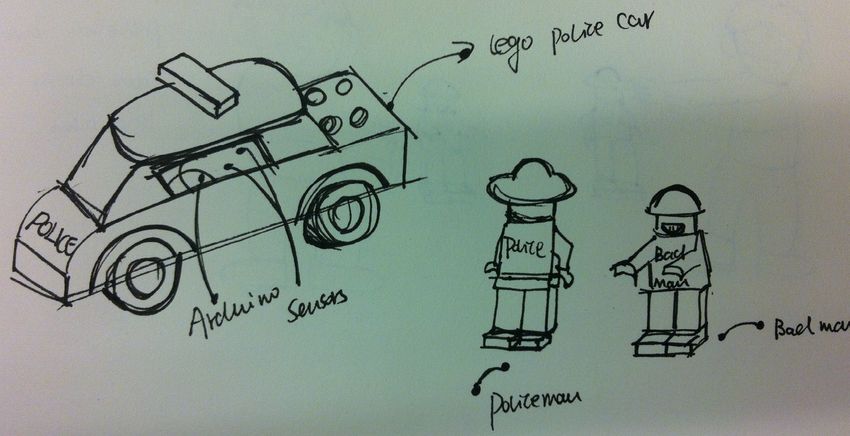
LEGO Police is designed for enhancing the interaction between LEGO and children and also the communication
between children and children. As shown below, there is an Arduino pad within the LEGO car, on which there is
a sensor and a speaker. On the LEGO policeman, there will be another sensor, which is different than the one on
the LEGO bad man. When the police car has reached different people, the speaker will sing a song or make a siren
sound.3
lego pol ce
i
storyboard
Jim and Tom are good friends, they
like playing LEGO together. One day,
they play with LEGO Police, Jim
chooses the policeman and Tom
chooses the bad man.3
lego pol ce
i
storyboard
They play with the two people in
front of the police car, the car can
sense different people in front of it.
When it senses it’s the policeman,
it will sing a song and if it’s the bad
man, it will play a siren sound.A fter we came up with three different concepts, we started to think about how to implement the
design idea with available techniques. We were trying to make the interaction easy to access
for children and meanwhile realizable with what we got: an Arduino UNO pad and an Arduino
Lilypad. We narrowed down our ideas to the LEGO police car, and in order to modify our initial
concept we conducted more research.4
observation
The police car was ordered and constructed. The Lego set came with a police man, a thief, a police car and some-
thing that resembled a railroad crossing with gates.
Kevin then allowed his girls to play
with the car. He asked his oldest
daughter what she imagined the car
could do. She said that she imag-
ined the car lighting up with a siren.
She also thought the gate should
hold the thief when the police-
man catches him. This inspired
our design and the interactions we
brought to the police car set.4
lego pol ce c r
i a
T he modified LEGO Police Car is
built with Arduino Lilypad. As
shown on the left, it has two inputs:
light sensor and button; and it has
two outputs: siren speaker and a
LED.
When children touch the light sen-
sor, it will activate the LED, and
when children push the button the
speaker will play a siren sound.
Parents can use this toy to educate
children about the relationship
between the “bad guys” and police-
man. The added interaction will also
increase the enjoyment of playing
with LEGO.1
circuit diagrams
In order to develop our prototype, we designed the elec-
tric circuit diagrams, as shown on the left and the next
page.1
circuit diagrams
LED SPEAKER
+ -
- +
+
-
5 A5
T he biggest circle in the middle is the Lilypad; above it is
the LED and the speaker and below it is the button and
light sensor.
9 A2
s
- +
- +
BUTTON LIGHT SENSOR2
test
W e built our prototype to test the
circuit and code, but initially it
didn’t work.
One problem was in the code, so we
started with a simple functionality:
the LED, and then we found out it
was because the wires were touch-
ing each other, which caused the
problem.2
test
W e sewed wires on a piece of
cloth and used alligator clips
to avoid wires from touching each
other; this was effective and we
could pay attention to the code.void loop(void)
{
if (digitalRead(buttonPin)==0)
3
code {
beep(speakerPin,2349,10);
beep(speakerPin,2637,10);
//D
//E
beep(speakerPin,2793,10); //F
beep(speakerPin,3136,10); //G
beep(speakerPin,3520,10); //A
beep(speakerPin,3951,10); //B
beep(speakerPin,4186,10); //C
/* Interactive Toy: LEGO Police Car Kevin Flick, Mengyao Zhao */ beep(speakerPin,3951,10); //B
beep(speakerPin,3520,10); //A
#define aref_voltage 4.08 // This is a reference voltage for your power supply: as 4.08 beep(speakerPin,3136,10); //G
//but measure it with a multimeter when running and add in the correct voltage. beep(speakerPin,2793,10); //F
beep(speakerPin,2637,10); //E
beep(speakerPin,2349,10); //D
int buttonPin = 9; //put the button on pin 9
int lightPin = A2; //put the light sensor on pin A2 beep(speakerPin,2349,10); //D
int lightReading; beep(speakerPin,2637,10); //E
int lightPin1 = 5; //put the LED light on pin 5 beep(speakerPin,2793,10); //F
int speakerPin = A5; //put the speaker on pin A5 beep(speakerPin,3136,10); //G
beep(speakerPin,3520,10); //A
beep(speakerPin,3951,10); //B
void setup(void) beep(speakerPin,4186,10); //C
{ beep(speakerPin,3951,10); //B
Serial.begin(9600); // To send debugging information via the Serial monitor beep(speakerPin,3520,10); //A
pinMode(buttonPin, INPUT); //set the pin as an input beep(speakerPin,3136,10); //G
digitalWrite(buttonPin, HIGH); //enable the pull-up resistor beep(speakerPin,2793,10); //F
pinMode(lightPin1, OUTPUT); //Setting LED (lightPin1) to be an output beep(speakerPin,2637,10); //E
pinMode(speakerPin, OUTPUT); //sets the speakerPin to be an output beep(speakerPin,2349,10); //D
} }
else
void beep (unsigned char speakerPin, int frequencyInHertz, long timeInMilliseconds) // the sound producing function {
{ beep(speakerPin,0,0);
int x; }
long delayAmount = (long)(1000000/frequencyInHertz);
long loopTime = (long)((timeInMilliseconds*1000)/(delayAmount*2)); lightReading = analogRead(lightPin);
for (x=0;x4
final prototype
A fter we fixed all the problems, we sewed wires onto
a piece of cloth, and modified our code until all the
expected functionalities worked well (as shown on the last
page). The photo on the left is an overview of the toy set.4
final prototype
To the left is the light sensor and the button, and below
shows the LED and the speaker.4
final prototype
You can view our video about the final prototype here: https://docs.google.com/file/d/0BzAbQhygAusBajRnck5zMDllV2c/editWhat would you do differently if you What would you have liked to have What would you like to be able to do
were to do it again? included? withArduino next?
We found it difficult to use the lilypad We would have liked to have included We imagine lego and arduino working
with the lego car, mainly because of the the temperature sensor instead of the together in the future to allow for the
small size of the car. The lego police button to control the siren. The idea circuitry to be integrated into the lego
car was from a lego set and wasn’t was that the sensor would detect when pieces. ideally, the lights on the police
wide enough to contain the lilypad. a child picks up the lego car and would car could have arduino led lights built
sound the siren. We had difficulties into them. Children could create inter-
Also, the wires were difficult to man- getting an accurate reading from the active lego designs simply by combining
age. Since there were so many wire sensor, which forced us to abandon the lego pieces together. This idea was
threads, we were not able to attach the sensor. inspired by research conducted by digi-
led flashing light and the siren to the blox (https://www.wpi.edu/Pubs/E-project/
car without crossing the wires. Available/E-project-011411-082210/unre-
stricted/DigiBlox.pdf).lego http://www.lego.com
interactive-gaming cubes http://venturebeat.com/2012/08/30/new-sifteo-cubes-make-the-little-blocks-of-gaming-joy-more-convenient/
interactive lego app http://www.ohhaveyouseenthis.com/2011/09/interactive-lego-app.html
interactive lego exhibit http://www.azcentral.com/community/phoenix/articles/2012/10/04/20121004arizona-science-center-hosts-
interactive-lego-travel-exhibit.html
DigiBlox https://www.wpi.edu/Pubs/E-project/Available/E-project-011411-082210/unrestricted/DigiBlox.pdf
Living Wall http://hlt.media.mit.edu/?p=27
Electronic Popables http://hlt.media.mit.edu/?p=5
Pu Gong Ying Tu http://hlt.media.mit.edu/?p=2286
Tweet-a-Pot http://www.instructables.com/id/Tweet-a-Pot-Twitter-Enabled-Coffee-Pot/
Singing Plant http://www.instructables.com/id/Singing-plant-Make-your-plant-sing-with-Arduino-/You can also read


