AN11990 NXP-NCI MCUXpresso example Rev. 1.2 - 4 January 2021 432212 - NXP Semiconductors
←
→
Page content transcription
If your browser does not render page correctly, please read the page content below
AN11990
  NXP-NCI MCUXpresso example
  Rev. 1.2 — 4 January 2021                                        Application note
  432212                                                         COMPANY PUBLIC

Document information
Information     Content
Keywords        NXP-NCI, NullOS, FreeRTOS, NFC, MCUXpresso, LPC, Kinetis
Abstract        This document intents to provide a description of the NXP-
                NCI_MCUXpressoExample project. This project demonstrates simple
                integration of NXP NCI NFC Controller without any OS resources
                dependencies.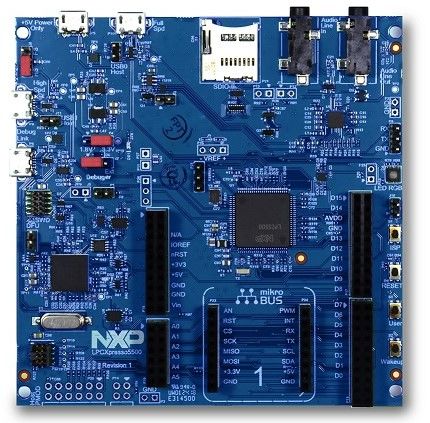
NXP Semiconductors
                                                                                                                        AN11990
                                                                                                             NXP-NCI MCUXpresso example

Revision history
Rev           Date       Description
1.2           20210104   Added support for LPC55xx and i.MX RT1060 and aligned with SW4325 v1.6 release
1.1           20181114   Updated with reference to SW package
1.0           20170607   First official version

AN11990                         All information provided in this document is subject to legal disclaimers.              © NXP B.V. 2021. All rights reserved.

Application note                             Rev. 1.2 — 4 January 2021
COMPANY PUBLIC                                         432212                                                                                       2 / 31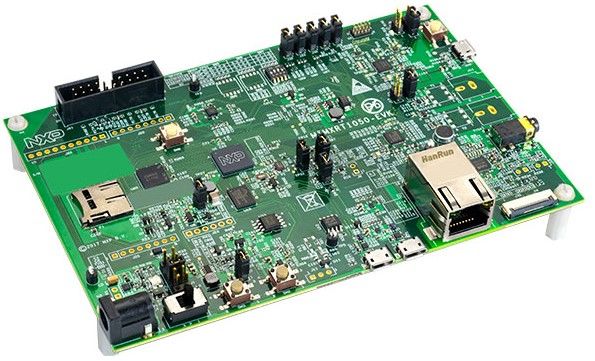
NXP Semiconductors
                                                                                                                            AN11990
                                                                                                                 NXP-NCI MCUXpresso example

1         Introduction
                     The NXP-NCI_MCUXpressoExample project shows how to easily interact with NCI-
                     based NXP’s NFC Controller in order to provide NFC capability to an embedded system
                     with no OS resources required.
                     The code example is delivered in the form of MCUXpresso projects running on NXP’s
                     LPC82x, LPC11Uxx , LPC11U6x and LPC55xx microcontrollers from the LPC family,
                     K64 microcontroller from the Kinetis K family and i.MX RT1060 from the Crossover
                     Processors familly.
                     The present example demonstrates NFC functionalities:
                     • R/W mode:
                       – extract NDEF content from a remote NFC Forum tag (Tag Types 1 to 5) and from
                         MIFARE Classic card
                       – write NDEF content to NFC Forum Type 2, Type 4 and Type 5 tag
                       – authenticate/read/write with MIFARE Classic card
                       – raw card access (ISO14443-3A, ISO14443-4 and ISO15693 cards)
                       – multiple tag support (up to 2 of the same technology or multiprotocol card)
                     • P2P mode: exchange (in both way) NDEF content with remote P2P device
                     • Card emulation mode:
                       – expose NDEF content and allow update to/from remote NFC reader (Type 4 tag
                         emulation)
                       – raw card emulation (ISO14443-4 emulation)
                     The K64 related project (based on SDK2.2) shows code example integrated under RTOS
                     (freeRTOS) while the LPC ones run without OS support.
                     In this document, the term „MIFARE Classic card“ refers to a MIFARE Classic IC-based
                     contactless card.

AN11990                             All information provided in this document is subject to legal disclaimers.              © NXP B.V. 2021. All rights reserved.

Application note                                 Rev. 1.2 — 4 January 2021
COMPANY PUBLIC                                             432212                                                                                       3 / 31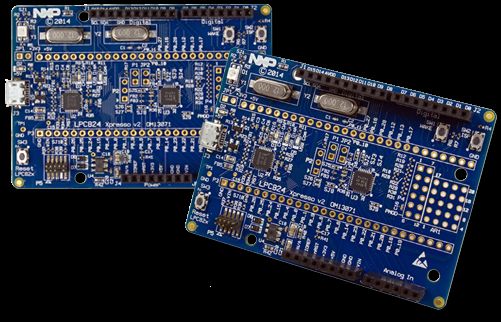
NXP Semiconductors
                                                                                                                              AN11990
                                                                                                                  NXP-NCI MCUXpresso example

2         HW setup

                   2.1 LPC82x
                      To set up the project, we use OM13071 LPCXpresso824-MAX board (http://
                      www.nxp.com/demoboard/OM13071).

                       Figure 1. OM13071 LPCXpresso824-MAX board

                      The board must be connected to NFC controller board using the following instructions:

                      Table 1. OM13071 HW setup instructions
                           OM13071 board pin                                                                            NFC controller signal
                               VOUT 3.3 V                                                                                    VBAT
                               VOUT 3.3 V                                                                               VDD(PAD) / PVDD
                              +5 V USB out                                                                            VANT (only OM5578)
                           PIO0.10 / I2C0_SCL                                                                              I2CSCL
                           PIO0.11/ I2C0_SDA                                                                               I2CSDA
                                PIO0.13                                                                                       IRQ
                                PIO0.17                                                                                      VEN
                                  GND                                                                                        GND

                      This matches Arduino version of OM5577 (http://www.nxp.com/demoboard/OM5577) and
                      OM5578 (http://www.nxp.com/demoboard/OM5578) demo kits. Those kits can then be
                      plugged on OM13071 board to run the example.

AN11990                              All information provided in this document is subject to legal disclaimers.               © NXP B.V. 2021. All rights reserved.

Application note                                  Rev. 1.2 — 4 January 2021
COMPANY PUBLIC                                              432212                                                                                        4 / 31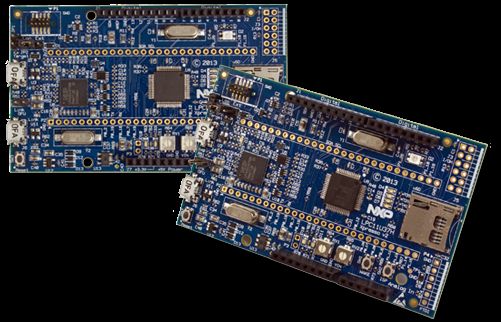
NXP Semiconductors
                                                                                                                              AN11990
                                                                                                                  NXP-NCI MCUXpresso example

                   2.2 LPC11Uxx
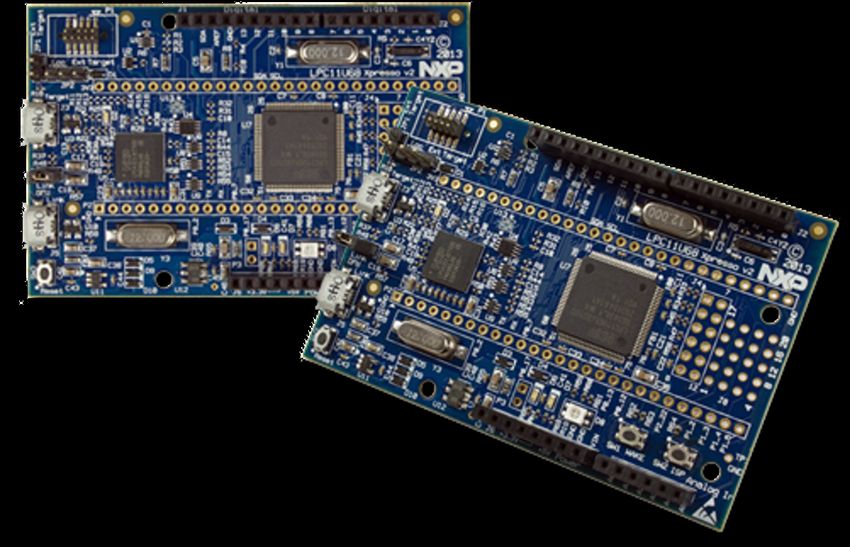
                      To set up the project, we use OM13074 LPCXpresso board for LPC11U37H (http://
                      www.nxp.com/demoboard/OM13074).

                       Figure 2. OM13074 LPCXpresso board for LPC11U37H

                      The board must be connected to NFC controller board using the following instructions:

                      Table 2. OM13074 HW setup instructions
                           OM13074 board pin                                                                            NFC controller signal
                               VOUT 3.3 V                                                                                    VBAT
                               VOUT 3.3 V                                                                               VDD(PAD) / PVDD
                              +5 V USB out                                                                            VANT (only OM5578)
                            PIO0.4 / I2C-SCL                                                                               I2CSCL
                            PIO0.5/ I2C-SDA                                                                                I2CSDA
                                 PIO0.2                                                                                       IRQ
                                 PIO0.7                                                                                      VEN
                                  GND                                                                                        GND

                      This matches Arduino version of OM5577 (http://www.nxp.com/demoboard/OM5577) and
                      OM5578 (http://www.nxp.com/demoboard/OM5578) demo kits. Those kits can then be
                      plugged on OM13074 board to run the example.

AN11990                              All information provided in this document is subject to legal disclaimers.               © NXP B.V. 2021. All rights reserved.

Application note                                  Rev. 1.2 — 4 January 2021
COMPANY PUBLIC                                              432212                                                                                        5 / 31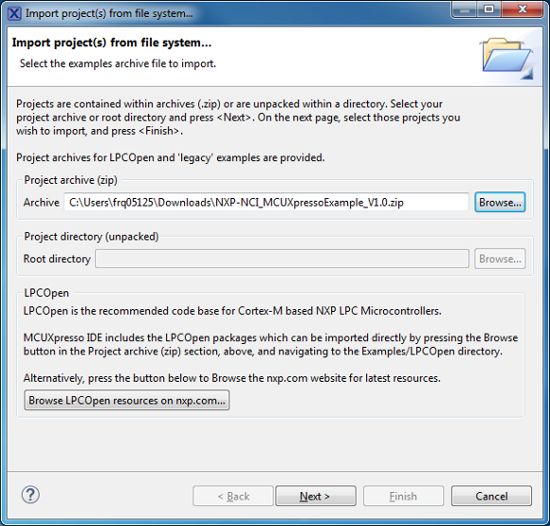
NXP Semiconductors
                                                                                                                              AN11990
                                                                                                                  NXP-NCI MCUXpresso example

                   2.3 LPC11U6x
                      To set up the project, we use OM13058 LPCXpresso Board for LPC11U68 (http://
                      www.nxp.com/demoboard/OM13058).

                       Figure 3. OM13058 LPCXpresso Board for LPC11U68

                      The board must be connected to NFC controller board using the following instructions:

                      Table 3. OM13058 HW setup instructions
                           OM13058 board pin                                                                            NFC controller signal
                               VOUT 3.3 V                                                                                    VBAT
                               VOUT 3.3 V                                                                               VDD(PAD) / PVDD
                              +5 V USB out                                                                            VANT (only OM5578)
                            PIO0.4 / I2C-SCL                                                                               I2CSCL
                            PIO0.5/ I2C-SDA                                                                                I2CSDA
                                PIO1.28                                                                                       IRQ
                                PIO1.25                                                                                      VEN
                                  GND                                                                                        GND

                      This matches Arduino version of OM5577 (http://www.nxp.com/demoboard/OM5577) and
                      OM5578 (http://www.nxp.com/demoboard/OM5578) demo kits. Those kits can then be
                      plugged on OM13058 board to run the example.

AN11990                              All information provided in this document is subject to legal disclaimers.               © NXP B.V. 2021. All rights reserved.

Application note                                  Rev. 1.2 — 4 January 2021
COMPANY PUBLIC                                              432212                                                                                        6 / 31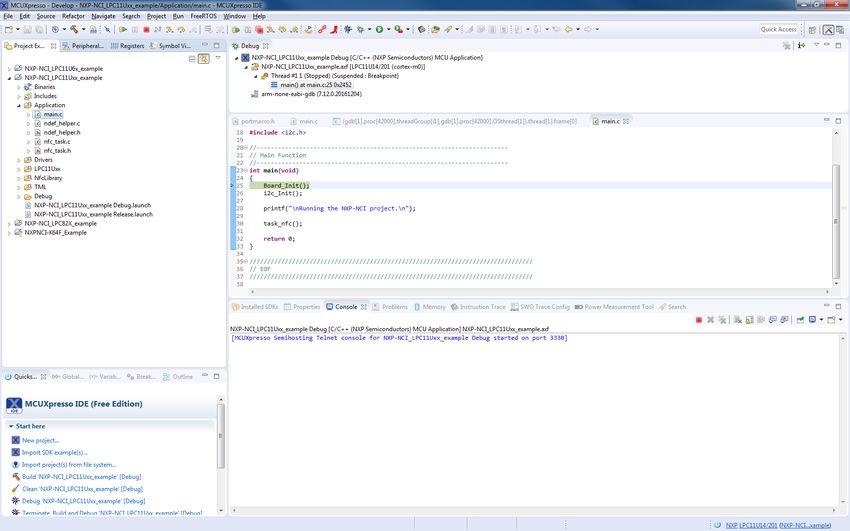
NXP Semiconductors
                                                                                                                              AN11990
                                                                                                                  NXP-NCI MCUXpresso example

                   2.4 LPC55xx
                      To set up the project, we use LPCXpresso55S69 Development Board (http://
                      www.nxp.com/demoboard/LPC55S69-EVK).

                       Figure 4. LPC55S69-EVK: LPCXpresso55S69 Development Board

                      The board must be connected to NFC controller board using the following instructions:

                      Table 4. LPC55S69-EVK HW setup instructions
                        LPC55S69-EVK board pin                                                                          NFC controller signal
                             VDD_TARGET                                                                                      VBAT
                             VDD_TARGET                                                                                 VDD(PAD) / PVDD
                                  +5 V                                                                                VANT (only OM5578)
                       PIO1_20 / FC4_I2C_SCL_ARD                                                                           I2CSCL
                       PIO1_21 / FC4_I2C_SDA_ARD                                                                           I2CSDA
                       PIO1_8 / PIO1_8_GPIO_ARD                                                                               IRQ
                       PIO1_9 / PIO1_9_GPIO_ARD                                                                              VEN
                                  GND                                                                                        GND

                      This matches Arduino version of OM5577 (http://www.nxp.com/demoboard/OM5577) and
                      OM5578 (http://www.nxp.com/demoboard/OM5578) demo kits. Those kits can then be
                      plugged on OM13058 board to run the example.

AN11990                              All information provided in this document is subject to legal disclaimers.               © NXP B.V. 2021. All rights reserved.

Application note                                  Rev. 1.2 — 4 January 2021
COMPANY PUBLIC                                              432212                                                                                        7 / 31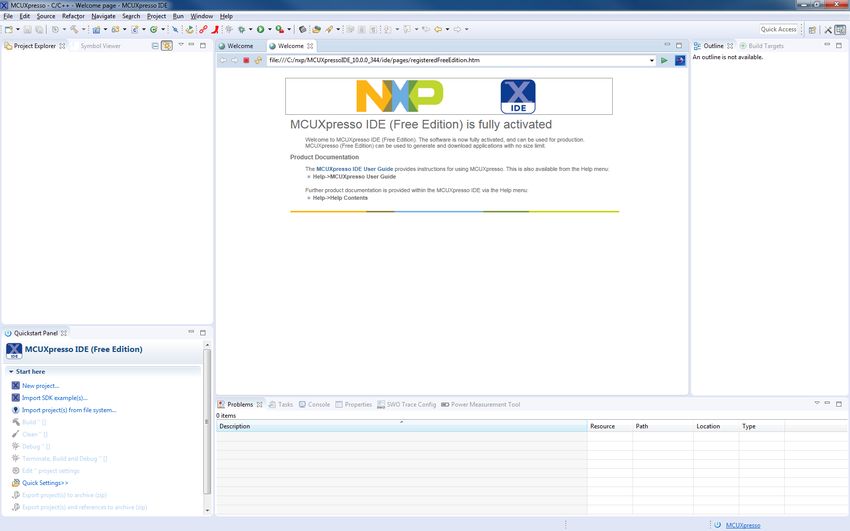
NXP Semiconductors
                                                                                                                          AN11990
                                                                                                               NXP-NCI MCUXpresso example

                   Alternatively, LPC55S69-EVK featuring mikroBUS header, the NFC click module from
                   MIKROELECTRONIKA (https://www.mikroe.com/nfc-click) can be used. The GPIO
                   mapping is then slightly different than described above:
                   • VEN signal is not mapped to a GPIO of the MCU, thus NFC Controller reset is not
                     managed by software
                   • IRQ signal is mapped to PIO1_18 (WAKE/GPIO) instead of PIO1_8
                   By defining "NFC_CLICK_MODULE" in the project properties (see Figure 17), the pin
                   assignment is mapped to fit to this definition.

AN11990                           All information provided in this document is subject to legal disclaimers.              © NXP B.V. 2021. All rights reserved.

Application note                               Rev. 1.2 — 4 January 2021
COMPANY PUBLIC                                           432212                                                                                       8 / 31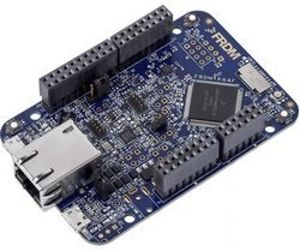
NXP Semiconductors
                                                                                                                              AN11990
                                                                                                                  NXP-NCI MCUXpresso example

                   2.5 K64
                      To set up the project, we use FRDM-K64F: Freedom Development Platform for Kinetis
                      K64, K63, and K24 MCUs (http://www.nxp.com/demoboard/FRDM-K64F).

                       Figure 5. FRDM-K64F: Freedom Development Platform

                      The board must be connected to NFC controller board using the following instructions:

                      Table 5. FRDM-K64F HW setup instructions
                             FRDM-K64F pin                                                                              NFC controller signal
                                  P3V3                                                                                       VBAT
                                  P3V3                                                                                  VDD(PAD) / PVDD
                                P5V_USB                                                                               VANT (only OM5578)
                             PTE24 / I2C-SCL                                                                               I2CSCL
                             PTE25 / I2C-SDA                                                                               I2CSDA
                                  PTA0                                                                                        IRQ
                                  PTC3                                                                                       VEN
                                  GND                                                                                        GND

                      This matches Arduino version of OM5577 (http://www.nxp.com/demoboard/OM5577) and
                      OM5578 (http://www.nxp.com/demoboard/OM5578) demo kits. Those kits can then be
                      plugged on OM13071 board to run the example.

AN11990                              All information provided in this document is subject to legal disclaimers.               © NXP B.V. 2021. All rights reserved.

Application note                                  Rev. 1.2 — 4 January 2021
COMPANY PUBLIC                                              432212                                                                                        9 / 31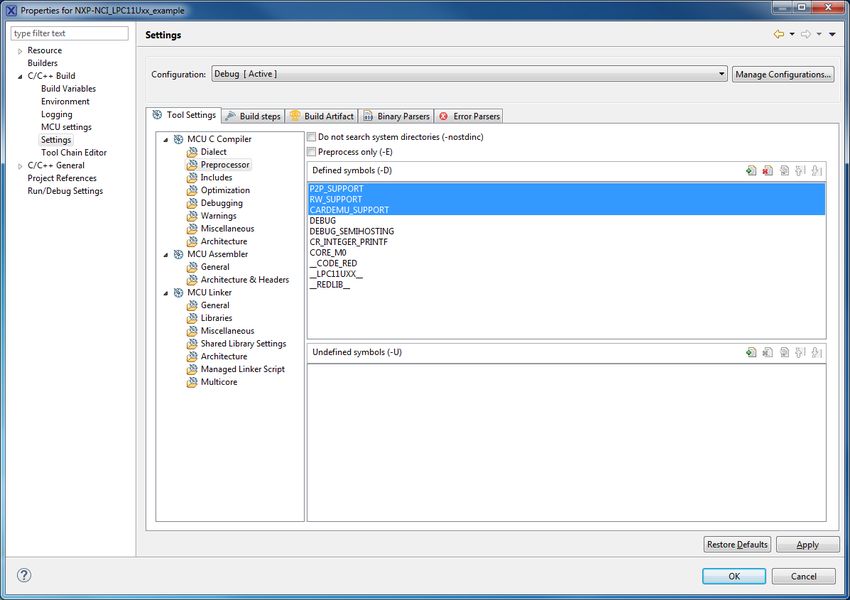
NXP Semiconductors
                                                                                                                               AN11990
                                                                                                                   NXP-NCI MCUXpresso example

                   2.6 i.MX RT1060
                       To set up the project, we use i.MX RT1060 Evaluation Kit (http://www.nxp.com/
                       demoboard/MIMXRT1060-EVK).

                       Figure 6. MIMXRT1060-EVK: i.MX RT1060 Evaluation Kit

                       The board must be connected to NFC controller board using the following instructions:

                       Table 6. iMXRT1060 EVK HW setup instructions
                            OM13058 board pin                                                                            NFC controller signal
                                   3V3                                                                                        VBAT
                                   3V3                                                                                   VDD(PAD) / PVDD
                                    5V                                                                                 VANT (only OM5578)
                        GPIO_AD_B1_00 / I2C1-SCL                                                                            I2CSCL
                        GPIO_AD_B1_01 / I2C1-SDA                                                                            I2CSDA
                         GPIO_AD_B0_03 / PIO1.3                                                                                IRQ
                         GPIO_AD_B1_03 / PIO1.19                                                                              VEN
                                   GND                                                                                        GND

                       This matches Arduino version of OM5577 (http://www.nxp.com/demoboard/OM5577) and
                       OM5578 (http://www.nxp.com/demoboard/OM5578) demo kits. Those kits can then be
                       plugged on MIXMRT1060-EVK board to run the example.

AN11990                               All information provided in this document is subject to legal disclaimers.               © NXP B.V. 2021. All rights reserved.

Application note                                   Rev. 1.2 — 4 January 2021
COMPANY PUBLIC                                               432212                                                                                      10 / 31
NXP Semiconductors
AN11990
NXP-NCI MCUXpresso example
3 SW setup
MCUXpresso IDE can be downloaded from https://mcuxpresso.nxp.com/.
For K64 project setup, first make sure K64 MCUXpresso SDK 2.2 is installed in
MCUXpresso (see https://mcuxpresso.nxp.com/en/builder).
• Create an empty workplace in MCUXpresso IDE:
Figure 7. MCUXpresso IDE workplace
• Import the targeted project from the NXP-NCI_MCUXpressoExample zip file (retrieved
from https://www.nxp.com/doc/SW4325):
Figure 8. Importing project in MCUXpresso IDE
AN11990 All information provided in this document is subject to legal disclaimers. © NXP B.V. 2021. All rights reserved.
Application note Rev. 1.2 — 4 January 2021
COMPANY PUBLIC 432212 11 / 31NXP Semiconductors
AN11990
NXP-NCI MCUXpresso example
• Click on the “dark blue bug” icon to build the project, flash the binary into the MCU
memory and start debugging:
Figure 9. Debugging project in MCUXpresso IDE
• Start the execution (clicking on « Resume » button or pressing ‘f8’). This launches
the discovery and following message is displayed in the « console » window of
MCUXpresso:
Figure 10. MCUXpresso console window when starting project execution
AN11990 All information provided in this document is subject to legal disclaimers. © NXP B.V. 2021. All rights reserved.
Application note Rev. 1.2 — 4 January 2021
COMPANY PUBLIC 432212 12 / 31NXP Semiconductors
AN11990
NXP-NCI MCUXpresso example
4 Demonstration
4.1 R/W mode
Bringing an NFC Forum Tag containing NDEF content leads to a message display in the
« console » window (in below example a Type 2 tag containing Text type NDEF message
“NXP Semiconductors”):
Figure 11. Terminal output when NDEF tag is read
In case of several tags, the related information will be displayed one after the other in
such way:
Figure 12. Terminal output when multiple tags are detected
AN11990 All information provided in this document is subject to legal disclaimers. © NXP B.V. 2021. All rights reserved.
Application note Rev. 1.2 — 4 January 2021
COMPANY PUBLIC 432212 13 / 31NXP Semiconductors
AN11990
NXP-NCI MCUXpresso example
4.2 P2P mode
Bringing an NFC Android phone and « beaming » a URL (select the URL inside the
phone web browser, tap the phone to the antenna then click of the screen when invited
for it by the Android « Beam » service) gives such result:
Figure 13. Terminal output example when exchanging data with Android NFC phone
Simultaneously, the phone displays the received NDEF record from the NXP-NCI
example project (NDEF Text type « Test » message):
Figure 14. Android phone receiving NDEF message from NXP-NCI example project
AN11990 All information provided in this document is subject to legal disclaimers. © NXP B.V. 2021. All rights reserved.
Application note Rev. 1.2 — 4 January 2021
COMPANY PUBLIC 432212 14 / 31NXP Semiconductors
AN11990
NXP-NCI MCUXpresso example
4.3 Card Emulation mode
Bringing an NFC reader gives such result:
Figure 15. Terminal output when exchanging data with Android NFC phone in card
emulation mode
Note: To perform such scenario, an NFC Android phone can be used but then P2P and
R/W modes must be disabled inside the NXP-NCI example project (see Section 6.3
for detailed procedure) since otherwise the P2P communication is favored or the NFC
Android phone may be discovered as a card (if it supports this mode).
AN11990 All information provided in this document is subject to legal disclaimers. © NXP B.V. 2021. All rights reserved.
Application note Rev. 1.2 — 4 January 2021
COMPANY PUBLIC 432212 15 / 31NXP Semiconductors
AN11990
NXP-NCI MCUXpresso example
5 SW description
5.1 Architecture overview
Figure 16. Example SW architecture overview
The Application consists in an NFC task using NFC library API to register for NDEF
functionalities and manage NXP-NCI processing.
{NXP-NCI} module offers high-level NFC API:
• Connection and configuration of the NFC controller
• Start of the NFC discovery
• Wait for NFC discovery
• Process the NFC discovery
• Offer raw access to remote tag or reader discovered
{NDEF library} module is composed of independent submodule:
• {RW_NDEF} implements NDEF extraction from NFC Forum tags (all 5 NFC Forum
defined tag types) and NDEF write to NFC Forum Type 2, Type 4 and Type 5 tags
• {P2P_NDEF} implements NDEF data exchange with P2P device (over NFC Forum
LLCP and SNEP protocols)
• {T4T_NDEF_emu} implements NDEF message exposure through card emulation (NFC
Forum Type 4 Tag protocol)
{TML} module brings HW abstraction to NFC library (abstract how the connection to NFC
controller IC is managed).
AN11990 All information provided in this document is subject to legal disclaimers. © NXP B.V. 2021. All rights reserved.
Application note Rev. 1.2 — 4 January 2021
COMPANY PUBLIC 432212 16 / 31NXP Semiconductors
AN11990
NXP-NCI MCUXpresso example
5.2 Stack size
Below is insight about the stack size, compiled on an Arm Cortex-M0 or M4 (no large
difference observed) in « Release » configuration mode:
Table 7. Stack size from Arm Cortex M0/M4
Module Approx. Size (in bytes)
NDEF library 6100
RW_NDEF 200
RW_NDEF_T1T 400
RW_NDEF_T2T 560
RW_NDEF_T3T 340
RW_NDEF_T4T 1220
RW_NDEF_MIFARE 920
P2P_NDEF 1340
T4T_NDEF_emu 480
NXP-NCI 4700
TML 200
The NFC library (NDEF library + NXP-NCI) is about 10 kB in its full configuration (RW,
P2P and Card Emulation) but could be substantially reduced according to the targeted
use case (for instance for T2T RW only support, size would be about 2 kB).
5.3 Porting recommendation for other MCUs
The present code example can be easily ported to any other target providing I2C-bus
master and GPIO capabilities (I2C master may even be implemented in SW via GPIO
control in case of no HW support is provided by the target).
The only modules requiring adaptations are the TML components (relates to how the
target provides this support), others modules being platform agnostics.
AN11990 All information provided in this document is subject to legal disclaimers. © NXP B.V. 2021. All rights reserved.
Application note Rev. 1.2 — 4 January 2021
COMPANY PUBLIC 432212 17 / 31NXP Semiconductors
AN11990
NXP-NCI MCUXpresso example
6 Example customization
6.1 I2C address/speed
NFC Controller I2C address is by default set to 0x28 (matching OM5577 and OM5578
HW configuration. It can be changed in the file:
• Drivers/inc/driver_config.h for the LPC-related projects
Table 8. I2C address setting for the LPC-related projects
#define NXPNCI_I2C_ADDR 0x28U
• board/board.h for the LPC55xx, K64 and i.MX RT projects
Table 9. I2C address setting for the other projects
#define BOARD_NXPNCI_I2C_ADDR 0x28U
6.2 PIOs assignment
In case a different connection is used than the one described in Section 2, definition in
the following file must reflect PIOs assignment:
• Drivers/inc/driver_config.h for the LPC-related projects
Table 10. PIOs assignment for the LPC-related projects
#define PORT_IRQ PORT0
#define PORT_VEN PORT0
#define PIN_IRQ 13 // P0.13
#define PIN_VEN 17 // P0.17
• board/board.h for the LPC55xx, K64 and i.MX RT projects
Table 11. PIOs assignment for the other projects
#define BOARD_NXPNCI_IRQ_PORTIRQn PORTC_IRQn
#define BOARD_NXPNCI_IRQ_GPIO (GPIOC)
#define BOARD_NXPNCI_IRQ_PORT (PORTC)
#define BOARD_NXPNCI_IRQ_PIN (12U)
#define BOARD_NXPNCI_VEN_GPIO (GPIOC)
#define BOARD_NXPNCI_VEN_PORT (PORTC)
#define BOARD_NXPNCI_VEN_PIN (3U)
6.3 NFC modes compile flags
Three compile flags exist in this SW example allowing to separately disable modes:
• RW_SUPPORT
• P2P_SUPPORT
• CARDEMU_SUPPORT
There are defined by default (all 3 modes supported). To disable a mode, just remove the
related definition in the project properties:
AN11990 All information provided in this document is subject to legal disclaimers. © NXP B.V. 2021. All rights reserved.
Application note Rev. 1.2 — 4 January 2021
COMPANY PUBLIC 432212 18 / 31NXP Semiconductors
AN11990
NXP-NCI MCUXpresso example
Figure 17. MCUXpresso project properties
6.4 Discovery configuration
The discovery loop can be configured by setting DiscoveryTechnologies variable
defined in nfc_task.c file.
By default, all technologies (required for the aimed demonstration) are enabled: Passive
NFCA, NFCB and NFCF as well as Active NFCA and NFCF, in both POLL and LISTEN
modes.
Simply adapt the discovery loop by commenting out the related technology you want to
remove.
Table 12. Discovery configuration variable
unsigned char DiscoveryTechnologies[] = { MODE_POLL | TECH_PASSIVE_NFCA,
MODE_POLL | TECH_PASSIVE_NFCB,
MODE_POLL | TECH_PASSIVE_NFCF,
MODE_POLL | TECH_ACTIVE_NFCF,
MODE_LISTEN | TECH_PASSIVE_NFCA,
MODE_LISTEN | TECH_PASSIVE_NFCF,
MODE_LISTEN | TECH_ACTIVE_NFCA,
MODE_LISTEN | TECH_ACTIVE_NFCF};
6.5 Settings configuration
Dedicated settings can be applied to the NXP-NCI NFC Controller. Those are configured
thanks to NfcLibrary/inc/Nfc_settings.h file.
AN11990 All information provided in this document is subject to legal disclaimers. © NXP B.V. 2021. All rights reserved.
Application note Rev. 1.2 — 4 January 2021
COMPANY PUBLIC 432212 19 / 31NXP Semiconductors
AN11990
NXP-NCI MCUXpresso example
Table 13. NFC settings configuration
/* Following definitions specify settings applied when NxpNci_ConfigureSettings() API is
* called from the application
*/
#define NXP_CORE_CONF 1
#define NXP_CORE_CONF_EXTN 1
#define NXP_CORE_STANDBY 1
#define NXP_CLK_CONF 1 // 1=Xtal, 2=PLL
#define NXP_TVDD_CONF 2 // 1=CFG1, 2=CFG2
#define NXP_RF_CONF 1
Table 14. NXP_CORE_CONF setting definition
#if NXP_CORE_CONF
/* NCI standard dedicated settings
* Refer to NFC Forum NCI standard for more details
*/
uint8_t NxpNci_CORE_CONF[]={0x20, 0x02, 0x07, 0x01, /* CORE_SET_CONFIG_CMD */
0x00, 0x02, 0x00, 0x01 /* TOTAL_DURATION */
};
#endif
Table 15. NXP_CORE_CONF_EXTN setting definition
#if NXP_CORE_CONF_EXTN
/* NXP-NCI extension dedicated setting
* Refer to NFC controller User Manual for more details
*/
uint8_t NxpNci_CORE_CONF_EXTN[]={0x20, 0x02, 0x0D, 0x03, /* CORE_SET_CONFIG_CMD */
0xA0, 0x40, 0x01, 0x00, /* TAG_DETECTOR_CFG */
0xA0, 0x41, 0x01, 0x04, /* TAG_DETECTOR_THRESHOLD_CFG */
0xA0, 0x43, 0x01, 0x00 /* TAG_DETECTOR_FALLBACK_CNT_CFG*/
};
#endif
Table 16. NXP_CORE_STANDBY setting definition
#if NXP_CORE_STANDBY
/* NXP-NCI standby enable setting
* Refer to NFC controller User Manual for more details
*/
uint8_t NxpNci_CORE_STANDBY[]={0x2F, 0x00, 0x01, 0x01}; /* last byte indicates enable/disable */
#endif
AN11990 All information provided in this document is subject to legal disclaimers. © NXP B.V. 2021. All rights reserved.
Application note Rev. 1.2 — 4 January 2021
COMPANY PUBLIC 432212 20 / 31NXP Semiconductors
AN11990
NXP-NCI MCUXpresso example
Table 17. NXP_CLK_CONF setting definition
#if NXP_CLK_CONF
/* NXP-NCI CLOCK configuration
* Refer to NFC controller Hardware Design Guide document for more details
*/
#if (NXP_CLK_CONF == 1)
/* Xtal configuration */
uint8_t NxpNci_CLK_CONF[]={0x20, 0x02, 0x05, 0x01, /* CORE_SET_CONFIG_CMD */
0xA0, 0x03, 0x01, 0x08 /* CLOCK_SEL_CFG */
};
#else
/* PLL configuration */
uint8_t NxpNci_CLK_CONF[]={0x20, 0x02, 0x09, 0x02, /* CORE_SET_CONFIG_CMD */
0xA0, 0x03, 0x01, 0x11, /* CLOCK_SEL_CFG */
0xA0, 0x04, 0x01, 0x01 /* CLOCK_TO_CFG */
};
#endif
#endif
Table 18. NXP_TVDD_CONF setting definition
#if NXP_TVDD_CONF
/* NXP-NCI TVDD configuration
* Refer to NFC controller Hardware Design Guide document for more details
*/
/* RF configuration related to 1st generation of NXP-NCI controller (e.g PN7120) */
uint8_t NxpNci_TVDD_CONF_1stGen[]={0x20, 0x02, 0x05, 0x01, 0xA0, 0x13, 0x01, 0x00};
/* RF configuration related to 2nd generation of NXP-NCI controller (e.g PN7150) */
#if(NXP_TVDD_CONF == 1)
/* CFG1: Vbat is used to generate the VDD(TX) through TXLDO */
uint8_t NxpNci_TVDD_CONF_2ndGen[]={0x20, 0x02, 0x07, 0x01, 0xA0, 0x0E, 0x03, 0x02, 0x09, 0x00};
#else
/* CFG2: external 5V is used to generate the VDD(TX) through TXLDO */
uint8_t NxpNci_TVDD_CONF_2ndGen[]={0x20, 0x02, 0x07, 0x01, 0xA0, 0x0E, 0x03, 0x06, 0x64, 0x00};
#endif
#endif
AN11990 All information provided in this document is subject to legal disclaimers. © NXP B.V. 2021. All rights reserved.
Application note Rev. 1.2 — 4 January 2021
COMPANY PUBLIC 432212 21 / 31NXP Semiconductors
AN11990
NXP-NCI MCUXpresso example
Table 19. NXP_RF_CONF settings definition
#if NXP_RF_CONF
/* NXP-NCI RF configuration
* Refer to NFC controller Antenna Design and Tuning Guidelines document for more details
*/
/* RF configuration related to 1st generation of NXP-NCI controller (e.g PN7120) */
uint8_t NxpNci_RF_CONF_1stGen[]={0x20, 0x02, 0x38, 0x07,
0xA0, 0x0D, 0x06, 0x06, 0x42, 0x01, 0x00, 0xF1, 0xFF,
0xA0, 0x0D, 0x06, 0x06, 0x44, 0xA3, 0x90, 0x03, 0x00,
0xA0, 0x0D, 0x06, 0x34, 0x2D, 0xDC, 0x50, 0x0C, 0x00,
0xA0, 0x0D, 0x04, 0x06, 0x03, 0x00, 0x70,
0xA0, 0x0D, 0x03, 0x06, 0x16, 0x00,
0xA0, 0x0D, 0x03, 0x06, 0x15, 0x00,
0xA0, 0x0D, 0x06, 0x32, 0x4A, 0x53, 0x07, 0x01, 0x1B
};
/* RF configuration related to 2nd generation of NXP-NCI controller (e.g PN7150) */
/* Following configuration relates to performance optimization of OM5578 demo kit */
uint8_t NxpNci_RF_CONF_2ndGen[]={0x20, 0x02, 0x94, 0x11,
0xA0, 0x0D, 0x06, 0x04, 0x35, 0x90, 0x01, 0xF4, 0x01,
0xA0, 0x0D, 0x06, 0x06, 0x30, 0xB0, 0x01, 0x10, 0x00,
0xA0, 0x0D, 0x06, 0x06, 0x42, 0x02, 0x00, 0xFF, 0xFF,
0xA0, 0x0D, 0x06, 0x20, 0x42, 0x88, 0x00, 0xFF, 0xFF,
0xA0, 0x0D, 0x04, 0x22, 0x44, 0x22, 0x00,
0xA0, 0x0D, 0x06, 0x22, 0x2D, 0x50, 0x34, 0x0C, 0x00,
0xA0, 0x0D, 0x06, 0x32, 0x42, 0xF8, 0x00, 0xFF, 0xFF,
0xA0, 0x0D, 0x06, 0x34, 0x2D, 0x24, 0x37, 0x0C, 0x00,
0xA0, 0x0D, 0x06, 0x34, 0x33, 0x80, 0x86, 0x00, 0x70,
0xA0, 0x0D, 0x04, 0x34, 0x44, 0x22, 0x00,
0xA0, 0x0D, 0x06, 0x42, 0x2D, 0x15, 0x45, 0x0D, 0x00,
0xA0, 0x0D, 0x04, 0x46, 0x44, 0x22, 0x00,
0xA0, 0x0D, 0x06, 0x46, 0x2D, 0x05, 0x59, 0x0E, 0x00,
0xA0, 0x0D, 0x06, 0x44, 0x42, 0x88, 0x00, 0xFF, 0xFF,
0xA0, 0x0D, 0x06, 0x56, 0x2D, 0x05, 0x9F, 0x0C, 0x00,
0xA0, 0x0D, 0x06, 0x54, 0x42, 0x88, 0x00, 0xFF, 0xFF,
0xA0, 0x0D, 0x06, 0x0A, 0x33, 0x80, 0x86, 0x00, 0x70
};
#endif
6.6 Reader/Writer mode raw access to tag
Demonstration of accessing in raw mode (non-NDEF) discovered card is present in
the demo application. Enabling it is done defining RW_RAW_EXCHANGE compile flag in
nfc_task.c file (just uncomment present definition), before building the project.
Pay attention that when enabling the RW_RAW_EXCHANGE option of the application
there is no more any NDEF operation (neither read nor write). Instead, the scenario
implemented in the following functions located in nfc_task.c file is executed per the
discovered card type:
• ISO14443-3A: PCD_ISO14443_3A_scenario() read then write and read back
memory block #5
• ISO14443-4: PCD_ISO14443_4_scenario() send “Select PPSE” ISO7816 C-APDU
and displays result according to the card answer
• ISO15693: PCD_ISO15693_scenario() read then write and read back memory
block #8
AN11990 All information provided in this document is subject to legal disclaimers. © NXP B.V. 2021. All rights reserved.
Application note Rev. 1.2 — 4 January 2021
COMPANY PUBLIC 432212 22 / 31NXP Semiconductors
AN11990
NXP-NCI MCUXpresso example
• MIFARE Classic: PCD_MIFARE_scenario() authenticates, reads then writes and
reads back memory block #4
6.7 Card Emulation raw mode
Demonstration of raw exchanges (non-NDEF) in ISO14443-4 card emulation mode is
present in the demo application. Enabling it is done defining CARDEMU_RAW_EXCHANGE
compile flag in nfc_task.c file (just uncomment present definition), before building the
project.
Pay attention that when enabling the CARDEMU_RAW_EXCHANGE option of
the application there is no more any NDEF operation (NDEF record no more
exposed to remote NFC reader). Instead, the scenario implemented in the function
PICC_ISO14443_4_scenario() located in nfc_task.c file will be run, which consist in
parsing incoming ISO7816 C-APDU and answering with “successful operation” R-APDU
to any received C-APDU.
6.8 NDEF write operation
Demonstration the NDEF write operation is present in the demo application (but not
enabled by default to prevent unintentional overwriting of tag content). Enabling it is done
defining RW_NDEF_WRITING compile flag in nfc_task.c file (just uncomment present
definition), before building the project. Then the write operation will occur just after the
NDEF read operation.
The NDEF message which is written is defined in NDEF_MESSAGE variable (see
Section 6.9).
Only Type 2 and Type 4 tags NDEF write operation is supported currently by the NFC
library. For others tag types, write operation will simply not occur but no issue will be
reported. Furthermore, the tag must be already NDEF formatted, the NFC library not
implementing NDEF formatting functionality.
6.9 Shared NDEF message
NDEF message shared in P2P or Card Emulation mode (or even in RW mode while
NDEF write operation is enabled, see Section 6.8) can be changed. Simply modify value
of NDEF_MESSAGE variable, in file nfc_task.c, following NFC Forum NDEF specification.
Table 20. Shared NDEF message definition
const char NDEF_MESSAGE[] = { 0xD1, // MB/ME/CF/1/IL/TNF
0x01, // TYPE LENGTH
0x07, // PAYLOAD LENTGH
'T', // TYPE
0x02, // Status
'e', 'n', // Language
'T', 'e', 's', 't'
};
6.10 P2P timing optimization
The current example implementation allows sharing in both way NDEF message with a
peer device (receiving and sending an NDEF message) in P2P mode over SNEP NFC
Forum protocol.
AN11990 All information provided in this document is subject to legal disclaimers. © NXP B.V. 2021. All rights reserved.
Application note Rev. 1.2 — 4 January 2021
COMPANY PUBLIC 432212 23 / 31NXP Semiconductors
AN11990
NXP-NCI MCUXpresso example
The SNEP standard protocol being also implemented as native feature of Android, so-
called "Beam" service, the NXP-NCI example shows NDEF message exchanges with
NFC Android devices. Unfortunately, because of the "Beam" service implementation, the
Android device cannot send any NDEF message after it has received one (until a new
tap occurs).
To work around this limitation, the NXP-NCI example defines a way to postone sending
NDEF message after the peer discovery, to give the Android device user to "Beam" the
expected content. This is implemented as NDEF_PUSH_DELAY_COUNT variable inside
NfcLibrary/NdefLibrary/src/P2P_NDEF.c file.
Table 21. P2P NDEF push delay definition
/* Defines the number of symmetry exchanges is expected before initiating the NDEF push
(to allow a remote phone to beam an NDEF message first) */
#define NDEF_PUSH_DELAY_COUNT 2
6.11 Traces output
By default, the example outputs all traces in the console window of MCUXpresso IDE.
To redirect the traces to the virtual COM port offered by the MCU board, the compile flag
DEBUG_SEMIHOSTING must be disabled (definition removed) inside the LPC-related
project properties (see Figure 17) before building the project.
For K64 project, refer to: https://community.nxp.com/docs/DOC-334074.
Then open a terminal (i.e. TeraTerm, HyperTerminal, Putty …) to the virtual COM port
with the following configuration:
• baud rate=115200 for OM13051, 460800 for OM13074 and OM13058
• 8 data bits, no parity, 1 stop bit, no flow control
Related port number can be retrieved from the “Ports (COM & LPT)” list inside computer
“Device Manager”:
Figure 18. Retrieving COM port number from Device Manager
Running the example, traces are logged into the related window, offering much faster
execution time (semi hosting function is time consuming) but also standalone execution:
AN11990 All information provided in this document is subject to legal disclaimers. © NXP B.V. 2021. All rights reserved.
Application note Rev. 1.2 — 4 January 2021
COMPANY PUBLIC 432212 24 / 31NXP Semiconductors
AN11990
NXP-NCI MCUXpresso example
Figure 19. External Terminal output
In case of frame misalignment, verify the terminal configuration about CR/LF handling.
Indeed, the project only makes use of LF to indicate end of line, so the terminal must be
configured to handle automatically line end or to understand implicit CR in every LF.
6.12 NCI communication debugging
Enabling NCI communication traces can be done defining NCI_DEBUG compile flag
inside the project properties (see Figure 17), or directly in NfcLibrary/NxpNci/inc/NxpNci.h
file, before building the project.
Pay attention that this significantly increases overall memory requirement and then
may require disabling some modes (refer to Section 6.3) to allow building the project
depending on the target memory capabilities.
AN11990 All information provided in this document is subject to legal disclaimers. © NXP B.V. 2021. All rights reserved.
Application note Rev. 1.2 — 4 January 2021
COMPANY PUBLIC 432212 25 / 31NXP Semiconductors
AN11990
NXP-NCI MCUXpresso example
7 Abbreviations
Abbr. Meaning
AN Application Note
EMU Emulation (card emulation)
GND Ground
GPIO General Purpose Input Output
HW Hardware
I²C Inter-Integrated Circuit (serial data bus)
IC Integrated Circuit
IO Input / Output
IRQ Interrupt Request
NDEF NFC Data Exchange Format
NFC Near Field Communication
NFCC NFC Controller
OS Operating System
P2P Peer to peer
PCD Proximity Coupling Device (Contactless reader)
PIO Programmed Input/Output
PICC Proximity Integrated Circuit Card (Contactless card)
RF Radiofrequency
RTOS Real-Time Operating System
RST Reset
R/W Reader/Writer
SW Software
T1T Type 1 Tag (NFC Forum tag types definition)
T2T Type 2 Tag (NFC Forum tag types definition)
T3T Type 3 Tag (NFC Forum tag types definition)
T4T Type 4 Tag (NFC Forum tag types definition)
T5T Type 5 Tag (NFC Forum tag types definition)
VEN V ENable pin (NFCC Hard reset control)
AN11990 All information provided in this document is subject to legal disclaimers. © NXP B.V. 2021. All rights reserved.
Application note Rev. 1.2 — 4 January 2021
COMPANY PUBLIC 432212 26 / 31NXP Semiconductors
AN11990
NXP-NCI MCUXpresso example
8 Legal information
Export control — This document as well as the item(s) described herein
may be subject to export control regulations. Export might require a prior
8.1 Definitions authorization from competent authorities.
Draft — A draft status on a document indicates that the content is still Evaluation products — This product is provided on an “as is” and “with all
under internal review and subject to formal approval, which may result faults” basis for evaluation purposes only. NXP Semiconductors, its affiliates
in modifications or additions. NXP Semiconductors does not give any and their suppliers expressly disclaim all warranties, whether express,
representations or warranties as to the accuracy or completeness of implied or statutory, including but not limited to the implied warranties of
information included in a draft version of a document and shall have no non-infringement, merchantability and fitness for a particular purpose. The
liability for the consequences of use of such information. entire risk as to the quality, or arising out of the use or performance, of this
product remains with customer. In no event shall NXP Semiconductors, its
affiliates or their suppliers be liable to customer for any special, indirect,
consequential, punitive or incidental damages (including without limitation
8.2 Disclaimers damages for loss of business, business interruption, loss of use, loss of
data or information, and the like) arising out the use of or inability to use
the product, whether or not based on tort (including negligence), strict
Limited warranty and liability — Information in this document is believed liability, breach of contract, breach of warranty or any other theory, even if
to be accurate and reliable. However, NXP Semiconductors does not advised of the possibility of such damages. Notwithstanding any damages
give any representations or warranties, expressed or implied, as to the that customer might incur for any reason whatsoever (including without
accuracy or completeness of such information and shall have no liability limitation, all damages referenced above and all direct or general damages),
for the consequences of use of such information. NXP Semiconductors the entire liability of NXP Semiconductors, its affiliates and their suppliers
takes no responsibility for the content in this document if provided by an and customer’s exclusive remedy for all of the foregoing shall be limited to
information source outside of NXP Semiconductors. In no event shall NXP actual damages incurred by customer based on reasonable reliance up to
Semiconductors be liable for any indirect, incidental, punitive, special or the greater of the amount actually paid by customer for the product or five
consequential damages (including - without limitation - lost profits, lost dollars (US$5.00). The foregoing limitations, exclusions and disclaimers shall
savings, business interruption, costs related to the removal or replacement apply to the maximum extent permitted by applicable law, even if any remedy
of any products or rework charges) whether or not such damages are based fails of its essential purpose.
on tort (including negligence), warranty, breach of contract or any other
legal theory. Notwithstanding any damages that customer might incur for
Translations — A non-English (translated) version of a document is for
any reason whatsoever, NXP Semiconductors’ aggregate and cumulative
reference only. The English version shall prevail in case of any discrepancy
liability towards customer for the products described herein shall be limited
between the translated and English versions.
in accordance with the Terms and conditions of commercial sale of NXP
Semiconductors.
Security — Customer understands that all NXP products may be subject
to unidentified or documented vulnerabilities. Customer is responsible
Right to make changes — NXP Semiconductors reserves the right to
for the design and operation of its applications and products throughout
make changes to information published in this document, including without
their lifecycles to reduce the effect of these vulnerabilities on customer’s
limitation specifications and product descriptions, at any time and without
applications and products. Customer’s responsibility also extends to other
notice. This document supersedes and replaces all information supplied prior
open and/or proprietary technologies supported by NXP products for use
to the publication hereof.
in customer’s applications. NXP accepts no liability for any vulnerability.
Customer should regularly check security updates from NXP and follow up
Suitability for use — NXP Semiconductors products are not designed, appropriately. Customer shall select products with security features that best
authorized or warranted to be suitable for use in life support, life-critical or meet rules, regulations, and standards of the intended application and make
safety-critical systems or equipment, nor in applications where failure or the ultimate design decisions regarding its products and is solely responsible
malfunction of an NXP Semiconductors product can reasonably be expected for compliance with all legal, regulatory, and security related requirements
to result in personal injury, death or severe property or environmental concerning its products, regardless of any information or support that may
damage. NXP Semiconductors and its suppliers accept no liability for be provided by NXP. NXP has a Product Security Incident Response Team
inclusion and/or use of NXP Semiconductors products in such equipment or (PSIRT) (reachable at PSIRT@nxp.com) that manages the investigation,
applications and therefore such inclusion and/or use is at the customer’s own reporting, and solution release to security vulnerabilities of NXP products.
risk.
Applications — Applications that are described herein for any of these
products are for illustrative purposes only. NXP Semiconductors makes
no representation or warranty that such applications will be suitable 8.3 Licenses
for the specified use without further testing or modification. Customers
are responsible for the design and operation of their applications and Purchase of NXP ICs with NFC technology
products using NXP Semiconductors products, and NXP Semiconductors
accepts no liability for any assistance with applications or customer product Purchase of an NXP Semiconductors IC that complies with one of the
design. It is customer’s sole responsibility to determine whether the NXP Near Field Communication (NFC) standards ISO/IEC 18092 and ISO/
Semiconductors product is suitable and fit for the customer’s applications IEC 21481 does not convey an implied license under any patent right
and products planned, as well as for the planned application and use of infringed by implementation of any of those standards. Purchase of NXP
customer’s third party customer(s). Customers should provide appropriate Semiconductors IC does not include a license to any NXP patent (or other
design and operating safeguards to minimize the risks associated with IP right) covering combinations of those products with other products,
their applications and products. NXP Semiconductors does not accept any whether hardware or software.
liability related to any default, damage, costs or problem which is based
on any weakness or default in the customer’s applications or products, or
the application or use by customer’s third party customer(s). Customer is
responsible for doing all necessary testing for the customer’s applications
and products using NXP Semiconductors products in order to avoid a
8.4 Trademarks
default of the applications and the products or of the application or use by
customer’s third party customer(s). NXP does not accept any liability in this Notice: All referenced brands, product names, service names and
respect. trademarks are the property of their respective owners.
2
I C-bus — logo is a trademark of NXP B.V.
MIFARE — is a trademark of NXP B.V.
AN11990 All information provided in this document is subject to legal disclaimers. © NXP B.V. 2021. All rights reserved.
Application note Rev. 1.2 — 4 January 2021
COMPANY PUBLIC 432212 27 / 31NXP Semiconductors
AN11990
NXP-NCI MCUXpresso example
DESFire — is a trademark of NXP B.V. Keil, Mali, Mbed, Mbed Enabled, NEON, POP, RealView, SecurCore,
SmartMX — is a trademark of NXP B.V. Socrates, Thumb, TrustZone, ULINK, ULINK2, ULINK-ME, ULINK-PLUS,
ULINKpro, µVision, Versatile — are trademarks or registered trademarks
MIFARE Classic — is a trademark of NXP B.V. of Arm Limited (or its subsidiaries) in the US and/or elsewhere. The related
Kinetis — is a trademark of NXP B.V. technology may be protected by any or all of patents, copyrights, designs
and trade secrets. All rights reserved.
AMBA, Arm, Arm7, Arm7TDMI, Arm9, Arm11, Artisan, big.LITTLE,
Cordio, CoreLink, CoreSight, Cortex, DesignStart, DynamIQ, Jazelle,
AN11990 All information provided in this document is subject to legal disclaimers. © NXP B.V. 2021. All rights reserved.
Application note Rev. 1.2 — 4 January 2021
COMPANY PUBLIC 432212 28 / 31NXP Semiconductors
AN11990
NXP-NCI MCUXpresso example
Tables
Tab. 1. OM13071 HW setup instructions ...................... 4 Tab. 11. PIOs assignment for the other projects ........... 18
Tab. 2. OM13074 HW setup instructions ...................... 5 Tab. 12. Discovery configuration variable ..................... 19
Tab. 3. OM13058 HW setup instructions ...................... 6 Tab. 13. NFC settings configuration .............................. 20
Tab. 4. LPC55S69-EVK HW setup instructions .............7 Tab. 14. NXP_CORE_CONF setting definition ..............20
Tab. 5. FRDM-K64F HW setup instructions .................. 9 Tab. 15. NXP_CORE_CONF_EXTN setting
Tab. 6. iMXRT1060 EVK HW setup instructions ......... 10 definition .......................................................... 20
Tab. 7. Stack size from Arm Cortex M0/M4 ................ 17 Tab. 16. NXP_CORE_STANDBY setting definition ....... 20
Tab. 8. I2C address setting for the LPC-related Tab. 17. NXP_CLK_CONF setting definition ................. 21
projects ............................................................ 18 Tab. 18. NXP_TVDD_CONF setting definition .............. 21
Tab. 9. I2C address setting for the other projects ........18 Tab. 19. NXP_RF_CONF settings definition ................. 22
Tab. 10. PIOs assignment for the LPC-related Tab. 20. Shared NDEF message definition ................... 23
projects ............................................................ 18 Tab. 21. P2P NDEF push delay definition .....................24
AN11990 All information provided in this document is subject to legal disclaimers. © NXP B.V. 2021. All rights reserved.
Application note Rev. 1.2 — 4 January 2021
COMPANY PUBLIC 432212 29 / 31NXP Semiconductors
AN11990
NXP-NCI MCUXpresso example
Figures
Fig. 1. OM13071 LPCXpresso824-MAX board ............ 4 Fig. 11. Terminal output when NDEF tag is read ..........13
Fig. 2. OM13074 LPCXpresso board for Fig. 12. Terminal output when multiple tags are
LPC11U37H .......................................................5 detected ...........................................................13
Fig. 3. OM13058 LPCXpresso Board for Fig. 13. Terminal output example when exchanging
LPC11U68 ......................................................... 6 data with Android NFC phone ......................... 14
Fig. 4. LPC55S69-EVK: LPCXpresso55S69 Fig. 14. Android phone receiving NDEF message
Development Board ...........................................7 from NXP-NCI example project ....................... 14
Fig. 5. FRDM-K64F: Freedom Development Fig. 15. Terminal output when exchanging data with
Platform ............................................................. 9 Android NFC phone in card emulation
Fig. 6. MIMXRT1060-EVK: i.MX RT1060 mode ............................................................... 15
Evaluation Kit .................................................. 10 Fig. 16. Example SW architecture overview .................16
Fig. 7. MCUXpresso IDE workplace ...........................11 Fig. 17. MCUXpresso project properties ...................... 19
Fig. 8. Importing project in MCUXpresso IDE .............11 Fig. 18. Retrieving COM port number from Device
Fig. 9. Debugging project in MCUXpresso IDE .......... 12 Manager .......................................................... 24
Fig. 10. MCUXpresso console window when Fig. 19. External Terminal output ................................. 25
starting project execution ................................ 12
AN11990 All information provided in this document is subject to legal disclaimers. © NXP B.V. 2021. All rights reserved.
Application note Rev. 1.2 — 4 January 2021
COMPANY PUBLIC 432212 30 / 31NXP Semiconductors
AN11990
NXP-NCI MCUXpresso example
Contents
1 Introduction ......................................................... 3
2 HW setup ............................................................. 4
2.1 LPC82x .............................................................. 4
2.2 LPC11Uxx .......................................................... 5
2.3 LPC11U6x ..........................................................6
2.4 LPC55xx ............................................................ 7
2.5 K64 .................................................................... 9
2.6 i.MX RT1060 ....................................................10
3 SW setup ............................................................11
4 Demonstration ................................................... 13
4.1 R/W mode ........................................................13
4.2 P2P mode ........................................................14
4.3 Card Emulation mode ......................................15
5 SW description .................................................. 16
5.1 Architecture overview ...................................... 16
5.2 Stack size ........................................................ 17
5.3 Porting recommendation for other MCUs ........ 17
6 Example customization .................................... 18
6.1 I2C address/speed ...........................................18
6.2 PIOs assignment ............................................. 18
6.3 NFC modes compile flags ............................... 18
6.4 Discovery configuration ................................... 19
6.5 Settings configuration ...................................... 19
6.6 Reader/Writer mode raw access to tag ............22
6.7 Card Emulation raw mode ............................... 23
6.8 NDEF write operation ...................................... 23
6.9 Shared NDEF message ...................................23
6.10 P2P timing optimization ................................... 23
6.11 Traces output ...................................................24
6.12 NCI communication debugging ........................25
7 Abbreviations .................................................... 26
8 Legal information .............................................. 27
Please be aware that important notices concerning this document and the product(s)
described herein, have been included in section 'Legal information'.
© NXP B.V. 2021. All rights reserved.
For more information, please visit: http://www.nxp.com
For sales office addresses, please send an email to: salesaddresses@nxp.com
Date of release: 4 January 2021
Document identifier: AN11990
Document number: 432212You can also read


