Learning outcomes: American School ...
←
→
Page content transcription
If your browser does not render page correctly, please read the page content below
3/14/2018

                               Technology
                            Toolbox for School
                               Counselors
            Webinar Presenters: Angela Cleveland, Jane Krauss,
                                Stephen Sharp, Dana Wile
                 Webinar Date: 3/14/18 3-4pm EST

    Learning outcomes:
After attending this webinar you should be able to:

•   Recognize the value of using technology to enhance your school
    counseling practice
•   Expand your technology toolkit
•   Demonstrate to students how technology can solve problems,
    and encourage students to utilize computer science to create new
    technologies to solve every day problems themselves.

                                                                              1
3/14/2018

              American School Counselor Association Webinar
                         “Technology Toolbox for School Counselors”
                            @NCWIT #NCWITC4C ncwit.org/C4C
Jane Krauss             Steve Sharp                     Dana Wile                 Angela Cleveland
Jane.Krauss@ncwit.org   Stephen_Sharp@hempfieldsd.org   Dana.Wile@pennmanor.net   Angela.Cleveland@ncwit.org
@JKrauss                @StvSharp                       @Dana_Wile                @AngCleveland

       Technology is changing our
 students, our profession, & our world.

                                                                                                                      2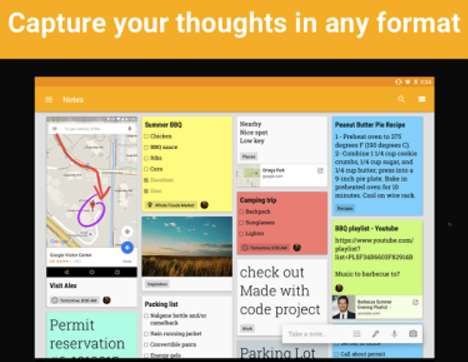
3/14/2018

                                                       MTS Internet Baby Full Version

                                                           Pinterest: More
Where can I go to quickly and easily find counseling       Than Recipes!
lesson ideas, bulletin board models, student pass
templates and other resources?

                                                                                               3
3/14/2018

How can I connect easily to other professionals?

                      Twitter: Connecting
                          Counselors
                      #onehashtagatatime
        Immediate response! (13 Reasons Why)
        Authentic response!
        Crowd-Sourced response!
        Competency (able to anticipate, prepared to respond)
        ADVOCATE for your programs

     1. username (@NCWIT)
     2. call out usernames in Tweets: "Hello @ASCATweets! Thanks for
        organizing these great webinars!"
     3. mention you in Tweets, send you a message or link to your profile

 “hashtag” - any word or phrase (no spaces) immediately preceded by the
 # symbol
 Use # to:
     1. categorize tweets/topics so others can find you
     2. search tweets on that topic
     3. Be cool

                                                                                   4
3/14/2018

School Counselor Chat List                    More
                                              #Hashtags &
Education Weekly Twitter Chat List            #chats
#SCCHAT - 1st Wednesday of the
month- 8:30PM EST
                                              #sccrowd - SC crowd
#scchat stands for "School Counselor
(SC) Tweet Chat," and is a monthly chat       #intlsc - international SCs
for all school counselors and anyone else
who is interested in joining the              #ESCCHAT - Elem SC Chat
conversation. It is organized by Dr. Erin     #Elemschool
Mason (@ecmmason), Susan Spellman
Cann (@SSpellmanCann), Erin Luong             #Highered
(@EHordyskiLuong ) and often has guest
moderators.                                   #Highschool
                                              #K12
#PSCOCCHAT - 2nd or 3rd Monday
of the month                                  #Middleschool
#PSCOCCHAT stands for
“Professional School Counselors of            #Edequity
Color” (anyone can join the chat)!
                                            Credit:
                                            schoolcounselorcrowdblog.weebly.com/school
                                            -counselor-twitter-chats.html

                                                                                                5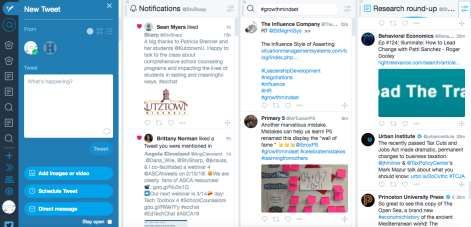
3/14/2018

                     How can I organize and sort through Twitter easily
                     and use all Twitter’s features?

                                         Use TweetDeck for Chats!

“TweetDeck Features: The Essentials”

          How can I quickly tap into a group’s
          thinking or understanding?                 padlet

                                                                                 6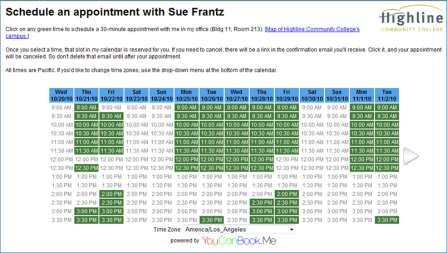
3/14/2018

            How can I schedule a meeting with multiple
            people EASILY and WITHOUT EMAIL?

                                Doodle Simplifies scheduling with others
                                   -a meeting at work
                                   -get-togethers with friends
                                any event in which multiple people need to
                                find a common date and time to meet

                                Everyone’s busy and email is insufficient.
                                Doodle makes the process of getting
                                together easier.

Set up in Doodle, email a link.

Recipients put a check next to
dates/times that work.

Seriously, it is that easy.

                                                                                    7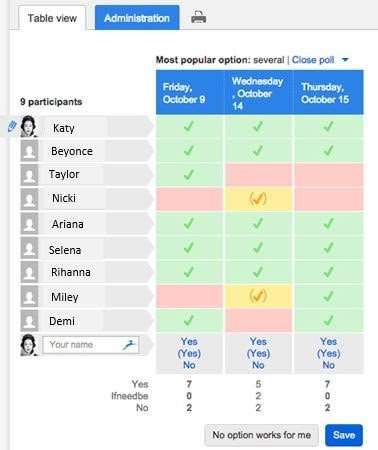
3/14/2018

How can I make it easy for students or families
to make an appointment with me?

Where can I find my school
counselor community?

                                            https://www.facebook.com/groups/590701787640166/

                                              High School Counselors’
                                                     Network
                                            https://www.facebook.com/groups/176582632507419/

                                             https://www.facebook.com/groups/149658681898931/

                                                                                                       8
3/14/2018

If you join a Facebook group that is:
     ● closed
     ● you must be accepted as a member
     ● for a specific purpose/profession
     ● not publicly searchable….
                   Are postings confidential?

    How can I easily make informational
    videos that people will actually want to
    watch?                                             PowToons

                                               Powtoon’s Mission:
                                               To address all the frustrations that people
                                               have with Powerpoint and Keynote and add
                                               animation and killer design

                                                                                                    9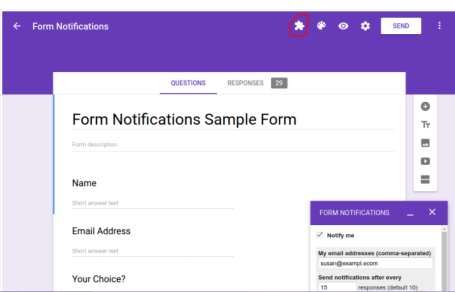
3/14/2018

         How can I tap into student creativity and
         tech skills for small group activities?

                             Use StoryboardThat
                         to create FREE comic strips!
➡“New students” group: Students divided up topics/tips for new students (making
friends, managing a locker, etc…). They each created a comic strip (6 squares is the
max for free accounts). We distributed the comic strip series to other new students.
➡ Girls’ Empowerment Group: The students made strips with themselves as the main
character overcoming a challenge they face.

➡ Organization Group: Students made

comic strips about their journey from

disorganized to organized.

                                                                                             10
3/14/2018
I use post-it notes to make lists and remind myself of
tasks. How can I use this system in a digital format?
https://www.youtube.com/watch?v=
UbvkHEDvw-o
How can I bring ideas to life?
Print. Color. Play
Use the Quiver Apps and let 3D augmented reality take
your coloring to the next level.
www.quivervision.com
113/14/2018
www.quivervision.com
SafeShare
Free! Share YouTube and Vimeo videos!
Remove Ads! Remove Comments!
How can I share YouTube clips without annoying pop-ups,
embarrassing suggested videos on the side and inappropriate
comments?
123/14/2018
How can I collect data in a What is Kahoot!?
game-based format?
• a collection of questions on specific topics
• asked in real-time, to an unlimited number of
“players”
• creates a social, fun & game-like learning
environment
• participate on computer, tablet, or smartphone
• no log-in account needed
• great for all ages
•There are different links for Kahoot It.
•To create one: https://create.kahoot.it
•Students get game pin and play at: kahoot.it
1. Go to: Kahoot.it •You can customize the timer.
2. Type in Game Pin I give you. •Faster answers earn more points, even if two people
respond with the same correct answer.
3. Type in your FIRST NAME or
an appropriate NICKNAME.
4. Join.
Google Form Add-Ons
How can I make my follow up
communications more
streamlined?
Add-ons are additional functions that can be installed and
become available across all of your google documents and sheets.
Pro: Streamline processes, expand capability of Google.
Con: Sometimes you are limited to how many features you get
‘free’. (Example: Form Publisher can only publish 100 forms a
month for free. Gliffy only has 5 free diagrams of many)
133/14/2018
Google Doc & Sheets Add-Ons
Google Form Add-Ons
143/14/2018
Google Sheets/Forms
15You can also read


