Parent/Guardian Handbook - www.somsd.k12.nj.us - South ...
←
→
Page content transcription
If your browser does not render page correctly, please read the page content below
Parent/Guardian Handbook

                       www.somsd.k12.nj.us
                  A District that celebrates students, community and diversity
District Administration Building, 525 Academy Street, Maplewood, NJ | Phone: (973) 762-5600

                                                                                              1
Welcome to Kindergarten: The ABC’s of Kindergarten

                                           Table of Contents

   I.   Welcome Letter                                                        3

  II.   About Our Elementary Schools                                          4

 III.   2020 – 2021 Key Dates                                                 5

 IV.    School Hours                                                          6

  V.    Eligibility Requirements                                              7

 VI.    Online Registration Enrollment Process                                8

VII.    Seth Boyden Opt-In                                                    9

VIII.   PowerSchool Parent Portal                                             10 -11

 IX.    Kindergarten FAQs                                                     12 – 14

  X.    Additional Kindergarten Information                                   15 - 16

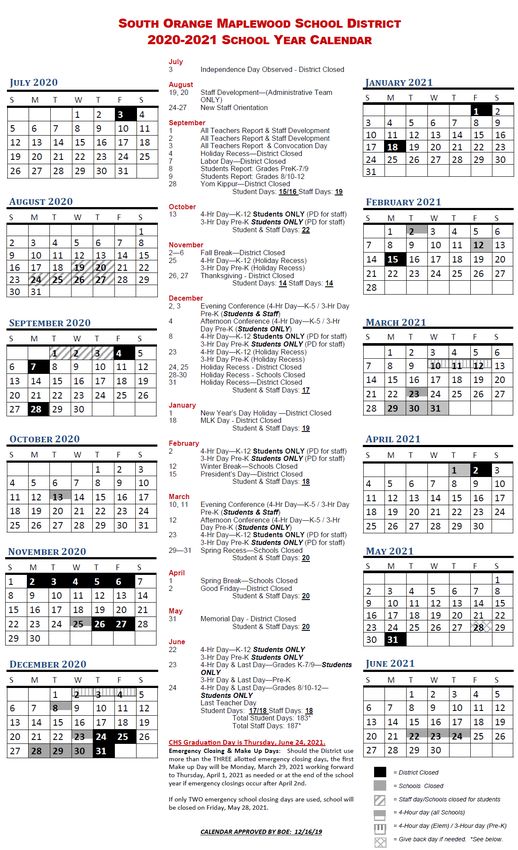
 XI.    2020 – 2021 School Year Calendar                                      17

                                                                                        2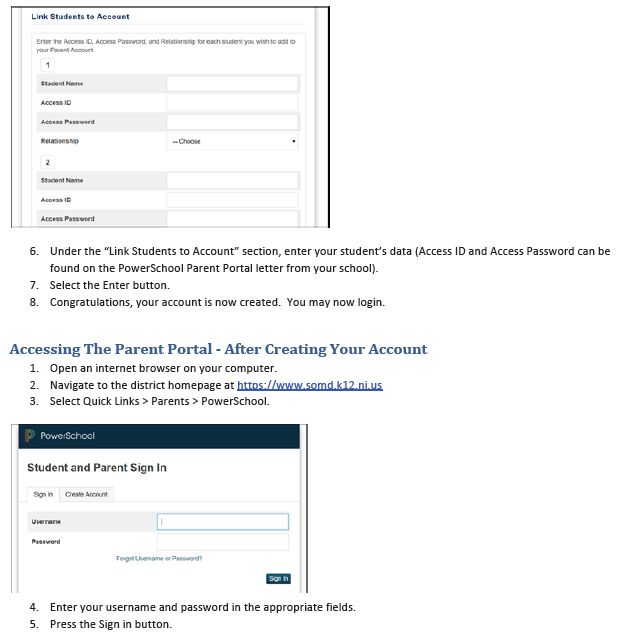
Dear Future Kindergarten Parents/Guardians,

We want to welcome the incoming class of 2034! Kindergarten is a milestone in your child’s life and
we are pleased that you have chosen The South Orange & Maplewood School District for your child’s
educational experiences. Kindergarten is not only the beginning of your child’s first formal education,
it is also the first step toward life-long learning and social participation. We want to partner with you
in this lifetime adventure.

New experiences and friends will make the year a special time for you and your child. There are many
things that you, as parents/guardians, can do to help your child adjust easily and eagerly to their
kindergarten experience. Your child has a natural love of learning. Every first-hand experience that
your child has can teach important skills.

We realize that you may have many questions about the kindergarten program. This kindergarten
handbook will address some of the questions and concerns that you or your child may have. Please
take some time to read through the information.

Do not hesitate to contact us if you have additional questions and once your child’s school placement
is confirmed, contact their school with additional questions. We are looking forward to forming a
partnership with you this year and for years to come. Thank you for choosing the South Orange &
Maplewood School District!

Sincerely,

South Orange & Maplewood School District

                                                                                                        3
ABOUT OUR ELEMENTARY SCHOOLS
Elementary Schools
SOMSD is committed to supporting all children on their journey to success in learning. Our six-elementary
schools use the same curriculum and provide an array of related arts classes. We have a strong teaching staff
who are life-long learners, willing to take on new challenges in curriculum and instruction. They are dedicated
to helping every student in their classroom reach their full potential.
SOMSD has 6 elementary schools serving over 3,400 students:
Four elementary schools serve students in kindergarten – 5th Grade: Clinton, Seth Boyden, South
Mountain and Tuscan.
Two schools are paired together: Marshall in South Orange serves students in Kindergarten – 2nd
Grade, and Jefferson in Maplewood serves students in 3rd-5th Grades.
The parent community is actively involved in our schools and helps to sponsor assemblies, special student
activities, fundraisers, and parent information meetings.
SOMSD also offers optional after school programming, Beyond the Bell, designed to help all elementary
students stretch and grow by offering enrichment classes for a modest fee. Scholarships are available to
ensure that all students can participate.
Elementary Choice Options
Note: Elementary school confirugrations will change as part of the District’s long range facilities plan and
Intentional Integration Inititiative, so families may be reassigned to a different school as their children progress
through the District (learn more about SOMSD’s III at: http://somsd-nj.org/somsdiii
SOMSD currently provides elementary families with the opportunity to attend their zoned elemtnary school, or
to “opt in” to one other elementary school, if space is available.
– Families zoned for Clinton, Jefferson, Marshall, South Mountain and Tuscan can opt-in to Seth Boyden
– Families zoned for Seth Boyden can opt in to Marshall/Jefferson
– Incoming families may be assigned to a different District school other than their zoned in accordance
with long-standing Board policy, if a grade is closed.
More information about elementary schools, including about each of the 6 elementary schools is available on
the District’s website.
42020-2021 KEY DATES
2020 – 2021 Registration Appointment Dates
Once you have successfully pre-registered your child online (please see page 7) an in-person registration
appointment is required to submit documents and complete the registration process. Appointments are
scheduled on-line via the Appointment Scheduler link. ONLY a parent/legal guardian may register a child for
school. The student is not required to be in attendance during the in-person appointment.
*2020 – 2021 Kindergarten In-Person Registration
Appointments will take place via zoned school, based upon your address, as scheduled below:
SCHOOL DATE RANGE TIME
**Seth Boyden Elementary School *February 18 – 20, 2020 9am – 4pm
South Mountain Elementary February 24 – 27, 2020 9am – 4pm
School/Annex
Tuscan Elementary School March 2 – 5, 2020 9am – 4pm
Clinton Elementary School March 9 – 12, 2020 9am – 4pm
Marshall Elementary School March 16 – 19, 2020 9am – 4pm
All Zoned Schools - Kindergarten May 11 – May 14, 2020 9am – 1pm
Enrollment
**Only for students ZONED for Seth Boyden Elementary (Tuesday – Thursday)
Kindergarten Orientation Dates (by School)
SCHOOL DATE
Marshall Elementary School Friday, May 29, 2020
Clinton Elementary School Thursday, June 4, 2020
Tuscan Elementary School Friday, June 5, 2020
South Mountain Elementary School Elementary/ Friday, June 5, 2020
Annex
Seth Boyden Elementary School Tuesday, June 9, 2020
Please contact schools directly regarding Kindergarten orientation.
5SCHOOL HOURS
Full Day Schedule
School Grades Start Time End Time
Clinton Elementary School K–5 8:05 am 2:35 pm
Marshall Elementary School K-2 8:45 am 3:15 pm
Seth Boyden Elementary K-5 8:45 am 3:15 pm
South Mountain Elementary K, 2-5 8:10am 2:40pm
South Mountain Annex K-1 8:00 am 2:30 pm
Tuscan Elementary K–5 8:45 am 3:15pm
4-Hour Session
School Grades Start Time End Time
Clinton Elementary School K–5 8:05 am 12:05 pm
Marshall Elementary School K-2 8:45 am 12:45 pm
Seth Boyden Elementary K-5 8:45 am 12:45 pm
South Mountain Elementary K, 2 - 5 12:10pm
South Mountain Annex K-1 8:00 am 12:00 pm
Tuscan Elementary K–5 8:45 am 12:45 pm
Delayed Opening Start-Time
School Grades Start Time End Time
Clinton Elementary School K–5 10:05 am 2:35 pm
Marshall Elementary School K-2 10:45 am 3:15 pm
Seth Boyden Elementary K-5 10:45 am 3:15 pm
South Mountain Elementary K, 2- 5 10:10 am 2:40 pm
South Mountain Annex K-1 10:00 am 2:30 pm
Tuscan Elementary K–5 10:45 am 3:15pm
Delayed Openings & Emergency Closings
Delayed Opening: All elementary and middle schools will delay opening for two hours, including the Preschool
Program. All CHS students and staff should report to school at 10:00 am.
All-Day Closing: Announcements will be made on the following AM radio station – WINS (1010), and the
following TV stations: WNBC (Ch. 4), WABC (Ch. 7), WNYW (Ch.5), News12 NJ, and CCN (Ch. 35 in Maplewood,
FIOS Channel 22 in Maplewood and Channel 19 in South Orange). A message will be posted on the District
webpage: www.somsd.k12.nj.us
A call, email and SMS text will be made to all District families and staff to announce either a delayed opening
or all-day closing. Please make sure your contact information is up to date by completing the online contact
forms found in the Power School parent portal (see page 10 in this packet).
6ELIGIBILITY REQUIREMENTS
In order to enroll your child in the South Orange & Maplewood School District Kindergarten program you must
meet the following eligibility criteria:
– Be domiciled (a resident) in South Orange or Maplewood
– Born on or before October 1, 2015
– Must pre-register on-line (see page 7)
– Schedule an in-person appointment (via appointment scheduler, see page 8) to provide the required
documents necessary to complete enrollment (if homeless please contact the registrar)
Upon successful submission of the application, an in-person registration appointment is required to submit
documents and complete the registration process. Appointments are scheduled on-line via the Appointment
Scheduler link (see onsite registration appointment dates by zone on page 5). ONLY a parent/legal guardian
may register a child for school.
Please have the required documents listed on the registration checklist on-hand (we are unable to print, fax or
receive emails of documents). Failure to have, the required documents with you may result in you being unable
to complete your child’s registration and a follow up appointment may be required. The student is not
required to be in attendance during the in-person appointment.
Registration Checklist for In-Person Appointment
Please review the Registration Checklist below to ensure that you bring the appropriate documents for your in-
person registration. For additional information on document checklist:
https://www.somsd.k12.nj.us/district/registration/regdocuments/2020-2021-registration-documents/
– All documents must be dated within the last 60 Days.
– Bills may be a combination of one or both parent’s names (PDF copies of bills are acceptable)
Documents Acceptable Documents Notes
For Your Child – Original Birth Certificate (with raised seal)
– Immunizations (computerized copy or
completed on District's Form) with
doctor's signature or stamp
– Proof Of Custody (if it applies)
– Proof of Identity (Photo ID)
*Proof of – Homeowners: one of the following * Proof of your attachment to the address is also
Address (current mortgage statement, current required in the form of (3) three pieces of current
property tax bill or recorded deed) legal mail. You may only use one of each
– Renters: Current Lease bill/company:
– Examples: PSE&G, Waste Management,
Verizon, Water, Sewage, Cable, bank
statement, cell phone bill, pay stub, credit
card bill...etc.
7ONLINE REGISTRATION ENROLLMENT PROCESS
AN IN-PERSON REGISTRATION APPOINTMENT IS REQUIRED FOR ALL THOSE SEEKING
TO ENROLL A CHILD FOR SCHOOL IN THE DISTRICT
To register a student for school (new or returning student), parents/legal guardians must:
STEP ONE: Access the on-line pre-registration link on the District’s website.
https://www.somsd.k12.nj.us/district/registration
STEP TWO: Create a username and password (make a note of it for safe keeping)
STEP THREE: Complete the on-line pre-registration (if you have trouble please contact the vendor
for assistance at 866-434-6276 or support@infosnap.com)
STEP FOUR: Once complete, review and submit. You should receive a “Submission Complete”
message.
STEP FIVE: Use the appointment scheduler to make your in-person registration appointment.
Please scroll to the bottom of the page and select “confirm” to secure your
appointment.
STEP SIX: Print/Review the “Registration Checklist” for a list of items needed for your in-person
appointment. Print the health forms and have your physician complete them.
STEP SEVEN: You may want to print a copy of your registration packet for your records or save it as
a PDF.
STEP EIGHT: Arrive at least 10 minutes before your scheduled appointment. Please bring your
immunizations, original birth certificate, proof of residency, photo ID and any other
relevant documents. Faxes and emails will not be accepted.
All registration appointments take place in the Office of Registration, at the Board of Education,
525 Academy Street, Maplewood, NJ 07040.
NOTE: The Student is not required to be in attendance for the in-person appointment.
For language assistance please contact the Office of Registration for additional information
8SETH BOYDEN TRANSFER REQUEST / OPT-IN PLACEMENT
For the 2020-2021 school year, students wishing to “OPT-IN” to Seth Boyden Kindergarten, will be placed via a
lottery. The Seth Boyden Opt-In Lottery is the result of increased enrollment across the District.
Seth Boyden Kindergarten Opt-In Lottery:
All new kindergarten applicants, including those currently enrolled in the District’s Universal Preschool
Program, who are NOT zoned for Seth Boyden Elementary School, must submit an “OPT-IN” form to be
considered for enrollment in Seth Boyden’s Elementary Kindergarten.
Priority Placement (regardless of opt-in request)
– Zoned Siblings
– Zoned Families
Opt-In students will be placed in kindergarten at Seth Boyden Elementary as follows:
– *Opt-in siblings of existing families (these are siblings of previously approved “opt-in” students who
remain enrolled at Seth Boyden for the 2020-2021 school year and have, (a) completed their
kindergarten enrollment and (b) submitted a Seth Boyden Opt-In form by April 10th (at 3 pm), will be
considered for priority placement)
– New Opt-In families
All remaining applicants, who meet the eligibility criteria listed below, will be placed through the Seth Boyden
Opt-In Lottery.
Eligibility Criteria:
All students must be fully registered for kindergarten, for the 2020 - 2021 school year, by the Opt-In deadline
of Friday, April 10, 2020, at 3 pm. This includes those with siblings currently enrolled at Seth Boyden.
– Parents will be notified of their acceptance in Seth Boyden Kindergarten no later May 15, 2020.
– Students not selected by the Seth Boyden Opt-In Lottery will be placed in their zoned school (provided
there is space) and waitlisted for an available seat at Seth Boyden. If a seat becomes available, prior to
the start of school, students will be placed from the waitlist through August 28, 2020.
– Forms received after the April 10, 2020 deadline will be, time and date stamped and added to the
waitlist in the order in which it was received.
*Siblings(s) will be given consideration for priority placement as long as the eligibility criterion is met and there
is ample space to accommodate the sibling with no restrictions to the placement.
9POWERSCHOOL PORTAL FOR PARENTS
At the beginning of the school year (once your child has been enrolled in school) you will receive a mailed
letter from the District with your access credentials for the PowerSchool parent portal.
PowerSchool is the student information system used by the South Orange & Maplewood School District. It
provides parents/guardians confidential and real-time access to information related to their child, such as
school assignments, grades, attendance and report cards. In addition, via the Annual Welcome Packet housed
within the PowerSchool parent portal, the District collects vital forms from SOMSD families. These forms
provide us with family contact information, student health information, and a range of important permissions
and agreements. All families are asked to complete these crucial online forms as soon as possible.
Accessing the Parent Portal for the First Time:
Please note: You will not have access the parent portal until your child is enrolled (fully completed the registration process and is placed
at a SOMSD school). Once this process is completed, you will receive a written notice from the District with access credentials to the
PowerSchool parent portal.
10If you need assistance with your account or with navigating the portal, go to the District home page and select
Quick Links > Parents > PowerSchool Parent Portal Help or email the parent portal help desk
at parentportalhelp@somsd.k12.nj.us.
If you are unable to locate the email or are new to the District please email the Parent Portal help desk
at: parentportalhelp@somsd.k12.nj.us.
11KINDERGARTEN FAQs
1. How old does my child have to be to enroll in school?
Children must be 5 by October 1 to enroll in kindergarten and 6 by October 1 to enroll in the first-
grade (per District policy #5112 - no exceptions or testing can supersede this policy).
2. How do I register my child for kindergarten?
a. Pre-register online. The 2020-2021 Enrollment application is available on the District’s Website.
www.somsd.k12.nj.us/district/registration
b. In-person appointment to provide the required documents needed to complete the registration
process
– After you complete the online registration, you will be prompted to select a registration
appointment for the in-person portion.
– Appointments should be scheduled according to your zoned school’s assigned week (see pg. 5)
3. How do I know what school I am zoned for?
Please access the School Zones document found in the Registration section of the website. School zones are
listed according to your street address.
4. I previously submitted an on-line application, do I need to submit another one?
Parents who previously submitted an application utilizing the online system, who do not have a child
currently attending school in the District, will need to complete and submit the 2020-2021 application and
make an in-person appointment to enroll for the 2020-2021 school year.
5. Is my child’s zoned school guaranteed?
Students shall generally attend the school located in the area closest to their residence (zoned school). The
Superintendent MAY, assign a student to another school, in the District, other than that designated by the
attendance area, when such an exception is justified by circumstances (e.g. re-zoning, over-enrollment,
changes in structure of school building). All Students are placed in accordance with District Policies 5112,
5120, 5124 and 8600:
– In their zoned school (based upon address), when space allows,
– Another school, in the District, with available space
The District will make every attempt to place siblings in the same school, but placement may not always be in
the zoned school. All such decisions of the Superintendent (or Representative) are final!
6. How are children placed in Kindergarten?
Student placement for the 2020-2021 school year adhere to the following criteria:
– Students will first be placed in their zoned school provided there is ample space to accommodate
each enrollee
12KINDERGARTEN FAQs (cont.)
– Should enrollment exceed the number of available seats, placement will be prioritized as follows:
a. Special program requirements (e.g., Special Education, English Language Learners, etc.)
b. Sibling Preference
c. Lottery for all zoned families who fully completed their registration during the stated
kindergarten registration period if the number of applicants exceeds the number of
available seats
7. What is “Sibling Preference?”
“Sibling Preference” is when a student who is enrolled in their zoned school for the 19-20 school year
continues to be enrolled in their zoned school for the 2020-2021 school year. The District will place the
sibling in the same zoned school, as long as there is space to accommodate the sibling there and there are
no restrictions with the placement. (“Sibling Preference” applies to students who will be attending
their zoned school for the 2020-2021 school year).
8. What happens if I am “closed out” of my zoned school due to over enrollment?
Students who are “closed out” of their zoned school due to over enrollment will be placed by the Office of
Registration, based on an assessment of available seats and transportation needs. Parents are not able to
choose which school their child is assigned to.
Students “closed out” will be placed on a waitlist according to when their enrollment packet was fully
completed. Students can and may remain waitlisted for a full school year before additional seats become
available. All students are placed in accordance with District Policies 5120, 5124 and 8600.
9. Do I get to choose which elementary school my child will attend?
SOMSD provides elementary families with the opportunity to attend their zoned elementary school, or to
"opt in" to one other elementary school, if space is available.
– Families zoned for Clinton, Jefferson, Marshall, South Mountain and Tuscan can opt in to Seth
Boyden
– Families zoned for Seth Boyden can opt in to Marshall/Jefferson
– Incoming families may be assigned to a different District school than their zoned or choice school,
in accordance with long-standing Board policy, if there are no open spots in that grade
10. When will I know which school my child will attend for kindergarten?
Kindergarten parents/guardians will receive notification of their child's placement mid-late May, along
with their kindergarten orientation notices.
11. Must I have the original birth certificate to register or may I use a copy or my child's passport?
13KINDERGARTEN FAQs (cont.)
You must provide an original birth certificate with a raised seal. Passports are not accepted as they do not
provide proof of custody.
12. Why must I have proof of custody?
If both parents' names are listed on a birth certificate, and the child will be living with only one parent, the
parent enrolling the child must provide proof of residential/physical custody. If only one parent's name is
listed this is not required.
13. Can I arrange for a tour of my child(ren)'s school?
Yes. Tours should be arranged directly with the school secretary.
14. What is the Kindergarten screening?
This is a time for your child to meet a kindergarten teacher and feel more at home at the school, and also
an opportunity for teachers to get a quick overview of your child's interests and learning style.
15. When will I learn the name of my child's teacher?
SOMSD sends teacher assignment letters to every student a few days before the first day of school.
Teacher assignments are sent out on the same day for all elementary schools. The school will not release
teacher assignment information before letters are mailed out.
16. Will my child ride a bus to school?
Busses are provided as a courtesy to qualified students at Marshall/Jefferson, Seth Boyden and South
Mountain Annex (based on distance from school). You will receive a form that must be completed and
mailed back in order for your child to be scheduled for transportation.
17. Is after-care available through the District?
The District does not provide after care. However, on-site after care is available through the South
Mountain YMCA, and there are also a number of off-site after care options available through various
providers. The on-site programs run from dismissal time until 6:30pm and follow the District calendar.
More information on the on-site programs is available at http://www.metroymcas.org/south-mountain-
ymca/after-schooI-care-program/
The District does provide optional, after school "enrichment classes" through the Beyond the Bell program.
These classes typically run in 6-week or 7-week cycles, three times per year. You will receive more
information once the school year begins.
18. Who can I talk to if I have a concern about my child?
The best place to start is with your child's teacher. In the rare event that you are not satisfied with the
teacher's response, then you can contact the school principal.
14ADDITIONAL KINDERGARTEN INFORMATION
FIRST DAY
What supplies should my child bring on the first day? If your child's kindergarten teacher requires any supplies
on the first day of school, a list will be included with your teacher assignment letter. Generally, however, most
kindergarten supplies will be requested during the first week of school. The supply list is usually quite short
and includes items like crayons, glue sticks, tissues and hand sanitizer.
Should my child bring a snack on the first day of school?
Kindergarten and first grade students eat a snack every day. In most classrooms, parents are
responsible for sending in a small, healthy snack and drink daily. In some classrooms, snacks might be
provided by one family for the entire class for a day or a week. On the first day it is recommended that
you do send in a snack. If the teacher has different plans for snack time, you will be informed at some
point early in the school year.
Should my child bring lunch on the first day of school?
Students can bring lunch for home or purchase lunch at school. The first few days of school, the lines
to purchase lunch are sometimes long as children are just learning the process. You may wish to
consider sending a lunch from home these first few days, even if you plan for your child to generally
purchase lunch.
LUNCH
How do I set up a lunch account for my child?
Students may either bring lunch from home or buy lunch, drinks, and snacks using a PIN number to
access their pre-paid lunch account. In order to open a lunch account, you will need your child's
student ID number. This number is usually included with correspondence that is sent by the school
district after you have registered your child for school. You can also obtain this number by calling Food
Services at (973) 762-5600, ext. 1000. Once you have that, you can:
1) Pay via check using the form for lunch accounts, which is located in your school's office;
2) Go to mealpayplus.com and use your credit card; or
3) Call (866) 734-4694 to give your credit card information over the phone. Please note that
applications for the Federal Free and Reduced Price Lunch program will be sent home as part
the start of year materials.
Note: There is no lunch on half-days. Please include a snack in your child's backpack if your teacher normally
schedules a snack period.
15ADDITIONAL KINDERGARTEN INFORMATION (cont.)
FAMILY INVOLVMENT
How can I stay informed about what is going on in my child's school? Your child's teachers will send home
regular communications about what is happening in the class, and your school principal will send home
periodic communications about what is happening in the school. There are also numerous opportunities to
visit the school throughout the year including Back to School Night in the early fall, parent/teacher conferences
in late fall and again in early spring, and celebrations such as art fairs, music festivals, and field day.
SCHOOL PTA
We encourage all parents/guardians to get involved in your school’s PTA. Children, schools and
parents/guardians all benefit from family involvement in the PTA. There are many ways to participate:
– Sign up for the PTA e-newsletters
– Attend PTA events
– Volunteer to help the PTA looks for volunteers throughout the year. Please contact any member of the
PTA to find out what you can do to help.
– Volunteer to help your child's class or participate in the field trips and other class events organized by
your child's teacher and the Class Parents.
DISTRICT COMMUNICATION
To stay abreast of District communications we encourage you to sign up via the PowerSchool parent portal to
ensure that you receive emails, SMS text and robocalls for updates. You can also visit the District website at
www.somsd.k12.nj.us, look for flyers in your child's backpack, follow us on Twitter @SOMSDK12 or attend
monthly Board of Education meetings (or watch them via livestream).
ELEMENTARY SCHOOL ADDRESSES
SCHOOL ADDRESS SCHOOL PHONE #
Clinton Elementary School 27 Berkshire Road, Maplewood (973) 378-7686
Jefferson Elementary School 518 Ridgewood Road, Maplewood (973) 378-7696
Marshall Elementary School 262 Grove Road, South Orange (973) 378-7698
Seth Boyden Elementary 274 Boyden Avenue, Maplewood (973) 378-5209
School
South Mountain Elementary 444 West South Orange Ave., South (973) 378-5216
School Orange
South Mountain Elementary 112 Glenview Road, South Orange (973) 378-2801
School - Annex
Tuscan Elementary School 25 Harvard Avenue, Maplewood (973) 378-5221
1617
You can also read


