Remote CPAP setups ResMed guidebook
←
→
Page content transcription
If your browser does not render page correctly, please read the page content below

ResMed guidebook
Remote CPAP setups

                     1
Table of
contents
Helpful tools for getting started................................... Page 3
Home delivery & remote setup checklist..................... Page 4
                                                                                           Download PDF
Key payer requirements to keep in mind..................... Page 5
Patient touchpoints map.............................................. Page 6

Key steps and resources
Intake........................................................................... Page 7   Download PDF
ResMed MaskSelector & resources............................ Page 8                         Download PDF
Pack, ship & deliver..................................................... Page 13          Download PDF
Boarding & prescription............................................... Page 15             Download PDF
Scheduling & resources............................................... Page 16              Download PDF
Setup........................................................................... Page 18   Download PDF
Compliance support..................................................... Page 25            Download PDF

Note: throughout this document you may click on the color-coded tabs at the top to skip to each section.
                                                                                                           2
Helpful tools
for getting started

                                 Email                                                                                                              Video/web conferencing
                                 Obtain patient email address and use a                                                                             Set up your patients virtually using
                                 secure platform to communicate on                                                                                  communication platforms such as
                                 equipment delivery, setup and support.                                                                             Zoom™, Apple® FaceTime® or Skype™.*

                                 Electronic signature                                                                                               ResMed videos
                                 Collect intake paperwork and credit                                                                                Visit ResMed.com/SleepApneaBasics
                                 card authorizations electronically with                                                                            for patient education and support
                                 platforms such as DocuSign®.                                                                                       videos to optimize setups.

*Effective 3/17/2020, the HHS Office for Civil Rights (OCR) will exercise enforcement discretion and waive penalties for HIPAA violations against healthcare providers that serve patients in good faith through everyday
communication technologies, such as FaceTime or Skype, during the COVID-19 nationwide public health emergency. Under this notice, however, Facebook™ Live, Twitch™, TikTok™ and similar video communication applications
are public-facing, and should not be used in the provision of telehealth by covered healthcare providers. Guidance is subject to change without notice. For further details, visit https://www.hhs.gov/hipaa/for-professionals/
special-topics/emergency-preparedness/notification-enforcement-discretion-telehealth/index.html                                                                                                                                   3
Home delivery &
remote setup checklist
Ensure you have everything you
need for successful home delivery
and remote setup by downloading
a copy of our printable checklist.
Ho m e y & re m ot e sesetup ecklist* *
tup chchecklist
Download PDF Home
Ho m e de er
delivery
de
liv liver&y remote
& remote setup chec
Key payer requirem
ent
† s:
† klist*
Key payer requirements:
• Pro vide †
:ions
Key paye r requ inst
irem ents
ruct for use •ain
Obt very • Doc ument date of service
• Provide instructions for use • Obtain
• Obt ain
proof
proo f prodeli
ofofofdelivery
of deliver y • Document date of service
Pro inst
• Provideces s ructions for use
1 Inta
• Document date of
ser vice
Process ke
1 Intake
a. Create a patient profil 6 6Boar ding & & prescription for
Process a. Create e in your billing manageme Boarding
6 Boardin
the
prescription
patien
g t
& into AirVie
pres w, using the delivery date
e
1 Intak nt system.
a patient profile in your billing management system. a. Board crip tionusing the delivery date for
a. Board the patient into AirView,
2 Intake call management system. a.date.
Board the patient into AirVi
Creat
2 a. Intake a.eConfi patient profile in your billing
a call setupsetup date.
ers, if using the delive ew, using ry datethe setup date,
fordeliv
ery date for
rm patient qualification: - U-Slee setup
p™ custom
™ date.
- U-Sleep customers, ingif using
the patien the delivery
t upon delive date ry setupthe
forsince date,
2 a.
Intak Confirm
e - Phon
call patient
e requi qualification:
red, recom we -
recomU-Sle mendep™ custoboardmers,
cation : mend a video-enabled devic we recommend boarding ifthe
edusing
patient
in casethe upon
of delays
delive delivery
ry .
date since the
a. Confir - Phone - Intern
m patien
required, t qualifi
et acces recommend
s, supporta mate a video-enabled device.. e. setup we
date canno
recom t be
mendbeboard adjust for setup
™ date,
invite.
video -enab
rials led device setup date cannot adjusted ing thein case
patie
send a of delays.
ResM ed myAir
- Phone - Patie
- Internet requir nt ed,
access,willinrecom
support mend
gness. materials are are available
available onlin
online.
ble online . e. b. Enter thesetup patien
b. Enter the patient’s email date email address to
t’s canno t be adjus
address to send
nt upon delivery since the
a ResMed myAir™ invite.
- Patient- Any others,intern
et acces
willingness. support materials are availa b. Enter iate the the patiennt’s t’s physic ian. ted in case of delays.
- Intern al requirements. c.c.Assoc
Associate thepatie patient’semail physician.
with addreAirVie ss to
w, set
send this
a now.
ResM
‡
ed myAir invite.
b.Any
- -PatienIf the t willin
other gness
internal . requirements. c. Assoc ng iatethe prescr iption ™
patie nt is quali fied, confi
requiremen ts. rm the shipping address and d.d.IfIfapplyi
applying thethe patie
prescription nt’s physi with cian.AirView, set this now.‡
c.the
b.- IfAny Proviother de intern
patient patie is nt alinform
qualified, confirm the shipping address andemailemail.emai
. l. d. If applying the presc urce s n with AirVie
ation tothe shippingforaddre
a clinic ss and 77 Sche duling &&reso riptio
the- Ifpatien is qualifi
tferrin ed, confir m
a clinicianian mask selec tion. 7Scheduling resources t once the delive
w, set this now.‡ne is
ry timeli
b.c.IfProvide patient
trans information
g to a clinictoian, sendan
formask
for
mask selection.
select ion. Sch
a.a. Sched edu
ule ling
the setup& appoi
reso ntmen
inform ation to asend clinici patiesizing
nt sizing instructions Schedule the setup appointment urces once the delivery timeline is
c. Provid while
e patien
- If transferring ontthe tophon
a clinician,
e via emai patient instructions
l. patient sizing instructions a. Sche
know n. dule the setup appointment
to a clinici an, send known. once
with the deliveryhow
detail s on to
-transf
- Ifwhile If settin erring
on the
g upphone a sepavia email. known. ar invite to the patient timeline is
- while instru
If setting up aphone
the
onction s separate viarateemail call. with a clinician, send
patie nt Sendaacalend
b.b. Send calendar inviteappoi to the ntmen patient t. with details on how to
via email call follow with a clinician,
with inga the
clinici an,esendsend patien
patient sizing
t sizingsizing b.
conne Send ct afor the dar
calen setup invite to
d. Have g up a separ ate call intak call. connect for the setup appointment. the patie
resou rces
nt with email .
details on how to
- Ifinstructions
settinthe patie viantemailsign following the intake call. call. connect for appoi ntment and
d. Have provithe ctions
de patient viaval
all of your
emailallfollow
sign of your
the
ingstandard intake
stand ardconsents,
consents,asaswell well Send aa setup
c. c.Send
c. the setup
setup appointment appo
regist and intme
rationresources
nt.
. email.
instru appro for outre ach via ardionalconse nts, as well asas Send rage
-- Encou a setup myAir appo appintme who to
video
provide
d. Have the patien
, approval
emai l ort sign all of your
for outreach
text message,
addit
stand
via additional modalitiessuch
modalitieslities such suchasas Encourage
- Encou
myAir
contarctapp
your contact
e rage
app inform nt ation
registration.and resou so the rces patienemait l.knows
ch via
outrea if applicable.if appli
additi onal
cable .moda -
- Includ
Include your myAi regis
information tratio so n. the patient knows who to
e.video,
Obtain
provid crediortval
appro
eemail text
card formessage, -conta
Includ for
ctefor suppo rt.
authorizati your conta s, such as
e.f. Obtain
Once, email
video credit
the mask or text
card message, ifonfor
authorization applic able.ys.
for co-pa
co-pays. contact
conta
support.
delive ry
ct informand
timeli ne ation shippiso the ng detail
patie nt know s who to
is determined nand co-pant
conse ys.is recei Providectaafor
-- Provide suppotimeline rt.
teamthe credit card authorizatioandforconsent ved,let letyour delivery and shipping details, such as
f.e. Once
Obtai nknow mask the ismask
determined
andined devic and conse
e requi
is received,
nt isnts.
reme received, let your
your - the
Provi de ang
tracki
the tracking
numb
delive
number. ryer.timelinet and shipp
s: date, ing detai time,ls,how to connect
3 f.Mas team
Once the
know maskthe is determ
mask and device requirements. the track
fy
Identi setupnumb setup
ing appoi ntmen detail such as
k selection & resodevice
the mask and urcesrequir
ements. --Identify appointment er.
t isdetails:
with. date, time, how to connect
3 Mask teamselection
a. Mask know
selection call. & resources - Ident
andwho ify setup
who the appoi appontmen intme detai ed water.
resources
and
and who
the appointment
forthe appotprior
patien prior tontisthe with. : obtain
ls: date,
setup time, distill
how to connect
3 a.Mas - Provi
Mask selec
k selection
de mask tion call.&size
type/ information to your team
Action
- -Action for patient intmetontthe is with.
setup:
tion andobtain suppodistilledrt resouwater. rces.
call. information to your team.. - Actio
Recom
-Recommend n for mend patie availa ble
nt prioreducation educa
b.a.-SendProvide
Mask select
thera maskpyion type/size
educ ation emai l. ation to your team. - available to the setup and : support
obtai resources.
n distilled water.
e mask type/sizeemail. inform - Recommend available
4 Opt b. Send Provid
- ima therapy
l remote education 8 Setup education and support resou introd uction,
setu . 8 Setup includ e: an rces.
y educationpemail kit contents 8 Setu p to include during the setup call
4 a. Optimal Send
b.Devic e: therap
remote
ResM ed AirSe setup nse™™pkit 10kit
contents Topics
a.a.Topics to include during tthe goals setup andcall quest ions, educa
include: tion, how to
an introduction,
te setu AutoS cont et™™entsor AirCu rve™™ 10 a. Topic soverv
anoverviewto includiewofof patien
epatient
durin
4 b. Mask
a.Opti
Device: mal
: ResM remo
ResMed ed AirFitAirSense™
F20, 10 AutoSet
AirFit or AirCurve
or AirCu rve ™ VAuto
10 10VAuto.
VAuto . ‡‡ ‡
. an g goals
the setup
and
therap questions,
call y, an
includ equip ment
education,
e: overv
an introduction,to how iew,
™ nse 10 AutoS N20 et AirFit
™
anget overv dofonpatie sleep apnea
AirFit N20 or iewon
starte
™
c.b. a.
Supp
Mask: ResMedResMsize ed
AirFitAirSe P10. sleepnt goals
Devic leme e: ntal cushiF20,
™ons: IfAirFit
or AirFit
totoor AirFit P10.P10. get started apnea
expec t therapy,
asand they quest anions,
start equipment
therap educa y. tion,
overview,
F20, Ifunab N20
le remo tely size getFAQs starteand onwhat
dwhat sleep toapne
provide to
how
c. patie Mask nts,: ResM
b.Supplemental include ed
sizeaAirFit
cushions:
Smal l for fema
unable
If les, e to
remotely
remot size
ely full
size face
fullfull
face
face FAQs
FAQs
and to expect
email : aasthera
reinfo they rce py,start
an
key therapy.
learni
equip ngs,
ment overv iew,
for males.emen tal size cushio forns: unabl and
andaaSmal l and aaLarge b.Send Send and what-up
follow toemail:
expec t as theykey ization if needed.
c.patients,
Suppl include a Small females, Small
a Small andand Large
a Large b.b. Send follow-up reinforce
m how to reach startlearnings,
yourpy.
thera organ provide
d. Supp forpatien ortingts,inform
males. includation e a Small for females, and resou
resources
follow rces -up
and
and emai confir
confirm l: reinfo
how rce to reach key learn yourings, organization
: HME contact information resources and confir provide if needed.
d.patie
Supporting
for nt males
education .
information: HME contact information plus
plus printe
printed d
printe d 9 Com plian ce supp m ort to reach your
how ts
materials. HME contact information plus 99 Com Compliance support identifying your organremot izatio
e setupn if need patien ed.
5 Packpatient Suppoeducation
d., ship rting inform ation:
materials. a. plian
Estabce lish a metho
supp ort d for
& delivtion er mater
(In lieuials. of a shipping carrier, you a.a.EstabEstablish a method
w locati
foronidentifying
or clinicalyour userremote fields). setup patients
delive
5 Pack, patien
r orship t educa
& deliver (In lieu of a shipping carrier, you maymayopt opttoopt
to to lish
(i.e. AirVie
a meth od for ident ifying
offer curbs ide picku r, you may (i.e. AirView locationtools or clinical suppo user
yourrt fields).
patien
remote ts:setup patie
a.5deliver
If apply ship &gsdeliv erp)(In lieu of a shipping carrie (i.e.
b. AirViLeverew age remot
locat ion eor
clinic
to nts
Pack ,offer
oring settin curbside manu pickup)
ideally to the device, do this now. b. b.LeverLeverage
age remo
remote tools
. te tools to suppo
to support al userpatients: fields).
Othe
a. rwise
Ifdelive
applying r or
, useoffer
settings
ResMcurbsmanually
ed AirView
pickup to™) the device, do, this
do now.now.
this -
- myAir.
myAi
- myAir
Group s orrtU-Sle patieep. nts:
b. Selec gs manu to
to the
remo
ally ™ to remotely device
tely apply settin - r.
AirVie w Action
a. tIfaapply
Otherwise, plaining boxsettin
use ResMed
that fits sleep AirView apply gs.
settings.
apply
‡ ‡
settings.‡ - AirView Action Groups
- AirVi-ew te Assist.
or U-Sleep.
therawpy to remotntsely AirVieActio wnRemo
™
c. Inclu use ResM AirVie
fitsedsleep conte snug - AirView Remote Group s or U-Sleep. settings.
Assist.
b. Select deOther HME wise,
a plain conta box ct that
inform therapy contents
y conte ntsgly.
snuggly.
snuggly. - AirView wteremot e prescription
thatation in thetherap
fits sleep shipp ing box. - AirVieRemo Assis t. t having any challenges within
-c.Avoid
Include
b. Selecspeci HME a plain
tfying boxbox
contact information
conte nts on ation
in the shipping
in the shipp box.
ing box. -
- AirView
AirVi ew remo
remote
up with
prescription
each patiensettings.
ct inform the shipp ing label c Follow te presc
each riptio n settin ion to:within myAir, mask fit,
comp
- Avoid
c. liant.
Includ e HME conta
specifying box contents on the
nts on
shipping
the shipp
labelto be
ing label HIPA
to be toHIPAAA HIPAA
be c cFollow Follow
updays
three
up
with
with
days each
patient
setup, paying specia
of patie
having gs.anyl attent challenges
ome
d. Choocompliant. box conte three of setup, nt
paying havin special attention rces tomask
to: withi
myAir, overcfit,
se-deliv Avoid confiying
eryspecif rmation from carrier to three days device of setup and
use setup,, payin setup, acclim g any ation and nges
challe resou
n the device
shipm
d. Choose entcomp isdelivery
delivliant. confirmation from carrier track
to track andand confi rm
confirm m device use and g speci
acclimation
comp al andtion
atten
liance resources
/regul to: ar use,tor,using
myAi overcome
ered. from carrier to track and confir device use challe andnges, setup cleani ng, mask fit,
e. Provi de delive
e delivered. ry confir matio n challenges, cleaning, , acclim ation
compliance/regular and ply. use,
resources to overcome using the device
shipment Choosis
d. shipp ing information, including deliv challenges, cleanaway ing,from home, and resup
and the track
e. Provide shipm entnumb
shipping
ing is delive red. including delivery
information, ery expeexpectations
ctatio ns tations while whilewhile away from compliance
home, and resupply./regular use, using the devic of how their
er, to youration, team includ
so they ingcandelive ry expec away from home, and resupto continue protecting their privacy. Be e
cognizant
patieand nt’s
e.the setup
Provid .e shipp
tracking ing inform
number, to your team so they sched
can ulesched
schedule the the ule Asthe As you manage during COVID-19, please make
sure ply.
their data. When communi
cating
er, to your team so they can As you manage your patients
your patients during COVID-19, pleaseand make sure follow
to continue protectingwhen
best practices their securing
privacy. Be cognizant of how their
f. Obtapatient’s
in recip the tracki
setup.
andient’s signang numb you manage your patients
health informati
during on (PHI)
COVID-1
is handled always
s in place to protect the content being
sent.
ture, if needed, and appli protected
protecte protected
d health health information
informatally,
(PHI)
through
9, please
is handled
email,
and always
make
validate follow
there
sure toare best
reasonab
continue
le safeguard
practices when securing
protecting their privacy.
their data. When communicating
ents. Check with your
deliv ery docu
f. Obtain patien t’s
recipient’s
mentation. setup .
signature, if needed, and cable
applicable proof of
proof of of electronically, suchion
electronic such isashandled
as (PHI)
through and always
email, validate therefollow
are reasonable safeguards in place tomay
protectBeor
add thereduce
cognizan
contenttrequirem
of being sent.
and applicable proof* * This checklist
electron ically, such as through email, validate best practice
y requirem s ents; state law
when securing their data. how their
ent’s signature, if needed,
customar
is based isonbased
on CMS’ there are and
usual When communicating
g. If shipp delivery
f.ingObtai n recipi
viadocumentation.
carrie r, confi This checklist *is This
based
checklist CMS’ usual and customary reasona ble safeguards
requirements; state law may
in place add or reduce requirements.
to protect the content being sent.
Check with your
the responsibility of the
rm setupon. setup kit was delivered using state
state regulatory on CMS’
regulator y authority.
authority. usual and customary requirem
to change without notice. It’s
carrier,entati
state regulato ents; subject
track
g. Ifingshipping
numbdelive ry docum
er.via confirm kit was delivered using ry authority.
policies and reimbursement
state law
informati on ismay add or reduce requirements.
via carrie r, confir m setup kit was delivered using† All coding, † All coding, coding, coverage
† Allcoverage
coverage policies
policies and reimbursement requiremtoents.
information is subject
e any change in regulatory
change without notice. It’s theCheck with your
responsibility of the
they can accept a
g. If shipp
tracking number. ing and
supplier to determin
reimburs
provider/to determine any change
providerprovider/supplier
/supplier to determin ement in regulatory
informat ion isrequirements.
subject require least one therapy session to
at without
be run before
e any change AirCurve 10 ST-A devices to change notice.
tracking number. AirCurve 10 STinand regulato ry requirem It’s thetorespons
directly the device.
ibility
‡ ResMed ‡ ResMed ‡ ResMed 10
AirCurveAirCurve ST and AirCurve 10 ST-A ents. nd
devices require only applying
at least one therapy settings
session to be run before theyofcan
theaccept a
10 AirView, therefore we recomme
ST and AirCurve
on fromtherefore 424-0737
new prescrip new prescripti
new prescription from AirView,
tion from AirView, therefor
10 ST-A devices
we recommend
require atonly
leastapplying settings directly
Diego,
, Sansession
one therapy CAto92123 USA (858) 836-5000 or (800)
the device.
e we 9001 Spectrum
recomm
Corp, Center Boulevard to be run before they , AutoSet, AirView, myAir and
DistributedDistribute
by ResMed ResMed
d byCorp, 9001 Spectrum end onlyBoulevard,
Center applying settings
Sanworldwid
Diego, e. AirCurve,
CA
directly92123
to theUSA (858)AirSense
AirFit, 836-5000 or can(800)
accept a
424-0737 without
Distributed by ResMed Corp,. See
(toll-free) 9001ResMed.
Spectrum com for other ResMed locations device.
of companie
familyAirSense, s. Specifications may change
(toll-free).(toll-free). See ResMed.com for otherCenter
ResMed locations
Bouleva worldwide.
ks ofCA ResMedAirFit,
AirCurve,
the AutoSet, AirView, myAir and
See ResMed .comarefor trademar
other ks and/or registeredrd,
ResMed
trademar
San Diego, 92123 ResMed.
USA (858)com/ip.
836-500©02020 ResMed 10111976/1 2020-7
U-Sleep areU-Sleep
U-Sleep are trademarks and/or location
registered trademarks
s worldwi of the
de.
property ResMed
informati on, see
family of companies. or
Specifications
(800) may change
424-073 7 without
trademarks and/or For patent andd other
registere intellectual AirCurve, AirFit, AirSens
e, 2020
AutoSet
4
notice. Fornotice. For notice.
patent and other trademaproperty
intellectual rks of information,
the ResMed see ResMed.com/ip. © , AirView
ResMed 10111976/1
, myAir 2020-7
and
patent and other intellect family of companies. Specific
ual property information, ations may change without
see ResMed.com/ip. ©
2020 ResMed 10111976/1
2020-7
Key payer requirements
to keep in mind
All coding, coverage policies and reimbursement information is subject to change without notice. Verification is always the responsibility of the provider/supplier.

     Instructions for use1
     • The beneficiary and/or their caregiver has received instruction from the supplier of the device in the proper use and
       care of the equipment.

     Proof of delivery/date of service 2                          See Pack, ship & deliver module for CMS guidance related to COVID-19.
     Proof of delivery (POD)
       • POD documentation, as well as claims documentation, must be maintained in the supplier’s files for seven (7) years
                                                                                                                                                                           1. Be sure to check with payers for any
     		 (starting from the date of service).
       • For delivery via shipping or delivery service directly to a beneficiary:                                                                                             specific guidance that may differ
     			     • If the supplier utilizes a shipping service or mail order, the POD documentation must be a complete record                                                     from CMS.
     				 tracking the item(s) from the durable medical equipment, prosthetics, orthotics and supplies (DMEPOS)
     				 supplier to the beneficiary.                                                                                                                                     2. We suggest that you ask the patient
     			     • An example of acceptable POD would include both the supplier’s own detailed shipping invoice and the                                                           for permission to record the setup
     				 delivery service’s tracking information.
                                                                                                                                                                              session for billing purposes.
     			     • The supplier’s record must be linked to the delivery service record by some clear method like the delivery
     				 service’s package identification number or supplier’s invoice number for the package sent to the beneficiary.                                                       WARNING:
     			     • The POD document must include:                                                                                                                                 many states prohibit recording phone
     					          • Beneficiary’s name.                                                                                                                                     calls without permission of all parties.
     					          • Delivery address.
     					          • Delivery service’s package identification number, supplier invoice number or alternative method that
     						 links the supplier’s delivery documents with the delivery service’s records.
     					          • A description of the item(s) being delivered. The description can be either a narrative description (e.g.
       					 full face mask), a Healthcare Common Procedure Coding System (HCPCS) code, the long description of
     						 an HCPCS code or a brand name/model number.
     					          • Quantity delivered.
     					          • Date delivered.
     					          • Evidence of delivery.                                                                                                                            1 CMS LCD: PAP Devices for the Treatment of OSA (L33718). Eff 01.01.20
       • Suppliers may also utilize a return postage-paid delivery invoice from the beneficiary or designee as POD.
     		 This type of POD document must contain the information specified above.                                                                                        2 CMS LCA: Standard Documentation Requirements for All Claims
                                                                                                                                                                       Submitted to DME MACs (A55426). Eff 04.06.20
     Date of service
      • As a general Medicare rule, the date of service shall be the date of delivery.
      • If a supplier utilizes a shipping service or mail order, they may also use the shipping date as the date of service.
                                                                                                                                                                                                                                     5
Patient
 touchpoints map

                            MaskSelector             Pack, ship     Boarding          Scheduling                          Compliance
            Intake                                                                                          Setup
                          tool & resources           & deliver    & prescription      & resources                          support

                           Mask selection
          Intake call /
                             & therapy                                                                                     As-needed
 Calls   MaskSelector                                                               Scheduling call       Setup call
                           education call                                                                                 interactions
           invitation     (only if using Option 2)

                                                                                   Setup appointment,
Emails                         Therapy                                                                       Setup
                                                                  myAir™ invite        tracking info
                           resources email                                                              follow-up email
                                                                                    & resources email

                                                                                                                                         6
MaskSelector tool                               Boarding               Scheduling
Table of contents          Intake             & resources        Pack, ship & deliver     & prescription                                     Setup                 Compliance support
                                                                                                                   & resources

       Intake
      1   If you use a billing management system, such as Brightree™, create a profile for the patient using the
          information from the referral source, following your standard process.
      2  Call the patient to confirm patient qualification:
       		 • Phone required, recommend a video-enabled device.         • Internet access for online support materials.            1. You can easily obtain patient consent remotely.
       		 • Patient willingness.                                      • Any other internal requirements.                         There are companies that allow you to e-sign
                                                                                                                                 documents, forms and agreements online through
      3  If the patient is qualified, confirm the shipping address and email.                                                    a secure platform. They allow you to add your
       		 • Update patient record, including contact information, as needed.                                                     existing forms and utilize their tools to create
       		 • If the patient does not qualify for home delivery and remote setup, follow standard processes.                       entry fields for inputting information such as name,
         A mask assessment will need to be completed if the mask is not prescribed.                                              signature, etc. You’ll need the patient’s name and
      4
       		 • If not prescribed, there are two options you can use to determine the right mask:                                    email address to send documents or request an
                                                                                                                                 e-signature.
       			Option 1
       				The ResMed MaskSelector tool will automate your mask selection and sizing process.                                    Note: Some companies may offer free trials.
                                                                                                                                 Please remember to always enable security
       					 • Send the patient a unique link to have them complete this process.
                                                                                                                                 features when using these technologies.
       					 • See the ResMed MaskSelector module for more information.
       			Option 2                                                                                                               2. Shipping & device setup task template:
       				 Transfer to a clinician after the intake call OR schedule a follow-up call with a clinician to determine             Hello,
       				the mask.                                                                                                             Please place an order for the following:
       					 • You may have the scheduler collect initial mask information and transfer to a clinician for                       ________ ResMed Air10™ with air tubing
       						further assessment.                                                                                                 ________ Mask
       					 • Guidance for remote selection/fitting is in the MaskSelector tool and resources module.                           ________ Cushion
                                                                                                                                 ________ Other materials
      5  Documentation:                                                                                                          Please reference the PO #_____________
       		 • Patients need to sign all of your standard consents, as well as provide approval for outreach via additional         Please set the device to the following
       			 modalities such as video, email and/or text message, if applicable. Many patients are being extra vigilant            settings from the prescription:
       			 about scams. It’s best practice to send emails while while you’re on the phone with the patient, so they can          ________ Therapy mode
       			 open them, as well as to confirm the sender, what information will be requested and what actions will be              ________ cm H20 (CPAP mode only)
       			recommended.                                                                                                           ________ Min cm H20 (AutoSet™ mode only)
       		 • Obtain credit card authorization for co-pays.                                                                        ________ Max cm H20 (AutoSet mode only)
       		 • When you receive these documents, file them in your patient records per your standard practice.                      ________ Response (AutoSet mode only)
                                                                                                                                 ________ EPR™
      6   Once the proper mask is determined and consent is received, let your team know the mask and                            ________ Ramp Time
          device requirements.

          Steps 1-5 MUST be completed before moving to step 6.                                                                                                                      7
MaskSelector tool Boarding Scheduling
Table of contents Intake & resources Pack, ship & deliver & prescription Setup Compliance support
& resources
Option 1: Mask selection
1 Select a mask that’s suited for the patient and provide that information to your team.
2 Provide therapy education and highlight available pre-therapy resources such as the
HelloSleep™ app, and encourage the patient to review and create a list of questions before ResMed MaskSelector is not a medical
the setup appointment. device. It’s designed to provide a
recommendation for a ResMed mask.
* ResMed MaskSelector offers
recommendations for the following
What is it? ResMed masks: AirFit™ F20, AirTouch™ F20,
ResMed MaskSelector is an online portal that makes mask selection and sizing easier and more AirFit N30i, AirFit N20 and AirFit P10.
effective by creating personalized mask recommendations based on a patient’s health, sleep attributes If you are not using this tool, please refer
and facial measurements. So, whether you’re doing remote, face-to-face, curbside, or a combination of to pages 9 and 10 for guidance on mask
these setup methods, MaskSelector is here to help. selection and sizing.
How does it work?
Your staff will access the MaskSelector portal, which hosts specific mask recommendations Clinical staff portal:
for each remote setup patient. To begin the process for a new patient, your staff sends a
unique invitation to the patient via the portal. ResMed MaskSelector will then prompt
the patient to:
• Answer a questionnaire
• Take three facial measurements
Based on each patient’s questionnaire and measurements, a recommended mask and size will be
shown in the portal. There will also be recommended sizes for other masks in the ResMed portfolio.
How do I get more information and/or sign up?
Reach out to your ResMed Solutions Consultant or Sales Representative to get started.
Patient identity and data are fictional
* There is no charge for the ResMed MaskSelector during the COVID-19 public emergency
8
MaskSelector tool                                     Boarding                Scheduling
Table of contents               Intake              & resources           Pack, ship & deliver        & prescription                                  Setup                 Compliance support
                                                                                                                                & resources

       Option 2: Mask selection
       This option can be used for those who do not sign up for ResMed MaskSelector.
       Use the decision tree on this page to determine the mask type and the sizing instructions
       on page 10 to determine the correct size.                                                                                               While we are recommending the
                                                                                                                                               mask types suited for a remote setup,
       While there are plenty of mask options for patients to use, we recommend the following ResMed                                           the decision-making ultimately lies
       masks because they are designed to offer a broad fit range for a majority of patients.                                                  with the clinician.
       		 • ResMed AirFit F20: universal mask with a broad fit range, easy to put on and take off.
       		 • ResMed AirFit N20: the Medium cushion is designed to fit the vast majority of patients.
       		 • ResMed AirFit P10: comes in a starter pack, therefore remote sizing is not necessary.

                      Do you know if you breathe through your nose or mouth?

                      Patient breathes          Patient breathes through their
                    through their mouth           nose and/or doesn’t know

                                                                                                                                              Yes
                                                       Do you have a                                      Do you have arthritis or any
                                                       deviated septum?                                   dexterity issues?

                                                       Do you have trouble                                Do you have any active                       Are you an active sleeper?
                                          Yes          breathing through                         No       implantable medical devices?        No
                                                       your nose at night?                                                                             [Internal]: Is the patient on
                                                                                                          Do you have sensitive skin?                  a high pressure?
                                                       Do you wake up with                                Are you claustrophobic?
                                                       a sore throat and/or
                                                       dry mouth?
                                                                                                                                                                 Yes
                                                       Do you experience a clammy/
                                                       sticky feeling in your mouth
                                                       when you wake up?

                                                                                                                                                                                         9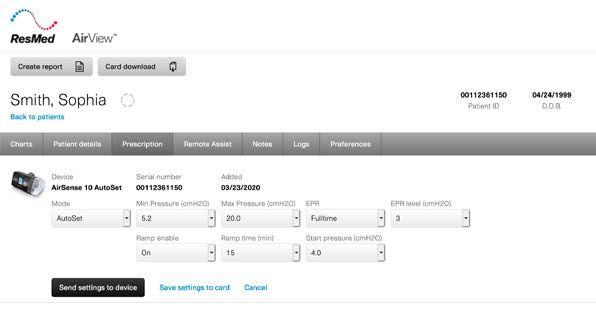
MaskSelector tool                                   Boarding              Scheduling
Table of contents                Intake                         & resources            Pack, ship & deliver     & prescription                                      Setup            Compliance support
                                                                                                                                        & resources

       Option 2 continued: Mask selection
     Sizing for AirFit F20                                       Sizing for AirFit N20                          Sizing for AirFit P10
      Option 1:                                                   Option 1:                                          AirFit P10 comes in a starter pack
      Clinician determines based on                               Clinician determines based on                          so pre-shipment sizing is
      facial structure                                            facial structure                                             not necessary.
         • If the follow-up call is conducted                        • If the follow-up call is conducted                                                         We recommend that the sizing
      		 with video, the clinician can use                        		 with video, the clinician can use                                                            instructions (tape measure or
      		 their best judgment to size the patient.                 		 their best judgment to size the patient.                                                     printing template at home)
      Option 2:                                                   Option 2:                                                                                       are sent to the patient prior
      Patient uses a tape measure at home                         Patient uses a tape measure at home                    F                                        to this call. These resources
        • The patient uses a tape measure at                        • The patient uses a tape measure at
                                                                                                                  Female patients                                 are available at
      		 home to size themselves.                                 		 home to size themselves.
                                                                                                                  should be sent the
        • Instructions for how to do this can                       • Instructions for how to do this can         AirFit P10 for Her                              ResMed.com/SizingAtHome.
      		 be found on our website:                                 		 be found on our website:                     starter pack.
      		ResMed.com/SizingAtHome                                   		ResMed.com/SizingAtHome
                                                                                                                                                                  Instructions could be for the
      Option 3:                                                   Option 3:                                                                                       patient to locate a tape measure/
      Patient prints the sizing template at home                  Patient prints the sizing template at home
        • The sizing template and instructions                      • The sizing template and instructions                                                        ruler or print both AirFit F20
      		 can be found on our website:                             		 can be found on our website:                                                                 and AirFit N20 sizing templates
      		ResMed.com/SizingAtHome                                   		ResMed.com/SizingAtHome                                                                       at home (pending which mask
                                                                                                                                                                  the patient qualifies for). The
         If you’re unable to size the patient:                                                                                                                    clinician can then instruct the
                                                                                                                                                  M               patient over the phone which
              F                            M                        If you’re unable to size the patient:                                                         measurement/template to use.
                                                                                                                                         Male patients should
      The majority of            Males have more                                                                                         be sent the AirFit P10
      females will fit on an     variability in their face.
      S or M cushion.
                                                                                   F        M                                            starter pack.
                                 If the patient is unable
      If the patient is unable   to size themselves
      to size themselves         at home, we suggest                   The majority of males and females will
      at home, we suggest        sending an M cushion,                  fit on a Medium cushion. We suggest
      sending an M cushion       in addition to both                          sending an M cushion only.
      and an S cushion.          S and L sizes.

                                                                                                                                                                                                  10
MaskSelector tool Boarding Scheduling
Table of contents Intake & resources Pack, ship & deliver & prescription Setup Compliance support
& resources
Mask selection & resources
We recognize the importance of educating patients on why they should treat their sleep apnea,
and how it contributes to short-term and long-term health benefits.
• If you’re already on the phone with the patient for mask selection, we suggest a brief
conversation during this phone call to discuss the importance of treating sleep apnea.
• Once the phone call is finished, we suggest sending a follow-up email
reinforcing pre-reading/educational material before the scheduling/pre-equipment
education (see email template on page 12).
• If you’re not setting up a separate call to run through initial mask selection, we suggest sending
the patient a follow-up email (template on page 12) offering pre-reading and educational material.
Topics to cover:
Sleep apnea overview Importance of treatment
myAir app education Support & education resources
11MaskSelector tool Boarding Scheduling
Table of contents Intake & resources Pack, ship & deliver & prescription Setup Compliance support
& resources
Mask selection email
Hello [Patient Name],
I enjoyed speaking with you today about preparing for your journey to better sleep and better health!
Now that we’ve selected a mask that will work best for you, I wanted to recommend some helpful Did you know that more patients are
education and support resources available to you: compliant with myAir and AirView?
• Visit ResMed.com/SleepApneaBasics to learn about the importance and benefits of treating
your sleep apnea, along with some tips for getting started with CPAP therapy. Online self-monitoring tools that
engage patients may significantly
• Download the myAir for Air10 by ResMed app through the app store on your phone and
™ ™ improve compliance and adherence
create an account to track your therapy progress and receive personalized coaching to help to treatment. An observational study
you adjust to therapy. We encourage you to read the app’s terms and privacy policy, of 128,000 new PAP users found 87%
available at ResMed.com/myAir. were compliant when using myAir and
monitored with ResMed AirView™ vs. 70%
One of our representatives will be in touch with you once your CPAP equipment has shipped to schedule when monitored with AirView alone.1
your remote setup appointment.
If you have any questions or need assistance, please contact [CONTACT] at [XXX-XXX-XXXX] or
87
via email at [EMAIL ADDRESS]. We are available during the following times: [DAYS AND HOURS].
We look forward to helping you get started on your sleep therapy journey! %
Sincerely,
of PAP users
[YOUR ORGANIZATION / PERSON SENDING EMAIL] were compliant 1
1 Crocker M et al. CHEST 2016.
12MaskSelector tool Boarding Scheduling
Table of contents Intake & resources Pack, ship & deliver & prescription Setup Compliance support
& resources
What to include in an optimal remote setup kit
• With a variety of device and mask choices available to patients, we recommend including the following components for a remote setup to help optimize the
patient experience and adjustment to therapy.
• Auto-adjusting positive airway devices help adjust the pressure in response to changes in your patient’s upper airway patency, especially as pressure needs
can vary and change over time. Clinical studies1-3 support the clinical outcomes of the AutoSet algorithm – citing the therapy, compliance and quality-of-life
benefits associated with using AutoSet devices.
Device Mask Alt. size cushions Supporting info
For full face mask users
If you’re unable to guide
patients to size themselves
remotely, include supplemental
PN 63401 (Medium)
size cushions to help ensure
HME contact info
OR a broader fit range.
PN 37207/37208
PN 62900/62910 (for Her)
S
Patient education
OR PN 63467 materials
(Males & females)
• AirFit F20 remote setup guide (PN 10111957)
• AirFit P10 remote setup guide (PN 10111959)
L • AirFit N20 remote setup guide (PN 10111958)
• Living with CPAP brochure (PN 1019759)
PN 63469 • myAir registration brochure (PN 10111223)
PN 37211/37212 PN 63501 (Medium) (Males only) • Stay on track resupply brochure (PN 1016061)
1 Massie CA et al. “Comparison between automatic and fixed positive airway pressure therapy in the home.” Am J Respir Crit Care Med 2003;167:20-23.
2 Netzel T et al. “APAP device technology and correlation with patient compliance.” Somnologie 2014;18(2):113-120.
3 Armistead JP et al. “Study of an auto-adjusting CPAP algorithm for the treatment of obstructive sleep apnoea.” Am J Respir Crit Care Med 2009;179:A3570. 13MaskSelector tool Boarding Scheduling
Table of contents Intake & resources Pack, ship & deliver & prescription Setup Compliance support
& resources
Pack, ship & deliver
Ensure the device is configured with the patient’s prescription and comfort settings prior to delivery.
This can be accomplished in one of two ways:
1. Unbox the device, plug it in and apply the settings before placing it in the shipping box.
2. Use AirView to remotely apply the settings. Provide device number and serial number to your
team to board the patient into your patient management system and apply the settings
via AirView. Note that some device settings are not available to be set remotely using AirView.
Important note for ResMed AirCurve™ 10 ST and AirCurve 10 ST-A bilevel devices: require at
least one therapy session to be run before they can accept a new prescription from AirView,
therefore we recommend only applying settings directly to the device.
• Select a plain box that fits the sleep therapy contents snugly to minimize the 1. Example box dimensions 16” x 16” x 8”.
Pack potential for any shipping damage.
• Avoid labeling or marking on the shipping box that indicates its contents to protect
patient privacy.
• If shipping via a carrier, choose delivery confirmation to track and confirm the shipment
Ship is delivered.
• Provide shipping information, including delivery expectations and the tracking number
to your team, so they can schedule the patient’s setup. 2. Use void fill (if possible) to help protect
contents during shipping.
• You may opt to deliver directly to the patient’s doorstep or offer a curbside
3. Include HME contact information in the
Deliver pick-up option.
shipping box to help patients know who
• Obtain recipient’s signature for secure delivery (if required) and applicable proof of sent their therapy equipment and how to
delivery documentation for payer requirements.1 reach out for questions and support.
• If shipping via a carrier, confirm the setup kit was delivered using the tracking number.
1 During the COVID-19 public health emergency (PHE), CMS will not be enforcing the signature requirement. During the PHE,
suppliers should document the appropriate date of delivery and that a signature was not able to be obtained because of COVID-19.
Learn more at CMS Provider Burden Relief FAQs. 14MaskSelector tool Boarding Scheduling
Table of contents Intake & resources Pack, ship & deliver & prescription Setup Compliance support
& resources
Boarding & prescription
Boarding all remote setup patients into
a unique location or by a dedicated
clinical user can enable you to track your
remote setup patients for easy sorting in
Boarding Update prescription Action Groups and compliance reporting.
Board the patient into ResMed AirView ™ per your If your workflow is to update the prescription
Download our Remote location setup fact
standard process utilizing the device number and using AirView, input it at this time. The device
sheet and learn how to create a remote
serial number provided by your team. will automatically update once the patient
location.
1. We recommend using the delivery date as the powers the device On.
setup date.
If you would like to minimize handling
• The setup date can be set as a future date.
and unboxing of the device, you can use
2. For U-Sleep™ customers, if using the delivery
AirView to apply settings remotely.
date for the setup date, we recommend
boarding the patient upon delivery.
3. Based on the patient’s interest, enter the
patient’s email address to send a myAir invite.
• Note: if you utilize a Brightree™ integration,
this may automatically go out per the
normal process.
In U-Sleep, the setup date cannot be
4. Associate the patient’s physician.
updated if the delivery date or setup
appointment changes. You may prefer to
board the patient right before the setup to
give the patient the full compliance period.
15MaskSelector tool Boarding Scheduling
Table of contents Intake & resources Pack, ship & deliver & prescription Setup Compliance support
& resources
Scheduling & resources
Schedule the setup appointment
• Once the delivery time is known, contact the patient to set up their appointment.
Note: if your organization is confident in shipping timelines, this can be done during the
The goal is to perform the remote
intake call.
setup as close to the delivery date
• Send a calendar invite to the patient with details on how to connect for the setup appointment.
as possible.
• Encourage the patient to register for myAir. • We recommend scheduling the
setup two to three days after the
Appointment via video conference expected delivery to avoid having to
reschedule if the delivery is delayed.
• We recommend setting up a secure video conference with the patient to facilitate a good
• Pay close attention to delivery
teaching environment where your team member and the patient are able to watch, mimic and schedules as carriers may be
troubleshoot through the appointment. experiencing delays.
Email supplemental information For patients who are unable to
get to a store, many grocery delivery
• Email supplemental product information to the patient in advance of the remote setup appointment services allow distilled* water to be
that includes your contact information so they know who to contact for support: ordered and delivered. Fees may
• Encourage myAir registration. apply and services vary by geography.
• Include your contact information so the patient knows who to contact for support.
• Include delivery timeline and shipping details, such as a tracking number.
• Setup appointment details should include: the date, time, how to connect (i.e. link for
video conference, phone number, etc.), and who the appointment is with.
• Actions for the patient to complete prior to the setup: purchase distilled* water.
• Include resources.
See next page for templates.
* As stated in our clinical and user guides, only distilled water should be used with a PAP humidifier for optimal operation. Distilled water has had most/all minerals removed from the
water which would otherwise cause a mineral buildup in the humidifier tub. While the use of tap or bottled water may require more rigorous humidifier cleaning in the short term and
excess mineral buildup in the tub over the long term, the use of tap or bottled water will not harm the therapy device or pose a risk to patients. 16MaskSelector tool Boarding Scheduling
Table of contents Intake & resources Pack, ship & deliver & prescription Setup Compliance support
& resources
Pre-setup email
Hello [Patient Name],
It was a pleasure speaking with you today! Your sleep products have been ordered and should be arriving by
[DELIVERY DATE]. Here is your tracking number: [TRACKING NUMBER].
Your sleep apnea therapy setup appointment is scheduled for: Video conference tools can be
• [DATE AND TIME OF APPOINTMENT)
downloaded onto computers,
• With [SETUP APPOINTMENT PERSONNEL], [ROLE]
smartphones or tablets. Security
During your call, you will speak with a sleep coach who will walk you through setting up and getting features on these tools, when
comfortable with using your machine. They are here to answer any questions you may have regarding your
appropriately enabled, can help
therapy, the machine, the mask and how to adjust to starting therapy. Our goal is to make sure you’re
comfortable with using your therapy and are ready to use your machine that night. protect patient privacy. You and your
patients will benefit from using these
Here’s how to get ready for your setup appointment:
tools during setup appointments.
1. Purchase distilled water.* This can be found at most major grocery stores or pharmacies.
2. [DOWNLOAD APPS / SOFTWARE NEEDED TO CONNECT TO THE SETUP APPOINTMENT]
3. You should have received an email invitation to register for ResMed myAir™. Consider registering for myAir The NIH referenced data1 indicates that
using your smartphone, tablet or computer. COVID-19 is stable for up to 24 hours
• This app will help you track your own progress on therapy and will provide personalized coaching to on cardboard and 2-3 days on plastic
help you adjust to therapy. and stainless steel. In an abundance of
• Please let us know if you did not receive this invitation, and we will happily resend the invite or help
caution, you may opt to recommend a
you register during your setup appointment.
4. Review the pre-setup resources available on these helpful website pages: [INSERT APPLICABLE delay in patient handling after delivery.
RESOURCE LINKS]
5. Make a list of questions, concerns and goals for sleep therapy to discuss with your sleep coach. Resources
It’s important to complete these prior to your scheduled appointment as they will assist with your success on therapy. Resource links are outlined on page 22.
On [DATE AND TIME OF APPOINTMENT], please [ACTION TO CONNECT TO SETUP APPOINTMENT]
for your setup appointment with [NAME]:
• For your setup call, choose an area with a large flat surface (dining room table or other large area) to set up
all of the different items in your therapy equipment and be able to have them within reach.
• You will need to have a power outlet near your setup area to plug in the device.
• If possible, have a family member or support with you, in person or remotely, during the setup to ask questions
and learn with you.
If you have any questions or need assistance, please contact [CONTACT] at [XXX-XXX-XXXX] or via email at
[EMAIL ADDRESS]. We are available during the following times: [DAYS AND HOURS]. We look forward to helping
you get started on your sleep therapy journey!
Sincerely, * Per the user guide, only distilled water should be used with your PAP machine
[YOUR ORGANIZATION / PERSON SENDING EMAIL] 1 https://www.nih.gov/news-events/news-releases/new-coronavirus-stable-hours-surfaces 17MaskSelector tool Boarding Scheduling
Table of contents Intake & resources Pack, ship & deliver & prescription Setup Compliance support
& resources
Setup
Recommendations
Block enough time Establish WHY patients are on therapy
We recommend blocking a few minutes on either end It’s very important to explain to patients why they are using
of each appointment for technology setup and wrap up. therapy. Ensure they understand why it’s important to their
health. The “why” is key to building this new habit.
Ensure you have the patient’s phone number
Some patients may struggle to follow instructions and Keep it simple
connect remotely, so ensure you have their phone number Because the patient is going to be working to build a new
available to call them in case they need additional support. habit, try to simplify information as much as possible.
• When troubleshooting any connection issues, learn what
device (i.e. computer, tablet or phone) is being used, Support is crucial
including the manufacturer/operating system and browser Make sure the patient knows where they can find support
as each technology may experience unique issues. if and when they need it. Whether it’s online, phone, text
Understanding the process for each can enable patient message or email support, they’ll appreciate knowing where
support when needed. to find it.
Have equipment & be prepared to demonstrate
Have equipment with you mirroring what the patient will have
during the setup and demonstrate how to use each piece.
• For instance, take time to assemble and put on the mask
so the patient has a clear understanding of what they need
to accomplish. Then allow the patient time to complete
the action themselves. If they struggle or experience
confusion, it may help to re-demonstrate the
specific action.
18MaskSelector tool Boarding Scheduling
Table of contents Intake & resources Pack, ship & deliver & prescription Setup Compliance support
& resources
Setup
Call outline
Introduction
• Confirm the patient’s identity by verifying data elements such as their name, date of birth, medical/health record identifier and phone number.
• If recording, obtain consent from the patient before the recording starts.
• Why we are here: A sleep study identified the need for CPAP therapy due to obstructive sleep apnea (OSA).
• Goal for today: Getting comfortable with therapy. Learn the patient’s goals and motivation for therapy.
• To ensure you’re teaching effectively, ask them to repeat the information and demonstrate. If anything is unclear, review it again.
• Share the agenda.
• What questions does the patient have?
Sleep apnea education
• Sleep apnea definition: What are the common symptoms? Ensure the patient understands what it is and why treatment is important.
• Explain the impact of comorbidities.
• Explain how the device and mask work, and how they treat sleep apnea.
Getting started
• Resources to help them achieve their goals:
• myAir: If they haven’t registered, explain the benefits, privacy notice and how to register.
• Review resources sent in pre-setup emails.
• Have them gather items (device, mask, etc).
Equipment overview
• ResMed device: APAP (auto-adjusting positive airway pressure) is our recommended sleep apnea treatment.
• 2 modes: CPAP + APAP adjusts based on their upper airways requirement to be best splinted open.
• Equipment received: mask and equipment start guide.
• Travel bag: Includes water chamber, power supply, air tubing and device.
• Device: black (AirSense™) or gray (AirCurve) depending on which model they received.
• Air filter: Disposable white square on the left side of the device. Filter door has holes.
• Water tub: Clear tub, measurement lines in front. Insert on the right side of the device. Fresh distilled water daily.*
Empty after each use. Be sure not to overfill.
• Power supply: Provides power to the device. There should be two pieces in the bag.
• Air tubing: Connects the mask to the device. The heated hose warms the air.
• On the back side of device: The serial number (SN) is 11 digits and the device number (DN) is 3 digits. This information is needed to register for myAir.
Navigating comfort settings
• These are settings patients are able to change to have a more comfortable experience using therapy.
• Ramp: Device is pre-set to AutoRamp, which is the suggested setting. It detects snoring, patterns of consecutive breathing or apneas.
• Humidity level: Allows the patient to modify the humidity settings to their environment and preference.
• Mask: If the patient has a full face mask, have them set their mask setting to full face.
* As stated in our clinical and user guides, only distilled water should be used with the PAP humidifier for optimal operation. Distilled water has had most/all minerals removed from the water which
would otherwise cause a mineral buildup in the humidifier tub. While the use of tap or bottled water may require more rigorous humidifier cleaning in the short term and excess mineral buildup in the tub
over the long term, the use of tap or bottled water will not harm the therapy device or pose a risk to patients. 19MaskSelector tool Boarding Scheduling
Table of contents Intake & resources Pack, ship & deliver & prescription Setup Compliance support
& resources
Setup
Call outline
Other key settings to review
• Prescription pressure & Expiratory Pressure Relief (EPR): can be adjusted if the patient needs changes between
inspiratory and expiratory pressure. Many therapy and comfort settings
• Climate Control: Pre-set to Auto if the ResMed ClimateLineAir™ heated tube is connected to the device. It can be set to Manual. can be adjusted remotely for patients
• Tube temperature: Controls the air temperature. The suggested setting is Auto. This may be changed to Manual to within the AirView Prescription tab.
increase the temperature up to 86° F if necessary.
Mask setup and sizing
Full face mask Nasal mask Pillows mask
• Remove mask from the box and bag it was shipped • Remove mask from the box and bag it was shipped • Remove mask from the box it was shipped in.
in. Be prepared to guide patients on how to separate in. Be prepared to guide patients on how to separate
the mask from the support packaging. the mask from the support packaging. • Mask cushion: The plastic edge and translucent
silicone material sit at the nasal opening (one-piece).
• Mask cushion: The plastic exterior and translucent • Mask cushion: The plastic exterior and translucent
silicone that covers the edge (one piece). The narrow silicone that covers the edge (one piece). The narrow • Size marker: Located on the bottom of the cushion.
part of the cushion sits on the bridge of the nose and part of the cushion sits on the bridge of the nose and The top of the cushion says ResMed.
the bottom fits between the lower lip and chin. the bottom sits just under the nose.
• Removing the cushion: Hold the top of the mask
• Size marker: Located on the bottom front. Use large • Size marker: Located on the bottom of the cushion
tubing, squeeze and pull the cushion away from the
size if medium hits the lip, use small size if medium (if multiple cushions were provided).
mask frame. To reattach, push until you hear an
hits the chin (if multiple cushions were provided). • Removing the cushion: Hold frame by placing your audible click sound and ensure the ResMed logo
• Removing the cushion: Squeeze both sides of hard thumb over the side slot. Pull cushion away from faces up.
plastic and remove. When reattaching, push until you frame. When reattaching, push until you hear an
hear an audible click sound. audible click sound. • Mask frame: Features short tubing and attaches to
• Mask elbow: Attach the elbow to the air tube then • Mask elbow: Features short tubing and attaches to the air tube. Explain venting purpose.
connect the elbow to the mask. Explain venting purpose. the air tube. • Mask headgear: Straps will fit on the head and attach
• Mask headgear: Straps will fit on the head and attach • Mask headgear: Straps will fit on the head and attach to the mask frame. The headgear consists of a single
to the mask frame. The top strap sits across the crown to the mask frame. The top strap sits across the crown strap with a split in the middle. The lower strap sits
of the head and the lower strap on the base of the of the head and the lower strap on the base of the across the nape of the neck, the top strap sits at the
neck. The magnetic clips allow for easy connection or neck. The magnetic clips allow for easy connection or top of the head.
removal without having to readjust the straps. removal without having to readjust the straps.
• Demonstrate putting on the mask: Fit the cushion.
• Demonstrate putting on the mask: Fit the cushion. • Demonstrate putting on the mask: Fit the cushion.
Adjust the straps. Start the device and run mask fit. Adjust the straps. Start the device and run mask fit. Adjust the straps. Start the device and run mask fit.
20You can also read


