Sharing Best Practice - New for 2020 - eTechnology
←
→
Page content transcription
If your browser does not render page correctly, please read the page content below
Sharing Best Practice

                        New for 2020
                                       1
DOWNLOAD OUR
WHITE PAPER
A comprehensive guide to Virtual & Augmented Reality in education
Download our 32-page informative guide to using Virtual and Augmented Reality in education, and discover the theory
behind using VR in education and good practical advice on how to implement this technology in the classroom.
www.classvr.com/whitepaper
AR & VR
DO YO Whitepa
per: Im
UR RESEA
plemen
ting VR
in the C
As with RCH
an
in the m y technology p
ar urchase
and the ket, what each , unders
ir costs, system ta
most eff are can do, nding what op
ective so the key aspec
ITY
th tio
ts to he eir advantages, ns are availa
VIRTUAL REERAL
comme lution to lping gu
rcially av limitatio
ailable V implement. Be ide you
to ns
R system low is a
s at the summar wards the
EDUCATION?
time of y of the m
OCUL writing:
OFF ain,
WHAT CAN IT
AR & VR Whitepa U
per: Does S
VR R I F
have aTPlace in the
The Oc Classroom?
ulus Rif
headse t was o
ts. Now ne of th
er e very fi
ition, can deliv that req owned rst
by its pure defin
by Face
uir
primarily es a tethered c book, O commercially
Virtual Reality, t onnecti culu availa
for students tha
a gamin
g devic on to an s is an integrate ble VR
d interactions e and as external d headse
experiences an WILL WE SEE
IMPROVED O su c h has limit P C. Oc t
ssible in the ed educ ulus is
actical or not po ADVU AN TTC O M E S ?
are either not pr AGES at ional co
ntent.
lel ed way to
vides an unparal
H igh Perfo
‘real world’, pro Ultimately, any inv
. uld estment in teachi Headse
rmance
Device LIMITA
TIONS
pti va te stu de nts of all ages sho yield improved out ng res ources t Positio
nal Trac
immerse and ca rse
So,
d wh
in at outcomes can
comes for stuIm denm er
ts.si ve Exper ki n g PC Req
uired to
feel im me be improved through ie nce Operate
helps students investment in Virt an Primarily
Virtual Reality ual Reality? a Gamin
an d Ex g Devic
agina tio n p en si e
gripping their im
ve
an ex pe rie nc e, It’s clear to see tha
t investments ma No Curr
iculum
ble wi th
t possi resources for specific equ de in C ontent
ught in ways no
No Class
ipment H T C
stimulating tho
room C
science
d facilitma
ansub s als, can impact , such as V I V E
ateteri ontrols
es or vid eo s, out com
B es
ac by
s, pictur jec ts or topics, so sho ked by
traditional book uld VR be huse dse mobile
entioincn.rease outcomes in focuse ead tot
driven b phone maker H
el of knowledge ret Sho d areasthor sub y T
a far hig he r lev uld we loo k to increase studen e g am ing mar a Windows PC C, Vive is an in
jec t?
in STEM using inn tthatta
e Vinm
ive ent ket, but or Mac. tegrated
ovative VR applica G h
as recen iv V R V
learningthat? Or can the use tions for roup Edition b tly starte e predominan
extending the undle o
f headse d targeting ed
tly targe
Enhancing and
of VR in a more gen ts
wayl yield improved eric ts u c at
tua
at Vir across out comes for stuA DVtsANT an d PCs. io n with
pe rie nc e is at the heart of wh all topics? Where
sho
den A G E S
ex bes
bly e used?
onfoc
t be uld this investment
d is possi Top Qu
er students, an ality Exp LIMITA
Reality can off s tha t Active D
erience TIONS
all tec hn olo giehave yet to
We eveloper
st po we rful of see definitive research
W Commu High Pri
of the mo studies detailing the id
pap
e ersgeorof
Ran n ity ce
rn for ever. benefits and results H
of long ardware Peripher
ge how we lea term use of VR in Limited
Educatio
could help chan who has
education, but ask
anyone als
Req uires Hig
nal Con
ten
seen a child put on h-end P
t
watched their rea a VR headset and C
ction, and the eng Comple
agement x Setup
benefits are unmista & Manag
keable. So, can we External
Sensors
ement
use Virtual Reality simply Needed
to stimulate imagin No Class
engagement? Can ations and room M
that alone yield out anagem
improvements for come ent
VR & AR
every child? If Virt
ual Reality 18
6 can improve knowledge retentio
n and increase
O
engagement, by sup
E T porting our existin
A GUID
teaching methods, g
is that not a goal
itself?
E D U C ATION
IN
RI ENCE”
S EXPE
WL EDGE I
OF KNO
N LY S OURCE EIN ~
14
“THE O
ST
ER T EIN
~ ALB
1
www.classvr.com
2
“ WE NEED TO EMBRACE TECHNOLOGY TO
              MAKE LEARNING MORE ENGAGING. WHEN
             STUDENTS ARE ENGAGED AND INTERESTED,
               THAT’S WHERE LEARNING TAKES PLACE.
                                                                                             ”
Classro
       om
            Introduction
able

            Since we launched ClassVR in January 2017, it’s been incredible to see how
            teachers all around the world have taken the technology and made it their own.
            Following the launch of our 30 ways last year, this book now gives you even more
            ideas to implement creative uses of VR and AR in the classroom.

            It’s designed to be a practical and inspiring guide to using ClassVR as a teaching
            tool. You’ll find out about how students of all ages have explored a wide range of
            content. Some lessons used 360 degree images, videos or interactive experiences
            as an incredible stimulus across the curriculum, from Antarctica to Ancient Maya
            and the Maldives to the Moon. Others gave students the opportunity to examine
            3D models up close using Augmented Reality; imagine holding a snowy owl,
            Roman sword or distant planet in your hands!

            But it’s not just the ClassVR published resources that you’ll see in this book –
            many teachers and students have begun capturing their own immersive content
            using 360 cameras, building 3D models, and crafting interactive worlds. They may
            have been built with a range of tools, but they’ve all been sent to the school’s
            headsets using ClassVR’s online portal, as you’ll read in the following pages.

            We hope that you’ll enjoy reading about the ways VR and AR are having an impact
            in classrooms across the globe; it may even spark a learning opportunity in your
            own setting. We’ve certainly enjoyed the process of supporting this community of
            schools to grow – and of course, we’d like to extend a massive thank you to the
            teachers who made this possible.

                                                                  Copyright 2019 @ AVANTIS SYSTEMS Ltd
                                                                  All rights reserved

                                                                                                         3
CONTENTS
     Return to Bude                           Student-created 360 Videos
     English                 Age 10-11   6    Social Studies          Age 10–11
                                                                                   21

     Digital Cell Models                      Interconnected Systems
     Science                 Age 6–12    7    Science                 Age 10–11
                                                                                   22

     The Moon Field Trip                      Creating 3D Shapes
     Science                 Age 5-11    8    Mathematics             Age 9-10
                                                                                   23

     The Future is History                    Minecraft Meets ClassVR
     History and Computing   Age 12–13
                                         9    Computing               Age 7–11
                                                                                   24

     Cave Exploration                         VR Worlds
     Kindergarten            Age 5-6     10   Computing               Age 9–10
                                                                                   25

     Mary’s Escape from Lochleven             Weather & The Seasons
     History                 Age 10–11   11   Geography               Age 5–6
                                                                                   26

     Experiencing the Trenches                Happy Places
     History                 Age 10–11
                                         12   Reading Intervention    Age 11-14    27

     Generation Ocean: Coral Reefs            Jacobites
     Geography and Science   Age 11+     13   History                 Age 9–10
                                                                                   28

     Introdcution to Microbes                 Virtual Reality Tour of Our School
     Science and History     Age 10-11   14   Cross-Curricular        Age 10–11
                                                                                   29

     Spanish Vocabulary                       Inside “El Quijote”
     Spanish                 Age 9–10
                                         15   Spanish                 Age 15–18    30

     Exploring Spain                          Polar Exploration
     Spanish                 Age 14-18   16   Science and Computing   Age 9–11
                                                                                   31

     Biological Systems                       Creating in CoSpaces
     Biology                 Age 10-11
                                         17   Computing               Age 5–7
                                                                                   32

     Making Connections to                    Lines and Angles
     Current Events      Age 10-11       18   Mathematics             Age 14-15    33
     Social Studies

     Sharks VR                                The Science of Flight
     English                 Age 10–11   19   Physics                 Age 11–13
                                                                                   34

     Descriptive Writing                      Animals and Their Adaptations
     English                 Age 10–11   20   Science                 Age 6–7
                                                                                   35

4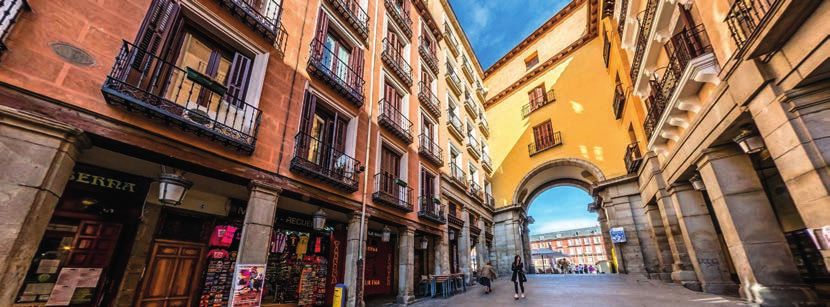
The Human Body                             Out of This World Writing
Biology                 Age 10–11
                                    36     English                Age 9–11    46

Submarine Inquiry                          Space
Kindergarten            Age 5–6     37     Science                Age 9–10
                                                                              47

Estimation and Prediction                  Seasonal Change
Mathematics             Age 5–7
                                    38     Science                Age 5–6
                                                                              48

Fly, Eagle, Fly                            Comprehension Skills
English                 Age 7–8     39     English                Age 9–11
                                                                              49

Early Communication                        Comparing Australia
Early Years             Age 3–4
                                    40     Geography              Age 14–15
                                                                              50

Bringing History to Life                   Under the Sea
History                 Age 8–9     41     Creative Writing       Age 9-11    51

Investigating Cells                        Battle of Britain
Science                 Age 14–16
                                    42     History                Age 15-18
                                                                              52

Underwater Exploration                     The Plight of Refugees
Geography               Age 6-7
                                    43     Social Studies         Age 10-11
                                                                              53

Magnificent Desolation                     Sense the Scene
Physics                 Age 9–13
                                    44     Science                Age 8-10
                                                                              54

Print 3D Spinning Tops with AR             Elements & Components
Design and Technology   Age 10–12
                                    45     Chemistry              Age 16-17
                                                                              55

   CONTACT OUR EDUCATIONAL SERVICES TEAM TODAY TO SHARE YOUR

          BEST CL ASSVR LESSON IDEA - COMMUNIT Y@CL ASSVR.COM

                                                                                   5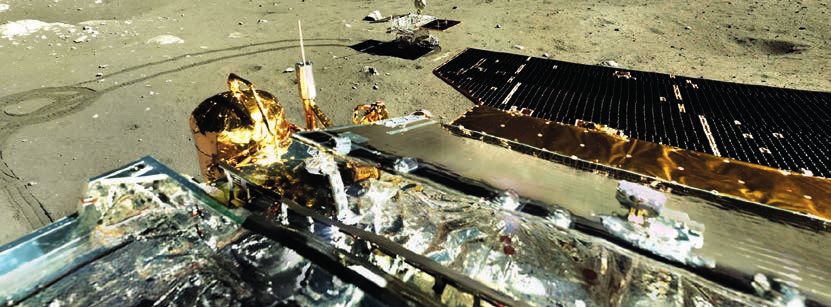
Return to Bude
    ENGLISH                     Age 10-11                                                         Zara
                                                                                                Conisbee

                                                                          CONTEXT
                      The Colleton
                      Primary School,                                     Our Year Six pupils had recently spent four nights on
                                                                          a residential trip to Bude. We wanted to harness their
                      Twyford, UK                                         exhilaration from this experience to generate some
                                                                          fantastic descriptive writing which needed to have a
    Learning Aims:                                                        factual grounding that would build on their previous
                                                                          learning about geographical features. Our Year Six
    • To write a recount of a recent trip to                              pupils have been travelling to Bude for their residential
      Bude, Cornwall.                                                     trip for years now and it is always used as a stimulus
    • To include accurate descriptions of the                             for writing but with our ClassVR headsets and 360°
      area of Bude.                                                       camera, we’ve captured the moments that our children
                                                                          remember, so their VR experience was personal to
    • To identify and comment on the uses of human                        them.
      and physical geographical features.

    PRACTICAL SESSION
    Bude 2019 Playlist - Community Library
    The children worked in two groups for their ClassVR experience. Half of the group were given ordinary photographs taken
    during the trip, whilst the other half had on the headsets showing a playlist of our 360° photos taken whilst in Bude. The
    two groups swapped over half way through. The children were enthusiastic about the opportunity to use the new VR
    technology and spotting themselves in the images brought a real thrill to the session. After the initial delight, the children
    were expected to note down the geographical features that they had encountered and this was to be done during and after
    viewing the photos. This was achievable using the VR images, but it was the descriptive phrases that they produced after
    reliving their days in Bude that were so impressive and really stood out after the lesson finished.

    IMPACT ON LEARNING
    The writing outcomes were fantastic! Despite returning from Bude several weeks earlier, the finer details that the children
    had seemingly forgotten were uncovered using the ClassVR headsets. The children managed to organise their ‘memories’
    and write in much greater detail having viewed the 360° photos. Not only did the photos have a positive impact on their
    writing, the joy it brought to the children to reminisce about such a wonderful experience was priceless!
    The Bude trip is a highly valued tradition in our school and the younger children look forward to it with great anticipation
    but also a degree of anxiety. We plan to use ClassVR in coming years to prepare our Year Sixes for their adventure.

6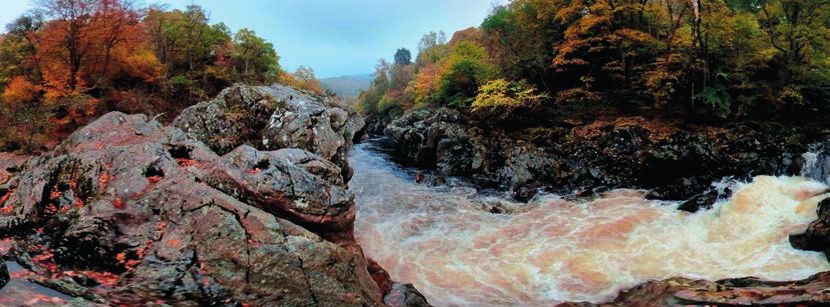
Digital Cell
Models
SCIENCE Age 6-12                                                                                 Drewe
                                                                                                Warndorff

                                                                               CONTEXT
                  Hartwell Elementary, CPS,
                                                                               This lesson can be done as enrichment or as a
                  Cincinnati, Ohio, USA                                        technology extension within the science curriculum.
                                                                               It is used to support the visual and conceptual
                                                                               understanding of cells and their organelles while
Learning Aims:                                                                 adding a tech and design element. Students should
                                                                               have or receive background information on cells,
• Students will apply their knowledge of cells to                              plant and animal, as well as the organelles. The
  create 3D models using digital software.                                     quantity of organelles and functions can be chosen
• Students will convert their files (.stl to .glb) and                         according to the curriculum. Students should
  test their cell models using the headsets.                                   also have a basic understanding of CoSpaces or
                                                                               Tinkercad in order to design the cell digitally.

PRACTICAL SESSION

      CoSpaces
I outlined the objective of creating a digital 3D model of a plant or animal cell with five identifiable organelles. Next, I led a
digital software tutorial, in which I gave a brief demonstration of how to use the digital design software, including how to
add shapes, remove sections and modify size. We focused on 3D cell model creation, whereby the students used the digital
software to create their individual cell models that meet the project requirements.

Following on from the students submitting their .stl files, I converted them to .glb format and then uploaded the files to the
ClassVR playlist. I was able to provide an AR/VR ‘cell experience’, where the students viewed their completed cell models
using the ClassVR headsets. The students were able to then identify any imperfections in their models in order to make
modifications/edits to their original files. As an extension, students could then send edited .stl files to a 3D printer, as well as
adding informational tags to the organelles when clicked (which can be done in CoSpaces).

IMPACT ON LEARNING
This lesson allowed students to gain a better understanding of the cell and its organelles. By applying their content
knowledge to a digital format, they were solidifying their content understanding and gaining technological skills necessary
for thriving in a 21st century environment.

                                                                                                                                       7
The Moon
    Field Trip
    SCIENCE Age 5 - 11                                                                           Man
                                                                                                 Choi

                                                                        CONTEXT
                     Oh Jeong Elementary,
                     Gwangju City,                                      2019 is the 50th anniversary of the lunar landing and as
                                                                        a result, I wanted the students to have an experience of
                     South Korea                                        seeing the Moon. These experiences were part of our
    Learning Aims:                                                      work exploring space and understanding how vast our
                                                                        solar system and universe are.
    • To visit the Moon and go on a virtual field trip.
    • To empathise with the astronauts’ experiences
      on the Moon.
    • To understand the vast nature of space.

    PRACTICAL SESSION

                    The Moon Playlist
    The lesson started with the students viewing news videos about the lunar landing. We then watched the VR lunar lander
    experience, where the rocket touches down on the Moon – this prompted the children to consider how humans would
    reach the Moon and the features of a vehicle to get us from Earth to the Moon. We also viewed the moon news, together
    with the ClassVR videos and talked about what the students might want to do on the moon. We then investigated the
    various 3D models within the Moon playlist, such as the Apollo command module and another model showing the Moon’s
    position from the Earth – the students held these models in their hands!

    IMPACT ON LEARNING
    The students experienced the feeling of going to the moon in virtual reality. I was able to provide an immersive experience
    of the Earth and the Moon and this helped the students to experience and understand the astronauts’ feelings. It was an
    amazing class that brought a teleporting experience from the classroom to the Moon. ClassVR’s incredible controls make it
    possible to conduct lessons while controlling the eyes of the students, making the class more enriching.

8
The Future
is History
HISTORY & COMPUTING                                             Phil           Daniel           Joseph
Age 12–13                                                   Nottingham         McKune          Cauldwell

                                                                 CONTEXT
               The Mosslands School,
                                                                 After meeting with several departments, I developed a cross-
               Merseyside, UK                                    curricular project between history and computing. By using
                                                                 ‘CoSpaces’, alongside the ClassVR headsets, pupils were
                                                                 able to create their own virtual world. A piece of work by
Learning Aims:                                                   which they could demonstrate both their understanding of a
• To be able to understand and explain                           historical concept, and the effective use of coding and design
                                                                 to create an engaging digital space. After initially creating
  significant events of the Holocaust.
                                                                 worlds to explore the coding, the students were given their
• To be able to design and create a 3D world.                    brief for the creation of a Virtual Holocaust Museum: a space
• To use computational language to improve                       that a visitor could explore, that not only conveyed the
  the usability of the 3D world.                                 creator’s understanding of the topic material but also engaged
                                                                 the viewer through effective use of CoSpaces.

PRACTICAL SESSION

      CoSpaces
In pairs, the students built their worlds using CoSpaces. Over the course of six weeks, students had a range of both history
and computing lessons to embed the depth of historical knowledge and learn the technicalities involved with the computer
science aspect of creating a fully-functioning 3D world on CoSpaces. In week three, students learnt about the rise of
Nazism and the final solution, as well as starting to create their space which reflected this series of chronological events. In
week four, we introduced the headsets: this involved the students pulling together the various worlds they had created on
CoSpaces to then test, trial and debug any coding or design errors. The final week involved sharing the spaces and providing
peer feedback – evaluating both the technical computing elements and the historical accuracy of their content.

IMPACT ON LEARNING

The work the students produced was not only of an excellent standard but also of an incredible variety. Some students had
chosen to create a traditional “gallery” with information adorning the walls of the space, while others had chosen to create
enclosed spaces to simulate the conditions of the transport and accommodation of the camps involved in the events of
the time period. After six weeks and approximately 8-10 hours working on the projects, the final session allowed pupils to
explore each other’s spaces. Many students commented on how students had effectively used the VR setting to create a
sense of immersion, particularly long corridors and cramped train compartments.

                                                                                                                                   9
Cave Exploration
     KINDERGARTEN Age 5-6
                                                                                                Brittany
                                                                                               Korstanje

                                                                        CONTEXT
                      Kinnwood Central
                      Public School,                                    Our students first practiced using the VR headsets to
                                                                        explore hot air balloons. This was sparked after reading
                      Forest, Ontario, USA                              the story “Not a Box”. After heavily investigating what a
                                                                        hot air balloon looked like up close, and how it moves,
     Learning Aims:                                                     our class ended up building a hot air balloon and
                                                                        encouraging school community members to come and
     • To use language to communicate thinking,                         experience hot air balloon expeditions. The students
       reflect and solve problems.                                      learned lots of scientific language and how to operate
     • To ask questions for a variety of purposes.                      the VR headsets. Next, they expressed interest in caves
                                                                        and requested that we look up various cave expeditions.

     PRACTICAL SESSION

                    Rocks and Caves Playlist
     We started by using 360-degree cave images, which provoked a wide variety of questioning, researching, discovering,
     creating, and writing. After exploring a cave with the headsets, our students had many questions: Why are there icicles
     hanging? How do caves form? How could animals live in the dark? When they went on the expedition a second time, they
     were excited to talk about stalactites, stalagmites and columns which they were seeing and eagerly searched for troglobites
     inside the cave. They recreated many of their own findings by building a large cave inside our classroom and creating paper
     and digital books. This extended to investigating water and ice caves, and researching animals that may live inside or on
     top of ice caves such as penguins. Students measured their height and compared it to these animals. Finally, they produced
     educational videos and provided QR codes to attach to the cave to add to this interactive experience when visitors arrived.

     IMPACT ON LEARNING

     We approach learning concepts by providing fun, interactive, authentic and rich experiences based on the interests and
     needs of our students. We are educators who listen, ask open-ended questions, wonder, problem-solve and discover WITH
     our students. We believe VR technology was the perfect learning tool to extend our students’ ideas and promote analytical
     thinking. ClassVR engaged and inspired every student in our learning community. It added a third dimension to their learning
     experience that they could connect with and become inspired by.

10
Mary’s Escape from
Lochleven Castle
HISTORY Age 10 - 11 Simon
Luxford-Moore
CONTEXT
ESMS Junior School,
Edinburgh, Scotland, Following Mary’s arrest, after the death of Lord Darnley, she
was imprisoned in Lochleven Castle and forced to sign her
UK abdication under threat of death. With the help of Willie and
George Douglas she escaped during a masque May Day
Learning Aims: celebration from her third floor room. Children study the
events surrounding her imprisonment and escape, looking
• To describe the events surrounding Mary, Queen
at sources of evidence and completing a recount of her
of Scots’ imprisonment in Scotland and the
diary entry.
support that led to her escape from Lochleven
Castle.
PRACTICAL SESSION
Loch Leven Castle - Community Library
Following the lesson and prior to beginning Mary’s diary entry, which details the plan of her escape, children experience
the Lochleven Castle footage. Taken in the rain, it is incredibly atmospheric, and shows the outside of the castle walls down
to the shore from which Mary escaped in a rowing boat. Back in 1568, the loch had a higher water level and reached the
edge of the castle walls on one side. The extent of the water receding is highlighted beautifully in this footage which could,
in itself, promote discussion about climate change. There is also still and video footage of inside the bailey of the castle
showing the extent of Mary’s freedom to walk the grounds. The pivotal footage is on the inside of the castle. Textbooks
and websites often depict Lochleven Castle as quite grand and the idea of being able to hold a masque ball implies a large
banquet hall. In reality, Lochleven Castle is very small and this makes Mary’s escape all the more incredible and daring.
Children are always impressed and amazed at the difference in size of what they imagine from printed textbooks to seeing,
for themselves, the smaller reality. Best used as part of the plenary of a lesson to highlight the stark contrast of the site to the
learners.
IMPACT ON LEARNING
Children experience the place of Mary’s imprisonment and, due to the weather at the time of filming, develop an
understanding of the ‘feel’ to her conditions on a tiny little island in Lochleven, Perthshire. This can be used beyond a
historical context and is ideal for developing a piece of writing surrounding Mary’s imprisonment. The playlist allows for the
development of first-person emotional vocabulary to be discussed and used in written work.
11Experiencing
the Trenches
HISTORY Age 10–11 Anthony
Isaac
CONTEXT
Crowlands
Primary School, This year marked the 100th anniversary of the ending of World
War One, and Year 6 pupils at Crowlands Primary School marked
Essex, UK the occasion by writing a piece from the point of view of those
brave soldiers in the cold, unforgiving trenches. The anniversary
Learning Aims: is a hugely symbolic time and as such, we wanted this topic
to be made even more personal, immersive and experiential.
• To understand and explain some of the Most children started the unit of work with a limited conceptual
major events during World War One. understanding about life in the trenches and how a typical day
• To write in first person from the would be; we therefore wanted to provide a learning experience
perspective of a soldier. to broaden and deepen their understanding and appreciation of
the conditions and expectations which soldiers endured.
PRACTICAL SESSION
WW1 Trenches Experience
Firstly, the children had to come up with emotions of the soldiers and an outline of the settings using all five senses. To
provide the most real, tangible experience possible, the children were given the headsets with the WW1 Trenches Experience
loaded up; they then explored the 360 video, focusing on the grime, mud, rain and sobering surroundings. As the video
has background audio projecting distant battlefield cries and warzone explosions, the children were given further food for
thought and this fed nicely into expanding their choice of language and vocabulary. Whilst viewing the video, pupils were
able to ask and pose questions to each other and raise further points to explore in groups and as a class. To codify and bring
together this experiential learning, the pupils then removed the headsets and decorated a silhouette of a soldier with words
and phrases that could describe what it might have been like to fight in the trenches.
IMPACT ON LEARNING
As 10-11 year olds, they really struggled to step into the footsteps of people that lived over 100 years ago. ClassVR helped
the children to engage with the task and gave them inspiration for how to describe the sights, sounds and smells of the
trenches. The children were astonished at what the soldiers had to go through even though we had already covered trench
life as part of our World War Topic and had a brand new understanding and empathy for the millions of courageous soldiers
that gave their lives to fight for this country. This immersive nature of VR helped them think more creatively and their work
was imaginative and detailed.
12Generation Ocean:
Coral Reefs Dr Amanda Megan
GEOGRAPHY & SCIENCE Age 11+ Waite Hendrickson
CONTEXT
ANGARI Foundation &
Academy of the Holy Using virtual reality and 360 film, 3D printed and
fossil coral specimens and related lessons, students
Names, Florida, USA were introduced to corals and reef ecosystems in
preparation for a field trip to the Florida Keys. This
Learning Aims: served as important pre-learning and pre-exposure
to these concepts, as it was the majority of students’
• To identify corals as animals and recognize their first exposure to the topic. It helped students
common forms. understand what to expect in the field, provided a
• To describe how corals form reefs and solid foundation for deeper learning, and served as a
understand reef composition and features. springboard for discussions about the subject area.
• To explain a coral reef’s geographical, societal,
and scientific importance.
PRACTICAL SESSION
Generation Ocean Video: Coral Reefs Underwater Playlist
First, students were introduced to corals, the reefs they form, and their local reef tract. The students were then given the
opportunity to explore corals and reefs independently through a series of observation-oriented stations. At one station, the
students accompanied coral scientists on a research expedition, both above and below water, via viewing of the 360 film
Generation Ocean: Coral Reefs in virtual reality. The remaining stations asked the students to examine, draw/describe, and
identify modern and fossil coral skeletons. The students were asked to compare what they learned of ancient and modern
corals and the environmental history of Florida to better understand how Florida coral reefs have changed through time.
IMPACT ON LEARNING
The students were engaged, asked thoughtful questions, and readily drew connections to other topics that they’d covered
in their courses. Their lab notebook pages demonstrated a strong attention to detail and accurate application of the
introduced coral vocabulary. The virtual reality expedition helped the students understand and anticipate what they would
see and experience underwater on the reef. This alleviated student apprehension about entering the water and resulted in
a cohort of students that was eager to get into the field and apply what they’d learned. Once in the field, the students were
immediately engaged and were able to make coral identifications while snorkeling in an unfamiliar environment.
13Introduction to
Microbes
SCIENCE/HISTORY Age 10-11 Stephen
Coyne
CONTEXT
British School of
Brussels, Tervuren, We work here at BSB with Integrated Learning Themes
(ILT) which link all of the traditional foundation
Belgium subject in a thematic learning approach. This term,
Year Six were looking at ‘Peace and Conflict’, with a
Learning Aims: focus on World War One and Two, but also with the
need to cover the main scientific concepts from the
• To introduce the class to microscopic organisms.
microorganisms unit of work. These on the surface
• To recognise the main types of micro organisms. may not seem to have an obvious link, but with the
• To understand the real-world impact of micro organisms. application of a little VR magic an interesting and
exciting bridge between the two can be formed.
PRACTICAL SESSION
WW1 Trench Experience
We had worked a lot with the ideas and themes behind war and peace, looking at various conflicts over the ages including
a visit to the site of the historic battle of Waterloo and an investigation into the world’s main peace making individuals,
but it was difficult to imagine the conditions the soldiers in the trenches of WW1 had to endure. This was where ClassVR
came into its own. With one headset per group of three and ClassView on the interactive whiteboard for those without, the
children could become immersed in ‘World War One Trenches Experience’. After investigating the truly terrible conditions
the soldiers had to live through, we turned to the idea that many of soldiers got very sick in these terrible conditions. This
was the way we could link the ideas of this conflict with that of our science topic. We discussed that the soliders were very
open to infection from a range of bacteria and viruses in these very unsanitary conditions. Of course, we could not see these
microscope creatures so again we used the VR biology section to get close to these tiny creatures, rotating each cell in turn
to study its structure.
IMPACT ON LEARNING
The children were very excited and engaged with the system as they felt they were actually in the trench system itself. When
they need to work on the task identifying the features of the various micro organisms in their books they had a renewed
enthusiasm for a topic that could had been very dry, if approached in a different more traditional method. The fact that we
used this technology as our first lesson on these creatures acted as a great hook on which to hang all our future learning on
this topic.
14Spanish
Vocabulary
SPANISH Age 9–10 Frankie
Smith
CONTEXT
Granard Primary The idea of this lesson is to allow students to read,
School, London, UK speak and familiarise themselves with Spanish
vocabulary. As part of our Spanish scheme of work,
the children studied a unit called ‘La Casa’. In this unit,
Learning Aims: the children explored objects in the house and how
to describe a room; ask questions about a room; and
• To develop and refine vocabulary and explain and describe the objects. I taught this lesson
pronunciation in order to describe settings. at the beginning of the ‘La Casa’ unit to introduce the
• To put vocabulary into context and understand children to new vocabulary that they would come
its meaning. across. They then used this experience to generate
a word bank in their books, which they annotated in
English, adding pictures to represent the words.
PRACTICAL SESSION
CoSpaces
I created a CoSpaces world based on our current unit of work; we created a house with everyday objects that the students
might come across. The objects in the CoSpaces world were labelled with both the English and the Spanish. Students
worked in groups of three in order to collect, share and use new vocabulary. It also meant that the person using the
headset had someone to help guide them around the classroom. The children were free to explore the CoSpaces world at
their own leisure. They shared the new vocabulary they discovered with each other and compiled a list of new vocabulary.
I encouraged the students to say the Spanish words aloud to their partners. Their partner could then give the English
translation (if they’ve been taught it); guess what the English might be (if they have yet to learn the vocabulary) and/or
check the pronunciation.
IMPACT ON LEARNING
Learning a foreign language can be off-putting for some children so this immersive, hands-on approach removed those
barriers through an exciting stimulus. They all wanted to take part, have a go and share their new vocabulary with their
peers. The children were willing to share what they’ve learnt and were excited to support others in saying their new
vocabulary. When we did say the words altogether as a class, it wasn’t as challenging as the children had seen the words
before and attempted to say them. The vocabulary was understood at a deeper level and the children were able to embed
and use these words more effectively in following lessons and pieces of work. To be able to put pictures to the Spanish
(both written and spoken) meant that all of my students were able to access the lesson and were engaged from the start.
15Exploring Spain
SPANISH Age 14-18
Thomas
Silva
CONTEXT
Stoughton
High School, Over the semester, we have been learning about
various cultural topics of Spain and trying to
Massachusetts, USA embrace as much of the local culture as possible.
Throughout this, we have used 2D items and
Learning Aims: photographs, but it isn’t as engaging or realistic
as a 3D models and 360 imagery. Language
• To use virtual reality to enable students to explore
acquisition is complex and embracing Spanish
Spain and its culture.
in a multi-sensory approach enables students to
• To communicate in Spanish with ClassVR. learn all about the culture, whilst acquiring new
• To analyze Spanish landmarks and locations. language knowledge.
PRACTICAL SESSION
Spain Playlist
To provide students a truly reflective, realistic and immersive perspective of Spain and Spanish culture, we used the ClassVR
headsets to explore various landmarks and localities. We started off by visiting the Guggenheim Museum in Bilbao Spain and
I asked the students to describe in detail the sculpture in enough detail for their partner to draw the sculpture based on their
description. We then analyzed an Easter Procession, investigating the seasonal climate, geographical location and interesting
local landmarks. We repeated these questions and lines of investigation for Madrid – the Street of Toledo and the Museo
Nacional del Prado. We finished the lesson off by exploring a cave with a bear skeleton and asked the students to describe
the place and explain what they found interesting about this to their partner.
IMPACT ON LEARNING
The students were able to cooperatively work together to see amazing sites and locations. The best part was having the
other students want to see what their classmate was describing and how the students were able to then apply what they
had learnt with ease.
16Biological
Systems
BIOLOGY Age 10 - 11 Gabriella
Rodolico
CONTEXT
University of Glasgow,
Glasgow UK Very recently, I started to look into the possibility
of studying the effect of virtual reality in education,
with the aim to analyse the impact that this type of
technology has, not only on the understanding of
Learning Aims: difficult concepts in science education, but also on
• To contribute to the School’s research performance by the learning experience that teachers and students
conducting and eventually publishing new research on share every day in the classroom and the enjoyment
that comes from this mutual exchange. In the last
the application of immersive VR in the understanding of
few months, I have started a collaboration with
abstract concepts in science. Avantis, and implemented ClassVR in my teaching
• To support trainee teachers to develop confidence in by planning, in collaboration with my colleagues,
applying immersive VR and AR technology to their own some lessons for the PGDE primary student
teaching. teachers, with a balanced blending of traditional as
well as innovative effective pedagogy techniques.
PRACTICAL SESSION
Human Anatomy Playlist
A pit-stop tour of active learning methods in preparation for an on-campus teaching session was organised for our PGDE
primary student teachers who, in a meta-level approach, had the chance to test several teaching tools. Pupils moved from
traditional peak flow meters and body organ aprons, to innovative augumented reality t-shirts showing the internal organs,
and virtual reality ClassVR headsets with an immersive virtual tour around the body. The children explored the different
organs and body components available to them in the human anatomy playlist.
The following week, PGDE primary student teachers had to plan a lesson on body systems, in a micro-teaching cooperative
style, for the primary six pupils from Corpus Christi Primary School, who were invited to visit the School of Education.
IMPACT ON LEARNING
The results were amazing: we found that it improved engagement and enjoyment of the lesson with pupils being able to
richly describe and explain what they learnt; we found that PGDE students were confident in the delivery of the lesson’s
objectives; and, we found that experiences which would not have otherwise been available, were easy to embed into
science teaching and learning.
17Making Connections
to Current Events
SOCIAL STUDIES Age 10-11 Paige
Green
CONTEXT
Countryside Elementary
School, Barrington, My students recently completed a nonfiction, current
events reading unit. Shortly after finishing the unit, I was
Illinois, USA shocked to see the spire above Notre Dame, engulfed in
flames, crumble to the ground. This made me think about
Learning Aims: the opportunity my students had lost. While churning
this over in my mind, I had an idea. I could help students
• To practice nonfiction text reading strategies.
unpack this tragic current event, practice their close
• To strengthen students’ ability to make reading skills, AND still give them the opportunity to visit
connections to current events. Notre Dame in all its glory using VR technology.
• To grow literate global citizens.
PRACTICAL SESSION
Notre-Dame de Paris Playlist
Students discussed their prior knowledge on Paris, Notre Dame, and this new current event. Afterward, we created a KWL
chart to document what they knew about the event, what they wondered about the event, and what they learned about
the news event. I introduced the news article and asked students to read it using close reading strategies. At the end of our
discussion, one student said she thought the fire at Notre Dame would be like the United States losing the White House or
the Statue of Liberty. Another student stated, “I think people will be sad that they can never see Notre Dame again. Some
people there have probably never seen it.”
This comment helped me connect my current events lesson to using ClassVR technology. I asked students if any of them
had been to Notre Dame and then told the students that they were going to be able to say that they saw it without even
leaving the classroom! Each student placed a VR headset on and explored the three different views of Notre Dame. We
analysed and evaluated the beauty, significance and history of the building and were able to answer and explore some of the
students’ key questions using the ClassVR experiences.
IMPACT ON LEARNING
ClassVR turned a current events lesson into a culminating experience; it connected them to the news events in a way
that printed word or an online video could not do. Students were able to experience Notre Dame as it was before the fire.
Adding virtual reality to my lesson also awoke my students’ sense of empathy and helped them to understand this global
news event in a more meaningful way. Afterward, a student said, “At least I can now say I saw it!”
18Sharks VR
ENGLISH Age 10-11
Laura
Obando
CONTEXT
Fairview Elementary
School, Fairfield, Students have been researching sharks from all
over the world. We have gone over key words and
California, USA vocabulary related to sharks and students have then
written an informational text about a specific shark
Learning Aims: and have become shark experts.
• To write a personal narrative/journal entry of a
shark experience.
• To use descriptive words to explain their experience.
PRACTICAL SESSION
Underwater Playlist
I told my students that they will be writing a journal entry on a shark experience. They pretended they were divers looking
for sharks. They used what we saw through ClassVR and/or used what we learned so far about sharks. We reviewed key
words related to shark life, such as habitat, coral reef, and predator. I then walked students through their first VR experience.
I played our first track “Adventures in Nature” and gave students thinking time to consider what they saw in the video. They
paired up to share and discuss what they saw. We move on to “Diving with Sharks in Cuba” and “Shark in New Caledonia.”
This time, students made a list of words (adjectives) that described what they saw. Next, I played the “Shark Experience”
track. Students then shared with their group how they felt about what they saw. I gave students a graphic organizer to help
them organize their thoughts. The graphic organizer includes: “What I saw”, “Adjectives to describe what I saw”, “How I felt”
and “Vocab words to include.” Students also had access to the “Great White Shark” track in case they want to use that shark
in their writing. Once they organized their writing, they began to prewrite and ended with publishing their journal entry.
IMPACT ON LEARNING
Seeing and being able to explore sharks underwater truly made this lesson much more engaging for my students. They
were able to see first hand the life of sharks, all from land. My class was very engaged and immersed in this lesson. They
were quick to get their thoughts on paper and many students wrote more than they ever had. I truly believe without the VR
experience my many students would have struggled with this writing assignment. They were able to be creative and very
detailed thanks to the VR experience.
19Descriptive
Writing
ENGLISH Age 10-11 Tamara
Letter
CONTEXT
Hanover County Public
Schools, Mechanicsville, Prior to this lesson, students were familiar with using
Google Classroom and Google Docs for digital writing.
Virginia, USA They also had several lessons throughout the school year
about how to create a descriptive writing paragraphs. This
Learning Aims: was the first experience students had using the ClassVR
virtual reality headsets and their task was to write a detailed
• Students will use a ClassVR virtual reality experience to
paragraph about the day they went swimming with sharks.
enhance their background knowledge about sharks.
We reviewed the five senses and how to include three of
• Students will create descriptive writing reflections these senses in their writing. They struggled a bit to write
focused on their senses. accurately and completely as none had ever been in the
• Students will collaborate with a partner to review, ocean with sharks before. We acknowledged their struggles
edit, and revise their digital writing. to include details in their writing, then revealed that today
they would get an opportunity to virtually swim with sharks!
PRACTICAL SESSION
Underwater Playlist
Teaching staff created three senses charts to display on the wall for students to add their insights: “What did I see, What
did I hear, What did I feel?”. Students then viewed the Shark Experience through their headsets. We focused on exploring
their immediate senses and being fully immersed within the moment to ensure they had lots of ideas to use after the VR
experience. Following the Shark Experience, students shared their insights as they added descriptive words and phrases to
our three senses charts on the wall. Then, students used these insights to add more details to their digital writing stories.
In their next lesson, students worked with a partner to read, revise, and edit their digital writing before submitting to the
teacher for review and feedback.
IMPACT ON LEARNING
Can students write a descriptive paragraph about swimming with sharks if they have no prior experience of swimming
in an ocean or viewing sharks? Possibly, but it would be a struggle, as shown by students in the first part of our lesson.
Providing students the opportunity to engage in a virtual learning experience they might never have in their real life, builds
in background knowledge in a way that is innovative, powerful and relative. After viewing the Shark Experience, students’
curiosity about sharks was piqued. They wanted to not only share their reflections about the experience, but to learn more
about sharks living in the ocean, what they ate, and how they lived. By collaborating with others to hone in on specific
senses engaged during the experiences, students were able to dramatically enhance their descriptive writing paragraphs.
20Student-created
360 Videos
SOCIAL STUDIES Age 10-11 Dawn
Jones
CONTEXT
St Andrew’s School,
The student group researched why people have stress
Boca Raton, Florida, USA and anxiety and ways that people can help manage
these feelings in many different outlets. The students
wanted to showcase what it was like to be at a
Learning Aims: counseling session. The objective of the lesson was to
enable students to choose an area of interest within a
• For students to engage in an in-depth central idea and then find a global problem they want
collaborative inquiry to provide students to research within the community. The Exhibition is
with the opportunity to synthesize and apply the culminating, collaborative experience in the final
their learning. year of the Primary Years Program for the International
Baccalaureate Program.
PRACTICAL SESSION
As we wanted students to ask questions about the topic they were researching and investigate their own questions, we
aimed to create a project which provided a platform for them to take action and create solutions to their line of inquiry.
Hence, we purchased the Ricoh Theta 360 video camera and the students used the camera to record their experience from
their time at the psychologist office. The student group then edited the video in iMovie and exported the file to the teacher’s
computer, who placed it the ClassVR portal. During their Exhibition, in addition to their verbal facts for visitors to their
Exhibition Table, the students had four ClassVR headsets for visitors to have an immersive experience of being at a clinical
session. This in-depth, real-life example of psychology in action enabled students to analyze and dig deeper into their own
action research project and provided a fantastic stimuli for immersive and multi-sensory learning.
IMPACT ON LEARNING
Students were able to take a typical tri-fold folding board presentation to an in-depth virtual field trip. Their presentation
skills were stretched by adding the ClassVR headset component and the best part of this was that it was totally student-
driven! They figured out how to use the 360 camera, used their prior editing skills in iMovie, and then I showed them how to
push it through the ClassVR portal.
21Interconnected
Systems
SCIENCE Age 10-11 Eloise
Feltham
CONTEXT
Knox Grammar
Preparatory School, Throughout this Year 5 unit of inquiry on
‘interconnectedness’, students conducted an investigation
New South Wales, AUS into living things. They were tasked with the question,
How do living things adapt to suit their changing
Learning Aims: environments? Students began by exploring rainforest
biomes and conducting a research project into the
• To examine how the environment affects the growth,
different biomes found on the Earth and their similarities
survival and adaptation of living things.
and differences. Students researched the human impact
• To define problems and design, modify and follow on different environments, made future predictions of
algorithms to develop solutions. human impact and explored how animals have adapted.
PRACTICAL SESSION
CoSpaces ARCube
We explained to the children that they were scientists, interested in the impact humans have on a variety of environments
on Earth. They were tasked with researching one particular environment, identifying its key features and classification, and
assessing the impact humans have had on that environment over time. We introduced the ARCube and explained to students
that they will present their findings through the creation of an interactive ARCube.
CoSpaces was used to design the different perspectives/environments on each of the six sides. Voice overs were used to
incorporate English outcomes and sequencing skills. The students followed this broad outline when designing their ARCube:
introduction to the rainforest environment, including four biomes and labelled plants and animals; how humans have impacted
the rainforest environment; individual research of their own environment (deep sea, coral reefs, deserts etc.), identifying its
unique features and outlining why it is important; explaining how the environment has been impacted by humans and/or
animals in some way; and finally, students choose one animal that has had to adapt to suit its chosen environment.
IMPACT ON LEARNING
Creating an ARCube engaged all learners, even those with no technological experience! It is a fun, hands-on and
interactive platform that allows students to develop and extend their coding skill-base at all levels. It provided students
with the opportunity to demonstrate knowledge and understanding at a level appropriate to their needs and is therefore
a personalised assessment tool that produced a deeper understanding of content. The impact of utilising Virtual and
Augmented Reality in the classroom has contributed to immense student growth in all key learning areas.
22Creating
3D Shapes
MATHEMATICS Age 9-10 Chris
Bass
CONTEXT
Educational
Specialist Before I started working for Avantis I was a Year
Five teacher for three years and I was always
Avantis Education looking for new ways to embed computing across
the curriculum. One really exciting way to do this is
Learning Aims: using Paint 3D to create 3D models of shapes that
can then be viewed and checked using ClassVR
• To identify 3D shapes from 2D representations. headsets. Giving students the ability to actually
• To draw shapes using given dimensions and angles. create their own shapes using simple computer
• To create content using a range of programs. software deepens both their understanding of the
properties of shape and their digital literacy skills.
PRACTICAL SESSION
Paint 3D
To start this session I talk with students about the differences between 2D and 3D shapes and how they relate to one
another. We then look at how a net relates to its 3D counterpart using a printed cube net – I like to use the ARCube net
for this, as it can then be used with the resultant 3D models! After introducing the basics of using Paint 3D I then challenge
students to create 3D models of some pre-prepared nets. These can be grouped to differentiate for varying abilities or
completed in mixed ability pairs. As the students complete their shapes, I can upload them to My Cloud on the ClassVR
portal and upload the model directly to them for evaluation. Does it look correct? Is it symmetrical? Do you need to edit
it? The students can then use their ARCube to manipulate their creation and study it from all angles before deciding if they
need to do any further editing.
IMPACT ON LEARNING
Exploring shape in a new and exciting way using Augmented Reality gives students a broader depth of experience and a
greater frame of reference when facing challenges in the future. When it comes to solving problems relating to 3D shape
they will have a tangible first-hand memory of creating shapes from nets. Even more importantly, they are experiencing and
using new technologies to help them understand the world and simultaneously improve their overall digital literacy. While
Paint 3D is a relatively simple modelling program it can lead into all sorts of other digital forms of expression and allows for
creativity in an exciting and innovative new medium.
23Minecraft Meets
ClassVR
COMPUTING Age 7–11 Mark
Savery
CONTEXT
Emmanuel College,
Students have been invited to join a
Queensland, AUS Minecraft server hosted by the teacher to
build individual homes from a central path.
The students need to build in a manner
Learning Aims: which shows how to be a good digital
citizen, recognising their footprint and that
• To develop digital technology skills. everything that happens in the world can
• To learn how to be a good citizen within a digital world. be seen. From their individual builds, the
students then work on collaborative building
• To communicate design ideas for their designed
tasks to construct something for the village
products, services and environments using modelling
to use collectively (for example a park/
and simple drawings. playground, school, library, supermarket,
church, farm/factory business).
PRACTICAL SESSION
Paint 3D
Within Minecraft, students chose either a house or a building that they built collaboratively. Students used a Minecraft
structure block to export their building as a 3D object (Structure blocks in Minecraft). Students opened Paint 3D and using
the 3D shape and text tools, students wrote their name with a background rectangle as an embossed plaque on their
collaborative build. When finished, students then exported their work from Paint 3D as a 3D object (*.glb file type). These
3D objects were then loaded into the ClassVR Portal and uploaded to the ClassVR headsets and viewed by the whole class
(including being able to explore the objects fully through the use of the ARCubes).
IMPACT ON LEARNING
Students were excited to be given building challenges in Minecraft as game-based learning, but they took a further pride and
ownership of their creations when they were able to bring their work from the digital world into their physical environment
and then manipulate it through the use of ClassVR. Students were able to share their work with other students and staff
beyond the Minecraft environment and reflect on their designs, seeing every aspect fully as a 3D object, and collaboratively
discussing how they may improve their designs in future builds.
24VR Worlds
COMPUTING Age 9-10
Laura Neree
Woods Sale
CONTEXT
Elm Park Primary
School, Hornchurch, The students explored the virtual world and how it
can be used in the classroom. Over a period of six
Essex, UK lessons, they built their own virtual worlds using
CoSpaces. Some of the key vocabulary we explored
Learning Aims: in this unit of was virtual reality, server, visual coding,
z-axis, MP3, cloud, password, virtual world, and story
• To create a complex game using code and go map. Online Safety also formed part of the focus and
beyond tutorials. this enabled the students to understand a bit more
• To use skills already developed to create content about file saving and organisation works.
using unfamiliar online technology.
• To save a document/file in various formats.
PRACTICAL SESSION
CoSpaces
Students had one or two headsets on each table. The students began by creating small sections of their own virtual worlds
on the desktop application CoSpaces. After students finished each phase of the virtual world, they then scanned the QR
code to experience their world and test its functionality; if it had errors, mistakes or could be improved, then they undertook
the computational process of debugging – to remove the errors and replace it with fully-functioning code. They also
asked one or two other students on their table to view their world and then give feedback on both what they enjoyed and
suggestions on how it could be improved.
IMPACT ON LEARNING
Using the virtual reality headsets, the children could immerse themselves in the worlds they and their peers created;
this enabled them to improve, critique and debug their worlds in a collaborative and constructive manner. One student
commented, “We have made VR worlds before, but when we used the headsets it made it real. Seeing it l could see what
worked and where I needed to make changes and could improve my world.”
25Weather &
The Seasons
GEOGRAPHY Age 5-6 James
Tromans
CONTEXT
Prince Albert
Primary School, Children had previously looked at the four seasons and
what they associated with each season. They had looked
Birmingham, UK at weather and what weather to expect in each season;
we explored simple reasons as to why certain weather
Learning Aims: is more common at various points in the year and what
kind of temperatures, sensations and noises you might
• To become immersed into different extreme hear in the different seasons. This then led on nicely
weather scenarios. to what might be considered as normal weather and
extreme weather.
PRACTICAL SESSION
Seasonal Changes Playlist
During the session children were exposed to extreme weather conditions. They were immersed into a tornado and they
looked at a frozen gorge and the northern lights. Following each immersive experience, the children were given the time
to discuss what they had just seen, how it would have felt to have been there at the time, and what clothes and equipment
would have been appropriate for that extreme weather condition. From this the children created a mind map of each
immersive experience and wrote down all of the vocabulary that they generated. This then formed the basis of their next
Literacy lesson where they used these mind maps to create sentences and explain what they had seen.
IMPACT ON LEARNING
Many of our children will never get to see or experience the extreme weather conditions that they saw using the ClassVR
headsets. By using the immersive headsets, the children got a real feel for the weather and through the use of the visual
and auditory elements, they were able to accurately describe what the weather condition was like and how it made them
feel. The language generated by the experience was far superior to what would have been generated by simply looking at
photos or watching a standard video and formed the basis of a fantastic writing stimulus. The ClassVR immersive experience
also allowed the teachers to bring to gather Science, Geography, Literacy and Computing into one lesson, creating a cross
curricular experience that took learning to the next level.
26You can also read


