Start Date 24th May, 2019 Submission Date 31st July, 2019 - Arena Animation Chowringhee
←
→
Page content transcription
If your browser does not render page correctly, please read the page content below

2 0 1 9
                   Start Date 24th May, 2019
                    Submission Date 31st July, 2019

       Mini Creative Minds (Center Level) - 1st August To 10th August 2019
                 RAH Submission Date to HO - 15th August 2019

OPERATIONAL NOTE FOR INTER-CENTRE COMPETITION FOR STUDENTS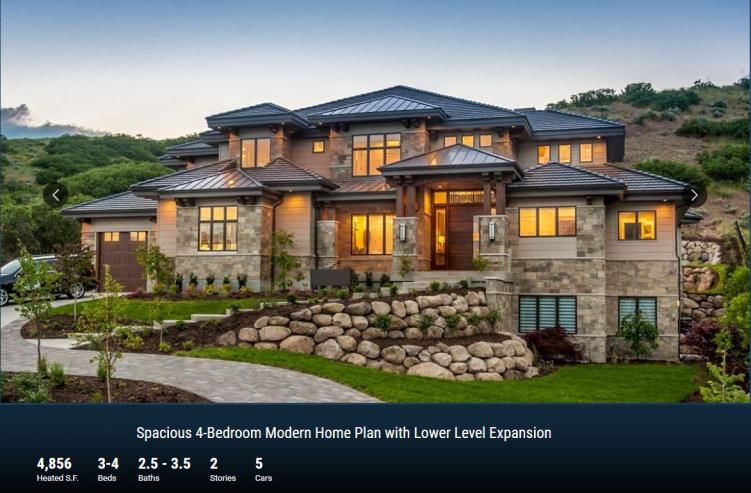
OBJECTIVE

To focus on & improvise the Conceptual & Technical Skillsets of
students required in today’s Animation, Visual Effects & Digital
                       Media industry.

                   THE SKILLSET INCLUDES:
               Originality of idea and concept
                       Creative thinking
  Technical Proficiency by using the required software tools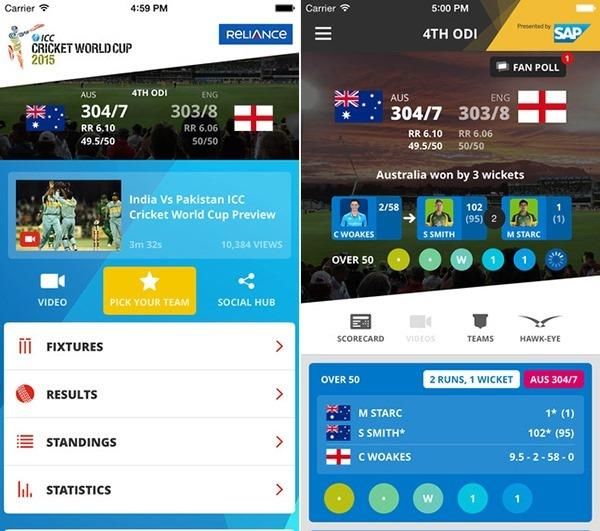
CATEGORIES

1. COVER DESIGN
2. COMIC PAGE
3. WEBSITE DESIGN
4. 3D ARCHITECTURAL VISUALIZATION
5. 3D ASSET MODEL
6. 3D PRODUCT PACK-SHOT
7. CHARACTER ANIMATION SEQUENCE
8. VFX - MATCHMOVING
9. VFX COMPOSITING
1. COVER DESIGN

      You can digitally illustrate or paint to create Cover art design.

                         EVALUATION CRITERIA:
Based on Originality, Typography, Layout, Color sense, Design Principles &
                              Composition

                             COLOR MODE & RESOLUTION:
                                 200DPI - RGB Color

                           SUBMISSION SPECS & FILE FORMAT:
 JPEG Images of   1st   , 2nd & 3rd winner is required to be submitted along with the
                        source file of your artwork (Ai, PSD, CDR).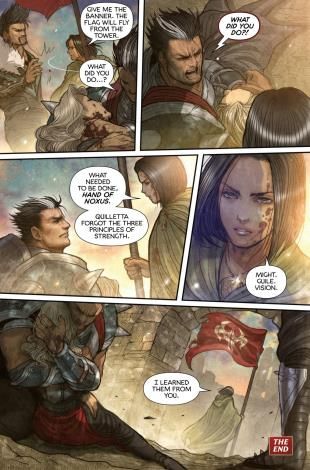
COVER DESIGN

             Design a Magazine Cover using
                your own illustrations and
             Digital Painting from any one of
                    the Themes below

              Bridal-Wear Indian Magazine
                           Or
                   Cricket World Cup
                     2019 Magazine

References Link : https://drive.google.com/open?id=1vyV5Rlqql1lU_P6zPwvirlRKAWjFAPIK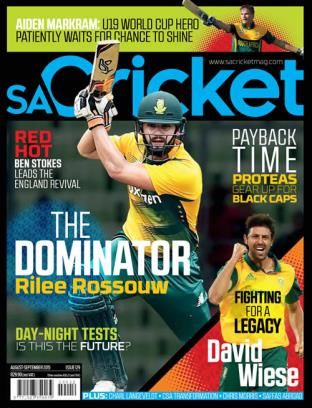
COVER DESIGN

            DOs & DON’Ts:
The characters or artwork has to be
  illustrated or Digitally painted .
      Do not use Downloaded
    Photographs or images. only
  digitally illustrate your artwork.
       Work on Layout Design,
 Composition & Typography as per
          given references.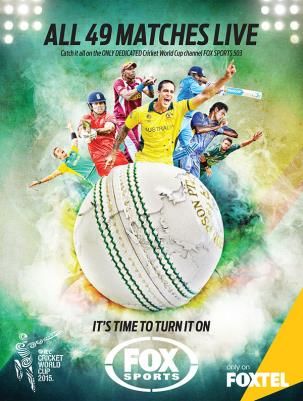
COVER DESIGN

     Any tool/s or software/s can be used to create the Cover Design.
                          Team size: Individual entry

                             File Name:
        e.g.: CoverD_CentreNa me_CM_Location _StudentName
                         Submission Format:
                               JPEG
                         Submission Format:
             JPEG-Layout (Planning of the Cover Design)

                            AWARDS
COVER DESIGN - 1st Prize Winner / 2nd Prize Winner / 3rd Prize Winner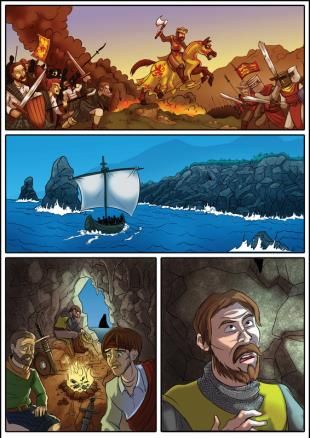
2. COMIC PAGE

          In this Category, a student designs a comic page of his short story or comic
          gag using any one of the 4 templates.

                                                                Reference Link : How to Plan and
                                                                Lay Out Your Comic

                                          https://drive.google.com/open?id=1f4oIMwp_tQBs6TxtdmM2yK
                                          EPl24jCJq2

                                                 We will focus on how you can break
                                                  down the idea of your comic into a
                                               visual script, and making it easy and fun
                                                  to read by using different types of
                                                      panels in a template page.

References Link : https://drive.google.com/open?id=1FHfmBnscB_tI_jIrGgaOejiWVVjnbvHH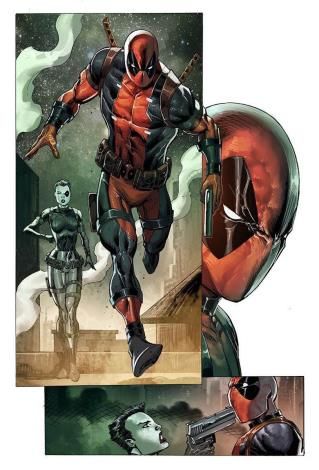
COMIC PAGE

Choose any 1 of the above 4 Layout options for your Comic Page

                         Link of Layout Templates:
 https://drive.google.com/open?id=1B7x3FT2yMhuKPhL3ElbA4Scl3j1RRHC5
COMIC PAGE

Any tool/s or software/s can be used to create the Cover Design.
                            Team size: Individual entry

                                   FILE NAME:
         e.g.: ComicP_CentreName_CM_Location _StudentName

                          SUBMISSION FORMAT:
                                  JPEG
                            Submission Format:
                 JPEG-Layout (Planning of the Comic Page)

                                  AWARDS
        Comic Page - 1st Prize Winner / 2nd Prize Winner / 3rd Prize Winne
3. WEBSITE DESIGN
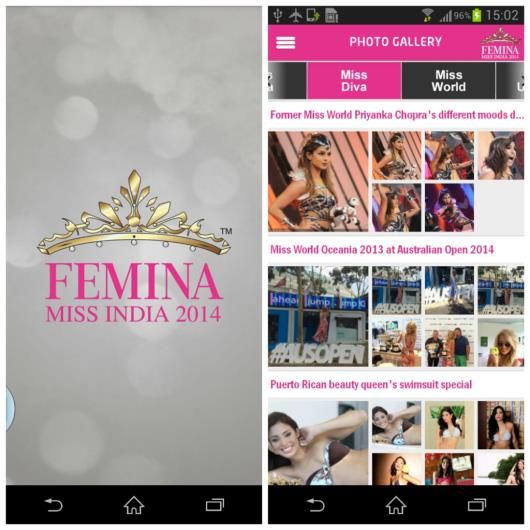
Create a Website Design (Responsive) on
ICC Cricket World Cup 2019 or Miss India Contest, with all the basic features
and functionality such as below examples.
Do not use existing Website Template Designs available online. Original Designs
(User Friendly Interface) & Coding / Programming is preferred.WEBSITE DESIGN
Students have to design ICC Cricket World Cup 2019 or Miss India Contest Responsive
Website for Large Desktop in 1920 x 1080 px resolution, For Laptop in 1366 x 768 px
resolution & For mobiles in 360 x 640 & 375 x 667 px resolution.
Evaluation Criteria
Originality, User interface, User experience design, Creativity & Coding
FILES FORMAT & RESOLUTION FOR SUBMISSION:
Responsive Website design for :
360 x 660 & 375 x 667 (Mobile)
1366 x 768 (Laptop)
1920 x 1080 (Large Desktop)WEBSITE DESIGN
Team size: Individual entry
File Name:
e.g.: WD_CentreName_CM_Location _StudentName
Submission Format:
Design the Website Design Responsive :
360 x 660 & 375 x 667 (Mobile), 1366 x 768 (Laptop) & 1920 x 1080 (Large Desktop)
1. Video Submission : Screen Capture Video (Duration 20 Sec)
Reference of Video Submission format :
https://drive.google.com/open?id=1vzoCf_KacmIkq3DBdObhEBStsk298upe
AWARDS
Website Design - 1st Prize Winner / 2nd Prize Winner / 3rd Prize Winner4. 3D ARCHITECTURAL VISUALIZATION
Create an 3D Architectural Walkthrough of any one of the 3 given options of Bungalows showcasing
both interiors & exteriors of the Bungalow such as Bedrooms, Bathroom, kitchen, living room, porch
area, garden surrounding the bungalow besides others.
Bungalow Plan Reference Images
Reference images Downloaded Link: https://drive.google.com/open?id=1mniMGHLDsyBoc1mL_sfQg4pEVqklpBjx
Evaluation criteria:
Modeling, Texturing, Lighting, Concepts for Architectural Visualization & Camera Animation3D ARCHITECTURAL VISUALIZATION
Main Level
Second Floor
Square Footage Breakdown Beds/Baths Foundation Type
Total Heated Area:4,856 sq. ft. Bedrooms:3 or 4 Standard
1st Floor:3,225 sq. ft. Full Bathrooms:2 or 3 Foundations:Basement, Daylight
2nd Floor:1,631 sq. ft. Half Bathrooms:1 or 2 Optional Foundations:Crawl
Optional Lower Level:2,799 sq. ft.3D ARCHITECTURAL VISUALIZATION
Duration: 1 min (60 seconds)
REFERENCE VIDEOS:
Link: https://drive.google.com/open?id=1ek7gL-e7LcbCgs8iJdlQb25RnbFNTpgl
Dos & Don’ts:
You can use downloaded props from the Internet.
Do not use Stills with Zoom, Pan or Track, use only video with Camera Animation.
Avoid Rendered videos with jitters.
Always check on Scale & Proportion of objects within the Walkthrough3D ARCHITECTURAL VISUALIZATION
Team size: Maximum 4 students
File Name:
e.g.: Arc_CentreName_CM_Location _StudentName
SUBMISSION FILE FORMAT & RESOLUTION:
Create a 60-second video showcasing interior & exterior 3D Architectural
Walkthrough of a bungalow to be submitted in
HD 1920 x 1080
QuickTime: H.264
(File size: not more than 30 MB)
Submission Format:
Link: https://drive.google.com/open?id=1ek7gL-e7LcbCgs8iJdlQb25RnbFNTpgl
AWARDS
3D ARCHITECTURAL VISUALIZATION
1st Prize Winner / 2nd Prize Winner / 3rd Prize Winner5. 3D ASSET MODEL
Create a 3D Asset Model as accurate & photo-realistic as possible to the reference
photograph.
Asset – 1 Asset – 2
Reference images Downloaded Link: Reference images Downloaded Link:
https://drive.google.com/open?id=17rW7roJPgy https://drive.google.com/open?id=1TfW6Yqsr0
NWzH09yOrTuB4cWb2li5i3 rieehtjJDi6RW3nVxrZGzJx3D ASSET MODEL
Create a 60-second Output video which showcases the following:
(I) 3D Asset Modeling : Turnarounds of Wireframe & Greyscale
(ll) Turnarounds of Texture & Lighting of the 3D Asset Model
Asset – 3 Asset – 4 Asset – 5
Reference images Downloaded Link: Reference images Downloaded Link: Reference images Downloaded Link:
https://drive.google.com/open?id=1_pRrhrL9F https://drive.google.com/open?id=1XttalFFzD https://drive.google.com/open?id=12no8E
n-S65hoYnftsLwYXIbzzqzg DRd1fmV9TRnjXUygeCxdSRU KeCJuH7JA-gaCB8SCDLryrS1f5k3D ASSET MODEL
Create 3D Asset using any of the below Reference image provided.
The Entry Output Video should showcase 360-degree turnarounds of Modeling (Wireframe &
Greyscale), Texturing, Lighting & Shading.
Asset – 6 Asset – 7
Reference images Downloaded Link: Reference images Downloaded Link:
https://drive.google.com/open?id=1_Xu86rHCQQVK0fGm8a8zn_6S https://drive.google.com/open?id=1D-
CTsB5GRE sFV9zRZJc8wy7TZ_hPYOh3sPd4mA2M3D ASSET MODEL
Team size: Individual entry Duration: 60-seconds
File Name:
e.g.: Asst_CentreName_CM_Location _StudentName
SUBMISSION FILE FORMAT & RESOLUTION:
HD 1920 x 1080
QuickTime: H.264
(File size: not more than 30 MB)
Video of Link Turnarounds:
https://drive.google.com/open?id=1j58LCC-b1lFAcCS__8F8ebPtI9c9AN2L
AWARDS
3D ASSET DEVELOPMENT
1st Prize Winner / 2nd Prize Winner / 3rd Prize Winner6. 3D PRODUCT PACKSHOT
Create a 10-sec Product Pack-shot in 3D showcasing a Product brand TVC.
Reference Images of 3D Product Packshots:
https://drive.google.com/open?id=1dhvsfhuS80nqcxNVJE_I0EnrFnyBkNcG
Product Name: Amul Milk
Product Features to be used as text copy
Pure Health & Pure Taste
The Taste of India
Amul Doodh Peeta Hai India
Har Pal Fresh
Product Name: Apple Watch Series 4
Product Features to be used as text copy
Not just evolved, transformed.
Proactive Health Monitor
Ultimate Workout Partner
Comprehensive Activity Tracker
Easy Ways to Connect3D PRODUCT PACKSHOT
Product Name: Fabelle Chocolates Bar
Product Features to be used as text copy
Chocolate Reimagined
Introducing our Range Of Centre-Filled Chocolate Bars With
Felling Inspired By Rich Desserts.
Product Features to be used as text copy
Product Name: Samsung Galaxy Fold
A new dawn in display technology:
the foldable Infinity Flex Display.
The future of speed and storage.
The dual battery delivering smarter power.
Performs like no other smartphone,
because it’s like no other phone3D PRODUCT PACKSHOT
Product Name: Jeep
Product Features to be used as text copy
King Of The Jungle.
Even The Concrete One.
Its your Time To Own India's Most Awarded SUV.
Book Now
Product Name: Lee Cooper UE 265
Product Features to be used as text copy
Go ahead, make my day
Product Name: Nivia Deodorant Product Features to be used as text copy
Long Lasting Freshness
Impact Fragrance
Fight Bacteria
Alcohol Free Formula
Dermatologically Safe3D PRODUCT PACKSHOT
REFERENCE VIDEOS YOUTUBE LINKS:
CANON 5D PACKSHOT
Link: https://vimeo.com/69415202
LAY’S MAX – DANCING CHIP
Link: https://vimeo.com/109934497
HEINEKEN - ALIVE
Link: https://www.youtube.com/watch?v=JbZwIWhagaU
Evaluation criteria:
Packaging and Labeling, Elements of Aesthetics, art and technique, Sufficient variation
in lighting, Texturing, Camera Angles & Movement, Compositing & VFX.3D PRODUCT PACKSHOT
Team size: Maximum 3 students Duration: 10 Seconds
File Name:
e.g.: PacS_CentreName_CM_Location _StudentName
FILES FORMAT & RESOLUTION FOR SUBMISSION:
HD 1920 x 1080
QuickTime: H.264
(File size: not more than 30 MB
AWARDS
3D Product Packshot - 1st Prize Winner / 2nd Prize Winner / 3rd Prize Winner7. CHARACTER ANIMATION SEQUENCE
Create a Character Animation Sequence using any one of the 5 Audio References.
Reference Material: 5 Audio Files (WAVE files)
Character: you can use Royalty Free rigged Characters
Audio: Choose any one of the given 5 audio (Dialogue)
Camera: The Medium Shot
Audio Files (5 Dialogs) Link for Character Animation Sequence :
https://drive.google.com/open?id=1aak_eurq7p4q8R8kPSgV97Eu7-r8CDW9
Evaluation criteria
Animation principles, Staging, blocking, Lip-sync & Expression, final output & acting of the studentCHARACTER ANIMATION SEQUENCE
• Camera must be Medium Shot , so that jury can see the full body movement (Animation) of the character
• Animate the character using given dialog
• Good acting, Expression & Lip-sync will be Appreciated.
• The Students should be able to convey the acting, body language and expression.
Balance is three dimensional, make sure to check your animation in all views, though you are animating for
given camera.
Act out the scene and get a clear idea of what needs to be done
Explain everything from character analysis and physical movement to facial expression and scene structure.
Focus Area:
The student should focus on the Acting, Timing & Staging of the following:
Strong Poses (Line of Action & Arcs)
Gestures & Body language
Facial Expressions
Eye Blinks
Lip SyncCHARACTER ANIMATION SEQUENCE
EXPLORING ACTING OPTIONS:
Link: https://drive.google.com/open?id=1mr9ZRVFmMja1dOlFfi5k0UZ0lQgLs_1N
FILES FORMAT & RESOLUTION FOR SUBMISSION:
HD 1920 x 1080
QuickTime: H.264
(File size: not more than 30 MB)
AWARDS
Character Animation Sequence- 1st Prize Winner / 2nd Prize Winner / 3rd Prize
WinnerCHARACTER ANIMATION SEQUENCE
Team size: Individual entry Footage Duration: 10 seconds
File Name:
e.g.: Anim_CentreName_CM_Location _StudentName
Duration : Around 30 - 40 Seconds which should include
Layout
Reference
Blocking
Final Animation and
Final output (Full Frame)
Submission Format in 4 panels as per image of the left and final out put in full frame
| Layout | Acting Reference | Blocking |Final output + Full Screen Final Output
Submission Format Link:
https://drive.google.com/open?id=1WQzivwJcjOVFTpG0qISWpfXgsK4rOrqT8. VFX - MATCHMOVE
In this category, you have to Matchmove any one of the 2 footages provided .
The Footage duration is 15 seconds.
Footage 1 Footage 2
Find the link below to download Footages of Matchmove Footage 1 & 2
Footages Link : https://drive.google.com/open?id=1nbiILfJt83WjW3Gci4ObqVlcpEscoUHvVFX - MATCHMOVE
Team size: Individual entry Duration: 45 second
File Name:
e.g.: MM_CentreName_CM_Location _StudentName
SUBMISSION FILE FORMAT & RESOLUTION:
HD 1920 x 1080
QuickTime: H.264
(File size: not more than 30 MB)
REFERENCE VIDEOS:
MPC Academy: Matchmove demo reel examples
Link: https://drive.google.com/open?id=1tmpUAN_bm8R2zf1asmU6RnutygKiwJ_G
AWARDS
VFX Matchmove - 1st Prize Winner / 2nd Prize Winner / 3rd Prize Winner9. VFX COMPOSITING
Create a VFX Compositing scene using given Video Footage (20-seconds). Using the 20-
second Live Footage, the Scene must showcase Roto, Roto-paint, Matchmove, Keying,
Tracking & CG Compositing as shown in the reference video.
Find the link below to download Footages of VFX Compositing
https://drive.google.com/open?id=1J6trIsfCQ6O-aH4IqOJMhGB1gCtDXjP-VFX COMPOSITING
Submission Video should showcase as per below stages
Final Output : 20 seconds
VFX Breakdown : 1 min (Roto, Roto-paint, Keying, Match-move, Tracking, Matte
painting, Color Correction, CG Models, Final Comp)
Reference Video:
Please watch the reference video to understand the
submission quality and various techniques of VFX
Compositing to be showcased in your video.
Link https://drive.google.com/open?id=1XJ4U-VtIpgHJhDx6qDmcwAGHvmWBeNzVVFX COMPOSITING
Team size: Maximum 4 students Duration: 1 min 15 Secs
File Name:
e.g.: VFX_CentreName_CM_Location _StudentName
SUBMISSION FILE FORMAT & RESOLUTION:
HD 1920 x 1080
QuickTime: H.264
(File size: not more than 30 MB)
AWARDS
VFX Compositing - 1st Prize Winner / 2nd Prize Winner / 3rd Prize WinnerCATEGORIES & TEAM SIZE
1. COVER DESIGN (Individual Entry)
2. COMIC PAGE (Individual Entry)
3. WEBSITE DESIGN (Individual Entry)
4. 3D ARCHITECTURAL VISUALIZATION (Maximum 4 students)
5. 3D ASSET DEVELOPMENT (Individual Entry)
6. 3D PRODUCT PACK-SHOT (Maximum 3 students)
7. CHARACTER ANIMATION SEQUENCE (Individual Entry)
8. VFX – MATCHMOVING (Individual Entry)
9. VFX COMPOSITING (Maximum 4 students)
Master link of Creative Minds 2019 (All Reference Material, layouts & Footages)
https://drive.google.com/open?id=1btCpXfAceyODNm-UNBn4SeVhdKbbewx5COMPETITION GUIDELINES
CENTER LEVEL PARTICIPATION
1. All students should be aware of the competition along with the rules.
2. Faculty to inform every batch about the competition.
3. Students to be informed about the importance of the evaluation parameters so that
they can put in their best.
4. After the submission date of the competition the Centre would select the top
nominations by conducting a mini Creative Minds event at the center. The center can
approach local industry professionals as in center Jury members along with Acads/
Sales/RO/HO team members.
5. The final submission of top 3 winners from each category of mini creative minds to
reach the respective RAH as per the submission dates communicated by respective
RAH.
6. The technical staff at the Centre will be responsible for grooming the students with
respect to presentation skills, handling Q&A and timely completion of the project and
also the Thought-Process Orientation. Any Clarification please connect to RAH.EVALUATION OF THE ENTRY
Respective RAHs will send the top 3 winners of each category
per center of the region to the HO for the final jury by industry
experts.
The top 3 winners per category will be announced &
showcased at the creative minds in respective regions.END CREDITS Also ensure you stick to the duration mentioned above in each category. No title or logo animation would be allowed at the start of the entry video Credits of the Arena Centre & students should be single frame & would appear at the end of the Video. Don’t put watermark of center or student names on your submission. Such entries will not be accepted Any tools of Active Arena courses can be used. Group work will be allowed in “3D PRODUCT PACK-SHOT / VFX COMPOSITING / 3D ARCHITECTURAL VISUALIZATION”. Even 1 individual can participate. Entries to reach the respective RAH by the submission date.
RULES FOR THE COMPETITION

1. The Decision of the jury is deemed to be final.
2. The Center will submit Maximum of top 3 entries for each category
3. You must follow the references (Guideline) which we have shared for each category &
     don’t modify or change the references which head office have shared
4.   Please follow the video compression for final submission - (HD 1080x1920, H.264
     QuickTime)
5.   The competition is open to all existing students in the center.
6.   Student Participation in creative minds will have to pay Rs.TBD/-.
7.   The Authorization letter/mail need to be sent in the Letter Head and need to be
     submitted along with the entries.
RULES FOR THE COMPETITION
9. Arena Animation holds the right to reject the submitted work by the Centre. The
jury’s decision would be final and they hold no explanation for the same to
whomsoever under any circumstances.
10. If any Centre fails to send the students Projects ON TIME, Aptech, HO holds the
right to disqualify the Centre from the competition
11. If there is any disparity found on the topic mentioned while presenting the jury
members / Arena Animation holds the right to disqualify him/her.
12. Reference (Like Model Structure / Sound etc) used from other sources has to be
mentioned or given credit.
13. Duration mentioned in each and every category need to be adhered if duration
increases for any reason will be disqualified.
14. We invite all centers to participate in this competition and provide students the
opportunity to exhibit their creative talents.EXECUTION GUIDELINES
Following suggestions on event format. The same will be decided by GH’s on Event
Mode post consultation with team members and respective Business Partners of each
locations
1. On Ground Execution
2. Online Execution
On Ground Execution :
1. The event can be executed in Auditorium or 4/5 star hotel
2. Locations will be finalized basis on number of participation each city to recover execution cost
3. Collection / Recovery from students as participation fee will be collected by the respective GHs
4. Event conduct will be done basis on recovery Vs Execution model
Online Execution
1. Winner will be announced on digital platform post jury of each category
2. Winner certificate and Trophies will be dispatched directly to respective cities/location
Based on above GH’s will communicate the proposed event model / date / venue for
executionThank You
You can also read


