Undergraduate admissions application guide - A user guide for counselors and advisers advising freshman applicants - UC Admissions
←
→
Page content transcription
If your browser does not render page correctly, please read the page content below

Undergraduate
admissions
application guide
A user guide for counselors and advisers advising freshman applicants

apply.universityofcalifornia.edu

Table of contents

Introduction         ............................................................................................    2   Test scores   ...............................................................................................   28
Helping your students prepare                                                    .................................   3   Activities & awards                     .....................................................................   30
Getting started                ..................................................................................    4   Scholarships & programs                                   ...................................................   32
Navigating the application                                          ..............................................   7   Personal insight questions                                      .............................................   33
About you      .................................................................................................   10    Review & submit                 ............................................................................    35
Campuses & majors                           ....................................................................   15    Submitting the application                                      .............................................   36
Academic history                      ..........................................................................   19    Post-submission                 .............................................................................   41

UNDERGRADUATE ADMISSIONS APPLICATION GUIDE FOR COUNSELORS                                                                                                                                                                                 1
Introduction: Redesigning the UC application

Every hopeful UC undergraduate student completes the              in fall 2016 with the new Personal Insight Questions. The
systemwide application for admission. For most students,          next phase of improvements, launching this year, focuses
it’s not only an exciting time, but a daunting one as well.       on improved usability, accessibility, and overall user
The application is not just a form they have to fill out — it’s   experience of the application, and includes these features:
a gateway to one of the best public research universities in
the world.                                                        • A fresh new look and a responsive, modernized design
                                                                  • Intuitive and easy-to-navigate interface
Understanding and empathizing with our applicants
was fundamental to why we embarked on redesigning                 • Clearer, simpler language and a warmer, more
the application. Many things have changed since the                 conversational tone
application was last designed ten years ago – student             • More places to find help
habits and expectations have shifted, and technology              • ADA compliant
has changed and improved. Not only did we need to
keep apace with these changes, but we needed to better            While we’re excited to introduce this updated application
understand our users’ evolving needs and behaviors when           to you, we will continually improve, assess and update the
it came to filling out the application: How do students           application year to year, as this is an iterative process.
experience the application? What are their expectations
and frustrations? What changes to the application itself          This year, we hope the user guide will help you in
would make it easier for potential students to complete?          familiarizing yourself with the changes. Moving forward,
                                                                  the user guide can be viewed as a reference manual,
To find answers to these questions, we conducted                  one you can access if your students have questions on
extensive research that included usability testing, surveys       filling out specific sections. (Please note that there will be
and interviews with former and prospective applicants, as         freshman and transfer user guides available for applicants
well as counselors and parents. We made sure our users            as well).
represented a diverse range of backgrounds, incomes,
ethnicities and nationalities.                                    As always, if you want to ensure you have the most
                                                                  up-to-date information and guidance for your students,
Our research uncovered a need to give applicants                  please visit our systemwide admissions site at
an easier way to tell us about themselves and their               admission.universityofcalifornia.edu.
experiences which are essential to UC’s comprehensive
review process. Students wanted to share their personal           We appreciate your support in helping us create a
stories, but the application presented a difficult format for     better application for your students. Thank you for
them to describe themselves and their backgrounds.                your partnership.

In a multiyear effort we aimed to remove barriers and
enable applicants to present a fuller picture of themselves
on the application. Our first set of changes were unveiled

UNDERGRADUATE ADMISSIONS APPLICATION GUIDE FOR COUNSELORS                                                                          2
Helping your students prepare

 General preparation before students begin                      Research campuses and majors

1.   Be sure to have your student compile materials ahead      1.   Encourage students to research each campus and
     of time, including:                                            apply to different types of campuses throughout
     • Unofficial transcripts/academic records of all               the system (large, small, rural, urban, etc.). It is to
       previously completed (and attempted), current, and           your students’ benefit to apply broadly. Applying to
       planned courses at all institutions                          different majors at different campuses will not impact
                                                                    students’ chances of being admitted.
     • Test scores and planned test dates
                                                               2.   A list of majors by disciplines across all nine UC
     • Awards and honors                                            campuses is available.
     • Non-classroom activities                                     • Some majors require a supplemental application.
     • Volunteer/employment timelines, including hours              • Some majors may not be open every term.
       and job duties
     • Military service dates, if applicable
2.   Strongly encourage your students to begin completing
     the application early.
3.   Students should plan multiple time blocks to work on
     their application rather than trying to complete it all
     at once.

UNDERGRADUATE ADMISSIONS APPLICATION GUIDE FOR COUNSELORS                                                                 3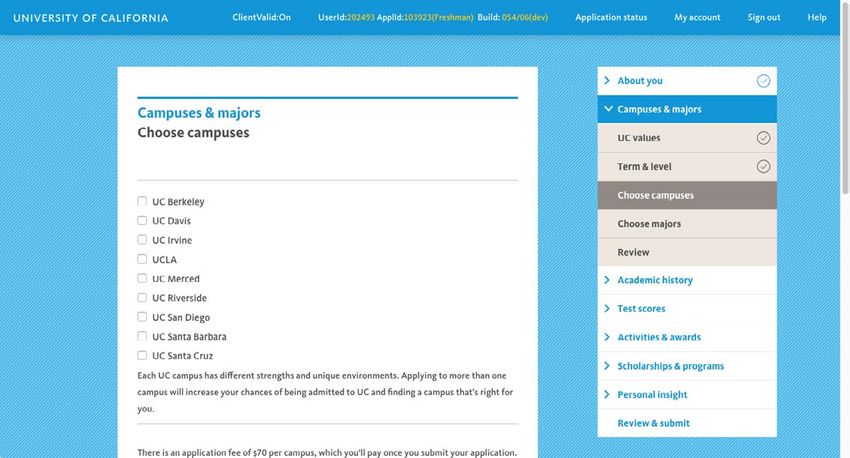
Getting started

 Creating an application account                                2.    Once an applicant clicks the “Create account”
                                                                      button, an email confirming the start of the
1.   An email address and password are required in                    application will be sent.
     order to create an account.
     • Encourage your students to use the email account
       they use for all applications. Additionally, encourage
       students to use a non-school issued email account.            What’s New
     • Campuses use email to send critical, time-sensitive           You’ll notice a fresh new look and feel on the
       correspondence to applicants. Students should                 homepage that’s approachable and welcoming,
       check their email regularly.                                  with clear calls to action. If you scroll past the top
                                                                     section, there are a few things that will be helpful
     • Applicants will use this same account sign-in
                                                                     to applicants, including links directing applicants
       information if they apply again in the future.
                                                                     to relevant information on the admissions site,
     • If the student’s family has multiple applicants or has        helpdesk hours and contact information, a call out
       future applicants, different email addresses must be          to follow the application Twitter account, and a
       used for each applicant.                                      section for application news and notices (appears
     • Remind students to adjust email filters to accept             only when needed).
       mail from UC addresses.
     • Students should be sure to keep sign-in
       information safe.

UNDERGRADUATE ADMISSIONS APPLICATION GUIDE FOR COUNSELORS                                                                     4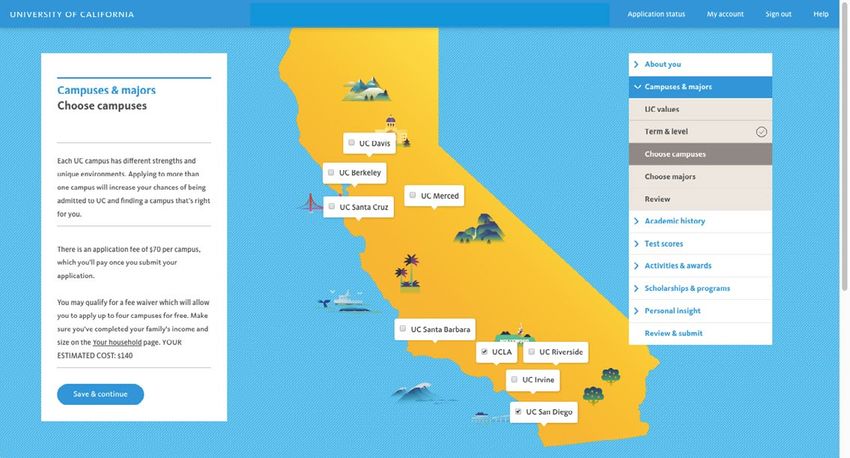
Getting started

 Selecting term & level
                                                            What’s New
Students must select the term for which they are applying
for admission to UC                                         There’s a new feature you’ll notice on this page:
                                                            Tool tips. When a blue “i” icon is present students
• Term: Most campuses and majors are open for the fall      can hover over it for more information. These tips
  term only.                                                will add more context to help students complete
• Level: Students must select the appropriate level for     that question or section of the application.
  which they are applying.

UNDERGRADUATE ADMISSIONS APPLICATION GUIDE FOR COUNSELORS                                                         5
Getting started

 It’s your time to shine
                                                              What’s New
• This is the page right before applicants officially start
  their application.                                          You may notice a new tone and style in the
                                                              language we’re using. Using language that is
• It reminds applicants about what they’ll need and how
                                                              conversational puts applicants at ease, which in
  to navigate through the application
                                                              turn makes them feel more confident in telling us
• Applicants can also choose to have the Personal Insight     about their personal experiences. You’ll also see
  Questions emailed to them (to practice writing them         this tone reflected in the questions throughout the
  in advance) by clicking on the “Email me the questions”     application (how we ask a question is as important
  button at the bottom of the page.                           as what we ask.)

UNDERGRADUATE ADMISSIONS APPLICATION GUIDE FOR COUNSELORS                                                           6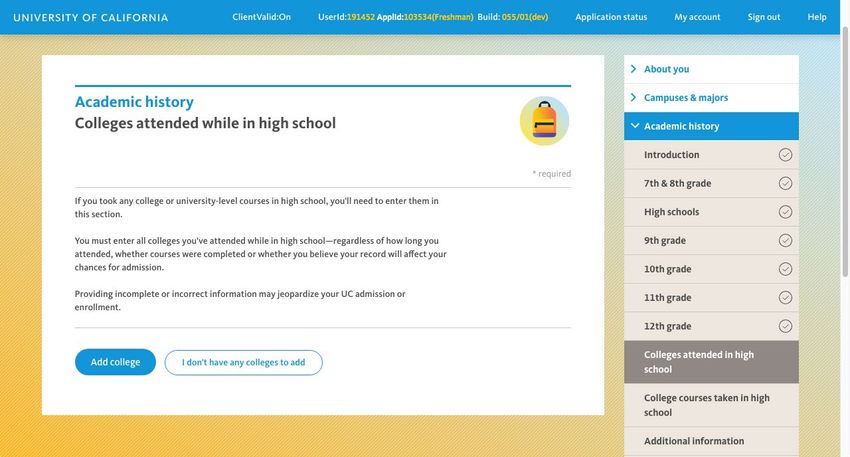
Navigating the application

Once applicants click “Start application” on the previous      Top-level header navigation
page, they immediately land on the first page of the
application: Personal information in the “About you”          You’ll see a couple of links at the top of the screen:
section. This is a good starting point to become familiar     Application status, My account, Sign out, Help.
with the new order of pages in the redesign, as well as the   Application status: Shows all open or submitted
new ways applicants can navigate the application.             applications for the applicant. After submitting the
                                                              application, applicants can access and edit certain
                                                              information from this page (e.g. applying to an
 Right-side navigation / Sections & pages                     additional campus).
• On the right-hand side, you’ll see a navigation bar with    My account: Where applicants can view and/or edit their
  all the sections in the application. Applicants can click   email address and password associated with their account.
  on each section to reveal the pages within the section.     Help: Shows answers to frequently asked questions
• Each section contains a review page where applicants        pertaining to that section. Clicking on Help will
  can see all the data they’ve entered for each page in       also display the contact information for the UC
  the section.                                                Application Center.

   What’s New
   We reconfigured the navigation and page order
   to ease users into the application and give them
   more flexibility.

UNDERGRADUATE ADMISSIONS APPLICATION GUIDE FOR COUNSELORS                                                              7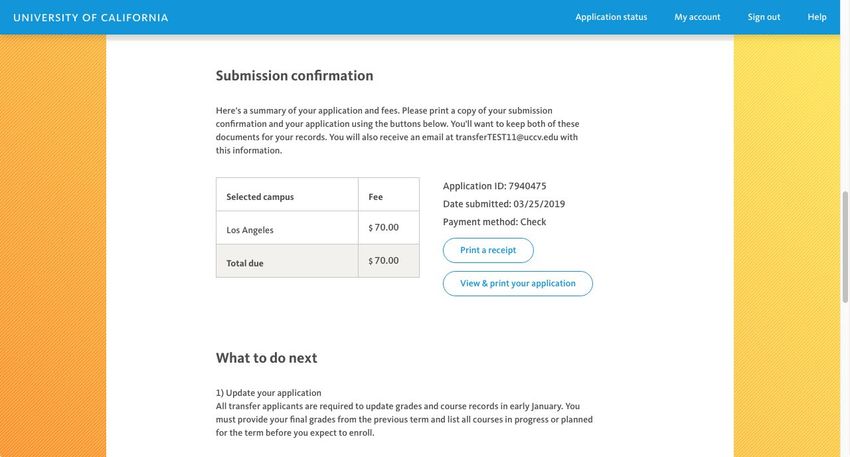
Navigating the application

 Moving around the application                                    Saving information

Students can navigate the application in any order — they        • Applicants should click “Save & continue” at the
do not have to fill out the application sequentially, but it’s     bottom of each page to save any entered data and
recommended they do. Some pages rely on information                proceed to the next page. Please note: There is a
being entered on previous pages. If applicants navigate to         20-minute inactivity period after which the application will
these pages out of order, a message will appear directing          automatically sign out the applicant.
applicants to visit the previous pages first.                    • Successfully completed pages (those with all required
                                                                   fields completed) will be marked with a checkmark in
                                                                   the navigation bar and on review pages.
                                                                 • Errors: If there is required information on the page
                                                                   that is either incomplete or invalid, and an applicant
                                                                   clicks “Save & continue,” they’ll see an error message
                                                                   appear at the top of the page. Applicants can choose to
                                                                   fix the errors on the page immediately, or choose “Skip
                                                                   for now” and fix the errors at a later time. (Note: These
                                                                   errors will need to be corrected for applicants to be able
                                                                   to start the submission process.)

UNDERGRADUATE ADMISSIONS APPLICATION GUIDE FOR COUNSELORS                                                                     8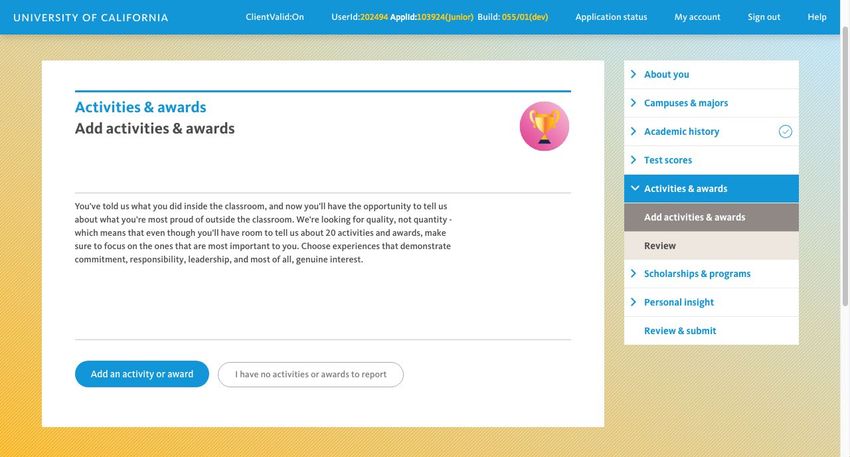
Navigating the application

 Review & submit

• Applicants have the opportunity to see their entire
  application at any point by clicking on “Review &
  submit” on the right-hand side navigation.
• Clicking “Expand all” or clicking to expand each section
  will show any data the applicant has entered.
• This is also the last page before an applicant begins the
  submission process. (It’s recommended that applicants
  review all of their information before they proceed to
  submitting their application. If there are any incomplete
  fields or questions, applicants will need to fix these
  before being allowed to submit the application.)
• This page also serves as the landing page for applicants
  logging back in after a previous session.

UNDERGRADUATE ADMISSIONS APPLICATION GUIDE FOR COUNSELORS     9
About you

 Personal information & Contact information                   Social Security number or Individual Taxpayer
                                                              Identification Number (ITIN):
The first two pages of the application ask applicants for
                                                              • The university uses the SSN or ITIN to accurately and
basic information about themselves (e.g. name, birthdate,
                                                                reliably merge the application for admissions with the
contact information).
                                                                Free Application for Federal Student Aid (FAFSA). We
                                                                also report it to the Internal Revenue Service, pursuant
                                                                to the Taxpayer’s Relief Act of 1997. Students are
 Citizenship and residency                                      required to disclose their SSN or ITIN if they have one.
Citizenship:                                                  • If applicants don’t have a valid SSN or SSN for work
                                                                purposes, but do have an ITIN, use the ITIN in place of
• Undocumented applicants have the option to choose
                                                                an SSN.
  “No selection” from the dropdown menu. This is option
  is a valid response, and we recommend this choice           • If students don’t have a valid SSN, SSN for work
  for undocumented applicants, including those with             purposes, or ITIN, leave this item blank.
  Deferred Action for Childhood Arrivals (DACA) status.       • All SSN and ITIN numbers are encrypted and kept secure.
• If students select a country other than the United States
  or “No selection”, they will need to provide their legal    California residency:
  immigration status and the type of visa (e.g., F-1, H4,     • These series of questions appear only for certain
  etc.) they hold or plan to hold upon enrollment.              applicants, based on their citizenship status.
                                                              • The questions help determine if applicants can be
                                                                considered residents or non-residents for admission
                                                                purposes only, which is separate from determining
                                                                residency for tuition purposes.

UNDERGRADUATE ADMISSIONS APPLICATION GUIDE FOR COUNSELORS                                                                 10
About You Demographics • This page is optional. We collect demographic information for statistical purposes only. Providing demographic information does not affect the students chances of admission. • New! Students can select Female, Male, or Non-binary as their gender selection. • Campus admission offices are legally barred from using race, sex or ethnicity in the admissions process. UNDERGRADUATE ADMISSIONS APPLICATION GUIDE FOR COUNSELORS 11
About You

For the next few pages (Your background, Your household,     Your background
Parent information) we want to know about applicants’
lives outside of the classroom, including their families    • Questions on this page ask applicants for more
and backgrounds. This information gives us a better           information about their backgrounds: What languages
understanding of their home environments, and helps           they first learned to speak, if they were in foster care
us determine if they’re eligible for certain programs,        and/or the military (or dependents of a U.S. military
scholarships or the application fee waiver.                   veteran), and if they’re married or in a civil union/
                                                              registered domestic partnership.
                                                            • Answers to questions on this page provide more
                                                              contextual information about applicants and determine
                                                              if they could be considered independent or dependent
                                                              students. This impacts the type of information we’ll ask
                                                              about their parents on subsequent pages. (In general,
                                                              if applicants are over the age of 24, married, have
                                                              dependents, are financially self-sufficient, or are a U.S.
                                                              military veteran, they do not need to provide parent/
                                                              guardian information. Most freshman applicants are not
                                                              considered independent.)

UNDERGRADUATE ADMISSIONS APPLICATION GUIDE FOR COUNSELORS                                                             12
About you
Your household appropriate. (The application fee waiver calculation will
appear on the Choose campuses page in the “Campuses
• Students should report the number of persons living & majors” section.)
in their household and the annual family income.
• Dependent applicants: Will be asked to provide
Family income is gross income from all sources, prior
information about the parents they live with at their
to deductions.
permanent address.
• Students who wish to be considered for a fee waiver
• Independent applicants: Will be asked if they live by
must report family size and income. Filling out the family
themselves or with family members.
size and income information allows the UC application
to automatically grant an application fee waiver if
UNDERGRADUATE ADMISSIONS APPLICATION GUIDE FOR COUNSELORS 13About you Parent information There are two different Parent information pages, depend- • Independent applicants: Only have the option to ing on how applicants answered questions on the Your provide their parents’ highest level of education. background page. • Dependent applicants: Have the option to add information for two parents (parents, step parents, legal What’s New guardians). Which parents applicants choose to provide is There’s no such thing as a “typical” family. Families up to them and their unique situations. If applicants are complex and diverse, and we wanted to give choose to provide information about a parent or legal applicants more room and guidance on how they guardian, they’ll be asked about the parent’s current job, can share their family stories with us. education level and contact information. UNDERGRADUATE ADMISSIONS APPLICATION GUIDE FOR COUNSELORS 14
Campuses & majors

 UC values, Term & level pages                               Choose campuses

• UC values: Applicants will need to read and agree to      There are two different views of the campus selection
  UC’s community principles.                                page, depending on the size of the browser and the device
• Term & level: Applicants will need to confirm their       applicants are using.
  level and application term. They’ve previously entered    • NEW! Applicants who’ve entered their family size and
  this information when they started the application, and     income in the “About you” section will see if they’ve
  we want them to make sure this information is correct       qualified for an application fee waiver on this page.
  before they select their campuses and majors.

UNDERGRADUATE ADMISSIONS APPLICATION GUIDE FOR COUNSELORS                                                             15
Campuses & majors

  Applicants who have qualified for a fee waiver will see a   • If available, students should select an alternate major.
  real-time feedback about how many campuses they can           If a campus is unable to offer the applicant a place
  apply to for free.                                            in the first-choice major, they may consider them for
• Applicants should apply to multiple campuses to               an alternate major. Be sure the alternate major is in a
  increase their chances of admission.                          subject area that the student really wants to study (and
                                                                in some cases, it should be in a different area of study
                                                                than the primary major).
 Choose majors                                                • Majors are sorted by category or college. After selecting
• All applicants must select a major for each campus to         the major/alternate major, scroll to the bottom of the
  which they are applying.                                      page and click “Save & continue.”

UNDERGRADUATE ADMISSIONS APPLICATION GUIDE FOR COUNSELORS                                                              16
Campuses & majors
• Closed majors: Some majors are not open for every
applicant level, for every term. To see closed majors,
applicants can click the “show closed majors” checkbox
on the major selection page. Note: If most of the majors
are closed, students should check to see if they selected
an incorrect applicant level or if it is past the application
submission deadline.
• Supplemental applications: Some majors require
submission of a supplemental application
• Professional schools and specialty pregrams
are likely to require multiple documents and a
supplemental application.
• Once the student selects the major/alternate
major, if a supplemental application is required, the
information will be displayed.
• If the supplemental application is not completed
by the deadline date, campuses are not required to
continue reviewing the application for admission.
• Most majors and schools requiring supplemental
applications do not review an incomplete
supplemental application.
UNDERGRADUATE ADMISSIONS APPLICATION GUIDE FOR COUNSELORS 17Campuses & majors
UC San Diego college ranking have the best chance of assignment to the college of
their choice.
• If applicants are admitted to UC San Diego, they’ll be
• The rankings do not affect the chances for admission to
assigned to one of seven colleges on campus.
UC San Diego.
These colleges are residential neighborhoods on
campus with specific areas of focus and general • College assignments are not based on major —
education requirements. applicants will be able to access the full range of
available majors regardless of college assignment.
• In addition to selecting a major and an alternate major,
applicants applying to UC San Diego will need to rank
the colleges at the campus in order of preference to
UNDERGRADUATE ADMISSIONS APPLICATION GUIDE FOR COUNSELORS 18Academic history
Overview If a student accepts an offer of admission, UC requires of-
ficial academic records to verify the information reported.
Information entered in this section must be thoroughly
and accurately reported. If a student accepts an offer of • Please remind students that official transcripts prior to
admission, UC requires official academic records from high school graduation should not be submitted unless
each institution to verify the information reported. UC requests them from the student directly via email.
• The admitting campus will provide instructions for
• Encourage students to refer to unofficial transcripts
submitting final transcripts which will be due by July 1
from all institutions attended, including:
for incoming fall students.
• Academic records from all high schools attended
beginning with grade 9, including courses completed
through online high school programs and study 7th & 8th grade
abroad experiences.
If applicants have taken any high school-level math or lan-
• Transcripts of college/university courses completed
guage other than English courses in 7th or 8th grade, they
while enrolled in high school.
can enter them on this page.
Students should complete the section chronologically
from first enrollment to current coursework. • 7th & 8th grade courses do not need to appear on the
high school transcript.
Students must self-report all courses taken at every
institution. All grades (including D/F and repeated grades ) • Only enter courses with grades of C or better.
must be included. • Math (including the Geometry requirement) and
Language other than English (LOTE) are the only subject
• The courses and grades entered must match the official
areas that can be met by course work in middle school.
academic records.
UNDERGRADUATE ADMISSIONS APPLICATION GUIDE FOR COUNSELORS 19Academic history
High schools • Applicants then search for their high school by
entering the school’s name or city, or the College Board
Before entering any coursework and grades, applicants school code.
must first enter information about all high schools they
• Applicants can select their school from the search
attended (including any online high schools), including
results and enter additional information about the
dates of attendance, grade and term systems, and diploma
high school.
or certificate information for each school.
• Applicants should list every school attended
Find high school & high school information beginning with 9th grade, even if 9th grade was part
of “middle school.”
• Applicants must select a location – “In California,” “U.S.
(not CA),” or “Outside the U.S.”
UNDERGRADUATE ADMISSIONS APPLICATION GUIDE FOR COUNSELORS 20Academic history UNDERGRADUATE ADMISSIONS APPLICATION GUIDE FOR COUNSELORS 21
Academic history

 Coursework and grades                                         • When entries for each grade level are complete, click
                                                                 “Save & continue”.
After adding all high schools attended, applicants will
                                                               • Repeat this process for each grade level, including
need to enter all their courses and grades. Courses are
                                                                 12th grade.
selected or entered by grade level beginning with ninth
grade. Students who attended more than one school              • 12th grade course grades will default to “IP – In
should be sure to enter courses under the correct school.        Progress” and “PL – Planned”. If applicants have already
                                                                 graduated and have senior year grades, they must
Students enrolled in California high schools should use          manually enter each grade.
the following instructions:
                                                               • Note: New California high school courses being
• Click on the subject area/course category to expand and        offered for the first time in the senior year may not
  see the course list for the school.                            appear on the school’s course list until Nov. 1; if
• For courses that are only one semester long, select “No        applicants don’t see a new course on the list, they
  Course” for the term for which the course was not              must remember to come back to add it later before
  offered (e.g. Economics offered fall term, for spring term     submitting the application.
  enter “No Course”).
                                                               Students not enrolled in a California high school must
• Include all original courses/grades and enter repeated       manually enter the courses as they appear on the
  courses/grades for courses in which an original grade of     student’s academic record.
  with D or F was earned and subsequently repeated.

UNDERGRADUATE ADMISSIONS APPLICATION GUIDE FOR COUNSELORS                                                                22
Academic history UNDERGRADUATE ADMISSIONS APPLICATION GUIDE FOR COUNSELORS 23
Academic history

 Coursework and grades:                                      on our website. Referring to the A-G Course List site (a
 Self-reporting courses & grades                             database of UC-approved courses offered in California
                                                             schools) can provide guidance on the types of courses that
For students who attended high schools in California:        have been UC-approved.
If applicants do not see an A-G course that they took
listed on the UC-Approved course list, they can self-enter   For all students: Courses such as physical education (PE)
the coursework. Non-A-G courses should not be entered        cannot be reported; only academic subjects should be
into the academic history.                                   included. In addition, courses/class periods for teacher
                                                             assistant, yearbook, and student government may or may
For students who attended high schools outside of            not be UC-approved. If they are approved, students can
California: There are no pre-approved course lists for       enter them. If they are not approved, they should not be
schools outside of California. Students should review the    entered. An opportunity to enter these types of courses is
subject area headings for the required A-G course pattern    provided later in the application.

UNDERGRADUATE ADMISSIONS APPLICATION GUIDE FOR COUNSELORS                                                            24
Academic history
Colleges attended while in high school • UC-transferable courses in all A-G subject areas as
well as non UC-transferable English and math courses
If any college/university-level courses were completed can be reported in this section of the application.
while in high school (including those completed as part
• If there are other CCC courses that are not UC-
of a dual enrollment program), applicants can add the
transferable or do not meet A-G requirements,
college information after completing the high school
applicants should report them in “Other coursework”
section. The process is very similar to entering the high
in the “Activities & awards” section.
school information.
• IF college/university courses were not taken at a CCC,
• Applicants should select the course taken, grade earned applicants should enter each course and grade earned
(or enter IP for In Progress, PL for Planned courses), and as it appears on the official academic record from the
the A-G subject area in which the course fits. college/university attended.
• Applicants should only report courses taken for a letter
grade; courses in which a Pass/Credit/No Credit grade
were earned should not be included.
UNDERGRADUATE ADMISSIONS APPLICATION GUIDE FOR COUNSELORS 25Academic history UNDERGRADUATE ADMISSIONS APPLICATION GUIDE FOR COUNSELORS 26
Academic history

 Additional comments                                        The Additional comments box can be used to provide
                                                            detailed information or explanations about specific
The last page in the section asks applicants to indicate    academic issues such as:
if they:
                                                            • Declining grades
• Know their California State Student ID number (and
                                                            • Course selection issues
  provide it if they do)
                                                            • Gaps in education
• Have any additional comments related to their
  academic history                                          • Repeated courses
                                                            • Courses taken in special programs

UNDERGRADUATE ADMISSIONS APPLICATION GUIDE FOR COUNSELORS                                                         27
Test scores
Test scores: ACT, SAT & SAT Subject Tests • We encourage but do not require students to report all
official scores although we only use the highest score
ACT & SAT: from a single sitting for admission consideration.
• ACT with Writing and/or SAT with Writing/Essay scores Appropriate scores on specific SAT Subject Tests can meet
must be completed by December of the senior year (last A-G requirements; refer to the Quick Reference Guide to
year of secondary school). UC Admissions for more information.
• Students should report completed test(s) with
• Official SAT/ACT/SAT Subject Tests examination scores
date(s)/scores or planned test date(s) on the
can be submitted to just one campus to which the
admission application.
student will be applying. Scores will be disseminated to
• If an examination was completed more than once, the all campuses to which the student applied.
student should enter the highest composite/total score
• If official scores are/were sent to UC prior to an
from a single sitting.
applicant filing an admission application, please note
• Note: For students who are graduating in 2020 and that the UC system office maintains scores received
later: UC will no longer accept scores from the SAT for three years. For example, if official scores were
Reasoning Test (taken before March 2016). submitted for an examination date in the student’s
sophomore year, the UC system office will still have
SAT Subject tests:
those scores when the student applies during their
These tests are not required but may be recommended for senior year.
specific programs at some campuses as an additional piece
of information to consider during the review process. Find
our SAT Subject Test recommendations on our website.
UNDERGRADUATE ADMISSIONS APPLICATION GUIDE FOR COUNSELORS 28Test scores
Test scores: AP exams, IB exams, TOEFL or • December of the year the student applies is the last
IELTS, International exams acceptable test date for TOEFL/IELTS.
Applicants will be asked about each of these exams on • Official test scores are due by January 31. If your student
separate pages in this section. They’ll need to report applied to multiple UC’s, they can send the official
scores if they’ve already taken an exam and/or indicate if TOEFL score report to one campus and the score will be
they’re planning on taking an exam in the future. shared with all campuses the student applied to. IELTS
scores must be submitted to each campus individually.
AP & IB exams:
International external exams:
Appropriate scores on specific AP and IB exams can be
used to meet freshman admission subject requirements • Students must self-report completed and planned
not satisfied with coursework. Please refer to the external exams, such as (I)GCSE, O-level, GCE A-level,
Quick Reference Guide to UC Admissions for details India Standard X and XII, etc.
on exam credit. • Predicted IB scores, if available, can also be entered on
• Scores must be self-reported on the application; this page.
official scores are not required until after a student has
accepted an offer of admission.
TOEFL/IELTS exams:
• Students who will complete fewer than 3 years
of high school in the U.S. and who are not native
English-speakers are required to demonstrate English
proficiency, most frequently by submitting TOEFL or
IELTS results.
UNDERGRADUATE ADMISSIONS APPLICATION GUIDE FOR COUNSELORS 29Activities & awards UNDERGRADUATE ADMISSIONS APPLICATION GUIDE FOR COUNSELORS 30
Activities & awards

 Add activities & awards                                         • Explain how else the applicant used their time and if it
                                                                   was a choice or a requirement (for example: caring for
In addition to courses, grades, and test scores, we want           siblings and/or children, eldercare, commitment to doing
to know how students spend their time outside of class.            homework, research projects, full-time employment, etc.)
Before students get started on this section, have them
brainstorm or refer to their resume: Were they involved
in clubs, athletics, band? Did they work or volunteer? Did
they have family responsibilities caring for siblings or other      What’s New
family members? Remind students their activities do not
                                                                    We got rid of the five-entry limit per category in
need to be through organized, school-sponsored programs.
                                                                    favor of a more versatile model. We wanted to
• New! There is no limit per category. Students can list up         allow students the flexibility and choice to enter
  to 20 total activities and awards.                                the activities that best reflect their interests and
                                                                    achievements. At the same time, we added more
• Students should describe the activity and their role and          guidance and specific questions to help students fill
  refrain from using acronyms.                                      out each category.
• If If an applicant did not have the time/opportunity
  to participate in school/community activities, and/or
  volunteer/paid employment, it is helpful to application
  readers to know why.

UNDERGRADUATE ADMISSIONS APPLICATION GUIDE FOR COUNSELORS                                                                   31
Scholarships & programs
Apply for scholarships & Support programs Support programs:
• Applicants interested in the Educational Opportunity
Scholarships:
Program (EOP), which provides support services while a
• Students should select any and all scholarship categories student is enrolled at UC, will need to check the box on
that apply to them this page and provide a brief statement about why they’re
• Only scholarships that are available at the campuses interested in the program.
selected will be displayed • EOP is not an admission process. If an applicant is offered
• New! No limit on the number of scholarships students and accepts an offer of admission, the applicant may
can select receive information from the campus’ EOP office. Unlike
the CSU system, there is no separate admission process
at UC for students who are interested in EOP.
UNDERGRADUATE ADMISSIONS APPLICATION GUIDE FOR COUNSELORS 32Personal insight questions
Personal insight questions (PIQs) “Email questions” to have the PIQs emailed to them
• The word limit for each PIQ response is 350 words
• Encourage your students to elicit stylistic feedback from
• Encourage your students to begin brainstorming
a trusted teacher, counselor or other adult
possible responses early
• There is no advantage to answering any specific
• Use the UC PIQ online resources with writing tips
question. Encourage students to answer the questions
and a worksheet
they feel will best represent their background, interests,
• Encourage students to write their responses in accomplishments, and context.
a Word document before entering them into
• Freshman applicants have 8 questions to choose from.
the application
They must respond to only 4 of the 8 questions.
• In the PIQ section, students are able to click on
UNDERGRADUATE ADMISSIONS APPLICATION GUIDE FOR COUNSELORS 33Personal insight questions Additional comments • This section should only be used to provide information that students have not had the opportunity to include elsewhere in the application, such as explaining unusual personal or family circumstances or clarifying other parts of the application. • This section cannot be used to respond to an additional PIQ. UNDERGRADUATE ADMISSIONS APPLICATION GUIDE FOR COUNSELORS 34
Review & submit

                                          missing screen shot

• This is the last page applicants visit before they start
  submitting the application.
• If students have remaining items to complete, they will
  see a “To Do” next to that section.
• Applicants will not be able to start submitting their
  application until all pages are complete (indicated with
  check marks).

UNDERGRADUATE ADMISSIONS APPLICATION GUIDE FOR COUNSELORS       35
Submitting the application Academic review State of legal residence • The application performs an academic review on the • These questions are optional, and answering them does information reported in the “Academic history” section. not affect an applicant’s chance of admission. Students should review the information carefully. They • If answered, the information may be used for an initial should return to “Academic history” to add any missing determination of residency for tuition purposes — courses, if applicable; OR check the box to confirm this that is, whether the applicant qualifies for resident or is what the applicant wants to submit. nonresident tuition. • If an applicant plans to use a test score to meet a subject requirement, it must be included in the “Test scores” section of the application. UNDERGRADUATE ADMISSIONS APPLICATION GUIDE FOR COUNSELORS 36
Submitting the application

 Sign & release                                                • The electronic signature also authorizes the release of
                                                                 official examination score(s) to all UC campuses to which
• Encourage students to review and check the release             the student applied.
  authorizations to share application information with
                                                               • Statement of Integrity: UC feels very strongly about
  scholarship agencies, parents/guardians, counselors
                                                                 student integrity on the application. The Statement
  and/or UC organizations and alumni groups.
                                                                 of Integrity is to affirm that all information in the
• Students will electronically sign and date the application     application is accurate and the personal insight question
  to verify accuracy and acknowledge that the applicant is       responses were written by the applicant. If information
  the author of the personal insight responses.                  is withheld, such as poor grades, enrollment at another
                                                                 collegiate institution or falsification is detected, the
                                                                 application is subject to cancellation.

UNDERGRADUATE ADMISSIONS APPLICATION GUIDE FOR COUNSELORS                                                               37
Submitting the application
Payment school in the U.S., however, the student may be eligible to
pay the lower application fee of $70 per campus.
Applicants should review their campus selections and
application fees at the top of the page:
Fee waivers
• For U.S. citizens or permanent resident students, the
application fee is $70 per campus. • If applicants did not provide information about their
• For international and non-immigrant applicants the family size or income earlier in the application, they have
application fee is $80 for each campus selected. If an the opportunity to do so here to see if they qualify for a
international or non-immigrant student currently attends fee waiver.
UNDERGRADUATE ADMISSIONS APPLICATION GUIDE FOR COUNSELORS 38Submitting the application
Who’s eligible for a fee waiver: Submission confirmation
• U.S. citizens or permanent residents or students who
After applicants have paid or selected their payment
have attended a CA high school for at least 3 years.
method (by credit card or by check/mail), they will see
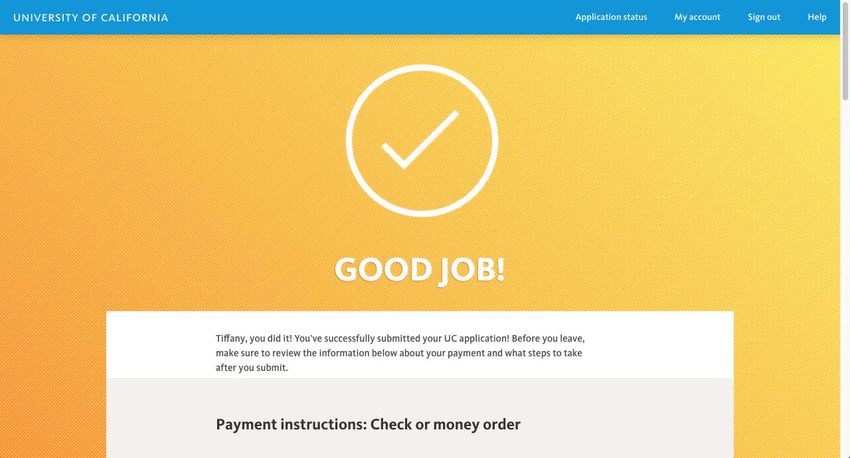
• If students meet the low-income criteria used to a confirmation page indicating their application has
qualify for free and reduced lunch, they will qualify been submitted.
for a UC application fee waiver for up to 4 campus
• If applicants chose to pay by check, they will see
choices but will be responsible for payment for any
instructions on how to mail in their payment.
additional campuses to which they choose to apply.
• UC Application ID Number: This will appear on the page.
• Students on a non-immigrant visa are not eligible for
Strongly encourage your students to write down or keep
the UC application fee waiver even if they attended
a copy of their Application ID number. This number is
a school in California. If students have a non-UC
used throughout the admission process to access the
fee waiver or UC/CCC EOPS fee waiver, they should
various campus student portals and, in many cases, to
select “Pay by check” and mail in the fee waiver to
access their admission decisions.
the UC Application Center. Only one fee waiver per
applicant for up to 4 campus choices may be used. • Print receipt & application: Applicants can choose to
print a receipt of their application fees or view and print
• If a fee waiver is granted, the applicant must select “Yes”
the entire application.
to accept the fee waiver.
• There are also reminders about what applicants should do
• If the applicant makes a mistake on the family income
after they submit their application, as well as instructions
amount, the applicant can correct the information
for making changes to an already submitted application.
by clicking “Recalculate fee waiver”; eligibility for
the fee waiver will automatically recalculate with the • Reminder: Information in the application is subject to
revised information. verification. If an applicant is selected for verification,
non-compliance will result in cancellation of the
application and the application fee will not be refunded.
The verification process occurs in January and is
communicated by email; students should check their
email regularly.
Campus portals (separate from the application)
• By January, each campus the student applied to will
email them to create a login username and password for
access to the campus’ applicant portal. This is the site at
which the admission decision will be posted along with
other important information.
• Students should check each campus’ applicant
portal frequently.
UNDERGRADUATE ADMISSIONS APPLICATION GUIDE FOR COUNSELORS 39Submitting the application UNDERGRADUATE ADMISSIONS APPLICATION GUIDE FOR COUNSELORS 40
Post-submission

 Application status                                              and UC Application ID number (and signature if sent by
                                                                 postal mail) of the applicant, and will be made available to
After the application is submitted, applicants can sign          all the campuses to which the student applied.
back in to the application to make certain changes to their
                                                                 Minor changes to activities, awards, volunteer work,
application. They will land on the “Application status” page
                                                                 employment or personal insight responses are unlikely to
which will have a list of the campuses they’ve applied to,
                                                                 have an impact on the admission decision. However, if a
in addition to a list of links and actions that applicants can
                                                                 student has significant updates in any of these areas, they
take post-submission, including:
                                                                 may notify us at the UC Application Center:
• View fees & payment: Summary of campuses and fees
                                                                 UC Application Center contact information
• Update personal information: Changes to name, address
                                                                 Email:
• View application: View and print submitted application
                                                                 ucinfo@applyUCsupport.net
• Add a campus choice: Before November 30th all
                                                                 Mail to:
  campuses are still open, and applicants can apply to
                                                                 UC Application Center
  additional campuses.
                                                                 P.O. Box 1432
• View how your application is reviewed: Shows                   Bakersfield, CA 93302
  applicants if they’ve been designated ELC status

Note: If a student changes schools, adds or drops a
course, or fails to earn a C or better in a course during the
current academic year after submission of the application,
they must notify the UC Application Center by email or
postal mail. Correspondence must include the full name

UNDERGRADUATE ADMISSIONS APPLICATION GUIDE FOR COUNSELORS                                                                  41
You can also read


