VIRTUAL FALL RECRUITING AND ENGAGEMENT PLAYBOOK 2021-2022
←
→
Page content transcription
If your browser does not render page correctly, please read the page content below
2021-2022

VIRTUAL FALL RECRUITING
AND ENGAGEMENT PLAYBOOK
VIRTUAL FALL RECRUITING AND ENGAGEMENT PLAYBOOK

         TABLE OF CONTENTS
          I. Introduction and Contact Information
          II. Key Information Summary
          III. Networking and Engagement Events
          IV. Virtual Recruiting and Interviewing
              Instructions and Best Practices
          V. Appendices
              A. Recommendations for Virtual Engagement
              B. Event Ideas
              C. Taking Attendance Across Platforms
              D. Virtual Technology Platforms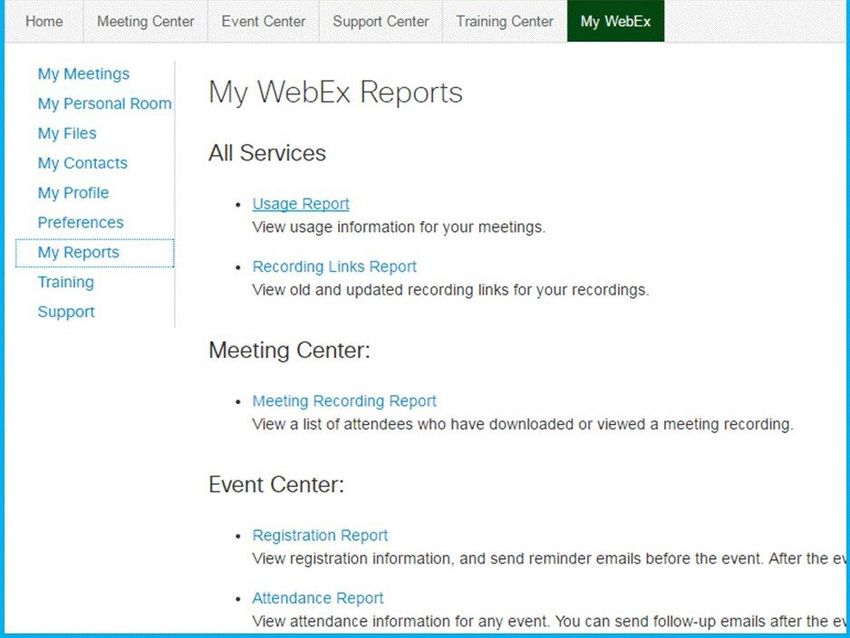
VIRTUAL FALL RECRUITING AND ENGAGEMENT PLAYBOOK

I. INTRODUCTION AND CONTACT INFORMATION
After a year of social distancing and working remotely, we have all transitioned                                                     Self-Service
considerably well to a virtual environment and embraced the flexibility it offers.                                                   • Employer provides virtual web
                                                                                                                                       conferencing room for event
Yet, making connections and networking in-person is a high priority for our                                                          • Employer generates student links
students for the upcoming recruiting season. At this point, all events will remain                                                     for event
virtual with the possibility of hosting limited, small in-person events if the health                                                • Employer collects student applications
and safety of our staff, students and employer partners can be maintained.                                                             on employer’s proprietary application
Nevertheless, the Employer Engagement & Recruiting (EE&R) team remains                                                                 portal
                                                                                                                                     • Employer works directly with students to
committed to ensuring our employer partners have successful virtual engagement                                                         create a personalized interview
and recruiting opportunities to develop relationships with our students and clubs.                                                     schedule
                                                                                                                                     • Employer manages day-of interview
This playbook provides guidelines, logistical information, suggestions and recommendations about our                                   logistics and communication directly
Fall virtual engagement events and recruiting. This is not exhaustive of the many questions that may                                   with students
arise over the coming months but should serve as a starting point for your networking and recruiting
at Kenan-Flagler Business School. If there are questions or suggestions, please reach out to your                                    Full-Service
Relationship Manager.                                                                                                                • UNC provides Zoom room for event
                                                                                                                                     • UNC generates student links for event
 NAME                                        RESPONSIBLE AREA                           CONTACT INFORMATION                          • UNC collects applications in Career
                                                                                                                                       Connections
 Melissa Werner, Sr. Associate Director      Healthcare                                 Melissa_Werner@kenan-flagler.unc.edu
 of Employer Engagement & Recruiting                                                    919-962-9029
                                                                                                                                     • UNC builds personalized interview
                                                                                                                                       schedule
 Sandra Chandler, Associate Director of      Energy and Financial Services              Sandra_Chandler@kenan-flagler.unc.edu
 Employer Engagement & Recruiting                                                       919-962-1627                                 • UNC manages day-of interview logistics
                                                                                                                                       and communication directly with
 Jarrett Early, Associate Director of        Consulting and Technology                  Jarrett_Early@kenan-flagler.unc.edu
 Employer Engagement & Recruiting                                                       919-962-0558                                   students
 Elizabeth Stanson, Assistant Director       Retail, CPG and Airlines                   Elizabeth_Stanson@kenan-flagler.unc.edu
 of Employer Engagement & Recruiting                                                    919-962-1666                                 2021-22 Key Recruiting Dates
 Nadia Korobova, Associate Director of       Business Development                       Nadia_Korobova@kenan-flagler.unc.edu
                                                                                                                                     Please see our key dates for MBA
 Employer Engagement & Recruiting                                                       919-962-6760                                 recruiting document for relevant dates
 Laura Fazzina, Recruiting Coordinator       Recruiting Logistics                       Laura_Fazzina@kenan-flagler.unc.edu          and deadlines.
                                                                                        919-962-0929
                                                                                                                                     Resume Books Available – Sept. 3, 2021
Note: Industry assignment is for Full-Time MBA Program. For those employers with an interest in discussing our Working
Professional student population, please contact Sandra Chandler.
                                                                                                                                     Student resume books will be available for
                                                                                                                                     download and review on Friday, Sept. 3.
Working Professional students are currently working full-time and enrolled in one of the following Executive MBA formats (evening,
online or weekend).

II. KEY INFORMATION SUMMARY
Our 2021 fall recruiting activities will remain fully virtual. This decision was made based on feedback
we’ve received from employer partners on travel restrictions that will continue to be in place
throughout this year, and we want to continue to ensure the safety of our students, staff, and company
representatives. Student classes will return to in-person, and we are working diligently to ensure
students can successfully participate in virtual recruiting while on campus. There is the possibility of
hosting limited, small in-person events as guidelines continue to change and the health and safety of
all involved can be maintained. We appreciate your flexibility and patience as we continue to navigate
the virtual environment.

Dual-Service Model
To continue to support the various needs of our employers this year, we have identified two levels of
service that any given recruiting activity may require. We recognize that these are not hard and fast
rules, and many employers will likely require a hybrid of the two options to execute a successful event.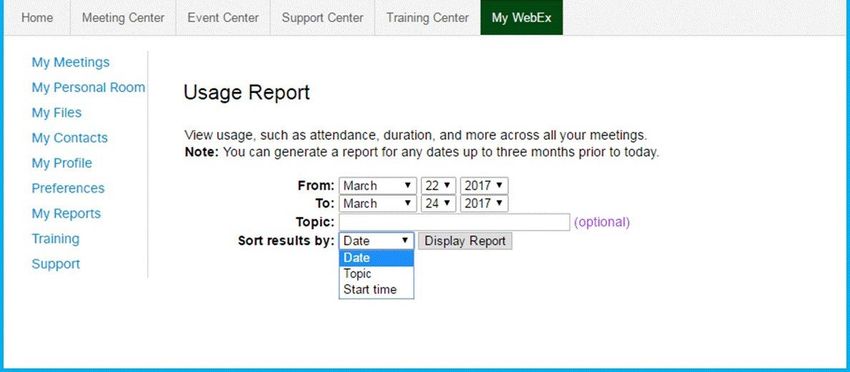
VIRTUAL FALL RECRUITING AND ENGAGEMENT PLAYBOOK

COMPANY PRESENTATION AVAILABILITY
Company presentations begin Sept. 13, 2021 for Second-Year (2Y) students and Sept. 14, 2021 for
First-Year (1Y) students. We recommend Friday for all external multi-school events.

 TIMES                MONDAY                  TUESDAY                   WEDNESDAY             THURSDAY

 12:45-1:45pm EST                             1Y & 2Y Presentations   1Y & 2Y Presentations   1Y & 2Y Presentations

 5-6pm EST            1Y & 2Y Presentations   1Y & 2Y Presentations   1Y & 2Y Presentations   1Y & 2Y Presentations

 7-8pm EST            1Y & 2Y Presentations   1Y & 2Y Presentations   1Y & 2Y Presentations   1Y & 2Y Presentations

OFFICE HOURS/COFFEE CHAT AVAILABILITY
Best Practice Recommendations: 20-30 minute time slots with 1-3 students, and follow the timing
recommendations in Career Connections that align best with the core class schedule.

 TIMES                MONDAY                  TUESDAY                   WEDNESDAY             THURSDAY

 8am-2pm EST          2Y Only                 2Y Only                   1Y & 2Y               1Y & 2Y

FULL-SERVICE VIRTUAL INTERVIEWS

Fall 2021 On-Campus Interview Cadence

 FALL WEEK                  RESUME                       RESUME DROP /               EMPLOYER                         STUDENT SIGN-UP   INTERVIEW
                            SUBMISSION OPENS             SUBMISSION CLOSE            SELECTIONS DUE                   / SCHEDULES       DATES
                                                         DATES (DEPENDENT            AT 12 PM EST                     RELEASED
                                                         ON ACTUAL INTERVIEW                                          (ANTICIPATED)
                                                         DATE)

 1                          August 23                    September 12                September 16                     September 20      Sept. 27 – Oct. 1

 2                          August 23                    September 19                September 23                     September 27      October 4 – 8

 3                          August 23                    October 10                  October 14                       October 18        October 25 – 29

 4                          August 23                    October 17                  October 21                       October 25        November 1 – 5

 5                          August 23                    October 24                  October 28                       November 1        November 8 – 12

Fall 2021 Full-Time Interview Schedule
Full-service virtual interviews for full-time opportunities begin Sept. 27, 2021. Below are guidelines
based on class times, but schedules are personalized to employer preferences and availability.

 MONDAY               TUESDAY                 WEDNESDAY                 THURSDAY              FRIDAY
 8am-2pm EST          8am-2pm EST             8am-2pm EST             8am-2pm EST             8am-5pm EST
 Preferred            Preferred               Preferred               Preferred
 2pm-5pm EST          2pm-5pm EST             2pm-5pm EST             2pm-5pm EST
 As Needed            As Needed               As Needed               As Needed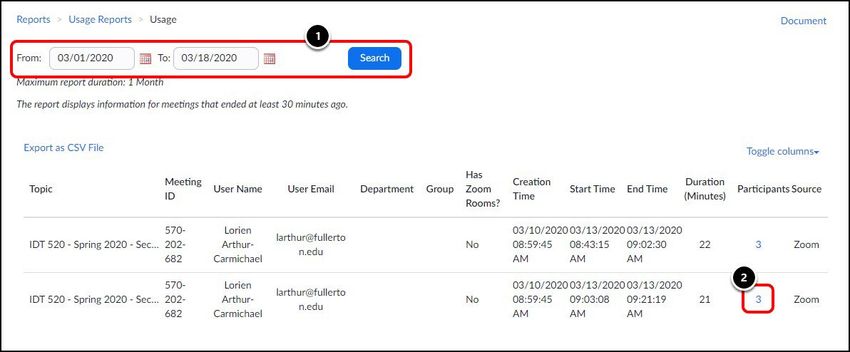
VIRTUAL FALL RECRUITING AND ENGAGEMENT PLAYBOOK

Spring 2022 On-Campus Internship Interview Cadence
 SPRING WEEK                RESUME                     RESUME DROP /             EMPLOYER                   STUDENT SIGN-UP            INTERVIEW
                            SUBMISSION OPENS           SUBMISSION CLOSE          SELECTIONS DUE             / SCHEDULES                DATES
                                                       DATES (DEPENDENT ON       AT 12 PM EST               RELEASED
                                                       ACTUAL INTERVIEW DATE)                               (ANTICIPATED)
 1                          October 18                 November 9                November 15                November 22 - 23           Nov. 30 - Dec. 1 (IB ONLY)
 2                          October 25                 December 5                December 9                 December 13                January 3 - 7
 3                          October 25                 December 12               December 16                January 3                  January 10 - 14
 4                          October 25                 January 2                 January 6                  January 10                 January 17 - 21
 5                          October 25                 January 9                 January 13                 January 17                 January 24 - 28
 6                          October 25                 January 16                January 20                 January 24                 Jan. 31 - Feb. 4

Spring 2022 Internship Interview Schedule                                        • Employer collects student applications on employer’s proprietary
Full-service virtual interviews for internship opportunities begin Jan. 3,         application portal
2022. Due to the continued uncertainty, we will continue to monitor              • Employer works directly with students to create a personalized
changes to guidelines to decide whether interviews will be virtual in Spring       interview schedule
2022. We will share our decision as soon as possible. Timing will remain the     • Employer manages day-of interview logistics and communication
                                                                                   directly with students
same as previous years, 8am-5pm EST. We recommend reserving second
Rounds for Fridays. We thank you in advance for your patience and flexibility.   Full-Service
                                                                                 • UNC provides Zoom room for event
MBA Virtual Networking Forum - SAVE THE DATE! - Friday, Sept. 24                 • UNC generates student links for event
(registration opens TBD)                                                         • UNC collects applications in Career Connections
Our premier networking event will be hosted virtually this year via              • UNC builds personalized interview schedule
                                                                                 • UNC manages day-of interview logistics and communication directly
Talentspace (https://talentspace.io/). For registration and pricing
                                                                                   with students
information, please visit Career Connections. Please contact your
Relationship Manager for more details.                                           2021-22 Key Recruiting Dates
                                                                                 Please see our key dates for MBA recruiting document for relevant dates
Available Recruiting Events in Career Connections for 2021-2022
                                                                                 and deadlines.
Recruiting Season
• Company Presentation – Share information about your company,                   Resume Books Available – Sept. 3, 2021
products, services, and culture                                                  Student resume books will be available for download and review on
• Office Hours/Coffee Chat – Meet students interested in your                    Friday, Sept. 3.
company in an intimate, less formal environment
• MBA Networking Forum – Join your fellow employers in this fast-                Company Presentations
paced networking forum that will provide access to the entire student            Company presentations are scheduled to begin Sept. 13, 2021 for
population, increasing exposure while meeting excellent candidates               Second-Year (2Y) students and Sept. 14, 2021 for First-Year (1Y) students.
• External Multi-School Event – Designed for employers with national/            The guidelines below are required to qualify as a “Company Presentation”
regional broadcast strategies or holding events that address multiple            in Career Connections. Any content that you plan to host for multiple
schools simultaneously.                                                          schools, or during times that do not align with our recommended guidelines
                                                                                 will fall under the event label “External Event of Interest.”
III. NETWORKING AND ENGAGEMENT EVENTS
                                                                                 We will consider “External Events of Interest” fully self-service, but we are
Student classes will be conducted fully in-person for the 2021-2022              happy to promote them to our students through the Career Connections
academic year. Alternatively, all recruiting activities will remain virtual      events portal. For purposes of information sharing, we encourage campus
based on current guidelines from the University. As such, we have worked         partners to list all pertinent external events in our system as a convenient
closely with the academics team and other MBA program staff to ensure            promotion tool. These events include, but are not limited to, regional
students can successfully participate in virtual events while on campus.         recruiting events, diversity talks and panels, and similar multi-school
The EE&R team will assist in reserving classroom and other available             events. Fridays are the most convenient day to host this style of event.
spaces to provide an appropriate location for virtual networking and
engagement. We appreciate your continued partnership and flexibility             As partners in these efforts, we ask that you provide as much
as we adapt to changing guidelines.                                              information as possible about your requested presentation content
Self-Service                                                                     in the relevant 12Twenty fields on your request forms. Accuracy
• Employer provides virtual web conferencing room for event                      of information such as target audience, preferred web conferencing
• Employer generates student links for event                                     software, invitation URL, and tech troubleshooting contact information
                                                                                 will be vital to continue a seamless to virtual recruiting experience.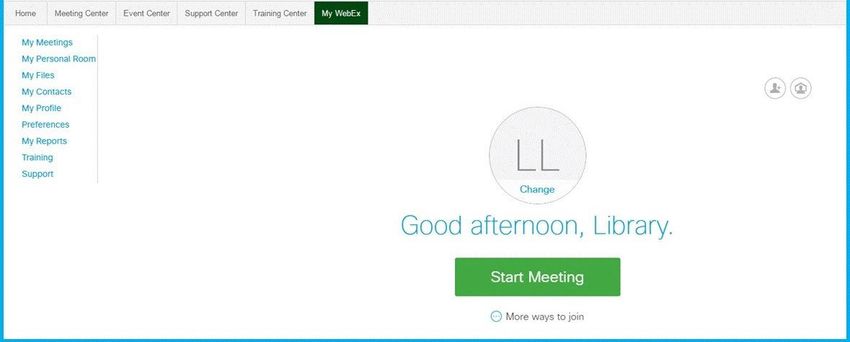
VIRTUAL FALL RECRUITING AND ENGAGEMENT PLAYBOOK

COMPANY PRESENTATION GUIDELINES
• We will allot 1 hour for all Company Presentations. We ask that all campus partners begin their
  presentations promptly at the listed start time and complete all presentation and break-out material
  by the end time listed on your approved event request form.
• How you use your 1-hour time slot is up to you. Please see Appendix A of this document for more
  robust suggestions and best practices.
• Below are the available time slots we have identified for Company Presentations this Fall. Please
  contact your Relationship Manager with any questions or special requests.

 TIMES                 MONDAY                  TUESDAY                 WEDNESDAY               THURSDAY

 12:45-1:45pm EST                              1Y & 2Y Presentations   1Y & 2Y Presentations   1Y & 2Y Presentations

 5-6pm EST             1Y & 2Y Presentations   1Y & 2Y Presentations   1Y & 2Y Presentations   1Y & 2Y Presentations

 7-8pm EST             1Y & 2Y Presentations   1Y & 2Y Presentations   1Y & 2Y Presentations   1Y & 2Y Presentations

The EE&R team will provide classroom spaces for students to log into virtual company presentations
while on campus for the 12:45 – 1:45pm time slot and the 5:00 – 6:00pm time slot. However,
classrooms or other spaces will not be reserved for the 7:00 – 8:00pm time slot. Students are required
to log into presentations from home or another appropriate location.

OFFICE HOURS/COFFEE CHAT AVAILABILITY
Best Practice Recommendations: 20-30 minute time slots with 1-3 students, and follow the timing
recommendations in Career Connections that align best with the core class schedule.

 TIMES                 MONDAY                  TUESDAY                 WEDNESDAY               THURSDAY

 8am-2pm EST           2Y Only                 2Y Only                 1Y & 2Y                 1Y & 2Y

FIRST-YEAR CORE CLASS SCHEDULE
Below is an outline of the first-year class schedule. Every student will have various breaks built into this
schedule during which time they can sign-up for office hours/coffee chats and other 1:1 networking
touchpoints. We have created standardized schedules for office hours/coffee chats and interviews in
Career Connections for various meeting durations, which maximize this schedule. Please contact your
Relationship Manager with any questions.

 MONDAY                      TUESDAY                       WEDNESDAY                     THURSDAY

 8am-9:20am                  8am-9:20am                    8am-9:20am                    8am-9:20am

 9:30am-10:50am              9:30am-10:50am                9:30am-10:50am                9:30am-10:50am

 11am-12:20pm                11am-12:20pm                  11am-12:20pm                  11am-12:20pm

 12:30pm-2pm - Lunch         12:30pm-2pm - Lunch           12:30pm-2pm - Lunch           12:30pm-2pm - Lunch

 3:30pm-4:30pm               3:30pm-4:30pm                 3:30pm-4:30pm                 3:30pm-4:30pm
VIRTUAL FALL RECRUITING AND ENGAGEMENT PLAYBOOK

SECOND-YEAR CORE CLASS SCHEDULE
These vary greatly depending on the student’s concentration and course of study. Please work directly
with these students whenever possible to account for this uncertainty.

FULL-SERVICE VIRTUAL INTERVIEWS
Fall 2021 Full-Time Interview Schedule
Full service virtual interviews for full-time opportunities begin Sept. 27, 2021. Below are guidelines
based on class times, but schedules are personalized to employer preferences and availability. As
mentioned earlier, we ask that you remain as flexible as possible to help work within each student’s
academic schedule.

 MONDAY                   TUESDAY                WEDNESDAY                 THURSDAY            FRIDAY
 8am-2pm EST              8am-2pm EST            8am-2pm EST               8am-2pm EST          8am-5pm EST
 Preferred                Preferred              Preferred                 Preferred
 2pm-5pm EST              2pm-5pm EST            2pm-5pm EST               2pm-5pm EST
 As Needed                As Needed              As Needed                 As Needed

Spring 2022 Internship Interview Schedule
Full-service virtual interviews for internship opportunities begin Jan. 3, 2022. Due to the continued
uncertainty, we will continue to monitor changes to guidelines to decide whether interviews will be
virtual in Spring 2022. We will share our decision as soon as possible. Timing will remain the same as
previous years, 8am-5pm EST. We recommend reserving second Rounds for Fridays. We thank you in
advance for your patience and flexibility.

FALL 2021 ON-CAMPUS INTERVIEW CADENCE

  FALL WEEK                  OCI PERIOD                                               START DATE & TIME         END DATE & TIME
                             Employer Pre-Registration Period                         05/19/2021, 8:00am EDT    08/09/2021, 5:00pm EDT
                                                                                      08/23/2021, 12:30pm EDT   09/12/2021, 11:59pm EDT
           1                 Student Application Period
                             Employer Decision Period                                 09/13/2021, 12:00am EDT   09/16/2021, 12:00pm EDT
  September 27 – Oct. 1      Extended Interview Student Decision and Sign-up Period   09/20/2021, 12:30pm EDT   09/22/2021, 8:59pm EDT
                             Alternate First-Come, First Serve Period                 09/22/2021, 9:00pm EDT    09/22/2021, 11:59pm EDT

                             Employer Pre-Registration Period                         05/19/2021, 8:00am EDT    08/09/2021, 5:00pm EDT
                             Student Application Period                               08/23/2021, 12:30pm EDT   09/19/2021, 11:59pm EDT
           2                 Employer Decision Period                                 09/20/2021, 12:00am EDT   09/23/2021, 12:00pm EDT
      October 4 – 8          Extended Interview Student Decision and Sign-up Period   09/27/2021, 12:30pm EDT   09/29/2021, 8:59pm EDT
                             Alternate First-Come, First Serve Period                 09/29/2021, 9:00pm EDT    09/29/2021, 11:59pm EDT

                             Employer Pre-Registration Period                         05/19/2021, 8:00am EDT    08/09/2021, 5:00pm EDT
                             Student Application Period                               08/23/2021, 12:30pm EDT   10/10/2021, 11:59pm EDT
           3                 Employer Decision Period                                 10/11/2021, 12:00am EDT   10/14/2021, 12:00pm EDT
     October 25 – 29         Extended Interview Student Decision and Sign-up Period   10/18/2021, 12:30pm EDT   10/20/2021, 8:59pm EDT
                             Alternate First-Come, First Serve Period                 10/20/2021, 9:00pm EDT    10/20/2021, 11:59pm EDT

                             Employer Pre-Registration Period                         05/19/2021, 8:00am EDT    08/09/2021, 5:00pm EDT
                             Student Application Period                               08/23/2021, 12:30pm EDT   10/17/2021, 11:59pm EDT
           4                 Employer Decision Period                                 10/18/2021, 12:00am EDT   10/21/2021, 12:00pm EDT
     November 1 – 5          Extended Interview Student Decision and Sign-up Period   10/25/2021, 12:30pm EDT   10/27/2021, 8:59pm EDT
                             Alternate First-Come, First Serve Period                 10/27/2021, 9:00pm EDT    10/27/2021, 11:59pm EDT

                             Employer Pre-Registration Period                         05/19/2021, 8:00am EDT    08/09/2021, 5:00pm EDT
                             Student Application Period                               08/23/2021, 12:30pm EDT   10/24/2021, 11:59pm EDT
           5                 Employer Decision Period                                 10/25/2021, 12:00am EDT   10/28/2021, 12:00pm EDT
    November 8 – 12          Extended Interview Student Decision and Sign-up Period   11/01/2021, 12:30pm EDT   11/03/2021, 8:59pm EDT
                             Alternate First-Come, First Serve Period                 11/03/2021, 9:00pm EDT    11/03/2021, 11:59pm EDT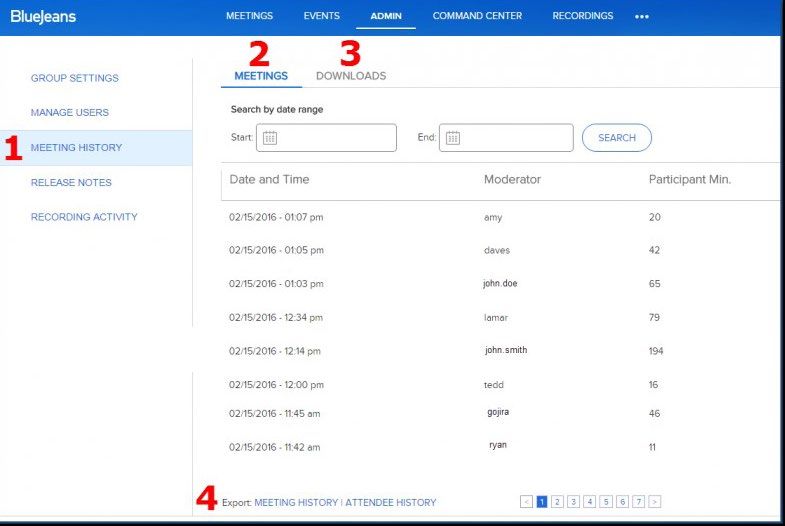
VIRTUAL FALL RECRUITING AND ENGAGEMENT PLAYBOOK

SPRING 2021 - 22 ON-CAMPUS INTERNSHIP INTERVIEW CADENCE

 SPRING WEEK               OCI PERIOD                                               START DATE & TIME         END DATE & TIME
                           Employer Pre-Registration Period                         05/19/2021, 8:00am EDT    10/04/2021, 5:00pm EDT
           1               Student Application Period
                           Employer Decision Period
                                                                                    10/18/2021, 12:30pm EDT
                                                                                    11/10/2021, 12:00am EDT
                                                                                                              11/09/2021, 11:59pm EDT
                                                                                                              11/15/2021, 12:00pm EDT
     November 30 –
      December 1           Extended Interview Student Decision and Sign-up Period   11/22/2021, 12:30pm EDT   11/23/2021, 8:59pm EDT
                           Alternate First-Come, First Serve Period                 11/23/2021, 9:00pm EDT    11/23/2021, 11:59pm EDT

                           Employer Pre-Registration Period                         05/19/2021, 8:00am EDT    10/11/2021, 5:00pm EDT
                           Student Application Period                               10/25/2021, 12:30pm EDT   12/05/2021, 11:59pm EDT
           2               Employer Decision Period                                 12/06/2021, 12:00am EDT   12/09/2021, 12:00pm EDT
      January 3 – 7        Extended Interview Student Decision and Sign-up Period   12/13/2021, 12:30pm EDT   12/15/2021, 8:59pm EDT
                           Alternate First-Come, First Serve Period                 12/15/2021, 9:00pm EDT    12/15/2021, 11:59pm EDT

                           Employer Pre-Registration Period                         05/19/2021, 8:00am EDT    10/11/2021, 5:00pm EDT
                           Student Application Period                               10/25/2021, 12:30pm EDT   12/12/2021, 11:59pm EDT
           3               Employer Decision Period                                 12/13/2021, 12:00am EDT   12/16/2021, 12:00pm EDT
    January 10 – 14        Extended Interview Student Decision and Sign-up Period   01/03/2022, 12:30pm EDT   01/05/2022, 8:59pm EDT
                           Alternate First-Come, First Serve Period                 01/05/2022, 9:00pm EDT    01/05/2022, 11:59pm EDT

                           Employer Pre-Registration Period                         05/19/2021, 8:00am EDT    10/11/2021, 5:00pm EDT
                           Student Application Period                               10/25/2021, 12:30pm EDT   01/02/2022, 11:59pm EDT
           4               Employer Decision Period                                 01/03/2022, 12:00am EDT   01/06/2022, 12:00pm EDT
    January 17 – 21        Extended Interview Student Decision and Sign-up Period   01/10/2022, 12:30pm EDT   01/12/2022, 8:59pm EDT
                           Alternate First-Come, First Serve Period                 01/12/2022, 9:00pm EDT    01/12/2022, 11:59pm EDT

                           Employer Pre-Registration Period                         05/19/2021, 8:00am EDT    10/11/2021, 5:00pm EDT
                           Student Application Period                               10/25/2021, 12:30pm EDT   01/09/2022, 11:59pm EDT
           5               Employer Decision Period                                 01/10/2022, 12:00am EDT   01/13/2022, 12:00pm EDT
    January 24 – 28        Extended Interview Student Decision and Sign-up Period   01/17/2022, 12:30pm EDT   01/19/2022, 8:59pm EDT
                           Alternate First-Come, First Serve Period                 01/19/2022, 9:00pm EDT    01/19/2022, 11:59pm EDT

                           Employer Pre-Registration Period                         05/19/2021, 8:00am EDT    10/11/2021, 5:00pm EDT
                           Student Application Period                               10/25/2021, 12:30pm EDT   01/16/2022, 11:59pm EDT
           6               Employer Decision Period                                 01/17/2022, 12:00am EDT   01/20/2022, 12:00pm EDT
 January 31 – February 4   Extended Interview Student Decision and Sign-up Period   01/24/2022, 12:30pm EDT   01/26/2022, 8:59pm EDT
                           Alternate First-Come, First Serve Period                 01/26/2022, 9:00pm EDT    01/26/2022, 11:59pm EDT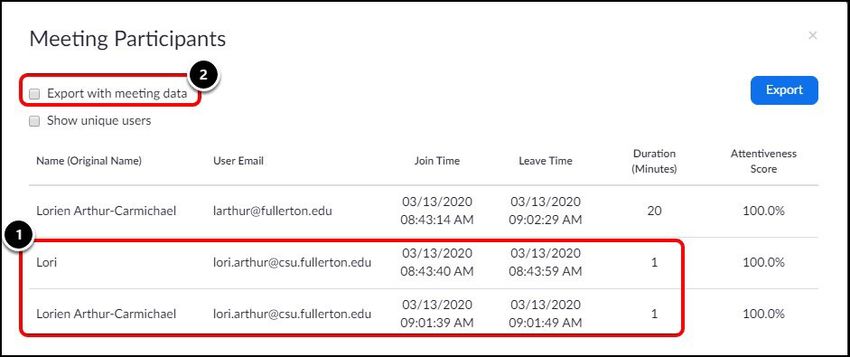
VIRTUAL FALL RECRUITING AND ENGAGEMENT PLAYBOOK

MBA Virtual Networking Forum - SAVE THE DATE! - Friday, Sept. 24                Event Registration
(registration opens TBD)                                                        In order to sign up for any event that is sponsored by the EE&R team,
Our premier networking event will be hosted virtually this year via             you must create an account in Career Connections if you do not already
Talentspace (https://talentspace.io/). For registration and pricing             have one (https://mba-kenan-flagler-unc.12twenty.com/hire). Once we
information, please visit Career Connections. Please contact your               receive a company’s preferences, your Relationship Manager will reach
Relationship Manager for more details.                                          out to confirm a date and time along with links already created for the
                                                                                company presentation and for full-time and/or internship interviews;
Available Recruiting Events in Career Connections for 2021-2022                 some companies may receive an email with dates only.
Recruiting Season
• Company Presentation – Share information about your company,                  If you receive an email with dates that include a link, all you need to
products, services, and culture                                                 do to accept this event date is click the link and complete items as
• Office Hours/Coffee Chat – Meet students interested in your                   directed. If you received an email with dates only, you will need to log
company in an intimate, less formal environment                                 into the system to sign up for the date recommended by our team. At
• MBA Networking Forum – Join your fellow employers in this fast-               this time, you may also choose to input any company information or full-
paced networking forum that will provide access to the entire student           time and/or internship job information as a draft.
population, increasing exposure while meeting excellent candidates
• External Multi-School Event – Designed for employers with national/           Before the Event
regional broadcast strategies or holding events that address multiple           Two weeks prior to the event date, your Relationship Manager will contact
schools simultaneously.                                                         you via email to gather the following information:
                                                                                • Agenda outlining the structure of the virtual engagement
                                                                                • Virtual presentation link. Zoom is the platform used school-wide, but
IV. VIRTUAL RECRUITING AND INTERVIEWING INSTRUCTIONS                              companies are not required to use Zoom
AND BEST PRACTICES
Signing Up for Company Presentations, Full-Time Recruiting,                     If the event registration is within this 2-week timeframe before initiating
Internship Dates and Other Events                                               or signing up for an existing event, please contact your Relationship
This year, the EE&R team is utilizing a survey format to gather employers’      Manager immediately upon registering so we can advertise this event to
preferences on which weeks, days, and times to host company                     students as soon as possible to maximize attendance.
presentations, full-time interviews, and internship interviews. This process
will be more seamless and allow us to better accommodate our employer           Help Students Prepare
partners. Additionally, this survey will collect information on any external    Send virtual presentation materials for students in advance through
events hosted by companies so we can add these dates to our calendar            Career Connections or our Employer Engagement and Recruiting email at
and share detail with students.                                                 employerengagementteam@kenan-flagler.unc.edu. This would include
                                                                                any materials used to help educate students about the company and
Nevertheless, our team will continue to be strategic in considering these       opportunities at the firm, such as: videos, website links, product
preferences when confirming the dates and times with employers. There           portfolios, collateral, business results, awards, information on
are potential conflicts and pitfalls in pairing companies within the same       company culture and values, and/or internship program information.
industries or who seek similar talent for programs such as leadership           Companies also have the option of pre-recording a company overview for
development. We want to continue to ensure each company has an equal            students to watch.
opportunity to host as many students as interested in attending their
events and applying to their jobs and internships.                              Day of Event Internal Administration
                                                                                Our Career & Leadership (C&L) team supports our employer partners and
After scheduling and confirming, we remain open to changing the dates           are committed to attending all company presentations. Your Relationship
and times selected for your company, but we continue to ask for patience        Manager will do their best to attend all the company presentations within
and flexibility in the event we receive this request from multiple companies.   their designated industries unless there is a conflict, upon which another
                                                                                C&L staff member will attend on their behalf. While in attendance, we
                                                                                will take notes that will be uploaded into your company profile in Career
                                                                                Connections and take student attendance. For events we host, we will
                                                                                also monitor the chat box. At the conclusion of the event, we will use
                                                                                the attendance reporting feature in Zoom to provide you with a curated
                                                                                resume book based on this report.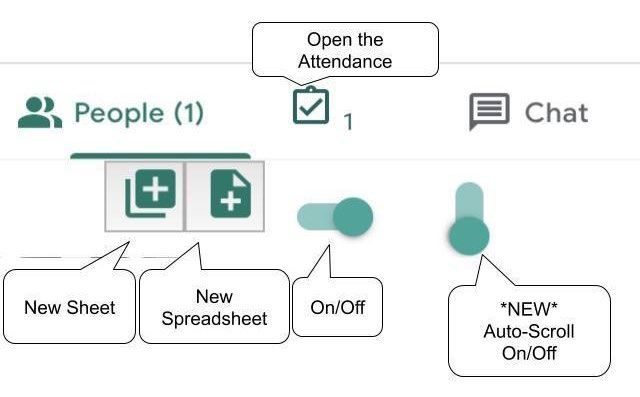
VIRTUAL FALL RECRUITING AND ENGAGEMENT PLAYBOOK

APPENDIX A – RECOMMENDATIONS FOR VIRTUAL ENGAGEMENT                            Introductions (Suggested time: 15-20 minutes)
                                                                               We suggest kicking off your engagement by introducing the hiring manager,
Virtual Engagement Best Practices, Logistical and Tactical                     recruiter, alumni, and/or a senior speaker.
Recommendations                                                                • Students are more engaged listening to a speaker than reading slides. A
Based on student feedback and best practices we have seen with virtual           memorable speaker and/ or interactive presentation is an opportunity
events, the best way to engage students in a virtual format is to make it as     for companies to differentiate themselves.
interactive and discussion-oriented as possible with the use of small break-   • A virtual session is a great opportunity for a firm to tap senior
out groups. We are recommending a 60-minute time frame for company               leaders, who may not have been able to otherwise attend an in-person
presentations. Below are some recommendations on how to make virtual             presentation, to provide remarks. Students enjoy hearing and learning
events valuable for both company and student attendees.                          from senior leaders, as they can provide perspectives on company
                                                                                 culture and goals that are difficult for students to research.
General Recommendations
Keep your events original (the less scripted the better). Students want to     Interactive Sessions (Suggested time: 35-45 minutes)
hear from current employees in a personalized and casual way. Showing          We recommend firms review ground rules for the breakouts such as: Q&A
comradery and community with panels or office tours is a great way to          structure, breakout room structure, etc. Format suggestions include:
recruit students authentically.                                                • Panel: 3-4 panelists followed by Q&A.
                                                                               • Open Q&A: Open forum for Q&A moderated by a company rep.
During an Event                                                                • Small Group Networking: Leverage breakout rooms for more intimate
                                                                                  conversations. We recommend one company rep meeting with 4-6
Test audio and video                                                              students in each room.
About 20 minutes before your event, have a fellow employee login as an
attendee to test your audio and video.                                         We recommend ending the event by providing students with the recruiter’s
                                                                               or the alum/alumni contact info and outlining any next steps for students.
Track who attends                                                              For any questions regarding this document, please contact your Relationship
Make sure you track who shows up as your Relationship Manager                  Manager or employerengagementteam@kenan-flagler.unc.edu.
will provide a curated resume book within 72 hours of your Company
Presentation. Here are a few ways you can do this:                             Prior to Networking Forum or Career Fair Event Best Practices
• Check to see if your livestream platform allows for an attendee download.    and Recommendations
   Many livestream platforms let you download a CSV or Excel file so you       Depending on what type of event you are hosting, some of these
   can track the names and emails of those who attended (see Appendix C        recommendations will not be applicable. Please decide what is relevant
   for taking attendance using the most popular technologies).                 and appropriate using the below criteria.

Monitor chat questions                                                         What do I need to do before the event?
Chat questions—just like live questions—are a great indicator of interest.     • Register your company
Make sure there is a moderator alongside your host or co-hosts to facilitate   • Consider getting a video broadcast booth to host webinars during
the conversation. If your event is hosted using our Zoom rooms, your             the event
Relationship Manager or someone else on our Career & Leadership (C&L)               o Each live broadcast booth can have up to 4 presenters
team will serve as your chat room monitor.                                          o Live broadcasts can be recorded
                                                                               • Determine alumni and/or additional staff that will be participating and
After an Event                                                                   sign up for a platform demo provided by the selected platform
Be sure you provide students with information about how to remain in touch     • Create a company profile
with company representatives or alums. You may also have upcoming              • Gather all the digital content needed to brand your event, whether it be
events scheduled on our Networking Days or with clubs that you should            logos, videos, marketing materials, corporate videos, or external links,
communicate to attendees.                                                        including job links
                                                                               • There is a platform that will allow you to enter questions prior to the event
Recommendations for Company-Hosted (Self-Service) and                            to better understand the student you will be interacting with, so have
Kenan-Flagler-Hosted (Full-Service) Events                                       those questions determined prior to the event and uploaded.
Companies are welcome to customize their 60-minute slot. Below are a few       • We suggest having at least 3 people in the chat room. This allows for
recommendations on virtual presentation structure and how to leverage            you to utilize the 1:1 breakout feature, but it is better if you can have 3
face-to-face interactions.                                                       to 4 alumni participate if possible. It is also great to involve subject
                                                                                 matter experts and other decision-makers in the networking process.
VIRTUAL FALL RECRUITING AND ENGAGEMENT PLAYBOOK
What do I need to do the day-of? • Virtual Fall Trivia Series
• We suggest staffing your chat room at least 15 minutes before the start o Event could be hosted once or twice a month with about 20
of the event time to prepare for students. They will be ready to chat! students. You would pair 4 teams of students with 1 to 2 alum to
• If you have planned a presentation, get that set up upon entering the compete in trivia contests. This would give the students and alumni
chat room the opportunity to get to know one another more casually. There are
• Get your predetermined student questions loaded into the system apps that will provide you with questions and topics or you could
• Utilize the private text chat and video chat functions if you find a customize a topic relative to your organization, industry, etc.
candidate that you are really interested in • Industry Education Series
• Chat with some amazing MBA talent! o Select a topic relative to your industry or company and an individual
• Rate each one of your student conversations and receive ratings from the or monthly event.
students as well • Employee Panel
o Feature recent grads or alumni—students like to hear from people
What should I do to follow-up? who are like them and have been through a similar journey. Have a
• Feel free to reach out to any students you are interested in hiring or moderator prepare some pre-determined questions about their
chatting with outside of the event. journey from college to career, experience at the organization, and
• If you do hire a student, please let us know. We would like to share in why they are proudest about their work. This will help stem a series of
your/their excitement! questions from students that the panel can answer.
• We will be sending a survey after the event; please take a moment to give • Office Tour
us your feedback about the event to help us plan future events. o If your office is open, highlight what a day in the life of an intern or
• Company participants will also receive ratings and other information that new college grad would look like. If your office is currently closed,
is tracked within a short time after the event has ended. share any videos you might have on YouTube that showcase everyday
life.
o Show the fun aspects that make being in your office exciting and
APPENDIX B – EVENT IDEAS rewarding (tip: these should be pre-recorded so that there aren’t any
issues with content or employee consent).
Event Ideas
• AMA (Ask Me Anything)
• Hot Cookies and Hot Topics in (you may add your focus and it can be
o Host this session with a recruiter, hiring manager or alum as well as a
on anything)
moderator.
• Hot Wings and Hot Topics
o Allow students to ask questions about the interview process,
• Cold Beer and Hot topics
hiring timelines, employer perks, culture, mentorship, career growth,
• Wine Tasting or Craft Beer Tasting
and overall company culture. Come prepared with a list of FAQs to
• Reach for the Stars or Breakfast with the Stars
help get the conversation going.
o This event would feature a high-ranking official in your organization
o Event could be focused on a specific topic related to your industry
chatting with the students and taking audience questions. You may
current events or current events
even have a set of pre-selected personal and professional questions
• ERGs (Employee Resource Groups)
to help the audience get to know the real person then take questions.
o Leverage internal ERGs to show future students how the company
is committed to creating an inclusive workplace where everyone has
a community to lean on.VIRTUAL FALL RECRUITING AND ENGAGEMENT PLAYBOOK APPENDIX C – TAKING ATTENDANCE Company-Hosted Event Instructions for Attendance Using Various Virtual Platforms Being able to accurately take attendance is one of the most important steps in virtual outreach. This is especially true when presenting at Kenan-Flagler because your Relationship Manager will provide you with a curated resume book of attendees within 48 hours of receiving your attendance report from the company presentation. Below you will find the steps necessary to take attendance across several of the platforms that could be used in the fall. ZOOM 1. Log in to Zoom on the web 2. Click Reports and then choose Usage Report 3. Check that the date range at the top includes the session for which you want to take attendance. Then click on the Participants link for the session.
VIRTUAL FALL RECRUITING AND ENGAGEMENT PLAYBOOK

4. Review the report. Check the Export with meeting data checkbox. Click Show Unique users to see a
collapsed list of each unique attendee and their total duration.

5. Click Export. An Excel file will download to your computer. Open the Excel file.

WEBEX
1. Log in to your WebEx account. Select ‘My WebEx’ in the top menu.
VIRTUAL FALL RECRUITING AND ENGAGEMENT PLAYBOOK

2. On the MyWebEx page - Select ‘My Reports’ from the menu on the left of the page.

3. Click the ‘Usage Report” hyperlink.
4. Select your date range and a sort option to search. Click Display Report button.

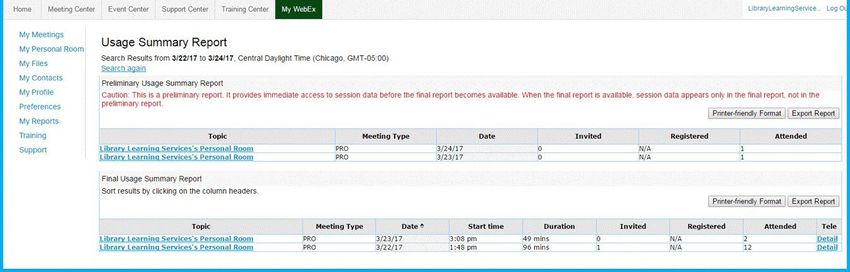
5. Click on the appropriate meeting title from the results.
VIRTUAL FALL RECRUITING AND ENGAGEMENT PLAYBOOK

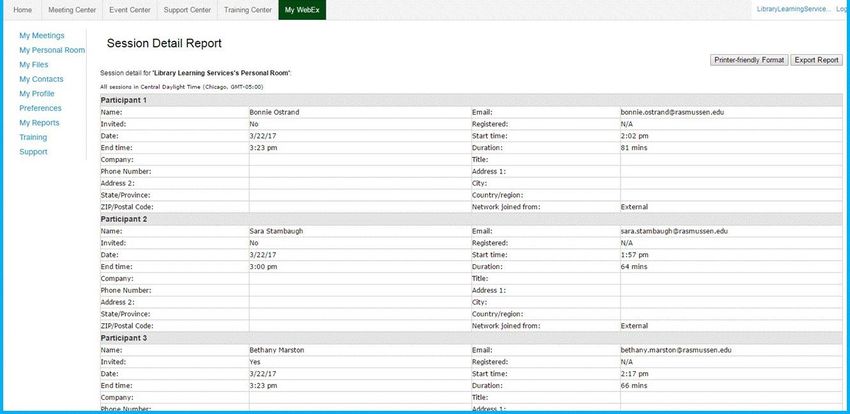
6. The report will display each attendee’s record. It includes the Enter/Exit times and the amount of time
spent in the meeting. You can select Printer-friendly format or Export Report (Excel) buttons.

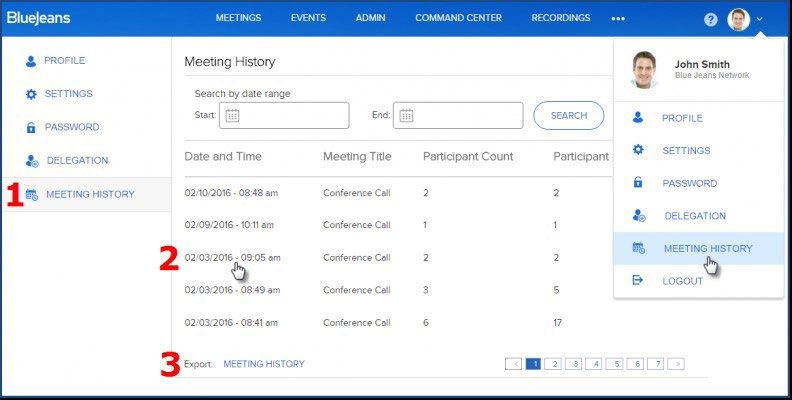
BLUEJEANS
To review your Meeting History, please follow these instructions:
   1. Open your Applications Menu in the top right-hand corner of the dashboard and select
      Meeting History.
   2. Click on an any Meeting Entry to pull up an overview of the session.
   3. Click on Export Meeting History to create a csv report.
VIRTUAL FALL RECRUITING AND ENGAGEMENT PLAYBOOK
To review your Group’s Meeting & Download History, please follow these instructions:
1. Access your Admin Console and select Meeting History from the side menu.
2. Click on an any Meeting Entry to pull up an overview of the session.
3. Click the Downloads tab to see list of reports generated by the group’s users
4. Click on Export Meeting or Attendee History to create a csv report.
GOTOMEETING
To view meeting history:
1. Log in to www.gotomeeting.com and select My Meetings and then Meeting History from the
left navigation.
2. Select the time frame and click the Show History button.
3. Click the number in the attendee column to display attendee names, email addresses and join/leave
times.VIRTUAL FALL RECRUITING AND ENGAGEMENT PLAYBOOK
MICROSOFT TEAMS
1. During the meeting, select Show participants and choose Download attendee list .
2. The report will download as a .CSV file that can be opened in Excel. The .CSV file contains the name,
join time, and leave time of all meeting attendees.
3. Keep in mind that you’ll only be able to download the attendance report while the meeting is in
progress and participants are still present.
GOOGLE MEET
To view meeting history:
How to Get the Google Meet Attendance Chrome Extension:
1. Go to the Chrome Web Store and search for “Meet Attendance.” Alternatively, you could also
click on this link to jump ahead.
2. After locating the extension, hit ‘Add to Chrome.’ Let it install. After successfully installing, the
extension would light up when you’re on a supported page — Meet’s official portal.
How to Take Attendance in Google Meet:
1. Open Google Meet in your browser.
2. Now, when a Google Meet session/meeting is underway, you’ll notice an extra tab — checkbox — right
beside the ‘People’ tab.VIRTUAL FALL RECRUITING AND ENGAGEMENT PLAYBOOK
3. Click on the tab to go to you the Google Sheet where attendance details are being stored.
4. Hover the tab and you’ll find a couple of options. Click on the ‘+’ Spreadsheet icon to create a
separate spreadsheet for longer meetings. The first unnamed horizontal toggle, on the other hand,
is used to automatically log the participants.VIRTUAL FALL RECRUITING AND ENGAGEMENT PLAYBOOK
5. Toggle off and on to capture the current attendees, and then click on the checkbox tab to access
the spreadsheet. Name of attendees, alongside meeting URL and joining time would be displayed
on the sheet.
APPENDIX D – VIRTUAL TECHNOLOGY PLATFORMS
• Brazen
• VirBELA
• GatherlyYou can also read


