2021 New Student Room Selection
←
→
Page content transcription
If your browser does not render page correctly, please read the page content below

2021 New Student Room Selection
New Student Room Selection?

               New Student Room Selection
              (NSRS) is the process by which
            students who do not currently live
            on campus are able to self-select
             their housing assignment for the
                  upcoming school year.
What is the Residency Requirement?
Any student under 21 years of age or who will have less
than 60 earned credits by the start of the semester is
required to live on campus. You may apply for an
exemption from the residency requirement if you:

•   Live with a parent or legal guardian within 40 miles
    commuting distance of the university

•   Active duty or veteran of military service

•   Legally married or

•   With children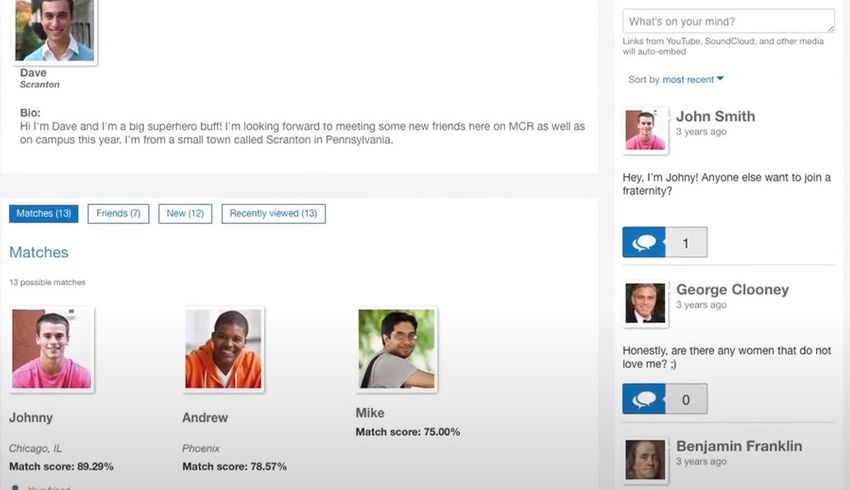
Let’s Talk Contracts!
            Signing the Housing & Dining
          contract is a binding agreement.

           It is advised that you read the
              document before signing.

           Please review cancellation fee
                schedule on page 3!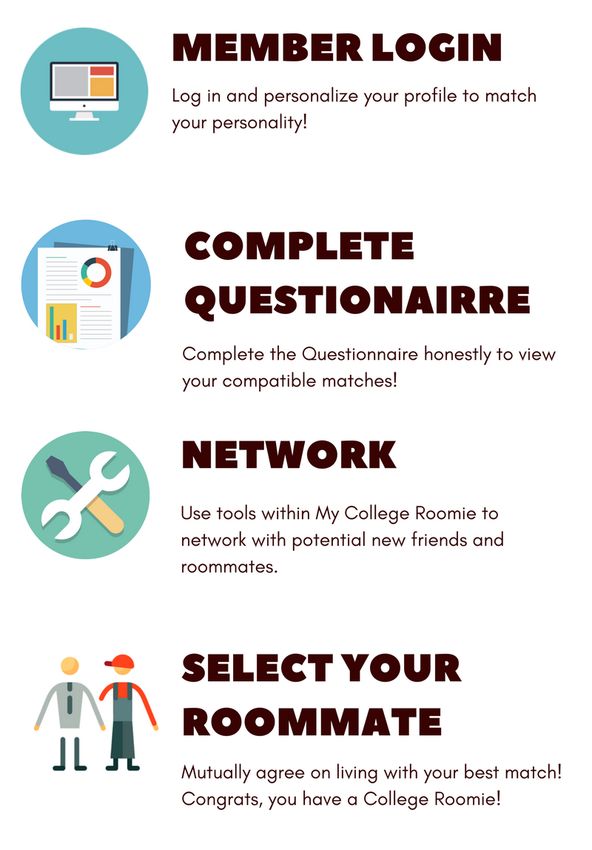
Signing The Contract!
         Signing the contract DOES NOT
         ALWAYS mean your contract has
         been submitted!
         If you are under 18 years old
         when completing the form you
         WILL need a parent verification
         signature to complete the
         contract.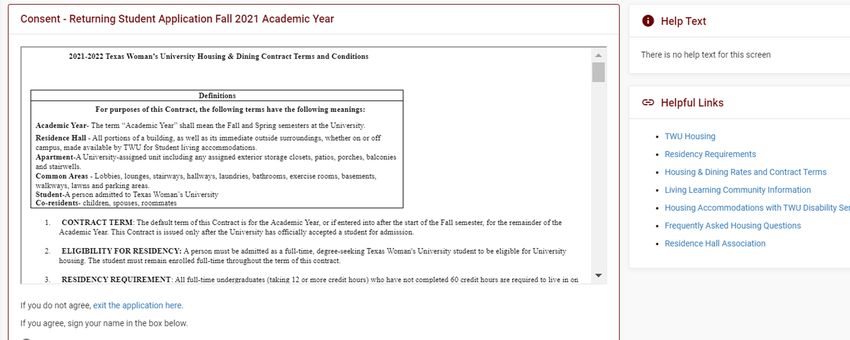
Selection Dates

                  Selection Period                           Start       End
These are based
                  Apply by March 31                          4/05/2022   4/08/2022
upon when your
contract was      Apply April 1-30                           5/03/2022   5/06/2022

officially        Apply May 1-31                             6/07/2022   6/10/2022

submitted.        Apply June 1-30                            7/12/2022   7/15/2022

                  Students who apply after June 30 will be   7/16/2022
                  manually assigned a space.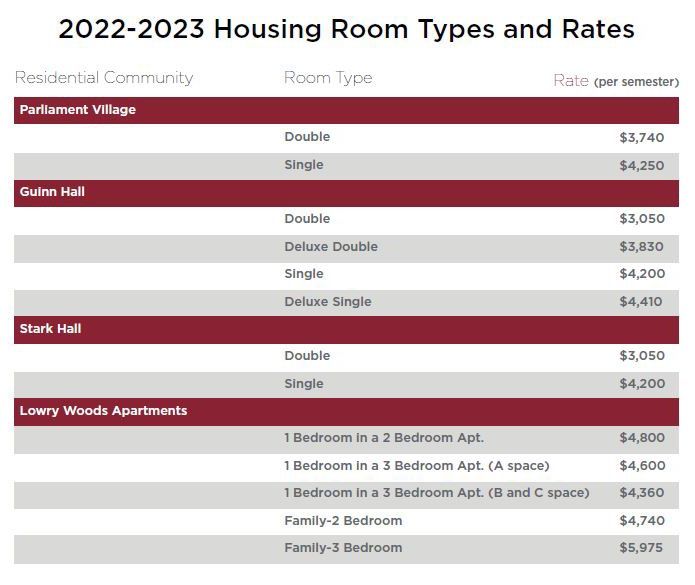
Where Can I Live?
Parliament Village: New, first-time in college students. Parliament is also
home to LLCs.

Stark and Guinn Halls: Students having between 30 and 60 credit hours
& under the age of 21. New students with 30 or more credit hours may
request to live in Guinn or Stark by contacting the Housing office,
depending on availability.

Lowry Woods Apartments: New or transfer students over the age of 21 or
having 60 credit hours or more.
 -   Age is calculated as age at the start of the semester 8/29/22.

First Time In College (FTIC)

All FTIC students under 21 years of age are designated
to live in Parliament Village. If you are an FTIC student
with 30 or more credits you can request to select a
space in another building by emailing the housing
office at housing@twu.edu. Spaces are limited and
are not guaranteed. If no space is available you will
be manually placed.

What Kind Of Rooms Are Available?
Parliament Village:
•    Community style bathrooms.
•    Floorplan options are as shown.
     - Room dimensions and layouts may vary.

•    Double & Single spaces available.
     - Prices are increased for single rooms.

•    Singles are smaller than a double.
What Kind Of Rooms Are Available?
Stark Hall:
•    Floorplan options are as shown.
     - Room dimensions and layouts may vary.

•    Double & Single spaces available.
     - Prices are increased for single rooms.
     - Half of the building will be single spaces.

•    Many singles are the same size as
     a double, with less furniture.
What Kind Of Rooms Are Available?
Guinn Hall:
• Floorplan options are as shown.
- Room dimensions and layouts may vary.
• Double & Single spaces available.
- Prices are increased for single rooms.
• Super Double and Single spaces are
available for upper-class students.What Kind Of Rooms Are Available?
Lowry Woods Apartments:
• Floorplan options shown.
- Room dimensions and layouts may vary slightly.
• 2 and 3 bedroom apartments.
- Each room is a single room, there are no single
apartments.
• Provides accommodations for Families and
Graduate Students in select buildings.How To Apply for Housing
Go to TWU Housing Website, Scroll down
Log in using the same
    username and
 password you use to
  log into your email
  and Pioneer Portal.   If you forget your login,
                         contact the TWU Help
                                  Desk!
Housing Self-Service Home Page
Select “Applications &
Request Forms” Tab.Housing Self-Service Home Page
Select “2022-2023 New
Student Application (Fall
2022)”Read and agree to terms of contract
Sign or type your name in
the signature box.Personal Information and General Application Questions
First complete the
New
Personal Information
Section.
Then click ContinueEmergency Contact & Missing Persons Info
New First update the Missing
Person and Emergency
Contact for sections by
clicking on the pencils.
Then click ContinueEmergency Contact & Missing Persons Info
If you are under 18 years old, this email address will
receive the verification signature email needed to be
signed for completion of application.Yay! Your Housing Contract is Submitted
New
This message
shows your
application
was submitted
successfully.
Please make
sure you see
this message
before closing
your browser.Selecting your Roommate
My College Roomie? (a.k.a – MCR)
What is My College Roomie?

                    Online roommate
                  matching program that
                    will show you the
                 roommates who are most
                   compatible with you
                 based on an introductory
                          survey.
What is Next?
24 Hours after you apply
for housing you will
receive a welcome email
from MyCollegeRoomie@
mycollegeroomie.com
with instructions.
Wait 24 hours before
calling to ask about your
email.My College Roomie – after receiving your email
1) Login to MCR with your university credentials
1) Complete your profile and questionnaire
1) Start making friends
1) Match and select your roommateMy College Roomie – Home screen
Initial profile
information that all
will see.
Where you can
post and
See all possible converse with
roommate matches others to see
ranked by match what people
score are doing and
who may like
the same
things as you.My College Roomie – How to match?
(1) Send a
friend request
and be
accepted.My College Roomie – How to match?
(2) Request
them to be
your
roommate.
You must be friends
before you will see
the “request
roommate” button.My College Roomie – How to match?
(3) Once
accepted
your
roommate
match will
show on the
top of your
home screen.Confirming Roommates in The Housing Portal
From the home
screen, select
“Roommates &
Room Selection”Confirming Roommates in The Housing Portal
Click “Select Test2, Student2
Roommates” to
Roommate matches from
view your match! MCR will populate hereI already know who I want as my
roommate, do I have to use MCR?
YES! You can search for
your friend by name and
match with them.I want a single room, do I have to use
MCR?
No! You don’t have to
match to select a room!
If there are no singles you
may get a random
roommate.What if I can’t find my friend?
1) They may not have
applied for housing
2) They may not have
waited 24 hours
3) They may not have the
same credits/age/LLC
qualifications as youRoommate Matching Takeaways • Wait 24 hours to use MCR and see your pair in Housing Portal. • Add a friend, then ask to be roommate. • You will not be able to find your roommate unless they have completed their application. • Your roommate selection will not be confirmed if they are in a different demographic (ex. senior/sophomore). • You can continue to change roommates in MCR until you select a space. • If someone unmatched your roommate request, you will NOT be notified. Please check your Housing Portal to make sure your roommate match is complete.
How to Self-Select
  Your Space
Selecting Your Space

              From the home
               screen, click
                 “Select a
               Room/Suite”
Selecting Your Space Confirm you can Select your process select at this time from the drop down and hit continue… menu
Selecting Your Space

Confirm you and
 your matched
 roommate are
   both listed                       Click, “Find
                                 Available Rooms.”
                                Filters are available.
Selecting Your Space You can see how many available When you have located spaces are in the the room you would like, suite/room here. click “Select Suite.”
Selecting Your Space

Confirm all roommates are shown to the left. When you
      are ready to submit your assignment, click
        “I agree – Submit My Room Selection.”
Selecting Your Space
If you have matched with a roommate only 1 person
needs to select a room. That 1 person can place
everyone into the room.Selecting Your Space
Your process is complete and you have been
assigned to a room!Housing Self-Service Home Page
You can see your room assignment,
and confirmed roommates on your Self-
Service homepage.
Fall 2022
Test 2 Student 2Things to note: • During self-selection only one of you will place all the confirmed roommate(s) in the space. • All applicants should go to their Housing portal to verify their room assignment. • Pay attention to the room style or apartment layout, as these can vary in price and the number of students sharing a space.
How to Choose Your
     Meal Plan
Selecting Your Dining Plan
From the home
screen, select
“Choose Your
Dining Plan”Selecting Your Dining Plan
Choose Your Dining Plan
From the home
screen, select
“Choose Your
Dining Plan”Selecting Your Dining Plan
Select your dining plan.
• Students in Parliament Village, Guinn Hall and Stark
Hall are required to select a residential meal plan.
• Students living in Lowry Woods may choose a
residential meal plan or a commuter meal plan.
• Meal Plans and Prices reflect 2021 – 2022 dining plan
options – 2022-2023 plans can be found on page 14.
Scroll to the bottom and hit the
“Submit” button to save.Questions?
You can also read


