A TESTING SERVICE FOR HOMECARE WORKERS IN ENGLAND - GUIDANCE DOCUMENT November 2020 - East Lancashire CCG
←
→
Page content transcription
If your browser does not render page correctly, please read the page content below
A TESTING SERVICE FOR
HOMECARE WORKERS IN
ENGLAND

GUIDANCE DOCUMENT

November 2020
Contents

  Summary: Testing for homecare workers    2
  How am I involved?                       3
  How does the service work?               5
  End to end process: Agency managers      8
      •   Preparing for the service
      •   Ordering test kits
      •   Communication responsibilities
      •   Storing and distributing kits
      •   Encouraging participation

  End to end process: Homecare workers     20
      •   Collection of test kits
      •   Using the test kits
      •   Registering test kits
      •   Returning test kits
      •   Results
      •   Weekly retesting

  Where to go for help                     37
  Appendix                                 39

                                                1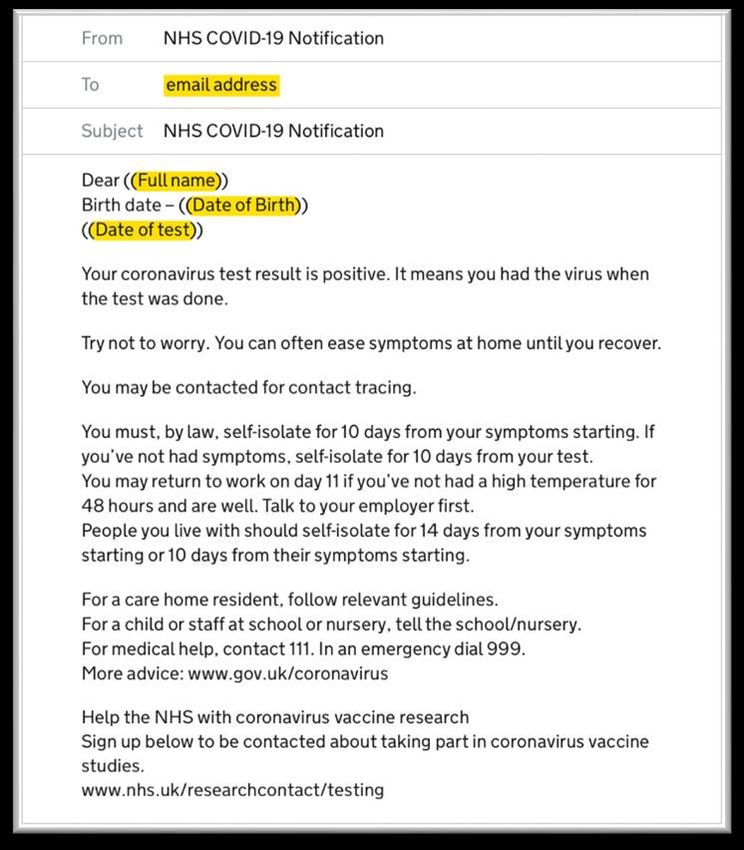
Summary: Testing for homecare workers

What is the service?                                                     Why is testing important?

• Weekly testing of all homecare workers in adult social care. This      • Identifies homecare workers who currently
  includes all carers in domiciliary care organisations.                   have Covid-19 so they are able to self-isolate if
                                                                           their result is positive
• Agency managers should order tests every 28 days for their
  homecare workers                                                       • Protects those receiving care from infection
                                                                           passed to them by homecare workers who are
• Four tests are delivered for each homecare worker to the agency, for     confirmed positive
  a 28 day testing cycle
                                                                         • Prevents and controls the spread of the virus by
                                                                           identifying asymptomatic cases
• Each homecare worker should be given four test kits every 28 days

• Every 7 days a care worker should take a test, register it online,
  and return it by post between Thursday and Sunday

• Homecare workers will receive their results in 2 to 4 days by email
  and text message (SMS)

• We will extend this service to all homecare workers in adult social
  care, including unregistered organisations, live in carers, and
  personal assistants.

                                                                                                                               2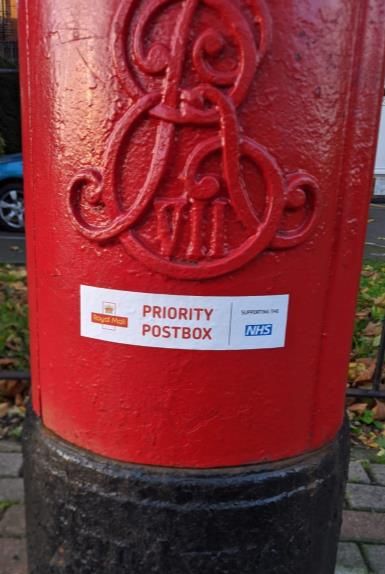
Which organisations are able to access test kits?

Your organisation is able to access                                    What if I am not able to access
testing now if:                                                        testing right now?

• You are a CQC regulated homecare organisation in England             We are working hard to increase our testing capacity,
  providing personal care                                              develop new technologies and reach more people.
                                                                       We will be including the following organisations in the
• This is defined in the CQC data as locations with the primary        coming weeks and will provide further updates:
  inspection category “Community based adult social care services”
  and providing the service type “Domiciliary care service”.           •   Homecare agencies not registered with CQC –
                                                                           we aim to roll out testing to all homecare
• If you believe you match this criteria and have not been contacted       organisations, including live in carers. We will
  by NHS Test and Trace with information on ordering test kits,            provide a further update in the coming weeks on
  please call 119                                                          how you can sign up to order test kits.

                                                                       •   Personal assistants - we aim to roll out testing
                                                                           to all personal assistants. We will provide a
                                                                           further update in the coming weeks on how you
                                                                           can sign up to order test kits.

                                                                                                                                 3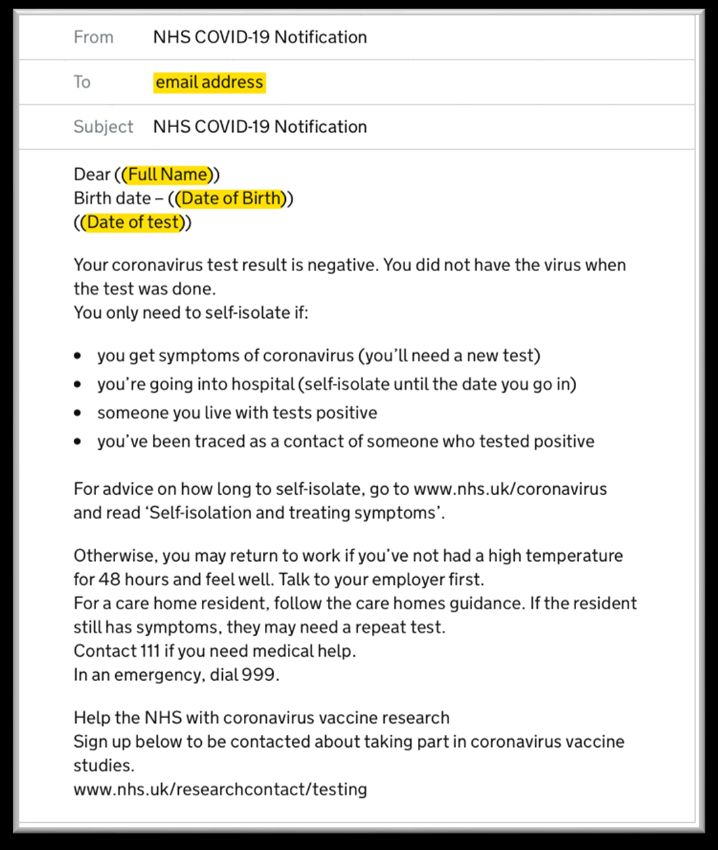
How am I involved?

An “Agency manager”                                                        A “Homecare worker”

You are the manager of a homecare agency, responsible for a team           You are a homecare worker who visits people with care
of homecare workers or you have been delegated responsibility for          and support needs in their homes
testing by your organisation
                                                                           Your key responsibilities are to:
Your key responsibilities are to:
                                                                           1.   Conduct tests weekly only between Thursdays and
                                                                                Sundays
1.   Attend a webinar to understand the process
                                                                           2.   Register your tests as soon as you have completed them
2.   Order test kits for homecare workers for every 28 day testing cycle        each week using your agency’s Unique Organisation
                                                                                Number (UON)
3.   Communicate your agency’s Unique Organisation Number (UON) to
     homecare workers                                                      3.   Return your test kits at a Royal Mail priority post box on
                                                                                the same day that you take the test
4.   Distribute test kits to homecare workers
                                                                           4.   If you test positive: isolate, notify your line manager and
5.   Encourage and support your homecare workers to complete weekly             provide contacts to NHS Track and Trace
     testing. This must happen between Thursdays and Sundays
                                                                           5.   Regardless of your result, continue following all IPC
                                                                                measures such as wearing PPE, washing your hands and
                                                                                socially distancing where possible

                                                                                                                                              4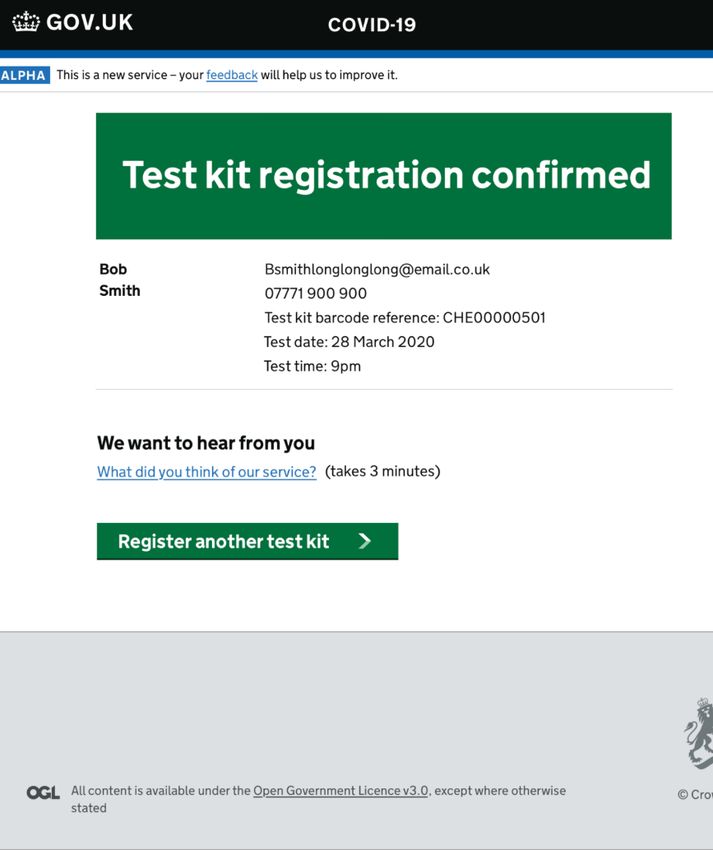
How the service works

                        5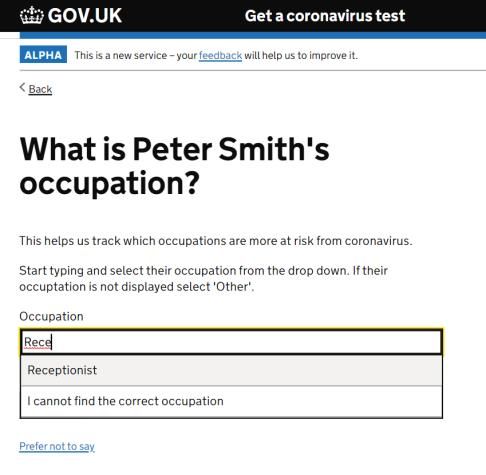
Summary: Testing for homecare workers

                  Agency manager identifies         Agency manager receives             Agency manager               Agency manager takes
                    the number of eligible            Unique Organisation              shares UON with the            delivery of the kits and
                      homecare workers              Number (UON) and orders             homecare workers             arranges for careworkers
                                                            test kits                                                     to receive them

  Homecare worker                   Homecare worker                Homecare worker              Homecare worker returns               Homecare worker
receives four kits from           takes their own swabs         registers test kit online,      test kit on the same day of           receives results via
 the agency manger                    using test kit            providing the UON from            testing via their nearest              email and text
                                                                 their agency manager                 priority post box                 message (SMS)
                                                                                                                                       Repeats process
 If you have any queries with any of the steps please                                                                                    every week
 call the national coronavirus contact centre on 119

                                                                                                                                                             6
Unique Organisation Number (UON)

NHS Test and Trace assigns all participating organisations a single Unique Organisation Number (UON)

Agency managers will receive their UON via the email address registered with CQC. Please make sure that the person
who receives these emails understands the importance of this message and knows who to contact

A UON is an 8 digit number which is exclusive to an individual organisation. This can be used to login to all online elements
of the testing process

Agency managers will need to use their UON for:

•   Ordering test kits (https://request-testing.test-for-coronavirus.service.gov.uk)
•   Contacting the national coronavirus contact centre for support (dial 119, or 0300 303 2713 in Scotland)

Homecare workers will need to use their UON for:

•   Registering completed test kits to make sure they will receive their results (https://gov.uk/register-organisation-tests)

If you have any issues with this process, please call 119

                                                                                                                                7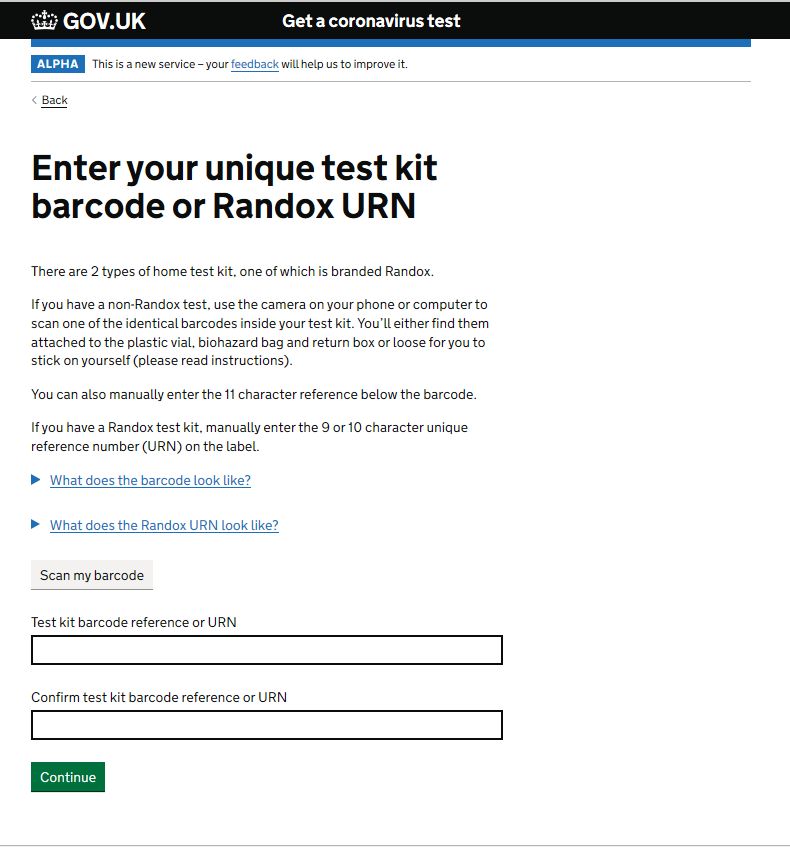
Identify homecare   Order test kits   Communicate with   Distribute test kits
          workers                          homecare workers

End to end Process:
Agency Managers
                                                                                     8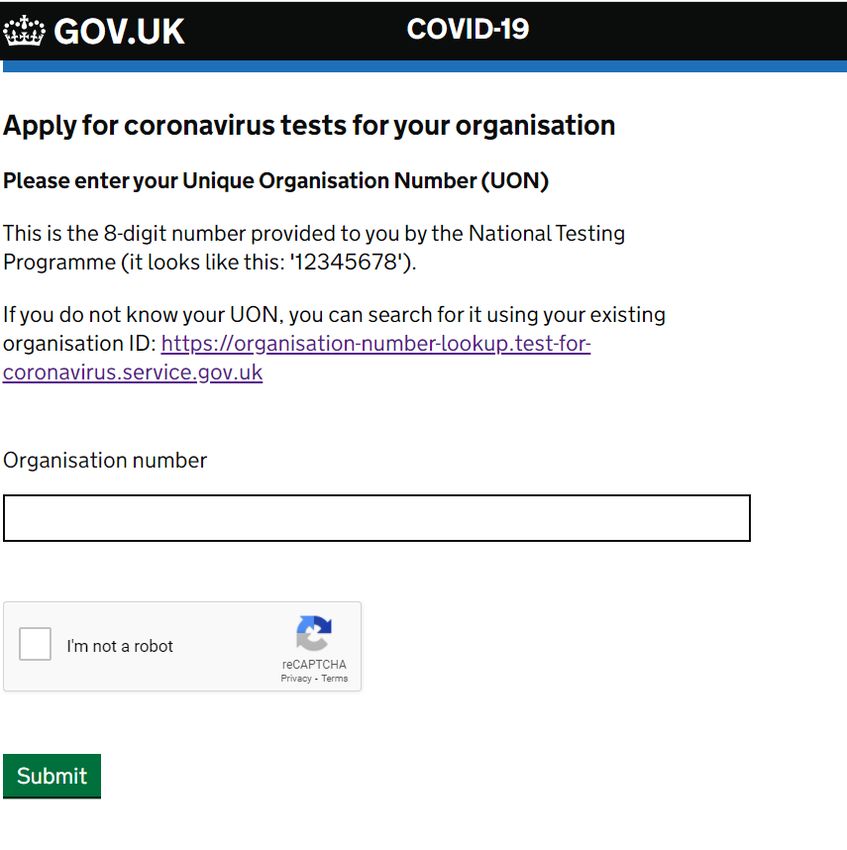
Ordering test kits

                     9
Ordering test kits Order kits
The agency manager is responsible for ordering test kits for the
homecare workers in the team
Each agency manager must register for test kits using this link
(https://request-testing.test-for-coronavirus.service.gov.uk)
In order to apply, you will need:
1. Your Unique Organisation Number (UON)
2. The total number of homecare workers for testing
When ordering you will be asked to enter the number of non
staff. You should enter zero for this
Once you have placed and order, the you will receive a
confirmatory email from the following address:
organisation.coronavirus.testing@notifications.service.gov.uk Screenshot of entering a UON
10After test kits have been ordered Order kits
The agency manager will receive an email from:
organisation.coronavirus.testing@notifications.service.gov.uk
when their test kits have been dispatched, informing them of their
delivery date
Test kits will be delivered in boxes of 40 to the registered
address of your homecare agency with the CQC
The agency manager is responsible for taking delivery of the test
kits
The agency manager must then order kits every 28 days for their
homecare workers
If you have any issues ordering test kits, please call 119
Screenshot of entering a UON
11Communicating to your
homecare workers
12Communicating to your homecare workers Communicate
The agency manager is responsible for communicating key information that homecare workers will need to successfully
conduct testing
We encourage agency managers to use existing communication channels that are best suited to your team
The activities which need to take place are:
Recommended form of Alternative form of
Communication When to do this?
communication communication
1. Group text
message/WhatsApp
Share your location’s Unique Before test kits are delivered, care Send an email to all care workers 2. Display the UON where team
1 Organisation Number (UON) with workers will need the UON to including the UON. Suggested members can see it (e.g. team
homecare workers in the team register their kits wording will be provided noticeboard)
3. Add information to workers’
wage slips
1. Announce in team meetings
Make the team aware of the Email relevant links to the team.
2 Before the test kits are delivered 2. Watch the agency webinar as
process Suggested wording will be provided
a team
1. Provide printed copies of
Share all relevant support Email relevant links to the team.
3 Before testing begins materials to the workforce who
materials Suggested wording will be provided
need them
Inform the team that the kits
Most appropriate channel for your 1. Share a drafted email
4 have arrived, and distribute them As soon as the kits are delivered
team, e.g. Microsoft Teams channel 2. Group text message/WhatsApp
or arrange collections
13Distributing test kits
14Distributing test kits Distribute
Once the kits are delivered to the registered address, it is the agency manager’s responsibility to distribute them to
homecare workers.
The agency manager should inform their team that the kits have arrived. They can either distribute the kits, or advise
carers to collect four test kits each as soon as possible.
You will know best how to handle the distribution process for your team but below are some suggestions that have
been put forward by homecare agencies as part of our initial research.
1. Homecare workers can pick up kits at the same time they pick up other materials (e.g. PPE, consumables and
other medical supplies)
2. Agency managers or supervisors can hand out the kits to the group at daily/weekly meetings
Ensure each care worker receives 4 kits every 28 days so that weekly testing can continue without interruption
Each test kit should include a pink individual Royal Mail return label. Please check that there is one in
each bag provided.
15Encouraging participation
16Encouraging participation
In order to protect your homecare workers and the people they support, it is important that homecare workers are
encouraged to complete the end-to-end weekly process of:
1. Completing the test between a Thursday and Sunday each week
2. Registering the test online
3. Returning the test through a priority post box
Below are some ideas that we have seen work well to encourage participation for homecare workers:
Digital tracker (e.g. Microsoft A physical tracker (e.g. a matrix Text/WhatsApp group message Sending outlook invite
Teams) so homecare workers can on a team notice board with reminders to test placeholders to remind team
confirm they have tested each week stickers for completed tests) members to test
17Support available for
homecare agencies
18Support for home care agencies
The Infection Control Fund, set up in May, has been extended until March 2021, with an extra
£546 million for the care sector to take key steps to improve infection prevention and control,
enabling providers to restrict staff movement in care homes and pay staff who are self-isolating
their normal wages
This means we have provided over £1.1 billion of ring-fenced funding for infection control
throughout the Covid-19 pandemic
The extension of the ICF modified the conditions of the fund to recognise the vital role of
community care providers, who have received £158.5m through this grant.
More information on the conditions of this grant, as well as how to access funding, can be found
here:
https://www.gov.uk/government/publications/adult-social-care-infection-control-fund-round-2/adult-
social-care-infection-control-fund-round-2-guidance
19Collect Test Register Return Results & repeat
End to end Process:
Homecare workers
20Collecting or receiving test
kits
21Collect
Collecting test kits
The agency manager will inform homecare workers when test kits arrive and how they can be collected
or distributed
Each care worker should take four test kits, one for each of the four weekly testing cycles
Please ensure you have postage labels for each test
Prepare for testing by looking at guidance
Before testing be sure to:
• Read guidance for homecare workers
• Read guidance included with your test kit
• Watch the instructional video for self swabbing
https://www.gov.uk/government/publications/covid-19-guidance-for-taking-
swab-samples/how-to-use-the-self-swabbing-kit-for-a-combined-throat-
and-nose-swab-video Instructional video for self swabbing
If a homecare worker becomes symptomatic and has a kit available at
home, they should test themselves in addition to the normal weekly cycle
22Using the test kits
23Test
Taking the test
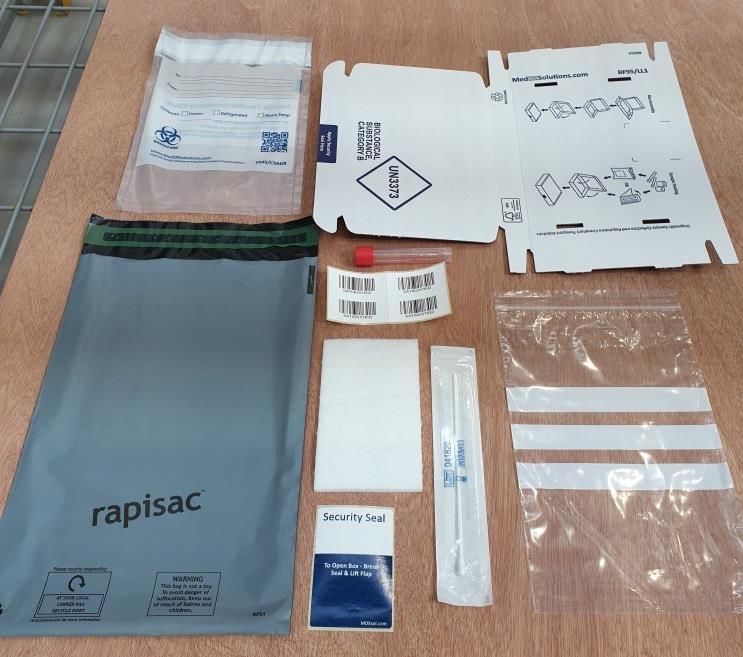
The test kits homecare workers will receive will be standard organisation test kits; they will contain:
1 2 3
6
7
1
3
4 5 6
5
4
7 8 9 8
2
Royal Mail
return label
An example test kit
24Test
Taking the test
Homecare workers will conduct a combined
throat and nose self-swab for the test
Follow the instructional video on how to do a
throat and nasal swab
https://www.gov.uk/government/publications/co
vid-19-guidance-for-taking-swab-samples/how- Instructional video for self swabbing
to-use-the-self-swabbing-kit-for-a-combined-
throat-and-nose-swab-video You must only conduct your test between Thursdays and
Sundays. Testing on other days may result in delays
replenishing your agencies test kits after your four week cycle.
Always leave 7 days between tests where possible
If possible please continue testing whilst on holiday (in the UK)
or off work due to illness which is not related to Coronavirus
25Registering test kits
26Register
Registering test kits
Steps to register a test kit:
These are the key steps, for full step-by-step instructions please see the appendix
Each week you should register your test after you have completed your test
1. Please go to https://organisations.test-for-coronavirus.service.gov.uk/register-
organisation-tests
2. Enter Unique Organisation Number of your homecare agency, you will receive
this from your agency manager
3. Enter or scan test kit barcode, please enter carefully and do not copy and paste
4. Enter personal details:
• Name
• Whether they are a service user or staff member
• Whether they have symptoms or not
• Gender
• Date of birth
• Email address (for results)
• Phone number (for results)
• Home postcode
• NHS number (optional, note that this is important to update the subjects’ NHS records)
5. Check your answers
6. Test kit registration confirmed
7. You will receive confirmation of registration via email Screenshot of the registration portal
If there are any problems with registering a test kit, please call 119.
27Returning test kits
28Return
Returning test kits
Each test kit contains a pink pre-paid return label. Please attach this to the outside of the
delivery packaging next to the security seal. If there is no label in the kit please check in the
box that the kits were delivered in. If additional support is needed please call 119
The test kit should be returned via a Royal Mail priority box
You will find your nearest priority post box and its collection times at
www.royalmail.com/services-near-you
Only use a Royal Mail priority post box. It will be labelled with the below Priority Box sign
and one of the regional NHS logos. Please do not enter any Post Office with the kit Example of Royal Mail priority post box
29Return
Returning test kits
Please be aware of the following key points to ensure samples reach the laboratories in time:
Post kits in the priority mail box at least one hour before the last collection
time to ensure that it is not missed
Locate your nearest priority post box and collection times in before taking
the test. Tests should be posted on the same day as they are taken
Some post boxes do not collect post on Sundays, and so please check if
there is a collection available before testing on Sunday
30Receiving results
31Results & repeat
Receiving results
The person tested will receive:
1. An email
2. A text message (if a mobile phone number was provided at registration)
The results will also include guidance on next steps for the person tested. We have included example
guidance in the next few slides for your information.
Homecare workers should inform their employer of a positive result immediately so that they can protect
others that the care worker may have come into contact with at work
Find out more about what to do when you get your results https://www.nhs.uk/conditions/coronavirus-covid-
19/testing-and-tracing/what-your-test-result-means/
The Infection Control Fund (ICF) can be used to pay the wages of staff who have to self-isolate.
Further details are on the website noted below:
https://www.gov.uk/government/news/more-than-500-million-for-social-care-to-reduce-coronavirus-
transmission-over-winter
32Results & repeat
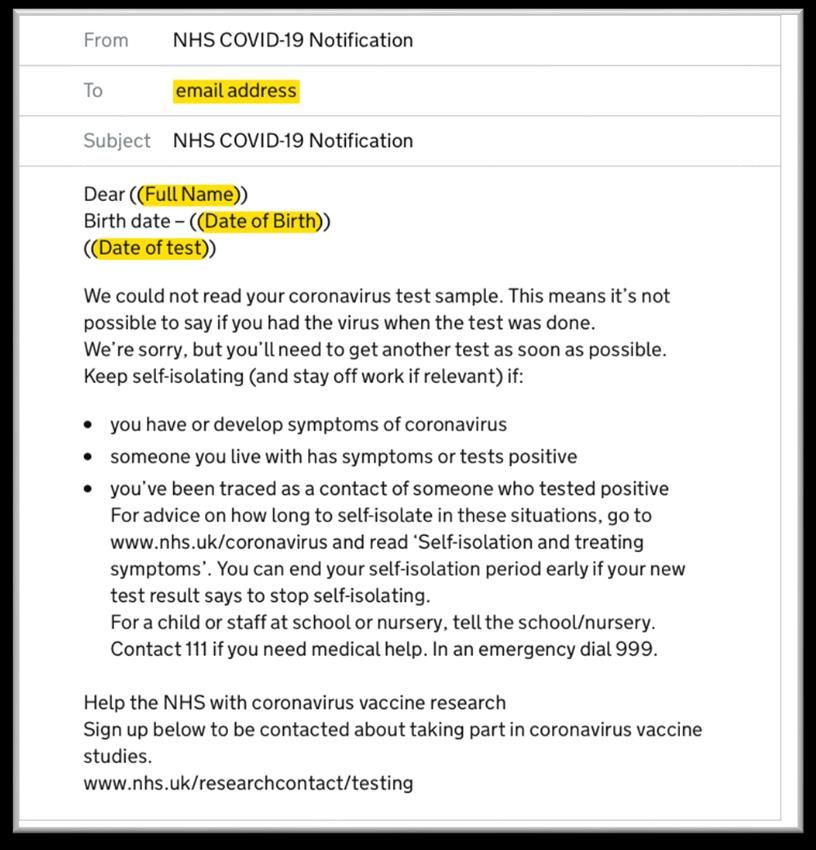
Examples of email containing results
There are 3 possible results – Negative, Positive and Unclear
Negative Positive Unclear
Email template for negative result Email template for positive result Email template for unclear result
33Results & repeat
Examples of text message containing results
There are 3 possible results – Negative, Positive and Unclear
Negative Positive Unclear
Your coronavirus test result is negative. You Your coronavirus test result is positive. It We could not read your coronavirus test
did not have the virus when the test was done. means you had the virus when the test was sample. This means its not possible to say if
You only need to self isolate if: done. you had the virus when the test was done.
- You get symptoms of coronavirus (you’ll Try not to worry. You can often ease We’re sorry, but you’ll need to get another test
need a new test) symptoms at home until you recover. as soon as possible.
- You’re going into hospital (self-isolating You may be contacted for contact tracing. Keep self-isolating (and care worker off work if
until the date you go in) relevant) if:
- Someone you live with tests positive You must, by law, self-isolate for 10 days from
- You’ve been traced as a contact of your symptoms starting. If you’ve not had - You have or develop symptoms of
someone who tested positive symptoms, self-isolate for 10 days from your coronavirus.
For advice on how long to self isolate, go to test. - Someone you live with has symptoms or
www.nhs.uk/coronavirus and read ‘Self- You may return to work on day 11 if you’ve not tests positive.
isolation and treating symptoms’ had a high temperature for 48 hours and are - You’ve been traced as a contact of
well. Talk to your employer first. People you someone who tested positive.
Otherwise, you may return to work if you’ve not live with should self-isolate for 14 days from
had a high temperature for 48 hours and feel your symptoms stating or 10 days from their For advice on how long to self-isolate in these
well. Talk to your employer first. symptoms starting. situations go to www.nhs.uk/coronavirus and
For a care home resident, follow relevant read ‘Self-isolation and treating symptoms’.
For a care home resident, follow the care guidelines You can end your self-isolation period early if
home guidance. If the resident still has For a child or staff at school or nursery, tell the your new test results says to stop self-isolating.
symptoms, they may need a repeat test. school/nursery.
For a child or staff at school or nursery, tell the
Contact 111 if you need medical help. For medical help, Contact 111. school/nursery.
In an emergency, dial 999.
In an emergency, dial 999.
Contact 111 if you need medical help.
In an emergency, dial 999.
Text template for negative result Text template for positive result Text template for unclear result
34Weekly retesting
35Results & repeat
Weekly retesting
After you have completed your first round of testing, homecare workers should continue to test on the
same day each week between Thursday and Sunday. If you have tested positive, you do not need to
retest for 90 days.
Repeat testing process every 7 days
Day one Day one Day one Day three to
Conduct test on day of Register test online five
Post completed test kit in
planned testing priority post box Receive result
If you receive a positive test result please stay
/ return home and inform your line manager
36Where to go for help
37Where to go for more support?
Online: Visiting the homecare testing portal at:
https://www.gov.uk/guidance/coronavirus-covid-19-getting-tested
Instructional videos: Watch instructional videos for how to conduct a test at:
https://www.youtube.com/watch?v=1l0jcv37WzI
https://www.gov.uk/government/publications/covid-19-guidance-for-
taking-swab-samples/how-to-use-the-self-swabbing-kit-for-a-combined-
throat-and-nose-swab-video
Coronavirus Testing Contact Centre: please call 119
Lines are open from 7am –11pm daily
38Appendix
Step-by-step guide for careworkers to
register their kits after completing a test
39Individual registration upload – Process Walkthrough
Please refer to slide 24 for initial registration instructions / links
STEP 1: Confirmation of consent STEP 2: Select other STEP 3: Enter your 8 digit UON
40Individual registration upload – Process Walkthrough
STEP 4: Select ‘add each person’s STEP 5: Select staff STEP 6: Enter your name
details one by one’
41Individual registration upload – Process Walkthrough
STEP 7: Enter your date of birth STEP 8: Enter your gender STEP 9: Enter your ethnicity. You can select
prefer not to say
42Individual registration upload – Process Walkthrough
STEP 10: Enter your work status. STEP 11: Enter your area of work. STEP 12: Enter your occupation. You must select
an option from drop down menu but you can say
that you are unable to find the correct occupation
43Individual registration upload – Process Walkthrough
STEP 13: Enter the name of your employer. STEP 14: Enter the country you live STEP 15: Enter your home postcode. An
in. additional question will ask for the first line of your
address.
44Individual registration upload – Process Walkthrough
STEP 16: Enter your NHS number, if you STEP 17: Select Yes or No depending STEP 18: Enter date of onset of symptoms, if you
know it. This is used to link the result to on whether you have symptoms. see this page.
your patient record.
45Individual registration upload – Process Walkthrough
STEP 19: Enter the test kit barcode. STEP 20: Enter the date and time the STEP 21: Enter your email address. Results will
test was completed. This date and be sent to this email address.
time can be in the past
46Individual registration upload – Process Walkthrough
STEP 22: Enter your mobile phone number STEP 23: Check your answers. You
if you’d like to receive text notification of are able to change details at this
your result. If you do not have a mobile or stage
do not want to receive a text, select ‘No’.
47Individual registration upload – Process Walkthrough
Your test will have now been registered.
The confirmation page also allows
you to register more test kits should
you need to
Note: You will receive
confirmation of registration via
email. If you do not receive this,
please contact 119 to check that
you have registered successfully.
48You can also read


