Avaya IP Office Platform Release 11.1 - Release Notes / Technical Bulletin General Availability - Issue 005 - Avaya Support
←
→
Page content transcription
If your browser does not render page correctly, please read the page content below
Avaya IP Office™ Platform Release 11.1 –
   Release Notes / Technical Bulletin
          General Availability

                              Issue 005

             Copyright 2020 Avaya Inc. All rights reserved.
   Use pursuant to the terms of your signed agreement or Avaya policy.
                                                                         1
1 Contents
1 Contents........................................................................................................................................ 2
2 Document changes ....................................................................................................................... 4
3 Introduction .................................................................................................................................. 4
4 Important Information – Avaya IP Office Server Edition Upgrade ................................................ 4
5 What’s New................................................................................................................................... 4
6 Summary of New Features Delivered in IP Office Release 11.1 .................................................... 7
Centralized WebLM Licensing Update: ................................................................................. 8
Avaya IX Workplace ™ Client ................................................................................................. 8
Apple Push Notification (APN) .............................................................................................. 8
Avaya IX Workplace – Single Sign On (SSO) ........................................................................... 9
Avaya IX Workplace – On Premises Messaging with one-X Portal ........................................ 9
Avaya IX Workplace – Incoming Call Redirection .................................................................. 9
Avaya IX Workplace – Hunt Group Feature Button ............................................................. 10
Avaya IX Workplace – Centralized Call Log .......................................................................... 10
Avaya IX Workplace – L100 Headsets and Android 10 ........................................................ 11
Soft Console – Avaya Cloud (Spaces) IM ............................................................................. 11
AC Web – Avaya Cloud (Spaces) IM..................................................................................... 12
Avaya Aura System Manager (Phase 2) ............................................................................... 12
MTCTI-3............................................................................................................................... 12
Additional Hypervisor and Cloud support ........................................................................... 13
7 Security ....................................................................................................................................... 14
8 Build Versions ............................................................................................................................. 14
IP Office 11.1 GA Software Versions ................................................................................... 14
IP Office Module Firmware ................................................................................................. 15
Phone Firmware Support .................................................................................................... 15
9 Upgrading to IP Office R11.1 ....................................................................................................... 19
10 Supported Releases .................................................................................................................... 19
11 Supported OS and Browsers ....................................................................................................... 19
Windows (PC) ...................................................................................................................... 19
12 Supported Hardware................................................................................................................... 23
13 Known Issues and Workarounds ................................................................................................. 24
Copyright 2020 Avaya Inc. All rights reserved.
Use pursuant to the terms of your signed agreement or Avaya policy.
2IX Workplace Client ............................................................................................................. 24
General................................................................................................................................ 24
14 Technical Notes ........................................................................................................................... 30
Licensing.............................................................................................................................. 30
Upgrading IP Office Administration..................................................................................... 30
Upgrade Instructions for IP Office one-X® Portal ................................................................ 30
Upgrade Instructions for IP Office Server Edition and Application Server........................... 30
Upgrade Instructions for using WebLM Licensing ............................................................... 31
Avaya USB Creator Tool ...................................................................................................... 31
Upgrade Instructions for IP Office Unified Communications Module (UCM) ...................... 31
Installation Instructions for Avaya Communicator for Microsoft Lync ................................ 32
15 Languages Added ........................................................................................................................ 32
16 Documentation errata ................................................................................................................ 32
17 Contacting support ..................................................................................................................... 33
Contact Support Checklist ................................................................................................... 33
18 Contact Support Tasks ................................................................................................................ 34
Copyright 2020 Avaya Inc. All rights reserved.
Use pursuant to the terms of your signed agreement or Avaya policy.
32 Document changes
Date Description
Apr 10th, 2020 Document issued
Apr 15th, 2020 Issue 002 – Added section 4 Important Information
Apr 17th 2020 Issue 003 – Updated Hypervisor support section 6.14 and Minor grammar
changes
Jun 10th 2020 Issue 004 – republished
Sept 11th 2020 Issue 005 – Updated to correct VM Pro UMS Support on Windows Server
2016
3 Introduction
Avaya is pleased to announce the General Availability of Avaya IP Office™
Platform Release 11.1. Avaya’s offer is referred to as “IP Office R11.1” throughout this
document.
For a full, detailed product description for Avaya IP Office 11.1 see the following URL.
https://sales.avaya.com/en/pss/ip-office
4 Important Information – Avaya IP Office Server Edition Upgrade
• IP Office for Linux (Server Edition, Virtualize Server Edition, Select)
Avaya IP Office R11.1 Server Edition is based on the CENTOS 7 operating system. To
upgrade from an earlier release the system must first be upgraded to Avaya IP Office 11.0.4
Service Pack 3 and the maintainer must follow the IP Office 11.1 Server Edition Migration
process. Avaya IP Office Server Edition 11.1 Upgrade Procedure
5 What’s New
The communications industry has changed dramatically over the past five years, thanks to
the proliferation of cloud-based applications, web conferencing and the Internet of Things.
Copyright 2020 Avaya Inc. All rights reserved.
Use pursuant to the terms of your signed agreement or Avaya policy.
4As the IT landscape has evolved, so has the underlying communications platform – and that
is having an impact on customer service.
Like many Avaya customers, the communications platform rolled out several years ago
continues to operate with the performance they rely on, while business and customers have
changed dramatically over the past five years.
Now with the Avaya IX Workplace ™ team engagement solution, users may truly collaborate
anywhere from any device, across any channel. New Vantage and J100 Series phones
provide refreshed devices to drive new sales and migration opportunities.
Demand for instant communications and collaboration is no longer a nice-to-have, but a
must-have for enabling employees and making fast business decisions. Winning business
means serving customers in the way they want to be served – and faster than competitors
can. By modernizing the communications infrastructure, connecting any employee,
anywhere, means improving customer service and reducing costs. Additional benefits can
translate into increases in revenue and profits.
Ease of doing business
IP Office continues to evolve with Release 11. There have been significant advancements in
security and resiliency, particularly for those that are interested in moving to cloud
deployments. For Avaya partners, simplifying deployments with new configuration wizards
ease installation complexity and technician time. Avaya offers solutions from pure premises
deployments, to pure cloud deployments. This offers flexibility for customers to start with a
premises-based solution, move to cloud as a resiliency option, or start in cloud and still have
resiliency on premises. As an added benefit, customers who are familiar and accustomed to
analog line appearances, as with key system, may now deploy SIP trunks and program line
appearance buttons on their phones. SIP Line Appearance will be supported on Essential
Edition, Server Edition, Select and Powered By solutions. This makes it easier to migrate
smaller businesses with analog line appearance to SIP trunked systems while preserving
their user experience and business processes.
With R11.1, IP Office utilizes Product License and Delivery System (PLDS) licensing for new
system deployments. Partners will benefit from self-service licensing management and the
utilization of a common licensing format across the Avaya solution stack. The Avaya One
Source (A1S) upgrade configuration option will simplify and automate upgrades to IP Office
R11.1, same process used for R10/R10.1. This process supports both transactional/paid or
support entitled upgrades. Avaya will continue to support aftermarket licensing for user and
trunking for those customers who may need to expand their system but are not ready to
upgrade.
Stronger resiliency and security
IP Office provides high-availability and secure communication without the high costs and
complexities of managing additional servers in their network. Customer locations may have
automatic backup, active calls stay connected, no idle hardware needed. R11.1 introduces
WebRTC Gateway resiliency with IP Office Select; providing High Availability (HA) to
WebRTC users.
Enhanced Collaboration
Copyright 2020 Avaya Inc. All rights reserved.
Use pursuant to the terms of your signed agreement or Avaya policy.
5Media Manager will be the primary recording/archiving solution with R111. Media Manager
in R11.1 enforces migration of Contact Recorder data as part of the R11.1 upgrade.
Media Manager search capabilities are improved for both Administrator and User with R11.1.
Contact Recorder is no longer supported with IP Office R11.1 and is not part of the
R11.1 software. (There is no migration of Contact Store data with R11.1.)
For ease of use and enhancing the user experience, the new IP Office Web Client is a
WebRTC based client that facilitates audio, video, Instant Messaging and Presence based
collaboration between users in either a Chrome browser-based environment (Windows or
MacOS) or as a standalone Windows client.
R11.1 will also start the introduction of the Avaya IX Workplace™ client on IP Office. With
R11.1 the Avaya IX Workplace ™ client will be supported on IP Office as a softphone only
(audio and video calling). Instant Messaging will be provided via Zang™ Spaces, presence
will be provided via the IP Office core and there will be optional subscription available to
Avaya IX Workplace ™ Meetings Online for multi-party audio / video / web conferencing.
While the Avaya IX Workplace™ 3.8 client will be a common client across both of Aura
and IP Office (R11.1) platforms in the GA timeframe – it is very important for all to
understand that the client capabilities will vary, depending on the platform that the
client registers to. This is down to different underlying architectures in each case.
and may also be used with Server Edition and IP Office Select deployments
IP Office R11.1
Avaya IP Office R11.1 software/binaries will be available through PLDS or the support site.
Customers will be required to upgrade to R11 using paid or entitled R11 release upgrade
licenses and apply the R11.1 software load using Manager.
If the system is running R10/10.1, which is all PLDS licensing; the PLDS upgrade processes
would apply.
Only if you are on pre-R10 and upgrading to R10/10.1 or R11.0 would you need to use the
.xml license migration file and processes for upgrades.
• Customers & Partners will still have to go through design / ordering process to
able an upgrade from IPO R10 to R11.1
• However, they do NOT have to upload the XML file for license migration for
R10 to R11.1 designs. Use the standard PLDS and A1S design process for
upgrade/entitled upgrade and activation.
Note that with General Availability of IP Office R11.1, Service Packs will be issued per the
target dates scheduled below. With the introduction of R11.1, service packs will no longer
be provided for R10.0. Avaya reserves the right to change this schedule. Refer to the
Avaya Product Lifecycle Policy for further information.
Copyright 2020 Avaya Inc. All rights reserved.
Use pursuant to the terms of your signed agreement or Avaya policy.
6Throughout this document, readers will learn much more about the extensive innovation
being delivered in IP Office R11.1.
6 Summary of New Features Delivered in IP Office Release 11.1
IP Office Release 11.1 includes a range of new features that will support Cloud market
expansion, ease of doing business, openness and user client experience for the mid-market
space. These are summarized in the table below.
IP Office Premises
Core Content:
• SMGR AURA 8.x (Phase 2)
• Data Privacy/CECs
• CentOS 7
• MTCTI API (DevConnect)
Clients and End points:
• IX™ Workplace:
o Apple Push Notification
o Single Sign On (Avaya Cloud (Space) + IP Office)
o On-Premise Messaging
o Incoming Call Redirection (Call Forward, Mobile Twinning)
o Feature Button – Hunt Group
o Centralized Call Logs
o L100 Headsets
o Android 10 support
• Vantage 2.2 SP2
• Soft Console – support for Avaya Cloud (Spaces) IM
• AC Web – support for Avaya Cloud (Spaces) IM
• J159 (11.0.4.2 FP available in November)
• J100 4.0.4
• B199 IP Conference phone
Note 1: Features listed are available worldwide unless otherwise specified. Not all of the
features in IP Office Release 11.1 are supported on all Editions, platforms and phones -
please see each feature's description for details.
Note 2: The R11.1 software will support planned HW components and parts upgrade
planned for late CY20. Advanced notice to the business partner for cut over timeframe will
be communicated through the IP Office Offer Document update.
Further note that IP Office 11.1 will be available for CPE (on-premise) only.
Powered by Avaya IP Office (Virtualized) will remain on 11.0.4 software.
Copyright 2020 Avaya Inc. All rights reserved.
Use pursuant to the terms of your signed agreement or Avaya policy.
7For a detailed introduction to the new features in IP Office R11.1 please see the Offer
Definition here - (https://sales.avaya.com/en/pss/ip-office)
Centralized WebLM Licensing Update:
IP Office release 11.1 uses a newer version of the WebLM server than previous IP
Office releases; WebLM version 8.1
Avaya IX Workplace ™ Client
Avaya IX Workplace™ is a SIP-based unified communications client with real time
collaboration capabilities that enable business users to easily manage their day-to-day
communications from a single interface. IP Office R11.0 introduces support of Avaya
Equinox™ client for the desktop (Windows and Mac) as well as mobile (Android and
iOS). The following enhancements are added as part of IP Office 11.1.
Note: Avaya Equinox is rebranded Avaya IX™ Workplace and will be referred to that
going forward.
Apple Push Notification (APN)
IP Office 11.1 in conjunction with Avaya IX™ Workplace client 3.8 and later introduces
support for Apple Push Notification for the on-premise environment. Apple Push
Notification enables an iOS client to receive information even when the Avaya IX™
Workplace application is not running.
Apple Push Notification ensures delivery of calls, voicemails and Instant Message
notifications to the Avaya IX™ Workplace iOS client even if the application is suspended
or not running. This also helps to optimize battery usage as the application does not
always have to be active.
Note that the Avaya IX™ Workplace client 3.8 is based on the Apple iOS 12 SDK. A
follow up Avaya IX™ Workplace client 3.8.4 will be released some weeks after launch of
IP Office 11.1 – that client will be based on the most recent Apple iOS 13 SDK.
The table below explains the Apple Push Notification support with different IP Office
deployments:
Avaya IX™ IP Office IPO Avaya IX™
Workplace Push Workplace push
support call/MWI
3.8.0 11.0.4.2 No Not Supported
3.8.0 11.1.0 Yes Supported
Copyright 2020 Avaya Inc. All rights reserved.
Use pursuant to the terms of your signed agreement or Avaya policy.
83.8.4 11.0.4.2 No Not Supported
3.8.4 11.1.0 Yes Supported
Avaya IX Workplace – Single Sign On (SSO)
Currently an Avaya IX™ Workplace user has to login to two accounts: IP Office for
telephony as well as Avaya Cloud (Spaces) for Instant Messaging. Single Sign On will
allow the user to sign in once to Avaya Cloud (Spaces) and be passed through to IP
Office as authenticated for telephony – using industry standard OAuth 2.0. Minimum
Avaya IX™ Workplace 3.8 client is required.
Avaya Cloud (Spaces) allows a user to be authenticated via any of the following – that
means a user can now be authenticated for IP Office telephony using same:
• Google
• Office 365
• Salesforce
• Enterprise SSO
Avaya IX Workplace – On Premises Messaging with one-X Portal
Currently in the IP Office environment there is a dependency on Avaya Cloud (Spaces)
for instant messaging with the Avaya IX™ Workplace client.
IP Office 11.1 introduces support for On Premise Messaging i.e. Avaya IX™ Workplace
client (3.8 and later) can now use Avaya one-X Portal for instant messaging. Point to
point instant messaging is supported i.e. similar capability to Avaya IX™ Workplace with
Avaya Cloud (Spaces). A new system level option allows choice of either Avaya Cloud
(Spaces) or one-X Portal as instant messaging solution for Avaya IX™ Workplace client.
Note that Apple Push Notification support for On Premise Messaging will follow
on from IP Office 11.1, with launch of the IX Workplace™ 3.8.4 client some weeks
after 11.1. That means that iOS clients in foreground only will get message alerts
until availability of IX Workplace™ 3.8.4.
Avaya IX Workplace – Incoming Call Redirection
Copyright 2020 Avaya Inc. All rights reserved.
Use pursuant to the terms of your signed agreement or Avaya policy.
9With IP Office 11.1 and Avaya IX™ Workplace client (3.8 and later) the user has
additional capabilities available via the Incoming Call Features menu on the client.
• Ability to toggle status of Call Forward as well as configure target for same
o Call Forward All Calls
o Call Forward Busy / No Answer
• Ability to toggle status of Mobile Twinning
Setup is via administration on IPO server side as per normal user configuration. If the
user is not configured for relevant services then the options will not be presented via the
Avaya IX™ Workplace client.
Avaya IX Workplace – Hunt Group Feature Button
IP Office 11.1 adds support for the first feature button within Avaya IX™ Workplace
client (3.8 and later).
The Hunt Group button is similar to the Hunt Group Enable button as programmed on IP
Office desk phones – it allows users to toggle their membership status (receive calls or
not) for individual hunt groups. It does not allow changing the hunt group status to Out
of Service or Night Service.
Setup is via administration on IPO server side as per normal user configuration. The
user will only see hunt groups for which they have been configured.
Avaya IX Workplace – Centralized Call Log
Call logs for the Avaya IX™ Workplace client on IP Office have until now been local to
the device only – this has meant a mismatch in details between the desk phone and soft
Copyright 2020 Avaya Inc. All rights reserved.
Use pursuant to the terms of your signed agreement or Avaya policy.
10client call logs. IP Office 11.1 adds support for centralized call logs for the Avaya IX™
Workplace client (3.8 and later), using the same IP Office centralized call log
infrastructure as for desk phones. This will allow a consistent view of call activity across
Avaya IX™ Workplace client and other clients / phones.
Standard IP Office capacities will apply as for desk phones i.e. 30 entries for IP500V2
and 60 for other platforms. If missed hunt group calls are also being logged, the system
stores up to 10 call records for each hunt group. When this limit is reached, new call
records replace the oldest record.
Similarly, the same call log format will be used as for desk phones – one call log entry
per calling party, showing the status of last call as well as total number of calls for that
party
Avaya IX Workplace – L100 Headsets and Android 10
The IX™ Workplace client 3.8 adds support for the following with IP Office 11.1
• Call control from Avaya L100 headsets
• Currency with Android 10 OS
Soft Console – Avaya Cloud (Spaces) IM
Soft Console currently supports instant messaging via one-X Portal only.
IP Office 11.1 adds the option of having Soft Console use Avaya Cloud (Spaces) for
instant messaging. This will allow an operator instant message with users on Avaya
IX™ Workplace client.
Copyright 2020 Avaya Inc. All rights reserved.
Use pursuant to the terms of your signed agreement or Avaya policy.
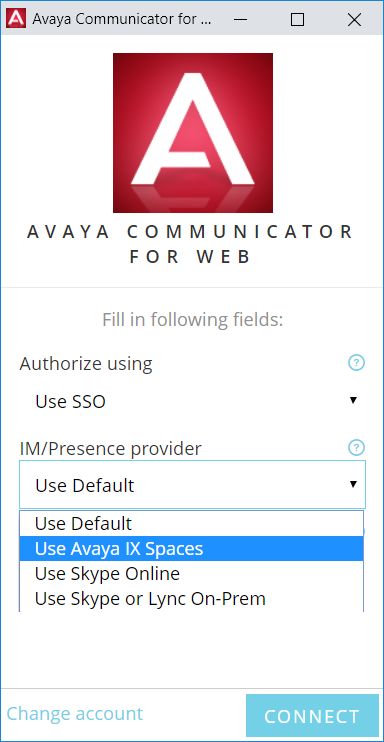
11AC Web – Avaya Cloud (Spaces) IM
Similarly, Avaya Communicator for Web (AC Web) currently supports instant messaging
via one-X Portal only.
The latest version of AC Web (1.0.20.1212 and later) adds support for Avaya Cloud
(Spaces) for purposes of instant messaging, in addition to the existing options (one-X
Portal and Skype / Lync). This opens up instant messaging between AC Web (often
used for Google / O365 / SFDC integration) and Avaya IX™ Workplace users.
Avaya Aura System Manager (Phase 2)
IP Office branch has again been supported since Avaya Aura® 8.1 – it was not
supported with Avaya Aura® 8.0.
IP Office 11.1 continues the enhancement of the IP Office branch solution with respect
to centralized management, and further removing dependency on Internet Explorer and
Java applets. More configuration is moved to Web Manager within Avaya Aura® System
Manager, rather than launching the applet-based IP Office Manager lite.
MTCTI-3
Copyright 2020 Avaya Inc. All rights reserved.
Use pursuant to the terms of your signed agreement or Avaya policy.
12MTCTI-3 allows third party call control, including control of groups (which is not
supported with CTI Web Services API). MTCTI-3 is supported for Linux platforms only at
this time; it is not available for IP500V2.
While there was a “soft launch” of MTCTI-3 with some DevConnect partners in the 11.0
FP4 timeframe, the API will be made available via DevConnect Portal as part of the IP
Office 11.1 program
Additional Hypervisor and Cloud support
Refer to the IP Office Deploying Avaya IP Office Servers as Virtual Machines
documentation 15-601011
Note: Support for AWS AMI with R11.1 is planned with the R11.1 service pack targeted
for early August 2020. MS Hyper V support will follow at a later date, to be announced.
IP Office
IP Office R11.1 Select
Hypervisor R11.0.4 Select, Sever
and Server Edition¹
Edition
VMware ESXi 6.0 ✓ ✓
VMware ESXi 6.5 ✓ ✓
VMware ESXi 6.7 ✓ ✓
Microsoft HyperV on Server 2012R2 ✓ X
Microsoft HyperV on Server 2016 ✓ X
Amazon AWS AMI ✓ X
Note: VMware ESXi 5.0 and 5.1 are end of support by VMWare in 2016. Refer to
VMWare.com support site for additional information (1) Refer to the IPOCC Offer
Document 10.1.2 for VMWare and hypervisor support
Avaya does not provide training or support for these hypervisor features; the Partner
is responsible for implementing and supporting these capabilities working in
conjunction with the hypervisor vendor.
Also note there are 3rd party products available to help Partners manage virtual
machines in a data center environment; Avaya has not tested and does not provide
support or recommendations on the 3rd party products.
Copyright 2020 Avaya Inc. All rights reserved.
Use pursuant to the terms of your signed agreement or Avaya policy.
137 Security
For detailed information on implementing and maintaining IP Office Platform security, please
refer to Avaya IP Office Platform Security Guidelines posted on the IP Office
Knowledgebase link below.
http://marketingtools.avaya.com/knowledgebase/businesspartner/index.html
8 Build Versions
IP Office 11.1 GA Software Versions
Component Version
Admin CD 11.1.0.0 Build 237
VMPro (Linux) 11.1.0.0 Build 230
VMPro (Windows) No Longer
Supported
One-X Portal 11.1.0.0 build 647
Server Edition DVD 11.1.0.0 Build 237
Server Edition OVA 11.1.0.0 Build 237
Server Edition Virtual Image Partner Hosted (PH_OVA) 11.1.0.0 Build 237
Unified Communication Module 11.1.0.0 Build 237
SoftConsole 11.1.0.0 build 16
Media Manager 11.1.0.0 Build 237
Avaya one-X Web Client 11.1.0.0 Build 647
Avaya Communicator for Windows 2.1.4.0 build 324
Avaya Communicator for iPad 2.0.7
Avaya Communicator for Web 1.0.20.1212
Avaya Aura System Manager for IP Office 7.1 Build 50 Patch
48
IP Office Contact Center (IPOCC) 10.1.2.0
Avaya Contact Center Select (ACCS) 7.0 FP2
Radvision XT500 / 4300 / 7100 8.3.8.57
Avaya one-X Mobile Preferred for IP Office (Android version) 10.0.0.5.224
Avaya one-X® Mobile Preferred for IP Office (iOS version) 4.1.12.769
WebLM Server 8.1
Avaya USB Creator Tool 11.1.0.0 build 89
IX Workplace (Windows/Mac/IOS/Android) 3.8
Cloud Operation Manager 11.1 build 30
Copyright 2020 Avaya Inc. All rights reserved.
Use pursuant to the terms of your signed agreement or Avaya policy.
14IP Office Module Firmware
Module Version
IP500V2 11.1.0.0 Build 237
POTSV2 Module 11.1.0.0 Build 237
DCPV2 Module 11.1.0.0 Build 237
ATM Module 11.1.0.0 Build 237
DS30/16 V2 Module 11.1.0.0 Build 237
DS30A/16A BST Module 11.1.0.0 Build 237
DS30B/16B Module 11.1.0.0 Build 237
Phone Firmware Support
Phone Model Version
1600 H.323 Phone Firmware (Separate Boot Code and App)
1603 & 1608 & 1616 Boot Code 1.350B
1603 & 1608 & 1616 App 1.350B
1603-L & 1608-L & 1616-L Boot Code 1.3110A
1603-L & 1608-L & 1616-L App 1.3110A
1616 Button Module 32 App 1.1.0
1600 Phone Language Files 502
9600 H.323 Phone Firmware (Separate Boot Code and App)
9620 & 9630 Boot Code 3.2.2
9620 & 9630 App 3.2.2
9640 & 9650 Boot Code 3.2.8
9640 & 9650 App 3.2.8
9620D01A & 9630D01A Boot Code 3.2.8
9620D01A & 9630D01A App 3.2.8
9600 Phone Language Files 76
96x1 H.323 Phone Firmware (Separate Kernel and App)
9608 & 9611 & 9621 & 9641 Kernel – Not capable for SHA2 S96x1_UKR_V25r10_V25r10
9608 & 9611 & 9621 & 9641 Kernel – Capable for SHA2 S96x1_UKR_V29r36_V29r36
9608 & 9611 Application – Not capable for SHA2 S9608_11HALBR6_6_1_15_V474
9621 & 9641 Application – Not capable for SHA2 S9621_41HALBR6_6_1_15_V474
9608 & 9611 Application S9608_11HALBR6_5_0_06_V474
Copyright 2020 Avaya Inc. All rights reserved.
Use pursuant to the terms of your signed agreement or Avaya policy.
159621 & 9641 Application S9621_41HALBR6_5_0_06_V474
96x1 Phone Language Files 148
Sonic Firmware S9608_11_HALKRR6_8_3_04
11x0 & 12x0 SIP Phone Firmware
1120 04.04.23
1140 04.04.23
12x0 04.04.23
B179 Firmware
B179 2.4.3.5
DECT D100 Firmware
D100_BS_MS 1.2.7
D100_BS_SL 0.9.6
J129 Firmware R4_0_4_0_10
J139 Firmware R4_0_4_0_10
J159 Firmware R4_0_4_0_10
J169 Firmware R4_0_4_0_10
J179 Firmware R4_0_4_0_10
DCP Phone Firmware
1403 Application R07
1403 Boot 03
1408 Application R48
1408 Boot 25
1416 Application R48
1416 Boot 25
9500 Application R60
9500 Boot R17
9500 Zarlink R0_09
DCP Phone Languages
14xx R10_v11_Pack01
DCP Phone Font Files
14xx Chinese (GB) R02_v01
14xx Korean (KSC) R02_v01
14xx Japanese (JIS) R02_v01
IP DECT Phone Firmware/Tools
Avaya 3701 22.04.04
Avaya 3711 91.24.31.04
Avaya 3711 Global 91.24.36
Avaya 3711 USB Driver 0.8
Copyright 2020 Avaya Inc. All rights reserved.
Use pursuant to the terms of your signed agreement or Avaya policy.
16IP DECT ADMM Firmware/Tools
IP DECT - ADMM Firmware 1.1.13
IP DECT - ADMM Java Configuration 1.1.13
IP DECT - ADMM DECT Monitor 1.4
DECT R4 Phone Firmware/Tools
Avaya 3720 4.7.2
Avaya 3725 4.7.2
Avaya 3730 2.5.16
Avaya 3735 2.5.16
Avaya 3740 4.8.17
Avaya 3745 4.8.17
Avaya 3749 4.8.17
Avaya 3720 Template 0.5
Avaya 3725 Template 0.5
Avaya 3730 Template 0.1
Avaya 3735 Template 0.1
Avaya 3740 Template 0.2
Avaya 3745 Template 0.1
Avaya 3749 Template 0.2
DECT R4 Firmware/Tools
DECT R4 - IPBS1 Boot Firmware 10.4.6
DECT R4 - IPBS1 Firmware 10.4.6
DECT R4 - IPBS1 Downgrade Firmware 10.4.3
DECT R4 - IPBS2 Boot Firmware 10.4.6
DECT R4 - IPBS2 Firmware 10.4.6
DECT R4 - IPBS2 Downgrade Firmware 10.4.3
DECT R4 - IPBL (DECT Gateway) Boot Firmware 10.4.6
DECT R4 - IPBL (DECT Gateway) Firmware 10.4.6
DECT R4 - IPBL (DECT Gateway) Downgrade Firmware 10.4.6
DECT R4 - GRBS (ISDN RFP) Firmware R7C 3/40
DECT R4 - GRBS-DB1 (ISDN RFP) Firmware R3F 3/80
DECT R4 - AIWS Firmware 2.73
DECT R4 - AIWS2 Firmware 4.7.0
DECT R4 - WinPDM (Windows Portable Device Manager) 3.13.2
DECT R4 - Rack Charger Firmware 2.0.7
DECT R4 - Advanced Charger Firmware 2.0.7
DECT R4 - Avaya 3720 Translation Tool 29
DECT R4 - Avaya 3725/3740/3749 Translation Tool 40
Copyright 2020 Avaya Inc. All rights reserved.
Use pursuant to the terms of your signed agreement or Avaya policy.
17DECT R4 - Avaya 3720 Downloadable Languages 29
DECT R4 – Avaya 3730, 3735 Translation Tools 49
DECT R4 - Avaya 3725/3740/3749 Downloadable Languages 40
DECT R4 - Company Phonebook Tool 9
DECT R4 - Avaya 3730/3735 Downloadable Languages 49
DECT R4 - Local Phonebook Tool 1
Wi-Fi Phone Firmware/Tools
3641/3645 117.058
HAT 4.1.4
AVPP 17x.040
H175 Phone Firmware
H175 1.0.2.3
Copyright 2020 Avaya Inc. All rights reserved.
Use pursuant to the terms of your signed agreement or Avaya policy.
189 Upgrading to IP Office R11.1
IP Office Support Services (IPOSS) customers entitled to IP Office software
updates/upgrades under a current support agreement will be upgraded in accordance with
the terms of their support contract.
Customers operating earlier releases of IP Office software without an IPOSS contract will
need to purchase an upgrade to get to IP Office R11.0/10.1.
The terms and conditions of the IP Office Support Services offer and how to purchase
support coverage can be found on the link below.
https://sales.avaya.com/en/pss/ip-office-support-services?view=collateral
10 Supported Releases
IPOSS policy will continue as N-1 as it includes maintenance and configuration support if
needed, and provide upgrade entitlement to R11.1. There are no additional Service Packs
planned for R10.1 after April 2020.
11 Supported OS and Browsers
Windows (PC)
Operating System Editions and Service Packs
Note 1 – from IP Office 11.1 Microsoft Windows 7 is no longer supported
Service
Operating System Editions
Pack
Windows 8.1 N/A Pro, Enterprise
Windows 10 Pro (SMB), Enterprise
Server 2012 N/A Standard
Server 2012 R2 N/A Standard
Server 2016 N/A Standard and Essentials
Server 2008R2 (64 Bit) is no longer supported
Operating System Support - Server Components
Copyright 2020 Avaya Inc. All rights reserved.
Use pursuant to the terms of your signed agreement or Avaya policy.
19Server Server
Win 7 Win 8.1(2) Win 10
2012/2012R2(1) 2016
Application
32 64 32 64 32 64 64
bit bit bit bit bit bit bit
Preferred
Edition Server
(VMPro)
Standalone X X ✓ ✓ ✓ ✓ ✓ ✓
... Plus UMS X X X X X X ✓ ✓
... Plus
X X X X X X ✓ ✓
Campaigns
... with IMS X X X X X X X X
... MAPI service
for VMPro on X X X X X X ✓ ✓
Linux
one-X® Portal
for IP Office X X X X X X ✓ ✓
Server
TAPI – 1st Party X X ✓ ✓ ✓ ✓ ✓ ✓
TAPI - 3rd Party X X ✓ ✓ ✓ ✓ ✓ ✓
TAPI – WAV (3) X X ✓ X ✓ X X X
Note:
(1) IPOCC Server 2012R2
(2) As per Microsoft Win 8.1 is the replacement/Service Pack for 8.0 so we no longer
support 8.0 - http://windows.microsoft.com/en-GB/windows/service-packs-
download#sptabs=win8other (link valid 16-Jun-2014)
(3) TAPI WAV is not recommended for new designs and is not supported on 64-bit
operating systems
Operating System Support - Thick Client Apps
Server Server
Application Win 7 Win 8.1 Win 10
2012/2012R2 2016
32 64 32 64 32 64 64 64
bit bit bit bit bit bit bit bit
Preferred X X ✓ ✓ ✓ ✓ ✓ ✓
Edition Client
SoftConsole X X ✓ ✓ ✓ ✓ X ✓
Manager X X ✓ ✓ ✓ ✓ ✓ ✓
SysMon X X ✓ ✓ ✓ ✓ ✓ ✓
SSA X X ✓ ✓ ✓ ✓ ✓ ✓
TAPI 1st Party X X ✓ ✓ ✓ ✓ ✓ ✓
TAPI WAV X X ✓ X ✓ X X X
Copyright 2020 Avaya Inc. All rights reserved.
Use pursuant to the terms of your signed agreement or Avaya policy.
20Server Server
Application Win 7 Win 8.1 Win 10
2012/2012R2 2016
32 64 32 64 32 64 64 64
bit bit bit bit bit bit bit bit
Avaya Windows X X
Communicator
(ACW) ✓ ✓ ✓ ✓ X X
(replaces Flare)
Avaya X X
Equinox™ for ✓ ✓ ✓ ✓ X X
Windows
one-X® Portal X X
Plug-In for ✓ ✓ ✓ ✓ X X
Outlook
Call Assistant X X ✓ ✓ ✓ ✓ X X
Plug-In for MS X X
Lync 2013 /
✓ ✓ ✓ ✓ X X
Skype for
Business
Web X X
Conferencing
(Adobe Flash and ✓ ✓ ✓ ✓ X X
Java Applet for
sharing)
IP Office Contact X X ✓ ✓ ✓ ✓ X X
Centre
Notes:
(1) Legacy support only
Please note that IP Office Native Salesforce.com Plug-in is no longer supported and
refer to Avaya Communicator for Web as an alternative solution.
Mac Thick Client Apps
OSX OSX
OSX 10.8 OSX
OSX 10.9 10.11 OSX 10.13
Application Mountain 10.10
Mavericks El 10.12 High
Lion Yosemite
Capitan Sierra Sierra
Web Conferencing
(Adobe Flash and
✓ ✓ ✓ ✓ ✓ ✓
Java Applet for
sharing)
Copyright 2020 Avaya Inc. All rights reserved.
Use pursuant to the terms of your signed agreement or Avaya policy.
21OSX OSX
OSX 10.8 OSX
OSX 10.9 10.11 OSX 10.13
Application Mountain 10.10
Mavericks El 10.12 High
Lion Yosemite
Capitan Sierra Sierra
Avaya Equinox™ for
X X X ✓ ✓
Mac ✓
Browsers
IE10 Microsoft FFXX Chrome Safari Safari Safari
Application IE11
(2) Edge (1) XX (1) 8 9 10(3)
VMPro Campaigns
✓ ✓ ✓ X X X X X
Client
VMPro UMS WebMail ✓ ✓ ✓ X X X X X
one-X® Portal for IP
✓ ✓ ✓ ✓ ✓ ✓ ✓ TBD
Office Client
Web Conferencing ✓ ✓ ✓ ✓ ✓ ✓ ✓ TBD
Web Manager
✓ ✓ ✓ ✓ ✓ ✓ ✓ ✓
Web Control Page
D100 DECT Admin ✓ ✓ ✓ ✓ ✓ ✓ ✓ TBD
IP DECT R4 Admin ✓ ✓ ✓ ✓ ✓ ✓ ✓ TBD
Avaya Communicator
X ✓ X X ✓ X X X
for Web
Media Manager ✓ ✓ ✓ ✓ ✓ X X X
Cloud Operations
Manager (COM)
(Update at GA)
IP Office Web Client X X X X ✓ X X X
Notes:
(1) These browsers update on a 6-week cycle with most users automatically updated
within two weeks. IP Office will aim to support future versions of these fast release
browsers to the extent possible as tested and verified.
(2) Only on Server 2012 (note Server2012R2 supports IE11)
(3) TBDs for Safari 10 will be updated post GA version of the R11.1 Offer document
Exchange
Copyright 2020 Avaya Inc. All rights reserved.
Use pursuant to the terms of your signed agreement or Avaya policy.
22Application Exchange Exchange Exchange
2010 2013 2016
VMPro UMS ✓ ✓ X
one-X® Portal
(IM Presence) ✓ ✓ ✓
one-X® Portal
(Calendar) ✓ ✓ X
Outlook
Outlook Outlook Outlook
Application
2010 2013 2016
VMPro IMS X X X
TAPI (for dialing) ✓ ✓ ✓
VMPro UMS IMAP ✓ ✓ ✓
one-X® Portal
✓ ✓(1) ✓(1)
Outlook Plugin
(1) Currently for Outlook 2013 and higher, the contact screen popping feature is not
supported
12 Supported Hardware
Platform and features supported on the platform will be modified with the IP Office R11.1
release. Supported platforms are:
• IP500 V2 Control unit
• IP Office for Linux (Server Edition, Virtualize Server Edition, Select)
o NOTE: Upgrade to IP Office Server Edition 11.1 is supported only from
11.0.4 SP3 and MUST follow the 11.1 Server Edition Migration process.
IP Office software supports Server Edition hardware platforms; the Dell PowerEdge R630
server and the Dell PowerEdge R230 server are the most current servers available. The
Dell PowerEdge R630 server support was introduced with IPO 9.1.4 SP (issued September
14, 2015).
Note: IP OFFICE 500 VERSION 2 EXTENSION CARD ETR 6 will be targeted to end of
sales in 2017. Please look forward to the End-of-Sales Notice for further details.
Customers may migrate to IP Office R11.1 by purchasing an upgrade for Release 10 and
applying the R11.1 software, or by acquiring an upgrade as part of their entitlement per the
terms of their valid IP Office Support Services support contract, as applicable. Customers
migrating to IP Office R11.1 will be required to have an IP500 V2 control unit or supported
servers with Server Edition. IP500 base cards, trunk cards and expansion modules are
Copyright 2020 Avaya Inc. All rights reserved.
Use pursuant to the terms of your signed agreement or Avaya policy.
23supported with IP500 V2 control unit and may migrate to the V2 control unit. Licenses will
require a dongle swap to move from the IP500 key card to the IP500 V2 SD card.
All other Release 11.1 features are supported on all platforms. IP Office R11.1 Select
features are supported with Select material codes.
IP400 Trunk and Station Modules supported in IP Office R11.1:
• Analog trunk 16
• Digital Station V2: 16 and 30 port variants
• Phone V2: 16 and 30 port variants
Refer to the IP Office R9.1 Offer/Product Update document for IP400 cards that are no
longer supported.
13 Known Issues and Workarounds
IX Workplace Client
IP Office R11.1 requires Avaya Equinox clients at release 3.8 or above for correct interworking. At
the time of IP Office R11.1 GA the Equinox 3.8 clients will be at General Availability. Avaya will
announce General Availability of the Equinox 3.8 SP
General
Copyright 2020 Avaya Inc. All rights reserved.
Use pursuant to the terms of your signed agreement or Avaya policy.
24Key Summary Component/s Release Note
IPOFFICE- UCM: The default IP address is not Application Server Problem: The IP Address is not populated
159084 populated correctly in SSA before ignition
Impact: Display issue in SSA
Workaround: Finish ignition and the ip address
will appear in SSA
IPOFFICE- SSA Status Messages and Lamps Application Server, SSA Problem: The SSA doesn't display correct
159062 Not Correct for UCM Modules with state of UCM during installation
CentOS7
Impact: Display issue in SSA
Workaround: Wait until the SSA gets updated,
do not reboot the UCM
IPOFFICE- IP Office Service stopped after IP Office Core Features Problem: All services appear Stopped in
159193 upgrade and causes other services Webcontrol and Web Manager
to stop upon restart
Impact: Services are not started automatically
Workaround: Start IP Office manually from
Webcontrol
IPOFFICE- Avaya Communicator for Microsoft Desktop Integration
158475 Lync doesn't make supervised
transfer over SIP Line
Copyright 2020 Avaya Inc. All rights reserved.
Use pursuant to the terms of your signed agreement or Avaya policy.
25IPOFFICE- Personal Directory contact IX Workplace Client Problem : Personal Directory contact
159123 dissapears when adding new disappears when adding new contacts from a
contacts from client. Windows and Mac IX Workplace clients.
Impact: Personal Directory contact disappears
Workaround: Sign-out and sign-in back into
the IX Workplace Client.
IPOFFICE- APNS : No miss call notification IX Workplace Client This issue specific to 3.8.4 client and will be
159168 seen for a call CANCELLED by fixed in 3.8.4 release.
Caller (ringing on a client in
suspended state)
IPOFFICE- Mybuddy commands are not working IP Office Server Edition, Problem: My buddy chat window does not
158465 one-X Portal respond to mybuddy commands.
Impact: Mybuddy commands are not available.
Workaround: Most of the mybuddy features
are available through one-X portal UI.
IPOFFICE- J179 : When bluetooth headset SIP terminals Problem: User with J179 phone having BT
156873 paired, blind transfer to J179 auto headset connected, calls get answered
answers automatically during blind transfer scenarios.
Impact: User with J179 phone having BT
headset connected, can join call unexpectedly
due to blind transfer of calls from other users
.
Workaround : None
Copyright 2020 Avaya Inc. All rights reserved.
Use pursuant to the terms of your signed agreement or Avaya policy.
26IPOFFICE- B199: Call over sip trunk fails when SIP terminals Problem: Call over sip trunk fails as user is
156101 Account code is entered unable to enter the account code
Impact: For call scenarios where a user needs
to give input of digits/numbers in mid call, such
as input for an IVR (for eg. calls with account
code/authorization code), B199 calls might fail.
This is because B199 phones fails to provide a
phone UI to input numbers.
Workaround: NA
IPOFFICE- Vantage Connect device shows Avaya K1x5 Telephone Problem: Vantage Connect device shows
158964 Avaya Aura error when connecting "Avaya Aura Device Services is not currently
to IP Office available"
Impact: Pop Message will be shown.
Frequency is very low
Workaround: NA
IPOFFICE- Screensaver Settings not retained Avaya K1x5 Telephone Problem: Screensaver Settings of Clock
156675 after K155/K165/K175 upgraded (showing Time) not retained after K1xx phones
upgrade
Impact: Phone looks as device powered off
after sleep
Workaround: User some other Screen Saver (
other than Time Clocks)
Copyright 2020 Avaya Inc. All rights reserved.
Use pursuant to the terms of your signed agreement or Avaya policy.
27IPOFFICE- Cannot modify Inactivity timeout in Web Control Panel Problem: Inactivity timeout widget is not
159205 Web Control working
Impact: The timeout cannot be changed
Workaround: Connect to console and edit
timeout(WEBCONTROL_SESSION_TIMEOUT)
in seconds in /etc/sysconfig/webcontrol and
restart webcontrol using {{systemctl restart
webcontrol}}
IPOFFICE- Cannot add Login Banner from Web Web Control Panel Problem: Banner cannot be changed in
159213 Control Webcontrol
Impact: Display issue Webcontrol
Workaround: N/A, needs patch of Webcontrol
IPOFFICE- CentOS 7 - Web Control Panel Problem: Webcontrol in other languages
159309 WebManager/WebControl except English it fails to load on first attempt
Impact: Webcontrol cannot be launched from
Webcontrol and needs a refresh to get it
working
Workaround: Select the language on login
page and refresh the page and will get you to
the login page
Copyright 2020 Avaya Inc. All rights reserved.
Use pursuant to the terms of your signed agreement or Avaya policy.
28IPOFFICE- Cannot use Web Mgt to change to Web Management Problem: Cannot use Web Manager or
159238 subscription mode on existing Manager to change to subscription mode on
licensed SE- Select system existing licensed SE- Select system
Impact: Converting Server Edition Select
system to Subscription mode is not supported
in this release using Web Manager as well as
Manager in re-run of ICU. It is supported for
defaulted configuration only. Convertion of SE-
NON Select to Subscription is supported
Workaround: NA
IPOFFICE- Error message when sending IPO Web Services Problem: Error message when sending IPO
158644 Config if expansion or secondary Config if expansion or secondary nodes offline
nodes offline
Impact: When 'SE Central Access' is 'ON' in
Manager and Administrator open the offline
configuration in Manager and sends it to
Primary which have offline expansions the
configuration will get applied to Primary only.
The offline expansion will not receive the
configuration as expected but Manager gives
the message "Failed to Save the Configuration"
Workaround: Ignore the Error or Administrator
Should send configuration when all nodes are
online.
Copyright 2020 Avaya Inc. All rights reserved.
Use pursuant to the terms of your signed agreement or Avaya policy.
2914 Technical Notes
Licensing
IP Office release 10 and higher only supports the Product Licensing and Delivery
System (PLDS) to manage license files. If you are upgrading from a previous release,
you must migrate all of your pre-R10 licenses (ADI, PLDS, mix of ADI/PLDS, virtual)
to R10 PLDS licenses. For further information, the “Administering Avaya IP Office™
Platform with Web Manager” manual available from the IP Office Knowledgebase.
Upgrading IP Office Administration
Earlier releases of IP Office Manager are not compatible with systems running this
release. Before upgrading an IP Office system to the 11.1.0.0 release, the
Administration suite must also be upgraded.
The IP Office Administration installer will detect previous installed versions and
upgrade automatically. It is not necessary to restart the PC after upgrading unless
instructed to do so.
Before upgrading the IP Office, system software ensures a backup of the system
configuration exists.
Note: All IP Office expansion units must also be upgraded to the version supplied
with the Administration software.
Warning: In all cases, always backup all application data to a separate location
before upgrading.
Upgrade Instructions for IP Office one-X® Portal
For further information, please refer to the “Implementing one®-X Portal for IP Office”
manual available from the IP Office Knowledgebase.
Warning: In all cases, always backup all application data to a separate location before
upgrading.
Upgrade Instructions for IP Office Server Edition and Application Server
IP Office Server Edition 11.1 employs CENTOS7 as its core operating system.
Copyright 2020 Avaya Inc. All rights reserved.
Use pursuant to the terms of your signed agreement or Avaya policy.
30Upgrading or Migrating to IP Office Server Edition requires the engineer to use the
procedure detailed in the R11.1 Server Edition Migration document.
Upgrade Instructions for using WebLM Licensing
IP Office Server Edition customers who are upgrading to 11.1 from a previous (not
11.x) release, and who will be using WebLM licensing, will need to obtain a WebLM
Host ID before the upgrade for generating the licenses. The WebLM Host ID is the
Mac address of the WebLM server. In a virtual environment, the WebLM Host ID is a
virtual Mac address that starts with the letter “V”. The WebLM Host ID must be used
when generating a PLDS license file for the WebLM server in order to implement a
centralized licensing scheme for multiple IP Office systems.
Avaya USB Creator Tool
The Avaya USB Creator Tool can be used to load an ISO image onto a USB memory
key from which the server can boot and either install or upgrade. This software tool
is downloadable from the same page as the ISO files. For further information on this
tool, please refer to the “Installing and Maintaining the Avaya IP Office™ Platform
Application Server” or the “Installing and Maintaining the Unified Communications
Module” located on https://support.avaya.com.
Upgrade Instructions for IP Office Unified Communications Module (UCM)
When upgrading from previous releases, please refer to the following table to
determine the upgrade scenario and the method to be used:
From: To:
9.0.0/9.0.1/9.0.2 9.0.3/9.0.4 9.1 10.0 10.1 11.0
9.0.0 USB Unetbootin USB USB USB USB USB
Unetbootin Unetbootin Unetbootin Unetbootin Unetbootin
9.0.1 Web Control ZIP
9.0.2
9.0.3 USB USB USB USB USB
Unetbootin Unetbootin Unetbootin Unetbootin Unetbootin
9.0.4
9.1 Avaya USB Avaya USB Avaya USB Avaya USB
Creator Creator Creator Creator
Copyright 2020 Avaya Inc. All rights reserved.
Use pursuant to the terms of your signed agreement or Avaya policy.
31Web Web Web Web
Management Management Management Management
10.0, Avaya USB Avaya USB Avaya USB
+ Creator Creator Creator
Web Web Web
Management Management Management
Installation Instructions for Avaya Communicator for Microsoft Lync
The Avaya Communicator for Microsoft Lync plug-in is distributed as a ZIP file, which
contains:
• lyncRuntime.msi
• AvayaCommunicatorForMicrosoft.X.IPO-X.6.X.X-SNAPSHOT.msi
The plug-in is installed as an add-in to Lync 2010, Lync 2013 or Skype for Business
clients.
Perform the following steps to install the plug-in:
1. Install the prerequisite by double-clicking lyncRuntime.msi, and follow the
installation wizard. This step only needs to be done once per computer.
2. Install the plug-in by double-clicking AvayaCommunicatorForMicrosoft.X.IPO-
X.6.X.X-SNAPSHOT.msi, and follow the installation wizard.
15 Languages Added
IP Office release 11.1.0.0 adds no new languages.
16 Documentation errata
The latest versions of detailed release information can be found in the below locations:
• DVD media available with Avaya IP Office R11.1 software pack
• IP Office Knowledgebase - Contains all administrator and user documentation for IP
Office - http://marketingtools.avaya.com/knowledgebase
Copyright 2020 Avaya Inc. All rights reserved.
Use pursuant to the terms of your signed agreement or Avaya policy.
32• The Avaya support site – Contains all administrator and user documentation for IP
Office -http://support.avaya.com
The Release 11.1 Documentation will be available by GA:
• Go to support.avaya.com
• Select Find Documentation and Technical Information by Product Name under
Downloads & Documents
• Enter ‘IP Office’ as your product
• Choose ’11.1’ as your release
• Click the ‘Documents’ radio button
• Click ‘Enter’ to see all documentation
The latest version of the IP Office Documentation Catalogue, which describes the
organization of all IP Office documents and indicates the type of information in each
document, is found at https://downloads.avaya.com/css/P8/documents/101049083.
The latest version of the IP Office Product Description Document, which defines the IP Office
product in more detail, can be found on the Avaya Partner Portal
(www.avaya.com/salesportal) and will require a valid Single Sign On (SSO) user name and
password to view it online.
The latest version of the IP Office 11.1 Offer Definition, which is a communication that
summarizes “what’s new” within the IP Office Release 11.1 product, can be found on the
Avaya Partner Portal
17 Contacting support
Contact Support Checklist
If you are having trouble with IP Office, you should:
1. Retry the action. Carefully follow the instructions in written or online documentation.
2. Check the documentation that came with your hardware for maintenance or
hardware-related problems.
3. Note the sequence of events that led to the problem and the exact messages
displayed. Have the Avaya documentation available.
If you continue to have a problem, contact Avaya Technical Support:
1. Log in to the Avaya Technical Support Web site https://support.avaya.com.
2. Contact Avaya Technical Support at one of the telephone numbers in the Support
Directory listings on the Avaya support Web site.
Copyright 2020 Avaya Inc. All rights reserved.
Use pursuant to the terms of your signed agreement or Avaya policy.
33Avaya Global Services Escalation Management provides the means to escalate urgent
service issues. For more information, see the Escalation Contacts listings on the Avaya Web
site.
18 Contact Support Tasks
You may be asked to email one or more files to Technical Support for analysis of your
application and its environment.
Copyright 2020 Avaya Inc. All rights reserved.
Use pursuant to the terms of your signed agreement or Avaya policy.
34You can also read


