Dorset Home Choice CBL Scheme User Guide
←
→
Page content transcription
If your browser does not render page correctly, please read the page content below
Your Ref No

           Your Band

           Your Date

Dorset Home Choice CBL
  Scheme User Guide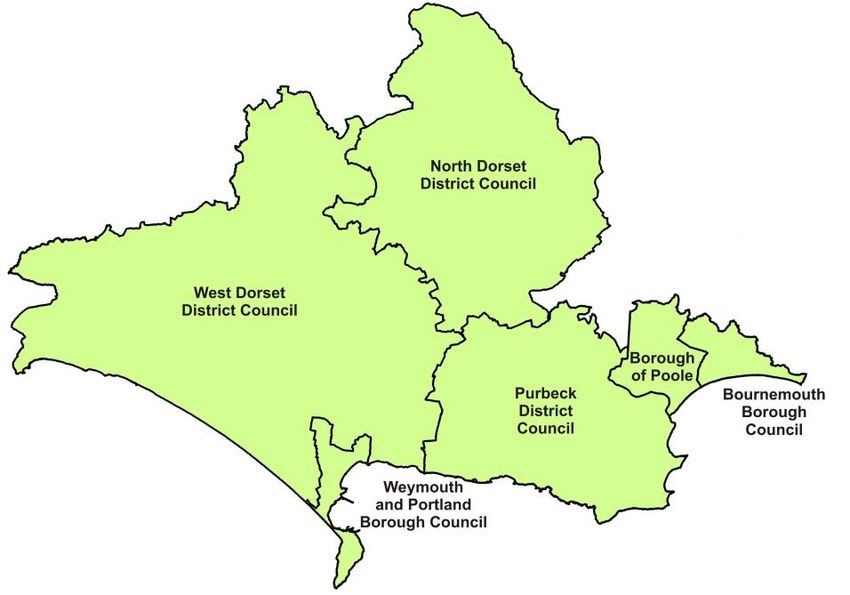
Contents                    Four steps to a new
    Page 3                             home
    Welcome to Dorset
    Home Choice               Step 1: Membership
                              You are a member of Dorset Home
    Page 4                    Choice if you have been accepted
    Local Authority Contact   onto the Housing Register of one of
    Information               the partner local authorities. Once
    Page 5                    accepted you will be given a unique
    How Dorset Home           Home Choice number – this is
    Choice works              shown on the front of this guide.
    Page 7                    Step 2: Choosing &
    The Banding scheme for    Bidding
    the Dorset Home Choice    You can see the available properties
    Common Policy             on the Dorset Home Choice website,
                              or in the weekly Dorset Home
    Page 10
                              Choice property list. You can bid for
    The Banding scheme for
                              any property that you are eligible
    Bournemouth Borough       for. You may use up to six bids in
    Council                   every advert cycle.
    Page 13                   Step 3: Offers
    Property Adverts          If once bidding closes your bid is top
    explained                 of the list, and you are eligible and
    Page 15                   your application has been verified,
    Where to get your         the landlord may offer you the
    Property List             property. Some landlords may
                              invite up to three bidders to view a
    Page 16
                              property.
    How to bid
                              Step 4: Feedback
    Page 22                   The results of previous property
    Feedback                  advertising cycles will be shown in
    Page 23                   the weekly property list. This will
    General Information       show how many people bid for each
                              property, the band of the successful
                              applicant and their relevant date.

2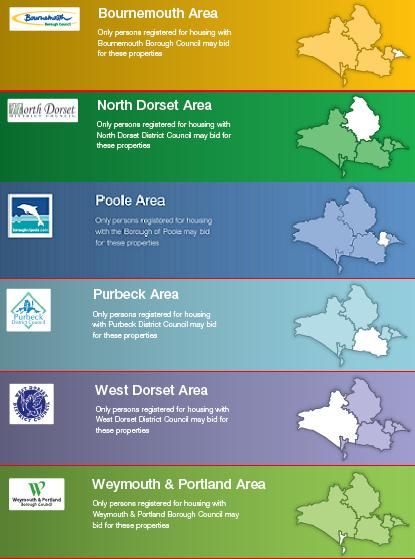
Welcome to Dorset
Home Choice
Dorset Home Choice gives you more choice about where you
want to live. You can decide which properties you would like to
be considered for. Expressing an interest for one of the homes
advertised is called ‘bidding’. See pages 16 to 19 of this guide to
find out the different ways to bid. Everybody accepted onto the
Housing Register can take part and bid for homes that they are
eligible for on Dorset Home Choice.
The properties advertised belong to either partner local
authorities or to Registered Providers of social housing who are
our partners. Properties will be advertised on a weekly basis. You
will be able to see basic details about each property available.
There is more information about the advertisements on page 13.
We will provide feedback on previous properties that have been
advertised so you will be able to see the band the successful
bidder for each property was in. You should be able to find all the
information you need in this guide, but if you have any questions
about Dorset Home Choice please contact your managing local
authority partner at the address/number overleaf:
We can give you help to read or understand this
information
Please contact the relevant Local Authority for
enquiries
Further information can be found at
www.dorsethomechoice.org
3
Local Authority Contact Information
                                Housing Options Team - Strategic Housing
                                Services
                                Bournemouth Borough Council
                                Town Hall, St Stephen’s Road,
                                Bournemouth BH2 6LL
Tel: 01202 451467 Email – housing1@bournemouth.gov.uk
                                Borough of Poole
                                Civic Centre
                                Poole
                                BH15 2RU
Tel: 01202 633805 Email – homechoice@poole.gov.uk

                              North Dorset District Council
                              Nordon, Salisbury Road
                              Blandford Forum, Dorset DT11 7LL
Tel: 01258 454111 Email – homechoice@north-dorset.gov.uk

                               Purbeck District Council
                               Westport House
                               Worgret Road
                               Wareham
                               Dorset, BH20 4PP
Tel: 01929 557370 Email - - homechoice@purbeck-dc.gov.uk
                               West Dorset District Council
                               Stratton House
                               58-60 High West Street
                               Dorchester, DT1 1UZ

Tel: 01305 251010 Email – housingadvice@westdorset-dc.gov.uk
                               Weymouth and Portland Borough Council -
                               Council Offices, North Quay, Weymouth
                               Dorset, DT4 8TA
Tel: 01305 838000 Email – housingadvice@weymouth.gov.uk

4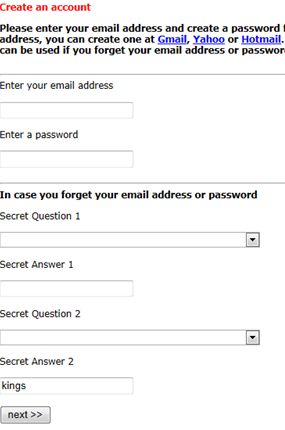
How Dorset Home Choice Works
There are four steps for you to follow in order choose your
new home:

                 Step 1 Membership & Registration
     You are automatically a member of Dorset Home Choice if you
     have been accepted onto one of the partner local authority
     Housing Registers. If you are not on the Housing Register you
     can apply on-line at www.dorsethomechoice.org or contact
     your local authority. If you need more information about
     whether you are eligible please contact your local housing
     authority. Once you have been accepted onto Dorset Home
     Choice we will write to you. We will tell you what band you are
     in, the size of property you are eligible for and your unique
     Dorset Home Choice reference number. You will also be sent a
     Scheme User Guide.
     If there are any changes to your household or your
     circumstances you must contact your managing local authority
     partner. It is very important that we know of any changes as it
     may change your band or the type of property you are eligible
     for.

                              Step 2 Bidding
    You can bid for up to six properties that you are eligible for in each
    weekly cycle. Properties are advertised in a property list which is
    available from your local authority and on the partnership website
    www.dorsethomechoice .org. There is more information about
    how to get the property list on page 15. The weekly cycle runs
    from Wednesday at 4pm to 11.59pm on the following Monday.
    Your bids must reach us before midnight on Monday to be
    considered.

5
Step 2 Bidding (continued)
The property adverts give you information about each property
available for letting. A photograph will be included if available.
You can bid in the following ways:
1. On the internet – go to www.dorsethomechoice.org and
log on with your unique Dorset Home Choice reference
number and your date of birth. Follow the instructions
on the screen.
2. By telephone – call 01202 454 700 and follow the
instructions. See pages 16 to 18 about bidding by
telephone.
3. By text message – see page 19 about bidding by text.
Step 3 Offer
At the end of the weekly bid period, all bids for each property
are put into a priority order based on the banding, relevant date
and any other short listing priorities that have been applied to
the advert. A shortlist of applicants is then produced. The
applicant at the top of the list (assuming they were eligible and
their application is validated) will be contacted by the relevant
landlord. If they refuse the property, or if the landlord decides
the offer is not suitable, the property is then offered to the next
person on the list and so on. If you are offered a property and
then unreasonably refuse it, it may count as a refusal of a
reasonable offer and may affect your banding.
If you are offered a property you will not be offered another
property until you have made a decision on the first offer.
6Step 4 Feedback
It is not possible to notify you individually when your bids have
been unsuccessful but you can get this information from the
website (see ‘bidding history’ after you have logged in).
All properties that have been advertised will be listed on the
Feedback page of the property list once they have been let. This
tells you how many people bid for each property as well as the
band of the successful bidder and their effective date in band.
IMPORTANT
If you are successful in your bid we will need to contact you very
quickly. It is VERY IMPORTANT that your contact details are
completely up to date. If we are unable to contact you within 1
working day of the advertising cycle closing you will lose the
opportunity to be offered a property.
It is your responsibility to keep your contact details up to date with
us.
The Dorset Home Choice Banding Scheme
The Borough of Poole, North Dorset District Council, Purbeck District
Council, West Dorset District Council and Weymouth & Portland
Borough Council all use the Dorset Home Choice common allocations
policy. The aim of this policy is to try and house those in greatest
housing need. We use a banding system based on an applicant’s
circumstances to give priority. Each applicant will be assessed and
put in a band based on the table on page 8.
7Emergency Band Gold Band Silver Band Bronze Band
Exceptional Housing Overcrowded by two or more beds Homeless/Threatened with Applicants with no
Need homeless local connection
Urgent Move - Supported housing/Care leavers ready Supported housing/Care Leavers Deliberate worsening
Financial/Operational for move on (not WPBC) ready for move on (WPBC only) of circumstances
Reasons
Emergency disrepair Severe/persistent harassment Medium medical/welfare Needs Adequately housed
Urgent Under occupation Medium disrepair needs No housing need
Health/Wellbeing
Urgent Move - Other High medical/welfare needs Shared facilities Substantial rent
arrears
Emergency Homeless High disrepair Needs Overcrowded by one bedroom Financial capability to
meet own needs
Combined medium medical/welfare & Split families Band downgraded
medium disrepair for offer refusal
Cumulative Need (4 silver band Relationship breakdown
reasons)
Decant applicants Need to move for work/support
Tenancy Succession Service personnel
Efficient management of housing stock Band downgraded for offer
refusal
Band downgraded for offer refusal
8The Bournemouth Borough Council
Banding Scheme
Eligibility – who can apply for the register?
Immigration Status
The following applicants will not be able to join the housing register:
Applicants from abroad
Applicants from abroad who are subject to immigration control
(there are however some exceptions)
Applicants who are not habitually resident
Unacceptable Behaviour
The following applicants will not be able to join the housing register:
Applicants with a history of rent arrears
Applicants with a history of anti-social behaviour
Applicants with a poor standard of tenancy
Housing Need
Applicants must have a housing need (i.e. they meet one or more of
the statutory reasonable preference groups) to join the housing
register
Financial Means
Applicants with the financial means to find their own accommodation
will not be accepted, I.e.:
Homeowners whose home is not suitable for their needs but
they have sufficient equity to secure alternative
accommodation
Applicants with a household income more than 5 times the LHA
level
Applications considered on a case by case basis (note AA and
DLA disregarded)
9Local Connection
Applicants must be resident in Bournemouth for at least 3
years or
Applicant must be employed (for at least 16 hours a week) or
have a firm offer of employment in Bournemouth and a
permanent contract or
Applicants must have a close family associate (parents,
grandparents, siblings and adult children) living in
Bournemouth continuously for at least 5 years.
Members of the Armed and Reserve Forces
Members of the Armed and Reserve Forces who have a housing need
do not have to meet the local connection criteria. These applications
will be placed on Gold Band. This includes
Serving members of the regular forces or former personnel
who have left the service within 5 years prior to making an
application
Bereaved spouses and civil partners who need to leave Service
Accommodation following the death of their spouse or civil
partner.
Serving or former members of the Reserve Forces who need to
move because of a serious injury, medical condition or
disability sustained as a result of their service.
Applicants with no local connection but with a housing need
will be accepted on to the register but only into Bronze band
Bournemouth Bands – What do they mean?
There are three main bands:
Gold Band
Applicants in this band will have a very high to urgent need housing
need. This band is also used enable the Council to provide effective
management of the social housing stock. The following categories
qualify for Gold Band:
Where high medical priority is awarded
10 Severe overcrowding (lacking two bedrooms or more)
Severe and/or persistent harassment, violence (including racial
harassment)
Disrepair – where the Council has identified Category I hazards
in the property that cannot be resolved or reduced to Category
II hazards within 6 months
Cumulative Need – 4 housing needs from the Silver Band
Under-occupying of social housing
Residing in Supporting People funded supported housing and
ready for move on
Members of the Armed and Reserve Forces
Care Leavers ready to move on into independent
accommodation
Social housing tenants whose current property is subject to re-
development
Tenancy succession – where a social housing tenant dies and
the person left in the property is unable to succeed to the
tenancy. In these instances the Council want to help them
move to alternative accommodation.
Silver Band
Applicants in this band will have a moderate housing need. If 4 or more
of these housing need categories apply, the application will be moved
to Gold Band.
Applicants who are homeless or are threatened with
homelessness
Applicants awarded a ‘medium’ medical priority
Disrepair – where the Council has identified Category I hazards
in the property that can be resolved or reduced to Category II
hazards within 6 months
Lacking one bedroom
11 Sharing facilities with other people not on the applicant’s
housing application. This housing need will take precedence
over any lack of bedroom requirements
Lacking facilities – this includes, kitchen, bathroom, inside
toilet, lacking water supplies, electricity, gas or adequate
heating
Poor internal or external arrangements
Split families – Applicants who, not by choice, are living in
separate households due to lack of suitable accommodation
Relationship breakdown – applicants who wish to live
separately but still reside with their ex partner/spouse
following a relationship breakdown
Work/support – applicants who are able to demonstrate the
need to move nearer their place of work within Bournemouth
because they have secured permanent employment. Also
applicants who are able to demonstrate the need to move
nearer local facilities or relatives to give or receive support.
Bronze Band
Bronze Band applicants will include the following:
Have a housing need but no local connection
Have substantial rent arrears
Engaging in anti social behaviour
Households who have deliberately worsened their housing
circumstances by moving into unsuitable accommodation.
Reviews
Applicants can request a review of their banding/acceptance on to the
register. Requests must be in writing and within 21 days of the date of
the decision being appealed.
12What Properties can I bid for?
You can choose whether you bid for a flat, house bungalow or
maisonette. The size of the property that you are eligible for is
explained below. If you are unsure about the size of property you
are eligible for, please contact your managing local authority
partner.
Bedroom sharing is covered by the following rules:
Household members living together as a couple will be
assessed as requiring 1 bedroom, unless there are
exceptional circumstances.
Additional adults (defined as being 18 years old or over)
living permanently in a household will require an extra
bedroom.
Children that are of different sexes that are both under 7
years will be expected to share.
Children of the same sex that are both under
18 will be expected to share.
Please note: Individual partner housing provider letting policies or
local planning policies may affect the size of households that may
apply for particular properties. Any such restrictions will be
included in the property advert.
Priority for Ground floor accommodation will normally be given
to someone who requires level access on the grounds of age,
disability or medical need.
In order to be eligible for bedroom spaces for children, the
adult(s) must demonstrate that the child(ren) live(s) with them
on a full time, permanent basis.
13The Adverts Our adverts are ordered and colour coded depending on the Local Authority partner that the property is located in and the type of property. The adverts contain symbols for an ‘at-a-glance guide’ to the details and who can bid for it. The colours and symbols being used are explained below. 14
Key to advert symbols

                            Available for homeseekers only

                            Available for transferring tenants only
                            Available for homeseekers and
                            transferring tenants
                            Number of bedrooms in the property
                            Minimum and maximum number of
                            people who can live in the property
              Garden                    Shared Garden

              Lift                      No lift
                            Property designed for people of this
                            age or above
              Fixed term tenancy (no of years shown below) –
              please check with landlord for details
                                        Pets may be allowed with
              No Pets
                                        the permission of the
              Allowed
                                        landlord
                            Property for families

              Mobility Group 1 – Suitable for wheelchair users for
              full time indoor and outdoor mobility.
              Mobility Group 2 – Suitable for people who cannot
              manage steps or stairs or steep gradients and require
              a wheelchair for outdoor mobility.
              Mobility Group 3 – Suitable for people who are only
              able to manage 1 or 2 steps or stairs.

PLEASE NOTE: It is important that you read the property
advertisement carefully, as some properties may have
additional    restrictions e.g. age, mobility or need for
adaptations, pets not permitted etc.

15
Where to access the Dorset Home Choice property list Each Dorset Home Choice property list is valid for one bidding cycle, running from Wednesday at 4pm to 11.59pm on the following Monday. The date will be clearly shown on the front of the property list. Make sure you are looking at the correct property list for the current bidding cycle when bidding. You can see the weekly list of available properties online at www.dorsethomechoice.org and you can place your bids online. Internet access is available at local libraries. You can also see the property list at any of the local authority partner offices (see contact details on page 4). Please contact your local authority for details of other locations where you can find the property list. If you do not have internet access and you would like to find out more information please contact your local authority. 16
Bidding for Properties

           Making your bids on the internet
The quickest and easiest way to make your bid is through our
website www.dorsethomechoice.org. You will need your
unique reference number and date of birth to log in. You can
see all available properties on the website and place bids for
ones that you are eligible for and receive personalised
feedback. You will need to register on the website and
create an account before you can place a bid.

To create an account click on ‘Log in’ on the right hand side
of the menu bar on the website

This will then bring up the following dialogue box

If you have previously created an account on the site you will
now need to enter your email address and password, if you
haven’t created an account click on the words ‘Create a new
login’. This will bring up the following screen.

17
Making your bids on the internet continued Click on yes if you have made an application to join the Dorset Home Choice Housing Register and have received a banding letter. This will then display this screen. Enter your own Dorset Home Choice number (this will be on your banding letter and on the front of this guide). Click on next. You will then be asked to complete your date of birth. Once you have entered your date of birth click on next. If you are using a valid Dorset Home Choice Number and the correct data of birth you will then be asked to provide your email address and a password for your account. Make sure you keep this password safe. You will also be asked then to complete a number of questions that will help you if you forget your password. You can choose from 3 questions. Once you have provided the answer to the two secret questions click on next. 18
Making your bids on the internet continued

 You will then have created your account successfully and will see
 this message.

 Once you have created an account you will need to use your email
 address and password to login to the website as well as your
 Dorset Home Choice login number and your date of birth.

19
Making your bids by Telephone
1. To begin making your bids   01202 454 700
dial:
2. You will hear:                  Welcome to the Dorset Home Choice
                                   Property Line, if you are interested in
                                   bidding for properties in:
                                   Bournemouth Borough Council Press
                                   1
                                   Borough of Poole Press 2
                                   North Dorset District Council Press 3
                                   Purbeck District Council Press 4
                                   West Dorset District Council Press 5
                                   Weymouth & Portland Borough
                                   Council Press 6
3. After pressing a number from 1 Please note that you have a maximum
to 6 you will then hear:           of 6 bids that you may use in any
                                   advertising cycle – you do not have to
                                   use all 6 bids if you do not wish to.
                                   Please enter the number section of
                                   your Reference number.
4. You should now enter the       “Thank you. Please enter the day
numerical part of your log in     number of your birth date” e.g. For
number (LIN) number only. E.g. If 16/04/60 enter 16 or for 08/01/58
your Reference number is BBC      enter 08 (you must put a 0 before a
54321 you only need to type in    single number)
‘54321’. Once you have entered
the correct number you will
hear:
5. You should now enter the day “Thank you. Please enter the Property
number of your date of birth.     Reference number for your first bid.”
Once you have entered the
correct number you will hear:
6. Once you have entered the 3    “Thank you. If you would like to add an
digit Property Reference number additional bid press 1 or press the star
correctly you will hear:          key to complete your bidding.”

20
7. If you have pressed one you “Please enter the Property
will hear: Reference number for your second
bid, or press the star key to
complete your bidding.”
8. Once you have entered the “Thank you. If you would like to
second Property number add an additional bid Reference
correctly you will hear: press 1 or press the star key to
complete your bids.”
9. When you have finished “Thank you for calling the Dorset
bidding (by pressing the star key) Home Choice Property Line.”
you will hear:
If you have made mistakes when entering information you will hear
some instructions as follows:
10. If you have made an error I am sorry; the Reference number
with your reference number you you have entered is not
will hear: recognised. Please try again.”
11. If you have made a further “I am sorry, the Reference number
error with your Reference you have entered is still not found.
number you will hear: Please check with your local
authority and call again.”
12. If you have made an error “I am sorry; the day of birth you
with your day number of your have entered does not match the
birth date, you will hear: day of birth specified for your
reference number, please re-enter
using your telephone now.”
13. If you have made a further “I am sorry; the day of birth you
error with your day number of have entered does not match the
your birth date, you will hear: day of birth specified for your
reference number, please re-enter
using your telephone now.”
14. If you have entered a “I am sorry, you are not eligible to
Property reference number you bid on that property please try
are not eligible to bid for you will again.”
hear:
21Making your bids by Text Message
1. To begin making your bids: Open a new text message
The number to use is 07781
472 726
2. Enter your Dorset Home Choice
reference number (including the e.g. NDDC23456#
letters) followed by a hash symbol (#).
3. You should now enter the advert
reference number of your first bid e.g. NDDC23456#567#
followed immediately by the hash
symbol.
If you have finished bidding then send the message. If you wish to
place more bids keep following the instructions below.
4. You should now enter the advert
reference number of your second bid e.g. NDDC23456#567#123#
followed immediately by the hash
symbol.
If you have finished bidding then send the message. If you wish to
place more bids keep following the instructions below.
5. You should now enter the advert
reference number of your third bid e.g.
followed immediately by the hash NDDC23456#567#123#456#
symbol.
6. When you have entered all of your SEND
bids send your text message bid.
The number to use is 07781 472 726
The cost of calls to the telephone bidding line will depend on
whether you are calling from a landline or mobile and the
individual tariff that you have with your telephone provider. The
cost of text bids will depend on your mobile telephone tariff.
You can enter your bids in both upper and lower case. You do
not have to use a specific mobile telephone to make these bids.
22Feedback
Understanding the feedback reports
In each edition of the Dorset Home Choice property list there
will be a Feedback page. The feedback contains lettings that
have taken place since the previous property list.
Date of Advert
This is the publication date of the property list that the
advert appeared in.
Advert Reference
Combined with the property list issue date, this gives a
unique identity to any advert appearing in the property list.
Property Type
This is simply a description of the property advertised.
Location
This gives an indication of where the property is situated
within the partnership.
Bids
This is the total number of bids that were made against the
adverts by applicants.
Letting Information
This is the status of the successful applicant who bid for the
property.
23General Information Bid deadline All bids for properties must reach us before midnight (Monday) on the closing date shown on the front of the Dorset Home Choice property list. If you are using coupons, make sure you allow enough time for the post to reach us. Need help bidding? You can ask a friend, family member or support worker to bid on your behalf. Please contact your managing local authority if you need help bidding or advice about the process. Bids can be made on the internet at www.dorsethomechoice.org, by telephone on 01202 454 700, by coupon or by text on 07781 472 726. There are several places you can see a copy of the Dorset Home Choice property list as explained on page 15. If you would like to receive a copy of the Dorset Home Choice property list leaflet every week posted directly to you, you can pay a subscription fee of £15 for 13 weeks. Please make cheques or postal orders payable to ‘Locata (Housing Services) Ltd’ and send, together with your identification number and mailing address to: Dorset Home Choice, PO Box 406, Ruislip, HA4 4EX. Bidding telephone number 01202 454 700 To make your bids by telephone use the above number and follow the instructions given over the line or as shown in this Scheme User Guide. Bidding by text message 07781 472 726 To make your bids by text (SMS), follow the instructions shown in the Scheme User Guide. The bidding deadline will always be before midnight on a Monday. 24
Bidding by coupon
Some partners offer a coupon bidding service – please contact
your managing local authority.
Who is my managing local authority partner? If you applied to
more than one of the local authority partners in the scheme
your managing partner will be the one that you expressed as
your preference when you applied.

What is a Homeseeker?
A Homeseeker is any accepted Housing Register applicant that is
not an existing social housing tenant.

What is a Transferring Tenant?
A transferring tenant is an accepted Housing Register applicant
who is currently a tenant of a social housing landlord.

DHC Scheme Guide Final v6 November 2012

25
You can also read


