Emergency telecommunications table-top simulation guide - ITU
←
→
Page content transcription
If your browser does not render page correctly, please read the page content below
Thematic reports         ITUPublications

                                               Emergency
                                               telecommunications
                                               table-top
                                               simulation guide

  International Telecommunication Union
Telecommunication Development Bureau
                       Place des Nations
                     CH-1211 Geneva 20
                             Switzerland

                  ISBN: 978-92-61-30361-7

                 9 789261 303617
                                               In partnership with:
                  Published in Switzerland
                            Geneva, 2020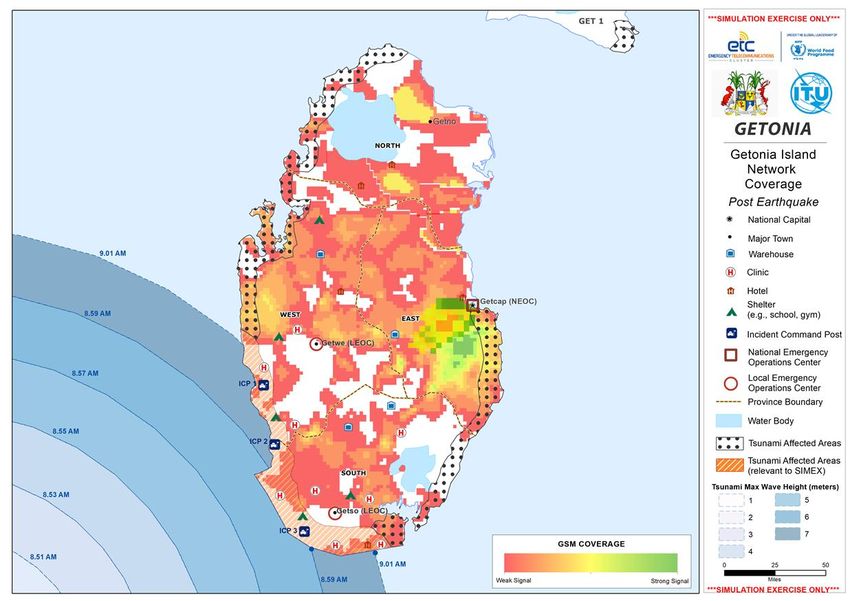
Emergency telecommunications
                           table-top simulation guide

In partnership with: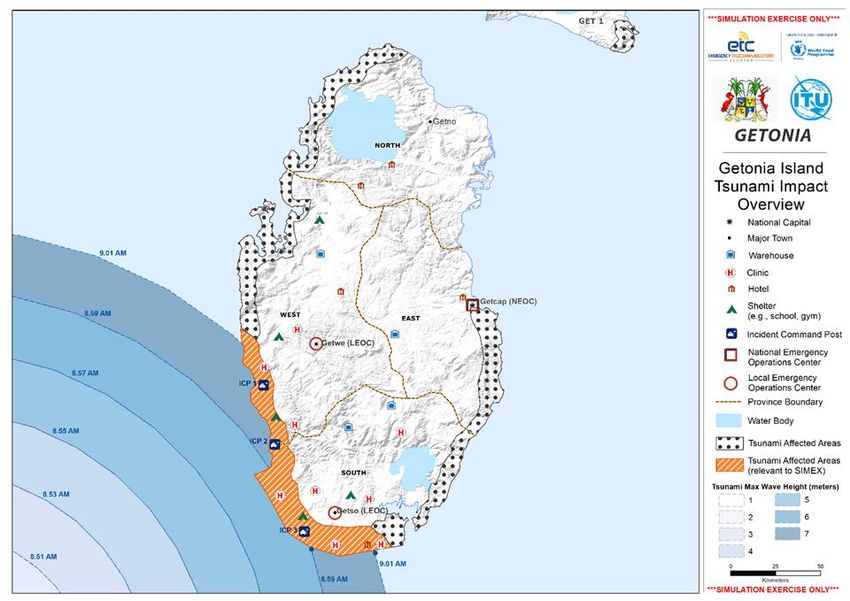
Acknowledgements
This guide and associated toolkit were prepared by the international expert Anna Young,
under the direction of the Environment and Emergency Telecommunications Division (EET) of
the International Telecommunication Union (ITU) in close collaboration with the Emergency
Telecommunications Cluster (ETC).
ITU and ETC would like to warmly thank those who contributed to this guide, including
members of the ETC, in particular Ria Sen (Global ETC Preparedness and Resilience Officer),
Joseph Burton (Counselor for Technology and Security Policy, US Department of State) and
Hlekiwe Kachali (ETC Coordinator for Pacific Islands, WFP).

ISBN
978-92-61-30351-8 (Paper version)
978-92-61-30361-7 (Electronic version)

                                           © ITU 2020
Some rights reserved. This work is licensed to the public through a Creative Commons
Attribution-Non-Commercial-Share Alike 3.0 IGO licence (CC BY-NC-SA 3.0 IGO).
Under the terms of this licence, you may copy, redistribute and adapt the work for non-
commercial purposes, provided the work is appropriately cited. In any use of this work, there
should be no suggestion that ITU endorse any specific organization, products or services. The
unauthorized use of ITU names or logos is not permitted. If you adapt the work, then you
must license your work under the same or equivalent Creative Commons licence. If you create
a translation of this work, you should add the following disclaimer along with the suggested
citation: “This translation was not created by the International Telecommunication Union
(ITU). ITU is not responsible for the content or accuracy of this translation. The original English
edition shall be the binding and authentic edition”. For more information, please visit
https://creativecommons.org/licenses/by-nc-sa/3.0/igo/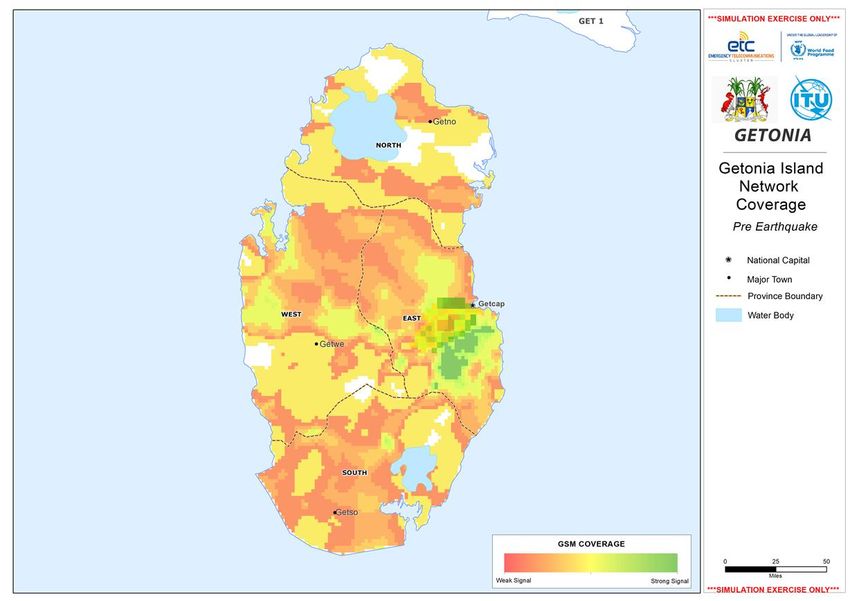
Table of Contents
                                                                                                                        Page
1.     Introduction ................................................................................................      1
2.     What is a simulation exercise?....................................................................                 2
3.     How to conduct a simulation exercise ........................................................                      5
       Phase 1: Plan ..............................................................................................       5
       Phase 2: Design and set up ........................................................................                8
       Phase 3: Implementation ...........................................................................               11
       Phase 4: Follow up .....................................................................................          12
Acronyms ............................................................................................................    14
Annex 1: Toolkit table-top simulation exercise ..................................................                        15
       Annex 1.1: Concept note.............................................................................              15
       Annex 1.2: Budget template .......................................................................                18
       Annex 1.3: Planning checklist......................................................................               19
       Annex 1.4: Master scenario and inject guidance ........................................                           22
       Annex 1.5: Inject matrix template ..............................................................                  27
       Annex 1.6: Example PowerPoint presentation ...........................................                            34
       Annex 1.7: Guidance for table-top simulation facilitators .........................                               44
       Annex 1.8: Activity sheet template .............................................................                  47
       Annex 1.9: Action plan template ................................................................                  48
       Annex 1.10: Evaluation ...............................................................................            50
Annex 2: Additional sample resources for Getonia (fictitious island) ................                                    53
       Annex 2.1: Inject matrix (Getonia example) ...............................................                        53
       Annex 2.2: ICT country profile (Getonia example) .....................................                            63
       Annex 2.3: ICT standard operating procedures (Getonia example) ...........                                        65
       Annex 2.4: Country overview map (Getonia example)...............................                                  70
       Annex 2.5: Impact overview map (Getonia example) ................................                                 71
       Annex 2.6: Zoom impact overview map (Getonia example) ......................                                      72
       Annex 2.7: Pre-coverage map (Getonia example) ......................................                              73
       Annex 2.8: Post coverage map (Getonia example) .....................................                              74
       Annex 2.9: Response plan template (Getonia example) ............................                                  75
Further reading ...................................................................................................      78

                                                                                                                         iii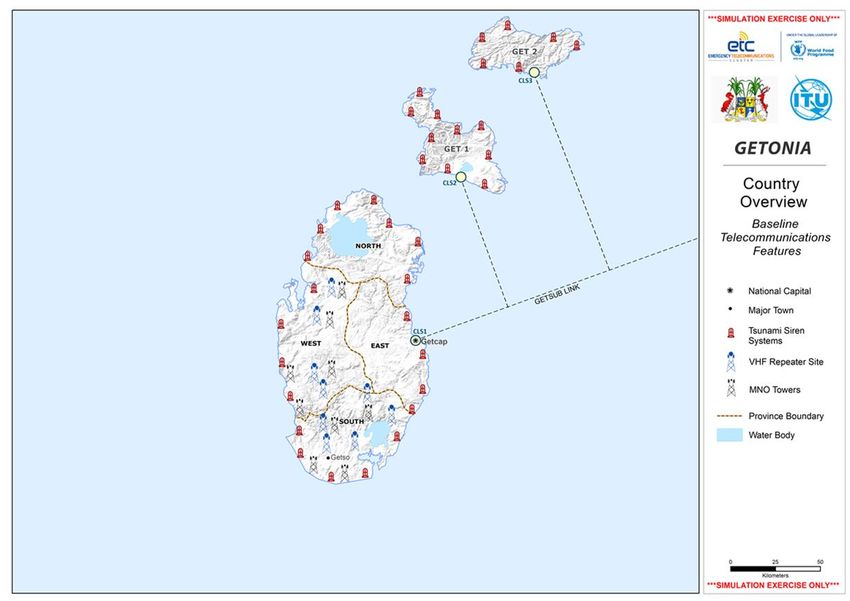
1.      Introduction
This guide has been designed to assist ITU Member States and stakeholders working on
disaster management and disaster risk reduction at a national level, to plan design and
conduct table-top simulations that test and refine emergency telecommunication plans and
policies and verify whether networks, redundant communications capacity, personnel, and
other telecommunication systems are in place. These activities increase preparedness when
disasters strike.
This guide will help the emergency communications sector of Member States to create a
contextualized and country specific simulation. It outlines the key steps and phases of
planning, designing, conducting and following up of an emergency simulation exercise
(see Figure 1).
All relevant material to complement this guide, including sample materials from previous
ITU-ETC simulations is included in the annexes.
Annex 1 contains the toolkit documents such as templates, checklists and guidance to assist
in running a simulation.
Annex 2 contains examples of simulation resources from previous exercises.
Annex 3 contains an additional list of resources for further reading and reference material.

                                                                                               1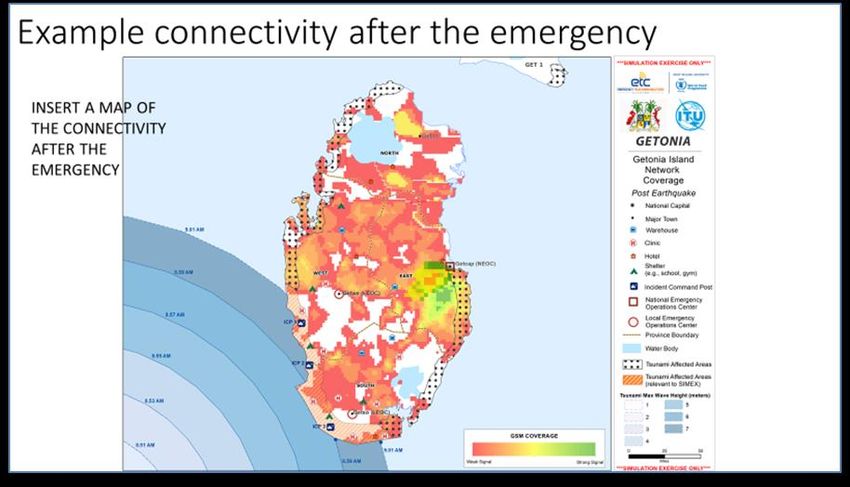
Figure 1: Steps of a table-top simulation (TTX)

Source: ITU

2.        What is a simulation exercise?
In the context of this guide, a simulation is an exercise that replicates selected aspects of an
emergency operation. It is a fictitious disaster scenario that allows participants involved in
emergency responses to rehearse procedures, identify gaps and test plans, in order to
enhance skills and knowledge and strengthen preparedness.1 A simulation serves as a
preparedness action, and is best run when mechanisms are in place such as coordination
structures, supporting policies, and plans.
This guide focuses on desk-based simulation exercises where small groups are expected to
react to a disaster scenario and resolve presented problems. Participants build an
understanding of the systems, policies, procedures, resources and structures in place to
support emergency responses. Through a debrief process at the end of the simulation, they
are also able to identify gaps and issues to be addressed through preparedness measures.
A simulation exercise usually takes 3-5 hours and is relatively easy to organise.
Selecting the type of simulation exercise will depend on the objectives and the resources
available for planning and conducting the exercise. While this guide focuses on table-top
simulations, examples of the different types of exercises are highlighted in Table 1, in order
of complexity.

1    See also the World Food Programme Emergency Preparedness and Response Package (EPRP)
     Simulation Guide. https://executiveboard.wfp.org/meeting/95

2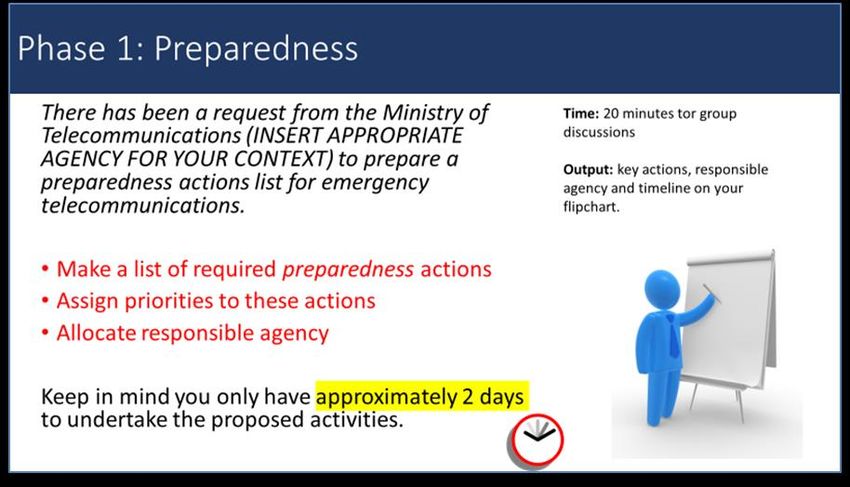
Table 1: Types of simulation

     Type              Description                  Key characteristics       Planning considerations
 Drill        An exercise that aims to          • Can include repeated      • Can take up to a month
              practice one component of a         practice of the same        dependent on the
              response, such as a                 action.                     deployment of equipment
              notification or the use of a      • Can include use of          and complexity.
              piece of equipment.                 equipment.
                                                • Less than 1 day.
 Table-top    Discussion-driven group           • Desk/room-based.          • Cost effective.
 exercise     exercise that allows              • Generally informal in     • Preparation time of up to
 (TTX)        participants to work together       nature and relatively       4 weeks.
              to resolve issues and answer        easy to implement.        • Generally, no equipment
              questions.                        • Run over 3-5 hours.         and/or deployment
                                                • Involves groups             needed.
                                                  working to resolve        • All activity can take place
                                                  problems or provide         in one room.
                                                  answers to questions.
 Functional   An interactive simulation that    • Time-pressured and        • Requires experienced
 exercise     exercises multiple functions of     realistic scenario.         facilitators.
              an organisation or                • Can be run over half a    • Two months to a year to
              government response plans.          day up to several days.     plan, depending on size
                                                • People and equipment        and complexity.
                                                  are not deployed.
 Field        A full-scale exercise that        • Includes the              • Expensive and time
 exercise     simulates real emergency            mobilization of             consuming to run.
              events as closely as possible       personnel and             • A year or more to
              and tests most functions of an      equipment.                  prepare.
              emergency response plan           • The most realistic of
                                                  simulation types.
                                                • Can be run over half a
                                                  day up to several days.

                                                                                                            3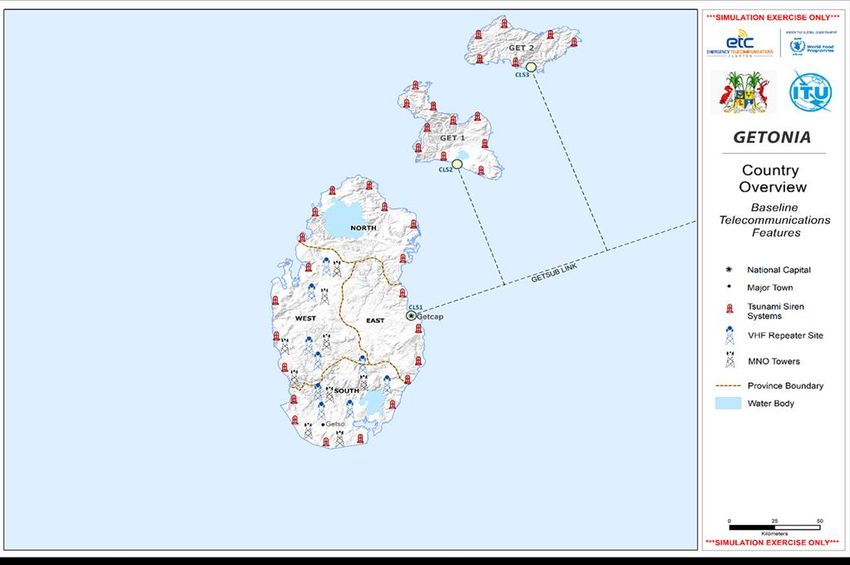
Figure 2: Represents the level of realism in relation to the level of challenge and time to
prepare for the different simulation types

Source: ITU
Simulations are an effective tool to assist organisations and government agencies in
preparedness planning and capacity building. In the context of emergency
telecommunications, simulations can be designed to:
•       Test national and local strategies, protocols and frameworks on the use of
        information communications technologies (ICTs) for disaster response.
•       Increase the understanding of telecommunication regulations and its crucial role in
        disaster response.
•       Identify gaps and challenges that can be addressed through preparedness in the
        emergency telecommunication sector.
•       Increase understanding of response mechanisms.
•       Practice national/interagency contingency plans and/or local-specific plans in
        emergency preparedness and response.
•       Test new policy, procedures or equipment before incorporation into national plans.
•       Test the roles and responsibilities of key stakeholders in disaster preparedness and
        response, including communities, provincial and national government, customs
        organisation, the private sector, national response agencies, local and international
        NGOs, civil protection, UN agencies.
•       Test the national disaster response coordination mechanism, and its coordination
        with other clusters at the regional level.

4
• Assist national, provincial, and district response management staff in their roles and
responsibilities in the use of ICTs for disaster management, with a specific focus on
the response phase.
• Build an understanding of government structures and/or coordination, cooperation
and communication between government and the humanitarian
community/organizations present in the country.
• Consider emerging risk(s) in the emergency telecommunication sector, and test
coordination and information sharing among the ICT private sector.
• Identify whether proper mechanisms, systems and resources, including early warning
systems, are available in-country and at regional and global level, to support the use
of different ICT platforms and technologies for a large-scale emergency response.
• Contribute to cross-sectoral relationship building, both within the national
government and between other key stakeholders.
• Apply lessons learnt and consolidate best practices identified during the simulation
exercise and identify next steps to enhance preparedness for future disasters.
3. How to conduct a simulation exercise
This section outlines the key steps in conducting a simulation exercise. Four main phases have
been identified:
• Phase 1: Plan
• Phase 2: Design and set-up
• Phase 3: Conduct
• Phase 4: Follow-up and results
Phase 1: Plan
Step 1.1 Initiate
The desire and commitment of a government agency or interested organisation at senior
management level to lead in the planning and running of a simulation should be the starting
point for undertaking a simulation exercise. This agency should then engage with cross-
sectoral partners from the government, private sector, humanitarian organizations, and other
stakeholders involved in disaster management, in order to plan and conduct the simulation.
This agency should also assemble a facilitation team to be responsible for the planning,
design, conducting, and follow up of the simulation. This team may include representatives
from different agencies.
Step 1.2 Determine objectives
When planning an exercise, objectives must be clearly defined, as these are the foundation
for the development of the simulation. This should be done in consultation with the key
stakeholders.
The key questions that need to be answered and articulated in the objectives are:
• What do we want to achieve through running a simulation?
• What are we trying to test or practice?
5• What are the areas that need strengthening?
• Who will conduct the simulation?
Step 1.3 Identify participants
To help determine the number, functions, and roles of participants of the simulation, the
following questions may be considered:
• Who needs to be in the simulation to meet the objectives?
• Who handles the functions to be tested?
• Who has a relevant role?
• Is there participant diversity: i.e. in terms of gender, age, ethnicity, and experience?
Participants should be included from all relevant sectors and should be selected based on
their ability to contribute to and meet the objectives of the simulation.
Participants will be expected to have relevant roles during the exercise, and it is important to
ensure that participants are in a position to make decisions during the simulation and to
consider potential preparedness/mitigating actions afterwards.
Table 2: Potential participants
Sector Agency/Organisation
Government Ministry of ICTs or agency responsible for
telecommunication policies, including spectrum allocation or
network outage reporting
Telecommunication regulatory authority
National disaster management organization or civil
protection authority
Ministry of transport
Ministry of foreign affairs
Customs and immigration organization
Meteorological organization
Military
Telecommunication/ICT/ Mobile network and service providers
media/electricity Fixed telephone service providers
providers (private and public)
Internet service providers
Satellite service providers
Broadcasters (TV and radio)
National power providers
National and International humanitarian National non-government organisations
agencies and civil society International non- government organisations
UN organisations
National Red Cross Society, International Committee of the
Red Cross and International Federation of Red Cross
Civil society
6Step 1.4 Draft concept note
The concept note serves as an introduction to the exercise for key stakeholders involved in
the planning process and helps to ensure that all stakeholders are clear on the expectations
for the overall exercise. A concept note should be developed and include the following
components:
• background and context;
• simulation objectives;
• scenario and scenario timeline;
• participants.
ANNEX 1.1 CONCEPT NOTE TEMPLATE
Step 1.5 Allocate budget and resources
Consideration needs to be given to the people who are required to run the simulation, as well
as associated costs, resources, and location. A budget should be created to support the
running of the simulation. The budget may be supported by more than one organisation.
ANNEX 1.2 BUDGET TEMPLATE
Step 1.6 Create planning timeline
A timeline for delivering the exercise should be created that will consider the duration of the
planning process, the time the simulation will take, and the period for following up. This should
include all other required activities to successfully conduct and complete the simulation, such as
identifying and nominating a team leader or responsible person.
ANNEX 1.3 PLANNING CHECKLIST
Step 1.7 Organize facilitation team
A core facilitation team should be established. The key responsibilities of the organizing team
include:
• Determine objectives of the exercise.
• Draft and gain approval of the concept note.
• Develop simulation materials including scenario and injects (information used to
manage the speed and direction of the exercise see Phase3, Step 2.2).
• Ensure adequate resources are available.
• Oversee planning and management of the logistics, administration, finance, and
other related issues.
• Identify and invite participants.
• Train participants in advance, providing plans, policies and other materials that will
be relied upon (tested) in the simulation, if needed.
• Ensure collaboration with key stakeholders throughout the process.
7A simulation should include some of the following functions:
• Team leader: Responsible for the overall planning and implementation of the
simulation.
• Facilitator: Oversees the exercise on the day of the simulation. It may be that the
facilitator is also the team leader.
• Technical advisor(s) subject matter experts: These may be needed in order to assist
with the master scenario.
• Logistic support: Logistic and administrative requirements.
• Co-facilitators: Assist the facilitator.
• Role players: Where necessary.
The core organizing team is responsible for designing the simulation, under the guidance of
the team leader. The team may be composed of three to five persons, but this may vary
depending on the scale of the simulation exercise. It is possible to arrange a simulation with
only one or two people, remembering that consultation with stakeholders is needed to ensure
the content is appropriate and will meet the planned objectives.
Ideally, preparations should begin, at least four weeks prior to the simulation exercise. The
preparation time can vary depending on the scale, scope and complexity of the exercise. The
level of expertise and prior experience with organizing and running simulations will determine
how many work-hours will be needed for organisational purposes.
Step 1.8 Invite participants
Participants should be nominated at least one month in advance of the exercise. If necessary,
a contact person for accommodation and special support should be appointed. The
communications to participants should include a logistics note, a concept note for the
exercise, and any other relevant background information needed, including any current plans
or policies if they are to be tested.
Phase 2: Design and set up
Phase 2 is about designing, developing, and creating the supporting documents to inform and
guide the exercise. It also includes the preparation of the simulation logistics outlined in the
planning checklist.
ANNEX 1.3 PLANNING CHECKLIST
Step 2.1 Master scenario
The master scenario is the narrative of the disaster event(s) and impact, which are simulated
during the exercise. For a table-top exercise, the master scenario does not need to be
extremely detailed but should provide a description of the events that unfold throughout the
duration of the scenario. This should include information on affected critical infrastructure
such as telecommunication networks and services, roads, and population.
If relevant to the objectives, the master scenario should also cover information on the
response by the government and international community, as well as information on major
humanitarian needs. It should describe how the scenario changes over time, including any
8changes to the above elements. If simulating different phases of the response (i.e. early
warning, preparedness or response) and days (i.e. two days before the disaster, the day of
the disaster, and 1 week after the disaster), then the master scenario needs to be broken
down into the different phases, with relevant information added to support and explain these
‘time jumps’.
FACILITATOR NOTE: The master scenario is for the use of facilitators only and should
not be shared with participants. Injects (described below) are used to create and
progress the scenario for participants.
Step 2.2 Injects
Injects are anything given by the facilitation team to the participants during the simulation.
Injects are used to progress the scenario and generally have two functions:
1. To provide information about and evolve the scenario for participants (i.e. news
reports, situation reports, maps or announcements from the government).
2. To prompt a response (i.e. call a meeting, provide information in response to a
question).
Injects can be written (email, SMS, reports, documents), presented face-to-face, over the
phone, video, and via audio announcements. In addition to simulating requests from
national/regional/international levels, as well as field level requests, injects should simulate
responses from and to stakeholders not participating in the exercise.
In order to have the desired impact during the simulation, an inject needs to be well thought
through and linked to the simulation exercise objectives. There should be an understanding
of what the expected outcome of each inject should be, and how participants might react to
it.
During emergencies, there are procedures to follow. It can be useful to have relevant
organizational or agency procedures, telecommunication regulations or other standards on
hand in order to practice the application of these elements. Putting these elements to the
test during the simulation will show whether they adequately address particular needs.
An emergency alert to the public can be included as an inject in a simulation. The emergency-
alert inject may convey key facts such as the type and location of the emergency, the response
time and degree of emergency, as well as expert advices and actions people should take.
Emergency alerts should be in Common Alerting Protocol (CAP) format2. Once the alert is
ready, make the simulation inject by saving the alert text as a ".xml" file.
To assist in the development of the master scenario and the creation of relevant injects, a
guidance document is included in the annexes (see annexe 1.4). Injects can be developed and
2 A free tool for making a CAP alert can be accessed at https://cap.alert-hub.org. For each country listed, there is a link in
the Editor tool column. Clicking the link will lead you to the initial setup page “This tool is for composing alerts in CAP
format. If you are in the role 'approver-cap' you are authorized to publish CAP alerts. If your role is 'composer-cap' you
can create draft CAP alerts but you cannot approve and publish a CAP alert. If you are not in either of the two roles, you
cannot use the CAP Editor tool.” Clicking the Guest button gives access to setting up a test or exercise alert. A brief guide
to the CAP Editor tool is available https://www.preparecenter.org/ht/resources/cap-editor-operations-guide.
9recorded in an inject matrix (see annexe 1.5) to ensure they support and correspond with the
events described in the master scenario. This can ensure that there are adequate numbers of
injects to meet the objectives and is a helpful tool to refer to when conducting the simulation.
ANNEX 1.4 MASTER SCENARIO AND INJECT DESIGN GUIDANCE
ANNEX 1.5 INJECT MATRIX
Step 2.3 Logistic requirements
Ensuring logistic and administrative requirements are in place well in advance is critical for
the success of a table-top simulation exercise. Within the simulation exercise organizing team,
there should be a dedicated focal person for administrative and logistic matters. This team
member should factor in the items required by participants and the facilitator. The health and
safety of all participants during the exercise is also an essential logistic and administrative
requirement of the simulation exercise.
Prior to the simulation any documents for participants should be sent via email, with
adequate time for participants to review them. If necessary, a training session reviewing the
relevant policies and regulations can be conducted in advance.
Step 2.4 Facilitator briefing
Prior to the start of the simulation, a short briefing with the facilitators should be undertaken.
Ideally this should take place the day before the simulation exercise starts. This time should
be dedicated to ensuring that facilitators and other team members understand their roles
and responsibilities, and how the simulation will unfold. It can be helpful during this briefing
to run through the PowerPoint presentation in annex 1.6.
ANNEX 1.6 EXAMPLE POWERPOINT PRESENTATION
Step 2.5 Set up and administration
Setting up the simulation exercise is critical. Key documents should be prepared in advance,
along with the room so that teams can work together around a table. There should be no
more than eight people per group. Facilities such as Internet, audio and video connections
should also be tested in advance, and possibly, a test-run of the actual proceedings should be
undertaken to catch any glitches in advance of the simulation exercise.
10Figure 3: Example room set up for four working groups
Projector
Grp 1 Grp 2
Grp 3 Grp 4
source: ITU
The simulation exercise facilitator or team leader can arrange either a separate room for the
facilitation team or a separate table in the room with all other participants.
FACILITATOR NOTE: Remind participants that despite being assigned to
a working group there will be opportunities to hear from and feed into
the work of other groups
Phase 3: Implementation
Step 3.1 Participant briefing
The simulation exercise facilitator should brief participants when the simulation begins. This
should include an explanation of how the exercise will run, what is expected of participants
and the objectives. It should also outline the expected timeline including a debrief at the end
of the simulation exercise to reveal what has been learnt and to identify future actions. Other
logistic information should also be provided at this juncture such as emergency exits and
coffee or lunch break times. It should also allow participants to ask questions and seek clarity
prior to the start of the simulation exercise.
Step 3.2 Facilitation and exercise management
The facilitator oversees the running of the exercise, this includes supporting co-facilitators,
ensuring injects are delivered, managing the speed and progression of the exercise and
facilitating the discussions at the end of each inject discussion. To assist the facilitator in the
running of the simulation, additional guidance can be found in annex 1.7.
ANNEX 1.7 GUIDANCE FOR TABLE TOP SIMULATION FACILITATORS
11Step 3.3 Debrief
Once the simulation is complete, sufficient time should be given to holding a facilitated
debrief session. Debriefing is critical to extract the lessons learnt and embed the learning after
a simulation. Debriefs should allow the opportunity for individual, team and full group
reflection. Participants should provide their feedback before facilitators provide theirs and
care must be taken to ensure that this is a positive and supportive process. Participants should
be encouraged to freely identify gaps, what went well, and what needs to change to ensure a
higher level of readiness.
A key output of the debrief process is the identification of activities to be taken forward based
on lessons learnt during the simulation exercises. Recommended activities should be
recorded in a draft action plan (see annexes 1.8 and 1.9).
ANNEX 1.8 ACTIVITY SHEET TEMPLATE
ANNEX 1.9 ACTION PLAN TEMPLATE
Sufficient time should be allocated for the debrief. Generally, at least 20 per cent of the overall
time spent on the simulation exercise should be dedicated to debriefing. To assist with
designing and running debriefs, guidance is included in the annex 1.7.
ANNEX 1.7 GUIDANCE FOR TABLE TOP SIMULATION FACILITATORS
Step 3.4 Evaluation
At the end of the simulation and debrief, participants should be given an evaluation to
complete. This can be through a printed form or an electronic questionnaire. Feedback from
participants on the simulation should contribute to the improvement of future simulations.
ANNEX 1.10 EVALUATION TEMPLATE
Phase 4: Follow up
Step 4.1 Recommendations for action
During the post-simulation debriefing, participants will help to improve and further elaborate
the action plan, which includes assigning a responsible agency/person along with the timeline.
Where possible, these improvements and changes to actions should be integrated into the
work and planning of current bodies engaged in emergency response and action such as the
national ETC Working Group.
Additionally, after the simulation is complete the facilitation team should consider what went
well and what went less well during the simulation and what can be done to improve future
simulations. These recommendations, as well as feedback from participants should be
reflected in the table-top simulation exercise report.
12Step 4.2 Draft table-top simulation exercise report
After the completion of the simulation exercise, a short report should be drafted outlining the
simulation objectives, process, action list and any other recommendations generated through the
simulation and post-simulation debriefing. This report should also include suggestions of how to
improve future simulations. Where possible, the report and the results of the action list are tracked
and shared.
Table-top exercises and other simulations should be scheduled regularly in order to
encourage a culture of learning, sharing of experiences, and improvement.
13Acronyms EPRP Emergency Preparedness and Response Package ETC Emergency Telecommunications Cluster ICT information and communication technologies ITU International Telecommunication Union SIMEX Simulation exercise TTX Table-top simulation WFP United Nations World Food Programme 14
Annex 1: Toolkit table-top simulation exercise

                                       Annex 1.1: Concept note
Introduction
The TTX concept note is a document that clearly defines the exercise being undertaken and
should be agreed upon by the partners involved in organising the TTX. It should include the
purpose, scope and objectives of the exercise and provide an overview of the scenario,
participants and facilitators.
Concept note template

                     Title: Concept note for [NAME] table-top exercise
                                                 [COUNTRY]
                                 Date of exercise: [DD/MM/YYYY]

1.        Background and context
Provide some brief background information on the planned exercise, including the rationale
for undertaking it, the type of exercise as well as when and where it will be conducted.

Example content:

The simulation is to take place on (ENTER DATE) at (ENTER LOCATION) from 8.30am until 1.30pm and will include
a 1.5 hour debrief.
The (INSERT AGENCY) recognises that given the rise in the number of people affected by disasters around the
world, having timely, predictable and effective information and communication technologies (ICT) and services
are critical to saving lives and increasing resilience. To that end, (INSERT AGENCY) has initiated this simulation in
collaboration with (INSERT PARTNERS) to allow key ICT stakeholders to identify, discuss and prioritise key
preparedness activities to be undertaken prior to the upcoming cyclone season.
The simulation will be run as a table-top exercise and will be based on the scenario of a tropical cyclone. The
scenario will cover a period of approximately four days, from prior to the cyclone (preparedness) to two days
after the cyclone has made landfall (response).

2.        Simulation objectives
Provide the specific exercise objectives. It is important that these objectives are clear and
achievable. For a TTX, it is prudent to limit your objectives to no more than three given the
limited time available.

                                                                                                                  15
Example content:
• To highlight the importance of having in place ICT strategies and policies that need to be implemented at a national level
to reduce the impacts of disasters (e.g. National Emergency Telecommunication Plans and procedures)
• To demonstrate the importance of regulators and ICT decision-making authorities for disaster management at a national
and local level
• To raise awareness of the need for inter-agency coordination throughout the disaster management cycle
• To highlight the need for clear coordination structures and engagement between government authorities and other
humanitarian actors involved in decision-making processes, including the ICT private sector
• To highlight the importance of having a clear process for dissemination of emergency alerts and warnings to the public
using different technologies (e.g. Common Alerting Protocol (CAP), SMS, cell broadcast, broadcast television and radio,
siren, social media)
• To demonstrate that preparedness efforts can improve response effectiveness.
• To showcase the value of monitoring and early warning to support informed decision-making.
• To highlight the importance of emergency telecommunication systems and services that allow communication between
key stakeholders, using different technologies such as satellite, mobile, radio, and other low-tech systems
• To demonstrate the criticality of effective end-to-end early warning systems, and the precise flow of risk information from
the initial stage of issuance of an alert to first-responder action on the ground
• To highlight the roles of the other key stakeholders involved in the disaster and emergency management cycle (e.g.
telecommunications line ministries, national disaster management offices, mobile network operators, satellite providers,
technology providers, etc.)
3. Simulation scenario
This section should include the below elements:
• Type of emergency
• Date/time of emergency
• Location of emergency
• Extent of impact
The scenarios should be relevant and credible and based on your country context.
Example content:
The exercise will use a scenario of a tropical cyclone that makes landfall at (INSERT LOCATION). It will cover a
simulated period of four days from preparedness (from 2 days before) to the response (2 days after).
The scenario will include elements of widespread disruption and destruction to key telecommunications
infrastructure and power (both government and private sector owned) and will affect approximately 60% of the
country.
164. Participants
Provide an outline of the types of stakeholders that will be participating in the TTX.
Example content:
This simulation will bring together key decision makers from ICT regulatory bodies, the ICT private sector,
policymakers, humanitarian organizations, disaster management offices, and other key stakeholders at national
level.
5. Facilitation team
Include a list of the names and roles of those people on the facilitation team.
The table below sets out the possible composition of a TTX facilitation team.
Function Name Organization Main responsibility
Team Leader Responsible for the overall planning and
implementation of the TTX
TTX controller Oversees the exercise on the day of the
simulation (may also be the team leader)
Technical advisor Provides technical guidance in the design,
running and debrief of the TTX
Logistic support Provides administrative and IT support
Co-facilitators Assists the TTX controller as needed
Role player Used to deliver injects, if applicable
6. Budget
Include how the cost for the TTX will be covered.
Example content:
Example of cost discussion
(ENTER AGENCY NAME) will cover all simulation-related expenses (venue, catering, stationery, equipment, etc.),
including the related costs of the facilitators and participants (travel, DSA). A detailed budget has been completed
using the template in the toolkit and is available on request.
17Annex 1.2: Budget template
Introduction
This template can be used to design a budget for a table top exercise. It can also help share
costs between hosting organisations.
Please fill the purple cells where relevant for your exercise
In red cells, specify the sponsor who will support that specific budget line (ie Ministry of
Telecommunications, private sector company)
COST
Quantity No. days Unit price Total Sponsor
Simulation exercise implementation cost
DSA for national participants (including evaluators)
1
who have to travel -
Transport cost for national participants (including
2
evaluators) -
Sub-total B.2. (National participants) -
3 Conference room -
Sub-total B.3. (Venue) -
4 Lunch -
5 Coffee breaks and refreshments -
Sub-total B.4. (Catering) -
6 Participant stationery (notepads, pens, nametags, etc.) -
7 Print-outs (certificates, plans & SOPs to be printed) -
8 Room stationery (flipchart, Post-its, markers, etc.) -
Sub-total B.5. (Stationery) -
IT equipment rental (computers, printers, projectors,
9
sound systems, etc.) -
Sub-total B.6. (Equipment) -
10 Translation services -
11 Security services -
12 Other services (please specify) -
Sub-total - Services -
TOTAL -
18Annex 1.3: Planning checklist
Planning Checklist for TTX Simulation Before the exercise
TASK DETAILS DATE DUE FOCAL POINT STATUS
Define the purpose
and scope of the ie: in process,
Concept note
simulation and completed
draft concept note
Facilitation team
identified and
confirmed
Resources
Budget prepared
Funding sources
agreed
Invitations: (Note: should be Participants
sent as early as possible to identified
ensure the appropriate people Participants invited
are available to participate)
Participant list
created
Admin note and
reminder sent
Venue selected
(security approved,
appropriate size)
Venue is accessible
for all stakeholders
Room layout
agreed with venue
manager
Venue setup
Supplies and
equipment
delivered and set
up
19TASK DETAILS DATE DUE FOCAL POINT STATUS
Catering package
(meals and
Catering refreshments)
Catering confirmed
and times provided
Accommodation
Participant accommodation and booked (if needed)
transport
DSA (if applicable)
4 x flipcharts on
stands
1 pad of paper per
person
Rubbish and paper
recycling bins
Large clock for the
room
Stationery:
• Name badge
holders
• Pens
• Memory sticks (at
least 4)
• Flipchart paper
and markers
• Adhesive tape
(paper tape)
• Scissors
• Packet of A4
printing paper
• Spare printer ink
(black)
• Pack of large
Post-It notes
Microphone and
speakers (sound
system)
LCD projector,
cables and screen
Printer (if
appropriate)
Multiplugs
Equipment
Presentation
remote control
Facilitator laptops
All equipment
needed to deliver
inject is in place
(i.e. audio
equipment, etc.)
20TASK DETAILS DATE DUE FOCAL POINT STATUS
Name badges
Registration sheet
Print agenda
Print inject matrix
(1 set per
facilitation team
To print and documents member)
required Print master
scenario (1 per
facilitation team
member)
Faciltation Team
Guidance Note
Monitoring and
evaluation survey
After the exercise
TASK DETAILS DATE DUE FOCAL POINT STATUS
Budget All expenses
recorded
Produce a financial
report if required
Report Update participant
contact list
Note: This checklist should be adapted to your local context.
21Annex 1.4: Master scenario and inject guidance
Master scenario and inject design guidance
This guidance has been created to assist in the design of the master scenario and
accompanying injects as part of a table-top simulation (TTX). It should be used in conjunction
with the ETC-ITU table-top simulation guide.
1. Master Scenario
The master scenario is a description of a series of hypothetical, but realistic events that form
the foundation of the simulation. For a TTX, the key elements of the master scenario should
include a brief narrative of what has happened and a timeline of events that occur over the
time of the simulation.
A scenario can evolve over a number of stages of an emergency response, i.e. mitigation,
preparedness, response or recovery or only one stage, i.e. response. More than one stage
may be included in a TTX but must be supported by appropriate injects to ensure that
participants understand that a ‘time-jump’ has occurred.
A master scenario should be finalized before creating injects, to ensure consistency. Injects
are then used to unfold the scenario to participants.
Example of a time jump:
A simulation may begin with an imminent severe hazard (such as a cyclone or a tsunami) in order for participants
to prepare for the event. The scenario can then include a time jump, with the disaster occurring (cyclone makes
landfall or tsunami wave arrives) and participants now require to undertake initial response activities.
Important note: The master scenario is only shared by the facilitation team and is never
shared with simulation participants. The scenario should be as realistic as possible in order to
help participants engage in the simulation.
Example of a master scenario for a TTX
Master Scenario for (NAME OF TTX)
Date of exercise: (DD/MM/YYYY)
Preparedness
We are currently in the tropical cyclone season. The Bureau of Meteorology has reported that there is a significant
low-pressure system located off the (INSERT LOCATION AND COUNTRY i.e. western coast of country name).
It is anticipated that this will strengthen and develop into a tropical cyclone as it moves over the ocean towards
(INSERT COUNTRY). It is currently expected to make landfall at (INSERT LOCATION) in approximately 2 days from
now.
There are grave concerns for residents of the country and all preparation efforts must be made in order to prepare
for this event.
Response - Time Jump – 2.5 days -
The tropical cyclone made landfall at (INSERT LOCATION) and has created widespread damage to buildings and
infrastructure. There has been coastal and inland flooding. Telecommunications infrastructure has been
damaged including 65% of private sector infrastructure. There are widespread power cuts with approximately
20% of the area around the capital without power. Mobile networks in (INSERT LOCATION) are currently not
functioning and coverage across the country is down to 50%.
222. Injects
A inject is anything shared by the facilitation team with one or more of the participants during
the simulation. Injects generally have two functions:
• To provide information about and evolve the scenario for participants (i.e. news
reports, situation reports, maps or announcements from the government)
• To prompt a response (i.e. call a meeting, provide information in response to a
question)
Usually during a TTX, participants work in groups of up to 8 people. Each group is given the
same injects. Injects are pre-planned and scheduled prior to the start of the simulation.
For TTX, injects can be displayed on a PPT, can be in written form (email, SMS, reports,
documents), presented face-to face, over the phone or via video or audio announcements.
Injects should simulate requests from levels above (national/regional/international) and
below (in the field) and responses from and to stakeholders not participating in the exercise.
Each inject requiring an action should include a request or question to be discussed by the
groups. Where necessary a template can be provided which should be included in the inject
matrix.
Important note: Injects should have a direct link with the objectives of the simulation. They
should prompt participants to take action, make decisions or provide information. Example:
If you wish to test participants knowledge of the telecommunication regulation in your
country, then the injects should request information or get them to perform actions that will
help to build and test their understanding of such regulations.
In order to assist in the process of creating and managing injects while running a simulation,
an inject matrix should be developed. Below is an example of an inject matrix for the scenario
above. An example TTX PPT for this scenario can be found in the annex along with an Inject
Matrix Template.
23Simulation Objective/s: To test the group’s understanding of emergency telecommunication regulations and standard operating procedures (SOPs) during preparedness
and response stages of an emergency
Actual
Stage Simulated Time # Inject Summary Inject Type Inject Objective Notes for facilitator
Time
Preparedness 8.30 am 2 days prior to tropical #1 Report from Bureau of Meteorology PPT Participants made Information only, to
cyclone (TC) landfall of impending TC aware of impending set the scene
TC and begin
preparedness
8.32 am 2 days prior to TC #2 Request from Ministry of PPT Participants will Once the activity is
landfall Telecommunications to provide a demonstrate complete the
list of the key emergency understanding of the facilitator can
telecommunication preparedness key preparedness review and
activities to be undertaken in the activities, focal points facilitate a short
next 2 days. This should be recorded and what to prioritize discussion on the
on your flipchart by 8.50 am and as a hazard key points and
include the timeline and responsible approaches issues
agency
9.15 am 1.5 days prior to #3 Offer from International NGO, ABC PPT Participants Facilitate a short
tropical cyclone Telecommunications, to donate demonstrate an discussion
landfall two-way radio equipment for use in understanding of how highlighting the
the community. It is also likely that to manage donations issues of being
there will be other offers of and their importation overwhelmed by
telecommunication equipment. The inappropriate
group needs to discuss and decide donations and the
how they will manage this situation. need to ensure that
import regulations
are being adhered
to
24Time Jump – Tropical Cyclone Makes Landfall
Impact 09.45 am TC makes landfall #4 TC has made landfall. CAP Alert PPT Demonstrate time Information only,
released jump and participants’ no action required
understanding of the
value of CAP to issue
warnings to the public
Response 09.50 am 1 day after TC made #5 Situation update on key damage to PPT of Provide printed maps Information only,
landfall telecommunication infrastructure as connectivity of damage information no action required
initial assessment reports are map and map received one day after
received of the TC made landfall
humanitarian
needs
09.55 am 1.5 days after TC made #6 The global response community is PPT Group will Facilitate a short
landfall mobilising and telecoms equipment demonstrate their discussion. If not a
is due to arrive requiring clearance understanding of signatory to the
and licenses. licensing and customs necessary
The group is required to discuss the procedures in an conventions, this
clearance and licensing emergency response should also be
requirements and possible situation included in the end-
exemptions due to the emergency of-simulation
situation debrief
10.15 am 2 days after TC made #7 Satellite operators have offered to Question on Group will Facilitate short
landfall install VSATs to restore PPT demonstrate their group discussion
telecommunication links while the understanding of after groups have
national mobile operators restore regulations and discussed the issue
their capacity. Are there any provide creative
national regulatory restrictions that solutions to the
will block installation and use of this current problem
satellite equipment? If yes, which
solutions are available?
25Time Jump – Tropical Cyclone Makes Landfall
10.45 am Two days after TC #8 Request that the group fill out the PPT and Understand key
made landfall response plan using the template response plan actions for inclusion in Provide groups with
provided template, an ETC response plan the response plan
baseline template.
telecoms Groups should refer
features map to the maps given
and suite of to them earlier.
emergency
Debrief with the
telecoms
group.
solutions
11.30 am Simulation ends
11.30 – Debrief
13.00
26Annex 1.5: Inject matrix template
This template can be used to design an inject matrix for a TTX.
Ensure the master scenario has been finalised and agreed to before creating the injects.
All injects should link with the objective(s) of the table top exercise (TTX). They should be
planned, written (where applicable) and scheduled prior to the simulation.
Injects progress the scenario script by giving information, or asking groups to discuss or find
a solution to a problem.
It is possible to project injects onto a PPT (see annex 1.6).
Injects can also be delivered in any appropriate format (phone call, email, sms, fax, radio
message, news article, radio news report, TV clip, agency briefing, situation update, meeting,
character role-play, etc.).
The inject matrix is the key facilitation tool during the exercise. It should be printed in order
to assist the facilitation team.
The TTX facilitator manages the exercise by controlling the pace and direction of the inject
matrix during the exercise.
All exercise documentation must be clearly labelled “SIMULATION ONLY”.
Actual Simulated Inject Inject Notes for
Stage Inject # Inject Type
Time Time Summary Objective facilitator
Stat
27EXAMPLE INJECT MATRIX - REFER TO THE MASTER SCENARIO AND INJECT DESIGN GUIDANCE AND THE EXAMPLE POWERPOINT
PRESENTATION IN ANNEX 1.6
Simulation Objective/s: To test the groups understanding of the emergency telecommunications regulations and standard operating procedures (SOPs)
during preparedness and response stages of an emergency
Notes for
Stage Actual Time Simulated Time # Inject Summary Inject Type Inject Objective
facilitator
Participants
2 days prior to Report from Bureau made aware of Information
08.30 am tropical cyclone #1 of Meteorology of PPT impending TC only to set the
(TC) landfall impending TC and begin scene
preparedness
Request from
Ministry of
Participants
Telecommunications
will Once the
to provide a list of
demonstrate activity is
Preparedness the key emergency
understanding complete, the
telecommunications
of the key facilitator can
preparedness
2 days prior to TC preparedness review and
08.32 am #2 activities to be PPT
landfall activities, focal facilitate a
undertaken in the
points and short
next 2 days. This
what to discussion on
should be recorded
prioritize as a the key points
on your flip chart by
hazard and issues
8.50am and include
approaches
the time line and
responsible agency
28Notes for
Stage Actual Time Simulated Time # Inject Summary Inject Type Inject Objective
facilitator
Offer from Facilitate a
International NGO short
ABC discussion
Telecommunications highlighting
Participants
to donate two-way the issues of
demonstrate
radio equipment for being
an
use in the overwhelmed
understanding
1.5 days prior to community. It is also by
Preparedness 9.15 am #3 PPT of how to
TC landfall likely that there will inappropriate
manage
be other offers of donations and
donations and
telecommunications the need to
their
equipment. The ensure that
importation
group needs to import
discuss and decide regulations
how they will manage are being
this situation. adhered to
29Time Jump – Tropical Cyclone Makes Landfall
Demonstrate
time jump and
ensure
participants
understand the Information
TC has made landfall. value of only, no
Impact 09.45 am TC makes landfall #4 PPT
CAP Alert released Common action
Alerting required
Protocol (CAP)
to issue
warnings to
the public
Provide
Situation update of printed maps
PPT of
key damage to of damage Information
connectivity
One day after TC telecommunications information only, no
Response 09.50 am #5 map and map of
made landfall infrastructure as received one action
humanitarian
initial assessment day after the required
needs
reports are received TC made
landfall
30Time Jump – Tropical Cyclone Makes Landfall
The global response
community is
mobilising and
telecoms equipment
Facilitate a
is due to arrive
short
requiring clearance
Group will discussion. If
and licenses.
demonstrate not a
The group is required their signatory to
to discuss the understanding the necessary
1.5 days after TC clearance and
Response 09.55 am #6 PPT of the licensing conventions,
made landfall licensing and customs this should
requirements and procedures in also be
possible exemptions emergency included in
due to the response the end of the
emergency situation simulation
debrief
31Time Jump – Tropical Cyclone Makes Landfall
Satellite operators
have offered to install
VSATs to restore
telecommunication
Group will
links while the
demonstrate
national mobile Facilitate
their
operators restore short group
understanding
their capacity. Are discussion
2 days after TC of regulations
Response 10.15 am #7 there any national Question on PPT after groups
made landfall and provide
regulatory have
creative
restrictions that will discussed the
solutions to
impede the issue
the current
installation and use
problem
of this satellite
equipment? If so,
which solutions are
available?
32Time Jump – Tropical Cyclone Makes Landfall
PPT and Provide
response plan groups with
template, the response
Request that the Understand
baseline plan template.
group fill out the key actions for
Two days after TC telecoms
10.45 am #8 response plan, using inclusion in an Groups should
made landfall features map
the template ETC response refer to the
and suite of
provided plan maps given to
emergency
them earlier.
telecoms
solutions. Debrief with
the group.
11.3 Simulation Ends
11.30 – 13.00 Debrief
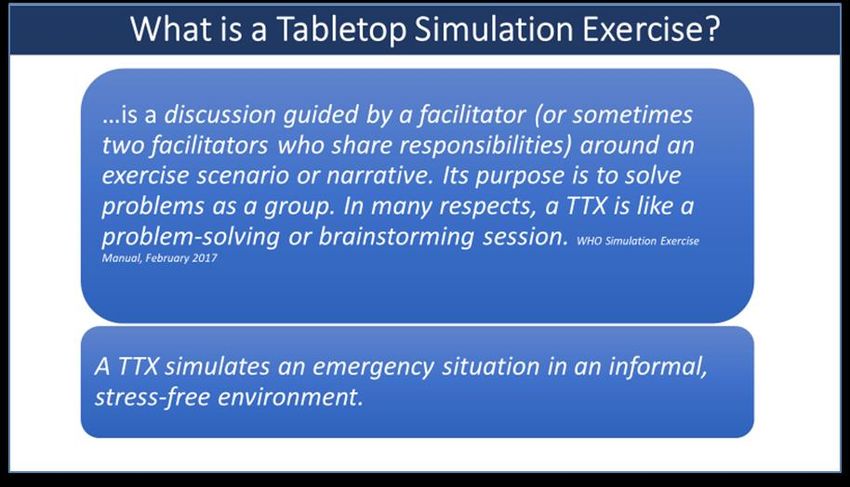
33Annex 1.6: Example PowerPoint presentation This PPT is an example that can be adapted for use in running a TTX. It is broadly based on the master scenario and injects included in the ITU/ETX TTX Guide. Or alternatively: is a discussion-driven group exercise that allows participants to work together to resolve issues and answer questions. A tabletop simulation is an exercise that uses a progressive 34
simulated scenario, together with series of scripted injects, to make participants consider the impact
of a potential health emergency on existing plans, procedures and capacities.

Tabletop simulations - identify major gaps or conflicts in response planning. Participants discuss which
actions they would take when faced with a given emergency, but no real resources are used.
Functional simulations – participants simulate their actions normally within an Emergency Operations
Center (EOC) and must make immediate decisions, but real equipment and personnel are not
deployed.
Full-scale simulations – most realistic and complex. Participants perform as many of their actual duties as
possible in a simulated emergency in order to best assess the true capabilities of the response system.

                                                                                                        35
Note to presenter You can make the groups smaller. Groups should generally be limited to no more than 8 people otherwise you risk losing the full participation of those involved. 36
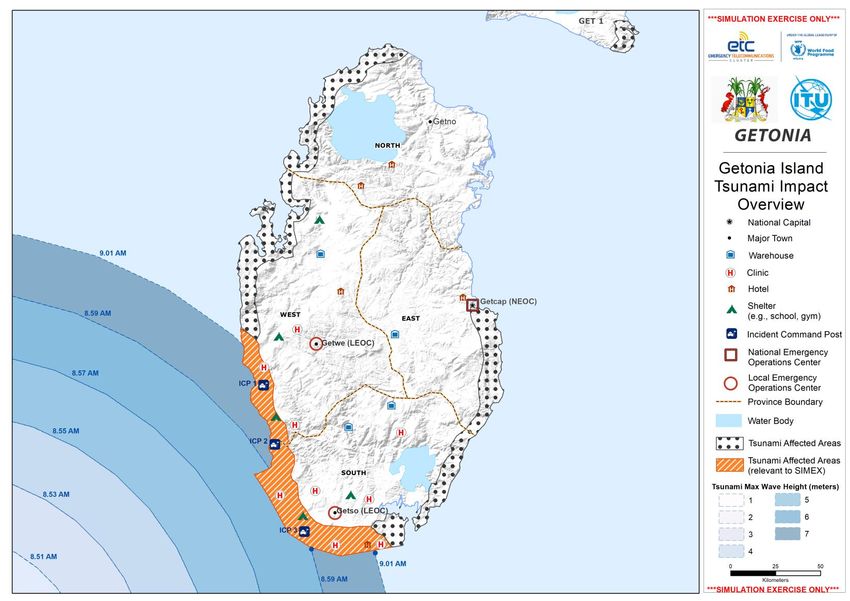
Copyright: Design by World Food Programme (WFP) GIS

                                                      37
38
Copyright: Design by World Food Programme (WFP) GIS

                                                      39
This is just for information. No action is required from this slide. Copyright: Design by World Food Programme (WFP) GIS 40
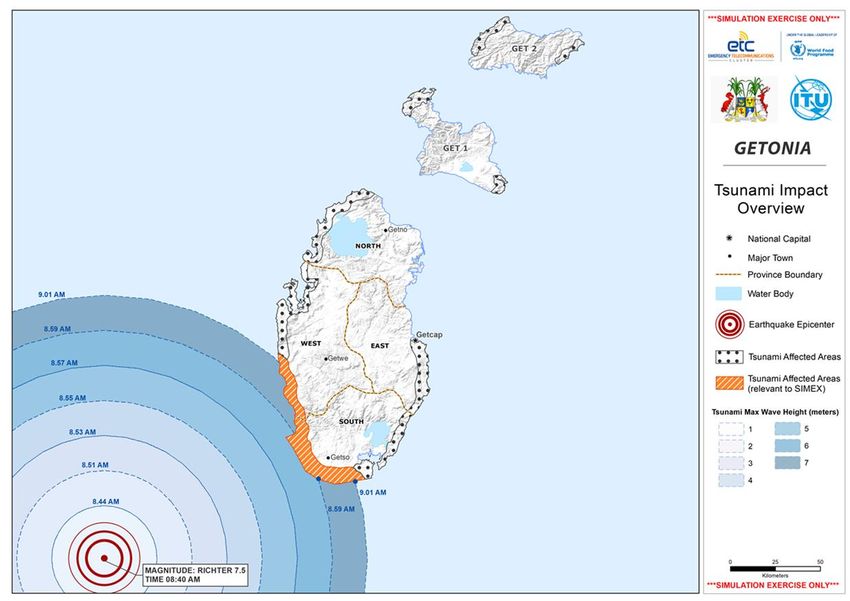
Copyright: Design by World Food Programme (WFP) GIS

                                                      41
42
43
Annex 1.7: Guidance for table-top simulation facilitators
1.        Introduction
This guidance is intended to assist table-top simulation (TTX) facilitators in the actual running
of the TTX simulation and should be used in conjunction with the ETC-ITU table-top simulation
guide.
2.        Roles within the simulation facilitation team
A TTX simulation facilitation team on the day of the simulation should include some of the
following functions:
          Role                            Key activities                               Notes

 Team leader             Responsible for the overall planning, design,   These two roles may be filled by
                         implementation and follow up of the             the same person
                         simulation

 TTX Facilitator         Oversees the exercise on the day of the
                         simulation

 Logistic support        Liaises with the venue, manages equipment,      This should be the same person as
                         deals with participant issues, etc.             the person in charge of logistics in
                                                                         the lead up to the simulation

 Co-facilitator          Assists the TTX Facilitator as directed

 Role players            Used to deliver or respond to injects

3.        General principles for facilitators to consider when conducting simulations:
•         Ensure that you clearly articulate to participants and co-facilitators the objectives of
          the simulation, in as much detail as possible.
•         Create a collaborative atmosphere amongst the facilitation team to ensure that the
          team is working together to achieve the objectives of the simulation.
•         Avoid seeking to scare or intimidate participants as this may inhibit their learning.
•         Build into simulations sufficient flexibility so as to allow the facilitation team to react
          to the participants’ level of knowledge and competence.
•         As a facilitator, as well as being experienced, you should also demonstrate
          respectfulness, humility, perceptiveness, creativity and adaptability.
•         Thoroughly brief facilitators to ensure they are clear on their role, injects and
          intended objectives of each session.
•         If using technology, consider if it will help participants to better engage and reach the
          objectives of the simulation, or if it will just create a distraction.
•         Create a learning environment where participants who ‘mess up’ can be given the
          opportunity to learn from that experience.

44
You can also read


