ERAS Overview The Electronic Residency Application Service - MS4 Class Meeting #2 July 5, 2018 - Pritzker School of Medicine
←
→
Page content transcription
If your browser does not render page correctly, please read the page content below
ERAS Overview
The Electronic Residency Application Service

MS4 Class Meeting #2
July 5, 2018
ERAS Overview
Agenda
• Review of MS4 Class Meeting #1
• Navigating ERAS
• Identifying and Applying to Programs within ERAS

                                                     3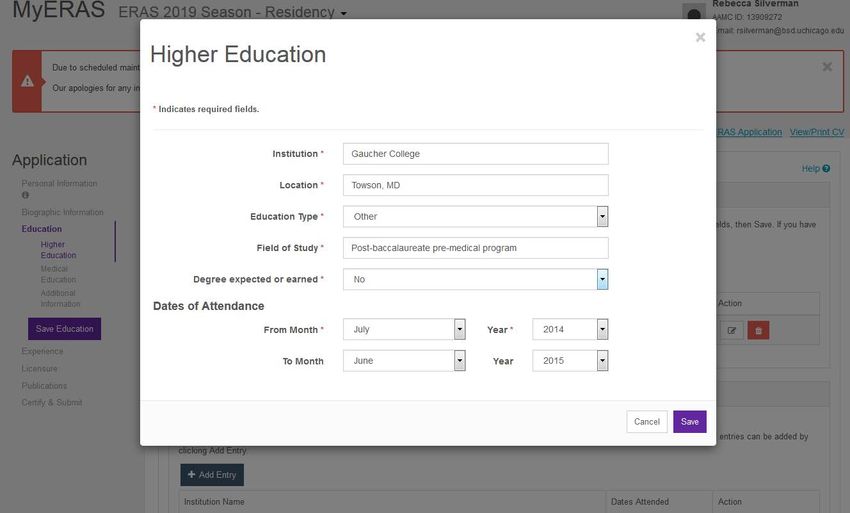
Review

         4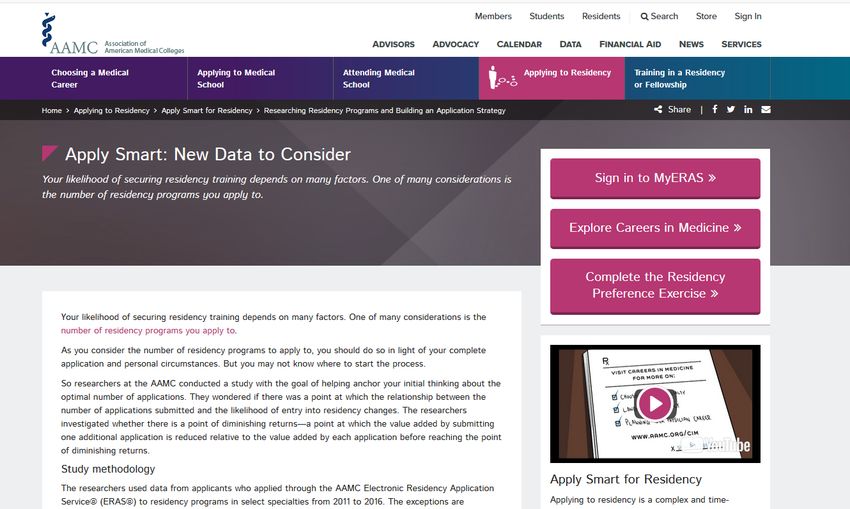
Timeline Review: July - August
July – August                Organize CV (follow template)

                                     Meet with Dr. Fromme, if you have not already done so

                                     Ask for Letters of Recommendation

                                     Sign up for your ERAS/Graduation photo

                                     Prepare for and submit your SVI (EM students only)

                                     Write your Personal Statement

                                     Send a draft to your career and specialty advisors for review

                                     Edit your ERAS application to near completion
This timeline is designed for students applying through the regular match.

                                                                                                     5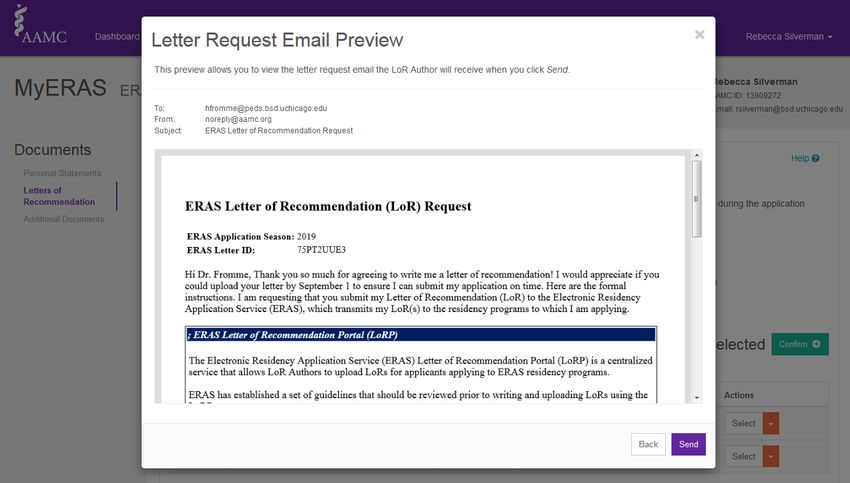
Timeline Review: August – Early September
August – early September   MSPE Review

                           Continue to edit your ERAS application and

                               Personal Statement

                           LORs uploaded

                                                                        6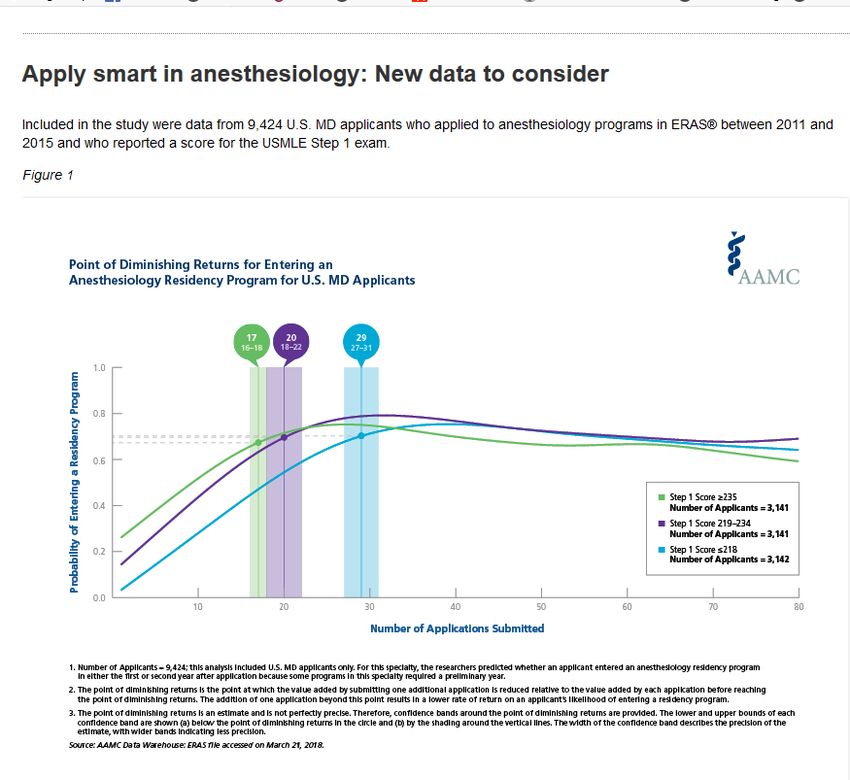
Timeline Review: September 5-15
September 5    Beginning of the 10-day period where you can certify

                    and submit your ERAS application

                    (Programs will NOT receive apps before 9/15)

September 15   Certified ERAS applications sent to programs

                    NRMP Registration opens

                    (You must register for both ERAS and the NRMP)

                                                                      7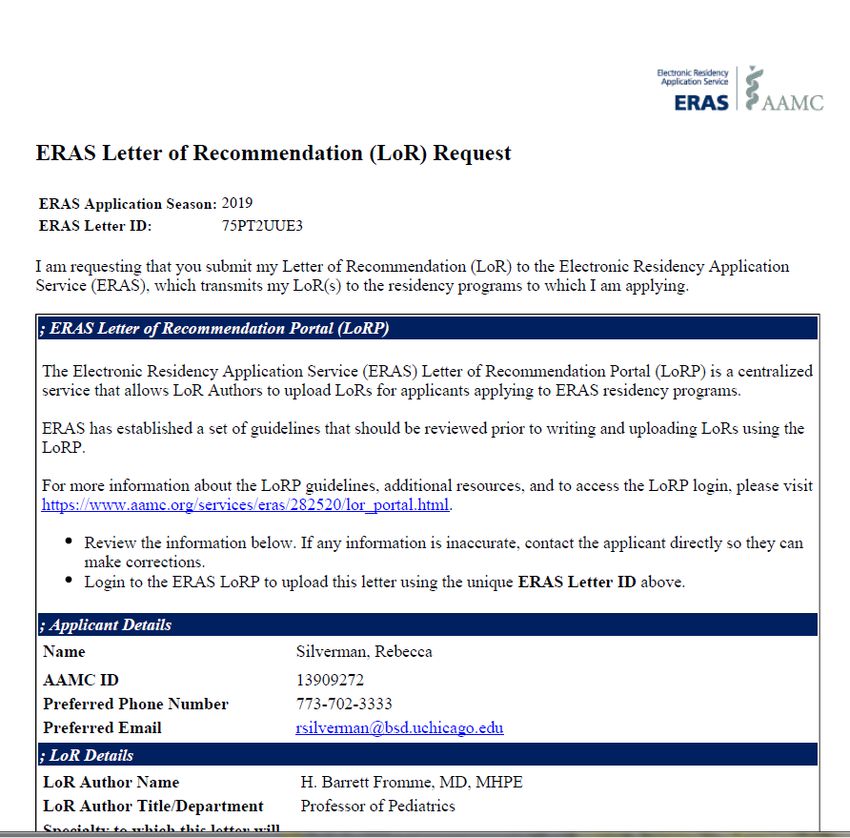
Timeline: October - December

  October   1      MSPEs are released to programs

  November 30      Deadline for NRMP registration

  December 1       PSOM Step 2 test date deadline

                                                    Review   8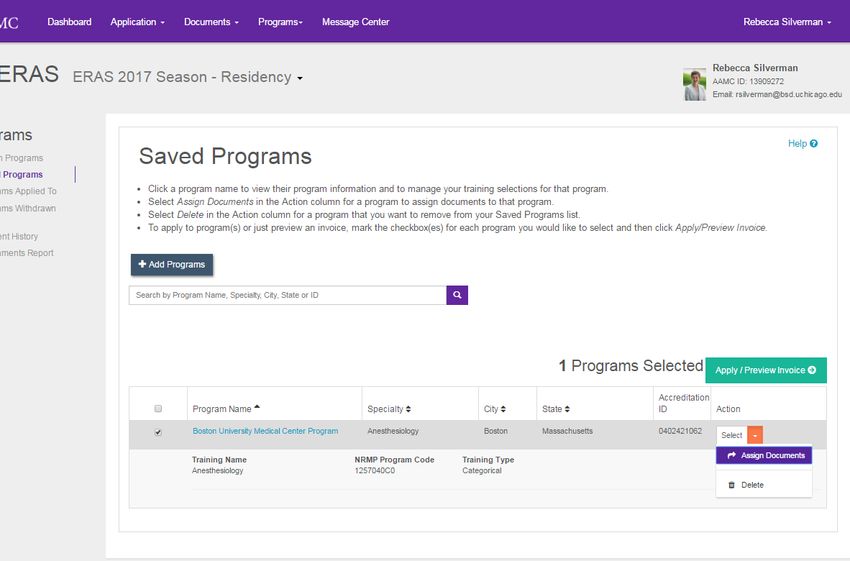
LORs: How many letters do I need?
Categorical Programs: 3-4 total letters
     •   3 clinical letters
     •   1 research letter (if appropriate)
                          Note: You cannot submit more than 4 letters to a single program.
Advanced Programs: 6-7 total letters
     •   Prelim/Transitional Year: 3 clinical letters
     •   Advanced Program: 3 clinical letters
                                  1 research letter (if appropriate)
     Note: Letter writers can use the same letter for both applications, as long as they are generic in their specialty
                                                    recommendation.
(i.e. “I recommend John Doe for your residency program” instead of “I recommend John Doe for your Pediatric residency
                                                        program”)

                                                                                                              Review      9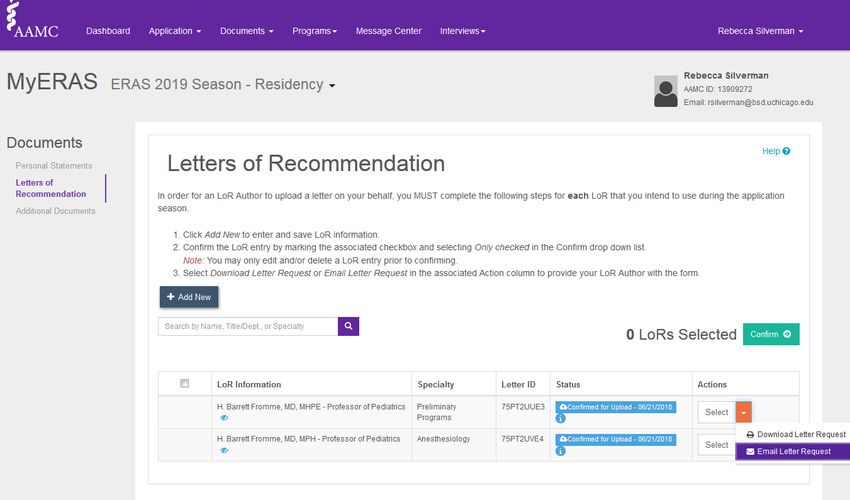
LORs: Do I need a Chair’s Letter?
•    Anesthesiology
•    Medicine*
•    Medicine-Pediatrics*
•    Preliminary Medicine*
•    Obstetrics and Gynecology
•    Orthopedic Surgery
•    Otolaryngology (Section Chief)
•    Pediatrics (some programs)*
•    Plastic Surgery (Section Chief)
•    Surgery
•    Urology (Section Chief)

      *Another faculty member writes the letter in conjunction with the Chair.

Emergency Medicine utilizes a “Standardized Letter of Recommendation”, and Plastic Surgery is starting to do the same. Check with
the section for details, and refer to your Residency Process Booklet.

If you are applying in both Preliminary Medicine and transitional programs, you could use the same set of letters for both if the
letters are generic in their specialty designation.

                                                                                                                     Review 10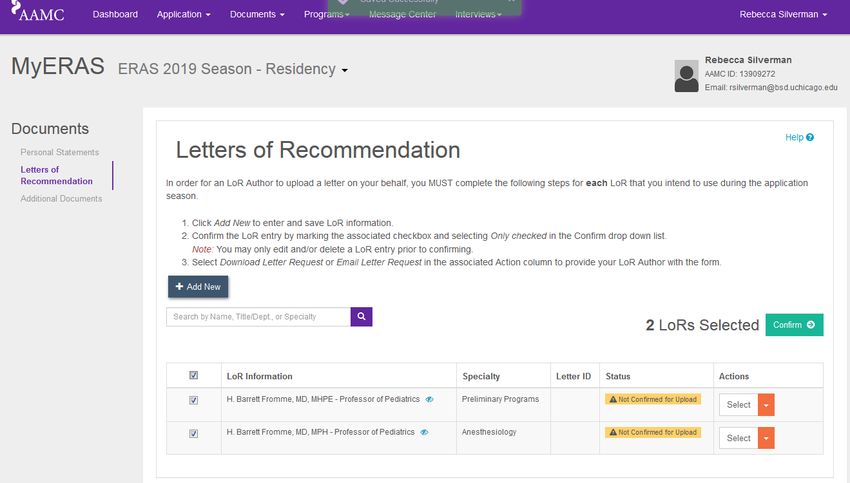
Important Staff
  Strategy/LoRs         Career Advisor
                        Specialty Advisor
                        Dr. Woodruff

  Personal Statement    Career Advisor
                        Specialty Advisor

  MSPE/Grade Concerns   Dr. Fromme

  Couples’ Matching     Career Advisor
                        Dr. Woodruff

  CV/ERAS Logistics     Rebecca Silverman

                                            Review 11
Navigating ERAS:
The Electronic Residency Application Service
12Definitions
ERAS The Electronic Residency Application Service
ERAS is the web-based program students and staff use to
compile and distribute residency application components.
NRMP The National Resident Matching Program
The NRMP is a nationwide non-profit organization that
standardizes the residency matching process. Students
submit rank lists to NRMP, not through ERAS.
You must register for both ERAS and the NRMP!
ERAS 13Register
ERAS 14MyERAS Dashboard
ERAS 15Application
16ERAS Personal Information
ERAS 17ERAS Personal Information (continued)
ERAS 18ERAS Personal Information (continued)
ERAS 19Biographic Information—Optional
ERAS 20Biographic Information (continued)
ERAS 21Education
ERAS 22Adding a Post-Baccalaureate
23Education (continued)
ERAS 24Experience
ERAS 25Experience: Adding an Entry (Work Experience)
ERAS 26Experience: Adding an Entry (Research Experience)
ERAS 27Experience: Adding an Entry (Volunteer Experience)
ERAS 28Experience: Adding an Entry (Volunteer Experience #2)
ERAS 29Experience: Adding an Entry (Volunteer Experience #3)
ERAS 30Experience: Final Screen
31Licensure: Not Necessary
32Publications
ERAS 33Publications (continued)
34Publications (continued)
35Guiding Principles for Listing Publications
• Be honest in representing all of your myriad accomplishments—but do not try to pad your
application
– Certain situations will require that you list things twice under two separate categories
– Use your best judgement, and then…
– Consult your Career Advisor!
• When it is not reasonable to list multiple similar or identical publications/presentations, list
them once under their “highest value”. In order, that is:
1. Manuscript
2. Published abstract
3. Oral presentation
4. Poster presentation
• National > Regional > Local
36FAQs: How to List Publications
Q: For poster presentations, should we list internal conferences like Medical Education Day or
SRP?
A: Yes. Include poster presentations given at any formal, organized event, even if they
are internal.
Q: If I was listed as an author on a poster or oral presentation but did not present it, should I list
it?
A: Yes, you may include it as a poster; annotate who the presenting author was with an
asterisk in the author line, or in a description box. Make sure you list the authors in the correct
order.
Q: If I am going to do an oral presentation in a month, do I put "anticipated" oral presentations?
A: Yes, you may do that.
37FAQs: How to List Publications (continued)
Q: Does my thesis defense count as an oral presentation?
A: No, it does not count as a separate oral presentation. It will be implied by your PhD.
Q: Do presentations in front of my departments or during rounds count?
A: No.
Q: Are abstracts considered published if they are published in a conference booklet only?
A: No, abstracts are not considered published if they are not disseminated beyond the conference.
If they were a poster, though, you may put it in the poster section. Do not list things twice (i.e. once in a
poster section and once in an abstract section—just list the abstract).
Q: Can I list manuscripts currently in preparation?
A: No. However, if they have been submitted, you can choose submitted from the drop-down in
ERAS. Be prepared to answer any questions about the status of the manuscripts.
38View/Print ERAS Application or CV for Proofreading
39Documents
40Documents: Personal Statements
ERAS 41Documents: Personal Statements (Continued)
ERAS 42Personal Statement Preview
43Documents: Personal Statements (Continued)
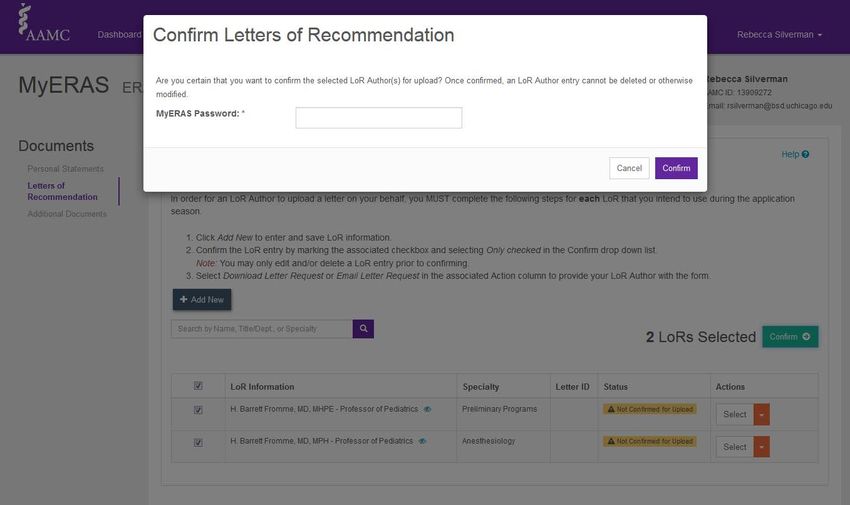
ERAS 44Documents: LORs
ERAS 45Documents: LORs (continued)
ERAS 46Documents: LORs (continued)
47Documents: LORs (continued) | Confirm your LOR
48Documents: LORs (continued) | Generate Letter Request Form
49Documents: LORs (continued) | Email a Letter Request Form
50Documents: LORs (continued) | Email a Letter Request Form
51Documents: LORs (continued) | Generate a PDF Letter Request Form
52Additional Documents
• Student
• PSOM (by 10/1)
• PSOM
• Student
ERAS 53USMLE Transcripts
Three steps to releasing your scores:
1. Authorize release through ERAS to sync current scores
2. Assign the USMLE score to a specific program (under the Programs section)
3. Once you receive updated Step 2 scores, go back into MyERAS and
retransmit your scores
– Think strategically about when or whether you want to release your Step 2
scores—discuss this with your Career Advisor or Dr. Woodruff.
ERAS 54Programs
55AAMC Apply Smart data
https://students-residents.aamc.org/applying-residency/article/apply-smart-data-consider/ 56When using the Apply Smart data, remember…
• No advice is one-size-fits-all.
• You may receive different advice from different advisors or mentors.
– This is a complex process with multiple possible approaches and a high degree of
uncertainty.
– This happens all the time in life, not just in residency advising!
• Use all data and advice at your disposal to make the best decisions for you.
57Programs (searching by number)
This is an NRMP ID, not an Accreditation ID. If you are looking up a program by number and
not finding it, it’s likely to be an NRMP ID. We recommend searching by specialty instead.
ERAS 58Programs (searching by specialty)
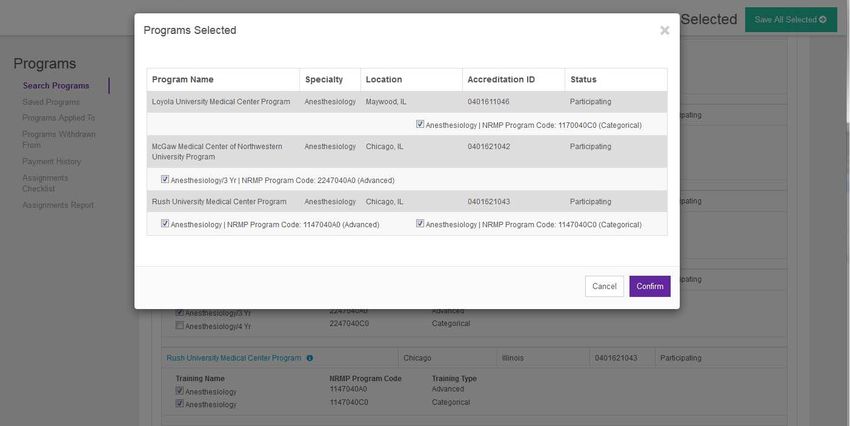
59Saving Programs
60Assigning Documents
61Assigning Documents
62Assigning Documents
• If you do not see an LOR listed, you probably did not
“confirm” it in the LOR section.
• You cannot assign an LOR until it has been uploaded.
• Only YOU can see how you’ve titled the LORs, so make
sure they are clearly labeled.
63Assignment Report
64Fees
652018-19 ERAS Fees
Base Fee, 1-10 applications to a specialty $99
Applications 11-20 $14 each
Applications 21-30 $18 each
Applications > 31 $26 each
USMLE Transcript Fee $80
• Example 1
– 30 Emergency Medicine programs: [$99.00 + (10 x $14.00) + (10 x $18.00)] = $419
• Example 2
– 20 OB/GYN programs [$99.00 + (10 X $14.00)] + 10 Family Medicine programs [$99.00] = $338
662018-19 NRMP Fees
Base Fee $85 for 20 ranks
Late registration fee $50 if you register after November 30
Couples $25 per partner
Additional Programs $30 for every program ranked above 20 ranks
From the NRMP: The NRMP also has capped at 300 the number of ranks allowed for individual applicants and applicants
participating in the Match as a couple. In addition… there will be a new Length of Rank Order List Fee. Lists with 100 or
more ranks will incur stepped fees, up to a maximum of $200 until the 300 rank cap is reached. These changes are being
made to prevent applicants from entering over-long ROLs, some of which have exceeded 700 ranks without any apparent
benefit to the applicants’ Match outcome.
67Pritzker 2017-18 Data
Data from our annual post-Match survey
9. How much money do you estimate that you spent applying and interviewing during the
residency application season (including application, travel, and hotel costs)? Please round
to the nearest $10.
Statistic Value
Mean 3,051
Median 3,000
Mode 3,000
Standard Deviation 2,040
Valid Responses 82
Total Responses 82
Bethany in Financial Aid is here to work with you to help with these costs.
Also, look out for info on our free alumni hosting program when traveling for interviews!
68Certify and Submit
69Certify and Submit
70Certify & Submit
ERAS 71Adding Programs After September 15
You can add programs after you have submitted your
ERAS application,
but you must re-assign your USMLE scores and photo
72Top 5 ERAS Points
1. Hit “Save” all of the time, and proofread.
– View your ERAS application in both CV and “application” formats
– Print your Assignment Report and make sure you assigned all your documents
2. Remember to click the final “Certify and Submit” button between September 5-15, and
have your credit card ready! (We will send a reminder. Many reminders.)
3. Be deliberate when naming and assigning your letters and personal statements.
4. Track the status of your LORs and assign LORs to programs once they arrive.
5. You can add programs after Sept. 15, but be sure to re-assign your documents and
USMLE scores.
73Upcoming Class Meetings
September 25 MS4 Class Meeting #3: Interviewing for Residency
January 22, 2019 MS4 Class Meeting #4: Preparing your Rank List
March 15, 2019 Match Day!
74You can also read


