Getting Started 2020/21 - Contents...
←
→
Page content transcription
If your browser does not render page correctly, please read the page content below

Getting Started
2020/21

Contents...
02   Welcome to the University
03   New student checklist
05   Principal’s welcome
06   Welcome from your Sabbatical Officers
07   Our University values
08   Welcome week
09   Events app
10   Your essential top 6 tasks
17   About health care in Scotland
18   Your wellbeing
19   Taking care of yourself
21   Preparing for study
23   Your new student life
24   Sport and exercise
25   Living on campus - University accommodation
26   Finding private accommodation
27   Your safety
28   Travel to Edinburgh
29   Travelling within Edinburgh
31   Settling into university
32   Challenges you may face as a new student
36   Helpful links to resources
37   Useful numbers                                #EdWelcome

The University of Edinburgh New Student
                                                                          GETTING STARTED Guide 2020/21             02

                                                         Welcome to the
                                                         University of
                                                         Edinburgh!
                                                         It is not too long to go until you begin your studies,
                                                         and whilst some things about university in 2021
                                                         may initially be different, some things won’t. We
                                                         are really excited to welcome you to your new
                                                         community, and while we know some of you may
                                                         not be able to join us in Edinburgh straight away,
                                                         we look forward to you all becoming a valued
                                                         student in one of the world’s leading universities!

                                                         There are a lot of things to think about when
                                                         getting ready for university to ensure you are fully
                                                         prepared to start as a new student. This guide acts
                                                         as one place to find all of the practical advice and
                                                         information that you need to know.

                                                         Start by looking through your checklist which
                                                         outlines the important tasks you need to do
                                                         before you start/arrive and when you start.
                                                         Take your time to go through each section of this
                                                         guide and make sure you understand what you
                                                         need to do. You will also discover really useful
                                                         resources, top tips from our current students and
                                                         more information about the professional support
                                                         services to help you throughout your academic
                                                         studies and university journey.

           Get
        connected                                                                       www.ed.ac.uk/
     before you arrive                                                                  new-students
    On our New Student 2020/2021                   Stay
  Facebook group you can find your
fellow classmates, ask questions, learn
                                                connected
  more about your new community:               when you start
    www.facebook.com/groups/              Get the latest announcements, news
                                            and events from the University:
    UoENewStudents20202021                                                              www.ed.ac.uk/
                                             www.ed.ac.uk/news/students
            #EdWelcome                                                                  news/covid-19
                                             www.fb.com/EdinUniStudents
                                             twitter.com/EdinUniStudents
                                             blogs.ed.ac.uk/studentstories
                                                blogs.ed.ac.uk/sharing-
                                                     things-blog/
                                                                                                     ©iStock.com/dibrova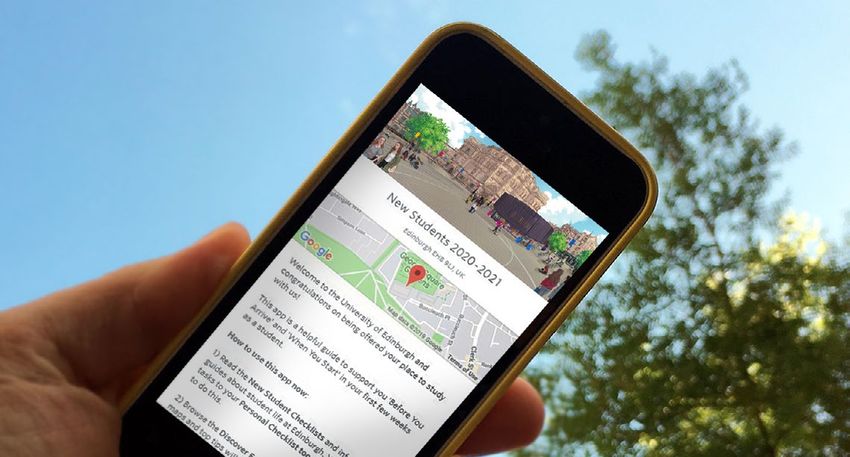
The University of Edinburgh New Student
GETTING STARTED Guide 2020/21 03
New student checklist
As a new student, you probably have lots of questions about where to go to find the resources and information you need
to prepare and get started at university. The new student’s checklist is a useful tool which lists the essential things you need
to be aware of and do before and when you start, in priority order. You can download/save the checklist and use the
interactive tick boxes to keep on track. Click onto the page references below to read more about the information provided
via the checklist.
Tasks to do before you arrive (all students) More info
Read all relevant sections of the New Student Getting Started Guide, including the top tips
Read all emails received from the University of Edinburgh, especially from your School/Programme
Read all the emails received from the Edinburgh University Students’ Association
If accessible, join relevant social media groups, including the UoE new students 2020/2021 Facebook
Page 02
group, your School/Programme groups, your University accommodation groups
Download the UoE Events App (www.ed.ac.uk/new-students/eventsapp) Page 09
Register your University Login and login to MyEd (the University of Edinburgh’s web portal) Page 11
Activate your Office365 and install Microsoft Software Page 12
Set up and access your personalised timetable Page 12
Fulfil any admissions criteria (if required) Page 13
Register online with the University as a student Page 13
Pay or organise to pay your tuition fees Page 14
Pay your accommodation fees (if living in University of Edinburgh accommodation) Page 14
Research which UK bank account is best for you (if required) Page 15
Apply online for your University student card Page 15
Research which GP Practices will be closest to your Edinburgh home, for GP registration. Page 16
Check that you have had any necessary vaccinations, and if not, make arrangements to get them Page 17
Familiarise yourself with helpful student support resources and services. Page 36
Tasks to do before you start/arrive on campus (additional for students outside the UK, if required) More info
Seek out immigration advice if coming from outside the UK, EU, EEA or Switzerland (if required)
Page 13
For more information: www.ed.ac.uk/immigration
Upload an image of your current passport and visa (essential) Page 13
Information to read - to support you throughout your university journey (all students) More info
Where to start with your wellbeing in the university community Page 18
Taking care of yourself Page 19
Have more awareness of your safety and security Page 27
Your new student life – introduction to the Edinburgh University Students Association, Sports Union Page 23-24
and Sport & Exercise
Settling into university – academic, independence and social challenges Page 31-35
Helpful links and useful numbers to support you at university Page 36-37
Continues on the next page...
The University of Edinburgh New Student
GETTING STARTED Guide 2020/21 04
Items to have with you when you start (if required)
Passport (proof of identity for all circumstances)
Driving licence (additional proof of identity, if in possession of one)
Printed proof of term-time Edinburgh address (GP Practices must see original proof of address)
At least three months of prescribed medication and an explanation letter from your doctor (for GP registration)
Letter evidence of a disability, learning difficulty or health condition - written in English within last 6 months by a
medical professional, outlining disability and how it may affect learning. More information: www.ed.ac.uk/student-
disability-service/students/evidence
Cash (in case opening a bank account takes a longer time, recommended no more than £1000.00)
Additional items to have with you when you start/arrive on campus (for students outside the UK, if required)
Study visa (for all international students to be checked at a UK airport)
Tuberculosis (TB) Certificate (if applicable to your home country, you must carry in hand luggage)
Tasks to do when you start/arrive on campus (all students) More info
Use the ‘new students 2020-2021 guide’ on the UoE Events app to plan your first few weeks Page 09
(prioritising induction activities hosted by your School/Programme)
Stay connected on social media: New Students Facebook Group, Edinburgh Student Facebook Page 37
page, Edinburgh Student Twitter
Check your emails to find out more about your School/Programme induction event/activities
(essential)
If you are on campus, get connected to eduroam Wifi Page 12
If you will be living in University accommodation, get connected to Optify Wifi Page 12
Attend any essential School/Programme activities – read your emails from your School/Programme Page 13
for more information (essential)
Pay your tuition fees (if required) Page 14
Go to your chosen GP Practice to register for a doctor (if required) Page 16
Register with a dentist and an optician (if required) Page 17
If in University accommodation, complete your e-induction. Read your emails from accommodation Page 25
for more information (essential)
If in private accommodation, update your address on your student record and submit your Council Page 26
Tax Exemption Letter (essential)
Additional tasks to do when you start/arrive on campus (for students outside the UK, if required) More info
Take a picture of your passport clearly showing your visa vignette and entry clearance stamp and Page 13
upload the images to the Immigration section of MyEd
Open a Bank account (if required) Page 15
The University of Edinburgh New Student
                                                                                       GETTING STARTED Guide 2020/21             05
Principal’s welcome
On behalf of all students and staff at the University of Edinburgh, huge
congratulations on your successful application and a very warm welcome!
                   The extraordinary circumstances of 2020 as the world adapts to the Covid-19 pandemic have posed
                    additional challenges to you and to us. We remain very confident that your success in joining one of the
                     world’s greatest universities will be the start of an exciting and productive next phase of your lives. We
                     are a large global community, currently with around 41,000 students, over 15,000 staff and an ever
                     growing alumni community of over 260,000. Our students and staff come from around 160 countries
                    making the University of Edinburgh a uniquely diverse place to learn; we are justifiably proud of our
                   whole community which aims to be open in both outlook and ethos.

Arriving at University, especially this year when circumstances dictate that some of your experience will be “hybrid”, ie
a mixture of face-to-face and online interactions with your teachers and with others including your fellow students, is
both exciting and daunting. We have been trying to give you as much certainty as possible about what to expect but
we all have to accept that there will still be uncertainty about the pandemic and its implications for public health advice
and government guidelines. One thing can be certain: your degree from the University of Edinburgh will be a marker
of excellence that will open doors for you in the future and be a source of respect throughout the world. We know this
because we have 430 years of experience on which to base that conclusion!

I encourage you to take every opportunity to meet your fellow students, learn about the services available to you and meet
the staff you will be working with before you start your studies, and also to explore the wonderful city of Edinburgh, its
nearby seaside and the spectacular surrounding countryside, but to do so whilst respecting health and safety for yourself,
your loved ones and the general public. Necessarily this means that some of the meetings and some of the new experiences
will be electronic rather than physical. Your generation is much more accustomed to these technologies than mine, but if
you have practical or technical difficulties, including but not limited to concerns about access to equipment, broadband or
WiFi, we are here to help and your University has a fabulous array of expertise and experience to address these issues.

My top tips to remember when starting university:
1.  Cherish the wonderful opportunity that you                 4.  Look after yourself, you are not alone: don’t be
have earned for yourself, apply yourself to your studies       afraid to ask for help. During your time at university,
and make sure you take advantage of everything the             you will face challenges. They could be academic,
University offers to help you during your time here.           financial, or social, and may test your confidence.
                                                               There are many people here to help you - your
2.  Embrace new ideas in your studies, extra-                  wellbeing is a priority for us.
curricular activities and personal life. Try something
new and explore - you will never again get an                  5.  Enjoy Edinburgh as much as you can in the
opportunity like this one.                                     circumstances, it is a beautiful city. Learn about its rich
                                                               history and most importantly have fun whilst staying
3.  Celebrate difference, seek out different cultures,         safe.
subjects and interests and be open to different points
of view. Be kind to others.

You will encounter teachers and researchers who are among the leading figures in their field and passionate about their
subjects. Take every opportunity that you can to learn from them to find out more about yourself and to build your own
success. As you embark on your studies, do reflect from time to time on all those who helped to get you here; your families,
your friends and your supporters. You will of course see less of them, but do remember to include them and to keep in
touch. They will be thinking of you, and will want to know about the experiences you have and the progress you make.
Many challenging and rewarding experiences lie ahead for you, the University of Edinburgh is a wonderful place (physical
and virtual!) – enjoy your time with us!

Warmest regards, and all best wishes for your studies and the next phase of your lives,

Principal and Vice-Chancellor Peter Mathieson
The University of Edinburgh New Student
                                                                                       GETTING STARTED Guide 2020/21             06
Welcome from your                                                                    G e t invol ve d
Sabbatical Officers                                                                 in t hings t h at
                                                                                    m at te r to you                          El le n,
                                                                                  - you’l l f ind like-                     Pre side n t
Hello and welcome                                                                   minde d pe ople
to the University of                               Tr y some t hing ne w !                 he re !
                                                  The re are a h uge and
Edinburgh!                                          di ve rse amoun t of
We are your Sabbatical Officer team for          s t ude n t opport uni t ie s
this year and we are here to support             and e ve n ts h appe ning
and represent you. As a student at the            and some of t he be s t
University, you automatically become            e x pe r ie nce s come f rom
a member of Edinburgh University                place s you would ne ve r
Students’ Association and anyone who
wishes to take part in sport will become
                                                           e x pe c te d.
a member of the Edinburgh University
Sports Union. We’re run by students,
for students, and we’re here to
                                                Amanda,
represent everyone who studies here,         VP C ommuni t y                                                    If you ne e d he lp,
so make sure you get involved. There                                                                            ASK! Our job is to
are countless opportunities for you to                                                                           support yo u, so
meet new people, gain valuable CV                                                                               se nding an em ail
boosting skills and make a difference to
                                            Take advantage of                                                 c an re al l y go a long
the things you care about. You can find
out more about the ways you can get          our wide varie t y                                               way in re ce i v ing t he
involved at: www.eusa.ed.ac.uk and          of sports clubs and                                                  he lp yo u ne e d.
www.eusu.ed.ac.uk                           acti v itie s to boost                             Niamh,
                                             your mood, stay                                 VP We lf are
We know this won’t be how you               he althy and make
envisaged your start to university           lifelong f riends.
would be, but we want you to be
assured by the fact that everyone is
in the same boat. We also want to let
you know there will still be plenty of
opportunities to make new friends and
try out new things, whether you are              K at ie,
here in Edinburgh or studying online.           Sports
There will still be quite a lot happening
                                               Pre side n t
on campus and online for you to get
involved with! Also, remember this
is temporary - in the not too distant                                                       Ke e p an e ye ou t
future we will all be together again                  Make sure you go                        f or socie t ie s
on campus and student life as you
                                                         to your clas se s                   and St ude n t ’s
imagined it will resume with loads of
                                                    (v i rt ual l y or f ace to          As sociat ion e ve n ts,
opportunities to try new things, make
friends, go on nights out, and have                f ace ) and t r y to t alk            as we l l as any online
the university experience you hoped                   to pe ople in t hem ,                 groups f or ne w
for when you chose to study at the                  i t ’s so import an t to               s t ude n ts to join!
University of Edinburgh.                           m ake course f r ie nds!
We are here for you, so please do get in
touch if you have any questions or need                                         Fizz y,
support. You can find our contact info                                       VP Educ at ion
at: www.eusa.ed.ac.uk/yourreps and
www.eusu.ed.ac.uk/contact

Looking forward to meeting as many
of you online and in person when you                                                      R ache l ,
start your studies in January!
                                                                                       VP Ac t i v i t ie s
The University of Edinburgh New Student
                                                                                     GETTING STARTED Guide 2020/21             07
Our University values
• We are diverse, inclusive and accessible to all
• We are always willing to listen
• We aim to achieve excellence, whilst always
  being principled, considerate and respectful
• We are a place of transformation and of self-
  improvement
• We strive to create a welcoming community,
  where staff, students, and alumni feel proud to
  be members of our University
We’re always working to improve your university experience. Here are just some
examples of what we’ve been doing to make things better for you:

Sustainable University                   EdHelp
We’re passionate about being a           Once you get closer to starting at the
socially responsible and sustainable     University, you will be able to use the
university. As part of our commitment    Edhelp service.
to become carbon neutral by 2040,
we’ve returned our carbon emissions      EdHelp provides clear and
to 2007-08 baseline year levels.         straightforward access to key student
                                         services such as library, IT, finance and
Creating a greener campus                administration, all from one place.
The introduction of a levy on single-
use coffee cups has led to a reduction   We want to ensure that information
in disposable cup usage of 37% in        and help is easy to find, meaning you
University-owned cafes over the past     will spend less time searching and
year!                                    more time learning. You’ll have access
                                         to the Edhelp service 6 weeks prior to
Keep up to date with Sustainable         starting at the University.
University news: www.ed.ac.uk/
sustainability/news/2020                 For more information about EdHelp
                                         support: www.ed.ac.uk/edhelp
The University of Edinburgh New Student
                                                                                        GETTING STARTED Guide 2020/21             08
Welcome Week
‘Welcome Week’ is the week prior to the first week
of the academic semester (www.ed.ac.uk/
semester-dates/202021) and is the first
opportunity for the University to welcome you to
your new environment and to the people who will
help shape your experiences at University.
This essential time before classes          University induction:
start allows you to get to meet fellow      For all students starting University
students and academics, and get a           this year, a hybrid delivery will be the
sense of the university life that awaits    new experience and there will be
you.                                        lots of opportunity within Welcome
                                            Week and for the continuing weeks to
All areas of the University are excited     join activities and learn information
to meet you, and during Welcome             about hybrid learning, guidance on
Week and for several weeks into the         looking after your mental health and
start of semester too, there will be lots   wellbeing and provide you with a basic
of online and in-person events and          grounding in equality and diversity.
activities that you may join, that will
provide you with essential information      There will be large community events
to get started, opportunities to            that will take place online to formally
network, explore and contribute, and        welcome all new students to the
provide you with that first and lasting     University and many smaller in-person
connection to the University.               activities to help you get to know your
                                            neighbours and the city.
School/Programme induction
(essential):                                There will be a specific welcome
Your School/programme induction             programme for all Postgraduate
is the most important to attend and         students and there will be lots of ways
will likely take place within Welcome       to explore your interests and hobbies
Week and the information included           too with society and sports clubs
will be available afterwards for you        activities.
too.
                                            There is no expectation to attend
Your school/programme induction             any induction activity outside of your
activities willprovide you with ways        school/programme but it is highly
to connect to your classmates, help         recommended that where possible,
you feel part of the community and          you attend what you want to during
understand what is expected of you          this welcome period.
and how you can succeed in your
studies.                                      The Welcome programme of
                                              induction activities will be available
You will be emailed with more details         on the UoE Events App. You will also
about what this induction includes and        receive direct communications about
how to attend.                                specific activities nearer to the start
                                              date and we recommend that you
                                              check your emails regularly!

                                                                                                    Photo of Greyfriars Bobby by Lauren Tonti
The University of Edinburgh New Student
                                                                             GETTING STARTED Guide 2020/21             09
UoE Events App
All of your induction events will be featured in
the ‘New Students 2020-2021’ guide within the
Guidebook ‘UoE Events app’ a few weeks before
the start of your studies.

This guide allows you to find the
events/activities that you are required
to attend (all school/programme
induction activities are essential to
attend) alongside lots of optional
activities that might interest you. You
will find details about how to engage
with the activities, if there are any pre-
requisites and you can add them to
your personalised timetables.                Download the
This app also includes helpful
                                             UoE Events App
checklists and resources so you can          now!
have all the information you need at         www.ed.ac.uk/new-students/
hand, anywhere and anytime.                  eventsapp
                                             Search ‘edinburgh events’ on
                                             Google Play or iTunes to find
                                             the UoE Events App.
The University of Edinburgh New Student
                                                                                GETTING STARTED Guide 2020/21             10
Your essential ‘Top 6 Tasks’
It is absolutely essential that you read and
complete these tasks. These essential ‘Top 6 Tasks’
are for all new students to complete either before,
or when you start/arrive, to enable you to get
started at the University.

                 1                                                                                      3
        Registe
                ry                                      2                                            e the
         Univer our                              Get Started                                 Complet ion
                s                                                                                      t
        Login ity                                 on Office                                  matricula
               an
         login t d                                                                              process
                o                                   365
          MyEd

                                                                                                          6
                                                                                                       e g i s ter
                                                                                                     R
                 4                                        5                                             h  a    local
                                                               ur                                   wit          or
            Pay your                              Apply for yo                                          doct
              fees                                  University
                                                     student
                                                       card

‘How to’ get started with the ‘Top 6 Tasks’
9 Read through the information for each task
9 Complete steps as outlined in the tasks
9 For more information about the tasks and to keep up to date with the
  latest information, please remember to check the ‘New Student Website’
  (www.ed.ac.uk/new-students/top-6-tasks) and the ‘UoE Events App’
  (www.ed.ac.uk/new-students/eventsapp)

                                         4 If you are planning to arrive from overseas, we also recommend that
                                           you read the ‘Welcome to Edinburgh’ guide for International Students
                                           for extra information and tips before and when you start. Find the guide
                                           at: www.ed.ac.uk/students/new-students/getting-started-resources/
                                           getting-started-guides
The University of Edinburgh New Student
GETTING STARTED Guide 2020/21 11
Task Don’t forget to keep a note of your Accounts - manage your personal
1
new updated password (securely), as details and password, check your
you’ll need this to login to MyEd, Learn card PIN, access your student record
and all the other systems that you’ll (sometimes called EUCLID), and pay
use. for fees, accommodation, printing
and catering.
Get started with MyEd
When you login to MyEd nearer to your Student Life - news and events,
start date, you may notice that the getting around, support services, and
content is different to what you saw as information from Edinburgh University
an applicant. Students’ Association.
Register your University As a new student, your homepage Careers - help from the Careers
Login and login to MyEd gives you direct access to the content Service, and access to MyCareerHub.
that you will use most often, including
Login to MyEd - Before you start Learn, Library and email. You’ll also For more information about how the
see your notifications here, which are information and resources in MyEd will
What is MyEd? alerts about tasks you must complete support you during your studies and
MyEd is the University of Edinburgh’s or important information. Look out for time at university: www.ed.ac.uk/
web portal, and the best way to find the Notifications icon in the top right information-services/myed-for-
and access many of the University’s corner of MyEd. students
online resources. It gives you easy
access to the systems, tools and MyEd gives you access to much Using MyEd on a public computer?
information that you will use most more than just the content on the If you are using MyEd on a public
often while you’re studying at the homepage. Explore the other menus computer, please remember to logout
University. These include Learn, your to find more support, information and from MyEd and your email service at
Virtual Learning Environment (VLE) guidance, tailored to you. the end of your session and close all
(see page 21), your email, timetables, browser windows.
the student record system (EUCLID) Studies - everything you need to
and much more. support your studies, including access
to Learn your VLE and other study
Register Your University Login tools, timetables, library resources and
You need to register for Your University study spaces. Check your notifications here
Login before you can access MyEd and
other University systems.
Step 1 – Find the email which contains
your University username (UUN) and a
registration password for your account
on the University’s MyEd portal and
follow the instructions.
Step 2 – You will need to update the
temporary registration password for
future use. Once you have completed
the registration process, you will then
be logged into MyEd.The University of Edinburgh New Student
GETTING STARTED Guide 2020/21 12
Task Activate Office365 Details and instructions on how to
2 Step 1 – to activate your free Office365
go to: www.office365.ed.ac.uk
Step 2 – login in with your new user-
name (in the format uun@ed.ac.uk) and
view your personalised timetable
can be found here: www.ed.ac.uk/
personalised-timetables/student-
timetables
password and activate your Office365
email account. You can also access your timetable
through MyEd by clicking the following
Set up the Office365 account on tabs: MyEd Homepage – Click onto
any of your devices (you can install Studies > My courses > Timetables
and activate on up to five devices).
Get started on Guidance on how to do this:
Office365 www.ed.ac.uk/is/office365/email-
calendar
Activate your Office365 and install
Microsoft Software for free Note After activating this account,
- Before you start most future communications from
Once you have registered for your the University will go to this email,
account on the University’s MyEd therefore it is important to access this
portal you can: account regularly, including before you Your Office365 calendar will start
• Sign up to Office365 via MyEd or the start your studies. showing your teaching activities
University’s Office 365 sign in page from December, however due to
• Install Office365 software for your Install Microsoft Office software the volume of activities, please note
future studies You can install Office365 software updates can take time to appear into
allowing you to fully use the your Office365 calendar and will be
As a student, you will have free access applications for your academic studies inputted in scheduled phases.
to the applications/software available and collaborate with your peers at
on Office365 for the duration of your university. To install Microsoft Office For the Academic Year 20/21, as
studies. Access to Office365 software software onto your personal computer the university moves to a hybrid
will enable you to work from any (Windows or Mac): method for teaching delivery, please
location and any device. Plus, with an check with your School about what
internet connection you can update Step 1 – Sign into: you should expect to see on your
and share ‘live’ documents to work https://portal.office.com/account Personalised Timetable.
collaboratively on projects with your Step 2 – Choose ‘Install Office’ and
peers. follow the on-screen instructions to
download and install Microsoft Office Get connected to WIFI
Office365 is entirely cloud-based,
which means that you can access
on your computer.
Step 3 – When opening an app, you
when you’re on campus!
your email, calendar, files and office may be asked to sign in with your eduroam
programs (such as Word, PowerPoint, University Office 365 account using This is the wireless network available
Teams and Excel) whenever you your uun in the following format: across University campuses. In
require, wherever you are. uun@ed.ac.uk advance of coming on campus,
launch the app on your device for
Office365 includes access to: For further guidance on this and how the quickest way to connect to the
• Word, Excel, PowerPoint and to install onto Android and/or iOS eduroam WIFI. Find the app and
OneNote devices how to do this, with step more information here:
• Emails and Calendar (your by step instructions and links, visit: www.ed.ac.uk/information-services/
personalised timetable) for daily use www.ed.ac.uk/information-services/ wifi-networking/configure-device
• OneDrive for storing and sharing files office365/latest-office
• Teams, SharePoint and Planner for Optify
collaborating with others Set up your personalised timetable This is the wireless network available
Step 1 – Through Office365, you can in university accommodation. Find
Further information on all the available add your timetable to your phone, out how to connect to Optify:
applications and how you can access computer or other devices. More www.accom.ed.ac.uk/for-students/
them can be found here: www.ed.ac.uk/ information about this: www.ed.ac.uk/ it-facilities/optify/
information-services/office365 is/office365/timetableThe University of Edinburgh New Student
GETTING STARTED Guide 2020/21 13
Task Step 2 – Annual Registration Further information on the entire
3
Registration is open to any student with matriculation process is also
an unconditional offer approximately signposted online: www.ed.ac.uk/
four to six weeks prior to your new-students/top-6-tasks
programme start date. You must
complete annual registration ahead of
your start date, to be able to start your Extra Step: International Check-In
studies. (only for students coming from
• You will receive an email to your outside UK/EU/EEA to complete
University email address with details after arriving in Edinburgh)
on how to complete this step and
when to complete your registration The University of Edinburgh has a
Complete the by. legal obligation to make sure that
matriculation process • You will continue to receive all non-EU/EEA/Swiss students have
reminder emails to complete suitable immigration permission to
“Matriculation” is the step by step registration. study in the UK.
process by which you will formally • You will be able to access the
enrol into the University of Edinburgh annual registration link via the email Once you arrive in the UK you will
before you start your studies. The first that is sent to you, alternatively need to upload an image of both
step to matriculation is registering you will need to login into MyEd the details page and the page with
online with the University in advance and access your student record the visa vignette and entry clearance
of starting. system (EUCLID) by clicking onto stamp from your passport to the
the following tabs on the MyEd immigration section on your student
The final part of the matriculation homepage: Accounts > Progression record. This is necessary to ensure
process is when you start your studies. > My student record that you have the correct permission
This involves your School officially • You will be required to input to study in the UK.
confirming your attendance on personal information.
programme when your studies • You will be able to update Once these checks are finished, you
commence. Without fully information anytime and use have completed this step.
matriculating (registering online and any device to complete your
your School confirming you have registration. You will receive more information
started your studies), you will be about this process from the Student
cancelled off the programme you have For more information about the Immigration Service in advance of
applied to study and you will be requirements on registration and arriving in the UK.
unable to access any of the University’s frequently asked questions about online
services and/or facilities. registration: www.ed.ac.uk/student- For more information, please contact:
systems/support-guidance/students/ studentimmigration@ed.ac.uk
Step 1 – Fulfil any admissions criteria matriculation/online-registration/
(if required). You may have been registration-faqs You can find further information
asked for additional criteria in your for all new international, visiting
offer communication, such as evidence Step 3 – Start your studies and exchange students in the
of English language proficiency, To complete the matriculation process, ‘Welcome to Edinburgh: A guide for
completion of a Disclosure Scotland your School will confirm that you have international students’ at:
application, etc. You will need to started your studies. This is also called www.ed.ac.uk/students/new-
follow all instructions provided in order confirming your attendance. students/getting-started-resources/
to complete this first step. If you were getting-started-guides
not asked to provide anything else as The School/Programme in which you
part of your offer, you do not need to will be studying will contact you at the
do anything. start of your programme to explain the
next steps on how they will confirm
that you have started your studies.
The process for confirming your
attendance does vary between School,
types of study and Programme. So, if
you have any queries on this, please
contact your School/Programme
directly.The University of Edinburgh New Student
GETTING STARTED Guide 2020/21 14
Task Self-funded students can pay online, by
Helpful tools...
University accommodation fees (if
4
bank transfer, or (in some cases) direct applicable)
debit instalments. Find out how here: If you have opted to pay your
www.ed.ac.uk/fees/self-funded accommodation fees by instalments,
your first rental payment will be
For more information about paying automatically collected using the bank
your tuition fees whether you are or card details provided at the time
a self-funded, internally-funded, or you accepted your contract. You can
externally-funded student: amend your method of payment up
www.ed.ac.uk/tuition-fees/payment to 10 calendar days before payment
is due.
Deadlines for tuition fees
Pay your fees The final dates to pay your tuition fees Find more information about paying
in full (not by instalment) are: your student accommodation fees and
Tuition Fees all payment FAQs here:
Without paying your tuition fees, you • 3 February 2021, for courses www.accom.ed.ac.uk/for-students/
will be cancelled off the course you commencing in January 2021 paying-your-rent/
have applied to study and you will be
unable to access any of the University’s Further student finance FAQs here: Read about managing your living costs
services and/or facilities. www.ed.ac.uk/finance/students/faqs on the New Student Website:
www.ed.ac.uk/new-students/finances
Every programme has a cost Additional costs to tuition
associated with it and up-to-date (applicable to Postgraduate Task 4 - Opening a bank account -
tuition fee levels are available online: Programmes only) continues on the next page...
www.ed.ac.uk/tuition-fees/find You should also check your offer
letter to see whether there are any
To contact your Fees and Student additional costs associated with
Support Team email: fees@ed.ac.uk your Programme, including any
or call on 0131 650 2230, with any deposit required by your School.
queries you may have relating to: For example, a deposit is required
for some Postgraduate Programme,
• Your tuition fee level see the “Fees and Costs” section of
• The Graduate/Alumni Scholarship the Programme entry on the Degree
• Issues with your application to SAAS, finder, to find out more.
Student Finance England, Wales or
Northern Ireland The deadline for the deposit payment
will vary depending on the Programme
Paying tuition fees you have applied for and information
How you pay your tuition fees (in on this will also be included in the
full or by instalments) is dependent offer letter. For further information
on whether you are a self-funded, about tuition fee deposits for
internally-funded, or externally-funded Postgraduate programmes including
student. deadlines for payments:
www.ed.ac.uk/tuition-fee-deposits
Tuition fees and related charges are
due in full, in advance or during the
first few weeks of semester. Your
invoice will only be available to see on
your MyEd after you have completed
registration.The University of Edinburgh New Student
GETTING STARTED Guide 2020/21 15
Opening a bank account (if required)
When you start/arrive on campus
Bank Introduction Letter:
If you have completed online Task
5
If you plan to make any regular registration and have also entered your
payments through direct debit (tuition correct semester-time address on your
fees, rent or household bills), or are student record, you will be eligible to
receiving any support loans, it is access your Bank Introduction Letter
recommended that you open a bank which is needed to open a UK bank
account in the UK. You should spend account. A printed version of this
time before you arrive to work out can also be a useful form of proof of
what type of bank account will work address to use when registering with a
best for you. doctor.
The University cannot recommend If you will be living in University
which account you should open but
can help you in making your own
accommodation, you will receive
a printed copy of this letter when
Apply for your University
choice. More information on the you have successfully checked in. student card
different types of bank account: Alternatively, you can download a
www.ed.ac.uk/new-students/banking digital copy of this letter from MyEd, You will receive your University card
save it and then attach it to your when you start University and it
Opening a bank account in the UK: application for a bank account, or will be your official student ID and
All students who are studying at the print it (depending on your bank’s token of being part of the Edinburgh
University for one year or longer are requirements). community, as well as your library
eligible to open a UK bank account. For card, door access control card to
shorter visits the choice is more limited, More information on the Bank university buildings, and identification
and it is recommended that you seek Introduction Letter: www.ed.ac.uk/ to benefit from various student
more information from banks directly. student-administration/bank-letter discounts.
This process may take up to two
weeks if you have all the required For general banking information; • You will need to upload and submit
documentation ready to go the types of accounts available to your photograph in advance of
beforehand. students; understanding terminology starting through MyEd.
and helpful guidance on how to open • You will receive an email to your
• You must have a local semester a UK bank account more information personal email address (the one you
address recorded on your student can be found here: www.ed.ac.uk/ used to apply with) with details on
record. new-students/banking how to complete this step.
• You will need to have all of these to
open a UK bank account: A guide to submitting your photo is
» Your passport (banks will not Printing facilities: available online: www.ed.ac.uk/is/
accept your University card as When you start your studies, you card/photo-submission
proof of identification) will receive a £4 free quota for
» Your Biometric Residence permit printing. Submitting the photo late or not
(Tier 4 students only) submitting it at all, will result in the
» University bank Introduction Letter, More information about the card not being ready for you for the
this will be accepted by a selection printing/copying and scanning start of semester.
of local banks as proof of student facilities available at the University
status and proof of semester-time and how to print here: www.ed.ac. A guide to applying for and collecting
address. uk/information-services/printing your student card is available online:
www.ed.ac.uk/is/getting-first-cardThe University of Edinburgh New Student
GETTING STARTED Guide 2020/21 16
Task Please note there are some limitations
to the Scotland Service Directory
Register with a GP Practice
If they can accept you as a patient,
6 information and although general
practices highlighted would probably
cover your address, it is best to
check on their website for their
they’ll ask you to register.
The GP Practice that you do register
with, will provide further guidance
exact practice area and if they are on how to proceed with the full
registering at the time. registration process on the practice
website. You will be required to
Not all GP Practices are just open on complete one or two forms for
weekdays, some are open on Saturdays registration. Details of how to register
and evenings. We recommend you and the registration forms they require
look up the opening times of each GP you to complete, including further
Register with a local Practice and also work out how to get documentation that will be required
Doctor there (see page 30). for proof of address/identity and
student status, will usually be outlined
We want to ensure that you look If you are already registered with a on the GP practice website and/or
after yourself whilst studying, both GP in another part of the UK then it is within the registration forms.
physically and mentally, and that recommended that you register with
you know how to get any medical an Edinburgh practice if that will be You may be required to download
assistance if you need it. your main home whilst at University. these forms to complete them, with
There is no direct transfer of your further information provided from the
It is important that you register with a medical records between general GP practice on how they wish forms
GP (General Practitioner) which is your practices therefore you require to to be returned. During Covid19, many
local doctor at a GP Practice. If you register with a practice in Edinburgh practices wish the forms to be posted
have questions about your health and and they will arrange for transfer of into the practice rather than handing
require advice or treatment, your GP your records from your previous GP. in-person at the GP practice.
will usually be the first point of contact
to help. After you have registered with Step 2 – When you start/arrive on • GP Registration Form (GPR) –
a GP practice, this will make it easier campus you can register with a GP You will be requested to provide
to access the national health service Practice. previous doctor’s details (if
(NHS) throughout your studies. Any applicable) and have the option to
person can register and access their Contact the GP Practice complete organ donor registration
nearest GP Practice if studying for Once you have found your nearest and blood donor registration.
longer than three months. GP practice please check their
website which should have up to date You can also keep informed on the
Step 1 – Before you arrive information on whether or not they NHS inform website and find out more
Look up which GP Practices will be are registering at present and how to about the number of NHS health
closest to your Edinburgh home. As register with that particular practice. services available across Scotland:
some GP Practices fill up with new www.nhsinform.scot/
students quickly, it is recommended
that you look up at least three After you have registered, check
different GP Practices that are closest that you understand how your GP
Practice works – where you need to
to your semester-time address in Click here to go to see a doctor, how you make
Edinburgh. You can use the Google
Map, via the circle to the right, to find find a GP practice an appointment, how you order a
prescription, etc.
the nearest GP Practices to you (also close to you using
shows all University accommodation
sites). our google map to
help as a guide.
You can also use Scotland’s Service
Directory to look up your postcode
and see which GP Practice will accept
you: www.nhsinform.scot/scotlands-
service-directory/gp-practicesThe University of Edinburgh New Student
GETTING STARTED Guide 2020/21 17
About health care in Scotland
The NHS (National Measles, Mumps and Rubella (MMR)
The MMR vaccine is safe and effective,
You should also bring at least a
three-month supply of your regular
Health Service) is a free protecting you against three separate medication with you to ensure you
health care service for illnesses in a single injection. do not run out as you make your new
arrangements.
all residents of the UK. • Measles is a highly infectious viral
illness that is spread by coughs and Please note that not all medications
NHS Guidance on Coronavirus sneezes in use overseas are available under the
(Covid-19) and accessing medical • Mumps is a viral illness that is spread NHS or are available in the UK.
assistance: www.nhsinform.scot/ by coughs and sneezes or close
illnesses-and-conditions/infections- contact with someone who already For more information about
and-poisoning/coronavirus-covid-19/ has the infection. Both measles and prescription charges visit:
coronavirus-covid-19-general-advice mumps can have potentially fatal www.nhsinform.scot/care-support-
complications and-rights/nhs-services/pharmacy/
If you become ill when living in • Rubella is a viral illness, now rare prescription-charges-and-exemptions
Edinburgh and have not registered in the UK, and is spread in a similar
with a GP Practice, then you can way to mumps and measles. For more information about the
contact local practices to check if NHS GP Service: www.nhs.uk/
they are able to see you, if they have You do not need to show evidence of choiceintheNHS/Yourchoices/
capacity on a particular day. If you are having had the vaccinations, but it is in GPchoice/Documents/rcgp_iyp_full_
unable to get to a GP Practice or need your best interest to have them. booklet_web_version.pdf
immediate medical advice, call NHS24
by phoning 111 or go to: www.nhs24. NHS Vaccination advice: www.nhs.uk/ Register with a Dentist
scot/ conditions/vaccinations/how- You can register as an NHS patient
vaccines-work/?tabname=all-about- at any dental practice which makes
If you are in serious need of vaccinations#eliminating-disease the dentist more cost-effective than
emergency medical attention at paying for private treatment. You
any time, even without registering For your protection from the can find your local dental practice by
for a GP in advance, call Emergency time you arrive at University, it is looking at: www.nhs.uk/Service-Search
Services by phoning 999. strongly recommended you have
the vaccinations in advance. If you Private dental practices are also
Vaccinations are unable to obtain the necessary available and there is an independent
Check your vaccination record: vaccinations before arriving at dental surgery called Vitality, which
It is likely that you have received University, please arrange these within currently accepts NHS patients,
some vaccinations in your youth, a week of arriving to University, for located in Potterrow:
but if you are not sure, speak to your your personal protection. Please check https://vdental.co.uk/
current doctor and arrange to take the with the practice you are registering
following vaccinations in advance of with as to the arrangements for More information on how to register
arriving to campus: obtaining these vaccinations, however with a dentist can be found online:
please note that you will not gain www.nhslothian.scot.nhs.uk/Services/
Meningococcal ACWY (MenACWY) protection from these immediately. Dentists/Pages/default.aspx
Immunisation You can arrange the vaccinations
This vaccination is for first time when you register with a doctor (see Register with an
university entrants (only students
under 25 years), to protect yourself
page 16). Optician
If you experience any problems with
against the rare, but life-threatening Medications your eyes, you will need to see an
meningitis and/or septicaemia (blood A lot of basic medication, such as a optician. Eye tests are free in Scotland
poisoning). It is strongly recommended paracetamol and cold and flu remedies and it is recommended that your eyes
that you get the MenACWY single-dose are cheaply available in pharmacies, are checked on a regular basis.
vaccine at least two weeks before you without a prescription in the UK.
arrive at the University, regardless of To find an optician near you, please
where you are travelling from, which Prescriptions are free of charge in go to the NHS Lothian webpages for
will protect you and others from Scotland, but you will need to register more information: www.nhslothian.
potentially fatal illnesses. with a GP practice to organise your scot.nhs.uk/Services/Opticians/Pages/
NHS MenACWY Advice: prescription orders. It would be useful default.aspx
www.nhsinform.scot/healthy-living/ if you could ask your current doctor for
immunisation/vaccines/meningitis- a patient summary to bring to give to
acwy-menacwy-vaccine your new GP practice.The University of Edinburgh New Student
GETTING STARTED Guide 2020/21 18
Your wellbeing
We are dedicated to supporting positive, physical
and mental health and wellbeing of every single
person in the University community.
Counselling Service:
Our Student Counselling Service
is a confidential service, offering a
range of support options to help
you work through mental health
concerns, personal issues and difficult Part of the Edinburgh University
circumstances. Students’ Association, the Advice Place
The new Health and Wellbeing is a free, professional, independent
Centre due to open in 2020, will All students (on campus and online) and confidential advisory service for all
house counsellors and disability can use this free, confidential service. students at the University.
advisers, new “drop in” services Counsellors offer in-person, telephone
for students, mindfulness provision; services and email counselling. They advise on:
additional online support, and more
training for staff: www.ed.ac.uk/ More information: • health and wellbeing
students/health-wellbeing www.ed.ac.uk/student-counselling • accommodation
• finances
Student Disability Service Chaplaincy • anything related to your studies
If you have any form of disability, The Chaplaincy is for students of all
neurodiversity condition, or physical faiths and none. You can receive advice in person or
and mental health issues, the Student via phone, email or videocall during
Disability Service can support you The Chaplaincy team offer a range opening times or by appointment. Full
in getting started and throughout of wellbeing services and practices, contact details on the website:
your studies. You are required to get including: www.eusa.ed.ac.uk/advice/contact
directly in touch with the Student
Disability Service as soon as you have • pastoral support The Advice Place has offices based at
been made an offer (conditional or • free mindfulness sessions Potterrow and King’s Buildings House.
unconditional) to arrange support • the University Listening Service
with: • yoga drop-ins More information:
• free and inexpensive relaxation www.eusa.ed.ac.uk/advice
• Teaching and learning adjustments, methods
including extra time on short loan
or reserve books and no penalties More information:
for poor spelling, grammar or www.ed.ac.uk/chaplaincy
structure in exams
• 1:1 specialist support (such as Support in a Crisis
proofreading, mental health We can help point you to resources
mentoring and notetaking) and organisations that can help in
• Provision of assistive technology and the event of a mental health crisis or
training in how to use it crime, including sexual assault and
harassment.
More information: www.ed.ac.uk/
student-disability-service/information- More information: www.ed.ac.uk/
for-applicants health-wellbeing/crisis-support
If you want to speak to someone,
there are a range of student support
services to help you, which you can
access before you start University.The University of Edinburgh New Student
GETTING STARTED Guide 2020/21 19
Take care of yourself
before and when you start studying
As you prepare to start your studies at university,
you may be excited and also a bit apprehensive,
but over the next few weeks you will discover
a host of people and services to help put your
concerns to rest. It is important to make sure that
you look for help when you need it, and that you
prioritise self-care.
Be Take Keep Give
Connect active notice learning
Introduction to the Further details can be found on the
New Student Website:
Five Ways to Wellbeing www.ed.ac.uk/new-students/
at the University of managing-your-wellbeing
Edinburgh
The Five Ways to Wellbeing is a
national campaign with five distinct
“Wellbeing can be
actions that you can use to allow understood as how
you to manage and improve your people feel and how
personal wellbeing.
they function, both on a
Click onto one of the distinct personal and a social level,
actions on page 20 to be directed and how they evaluate
to the New Students Webpages and
discover more about the support, their lives as a whole.”
development opportunities and/or
(New Economics Foundation (2012) Measuring
spaces for you to reflect and learn in. Wellbeing: A guide for practitioners, London:
New Economics Foundation.)
This information will provide you with
tips, advice and support services,
which will eases your transition
into and throughout your university
journey.Connecting with the people around you, in person or online
is important – with family, friends, peers, societies and your
University community. To further connect in your online space
Connect within your home, set up your learning area, which in turn will
allow you to feel that you are in that space “to study”.
Click here for more information about how to connect.
Take regular breaks throughout the day and take some time
away from the screen. Keeping active plays a key role in both
Be your physical and mental wellbeing. The University has plenty
active of opportunities and activity pages to explore, and there is
something for everyone.
Click here for more information about how to be active.
It is important to be mindful and keep an awareness of the present
moment. If studying at home take time to plan your day ahead and
Take settle into your study space. Take notice of your surroundings, your
notice feelings and the world around you.
Click here for more information about how to take notice.
The University provides you with plenty of opportunities for personal
and academic growth, becoming more confident throughout your
Keep time at Edinburgh. Take time to reflect on what works for you when
learning you are learning.
Click here for more information about how to keep learning.
There are lots of opportunities as a student to give back to your
community. The University encourages volunteering, offering
students opportunities to enrich their lives and the wider
Give community. Alternatively, you may offer someone a helping hand
or contact that one person who needs to talk. Giving, however
big or small, can be incredibly rewarding and creates connection
with the people around you.
Click here for more information about how to give.The University of Edinburgh New Student
GETTING STARTED Guide 2020/21 21
Preparing for study
How will you learn? Step 3 – It may be that there is not
much information initially on your
Keep checking your timetable
When choosing your optional courses
As you get nearer to the start of Learn pages, please wait to hear from you will be responsible for checking
semester, you will find links to your School/Programme for further your timetable to ensure there are no
resources to help you prepare for your information about using Learn. clashes with your classes.
studies at: www.ed.ac.uk/students/ Discover how to navigate Learn here: Whilst timetables for optional choices
new-students/getting-started-resources www.ed.ac.uk/information-services/ can be found through helpful tools such
learn as PATH and DRPS, you will also need
There are various types of teaching at to check your personalised timetable
University and each course will also Digital Skills (please refer to task 2 for further
be taught differently. Your School/ To help you study more effectively information) which will not be fully
Programme will be able to tell you and become familiar with the many confirmed until just before classes start.
more about how the teaching will digital tools and support offered at the
work on your course. You will be given University, we recommend you have To find out if you have an optional
more detail about this a few weeks a look at these resources before you course as part of your programme,
prior to starting University. start. you can enquire with your School or
alternatively find out more about if
Understand the different types of study Additional resources to develop your you have optional courses as part of
you may expect to find at University digital skills before you start: your Programme through the degree
here: www.ed.ac.uk/new-students/ finder: www.ed.ac.uk/studying/
your-campus-life (Remember that with • Digital Skills Framework: undergraduate/degrees
all modes of study there will be a level www.digitalskills.ed.ac.uk
of independent study involved) • Digital Skills Awareness online Helpful tools
course: www.ed.ac.uk/is/skills/ There are also helpful tools you can
Learn digital-skills-awareness access before you start that will
Learn is your Virtual Learning • Student guide to online learning assist you in considering your course
Environment (VLE) and an online tools: www.ed.ac.uk/is/skills/ options. It is important to note that
learning platform where you: student-online-learning-tools these tools will not confirm any course
• Digital Skills Toolkit for enrolments.
• will find resources related to your Undergraduates: www.ed.ac.uk/is/
course; skills/undergraduate-toolkit • Path is a tool which allows you
• may be asked to engage in • Digital skills live training courses to consider your whole degree
collaborative learning and (online + classroom): www.ed.ac.uk/ pathway before your programme
assessment activities; is/skills/taught-courses starts. You can review your
• may be required to submit course • LinkedIn Learning: (access compulsory courses and understand
assignments and engage actively through MyEd): www.ed.ac.uk/is/ your co-requisite and pre-requisite
with assessment feedback. linkedinlearning courses to see how your outside
• Digital Safety and Citizenship: course choices fit in. To access
You will have access to Learn in www.ed.ac.uk/is/digital-safety go online: https://path.is.ed.ac.uk
advance of your course start date. • 23 Things for Digital Knowledge: (requires your university login
This will give you the opportunity to www.23things.ed.ac.uk password)
familiarise yourself with the online • Course Timetable Browser shows
course space, including the digital When will you learn? you a number of possible timetables
resources that are available and the and acts as an aid for the student
online activities that you will be asked Choose your optional courses (If and relevant members of staff to
to engage in. applicable): Degree programmes plan classes and courses to study. It
are made up of individual courses. lets you explore how your courses
Access Learn “Optional courses” (also referred to will fit into your timetable and
Step 1 – Access Learn via your MyEd as electives, outside courses, outside what each day will look like for
homepage in advance of your course subjects) are courses that are available you. Access through your MyEd or
start date by clicking in the Learn to choose if your Programme offers https://browser.ted.is.ed.ac.uk
feature box. some level of flexibility. You may
Step 2 – Familiarise yourself with the have an opportunity to choose your Find more information and guidance
online course space, including the optional courses as part of your on accessing timetables here:
digital resources that are available and Programme. Please check with your www.ed.ac.uk/personalised-
any online activities that you will be Programme for further information. timetables/student-timetables
asked to engage in.You can also read


