Hound has the features for compliant labs - Unchained Labs
←
→
Page content transcription
If your browser does not render page correctly, please read the page content below
Technical Note

Hound has the features for compliant labs

Introduction
For GxP labs, maintaining proper electronic re-
cords and data security is a must. Hound has you
covered with a 21 CFR Part 11 compliant software
package, providing full sample tracking, data
authenticity, and user accountability. This feature
enables your lab to remain compliant with 21 CFR
Part 11 regulations and includes elements such as
system and experiment-specific audit trails, elec-
tronic signatures, and data integrity checks.

Hound combines microscopy with dual Raman
spectroscopy and laser induced breakdown spec-
troscopy (LIBS) to identify any particle that comes
your way (Figure 1). Dual Raman at 785 nm and
                                                           Figure 1: Hound counts and identifies the composition of visible
532 nm identifies organic, inorganic, and protein          and sub-visible particles with both automated and manual
particles while LIBS identifies metal and elemen-          modes. Hound uses Raman (532 nm and 785 nm) and LIBS to
                                                           identify the composition of particles, helping users track down
tal particles. Samples are prepared on individual
                                                           the particle source.
rounds; filter rounds isolate particles for chemical
ID, adhesive rounds isolate particles for elemental
ID, and wet rounds keep particles in suspension for        These main features are available:
chemical ID.
                                                           • Secure and controlled user access: The admin-
                                                             istrator can set password requirements, create
Key features of the Hound 21                                 or disable user accounts, and define user access
CFR Part 11 package                                          levels.
                                                           • Audit trails: All events or actions performed by
21 CFR Part 11 main screen                                   users, including changes to the software (user
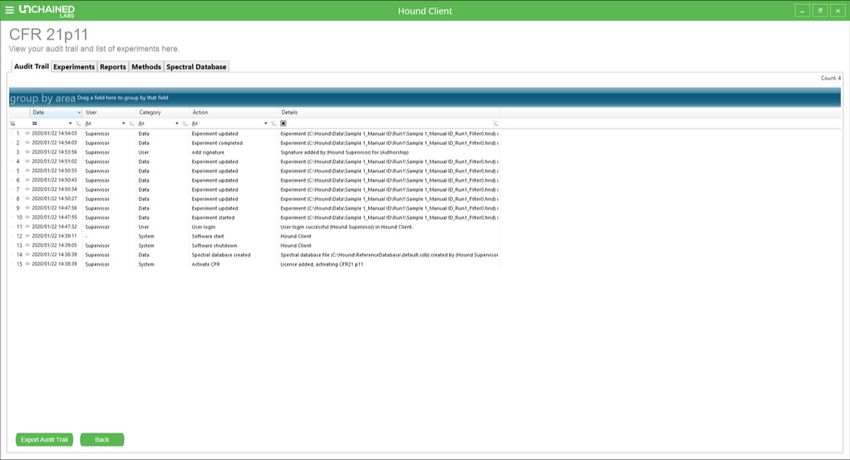
The main 21 CFR Part 11 screen can be accessed               settings, experiments, and reports), are cata-
at any time in Hound Client software by clicking on          logued in this database.
the tab from the drop-down menu on the home                • Digital signatures: Before an experiment is start-
page (Figure 2).                                             ed, a signature, as login credentials, is required.
                                                           • Integrity check: This button checks all experi-
                                                             ments, method files, databases, and reports for
                                                             integrity, and notifies you of any that have been
                                                             corrupted or altered without authorization.

                                                       1
HOUND FEATURES FOR COMPLIANT LABS

Figure 2: Main 21 CFR Part 11 screen in Hound Client.

 System                               User                                  Data                   Spectral database
 Activate CFR                         Add signature                         Experiment analyzed    Spectral database file
                                                                                                   closed
 Database integrity                   Add signature                         Experiment completed   Spectral database file
 check                                (cancelled)                                                  created
 Software shutdown                    Add signature (failed)                Experiment opened      Spectral database file
                                                                                                   opened
 Software start                       New user created                      Experiment recount     Spectral database file
                                                                            reverted               updated
 Surface correction                   User login                            Experiment recounted   Spectral database
 updated                                                                                           closed
                                      User logout                           Experiment spectrum    Spectral database
                                                                            processed              created
                                                                            Experiment spectrum    Spectral database
                                                                            reverted               default updated
                                                                            Experiment started     Spectral database
                                                                                                   opened
                                                                            Experiment updated     Spectral database
                                                                                                   removed
                                                                            Method created         Spectral database
                                                                                                   updated
                                                                            Report created
                                                                            Report updated

Table 1: A list of actions in the audit trail by which a user can filter or sort.

                                                                        2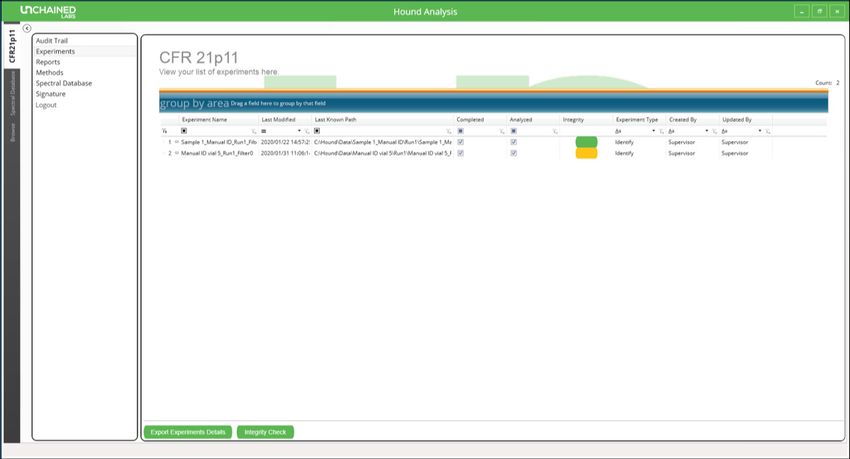
HOUND FEATURES FOR COMPLIANT LABS

Figure 3: Experiment list in the Hound Analysis software showing an example of one experiment that failed the integrity check and
is colored yellow.

                                                                    Experiment-specific information and
                                                                    audit trails
                                                                    Opening the Hound Analysis software and select-
                                                                    ing the “CFR21p11” tab provides an overview of all
                                                                    experiments completed (Figure 3). The last user
                                                                    who modified the experiment file is also shown
                                                                    in the experiment list. An integrity check can be
                                                                    performed on the list of experiments and the ones
                                                                    that have been modified without authorization will
                                                                    appear yellow.

                                                                    When a user or administrator performs an exper-
                                                                    iment, an authorization signature is requested for
                                                                    authorship (Figure 4). Additionally, all experiments
                                                                    can be signed for review, approval, and respon-
Figure 4: Digital signature request screen in Hound Analysis        sibility, by users or the administrator. Every time
software.                                                           an experiment file is opened, the integrity check is
                                                                    reapplied to detect whether that experiment has
                                                                    been compromised.
An overview of the audit trail is available in the
21 CFR Part 11 main screen. The user can sort for                   The report details are generated automatically,
specific parameters by applying the filters shown                   including the file name of the experiment, the
in Table 1.                                                         sample name and the analysis settings. Users are
                                                                    unable to modify data or text in the report, so you
The audit trail can be exported with or without                     know the information is legit.
applied filters as a PDF by selecting the “Export
Audit Trail” button.                                                The Hound CFR database contains experiment
                                                                    identification information specific to the data

                                                                3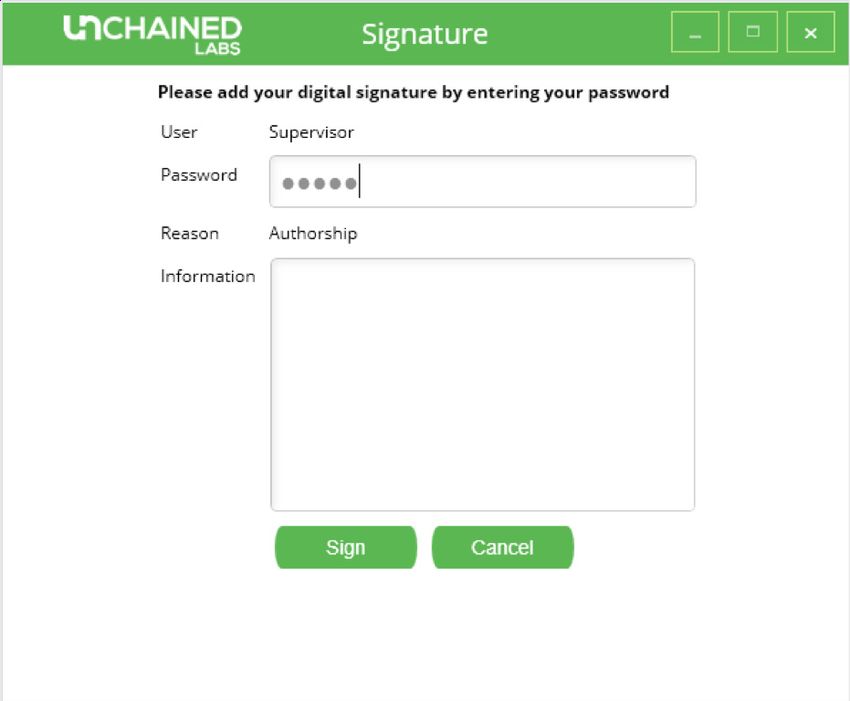
HOUND FEATURES FOR COMPLIANT LABS

integrity of all experiment files. Each computer has       tions. These features include electronic storage of
its own individual license, so a file created on one       data as HDF files, from which the user can create
21 CFR Part 11-active computer cannot be trans-            reports at any time. The audit trail archives exper-
ferred to another while maintaining the integrity of       iments and reports, and provides an overview of
that file. The CFR database can be transferred to          all actions performed by the user. Integrity checks
a new computer by an Unchained Labs employee               can be performed on experiments, method files,
if necessary. This transfer can be done in a way           databases, and reports to identify corrupt or
that maintains the integrity of the data.                  altered files. Extra features include an advanced
                                                           user management system, full audit trail capa-
                                                           bilities, and signature requirements on electronic
Conclusion                                                 records.
To meet GxP laboratory requirements, Hound
Client and Analysis software offers features to
enable compliance with 21 CFR Part 11 regula-

Unchained Labs
6870 Koll Center Parkway                                                  © 2020 Unchained Labs. All rights reserved. Hound is a
Pleasanton, CA 94566                                                        trademark and Unchained Labs is a registered trademark
                                                                            of Unchained Labs. All other brands or product names
Phone: 1.925.587.9800
                                                                            mentioned are trademarks owned by their respective
Toll-free: 1.800.815.6384                                                   organizations.
Email: info@unchainedlabs.com
                                                                                                                           Rev A
                                                       4
You can also read


