IT Security and Services on Campus - NEW STUDENT ORIENTATION (NSO) 2021 - Lingnan University
←
→
Page content transcription
If your browser does not render page correctly, please read the page content below

IT Security and Services on Campus
NEW STUDENT
ORIENTATION (NSO) 2021

                         1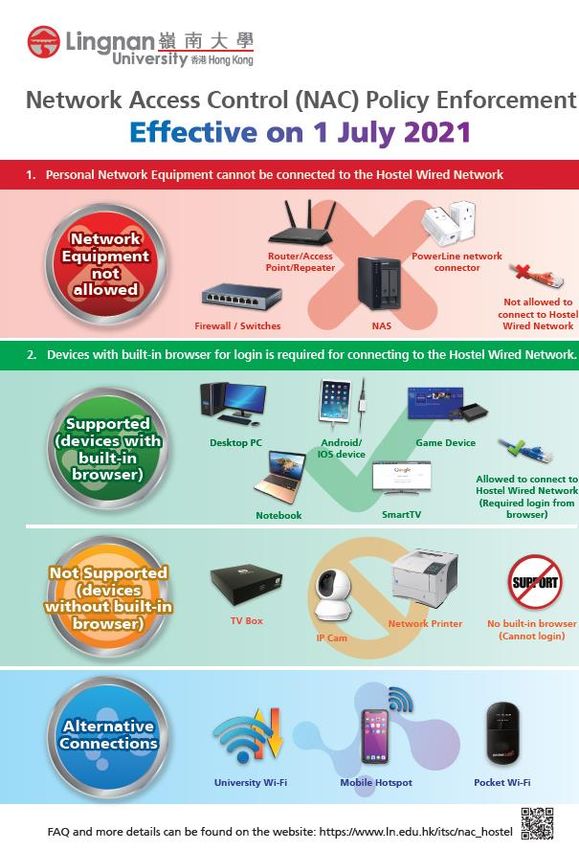
ITSC Overview
ITSC aspires to become a forward-looking centre of excellence providing
enabling solutions and leveraging cutting-edge technology to advance
the strategic priorities of the University.
Services provided by ITSC:
• E-mail services • IT facilities services
• Network • Campus-wide IT • Information
connection systems security
services • Computing • Information
• Learning and services literacy training
teaching services • Audio visual
For more details, please visit the ITSC website:
https://www.LN.edu.hk/itsc
Read the comprehensive ITSC Orientation Materials for more information:
https://www.LN.edu.hk/itsc/itsc-information/orientation
2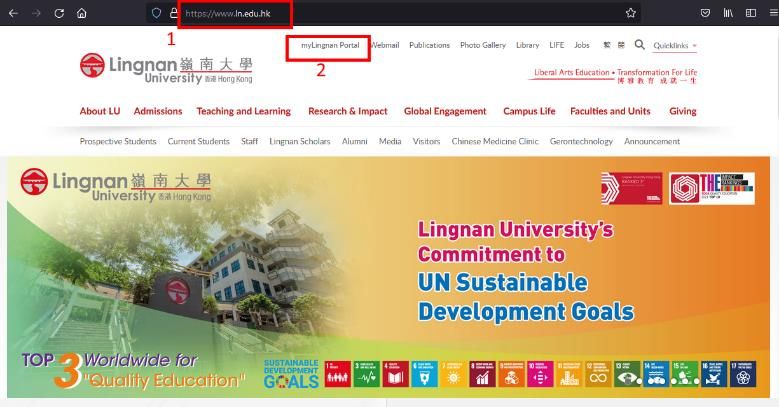
3 Different Kinds of ITSC Services (1)
4 Different Kinds of ITSC Services (2)
5 Different Kinds of ITSC Services (3)

6 ITSC Service Counters (1)
MB203, Patrick Lee Wan
Keung Academic Building
Service Hours (Term Time)
8:30am - 12:30pm,
2:00pm - 6:30pm Mon-Fri
Closed on Saturdays,
Sundays and public
holidays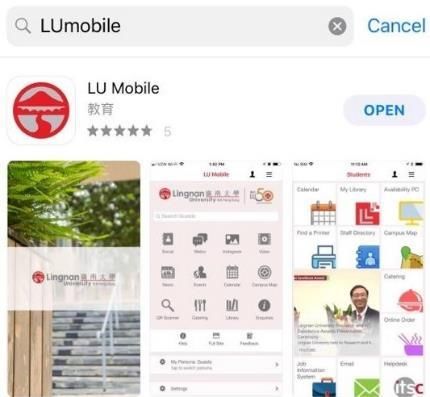
7 ITSC Service Counters (2)
MB412, Patrick Lee Wan Keung Academic Building
Service Hours (Term Time)
12:00 noon - 12:00 midnight
Mon - Fri
Closed on Saturdays, Sundays and public holidays
8 ITSC Service Hotline
Tel: 2616-7995
As printed at the back of your student ID card
Service Hours (Term Time)
8:30am-6:30pm Mon-Fri
Closed on Saturdays, Sundays and public holidays
What if you have questions
Always consult ITSC Helpdesk when in doubt about anything
suspicious
Report any potential security incident to ITSC Helpdesk
If you need help on the services provide by ITSC you can:
• Browse the service manual under the ITSC website:
https://www.LN.edu.hk/itsc
• E-mail your question to:
itsc@LN.edu.hk
• Call the ITSC Service Hotline for help:
2616-7995 (This number was printed at the back of your student
card)
• Visit the ITSC Service Counter:
MB203, Patrick Lee Wan Keung Academic Building
9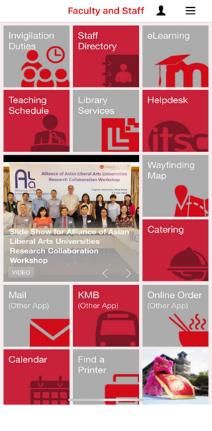
10   Computer Labs

     Lab       No. of PCs        Mon-Fri                 Sat            Sun, Public
                                                                         Holidays
     MB202         40                            9:00am – 5:00pm

     MB412         72       24 hours opened
                            The Lab is only accessible by valid smart ID card
     LCH206A       24       9:00am – 11:00pm      9:00am – 7:00pm     Closed

     SEKG02        23       6:00pm – 8:30am       24 hours            24 hours
                            The Lab is only accessible by valid smart ID card
11 Basic Lab Usage Regulations
NO food or drinks
Keep the voice down, DO NOT disturb other users
Academic research and related activities ONLY
NO games
NO entertainments (watching music videos or movies)
DO NOT download illegal material (software/music/movie, etc)
Seats are NOT ALLOWED to be RESERVED with personal belongings.
University staff have the rights to remove all unattended belongings
without prior notification
DO NOT MOVE any furnitureLU Mobile
13 LU Mobile
Available for
Guest
Student
Staff
Alumni14 Where to download
For more information,
https://www.ln.edu.hk/itsc/services/learning-and-teaching-services/lu-mobile15 Switching to Different Role
Login to the Campus Network
17 Login to the Campus Network
Turn on the PC and monitor
Press a key on your keyboard
or click the mouse
Enter your Lingnan username
and password as “User name”
and “Password” respectively
Press “Enter” when finished18 Important to Note
System will automatically logout if it remains idle (no activity)
for 30 minutes
ALL data will be lost after logout
DO NOT keep any files or personal data in public computersNetwork Printing
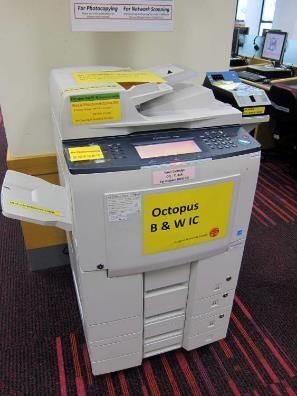
20 Octopus System
Black & White Octopus
printers are installed in
all student computer
labs
Color Octopus printers
are installed in MB412,
LCH206A and SEKG0221 Octopus Printing Charge
Color Mode Size Simplex Duplex
A4 $0.30 $0.40
Black and
White A3 $0.60 $0.80
A4 $2.50 $3.50
Color
A3 $5.50 $7.0022 Network Printer Locations
Location Octopus B/W Octopus Color
MB202 O X
MB412 O O
LCH206A O O
SEKG02 O OmyLingnan Portal Banner, eLearning & ePortfolio, Degreeworks, CTLE
24 myLingnan Portal (1)
What is myLingnan Portal?
myLingnan Portal is your 'one stop' portal to access
Lingnan University's secure online services
What is in there?
All university-wide announcements and notices for staff
and students will be posted here25 myLingnan Portal (2)
Banner Self Services for
Academics
Students can check
academic records,
register,
add/drop courses, view
personal info, apply for a
testimonial, etc
eLearning
Access to the Moodle
online learning system26 Banner Services
A comprehensive computer information system that
contains information on courses, students, faculty, staff,
and Alumni
Everything from student to alumni, registration to
graduation; and purchasing to payroll, is all managed in
one system27 eLearning and ePortfolio
Moodle and Mahara are the eLearning platforms which
allow teachers and students to participate interactive
online courses28 Degree Works
Degree Works is an degree-advising tool to serve as
course planning and advising for students and advisors
and as a degree auditing tool29 Term-end Course
Teaching and Learning
Evaluation (CTLE)
My Course(s) CTLE Survey /
Response Rate provides a
function specifically for
students to view survey
response rates and the
survey link of all courses
registered by the student in
the CTLE survey term
For details, please visit:
https://www.ln.edu.hk/its
c/services/learning-and-
teaching-services/ctle30 Login to myLingnan Portal (1)
31 Login to myLingnan
Portal (2)
Enter your Lingnan
username and password
Click “Sign in”32 Change Your Password (1)
• Access to
Enter your
https://selfservice.ln. username
edu.hk
• Enter your username
and verification
code
Enter the
verification code33 Change Your Password (2)
34   Change Your Password (3)

                    Enter your
                current password
35 Change Your Password (4)
Enter new password twice
and press “Confirm”Email Services
37 Email Services
All students are provided with an email account when
they join Lingnan
Service built on Microsoft Office365 platform
Email address in the format of username@LN.hk
The same username and password for email AND other
Lingnan computing services
Other Office365 services such as OneDrive through the
same web interface38 Login to Webmail (1)
Access to Lingnan homepage and click “Webmail”39 Login to Webmail (2)
Click “Webmail for Student”40 Login to Webmail (3)
Enter your Lingnan
username and password
Click “Sign in”Network Services
Hostel Network, WiFi Services, SoftPhone
4142 Network Access
Control – Hostel Network
The Network Access Control (NAC) policy and
measures are devised with the purpose of
strengthening hostel network security to ensure
only authorized users and devices can get access
to the campus network.
NAC is enforced on the Hostel Wired Network. Two
controls are applied to the devices connecting to
the Hostel Wired Network.
Control 1: Personal Network Equipment cannot be
connected to the Hostel Wired Network
Control 2: Login is required when initiating access
to the Hostel Wired network
More details can be found under the ITSC
website:
https://www.ln.edu.hk/itsc/services/information-
security/nac/nac_hostel43 Hostel Network
How to connect
Plug your allowable devices to the socket in your room
Open any webpage with your browser
Login using your Lingnan username and password
General usage regulations
Do not setup servers/network equipment (e.g. router/switches)
Do not download illegal material (software/music/movie, etc)
Once detected, you will be disconnected from the network
https://www.ln.edu.hk/itsc/services/network/hostel-network
4344 Wi-Fi Service
Provides almost 100% coverage across
the campus
IEEE 802.11a/b/g/n/ac compliant
wireless LAN
Authenticate with your Lingnan
University username and password,
using the SSID name: LU, LU-Advanced
Recommend to use LU-Advanced on
supported devices
https://www.ln.edu.hk/itsc/services/net
work/wireless-connection 44Multimedia and AV Services
46 AV Equipment In Teaching Venues
Audio Visual (AV) equipment is
available in all teaching venues
This includes…
Common Control User Interface
Desktop computer
Projection system
Sound system
Wireless microphone system
Visualizer and Blu-ray player, etc.47 AV Equipment On-loan Services
A wide range of AV equipment is available
from ITSC for on-loan purposes:
Portable PA
Notebook computer
Wireless microphone
Wireless presenter
TV set
Digital video camcorder
Camera tripod
Portable visualizer, etc.48 Multimedia and AV Services
Teaching and Classroom Support
https://www.ln.edu.hk/itsc/services/it-
facilities/teaching-and-classroom-support
Equipment On-loan Services
https://www.ln.edu.hk/itsc/services/multimedi
a-and-av-services/av-equipment-on-loan-
servicesInformation Literacy Training Courses
50 Information Literacy Training Courses
Information Literacy Training
Courses
Advanced Microsoft Excel 2016 for Assignments
Qualtrics Fundamentals – The online survey system
Qualtrics Advanced
For details, please visit:
https://www.ln.edu.hk/itsc/services/information-literacyInformation Security (IS)
52 Policies & Guidelines
Information Security Policy
Information Security (IS) Policy provide high-level
rules and principles of governance and control of
information security for the University. The IS
policies are approved by the management of
the University.
Every user should go through the IS Policy before
using IT facilities provided by the University.
The Information Security Policy can be found on
the below ITSC webpage:
https://www.LN.edu.hk/itsc/policies-and-
guidelines/information-security-policy53 Choose a Strong Password
A password is needed to access the critical systems in the University.
Choosing a strong password is the most basic and important task to
maintain Information Security.
Below are some guides on choosing a strong password:
Don’t use one password for all accounts
Password should have at least 8 characters long
Combination of upper- and lower-case characters and numbers
Don’t include your name or part of your name in the password
Don’t use your Birthdate or telephone number, or personal particulars in your
password
Don’t use easy to guess word or sentence as password54 Two Factor Authentication
(2FA)
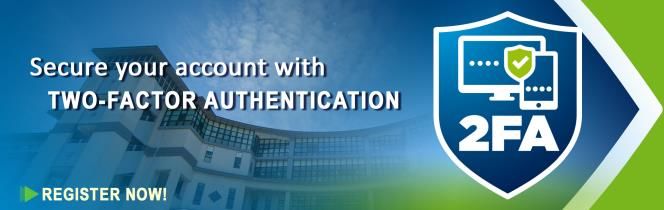
Two-Factor Authentication (2FA) is an important component in Information
Security. 2FA adds an additional layer of security protection to the
authentication process by making it harder for attackers to gain access to
a person's online account.
To enhance the protection of students’ personal data and tighten the
information security of the University, Lingnan University has implemented
the 2FA solution.
Watch this video for understanding what is 2FA:
Why 2FA? [Video]How 2FA works
2FA is mandatory for all students in
Lingnan University
2FA is required when login to the
critical systems from networks outside
of Lingnan University Campus
More details can be found on the ITSC
website:
https://www.ln.edu.hk/itsc/services/
information-security/two-factor-
authentication
Watch the video guide for the
registration process:
Registration and Use of 2FA. [Video]
5556 Secure Your Username and Password
Do not share your password with anyone
Do not disclose your password to anyone including ITSC staff
Do not store passwords in any physical location
Do not store passwords on a mobile device without encryption and
password protection
Avoid to input your username or password via public Wi-Fi or on
public computers
Change your password regularly57 Protect Your Personal Data (1)
Avoid data/personal data leakage through the Internet
Do not visit any suspicious websites
Do not download software or media files from an unknown
source
Do not open suspicious emails
Do not open any URLs on suspicious emails (it may be “phishing
emails”)
Always check the URL or email address before you login or
responding with your personal information58 Protect Your Personal Data (2)
Avoid data/personal data leakage from storage media
Do not leave storage media unattended in public areas
Keep the storage media in a secure place (with lock and key)
when not in use
Do not rely on USB storage device to store sensitive data
Use data encryption and secure devices/media to protect your
data where necessary
If you must copy sensitive data to a USB storage device, delete
the data immediately after use59 Protect Your Personal Data (3)
Avoid data/personal data leakage from personal computers
Protect your personal computer by installing anti-virus/anti-
malware software
Always check and make sure the anti-virus/anti-malware
software and its definition files are up-to-date
Install and enable a personal firewall
Always apply latest update and patches to your operation
systemPhishing emails Phishing is an email that tries to trick you in to giving out personal information, or visiting fake websites. When you receive email with curious, do not reply or click any link from the email and report the case to ITSC immediately. Once confirmed it is a phishing email, ITSC will manage to block the sender from our system.
61 Copyright Issues (1)
Intellectual Property
You need to understand software piracy and
intellectual property issues. Please see
https://www.ln.edu.hk/info-about/intellectual
Scope
General: Copyright Ordinance 2001
Copyright in Education
Legal Computer Software in Lingnan University62 Copyright Issues (2)
Some Protection of Copyright Tips
DO NOT use university facilities to upload or download
any copyright software or media files
DO NOT share any copyrighted material using P2P
(peer-to-peer) software applications, such as BT (Bit
Torrent)
CONTACT ITSC by email to itsc@LN.edu.hk if you find
any
material on the University network or computers,
that you think may violate copyright63 Useful Links
Lingnan University Home Page:
https://www.LN.edu.hk
ITSC Home Page:
https://www.LN.edu.hk/itsc
Lingnan Information Security Policy:
https://www.LN.edu.hk/itsc/policies-and-guidelines/information-
security-policy
Orientation Materials:
https://www.LN.edu.hk/itsc/itsc-information/orientation64
Thank YouYou can also read


