Low Cost Interactive Electronic Whiteboard Using Nintendo Wii Remote
←
→
Page content transcription
If your browser does not render page correctly, please read the page content below
American Journal of Applied Sciences 7 (11): 1458-1463, 2010
ISSN 1546-9239
© 2010 Science Publications

            Low Cost Interactive Electronic Whiteboard Using Nintendo Wii Remote
                                  1
                              Dalbir Singh, 2Ridha Omar and 2Azfar Anuar
                 1
                Center of Computer Science, Faculty of Information Science and Technology,
                    National University of Malaysia, 43600 Bangi, Selangor, Malaysia
              2
                Department of Graphic and Multimedia, College of Information Technology,
      University Tenaga Nasional, Km 7, Jalan Kajang-Puchong, 43009 Kajang, Selangor, Malaysia

       Abstract: Problem statement: The application of interactive whiteboard offers extensive benefits in
       the learning and teaching process for classroom environment. The high cost associated with
       commercial interactive whiteboard may hinder its application in primary or secondary school,
       especially in developing countries. Thus, this study describes the methods used to create a low cost
       interactive and viable electronic whiteboard by using the capabilities of the Nintendo Wiimotes. It also
       looks at the possibility of whether this much cheaper technology can be fully utilized to create better
       tools for in-class learning. Approach: Several technical aspects of the Wii Remote are examined, how
       this technology can be used on a low cost interactive whiteboard and how the system can be connected
       to your computer and LCD projector/screen. Result: This system has a stand-alone architecture,
       consists of a PC. The input client was responsible for getting the input data and connecting the Wii
       Remotes using a Bluetooth connection. The PC handles the software engine and display module. The
       user sends the IR source light to Wiimote by pressing the IR Pen’s switch button and then the Wiimote
       sends data to the PC via a Bluetooth connection. Conclusion/Recommendations: The genre of the
       system makes it more suitable in learning environments such as schools or universities. The main
       target groups of the system are lecturers, teachers or students (during presentation or in class exercise).
       Therefore, it was necessary to simplify the software design and control mechanism in order to support
       these main target groups.

       Key words: Overhead Projectors (OHPs), Light-Emitting Diode (LED), calibration process,
                  Bluetooth connection, Field Of View (FOV), stand-alone architecture, nintendo wii
                  remote, computer projection systems, interaction design

                     INTRODUCTION                              compared to a standard OHP (Savoy et al., 2009).
                                                               While a computer projection system eliminates the need
     Overhead Projectors (OHPs) were once a common             to create hard copy transparencies (which can be quite
fixture in most classrooms and business conference             expensive, particularly if printed in colour) of the
rooms, but today they are slowly being replaced by             presentation, many presenters do make both version
Document Cameras, large computer monitors,                     (softcopy and hardcopy versions) in case of a computer
dedicated computer projection systems and interactive          hardware failure. The overhead projector also allows a
whiteboards. Such systems allow making animations,             more direct interaction through live writing on the
interactive presentations with movement and videos,            transparency. Therefore, in this study, a novel strategy
typically using software like Microsoft PowerPoint or          is presented that outlines the concept of interactivity
other authoring tools. The primary reason for this             between the presenter and the audiences for modern
gradual replacement is the deeply ingrained use of             projector/large monitor based presentation with the use
computing technology in modern society and the                 of Nintendo Wii Remote (Peek and Fernandez, 2008). It
inability of OHPs to easily support the features that          utilizes the interactivity attributes of the overhead
modern users’ demand (Lanir et al., 2010).                     projector and whiteboard (Lee, 2008; Jayakumar and
     However, critics feel that there are some                 Gopinath, 2007). It focuses on low cost solution for
downsides, these technologies are more prone to failure        existing (projector/large monitor) classroom based
and have a much steeper learning curve for users as            teaching and learning environment.
Corresponding Author: Dalbir Singh, Faculty of Information Science and Technology, National University of Malaysia,
                      43600 Bangi, Selangor, Malaysia
                                                          1458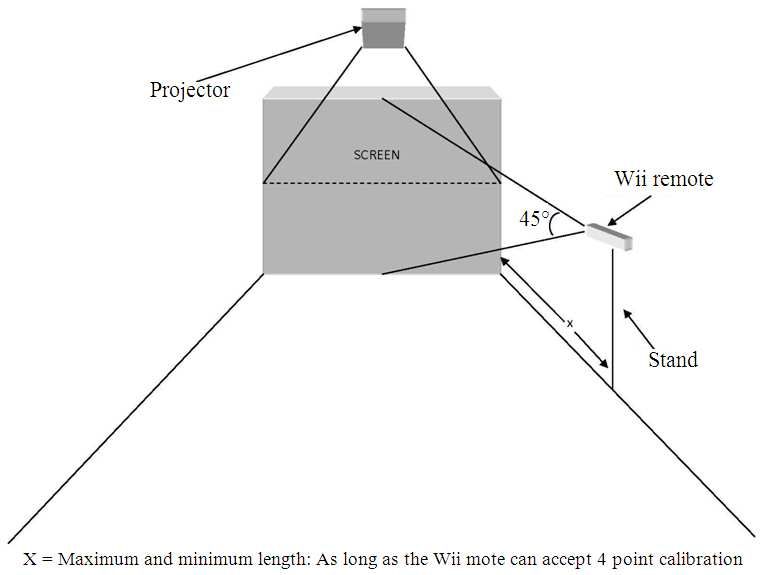
Am. J. Applied Sci., 7 (11): 1458-1463, 2010

System architectural: This system has a stand-alone           Wii remote: The IR sources must be within the Field
architecture, consists of a Personal Computer (PC),           Of View (FOV) of the Wii remote IR camera. It
Infrared (IR)/Light-Emitting Diode (LED) Pen and two          consists of 3 axis (x, y, z) as described in Fig. 4. The
Wiimotes (Mantilla-Gomez and Palacio-Gonzalez,                arrangement of the Wii remote is based on the
2009). It is illustrated in Fig. 1. The PC handles the        surrounding environment. Wii Remotes should be able
software engine and display. It is also responsible for       to “see” clearly (without any obstructions) the four IR
getting the input data and connecting the Wii Remotes         points of calibration in order to be used as a capture
using a Bluetooth connection. The user sends the IR           device. The Wii remote infrared camera is not just any
source light to Wiimote by pressing the IR Pen switch         typical infrared camera. The actual infrared tracking is
button and then the Wiimote sends data to the PC via a        accomplished using hardware within the Wii remote.
Bluetooth connection.
Hardware design: Below are the hardware setup
descriptions of the proposed Low Cost Interactive
Whiteboard using Wii Remote:
Screen: The minimum screen size is 20 square inch and
it can go up to a size of a cinema screen, depending on
the user’s height and flexibility. The maximum distance
between Wiimote and the screen depends on the IR
source. (The IR source should be visible to the
Wiimote). Refer Fig. 2 and 3 for more details.

                                                              Fig. 3: Wii remote projection (2)

Fig. 1: Overall system architecture                           Fig. 4: Wii Remote 3D axis (x, y, z)

Fig. 2: Wii remote projection (1)                            Fig. 5: Wii remote side view projection
                                                         1459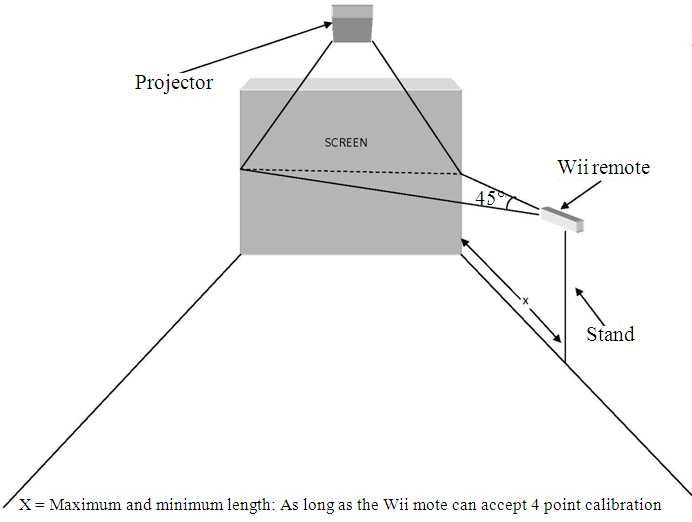
Am. J. Applied Sci., 7 (11): 1458-1463, 2010

Fig. 6: Wii remote top view projection

                                                            Fig. 8: IR pen architecture

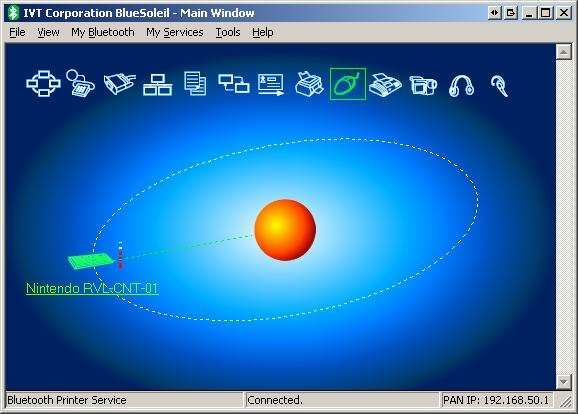
                                                            Fig. 9: A successful     Wii   Remote    pairing   using
                                                                    Bluesoleil

                                                            IR Sources/IR pen: The IR Pen is powered by a 1.5V
                                                            battery, when the battery is running low, the IR source
                                                            will not be strong or stable enough. Its layout and
                                                            architecture is illustrated in Fig. 7 and 8. This will
                                                            eventually make the IR points not clearly visible to the
                                                            Wii Remote. This can be resolved by replacing the
Fig. 7: IR LED Pen                                          battery with a power source that has a stronger capacity
                                                            voltage, but this requires a resistor to protect the IR
It then sends the position data via Bluetooth to a PC.      LED from being burned.
(No processing resources are wasted with tracking
code). It has an infrared camera in it which tracks the       Software interaction design: To test the concept of the
position of up to 4 infrared light sources. The limitation    low cost interactive whiteboard using Wii Remote, a
of this camera is that it only has a 45° angle opening.       software prototype is developed. It is paired using
Refer Fig. 5 and 6. Therefore objects placed at the side      Bluesoleil (Refer Fig. 9). The user will control the
of the Wiimote camera are “unseen”. In this project, the      system using their IR pen. There are three interaction
system needs to be placed indoor to avoid direct              methods utilised when using the IR pen:
sunlight and also in a non reflective environment
(avoiding any shiny surfaces near the setup).                 • Pointing
                                                          1460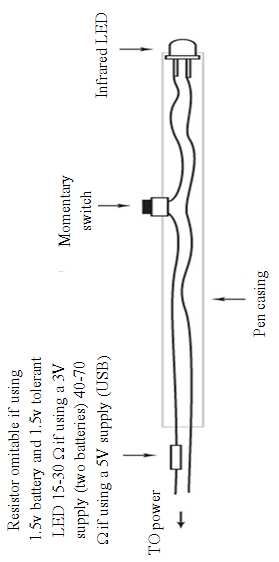
Am. J. Applied Sci., 7 (11): 1458-1463, 2010

•   Pressing and releasing the switch button
    (click/double click)
•   Pressing and holding the switch button (dragging),
    which will be explored and used to control the
    system

Interaction design using Wii remote: Another
purpose of this project is to evaluate the three common
mouse-based interaction methods by using the IR Pen.
These interaction methods are:

•   Point. The IR pen is used as a pointing device. The
    user points it to the screen and when the switch
    button is pressed and the cursor will appear
•   Press/Click. The user holds the IR pen and pressing
    the switch button (hold, single push, double push)
          METERIALS AND METHODS
                                                            Fig. 10: Wii remote connection
Hardware: A desktop computer is used. The machine
must have sufficient processing power to get input
from Wii Remote and to process the input data. The
most important hardware for the machine is the
Bluetooth capable hardware. For this purpose, a USB
Bluetooth dongle or a laptop with built-in Bluetooth
hardware is used.
Software: C# and .Net technology from Microsoft are
used to develop the prototype application. As for the
IDE, Microsoft Visual Studio 2008 Express Edition is
used (Randolph and Gardner, 2008). It provides an
integrated application for editing the source codes,        Fig. 11: First point calibration
compiling and debugging processes. It can be
downloaded for free and it is a highly recommended
platform to develop application utilizing C# and .Net
technology. The software development toolkit -SDK
used for the development is Peek and Fernandez (2008).

Calibration features: There are several steps which
must be implemented to calibrate the wii remotes and
their receiver. Firstly, the system must be able to
connect and detect the pair of Wii-Motes. Up to four
Wii Remotes are supported by the machine but not in
this beta version. Once the Wii Remotes are connected,
we can calibrate the windows by using an IR Pen. The
connection status and settings are shown in Fig. 10. The      Fig. 12: Second point calibration
calibration is done by pointing the IR pen to the target
crosshair (4 points calibration, each done at the angle of    Testing and evaluation: Below are the summarized
the projected screen or monitor) and by pressing              outcomes of the testing and evaluation process:
momentary and then releasing the switch button. The
calibration process is completed when the windows             • The Wiimote has the ability to compute four points
desktop appears. Once this process is successful, we               of calibration (x,y-axis on 2-plane). Thus, this
can then use the IR pen just like ordinary WIMP-based              enables the board to be used to the maximum
mouse functionalities. The series of calibration steps are         capabilities with regards to the maximum angle of
shown in Fig. 11-14.                                               45° of the Wiimote and its distance to the board
                                                          1461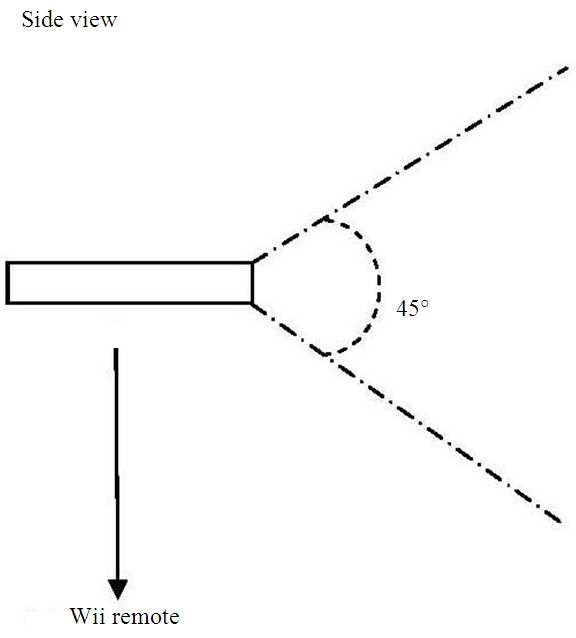
Am. J. Applied Sci., 7 (11): 1458-1463, 2010

                                                            Fig. 15: Subject’s satisfaction summary

                                                                                   DISCUSSION

Fig. 13: Third point calibration                                 The subjects, specially the teachers were satisfied
                                                            with the overall functionality. The prototype eases and
                                                            aids their teaching process. The satisfaction level
                                                            increases after each series (learnability level).Therefore
                                                            the hypothesis of this project is proven. On the other
                                                            side, the teachers complain and express their
                                                            dissatisfaction about the initial calibration process.
                                                            Based on the observation, the calibration process took a
                                                            longer time than expected. Thus, for future
                                                            recommendation, further steps would be carried out to
                                                            improve its interface and addition of self- calibration
                                                            features.

                                                                                CONCLUSION
Fig. 14: Fourth point calibration                                Based on the experiment results, a low cost
                                                            interactive whiteboard coupled with the capabilities of
•   The system is feasible for usage in a small             the Wiimote is feasible for development and provides a
    classroom where there is little or no interference is   practical solution in terms of usage in a classroom
    expected from other light sources                       setting. The Low Cost Interactive Whiteboard software
•   In terms of the interaction methods, the drag-and-      can be utilised using the two interaction methods which
    drop feature was rather unstable. However, both         can be done using an IR Pen: pointing, pressing (only
    the single click and double clicks operations were      single and double click functions and right click
    very much stable and produce excellent results          function). As for future enhancements, the prototype
                                                            system developed will have better graphical user
                       RESULTS                              interface designs and auto-calibration features
                                                            (Wingrave et al., 2010).
     In the testing phase, the prototype was developed                   ACKNOWLEDGEMENT
and tested. The test subject comprises 15 school
teachers. The test subjects were given training on how         The researchers would like to thank the Malaysian
to calibrate and apply it in their classroom’s teaching    Ministry of Science, Technology and Environment
environment. There were 3 series of experiments that       (MOSTE) for the research project’s funding.
caters of 2 different teaching materials for different
group of students. Questionnaires (teachers and                              REFERENCES
students) were distributed and direct observation was      Lanir, J., K.S. Booth and K. Hawkey, 2010. The
conducted (video recording during the teaching                 benefits of more electronic screen space on
process) to measure the satisfaction and learnability          students’ retention of material in classroom
level. Figure 15 summaries the satisfaction and                lectures. Comput. Educ., 55: 892-903. DOI:
learnability level among the subjects.                         10.1016/j.compedu.2010.03.020
                                                       1462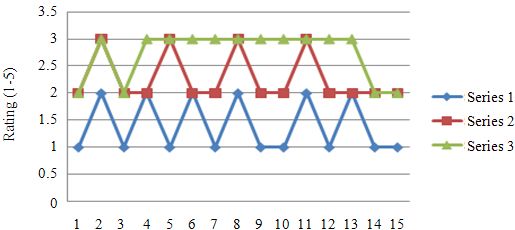
Am. J. Applied Sci., 7 (11): 1458-1463, 2010

Lee, J.C., 2008. Hacking the Nintendo Wii remote.        Randolph, N. and D. Gardner, 2008. Professional
    IEEE Pervasive Comput., 7: 39-45. DOI:                   Visual Studio. 1st Edn., Wrox Press Ltd, ISBN:
    10.1109/MPRV.2008.53                                     0470229888 9780470229880, pp: 1032.
Mantilla-Gomez, F. and A. Palacio-Gonzalez, 2009. An     Savoy, A., R.W. Proctor and G. Salvendy, 2009.
    accessibility framework based on Wiimote.                Information retention from PowerPoint™ and
    Proceeding of the 9th WSEAS International                traditional lectures. Comput. Educ., 52: 858-867.
    Conference on Applied Informatics and                    DOI: 10.1016/j.compedu.2008.12.005
    Communications,      World     Scientific    and     Wingrave, C.A., B. Williamson, P.D. Varcholik, J.R.A.
    Engineering Academy and Society (WSEAS)                  Miller and E. Charbonneau, 2010. The Wiimote
    Stevens Point, Aug. 20-22, Wisconsin, USA., pp:          and Beyond: Spatially Convenient Devices for 3D
    363-365. ISBN: 978-960-474-107-6                         User Interfaces. IEEE Comput. Graphics Appl., 30:
Peek, B. and D. Fernandez, 2008. Coding4Fun: 10.             71-85. DOI: 10.1109/MCG.2009.109
    NET Programming Projects for Wiimote,                Jayakumar, G. and G. Gopinath, 2007. Ad hoc mobile
    YouTube, World of Warcraft and More. 1st Edn.,           wireless networks routing protocols-a review. J.
    O’Reilly Media, Inc., ISBN: 0596520743                   Comp.         Sci.,     3:    574-582.      DOI:
    9780596520748, pp: 510.                                  10.3844/jcssp.2007.574.582

                                                    1463
You can also read


