Norwalk Community College - 2021-2022 Registration Guide
←
→
Page content transcription
If your browser does not render page correctly, please read the page content below

2021-2022 Registration Guide

Norwalk Community College
Welcome to NCC!                                                                Table of Contents

                                                                                Six Steps to Start!
Norwalk Community College (NCC) offers approximately
40 Associate Degree programs designed to help you succeed                       Step 1: Apply to NCC.............................................................................. 1
in today’s job market. You can use your associate degree
                                                                                Step 2: Apply for Financial Aid............................................................ 3
as a career credential or continue on for a four-year degree.
In fact, many of our graduates do transfer to four-year                         Step 3: Determine English and Math Placement......................... 4
colleges in their junior year, greatly reducing the overall cost
                                                                                Step 4: Log On to Your Student Account........................................ 5
of their college education.
    NCC also offers approximately 20 Certificate programs,                      Step 5: Register Online or In-Person................................................. 6
each designed to help you obtain specific skills, earn an
important academic credential, or pursue an interest in                         Step 6: Tuition and Fees........................................................................ 8
greater depth.
                                                                                Course Listings, Prerequisites and Requirements...................... 10

                                                                                Online, Online/Campus Hybrid, LRON, and
                                                                                Computer Courses................................................................................. 11

Norwalk Community College does not discriminate on the basis of race,           Major Codes: Degree and Certificate Programs.......................... 12
color, religious creed, age, sex, national origin, marital status, ancestry,
present or past history of mental disorder, learning disability or physical     Major Codes: Transfer Pathway Degree Programs...................... 13
disability, sexual orientation, gender identity and expression or genetic
information in its programs and activities. In addition, the College does       Continuing Education and Workforce
not discriminate in employment on the basis of veteran status or criminal       Development (Non-Credit) ...................................................................16
record. The following persons have been designated to handle inquiries
                                                                                NCC Student Email and Online Services ....................................... 17
regarding the non-discrimination policies: Chief Executive Officer
Cheryl C. De Vonish, JD, (203) 857-7016 or cdevonish@norwalk.edu;               Important Contact Information...................................... Back Cover
and Americans with Disabilities Act Coordinator Dr. Fran Apfel,
(203) 857-7192 or fapfel@norwalk.edu.
STEP

            1
All Credit Students
                                   Apply to NCC

1. Complete an application. An online application may
   be found on the Admissions Office homepage under the
   Admissions & Aid tab, or you can download a paper
                                                                    Additional Information
                                                                    PAW Sessions for First Time Students
                                                                    Students entering college for the first time are required to attend
                                                                    a Panther Advising Workshop (PAW) prior to registering for
   Application Package. https://norwalk.edu/admissions/apply        their first semester at NCC. The workshop will include an
2. Submit supporting documents.                                     informative presentation, an advisor meeting, training to use the
                                                                    NCC online system (myCommNet), and registration for classes.
  • Proof of high school completion: Provide official high
                                                                        Before attending, you must have been assessed for placement
    school transcripts or diploma, or GED with date of
                                                                    (see page 4), and submitted your immunization records. To
    graduation.
                                                                    register for a workshop, go to https://norwalk.edu/paw-work-
  • Immunization Records: Provide proof of immuniza-                shop. Due to the COVID-19 pandemic, workshops will either
    tion against Measles, Mumps, and Rubella if born after          be offered virtually via Microsoft Teams or in-person.
    12/31/56 and Varicella (chicken pox) if born after                  English as a Second Language (ESL) students are advised to
    12/31/79. You may not declare a major, register as a            visit www.norwalk.edu/academics/esl or call (203) 857-7093,
    full-time student (12 credits or more) or receive               to sign up for an ESL Advising session specifically designed for
    Financial Aid without immunization compliance.                  non-native speakers. If you are testing into ESL, please choose
    https://norwalk.edu/wp-content/uploads/2016/12/                 this type of session on the PAW webpage as your advising needs
    ProofofImmunization.pdf                                         are slightly different.
  • College Transcripts: If you have attended another college/      Transfer Students
    university and are seeking transfer credits, submit official       • Submit official transcripts from all previous colleges if
    transcripts in a sealed envelope, or have them sent elec-              you will be pursuing a degree or certificate.
    tronically by the college(s). An unofficial copy is needed in
                                                                       • To have credits transferred to your NCC records, you
    order to meet with an advisor for class selection.
                                                                           must also submit a Transcript Evaluation Request Form.
  • SAT/ACT Scores (if applicable): Submit SAT/ACT scores                  https://norwalk.edu/counseling/transfer-into-ncc
    for placement assessment (see page 4).
                                                                       • Please allow 7-10 business days for processing transcript
3. Check your email for your Banner ID. Your Banner ID is                  evaluation requests.
   an eight digit number (for example, @01234567) that is used
                                                                    Readmit Students
   to identify you within the college systems. It is not the con-
   firmation number (i.e. G00…) you received with your online          • NCC students who have not taken credit classes within
   application. A derivation of the Banner ID is used to create           the last two years must submit either an online or paper
   your log-on account, or NetID, for access to CSCU online               Readmit Application to the Admissions Office. There is no
   services, such as the myCommNet portal, student email and              fee. https://norwalk.edu/admissions/apply
   more. (See page 5 for full instructions on accessing your           • The Fresh Start Option gives the readmitting student who
   account with your NetID.)                                              had a GPA below 2.0 the opportunity to start again with-
                                                                          out the burden of a poor academic history. Contact the
If you have questions about your application, contact Admissions          Records Office for information. https://norwalk.edu/
at (203) 857-7068 or email Admissions@norwalk.edu.                        admissions/fresh-start
                                                                    International Students
                                                                       • Students who intend to apply for a student visa, please
                                                                          visit https://norwalk.edu/is and contact Justyna Davis at
                                                                       		 jdavis@norwalk.edu with any questions.

                                                                                                        2021-2022 Registration Guide 1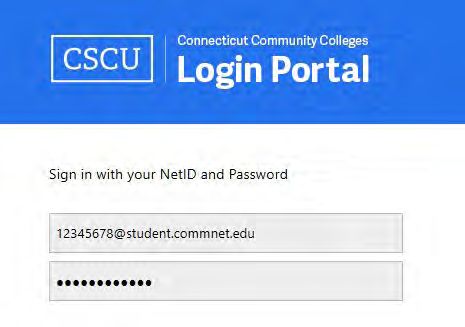
myPATH                                                                                          Apply for a Foundation Scholarship!
Norwalk Community College provides “myPATH,” a grounding                                        The Norwalk Community College Foundation offers scholar-
framework for a student’s journey here. It supports you to grow,                                ships for high school seniors coming to NCC, current NCC
persist, graduate and achieve your goals.                                                       students, and NCC graduates transferring to a four-year school.
    It is called “my” PATH because NCC seeks to provide                                         To learn more about scholarships and how to apply, please visit
students with the resources necessary to support your unique                                    ncc-foundation.org.
path to your dreams and aspirations. Students are encouraged                                        The NCC Foundation is a 501(c)(3) nonprofit organization
to become the “owners of their own vision and agents for their                                  that supports expanding access to affordable, quality higher
own success.” The PATH acronym stands for:                                                      education, the development of a productive workforce, and con-
     (P) PLAN AHEAD for academic, career, and financial suc-                                    tributing to the knowledge and well-being of our community by
     cess. Students connect with advisors, explore major and                                    raising funds for Norwalk Community College.
     career interests, evaluate transfer opportunities, and learn                                   The Foundation works with individuals, major corporations
     about financial options.                                                                   and local organizations to develop new initiatives and educa-
                                                                                                tional partnerships to inspire and engage our community to share
     (A) ACCESS RESOURCES to strengthen academic and                                            talents and resources. With assistance from generous donors, the
     leadership skills. Students learn with their peers, join student                           NCC Foundation provides $3 million annually in scholarships,
     clubs, connect to campus services, and are called to be active                             faculty and program support, and student success initiatives.
     in their education.
     (T) THINK CRITICALLY about your community at NCC
     and beyond. NCC asks students to reflect on their experi-
     ences, connect with people from different backgrounds,                                      NCC Office Hours
     build their support network, and always consider the source
     of information.                                                                               Admissions, Room E102
                                                                                                   Monday through Thursday                 8:30 a.m. to 5 p.m.
     (H) HEAD OUT confidently on your path to success.
                                                                                                   Friday                                  8:30 a.m. to 4 p.m.
     As you work toward your goals, we want you to commit to
     your own success, create your future, inspire others to make                                  Financial Aid, Room E105
     a difference and stay connected.                                                              Monday through Thursday                 9 a.m. to 5 p.m.
For more information on ways to get onto your path and suc-                                        Friday                                  9 a.m. to 4 p.m.
ceed on your path, visit https://norwalk.edu/current-students.
                                                                                                   Business Office, Room E103
This initiative was created by Title V. Title V is funded by the U.S. Department of Education      Monday through Thursday                 8:30 a.m. to 5 p.m.
Developing Hispanic-Serving Institutions Program at Norwalk Community College.
                                                                                                   Friday                                  8:30 a.m. to 4 p.m.

                                                                                                   Records and Registrar, Room E102
                                                                                                   Monday through Thursday                 9 a.m. to 5 p.m.
                                                                                                   Friday                                  9 a.m. to 4 p.m.

                                                                                                   Information Technology Services
                                                                                                   (Help Desk), Room E319
                                                                                                   Monday through Thursday                 9 a.m. to 7 p.m.
                                                                                                   Friday                                  9 a.m. to 4 p.m.

                                                                                                   Continuing Education & Workforce
                                                                                                   Development, Room W102
                                                                                                   Monday through Friday                   8:30 a.m. to 5 p.m.

                                                                                                   Office hours are subject to change. Please contact each office
                                                                                                   (see back cover) prior to visit.

2 www.norwalk.edu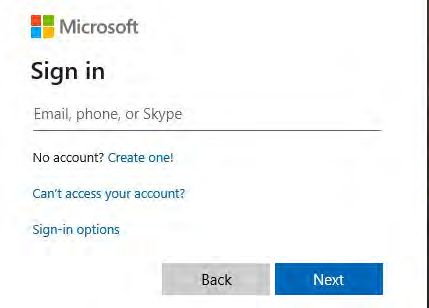
STEP

           2                           Apply for
                                       Financial Aid

Photo ID is required at the front counter of the Financial Aid
Office when inquiring about your Financial Aid status. Please
be sure to bring your driver’s license, State ID or NCC Student
ID with you.
                                                                            • Your Permanent Resident Card (if applicable)
                                                                            • Records of Untaxed Income
                                                                                Payments of tax-deferred pension, retirement savings
                                                                                plans, Child Support received, Veterans non-education
    Parents please be advised that student information, including               benefits, etc.
financial aid information, cannot be given to the parent
                                                                         3. Use myCommNet to track the progress of your financial
without the student present or without a signed release form.
                                                                            aid application. (How to log in can be found on page 5.)
ONLY the student can fill out a release form in the Financial
                                                                            You will be able to monitor your financial aid progress and
Aid Office in room E105. Please refer to the Family Educational
                                                                            view your eligibility once you have completed all financial aid
Rights and Privacy Act (FERPA) information provided at https://
                                                                            requirements. This is done through the Banner Students and
norwalk.edu/ferpa that explains confidentiality at NCC.
                                                                            Faculty Service tab, under the Financial Aid tab, and by
                                                                            clicking on Eligibility Requirements.
Getting Started                                                             • Your application may be selected by the Dept. of Education
1. Create a Federal Student Aid ID (FSA ID). If you do not                      for Verification as part of a random selection process, or
   have an FSA ID go to https://studentaid.gov to apply for one.                because of incomplete or conflicting information provided.
   The FSA ID will allow you to sign your Free Application for                  If selected for Verification, you will receive an email from
   Federal Student Aid (FAFSA) application online. Dependent                    the NCC Financial Aid Office with the steps you will need
   students need to have one parent apply for an FSA ID also.                   to take. You will also be contacted by our third-party servicer:
   TIP: You will need your FSA ID each time you file or make                    Inceptia. It is critical that students complete the Verification
   corrections to your FAFSA. You must keep your FSA ID login                   process in order to be considered for Financial Aid.
   information in a safe place so you can easily access your FAFSA       4. Review your Financial Aid Award. When we complete our
   application. You may want to keep your FSA ID information                review of your financial aid application, we will notify you at
   with your tax documents so you will always know where it is.             your school email address and direct you to view your award
2. By completing the Free Application for Federal Student                   through myCommNet.
   Aid (FAFSA)* at https://studentaid.gov, you are considered            5. To maintain Financial Aid eligibility, students must main-
   for Federal, State and Institutional aid (no separate application        tain good academic standing and be making satisfactory aca-
   is needed). The FAFSA application is FREE; make sure you                 demic progress. Visit www.norwalk.edu/finaid/sap-policy
   use the U.S. Department of Education’s website. You will                 for more information.
   need the Norwalk School Code, 001399.                                 Please contact the Financial Aid Office if you have any questions.
   The following information is needed to complete the FAFSA             We are here to assist you at NK-FinAid@norwalk.edu or call
   application online:                                                   us at (203) 857-7023. If you need assistance completing your
   • Income Tax Information                                              FAFSA, you can book a virtual appointment https://norwalk.
     To complete your 2021-2022 FAFSA application you                    edu/finaid. The 2021-2022 Aid Application for CT Undocu-
     must provide your 2019 tax information                              mented Students (AACTUS) is now available!
     Note: Use the Data Retrieval Tool. This tool allows stu-          * In order to file a FAFSA, students must be a citizen or permanent resident of the United
     dents and parents to access the IRS tax return information          States or Trust Territories; be in compliance with draft regulation requirements (Selective Service
                                                                         Registration); not be in default on any previous student loan; not owe a refund to any Title IV
     needed to complete your FAFSA, and transfer the data                Higher Education Grant Program at any institution. (If you are not eligible to file a FAFSA,
     directly into your FAFSA from the IRS website.                      please speak to the Financial Aid Office about other options to finance your education.)

                                                                                                                               2021-2022 Registration Guide 3
STEP
3 Determine English &
Math Placement
NCC has alternative placement measures in place due to COVID-19,
with in-person assessment suspended until further notice.
Students are currently placed in English and Math courses via
Step 1:
Please request that your most recent SAT scores and/or
9-12 high school transcripts be sent directly to NCC’s
SAT scores OR 9-12 grade high school transcripts (whichever Admissions Office at: admissions@ncc.commnet.edu.
places higher). For those with neither, we will arrange individu- For SAT scores, contact the College Board at:
alized online assessments on a per case basis. https://www.collegeboard.org. For 9-12 high school
In order to receive placements, you must first submit an transcripts, contact your high school’s Guidance Office.
application to NCC and receive your permanent NCC
Student ID (Banner) number. We are unable to assess Step 2:
you without a student ID number or with a temporary ID
number beginning with “G.” Complete the Alternative Placement Form for assessment
in English/Math. The form will appear when you click
Schedule Basic Skills Test at: https://norwalk.edu/place-
ment-testing/schedule-placement-test.
Or, complete the Alternative Placement Form for
ESL assessment: https://norwalk.edu/placement-test-
ing/esl-placement-test-intake.
If you have taken even one year of ESL during high
school, or did not attend an English-speaking high school,
please take the ESL assessment. Contact Professor Hannah
Moeckel-Rieke at HMoeckel-Rieke@norwalk.edu for
additional information.
Step 3:
After submitting all documents:
• If you are a first-time ever college student, please
register for a Panther Advising Workshop (PAW) at:
https://norwalk.edu/paw-workshop
• If you are a current, returning, or transfer student,
contact the Academic Advising Center for assistance
with course registration at: https://norwalk.edu/
counseling
If you have any testing questions, please email Thalia
Moshoyannis at TMoshoyannis@norwalk.edu.
4 www.norwalk.eduSTEP
4 Log On to Your
Student Account
Your application must be complete in order to access your
student myCommNet account. Access to new student accounts
may take up to 24 hours after Admissions has processed your
application. Your NetID is your college network user name,
a new password before you log in for the first time! If you ever need
to reset your password, you will be prompted to choose the same
security question and give the same answer.
and it allows you to log on to computers in the library and labs. How do I create a password that will work?
Your NetID also gives you entry to http://my.commnet.edu, Your password must be at least eight characters, and must
the “portal” entry to Connecticut Community College online include three of the following types of characters:
services: library services, online registration, academic transcripts, • an upper case letter (A to Z)
grades, Blackboard Learn and more. • a lower case letter (a to z)
• a number (0 to 9)
Logging On for the First Time • punctuation or symbols: ! @ # ^ & * ( ) _ + | ~ - = ` { . } [ ] : “ ; ‘ ? , /
Your log-on account, or NetID, is derived from your Banner ID. Your password cannot contain any part of your name, your NetID,
You received your Banner ID when you were admitted. It is not or your Social Security Number. Here are some examples of
the confirmation number (i.e. G00...) you received with your passwords that satisfy the above requirements:
online application. The Banner ID begins with the @ symbol Egg2Salad #75chase RedSox05
following the eight numbers (for example, @01234567). Your Out2lunch Fido2006 67Mustang
NetID removes the leading @ symbol, and adds the student
domain (for example, 012345676@student.commnet.edu). You may use the kiosks located throughout the NCC campus
Your initial password is made up of the following personal to reset your password, or go to the www.commnet.edu/netid
information: website and follow these five easy steps:
• The first three characters of your birth month (with the 1. Think of a new password (using requirements listed above)
first letter capitalized) 2. Enter your NetID (your student ID without the @ sign)
• The “&” symbol 3. Enter your Birth Date and Social Security Number
• The last four digits of your Social Security Number (for 4. Provide the answer to your Security Question
example: Apr&1899). If you did not provide a social secu- 5. Enter the new password you created in Step 1.
rity number, please go to the Records Office, room E102,
with a valid photo ID to request a password. What can I do if that doesn’t work?
The password is case sensitive. You will be prompted to If you don’t have a Social Security Number you will not be able
change your password. to use the kiosks or the website to reset your password. Instead,
For additional information, go to www.norwalk.edu, click contact the Online HelpDesk at (860) 723-0221 or visit https://
on myCommNet at the top right of the page (in the blue band), cscu.edusupportcenter.com. In-person, please bring your photo
then log in to myCommNet. If you don’t know your NetID, click ID (driver’s license, passport, or NCC ID card) to the I.T.
on Forgot your Net ID. You will then be directed to the NetID Office (room E319) or the Records Office (room E102), and a
Lookup where you can enter your personal information. staff member will help you.
Note: The first time you log in to a college computer, you For any other problems you may encounter at a kiosk or on
will be required to change your password and to set a security the website, bring your valid photo ID (driver’s license, pass-
question. There will be a choice of questions and you will need port, or NCC ID card) to the I.T. Office (room E319) or the
to pick one and provide an answer. You will have two minutes Records Office (room E102) and a staff member will help you.
to type in and then confirm your new password. If you exceed the For further password reset options via email, go to www.
time limit you will need to start over, so be prepared by thinking of commnet.edu/netid and select “Reset Forgotten Password.”
2021-2022 Registration Guide 55
Register Online
STEP or In-Person
The Admissions Office must designate you as a student before ESL Students
you can register for classes. You will need to receive your Banner
Students taking English as a Second Language courses must meet
ID# (the number with the @ sign) from the Admissions Office.
with an ESL advisor prior to registering. For more information,
See Admissions Requirements on page 1 of this guide or visit the
please make a virtual appointment at https://norwalk.edu/academ-
Admissions Office in room E106 for more information.
ics/esl/virtual-registrations, or call (203) 857-6854 (credit) or
(203) 857-6881 (non-credit).
New First-Time Students
First-time students are required to schedule and attend a Panther Current Students
Advising Workshop (PAW). At the workshop, students will meet
After meeting with an advisor and checking your DegreeWorks
with an advisor, register for classes, and register for new student
evaluation to determine the appropriate courses, current students
orientation. https://norwalk.edu/paw-workshop
are strongly encouraged to register online.
For an online list of advisors, visit https://norwalk.edu/aca-
demics/advisor-directory. For instructions on how to use Degree-
Works, visit https://norwalk.edu/degreeworks/instructions.
Online Registration and Payment Information
Current students can register online if they are in good standing, • In “Select Payment Method” area select: “Electronic Check”
have declared a major, and have met pre-requisites as shown on or “Credit or Debit Card” and then “Select”
their NCC transcript. Here’s what to do: • In “Account Information” area, type in required information
• See full instructions here: https://norwalk.edu/records/ then click “Continue”
registration • Confirm your course selection and printout Payment Receipt
• Search for available courses on the web via the public Course
Search under “Academics” and write down the CRNs. Financial Aid Students
• Log on to your my.commnet.edu account and click on Financial Aid students must go to the Business Office in room
“Banner Student and Faculty Self-Service.” Select the E103 to finalize their financial aid payments.
“Registration/Schedule” tab, then “Class Registration.”
• Once on the Registration page, select the appropriate Term Online Registration Notes
(for example “Fall 2020”) and click “Submit.”
• Be sure to include a credit card payment online or pay in
• Scroll down to the bottom of the screen and enter CRNs in
person at the Business Office at time of registration. (See
the boxes for the classes you wish to register for. CRNs for
Step 6 on page 8 for more payment information.)
courses can also be found by clicking in the “Class Search”
• Check your class schedule on myCommNet.
box in the same location.
• Students who drop courses prior to the term or up until
• Click on “Submit Changes.” the seventh day of the term having elapsed (i.e. 10% of the
• Scroll down to the bottom of the screen term) will be entitled to a 100% refund of tuition and fees.
• Click on: “Make a Payment or Enroll in a Payment Plan” For more information on our refund policy, see page 9.
• Click on: “Make a Payment” • Veterans who register must immediately notify the Veterans
• Select a term: Choose term you are registering for (for Certifying Official in the Records Office, room E102.
example “Fall 2020”) • Click on the hyperlinks in the Course Search to view im-
• Click on: “Continue” portant course and textbook information.
6 www.norwalk.eduIn-Person Registration
The Records Office, room E102, normally processes course your meeting with your counselor or advisor. Transfer students
registrations during regular business hours. Please arrive no later should bring an unofficial copy of their transcripts from their
than 15 minutes before closing. See page 2, or the Records Office previous colleges.
webpage, for regular business hours. Veterans who register must immediately notify the Veterans
Current students should contact their advisor for an appoint- Certifying Official in the Records Office, room E102.
ment through the Advisor Directory. Current students may also A form of payment is required at the time of registration.
attend scheduled Walk-In Advising and Registration sessions to Early registration with a partial deposit at time of registration
meet with an advisor and register for classes. Extended registra- will reserve your classes. (See Step 6 on page 8 for more payment
tion hours are available during these times. Check online for information.)
Advising and Registration dates. Use the Registration Worksheet below to create a draft of
Bring your unofficial NCC transcript and your DegreeWorks your schedule of classes. Write in each box the CRN number,
Evaluation when you meet with your advisor or counselor. You Subject and Course Number and exact meeting time of the class.
can obtain your unofficial student transcript online at http:// If the course includes a lab, be sure to include the lab time.
my.commnet.edu. After logging on, click on the “Banner Class meeting times cannot overlap.
Student Self-Service” link. Once in the student self-service area,
click on “Student Records.” Then click on “Transcripts” followed Advisor Directory
by “Unofficial Transcript.” If you are a new student, bring your For an online list of advisors, visit https://norwalk.edu/academ-
Individual Score Report from your placement test with you to ics/advisor-directory.
Registration Worksheet
MONDAY TUESDAY WEDNESDAY THURSDAY FRIDAY SATURDAY
8 a.m.
9 a.m.
10 a.m.
11 a.m.
12 p.m.
1 p.m.
2 p.m.
3 p.m.
4 p.m.
5 p.m.
6 p.m.
7 p.m.
8 p.m.
9 p.m.
2021-2022 Registration Guide 76
Tuition and Fees*
STEP
2021-2022 Tuition and Fees - In-State 2021-2022 Tuition and Fees - Out of State**
Credit Tuition Registration Transportation Total Credit Tuition Registration Transportation Total
Fees Fee Fees Fee
0.5 83.00 94.00 40.00 217.00 0.5 249.00 262.00 40.00 551.00
1.0 166.00 98.00 40.00 304.00 1.0 498.00 274.00 40.00 812.00
1.5 249.00 101.00 40.00 390.00 1.5 747.00 283.00 40.00 1,070.00
2.0 332.00 105.00 40.00 477.00 2.0 996.00 295.00 40.00 1,331.00
2.5 415.00 107.00 40.00 562.00 2.5 1,245.00 301.00 40.00 1,586.00
3.0 498.00 111.00 40.00 649.00 3.0 1,494.00 313.00 40.00 1,847.00
3.5 581.00 113.00 40.00 734.00 3.5 1,743.00 319.00 40.00 2,102.00
4.0 664.00 116.00 40.00 820.00 4.0 1,992.00 328.00 40.00 2,360.00
4.5 747.00 120.00 40.00 907.00 4.5 2,241.00 340.00 40.00 2,621.00
5.0 830.00 135.00 40.00 1,005.00 5.0 2,490.00 385.00 40.00 2,915.00
5.5 913.00 144.00 40.00 1,097.00 5.5 2,739.00 412.00 40.00 3,191.00
6.0 996.00 152.00 40.00 1,188.00 6.0 2,988.00 436.00 40.00 3,464.00
6.5 1,079.00 160.00 40.00 1,279.00 6.5 3,237.00 460.00 40.00 3,737.00
7.0 1,162.00 170.00 40.00 1,372.00 7.0 3,486.00 490.00 40.00 4,016.00
7.5 1,245.00 178.00 40.00 1,463.00 7.5 3,735.00 514.00 40.00 4,289.00
8.0 1,328.00 185.00 40.00 1,553.00 8.0 3,984.00 535.00 40.00 4,559.00
8.5 1,411.00 195.00 40.00 1,646.00 8.5 4,233.00 565.00 40.00 4,838.00
9.0 1,494.00 204.00 40.00 1,738.00 9.0 4,482.00 592.00 40.00 5,114.00
9.5 1,577.00 213.00 40.00 1,830.00 9.5 4,731.00 619.00 40.00 5,390.00
10.0 1,660.00 219.00 40.00 1,919.00 10 4,980.00 637.00 40.00 5,657.00
10.5 1,743.00 229.00 40.00 2,012.00 10.5 5,229.00 667.00 40.00 5,936.00
11.0 1,826.00 237.00 40.00 2,103.00 11.0 5,478.00 691.00 40.00 6,209.00
11.5 1,909.00 247.00 40.00 2,196.00 11.5 5,727.00 721.00 40.00 6,488.00
12.0+ 1,992.00 261.00 40.00 2,293.00 12.0+ 5,976.00 753.00 40.00 6,769.00
Annual Annual 11,952.00 1,506.00 80.00 13,558.00
3,984.00 522.00 80.00 4,586.00
Full-time Full-time
* Tuition and Fees are subject to change. All students are required to pay their
Registration Fees at the time of registration.
** Extending the in-state tuition and fees for neighboring States (Massachusetts,
Rhode Island and New York) at the following Community Colleges: Asnuntuck,
Quinebaug Valley, Three Rivers, Norwalk, Northwestern, Housatonic and
Naugatuck Valley-Danbury Campus.
8 www.norwalk.eduFall 2020 Mandatory Usage Fees tuition and fees less a “late drop” fee assessed at $50 per
dropped course.
Material Fee: $51 (per course; $102 max per term)
• Students who withdraw subsequently to 20% of the
Clinical Program Fee - Level 1: $487 (per semester)
abbreviated term having elapsed will be charged 100% of
Clinical Program Fee - Level 2: $359 (per semester)
all tuition and fees. Dates representing the 10-20% points
Advanced Manufacturing Lab Fe: $120 of the respective abbreviated terms will vary according to
Supplemental Course Fee - Level 1: $102.50 ($410 max per term) each session/part of term in which the student is registered.
Supplemental Course Fee - Level 2: $205 ($410 max per term) Please see the Registrar or Bursar’s office for the exact dates
Payment options: cash (in-person only), check or money order (payable to Norwalk on which the “late drop” fee will be assessed.
Community College), American Express, MasterCard, Visa or Discover card number,
expiration date and security code from the back of the card. Please print clearly.
There will be a $25 charge for returned checks. Tuition Waivers
Connecticut Senior Citizens 62 and older pay no tuition or
Excess Credits Tuition Charge fees, with the exception of clinical, material and supplemental,
An additional flat tuition of $100 per semester shall apply when for General Fund courses on a space available basis to be deter-
total registered credits exceed 17 for the semester. mined by Senior Registration Day (check date/time online at
https://norwalk.edu/academics/calendar). Proof of age must be
Partial Payments shown and a Waiver of Tuition and Fees Form completed in the
Students may reserve their classes by paying the registration fees Business Office to finalize the senior registration process.
only, during Early Registration. Registration fees serve as a deposit A senior citizen may register early by paying for the course;
and are non-refundable. All non-credit courses must be paid in however, paying for the course negates the senior waiver for that
full at time of registration. For more information, contact the course. No refund will be issued if the course is dropped, then
Business Office, room E103 at (203) 857-7046, or visit https:// re-added on senior registration day.
norwalk.edu/business for more information and due dates.
Tuition Payment Plan
Students who enroll for three credits or more may request a
tuition payment plan. Please visit the Business Office in room
E103 for complete information.
Tuition Refund Policy (for Credit Courses)
Traditional Fall/Spring Semester Courses:
• Students who drop courses prior to the term or up until
the seventh day of the term having elapsed (i.e. 10% of the
term) will be entitled to a 100% refund of tuition and fees.
• Students who drop subsequently to the seventh day of the
term but prior to the 21st day of the term having elapsed
will be entitled to a 100% refund of tuition and fees less a
“late drop” fee assessed at $50 per dropped course.
• Students who withdraw subsequently to the 21st day
of the term having elapsed will be charged 100% of all
tuition and fees.
Courses Offered in Abbreviated Terms (e.g. summer, winter,
late start courses):
• Students who drop courses prior to the abbreviated term
and up until 10% of the abbreviated term having elapsed
will be entitled to a 100% refund of tuition and fees.
• Students who drop subsequently to 10% of the abbreviated
term having elapsed but prior to 20% of the abbreviated
term having elapsed will be entitled to a 100% refund of
2021-2022 Registration Guide 9Course Listings, Prerequisites and
Requirements
Course Listings
For a complete listing of all available courses, please go to the
NCC website at www.norwalk.edu and click on the “Academics”
tab, then “Course Search.” You will then be on the Connecticut
Community College Course Search page where you will be able to
access real-time information regarding course availability.
Course Prerequisites
Many college courses have prerequisites that indicate the prior
knowledge and skills students need to succeed in the course.
It is the responsibility of the student to meet these course
prerequisites before enrolling.
To determine if prerequisites are required for the course you
wish to take, go to the NCC website at www.norwalk.edu and
click on the “Academics” tab, then “Course Descriptions.”
If you have fulfilled the prerequisite at NCC, you can
proceed to online registration. If you have taken the prerequisite
at a different college that has not been added to your NCC Email the director or chair of the department for the course
transcript, you will need to request an override to be entered you want to take (see back cover). In the email indicate:
on your behalf in order to register for the course. • Your name
• Your Banner ID
• The semester for which you wish to register
• The course CRN
• The course number and section (example: ACC D113-02)
• The reason why you are requesting the override; attach an
unofficial transcript with the prerequisite listed.
You will receive a reply email within three business days. If the
override has been approved, you will be able to register online.
English Requirements
Students are required to enroll in an appropriate English
course after completing nine credits unless they can demonstrate
proficiency in written English. If you fail or withdraw from
a required English course, it must be repeated in your next
semester of enrollment.
10 www.norwalk.eduOnline, Online/Campus Hybrid, LRON and
Computer Courses
Students taking online, online/campus hybrid, or LRON courses LRON (Live Remote Online) Courses
for the first time should plan to attend a scheduled orientation
These classes are similar to hybrid in that they require you to
on campus. For information regarding online/hybrid/LRON
be in class at a specific time. However, you do not have to come
orientation dates and times, please refer to the NCC website
to campus. The synchronous portion of the class will take place
noted below or contact Lois Aime at laime@norwalk.edu or
on specific days, at specific times, but they will be via a commu-
(203) 857-7288.
nication tool on the web, such as Webex, Blackboard Collabo-
rate, MS Teams, or Zoom. The days and times will be listed on
Technical Requirements the schedule so when you register you will know when you will
In order to take an online or online/campus hybrid course, you have to be available.
must have access to a computer with Internet access that meets For more information on taking online or online/campus
the following requirements: hybrid courses at NCC, go to http://www.norwalk.edu/dis-
• Windows: 8/10, if using Microsoft Edge, Firefox 31+ or tance-learning. This site lists system requirements, various fixes
higher, or Google Chrome 36+ or higher for technical difficulties, has links to add-ins you might need to
• Mac Operating System: OS 10.8.x, or 10.9.x Firefox 3.x download and other pertinent information.
or higher or Chrome OS
Additional Notes: All browsers require JavaScript, Java, Popups, Computer Courses
and Cookies to be enabled. Students enrolling in a computer course should check the course
description for equipment and system requirements and restrictions.
Online Courses
All communications, assignments, tests, etc. take place on the
Internet using a course management system called Blackboard,
at a time and place that is convenient for you. You DO NOT
have to attend “class” at a specific time on campus. You DO
need to have strong time management and organizational skills.
Online classes are not easier—just more convenient.
Online/Campus Hybrid Courses
These classes can have any number of formats. But, they are all
taught partially in a campus classroom at a required time and
partially online using Blackboard. You may be required to meet
on campus as much as once a week or as little as three times a
semester. This will vary with each course, so be sure to check
the schedule carefully and verify this with your professor on the
first day of class when taking a hybrid course.
Hybrid courses allow you the flexibility of working in an
online environment while still meeting with your instructor
and classmates in a classroom. You continue to have the support
that you receive in a classroom environment, but you do not
have to spend as much time on campus. For those of you who
are working or have family obligations, or perhaps both, this
form of class structure offers you the flexibility you need to go
to school while meeting those obligations.
2021-2022 Registration Guide 11Major Codes: Degree & Certificate Programs
Please use the appropriate code below to designate your choice of major your application.
Use Major Code: DZ99 if you are not pursuing a degree or certificate at this time. Use Major Code: DA01 if you are in the High School Partnership program.
Associate Degree Programs
Major Major Code Major Major Code
Allied Health Computer Science
Medical Office Management - Administrative* DA10 Computer Science DA12
Medical Office Management - Clinical* DA11 Web Development DA16
Nursing* DF30
Education & Social Science
Physical Therapist Assistant* DB94
Criminal Justice DB06
Respiratory Care* DB77
Early Childhood Education - Career DB11
Art, Architecture & Design Early Childhood Education - Transfer DB12
Architectural Engineering Technology DA22 Exercise Science DB93
Construction Technology DA98 Human Services - Career DB35
Design for the Web DA02 Human Services - Transfer DB36
Fine Arts DB42
Engineering
Graphic Design DA45
Engineering Science DB14
Interior Design DA05
Technological Studies DF11
Studio Art DB40
General Studies DB31
Business
Accounting - Career DA07 Honors Program* DB33
Accounting - Transfer DA09
Hospitality Management
Business Administration DA67
Culinary Arts Option DA60
Finance DA13
Hotel Option DA58
Management DA15
Restaurant Option DA59
Marketing DA14
Legal Assistant* DB53 Liberal Arts & Sciences
Liberal Arts Transfer DB54
Communication Arts
Mathematics & Science DB46
Journalism DB89
Psychology DB00
Media Studies DB91
Teaching Career Pathway DB10
Film & Television Production DB90
Veterinary Technology DA06
Certificate Programs
Major Major Code Major Major Code
Allied Health Computer Science
Health Careers Pathways** DK55 Relational Database DK02
Medical Assistant* DJ70 Smartphone App Development DJ06
Medical Office Specialist DJ09 Web Developer DK06
Art, Architecture & Design Early Childhood Education
Graphic Design# DJ83 Administrative Option DJ50
Education Option DJ89
Business
Infant/Toddler DJ79
Accounting # DJ05
Culinary Arts DJ77 Engneering DJ81
Legal Assistant* # DJ88 Computer Aided Design DJ23
Communication Arts English as a Second Language DJ81
Digital Journalism DJ07
Film & Television Production DJ08
* Selective Admissions Program with limited enrollment. Consult the college catalog for specific admission requirements and deadlines.
** Can only be added as a second major; first major must be General Studies. # Open only to students who have an Associate or Bachelor’s degree.
12 www.norwalk.eduMajor Codes: Pathway Transfer Degree Programs
CSCU Transfer Tickets Business, Chemistry, Commu-
nication, Criminology, Early
The Connecticut State Colleges and Universities (CSCU)
Childhood Teacher Credential,
system has developed Transfer Tickets to provide pathways to
English, French, German,
a four-year degree. Transfer Tickets are degree programs for
History, Italian, Mathematics,
Connecticut community college students that easily transfer to
Physics, Political Science,
Connecticut State Universities and Charter Oak State College.
Psychology, Sociology, Social
Upon graduation from NCC, students are guaranteed
Work and Spanish.
full junior status at a four-year institution that is part of the
To learn more about
CSCU system. They can complete a bachelor’s degree in their
CSCU’s Transfer Tickets, visit
major with the assurance they will not lose any credits or be
www.ct.edu/transfer. An interactive guidance system will
required to take any extra credits. (Select programs may have
walk you through the program.
additional admission requirements.)
To register for a specific Pathway Transfer degree program,
Students choose a transfer degree program just as they
please use the Banner Program Codes listed below. Students
would a major field for an associate degree, but take only the
should contact their advisor for information regarding transfer
courses that apply to both the major’s associate degree and
credits in specific programs.
its bachelor’s degree.
www.ct.edu/transfer
Transfer Tickets are currently available in the following
majors, and new ones will be added each year: Art, Biology,
Pathway Transfer Degree Programs*
Degree Major Code
CSCU Pathway Transfer Degree: Art Studies DG21
CSCU Pathway Transfer Degree: Biology Studies DG01
CSCU Pathway Transfer Degree: Business Studies (Finance, Management and Marketing) DG12
CSCU Pathway Transfer Degree: Chemistry Studies DG02
CSCU Pathway Transfer Degree: Communication Studies DG03
CSCU Pathway Transfer Degree: Criminology Studies DG04
CSCU Pathway Transfer Degree: Early Childhood Teacher Certification Studies DG14
CSCU Pathway Transfer Degree: English Studies DG05
CSCU Pathway Transfer Degree: Exercise Science Studies DG15
CSCU Pathway Transfer Degree: French Studies DG16
CSCU Pathway Transfer Degree: German Studies DG17
CSCU Pathway Transfer Degree: History Studies DG06
CSCU Pathway Transfer Degree: Italian Studies DG18
CSCU Pathway Transfer Degree: Mathematics Studies DG07
CSCU Pathway Transfer Degree: Physics Studies DG19
CSCU Pathway Transfer Degree: Political Science Studies DG08
CSCU Pathway Transfer Degree: Psychology Studies DG09
CSCU Pathway Transfer Degree: Social Work Studies DG10
CSCU Pathway Transfer Degree: Sociology Studies DG11
CSCU Pathway Transfer Degree: Spanish Studies DG20
*For information on additional programs, visit http://www.ct.edu/transfer/ticket#major
2021-2022 Registration Guide 13Academic Calendar 2021-2022
Fall 2021 Semester
July September
TBA Advising and Registration: 2 - 5 pm September 4-6 LABOR DAY Observance - College closed
TBA Advising and Registration: 9 am - 12 pm September 7 Last day for 50% tuition refund
in person by 5 pm
TBA Advising and Registration: 3 - 6 pm
September 27 Last day to change to audit
TBA Advising and Registration: 3 - 6 pm
August October
October 11 COLUMBUS DAY - College open; classes held
August 2 Registration begins for Fall 2021
Non-Credit classes October 18 Mid-term grades due online
TBA Advising and Registration: 3 - 6 pm October 18-21 Advising Week for Spring 2022 by appointment
August 4 Fall tuition balance due October 18 Registration begins for Winter 2021 and
Spring 2022 Credit classes
TBA Advising and Registration: 10 am - 1 pm
October 19 Reading Day - No classes; College open
TBA Advising and Registration: 9 am - 12 pm
TBA Advising and Registration: 3 - 6 pm
November
August 10 New Student Orientation: 4 pm
November 5 Application deadline for December graduation
Advising and Registration: 10 am - 1 pm
November 11 VETERAN’S DAY - College open; classes held
August 11 New Student Orientation: 12:30 pm
November 15 Last day to withdraw in person by 5 pm;
August 12 Advising and Registration: 3 - 6 pm
online prior to midnight
New Student Orientation: 9:30 am
Nov. 24-28 THANKSGIVING RECESS - No classes
August 25 Advising and Registration: 4 - 7 pm
November 25 THANKSGIVING DAY - College closed
Last day to drop with 100% tuition refund
in person by 7 pm, online by midnight
December
Add/Drop: 10 am - 1 pm; 3 - 6 pm
(see Policy for Adding Courses below) December 1 Registration begins for Spring 2022
Non-Credit classes
August 26 Classes begin for Fall 2021 Semester
December 6 Last day of classes
Add/Drop: 10 am - 1 pm; 3 - 6 pm
(see Policy for Adding Courses below) December 9-15 Final exams week
August 27 Senior citizen registration: 9 - 11 am December 17 Final grades due online by 12 Noon
December 24 CHRISTMAS EVE - College closed
December 25 CHRISTMAS DAY - College closed
December 27 Final Fall grades available for viewing at
myCommNet
December 31 NEW YEAR’S EVE - College Closed
14 www.norwalk.eduSpring 2022 Semester
January April
January 1 NEW YEAR’S DAY - College closed April 1 Application deadline for May graduation
January 3 Spring tuition balance due April 15-17 DAY OF REFLECTION - College closed
January TBA Advising and Registration: 10 am - 1 pm April 18 Last day to withdraw, in person by 5 pm
January TBA Advising and Registration: 3 - 6 pm
January TBA Advising and Registration: 3 - 6 pm
May
January TBA Advising and Registration: 10 am - 1 pm May 9 Last day of classes
January 13 New Student Orientation: 10 am May 10-16 Final exams week
January TBA Advising and Registration: 2 - 5 pm May 18 Final grades due online by 12 Noon
January 17 MARTIN LUTHER KING, JR. DAY - College closed May 19 Commencement
January TBA Advising and Registration: 4 - 7 pm May 24 Final grades available for viewing
at myCommNet
January TBA Advising and Registration: 10 am - 1 pm
May 30 MEMORIAL DAY - College closed
January TBA Advising and Registration: 3 - 6 pm
Last day to drop with 100% tuition refund
in person by 7 pm, online prior to midnight
January 21 Classes begin for Spring 2022 semester
January 24, 25 Add/Drop Advising: TBA
January 26 Senior citizen registration: 9 - 11 am
February
February 4 Last day for 50% tuition refund,
in person by 5 pm
Note: Calendar subject to change based on College needs and
February 18-21 PRESIDENT’S RECESS - College closed priorities. Check online at www.norwalk.edu for the most up-to-date
February 17 Last day to change to audit Academic Calendars.
March Policy for Adding Courses
A student may enroll in a 2 and 3 day a week/14-week course if the
March 7 Registration begins for Fall 2022 Credit classes class has not met more than twice.
Registration begins for Summer 2022 A student may enroll in a 1 day a week/14-week course if the class has
Credit and Non-Credit classes not met more than once.
March 14-20 Spring Recess - No Classes A student may enroll in an abbreviated session course if the class has
not met more than once.
March 20 Mid-term grades due online
A student may enroll in an online or hybrid course no later than seven
March TBA Advising Week for Fall 2022, by appointment days after the first day of a 14-week semester and no more than two days
after the first day of an abbreviated semester’s courses have begun.
2021-2022 Registration Guide 15Continuing Education and Workforce
Development (Non-Credit)
The Continuing Education and Workforce Development Registration
Division of Norwalk Community College offers affordable non-
Students are encouraged to register at least one week prior to
credit courses and certificate programs (see below). The courses
the class start date. Registration options can be found online at
are ideal for motivated individuals seeking to upgrade or learn
https://norwalk.edu/extended-studies/#registration.
new job skills. The Division also offers English as a Second
Language (ESL) courses, a wide variety of personal enrich- Five Ways to Register:
ment courses for adults and courses (listed below) that award 1. Online: Go to https://norwalk.edu/extended-studies/reg
Certificates of Completion upon meeting all requirements. and fill out the registration form.
Business 2. By mail: Mail completed registration form with a check or
money order (payable to Norwalk Community College) to:
• Legal Secretary Certificate
Norwalk Community College, Continuing Education,
• National Bookkeeping Certification Preparation
188 Richards Avenue, Norwalk, CT 06854.
• Real Estate Licensing
• Retail Customer Sales & Service 3. By fax: Send completed registration form and credit card
• Travel Associate Certificate information to (203) 857-7388.
4. By phone: Call (203) 857-7080. You will be called back
Information Technology
within 24 hours. Credit card payment will be accepted.
• A+ Computer Repair Certification Preparation
5. In-person: Please visit the Continuing Education Office,
• Computer Graphics Certificate
W102, or the Records Office, E102. All methods of payment
• Web Design Certificate
are accepted in-person.
Healthcare
• CNA (Certified Nurse Aide) Non-Credit ESL Students
• Dental Assistant Certificate Non-credit ESL students must fill out an NCC application
• EKG (Electrocardiogram Technician) Certificate and sign up for an assessment (see page 4) before registering for
• Homemaker Companion classes. For further information, please contact the ESL office
• Medical Billing and Reimbursement Specialist Certificate at (203) 857-6854 or ddaych@norwalk.edu.
• Medical Coding Certificate
• Phlebotomy Technician Specialist Certificate
• Patient Care Technician Certificate
• Physical Therapy Aide Certificate
• Veterinary Assistant Certificate
Public Safety
• Connecticut State Security Officer Certification
• EMT (Emergency Medical Technician)
For further information regarding non-credit courses, please
visit www.norwalk.edu/ce-wd, call (203) 857-7080, or email
NK-continuing-ed@norwalk.edu.
16 www.norwalk.eduNCC Student Email and Online Services
The latest version of the full Office 365 productivity suite, inclu- • OneDrive for Business: Store, sync, and share your files
ding Word, Excel, PowerPoint, Access, Publisher, and OneNote online. As part of Office 365, OneDrive for Business provides
is now available for offline and online use to best prepare you for 1TB of online storage, lets you update and share your files
class. All Connecticut Community College students now have from anywhere, and work collaboratively on Office docu-
access to: ments with others at the same time.
• Office 365 Email: Email account with 50 GB (gigabytes) of All college-based communications will be sent to your Office
storage, calendaring, contact info, to-do lists, etc. 365 account email address. You can access Office 365 by logging
• Office 365 ProPlus: The Office suite including Word, Excel, in directly on the Microsoft Online Portal (see instructions
PowerPoint and OneNote which you can install on up to below). Office 365 can also be accessed within my.commnet.edu
five devices including Macs, PCs, and tablets with Android, (view tutorial at: https://norwalk.edu/o365-mycommnet.
Windows, and even iPads and iPhones.
• Microsoft Teams: Instant messaging, online audio and video
calls and meetings, screen sharing, and integration with Office
apps such as Outlook, Word, PowerPoint, Access, and Publisher.
Here’s how to log in to Office 365:
1. Click
Connect to https://www.office.com
Sign In.
2. You will be directed to the Microsoft Sign-In page.
Enter your CSCU NetID
(e.g., 98765432@student.commnet.edu).
Click Next. 98765432@student.commnet.edu
3. You will then be directed to the CSCU Login Portal.
Enter your CSCU NetID and password.
Click Sign In.
4. You will be asked to “Stay signed in?”
Click Yes.
Need help? Call the Help Desk at (860) 723-0221 for
24/7 tech support for login, Blackboard, myCommNet,
Banner Self-Service, Office 365, NetID Password
Reset, and Library.Norwalk Community College
188 Richards Avenue
Norwalk, CT 06854-1655
(203) 857-7000
www.norwalk.edu
Important Contact Information
Department Chairs
Main Number..........................................................(203) 857-7000
John Alvord
Admissions Main Number..................................(203) 857-7068 Art, Architecture and Design........... (203) 857-6890 jalvord@norwalk.edu
Bookstore.................................................................(203) 857-7239 Michele Barber
Science........................................... (203) 857-7275 mbarber@norwalk.edu
Business Office.......................................................(203) 857-7046
Tanisha Tyson
Center for Career Development.......................(203) 857-6947 Nursing.......................................... (203) 857-0756 ttyson@norwalk.edu
Child Development Laboratory School.........(203) 857-6804 Tom Duffy
Computer Science........................... (203) 857-6892 tduffy@norwalk.edu
Continuing Education and Workforce
Elizabeth Glatt
Development (Non-Credit)................................(203) 857-7080
Mathematics.................................. (203) 857-7292 eglatt@norwalk.edu
Counseling Center................................................(203) 857-7033 Steven Glazer
Financial Aid............................................................(203) 857-7023 Social/Behavioral Sciences............... (203) 857-3326 sglazer@norwalk.edu
Andres Aluma-Cazorla
High School Partnership.....................................(203) 857-7250
Humanities.................................... (203) 857-7362 aaluma-cazorla@norwalk.edu
International Student Office..............................(203) 857-6875 Forrest Helvie
I.T. Help Desk...........................................................(203) 857-6800 Academic Enrichment and
First-Year Experience Division......... (203) 857-3301 fhelvie@norwalk.edu
Library.......................................................................(203) 857-7200
Tom Jackson
Placement Testing.................................................(203) 857-7070 Business.......................................... (203) 857-7152 tjackson@norwalk.edu
Records Office (Credit).........................................(203) 857-7035 Hannah Moeckel-Rieke
(Non-Credit).........................................(203) 857-7237 English as a Second Language......... (203) 857-7335 hmoeckel-rieke@norwalk.edu
Bill O’Connell
Student AccessAbility Services.........................(203) 857-7192
English........................................... (203) 857-7368 woconnell@norwalk.edu
Student Activities..................................................(203) 857-7146
Student Employment Center............................(203) 857-7032 Division Director
Ezechiel Dominique
Student Success Center......................................(203) 857-7255
Nursing/Allied Health..................... (203) 857-7233
Student Support Services Program................(203) 857-7107
Tutoring Services Center....................................(203) 857-7205 Deans
Veterans’ Information...........................................(203) 857-7006 Tony Peffer
Dean of Academic Affairs............... (203) 857-7325 gpeffer@norwalk.edu
Wellness Center......................................................(203) 857-7193
Kellie Byrd Danso
Writing Center........................................................(203) 857-3374 Dean of Student Affairs.................. (203) 857-6887 kbyrd-danso@norwalk.eduYou can also read


