Orientation Year 7, 2021 Information Booklet for Parents and Students - Princes Highway Kogarah 2217 Phone: 9587 1770 Website: ...
←
→
Page content transcription
If your browser does not render page correctly, please read the page content below
Orientation
                                   Year 7, 2021
                              Information Booklet
                                for Parents and
                                    Students

Princes Highway Kogarah 2217
Phone: 9587 1770
Website: https://jamescookb-h.schools.nsw.gov.au/
School email:jamescookb-h.school@det.nsw.edu.au

                      EMPOWERING YOUNG MEN THROUGH INNOVATION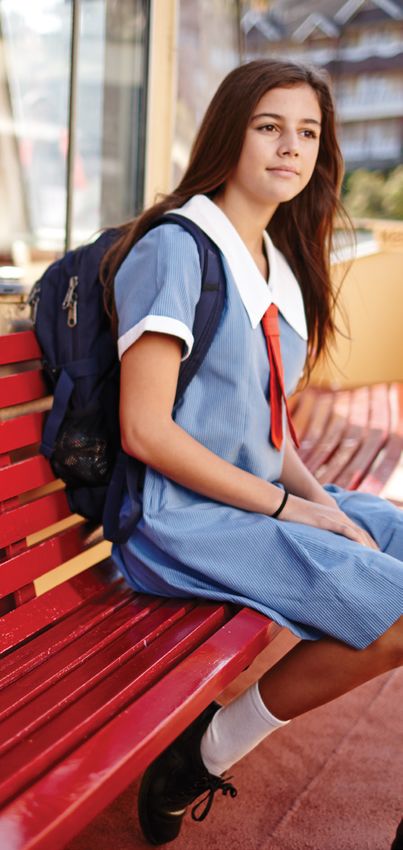
CONTENTS

Principal welcome
School Dates 2021
School Staff List
Curriculum
Year 7
Student Involvement - Student Council/Peer Support
School Bands/Gym Club/Coding Club/Homework Club
Reporting to Parents
Weekly Routine
School Routine
Assembly/Roll Call/Late Arrival/Early Departure
Absenc
Transport, To and From School
Bicycles
Lost Property
School Uniform
School Matrix
Unwell Students
Library
Sport
Community Involvement
P & C Association
Homework (Parental Supervision)
School Contributions
Parent on Line Payment Information Guide
Bell Times
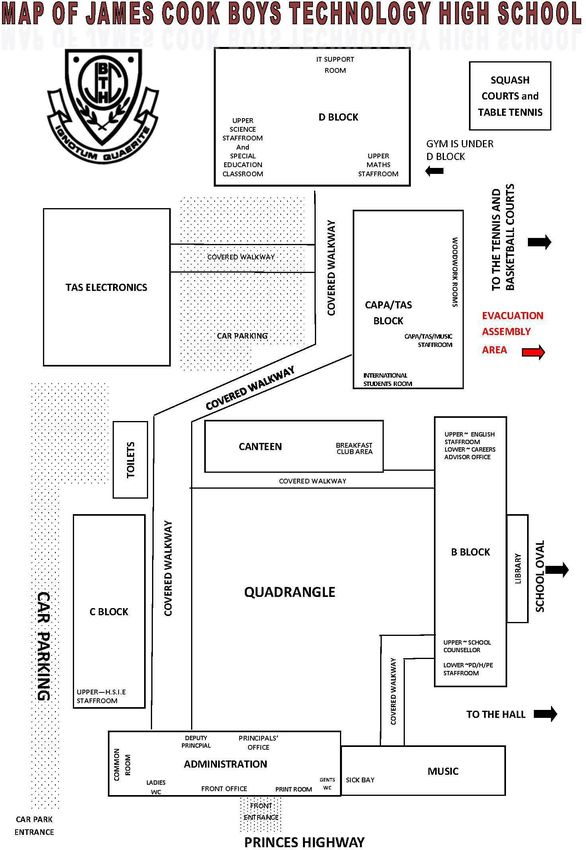
Map of School
Laptop Loan Charter
Canteen Menu and Price List
Transport/Opal Card information

Welcome to James Cook Boys Technology High School. This booklet contains information for students new to our
school and also their parents or guardians. Please read it carefully and keep the booklet at home for future
reference.

                                                School Vision Statement
James Cook Boys Technology High School is committed to successfully educating young men to be ethically guided
critical thinkers who are innovative lifelong learners empowered to contribute responsibly as informed citizens.

Each student is challenged to achieve his personal best through authentic learning opportunities within an inclusive,
caring and supportive environment.

                                                    School Context
James Cook Boys Technology High School was established in 1956 on the site of the old Moorefield Racecourse. It
is a multicultural school with about 86% of the students coming from a non-English speaking background. The school
motto, Ignotum Quaerite means ‘seek the unknown’ or in simpler terms, always takes the opportunity to discover and
learn about new things. In addition to its academic record the school has a proud tradition in sport, providing many
CHS, NSW and Australian representatives over the years, particularly in rugby league, rugby union, water polo,
athletics and soccer. The school is located at Kogarah and consists of expansive grounds that include a full-size
rugby/soccer field, tennis courts, basketball courts and indoor squash courts.

The School is located approximately 16 kms from the CBD. The school has a culturally diverse student population
with 80% of students from a Language Background Other Than English (LBOTE). Students from a LBOTE represent
more than 38 different language backgrounds.

James Cook Boys Technology High School has a proud tradition of sporting, leadership and academic excellence.

As a technology high school we have a strong focus on STEM (Science, Technology, Engineering and Mathematics)
offering STEM subjects for students in Stage 4 and 5. All students in Years 7 and 8 are provided with their own
laptops as part of the Technology Transition Program (TTP). The school is committed to providing students with the
necessary technology skills to enable them to be competent and collaborative digital citizens.

The school has developed and maintained community and learning partnerships with local organisations that include
the St George Illawarra Rugby League Club and other local sporting groups to support the physical wellbeing of the
young people in the local community.

James Cook Boys Technology High School is a proud member of the Bayside Learning Community (BLC). The BLC
includes Carlton South Public School, Brighton Le Sands Public School, Ramsgate Public School, Arncliffe Public
School, Rockdale Public School and Moorefield Girls High School. BLC focuses on providing all students and
teachers extended learning opportunities across the community of schools and has developed integrated learning
experiences between primary and high school to assist students in effective transition.

James Cook Boys Technology High School offers many exciting and challenging alternatives, and any student who is
prepared to participate fully in the life of the school will be rewarded with success.

Mr Mark Marciniak

Principal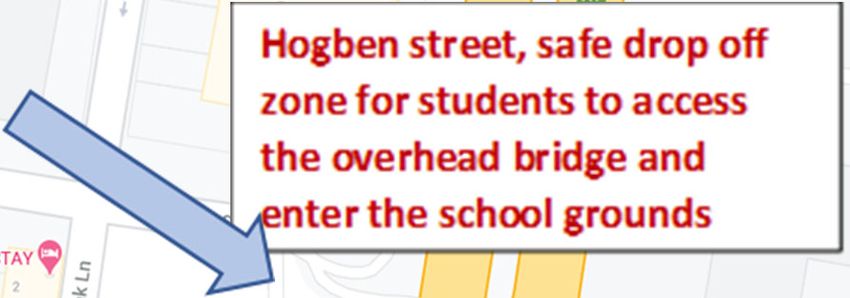
SCHOOL TERM DATES FOR 2021

TERM 1
         Friday 29th January to Friday 1st April
         Friday 29th January 2021 Years 7, 11,12 Students return
         Monday 1st February 2021 all students return

TERM 2   Tuesday 20th April to Friday 25th June
         Monday 19th April Staff Development Day
         All students return Tuesday 20th April 2020

TERM 3
         Tuesday 13th July to Friday 17th September
         Monday 12th July Staff Development Day
         All students return Tuesday 13th July

TERM 4
         Tuesday 5th October to Thursday 16th December
         All students return Tuesday 5th October
         Students last day, Thursday 16th December
         Friday 17th December Staff Development Day
JAMES COOK BOYS TECHNOLOGY HIGH SCHOOL
                             STAFF LIST 2021

                       Mr M Marciniak             Principal
                       Mr J Mallios               Deputy Principal

English                                           TAS/CAPA
Ms V Meyer        Head Teacher
Ms D Rees                                         Mr M Colucci       Music
Ms C Papadopoulos                                 Ms D Dauter
Ms N Kypriotis                                    Mr G Woo           Computer Coordinator
Ms H Mehdi                                        Mrs J Blatchford   Careers Advisor
Mr D Varker                                                          Year 12 Advisor
Mr J Dmoch        School Learning
                   Support Officer
HSIE                                              PD/H/PE
Ms L Smith         Head Teacher Relieving         Mr B Yelavich      Head Teacher
Mr G Errington                                                       TAS/CAPA
Mr J Bulfon        Year 9 Advisor                                    PE Coordinator
Mr N Heiler                                                          Wellbeing Coordinator
                                                  Mr R Sawford       Year 11 Advisor
                                                  Mr N Pikis         Sports Coordinator
Maths                                                                Year 10 Advisor
Mr R Mansour       Head Teacher                   Mr D Prodanovic
Ms L Axiotis                                      Mr N Panagiotis
Ms M Lagoudakis
Mr D McGeary                                      Mr L McConaghy
Mr G Dawood                                    School Administration Staff

                                                  Mrs M Maggs        Business Manager
Mr N Hadges        School Chaplain &              Mrs A Gamvroulis   Administrative Manager
                   School Learning                                   Relieving
                   Support
                   Officer
                                                  Mrs K Anderson     Front Office
                                                  Mrs N Orsaris      Front Office

Science                                           Mrs V Peck         Front Office
                                                  Mrs A Monogios     Front Office

Dr J Bowles        Head Teacher
Ms K Diwakar
Ms S Cvetkovska    Year 7 Advisor                 Mr M Balkwell      General Assistant
Mr E Gerges
Mr S Murillo
Mrs F Calnan       Special Education
Ms A Geldard       Science/Library Assistant
Mrs F Huber        School Learning Support
                   Officer
CURRICULUM

The school offers a comprehensive curriculum within the structure of a six-period day, with recess after period
two and lunch at the end of period four. Recess and lunch breaks are for 30 minutes each.

Year 7 Courses (Stage 4) Subjects are studied in each of the eight Key Learning Areas – English,
Mathematics, Science, Human Society and its Environment, Languages other than English, Creative Arts and
Personal Development/Health/Physical Education, as well as STEM which is integrated across Year 7 and 8.

                                                STUDENT INVOLVEMENT
There is a high expectation that all students will make the effort to become a part of James Cook Boys Technology High
School community. There are many opportunities for students to develop a strong sense of belonging through our co-
curricular programs to our community events and open days.

There are many extra-curricular activities that occur after school. If your son is participating in an after-school
program parental consent will need to be given, and parents will need to organise transport for their sons at
the end of the program.

Student Representative Council (SRC). Each year group elects a number of representatives for the
SRC from all years. The SRC meets regularly and will bring before the school administration any
suggestions made for improving the school. Two School Captains are elected every year by the Student
Representative Council, their current co-hort and by the Teaching staff.

As many students as possible should be involved in the Student Representative Council. The Student
Representative Council plays a very important role in the school, making many important decisions
about many aspects of school life.

The SRC meet every week and participate in school based and external leadership opportunities. The
SRC are elected every year and form an important part of student voice across the school.

Peer Support: This is a system whereby selected Year 10 students are responsible for a group of,
Year 7, students. The Year 7 students then have the advantage of being involved in small group activities, and it is
hoped that the organisation of this will improve friendships, self-esteem and the transition to high school.
The elected Year 10 Peer Support Leaders attend the Year 7 camp in Term 1.

Gym Club: Runs 2 days a week in school weights gym located below block D. Gym Club is normally for
students in Years 9, 10, 11, 12, and run by the PDHPE teacher.

STEM Club: Develops students’ skills in coding and logic-based problem solving. STEM Club provides
the opportunity for students to engage in new technologies, such as robotics, video editing and
programming.
Stem Club runs weekly, Tuesday 3:00pm – 4:00pm

Homework Club: Is provided for students after school to support their learning in all subjects.
Homework club runs weekly Monday 3:00pm – 4:00pm

Breakfast Club: Breakfast club is open to everyone on Tuesday, Wednesday, Thursday from 8:15am

After school activities: There is the opportunity for students to participate in external programs provided through
our community users

St George Martial Arts Academy: St George Martial Arts Academy, provide Taekwondo lessons, for further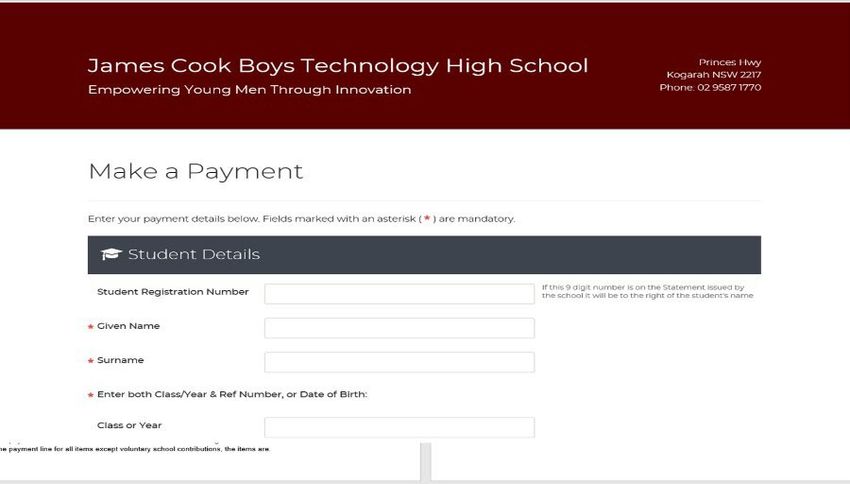
information, please see their website SGMAA.com.au
DPN_23 Soccer School: DPN_23 Soccer School is an elite football school that provide young athletes the
opportunity to develop their skills, for further information please see their website https://dpn23.com.au
REPORTING TO PARENTS
It is very important for parents to be continually informed of the progress of their son. We will report to all
parents through a Half Yearly and Yearly School Report. These reports are distributed at Parent/Teacher
evenings and after Presentation day each year.
Parents are free to contact the school by phone or email at any other time to arrange an interview with the Year
Advisor, Classroom Teacher, Head Teacher, Deputy Principal or Principal.
WEEKLY ROUTINE
The school is organised on six periods per day, see attached bell times on page 18.
Wednesday afternoon is Sport, Sport runs between 1:00pm and 2:20pm for students year 7-10.
* Non-grade recreational sport finishes at 2.20 pm
* Grade sport may finish earlier than this (if early game) or much later on some occasions.
On Thursdays, students finish school at 2.08pm (Period 6 is the Staff Meeting afternoon). Some senior
students will have an extended day, starting earlier or finishing later than junior students.
Assembly
This takes place every, Monday morning weather permitting. At the assembly students are
provided with information regarding upcoming events.
Roll Call
Roll Call is taken in Period 1 classes. At this time students are marked present or absent for the day. Rolls are then
subsequently marked every lesson by the classroom teacher.
Late Arrival
If a student arrives during Period 1 he must go straight to class and his class teacher will record his late arrival.
If a student arrives after Period 1 he must sign in at the Front Office and his time of arrival is recorded.
Note Any boy who arrives late must have a note from his parent or guardian explaining his lateness.
Early Departure
If a student wishes to leave school early he must present a note to the Deputy Principal or Wellbeing Coordinator.
This note must also detail
name and class of student (PRINTED)
reason for leaving early and the time of departure
signature of parent/guardian and contact phone number
This note should be written and signed by the parent or guardian and state the reason for, and the time of, your
early departure. If permission is granted, you may pick up an early leave pass from the office at recess or
lunchtime.Note: On Wednesday the Sport Coordinator will interview any student wishing to leave early. Sport is an
integral part of the school curriculum and should not be used for medical appointments etc.
Absences
If a student is to be absent for more than 2 days the parent/guardian should inform the office. For all absences,
a written explanation from a parent or guardian must be presented on the first day of return to school. If a note
is not received within one week of an absence, then that absence will remain on school records as
unexplained.
This note must also detail
student's name and year
reason for the absence
dates of the absence
signature of the parent/guardian
Notes are to be handed into the Front Office. Parents and students should be aware that if a note is not given,
then this "unexplained" absence will be indicated on the school reports (which are issued at parent/teacher
evenings). Text messages are sent to parents/carers when their son is absent from school.
Bicycles
We encourage students to ride their bikes to school if possible, please ensure your son is wearing a helmet at
all times and please ensure you chain lock your bike or scooter, once at school. Please note: Any personal
object is the responsibility of the owner and the school cannot take responsibility for any lost, stolen or
damaged items. For safety reasons, bicycles and scooters are not to be ridden in the school grounds.
Lost Property
Please ensure that all clothing and equipment is clearly labelled with student's name as lost property is
returned to the Front Office in the Administration Block. Again, we cannot be responsible for items which are
not clearly labelled or secured where possible.Travelling, To and From School
Due to the position of our school site, we are unable to accommodate students being dropped off in our car
park. There is no entry into the carpark for dropping off or collecting students, the only exception being if your
son is unwell or injured and needs to be collected.
Our carpark is locked between 8:00am and 9:00am as well as 1:45 to 3:30pm to ensure all students safety as they
enter and exit the school grounds. The safest place for drop off and pick up is on Hogben Street, where the
students can then safety walk across the overhead bridge and enter the school grounds.
The safest way for students to enter the school is to use the overhead bridge to cross Princes Highway
James Cook Boys
Technology High
School
Railway and Bus passes are available to all eligible students. Eligible students will be issued with an Opal card
for travel to and from school only. Students are required to have their own Opal card for excursions. Please
see attached flyer for application information.SCHOOL UNIFORM
AVAILABLE FROM LOWES ROCKDALE PLAZA)
SUMMER AND WINTER
- Shirts Year 7 to 10 Ice Blue (long or short sleeves) with Emblem
- Trousers Grey Blocker Longs or Grey College Long Baggies
- Shorts Grey “Blockers” or Grey College Baggies
- Belt Grey or Black
- Shoes Black leather lace-up shoes ONLY
- Sloppy Joe Black v neck with Emblem
- Jacket Black with Emblem
Black leather lace-up shoes must be worn at all times other than sports days for safety reasons and active
participation in practical lessons.
P.E. UNIFORM
(AVAILABLE FROM LOWES ROCKDALE PLAZA)
Polo Shirt Black/White/Maroon with School Emblem
Shorts Black Microfibre Maroon/White piping with School Emblem
Track Pants Black Microfibre Maroon/White piping
Jacket Microfibre Sports Jacket with School Emblem
Black Cap
Socks White ankle
Students are allowed to wear sports uniform and joggers on Wednesdays only.
The school uniform is also available from Lowes Online at www.lowesschoolwear.com.au
FOOTWEAR: An important uniform issue is correct footwear. The Department of Education requires all
students to wear safe footwear at all times. Students without safe footwear will not be able to participate
in practical classes such as Science or Woodwork. Unsafe shoes include those with openings, shoes
made from open-weave materials such as canvas or cotton types of shoes.
School shoes are to be completely black (including the soles and the laces – no brandings) and the entire
foot is to be enclosed by the shoe, including the upper section of the foot. The shoe is to have a stout
sole, low heels and firm leather uppers.
Below is a selection of pictures to help guide you on what shoes are acceptable. When
purchasing new shoes for next year please refer to the pictures below to ensure that an
acceptable shoe is purchased that meets the requirements of the school.
ACCEPTABLE SCHOOL SHOESClassroom Playground/ Community
Corridors
Safe
• Follow teacher instructions. • Stay in bounds. • Follow the rules for different places
• Acknowledge and respect • Play designated sports in • Observe all rules
other people’s personal appropriate areas. • Follow social/community rules and
space. • No dangerous/aggressive expectations.
• Follow specific classroom play/contact.
rules. • Acknowledge and respect other
people’s personal space.
Respectful
• Use appropriate language. • Keep a clean environment. • Wear your school uniform with pride
• Respect your learning • Be respectful to others. and uphold the values of the school.
environment. • Be respectful of other people’s • Be respectful of yourself and others
Responsible •
•
Respect the teacher and the
learning provided.
Respect the rights of others
•
property.
Respect and acknowledge other
people’s personal space.
•
•
around you and your environment.
Use appropriate language.
Respect other religions, cultures and
to learn. • Use appropriate language. beliefs.
• Respect and acknowledge • Be polite and courteous to canteen • Be gracious and humble.
other people’s personal staff and visitors.
space.
• Be respectful and responsible
for your and others
equipment.
Active
• Be prepared and ready to • Respond to the bell and move • Interact positively with the
learn. quickly. community.
• Attend every lesson. • Interact positively in social
Learner • Participate positively and
support each other in our
learning.
activities.
• Arrive on time.
• Work to the best of your
ability.LIBRARY
The School Library or learning centre, aims to provide students and staff with books and audio-visual materials
for both academic and recreational purposes.
Students are also encouraged to borrow books for leisure reading and parents are asked to reinforce the
importance of reading at home. All junior students participate in a Wide Reading program in which they are
encouraged to read at home each evening.
Use of the Library
Students may use the Library before school and during breaktimes and at lunch time. Seniors must be in the
Library during study periods.
All students are advised to join their local municipal libraries in addition to using the School Library.
STUDENTS THAT ARE UNWELL
In line with current Covid restrictions, any student that presents unwell must not attend school, or if at school
will be sent home and require a Covid test before returning to school. The negative test results must be
handed in to the office upon arrival to school. Students who become ill at school must report to either their
class teacher or teacher on duty in the playground
If there is any indication that a student is ill, it is preferable that they be kept at home.
It is important that we have a current emergency contact phone number in case of illness. If you
change your phone or mobile number please make sure you inform the school of the new number
STUDENTS WITH MEDICAL CONDITIONS
If your son has a medical condition such as asthma, allergies, anaphylaxis or requires medication to be
administered at school please ensure we have the up to date medical plans and any required medication
e.g. Please contact the Front Office for any questions or concerns.
Family Information Form and Medical Card
Each student is to complete these forms on enrolment, so that all relevant information can be placed in the
computerised school administration system. Emergency contact numbers in case of an accident are essential.
Please update all family information regularly – especially change of address or contact numbers.
SPORT
Wednesday afternoon is sport afternoon. All students are required to attend sport, which is a compulsory
part of the curriculum. All sport students are required to pay a sport levy each year to assist in the purchase of
new equipment and pay for transport costs. If a student is unable to participate in sport, a medical certificate must be
presented to the Sports Organiser.
NOTE: Grade sports, Recreational sports and special carnivals are held at a variety of venues. Students are
frequently dismissed at the venue (usually another school) and will be expected to find their own way home.
This information will be relayed to parents via notes.CANTEEN FOOD The School Canteen is privately run and offers a large range of fresh, wholesome food, before school, during recess and lunchtime. A menu and price list is included in this booklet. Microwave ovens are also available for students who bring their own lunch that requires heating. Please remember safe food hygiene practice when packing your son`s recess or lunch, which may include cold packaging any meat or cooked food.
COMMUNITY INVOLVEMENT
Parental Involvement
There are numerous opportunities for the community, family and carers to participate in their son’s learning.
Community partnerships are an important way. These events include meet the Teacher evening, parent
teacher report interviews, parent information sessions, community events and special presentations.
The P & C Association
Parents and Citizens are invited to join this Association. Meetings take place once per school term, (see
website calendar for dates). All parents will be advised of the scheduled meetings through text messaging
during the school term (see Calendar for exact dates). The meetings are held at 6pm in the Staff Common
Room in,
A Block. At these meetings you will get to know other parents and other members of the community. School
policy is outlined and reports on school activities are given. The Annual School Report is also presented and
reviewed at the P & C Meeting
SCHOOL INFORMATION
School information is provided throughout the year, through direct newsletters emailed to parents and by
accessing our school webpage, Facebook page or twitter accounts.
HOMEWORK
All students are encouraged to attend the schools Homework Club, that runs every Monday afternoon between 3:00pm
and 4:00pm. For subject assessment tasks, please also refer to the termly calendar sent home and available on our
website.
To support your son`s learning, we suggest the following homework time guide:
Years 7 and 8 one hour, 5 times a week
Years 9 and 10 two hours, 5 times a week
Year 11 two-three hours, 5 times a week minimum
Year 12 more than that suggested for Year 11, with the weekends
being a time when systematic revision is attempted
If no homework is set by the school on a particular day, then the student should undertake revision or reading.
Parents should make sure that
boys have a study program
they do this work on the program
they have a place to study
if they miss homework for some serious reason, that they "make up" on the weekendYEAR 7 – 2021
Student Contributions - 2021
Year 7 Camp - Term 1: 17th – 19th March 2021
$300.00
Sports Levy
$80.00
Swimming Carnival – 11TH March 2021
$10.00
Athletics Carnival – 26th March 2021
$10.00
Swim School – Term 4 2021
$85.00
Voluntary School Contribution
$60.00
P & C Contribution
$20.00
Subject and Materials Contribution
Visual Art $40.00
STEM Resources
$100.00
YOUR PAYMENT TOTAL FOR SCHOOL FEES
$705.00
Book pack – requirement for Year 7
$45.00
Calculator – requirement for all students $40.00
Home delivery $10.00
SCHOOL FEES AND BOOKPACK/CALCULATOR PAYMENT $800.00
Methods of payment accepted at James Cook Boys Technology High School
POP (Parent Online Payment), CASH, Eftpos, Cheque
Please see attached flyer for Parent Online Payment instructions, this is the preferred method of paymentHow to Make Parent Online Payments (POP) It is now possible for parents to make online payments to the school for amounts owing for students, via a secure payment page hosted by Westpac. Payments can be made using either a Visa or MasterCard credit or debit card, and can be made via computer, tablet or mobile phone. The payment page is accessed from the front page of the schools website by selecting Make a Payment (which is located at the top right hand side of the screen). From the initial payment page, payers will complete the details, some of which are mandatory (marked with an *), before confirming the payment details and completing the payment. A receipt can be printed from the payment page and/or be emailed to the payer. The payment screens are: 1. Entering payment details 2. Entering credit card details 3. Confirmation of payment details and 4. Online Payment Receipt. Entering Payment Details The payment details screen captures student and payment details. This allows for identification of the student that the payment applies to and what the payment is for. This is critical to ensure that the right student is credited for the right items. Please make sure that you enter the students name, class and date of birth. These details are entered each time you make a payment as student information is not held within the payment system. There is also the option to enter the Student Registration Number and Invoice number these are not used at our school, please leave blank. The payment details should come from the school invoice or listing that the school issues. There can be more than one payment line for all items except voluntary school contributions, the items are. Voluntary school contributions (1 payment line), use this for general contributions or donations;
Subject contributions (up to 10 payment lines), use this for contributions for specific subjects
e.g. Visual Arts, Industrial Technology, etc.
Excursions (up to 5 payment lines), use this for specific excursions e.g. Zoo; Opera House, etc.
Sport (up to 5 payment lines), use this for any sporting activities e.g. carnivals and weekly sport activities, etc.
Creative & Practical Arts (up to 5 payment lines), use this for drama, dance, craft levies, etc.
Sales to Students (up to 5 payment line) use this for anything purchased by a student that becomes the property of the student.
Other (up to 5 payment lines) this may be used for paying total amounts owed by a student
e.g. complete student invoice/statement of account.
For any option it is mandatory to include both a payment description and payment amount.
The Payment Description details should come from the school Statement of Account or list of items issued by the school.
Below are some examples:
If paying online please enter “Science” in the Payment Description under “Subject Contributions”.
If paying online please enter “Opera House” in the Payment Description under “Excursions”.
If paying online please enter “Term 2 sport” in the Payment Description under “Sport”.
If paying online please enter “Dance” in the Payment Description under “Creative & Practical Arts”.
If paying online please enter “Uniform” in the payment description under “Sales to Students”.
If you wish to pay the entire total amount owing on the statement of account online under “Other”, enter “Total Payment” in the
Payment Description – please note this is for a complete payment of all amounts owing only.
If you are unsure of which box to choose, please contact the school on (02) 9587 1770 and ask for clarification.
When paying for more than one student the “Make Another Payment” option should be selected on the Online Payment Receipt screen.
There is no option to add multiple students to a single payment as the details on the initial screen relate to one particular student only.
You have the ability to check and change any details of the payment before the payment is processed.
Details of the payments are passed daily to the school where they will be receipted against your child’s account. As a receipt has been issued
from the payment page a further receipt will not be issued by the school. For any enquiries regarding the Online Payment process please
contact the School Administration Office.Bell Times
Monday Tuesday Wednesday Thursday Friday
Warning Bell 8:43am 8:43am 8:43am 8:43am 8:43am
Period 1 8:45am 8:45am 8:45am 8:45am 8:45am
Period 2 9:38am 9:38am 9:38am 9:38am 9:38am
Recess 10:31am 10:31am 10:31am 10:31am 10:31am
Period 3 11:00am 11:00am 11:00am 11:00am 11:00am
Period 4 11:53am 11:53am 11:45am 11:53am 11:53am
Lunch 12:46pm 12:46pm 12:30pm 12:46pm 12:46pm
Period 5 1:16pm 1:16pm 1:00pm 1:16pm 1:16pm
Period 6 2:08pm 2:08pm 2:08pm
End of School Day 3:00pm 3:00pm 2:20pm 2:08pm 3:00pmScience - Ground floor Maths - Top floor
TAS - Woodwork
TAS - STEM
TAS - ICT
ART
English - Top floor
HSIE - Top floor
PDHPE - Ground floor
Science labs – Ground floorTechnology Transition Program
LAPTOP LOAN CHARTER
Student name
Family name Given name Year
Parent/Carer name
Family name Given name
Purpose
Students enrolled in Year 7 & 8 will be issued a school owned device for their stage 4 (Year 7 & 8) education
at JCBTHS. This will provide the opportunity for students to learn knowledge & skills as a digital citizen, utilise
a standard device for completing work electronically with web based tools licensed for all government school
students.
At the end of Year 8 parents will be able to make a decision with their child on the best device to select for
the remainder of their schooling. Financially, we are providing equity of access in stage 4 and minimising
costs to families with students possibly only needing to purchase one device for use through Years 9 to 12.
JCBTHS may determine that students in year groups which are not designated to receive a 1 to 1 laptop will
benefit from a home loan of a laptop. This may be for a particular topic of work, project or need. Loan laptops
remain school property. A Laptop Loan Charter must be signed and provided to the student’s school before
the laptop will be loaned, this includes equity based loans to students in all year groups.
Students and parents/carers must carefully read this charter prior to signing it. Any questions should be
addressed to the school and clarification obtained before the charter is signed.
Laptop Loan Charter
We have read the Laptop Loan Charter (version 2020-1).
We understand our responsibilities regarding the use of the laptop and the internet.
In signing below, we acknowledge that we understand and agree to the Laptop Loan Charter.
We understand that we accept responsibility for any costs associated with the repair or
replacement if caused by any negligent act.
We understand that failure to comply with the Laptop Loan Charter could result in loss of future loan
permission.
Signature of student: Date: / /
Signature of parent/carer: Date: / /
PLEASE SIGN AND RETURN THIS PAGE TO THE SCHOOL
Page 1 of 4LAPTOP LOAN CHARTER (version 2020-1)
1. Purpose
The laptop is to be LOANED as a tool to assist student learning both at school and at home.
2. Equipment
2.1 Ownership
2.1.1 The student must bring the laptop fully charged to school every day if required. Chargers
should be left at home.
2.1.2 Access to a laptop on loan may be terminated if there is damage caused by negligence or if the
student does not bring the laptop as required to school or return it by the due date. Parents
will be charged for the repair of a device damaged through negligence, this will be
determined by the Principal or Representative.
2.1.3 The school retains ownership of the laptop.
2.1.4 In the case of a student being loaned a laptop with the intention that it will be loaned across
years 7-12 the following apply:
2.1.4.2 If a student leaves James Cook Boys Technology High School, moves to another
government or nongovernment school, interstate or overseas, the laptop must be returned to
the school.
2.1.4.3 When the student completes Year 8, the laptop must be returned to James Cook
Boys Technology High School with any supplied accessories.
2.1.5 All material on the laptop is subject to review by school staff. If there is a police request, the
department will provide access to the laptop and personal network holdings associated with
your use of the laptop.
2.1.6 Loans are based on school priorities and may vary from short term to long term loans to class
groups or individual students.
2.2 Damage or loss of equipment
2.2.1 All laptops and batteries are covered by a manufacturer’s warranty for two years. The
warranty covers manufacturer’s defects and normal use of the laptop. It does not cover
negligence, abuse or malicious damage.
2.2.2 Any problems, vandalism, damage, loss or theft of the laptop must be reported immediately
to the school. The person at fault may be charged for the cost of repair/replacement.
2.2.3 In the case of suspected theft a police report must be made by the family and an event number
provided to the school.
2.2.4 In the case of loss or accidental damage a witnessed statutory declaration signed by a
parent/carer should be provided.
2.2.5 Laptops that are damaged or lost by neglect, abuse or malicious act, will require
reimbursement. The Principal will determine whether replacement is appropriate and/or
whether or not the student is responsible for repair or replacement costs and whether or not
the student retains access to laptop loans.
2.2.6 Students will be required to replace lost or damaged chargers.
Page 2 of 43. Standards for laptop care
The student is responsible for:
3.1 Taking care of laptops in accordance with school guidelines.
3.2 Adhering to Online Communication Services: Acceptable Usage for School Students policy.
https://goo.gl/28ax0N
3.3 Backing up all data securely. This should be on the DoE online storage or for personal data including
photographs or music, on an external storage device. Students must be aware that the contents of the
laptop will be deleted and the storage media reformatted in the course of repairs/replacement.
3.4 Never damaging or disabling laptops, laptop systems and networks or establishing, participating in
or circulating content that attempts to undermine or bypass laptop security mechanisms for either
software or hardware.
4. Acceptable computer and internet use
4.1 Students are not to create, participate in, or circulate content that attempts to undermine, hack into
and/or bypass the hardware and software security mechanisms that are in place.
4.2 Upon enrolment into a New South Wales Government school, parental/carer permission was sought
to allow the student to access the Internet at school based on the Online Communication Services:
Acceptable Usage for School Students policy. Extracts are provided below. This policy forms part of the
Laptops Loan Charter
4.3 The Online Communication Services: Acceptable Usage for School Students policy applies to the
use of the laptop and internet both on and off school grounds. https://goo.gl/28ax0N
4.4 The James Cook Boys Technology High School "Bring Your Own Device" Policy applies to the use of
the laptop and internet both on and off school grounds. http://goo.gl/ckVjHX
Extracts: Online Communication Services: Acceptable Usage for School Students (as of May 2016)
4 Access and Security
4.1.1 Students will:
not disable settings for virus protection, spam and filtering that have been applied as a departmental
standard.
ensure that communication through internet and online communication services is related to learning.
keep passwords confidential, and change them when prompted, or when known by another user.
use passwords that are not obvious or easily guessed.
never allow others to use their personal e-learning account.
log off at the end of each session to ensure that nobody else can use their e-learning account.
promptly tell their supervising teacher if they suspect they have received a computer virus or spam
(i.e. unsolicited email) or if they receive a message that is inappropriate or makes them feel
uncomfortable.
seek advice if another user seeks excessive personal information, asks to be telephoned, offers gifts
by email or wants to meet a student.
never knowingly initiate or forward emails or other messages containing:
o a message that was sent to them in confidence.
o a computer virus or attachment that is capable of damaging recipients’ computers.
o chain letters and hoax emails.
o spam, e.g. unsolicited advertising material.
never send or publish:
o unacceptable or unlawful material or remarks, including offensive, abusive or
Page 3 of 4discriminatory comments.
o threatening, bullying or harassing another person or making excessive or unreasonable
demands upon another person.
o sexually explicit or sexually suggestive material or correspondence.
o false or defamatory information about a person or organisation.
ensure that personal use is kept to a minimum and internet and online communication services is
generally used for genuine curriculum and educational activities. Use of unauthorised programs and
intentionally downloading unauthorised software, graphics or music that is not associated with
learning, is not permitted.
never damage or disable computers, computer systems or networks of the department.
ensure that services are not used for unauthorised commercial activities, political lobbying, online
gambling or any unlawful purpose.
be aware that all use of internet and online communication services can be audited and traced to the e-
learning accounts of specific users.
4.2 Privacy and Confidentiality
4.2.1 Students will:
never publish or disclose the email address of a staff member or student without that person's explicit
permission.
not reveal personal information including names, addresses, photographs, credit card details and
telephone numbers of themselves or others.
ensure privacy and confidentiality is maintained by not disclosing or using any information in a way
that is contrary to any individual’s interests.
4.3 Intellectual Property and Copyright
4.3.1 Students will:
never plagiarise information and will observe appropriate copyright clearance, including
acknowledging the author or source of any information used.
ensure that permission is gained before electronically publishing users’ works or drawings. Always
acknowledge the creator or author of any material published.
ensure any material published on the internet or intranet has the approval of the principal or their
delegate and has appropriate copyright clearance.
4.4 Misuse and Breaches of Acceptable Usage
4.4.1 Students will be aware that:
they are held responsible for their actions while using internet and online communication services.
they are held responsible for any breaches caused by them allowing any other person to use their e-
learning account to access internet and online communication services.
the misuse of internet and online communication services may result in disciplinary action which
includes, but is not limited to, the withdrawal of access to services.
5. Monitoring, evaluation and reporting requirements
5.1 Students will report:
any internet site accessed that is considered inappropriate.
any suspected technical security breach involving users from other schools, TAFEs, or from outside
the NSW Department of Education.
5.2 Students should be aware that:
their emails are archived and their web browsing is logged. The records are kept for two years.
the email archive and web browsing logs are considered official documents.
they need to be careful about putting their personal or sensitive information in emails or on websites.
these records may be used in investigations, court proceedings or for other legal reasons.
The current loan charter and further resources will be available on our website
Page 4 of 4Breakfast Wraps Sandwiches Salads Hot Food
Assorted toasted sandwiches from Middle Eastern Falafel Wrap Cheese and Salad Sandwich $4.00 Greek Salad. $5.00 Chicken Breast Burger $5.00
$3.50 $5.00 Chicken Sandwich. $4.50 Chicken Caesar Salad $6.00 Spicy Chicken Breast Burger $5.50
Croissants (fresh or toasted): Plain $3.00 Gourmet Chicken Salad Ham & Cheese Sandwich. $4.00 Thai Beef Salad. $6.00
Wrap $5.00 Turkey Cranberry Sandwich. Pasta Salad. $5.00 Beef Burger $5.50
Cheese tomato $4.50 Kafta Wrap $4.50 Chicken Basil Penne $5.00 Cheese Burger $5.00
Ham cheese tomato $5.00 $5.00 Tuna Sandwich. $4.00 Fish Burger $5.00
Fresh fruit salad $4.50 Tuna Salad Wrap Curried Egg Sandwich. Sausage Rolls $3.50
Raisin toast $2.50 $5.00 Gourmet Sausage Roll. $5.00
Bacon and egg roll $5.00 Turkey Cranberry Wrap Meat Pie $4.00
Yoghurt & muesli $4.00 $5.00 Gourmet Spinach & Feta Roll $5.00
Baked hash brown $1.00 Cheese and Salad Wrap Vegetarian Spring Rolls $4.00
Seasonal fresh fruit pieces $1.00 $5.00 Chicken Breast Nuggets $4.00
Cereal box $3.00 Chicken Breast Chippies $4.50
Assorted pastry selection from $3.00 Potato Wedges $4.00
Banana bread $3.50 ADDITIONAL SALADS Baked Hot Chips $4.00
AVAILABLE DAILY Garlic Bread $2.50
ADDITIONAL HOT FOOD SPECIALS
AVAILABLE DAILYIntroducing Who needs to apply
A new application is only required if the
the School student has not had a School Opal card before.
If the student already has a School Opal card
Opal card and is changing schools, campuses or home
address, you will need to update their Opal
card for the new school year before mid-
December at apps.transport.nsw.gov.au/ssts
The School Opal card gives eligible students
free or discounted travel between home and
school using the train, bus, ferry and light rail How to apply
services you nominate in your application. Applications for next year open at the start
of Term 4 this year.
Who can apply? Step 1
To be eligible for a School Opal card, students Once the new school has confirmed your
may need to live a minimum distance from child’s enrolment, complete the application at
their school: transportnsw.info/school-students
Years K-2 (Infants) Step 2
The school endorses your application.
There’s no minimum distance.
Years 3-6 (Primary)
Step 3
Once Transport for NSW has approved the
More than 1.6km straight line distance or at application, a School Opal card will be sent
least 2.3km walking. to the address provided on the application.
Years 7-12 (Secondary)
More than 2.0km straight line distance or at
least 2.9km walking.
If you live too close to be eligible for free A parent or guardian must apply for students
See travel, you may still qualify for a School See 15 years and under. Students 16 years and
Feedbackcare
Customer
Customer centre – customer care Feedback
Customer
Customer centre – customer
care care
Term Bus Pass, which offers travel on buses over must apply for themselves.
between home and school at a discounted
rate for the whole school term.For more information call 131 500 or
visit transportnsw.info/school-students
Privacy
The personal information collected for the purposes
of the Opal Ticketing System will be treated in
school accordance with the Privacy and Personal Information
Protection Act 1998 (NSW) (PPIPA). For information on
how we handle such personal information please refer
Better together to the Opal Privacy Policy published on opal.com.au
Terms of Use
The School Opal card is only for travel to and By ordering, using a School Opal Card you agree
from school. So it’s a good idea to get a Child/ to be bound by the School Pass Terms and the
Youth Opal card for travel after hours, on Student Codes of Conduct, available at
apps.transport.nsw.gov.au/ssts.
weekends or during school holidays.
For help in your language, call the Translating and
Child/Youth Opal card benefits Interpreting Service (TIS) on 131 450.
• Concession fares across the Opal network
• Half-price travel after eight paid journeys
each week*
• $1 transfer discount for every transfer
between modes (train, ferry, bus or light rail)
as part of one journey within 60 minutes
from the last tap off †
• The Opal Transfer Discount doesn’t apply
when transferring between light rail and
Sydney Ferries.
• Set auto top up and link it to your
credit or debit card so there's always
enough value on the card to travel.
Find out more and apply at opal.com.au
or pick one up from an Opal retailer. To find
one in your area visit retailers.opal.com.au
Secondary students aged 16 and over can
See travel with a Child/Youth Opal card when
Feedback
Customer
ustomer centre – customer
care
carrying a NSW/ACTcareSenior Secondary
Student Concession Card, available from
school and TAFE offices.
* Excluding Sydney Airport station access fee.
† The Opal Transfer Discount doesn’t apply when transferring between light rail and Sydney Ferries.You can also read


