REGISTRATION GUIDE FOR NEW STUDENTS - 2018 COURSE SELECTION BEGINS MAY 14 Step-by-step guide for selecting courses and paying fees - University of ...
←
→
Page content transcription
If your browser does not render page correctly, please read the page content below

COURSE SELECTION BEGINS MAY 14

2018
REGISTRATION GUIDE
FOR NEW STUDENTS
Step-by-step guide for
selecting courses and paying fees

Table of Contents
                                                                                                              Important Contacts & Resources .................................................2
                                                                                                              Getting Started...............................................................................3
                                                                                                              How to use WebAdvisor to pick courses.....................................4
                                                                                                              Link to Class Schedule Worksheet Grid ......................................5
                                                                                                              Program Information — how to pick courses..............................8
                                                                                                                 Bachelor of Applied Science.......................................................8
                                                                                                                 Bachelor of Arts..........................................................................9
                                                                                                                 Bachelor of Arts & Sciences .....................................................10
                                                                                                                 Bachelor of Bio-Resource Management...................................11
                                                                                                                 Bachelor of Commerce ............................................................12
                                                                                                                 Bachelor of Computing.............................................................14
                                                                                                                 Bachelor of Engineering............................................................15
                                                                                                                 Bachelor of Landscape Architecture.........................................15
                                                                                                                 Bachelor of Science..................................................................16
                                                                                                                 Bachelor of Science in Agriculture ............................................18
                                                                                                                 Bachelor of Science in Environmental Sciences .......................19
                                                                                                                 Associate Diploma in Turfgrass Management...........................19
                                                                                                                 Co-operative Education............................................................20
                                                                                                                 General Studies ........................................................................20
                                                                                                              Academic Advising......................................................................21
                                                                                                                 Undergraduate Academic Information Centre (UAIC) ...............21
                                                                                                                 Program Counselling Information..............................................21
                                                                                                              Financial Matters — how and when to pay fees .......................22

Important Contacts and Resources
University of Guelph ..........................................................................................................................................................................(519) 824-4120
Undergraduate Academic Information Centre ..........................................................................................................................................ext. 56613
Associate Diploma in Turfgrass Management...........................................................................................................................................ext. 58475
Bachelor of Applied Science (B.A.Sc.) ......................................................................................................................................................ext. 58964
Bachelor of Arts (B.A.) ..............................................................................................................................................................................ext. 52140
Bachelor of Arts & Sciences (B.A.S.) ........................................................................................................................................................ext. 56385
Bachelor of Bio-Resource Management (B.B.R.M.) .................................................................................................................................ext. 54549
Bachelor of Commerce (B.Comm.)...........................................................................................................................................................ext. 56757
Bachelor of Computing (B.Comp.)............................................................................................................................................................ext. 52711
Bachelor of Engineering (B.Eng.) ..............................................................................................................................................................ext. 56572
Bachelor of Landscape Architecture (B.L.A.) ............................................................................................................................................ext. 54549
Bachelor of Science (B.Sc.) ......................................................................................................................................................................ext. 53788
Bachelor of Science in Agriculture (B.Sc.Agr.) ..........................................................................................................................................ext. 54549
Bachelor of Science in Environmental Sciences (B.Sc.Env.) .....................................................................................................................ext. 58475
Co-operative Education............................................................................................................................................................................ext. 52323
General Studies ........................................................................................................................................................................................ext. 56385

FAQ: askgryph.registrar.uoguelph.ca
Forms & Downloads: uoguelph.ca/registrar/downloads
Undergraduate Calendar: uoguelph.ca/registrar/calendars/undergraduate/current
For the most up-to-date information please refer to: uoguelph.ca/registrar/newstudents

                                                                                                                                                                                                               2
Getting Started                                                     Keep in mind:
You’ve accepted your offer of admission! The next step in           Enrol in a First Year Seminar
becoming a U of G student is to select your courses.                First Year Seminars are engaging, stimulating courses open to first
Here’s how you do it:                                               year students ONLY! Led by some of the University’s most dynamic
                                                                    professors, topics range from human sexuality to climate change,
1. Find your program:                                               from science to communication, from human rights to animal rights.
The next few pages list every degree program.                       Each seminar reflects the research or professional interest of the
n Check the table of contents (page 2) to find your program.         instructor.
n Review the information about the courses you should pick.

                                                                    There are a limited number of these courses offered each semester,
2. Download the worksheet                                           with just 18 spots available in each one, so enrol early! Please note
n   Go to uoguelph.ca/registrar/downloads                           that First Year Seminars are not required courses and they may not
n   Scroll down to “Forms for Undergraduate Students Only” and      fit in your schedule depending on your program’s required courses,
    click on “Class Schedule Work Sheet Grid”.                      which are outlined in this guide.
n   Print, grab a pencil and get ready to pick your courses!
                                                                    Find specific course descriptions here: uoguelph.ca/fys
3. Log into WebAdvisor:              webadvisor.uoguelph.ca
WebAdvisor is the University’s online registration system, and      Check out the Undergraduate Calendar
allows you to search for courses, read descriptions of the          The University’s Undergraduate Calendar contains information you
courses, and find out what day and time of day each course is        will need as a University of Guelph student.
offered.                                                            uoguelph.ca/registrar/calendars/undergraduate/current
n Click “Log In” in the top right corner.                           The following chapters are helpful:
n Enter your Central Login ID and your Central Login Password.      I.    Statement of Students' Academic Responsibilities
   You will find your login ID and password in the letter that was   III. Schedule of Dates
   mailed to you when you accepted your offer of admission or       VII. Academic Advising
   you would have received it when you applied to U of G.           VIII. Undergraduate Degree Regulations and Procedures
n See the next page for detailed, step-by-step instructions on      X. Degree Programs
   how to pick courses using WebAdvisor.                            XII. Course Descriptions

       Connect with upper year students
        and be prepared for September.

                  startonline.ca
       Follow Us
       @UofGStudentLife

                                                                                               AT   THE   UNIVERSITY    OF   GUELPH

                                                                                                                                       3
How to use WebAdvisor,
the University’s online registration system
The following instructions will guide you through the process of registering for your Fall 2018 course
sections. Go to WebAdvisor at webadvisor.uoguelph.ca and then follow these six basic steps:

1. Log in to WebAdvisor:

a) Click on the “Log In” button in the upper
   right-hand corner of the welcome
   screen.
b) Type your Central Login User ID into the
   “Central Login ID” field. Type your
   Central Login password into the
   “Central Login Password” field.
c) Click the “Submit” button.
d) You will now be brought back to the
   WebAdvisor welcome screen.

e) Choose Students from the Main Menu
   on the right-hand side.

Please note that there                                                   2. If you receive a message that says “XXXX*1234*0101 –
                                                                         Course XXXX*1234 prerequisites have not been started,” you have
are a number of errors                                                   attempted to register for a course for which you do not have the
that may occur during                                                    appropriate prerequisites. You should only register for courses that
                                                                         you are eligible to take at this time. You will be eligible to take that
the registration process                                                 course in a future semester, after completing the prerequisites. If
                                                                         you would like to request additional consideration, you can fill out a
                                                                         Course Waiver Request form, which would require the instructor’s
1. If you receive a message that says “XXXX*1234*01 —                    approval. This approval is not automatic.
Registration in XXXX*1234*01 puts student in overload. Program
Counsellor approval is required,” you have attempted to register for     3. If you receive a message that says “XXXX*1234*10 – Section
more than your allowed credit limit. Please refer to the Academic        XXXX*1234*10 is “Closed”. Enrolment not allowed,” you have
Calendar for the credit limit for your program. If you have reached      attempted to register for a section that is full and therefore closed.
the credit limit but still need to register for a required course, you   You should monitor WebAdvisor for an opening in that section or
will need to drop one of the non-required courses in your “Current       you should select another open section that fits your schedule. If
Registrations” list. Please keep in mind that courses can be 0.50,       you would like to request additional consideration, you can fill out a
0.75 or 1.00 credits. For additional guidance, contact your              Course Waiver Request form, which would require the instructor’s
Program Counsellor.                                                      approval. This approval is not automatic.

                                                                                                                                               4
Download and print a Class Schedule Worksheet Grid:
uoguelph.ca/registrar/downloads
2. Searching for Course Sections

a) Click on the “Search/Register for Sections” button on the right-      should be selecting “100 – First Year” for first year courses.
   hand side of the Students menu. This will bring you to the         e) Enter the course number – if you know it – in the “Course
   Search/Register for Sections Screen (see below).                      Number” field. It’s OK to leave it blank.
b) Using the “Term” drop-down menu select “Fall 2018”.                f) Leave “Section” blank.
c) Using the “Subject” drop-down menu choose the subject of the       g) Click on the “Submit” button.
   course section for which you are looking.
d) Using the “Course Level” drop-down menu choose the level of
   the section you are looking for. As a first year student, you

                                                                                                                                          5
3. Selecting Course Sections and adding them to your “Preferred Sections” List

a) You will now be brought to the “Section Selection Results” page.     b) Click the “Submit” button to add the selection to your preferred
   In order to add to your preferred sections, place a check in the        list.
   check box in the “Select” column on the left side.

4. Registering for your Course Sections

a) You will now be brought to the “Register and Drop Sections”            will confirm your success or failure in registering. A list entitled
   page. This screen will display two lists: (1) your “Preferred          “The following request(s) have been processed” will appear. This
   Sections” list, and (2) your “Current Registrations” list.             list indicates the courses for which you have successfully
b) For each course in your “Preferred Sections” list you will find a      registered. Please be sure that the message under the “Status”
   drop-down menu under the column labeled “Action”. Use the              column of this list says “Registered for this section”. If your
   drop-down menu to choose “RG – Register” for the course                registration was unsuccessful, a reason will be given. Note, if
   section in which you wish to be registered. It is best to register     you are trying to register for multiple sections at once and there
   for one course at a time.                                              is a problem with your registration in any single section, you will
c) Click the “Submit” button.                                             not be registered in any of the sections for which you have set
d) This will bring you to the “Registration Results” page. This page      the “Action” to “Register”.

                                                                                                                                            6
5. Confirming for Conflicts

a) Click on the “Class Schedule” button on the right-hand side of          can also click on the “Class Schedule Grid” bar on the left side
   the Students menu.                                                      of the screen to see your schedule in an easy-to-read format. If
b) Using the “Term” drop-down menu select the relevant term.               your schedule does have conflicts, follow instruction #6 to drop
c) Click on the “Submit” button.                                           the conflicting course section and return to instruction #2 to
d) This screen displays your schedule for the chosen semester. Be          register for a different course section.
   sure that none of your lectures, seminars or labs overlap. You       e) Click the “OK” button to proceed.

6. Dropping Courses

a) Click on the “Register and Drop Sections” button on the right-       c) Click the “Submit” button at the bottom of the page and then
   hand side of the Students menu. This screen will display two            click “OK” in the window that pops up to confirm your request.
   lists: (1) your “Preferred Sections” list, and (2) your “Current     d) This will bring you to the “Registration Results” page.
   Registrations” list.                                                    Please be sure that the message under the “Status” column
b) For each course in your “Current Registrations” list you will find      says “Dropped from this section”.
   a check box under the column labeled “Drop”. Place a check
   in the check box for each course/section you wish to drop.

                                                                                                                                            7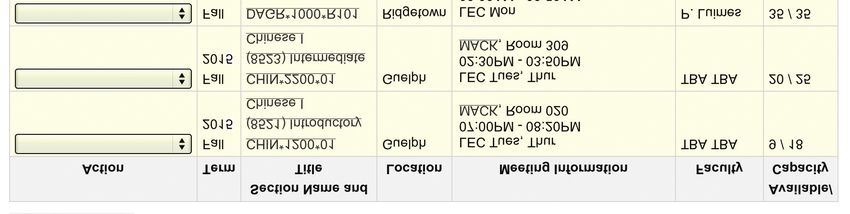
Program Information
Bachelor of Applied Science (B.A.Sc.)
uoguelph.ca/family

Welcome to the Bachelor of Applied Science degree program! All        Advising Notes:
first year B.A.Sc. students will be invited to attend an Orientation   n   Review the Schedule of Studies (the order in which you are
Session in September – details will follow by email.                      advised to take courses). Go to the 2018/2019 Undergraduate
                                                                          Calendar (link below), click “Degree Programs”, click your degree
Picking your courses for Semester 1 (Fall 2018):                          program and click on your major. Here you will find your degree
As a B.A.Sc. student in Semester 1, you will normally select five          laid out by semester, with listings of courses that are available for
courses (or 2.50 credits). Your courses are determined by the             selection throughout your studies.
major into which you have been admitted. Your required courses        n   Pick your courses as soon as possible. Availability of desired
for Semester 1 are listed below by major:                                 sections may fill up quickly.
                                                                      n   You will use WebAdvisor to pick your courses. Detailed
ADULT DEVELOPMENT (Regular and Co-op)                                     instructions are available on page 4.
n FRHD*1100 Life: Health and Well-being                               n   As you make your class schedule, ensure there are no conflicts
n PSYC*1000 Introduction to Psychology                                    in your timetable.
n NUTR*1010 Introduction to Nutrition                                 n   All B.A.Sc. students who do not have high school biology (or
n ANTH*1150 Introduction to Anthropology or SOC*1100                      equivalent) must take BIOL*1020 instead of an elective in
  Sociology                                                               Semester 1.
n 0.50 elective – if you do not have high school biology you must     n   Co-op students are required to maintain a minimum 70%
  take BIOL*1020 instead of an elective in Semester 1.                    average in first year over two full-time academic semesters
                                                                          (minimum 4.00 credits) to be eligible to continue in the Co-op
APPLIED HUMAN NUTRITION                                                   program.
n  CHEM*1040 General Chemistry I
n FRHD*1100 Life: Health and Well-being                               Course Selection Tips:
n HTM*2700 Understanding Foods**                                      n   Download the Class Schedule Worksheet (see page 3) to assist
n PSYC*1000 Introduction to Psychology                                    in creating your schedule.
n 0.50 elective – if you do not have high school biology you must     n   Select your required courses first and build the rest of your
   take BIOL*1020 instead of an elective in Semester 1.                   schedule around these courses.
**Note: HTM *2700 is recommended for Semester 1, if capacity in       n   “Elective” courses are any first year course that you find
the class allows, but it can also be taken in Semester 2 by               interesting – make sure you pick one that you’re eligible to take
substituting NUTR *1010 Introduction to Nutrition in Semester 1.          (i.e.: are there prerequisites?).
                                                                      n   Distance Education (called DE) courses are an alternative way to
CHILD, YOUTH AND FAMILY (Regular and Co-op)                               take courses without meeting for regularly scheduled classes.
n FRHD*1100 Life: Health and Well-being                                   You will find DE course times listed in WebAdvisor as TBA.
n PSYC*1000 Introduction to Psychology

n ANTH*1150 Introduction to Anthropology or SOC*1100

  Sociology                                                           FOR ADDITIONAL INFORMATION AND COUNSELLING
n NUTR*1010 Introduction to Nutrition                                 PLEASE CONTACT:
n 0.50 elective – if you do not have high school biology, you must    B.A.Sc. Program Counsellor
  take BIOL*1020 instead of an elective in Semester 1.                Macdonald Institute, Room 253
                                                                      (519) 824-4120, ext. 58964
Should you find that all sections of a required course are full,      To book an appointment, email bascprog@uoguelph.ca
please contact your Program Counsellor (contact information
at the end of this section).

                                                       uoguelph.ca/registrar/calendars/undergraduate/current                                8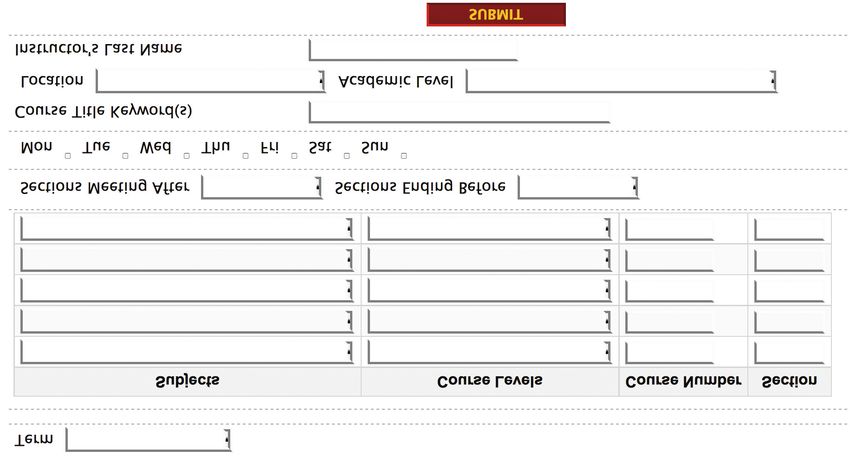
Bachelor of Arts (B.A.)
uoguelph.ca/baco

Picking your courses for Semester 1 (Fall 2018):
As a Bachelor of Arts (B.A.) student, you should select five (5)           ARTS COURSE OPTIONS FOR F18
courses for your first semester if you wish to study full-time. You        n Arabic – ARAB*1100

are selecting courses for your fall semester only. You will select        n Art History – ARTH*1510

courses for your winter semester in October.                              n Chinese – CHIN*1200, CHIN*1280

                                                                          n Classical Studies – CLAS*1000

Your 5 courses will be from the arts and/or social science subject        n English – ENGL*1030, ENGL*1080, ENGL*1200

areas with possibly one or two courses from other subject areas.          n European Studies – EURO*1100

Your courses for Fall 2018 will include:                                  n French Studies – FREN*1100, FREN*1150, FREN*1200

1) Courses that go towards your specialization (your chosen area          n German Studies – GERM*1100

   of study). These are called “required courses”.                        n History – HIST*1010, HIST*1050, HIST*1150, HIST*1250

2) Courses of interest that aren’t specifically required for your          n Italian Studies – ITAL*1060

   specialization area from the arts and social science subject           n Latin – LAT*1100

   areas. These are called “elective courses”.                            n Linguistics – LING*1000

3) Possibly a science course (two of these courses are required for       n Music – MUSC*1060, MUSC*1130, MUSC*1180, MUSC*1500

   all B.A. students by the time they graduate). The science              n Philosophy – PHIL*1000, PHIL*1010, PHIL*1030

   courses recommended for B.A. students are ones that do not             n Portuguese – PORT*1100

   require any high school science background.                            n Spanish – SPAN*1100

4) Perhaps a course of interest from an area outside the arts and         n Studio Art – SART*1050, SART*1060

   social sciences. These are also called “elective courses”. (Please     n Theatre Studies – THST*1040, THST*1200

   note that due to restrictions that may be in place, it may not be      n Women’s Studies – WMST*1000

   possible to register for certain courses in other subject areas.)
                                                                          SOCIAL SCIENCE COURSE OPTIONS FOR F18
It is important to select the “required courses” for your chosen area     n Anthropology – ANTH*1120, ANTH*1150
of study first, then build the rest of your schedule around these          n Economics – ECON*1050

courses. There may be only one course specifically required for            n Geography – GEOG*1200, GEOG*1220, GEOG*1300, GEOG*1350

your specialization in your first semester.                                n International Development – IDEV*1000

                                                                          n Political Science – POLS*1150, POLS*1400, POLS*1500

To find out which course(s) are required for your chosen                  n Psychology – PSYC*1000, PSYC*1500

specialization in Semester 1 (Fall 2018), please go to                    n Sociology – SOC*1100, SOC*1500

uoguelph.ca/baco and look under “First Year Course Selection”.            n Women’s Studies – WMST*1000

It is important that you look at this information to make certain you     SCIENCE COURSE OPTIONS FOR F18
select the correct course(s) for your specialization area. For            n Biology – BIOL*1020, BIOL*1500
instance, there are three English courses offered in the fall             n Chemistry – CHEM*1060

semester: ENGL*1030, ENGL*1080 and ENGL*1200. A student                   n Computing and Information Science – CIS*1000

pursuing English as their area of study requires ENGL*1080 but            n Environmental Sciences – ENVS*1060

does not need to take ENGL*1030 or ENGL*1200.                             n Geography – GEOG*1300, GEOG*1350

                                                                          n Horticultural Science – HORT*1130

If you are a B.A. General Arts student who has been admitted without a    n Nutrition – NUTR*1010 (Access to this course may be restricted)

declared specialization, choose the courses that interest you the most.   n Physics – PHYS*1600

You will be registering for 1000 level (first year) courses during         INTERDISCIPLINARY FIRST YEAR SEMINAR COURSE
Semester 1 (Fall 2018). An exception to this may be language              (VARIED CONTENT) – UNIV*1200. This course can count as an
courses if you have background proficiency. If you believe you have        arts, social science or science course.
advanced language skills in Arabic, Chinese, French, German, Greek
(Ancient), Italian, Latin, Portuguese or Spanish, please contact the
School of Languages and Literatures for guidance on an appropriate        FOR ADDITIONAL INFORMATION:
course to take in Fall 2018 (519-824-4120, ext. 53883).                   B.A. Counselling Office
                                                                          MacKinnon Building, Room 130
Select your courses from the following lists. For course descriptions,    (519) 824-4120, ext. 52140
see uoguelph.ca/registrar/calendars/undergraduate/current/c12.            baco@uoguelph.ca

                                                         uoguelph.ca/registrar/calendars/undergraduate/current                           9
Bachelor of Arts and Sciences (B.A.S.)
uoguelph.ca/bas

Welcome to the Bachelor of Arts and Sciences degree program!
We are excited to welcome you to the University of Guelph              SOCIAL SCIENCES SUBJECT AREAS
community and to the unique family of staff, students and faculty in   n ANTH Anthropology

the Bachelor of Arts and Sciences program!                             n ECON Economics

                                                                       n GEOG Geography

Picking your courses for Semester 1 (Fall 2018):                       n POLS Political Science

As a B.A.S. student in semester 1, you will normally select five       n PSYC Psychology

courses (or 2.50 credits).                                             n SOC Sociology

n Select ASCI*1110 Society and Inquiry. Schedule this lecture and      n UNIV First Year Seminars

  its corresponding seminar first – you can choose the seminar         n WMST Women's Studies

  time that suits you.                                                 You can view the requirements for each of these courses in
n Select two science courses. The courses you pick will be             WebAdvisor, or in the Degree Program section of the Bachelor of
  determined by the science minor you are considering pursuing.        Arts Degree in the Undergraduate Calendar.
  A list of courses can be found in the 2018/2019 Undergraduate        uoguelph.ca/registrar/calendars/undergraduate/current/c10
  Calendar (link below) under “Section X Degree Programs” and          /c10ba.shtml
  clicking on the B.A.S. degree program. The course must be in
  this list. B.A.S. students may not take BIOL*1500, BIOM*2000,        A SAMPLE FIRST SEMESTER
  BOT*1200 or MBG*1000.                                                n Arts & Sciences – ASCI*1110

n A helpful chart can be found on the B.A.S. website:                  n Science Core Course – BIOL*1090

  uoguelph.ca/bas, under “Current Students”. Use the chart to          n Science Core Course – CHEM*1040

  see what science courses are most common across the science          n Arts or Social Science Core Course – THST*1040

  minors you may be interested in. To view the requirements for        n Arts or Social Science Core Course – PSYC*1000

  each minor, look at the list of science programs in “Section X
  Degree Programs, Bachelor of Science”.                               Should you find that all sections of a required course are full,
n Select two courses from the arts or social sciences (preferably      please contact your Program Counsellor (contact information
  one from each category):                                             at the end of this section).

ARTS SUBJECT AREAS                                                     Advising Notes:
n ARTH Art History                                                     n   Interdisciplinary Arts & Sciences (ASCI) classes are at the core of
n CHIN Chinese                                                             the B.A.S. program, incorporating both arts and sciences in the
n CLAS Classical Studies                                                   curriculum and studying their interactions and relations.
n ENGL English                                                         n   Students do not have to know what specializations (one in
n EURO European Studies                                                    science, one in arts/social science) they are selecting yet. Many
n FREN French Studies                                                      students do not fully decide until after their first semester.
n GERM German Studies                                                      Specializations are based on minors, and a list can be found in the
n GREK Greek                                                               Undergraduate Calendar under the B.A.S. program (link is below).
n HIST History                                                         n   Review the Schedule of Studies (the order in which you are
n ITAL Italian Studies                                                     advised to take courses). Go to the 2018/2019 Undergraduate
n LAT Latin                                                                Calendar (link below), click “Degree Programs”, click your
n LING Linguistics                                                         degree program and click on your specialization. Here you will
n MUSC Music                                                               find your degree laid out by semester, with listings of courses
n PHIL Philosophy                                                          that are available for selection throughout your studies.
n PORT Portuguese                                                      n   Pick your courses as soon as possible. Availability of desired
n SPAN Spanish and Hispanic                                                sections may fill up quickly.
n THST Theatre Studies                                                 n   You will use WebAdvisor to pick your courses. Detailed
                                                                           instructions are available on page 4.
                                                                       n   As you make your class schedule, ensure there are no conflicts
                                                                           in your timetable.

                                                    uoguelph.ca/registrar/calendars/undergraduate/current                                10
Course Selection Tips:
n Download the Class Schedule Worksheet (see page 3) to assist FOR ADDITIONAL INFORMATION:
in creating your schedule. Brittany Lawrence
n Select your required course(s) first and build the rest of your Program Counsellor, B.A.S.
schedule around these courses. bas@uoguelph.ca
n Distance Education (called DE) courses are an alternative way to (519) 824-4120, ext. 56385
take courses without meeting for regularly scheduled classes.
You will find DE course times listed in WebAdvisor as TBA.
Bachelor of Bio-Resource Management (B.B.R.M.)
uoguelph.ca/bbrm
Welcome to Bachelor of Bio-Resource Management. We are This course has two lecture sections and many seminar
excited to welcome you to the University of Guelph! sections. If you do not have high school biology, please contact
your Program Counsellor (contact information at the end of this
Picking your courses for Semester 1 (Fall 2018): section). **You must select the Monday/Wednesday 3:30-
As a B.B.R.M. student in Semester 1, you will select 2.50 credits 4:30 p.m. lecture to avoid scheduling conflicts with BIOL*1050.
for full-time registration. Your courses are determined by the major n ECON*1050 Introductory Microeconomics. This course has
into which you have been admitted. Your required courses for several lecture sections. **Do not select Section 3 of this course
Semester 1 are listed here: because it conflicts with your BIOL*1090 course.
These four courses make up a full-time schedule.
ENVIRONMENTAL MANAGEMENT
n ENVS*1030 Introduction to Environmental Sciences. This course FOOD INDUSTRY MANAGEMENT
is worth 1.00 credits. This course has one lecture section and n ACCT*1220 Introductory Financial Accounting. This course has
several lab sections (please note which labs conflict with one lecture section and many seminars. There is also a Distance
MGMT*2150). Education (DE) section.
n MGMT*2150 Introduction to Canadian Business Management. n BIOL*1080 Biological Concepts of Health. This course has one
**This is a second year course so be sure to select “200 – Second lecture section and many lab sections.
Year” in the “Course Level” dropdown menu in WebAdvisor. This n CHEM*1040 General Chemistry I. This course has several
course has one lecture section and no labs or seminars. lecture and lab sections.
n BIOL*1070 Discovering Biodiversity. If you do not have high n HROB*2090 Individuals and Groups in Organizations. **This is a
school biology, please contact your Program Counsellor (contact second year course so be sure to select “200 – Second Year” in
information at the end of this section). This course has one the “Course Level” dropdown menu in WebAdvisor. This course
lecture section and many seminar sections. has two lecture sections and one Distance Education (DE) section.
n CHEM*1060 Introductory Chemistry – pick this course if you do n MATH*1030 Business Mathematics. This course has two lecture
not have grade 12 or 4U chemistry. This course is only offered in sections.
Distance Education (DE) format. You will take CHEM*1040 in a These five courses make up a full-time schedule.
future semester.
OR Advising Notes:
n CHEM*1040 General Chemistry I – pick this course if you do n Review the Schedule of Studies (the order in which you are
have grade 12 or 4U chemistry. This course has several lecture advised to take courses). Go to the 2018/2019 Undergraduate
and lab sections (note which sections conflict with ENVS*1030). Calendar (link at bottom of page), click “Degree Programs”, click
These four courses make up a full-time schedule. your degree program and click on your major. Here you will find
your major laid out by semester, with listings of courses that are
EQUINE MANAGEMENT available for selection throughout your studies.
n EQN*1010 Introduction to Equine Management. This course is n Pick your courses as soon as possible. Availability of desired
worth 1.00 credits. This course has one lecture section and two sections may fill up quickly.
lab sections. n You will use WebAdvisor to pick your courses. Detailed
n BIOL*1050 Biology of Plants & Animals in Managed Ecosystems instructions are available on page 4.
(listed as “Biology of Managed Ecosystems” on WebAdvisor). This n As you make your class schedule, you’ll notice that many courses
course has one lecture section and many lab sections. have several lecture/lab/seminar sections. Pick the ones that best fit
If you do not have high school biology, please contact your in your schedule to ensure there are no conflicts in your timetable.
Program Counsellor (contact information at the end of this section). n B.B.R.M. students do not select an elective for their first semester.
n BIOL*1090 Introduction to Cellular and Molecular Biology. n Note that the Equine Management and Environmental
uoguelph.ca/registrar/calendars/undergraduate/current 11Management majors take four courses while Food Industry course content is presented online. You will find DE course times
Management takes five. This is because EQN*1010 and listed in WebAdvisor as TBA.
ENVS*1030 are worth double credits (1.00 versus 0.50).
n Co-op Students: Students who are enrolled in a Co-op major Should you find that all sections of a required course are full,
are required to maintain a minimum 70% average in first year please check uoguelph.ca/bbrm for announcements and if there
over two full-time academic semesters (minimum 4.00 credits) to is no additional information posted, contact your Program
be eligible to continue in the Co-op program. Counsellor (contact information below).
Course Selection Tips:
n Download the Class Schedule Worksheet (see page 3) to assist FOR ADDITIONAL INFORMATION AND COUNSELLING PLEASE
in creating your schedule. CONTACT:
n Select courses that are more limiting (e.g. courses which have Melinda Vanryn
one lecture time) first and build the rest of your schedule around B.B.R.M. Program Counsellor
those times. Johnston Hall, Room 133A
n Distance Education (called DE) courses are an alternative way to (519) 824-4120, ext. 54549
take courses without meeting for regularly scheduled classes. All mavanryn@uoguelph.ca
Bachelor of Commerce (B.Comm.)
uoguelph.ca/business/bcomm/first-year
Welcome to the Bachelor of Commerce Program! We are excited As an Undeclared student, you are encouraged to select from the
to welcome you to the University of Guelph. All first year B.Comm. previous list the course that relates to your major of interest. For
students will be invited to attend an Academic Program Meeting example, choose REAL*1820 Real Estate and Housing if you are
during Orientation Week in September; details to follow later in interested in that major. Alternately, you have the option of
August via email. choosing an elective which can be any first year course that you
find interesting, provided you have the prerequisities. For tips on
Picking your courses for Semester 1 (Fall 2018): choosing an elective, please visit
Our office has set up a webpage specifically for first year B.Comm. uoguelph.ca/business/bcomm/first-year.
students, uoguelph.ca/business/bcomm/first-year. Use this page,
along with this Guide to assist you with the course selection process. Note: if you are interested in the Accounting major, you should take
ACCT*1220 during the Fall semester instead of one of the courses
As a B.Comm. student in Semester 1, you will take four courses from the list. If you choose MATH*1200 from the list, you do not
worth a total of 2.50 credits. Note that MGMT*1000 Introduction to also need to complete MATH*1030. Additional information about
Business, is a double-weight course which is worth two courses or the math requirement can be found at
1.00 credits. This course is offered in the Fall semester only (Sept- uoguelph.ca/business/bcomm/first-year.
Dec) and must be taken by all B.Comm. students in their first
semester. As this is a double-weight course, the academic work For additional information about the Undeclared, visit the
load will be the same as two regular courses. Undeclared First Year webpage which is linked from
uoguelph.ca/business/bcomm/first-year. You will be asked to
Your required courses for Semester 1 are listed here by major. select your B.Comm. major at the end of your first year.
UNDECLARED (UND) ACCOUNTING (Regular and Co-op)
n ECON*1050 Introductory Microeconomics n ACCT*1220 Introductory Financial Accounting
n MATH*1030 Business Mathematics n ECON*1050 Introductory Microeconomics
n MGMT*1000 Introduction to Business (double weight) n MATH*1030 Business Mathematics
n Choose one of: n MGMT*1000 Introduction to Business (double weight)
n HTM*1700 Foodservice Management**
n HTM*1070 Responsible Tourism Policy and Planning** FOOD AND AGRICULTURAL BUSINESS (Regular and Co-op)
n MATH*1200 Calculus I** n ECON*1050 Introductory Microeconomics
n POLS*1400 Issues in Canadian Politics** n MATH*1030 Business Mathematics
n PSYC*1000 Introduction to Psychology n MCS*1000 Introductory Marketing
n REAL*1820 Real Estate and Housing** n MGMT*1000 Introduction to Business (double weight)
n 1 Elective
**The above-noted courses are offered in the Fall semester only.
uoguelph.ca/registrar/calendars/undergraduate/current 12n REAL*1820 Real Estate and Housing
HOSPITALITY AND TOURISM MANAGEMENT n 1 Elective – electives can be any first year course that you find
(Regular and Co-op) interesting, provided you have the prerequisities. For tips on
n ECON*1050 Introductory Microeconomics choosing an elective, please visit
n HTM*1700 Foodservice Management uoguelph.ca/business/bcomm/first-year.
n MCS*1000 Introductory Marketing
n MGMT*1000 Introduction to Business (double weight) Advising Notes:
n To view all of the courses required for your major (your Schedule
LEADERSHIP AND ORGANIZATIONAL MANAGEMENT of Studies) visit
n ECON*1050 Introductory Microeconomics uoguelph.ca/registrar/calendars/undergraduate/2018-2019/
n MCS*1000 Introductory Marketing c10/c10bcomm.shtml and select your major from the list
n MGMT*1000 Introduction to Business (double weight) on the right.
n 1 Elective – electives can be any first year course that n It is strongly recommended that you select your courses as soon
you find interesting, provided you have the prerequisities. as possible as popular course sections fill up quickly. Some
For tips on choosing an elective, please visit courses, like MGMT*1000, add additional spaces throughout the
uoguelph.ca/business/bcomm/first-year. month of June so be sure to check WebAdvisor daily to see if
new spaces have been added.
MANAGEMENT ECONOMICS AND FINANCE (Regular and Co- n Should you find that all sections of a required course are full, it is
op) important that you contact the B.Comm. Program Counselling
n ECON*1050 Introductory Microeconomics Office as soon as possible. Our contact information is at the end
n MGMT*1000 Introduction to Business (double weight) of this section.
n Choose one of: n You will use WebAdvisor to pick your courses. Detailed
n MATH*1030 Business Mathematics or instructions are available on page 4.
n MATH*1200 Calculus I n Create your own class schedule by selecting lecture and
For important details on math requirements please visit seminar sections that fit together without conflicts.
uoguelph.ca/business/bcomm/first-year. n Co-op Students: Students who are enrolled in a Co-op major
n 1 Elective – electives can be any first year course that you are required to maintain a minimum 70% average in first year
find interesting, provided you have the prerequisities. over two full-time academic semesters (minimum 4.00 credits) to
For tips on choosing an elective, please visit be eligible to continue in the Co-op program.
uoguelph.ca/business/bcomm/first-year.
Course Selection Tips:
MARKETING MANAGEMENT (Regular and Co-op) n Download the Class Schedule Worksheet (see page 3) to assist
n ECON*1050 Introductory Microeconomics in creating your schedule.
n MGMT*1000 Introduction to Business (double weight) n Select required courses with the fewest lecture/seminar sections
n Choose two of the following four*** courses: first and then build the rest of your schedule around these courses.
n MATH*1030 Business Mathematics n Choosing an elective: this can be any first year course that you
n PSYC*1000 Introduction to Psychology find interesting provided you have the required prerequisites.
n 1 Marketing Environment Elective (List E1). For the list of For additional tips on choosing an elective please visit
Marketing Environment Electives visit, uoguelph.ca/business/bcomm/first-year.
uoguelph.ca/registrar/calendars/undergraduate/ n Distance Education (called DE) courses are an alternate way to
2018-2019/c10/c10bcomm-mkmn.shtml. take courses without having to meet for regularly scheduled
n 1 Elective – electives can be any first year course that you find classes. DE courses are completed exclusively online; there are
interesting, provided you have the prerequisities. For tips on no class meetings. You can identify DE courses in WebAdvisor
choosing an elective, please visit as they have a section number of “DE01” under the "Section
uoguelph.ca/business/bcomm/first-year. Name and Title" column.
***The two courses you do not take in the Fall will be taken in the You will only choose courses for the Fall semester at this time.
Winter semester. Winter semester course selection will take place in October.
PUBLIC MANAGEMENT (Regular and Co-op)
n ECON*1050 Introductory Microeconomics FOR ADDITIONAL INFORMATION AND COUNSELLING
n MCS*1000 Introductory Marketing PLEASE CONTACT:
n MGMT*1000 Introduction to Business (double weight) B.Comm. Program Counselling Office
n POLS*1400 Issues in Canadian Politics Macdonald Hall, Room 106
(519) 824-4120, ext. 56757
REAL ESTATE AND HOUSING (Regular and Co-op) uoguelph.ca/business/bcomm/first-year
n ECON*1050 Introductory Microeconomics bcomm@uoguelph.ca
n MGMT*1000 Introduction to Business (double weight)
uoguelph.ca/registrar/calendars/undergraduate/current 13Bachelor of Computing (B.Comp.)
uoguelph.ca/computing
Welcome to the Bachelor of Computing degree program! We are Advising Notes:
excited to welcome you to the University of Guelph. n Review the Schedule of Studies (the order in which you are
advised to take courses). Go to the 2018/19 Undergraduate
Picking your courses for Semester 1 (Fall 2018): Calendar (link below), click “Degree Programs”, click your
As a B.Comp. student in Semester 1 you will select five courses degree program and click on your major. Here you will find your
(2.50 credits). Your required courses for Semester 1 are listed degree laid out by semester, with listings of courses that are
below by major: available for selection throughout your studies.
n It is strongly recommended that you select your courses as soon
COMPUTER SCIENCE (Regular and Co-op) as possible as popular course sections fill up quickly.
n CIS*1500 Introduction to Programming n You will use WebAdvisor to pick your courses. Detailed
n MATH*1200 Calculus I instructions are available on page 4.
n Three courses in an anticipated Area of Application or elective. n As you make your class schedule, ensure there are no conflicts
All B.Comp. students complete an Area of Application or a Minor in your timetable.
as part of the Honours program. This consists of at least 4.00 n Co-op Students: Students who are enrolled in a Co-op major
credits (8 courses) as part of a minor. Minors are described in the are required to maintain a minimum 70% average in first year
Undergraduate Calendar (link below). If you have more than one over two full-time academic semesters (minimum 4.00 credits) to
interest, select a course in each area. This will help you decide be eligible to continue in the Co-op program.
what area to pursue.
Course Selection Tips:
SOFTWARE ENGINEERING (Regular and Co-op) n Download the Class Schedule Worksheet (see page 3) to assist
n CIS*1250 Software Design I in creating your schedule.
n CIS*1500 Introduction to Programming n Select courses that are more limiting (e.g. courses which have
n Three courses in an anticipated Area of Application or elective. one lecture time) first and build the rest of your schedule around
All B.Comp. students complete an Area of Application or a Minor those times.
as part of the Honours program. This consists of at least 4.00 n Distance Education (called DE) courses are an alternative way to
credits (8 courses) as part of a minor. Minors are described in the take courses without meeting for regularly scheduled classes. All
Undergraduate Calendar (link below). If you have more than one course content is presented online. You will find DE course times
interest, select a course in each area. This will help you decide listed in WebAdvisor as TBA.
what area to pursue.
Should you find that all sections of a required course are full, FOR ADDITIONAL INFORMATION AND COUNSELLING
please contact your Program Counsellor. PLEASE CONTACT:
Greg Klotz, B.Comp. Program Counsellor
School of Computer Science
(519) 824-4120, ext. 52711
gklotz@uoguelph.ca
uoguelph.ca/registrar/calendars/undergraduate/current 14Bachelor of Engineering (B.Eng.)
uoguelph.ca/engineering/newstudent
Welcome to the Bachelor of Engineering degree! We are excited to Advising Notes:
welcome you to the University of Guelph! n Review the 2018/2019 Program Guide for your major at
uoguelph.ca/engineering/beng-program-guides-degree-
Picking your courses for Semester 1 (Fall 2018): requirements.
As a B.Eng. student in Semester 1 you will select five courses (2.75 Here you will find your degree laid out by semester.
credits). All engineering students are required to take the following n It is strongly recommended that you select your courses as soon
courses in Semester 1: as possible.
n CHEM*1040 General Chemistry I n Find updated registration information for first year courses on our
n CIS*1500 Introduction to Programming first year engineering site: uoguelph.ca/engineering/newstudent.
n ENGG*1100 Engineering and Design I n As you make your class schedule, ensure there are no conflicts
n MATH*1200 Calculus I in your timetable.
One of: n Co-op Students: Students who are enrolled in Co-op (or
n ENGG*1210 Engineering Mechanics I planning to enrol at the end of first year) are required to maintain
n HIST*1250 Science and Technology in a Global Context a minimum 70% average in first year over two full-time academic
Either ENGG*1210 or HIST*1250 must be taken in Semester 1 semesters (minimum 4.00 credits) to be eligible to continue in
(fall). The other course must be taken in Semester 2 (winter). the Co-op program.
n I do not have grade 12/4U Chemistry Course Selection Tips:
You must take CHEM*1060 in Semester 1 (fall) instead of n Download the course schedule worksheet from
CHEM*1040. You will take CHEM*1040 in Semester 2 (winter). uoguelph.ca/engineering/newstudent to assist in
n I do not have grade 12/4U Physics creating your schedule.
You must take PHYS*1300 in Semester 1 (fall). You will take n Select courses that are more limiting (e.g. courses which have
ENGG*1210 in Semester 2 (winter) and HIST*1250 in a later only one lecture time) first and build the rest of your schedule
semester to meet graduation requirements. around those times.
Should you find that all sections of a required course are full,
please contact your Program Counsellor (contact information FOR ADDITIONAL INFORMATION AND ACADEMIC
at the end of this section). COUNSELLING PLEASE CONTACT:
B.Eng. Program Counselling Office
Thornbrough Building
(519) 824-4120, ext. 56572
engcouns@uoguelph.ca
Bachelor of Landscape Architecture (B.L.A.)
uoguelph.ca/bla
Welcome to the Bachelor of Landscape Architecture degree n One of the following:
program! We are excited to welcome you to the University of n ANTH*1150 Introduction to Anthropology. This course has two
Guelph! lecture sections.
n PHIL*1010 Introductory Philosophy: Social and Political Issues.
Picking your courses for Semester 1 (Fall 2018): This course has one lecture section and several seminar sections.
As a B.L.A. student in Semester 1 you will select five courses. The n PSYC*1000 Introduction to Psychology. This course has two
courses you should select for Semester 1 are listed here: lecture sections.
n LARC*1100 Design and Communications Studio. This course n SOC*1100 Sociology. This course has two in-class lectures
has one lecture section and one lab section. and one distance education section.
n LARC*1950 History of Cultural Form I. This course has one n One elective. This is a course of your choice, if you have the
lecture section. prerequisite and it is not a restricted course. If you need help
n BIOL*1500 Humans in the Natural World. This course has one deciding on an elective, please contact your Program Counsellor
lecture section. (contact information at the end of this section).
uoguelph.ca/registrar/calendars/undergraduate/current 15Should you find that all sections of a required course are full, Course Selection Tips:
please check uoguelph.ca/bla for announcements and if there n Download the Class Schedule Worksheet (link on page 3) to
is no additional information posted, contact your Program assist in creating your schedule.
Counsellor (contact information at the end of this section). n Select courses that are more limiting (e.g. courses which have one
lecture time) first and build your schedule around those times.
Advising Notes: n Select your elective last as course scheduling may limit your options.
n Review the Schedule of Studies (the order in which you are n Distance Education (called DE) courses are an alternative way to
advised to take courses). Go to the 2018/2019 Undergraduate take courses without meeting for regularly scheduled classes. All
Calendar (link below), click “Degree Programs”, click your course content is presented online. You will find DE course times
degree program and click on “Schedule of Studies”. Here you listed in WebAdvisor as TBA.
will find your degree laid out by semester, with listings of courses
that are available for selection throughout your studies. Please refer to uoguelph.ca/bla for important announcements.
n It is strongly recommended that you select your courses as soon
as possible as popular course sections fill up quickly.
n You will use WebAdvisor to pick your courses. Detailed FOR ADDITIONAL INFORMATION AND COUNSELLING
instructions are available on page 4. PLEASE CONTACT:
n As you make your class schedule, you will notice that many Melinda Vanryn
courses have several lecture/lab/seminar sections. Pick the ones B.L.A. Program Counsellor
that best fit in your schedule to ensure there are no conflicts in Johnston Hall, Room 133A
your timetable. (519) 824-4120, ext. 54549
mavanryn@uoguelph.ca
Bachelor of Science (B.Sc.)
uoguelph.ca/bsc
Welcome to the Bachelor of Science degree program. We are n Physical Science (PSCI)
excited to have you join us. n Physics (PHYS)
n Plant Science (PLSC)
Picking your courses for Semester 1 (Fall 2018): n Theoretical Physics (THPY)
The process for creating your first semester schedule is outlined below. n Wildlife Biology and Conservation (WBC)
n Zoology (ZOO)
1. Identify your major:
(If you’re unsure of your major, refer to your offer of admission.) 2. Identify your courses:
n Animal Biology (ABIO)
n Biochemistry (BIOC) MATHEMATICS
n Biodiversity (BIOD) n ABIO, BIOC, BIOD, BIOS, BIOM, BTOX, ENVB, FOOD, HK,
n Biological and Medical Physics (BMPH) MFB, MICR, MBG, NEUR, NANS, PLSC, WBC and ZOO
n Biological and Pharmaceutical Chemistry (BPCH) majors select MATH*1080 Elements of Calculus I.
n Biological Science (BIOS) n EGG majors select either MATH*1080 Elements of Calculus I or
n Bio-Medical Science (BIOM) MATH*1200 Calculus I.
n Biomedical Toxicology (BTOX) n BMPH, BPCH, CHPY, CHEM, MSCI, NANO, PSCI, PHYS,
n Chemical Physics (CHPY) and THPY who do have Grade 12 Physics and Calculus and
n Chemistry (CHEM) Vectors select IPS*1500 Integrated Mathematics and Physics I.
n Environmental Biology (ENVB) n BMPH, BPCH, CHPY, CHEM, MSCI, NANO, PSCI, PHYS and
n Environmental Geoscience and Geomatics (EGG) THPY who do not have Grade 12 Physics but do have Grade
n Food Science (FOOD) 12 Calculus and Vectors, select MATH*1200 Calculus I.
n Human Kinetics (HK)
n Marine and Freshwater Biology (MFB) BIOLOGY
n Mathematical Science (MSCI) Students who do not have Grade 12 Biology should contact the
n Microbiology (MICR) B.Sc. Academic Counselling Centre for advice. Contact information is
n Molecular Biology and Genetics (MBG) provided at the end of this section.
n Nanoscience (NANO)
n Neuroscience (NEUR) Students who do have Grade 12 Biology should select the biology
n Nutritional and Nutraceutical Sciences (NANS) course in the list that follows for your major.
uoguelph.ca/registrar/calendars/undergraduate/current 16n ABIO majors select BIOL*1050 Biology of Plants & Animals in Advising Notes:
Managed Ecosystems (listed as “Biology of Managed n Some electives are required courses by certain majors and may
Ecosystems” on WebAdvisor). be restricted. If space allows, restrictions on these courses may
n BIOD, ENVB, EGG, MFB, PLSC, WBC and ZOO majors select be removed near the end of the course selection period,
BIOL*1070 Discovering Biodiversity. allowing all students the opportunity to register.
n BIOM, HK, NEUR and NANS majors select BIOL*1080 n Should you find that all sections of a required course are
Biological Concepts of Health. full, please first check the B.Sc. Academic Advising website
n BIOC, BMPH, BPCH, BIOS, BTOX, CHEM, FOOD, MICR, (uoguelph.ca/bsc) for updates. If you continue to experience
MBG and NANO majors select BIOL*1090 Introduction to difficulties, please contact the B.Sc. Academic Counselling
Molecular and Cellular Biology. Centre.
n CHPY, MSCI, PSCI, PHYS and THPY majors select any one of n Distance Education (DE) courses have no scheduled class time
BIOL*1070, BIOL*1080 or BIOL*1090. as these courses are online.
n If you are a transfer student with transfer credits, contact the
CHEMISTRY B.Sc. Academic Counselling Centre to schedule an
Students who do not have Grade 12 Chemistry select CHEM*1060 appointment (phone or in-person appointments are available
Introductory Chemistry. For subsequent semesters, see your during regular office hours).
revised Schedule of Studies at: uoguelph.ca/bsc/revised_SS. n Co-op students are required to maintain a minimum 70%
average in first year, over two full-time academic semesters
All students who do have Grade 12 Chemistry select CHEM*1040 (minimum 4.00 credits), to be eligible to continue in the Co-op
General Chemistry I. program.
n Bio-Medical Science majors are required to maintain a minimum
PHYSICS 75% average in first year, over two full-time academic semesters
Students who do not have Grade 12 Physics select PHYS*1300 (minimum 5.00 credits), to be guaranteed continuation in the major.
Fundamentals of Physics. For subsequent semesters, see your n Students not admitted directly to the BIOM or HK majors, but
revised Schedule of Studies at: uoguelph.ca/bsc/revised_SS. wishing to transfer to one of these majors, should consult the
respective Schedule of Studies for information.
Students who do have Grade 12 Physics should select the physics n Students not admitted directly to Co-op, but wishing to apply to
course listed below for your major. one of these majors, need to apply by the last class day of their
n ABIO, BIOC, BIOD, BIOS, BIOM, BTOX, ENVB, EGG, FOOD, first semester. Contact the B.Sc. Academic Counselling
HK, MFB, MICR, MBG, NEUR, NANS, PLSC, WBC and ZOO Centre for assistance.
majors select PHYS*1080 Physics for Life Sciences.
n BMPH, BPCH, CHPY, CHEM, MSCI, NANO, PSCI, PHYS and Useful Links
THPY majors select IPS*1500 Integrated Mathematics and n B.Sc. Academic Advising information: uoguelph.ca/bsc
Physics I. This is a 1.00 credit course and will count as two courses n Revised Schedule of Studies links: uoguelph.ca/bsc/revised_SS
– math and physics. You will only select four courses in total. n First semester students considering their options for Arts or
Social Science electives: uoguelph.ca/bsc/firstyear_electives
ADDITIONAL REQUIRED COURSE OR ELECTIVE
n BMPH, CHPY, MSCI, PHYS and THPY majors select
MATH*1160 Linear Algebra. CONTACT INFORMATION
n EGG majors select GEOG*1350 Earth, Hazards and Global B.Sc. Academic Counselling Centre,
Change. Summerlee Science Complex, Room 1329
n NANO majors select NANO*1000 Introduction to Nanoscience. bscweb@uoguelph.ca
n For all other majors, select an elective. You can choose an Arts
or Social Science elective from a broad range of subjects. Please refer to the B.Sc. Academic Advising website before
Options include languages, economics, anthropology, history contacting the B.Sc. Academic Counselling Centre, as we may
and philosophy. See the link to the B.Sc. Academic Advising have already posted an answer to your question.
website for possibilities: uoguelph.ca/bsc/firstyear_electives.
You can access instant chat at uoguelph.ca/bsc
3. Register for your courses: or call (519) 824-4120, ext. 53788.
n Log in to WebAdvisor. Detailed instructions are available on
page 4.
n Select your required courses and create a class schedule by
choosing lecture and seminar/laboratory times that do not conflict.
Be aware that our system does not prevent class conflicts.
n Find an elective course (if you have an elective in Semester 1).
n Register for your courses as described in the instructions.
n Check your schedule to ensure that there are no conflicts.
uoguelph.ca/registrar/calendars/undergraduate/current 17Bachelor of Science in Agriculture (B.Sc.(Agr.))
uoguelph.ca/bsc-agr
Welcome to the Bachelor of Science in Agriculture! We are excited Course Selection Tips:
to welcome you to the University of Guelph! n Download the Class Schedule Worksheet (see page 3) to assist
in creating your schedule.
Picking your courses for Semester 1 (Fall 2018): n Select courses that are more limiting (e.g. courses which have
As a B.Sc.(Agr.) student in Semester 1 you will select four courses one lecture time) first and build your schedule around those
(2.50 credits). The courses you should select are listed here: times.
n AGR*1110 Introduction to the Agri-Food Systems. This course n Distance Education (called DE) courses are an alternative way to
has one lecture section and several seminar sections. It is worth take courses without meeting for regularly scheduled classes. All
1.00 credits. course content is presented online. You will find DE course times
n BIOL*1050 Biology of Plants & Animals in Managed Ecosystems listed in WebAdvisor as TBA.
(listed as “Biology of Managed Ecosystems” on WebAdvisor).
This course has one lecture section and several lab sections. If Please refer to uoguelph.ca/bsc-agr for important
you do not have high school biology, please consult your announcements.
Program Counsellor (contact information at the end of this
section).
n MATH*1080 Elements of Calculus I. This course has several FOR ADDITIONAL INFORMATION AND COUNSELLING
lecture and lab sections. PLEASE CONTACT:
n CHEM*1060 Introductory Chemistry for students who do not Melinda Vanryn
have grade 12 or 4U chemistry. This course is only available in B.Sc.(Agr.) Program Counsellor
Distance Education (DE) format. CHEM*1040 will then be taken Johnston Hall, Room 133A
in the Winter semester. (519) 824-4120, ext. 54549
OR mavanryn@uoguelph.ca
n CHEM*1040 General Chemistry I for students who do have
grade 12 or 4U chemistry. This course has several lecture and
lab sections (note which lecture conflicts with AGR*1110).
Should you find that all sections of a required course are full,
please check uoguelph.ca/bsc-agr for announcements and if
there is no additional information posted, contact your Program
Counsellor (contact information at the end of this section).
Advising Notes:
n Review the Schedule of Studies (the order in which you are
advised to take courses). Go to the 2018/2019 Undergraduate
Calendar (link below) and click “Degree Programs”, click your
degree program and click on your potential major (you will
choose from three majors). Here you will find each major laid out
by semester, with listings of courses that are available for
selection throughout your studies.
n Pick your courses as soon as possible. Availability of desired
sections may fill up quickly.
n You will use WebAdvisor to pick your courses. Detailed
instructions are available on page 4.
n As you make your class schedule, you will notice that many
courses have several lecture/lab/seminar sections. Pick the ones
that best fit in your schedule to ensure there are no conflicts in
your timetable.
n B.Sc.(Agr.) students will not select an elective course in this
semester. Your four courses will make up a full-time schedule
because AGR*1110 is worth a double credit.
n You take a common first year as an undeclared student. In your
third semester, you will declare one of our three majors.
uoguelph.ca/registrar/calendars/undergraduate/current 18You can also read


