SAP Marketing Cloud What's New in the 1905 Release - May 2019 - SAP Help Portal
←
→
Page content transcription
If your browser does not render page correctly, please read the page content below
SAP Marketing Cloud
What‘s New in the 1905 Release
May 2019

PUBLIC
What’s New in 1905
                                                                                            LEAD AND ACCOUNT-BASED MARKETING
                                                                                            ▪ Lead Nurturing
                                            DYNAMIC CUSTOMER PROFILING
                                            ▪ Dynamic Customer Profiling                    ▪ Account-Based Marketing
                                                                                            ▪ B2B Marketing - Lead Management
                                                                                            ▪ Integration with Presales / Sales

                                                                                            MARKETING PLANNING & PERFORMANCE
                                            COMMERCE MARKETING
                                                                                            ▪ Marketing Planning
                                            ▪ Offer Management and Couponing

                                                                                            MARKETING ANALYTICS
                                            SEGMENTS, CAMPAIGNS, AND JOURNEYS               ▪ Marketing Analytics
                                            ▪ Campaign Automation
                                            ▪ Marketing Overview Page
                                            ▪ Adform External Campaign Integration
                                            ▪ Content Studio Landing Pages
                                            ▪ Content Studio Messages and Email Templates    GENERAL
                                            ▪ Survey Integration                             ▪ Configuration
                                            ▪ Marketing Events                               ▪ Integration Scenarios

© 2018 SAP SE or an SAP affiliate company. All rights reserved. ǀ PUBLIC                                                          2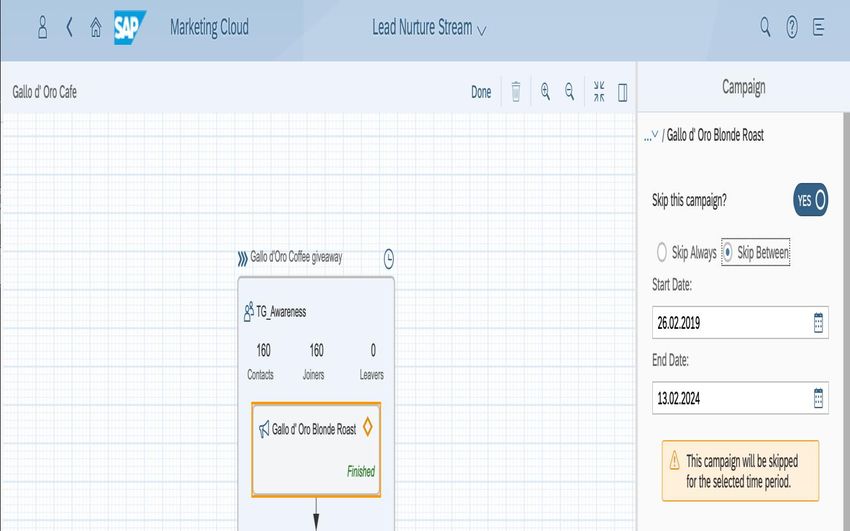
BACK

What’s New in
Dynamic Customer Profiling in 1905
What‘s New in Dynamic Customer Profiling
                                                                           New capabilities
                                                                           Enhancements for the "Inspect Contact" app
                                                                           ▪ Capability to inspect Accounts
                                                                           ▪ A new section "History", displaying
                                                                             important best record logic events
                                                                           Origin of Contact IDs configuration changes
                                                                           ▪ "Shareable" setting is renamed to "For
                                                                             Identification", its semantics
                                                                             and corresponding values have been enh
                                                                             anced
                                                                           Capability to add file-imported contacts to a
                                                                           target group, in the "Contacts" app
                                                                           Enhancements of "Browse Interaction" app
                                                                           ▪ Performance improvements
                                                                           ▪ Handover of interactions from the app
                                                                             to the "flag for deletion" application job

© 2018 SAP SE or an SAP affiliate company. All rights reserved. ǀ PUBLIC                                                  4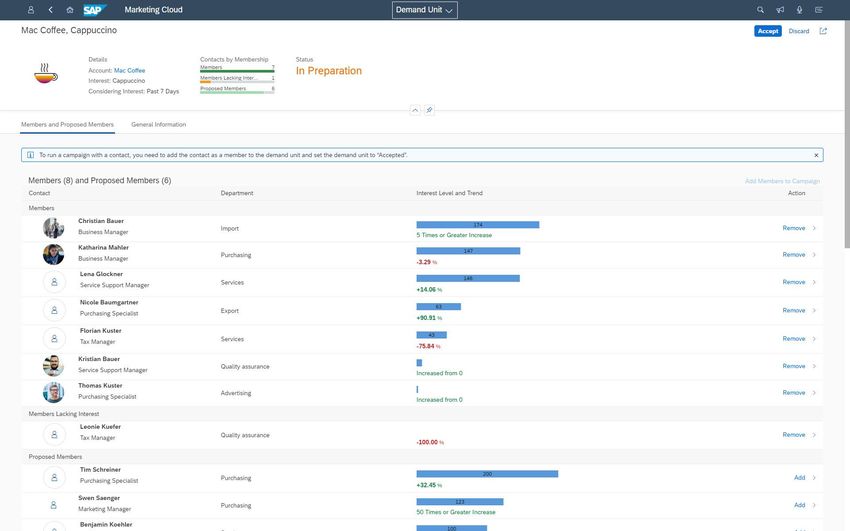
BACK

What’s New in
Offer Management and Couponing in 1905
What‘s New in Offer Management and Couponing
Public OData API for Coupons enhancements
                                                                                                                                              Benefits for customers
With release 1905, the Coupon OData Service                                                                                                   Customer is able to read more
                                                                                                                                              specifics around the coupon code usage.
API_MKT_COUPON_SRV supports the possibility to read                                                                                           The coupon code usage will be created or
more specifics of the coupon code usage and coupon                                                                                            updated when the coupon code will be
                                                                                                                                              distributed or redeemed.
code usage interaction contact.                                                                                                               Within the usage the UUID of the interaction
                                                                                                                                              contact golden record is stored. Now the
                                                                                                                              OData           customer can read all the facets of the
                                                                                                                                              interaction contact with a give coupon code
                                                                                                                                              usage UUID.

                                                                                                                                              New capabilities
                                                                           CouponCodeUsageIntactnCntctsType                                   Entity CouponCodeUsage
                                                                                                                                              ▪ Get a list of coupon code usages
                                                                           •   Country                    - Country
                                                                                                                                              ▪ Get the coupon code for a specific
                                                                           •   InteractionContactFacetUUID - Facet UUID                         coupon code usage
                                                                           •   InteractionContactId       - Contact ID (external)
                                                                                                                                              Entity CouponCodeUsageIntactnCntcts
                                                                           •   InteractionContactOrigin   - Origin (ext. system or channel)
                                                                                                                                              ▪ Get all the contacts and contact origins
                                                                           •   InteractionContactUUID     - Contact UUID (internal)             for a specific coupon code usage
                                                                                                                                              ▪ Get the contact and contact origin for a
                                                                                                                                                specific interaction contact
                                                                                                                                              ▪ Get a list of interaction contacts and
                                                                                                                                                contacts origins used in coupon code
                                                                                                                                                origins

© 2018 SAP SE or an SAP affiliate company. All rights reserved. ǀ PUBLIC                                                                                                                   6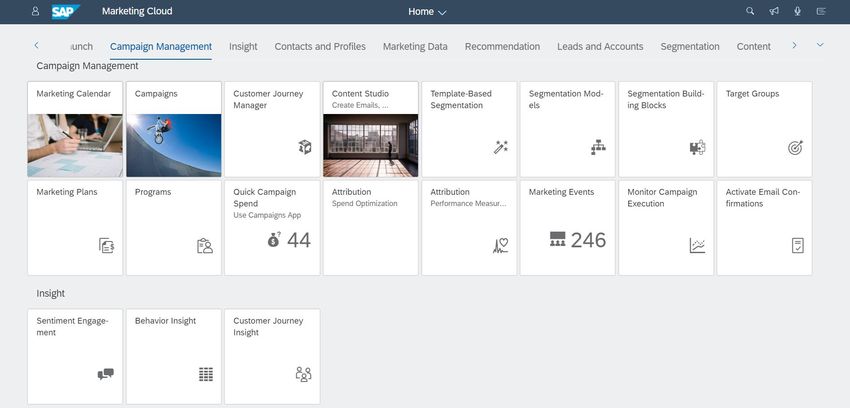
What‘s New in Offer Management and Couponing
SAP Business Event Handling for Coupon Code Usages
                                                                                                                       Benefits for customers
When business event Handling is active for coupon code usages, then                                                    Customer can subscribe to business event
                                                                                                                       for Coupon Code Usages triggered in SAP
SAP Marketing Cloud triggers an event when a coupon code usage is                                                      Marketing Cloud to receive notifications
created or updated. The benefit is that a custom application can directly do                                           from a queue, then the customer can take
                                                                                                                       follow-up actions on the event to update
follow-up activities to keep the custom application or external system up-                                             their own external system, e.g. POS or
to-date.                                                                                                               coupon validation and redemption system.

                                                                                                                       New capabilities
                                                                                                                       Triggers Coupon Code Usage events to
         SAP Marketing Cloud                                               SAP Cloud Platform   Third-Party Platform   inform external applications of an external
                                                                                                                       system that changes happened on the
                                                                                                                       coupon code usage level.

                                                                                                                       More information
                  Coupon Code                                                 SAP Enterprise           Custom          See:
                     Usage                                                      Messaging            Applications      Integration Guide: Business Event Handling

                                                                                 Custom
                                                                               Applications

© 2018 SAP SE or an SAP affiliate company. All rights reserved. ǀ PUBLIC                                                                                             7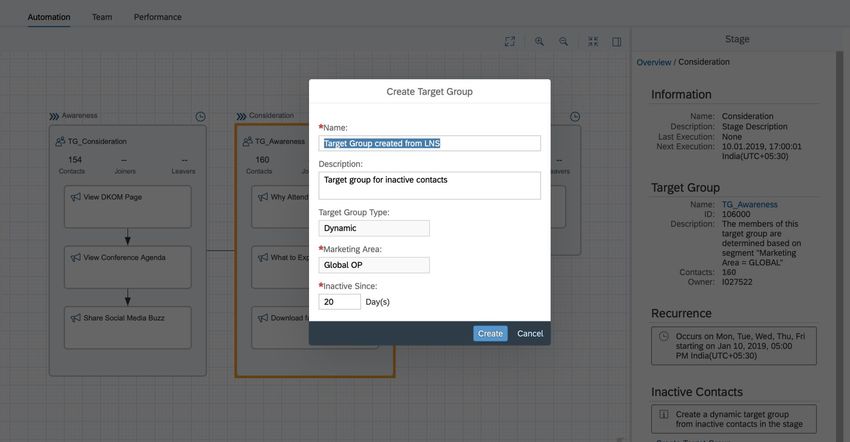
BACK

What’s New in
Campaign Automation in 1905
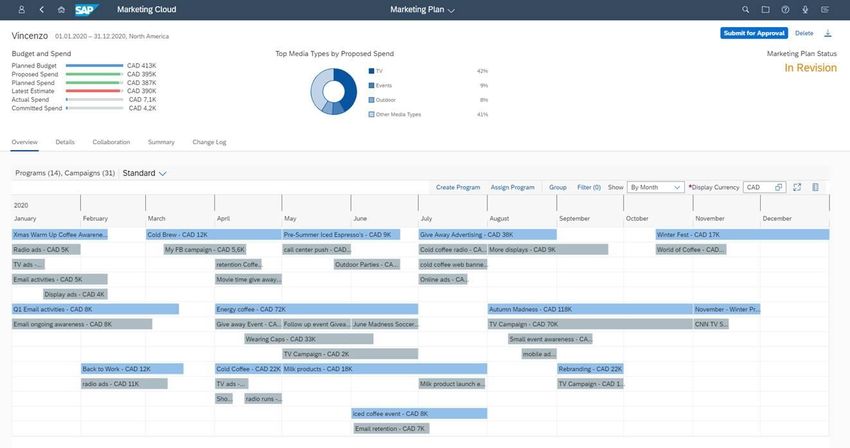
What‘s New in Campaign Automation
Automatic Unsubscribe for Email Using SAP Digital Interconnect
                                                                                                                  Benefits for customers
                                                                                                                  Customers do not need to maintain the
                                                                                                                  unsubscribe email, do not collect the
                                                                                                                  unsubscribe information provided from email
                                                                                                                  client, and do not handle the permissions
                                                                                                                  based on an email unsubscribe.
                                                                                                                  This is supported by SAP Marketing Cloud
                                                                                                                  automatically with release 1905.

                                                                                                                  New capabilities
                                                                                                                  ▪ Defaulting of sender profile with
                                                                                                                    unsubscribe email address when
                                                                                      Activate Communication        activating a communication arrangement.
                                                                                            Arrangement           ▪ Generate unsubscribe email into email
                                                                                         SAP_COM_0040.              header that it can be rendered by email
                                                                                      The Email Address for         client. Note that not all email clients
                                                                                     Unsubscribing is defaulted     support this.
                                                                                        into sender profile.      ▪ The unsubscribe information is collected
                                                                                                                    by SAP Marketing Cloud from SAP Digital
                                                                                                                    Interconnect.
                                                                                                                  ▪ System will update automatically email
                                                                                                                    permissions, opt-out, or unsubscribe.
                                                                     Unsubscribe from your email                  More information
                                                                      header will result into an                  See: Ways to Unsubscribe
                                                                        permission opt-out or
                                                                       newsletter unsubscribe.

© 2018 SAP SE or an SAP affiliate company. All rights reserved. ǀ PUBLIC                                                                                   9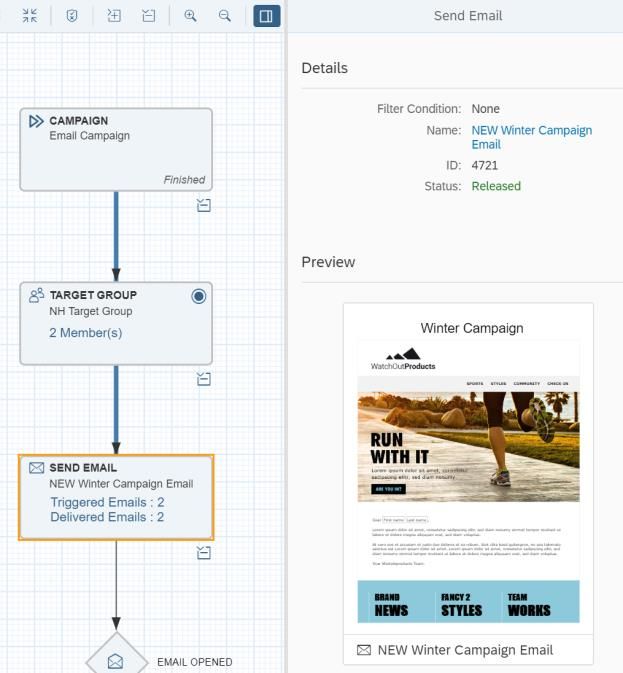
What‘s New in Campaign Automation
Global Campaign Templates
                                                                                                                                            Benefits for customers
                                                                                                                                            As a marketer, I want to provide a much
                                                                                                                                            easier & standard way to create campaigns
                                                                                                                                            with the relevant, most frequent reusable
                                                                               A new option is available where you can generate a           information already filled in the campaign.
                                                                               GLOBAL campaign template from a campaign. This               Also I want to only see the relevant
                                                                             template is then available for all (just like SAP delivered    information and hide the irrelevant
                                                                                                    template)                               information.

                                                                                                                                            New capabilities
                                                                               Note: All the marketing area dependent information           ▪ Ability to create global template that are
                                                                               available in the campaign is cleared when the global           valid across the organization.
                                                                                           template is generated from it.                   ▪ Ability to manage (hide/unhide/configure)
                                                                                                                                              these global templates.
                                                                              For such global templates the‚Global‘ marketing area is
                                                                           assigned as default (this is a delivered marketing area). This
                                                                               can be changed in the BADI „Set Default Values for
                                                                             Campaign Template Header”. Post this change, the Job:
                                                                            “Campaigns: Update Marketing Area for Global Templates”
                                                                                    needs to be executed to change old Global
                                                                                    Templates' marketing area to the new one.
                                                                              Pre-requisite: All users would need access to this
                                                                             marketing area. Hence there might be a need to adjust
                                                                                          the respective user role(s).

© 2018 SAP SE or an SAP affiliate company. All rights reserved. ǀ PUBLIC                                                                                                             10
What‘s New in Campaign Automation
Global Campaign Templates
Benefits for customers
As a marketer, I want to provide a much
easier & standard way to create campaigns
Global templates with the relevant, most frequent reusable
available in the ‚Global information already filled in the campaign.
Template‘ tab in the Also I want to only see the relevant
Create campaign popup. information and hide the irrelevant
information.
New capabilities
▪ Ability to create global template that are
valid across the organization.
Option to Hide/ Edit ▪ Ability to manage (hide/unhide/configure)
Global created template these global templates.
© 2018 SAP SE or an SAP affiliate company. All rights reserved. ǀ PUBLIC 11What‘s New in Campaign Automation
Assign Unreleased TG & Release from Campaign
Benefits for customers
As a marketer, I want to have an enhanced
end-to-end user experience that includes
consistency, availability of relevant
It is possible to assign information and better campaign design
unreleased Target Group experience.
in the campaign
New capabilities
Ability to work with unreleased Target
Group.
Option to Release the
Target Group directly
from campaign
© 2018 SAP SE or an SAP affiliate company. All rights reserved. ǀ PUBLIC 12What‘s New in Campaign Automation
Ability to Revise Released Messages used in Running Campaign
Benefits for customers
As a marketer, I want more flexibility for my
running campaigns.
New capabilities
Ability to Revise Released content used in a
campaign that is running.
Released Message can be
Revised
Email already sent via campaign.
Campaign shows information if the content is being
revised.
Note: The Message Preview shown in the
campaign pertains to the content that was used
while sending.
© 2018 SAP SE or an SAP affiliate company. All rights reserved. ǀ PUBLIC 13BACK
What‘s New in Segments, Campaigns, and Journeys
Marketing Overview Page Snapshot view of the
processes Benefits for customers
▪ Marketing Experts find it very difficult to access
their required information from the various apps
in the Fiori LP and make sense of it, and would
prefer a overview page, which helps the users in
giving a snapshot of their processes and also
Option to customize the cards help them in navigating to respective applications
for in-depth analysis or subsequent action.
using the RTA feature
▪ View of all their processes so that the user can
decide upon the items that need attention at a
glance
New capabilities
▪ At the start of the day, a user would like to get a
quick snapshot of the Campaign Execution,
which includes, knowing if any Campaigns have
run into errors, important KPIs for Campaign
overall
▪ During the day, or any point in time, the user is
involved in discussions with various stakeholders
and budget owners, collaborating with agencies
to ensure proper execution of marketing strategy.
▪ Customize the cards using the RTA feature
Option to manage visibility as
personalization in the overview
page.
© 2018 SAP SE or an SAP affiliate company. All rights reserved. ǀ PUBLIC 14BACK
What‘s New in Segments, Campaigns, and Journeys
Custom Audiences for Digital Ad Campaigns with Adform
Benefits for customers
▪ Marketers can leverage the enriched
profile in Marketing Cloud to create
custom audiences that can be transferred
and further expanded in the Adform Data
Management Platform (DMP).
▪ The audiences within the DMP can be
enriched by 3rd party data available in
Adform.
▪ Marketers can use the Demand-Side
Platform (DSP) in Adform to run display-
ad campaigns on the audience.
New capabilities
▪ SAP Marketing Cloud integration with
Adform Advertiser Edge – boasting an
out-of-the-box integration to a data
management platform (DMP).
▪ Marketer can create a target group in
SAP Marketing Cloud using the mapped
DMP IDs.
▪ The target group can be transferred to
Adform as a custom audience and
leveraged for Display Ad campaigns.
More information
See: Adform Audiences Campaign and
Integration with Adform
© 2018 SAP SE or an SAP affiliate company. All rights reserved. ǀ PUBLIC 15BACK What’s New in Content Studio – Forms & Landing Pages in 1905
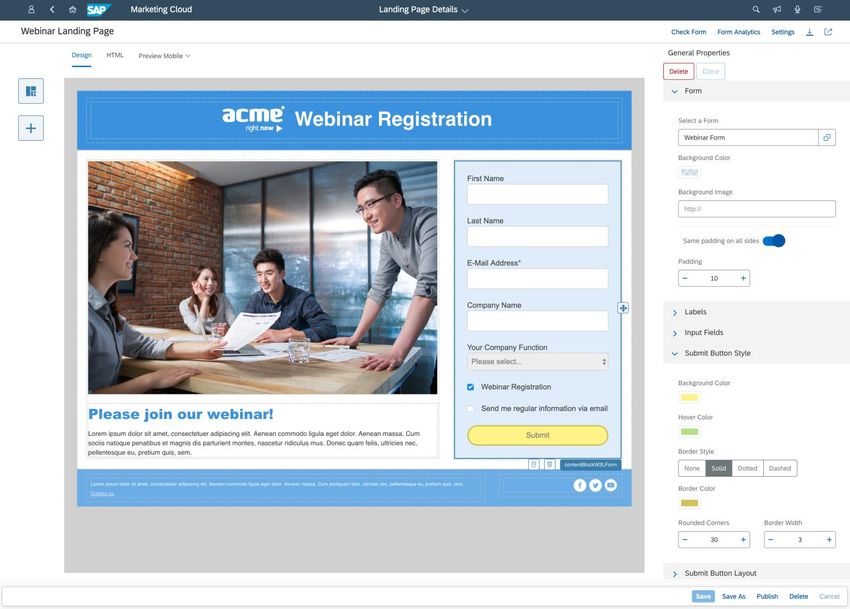
What's New in Content Studio – Forms & Landing Pages
Forms
                                                                           Benefits for customers
                                                                           Define a form to collect contact information
                                                                           and use it in a landing page

                                                                           New capabilities
                                             Form
                                                                           ▪   Old landing pages have been renamed
                                                                               to 'Forms‘
                                                                           ▪   Analytics can be filtered on a specific
                                                                               landing page where the form is
                                                                               embedded

                                Analytics can                              More information
                                 be filtered                               See: Forms and Landing Page and Form
                                                                           Analytics

© 2018 SAP SE or an SAP affiliate company. All rights reserved. ǀ PUBLIC                                             17
What's New in Content Studio – Forms & Landing Pages
New Landing Page
Form Editor Benefits for customers
Embed forms Create landing pages with a new, intuitive,
Layout rows drag and drop editor with responsive
as reusable
blocks WYSIWYG layouts and easy-to-use style
Multi-device
controls.
previews
Form
New capabilities
Analytics
▪ Choose from different responsive layouts
▪ Blocks can be dragged and dropped on
any layout
Additional styling can be applied to
layout columns or rows (colours,
background image, padding, alignment)
and blocks
Embed form ▪ HTML elements for maximum flexibility
with adapted ▪ Embed forms as reusable blocks
styling ▪ Adapt style of form to the landing page
Adapt style of ▪ Access to Form Analytics
form ▪ Multi-device previews
▪ Out-of-the-box publishing of
landing pages
Blocks can be
dragged and More information
dropped on any See: Landing Pages
layout row Publishing
HTML
elements
© 2018 SAP SE or an SAP affiliate company. All rights reserved. ǀ PUBLIC 18What's New in Content Studio – Forms & Landing Pages
New Contact Matching Logic for Submitted Form Data
Benefits for customers
Submitted form data will be processed
irrespective of ambiguous contact data
Start (e.g. if there is more than one contact with
the same set of attributes)
New capabilities
BAdI logic is executed
BAdI for (CUAN_CP_DETERMINE_CONTACT - Find Contact Using
contact finding Yes Form Input) New forms create contact data with the new
active origin SAP_FORM and the data is handled
by the match and merge logic for contacts.
No More information
See: Match and Merge Contacts on Import
Old form contact finding logic will also be applied for newly
Data submitted submitted data. ID Origin LANDING_PAGE is used.
to Form before Yes
1905
No
Merge logic
■ Submitted data is written with new ID Origin SAP_FORM
■ The standard contact matching/merge logic will be
executed on the new data (See document on Data
Management Implementation: Matching Logic >= 1802)
© 2018 SAP SE or an SAP affiliate company. All rights reserved. ǀ PUBLIC 19BACK What's New in Survey Integration in 1905
What‘s New in Survey Integration
Integrating Qualtrics Survey Data with SAP Marketing Cloud
                                                                                                            Benefits for customers
                                                                                                            Qualtrics offers excellent platform to derive
                                                                                                            insights out of Survey data. This could be
                                                                                                            used by customer for retargeting and
                                                                                                            triggering further marketing activities.

                                                                                                            New capabilities
                                                                           (7). Send mail based on Survey   Standard Integration flows would be
                                                                           Response i.e. offer mail
                                                                                                            available to bring Qualtrics survey data into
                                                                                                            SAP Marketing Cloud via SAP Cloud
                                                                                                            Platform Integration.

                                                                                                            More information
                                                                                                            See: Will be available in the Integration
                                                                                                            Guide published on help portal.

                                                   (5). Push
                                                   Survey Data

© 2018 SAP SE or an SAP affiliate company. All rights reserved. ǀ PUBLIC                                                                                21
BACK What’s New in Marketing Events in 1905
What‘s New in Marketing Events
                                                                           Benefits for customers
                                                                           The Marketing Events app provides an
                                                                           overview of marketing events, such as
                                                                           Webinar. It also displays key information of
                                                                           participants and the performance summary
                                                                           of the event.

                                                                           The events are hosted on event provider
                                                                           platforms, for example, ON24 platform and
                                                                           the event information is imported into SAP
                                                                           Marketing Cloud system.

                                                                           More information
                                                                           See: Marketing Events

© 2018 SAP SE or an SAP affiliate company. All rights reserved. ǀ PUBLIC                                             23
What‘s New in Marketing Events List of Marketing Events © 2018 SAP SE or an SAP affiliate company. All rights reserved. ǀ PUBLIC 24
What's New in Marketing Events
Marketing Events – General Details

© 2018 SAP SE or an SAP affiliate company. All rights reserved. ǀ PUBLIC   25
What‘s New in Marketing Events
Marketing Events – Participant Details

© 2018 SAP SE or an SAP affiliate company. All rights reserved. ǀ PUBLIC   26
What‘s New in Marketing Events
Marketing Events – Performance Details

© 2018 SAP SE or an SAP affiliate company. All rights reserved. ǀ PUBLIC   27
BACK

What’s New in
Messages and Email Templates in 1905
What‘s New in Messages and Email Templates
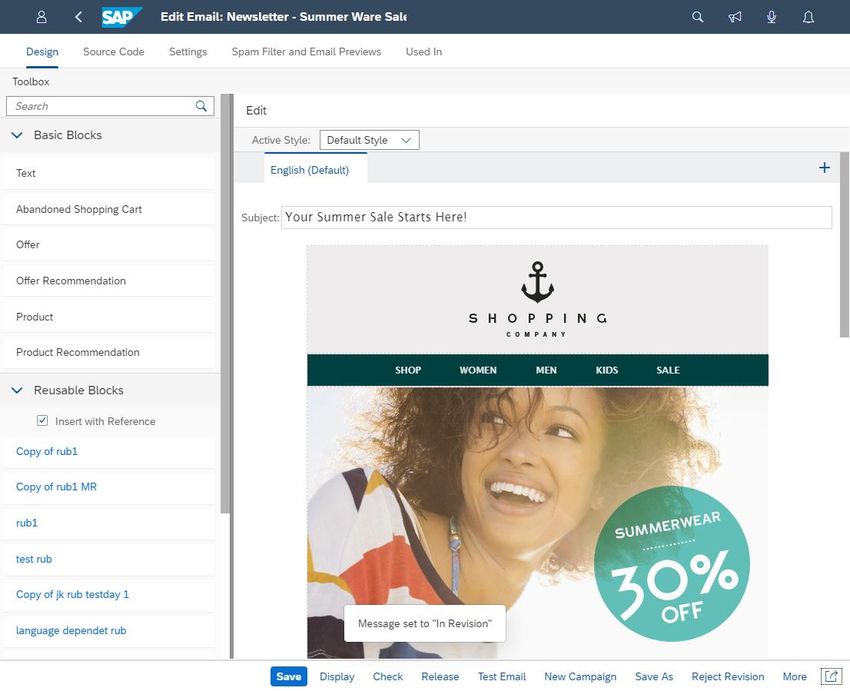
Bulk Actions within the Object Worklist (OWL)
                                                                                                   Benefits for customers
                                                                                                   Customers are able to change the status for
                                                                                                   multiple items at the same time without the need
                                                                                                   to navigate to each item.

                                                                                                   Mass deletion of items which are in status “In
                                                                                                   Preparation” is also possible.

                                                                                                   New capabilities
                                                                                                   You can do bulk actions on many items
                                                                                                   - mass status change
                                                                                                   - mass deletion

                                                                               Buttons for bulk
                                                                           actions become active
                                                                           when a least one item
                                                                                 is selected

                    OWL supports
                     multi-select

© 2018 SAP SE or an SAP affiliate company. All rights reserved. ǀ PUBLIC                                                                            29
What‘s New in Messages and Email Templates
Error Handling within the Object Worklist (OWL)
Benefits for customers
Customers can easily check why a status
change or a deletion was not completed for one
or more items.
Quick navigation to the items which could not
process the bulk actions
New capabilities
Error handling for all objects in Content Studio
Navigation to each item when error message is
Highlighting the item clicked
when user clicks on an
error message
Error Messages appears
for all objects which could
not process the action
© 2018 SAP SE or an SAP affiliate company. All rights reserved. ǀ PUBLIC 30What‘s New in Messages and Email Templates
Edit Released Messages
Benefits for customers
Customers can make corrections in their
marketing messages without the need of
creating new messages.
Creating new marketing messages just for the
sake of corrections left the uncorrected
messages in the customers work list making
the list confusing for the user.
For started campaigns that can only be stopped
but not paused, like for example trigger based
campaigns, customers can now change the
content for the same campaign.
New capabilities
You can edit released messages, even if
- they have been sent with a campaign or
- the e-mail is used in an active confirmation
More information
See: Revise Released Messages
Edit button is
enabled for
released
messages
© 2018 SAP SE or an SAP affiliate company. All rights reserved. ǀ PUBLIC 31What‘s New in Messages and Email Templates
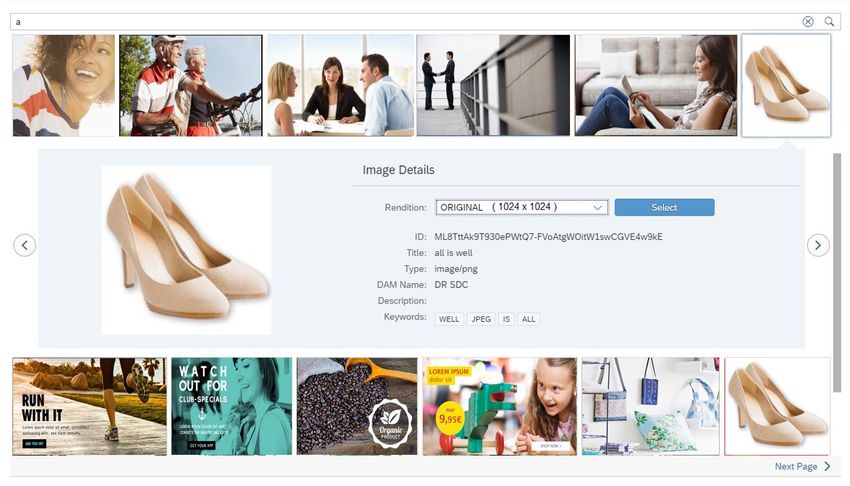
Search Term Proposals in Image Search
Benefits for customers
User experience has been improved:
Users can search for images more easily and
faster than before as typos are avoided that
would hide relevant results.
New capabilities
When you search for an image, possible search
terms are now displayed below the search field
as soon as you enter at least one letter in the
search field.
More information
See: Using Image Links in Emails and Email
Templates
© 2018 SAP SE or an SAP affiliate company. All rights reserved. ǀ PUBLIC 32What‘s New in Messages and Email Templates
Create Campaign From Content Studio
Benefits for customers
End-To-End User experience has been
improved:
Users do not need to navigate to the Campaigns
app anymore.
Users do not need to remember the name or id
of the marketing content they want to assign to
the campaign.
New capabilities
It is now possible to create a campaign from the
Content Studio app. You can create all kinds of
campaigns directly from the Content Studio.
While designing a message, choose New
Campaign to navigate to the Campaign app
where you create the required campaign. The
message is automatically assigned to the
campaign as content.
Create
New Campaign
© 2018 SAP SE or an SAP affiliate company. All rights reserved. ǀ PUBLIC 33BACK What’s New in Lead Nurturing in 1905
What‘s New in Lead Nurturing
Inclusion Criteria
                                                                                                                     New capabilities
                                                                                                                     Checks inbound interactions of users in the previous
                                                                                                                     campaign.
                                                                                                                     Inbound interactions include the following actions by
                                                                                                                     the user:

                                                                                                                     ▪ Clicking on a link in the email received
                                                                                                                     ▪ Opening the email received
                                                                                                                     ▪ Viewing application notifications on mobile

                                                                                                                     More information
                                                                                                                     See: Campaign

                                                                             Use the inclusion criteria option to
                                                                           check the inbound interactions of users
                                                                                  in the previous campaign

© 2018 SAP SE or an SAP affiliate company. All rights reserved. ǀ PUBLIC                                                                                                35
What‘s New in Lead Nurturing
Skip campaigns for a certain duration
After you start a stream, if a campaign
is not required for a particular time
period, you can choose to skip that
campaign
© 2018 SAP SE or an SAP affiliate company. All rights reserved. ǀ PUBLIC 36What‘s New in Lead Nurturing
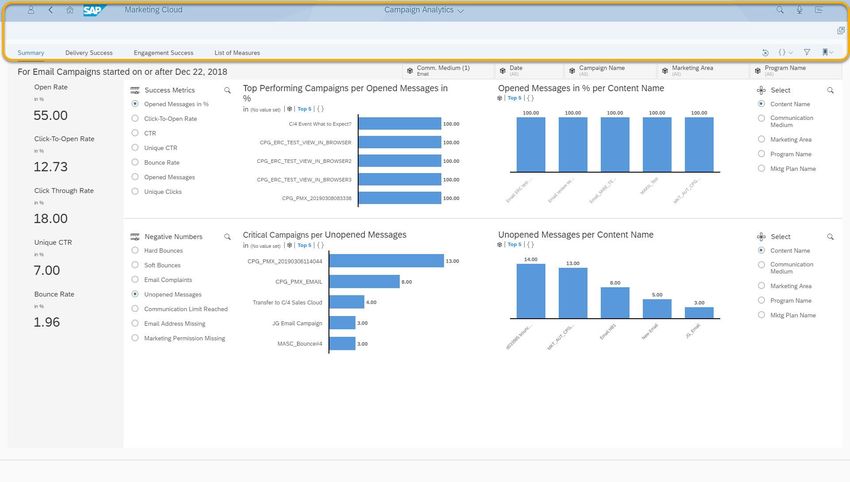
KPI for campaigns
You can now view the performance of
each campaign in the lead nurture
stream.
© 2018 SAP SE or an SAP affiliate company. All rights reserved. ǀ PUBLIC 37What‘s New in Lead Nurturing
Create target group for inactive contacts
Use this feature to identify and group
contacts who have not responded to
campaigns over a specific time
period.
© 2018 SAP SE or an SAP affiliate company. All rights reserved. ǀ PUBLIC 38What‘s New in Lead Nurturing
Copy Lead Nurture Stream with Campaigns
New capabilities
You can create copies of a lead nurture
stream along with associated campaigns
using ‘Copy associated campaigns’ option.
More information
See: Creating a Lead Nurture Stream
You can create copies of
a lead nurture stream by
using Copy option
© 2018 SAP SE or an SAP affiliate company. All rights reserved. ǀ PUBLIC 39BACK What’s New in Account-Based Marketing in 1905
What‘s New in Account-Based Marketing
Spotlighting Accounts - Toggle the ABM-Relevance
                                                                                              Benefits for customers
                                                                                              You, as a marketer want to quickly set or
                                                                                              remove the ABM-Relevance flag for one or
                                                                                              multiple accounts without navigating to the
                                                                                              factsheet each and every time.

                                                                                              New capabilities
                                                                                              On the corporate accounts list, you
                                                                                              can toggle the ABM-Relevance for various
                                                                                              selected corporate accounts in one step.

                                                                                              More information
                                                                                              See: Spotlighting Accounts

                                                                           Trigger toggling
                                                                           ABM-Relevance

          Select relevant
            accounts

© 2018 SAP SE or an SAP affiliate company. All rights reserved. ǀ PUBLIC                                                               41
What‘s New in Account-Based Marketing
Spotlighting Accounts - Leads
Benefits for customers
You, as a marketer, want to see the demand
You can see at a glance all lead- of a specific account and its contacts.
relevant information on contact and
account level: New capabilities
• Various lead stages with the On the Leads tab, you are provided with an
number of contacts
overview of the account's situation regarding
• Number of leads
• Number of leads created by lead readiness and lead creation on contact
status and account level.
More information
See: Leads
You can check the number of contacts and
the lead stage that individual contacts have
reached. So, you get an insight into the
progress regarding lead readiness of the
contacts.
The Leads section provides you with the
number of leads created and displays an
overview of contacts and accounts with their
sales-created or marketing-driven leads.
© 2018 SAP SE or an SAP affiliate company. All rights reserved. ǀ PUBLIC 42What‘s New in Account-Based Marketing
Spotlighting Accounts - Business Insight Tab
Benefits for customers
You, as a marketer, want to get insights into
You are provided with a list of expected revenue based on existing sales
opportunities with extra data from sales
and marketing, per contact of the orders and achieved revenue based on
account, within different timeframes that replicated sales order information.
you can select. The Current Additionally, you want to see meaningful
Status reflects which phase the sales product recommendations based on the
process has already reached. For the buying history of the account.
current account and its contacts, this
data lets you estimate the possibilities
for sales.
New capabilities
On the Business Insight tab, you are
provided with the account's business data
that help you to understand the account's
business behavior.
Information on Business Insight is based on
opportunity data, sales orders, and
recommendations.
You are provided with a list of the latest
More information
purchases of products of the current
account. The buying history is based on See: Business Insight
sales order data which is replicated from
sales to marketing.
Depending on the buying history of the
corporate account, you are provided with a list
of recommendations for products. This will get
you an idea of which further products this
account could be interested in that you could
© 2018 SAP SE or an SAP affiliate company. All rights reserved. ǀ PUBLIC focus on with future marketing measures. 43What‘s New in Account-Based Marketing
Process Flow: Discover Demand Units
Identify Understand Engage Orchestrate Measure
Lane 1 Lane 2 Lane 3 Lane 4 Lane 5
Preparation
Setup Persona
specific Flow incl.
Setup Program & Sales involvement
Get demand unit Campaign Tactics
Access Discover
proposals on
demand units
Marketing
proposals
Overview page
Execute
Campaign
Identify new
demand units and Add selected
update existing Demand Unit
ones Members to
Campaign
Accept or discard
proposal
Select and trigger
Campaign
End
Refine Members of Review Campaign
Demand Unit Performance
(Remove, Add)
© 2018 SAP SE or an SAP affiliate company. All rights reserved. ǀ PUBLIC 44What‘s New in Account-Based Marketing
Overview Page Card for Demand Unit Proposals
Benefits for customers
Lists the Demand Unit Proposals in a Marketing
Overview along with other Marketing Objects,
helping you to identify a new proposal.
New capabilities
▪ Helps you to navigate to the details page of the
A dedicated card to show particular Demand Unit for further actions
Demand Unit in status
▪ Acts as a entry point to the Discover Demand
‘Proposed by System’
Unit, selection on Card header navigates to
Discover Demand Units application
© 2018 SAP SE or an SAP affiliate company. All rights reserved. ǀ PUBLIC 45What‘s New in Account-Based Marketing
Discover Demand Units Visual filters provide an
Many further filter options.
overview. Benefits for customers
See proposals for demand
units by the system and Easily identify new demand units: Groups of
demand units you are already people in accounts showing a common
working on. interest.
Working with demand units: See at a glance
if new people engage or if the engagement
of demand unit members end.
New capabilities
▪ Proposals for demand units are made by
Overview on top 25 demand
units. the system
▪ The Discover Demand Units app
identifies new demand units and
keeps existing demand units up-to-date
More information
See: Discover Demand Units
List of demand units sorted by
interest level. How much interest was there How many different people
from an account? showed interest?
© 2018 SAP SE or an SAP affiliate company. All rights reserved. ǀ PUBLIC 46What‘s New in Account-Based Marketing
Demand Unit - Cross-Functional Group of Contacts within an Account Showing Common Interest
Benefits for customers
Marketers shall use demand units to closely
collaborate with sales on ABM-relevant
accounts to address the need of a cross-
functional group of contacts
Accept or discard
a proposal
New capabilities
Key Information: Account, ▪ A new business object demand unit is
Interest, and time frame for Interest Level: No. of used to build groups of contacts of an
interest level calculation weighted interaction account, which share a common interest
interest of a single contact
▪ The system identifies contacts, which
raise interaction interests of the demand
unit, and proposes them as members
Remove member
▪ The demand unit shows the interest level
from demand unit of the contacts, and its trend, comparing
interactions of a given period e.g. the last
14 days, with the previous period
▪ Marketers shall decide, if proposed
members are relevant for the demand
unit, and add them to, or remove them
from the member list
Add member to
demand unit
More information
See: Demand Units
Trend: change of interest
level, comparing current
© 2018 SAP SE or an SAP affiliate company. All rights reserved. ǀ PUBLIC with last period 47What‘s New in Account-Based Marketing
Demand Unit - Add Members to Marketer-initiated Campaigns
Benefits for customers
Use demand units to trigger marketer-
initiated campaigns, for example to invite
contacts to a webinar or sales event, or to
Add selected engage contacts by a call of the responsible
members to campaign account executive.
New capabilities
Select relevant members
▪ Before demand units can be used in
campaigns, they need to be accepted by
the marketer, and are completed after a
successful sales cycle.
▪ Marketers decide individually for each
contact, e.g. based on their function or
interest level, if a members is relevant for
a marketer-initiated campaign.
▪ Demand units have its own Marketing
Area, e.g. representing a certain business
area in marketing, which can be different
from the marketing area of the campaign.
Remove contact, if warning ▪ If the selected campaign is active, then
influences the selection added contacts will be processed
immediately. If selected campaign is in
Search and select
desired campaign process or paused, then added contacts
will be processed once the campaign is
Confirm selected contacts started.
for campaign execution More information
See: Demand Units
© 2018 SAP SE or an SAP affiliate company. All rights reserved. ǀ PUBLIC 48What‘s New in Account-Based Marketing
New Trigger based campaign template (with New Trigger)
Benefits for customers
Use the trigger based campaign to reach
out to the added members of the Demand
Unit
New Template
New capabilities
• A new trigger in the trigger based
campaign.
• A new template delivered out of the box.
More information
See: Demand Units
New Trigger
© 2018 SAP SE or an SAP affiliate company. All rights reserved. ǀ PUBLIC 49BACK What’s New in B2B Marketing - Lead Management in 1905
What‘s New in B2B Marketing - Lead Management
Spotlighting Account - Leads Tab
                                                                                                                          Benefits for customers
                                                                                                                          You, as a marketer, want to see the demand
                                                                                   You can see at a glance all lead-      of a specific account and its contacts.
                                                                                   relevant information on contact and
                                                                                   account level:
                                                                                   • Various lead stages with the         New capabilities
                                                                                      number of contacts                  On the Leads tab, you are provided with an
                                                                                   • Number of leads                      overview of the account's situation regarding
                                                                                   • Number of leads created by           lead readiness and lead creation on contact
                                                                                      status
                                                                                                                          and account level.

                                                                                                                          More information
                                                                                                                          See: Leads

                                                                           You can check the number of contacts and
                                                                           the lead stage that individual contacts have
                                                                              reached. So, you get an insight into the
                                                                             progress regarding lead readiness of the
                                                                                            contacts.

                                                                             The Leads section provides you with the
                                                                            number of leads created and displays an
                                                                           overview of contacts and accounts with their
                                                                             sales-created or marketing-driven leads.

© 2018 SAP SE or an SAP affiliate company. All rights reserved. ǀ PUBLIC                                                                                            51
BACK What's New in Integration with Presales / Sales in 1905
What’s New in Integration with SAP Customer Relationship Management
Replicating Marketing Attributes
                                                                           New capabilities
                                                                           Initial and Delta Load of SAP CRM Business
                                                                           Marketing Attributes to Marketing Attribute
                                                                           Categories in SAP Marketing Cloud

                                                                           More information
                                                                           See: Configuration of CRM Marketing
                                                                           Attribute Replication Integration Flow

© 2018 SAP SE or an SAP affiliate company. All rights reserved. ǀ PUBLIC                                            53
BACK What’s New in Marketing Planning in 1905
What’s New in Marketing Planning and Performance
Export Marketing Plan Data to PDF
                                                                            Benefits for customers
                                                                            As a marketing planner, you can export the
                                                                            marketing plan data to a PDF.

                                                                            New capabilities
                                                                            A button is now available to trigger the export to
                                                                            PDF.

                                                                            More Information
                                                                            See: Marketing Plans

 © 2018 SAP SE or an SAP affiliate company. All rights reserved. ǀ PUBLIC                                                  55
What’s New in Marketing Planning and Performance
Export Marketing Plan Data to PDF
Benefits for customers
As a marketing planner, you can export the
marketing plan data to a PDF.
New capabilities
The PDF document contains the following:
▪ Header and detail data
▪ Grouping and filtering criteria
▪ Calendar view
▪ Summary charts
Note that this functionality is not available for
Internet Explorer.
More Information
See: Marketing Plans
© 2018 SAP SE or an SAP affiliate company. All rights reserved. ǀ PUBLIC 56What’s New in Marketing Planning and Performance
Team Members in “My Programs” Filter
Benefits for customers
As a marketing manager, you can easily find the
programs relevant for your daily work.
New capabilities
Filter of “My Programs” now includes all
programs you are a team member of
More Information
See: Programs
© 2018 SAP SE or an SAP affiliate company. All rights reserved. ǀ PUBLIC 57What’s New in Marketing Planning and Performance
Quick Campaign Spend App is Replaced by the Campaigns App
Benefits for customers
As a marketing expert, you can plan all spend
on a detailed level in one place within the
campaign.
Announcement
The Quick Campaign Spend app will be
removed with SAP Marketing Cloud 1911. We
recommend that you switch to the Campaigns
app as soon as possible.
More Information
See: Detailed Campaign Spend
© 2018 SAP SE or an SAP affiliate company. All rights reserved. ǀ PUBLIC 58BACK What‘s New in Marketing Analytics in 1905
What‘s New in Markting Analytics
Embedded Mode for SAP Analytics Cloud Stories
                                                                                                           Benefits for customers
                                                                                                           Business User can work more productively in
                                                                                                           the Analytics and Report Gallery List,
                                                                            SAC Stores are opened in       because the SAC stories are opened in-
                                                                            an embedded mode in the
                                                                                                           place.
                                                                           Gallery List App, showing the
                                                                             story pages next to each
                                                                                        other              New capabilities
                                                                                                           After launching a SAC story, the pages of the
                                                                                                           story are shown next to each other in an
                                                                                                           embedded mode.

                                                                                                           The title of the app is filled with the
                                                                                                           information area, where the story is located.

                                                                                                           The user can break out into a separate
                                                                                                           browser window/tab to return to the gallery
                                                                                                           list app.

                                                                                                           The embedded mode for the card view is not
                                                                                                           yet available

© 2018 SAP SE or an SAP affiliate company. All rights reserved. ǀ PUBLIC                                                                              60
What‘s New in Markting Analytics
Enhanced Lead Nurture Performance Story
Benefits for customers
Business User can view the various KPIs of
campaigns.
New capabilities
A new page has been added to the story
which displays,
New page displays the KPIs
▪ KPIs such as opened messages, click-to-
of lead nurture campaigns open rate, sent messages, opened
messages, bounce rate and qualified
leads per campaign
▪ Opened messages per content
▪ Performance of triggered messages
The story can also be accessed by clicking
on the 'View All' button present on the
campaign node properties.
The page can be filtered based on stage
and communication medium
More information
See: Campaign
© 2018 SAP SE or an SAP affiliate company. All rights reserved. ǀ PUBLIC 61BACK What’s New in Configuration in 1905
What‘s New in Configuration
   Origin of Contact IDs configuration changes                                                                                        Benefits for customers
                                                                                                                                      Support of other use cases regarding match
                                Value                                         Code       What It Means                                and merge of Interaction Contacts (ex.:
                                Yes (System ID)                                   This source system ID can be used to         better handling for Landing Pages)
                                                                                         identify an existing potential matching
                                                                                         contact, typically because the ID cannot
                                                                                         be shared by other contacts.                 A clearer terminology and better
                                                                                                                                      understanding of this configuration
                                No (System ID)                                - (dash)   This source system ID cannot be used to
                                                                                         identify an existing potential matching
                                                                                         contact, for example, because the ID can
                                                                                         be shared by multiple contacts. A new        New capabilities
                                                                                         best record will always be created when      "Shareable" setting is renamed to "For
                                                                                         such an ID is imported. A landing page is
                                                                                         a typical example of such an ID.             Identification", its semantics and
                                                                                                                                      corresponding values have been enhanced
                                Restricted, see Help (Additional ID)          X          This additional ID can be partially useful
                                                                                         for identifying contacts, for example, for
                                                                                                                                      More information
                                                                                         shareable IDs together with a contact
                                                                                         name.                                        See: Defining Origins of Contact IDs
                                Yes (Additional ID)                           A          This additional ID is considered relevant
                                                                                         for identifying an existing matching
                                                                                         contact or for triggering a merge.

                                No (Additional ID)                            N          This additional ID cannot be used to
                                                                                         uniquely identify a contact. For example,
                                                                                         a fax number cannot uniquely identify a
                                                                                         contact.

Values for the renamed
field „Sharable“ by „For
      Identification“

   © 2018 SAP SE or an SAP affiliate company. All rights reserved. ǀ PUBLIC                                                                                                   63
What‘s New in Configuration
Manage Marketing Solution Setup Benefits for customers
As a configurator for marketing, you can now
deactivate scenarios that you do not use and
don’t need to set up
New capabilities
A button is now available to open a new view
to activate and deactivate scenarios for the
marketing setup
More Information
See: Set Up Your Marketing Solution
© 2018 SAP SE or an SAP affiliate company. All rights reserved. ǀ PUBLIC 64BACK What’s New in Integration Scenarios in 1905
What‘s New in Integration Scenarios
                                                                                                                                      Benefits for customers
                                                                                                                                      ▪ Integration of additional contact
                                                                                                                                        information
                                                                                                                                      ▪ Usage of event information
                                                  SAP CRM                  Marketing attributes can be replicated from SAP CRM
                                                                           to SAP Marketing Cloud                                     ▪ Ease of integration
   Sales & service data
                                                                                                                                      New capabilities
                                                                                                                                      ▪ Replication of Marketing Attributes
                                                  Facebook and             The integration packages have been renamed to
                                                  Twitter                  “Twitter Integration with SAP Marketing Cloud              ▪ User Synchronisation
                                                                           Sentiment Engagement” and “Facebook Page                   ▪ Integration of Event information
                                                                           Integration with SAP Marketing Cloud Sentiment
    Social media, Web,                                                     Engagement”. A new integration scenario has been           More information
    Commerce, Mobile,                                                      created                                                    See: Implementing Integrations for
            IoT                                   WeChat                   Synchronize WeChat Users application job template to       Business Scenarios in the Integration
                                                                           synchronize WeChat users manually in special               Guide
                                                                           situations. The new way saves system resources by
                                                                           skipping the already synchronized WeChat users
                                                                           during synchronization.
                                                  Marketing Events         Integrate Marketing Event information like participants,
  Market data & events                            Integration              interactions

© 2018 SAP SE or an SAP affiliate company. All rights reserved. ǀ PUBLIC                                                                                              66
Follow all of SAP www.sap.com/contactsap © 2018 SAP SE or an SAP affiliate company. All rights reserved. No part of this publication may be reproduced or transmitted in any form or for any purpose without the express permission of SAP SE or an SAP affiliate company. The information contained herein may be changed without prior notice. Some software products marketed by SAP SE and its distributors contain proprietary software components of other software vendors. National product specifications may vary. These materials are provided by SAP SE or an SAP affiliate company for informational purposes only, without representation or warranty of any kind, and SAP or its affiliated companies shall not be liable for errors or omissions with respect to the materials. The only warranties for SAP or SAP affiliate company products and services are those that are set forth in the express warranty statements accompanying such products and services, if any. Nothing herein should be construed as constituting an additional warranty. In particular, SAP SE or its affiliated companies have no obligation to pursue any course of business outlined in this document or any related presentation, or to develop or release any functionality mentioned therein. This document, or any related presentation, and SAP SE’s or its affiliated companies’ strategy and possible future developments, products, and/or platforms, directions, and functionality are all subject to change and may be changed by SAP SE or its affiliated companies at any time for any reason without notice. The information in this document is not a commitment, promise, or legal obligation to deliver any material, code, or functionality. All forward-looking statements are subject to various risks and uncertainties that could cause actual results to differ materially from expectations. Readers are cautioned not to place undue reliance on these forward-looking statements, and they should not be relied upon in making purchasing decisions. SAP and other SAP products and services mentioned herein as well as their respective logos are trademarks or registered trademarks of SAP SE (or an SAP affiliate company) in Germany and other countries. All other product and service names mentioned are the trademarks of their respective companies. See www.sap.com/corporate-en/legal/copyright/index.epx for additional trademark information and notices.
You can also read


