Application Processing Update - 2016-17 FAFSA and Presented by the Illinois Student Assistance Commission - Illinois ...
←
→
Page content transcription
If your browser does not render page correctly, please read the page content below
2016-17 FAFSA and
Application Processing Update
 Presented by the Illinois Student Assistance Commission

        Adapted from presentations given by the
         U.S. Department of Education at the
            2015 FSA Training Conference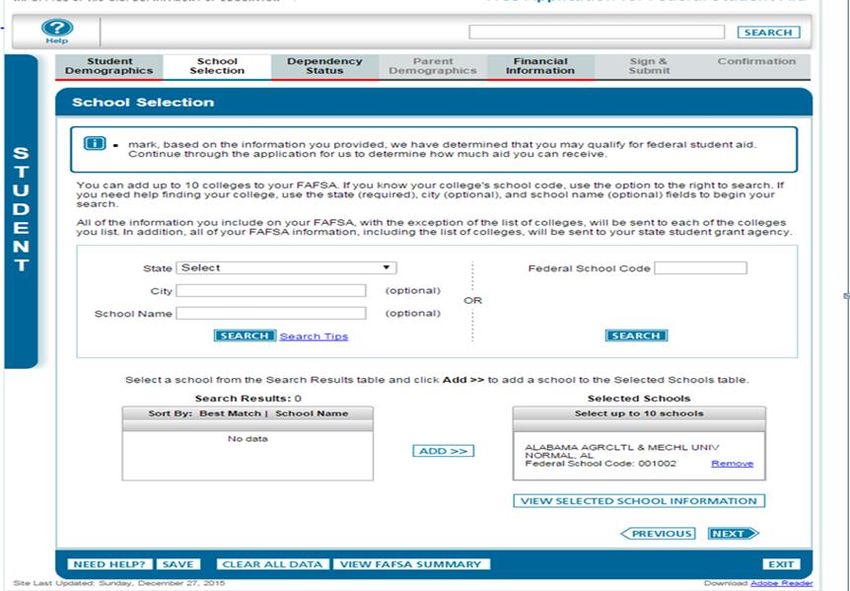
Agenda
    •   2016-17 Application Enhancements
    •   Application Trends
    •   FSA ID
    •   2016-17 Verification
    •   Important Dates
    •   Resources
    •   Planned Application Changes for 2017-18
    •   Contact Information

2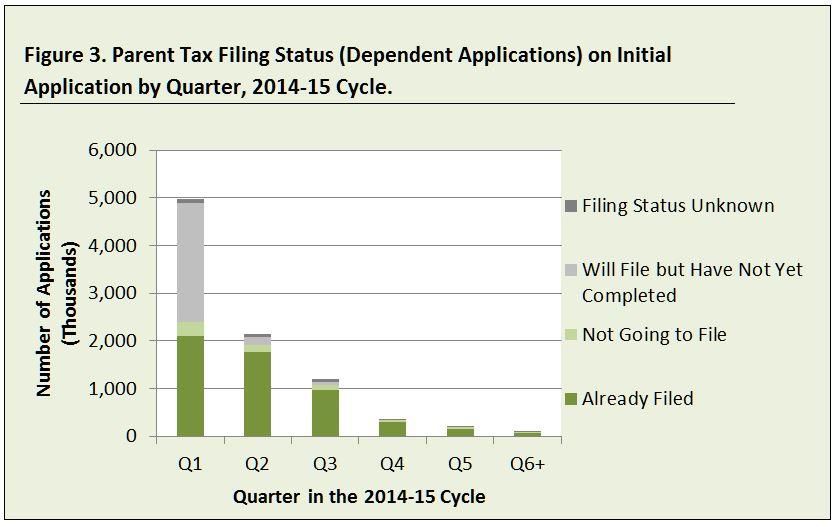
Resources Used for This Presentation
•   FAFSA Application Processing and Verification Update, General
    Session #2
    •   Presented by Maria Marella, Carney McCullough, Ed Pacchetti, and Misty Parkinson
•   The FSA ID – Resources for Assisting Students, Parents and
    Borrowers to Create and Use an FSA ID, Session #44
•   Stand Ready! FAFSA® Early Submission is Coming, Session #49
•   2016-2017 Summary of Changes for the Application Processing
    System
•   2016-2017 FAFSA on the Web Preview Presentation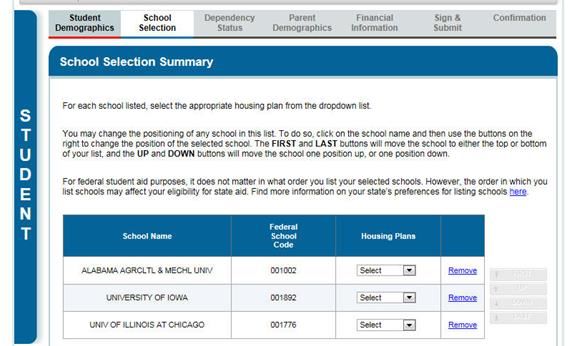
2016-17 Application
      Enhancements

4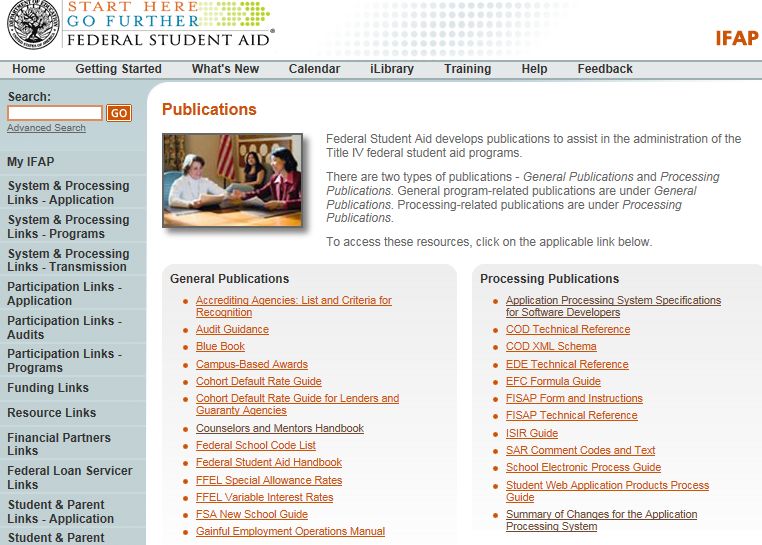
College List
•   Issue:
    FSA has received requests from the public to stop sharing
    the full list of colleges on a student’s FAFSA with every
    school listed.
•   Resolution:
    The ISIR that is sent to colleges will only include the Federal
    School Code and associated housing code for the school to
    whom the ISIR is sent.

     5
“School Selection” Page

6
“School Selection Summary” Page

7
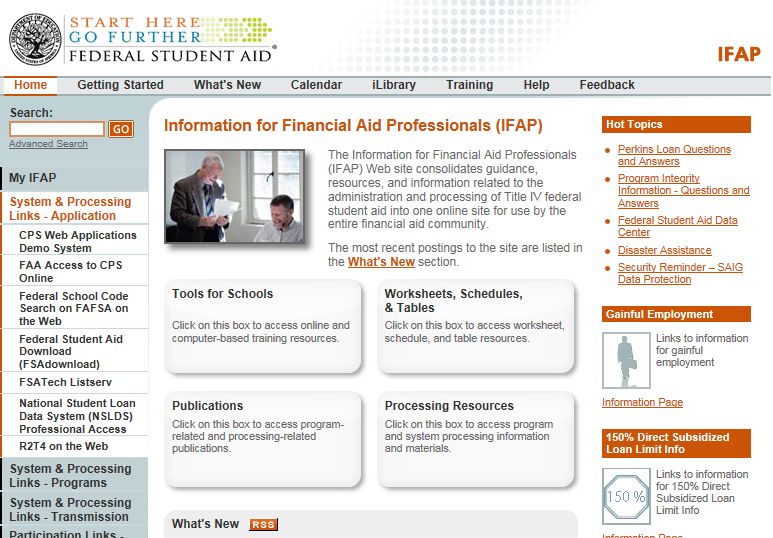
FAA Access Correction Entry Page

8
Change to Marital Status
•   Issue:
    When a student or parent changes his/her marital status on a
    renewal application or correction, the corresponding marital
    status date isn’t always updated.
•   Resolution:
    When a student or parent changes his/her marital status and
    does not change the corresponding date, an edit displays.

     9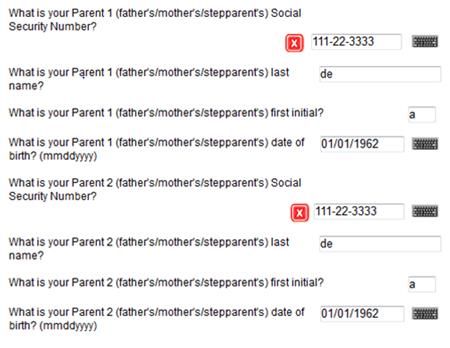
Marital Status Date Edit

10
Edit When Parents Report Same PII
•   Issue:
    When parents are married, or unmarried and living
    together, they sometimes report the same identifiers.
•   Resolution:
    When both parents report the same SSN, an edit displays.

    11
Duplicate Parent SSN Edit 12
Messaging to Explain Rollovers
•   Issue:
    Students and parents who report untaxed portions of IRA
    distributions or pensions on the FAFSA sometimes fail to
    subtract rollover amounts despite FAFSA and IRS help text.
•   Resolution:
    When an amount greater than $0 is reported, a message
    will display.

    13
Rollover Message 14
Guidance For Legal Guardianship
 •    Issue:
      Applicants sometimes answer the legal guardianship
      question incorrectly.
 •    Resolution:
      FAFSA question 55 has been reworded and help text has
      been modified.

 15
Legal Guardianship Messaging 16
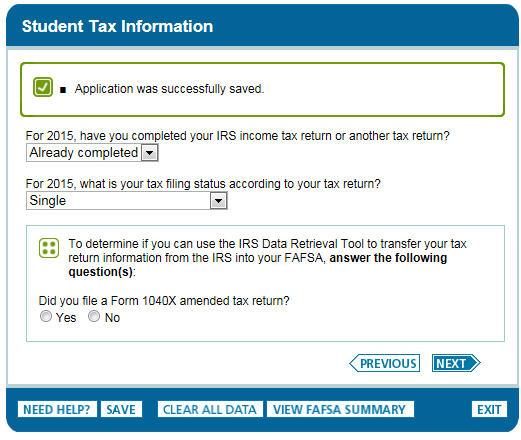
IRS DRT Messaging
 •    Issue:
      Applicants and parents don’t understand the purpose of
      the IRS DRT filtering questions.
 •    Resolution:
      Text that precedes these questions has been enhanced.

 17
IRS DRT Messaging 18
Other 2016-17 FAFSA Changes
•   Increase Automatic Zero EFC threshold to $25,000
•   Change tax line references in taxes paid questions
•   Clarified some FAFSA Questions and Instructions
    •    Adjusted text in FAFSA questions 26, 28, 29, and 30
         •   For example:
             –   Instead of: “When you begin the 2016- 2017 school year, what will be your grade level?”
             –   It will say: “What will your grade level be when you begin the 2016-2017 school year?”

    •    Instructions have been enhanced and clarified for several questions
         •   For example:
             –   In the note defining dislocated workers, the bullet item regarding the spouse of a service member has been updated to
                 read: “is the spouse of an active duty member of the Armed Forces, unemployed or underemployed, and experiencing
                 difficulty in obtaining or upgrading employment”

    19
Other 2016-17 FAFSA Changes
• For a comprehensive
list of changes to
FAFSA text see the
2016-2017 Summary
of Changes for the
Application
Processing System
• At http://ifap.ed.govApplication Trends 24
Applications and Corrections

•   FOTW has increased its share as an application (and correction) data
    source, accounting for 99% of all applications in 2014-15

     25
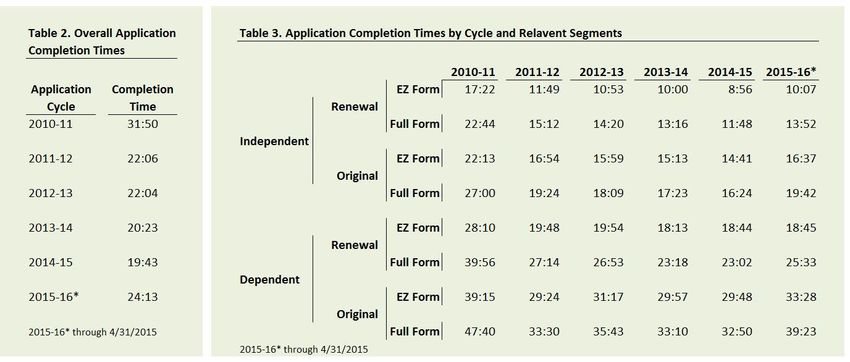
Application Completion Times
• Completion times have been consistently declining until this year
• Even accounting for three primary factors influencing completion times—dependency status,
renewal status, and EZ form eligibility—improvements in the online application have been
decreasing completion times
26IRS Data Retrieval Tool Usage
• Compared to independents, dependent applicants are more likely to apply early in
the cycle. Moreover, parents of these early Q1 applicants are more likely to have
yet to file (2.5 million) than have actually filed (2.1 million) their taxes
• Among parents who have already filed their taxes by the initial application, 1.9
million transferred data using the IRS DRT
27FSA ID (slides from 2015 FSA Conference, Session # 44) 28
FSA ID – AP ‘Exam’
Linking PIN information allows you to immediately transfer
your Social Security match information to your FSA ID
profile and start your renewal FAFSA® immediately
a) TRUE
b) FALSE

29
FSA ID – AP ‘Exam’
Linking PIN information allows you to immediately transfer
your Social Security match information to your FSA ID
profile and start your renewal FAFSA® immediately

                                 TRUE
This is one of the benefits of linking your PIN. And if you link your
  PIN to your FSA ID, you can also use it right away to submit a
      FAFSA correction, access your SAR online, sign a master
promissory note or perform any other task you used your PIN for

30
FSA ID – AP ‘Exam’ You must wait one to three days for your Social Security match before you can submit an original FAFSA® a) TRUE b) FALSE 31
FSA ID – AP ‘Exam’
You must wait one to three days after creating your FSA ID
for your Social Security match before you can submit an
original FAFSA®

                         FALSE
     You can create, sign and submit a new FAFSA®
         immediately after creating an FSA ID

32
FSA ID – AP ‘Exam’ You must verify your e-mail before you can use your FSA ID a) TRUE b) FALSE 33
FSA ID – AP ‘Exam’
You must verify your e-mail before you can use your
FSA ID

                            FALSE
      You are not required to verify your e-mail in order
                     to use your FSA ID

34
FSA ID – AP ‘Exam’
Students need to wait 30 minutes after they reset their
FSA ID password before they can log in
a) True
b) False
c) Students only need to wait 30 minutes, if they use their challenge
questions to reset their password
d) Students only need to wait 30 minutes, if they use their e-mail to
reset their password
35FSA ID – AP ‘Exam’ Once an e-mail address has been verified, it can be used instead of the Username to log in to FSA websites for students, parents or borrowers a) TRUE b) FALSE 36
FSA ID – AP ‘Exam’
Once an e-mail address has been verified, it can be used
instead of the Username to log in to FSA websites for
students, parents or borrowers

                               TRUE
     This is one of the benefits of entering and verifying the
                          e-mail address

37
FSA ID – AP ‘Exam’ A single e-mail address may be associated with only one FSA ID a) TRUE b) FALSE 38
FSA ID – AP ‘Exam’
A single e-mail address may be associated with only one
FSA ID

                            TRUE
     Parents and children cannot share an e-mail address

39
FSA ID – AP ‘Exam’ A student didn’t receive a confirmation e-mail from FSA when they created their account, what should they do next? a) Check their e-mail spam folder b) Refresh their e-mail to make sure it downloaded recent messages c) Logging in to the ‘Edit My FSA ID’ tab and double check that the address was entered correctly d) All of the above 40
FSA ID -- Resources
•   StudentAid.gov/fsaid: Web page for Students, Parents, and Borrowers
    •   Information on FSA ID, answers to FAQs, & easy to find “Create You FSA ID” link
    •   Updates planned to include more details on troubleshooting common issues
•   Blog posts:
    •   Federal Student Aid PIN (1998–2015)
    •   Goodbye, Federal Student Aid PIN. Hello, FSA ID!
    •   The FSA ID: Your First Step to Getting Financial Aid
        for College (coming soon)

         41
FSA ID -- Resources
• Other FAFSA-related Resources (FinancialAidToolkit.ed.gov/resources)
• Infographics:
• The FAFSA Process
• FAFSA Dependency Status
• Who’s My Parent When I Fill Out the FAFSA
• Simple Steps to Transfer Tax Information Info Your FAFSA
• Videos:
• FAFSA Overview
• How to Fill Out the FAFSA (update coming by end of Dec. to reflect FSA ID)
• After the FAFSA: What Happens Next (update coming by end of Dec. to reflect FSA ID)
• How to Create an FSA ID (NEW)
42FSA ID – Accessing Resources
• For Financial Aid Professionals:
• FSA ID resources are available on the Financial Aid Toolkit’s Search
Resources page at FinancialAidToolkit.ed.gov/resources (select “FSA ID” as
the search topic)
• An Electronic Announcement with information on and links to FSA ID
resources will be sent in mid-December
• FSA Conference Presentation
• For Students, Parents, and Borrowers
• Send them to StudentAid.gov/fsaid for info and to create their FSA IDs
• The Financial Aid Toolkit is for professionals and shouldn’t be shared with
students or parents
43FSA ID – General Tips
• Have students access their e-mail account before starting
to create an FSA ID
• Have students create an FSA ID before starting a FAFSA®
• Have list of common questions available for students
• Have list of suggestions for “additions” to usernames
• Middle Initial or Name
• Graduation year
• Last 4 digits of phone number
• House number
44Verification 45
Verification – Changes 2016-17
•    Changes for 2016-17
     •   Same data elements as for 2015-16 award year
     •   Some modifications and clarifications to acceptable documentation
     •   Eliminated Child Support Paid (V3) as a separate verification group
     •   In limited circumstances, an applicant’s Verification Tracking Group
         could change

46
Verification – Acceptable Documentation
• Acceptable Documentation
• Tax filers in a U.S. territory or commonwealth must submit a transcript
of their tax return if it is available for free from the taxing authority
• Nontax filers in the Freely Associated States, a U.S. territory or
commonwealth, or a foreign country must submit a copy of their Wage
and Tax statement for each source of employment income for 2015
and a signed statement identifying all income and taxes for 2015
47Verification – Acceptable Documentation
• Tax filers and Nontax filers—if a copy of the tax return
was not retained and cannot be located by the IRS must
submit:
• Copy of all relevant W-2s
• Signed statement that the individual did not retain a copy of his or
her tax account information, and
• Documentation from the IRS that indicates that the individual’s 2015
tax account information cannot be located
48Verification – Acceptable Documentation
• Victims of IRS tax-related identity theft must submit:
• A Tax Return DataBase View (TRDBV) transcript and
• A signed and dated statement from the tax filers that they are
victims of IRS tax-related identity theft and that the IRS has been
made aware of this
• Tax filers who filed an amended tax return must submit:
• A transcript from the IRS that lists tax account information of the tax
filer and
• A signed copy of the IRS Form 1040X that was filed
49Verification – Acceptable Documentation
• High school completion status
• If the institution successfully verified and documented high school
completion status in a prior award year, it does not have to reverify
this item
• If documentation is not available, alternative documentation may
not include self-certification or a DD Form 214
• Child support paid
• Removed a separation agreement or divorce decree from
acceptable documentation
50Verification – Acceptable Documentation
• Identity/Statement of Educational Purpose
• Clarified that the valid government-issued photo identification used
to verify identity must not have expired
51Verification – Changes 2016-17
• Eliminated Verification Tracking Group V3 (Child Support Paid)
• Applicants may be moved from previously assigned Groups V1,
V4, and V6 to Verification Tracking Group V5
• Applicant is only required to verify the additional items in V5 that were not
previously verified
52Verification – Changes 2016-17
• If the applicant is moved to Verification Tracking Group
V5, no additional disbursements of any Title IV aid may
be made until verification is satisfactorily completed
• If verification is not satisfactorily completed, the student is
liable for the full amount of Title IV aid disbursed
• The institution is not liable
53Verification – 2016-17 Operations
Verification Tracking Selection Criteria:
Verification Verification Tracking Group Verification Selection Criteria
Tracking Flag
V1 Standard Verification Group Record selected because conditions based on statistical
analysis error-prone risk model were met
V2 Reserved for FSA Use Only N/A
V3 Reserved for FSA Use Only N/A
V4 Custom Verification Group Record selected for Identity criteria
V5 Aggregate Verification Group Record selected for combination of Identity criteria, “Standard
Verification” criteria and Total Income/Household Size
V6 Household Resources Verification Group Record selected for Total Income and Household size
54Verification – Tracking Group
• Beginning in 2016-17, a student may go to tracking group
V5 from V1, V4, or V6
• Verification can be set on the application or correction
• Verification Selection Change Flag
• Y: indicates verification was not set and now record is selected for
verification
• C: indicates the verification tracking group has changed
55Communication with Schools
Y V5
Auto Zero EFC Flag XXX Rejected Status Change Flag X Duplicate SSN Flag XXX
EFC Change Flag XXXXXXXX Verification Selection Change Flag C y Address Only Correction X
SNT Flag XXX Special Circumstance Flag X SAR C Change Flag X
2016-2017
999999999
Change in Verification Tracking Group
Selected for Verification
Aggregate Verification
56Transcript Requests – 2016-17 Transcript Requests • Online Get Transcript by Mail, • Automated phone tool (1-800-908-9946) • Paper Form 4506-T or 4506T-EZ generate a paper transcript • (Refer to Appendix A of the 2016-17 Verification Suggested Text) 57
Identity Theft – 2016-17
A tax filer who is unable to obtain an IRS Tax Return
Transcript because of IRS identity theft, calls a special IRS
group at 1-800-908-4490
• Upon verification of identity, the tax filer can obtain a paper
  copy of an alternative document unique to identity theft
  issues (Tax Return Data Base View (TRDBV))
• The TRDBV is an official transcript that can be submitted
  to the school to meet verification requirements
• (Refer to Dear Colleague Letter – GEN-15-11)
 58
Verification – Resources
     •   2016-17
         •   Federal Register Notice, published June 26, 2015, Free
             Application for Federal Student Aid (FAFSA) Information To Be
             Verified for the 2016-17 Award Year

         •   Dear Colleague Letter GEN-15-11, Published June 29, 2015,
             2016-17 Award Year: FAFSA Information to be Verified and
             Acceptable Documentation

59
Verification – Resources
• 2016-17
• 2016-17 Verification Suggested Text and Availability of 2015
IRS Tax Information; Electronic Announcement Published on
November 18, 2015
http://ifap.ed.gov/eannouncements/111815VerificationSuggestedTextAvailabili
ty2015IRSTaxInfo20162017.html
• Note: On December 9, 2015, ED updated this announcement by replacing
APPENDIX B to correct an error on page 3.
• Program Integrity Q & A Website (verification topic)
http://www2.ed.gov/policy/highered/reg/hearulemaking/2009/integrity-qa.html
60Important Dates 61
Important Dates (cont.)
 October 2015
 •        2016-17 EFC Formula Guide (posted 10/6/2015)
 •        2016-17 CPS Test System User Guide (posted 10/16/2015)
 November 2015
      •   2016-17 SAR Comment Codes and Text (posted 11/17/2015)
      •   2016-17 Electronic Data Exchange (EDE) Technical Reference -
          Final (posted 11/17/2015)

 62
Important Dates (cont.)
December 2015
• 2016-17 Summary of Changes for the Application Processing System Guide
• 2016-17 ISIR Guide
• FAFSA on the Web Preview Presentation
• The CPS Test System is made available
• CPS Web Applications Demo System, December 27, 2015
63Important Dates (cont.)
January 2016
• Application launch, January 1, 2016
February 2016
• IRS Data Retrieval Tool, February 7, 2016
64Resources 65
Summary of Changes for the Application Processing System

    •   Table of Contents:
        – Major Changes
        – 2016-17 Application Processing System Schedule
        – Summary of Changes to the 2016-17 paper FAFSA and FAFSA
          on the Web
        – Summary of Changes to FAA Access to CPS Online
        – Summary of Changes to the 2016-17 Central Processing
          System
        – Getting Help
From the Summary of Changes for the Application Processing System • Page 39:
From the Summary of Changes for the Application Processing System

•   Pages
    40 & 41:
From the Summary of Changes for the Application Processing System • Page 42:
Planned Application Changes
             for 2017-18

73
Changes to the FAFSA for 2017-18
• Students will be able to submit a 2017-18 FAFSA as early as October
1, 2016, rather than beginning on January 1, 2017.
• Students and parents will report income information from an earlier
tax year (2015 instead of 2016).
74Changes to the FAFSA for 2017-18
• The colleges listed by applicants on the FAFSA will no
longer be sent to states in the order in which they’re listed
• The pre-printed FAFSA will no longer be available. The PDF
FAFSA will still be available for download across multiple
Federal Student Aid websites
75Timeline for FAFSA Messaging
• In early April 2016, Federal Student Aid will share 2017-18
FAFSA materials with partners
• Updated videos
• Updated publications
• Social Media content (Facebook and Twitter)
• The materials will be available on the Financial Aid Toolkit
website, www.financialaidtoolkit.ed.gov
• Partners can start sharing this information with students and
parents in the Spring of 2016
76Timeline for FAFSA Messaging (cont.)
• In mid-August 2016, Federal Student Aid will launch the
2017-18 FAFSA Integrated Communications Campaign
• Outreach to students and parents via social media, in-person
events, and webinars
• Updated information available on StudentAid.gov
• Partnership with schools, states, etc. to share messaging with
students and parents
77ED Contact Information
Carney McCullough Ed Pacchetti
Director, Policy Development Group Director, Customer Analytics
Office of Postsecondary Education Federal Student Aid
Phone: 202-502-7639 Phone: 202-377-3877
E-mail: Carney.McCullough@ed.gov E-mail: Ed.Pacchetti@ed.gov
Misty Parkinson Maria Marella
Director, Applicant Products and Application Processing Verification
Customer Service Division Operations Team Lead
Federal Student Aid Federal Student Aid
Phone: 202-377-3749 Phone: 312-730-1551
E-mail: Misty.Parkinson@ed.gov E-mail: Maria.Marella@ed.gov
78ISAC Contact Information
• School Services Communication Center
• Exclusively for school inquiries, 8 a.m. – 4:30 p.m. CST
• Phone: 866-247-2172
• Fax: 847-831-8549E-mail: isac.schoolservices@isac.illinois.gov
• Training Services
• Kim Eck, Training Coordinator
• Phone: 217-785-7139
• E-mail: Kimberly.Eck@isac.illinois.govQuestions/Comments?
Thank you for participating today!
80You can also read


