Demystifying Single Touch Payroll - Presented by Pam Chilman, AMC Training Centre MYOB Certified Consultant - Connecting Up
←
→
Page content transcription
If your browser does not render page correctly, please read the page content below

Demystifying Single
Touch Payroll
Presented by Pam Chilman, AMC Training Centre
MYOB Certified Consultant
Pam Chilman                Background
                              • Trainer, Consultant and Business owner over 25 years
AMC Training Centre           • Work with business and NFPs to obtain efficiencies
                              • Deliver face to face courses: MYOB
www.ausmanagement.com.au      • Presents webinars on a range of topics
                              • Set up a range of bookkeeping solutions
                              • Specialises in finding efficiencies

                           Qualifications
                              • Certificate IV – Training and Assessment
                              • Fellow of Institute of Public Accountants & ICB
                              • Registered BAS Agent
                              • Award winning MYOB Certified Consultant
                              • Member of MYOB Partner Advisor Group
                              • Calxa Accredited Partner
                              • Xero Accredited Partner and Training Centre
                              • Reckon Accredited Partner
                              • QuickBooks Online Pro-Advisor
We are all working closely with the ATO...

           www.ato.gov.au/singletouchpayroll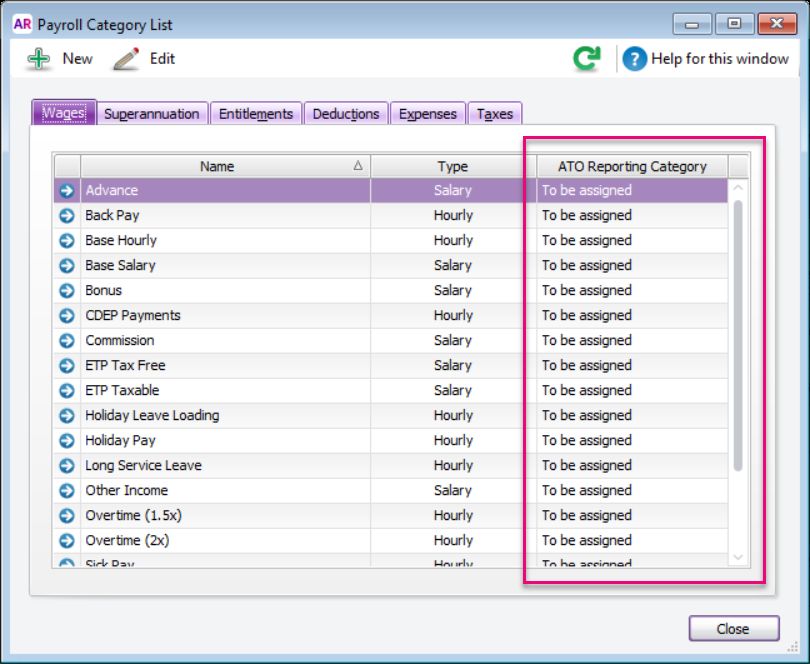
What’s being covered today
STP reporting
STP reporting

1WHAT IS STP REPORTING?
                                                                       3
                                                                       WHAT TO TELL YOUR
                                                                       EMPLOYEES
 Learn about the ATO’s new                                             Educate your employees on what
 streamlined reporting with Single                                     to expect
 Touch Payroll

                                2WHAT IT MEANS FOR
                                 EMPLOYERS
                                                                                                        4
                                                                                                        BEFORE YOU BEGIN WITH STP

                                 See what’s in store so you’re ready                                    STP is all about compliance, so it’s
                                 for the changes                                                        a great time to do a payroll health
                                                                                                        check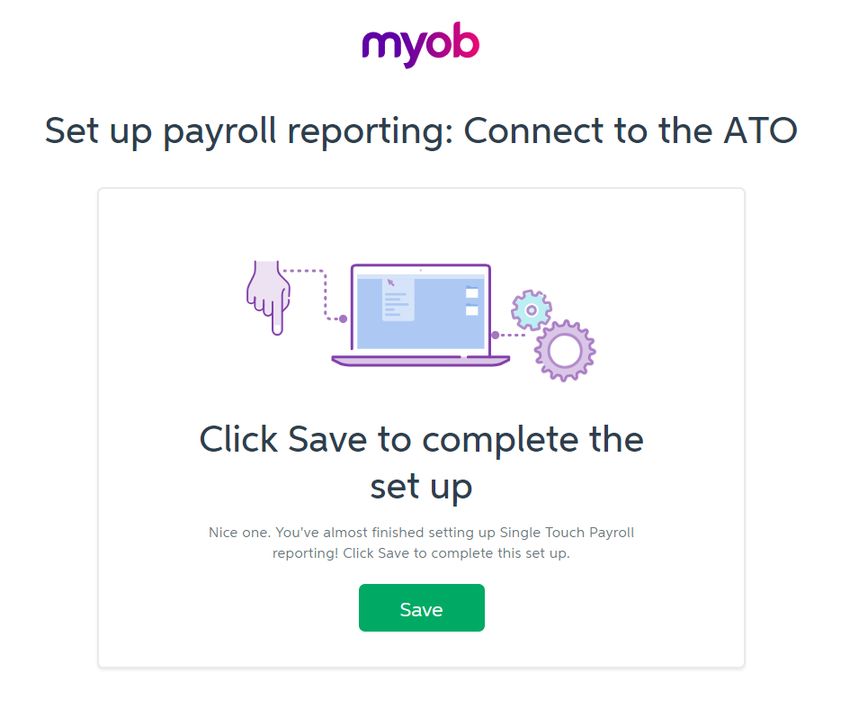
Pay day

                     Do a pay run

                                    Employer

          Employee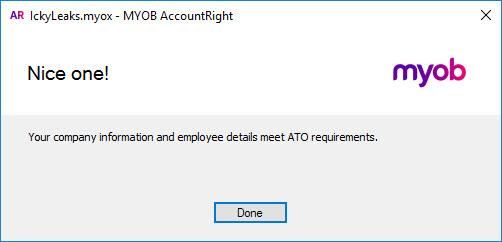
Pay day

                                    Employer

                     Receives pay
                      and payslip

          Employee
Pay day

                     Employer

                                Receives employee’s year
                                to date (YTD)…

                                • Salary and wages
                                • Tax withheld
                                • Super guarantee
                                  liability

          Employee
Pay day

                     Employer

                                Receives employers
                                period to date (PTD)…

                                • Total wages
                                • PAYG Withholding
          Employee
Employee
EmployeeEmployee
EmployeeEmployee
Tax agent EmployeeSTP so far… Already reporting from Start reporting
Reporting mistakes may happen…

    The ATO understand that this is a
   big change for employers and that
it may take time to get everything right.
No longer Same old New
Provide Paying employees and Payroll information is sent to
payment summaries giving pay slips ATO with each pay run
What it means for Fixing errors at EOFY Paying PAYG and Superannuation Guarantee
employers (fix immediately instead) Superannuation on time (SG) liabilities also sent to
the ATO (along with RESC)
Coming later…
Forms to be completed
online for new employeesNo longer Same old New
Receive Use myGov to view their
Get paid (phew!)
payment summaries wages and salary
What to tell your amounts, tax and super
employees information
Receive pay slip each pay
Use myGov to access
their end-of-year payment
summary onlineWhat to tell your
employees
•
•
YTD pay information
Tax withheld from their pay myTax
• Super contributions owed to them
• Pre-fills tax returnCompliance is key!
Check employee details           Check pay calculations
                                                                                    Clean up payroll data
                      are up-to-date                    are correct

It’s time for a
payroll health
check
                                                                     Pay PAYG and Super
                                Review your payroll process
                                                                           on time
Any questions?
1WHAT IS STP REPORTING?
3
WHAT TO TELL YOUR
EMPLOYEES
Learn about the ATO’s new Educate your employees on what
streamlined reporting with Single to expect
Touch Payroll
2WHAT IT MEANS FOR
EMPLOYERS
4
BEFORE YOU BEGIN WITH STP
See what’s in store so you’re ready STP is all about compliance, so it’s
for the changes a great time to do a payroll health
checkLet’s get you ready
Let’s get you ready

1GET YOUR STP ENABLED
 SOFTWARE
                                                                    3
                                                                    ASSIGN ATO CATEGORIES

 Update to the latest version to                                    Your payroll categories must be
 ensure you’re on an STP enabled                                    assigned to an ATO category
 solution

                               2   UPDATE FIELDS
                                                                                                      4
                                                                                                      SET AUTHORITY

                                   Company information and                                            Specify who has got authority to
                                   employee details must meet ATO                                     report this to this ATO
                                   requirements
Get your STP enabled software
Now
Now v2018.4 and later Now
Automatically updates V18
Current version = V2019.2
AccountRight Classic (v19)
will not be updated to include STPAm I covered by MYOB’s deferral?
MYOB AccountEdge All clients
MYOB AccountRight v19 Only clients using the following
specific features:
Multi-Currency
Multi-Location
M-Powered Payments
Negative inventory
Some add-ons
If this is the case, we’ve got you covered
until 31 May 2019!Your data must fit with the ATO
What data needs to be checked?

             Company information                  Employee details

                          You’ll need to tweak your data
                         because of STP specific changes
                  We’ve added a Check Payroll Details tool
                                 Either
                 to tell you exactly    they are
                                     which   fields need fixing
                  missing because they weren’t needed previously
                          or they need to be reformatted
Company Information ▪ Company Name ▪ ABN ▪ Street Address ▪ Suburb/Town/City ▪ State ▪ Postcode
Employee details

▪ First and last name
▪ Address, City, State, Postcode and Country
▪ Tax File Number
▪ Email
▪ Date of birth
▪ Start date
Let’s take a look…

AccountRight   Essentials
Before STP…

you would assign
payroll categories
during end of year
when creating
payment summaries
With STP…

you need to assign
payroll categories in the
Payroll Category List
before your first pay
run
ATO reporting categories

       Gross Payments              Deduction (3 to 6)         Not Reportable             Lump Sum A – Termination

      Allowance (1 to 9)         CDEP Salary or Wages         Gross Payments             Lump Sum A – Redundancy

    Lump Sum Payments A
                                 Exempt Foreign Income     Exempt Foreign Income                Lump Sum B
       (Termination)
    Lump Sum Payments A
                                  Total Tax Withheld *        CDEP Payments                     Lump Sum D
       (Redundancy)

    Lump Sum Payments B         ETP – Taxable component       Allowance - Car                   Lump Sum E

    Lump Sum Payments D         ETP – Tax free component   Allowance – Transport         Superannuation Guarantee

                                                                                         Reportable Employer Super
    Lump Sum Payments E            ETP – Tax Withheld        Allowance – Travel    Reportable Employer Super Contributions
                                                                                                Contributions
                                                                                    Deduction – Union/Professional Assoc
   Work Place Giving (1 to 3)                                Allowance – Meals
                                                                                                   Fees

   Deduction 1 – Union Fees                                 Allowance – Laundry         Deduction – Work Place Giving

   Deduction 2 – Prof Assoc                                  Allowance – Other               PAYG Withholding *
ATO reporting categories
Gross Payments Deduction (3 to 6) Not Reportable Lump Sum A – Termination
Allowance (1 to 9) CDEP Salary or Wages Gross Payments Lump Sum A – Redundancy
Lump Sum Payments A
Exempt Foreign Income Exempt Foreign Income Lump Sum B
(Termination)
Lump Sum Payments A
Total Tax Withheld * CDEP Payments Lump Sum D
(Redundancy)
Lump Sum Payments B ETP – Taxable component Allowance - Car Lump Sum E
Lump Sum Payments D ETP – Tax free component Allowance – Transport Superannuation Guarantee
Reportable Employer Super
Lump Sum Payments E ETP – Tax Withheld Allowance – Travel Reportable Employer Super Contributions
Contributions
Deduction – Union/Professional Assoc
Work Place Giving (1 to 3) Allowance – Meals
Fees
Deduction 1 – Union Fees Allowance – Laundry Deduction – Work Place Giving
Deduction 2 – Prof Assoc Allowance – Other PAYG Withholding *ATO reporting categories
Gross Payments Deduction (3 to 6) Not Reportable Lump Sum A – Termination
Allowance (1 to 9) CDEP Salary or Wages Gross Payments Lump Sum A – Redundancy
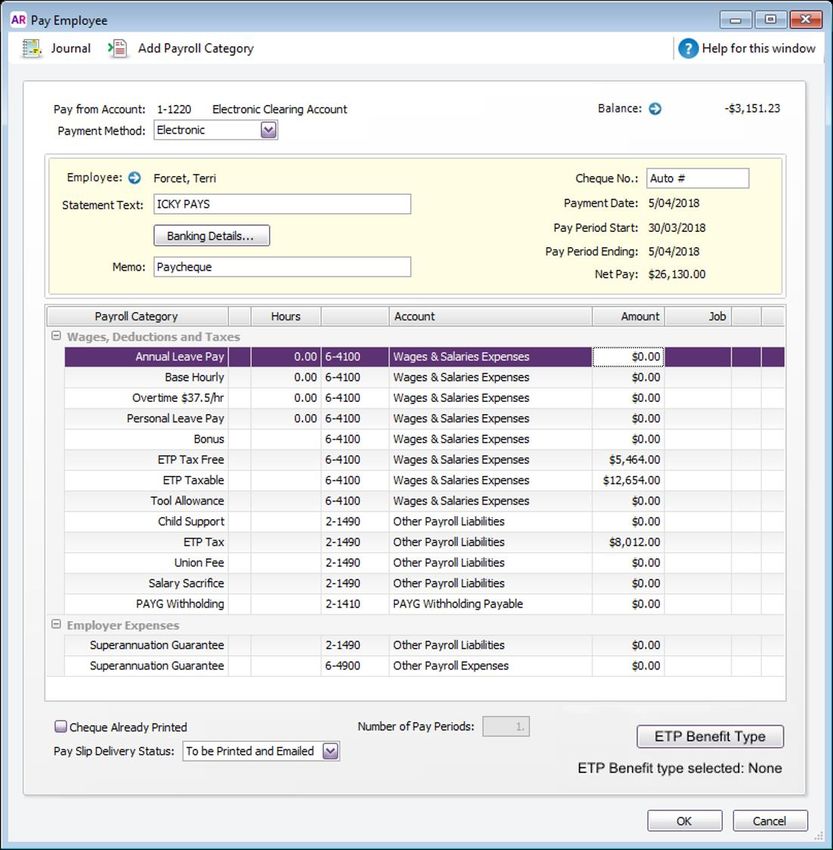
ETP – Taxable component
Lump Sum Payments A
Exempt Foreign Income Exempt Foreign Income Lump Sum B
(Termination)
ETP – Tax free component
Lump Sum Payments A
Total Tax Withheld * CDEP Payments Lump Sum D
(Redundancy)
ETP – Tax Withheld
Lump Sum Payments B ETP – Taxable component Allowance - Car Lump Sum E
Lump Sum Payments D ETP – Tax free component Allowance – Transport Superannuation Guarantee
Reportable Employer Super
Lump Sum Payments E ETP – Tax Withheld Allowance – Travel Reportable Employer Super Contributions
Contributions
Deduction – Union/Professional Assoc
Work Place Giving (1 to 3) Allowance – Meals
Fees
Deduction 1 – Union Fees Allowance – Laundry Deduction – Work Place Giving
Deduction 2 – Prof Assoc Allowance – Other PAYG Withholding *Superannuation Guarantee is also reported
Reportable Employer Super
Contributions Year to date
Above super
9.5%
$3,500
$10,000
9.5%
Superannuation GuaranteeBefore STP With STP
Reducing
Automatic reduction
Gross Payments Salary Sacrifice & Gross Payments
No longer need to do this!
No longer need to do this!
To reduce the Gross Payments amount,
Salary
Salary Sacrifice (deductions)
(deductions) and
and
you would tick
pre-tax Deductions
Super Salary Sacrifice against it when
will automatically reduce
preparing payment summaries
Gross Payments amountLet’s take a look… AccountRight Essentials
Check completed
                    Company details

                    Employee details

                  All payroll categories
                        assigned
Before STP With STP
Set authority Every pay run
Once a year
You’ll need to make this same
When Payment Summaries are lodged
declaration every time payroll is
to the ATO, you need to declare the
processed.
information is true and correct.Australian Business Number (ABN)
Tax/BAS agents will also need their RAN
What you’ll need my.MYOB
Email and password
Contact details
First and last names
Phone number
Email addressNominate MYOB as your software service
Authoriser Contact details Notify ATO
Enter business and contact details.
Nominate those who Nominate MYOB as your software
are authorised service provider using the Unique
Tax/BAS agents will also
to send information. Software ID.
need to complete this step.Call Online
Notify the ATO
1300 85 22 32 Access Manager
If you do not have an AUSkey, Prefer online and you have an AUSkey,
you can provide your software ID login into the
to the ATO over the phone. ATO’s Access ManagerLet’s take a look… AccountRight Essentials
All connected up
ATO online
services                      Access Manager                               Business Portal

                                                          Through Business Portal, businesses can:
             •   Manage access and permissions for
                 online services like Business Portal
                                                          •   Lodge activity statements
                                                          •   Update business registration details
             •   Lets the ATO know that the business is
                                                          •   Send and receive mail through a secure
                 using MYOB to send transactions to and
                                                              mailbox
                 from ATO
                                                          •   View Single Touch Payroll event reports
help.myob.com Single Touch Payroll
Any questions?

1GET YOUR STP ENABLED
 SOFTWARE
                                                                    3
                                                                    ASSIGN ATO CATEGORIES

 Update to the latest version to                                    Your payroll categories must be
 ensure you’re on an STP enabled                                    assigned to an ATO category
 solution

                               2   UPDATE FIELDS
                                                                                                      4
                                                                                                      SET AUTHORITY

                                   Company information and                                            Specify who has got authority to
                                   employee details must meet ATO                                     report this to this ATO
                                   requirements
Up and running
Up and running

1PAY DAY WITH STP
                                                                3
                                                                FIXING MISTAKES

 Complete a pay run with Single                                 Mistakes happen and that’s OK
 Touch Payroll reporting

                                  2
                                  BEHIND THE SCENES
                                                                                                4
                                                                                                KEY THINGS TO KNOW

                                  Understand what’s happening                                   Deal with ETPs, terminations,
                                  with year-to-date reporting                                   reinstating employees and so on
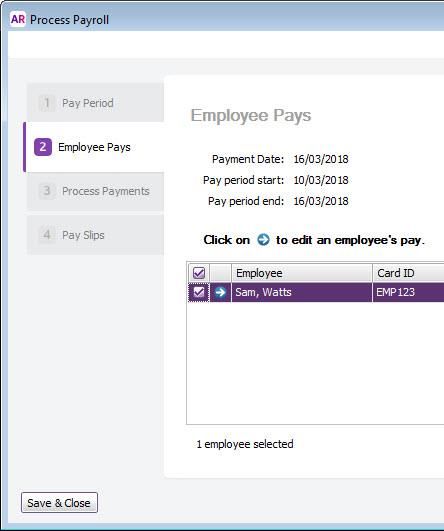
Process payroll
Edit pay period
Pay day
Check and edit amounts for each
employee
Record pays + declaration
Email payslips
Transfer fundsNot ready
to send to
Save & Close
(AccountRight)
atoNot ready
to send to
Save
(MYOB Essentials)
atoYour software is the source of truth!
Employee reporting is year to date only

                                          Year to date

 Gross Wages                   $1000            $1000

Tax Withheld     $200                            $200

       Super   $95                                $95

               Pay week 1
               Gross Wages:      $1000
               Tax Withheld:      $200
               Super:              $95
Employee reporting is year to date only
Year to date
Gross Wages $2000 $2000
Tax Withheld $400 $400
Super $190 $190
Pay week 2
Gross Wages: $1000
Tax Withheld: $200
Super: $95Employee reporting is year to date only
Year to date
Gross Wages $3000 $3000
Tax Withheld $600 $600
Super $285 $285
Pay week 3
Gross Wages: $1000
Tax Withheld: $200
Super: $95Don’t wait until the end of year
to fix mistakes!
Once an error has been identified,
it needs to be corrected and
reported
within 14 days or next pay event
(additional time will be allowed to the next
regular pay run e.g. monthly pay cycle)Fix mistakes as you do today
Year to date
Delete transaction
$2000
Reverse transaction
$400
$0 pay run (e.g. adjust leave hours) $190
Adjustment pay runAdjustment pay runs send YTD values
Year to date
Gross Wages $2000 $2000
Tax Withheld $400 $400
Super $190 $190
Pay week 2
Gross Wages: $1000
Tax Withheld: $200
Super: $95Adjustment pay runs send YTD values
Year to date
Gross Wages $2000 $2000
Tax Withheld $400 $400
Super $190 $190
Adjustment pay run
Gross Wages: -$500
Tax Withheld: -$100
Super: -$48Adjustment pay runs send YTD values
Year to date
Gross Wages $1500 $1500
Tax Withheld $300 $300
Super $142 $142
Adjustment pay run
Gross Wages: -$500
Tax Withheld: -$100
Super: -$48Delete and Reverse do not send YTD values
Year to date
Gross Wages $2000 $2000
Tax Withheld $400 $400
Super $190 $190
DELETE
Pay week 2
Gross Wages: $1000
Tax Withheld: $200
Super: $95Delete and Reverse do not send YTD values
Year to date
Gross Wages $1000 $2000
Tax Withheld $200 $400
Super $95 $190
DELETEDelete and Reverse do not send YTD values
Year to date
Gross Wages $1000 $2000
Tax Withheld $200 $400
Super $95 $190
DELETE
Correct pay run
Gross Wages: $500
Tax Withheld: $100
Super: $47Delete and Reverse do not send YTD values
Year to date
Gross Wages $1500 $1500
Tax Withheld $300 $300
Super $142 $142
DELETE
Correct pay run
Gross Wages: $500
Tax Withheld: $100
Super: $47Delete transaction Year to date
$1500
Over to you… Reverse transaction
Any other $300
scenarios? $0 pay run (e.g. adjust leave hours)
$142
Adjustment pay runYTD amounts sent to ATO …
they can go UP Year to date
$54,750
$87,550
$66,550
Golden Rule $18,200
$14,000
$9,715
$5,200
$5,800
$3,010
they can go DOWN
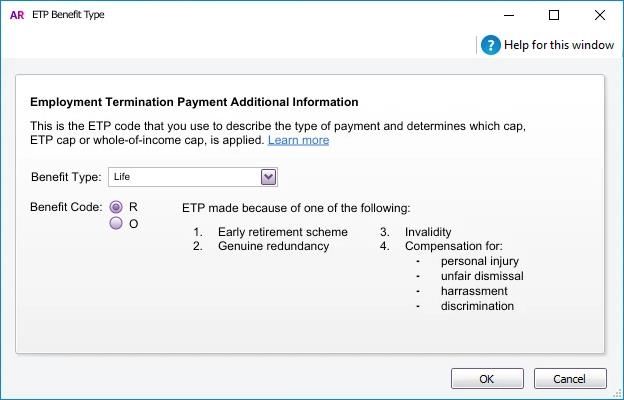
but cannot be NEGATIVEEmployment Termination Payment (ETP) (AccountRight)
Employment
Termination Payment
(ETP)
(MYOB Essentials)
Termination
  Undo termination
Any questions?

1PAY DAY WITH STP
                                                                3
                                                                FIXING MISTAKES

 Complete a pay run with Single                                 Mistakes happen and that’s OK
 Touch Payroll reporting

                                  2
                                  BEHIND THE SCENES
                                                                                                4
                                                                                                KEY THINGS TO KNOW

                                  Understand what’s happening                                   Deal with ETPs, terminations,
                                  with year-to-date reporting                                   reinstating employees and so on
Final declaration and EOFY
Final declaration and EOFY

1FLAGGING FINAL
 DECLARATION
                                                                 3
                                                                 CLOSING OFF THE PAYROLL
                                                                 YEAR
 Let the ATO know when to make                                   How to close your payroll year
 reported amounts available in                                   with Single Touch Payroll reporting
 myGov

                                 2
                                 AMENDMENTS

                                 How to amend declared amounts
1. Record their final 2. Check YTD amounts are
standard pay correct on pay slip
Final declaration
3. Head over to 4. Make the
Online Payroll Reporting Center final declarationPeta Tap
EOFY finalisation Total tax withheld $12,003.00
Undo finalisation Gross payments $62,520.00
RFBT $0.00
Total allowances $0.00Peta Tap
Reportable Fringe
Benefit Amount Total tax withheld $12,003.00
(RFBA) Gross payments $62,520.00
RFBT $0.00
Total allowances $0.00So, what happens next?
Peta Tap
Total tax withheld $12,003.00
Gross payments $62,520.00
RFBT $0.00
Total allowances $0.00Payment Summaries STP reporting
Changing mindset
You only report to the ATO You’ve been reporting
once a year. to the ATO all year.
At year-end, amounts are So there’s no need to wait
checked and fixed before they are before making final declaration
reported to the ATO. to the ATO.Update Close Tax table
Closing off the
payroll year Download & install Close off the Load the new
the compliance update* payroll year* tax tables*
* Automatically done for MYOB Essentials users.Any questions?
1FLAGGING FINAL
DECLARATION
3
CLOSING OFF THE PAYROLL
YEAR
Let the ATO know when to make How to close your payroll year
reported amounts available in with Single Touch Payroll reporting
myGov
2
AMENDMENTS
How to amend declared amountsHow do you now feel about being STP ready?
POLL…Upgrade to latest version OR Get software in place
Next steps?
30% off RRP -
AccountRight or Essentials
(full version)Download AMC Training Centre STP Guide:
www.ausmanagement.com.au
Check employee details Check pay calculations
Clean up payroll data
Next steps? are up-to-date are correct
Payroll Health Check
Pay PAYG and Super
Review your payroll process
on timeAMC Training Centre
www.ausmanagement.com.au
• Support online
Next steps? • Webinars – incl. monthly MYOB NEWS Channel
• Training Courses
• Problem solving
• Setup and conversions
• Integration services
• Review and ongoing support servicesAMC assist clients nationally – online or face to face
Online meeting
Discuss payroll issues
Payroll
Health Review MYOB payroll setup and processes
Check
Provide written report
Meeting – online or face to face
Contact: reception@ausmanagement.com.au
www.ausmanagement.com.au
or 02 6215 9710This is just the beginning…
Next steps…

              MYOB will continue developing STP & keep you updated

              Contact the AMC team for personalized assistance
              reception@ausmanagement.com.au – mention ConnectingUp for special offer

              help.myob.com is just a click away

              community.myob.com to continue the conversation

              ato.gov.au/singletouchpayroll for the official line
Questions?
Keep in touch
pamc@ausmanagement.com.au
www.ausmanagement.com.au
AMC Training Centre 02 6215 9710
Ask about our Payroll Health Check +
Voucher for training sessions
connectingup@myob.comYou can also read


