Embedded Services Product Information - Vector
←
→
Page content transcription
If your browser does not render page correctly, please read the page content below

Embedded Services Product Information
Embedded Services

Table of Contents

1       Product Services by Vector ...................................................................................................................................................... 3

2       Budget Types ............................................................................................................................................................................. 3
2.1     Coaching Budget ....................................................................................................................................................................... 3
2.2     Project Service Budget ............................................................................................................................................................. 4

3       Delivery, Installation and Support........................................................................................................................................... 4
3.1     MICROSAR "Getting Started Package"................................................................................................................................. 4
3.2     MICROSAR “Getting Started CHARGE” ................................................................................................................................ 4
3.2.1   MICROSAR “Getting Started CHARGE Add-on PNC” .......................................................................................................... 5
3.3     CANbedded "Getting Started Package" ................................................................................................................................ 5
3.4     Flash Bootloader “Getting Started Package”........................................................................................................................ 5

4       Support ...................................................................................................................................................................................... 5
4.1     Self-Service Support................................................................................................................................................................. 5
4.2     Helpdesk Support ...................................................................................................................................................................... 6

5       Coaching .................................................................................................................................................................................... 6
5.1     Coaching Packages ................................................................................................................................................................... 6
5.2     Project Management ................................................................................................................................................................ 7

6       Support & Coaching - The Differences at a Glance ............................................................................................................... 8

7       Trainings..................................................................................................................................................................................... 9
7.1     AUTOSAR Training for the Classic/Adaptive Platform ........................................................................................................ 9
7.2     CANbedded Training ................................................................................................................................................................. 9
7.3     Flash Bootloader Training ........................................................................................................................................................ 9
7.4     Vector Certified Embedded Professional (CEP) .................................................................................................................... 9
7.4.1   Prerequisite.............................................................................................................................................................................. 10
7.4.2   Phases of the Vector Certified Embedded Professional program ..................................................................................... 10
7.4.3   Business Model ........................................................................................................................................................................ 11

8       Technical Consulting ............................................................................................................................................................... 11

9       Extended Integration Package (EIP) ..................................................................................................................................... 11

10      Review of your Configuration ................................................................................................................................................ 11

V2.8.1, 07/2021
Please consider your responsibility towards the environment before printing this document.

                                                                                                                                                                                                      2
Embedded Services
1 Product Services by Vector
For over 30 years, Vector has been creating software components as well as professional tools, and has been successfully
supporting customers worldwide in developing ECU software, ECU hardware and complete networking ECUs. Our experts
bring success to your project with individually tailored product services.
Figure 1: Product services at Vector
With our product services, we support you in every phase of your ECU development. Starting after delivery of your Vector
software with Integration Services like GettingStarted or Extended Integration Packages (EIP) or with Assistance and
Knowhow by support, coaching and technical consulting.
Your advantages:
> Competence - Benefit from our solid background of many years of professional experience
> Precision - Our engineers understand your project and focus on your individual challenges
> Tempo - Professional assistance without a long customer learning period
> Knowledge transfer - Sustained build-up of know-how for your employees
2 Budget Types
Vector offers two budget types for different services. These budgets will be offered as “Service Points” which can be used for
requesting services for your project.
2.1 Coaching Budget
This budget can be used for Coaching services as described in chapter 5 of this Product Information.
3Embedded Services
Note
The purchase of coaching services is now only possible via Service Points.
2.2 Project Service Budget
This budget can be used for the following services:
> Getting Started Packages – see Chapter 3 Delivery
> Coaching – see Chapter 5 Coaching
> Customer exclusive Remote Training for AUTOSAR and specific solutions – see Chapter 7.1 AUTOSAR Training for the
Classic/Adaptive Platform
> Customer exclusive E-Learning/ Blended Learning Training for AUTOSAR and specific solutions – see Chapter 7.1
AUTOSAR Training for the Classic/Adaptive Platform
Academy trainings and onsite trainings are not included.
3 Delivery, Installation and Support
Vector will deliver a “ready to use” software product and offers additional services to help customers speeding up setup and
initial configuration as well
3.1 MICROSAR "Getting Started Package"
As part of the package, we support you to start up the MICROSAR basic software (BSW) and RTE on your ECU hardware
using the related configuration tools and a sample application. This enables a quickly runnable system, letting you focus on
your application. This service is usually performed in a remote session but can also be done at your business site at a fixed price.
The main targets of this package are:
> Communication basically works on all busses
> Diagnostics responds to a basic service request
> Non-volatile memory is accessible
Afterwards, our helpdesk teams are available to assist you in case of questions about how to use the MICROSAR solution.
3.2 MICROSAR “Getting Started CHARGE”
Within the scope of this fix price service package, we will take the MICROSAR.CHARGE software into operation on your ECU
hardware using the related configuration tools and a sample application. This quickly gives you a runnable system, letting you
focus on your application. The project setup is completely performed at Vector site, whereas the handover workshop can either
take place via remote session, at Vector site or at your business site.
The main targets of this package are:
> The PHY chip is able to download firmware from host controller
> A link can be established after SLAC has completed
> V2G communication completes a full session
A detailled offer attachment will describe the prerequisites that have to be fulfilled prior to the start of this service package,
in order to ensure successful completion in time.
Afterwards, our helpdesk teams are available to assist you in case of questions about how to use the MICROSAR.CHARGE
solution.
4Embedded Services
3.2.1 MICROSAR “Getting Started CHARGE Add-on PnC”
The goal of this integration is to establish a secured and encrypted V2G communication according to ISO15118, using TLS and
“Plug & Charge” (PnC). The project setup is completely performed at Vector site, whereas the handover workshop can either
take place via remote session, at Vector site or at your business site.
Please note that this training requires basic knowledge from the training course "MICROSAR Getting Started CHARGE".
Booking of this item is possible:
> in combination with MICROSAR “Getting Started CHARGE” or
> as standalone training, if a V2G communication according to ISO15118, using "External Identification Means" (EIM), is
already in place.
Please note that this integration requires also a Vector CryptoSw Driver or vHSM.
Afterwards, our helpdesk teams are available to assist you in case of questions about how to use the MICROSAR.CHARGE
solution.
3.3 CANbedded "Getting Started Package"
Here, we work together with you to start up the CANbedded basic software on your ECU hardware based on your valid input
data, using the related configuration tools. This quickly gives you a runnable system, letting you afterwards focus on your
application. This service is typically performed in a remote session but can also be done at your business site at a fixed price.
The main targets of this package are:
> Communication basically works on the channels described in your communication database (dbc/ldf file)
> Diagnostics responds to a basic service request like a TesterPresent or a change to extended session
Afterwards, our helpdesk teams are available to assist you in case of questions about how to use the CANbedded solution.
3.4 Flash Bootloader “Getting Started Package”
As part of the package, we work together with you to start up the Flash Bootloader (FBL) on your ECU hardware using the
related configuration tools and a sample application to ensure that you will quickly get a reprogrammable system. This service
is typically performed in a remote session but can also be done at your business site at a fixed price.
The main targets of this package are:
> Download of example application (DemoAppl or StartApplication, included in the FBL delivery) is possible via the defined
bus system.
> Return from download with positive response from application software
Afterwards, our helpdesk teams are available to assist you in case of questions about how to use the Vector Flash
Bootloader.
4 Support
The product support, regardless whether it is self-service or helpdesk support, is included into the SIP Maintenance, the
prototype package and the evaluation package.
The Vector embedded poduct support consist of two parts:
4.1 Self-Service Support
The self-service support is the easiest and fastest support we provide. You will get access to our Vector portal and you will find
steadily growing information in our knowledge database, containing engineering videos, descriptions and frequently asked
questions (FAQ). Here you get questions answered like:
> How do I create a support request package?
> How do I integrate End-To-End Protection in MICROSAR
> How do I install and update a Vector basic software package?
5Embedded Services
> How do I copy configuration data from one DaVinci project to another
4.2 Helpdesk Support
The helpdesk support bases on our ticket system. You can ask your questions via the Vector portal or e-mail. Your request will
be checked by a support dispatcher and assigned to an appropriate support engineer. This support engineer is mainly located
at your local Vector subsidiary. Due to the worldwide availability of Vector subsidiaries we can also handle tickets in other
subsidiaries and by that we reach a very high availability.
To ensure a fast reaction time for you in helpdesk we hand over requests that require longer lasting assistance to coaching.
5 Coaching
Note
The purchase of coaching services is now only possible via Service Points.
In coaching, we accompany your ECU development as long as you wish from first Vector software delivery to SOP. In coaching
we'll focus on handling typical situations that might happen in ECU development and handle them together with you and your
team. Examples for common coaching activities are:
> Setting up your Vector software package on your hardware based on your requirement
> Integration and configuration of OEM-specific software components
> Individual configuration of the operating system or other basic software clusters
> ECU and mode management for power up and shut down
> Optimization of RAM, ROM consumption and runtime of your basic software system
> Integration of diagnostics, fault memory and memory management in your ECU software
> Linking of the applications to watchdog management
> Integration of further standard software from the OEM
If you ordered coaching you will request a service via our helpdesk system, a coach will contact you afterwards to plan the
realization.
5.1 Coaching Packages
All coaching actions we offer as coaching packages. You can trigger them by a request to our helpdesk support team or your
Vector contact. The following packages are offered and the content will be adjusted to your specific needs:
> Setup Package
A package, including all tasks to get the Vector basic software basically runnining on your system.
> Update Package
A package to assist you especially in updating the input data like ECU-extracts, diagnostic descriptions, etc.
> Configuration Package
Configuration of specific clusters like communication, memory, diagnostics, watchdog, XCP, etc.
> Optimization Package
Analyzing your configuration to improve the memory consumption and/or the runtime behaviour
> Troubleshooting Package
In case of serious troubles with Vector basic software, our experts will assist you in debugging to find a solution.
> Walkthrough Package
Checking your specific configuration of the Vector basic software and give you feedback. The walkthrough is an informal
configuration check that cannot replace an official review demanded by an OEM.
6Embedded Services
In addition to the telephone and e-mail hotline, our coaching also offers you on-site support by arrangement. Based on the
agreed specific objectives, we provide individual assistance with your project.
In order to optimally synchronize our supplies and services with your ECU development, we also offer you a customized project
management within the scope of coaching. The scope can range from selective coordination to regular management meetings
in order to assist in appointments with the respective OEM.
5.2 Project Management
A project manager at vector can be considered as your single point of contact in all technical and management concerns during
your project development cycle. The main activity of the project manager is to “supervise and control” the project in sense of
identifying and preventing impediments that may slow down the development process and delay your releases. The project
manager represents your escalation path and can support you to (re)act in order to keep the project on track. The supervision
and control activities are part of your SIP and will not be charged extra. Following activities are categorizing the tasks
performed:
Planning of project activities
> Creating a schedule at the beginning of the project according to the ordered software products
Control of project activities
> Handling change requests (delivery change request, change requests which may affect the ECU project e.g. change of
derivative, platform, compiler etc.)
> Handling of service and sales requests (coaching budget, feature requests, trainings, workshops, etc.)
> Managing tasks and activities in a so called open item list (OIL); actions in such an OIL may also be performed by
customer (providing questionnaires, µC data sheets, wiring schematics, etc.)
> Adapting project plan according to the needs during the development process and in case new activities relate to the
project are added or submitted
> Handling escalation requests
Monitoring of project activities
> Monitoring the status of the tasks and activities managed in the OIL (HW/SW change requests, feature requests,
quickfix/warranty deliveries, etc.).
> Monitoring the project related technical support requests in our support helpdesk to detect impediments to the project
Project management activities are usually performed in the background on Vector side and are communicated to the customer.
In order to synchronize even closer with the project manager at Vector you can optionally request a “regular meeting” and/or
a “regular project status report”. Both instruments can be ordered as additional services and will be charged to the coaching
budget accordingly.
Regular meetings
> Establishing a regular meeting in order to discuss open questions in detail and derive new project activities; the
frequency is depending on the project requirements and can be defined during the kick-off meeting
Project status reports
> Providing project status reports including management relevant information (OIL status, quickfix/ warranty delivery
status, service tickets, etc.); the frequency is agreed during the kick-off meeting
7Embedded Services
6 Support & Coaching - The Differences at a Glance
The table below gives an overview of the differences between support and coaching.
Support (Self-Service + Helpdesk) Coaching
E-mail Support Yes, unknown contact person (Support Engineer) Yes, dedicated contact person (a Coach)
support@.vector.com Firstname.lastname@vector.com
Characteristics Main focus: Standard Q+A Main focus: Performing
(+ incident management)
> Pre-defined work packages
> Setup Package
> Update Package
> Configuration Package
> Optimization Package
> Troubleshooting Package
> Walkthrough Package
> Customized work packages
> Workshops
… to address complicated and complex (long
running) topics together with you, know-how
transfer, consulting.
Request type: event-driven request, to address Request type: must be planned, mid-term resp.
simple (quick to solve) topics long term activities (e.g. work packages)
Project details: out of scope, shall be independent Project details: known
of other tickets
Contact Impersonal via Helpdesk-System Personal
i.e. by E-Mail or Vector portal via phone or E-Mail
On-Site support No Included if necessary
Self service Yes Yes
Knowledge database, engineering videos, FAQs Coaching is an optional support extension
Limit Certain limit per ticket (e.g. few hours only) Limited to the pre-defined Coaching package
based on existing budget
Criteria Project details: out of scope Project details: known
Project Manager and/or Coach are familiar with
Shall be independent of other tickets
project context
Examples Installation support Setting up the system i.e. bring the Vector
software to your system
Configuration support
Updating the Vector software or the ECU-Extract
Optimization of RAM, ROM, Runtime
Effort Reporting No Yes
Business Model Covered by the product maintenance or by an Available as additional service
explicit support package (as hourly based budget)
8Embedded Services
7 Trainings
Vector offers different types of training:
> E-Learning
The E-Learning training is an online training, which can optionally accompanied by interaction with a trainer via one -or
multiple face-2-face or remote sessions. Depending on the type of training the content is provided as a mixture between
videos and interactive contents or as videos only. Students learn on their own pace – depending on their personal
schedule – using the Vector E-Learning Platform, which provides all learning contents.
> Remote Training – Content of Classroom Training in remote sessions
All contents of the classroom trainings are made available as remote training. Trainer and participants meet in a web
conference and will perform the training in a “virtual classroom”. Exercises will be performed on our virtual training
environment and supported directly on site by the trainer. This form of training is available for all offered Vector
embedded training courses.
> Classroom Training – Presence Training
The classroom training is a presence training. The theoretical and practical parts are accompanied and supported
directly on site by the trainer. This form of training is available for all offered Vector embedded training courses.
7.1 AUTOSAR Training for the Classic/Adaptive Platform
Vector AUTOSAR training courses provide you with an ideal entry into ECU development with AUTOSAR. Intensive exercises
ensure its relevance to practice.
> For more information about the AUTOSAR Classic Platform refer to vector-academy.com/autosar-classic. There you
can find our trainings for AUTOSAR basics, usage of AUTOSAR 4 in practice, OEM related trainings and special topics
such as Safety, Cybersecurity, OTA, Ethernet, Memory or Multi-core.
> For more information about the AUTOSAR Adaptive Platform refer to vector-academy.com/autosar-adaptive.
There you can find our trainings for AUTOSAR adaptive Platform basics as well as the usage of AUTOSAR Adaptive in
practice.
7.2 CANbedded Training
In the Vector CANbedded training you will get an introduction to the characteristics and interaction of the CANbedded
software components. The training also includes the specific peculiarities for the different OEMs.
If you are interested in our CANbedded Training please contact us at embedded@vector.com.
7.3 Flash Bootloader Training
The Vector flash bootloader training concerns the important aspects of flash programming in the vehicle. Based on selected
examples you learn the basics and functionalities of the flash bootloader. You get to know how to integrate the bootloader
into an existing application in practice.
If you are interested in our Flash Bootloader Training please contact us at embedded@vector.com.
7.4 Vector Certified Embedded Professional (CEP)
With the Vector Certified Embedded Professional (CEP) program, you can be trained as an expert in Vector basic software
and thus maintain close contact with our development and product management departments.
Your advantages as a Certified Embedded Professional are:
> Combining the domain-specific know-how of your employees with the expertise for Vector MICROSAR software
> Availability of Vector special know-how at your location
> Continuous expansion of your knowledge regarding the latest topics through special workshops for Certified Embedded
Professionals.
9Embedded Services
7.4.1 Prerequisite
The prerequisite for the Vector Certified Embedded Professional program is a solid AUTOSAR basic knowledge. You can build
this knowledge by participating the Vector MICROSAR Basic Training. Of course, your experience, which you have already
gained with AUTOSAR projects, also matters.
7.4.2 Phases of the Vector Certified Embedded Professional program
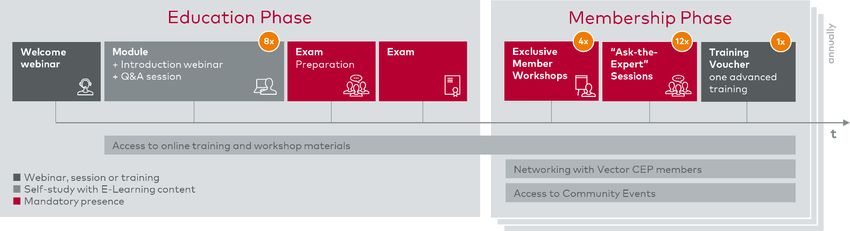
The Vector Certified Embedded Professional program distinguishes between an education- and membership phase.
Figure 2: Phases of the Vector Certified Embedded Professional program
7.4.2.1 Education Phase
The education phase will start after a welcome webinar that provides you with the necessary information about the E-Learning
platform and the modalities.
During the training phase you will go through a special program of online learning modules and attendance phases, which will
end in exam preparation and certification. The training phase lasts about 15 weeks.
The modules give you access to our modern E-Learning platform, which enables the transfer of knowledge through various
videos, explanations and helpful animations. Complete your knowledge build-up with expert tips and best practice sequences
and check your learning status at any time with numerous self-check questions. In addition to the E-Learning platform, the
Vector Certified Embedded Professional program offers a real working environment. Practical applications can be simulated
directly in a virtual environment via included SIP and Vector DaVinci toolsuite.
This exam preparation phase takes place in a classroom event at Vector with further expert topics, a summary and a further
Ask-the-Expert session. The certificate examination then takes place. After successful completion of this examination, you
have qualified as Certified Embedded Professional and enter directly into the membership phase.
7.4.2.2 Membership Phase
As a Certified Embedded Professional, you have further advantages and access to the membership phase:
> 2 times a year exclusive member workshops at Vector
The topics of the member workshops are selected by Vector and the Certified Embedded Professional. The duration of
the workshops varies, depending on the topic, between 1 and 3 days. As workshop participants, you will work with your
own evaluation bundle and can optionally bring in your own target hardware. The agenda includes a theoretical part, a
practical trainer session, as well as a practical work of the participants on your own system and on your own use cases
with the support of the trainer.
> Regularly, web-based Ask-the-Expert sessions with Vector experts on current topics and issues
The topics of the Ask-the-Expert sessions are proposed by Vector but can also be worked out together with the Certified
Embedded Professionals. Typical contents are an open round of questions in which you can ask your own questions. The
same applies to an exchange round in which you can exchange your own experiences with other participants and the
Vector experts. Of course, there are also tips and tricks from the Vector experts, news about embedded products,
schedules and releases as well as information about similar topics and Vector solutions.
> Networking with other Certified Embedded Professionals
> Access to online training and workshop materials
> Access to Community Events
10Embedded Services
The membership phase has a duration of 12 months and can be renewed annually.
7.4.3 Business Model
The business model consists of an initial package and an annual update. Both licenses are personal and cannot be shared with
others.
> Initial Package (Education Phase)
The initial package includes access to the embedded online training and participation of the exam, which is valid for
three years after successful completion.
> Annual Update Package (Membership Phase)
With the annual update package, you receive the rights to participate in the expert sessions. In addition, during this time
they have access to the current online trainings as well as the possibility to participate in two member workshops at
Vector.
8 Technical Consulting
Within the scope of technical consulting, we can work out together individual, technical solutions to various questions related
to AUTOSAR:
> Definition of an AUTOSAR-compliant software architecture
> Optimal use of the AUTOSAR tool chain: DaVinci Developer, Configurator Pro and GENy
> Migration of existing software to the AUTOSAR architecture
> Conceptualization of gateway functions
> Structuring of MATLAB/Simulink models to be linked as software components via the RTE
> Interfacing external peripheral components
> Hardware-dependent sleep and wakeup concepts under consideration of individual quiescent current requirements
> Consideration of aspects related to Functional Safety according to ISO 26262
We are performing these consulting activities as customized workshops. This ensures that the worked-out solutions optimally
fit into your ECU project.
9 Extended Integration Package (EIP)
The Extended Integration Package is a pre-defined (standardized) project work for the integration of the OEM-specific
standard software on your ECU. It offers an efficient start for your project and allows an early and successful execution of
bench tests with the OEM. For details on the content of this service package, please refer to the separate Product Information
MICROSAR at www.vector.com/pi_microsar_en.
10 Review of your Configuration
You have been using our AUTOSAR embedded software for a longer period of time, and you are approaching an important
project milestone. Based on prepared checklists, we conduct an integration and configuration review related to the concrete
usage of the MICROSAR stack. In this process, we evaluate the completeness, correctness and consistency of the selected
settings and the required integration code. In particular, specific aspects of the OEM are considered, such as parameters,
configuration settings, as well as provided software components.
Reviews will always be done in close cooperation with the car manufacturer. We’ll offer reviews for the following OEM:
> Porsche
> Audi
> Ford
> Mazda
11More Information Visit our Website for: > News > Products > Demo-Software > Support > Training Classes > Addresses www.vector.com
You can also read


