A Productivity Comparison of Pegasystems Pega 7 versus Java Enterprise Edition Custom Build - Financial Services | the way we see it
←
→
Page content transcription
If your browser does not render page correctly, please read the page content below
Financial Services | the way we see it

A Productivity Comparison of
Pegasystems Pega 7 versus Java
Enterprise Edition Custom Build

Financial Services | the way we see it
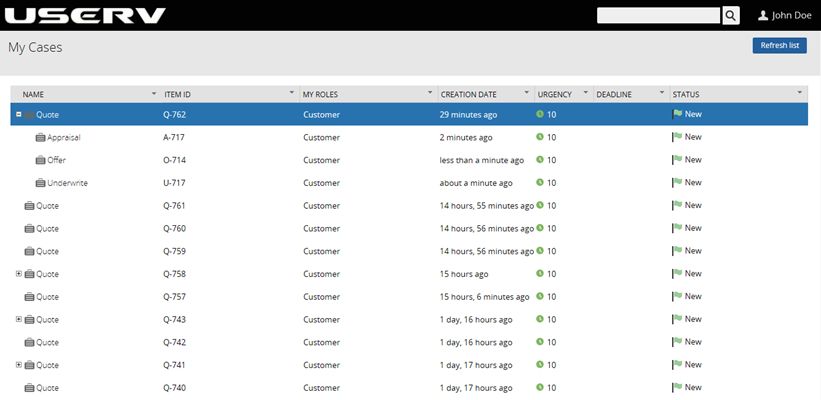
Table of Contents

             1. Foreword                                                          1

             2. About the Study                                                   3

             3. Why Compare Pega 7 with Java Platform Enterprise
                Edition?                                                          4

             4. Assumptions                                                       5

             5. Key Findings                                                      6
                5.1.   Developing a Business Application is 6.4 Times Faster in
                       Pega 7                                                      6
                5.2.   Pega Enables Quick Creation of Branded Portals and User
                       Interface                                                   7
                5.3.   Powerful Case Lifecycle Management                          8
                5.4.   Predictive Analytics                                        8
                5.5.   Pega Pulse Social Collaboration                             9
                5.6.   Mobile Implementation                                       9
                5.7.   Advantages of Pega Cloud                                   10
                5.8.   Pega Live Data                                             11
                5.9.   Pega Adapted to Changes 8 Times Faster                     12

             6. Team Composition                                                  13

             7. Measuring Productivity                                            14
                7.1.   Productivity Metrics Comparison and Interpretation         15
                7.2.   Analysis and Design                                        16
                7.3.   Development                                                17
                7.4.   Process Flow                                               19
                7.5.   Information Model                                          19
                7.6.   Integration                                                20
                7.7.   Mobile                                                     21
                7.8.   Social                                                     22
                7.9.   Localization                                               23
7.10. Reuse of Layers for New Line of Business   24
   7.11. Build                                      24
   7.12. Testing                                    25
   7.13. Deployment                                 26

8. Conclusion                                       27

Appendix A: Effort Comparison                       28

Appendix B: Applications Developed                  30

Appendix C: Sample Application Screens              32

Financial Services | the way we see it
1. Foreword
As we continue to witness a torrid pace of technology innovation in
today’s market, we remain optimistic. We have witnessed these new
products, tools, methods, components and frameworks ultimately
translate into not only technical and broad IT benefits, but, more
importantly, into legitimate and sustainable business value and impact. A
recent comparative study of two very distinct and, at their core,
appreciably different application development and delivery paradigms
provides notable insights into a catalogue of material performance gains
across the application development, deployment and change lifecycle.
Yet more important and arguably more relevant than the performance
gains demonstrated are the business impacts and implications to be
drawn from this otherwise technology-centric study and its findings.
I encourage you to have a close look at the Pega 7 vs. Java Platform
Enterprise Edition (Java EE) study that follows. It builds the case, step
by step, for the power of model-based and model-driven development as
a paradigm for developing, deploying, managing and evolving business
applications.
Today’s digital business climate demands speed, agility, scalability, and
adaptability. Pegasystems’ Built For Change® platform and solution
reinforces, through this study, the magnitude of productivity gains
available from re-thinking and re-defining the approach to and strategy
for building and deploying the digital business applications of today and
tomorrow.
From this, it is only a small step to appreciate the potentially profound
benefits to enterprise business performance. If we can obtain a solid
portion of the productivity gains demonstrated in the study, we, in turn,
are able to deliver and change business applications in substantially less
time and at lower cost to meet the demands of today’s digital age. With
this in hand, we equip the enterprise to become digital and profoundly
alter its operational motion in six key ways:
Reduction in the time to market for new or enhanced products and
services;
Acceleration in the readiness of multi-channel customer engagement;
Improvement in the ability and time to respond to customer-driven
demands, new market opportunities, or competitor actions in the
market;
Flexibility to innovate by way of more, faster, and less costly
experimentation;
A Productivity Comparison of Pegasystems Pega 7 versus Java Enterprise Edition Custom Build 1
Copyright © 2014 Capgemini Financial Services. All rights reserved.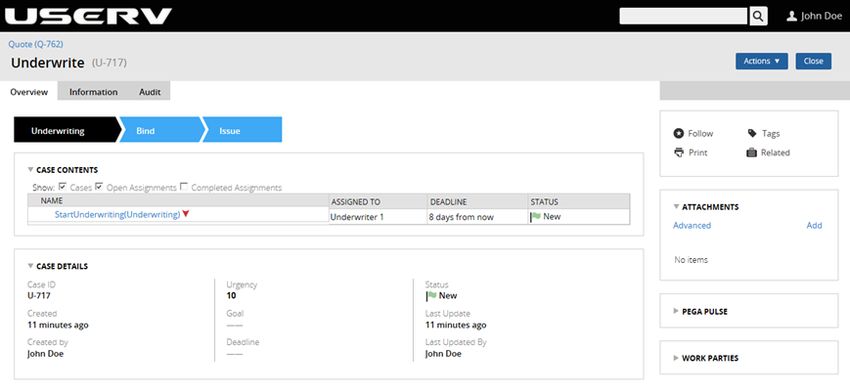
Financial Services | the way we see it
Heightened process accuracy and reliability and lower defect
occurrence gained from extensive re-usability; and
Greater resource optimization of key personnel derived from
business process and application development and deployment
productivity improvements and cycle time reductions.
Extrapolating and applying insights from findings of comparative studies
of the type offered here move us toward the realization of real, long-term
business benefits—the true acid test for any of today’s technology
disruptions and innovations.
Approach your reading with this intent in mind. We welcome your
feedback, and look forward to hearing how you apply these new
paradigms to develop and deploy your business processes, and the
business benefits you realize as a result.
Enjoy.
Lanny S. Cohen
Global Chief Technology Officer, Capgemini
A Productivity Comparison of Pegasystems Pega 7 versus Java Enterprise Edition Custom Build 2
Copyright © 2014 Capgemini Financial Services. All rights reserved.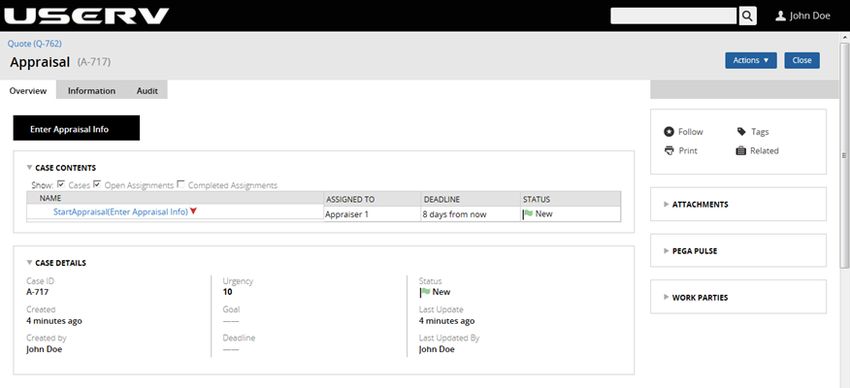
Financial Services | the way we see it
2. About the Study
This study set out to determine the productivity gains of using Pega 7
versus Java Platform Enterprise Edition (Java EE) to build a robust
business application. The study examined the core capabilities and
advantages of Pega 7, including:
Case Lifecycle Management
Omni-Channel UX
Predictive and Adaptive Analytics
Pega Live Data
The study set out to meet three key objectives:
Evaluate the ease of building the application with Pega 7, versus
custom build using Java EE
Evaluate the effort required to make business changes to the
application, and the ease of rolling back those changes
Measure the time and effort required to:
Build the application and debug, test, and deploy
Change/update (maintain) the application once developed
For the purposes of the study, Capgemini built two teams for developing
two identical auto insurance new business process applications—one
team used Pega 7, the other team created a custom product using Java
EE. The initial project specifications required that the application to
guide users through the process of a quote and then create a test case for
an appraiser and an underwriter to work on. The team was then started
enabling the application for mobile functionality to allow a manager to
work on cases, search for directions or assign work to his/her team from
a mobile device.
About 80% through the development effort, a new requirement was
specified: add functionality to allow the purchase of home insurance in
addition to auto insurance. This was done to assess the nimbleness and
adaptability of each technology for enduring a disruptive change with
ease. Finally, the system was extended and localized to operate in the
European market. For the purpose of this study it was localized for
Germany.
A Productivity Comparison of Pegasystems Pega 7 versus Java Enterprise Edition Custom Build 3
Copyright © 2014 Capgemini Financial Services. All rights reserved.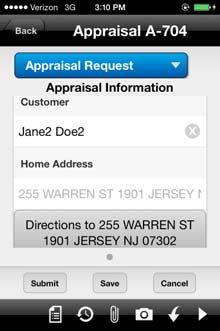
Financial Services | the way we see it
3. Why Compare Pega 7 with Java
Platform Enterprise Edition?
Java EE is a Java platform designed for large-scale computing typical of
large enterprises. It includes many components of the Java Platform
Standard Edition (Java SE) such as the Java Development Kit (JDK),
which is included as the core language package.
Here’s why Java EE lends itself well to a comparison with Pega 7:
Java is a widespread and popular language, and is the language of
choice for a several large, high-performance applications.
Java EE Open and Standards-based platform supports everything
from mobile devices to high-end servers.
Java EE is a multi-tier enterprise computing model within a web
environment.
Java is supported on multiple platforms: Windows, Solaris, Linux,
z/OS, HP-UX, AIX and others.
Java is Pega’s target language. More specifically, the various rule
forms in Pega are translated into Java. The Pega 7 server engine runs
in a JVM as a Java application. This helps us elucidate the
productivity gains from the Pega 7 technology.
Java EE’s “Write Once, Run Anywhere” technology is similar to
Pega’s “Build Once, Deploy Anywhere” technology.
Java EE’s component and container model, in which container
provides system services, is well-defined as an industry standard.
Java EE provides portability of code because it is based on Java
technology and standard-based Java programming APIs.
The Java EE platform uses containers to simplify development. Java EE
containers provide for the separation of business logic from resource and
lifecycle management, which means that developers can focus on
writing business logic—their value add—rather than writing enterprise
infrastructure. For example, the Enterprise JavaBeans (EJB) container
(implemented by Java EE technology vendors) handles distributed
communication, threading, scaling, transaction management, etc. This is
similar to Pega 7, which also aims to enhance developer productivity.
A Productivity Comparison of Pegasystems Pega 7 versus Java Enterprise Edition Custom Build 4
Copyright © 2014 Capgemini Financial Services. All rights reserved.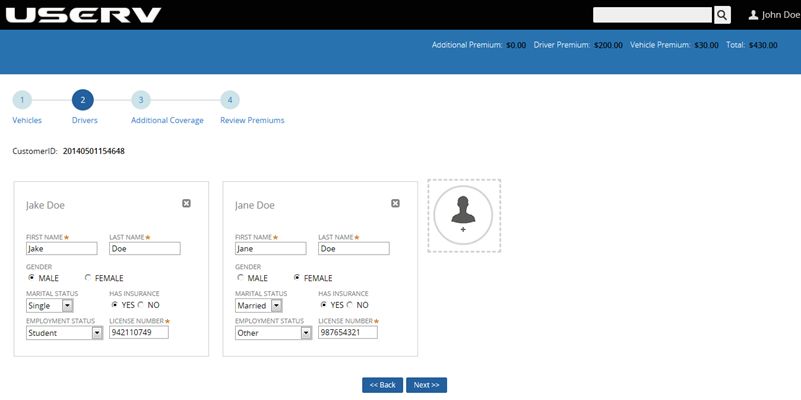
Financial Services | the way we see it
4. Assumptions
In executing the project, we made the following assumptions:
Developers are well-versed in both Pega 7 and Java EE.
It is not necessary to consider time spent by resources on training, as
training costs are not normally recovered over a single project.
Therefore, this study does not include the time required to learn Pega
7 or Java in its productivity measurements.
It is not necessary to consider time to install and configure the tools,
since the associated times and costs are not recovered over a single
project. Therefore, this study does not factor these times into
developer productivity.
It is not necessary to consider the time spent researching topics and
solving problems related to development, as these are not recovered
over a single project, and are part of the development team’s learning
process.
Productivity measurements can be extrapolated to production
applications.
A Productivity Comparison of Pegasystems Pega 7 versus Java Enterprise Edition Custom Build 5
Copyright © 2014 Capgemini Financial Services. All rights reserved.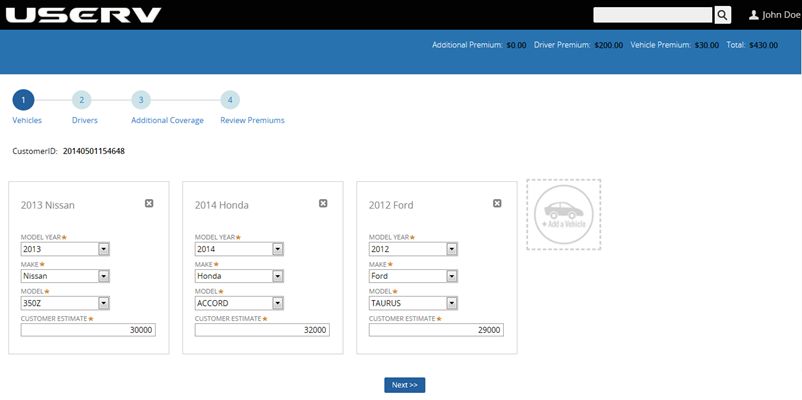
Financial Services                |   the way we see it

5.         Key Findings
5.1.       Developing a Business Application is 6.4 Times
           Faster in Pega 7
The scenario chosen for the study simulated the entire lifecycle
development process of building a complex business application. While
the time it takes to build an end-to-end application will always be
relative, the types of actions required to build a global enterprise
application are well known. It is these concrete tasks and actions that are
important and relevant to examine when considering building intelligent
business applications.

Creating a global, feature-rich, mobile-enabled business application as
defined by the specifications of this study took 60 hours in Pega 7 versus
382 hours in Java EE. Put another way: Pega 7 was 6.4 times more
productive than Java EE.

Exhibit 1: Pega 7 and Java EE Development Times

Activity                                                                   Pega 7    Java EE

Analysis and Design                                                          4.00       32.00

User Interface                                                              14.17       76.08

Business Logic                                                              12.67       57.75

Process Flow                                                                 6.17       28.25

Information Model                                                            5.92       22.00

Integration                                                                  0.23        0.85

Reports                                                                      0.00        8.00

Mobile                                                                       0.50       20.00

Social                                                                       0.25        2.00

Localization                                                                 2.25       20.00

Reuse of Layers for New Line of Business                                     2.00       16.00

Build                                                                        0.75        2.00

Testing                                                                      9.62       94.37

Application Deployment                                                       1.42        3.00

Total Effort in Hours                                                       60.00      382.00

Productivity Factor                                                                      6.4

The productivity gain and the exact timings spent in each of the
activities are based on the requirements of this study. These efforts may

A Productivity Comparison of Pegasystems Pega 7 versus Java Enterprise Edition Custom Build     6
Copyright © 2014 Capgemini Financial Services. All rights reserved.
Financial Services | the way we see it
change based on the complexity of the type of application, integrations
complexity, standards / guardrails defined, pre-defined frameworks in
use, enterprise standards / limitations of the organization, number of
systems involved in handling the specific processes and the methodology
followed to deliver the functionality.
These productivity gains were accrued because Pega 7 comes with
several out-of-box features to accelerate UI (User Interface)
development, create process flows, enable mobile functionality,
predictive analytics, social and localization capabilities that are table
stakes for today’s business applications yet require considerable coding
efforts in Java EE.
The biggest time savers while building the application in Pega 7 were:
testing, ease of use of UI generation, implementation of business logic,
process flows and mobile enablement.
5.2. Pega Enables Quick Creation of Branded Portals
and User Interface
Pega’s model-driven development paradigm makes UI creation fast and
efficient. Model-driven development is not new to Pega but Pega 7
offers several improvements, especially to UI capabilities.
With Pega 7, the HTML generation is more efficient by virtue of being
HTML5 and CSS3 compliant. The result is a more responsive website
with a better user experience.
To create UIs, developers specify form layouts and field formats, from
which Pega generates the HTML to display the UIs. The Pega-generated
UI separates form content (HTML) from layout and styling (CSS),
allowing the UI to adapt to different screen sizes as well as mobile
devices. This responsive UI approach means UIs only need to be
designed once and the system automatically displays and functions based
on whether a computer or a mobile device was used.
The approach allows developers to design a single screen for each piece
of work. Pega 7 then finds the best way to present that to the user based
on the device or computer they are using. With Pega’s Omni Channel
capabilities you build once and deploy anywhere.
Pega’s Next Best Action capability can also factor in a user’s device to
determine the next best course of action for that user.
Pega separates content from laying out a screen by defining the styling
and branding elements of the application in a skin. This gives developers
freedom in defining the content of a screen without having to worry
A Productivity Comparison of Pegasystems Pega 7 versus Java Enterprise Edition Custom Build 7
Copyright © 2014 Capgemini Financial Services. All rights reserved.Financial Services | the way we see it about the final appearance, which can be managed and controlled independent of the screen content. 5.3. Powerful Case Lifecycle Management Pega 7’s Case Lifecycle Management makes it easy for business stakeholders to design and develop a process flow. The high-level flow is easier to use than process modeling solutions such as Microsoft Visio, and doesn’t require any coding knowledge or even knowledge of Pega’s Flow shapes or any other process flow notation. Pega 7’s process flows are defined in a business context. Steps within each stage mirror the business goals of an organization, and display how a piece of work flows through that organization. In addition to simplifying the creation of a business process, this greatly helps in defining screens and sub-cases and gives developers a better understanding of how their piece fits into the overall business flow. Exhibit 2: Application Case Definition Once a business user creates the Case Lifecycle, the details of individual steps can be defined using business process modeling. Case Lifecycle Management allows the business user to create case management flows with its new Stage Designer functionality. This new capability streamlines the creation of cases and sub cases. This represents an improvement from the earlier Pega Discovery Map, which provided a graphical representation of the flow but didn’t allow creation of complex, dynamic case management. 5.4. Predictive Analytics Pega 7 has evolved its Predictive Analytics capability to take advantage of big data to make decision management configurable and easy to use. Pega 7 makes it easy to both exploit the data that resides in the A Productivity Comparison of Pegasystems Pega 7 versus Java Enterprise Edition Custom Build 8 Copyright © 2014 Capgemini Financial Services. All rights reserved.
Financial Services                |   the way we see it

application, and build sophisticated rules that can be invoked from the
process and cases.

One of the key uses of Predictive Analytics is to proactively understand
and anticipate the needs of today’s socially connected consumer across
service channels and silos. Pega’s Predictive Analytics performs this by
implementing intelligent cross-selling capabilities. A rule-based
scorecard dynamically generates relevant and contextual customer offers
using parameters such as age, marital status,
and gender.

This is easy to implement by specifying parameters, modeling a decision
strategy, assigning weights to parameters and arriving at a score to
determine which products to offer and display. Unlike alternative
solutions, the Predictive Analytics capability is easy for the business user
to modify and maintain.

5.5.       Pega Pulse Social Collaboration
Social collaboration is built into Pega 7 with the introduction of Pega
Pulse—a powerful tool that enables social collaboration and the transfer
of work from one person to another. Pega Pulse allows users to
communicate with their entire workgroup or to send private messages
and tasks in the context of a case, all while seamlessly tracking relevant
audit trail, case information and Service Level Agreements (SLAs).
Implementation is as easy as specifying which sections of a screen
should have social capabilities. No additional coding effort is required.

Users can respond to cases by replying to a Pulse message and creating
and assigning a case as part of the reply. The system’s work
management tools treat and manage the action in the same manner as
any other type of work generated using the system.

Users can also create and assign ad hoc tasks that are not part of the
original process flow, assuring that work of all types (expected and
unexpected) is tracked, managed, and monitored in one place.

5.6.       Mobile Implementation
Creation of a mobile-friendly application was extremely easy, given
Pega’s “Design Once, and Access Anywhere” paradigm. Once the
developer creates the UI, it can be accessed on any device, as Pega
renders the UIs dynamically.

The Underwriter’s case management portal is a powerful illustration of
this concept: On the desktop, the case management portal displays
specifics about the case and customer in the middle of the screen. Details

A Productivity Comparison of Pegasystems Pega 7 versus Java Enterprise Edition Custom Build   9
Copyright © 2014 Capgemini Financial Services. All rights reserved.
Financial Services                |   the way we see it

such as Recent Items, Dashboard and Favorites are displayed on the left,
with Pega Pulse Social Collaboration tools and other features displayed
on the right.

Exhibit 3: Mobile Application

When the application is accessed from a tablet, the screen dynamically
resizes and shows only the most important information, and minimizes
less critical information. When accessed from a mobile device, the
screen adjusts to show just the case information, and a few key action
items. Additionally, users can search for directions by taking advantage
of the geo-tagging feature. The result is a seamless mobile experience
that has the same feel as a native mobile app.

The developers didn’t have to code for any of this as Pega renders the
screen dynamically by responding to the environment that’s being used
to access it.

Creating the mobile functionality itself only required importing Pega
mobile ruleset, which intelligently leverages all the UI components
developed in the previous steps, requiring no additional UI development.

The mobile experience is impressive and reinforces the power of Pega’s
Omni Channel UI capabilities.

5.7.       Advantages of Pega Cloud
For the purposes of this study the team used a cloud instance of Pega to
build the application. Using an existing, optimized infrastructure helped
to speed up the development process.

The benefits of Pega Cloud scale dramatically when the program size
grows. Its elastic IT infrastructure can be used to meet an organization’s
business demands while reducing the total cost of ownership. Pega

A Productivity Comparison of Pegasystems Pega 7 versus Java Enterprise Edition Custom Build   10
Copyright © 2014 Capgemini Financial Services. All rights reserved.
Financial Services                |   the way we see it

Cloud is a Software as a Service (SaaS) based version of the full Pega 7
platform and can be used to design, build and deploy full-scale BPM
applications.

An organization using Pega for the first time will benefit from avoiding
investments in infrastructure to support hardware and software. Even
after the initial implementation, the responsibility of managing the
hardware resides with Pega. Funds that had been tied up in managing
and maintaining infrastructure are freed up for building applications that
deliver business value. Additionally, Pega provides 24x7 monitoring,
support and administration, and delivers a 99.5% SLA (service level
agreement). With the Pega Cloud, businesses can rely on Pega’s
sophisticated disaster recovery mechanism rather than having to build
their own complex disaster recovery plans.

Pega 7 also provides application portability to offer a choice between
running solutions on the cloud or on site throughout the application
lifecycle. Pega Cloud made our application development process more
collaborative as the application was accessible to our team members
wherever they were. In addition, application demos and walkthroughs
were more straightforward due to the availability and accessibility of
Pega Cloud.

5.8.       Pega Live Data
The introduction of Pega Live Data has made data management
strikingly simpler in Pega 7 as data pages are now sensitive to the
context in which they are used.

Pega Live Data is implemented with help of a new rule type called Data
Page. Data pages are a reusable object, with the additional ability to pass
parameter and fetch data (either from internal/external database or
applications accessed via SOAP, REST, MQ, etc.).

As a result, developers define the data connection elements
independently from where they can be used in the application.
Traditionally, data integrations had to be built specific to the screens
where the data was used. But with Live Data, developers define pages
with the source data and the system intelligently references these data
pages to retrieve the right information to display to the customer in the
context of the functionality that’s being accessed. Data pages enable
developers to externalize data from application functionality, and
eliminate the need to code for data retrieval as part of the application
flow. The developers can now store data independent of the process flow
and retrieve it at various points in the process without any code changes.

A Productivity Comparison of Pegasystems Pega 7 versus Java Enterprise Edition Custom Build   11
Copyright © 2014 Capgemini Financial Services. All rights reserved.
Financial Services                |   the way we see it

System performance is also improved with this feature due to intelligent
caching. If the user refers to a data entity that is already available on the
Data page, then no processing is required to fetch the data or to check if
the data already exists on data page. Alternatively, in procedural
development it is required to check if the data is already available, which
results in unnecessary coding and maintenance.

5.9.       Pega Adapted to Changes 8 Times Faster
In this section the team put Pega’s “Build for Change” claim to the test.
It was impressive to note that the reuse of layers for the new line of
business showed an 8X productivity gain.

This was because there was no need to create a new process flow, as the
home insurance, appraisal, underwriter, premium summary and offer
screens were circumstanced and were made immediately available for
reuse. Any functionality that needed to be altered benefited from Pega’s
model-driven development environment, which allowed for quick and
easy customizations.

Additionally, the same tables were used to store coverages and offers for
both auto Insurance and home insurance. A filter added to these tables
distinguished home and auto coverages, and eliminated the need to write
extra logic to retrieve home insurance-related data, as is typically
required in competing products.

A Productivity Comparison of Pegasystems Pega 7 versus Java Enterprise Edition Custom Build   12
Copyright © 2014 Capgemini Financial Services. All rights reserved.
Financial Services | the way we see it
6. Team Composition
The development team was comprised of members across locations and
time zones. This was done to mimic the onsite/offshore delivery model
and to factor in the realities of the current development and delivery
paradigm, which include:
The difficulties in translating requirements from onsite to offshore
The difficulties in managing the project from the U.S. when the
development team is based in India
The time lag introduced in clarifying technical issues with the project
manager and process architect in the U.S.
Not all factors mentioned above directly affected productivity,
nevertheless we attempted to factor these real-life issues into this study.
Project management and coordination was done from Chicago, Illinois.
A project manager in Chicago facilitated interaction with key U.S.
stakeholders at the client organization (Pegasystems Inc., in this case).
The project manager worked with both the Java EE and Pega 7 teams,
which were based out of various Capgemini locations across the U.S.
There were two developers on both the Pega 7 and Java EE teams, and
two business analysts shared by both teams who documented functional
specifications, clarified requirement questions, and helped with project
coordination.
A Productivity Comparison of Pegasystems Pega 7 versus Java Enterprise Edition Custom Build 13
Copyright © 2014 Capgemini Financial Services. All rights reserved.Financial Services | the way we see it 7. Measuring Productivity We divided the development activities required into broad categories typical of any business application, and measured the time it took each team to implement those features. Most Pega 7 activities had a straightforward comparison with those in the Java EE stream except for the Mobile and Social capabilities, which require additional comparison frameworks. Thanks to Pega 7’s powerful Mobile implementation, simply importing the ruleset satisfied the specified requirements and provided some additional capabilities as well. Similarly, Pega Pulse provided additional social capabilities above and beyond those required. For the Java EE piece the team only built specific features to satisfy the listed requirements. We classified the activities into the following broad categories: Analysis and Design Develop UI Business Logic Process Flow Information Model Integration Build Testing Application Deployment Disruptive Change Mobile Social Localization For each category, we measured the time the two teams took to implement a given application functionality. We then rolled up the time taken for each task into an overall time for each category. A Productivity Comparison of Pegasystems Pega 7 versus Java Enterprise Edition Custom Build 14 Copyright © 2014 Capgemini Financial Services. All rights reserved.
Financial Services | the way we see it
7.1. Productivity Metrics Comparison and
Interpretation
Exhibit 4: Comparison of Productivity Metrics
Application 3.0
Deployment 1.4
94.4
Testing
9.6
2.0
Build
0.8
Reuse Layers for 16.0
New LOB 2.0
20.0
Localization
2.3
2.0
Social
0.3
20.0
Mobile
0.5
8.0
Reports
0.0
0.9
Integration
0.2
Information 22.0
Model 5.9
28.3
Process Flow
6.2
57.8
Business Logic
12.7
76.1
User Interface
14.2
Analysis and 32.0
Design 4.0
Java EE 0 20 40 60 80 100
Pega 7 Hours
The study has demonstrated that the entire application-development
cycle was 6.4 times faster with Pega 7 than with Java EE
The analysis and design phase was 8 times faster with Pega 7 than
with Java EE.
Developing the UI, business logic and process flows was 5 times
faster in Pega 7 than in Java EE and the new Designer Studio has a
A Productivity Comparison of Pegasystems Pega 7 versus Java Enterprise Edition Custom Build 15
Copyright © 2014 Capgemini Financial Services. All rights reserved.Financial Services | the way we see it
big role to play in speeding up the development time. It is much
improved over the previous version in the following ways:
It gives developers visibility into the core elements of the solution.
Charts display the guardrail report right on the developer’s home
page, which helps track guardrail warnings and flag corrective
action.
It brings visibility on how the application has been constructed:
the work types, data elements, screens, users and security
elements.
A Recent Items list on the left of the screen that gives developers
access to their work quickly.
Developers can create a To Do list that contains tasks for
themselves as well as tasks that they want to assign to others.
The mobile development phase has shown 40 times productivity gain,
and is a testament to the powerful and simple mobile enablement that
comes out of the box with Pega 7.
Developing the information model with Pega 7 was 4 times faster
than with Java EE.
Integration activities showed that Pega 7 was 4 times faster than Java
EE.
Testing the application using Pega 7 was 10 times faster than with
Java EE IDE.
7.2. Analysis and Design
Both teams analyzed the requirements in this phase and devised the best
approach to design the solution in their respective technologies. The
Pega 7 team used the DCO session as compared to traditional
requirements walk through for Java EE.
Exhibit 5: Comparison of Productivity Metrics: Analysis and Design
32.0
Analysis and
Design
4.0
Java EE 0 10 20 30 40
Pega 7 Hours
The analysis and design took 8 times longer in Java than in Pega 7 due to
the following factors:
A Productivity Comparison of Pegasystems Pega 7 versus Java Enterprise Edition Custom Build 16
Copyright © 2014 Capgemini Financial Services. All rights reserved.Financial Services | the way we see it
Pega 7 design guardrails and best practices offer direction that
architects can follow to speed up the design process.
Standard Pega features such as Stage Designer to design process
flows, and Decision rules to develop business logic, accelerate
application design and reduce development efforts.
Pega’s out-of-the-box features for mobile, local and social
requirements are easily developed by including rulesets and require
minimum configuration or design time.
Pega’s model-driven development environment auto-generates
documentation based on business user and developer input, saving
several hours creating, maintaining and managing specification
documentation.
Pega’s design methodology is easily extensible. Design time is not
adversely affected even when a disruptive change is added.
7.3. Development
To facilitate analysis, the development phase of the project was broken
into three sub-phases: building the user interface, business logic, and
process flows.
User Interface
Pega 7’s out-of-box portals, layouts, and controls allow for much faster
UI creation in Pega than in Java EE. The UIs were generated in Pega in a
fifth of the time it took Java EE.
Exhibit 6: Comparison of Productivity Metrics: User Interface
76.1
User Interface
14.2
Java EE 0 20 40 60 80
Pega 7 Hours
Pega’s Model-driven development environment was a big factor in the
UI development speed. Four factors, in particular, enabled the speed:
Pega 7 comes with several out-of-box layouts that were used to setup
the basic UI framework very quickly. Several out-of-the box UI
features were used with minimum configuration to generate Omni
A Productivity Comparison of Pegasystems Pega 7 versus Java Enterprise Edition Custom Build 17
Copyright © 2014 Capgemini Financial Services. All rights reserved.Financial Services | the way we see it
channel user interfaces, and the team used an out-of-the-box screen
layout to quickly and easily create the customer branded portal.
Since the developers specify the sections and controls to be displayed
within each section, and Pega generates the HTML to create the user
interface, the UI was developed only once, and the system deployed
it to multiple platforms automatically, including to mobile. Pega’s
responsive layouts ensure that the system dynamically adjusts the UI
to the user’s screen size and range.
Out-of-the-box controls, such as list views, were used to display
assignments. Since these are highly reusable and configurable by
simply passing parameters, each additional screen took a lot less time
to develop.
The application had several screens where a user was required to
perform some type of action. Out of the box, the system provides a
number of preconfigured screens to accelerate development. In
addition, any new UI functionality built from scratch can seamlessly
be reused.
Business Logic
In this phase, the teams built the business rules and process logic of the
application. This was considerably faster in Pega 7 and was also easy for
a business user to both change and maintain.
Exhibit 7: Comparison of Productivity Metrics: Business Logic
57.8
Business Logic
12.7
Java EE 0 20 40 60 80
Pega 7 Hours
Pega 7’s efficiency can be attributed to these specific features:
Complex rules determining what products to offer as part of the
cross–selling functionality were easily implemented using Pega 7’s
Scorecard-driven Predictive Analytics feature.
Predictive Analytics allowed analysis of all the data available in the
application to determine the next best action for the customer.
Predictive Analytics is easy to configure and manage, and allows
developers to code powerful and sophisticated business logic in an
intuitive graphical interface. All the rules were developed using out-
A Productivity Comparison of Pegasystems Pega 7 versus Java Enterprise Edition Custom Build 18
Copyright © 2014 Capgemini Financial Services. All rights reserved.Financial Services | the way we see it
of-the-box functionality that can be easily developed using the
wizard-driven,
form-based approach designed for a business stakeholder to author.
Several When/Conditional Rules were created which were referenced
throughout the application development to evaluate binary
conditions.
Decision Tables and Declarative expressions were also used to
develop business logic, especially functionality which required
evaluation of coverage eligibility.
7.4. Process Flow
In this stage, Pega was found to be 5 times more efficient than Java EE
in building process flows.
Exhibit 8: Comparison of Productivity Metrics: Process Flow
28.3
Process Flow
6.2
Java EE 0 5 10 15 20 25 30
Pega 7 Hours
These key features of Pega 7’s Case Management’s Stage Designer are
responsible for this enhanced performance:
Easy-to-use graphical interface
Intuitive to use, requiring no knowledge of Pega shapes. Creating the
process flow is quick and, once created, it automatically allows for
case creation and managing the case lifecycle without any additional
effort.
Provides context as to where a developer’s individual piece fits in the
overall application. This helps the developer understand the entire
business functionality, which in turn allows for adapting to changing
requirements with speed and accuracy.
7.5. Information Model
In this activity, the teams defined the entities, their properties, and the
relationships between them. They also designed the class structures and
table structures for the data and properties that the application required.
A Productivity Comparison of Pegasystems Pega 7 versus Java Enterprise Edition Custom Build 19
Copyright © 2014 Capgemini Financial Services. All rights reserved.Financial Services | the way we see it
Exhibit 9: Comparison of Productivity Metrics: Information Model
22.0
Information
Model
5.9
Java EE 0 5 10 15 20 25
Pega 7 Hours
Creating the information model was about 4 times faster in Pega 7 as in
Java EE due to:
Easy-to-use graphical interface speeds up the creation of the class
structure, as well as definition of new properties
Provides a single, connected model that improves communication
within the design and development
Parametric elements of the model create a robust database
Ability to store data independent of the process flow and retrieve it at
any point in the process when needed without any code change
required
Data can be referenced as and when it is needed instead of having to
store it in the memory
Ability to simulate data during development if the data sources such
as web services are unavailable
Ease of copying or referring to data from a case or other object into a
page to support complex/embedded pages
7.6. Integration
Pega 7 provides wizards for creating web services. Web service
integrations can be done in a few simple steps. Integrations built in the
application:
SOAP integrations:
Retrieve driver information
Connect to 3rd party services like MVR and CLUE
Database Integrations:
Retrieve list of drivers
A Productivity Comparison of Pegasystems Pega 7 versus Java Enterprise Edition Custom Build 20
Copyright © 2014 Capgemini Financial Services. All rights reserved.Financial Services | the way we see it
Exhibit 10: Comparison of Productivity Metrics: Integration
0.9
Integration
0.2
Java EE 0.0 0.2 0.4 0.6 0.8 1.0
Pega 7 Hours
In addition, Pega 7 provides numerous features to make the integrations
flexible for developing the applications, including:
Open standards to enable easy integration with existing systems
Service and connector types include JCA, JDBC, Java, EJP, JMS,
MQ, .NET, SOAP, and others
Powerful and easy-to-use business process mapping and business
process modeling wizards
Various dashboards to provide view of operations across the
enterprise
Execution of integrated business processes across disparate enterprise
systems with standards to meet enterprise SOA
Rule-driven business process integration capabilities, in which
service requestor and service provider make the right connection for
each usage, based on the situation
7.7. Mobile
In this phase of the project, the application was extended for use in
mobile devices. This was one of the most impressive demonstrations of
Pega 7 capabilities.
Enabling the application for mobile use was 40 times faster in Pega 7
than in Java EE. This efficiency accrued due to the simplicity with which
Pega 7 allows the creation of a mobile-friendly application.
A Productivity Comparison of Pegasystems Pega 7 versus Java Enterprise Edition Custom Build 21
Copyright © 2014 Capgemini Financial Services. All rights reserved.Financial Services | the way we see it
Exhibit 11: Comparison of Productivity Metrics: Mobile
20.0
Mobile
0.5
Java EE 0 5 10 15 20 25
Pega 7 Hours
The efficiency gain in developing the mobile capability can be attributed
to the following features:
Importing the Pega mobile ruleset allows mobile enablement and the
creation of a feature-rich application
Users are able to access and use their worklist from a mobile device
Users can find directions using geo tagging, and can both create and
resolve assignments
The system dynamically renders the screen display based on the end
user’s device at run time for native devices such Apple's iOS,
Google's Android, etc.
Provides pre-defined UI templates for faster development
User portal configuration for use with applications that are mobile-
only or that are accessed from both a mobile device and the desktop
7.8. Social
In this phase we assessed the team’s capabilities to enable social
collaboration using their respective technologies, and evaluated to what
degree Pega 7 allows collaboration between team members
vis-à-vis Java EE.
Exhibit 12: Comparison of Productivity Metrics: Social
2.0
Social
0.3
Java EE 0.0 0.5 1.0 1.5 2.0 2.5
Pega 7 Hours
A Productivity Comparison of Pegasystems Pega 7 versus Java Enterprise Edition Custom Build 22
Copyright © 2014 Capgemini Financial Services. All rights reserved.Financial Services | the way we see it
Pega 7 was 8 times more productive than Java EE due to the following
factors:
Pega Pulse was used to enable social collaboration. Implementing
Pega Pulse is as easy as including a section in a harness without any
extra coding effort.
Pega Pulse allows users to communicate with their entire workgroup
by sending private and public messages.
Pega Pulse allows users to transfer work along with the entire
relevant audit trail and also create and assign new cases.
Pega Pulse allows the users to create and assign a task with all the
associated SLAs and audit trails in the context of the case.
7.9. Localization
In this phase the application was localized for the Germany region and
Pega 7 proved to be 9 times faster than Java EE.
Exhibit 13: Comparison of Productivity Metrics: Localization
20.0
Localization
2.3
Java EE 0 5 10 15 20 25
Pega 7 Hours
These Pega 7 features influenced the ease of development towards the
localization:
Localization wizard identifies various text strings and field values in
the application user interface rules and then guides the developers
through the localization process to render the application in the
desired local language.
Auto detects initial language from a browser setting.
Standard control rules to support input and output of locale specific
formats.
Implementation of Unicode CLDR 1.3 standards for date and time for
internationalization.
Language specific user forms and portals.
Language specific rulesets.
A Productivity Comparison of Pegasystems Pega 7 versus Java Enterprise Edition Custom Build 23
Copyright © 2014 Capgemini Financial Services. All rights reserved.Financial Services | the way we see it
Localization wizard provides a step-by-step facility to identify text
elements that need translation.
7.10. Reuse of Layers for New Line of Business
In this phase we added a new requirement: extend the auto insurance
application to include a homeowner insurance functionality. We did this
to test the ability of the two teams to adapt to change and re-use existing
code.
Exhibit 14: Comparison of Productivity Metrics: Reuse of Layers
for New Line of Business
16.0
Reuse Layers for
New LOB
2.0
Java EE 0 5 10 15 20
Pega 7 Hours
The time it took in Pega 7 to address the disruptive change was only an
eighth of what it took in Java EE. Here’s why:
The home insurance, appraisal, underwriter, premium summary and
offers screens were circumstanced and made immediately available
for reuse.
There was no need to create a new process flow, as the existing flow
for auto insurance was used in home insurance via the Circumstance
feature.
Functionality that needed altering benefited from Pega’s model-
driven development environment for quick customizations.
Additionally, same tables were used to store coverages and offers for
both auto insurance and home insurance. A filter was added to these
tables to distinguish between Home and
Auto coverages, thus eliminating the need to write extra logic to
retrieve home insurance-related data.
7.11. Build
We used the automation of build process for Pega 7 as well as Java EE
with ANT script feature for generating the respective build archive files
for deployment.
A Productivity Comparison of Pegasystems Pega 7 versus Java Enterprise Edition Custom Build 24
Copyright © 2014 Capgemini Financial Services. All rights reserved.Financial Services | the way we see it
Exhibit 15: Comparison of Productivity Metrics: Build
2.0
Build
0.8
Java EE 0.0 0.5 1.0 1.5 2.0 2.5
Pega 7 Hours
Here’s why the build in Pega 7 was 3 times faster than in Java EE:
Automatic recognition of the change
No need for separate build process/scripting
Change takes immediate effect for testing
Parallel development flexibility with local rulesets and merge process
7.12. Testing
In this phase, all the functionality built in the application was system
tested. The features of AUT from Pega 7 and JUnit for Java EE was used
to compare the productivity gain.
Exhibit 16: Comparison of Productivity Metrics: Testing
94.4
Testing
9.6
Java EE 0 20 40 60 80 100
Pega 7 Hours
Pega 7 was 10 times faster than Java EE for testing and debugging the
application. These factors contributed to that efficiency:
Tracer makes it easy to debug the code, as it pinpoints to the exact
point of failure, saving significant time and developer frustration.
Clipboard and the Performance tool (PAL) provide an efficient way
to analyze and improve system performance.
Every rule, process, UI, flow, decision, activity, etc. is created within
a runtime model empowering the developer to test the application at
any point and conduct on-demand debugging to any component of
A Productivity Comparison of Pegasystems Pega 7 versus Java Enterprise Edition Custom Build 25
Copyright © 2014 Capgemini Financial Services. All rights reserved.Financial Services | the way we see it
the application. This empowers developers to do on-demand testing
to assure snippets of functionality work as expected on an immediate
basis.
UI Inspector shows developers each element of the UI just by
hovering over a control, allowing them to see the context and
configuration of the build. This feature gives developers a quick
understanding of how any changes will impact the screens.
7.13. Deployment
Ruleset versioning is an easy technique with which to test the newly
deployed applications. During our tests, we granted a group of pilot
users access to the new application by defining the ruleset name and
application to which they were to have access. When these users next
logged onto the Pega 7 system, they were able to run the newly deployed
application. There was no need to take down the Pega 7 system to
develop the new application.
Exhibit 17: Comparison of Productivity Metrics: Application
Deployment
Application 3.0
Deployment 1.4
0.0 1.0 2.0 3.0 4.0
Java EE Pega 7 Hours
Pega 7 provides various methods to export complete applications from
the system, and then import them into another Pega system. Key reasons
for this deployment efficiency gain are:
Easy to use ANT Script Command line utility for build automations
Report to identify rule Conflicts
Automation build from one environment to another
A Productivity Comparison of Pegasystems Pega 7 versus Java Enterprise Edition Custom Build 26
Copyright © 2014 Capgemini Financial Services. All rights reserved.Financial Services | the way we see it
8. Conclusion
The result of our comparative study shows conclusively that using Pega
7 was 6.4 times faster than Java EE for developing a robust business
application.
Gain in productivity during the analysis & design phase using Pega 7
DCO sessions: 8X faster
Create branded UI and screens: 5X faster
Accelerate business logic development: 5X faster
Build the localization for an existing application: 9X faster
Build, reuse, and specialize: 8X faster
The productivity gains were accrued in each phase of application
development and testing, and the model-driven development model of
Pega 7 not only makes it easy to build an application, but also enables
for quicker changes. The mobile implementation was very impressive,
with Pega 7 rendering a fully capable mobile application simply by
importing the mobile ruleset with minimum configuration.
Pega 7 clearly stands out as the better solution over custom
development. It delivers greater agility and accuracy by giving business
users more control of process execution. We recognize that actual
production applications and scenarios will be far more complex than the
one developed for our evaluation purposes. It is our professional opinion
that the results of this study can be extrapolated to actual production
applications.
Organizations using Pega 7 to implement their business processes will
reap significant productivity gains, and these will continue to increase
when they implement frequent changes—an inevitable part of today’s
operating environment.
A Productivity Comparison of Pegasystems Pega 7 versus Java Enterprise Edition Custom Build 27
Copyright © 2014 Capgemini Financial Services. All rights reserved.Financial Services | the way we see it Appendix A: Effort Comparison Exhibit 18: Effort Distribution Activity Pega 7 Java EE Analysis and Design 4.00 32.00 User Interface 14.17 76.08 Business Logic 12.67 57.75 Process Flow 6.17 28.25 Information Model 5.92 22.00 Integration 0.23 0.85 Reports 0.00 8.00 Mobile 0.50 20.00 Social 0.25 2.00 Localization 2.25 20.00 Reuse of Layers for New Line of Business 2.00 16.00 Build 0.75 2.00 Testing 9.62 94.37 Application Deployment 1.42 3.00 Total Effort in Hours 60.00 382.00 Productivity Factor 6.4 A Productivity Comparison of Pegasystems Pega 7 versus Java Enterprise Edition Custom Build 28 Copyright © 2014 Capgemini Financial Services. All rights reserved.
Financial Services                |   the way we see it

Exhibit 19: Pega 7 Stream Effort Distribution

Exhibit 20: Java EE Stream Effort Distribution

A Productivity Comparison of Pegasystems Pega 7 versus Java Enterprise Edition Custom Build   29
Copyright © 2014 Capgemini Financial Services. All rights reserved.
Financial Services | the way we see it
Appendix B: Applications Developed
This section describes the requirements for the application that was
developed as part of this study.
Vehicle-Insurance Quote Generation
Provide applicant information on a screen, and retrieve the
relationship and balance history from the database.
Provide Vehicle Details for which quotes are to be generated. The
application calculates the premium based on the business rules
associated with each vehicle.
Provide required details of the Driver(s). The application calculates
the driver premium, again in accordance with the defined business
rules.
Provide details for Uninsured Motorist Coverage and Bodily Injury
Coverage. Based on the coverage amounts entered, the application
calculates the appropriate premium amounts for the additional
coverage.
Review the premium amount calculated by the system using the
business rules defined. The application calculates the policy decision
and displays it on the Review Premium screen.
Exhibit 21: Process Flow for Vehicle-Insurance Quote Generation
Enter Vehicle
Enter Driver Details Additional Coverage
Enter Applicant Details and
and Calculate Driver Details and Caculate
Details Calculate Vehicle
Premium Premium
Premium
Reject Application No Driver Eligible?
No Yes
Underwriter
X Generate Quote Appraise Application Yes Eligible?
Reviews Application
If the Policy Decision is Eligible, the operator generates the quote
and a letter, with the premium quote, is mailed to the applicant’s
email ID in PDF format.
If the policy decision is Not Eligible, the operator assigns the
application to Underwriter for review.
A Productivity Comparison of Pegasystems Pega 7 versus Java Enterprise Edition Custom Build 30
Copyright © 2014 Capgemini Financial Services. All rights reserved.Financial Services | the way we see it
The underwriter reviews the quote and either rejects it, in which case
the rejection note is sent to the applicant, or approves it, in which
case the quote in PDF format is sent to the applicant’s email ID.
Homeowner-Quote Application
This application simulates a simple process flow in which the operator
creates a quote request for a homeowner in the application. The request
is then assigned to another operator, who picks the item from his or her
work queue and resolves or completes it.
The application can also be accessed using a tablet or mobile device:
Based on the tablet or mobile device used, the system dynamically
presents the screens
From the work order the appraiser can click on Get Directions and
the system gives direction automatically based on the user’s current
location
For the tablet/mobile functionality the application is designed to
implement using a native application such as iOS and Android
platform.
Exhibit 22: Process Flow for Homeowner-Quote Application
Enter Applicant Review Generate
Start Stop
Details Application Quote
A Productivity Comparison of Pegasystems Pega 7 versus Java Enterprise Edition Custom Build 31
Copyright © 2014 Capgemini Financial Services. All rights reserved.Financial Services | the way we see it Appendix C: Sample Application Screens Exhibit 23: Customer Info Exhibit 24: Vehicles A Productivity Comparison of Pegasystems Pega 7 versus Java Enterprise Edition Custom Build 32 Copyright © 2014 Capgemini Financial Services. All rights reserved.
Financial Services      |   the way we see it

Exhibit 25: Drivers

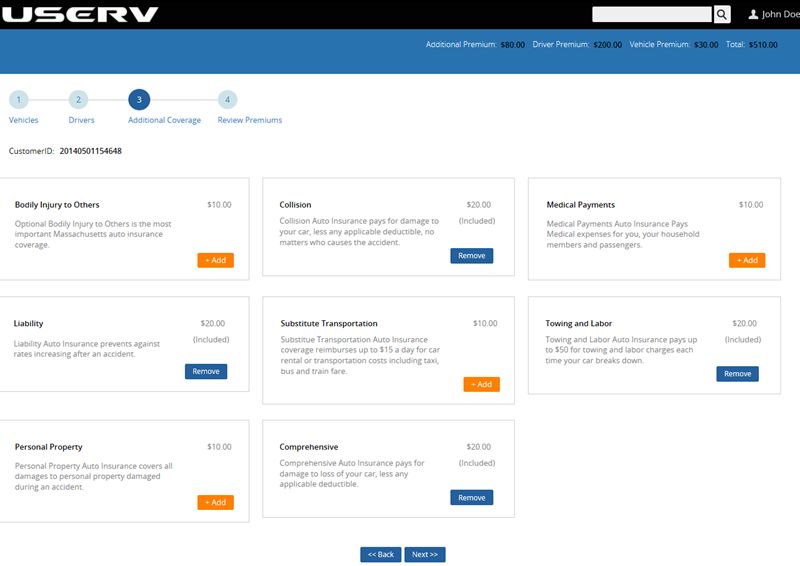
Exhibit 26: Vehicle Additional Coverage

A Productivity Comparison of Pegasystems Pega 7 versus Java Enterprise Edition Custom Build                       33
Copyright © 2014 Capgemini Financial Services. All rights reserved.
Financial Services      |   the way we see it

Exhibit 27: Review Premiums

Exhibit 28: Quote Submission

A Productivity Comparison of Pegasystems Pega 7 versus Java Enterprise Edition Custom Build                       34
Copyright © 2014 Capgemini Financial Services. All rights reserved.
Financial Services      |   the way we see it

Exhibit 29: My Cases

Exhibit 30: My Worklist

A Productivity Comparison of Pegasystems Pega 7 versus Java Enterprise Edition Custom Build                       35
Copyright © 2014 Capgemini Financial Services. All rights reserved.
Financial Services      |   the way we see it

Exhibit 31: Appraiser

Exhibit 32: Underwriting - Task

A Productivity Comparison of Pegasystems Pega 7 versus Java Enterprise Edition Custom Build                       36
Copyright © 2014 Capgemini Financial Services. All rights reserved.
Financial Services      |   the way we see it

Exhibit 33: Underwriting

Exhibit 34: Underwriting – Bind

A Productivity Comparison of Pegasystems Pega 7 versus Java Enterprise Edition Custom Build                       37
Copyright © 2014 Capgemini Financial Services. All rights reserved.
Financial Services      |   the way we see it

Exhibit 35: Underwriting – Issue

Exhibit 36: Policy Correspondence

A Productivity Comparison of Pegasystems Pega 7 versus Java Enterprise Edition Custom Build                       38
Copyright © 2014 Capgemini Financial Services. All rights reserved.
Financial Services      |   the way we see it

A Productivity Comparison of Pegasystems Pega 7 versus Java Enterprise Edition Custom Build                       39
Copyright © 2014 Capgemini Financial Services. All rights reserved.
www.capgemini.com/financialservices

                  About Capgemini
With more than 130,000 people in 44 countries, Capgemini is one of the world’s foremost providers of
consulting, technology and outsourcing services. The Group reported 2013 global revenues of EUR
10.1 billion.
Together with its clients, Capgemini creates and delivers business and technology solutions that fit
their needs and drive the results they want.
A deeply multicultural organization, Capgemini has developed its own way of working, the
Collaborative Business Experience™, and draws on Rightshore®, its worldwide delivery model.

Learn more about us at       www.capgemini.com
For more information, contact us at: financialservices@capgemini.com
or visit: www.capgemini.com/financialservices
The information contained in this document is proprietary. ©2014 Capgemini. All rights reserved.
Rightshore® is a trademark belonging to Capgemini.
You can also read


