Fundamentals of Blended Learning - Learning and Teaching Unit 2013
←
→
Page content transcription
If your browser does not render page correctly, please read the page content below

Learning and Teaching Unit 2013

Fundamentals of
Blended Learning

The aim of this module is provide to you with an opportunity to examine a
variety of learning and teaching strategies to support blended learning as
well as designing and developing a unit with a blended learning focus.

Fundamentals of Blended Learning

This is a fully online, self-paced module comprising of three chapters:

1. What is blended learning?
2. Options for blended learning
3. Designing your unit for blended learning

Acknowledgments & Copyright
Resource developed and designed by Gina Saliba, Lynnae Rankine and Hermy Cortez.
Blended Learning Team, Learning and Teaching Unit UWS
designingforlearning@uws.edu.au

This work is licensed under a Creative Commons Attribution-NonCommercial-ShareAlike
3.0 Australia License.

Chapter 1

What is
blended learning?

            The objectives of this chapter
            are to:

            • define blended learning in
              a UWS context
            • examine reasons for
              ‘blending’
            • illustrate different kinds
              of blends
Chapter 1 - What is blended learning?

Definition of blended
learning
Blended learning at UWS refers to a strategic and systematic approach to combining
times and modes of learning, integrating the best aspects of
face-to-face and online interactions for each discipline, using appropriate ICTs.

The following YouTube video describes how blended learning combines classroom
environments and face-to-face settings, with digital tools and environments

• Salman Khan Describes Future Classrooms with Blended Learning
• The blended learning cycle

4
Chapter 1 - What is blended learning?

Why blend?
Blended learning strategies vary according to the discipline, the year level, student
characteristics and learning outcomes, and have a student-centred approach to the
learning design.

Blended learning can increase access and flexibility for learners, increase level of active
learning, and achieve better student experiences and outcomes. For teaching staff,
blended learning can improve teaching and class management practices. A blend might
include:

• face-to-face and online learning activities and formats
• traditional timetabled classes with different modes, such as weekend, intensive,
  external, trimester
• well established technologies such as lecture capture, and/or with social media and
  emerging technologies
• simulations, group activities, site-based learning, practicals

                                                                                              5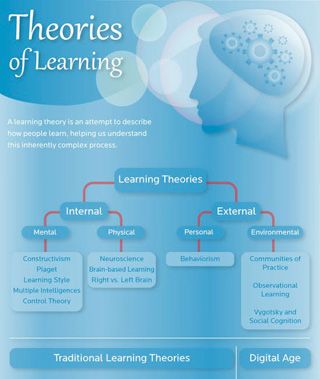
Chapter 1 - What is blended learning?

How is blended learning
different from classroom
learning?
Teachers have been blending or integrating different types of learning activities and
resources in classroom, laboratory, practicum, studio contexts for a very long time. Today,
the term ‘blended learning’ has evolved to mean the integration of classroom learning with
online or e-learning.

       Activity:
       In the following 3 minute video, Professor Gilly Salmon (Pro Vice-Chancellor of
       Learning Transformations at Swinburne University of Technology) talks about
       the characteristics and challenges of facilitating online learning. Note that in the
       video, Salmon refers to online or e-learning (where all learning occurs online),
       however the points she makes apply equally to blended learning, where learning
       within the unit occurs in both online and classroom contexts.

Watch the Professor Gilly Salmon video.

6
Chapter 1 - What is blended learning?
In the video, Gilly Salmon talks about the differences between designing for learning using
ICTs and designing for classroom teaching. As you watch the video, make notes in the
space below for your own reference.
PRINT
7Chapter 1 - What is blended learning? Orientation to online learning and teaching As discussed by Prof Gilly Salmon in her video, adjustments are required to incorporate flexibility and blended learning experiences. When you design your unit for blended learning, consider: • The role of the physical space - use face-to-face interaction when the activities best suit the use of physical spaces. UWS is building collaborative learning spaces across the campuses. Some of these spaces are designated learning commons where students can work together. • Planning and creating class content – in addition to content you have created, look at open education resources and resources available from the Library. • Using the online space – use collaboration and communication spaces in vUWS . There are discussion boards, blogs, wikis and journals. • Providing feedback – feedback will need to be timely as well as clear and concise. • Flexibility versus structure - often when you add flexibility, you can lose a certain amount of structure. Due dates, clear learning objectives and expectations will play an important role in providing online structures. • Class participation versus class attendance – Students will need to understand what is expected of them and also the mandatory requirements for successful completion of the unit. Students need to be made aware that participation is important and necessary. • Office hours – provide students with extra help or an opportunity to ask questions. Consider using asynchronous (e.g. Discussion Boards) and/or synchronous (e.g. Collaborate) sessions. 8
Chapter 1 - What is blended learning?

What could a ‘blend’
look like?
Blended learning comes in many guises, although each application or method may have
similar ‘ingredients’ or elements such as face-to-face delivery, flexible options, online
components. In essence, there  is a blending of flexible learning and teaching experiences
that may involve assessment, teacher/student communication, student activities, teaching
activities and students resources.

Comparison of face-to-face activities with blended
learning equivalents
This table outlines what a blended or hybrid unit may include in a face-to-face environment
along with equivalent blended learning options.

                                                                                        9
Chapter 1 - What is blended learning?
Want to know more?
• The Basics of Blended Learning
• Blended Learning – The Student Perspective
• Talking About Blended Learning – Foundations
• Advantages of blended learning
• Benefits of blended learning
Think point:
Reflect on what you found useful in this chapter.
PRINT
You are now ready to move onto Chapter 2: Options for blended learning - strategies
for engagement
10Chapter 2
Options for
blended learning
The objectives of this chapter
are to:
• examine various digital tools
that can be incorporated
into learning and teaching to
support blended learning
• investigate learning and
teaching strategies as
options for blended learning
• analyse key components of
the flipped classroomChapter 2 - Options for blended learning Theories of Learning Before you begin to plan your unit for blended learning, it is important to investigate concepts and strategies that maybe useful as part of your preparation. Let’s begin with learning theories. Learning theories are a set of concepts about how people learn and to some extent they identify strategies underlying cognitive processes involved in learning. The infographic on the right provides a clear categorisation of the learning theories you may need to be aware of as an educator. You may be familiar with established learning theories like behaviourism, cognitivism and constructivism and these can all be useful in designing blended learning activities, however there is another learning theory, connectivism, that can be very effective. Click on the image below to see the FULL infographic 12
Chapter 2 - Options for blended learning

SAMR Model
Dr Rueben Puentedura (2011) developed the SAMR model which was designed to help
educators integrate technology into teaching and learning. The model aims to enable
teachers to design, develop, and integrate digital learning experiences that utilise
technology to transform learning experiences to lead to high levels of achievement for
students and meet learning outcomes. Following is a brief explanation about each of the
stages of the SAMR model.

Figure 1: Substitute, Augmentation, Modification, Redefinition SAMR - Models for
Enhancing Technology Integration 1

                                                   Transformation

                                                                                    Collaborate with experts about the
                                                                                    designand results of lab work.
                     Tech allows for creation of       Integrated with workgroup    From feedback make changes to
Redefinition         new tasks, previously             andcontent management        lab design. Use online tools to
                     inconcievable                     software                     display the results. Blog and get
                                                                                    others to repeat the lab worldwide.
                                                                                    Compare results

                                                                                    Collaborate with experts about the
                                                       Integrated with email,
                     Tech allows for significant                                    design and results of lab work.
Modification                                           spreadsheets, graphing
                     task design                                                    From feedback make changes to
                                                       packages
                                                                                    lab design

                     Tech acts as direct tool          Basic functions (e.g., cut
                                                                                    Type up lab report, use spell check,
Augumentation        substitute, with functional       andpaste, spellchecking)
                                                                                    grammar check, hand in
                     improvement                       used

                     Tech acts as direct tool
                                                       Word processor used like     Word process lab report, print, and
Substitution         substitute, with functional
                                                       a typewriter                 hand in
                     improvement

                                                   Enhancement

                                                                                                                    13
Chapter 2 - Options for blended learning SAMR levels The first level: substitution and the lowest level of use Technology acts as a direct tool substitute with no functional changes. A common example is a type-writer being exchanged for a word-processor (albeit with a screen) and being used in exactly the same way. No cut and paste, no spell check, just direct substitution. The second level: augmentation At this level you are using the same tool with some functional improvement. Improvements may include the spell check or instant dictionary definition, cut/paste and placement of images etc. Already at this secondary stage we are seeing a much higher level of productivity from the individual student. The third level: modification This level actually slightly alters (but doesn’t change) the task at hand. For example, beforehand your type-writer was being used to produce a text report. But now we have additional technology tools available, we could create the report in a spreadsheet. This would allow for the automatic calculation of sums and create graphs for immediate visualisation of data. The spreadsheet can be emailed instead of being printed. The report (previously a fixed paper document) now has significant task redesign. This results in substantial productivity increase. The fourth level: redefinition At this level, we look beyond ways of just modifying the process which still has the fundamental task at its core. Is this the best way to perform the task? The Redefinition level will use available technology to completely redesign tasks. 14
Chapter 2 - Options for blended learning

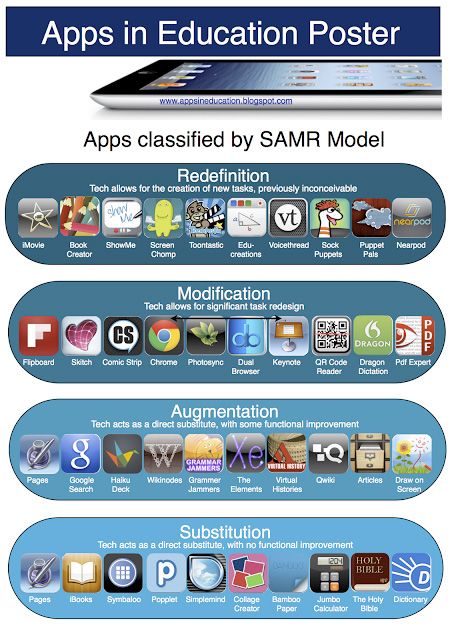
SAMR model using iPad apps
Discover how iPad apps can be used in education as shown in the SAMR Model using
iPad apps poster.

                                                                                   15
Chapter 2 - Options for blended learning
Think point:
Watch the following YouTube video of Dr Ruben Puentedura
explaining the SAMR model that he developed and how the
technology used in the classroom links to educational outcomes.
Use the space below to reflect on what you have found
interesting from Dr. Rubin Puentedura’s explanation.
PRINT
16Chapter 2 - Options for blended learning
Digital tools to support
blended learning
Following are some examples of digital tools that can be used to support learning and
teaching in a blended environment. Click on each of the tools to discover suggested
learning and teaching strategies, integration of the SAMR model, possible mobile device
apps and suggested links for more information.
Blogs
Learning and teaching strategies:
• Commentary and analysis: Blogs are an ideal tool for disseminating regular commentary
and opinion. These blogs might be written by a single author or several. Multi-author
blogs in particular can provide an opportunity for improving communication and
increasing impact.
• Supporting research projects: Blogs make an ideal tool for recording the process of
completing a project and distributing findings.
• Learning Journals: Students can use blogs to support and develop their learning. These
blogs are often reflective and might be private, shared with a teacher or completely
public. It allows learners to document their learning and can enable the Instructor to
gauge a students’ depth of understanding about a task or unit content.
• Learning communities: This could be in the form of a group blog for a unit involving
teachers and / or students using it to share information and discuss topics. Learning
communities can also be loosely connected networks involving many individuals
reading and commenting on each other’s blogs around a common theme.
• Resource sharing: Blogs can be used as a resource sharing tool allowing students to
share, review and critique resources.
• Collaborative authoring: Blogs can be used to develop a ‘publication’. The commenting
functionality allows readers and collaborators to comment on each other’s text.
• Blog journaling: creating a list or bullet points of main concepts and/or reporting events
17Chapter 2 - Options for blended learning Application of the SAMR model Blogs often work at the augmentation or modification level. If, for example, the Blog is used for reflection, thinking and analysing type activities then it can be seen as a modification process. Want to know more: • Blogs in Plain English. Common Craft. http://www.commoncraft.com/video/blogs • Downes, S. (2009). Blogs in Education. Retrieved on 15 February, 2013 from http://halfanhour.blogspot.com.au/2009/04/blogs-in-education.html • 27 reasons to Blog. Educational Technology and Mobile Learning. Retrieved 4th March, 2013 from http://www.educatorstechnology.com/2013/03/27-reasons-to-blog.html • 7 things you should know about Blogs. Educause. Retrieved on 15 Feb, 2013 from http://net.educause.edu/ir/library/pdf/ELI7006.pdf • Waters, S. (2013) From ETMOOC: Learning through blogging - tips, tricks, ideas and help with using web 2.0 technologies and edublogs. The Edublogger. Retrieved on 15 February, 2013 from http://theedublogger.com/ 18
Chapter 2 - Options for blended learning

Discussion boards
Learning and teaching strategies:
• Theory-practice: make links whilst on work placement; tutor poses questions, students
  share experiences, problems and solutions which will differ between work places
• Critical thinking: Examine past events or current topics and pose challenging or counter-
  challenging statements/ideas proposed.
• Brainstorm: stimulate ideas ahead of lectures, tutorials, field trips or guest speakers.
• Create threaded discussions around assigned readings. Threads may include pre-
  reading (anticipation) activities, interpretations, evaluations.
• Cooperative Debate: in groups or individually student’s present perspectives on a
  particular issue, followed by a whole group consensus-building discussion.
• Collaborative Writing: in groups students work together to create a single document
  formulating proposals and analytical reports, which they then post to the larger group
  for discussion and/or critique.

Application of the SAMR model
Discussion Boards are similar to Blogs in that they often work at the augmentation or
modification level. If, for example, the Discussion Board is used for reflection, thinking and
analysing type activities then it can be seen as a modification process.

Want to know more:
• Conducting effective discussions online. COFA. Retrieved on 15 February, 2013 from
  http://www.youtube.com/watch?feature=player_embedded&v=TxzipYOGaoE
• Diaz, V., & Strickland, J. (2009). Unit 3: Building community and collaboration.
  Educause. Retrieved from, http://net.educause.edu/ir/library/pdf/ELI80073.pdf
• Kelly, Rob. (Ed.). (2010). Synchronous and Asynchronous Learning Tools: 15 Strategies
  for Engaging Online Students Using Real-time Chat, Threaded Discussions and Blogs.
• McIntyre, S. (2011). Conducting effective online discussions. COFA Online. Retrieved on
  20 February, 2013 from http://online.cofa.unsw.edu.au/sites/default/files/episode-pdf/
  Discussions_LTTO.pdf
• Owens, Rebecca. (2009). Eight Tips for Facilitating Effective Online Discussion Forums.
  Faculty Focus. Retrieved from http://www.facultyfocus.com/articles/asynchronous-
  learning-and-trends/eight-tips-for-facilitating-effective-online-discussion-forums/

                                                                                           19
Chapter 2 - Options for blended learning Live Internet streaming Learning and teaching strategies: • Guest speaker: invite an author or expert from your discipline area to be available for students to interview or for a topical discussion. • Live Q & A: host timely Q & A sessions for students. • Demonstrations: perform demonstrations about complex mathematical or scientific equations. • Debates: ask students to participate in live debating or to discuss topical issues. • Revision: ask students to prepare questions to prompt discussion about topics for revision prior to assessments. • Exploration: explore complex problems from an issue arising from a unit reading; pose a problem and entice students to take a deeper look. • Debates: ask students to participate in live debating or to discuss trending issues. • Polling: ask students for their opinion via the polling feature capabilities. Application of the SAMR model If live internet streaming is used purely to deliver information live to students off campus then the technology is be used at a substitution level. However, if students are debating, problem solving or exploring then it is being used at a much more transformative level i.e. modification. Want to know more: • Hrastinski, S. (2008). Asynchronous and Synchronous E-Learning. Educause Quarterly. http://net.educause.edu/ir/library/pdf/eqm0848.pdf • Schullo, S & Venable, M. (2011). Synchronous E-Learning: Proven Strategies for Teaching at a Distance. Retrieved 20 February, 2013 from http://www.coedu.usf.edu/cream/papers/STARS_distanced_madison_Final_paper_ submission.pdf 20
Chapter 2 - Options for blended learning

Web/video conferencing
Learning and teaching strategies:
• Feedback: allow students to report on field trips, clinical practice or placement.
• Collaborative experiments: ask different groups (e.g. tutorial classes or students from
  another institution) to conduct the same experiment live to each other and then discuss
  outcomes. Did both experiments achieve the same results? Why or why not?
• Host a weekly or fortnightly hourly Q & A session for students
• Host fortnightly or weekly discussion session based on readings, books or texts.
• On site lecture: on location e.g. at a landmark, discuss with students the protocols
  involved for passing laws or policy making.
• Problem-solving challenges: on a weekly/fortnightly rotation ask students to formulate
  a problem to challenge other groups of students. During the session, students discuss
  how they worked together to solve the problem.

Application of the SAMR model
Video/web conferencing is similar to live Internet streaming is used purely to deliver
information live to students off campus then the technology is be used at a substitution
level. However, if students are debating, problem solving or exploring then it is being used
at a much more transformative level i.e. modification.

Want to know more:
• Hrastinski, S. (2008). Asynchronous and Synchronous E-Learning. Educause Quarterly.
  http://net.educause.edu/ir/library/pdf/eqm0848.pdf
• Bentley, K. (2009). The Evolution of Web Conferencing. EDUCAUSE Evolving
  Technologies Committee. Retrieved on 20 February, 2013 http://net.educause.edu/ir/
  library/pdf/DEC0705.pdf
• Introducing Skype in the classroom. http://www.youtube.com/watch?v=K4CVbIInVWo

                                                                                          21
Chapter 2 - Options for blended learning Mind mapping Learning and teaching strategies: • Cause –effect diagrams: create cause-effect diagrams that show outcomes of an experiment. • Flowchart: create a flowchart of events that led to a significant moment in history. • Brainstorming: when students are working in groups, scope out ideas to help in the development of the project. Application of the SAMR model If a mind mapping tool is used purely as a substitute for pen and paper then the activity is at the substitution level, however if students are including links, videos and graphics then this would be considered to be at augmentation level. Mobile device apps: iThoughts HD Popplet Want to know more: • Concept Map. (2010). Retrieved on 20 February 2010, Wikipedia, from http://en.wikipedia.org/w/index.php?title=Concept_map&oldid=139167845 • Davies, M. (2011). Concept mapping, mind mapping and argument mapping: what are the differences and do they matter? Springer:University of Melborne. Retrieved on 20 February, 2013 from http://w1.tlu.fbe.unimelb.edu.au/pdfs/martinpubs/mind_concept_argument_mapping. pdf • Hay, D., Kinchin, I., & Lygo-Baker, S. (2008). Making learning visible: The role of concept mapping in higher education. Studies in Higher Education, 33(3), 295–311 22
Chapter 2 - Options for blended learning

Twitter
Learning and teaching strategies:
• Feedback: report on a placement experience with a tweet about their reflections.
• Curation: follow discipline specific professionals, experts or commentators.
• Mathematical analysis: develop mathematical constructs or problems from mash-ups
  that analyse Twitter usage statistics such as www.twitterholic.com , www.tweetstats.
  com , www.twittercount.com , to develop student skills in comparisons, ratios,
  percentages, interpreting graphs.
• Problem-solving: use Twitter as a problem-solving space where all group members
  contribute. Depending on group members and the complexity of the problem, each
  student writes at least one tweet in order to collaboratively solve the problem. Screen
  capture or copy and paste the Twitter timeline and submit as a group assignment.
• Reflection: post and reply to discursive comments regarding an upcoming tutorial
  topic to deepen understanding through reflection and sharing – referred to as back-
  channelling.

Application of the SAMR model
If students are using this tool for curation, problem solving and analysis it would require
students to utilise the information at a much more complex level of modification.

Mobile device apps:
Twitter

Want to know more:
• Cheal, C. (2011). Teaching and Learning with Social Media. e-Mentor, 5, 42. Warsaw
  School of Economics. http://www.e-mentor.edu.pl/artykul/index/numer/42/id/892
• M. Moran, J. Seaman, H. Tinti-Kane. (2011). Teaching, Learning, and Sharing: How
  Today’s Higher Education Faculty Use Social Media. Pearson Learning Solutions.
  Retrieved 20 February, 2013 from, http://www.pearsonlearningsolutions.com/educators
• 7 Things You Should Know About Twitter. (n.d.). Retrieved 20 February, 2013 from,
• http://net.educause.edu/ir/library/pdf/ELI7027.pdf
• Twitter in plain English. Common Craft. http://www.commoncraft.com/video/twitter

                                                                                              23
Chapter 2 - Options for blended learning Screen capture/recording Learning and teaching strategies: • Vignette: make a recording to lead students through steps on how to complete a particular skill. • Navigation: record a video that leads students through a navigation of website such as an online museum or institute e.g. Exploratorium (www.exploratorium.edu) or the Smithsonian Institute (www.si.edu) • Concept mastery: create a screen recording for teaching particularly difficult or complex concepts. • Problem solving: have students screen capture their pathway through the events of a timeline, the steps of a task, or the solution to a problem they have solved and share it with their peers. Application of the SAMR model Using screen capture technology to record lectures would be considered to be at a substitution level as the technology is acting only as a substitute for face-to-face lectures. However, if students are set a task to capture their pathway through a learning activity such as problem solving, then this would be incorporating the technology in a form of redefinition. Mobile device apps: Explain Everything Want to know more: • Kelly, R. (2011). Using Screen Capture Software to Improve Student Learning. Faculty Focus • Retrieved February, 2013 from • http://www.facultyfocus.com/articles/teaching-with-technology-articles/using-screen- capture-software-to-improve-student-learning • Woodward, J. (2010). Screencasting. Tech Pulse of Higher Education Blog. Retrieved on 28 February, 2013 from http://techpulsehe.wordpress.com/tag/screen-capture 24
Chapter 2 - Options for blended learning

Open education resources
Learning and teaching strategies:
• Anchored instruction: use a short ‘anchoring’ that students can watch and revisit.
  Create a problem solving context or environment to ‘anchor’ student’s interest in the
  video.
• Digital storytelling: using multimedia software such as iMovie, enables students to
  create their own instructional, historical or autobiographical video.
• Expressive dimension: listen to Literary analysis of many great works such as those of
  Shakespeare adding a more expressive dimension
• Prediction: play a portion of a video and then ask students what they think will happen
  next.

Application of the SAMR model
If OER-video resources are used solely to review video as a source of content then it is
being utilised at a substitution level. If on the other the activity involves digital storytelling
and uploading to YouTube, for example, this would be considered to be at the redefinition
level.

Want to know more:
• Educause. (2006). Educause Learning Initiative: 7 things you should know about
  YouTube. Retrieved 10 February, 2013 from http://www. educause. edu/ir/library/pdf/
  ELI7018. pdf
• Educause. (2010) 7 Things You Should Know About Open Educational Resources.
  Retrieved 4 March, 2013 from from, http://net.educause.edu/ir/library/pdf/ELI7061.pdf
• Educause Review Magazine. (2010). The Open. 45(4). Retrieved 4 March, 2013 from,
  http://www.educause.edu/EDUCAUSE+Review/ERVolume442009/
  EDUCAUSEReviewMagazine
• Volume45/209245

                                                                                                25
Chapter 2 - Options for blended learning Flipped classroom The Flipped Classroom as described by Jonathan Martin is: “Flip your instruction so that students watch and listen to your lectures… for homework, and then use your precious class-time for what previously, often, was done in homework: tackling difficult problems, working in groups, researching, collaborating, crafting and creating. Classrooms become laboratories or studios, and yet content delivery is preserved. Flip your instruction so that students watch and listen to your lectures… for homework, and then use your precious class-time for what previously, often, was done in homework: tackling difficult problems, working in groups, researching, collaborating, crafting and creating. Classrooms become laboratories or studios, and yet content delivery is preserved (http://www.connectedprincipals.com/archives/3367 ).” In a flipped classroom, students have a voice and are encouraged to debate, question, make decisions, make choices and be supported in a learning environment. Of course, good pedagogy is key and teaching involves providing dynamic and varied learning experiences. Examples Below are two videos which look in detail at how to flip your classroom and reasons for using this strategy. • Why I flipped my classroom? • Teaching for tomorrow: Flipped learning 26
Chapter 2 - Options for blended learning

        Activity:
        Follow the Twitter feed #flipclass to share ideas with other teachers and
        instructors.

Further reading
•   The Flipped Classroom Model: A Full Picture
•   Flipped classrooms: Let’s change the discussion
•   The Flipped Academic
•   The Flipped Classroom Infographic

                                                                                    27
Chapter 2 - Options for blended learning
Outline two new learning and teaching strategies that you would
consider implementing in one of your units.
In the space provided below, please describe what else you have
found useful in this chapter.
PRINT
28Chapter 3
Designing your unit
for blended learning
The objectives of this chapter
are to:
• appraise the features of well-
designed blended learning
activities in comparison to
face-to-face
• classroom activities
• design and develop a unit
with a focus on blended
learningChapter 3 - Designing your unit for blended learning Where to begin? Good practice in blended learning involves using a few tools in effective ways to achieve quality learning outcomes. When designing a unit for blended learning start first with the learning outcomes and consider what supports students will need to achieve successful learning outcomes. This planning process includes the integration of blended learning in your unit and designing the learning activities. The blended learning activity is planned in advance, as something that the student does. A blended learning activity is designed as a learning process which the student does. Typically, it involves the student in doing something more than just reading on-screen. The sequence of what the student will do in the blended learning activity is mapped out in advance. The resources and supports that students will need, and when they will need these are also mapped out in advance. Resources and supports include: task instructions, learning guide, online tools, and appropriate FAQs, web links, media files, etc. All the components of the activity are ready (but not necessarily available) before the student starts the activity. Online tools are set up in the appropriate part of the vUWS site. The resources that students will use in doing the activity (eg instructions, content materials, online tools etc) are written/created and linked into the appropriate part of the vUWS site before the student starts the activity. Pointers to resources and supports are provided. The activity leads students towards achieving the learning outcomes and/or completing assessment for the unit. An effective blended learning activity is designed as an integral component of the unit. The activity may help students achieve the learning outcomes for the unit, for example, by practising written communication skills and critical thinking in an online discussion (if these are learning outcomes, or implicit in the learning outcomes for the unit). Or it may help students prepare for an assessment task, for example by doing practice quizzes which allow multiple attempts. Blended learning activities extend learning opportunities beyond the classroom. 30
Chapter 3 - Designing your unit for blended learning

The activity takes account of students’ incoming level of expertise
in online learning/independent learning.
Students who have not experienced online learning may find it challenging, at least initially,
to do a blended learning activity. Blended learning places more emphasis on individuals to
learn independently including monitoring their own progress. Blended learning activities,
particularly for first-year students, should build students’ confidence in themselves as
online and independent learners. This doesn’t imply making blended learning activities
trivial, but it does imply careful design so that the activity is both challenging and
achievable, with support. Although mature students may initially be more apprehensive
about blended learning, there is some evidence that older learners may be better
equipped than younger students to study independently. [Hartley, J. (1998) Learning and
Studying: A Research Perspective. London: Routledge.]

Students are provided with clear guidelines/expectations about
what they are to do, where, and within what time frame.
Before beginning the blended learning activity, students are provided with an overview of
what they will do in the activity. As well, students are provided with information about the
components of the activity, where they will do these, in what sequence, with what support,
and within what timeframe/s. This information is provided online so that students can
refer back to it, at will. Usually this information is also discussed in class. When preparing
guidelines, it’s a good idea to ask someone else to trial these, aiming to identify any gaps
or information that could be misinterpreted by students.

The rationale for the activity is made clear to students.
Students are informed about why they are doing the particular blended learning activity.
Explain how the activity will help them to achieve the learning outcomes for the unit, and/
or complete assessment task(s) for the unit. Remember too, to explain how the blended
learning activity will help them develop professional skills for the workplace. For example,
blended learning activities can help students enhance their independent learning skills,
writing skills, collaboration skills, investigation skills, etc.

                                                                                           31
Chapter 3 - Designing your unit for blended learning Students get feedback on their performance as part of doing the activity or following completion of the activity. An advantage of blended learning is that it can enable students to receive immediate feedback on their performance (eg automated feedback on quizzes). It can also enable students to receive more feedback (eg feedback from multiple students and the teacher/ guest presenter in an online discussion). Feedback provided in online discussions is also “persistent” in the sense that the student can return to the feedback and re-read it, thus increasing the likelihood of learning. The activity is manageable by staff. When designing a blended learning activity, keep in mind what it is feasible for you to do during semester. If the blended learning resources and task components are in place in vUWS before semester starts, your blended learning teaching time during semester will be mostly related to monitoring. A built-in feedback process can reduce your blended learning teaching time. To keep your workload manageable, you could also create a Frequently Asked Questions resource so that you don’t have to answer any task-related questions multiple times. Remember to tell students how frequently you will be monitoring the site and responding to questions, posts etc. One final word: as with anything new, it is wise to expect to devote a little more time to an activity the first time you run it. 32
Chapter 3 - Designing your unit for blended learning

Blended learning standards
& frameworks
The Basic Standards for E-Learning Sites have been designed to be applicable to the
diverse ways in which blended or e-learning sites are used and to enable all designers,
regardless of their familiarity with designing e-learning environments, to review and
improve unit and course sites.

The Basic Standards for E-Learning Sites consists of the following:

1. Organisation and appearance. This Standard focuses on principles that support clear
   structure and presentation of the site (e.g. ‘Site design promotes ease of navigation’).
2. Consistence and compliance. This Standard emphasises legal and institutional
   aspects such as copyright, privacy, compliance with policies and consistency in
   documentation (e.g. ‘Information in the site is consistent with the Unit Outlines and
   Learning Guides’).
3. Appropriate use of tools. This Standard promotes using tools with clear purpose and
   responsible management (e.g. ‘Expectations about use of communication tools are
   clear to students’).
4. Learner resources and support. This Standard focuses on ensuring students have
   access to appropriate supports and resources in the site (e.g. ‘Links to learning
   supports are contained in the site’).

                                                                                          33
Chapter 3 - Designing your unit for blended learning
Basic Standards for E-Learning Sites
The Basic Standards for E-Learning Sites enables you to:
i. work through a self-review activity by completing the ratings for each criterion in relation
to your selected blended learning site.
ii. identify relevant tips and resources that you can use to assist you with each criterion
identified in part (i).
Review the Basic Standards for E-Learning sites.
The Advanced Standards for Blended
Learning
The Advanced Standards for Blended Learning focuses on four key standards centering
on student centred pedagogical principles and the appropriate selection of ICT
technologies to enhance the student learning experience.
i. Standard 1: Design is driven by principles of learner-centred pedagogy.
i. Standard 2: Assessment activities and feedback processes are blended.
i. Standard 3: Student interaction and engagement are facilitated by online
communication and networking channels.
i. Students have access to a range of quality resources and supports.
Review the Advanced Standards for Blended Learning.
34Chapter 3 - Designing your unit for blended learning
Think point
How can the Basic Standards for E-Learning Sites & Advanced
Standards for Blended Learning help you plan and develop
engaging blended learning unit?
Use the space below to reflect on what is useful to you so far in
this chapter.
PRINT
35Chapter 3 - Designing your unit for blended learning Designing your unit for blended learning In chapter 1, it was discussed that Blended learning at UWS refers to a strategic and systematic approach to combining times and modes of learning, integrating the best aspects of face-to-face and online interactions for each discipline, using appropriate ICTs. The key steps involved in designing for blended learning should be considered well in advance, and include: • Planning for integration of blended learning principles in your unit • Designing the learning activities and assessment and developing them as required • Implementing the blended learning design • Evaluating the effectiveness of your blended learning designs • Making improvements for the next time you teach your blended unit 36
Chapter 3 - Designing your unit for blended learning

Exemplars of blended
learning strategies
The Blackboard Exemplary Course Program began in 2000 with the aim of identifying and
disseminating best practices for designing engaging online courses.

Discover the 2011/12 Blackboard Catalyst Award winners and be inspired by some of their
learning and teaching strategies which you may be able to adapt as part of one of your
blended units.

      Activity:
      Now it is your turn to design one of your chosen units for blended learning.
      Click here and complete each of the steps outlined.

                                                                                     37
Fundamentals of Blended Learning Support To aid us in improving the quality of our workshops please complete a short survey accessible through the Course Menu in the vUWS site. If you require assistance or would like to provide feedback, please contact either of the facilitators listed below: Gina Saliba Blended Learning Advisor g.saliba@uws.edu.au Lynnae Rankine Blended Learning Manager l.rankine@uws.edu.au Other links: • Landscape for blended learning support at UWS • QiLT Hub • Facebook • Twitter • Scoop.it • 2013 Designing for Learning Program • Blended Learning Forum Follow us: 38
You can also read


