GOD MAN I FICKAN: INVOLVING PEOPLE WITH COGNITIVE IMPAIRMENTS IN PARTICIPATORY DESIGN ACTIVITIES - DIVA
←
→
Page content transcription
If your browser does not render page correctly, please read the page content below

DEGREE PROJECT IN COMPUTER SCIENCE AND ENGINEERING,
SECOND CYCLE, 30 CREDITS
STOCKHOLM, SWEDEN 2020

God man i fickan: Involving people
with cognitive impairments in
participatory design activities

ALEXANDER NORDH

KTH ROYAL INSTITUTE OF TECHNOLOGY
SCHOOL OF ELECTRICAL ENGINEERING AND COMPUTER SCIENCE
ABSTRACT
Background: Technology can provide efficient and accessible solutions to manage private economy, taking
into account user needs and experiences. People with disability are most likely to encounter challenges
related to financial literacy and lack of access to their own money. The project God man i fickan in Sweden
aims to develop an accessible application that supports people with difficulties handling their private
economy.

Purpose: The purpose of this study was to investigate basic functions and interactions in a digital tool used
by people who cannot manage their own economy without some kind of assistance.

Method: Participatory design activities involving people with cognitive impairments were utilized. The
qualitative data collection included discussions, storyboarding and an online design session. Due to Covid-
19 we had to modify one workshop for online environments. The collected data was analyzed with a content
theme analysis which then was visualized and refined iteratively through wireframes and a lo-fi prototype.

Results: The study revealed a number of user values, reflecting user needs, and a number of key features
that should be supported by the application. A heuristic evaluation of the lo-fi prototype showed that using
a provocative object engaged the participants in critical reflections and discussions.

Discussion: By involving people with cognitive impairments in the design process through participatory
design activities, the methodology used in this study allowed them to influence the design and application
functionalities.
SAMMANFATTNING

Bakgrund: Teknik kan bidra med effektiva och tillgängliga lösningar för att hantera privatekonomi, med
hänsyn till användarens behov och erfarenheter. Personer med funktionsnedsättningar är den grupp som
möter störst utmaningar relaterade till ekonomisk förståelse och bristande tillgång till sina egna pengar.
Syftet med projektet God man i fickan är att utveckla en applikation som stödjer personer med svårigheter
att hantera sin privatekonomi.

Syfte: Syftet med denna studie var att undersöka grundläggande funktionalitet och interaktion i ett digitalt
verktyg för personer som inte kan hantera sin ekonomi utan någon form av assistans.

Metoder: För att genomföra studies syfte användes deltagande design aktiviteter med personer med
kognitiva funktionsnedsättningar. Kvalitativa data samlades in genom diskussioner, storyboarding och en
designsession. På grund av Covid-19 var vi tvungna att anpassa en workshop för miljöer online. Data som
samlades in analyserades i olika teman som visualiserades och gradvis förfinades genom wireframes och
en lo-fi prototyp.

Resultat: Studien kunde urskilja ett antal användarvärden, som reflekterar användarbehov, och ett antal
nyckelfunktioner som borde vara inkluderade i applikationen. En heuristisk utvärdering av lo-fi prototypen
visade på att användningen av ett provokativt objekt engagerade användarna i kritiska reflektioner och
diskussioner.

Diskussion: Genom att involvera personer med kognitiva funktionsnedsättningar i designprocessen och i
deltagande design aktiviteter kunde studien ge dessa personer ett inflytande över designen och
applikationens funktionalitet.
God man i fickan: Involving people with cognitive
       impairments in participatory design activities
                                               Alexander Nordh
                                         KTH Royal Institute of Technology
                                              Stockholm, Sweden
                                                alnordh@kth.se

ABSTRACT                                                            impairments [2,3]. A new standard, ISO 21 801, addressing
                                                                    cognitive accessibility for systems, products, services, and
Background: Technology can provide efficient and accessible         environments, was launched by ISO in 2019 [2,4].
solutions to manage private economy, taking into account user
needs and experiences. People with disability are most likely to    The European accessibility act (2019) is a new directive aiming
encounter challenges related to financial literacy and lack of      to remove barriers in order to improve and create more accessible
access to their own money. The project God man i fickan in          products and services within domains such as e-commerce,
Sweden aims to develop an accessible application that supports      banking, etc. [5]. In Sweden, accessibility is also subject to
people with difficulties handling their private economy.            conformance as, among other regulations, there is a law to be
                                                                    upheld by the government agencies which states that the content
Purpose: The purpose of this study was to investigate basic         of technical solutions such as web and mobile applications, and
functions and interactions in a digital tool used by people who     web pages have to be accessible for people with disability [6].
cannot manage their own economy without some kind of
assistance.                                                         Digital technology has the potential to provide higher efficiency
                                                                    and an opportunity for people to access financial services [7].
Method: Participatory design activities involving people with       Financial technology (Fintech) refers to new technologies and
cognitive impairments were utilized. The qualitative data           software that seeks to improve and automate existing delivery and
collection included discussions, storyboarding and an online        use of financial services [8,9]. Fintech challenges banks in their
design session. Due to COVID-19 we had to modify one                core businesses such as payments, loans, and savings with their
workshop for online environments. The collected data was            ability to provide agile, efficient, accessible, and differentiated
analyzed with a content theme analysis which then was visualized    experiences to their users [7–9], providing opportunities to
and refined iteratively through wireframes and a lo-fi prototype.   support a wider range of the population [8,9].
Results: The study revealed a number of user values, reflecting     Historically, disability has been seen as a medical condition,
user needs, and a number of key features that should be supported   referred to as the medical model [2,3]. Contemporary models
by the application. A heuristic evaluation of the lo-fi prototype   recognize that disability is a social construction, where
showed that using a provocative object engaged the participants     impairment and society interplay [2,3,10,11]. Cognitive
in critical reflections and discussions.                            impairments are difficulties related to perception, attention,
                                                                    memory, linguistic functions, reasoning, planning, problem-
Discussion: By involving people with cognitive impairments in       solving, decision making, reading, and calculating [2,10].
the design process through participatory design activities, the
methodology used in this study allowed them to control the          Although Sweden is heavily digitized [2], there are societal
design and application functionalities.                             institutions and services not yet digital. One such example is the
                                                                    Good Man (GM) institution. (Swedish: “God Man”). A GM
                                                                    assist individuals who are unable to monitor their rights, manage
KEYWORDS                                                            their property, and/or provide for themselves [12]. A US
Participatory   design; people with disability; cognitive           equivalent to GM would be conservatorship [13]. As for
impairments;     financial literacy; financial technology;          conservatorship, the duty of a GM is to maintain a person’s legal
accessibility                                                       and financial rights. For example, it may be to pay bills, apply for
                                                                    grants, or to make sure that the allocation of grants is working.
                                                                    Adults with intellectual impairments, mental health issues, or
1. INTRODUCTION                                                     dementia are examples of people who may need assistance from
                                                                    a GM.
Technology changes our way to communicate, execute tasks, and
interact with services and people. It is important to ensure that
technology can be used by all people to the greatest extent         2. THEORY & RELATED RESEARCH
possible. The United Nations Convention on the Rights of
Persons with Disabilities (CRPD) and international and national
legislation aims to provide a non-discriminative, full and          2.1 Theory
effective participation for people with disability [1]. The Web
Content Accessibility Guidelines (WCAG) are referred to by
                                                                    2.1.1 Accessibility, usability & Universal Design
legislation around the world as the benchmark for web               Accessibility is defined by the International Organization for
accessibility [1]. However, WCAG provides useful technical          Standardization (ISO) (2011) as the “extent to which products,
explanations to create digital products but leaves out how to       systems, services, environments, and facilities can be used by
design them [2]. A critique towards WCAG is that compliant          people from a population with the widest range of user needs,
websites are still not accessible for people with cognitive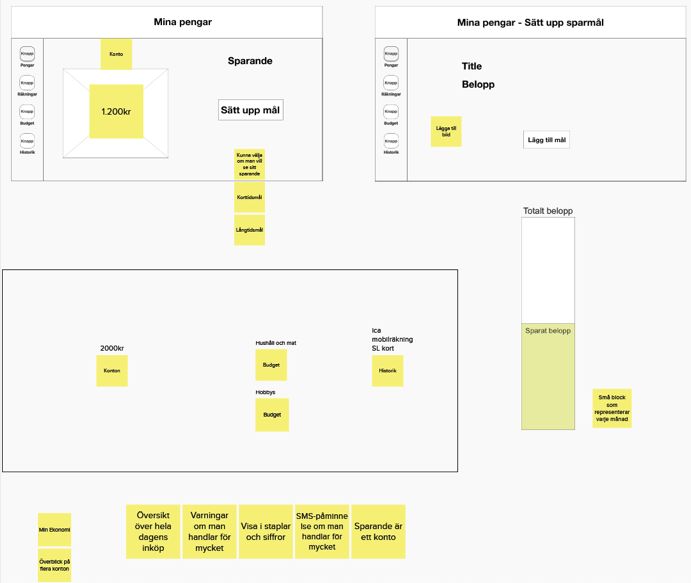
characteristics and capabilities to achieve a specified goal in a
specified context of use”. Accessibility could be interpreted as a      2.2 Related work
quality concept that can improve quality of life and provide equal
living conditions for all people regardless of abilities [2,14].        Studies regarding how individuals with cognitive impairments
Thus, it has a positive impact on society and social sustainability.    interact with financial services are limited. However, there are
Accessibility can also be seen as a solution to challenges that arise   studies regarding how these individuals handle their own money
during interactions in society [2]. For example, the “barrier-free”     and the importance of being able to do so. Among other findings,
buildings during the 1950s in the USA, making buildings                 those studies indicate that people with disability perceive
accessible to injured soldiers returning after the Vietnam war and      financial literacy as an important factor to feel included in society
to others with similar impairments [14]. For persons with               [22–24].
cognitive impairments the focus is on cognitive accessibility,
defined by ISO (2020) as the “extent to which systems can be used       A study in Australia investigated how individuals with cognitive
by people from a population with the widest range of user needs,        impairments comprehend the concept of money and they
cognitive characteristics and capabilities to achieve identified        concluded that financial literacy was highly valued by their
goals in identified contexts of use”.                                   respondents [22]. Another finding in the same study indicated that
                                                                        individuals with cognitive impairments perceived financial
However, accessibility can be perceived as difficult to interpret       literacy to be a barrier to social inclusion and that they urge more
as there is no general agreement formulating the concept,               opportunities to develop such capabilities [22]. This study argues
different areas have different approaches [14]. Another aspect to       that there is a pressing need for tools that target financial literacy
consider is individual characteristics and the context where the        and the mathematical competencies needed for using physical
interaction is embedded. As Stefan Johansson (2019) describes it:       money and form the foundation for understanding digital money
“People with the same impairment could have different                   [22].
experiences and difficulties with interactions” [2], thus,
accessible or not, depends on the person’s ability to interact with     Another study investigated if people with disability have access
society, a product or service [2].                                      to their own money and its impact [23]. According to the study,
                                                                        additional support, attitudes and organizational policies entail that
As accessibility focuses on the opportunities to achieve a specific     people with disability encounter a lack of access to their own
goal and perceived as a quality concept, usability could be             money. They also found that regarding controlled support or not,
interpreted as a quality attribute, related to the ease of use with     people with disability who have access to their own money
three quality components: effectiveness, efficiency, and                increases the likelihood that they will interact and participate in
satisfaction [2,15]. ISO (2018) defines usability as the “extent to     society [23].
which a system, product or service can be used by specified users
to achieve specified goals with effectiveness, efficiency and           A US-investigation on how financial tools and products served
satisfaction in a specified context of use”.                            people with mental disorders, found that having one-on-one
                                                                        coaching had a positive influence on people’s financial well-
Another concept that relates to accessibility is Universal design       being, as long as this peer support is customized for that particular
with a distinction that the target group is “all users”, targeting      person’s situation [24]. This study argues that Fintech could be
more diversity rather than only people with disability [2]. ISO         assistive when involving people with mental disorders in their
(2014) defines Universal design as “design of products,                 private financials but conclude that solutions today mostly target
environments, programmes and services to be useable by all              the younger population and people who already are comfortable
people, to the greatest extent possible, without the need for           with technology [24].
adaption or specialized design”, also stating that Universal
design should include assistive technology for particular groups,       Prior research regarding Participatory Design involving people
such as people with disability, when needed.                            with disability, reports about the positive impact it has on both
                                                                        the project in question and the participants [19–21,25]. One study
2.1.2 Participatory design & people with disability                     concludes the importance of participants’ involvement in the
                                                                        design process when developing a technology to support people
Participatory design is about engaging your target users and            on the autism spectrum to recognize faces [25]. The authors argue
other important stakeholders in the design process of new               that their findings could be applied to other minority populations
technology. Focus is on participation, acknowledging the users as       with similar difficulties as their participants.
legitimate stakeholders rather than solely informants [2,16].
Participatory design has gained significant influence within the        Melissa Schmidt [19] involved people with cognitive
field of Human-Computer Interaction as a complement to situated         impairments in participatory design activities. Using technology
and human-centered interaction design [17]. This approach               probes the study engaged individuals with cognitive impairments
originated in the Scandinavian labor movement and has also              effectively in the design process [19]. The participants shifted
become more meaningful and important in modern web design               from passive to active participants during the design process. She
advocating participation of users affected by the technological         concludes the importance of technology probes when using a
change [2,17,18].                                                       participatory design approach involving people with cognitive
                                                                        impairments, enabling the participants to effectively show rather
It could be challenging involving people with disability in             than describe their needs [19].
participatory design activities [19,20]. For example, limited
language abilities can affect their ability to describe opinions and    Another study conducted by Anthony et al. [20], created a
needs. Some could experience difficulties participating in              workshop to develop a better understanding of the needs of users
hypothetical and abstract scenarios and discussions [19,20].            with learning difficulties, and to help the users gain an
Design methods should be adapted to support diversity and the           understanding of interaction design to develop skills needed in a
different abilities of the users [20]. However, involving people        Human-centered computing-related role. The workshop had three
with disability, contributes to knowledge exchange, which is one        sessions, one to introduce the concept of participatory design, the
of the aspects of participatory design, mutual learning between         second to evaluate application and game prototypes, and the third
users and designers about their respective fields [20,21].              to discuss their findings. The study showed that their participants
felt engaged in the conversation with the faculty. The participants
appreciated the participatory design session and were enthusiastic 4.2.1 Pre-knowledge, initial meeting & interview
about the fact of being a team member. Being able to engage in
critical thinking and give feedback on the prototypes to make Prior to this project, I had acquired working experience with
them more accessible for diversity, empowering the participants people with cognitive impairments and mental health issues over
[20]. four summers. My working title was housing support, (Swedish:
Boendestöd), which is a social and practical support effort that
2.3 The Project God man i fickan aims to strengthen the client’s ability to manage their everyday
life. Through those summers, I experienced interactions between
The project God man i fickan was initiated by Begripsam1, a GMs’ and clients from a third-party perspective.
company that works to make society more accessible with a focus
on people with cognitive impairments, in association with KTH I met with most of the participants before the project started in
Royal Institute of Technology to target a need for digital support different contexts. For example, the initial meeting with the
for both clients and GM. The project aims to produce a hi-fi majority of the participants happened during a member meeting
prototype, presenting an application that could provide digital for their association, called Begripsam. I also participated in
assistance for people struggling with handling their own money. different workshops together with some of the participants.
The assumption is that the interaction between GMs and their
clients has a lot to gain with increased digitalization. This degree The interview was to form a deeper understanding of the GM-role
project will contribute to the project God man i fickan as it and the different interactions a GM could have with the clients.
explores the basic functions and the basic interaction in the The interview was constructed as a semi-structured interview
interaction between a client and a GM. [26], allowing both parts to interpose questions as they occurred.
3. RESEARCH QUESTION & DELIMITATIONS 4.2.2 Workshops
The overall purpose for this work is to investigate the basic All workshops were structured in the same way with a three-step
functions and the basic interaction in a fintech digital tool used procedure. Step one, an introduction to the workshop, including
by a client and a GM in the purpose to handle the clients’ money. a summary of what has previously been done in the project and
This work is limited to the interaction between the application and the instructions of the task for that particular workshop. Step two,
the client. It is limited to economy, although clients also might execute the task and third, discuss findings within the group.
need other kinds of support from a GM.
4.2.2.1 Experience sorting
The research question is:
This workshop is heavily influenced by the card sorting method
What are the basic functions and basic interactions in a digital often used in user experience design [27]. The goal of this
tool that will help clients handle their economy more workshop was to create an understanding of the relation between
autonomously than without using a digital tool? the participants and their GMs’ as well as their perception of
private economy. To do so, the workshop was divided into two
4. METHOD parts: 1) discuss the pros and cons of GM’s and 2) discuss what
is difficult or not regarding private economy. At the beginning of
This project encountered unexpected circumstances due to the each part, the participants dedicated about 20 minutes to write
Covid-19 pandemic. After we had completed two out of three down their experiences on notes, one experience per note. Each
workshops, we had to move from an environment the participant then presented their experiences in the group for
participants, people with cognitive impairments, were further discussions. At the end of the workshop, the notes were
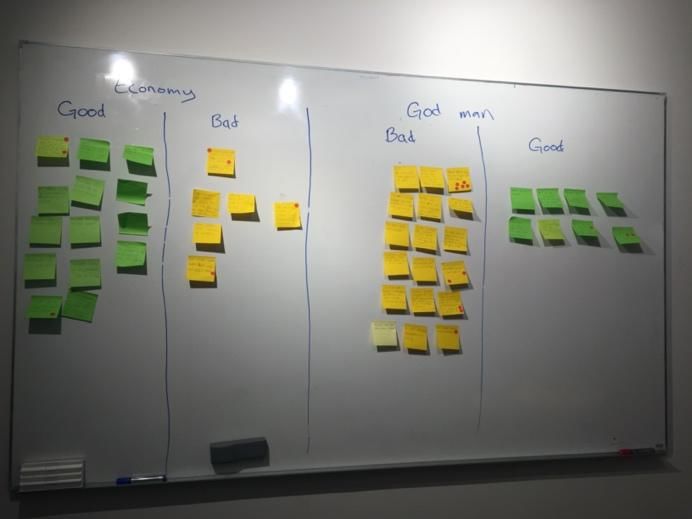
comfortable with to an entirely new environment. The third grouped on a whiteboard with positive experiences on one side
workshop had to be modified for online environments. These and negative experiences on the other, see figure 1. The
modifications are described below. participants were given five red stickers each, in order to vote and
prioritize the presented experiences. The rules applied were that
4.1 Participants the participants could place them however they wanted, e.g. one
sticker on five different experiences, five stickers on one
For this project, the participants, people with cognitive experience, etc.
impairments e.g. aphasia, dyslexia, and dyscalculia, were referred
to as members of a design team. The design team had a total of
10 participants, 2 female and 8 males, between the ages of 20-70
who all have different experiences with GM as an institution.
Some participants get assistance from a GM, one is a GM, and
others have living experiences of GM’s, either family members
or friends have assistance from a GM. Eight of the participants
had previous experiences participating in projects with a
participatory approach, while two who had no prior experiences
of this at all.
4.2 Data collection
This participatory design study included the following methods
for qualitative data collection: discussions, storyboarding and a Figure 1. Sorted experiences on the whiteboard, good
design session. The collected data was analyzed in terms of (positive) and bad (negative) experiences. Red dots indicate
themes which then were visualized and gradually refined through votes.
wireframes and a lo-fi prototype.
1
http://www.begripsam.se/4.2.2.2 Storyboarding instructed that these served as a conversation starter, to trigger
discussions.
None of the participants had prior experiences with storyboarding
[28], thus, this workshop started with an introduction to what 4.3 Interactive prototype
storyboarding is and different ways to create a storyboard. To
make the concept of storyboarding easier to understand, we called A digital lo-fi prototype was designed which allowed interaction
it “creating stories”. With the results from the experience sorting, based on the qualitative data collected from the online discussion-
the participants created storyboards to illustrate how particular and design session. The design process of the prototype was
situations could look like with regards to their own experiences. initiated after the analysis of the online workshop. A provocative
This workshop aimed to entail contextualized experiences with object, also called critical artifacts [31], was implemented in the
more details. budget feature, serving as a method to provoke critical reflection
and discussions. The prototype was then tested with heuristic
4.2.2.3 Lo-fi prototyping evaluation with the participants. The heuristic evaluation was
conducted online through Zoom where the prototype was
The goal of this workshop was to identify and explore user needs presented to the participants with a walkthrough of the prototype,
and key features by co-designing the user experience. The using the share screen function provided by Zoom. After the
objective for this workshop was to do lo-fi prototyping [29], by walkthrough, the participants were divided into two groups, using
evaluating and modifying created lo-fi paper prototypes based on Zoom breakout rooms, for further discussions of the prototype
the storyboards from the storyboarding workshop. Additional design. A facilitator coordinated each group and with consent, the
paper elements were pre-made e.g. buttons, text fields, etc. The discussions were recorded for documentation purposes.
purpose was to let the participants articulate their requirements
and engage in the design process. 5. RESULT
4.2.2.4 Online workshop, divided to four sessions 5.1 Experience sorting
Due to COVID-19, instead of gathering the participants in a The experience sorting revealed a number of situations associated
physical space, the lo-fi prototyping had to be modified to be held with the participants. The most frequent topics during discussions
online. The workshop was divided into four sessions, two training about GM was communication, no obligations on the GM’s
sessions, a discussion session, and one design session. Each behalf reporting back to the client and failure from the GM to
session was scheduled for two hours and recorded for perform assignments. The voting of these experiences reflects the
documentation purposes. The tools that were used were Zoom2, a discussions. Experiences that were most voted for were good
video conferencing system, and MURAL3, a digital workspace communication, prefer to be informed, and encountering issues
for visual collaboration. MURAL allows users to collaborate with GM’s not executing their assignments.
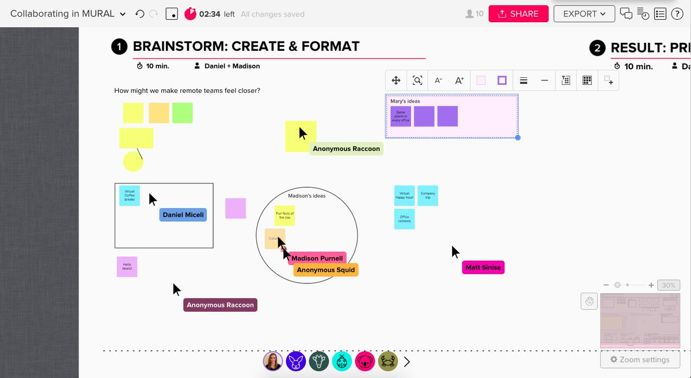
online in real-time, interacting together on the same MURAL, see
figure 2 for an example. The discussion of the private economy revealed problems that the
participants encountered. For example, two of the participants
described problems with managing their own economy, whereas
one of them does not understand the concept of numbers, and the
other expressed that he wants to be involved in decision making
regarding his budgeting. One participant explained that he often
uses digital tools to manage budgeting and invoices.
The amount of experiences regarding negative aspects of ones’
private economy was lower than other categories discussed.
Seven of the participants have assistance from a GM and are not
involved in their own economy. The experiences that were most
voted for regarding private economy was that their GM keeps
track of invoices due dates, managing one's’ own food budget
Figure 2. Example of MURAL where several people are every month, the absence of reports from the GM about the
collaborating with brainstorming in real-time. economy, not involved in one's’ own economy and a non-existing
cooperation with the GM leaving the participant to handle the
Two training sessions were conducted for the users to learn the economy.
tools, one session for each tool. Based on the results from the
physical workshops, four categories were distinguished and 5.2 Storyboarding
discussed further in detail in a discussion session. With these The participants created a total of 11 storyboards. A few with text
categories, basic digital wireframes [30] were designed to work explaining each step in their stories, others with images combined
as an online substitute for the physical lo-fi prototyping with text, see figure 3 for an example. Four storyboards were
workshop. about budgeting, some about how to create a monthly budget and
others about how to keep track of the disposable amount of
The last session was a design session where the participants were money per month. Five were about communication, mostly
divided into two groups, by using the function breakout rooms in stating that clients often receive responses from GM long after
Zoom, with a facilitator in each group. The groups were assigned they needed it. One was about failure performing an assignment,
to design a user interface based on the features identified in the e.g. missed the due date of an invoice which had its consequences.
previous discussion session. At the beginning of the design One was about the lack of consistency thinking, overdrawing the
session, the users were introduced to the wireframes and monthly budget leaving no money left for rent, and trying to get
2
https://zoom.us/
3
https://www.mural.co/a hold of the GM in the middle of the night. More examples of application without external support. Safety, the application
storyboards can be found in the Appendix. should help the user feel safe with additional settings including
warning systems. For example, the user should receive warnings
Combining the results from the experience sorting and if unusual transactions happen. Financial literacy, the web
storyboarding, four categories were distinguished: 1) Budget, 2) application should be able to assist the user with decision-making
Invoices, 3) History and 4) Support. regarding purchases depending on their financial situation. It
should contain visuals of quantity, assisting the user to
comprehend the value of money.
These discussions also revealed a number of key features.
Account features, the user should be able to see either their
balance overview or their accessible money (money the user can
spend after paid invoices). Budget features, the user should be
able to categories their expenses and incomes. Invoice features,
the application should register electronic invoices automatically
and the user should be able to add physical invoices manually.
History features should include previous transactions, receipts
function and accounting materials.
The participants agreed that this application should have multiple
support and settings features, assisting the user to perform tasks
individually and let them be more involved in their own economy.
The support features should include a decision-making service,
Figure 3. Example of a storyboard describing a situation a warning system, the ability to add third-party support, a chat
where the GM forgot to pay one of the client’s invoices which service to communicate with their GM, an error reporting service
had consequences that made the client irritated and angry. if the user needs to report if a GM is not executing their
assignment and clarification of who should do what. The settings
5.3 Online workshop features should consist of the ability to choose which accounts to
display in the application, the ability to personalize categories for
5.3.1 Training sessions expenses and incomes, the ability to personalize the user
interface, an alternative way to navigate in the application e.g.
During the Zoom session, some participants encountered issues with voice commands and text-to-speech functionality.
with how to get the sound in their headphones. We overcame that
obstacle with remote one-on-one support. The participants
5.3. Design session
perceived Zoom as a good tool for online meetings as they could
access it through the browser with only a click on an invitation As shown in figure 4 & 5, the two groups who participated in the
link. design session had different approaches. Group one mostly
worked with text to contextualize their ideas and discussions. One
During the MURAL session, some participants encountered of the participants engaged more with MURAL than the others,
issues with creating a personal account. After they had filled out in order to display an idea of the dashboard. The discussions in
the sign-up form, they received an email with a link to where they group one resembled around the importance of being able to see
were to create their password. They perceived the sign-up flow to the most relevant information first, with emphasis on a
be confusing as they could not choose a password directly when customizable user interface. A suggestion from the group was that
they filled out the form. One of the participants encountered ones’ account balance, budgets and previous transactions should
issues not receiving the email with a password link which entailed be displayed. Other functionality discussed in the group was the
that the participant could not access the project workspace. ability to see multiple accounts, warnings if a daily amount was
Attempts to solve the problem was to use breakout rooms in overdrawn.
Zoom, giving the participant one-on-one support with a
facilitator. The other participants who managed to create an
account successfully, were introduced to MURAL by the other
facilitator. During a discussion at the end of the session,
participants expressed issues with translating the content on
MURAL. We decided to create two manuals. One for creating an
account on MURAL successfully and another for translating web
page content from English to Swedish in the browser. Both
manuals included describing text and step-by-step illustrations.
5.3.2 Discussion session
The session started with a reflection on the four identified
categories. A number of values, reflecting the user needs, were
distinguished by the participants. Simplicity and Clarity, the user
interface should be easy to understand, navigation should not be
complicated, clear and simple language, surrounding elements
should not draw the users’ attention from the element in focus and
the font size should be appropriate. Flexibility, responsive, the
application has to be responsive so that the user can choose which
platform to access it from. The user should also be able to choose
which functionality should be applied to that specific user. Figure 4. Design session contribution from group one.
Individuality, the user should be able to interact with the webwho has overdrawn their budget. The participants stated that the
red part, visualizing the amount overdrawn, should be outside the
bar, some got confused thinking the red area showed the amount
left before reaching the budget amount. Both groups also stated
that if a budget is overdrawn, there should be something that
shows the consequences of that. For example, remove the same
amount from another budget.
Figure 7. The provocative object. A poorly designed
visualization displaying that the food budget is overdrawn
with 356 SEK.
Figure 5. Design session contribution from group two.
Both groups expressed that it would be good to see the different
Group two worked with text, shapes and positions to visualize budget posts in relation to the total income, enabling the users to
their idea. Their idea for the dashboard was a simple overview, see how much of the revenue the different budget post takes.
displaying the most relevant and urgent features such as account Preferably placed above the list of budgets.
balance, messages, a search function, settings, support etc. In
group two, the participants discussed and instructed the facilitator There were also discussions about the ability to visualize a
what to illustrate as the facilitator interacted with MURAL. They specific budget post over a whole year in order to see the yearly
discussed the importance of easy access of the different features, costs. However, others argued that it could be difficult for some
placing the navigation menu in the middle, a search function at to understand the meaning of it, as it involves many complicated
the top together with settings and support. They discussed and decisions.
added an additional functionality, “Take a picture/Scan”,
enabling easy documentation of e.g. invoices and other important Regarding the red color in the bar in figure 6, it was suggested
documents. They also discussed an additional support, a that colors indicating something, in this case a warning, should
calculation tool that the user could use before e.g. grocery be accompanied by symbols so that users who cannot perceive
shopping. colors still can understand that indication.
5.4 Interactive prototype 6. DISCUSSION
The heuristic evaluation of the first iteration of the prototype The aim of this participatory design study is to contribute to the
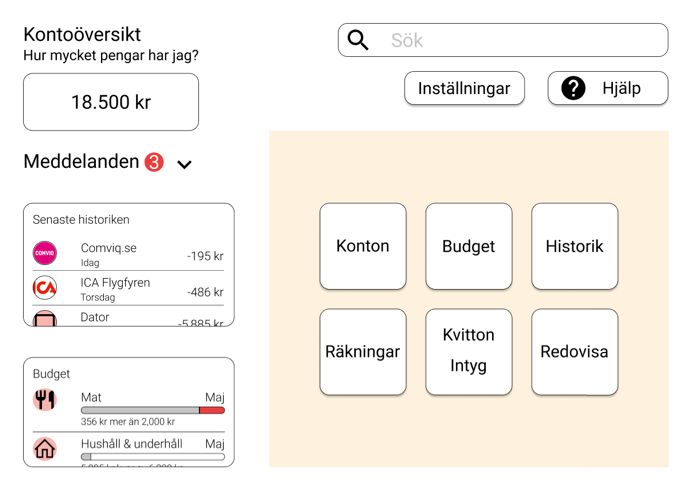
design process revealed that the dashboard suggestion was simple project God man i fickan and to answer the research question:
and clear, see figure 6. The participants did not perceive the What are the basic functions and basic interactions in a digital
dashboard as cluttered nor did they become overwhelmed by the tool that will help clients handle their economy more
amount of information displayed. One participant explained that autonomously than without using a digital tool?
the spacing between the elements made the design look clean, and
easy to comprehend. The participants were divided into two Participatory design activities were used to give the users an
groups right after the demonstration of the prototype. influence on the design. Qualitative data was collected from the
participants, people with cognitive impairments. The data was
collected through a series of participatory design activities
including experience sorting, storyboarding, discussion sessions
and a design session. The data was analyzed in terms of themes,
visualized and gradually refined through wireframes and an
interactive lo-fi prototype.
The study revealed themes related to the participants, values
reflecting user needs, key features to be supported by the
application, an alternative data collection method using picture-
based activities such as storyboarding. Additionally, the study
found ways to involve the participants in participatory design
activities in an online environment. With input from the
participants, we manage to overcome obstacles such as language
barriers and abstract thinking.
6.1 Discussion of the findings
During discussions about the basic functionality categories, the
Figure 6. The dashboard displaying account balance, unread participants distinguished a couple of values reflecting the user
messages, previous transactions, budgets, and other needs. For example, simplicity, clarity, flexibility and
functionalities. individuality, where flexibility and individuality were identified
as most important according to the participants. These user values
The feature that got most of the participants attention was the could be applicable on other types of applications. For example,
budget function where a provocative object was placed, see figure similar user values were found in another participatory design
7. The provocative object represented a visualization of a user study that designed an e-learning platform involving people withintellectual disability [32]. The difference between the two participating, the participants had to have a computer, internet
studies is that the latter used a focus group of accessibility experts and prior knowledge interacting with online environments. In our
to identify user values for people with intellectual disability and case, the participants had access to the required equipment and
in this case the values were articulated directly by people with were familiar with online environments. We encountered minor
cognitive impairments. An advantage with participatory design is problems interacting with the tools but after considering feedback
that information is collected directly from the users rather than from the participants these obstacles were removed. However,
through third-party sources. people with cognitive impairments could need flexible and
several ways to participate. Generally, some could have
The key features that were identified could be generalized to other difficulties adapting to new environments and tools. This change
applications and target groups, especially support features and demonstrated that there is a need for directives regarding
setting features. For example, setting features such as the ability accessibility such as the European accessibility act (2019), as a
to personalize the user interface and an opportunity to choose big part of our society is not accessible for people with cognitive
which functionalities are of interest could be generalized to most impairments.
domains and applications. These features could remove
overwhelming aspects such as too much text and impressions, and 6.2.2 Participatory design activities
complex navigation. For example, a newspaper website could
give the user the ability to choose which types of news that are The structure of the workshops, with the tree-step procedure, is
relevant. Also, clothing store websites could give the user an similar to the approach used by Anthony et al. [20]. They reported
opportunity to choose whether they should only see male or that the participants felt engaged and enthusiastic about being a
female clothes. With a design like figure 6, the dashboard, an team member, and this study had similar results. The participants
application could contain similar amounts of information without were engaged in the subject. For seven participants is this project
being overwhelming for people. The design could be generalized related to lived experiences of having issues handling private
and applicable in other areas where an overview of information is economy. They showed great commitment in the project process,
of essence. It could also be an alternative way to implement and and also expressed their interest in continuing working with the
design a navigation menu. Displaying the menu and project in the future.
corresponding submenus on the left-hand side could give the user
the ability to see the page content directly without investigating The storyboard workshop explored an alternative way for the
the applications navigation. Another thing that could be participants to express themselves and contextualize their
applicable is the sizing of buttons and text fields corresponding experiences. Storyboarding as a qualitative data collection
to functionalities such as search, settings, and support. These method allowed the participants to mediate thoughts and feelings
functionalities should be placed, and sized, to make them that sometimes can be difficult to communicate, and since some
noticeable by a wide range of user abilities. have difficulties in writing, a picture-based method provided an
alternative way of expression.
An important finding in this study is that many of the participants
lack access to their own money. They agree that they have The online design session did not end up as expected where the
difficulties handling their own economy to an extent that they groups different outcomes can depend on various reasons. For
need assistance, not to a degree where they should not be allowed example, group two had a facilitator that was more experienced
to handle money at all. The option is either to give all the handling with leading design sessions. Another reason could be different
of their economy away or take the full responsibility. Many difficulties envision abstract and hypothetical scenarios [19,20].
participants argued for a middle-way approach where they could Some participants expressed the need for more practice with the
have some influence. But that is not an option at hand due to legal digital tool before engaging in the design session. With more time
regulations and policy [23]. The participants also argue that the allocated for training sessions, the results could have differed as
lack of access to their own money could depend on the role their more participants could have felt more confident and been more
peer-support, in this case a GM, takes on. In some cases, a GM engaged in creating the user experience. One thing that was
could identify their client as incapable to handle their own money. discussed after the design session was that MURAL perhaps was
In the early stages of the design process, the participants better suited for discussion activities, and not for design activities.
expressed the importance of financial literacy and the desire to be A design activity would have benefited more from a tool that
more involved in their own economy, which aligns with previous provided pre-made elements such as buttons, text-fields etc.,
research findings [22–24]. something that is not provided in MURAL.
Financial literacy could be perceived as a complex subject for The participatory design activities used in this study could be
people with cognitive impairments as some lack the mathematical generalized as they are not limited to any specific area or subject.
competencies needed [22]. Previous research argues that
customized support for a particular individual has a positive 6.2.3 Involving people with cognitive impairments in
influence on their financial well-being [24]. In this study, much the design process
emphasis was put on the ability to personalize the user interface
as well as a wide collection of support features to assist the user. Involving people with disability in the design process of new
A technical solution that assists the user on an individual level, technology, through participatory design, is an important aspect
with a customizable user interface and selectable functionality, for both social inclusion and accessible technology according to
could provide a positive effect on the users’ economy. As argued a number of researchers [2,17,19–21,25]. Using participatory
in previous research, Fintech solutions could be assistive for design gives people with disability power over the design,
people with disability, if they target users with varied abilities empowering them and provides a sense of ownership [17]. Also,
[24]. it raises their awareness of their own resources and strengths [2]
and could contribute to their wellbeing [17].
6.2 Discussion of method
Research states different challenges involving people with
6.2.1 Covid-19’s effects on participatory design disability in participatory design, e.g. limited language abilities
[19,20]. A finding in this study is that moving participatory
Utilizing a participatory design approach during Covid-19 forced design activities to an online environment enhances challenges
us to adapt to online environments. In order to continuewith language barriers if your native language is not English. The opportunities participating, manuals with describing text and
participants stated, early on, their difficulty with English when illustrations on how to translate web page content from English
interacting with the online tools. Some participants tried to to Swedish were produced. Training sessions, how-to manuals,
translate by themselves, but that consumed much of their energy, and online support enabled the participants to adapt to an online
interfering with their ability to participate in the activity. Using a environment.
participatory design approach gave the participants the
opportunity to affect upcoming activities. With the feedback from The next step in the project God man i fickan is to identify user
the participants, multiple manuals were produced to overcome the needs and key features from the perspective of the GM. The
language barrier. For example, step by step instructions, both with project also needs to iterate the prototype design process,
describing text and illustrations, on how to translate a web page implementing the new perspective.
from English to Swedish using google Chrome.
6.4 Ethical aspects & people with disability
Research claims that people with disability could experience
difficulties participating in hypothetical and abstract scenarios Involving people with disability in participatory design can
and discussion [19,20]. This is something that this study encounter some ethical concerns. In participatory design, the
encountered during discussions about visualization of quantity. participants are team members rather than informants, with
According to the participants, visualizations of quantity could be emphasis on equality, transparency and partnership. However,
beneficial as a support to better comprehend financial literacy. when involving people with disability researchers could
However, without existing examples of visualizations the encounter tensions between equality and the competing
participants encountered issues envisioning visualizations, thus, obligation to protect the participants [33]. Often, academia
experienced issues expressing their thoughts. The use of a requires a written thesis of the conducted study, which has the
provocative object, the poorly designed visualization of quantity, potential to silence the participating team members due to
engaged the participants in a discussion, exploring better and a language barriers [19,20], as the academic report could be
more understandable visualization of quantity. Compared to difficult to comprehend for participants with cognitive
discussions without visual feedback, the provocative object impairments [33]. This could also result in power imbalances as
entailed more detailed discussions which could be compared to the participants are unable to be involved or leave their opinions
Schmidt’s technology probes [19], using objects to provoke on the written report.
discussions, assisting the participants to contextualize their ideas
and imagination. 7. CONCLUSION
Involving people with cognitive impairments in participatory The goal for this study was to identify basic functionality and
design introduced a number of benefits. As they had an active role interactions to be implemented in an application, God man i
throughout the process, we could define, analyze and solve fickan, supporting the users with their private economy through
problems that were identified. Throughout the activities, the participatory design but also empowerment, giving people with
participants used their prior knowledge and experiences cognitive impairments power over the design. This study
discussing hypothetical scenarios, as well as emphasizing other provides insight on basic functionality and interactions in a digital
perspectives, not just their own. Their involvement also tool that focuses on assisting people with their private economy.
highlighted problematic situations they encounter as well as For instance, user values and key features related to direct
useful solutions they utilize to manage challenges in their stakeholders were identified by the participants. Important user
everyday life. Throughout the process, there was an ongoing values that were identified are simplicity, clarity, safety and
knowledge exchange within the group which provided a raised financial literacy whilst valued key features are support -and
awareness and better understanding for diversity. Participatory settings features, assisting the user to manage parts of their
design and direct interaction with the participants enabled a private economy. These insights add a new perspective to the
deeper understanding about the users as all activities revealed design of similar platforms, one such platform could be fintech
information about their ability to solve problems, comprehend platforms.
subjects, and interact with different technologies.
Additionally, this study provides insights on online alternatives
Throughout this study, it has been shown that people with to physical participatory design activities such as online
cognitive impairments can contribute with valuable information discussions and design sessions. As previous research has
and experiences needed for the design to be accessible and usable. focused on people with disability and their financial literacy, their
When the participants were given an opportunity to express access to their own money and their involvement in participatory
themselves regarding a sensitive and important topic such as design, this study explores new territory by combining those
private economy, they had a lot of lived experiences and subjects. During the study, it was discovered that the participants
information to share. They are the experts when it comes to their lack the capacity to manage their private economy autonomously.
interactions with different aspects of society. Stefan Johansson However, by analyzing their own lived experiences they could
claims “It is by participation that we become included.” [2, p.15]. identify and solve problems that they encounter with private
economy. This study confirms previous research regarding a few
6.3 Limitations & future work challenges involving people with disability in participatory
design, e.g. language barriers and difficulties envision
As this study encountered circumstances because of the Covid-19 hypothetical and abstract scenarios, for instance to find solutions
pandemic, unforeseen obstacles approached. As we could not about private economy that is affected by their lack of access to
continue with the original plan, the study became limited to the their own money. As they have assistance from a GM they have
participants as they needed access to a computer with internet limited insight to their private economy.
connection to proceed. As the participants had different
experiences with technology a lot of effort had to be put into ACKNOWLEDGMENTS
exploring and choosing tools to be used online. Nonetheless,
there were participants who encountered issues interacting with I would like to take this opportunity to thank the amazing people
these tools, mostly because of language barriers. To undertake at Begripsam AB for all their valuable and much appreciated
these barriers, and to provide everyone with the same help, providing me with all kinds of knowledge, the participants,and an inspiring environment. Also, I like to thank my design 15. Sloan D, Horton S. Usability, Universal Usability, and
team for their amazing work. Design Patterns. In 2019. p. 445–60.
A special thanks to my supervisors, Stefan Johansson and 16. Simonsen J, Robertson T. Routledge International
Nickolaos Syropoulos at Begripsam AB and Kjetil Falkenberg at Handbook of Participatory Design. In 2013. p. 300.
KTH for providing me with valuable feedback and knowledge
throughout this project. 17. Frauenberger C, Good J, Alcorn A. Challenges,
Opportunities and Future Perspectives in Including
REFERENCES Children with Disabilities in the Design of Interactive
Technology. ACM International Conference
Proceeding Series. 2012. 134–143 p.
1. Lewis C, Seeman L. Policy and Standards on Web
Accessibility for Cognitive and Learning Disabilities. 18. Power C, Petrie H. Working With Participants. In 2019.
In: Web Accessibility. 2019. p. 281–99. p. 153–68.
2. Johansson S. Design for Participation and Inclusion 19. Schmidt M. Let me show you what I want: engaging
will Follow: Disabled People and the Digital Society individuals with cognitive disabilities and their families
[Internet]. KTH Royal Institute of Technology; 2019. in design. Conference on Human Factors in Computing
Available from: urn:nbn:se:kth:diva-262819 Systems - Proceedings. 2007. 2177–2182 p.
3. Seeman L, Lewis C. Cognitive and Learning 20. Anthony L, Prasad S, Hurst A, Kuber R. A
Disabilities. In 2019. p. 49–58. participatory design workshop on accessible apps and
games with students with learning differences.
4. Standardization IO for. ISO 26800 Ergonomics - ASSETS’12 - Proceedings of the 14th International
General approach, principles and concepts. 2011. p. 26. ACM SIGACCESS Conference on Computers and
Accessibility. 2012. 253–254 p.
5. European accessibility act [Internet]. [cited 2020 Apr
16]. Available from: 21. Holone H, Herstad J. Three tensions in Participatory
https://ec.europa.eu/social/main.jsp?catId=1202 Design for inclusion. Conference on Human Factors in
Computing Systems - Proceedings. 2013. 2903–2906 p.
6. Lag (2018:1397) om tillgänglighet till digital offentlig
service. 2018. 22. Hopkins S, O’Donovan R. Using complex learning
tasks to build procedural fluency and financial literacy
7. Ståhl B. FinTech: Den digitala transformeringen av for young people with intellectual disability. Math
finansmarknaden. 2017. Educ Res J. 2019;
8. Lee I, Shin Y. Fintech: Ecosystem, business models, 23. Friedman C. People with disabilities’ access to their
investment decisions, and challenges. Bus Horiz. 2017 own money. Int J Disabil Hum Dev. 2017;
Oct 1;61.
24. Harper A, Staeheli M, Edwards D, Herring Y, Baker
9. Zhang X, Zhang J, He Z. Is Fintech Inclusive? M. Disabled, Poor, and Poorly Served: Access to and
Evidence from China’s Household Survey Data. In: Use of Financial Services by People with Serious
IARIW General Conference. 2018. Mental Illness. Soc Serv Rev [Internet].
2018;92(2):202–40. Available from:
10. The World Health Organization’s International https://doi.org/10.1086/697904
Classification of Functioning, Disability and Health
(ICF) [Internet]. [cited 2020 Feb 17]. Available from: 25. Madsen M, el Kaliouby R, Eckhardt M, Hoque ME,
https://www.who.int/classifications/icf/en/ Goodwin MS, Picard R. Lessons from Participatory
Design with Adolescents on the Autism Spectrum. In:
11. Dekelver J, Siplivaya M, Shabalina O, Borblik J, CHI ’09 Extended Abstracts on Human Factors in
Pidoprigora A, Romanenko R. Design of Mobile Computing Systems [Internet]. New York, NY, USA:
Applications for People with Intellectual Disabilities. Association for Computing Machinery; 2009. p. 3835–
In 2015. p. 823–36. 3840. (CHI EA ’09). Available from:
https://doi.org/10.1145/1520340.1520580
12. God man och förvaltare [Internet]. [cited 2020 May
12]. Available from: 26. Rabionet SE. How I Learned to Design and Conduct
https://rfs.se/frivilliguppdragen/gode-man-och- Semi-Structured Interviews: An Ongoing and
forvaltare/ Continuous Journey. Qual Rep. 2011;16(2):563–6.
13. Alliance FC. Conservatorship and Guardianship
[Internet]. [cited 2020 Mar 15]. Available from: 27. Nawaz A. A Comparison of Card-sorting Analysis
https://www.caregiver.org/conservatorship-and- Methods. In: Proceedings of the 10th Asia Pacific
guardianship Conference on Computer-Human Interaction [Internet].
2012. p. 583–92. Available from:
14. Persson H, Åhman H, Yngling A, Gulliksen J. http://hdl.handle.net/10398/8587
Universal design, inclusive design, accessible design,
design for all: different concepts—one goal? On the 28. Mollá R, Santamarina-Campos V, Abad F, Tipantuña
concept of accessibility—historical, methodological G. Storyboarding as a Means of Requirements
and philosophical aspects. Univers Access Inf Soc. Elicitation and User Interface Design: An Application
2014 May 7;14. to the Drones’ Industry. In: Drones and the Creative
Industry. Springer, Cham; 2018. p. 83–97.You can also read


