Parent Voice a chance to have your say - Heronswood Primary School
←
→
Page content transcription
If your browser does not render page correctly, please read the page content below
Take a look at our website www.heronswoodprimaryschool.co.uk
            or keep up to date on Facebook Heronswood Primary School and Pre-School

                                                                    Wednesday 3rd October 2018

                                        Latest News
  There is a fantastic opportunity for parents and carers to become part of our Parent Voice
             committee. Please see details below, we would love to see you there.
In addition we are always on the lookout for parent readers and if you have some spare time
 and would be able come in to school each week (subject to safeguarding and DBS checks)
         please get in touch either by telephone or email. HWoffice@riverscofe.co.uk

          Parent Voice                          a chance to have your say

As a school we are always looking for ways to improve communication and to give our
parents opportunities to have their voice heard, as we value opinions and ideas. Here at
Heronswood we have a Parent Voice forum which meets every half term. Our forum allows
parent representatives to be a voice to inform school of the needs of all our children and
families.
The forum creates a platform for parent voices as it facilitates communication between
parents/carers, staff and governors. The forum works to create opportunities for parents to be
involved in school matters, provide feedback on provision, offer a parent's perspective on
current policy and practices and input into decision making and planning for future provision.
The next meeting will take place on Wednesday 24th October at 8:45 a.m. We are looking
for representatives from all year groups. All parents and carers are welcome and we would
love to see you at the next meeting which will take place in the mobile classroom.

                 Child Safety on Fortnite - Factsheet
    Fortnite is an online video game, we have received a factsheet which we would like all
                                   parents and carers to read.

     The factsheet can be found on pages four, five and six of this newsletter. Thank you.
The following children have been recognised for going over and above in one of our STARS
VALUES - (Safety, Trust, Achievement, Respect and Sharing.)
SAFETY- Jasmine, Tyler, Kharee, Harry, Zuzanna, Paighton, Tyrese, Martha, Leyla, Peter, Charlie,
Jacob, Sonny and Lizzy.

TRUST - Grace, Amelia, Kukenga, Harrison, Lilliana, Josh, Daisy, Archie, Tammy, Chloe, Paige,
Perran, Decklan and Oliver.

ACHIEVEMENT - Asa, Katerina, Liam, Ethan, Joseph, Jamal, Artjoms, William, Alice, Kobe and
Rhys.
RESPECT - Archie, Harley, Lydia, Isaac, Sian, Zack, Evie, Jess, Dylan, Mia, Connor, Ethan, Joseph
and Oliver.

Well Done we are all very proud of you.

Attendance and Lates:        Week ending 28th September 2018 –3 classes at 100% well done.

   Class        Attendance     Lates   Class    Attendance    Lates    Class     Attendance      Lates

    RLC           93.75          0      2CB        100         0        5DS        98.82          0
    RMM            97.6          0     3HM         97.5        0       5LW          100           2
    1SC           92.67          1      3TP        100         0        TEP         98.5          0
    1LJ            97           0       4HG       99.62        1        6BK        97.39          0
    2AL           98.26         1       4GS       98.33        0

                                               House Points

           Points are being awarded and will show here once they have been totalled.

                                                 This weeks winner is -

                    Year totals FALCONS:          RAVENS:          EAGLES:     HAWKES:

              Governors Contacts                                      FRIENDS OF HERONSWOOD
          Lisa Gregg, Chair of Governors.                               Contact - Tina Culloty
                                                                      tculloty@riverscofe.co.uk
             lgregg@riverscofe.co.uk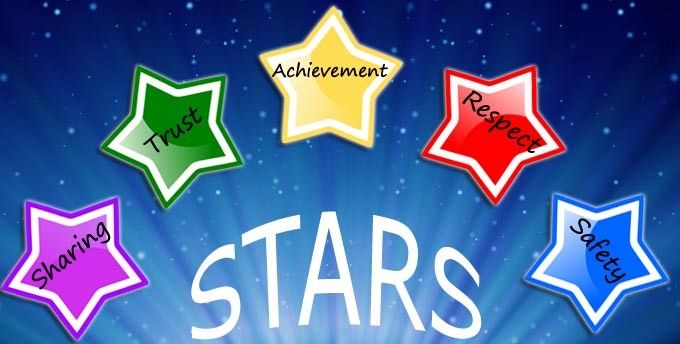
Dates for your diary…
                                                         Subject to Change
                                                                          Parents
       Date                         Event                 Children                     Time
                                                                         Invited?

 Thurs 4th October          KC1 Open Evening                 Y6            Yes      18:00– 20:00

 Thurs 4th October    Friends of Heronswood PTA meet                       Yes      17:30– 19:00

 Mon 8th October               PACT Meeting                                Yes      19:00-21:00

                        Harvest Festival and coffee
Weds 10th October                                           PS-Y6          Yes      09:00-10:00
                                 morning

 Thurs 18th October    Whole school sponsored event          All                    08:35-15:15

 Thurs 18th October          Y6 Back to School               Y6            Yes      09:00-09:45

 Mon 22nd October                Arts Week                   All

 Mon 22nd October      Book People Book fair all week        All                       14:45

 Tues 23rd October            Parents Evening                              Yes      15:30-19:00

Weds 24th October          Parent Voice Meeting                            Yes         08:45

Weds 24th October             Parents Evening                              Yes      15:30-18:00

 Thurs 25th October            School Closes                                           15:15

Friday 26th October        TED day school closed             All

Mon 5th November               School Opens                  All                       08:35

Mon 5th November        Science day - Bonfire focus          All                       08:35

Mon 5th November        Polioe Cadet starts this week        Y5                     08:35-15:15

                                                        YR, Y1, 3,,5 &
Tues 6th November            Pedestrian training                                    08:35-15:15
                                                              6

Weds 7th November             Halloween Disco                All                        TBC

Mon 12th November            Anti-bullying week              All

Mon 12th November            Kara WHP drop in                All           Yes      08:30-09:30

Thurs 15th November     Whole School Photographs             All                    08:15-15:15
Parent Fact Sheet on Fortnite :

Fortnite is an online video game where players compete to be the last person standing in a
post-apocalyptic world. The most popular version is Fortnite: Battle Royale, which sees up to
100 players pitted against each other to stay alive on an island. Players can build and demolish
structures, and collect weapons, supplies and armour to help them along the way.
Players shoot each other using a range of lethal weapons, but the brightly-coloured, cartoon-
style graphics and lack of bloodshed mean it doesn’t feel too gory or graphic.
To play, the age recommendation is 12 and above due to ‘mild violence’, although you don’t
have to provide your age when creating an account, so younger children can still log on easily.
Fortnite: Battle Royale is free to download on PC/Mac, Xbox, Playstation, Nintendo Switch and
iOS devices (Apple phones and tablets). It’s coming to Android soon.
It has about 45 million monthly users worldwide including the England football team, who
reportedly played it in their World Cup downtime.

What are the concerns?
You may have seen news reports or heard concerns raised about the:

    Communication between players: a chat function allows players to talk to each other
      either over a headset and microphone, or using messaging. Children could use it to
      speak to strangers, or it could put them at risk of cyberbullying
    In-app purchases: players can build up large bills on their parents ’ accounts by buy-
        ing cosmetic items like outfits for your character and better-looking weapons (otherwise
        known as ‘skins’)
    Addictive nature of the game: anecdotal stories tell of children staying up all night to
      play, or falling asleep in lessons after playing for too long. Some commentators attribute
      this to the communal feel of the game – you can play with your friends – and the game
      is different every time you play, keeping it fresh

What safety options are available to parents?

Use the parental controls on the gaming device
Most devices allow you to set time limits on game play, set age limits for content, and re-
strict in-app purchases.
Visit the website ‘ask about games’ for links to detailed instructions on the device your child
uses – the site covers Playstation 3, Playstation 4, Xbox 360, Xbox One, Apple and Android
phones, and Nintendo Switch.
Ask About Games
www.askaboutgames.com/advice/parental-controls
The battles in Fortnite last around 20 minutes. When trying to limit your child’s screen time,
make the most of this natural stopping point. Set a limit in terms of matches rather than hours
and minutes, or set time limits in 20 minute increments.
Turn off the voice chat feature
Speak to your child to make sure they know this feature exists, and encourage them to use the
options below if they encounter someone who is offensive or inappropriate.
You can disable the voice chat function in the game if you:
           Open the settings menu (the 3 lines on the right-hand-side of the screen), then choose
the ‘cog’ icon
          Select the ‘audio’ tab
         You should be able to turn off ‘voice chat’ by tapping the arrows next to it

You can also ‘mute’ individual players in the game by:
         Pausing the game
         Hovering over the player you wish to mute
         Selecting the mute button (a loudspeaker icon)

Make sure your child knows how to report inappropriate behaviour
You or your child can report players who make them uncomfortable using the in-game feedback
tool (located in the main menu).

You can also use the ‘support’ section of the Epic Games site (the makers of Fortnite). You’re
asked to select the platform you play the game on, the game mode you’re playing, and then you
can select ‘report player’. You can provide more detail such as the player’s name, and attach a
screenshot.

Support, Epic Games
https://fortnitehelp.epicgames.com/customer/portal/emails/new?b_id=9729&q=email+us

What else can I do?
Further tips
   Download and play the game to help you understand it
   Talk to your child about what they’re doing online, and make sure they know they can talk to
      you about anything that has upset them
   Check your bank statements and gaming system account balance regularly to look for in-app
     purchases you’re not happy with, and to make sure your child isn’t getting around any
     passwords you’ve set up

More sources of support
   Non-profit organisation Internet Matters has put together 5 top tips to manage children’s
     screen time.
   https://www.internetmatters.org/hub/guidance/5-top-tips-to-manage-childrens-screentime/

   The National Society for the Prevention of Cruelty to Children (NSPCC) has a range of
resources for parents on internet safety.
https://www.nspcc.org.uk/preventing-abuse/keeping-children-safe/online-safety/
The NSPCC has also teamed up with O2 to offer advice to parents. You can call their free
helpline on 0808 800 5002, or make an appointment with an O2 Guru in an O2 store.
https://guru.secure.force.com/O2DeskStoreLocator
Sources for this factsheet
This factsheet was produced by Safeguarding Training Centre from The Key
Fortnite, Epic Games
https://www.epicgames.com/fortnite/en-US/home
‘Fortnite chat raises stranger danger fears from NSPCC’, BBC News, 3 May 2018
https://www.bbc.co.uk/news/technology-43988210
Fortnite: all you need to know, Net aware, from the NSPCC and O2
https://www.net-aware.ohttp://www.heronswoodprimaryschool.co.uk/images/pages/
wishing_tree.pngrg.uk/news/fortnite-all-you-need-know/
Heronswood Proud Tree
The following children have achieved five green
leaves and have been awarded a proud leaf:-
Tom, Finley, Charlie, Martha, Mia, Tabitha, Evie,
Aleisha and Grace.You can also read


