Roadmap Update March, 2019 - Spryker Documentation
←
→
Page content transcription
If your browser does not render page correctly, please read the page content below

Roadmap Update March, 2019
Disclaimer

The roadmap is presented for INFORMATIONAL PURPOSES ONLY, and not as
  a binding commitment. Spryker reserves the right to change timing and
  scope of released functionality based on input from our customers and
                         changing market trends.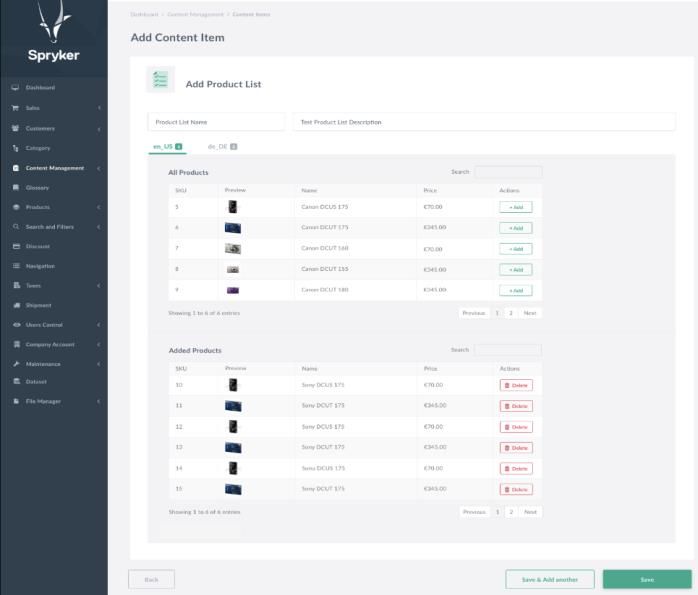
Short term roadmap
Q2-Q3, 2019

B2B
Quotation or Request for Quote

                            1. Reduce time required to negotiate a deal
                            2. Increase flexibility of the quotation process by
                               supporting online and offline interactions
                            3. Real time collaboration between a customer
                               and sales representative

                                                                                  5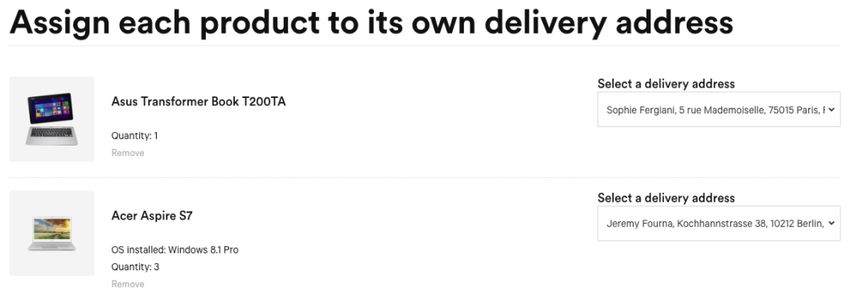
Comments

                                        − Comments Widget
 Approver
                                        − Supports multiple comments on a cart or a
                  Sales Agent
                                          shopping list

                                        − Generic feature that can be reused anywhere
   RFA
            RFQ
                                          in the system where multiple comments are
                                          needed

  Buyer                         Order

                                                                                        6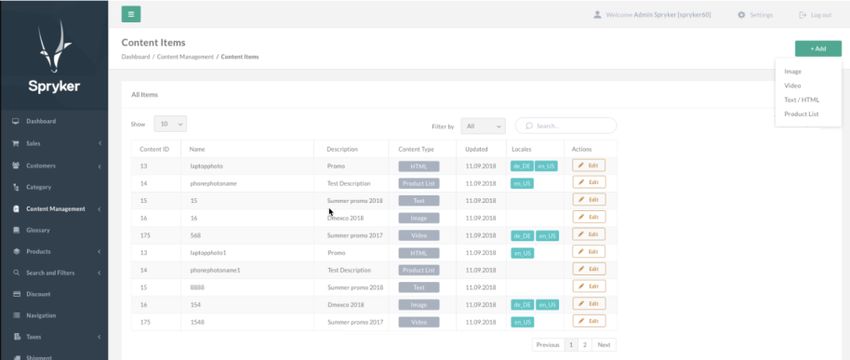
Shopping List Enhancements

                             To make using Shopping Lists even more efficient,
                             we are adding two enhancements

                              − Calculating Total in Shopping Lists
                              − Ability to export a Shopping List into a CSV file

                                                                                    7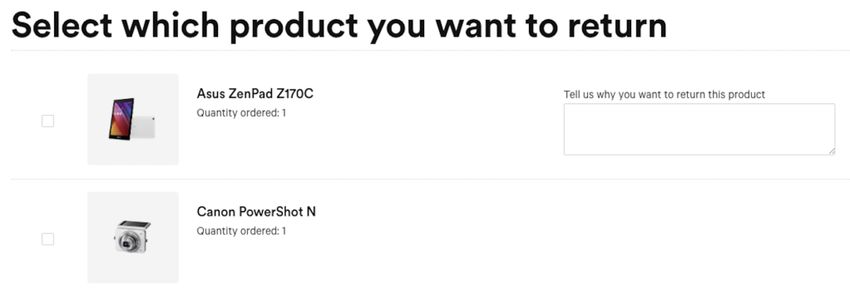
Sharing Cart - Online & Offline

                                  Shopping Cart Sharing - it’s about convinience of
                                  integrating different online and offline systems to
                                  improve collaboration when making complex
                                  purchases.

                                  New ways for collaboration:

                                   − Export Cart to a CSV file
                                   − Unique Url per Cart for easy sharing

                                                                                        8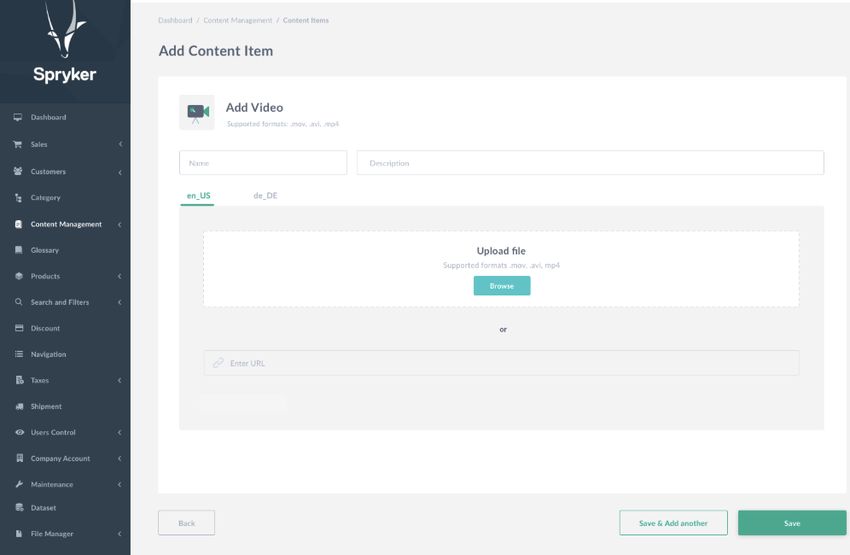
PunchOut Integration
                                   PunchOut makes it more convenient for B2B
                                   customers to do purchases
                                   − PunchOut brings e-commerce experience into
                                     customer’s ERP system.

                                   − A B2B customer logins into an online shop
  B2B Buyer            B2B Buyer
                                     directly from an ERP system, selects products,
   Shop A     Shop B
   Shop B
                       Shop B        adds them to the cart, then ‘punches out’ the
   Shop C              Shop C        cart back to the ERP to place the order there
    ERP                   ERP
                                   − PunchOut Protocols

                                       • OCI
                                       • cXML

                                                                                      9
Core Commerce
Split Delivery
                 − Support splitting an order into multiple
                   Shipments
                 − Introduces the Shipment object to group order
                   items together
                 − A shipment defines:
                     − Shipment method
                     − Delivery address
                     − Delivery date
                 − An order can have multiple shipments each
                   containing several order items

                                                                   11
Scheduled Price updates
− Customers can add delayed price updates to
their shop
− A cron job will apply price updates at the
required time to the required stores
− If the new price is defined as a ‘Sale’ price, the
original list price will be shown as crossed-out
on product details page
12Decimal numbers for stock quantity
− Allow stock values to contain decimal numbers
− for example: 10.214
− This improvement will allow customers to represent product’s availability with decimal number
quantities
13Dynamic Bundle Price
− Price for a bundle could be dynamically calculated based on the price of the products that are
contained inside the bundle
− Whenever a product price inside the bundle is updated, the bundle price will get automatically
updated
− Works with Volume price, merchant specific price, etc.
14Content Management System (CMS)
Content Items

                16
Content Items
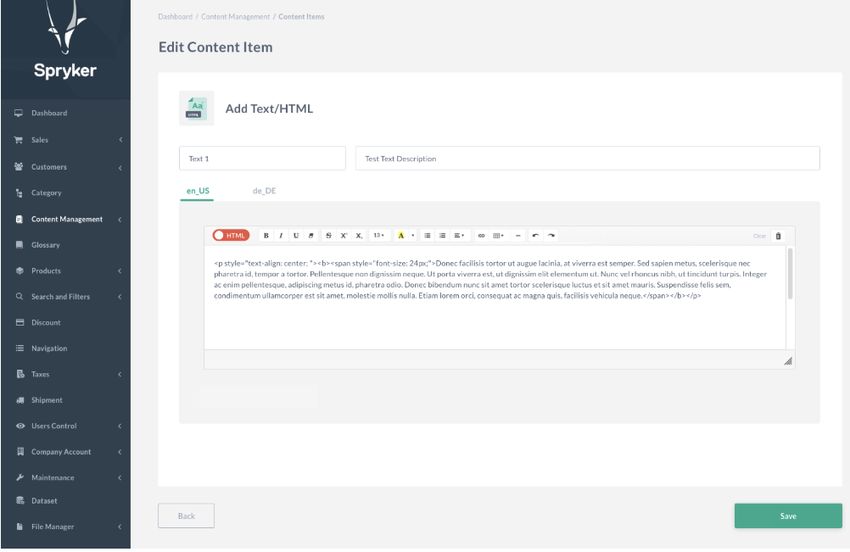
− New abstraction: Content Item
− Allows to separate content from placement and the way it is presented
− New section in Content Management
− Allows the user to see existing content items, useful information about them and create/edit
them
− User friendly UI
− Content available in Twig templates or through API
17CMS API
− Allow Content Items to be accessed
through API
− Makes Content created in Spryker CMS
available for use in mobile or single page
Glue API
Javascript applications
18Store Pages with Configurable CMS Blocks
− Give Admin Interface users the ability to modify content blocks for the Homepage and other store
pages
− List of store pages is visible in Admin Interface
− User can assign different content blocks to predefined placeholders
19CMS Integration - Styla
− Seamless Shopping Integration
− Create Inspiring content and landing pages
− Improve SEO-Optimization
− API Integration to access products and shop
data in STYLA‘s content editor
− Make content shopable with add-to-cart
function and hotspot shopping
20API
B2B Login

                   Business Unit
                     Manager

                                                       − B2B End-Customers login with a single company
                                                         user login
                                                          − User can switch between business units
                                                          − See and work with business unit’s specific
                                                            prices
                                                          − Can manage company account resources

 Business Unit A   Business Unit B   Business Unit C

                                                                                                         22
Multi Cart & Shopping Lists Functionality
− Access multiple shopping lists and multiple carts
− Share Shopping lists and carts
− Access rights can be provided to individual users
and also to all members of a business unit at
once
End Customer End Customer
23Spryker Cloud Ready
Containerization of Development Environment

         Development        − Cloud Enablements:
                               − Containerization of B2C & B2B suites
                               − On Mac & Linux platform
                               − CI for building process
                               − Improvements of core modules for:
 B2C / B2B
                                   − Configuration
                                   − Building process
                                   − Logging
                                   − And more...
Long term roadmap Q3-Q4, 2019
Return Management

                    − Customers can request to return products from
                      past purchases from the storefront

                    − Shopowner will be able to offer either an
                      Exchange or a Refund

                                                                      27
Configurable Products & Bundles
− Configurable product feature will add the ability
to define and sell products that the customer
can customize before the purchase
− Configurable bundles will allow customers to
use guided navigation to select bundle
configurations that fit their needs
28Backoffice APIs
− Connect to 3rd party applications that can be
used to manage backend data (e.g. PIM, CRM, …)
− It will support management of:
− Products
− Stock
− Prices
− Orders
− Customers
New
External ERP External PIM
− Content
Backoffice
29Cloud Support in Production Environment
− Cloud enablements:
Development Production
− B2B & B2C
− Multi store setups
− Windows support
B2C & B2B
− Cloud support:
− K8S / Openshift support
− Clouds: AWS, Azure, Google Cloud Platform
− Pre-built docker images for suites
− Support Cloud-services: SQS, DB, S3, …Marketplace
Extending your Store to a Marketplace
         Storefront          Backoffice

                                                    “Marketplace operation as a business model
                                                    is attracting an increasing amount of
            Customer sees        Main Merchant
           products from a      manages Products,
                                                    attention from brands, retails and B2B online
           single merchant        Prices, Stock     sellers. For B2B sellers, the interest often
          Customer           Main Merchant          stems from the need to more fully serve their
                                                    customers and offer them a single online
                                                    source for more products and services, while
         Storefront          Backoffice             increasing loyalty from partners (suppliers
                                                    and distributors).”

                                                    Gartner - Hype Cycle for Digital Commerce,
                                                    2018
            Customer buys             Main
           products from a         Merchant
           single merchant       fulfills orders

          Customer           Main Merchant

                                                                                                    32
Extending your Store to a Marketplace
Storefront Backoffice Merchant Portal
Customer sees products Main Merchant Each Merchant adds
from multiple Manages its Products, and manages its
merchants Prices, Stock products
Customer Main Merchant 3rd Party Merchants
Storefront Backoffice Merchant Portal
Customer buys products Main Merchant Each Merchant
from multiple fulfills its Orders fulfills its orders
merchants
Customer Main Merchant 3rd Party Merchants
33New Marketplace Specific Functionality
Marketplace Storefront Marketplace Backoffice Merchant Portal
Customers Operator/ Main Merchant Merchants
✓ Products from multiple merchants are in the ✓ Merchants approval and management ✓ Merchant registration and login
same storefront
✓ Merchants products approval ✓ Merchant profile
✓ Customer can mix products from multiple
merchants in a single order ✓ Order splitting and routing to correct ✓ Merchant users with different roles and
merchant permissions
✓ Ability to search and navigate by merchant
✓ Marketplace reporting ✓ Merchant sales reports
✓ Merchant profile pages
✓ Payment processing ✓ Merchants manage their:
✓ Merchant reviews and ratings
✓ Refunds ✓ Products
✓ Merchant’s “Store-in-Store” -
✓ Prices
a special store area that highlights products
from a single merchant ✓ Stock
✓ Shipping methods
✓ Order status update from order fulfilling
merchants ✓ Merchants fulfil their orders
✓ Merchants to manage reviews
34You can also read


