Controlled Document Please use online version for most up to date requirements 06/20/2018 - ROUTING, SHIPPING, AND PACKAGING INSTRUCTIONS ...
←
→
Page content transcription
If your browser does not render page correctly, please read the page content below
ROUTING, SHIPPING, AND PACKAGING INSTRUCTIONS

                06/20/2018

         Controlled Document
Please use online version for most up to
          date requirements.
ROUTING, SHIPPING, AND PACKAGING INSTRUCTIONS

Part 1: General Information ....................................................................................6
   Purpose, Application, and Expense Offset Policy ....................................................................... 6
   Disputes ....................................................................................................................................... 6

Part 2: Bill of Lading Requirements........................................................................7
   All shipments to Family Dollar require a Bill of Lading (BOL) ................................................. 7
   Bill of Lading (BOL) and Supplemental BOL Examples with Product Expiration Dates ........... 9

Part 3: Transportation ........................................................................................... 14
   Collect and Prepaid to Consolidator Contact Information ....................................................... 14
   Collect and Prepaid to Consolidator Purchase Orders ............................................................ 14
   Understanding Family Dollar PO Dates—Collect Supplier and Prepaid Consolidator .......... 14
   Understanding Dates on Collect Purchase Orders:.................................................................. 14
   Routing & Release Procedures.................................................................................................. 15
   Creating Purchase Orders Releases in the CVP: ...................................................................... 15
   Direct Store Delivery (DSD) shipments: ................................................................................... 17
   Prepaid Suppliers ...................................................................................................................... 17
   Understanding Family Dollar Purchase Order Dates—Prepaid Supplier ............................... 17
   Prepaid Supplier Instructions.................................................................................................... 18
   Prepaid Supplier Carrier Instructions ...................................................................................... 18
   Setting Delivery Appointments-Prepaid Only ........................................................................... 19
   DC Hours and Contact Information .......................................................................................... 20
   Shipping on Pallets .................................................................................................................... 21
   Pallet Tags (Labels) Recommendation – For Full Pallet Shipments ........................................ 23
   Pallet Configurations ................................................................................................................ 24
   Pallet Sheet Recommendations.................................................................................................. 25
   Transportation Non-Compliance Charges ................................................................................ 26

Part 4: Required Distribution Center Operations .............................................. 27
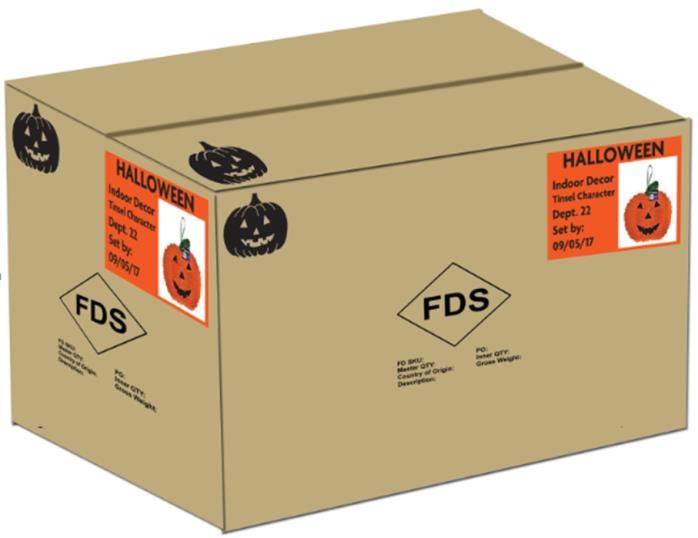
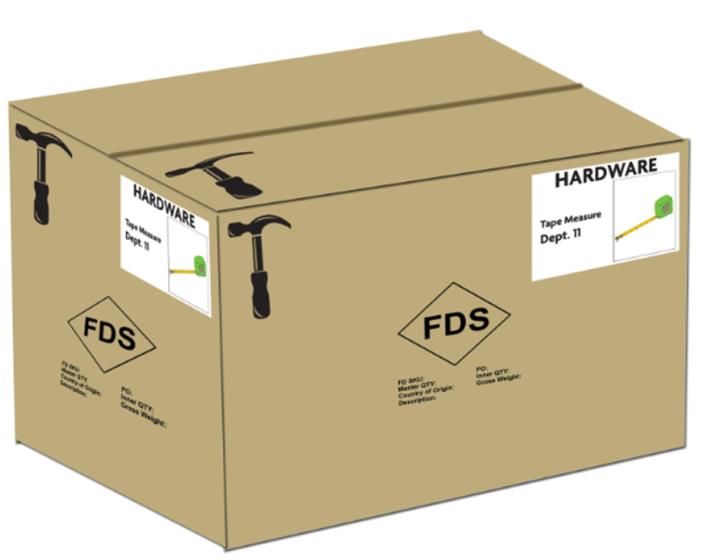
   Distribution Center Carton Marking Requirements .................................................................. 28
   Receiving Requirements ............................................................................................................ 28
   Distribution Noncompliance Charges ....................................................................................... 29

 6/22/2018 11:00:20 AM                                            RSPI document                                                                         2
ROUTING, SHIPPING, AND PACKAGING INSTRUCTIONS
Part 5: Required Corporate Policies .................................................................... 30
   Family Dollar Freshness Policy ................................................................................................ 30
   Private Brands Packaging Commitment ................................................................................... 31
   Cost Change Process ................................................................................................................. 32

Part 6: Carton Marking Requirements ................................................................ 33
   Additional Carton Marking Information ................................................................................... 33
   Source and Season Specific Marking Requirements ................................................................. 34
   Carton Marking Glossary.......................................................................................................... 35
   Key Carton Marking Components ............................................................................................. 35
   Master Carton with Inners ........................................................................................................ 36
   Master Carton with NO Inners .................................................................................................. 36
   Other exceptions to carton labeling requirements .................................................................... 37
   MERCHANT DIRECTED LABELS ........................................................................................... 37
   SEASONAL LABEL COLORS ................................................................................................... 38
   SEASONAL CARTON LABELS ................................................................................................. 39
   NON SEASONAL Carton Labels ............................................................................................... 39
   IMPORT SEASONAL CARTON MARKING LAYOUTS ........................................................... 40
   DOMESTIC SEASONAL CARTON MARKING LAYOUTS ...................................................... 41
   IMPORT NON-SEASONAL CARTON MARKING LAYOUTS .................................................. 42
   DOMESTIC NON-SEASONAL CARTON MARKING LAYOUTS ............................................. 43
   DEPARTMENT ICONS ............................................................................................................. 43
   Clip Strip, Impulse Lane, and Power Panel Carton Labels ...................................................... 45
   INNER CARTON MARKINGS - Shippable ............................................................................... 46
   INNER CARTON MARKINGS – NON-Shippable ..................................................................... 47
   Cartons with Inners Recommendations ..................................................................................... 47

Part 7: Distribution Packaging Requirements .................................................... 49
   Shipping Carton Strength Requirements ................................................................................... 49
   Display Shipping Carton Requirements .................................................................................... 50
   Approved Shipping Carton Styles .............................................................................................. 50
   Tear Away Carton Design Styles ............................................................................................... 51
   Carton/ Carton Shippable Inner Taping ................................................................................... 52
 6/22/2018 11:00:20 AM                                        RSPI document                                                                   3
ROUTING, SHIPPING, AND PACKAGING INSTRUCTIONS
   Inner Packaging Requirements ................................................................................................. 52
   Clip Strip Program Requirements ............................................................................................. 53
   Floor Ready Apparel Requirements: ......................................................................................... 54
   Nominated Packaging Suppliers for Apparel Brands ............................................................... 54
   Hanger Styles and Suppliers...................................................................................................... 55
   Additional Approved Packaging Suppliers ............................................................................... 56
   Plastic/Poly Bag Over-packaging and Garment Bag Requirements......................................... 57
   Fragile Packaging Recommendations ....................................................................................... 58

Part 8: Display Construction ................................................................................. 59
   Display Corrugated Strength Requirements ............................................................................. 59
   Shelf Display Dimensions .......................................................................................................... 59
   Stadium Style Displays .............................................................................................................. 59
   Stadium Tray Design Style (*NEW*) ........................................................................................ 60
   Locked Back Stadium Style ........................................................................................................ 60
   Pegged Stadium Style PDQ’s (angled sides) ............................................................................. 61
   Pegged Shadow Box (Straight Tray Style) ................................................................................ 61
   Display Section Dividers ........................................................................................................... 62
   Straight Trays ............................................................................................................................ 62
   Straight Tray with Half Front Lip ............................................................................................. 63
   Straight Tray with No Front Lip ................................................................................................ 63
   Straight Tray with No Front Lip – Clear poly panel ................................................................. 63
   Double Angle PDQ Tray ........................................................................................................... 64
   Straight Tuck Box with Foam Insert .......................................................................................... 64
   Tall Wall Displays ..................................................................................................................... 65
   Stadium Style Tall Wall PDQ Tray............................................................................................ 66
   Display Front Lip Graphics ...................................................................................................... 66
   Spinner Rack PDQ’s – Accessories ........................................................................................... 67
   Footwear PDQ’s ....................................................................................................................... 68
   Shipping Dividers and Fillers ................................................................................................... 69
   False Bottoms ............................................................................................................................ 69
   Product Orientation................................................................................................................... 70
   Display Bottoms......................................................................................................................... 70
 6/22/2018 11:00:20 AM                                          RSPI document                                                                       4

ROUTING, SHIPPING, AND PACKAGING INSTRUCTIONS
  Power Panel Displays ............................................................................................................... 71
  Calendars and Planners ............................................................................................................ 72
  Floor Display Labeling ............................................................................................................. 73
  Giftable Products Easy Peel Labels .......................................................................................... 74
  Hanging Blister Cards and Carded Product ............................................................................. 74
  Hanging Card Design................................................................................................................ 75
  Hanging Packaging for products with multiple styles/colors ................................................... 76
  Hanging Pouches or Bags ......................................................................................................... 76
  Plastic Hook Hanger ................................................................................................................. 76
  END OF WRITTEN DOCUMENT ............................................................................................ 76

6/22/2018 11:00:20 AM                                        RSPI document                                                                   5
ROUTING, SHIPPING, AND PACKAGING INSTRUCTIONS

Part 1: General Information
Purpose, Application, and Expense Offset Policy
PURPOSE
Family Dollar has made a significant investment in efficient supply chain operations which depends on it’s
suppliers to follow the policies outlined in this guide to be successful. This guide describes Family Dollar’s
requirements and standards in considerable detail, explains the importance of compliance with each
requirement, and provides instructions for providing assistance.
APPLIES TO
All Family Dollar Suppliers, Shippers, Consignees; Family Dollar Transportation Department, and
Distribution Centers.
DOES NOT APPLY TO
All Family Dollar and Tar Heel Trading direct import orders. Direct Import Suppliers should reference the
Tar Heel Trading Import Guidelines for routing, shipping, and packaging instructions. Suppliers that have
registered with Yusen, may access the necessary documents in the Useful Information tab within eBooking
module or may visit the International Transportation section of the Family Dollar website at
http://corporate.familydollar.com/pages/transportation.aspx.
EXPENSE OFFSET POLICY
In order to facilitate shipping, handling, and receiving activities supplier compliance guidelines have been
established, which is outlined in the following pages. Given that non-compliance causes disruption to
operations with additional expense, Family Dollar has an expense offset policy intended to recover costs
associated with non-compliance which can be assessed as an invoice deduction against unpaid purchase
orders. Suppliers non-compliance will constitute suppliers acceptance that supplier will pay the cost. Fees
associated with non-compliance are detailed in this guide, which are subject to change as posted to
www.familydollar.com from this document. The supplier is responsible for collecting reimbursement for
any costs associated to a subcontracted carrier issue other than Family Dollar Transportation Services as a
result of non-compliance.
Disputes
Chargeback Philosophy
Chargebacks are designed to provide incentive toward compliance with Family Dollar policies and our
policies are designed to eliminate waste from our supply chain. Chargebacks, therefore, should focus on
those activities and requirements that add waste to our supply chain. It is important to understand that
waste could be realized at the point of exchange (e.g., bad pallets at the point of receipt) or can be seen as
potential waste at some post-exchange / downstream process (e.g., missing key information on the BOL
resulting in lost time during research).

6/22/2018 11:00:20 AM                        RSPI document                                                  6
ROUTING, SHIPPING, AND PACKAGING INSTRUCTIONS
Initial Action
All disputes on chargebacks should be addressed directly to the Distribution Center generating the
chargeback. Direct contact information is provided on each chargeback letter sent to our
suppliers/shippers. Generally this is in the form of name, e-mail and possibly phone number.
Appeal Procedure
Any disputes on chargebacks filed against a supplier/shipper that cannot be resolved at the DC-level must
be addressed in writing within six months of the chargeback date. Any chargeback not questioned within
six months will stand as filed with no further review. Address appeals to:
                        Chargeback Supplier Relations
                        Accounts Payable
                        Family Dollar Stores, LLC.
                        PO Box 1017
                        Charlotte, NC 28201-1017

Part 2: Bill of Lading Requirements
All shipments to Family Dollar require a Bill of Lading (BOL)
1. All bills of lading must contain the following information:
         a. The Family Dollar Purchase Order Number.
         b. Family Dollar SKU, Carton Count by SKU, and if appropriate expiration date(s) and Carton
            Count by SKU (appropriate means any product that has an expiration date or best if used by date
            on the product label). Note: information may be incorporated into the bill of lading or appended
            to the BOL as a supplement to the bill of lading or packing list. See examples provided at the end
            of this section. Separate line item detail is required with case counts for each date/item/pallet
            provided. Multiple dates per item are accepted as long as they are on different pallets.
         c. Shipper’s name, ship point, street address, city, state, zip code and telephone number.
         d. Consignee’s name, street address, city, state, and zip code.
         e. Collect or Prepaid to Consolidator Suppliers must note the Transportation Management System
            (TMS) “Ship id number.” (SID)
         f. Prepaid suppliers must note the Appointment date, time and confirmation numbers must show
            on the carrier’s delivery bill.
         g. Accurate Family Dollar description of items being shipped including the item and classification
            code according to the National Motor Freight Classification (NMFC).
         h. Collect Suppliers must note the Family Dollar Shipment ID provided on the Vendor Tender
            Notification (VTN).
         i. Total weight, cube, carton, and pallet count.
         j. All bills of lading must have a unique, unrepeated, bill of lading number.
         k. Bill of lading date (ship date).
         l. Mark Freight terms: Collect – C, Prepaid – P, or Prepaid to Consolidator - PC
6/22/2018 11:00:20 AM                          RSPI document                                             7
ROUTING, SHIPPING, AND PACKAGING INSTRUCTIONS
         m. Carrier name and trailer number.
         n. Seal Number attested to by Shipper and Driver signatures.
         o. Driver’s appointment date/time, arrive & departure time/date, printed name & signature, and
            carton or pallet count verification.
         p. Give shipment documents to driver for all full truckloads.
         q. LTL documents should be attached and marked clearly on the freight. Give one master bill of
            lading to the driver.
2. If the product to be shipped is not prepared and ready to load at the time of the carrier’s scheduled pickup,
     any resulting charges for delay billed to Family Dollar Stores by the carrier will be charged against the
     shipper.
3. If mode is Truckload or Intermodal, the carrier will contact you 48 hours in advance to schedule pickup.
4. If instructed to ship via LTL – the carrier noted on the Vendor tender notification will reach out to
     schedule a pickup. In the event the carrier has not 2 days prior to the orders’ cancel date, the supplier
     should contact the carrier.
5. If notified that PO’s are part of a multi-stop shipment on the VTN, it is responsibility of the supplier to
     load freight high and tight on the carriers’ trailer to ensure sufficient empty trailer space for remaining
     pickups.
6.    During the loading process suppliers will be given 2 hours of free time. Detention will being accruing
     after those 2 free hours have expired regardless of load type.
7. If requested by TMS to ship via Avrio Logistics, formally AMSTAR -- All shipments from New Jersey
     and New York metro must be shipped prepaid to the consolidator. Family Dollar’s Consolidator is Avrio
     Logistics – 549 Mill Road, Edison, NJ 08837. The telephone number is 800-935-6320 ext. 205. You must
     call Avrio Logistics 24 hours prior to delivery or to schedule a pickup.
8. Avrio Logistics will not accept your shipment without the Family Dollar Shipment ID number.
     Note: This includes overflows and back orders.

6/22/2018 11:00:20 AM                        RSPI document                                                 8
ROUTING, SHIPPING, AND PACKAGING INSTRUCTIONS
Bill of Lading (BOL) and Supplemental BOL Examples with Product Expiration Dates

                LTL Bill of Lading (BOL) – lists freight class NMFC item number
6/22/2018 11:00:20 AM                  RSPI document                               9
ROUTING, SHIPPING, AND PACKAGING INSTRUCTIONS

6/22/2018 11:00:20 AM    RSPI document                 10
ROUTING, SHIPPING, AND PACKAGING INSTRUCTIONS

6/22/2018 11:00:20 AM    RSPI document                 11
ROUTING, SHIPPING, AND PACKAGING INSTRUCTIONS

6/22/2018 11:00:20 AM    RSPI document                 12
ROUTING, SHIPPING, AND PACKAGING INSTRUCTIONS

6/22/2018 11:00:20 AM    RSPI document                 13
ROUTING, SHIPPING, AND PACKAGING INSTRUCTIONS
Part 3: Transportation
Collect and Prepaid to Consolidator Contact Information
If you are a NEW, Collect or Prepaid to Consolidator Supplier Family Dollar has contracted to assist you in
the transportation of your orders and will not need to contact the distribution centers directly. You will need
an approved PO# to be set up. Once you have this, please contact TMS Customer Service to setup your
shipping information and request a user ID and password to use the CVP. A USER ID is required to access
the CVP. You can contact TMS Customer Service at
OTMQUESTIONS@DOLLARTREE.COM or call 704-847-6961, Option 8 and the first available representative will
assist you.
Collect and Prepaid to Consolidator Purchase Orders
Any cartons shipped in error to the wrong DC will result in a chargeback to the supplier/shipper for
handling and transportation charges in accordance with Transportation Noncompliance Charges section.
Understanding Family Dollar Purchase Order Dates—Collect Supplier and Prepaid Consolidator
Collect Supplier: Family Dollar arranges shipment and pays all freight charges. Supplier releases all
freight in TMS-Transportation Management System (OTM) and receives Tender Notifications on how
product will be shipped.
 Prepaid to Consolidator: Supplier releases freight in TMS -Transportation Management System (OTM)
and receives Tender Notifications to ship product prepaid to consolidator. Family Dollar then arranges
shipment from the consolidator and pays freight charges to deliver goods to the appropriate distribution
center from the consolidator.
Understanding Dates on Collect Purchase Orders:
 Hard Copy PO              EDI PO                                             Definition of Date
Do Not Ship Before         Code 037     This date represents supplier’s expected ship date.
                        Ship Not Before Product should be available for pickup or shipment on or before this date. In addition,
                                        Family Dollar expects product to be released in TMS (OTM) at a minimum of 7 days
                                        prior to the date the product will be available for pickup or shipment.
    Cancel If Not          Code 038    In the event supplier does not have product available for pickup or shipment on the “Do
     Shipped By          Ship No Later Not Ship Before” date, supplier may release product in TMS (OTM) for pickup or
                                       shipment up to 48 hours prior to the ship date. Product available for pickup or shipment
                                       past this date requires Buyer approval and is subject to cancellation.
                                        In addition, product will be considered late.
         N/A               Code 017      This date has no relevance for Collect and Prepaid to Consolidator suppliers.
                           Estimated     If product is shipped on time, the receipt should occur close
                            Delivery     to this date after distribution center processing.

         N/A              Code 061     Product cannot be released in the TMS (OTM) for routing five days prior to this date.
                         Cancel If Not Example: If the “Cancel If Not Delivered By” date on the Purchase Order is the 25 ,
                                                                                                                          th
                                                                              th
                         Delivered By product cannot be released after the 19 . The Family Dollar Buyer will have to be
                                       notified to extend the Purchase Order dates. Orders shipped late are subject to
                                       cancellation or other penalties.

6/22/2018 11:00:20 AM                             RSPI document                                                          14
ROUTING, SHIPPING, AND PACKAGING INSTRUCTIONS
Routing & Release Procedures
Release Procedure
1. Suppliers shipping Collect or Prepaid to the Consolidator Purchase Orders must enter shipment data into
Family Dollar’s Transportation Management System (TMS) no less than 48 hours prior to product
availability. Prepaid suppliers will also be required to input their orders into the CVP. All orders must
be ready to ship complete by the “Cancel if not shipped by” date. Failure to meet the expectations listed
herein may result in noncompliance charges.
2. Failure to utilize the Family Dollar Transportation Management System in routing Collect or Prepaid to
Consolidator Purchase Orders will result in full freight chargeback in addition to administrative expenses.
To access CVP – Direct link: https://cvp.dollartree.com
3. If you are a NEW Supplier – You will need an approved PO# to be set up. Please contact TMS Customer
Service to setup your shipping information and request a user ID and password to use the TMS System,
and can take up to 48 hours to obtain. A USER ID is required to access the TMS System. You can
contact TMS Customer Service at OTMQUESTIONS@DOLLARTREE.COM or call 704-847-6961, Option 8 and
the first available representative will assist you.
4. If you are an existing Supplier – Please read the Family Dollar Supplier CVP (Custom Vendor Portal)
Web Interface instructions before entering data into the system. You can download the instructions
in the TMS link. Direct Link: http://corporate.familydollar.com/pages/tmsinfo.aspx
Creating Purchase Orders Releases in the CVP:
When you are ready to enter your PO Information, please access https://otm.dollartree.com/cvp/index.html
via the internet. User ID and Password assigned by Family Dollar are required. A supplier shipping both
prepaid and collect will have a different User ID for POs associated with prepaid supplier numbers and those
written to collect supplier numbers
If you experience difficulties in accessing the URL from Family Dollar’s website, open the web
browser on your computer. Click the following link, copy and paste, or type the following URL on the
address line of your browser: https://otm.dollartree.com/cvp/index.html. This application works better
when utilizing Google Chrome.
The following information must be provided when releasing freight for collect or prepaid to
consolidator loads in the Transportation Management System:
1. CAP locks are not required for entering data.
2. Enter your User Name and Password. (password is case sensitive)
3. Click Ok.
4. Your location will need to be set up. In order to do so, click on new location. This will present a
screen with several boxes outlined in green. Each field will need to be filled out. Once all the
required information is inputted, click on the button labeled validate.
6/22/2018 11:00:20 AM RSPI document 15ROUTING, SHIPPING, AND PACKAGING INSTRUCTIONS
5. After selecting validate, a screen will pop up asking you to confirm the address. Select the correct
address. This field is powered by Google Maps. If your address is not valid on Google Maps,
it will not appear.
6. Once you have selected the correct address, you will be taken back to the previous screen. It will
now show you 3 boxes asking for contact information. Populate that information and click
Finished. (In order to find a location, click on the button titled find location. You may edit the
information in this screen.)
7. To release a Purchase Order, click on Find Purchase Order. Input the PO and click Find. The next
screen will show you that PO. Select it. A screen will then show up asking for the release
information. Input all data and select the Recalc ShipUnits button. All releases must be in the
quantity of pieces equal to a carton. (Ex. There are 10 blow pops per carton and you are
shipping 10 cartons. You will need to release 100 pieces in the ship quantity field.)
8. Select your load method (pallets, slip sheet, floor loaded). Input the quantities and select finished.
9. You will receive a message that you have successfully created the order release. If you receive an
error, call the Family Dollar Customer Service Center at 704-847-6961 – Option 8.
10. To input information for another order release, click the Home Icon on the left to start again.
11. A. For collect suppliers, when a carrier has been assigned to your shipment, you will receive an
e-mail Vendor Tender Notification (VTN) from the OTM system along with a shipment ID number
(SID). You will also receive a BOL for your use. If you use your own BOL, the Shipment ID
number and Purchase order number(s) must be printed on one master Bill of Lading. This includes
LTL tenders. Creating one PO per Bill of Lading instead of listing them all on the Master Bill of
Lading will result in labor recovery charge backs.
B. Prepaid suppliers will receive an email with the shipment ID. Please note: this shipment ID,
not the PO, will be needed to make your delivery appointment
Routing for Collect Suppliers
12. Supplier’s must ship the purchase order or purchase orders as noted on the VTN. If multiple PO’s
are listed, all should ship together on the same truck in the quantities previously released by the
Supplier. Do not ship additional product that has not been released within OTM. Suppliers who
ship cartons, weight, and/or cube not previously released will be subject to incremental freight
charges.
13. Please notify Family Dollar immediately of any over-flows (product that does not fit on the trailer)
that occur once the carrier has picked up.
Since systems enhancements may occur, we encourage you to print and follow the CVP
Interface Instructions, if you seem to have any problems entering data. If this does not
resolve your problem, please feel free to contact 704-847-6961 – Option 8 and the first
available representative will assist you.
14. All purchase orders that are entered for routing after the cancel date will have to be approved by
the buyer before they can be routed. A late purchase order is subject to cancellation by the buyer,
or chargeback of the freight costs for any additional expense incurred to expedite the freight to
the DC.
6/22/2018 11:00:20 AM RSPI document 16ROUTING, SHIPPING, AND PACKAGING INSTRUCTIONS
15. All suppliers are required to load the merchandise on the carrier’s trailers. Failure to comply will
result in chargebacks to the supplier. Chargebacks will be assessed in the amounts of:
$100.00 for up to 500 cartons
$150.00 for 501 to 700 cartons
$200.00 for 701 to 1000 cartons
$50.00 increments for every 200 cartons thereafter
16. The Shipper is responsible to block and brace the freight to make it safe for transit, in order to
prevent damage.
Direct Store Delivery (DSD) shipments:
DSD Shipments that are 200 lbs. or less and meet standard Parcel Service guidelines should be
shipped via a major Parcel Service. Freight charges for shipments should be added to the invoice if
the Buyer’s purchase order is written as “collect.” If, however, the DSD shipment is more than 200
lbs. and does not meet other standard Parcel Service guidelines, use one of the pre-approved DSD
carriers from your origin state. Direct Store Delivery orders are NOT to be released into OTM
(Transportation Management System) for routing. Outside suppliers that deliver directly to stores
are exempt from using a parcel service. Example products are: soft drinks, and refrigerated items.
Prepaid Suppliers
Prepaid suppliers are responsible for delivery to our distribution centers and pay for all freight charges. An
appointment is required for delivery and must follow the appointment procedure described later.
Understanding Family Dollar Purchase Order Dates—Prepaid Supplier
Hard Copy PO EDI PO Definition of Date
N/A Code 037 This date has no relevance for prepaid suppliers.
Ship Not Before Supplier must ship product whenever necessary to meet the Family Dollar
“Do Not Deliver Before” date.
N/A Code 038 This date has no relevance for prepaid suppliers.
Ship No Later Supplier must ship product whenever necessary to meet the Family Dollar
“Do Not Deliver Before” date.
Do Not Deliver Before Code 017 This date represents the day Family Dollar expects delivery to its
Estimated Delivery Distribution Center. Supplier is responsible for shipping product with
enough transit time to meet the Family Dollar “Do Not Deliver Before”
date.
6/22/2018 11:00:20 AM RSPI document 17ROUTING, SHIPPING, AND PACKAGING INSTRUCTIONS
Cancel If Not Delivered By Code 061 In the event supplier does not deliver product on the
Cancel If Not “Do Not Deliver Before” date, supplier may deliver product up to the
Delivered By “Cancel If Not Delivered By” date.
Product received past this date will be considered late and subject to
cancellation or other penalties.
Prepaid Supplier Instructions
1. Family Dollar appointments are made by the supplier or carrier assigned by the supplier in C3
Solutions system: https://www.c3reservations.com/dollartree
User guides for both suppliers and carriers may be found on the FamilyDollar.com website at
https://www.familydollar.com/corporate/our-company/businesspartners/transportation
2. Carriers / Drivers will not be accepted for live unload deliveries more than one (1) hour prior to the
scheduled delivery date and time.
3. For more efficient handling of your freight, prepaid suppliers should consider using one of our
preferred LTL carriers –Estes Express Lines, Old Dominion Freight Lines, YRC Freight, and Unyson
(for freight originating in Los Angeles, CA area).
4. Family Dollar Stores will not be responsible for any additional charges on prepaid shipments,
including, but not limited to: a) detention, b) sorting and segregating, c) notification charges, and d)
unloading.
5. The risk of any damage, destruction or loss of goods remains with the supplier until the goods are
delivered to the consignee in good condition.
Note: Do not use the carriers Central Transport or Vitran Express for any shipments to Family
Dollar.
Prepaid Supplier Carrier Instructions
Should there be a delay (e.g., an accident, inclement weather, road work, or loading delay) that requires the
appointment to be rescheduled it may not be rescheduled the same day without permission of the DC.
1. All trailers, including leased trailers, must be clearly marked with the carrier's name. The carrier’s
name should be indicated on the nose, sides, and rear of the trailer.
2. Prepaid Inbound freight to Family Dollar Distribution Centers shall be "Driver Unload." Family
Dollar will make every attempt to unload palletized, single item shipments without carrier/driver
assistance. However, the supplier’s failure to follow our shipping and packaging instructions may
result in the driver having to assist in the unloading process. Supplier noncompliance could include,
but is not limited to, overhang on pallets, bad pallets, and mixed freight.
3. Each carrier's driver shall count and sign for the correct number of shipping units as specified on the
bill of lading and packing list. Family Dollar’s unloading service is available at carrier request only.
Family Dollar will in no way require a driver to use the service.
6/22/2018 11:00:20 AM RSPI document 18ROUTING, SHIPPING, AND PACKAGING INSTRUCTIONS
4. Drivers are required to obtain a copy of the proof-of-delivery (POD) at the time of delivery. Failure
to obtain a (POD) will result in a $75 administrative charge per bill should Family Dollar have to pull
and send a copy to the carrier and/or supplier.
5. Any carrier missing their pre-scheduled delivery appointment shall have to hold the freight, at the
carriers or suppliers expense, until a new delivery appointment is made. The DC is not required to
accept same day reschedules
6. Family Dollar will not be responsible for any additional charges on prepaid shipments, including, but
not limited to: a) detention, b) sorting and segregating, c) notification charges, and d) unloading.
Setting Delivery Appointments-Prepaid Only
Family Dollar appointments are made by the supplier or carrier in C3 Solutions system:
https://www.c3reservations.com/dollartree using the Shipment ID generated by releasing the PO in the CVP
(see Page 15 Creating Purchase Orders Releases in the CVP). C3 user guides for both suppliers and carriers
may be found on the FamilyDollar.com website at:
https://www.familydollar.com/corporate/our-company/businesspartners/transportation
For help with issues making or rescheduling appointments please email the appropriate email box for that
DC as shown below. Please note if an appointment already exists for a SID an additional
appointment cannot be made, the original appointment should be amended. If the carrier on SID
changes the new carrier will not be able to change or book an additional appointment for that SID. The
supplier of Family Dollar will need to change the carrier on the appointment.
Only suppliers or carriers on our approved drop list will be allowed to make drop appointments. All
other prepaid deliveries will be “Live” unload.
6/22/2018 11:00:20 AM RSPI document 19ROUTING, SHIPPING, AND PACKAGING INSTRUCTIONS
DC Hours and Contact Information
Distribution Center Name Appointment Hours
DC Code Address Email Address
Phone
9510 Indiana Distribution Center Monday – Friday
500 Family Dollar Parkway 8 a.m. – 5 p.m. (Eastern)
Ashley, IN 46705 apptrequestashley@familydollar.com
Ph 260-587-3230
9515 Utah Distribution Center Monday – Friday
4815 S River Rd. 8:00am – 5:00pm (Eastern)
St George, UT 84790 apprequeststgeorge@familydollar.com
Ph 435-688-6600
9520 Arkansas Distribution Center Monday - Friday
1800 Family Dollar Parkway 8:00 a.m. – 5:00 p.m. (Eastern)
West Memphis, AR 72301 apptrequestWMemphis@familydollar.com
Ph 870-732-3264
9530 Texas Distribution Center Monday - Friday
3101 East I-20 8:00 a.m. – 5:00 p.m. (Eastern)
Odessa, TX 79766 apptrequestOdessa@familydollar.com
Ph 432-367-1300
9540 Virginia Distribution Center Monday - Friday
155 Fairground Road 8:00 a.m. – 5:00 p.m. (Eastern)
Front Royal, VA 22630 apptrequestFrontRoyal@familydollar.com
Ph 540-622-6600
9550 Florida Distribution Center Monday - Friday
3985 DISTRIBUTION DR 8:00 a.m. – 5:00 p.m. (Eastern)
Marianna, FL 32448 apptrequestMarianna@familydollar.com
Ph 850-526-6500
9560 Oklahoma Distribution Center Monday - Friday
201 East Cherokee Road 8:00 a.m. – 5:00 p.m. (Eastern)
Duncan, OK 73533 apptrequestDuncan@familydollar.com
Ph 580-470-1700
9570 New York Distribution Center Monday – Friday
847 Ellsworth Road 8:00 a.m. – 5:00 p.m. (Eastern)
Rome, NY 13441 apptrequestRome@familydollar.com
Ph 315-838-2500
9580 Kentucky Distribution Center Monday – Friday
1000 Industry Road 8:00 a.m. – 5:00 p.m. (Eastern)
Morehead, KY 40351 apptrequestMorehead@familydollar.com
Ph 606-780-7960
9590 Iowa Distribution Center Monday – Friday
302 Family Dollar Parkway 8:00 a.m. – 5:00 p.m. (Eastern)
Maquoketa, IA 52060 apptrequestMaquoketa@familydollar.com
Ph 563-652-7300
9990 North Carolina Distribution Center Monday – Friday
10401 Monroe Road 8:00 a.m. – 5:00 p.m. (Eastern)
Matthews, NC 28105 apptrequestMatthews@familydollar.com
Ph 704-847-6931
6/22/2018 11:00:20 AM RSPI document 20ROUTING, SHIPPING, AND PACKAGING INSTRUCTIONS
Shipping on Pallets
Pallets used by supplier/shipper shall conform to these specifications:
For pallet weighing less than 2000 lbs:
1. All pallets used shall be, at the minimum, a grade A GMA four-way pallet in good condition and
measuring 48" x 40". They shall comply with the standards, including board thickness, of the Grocery
Manufacturers’ Association.
2. Each pallet shall have three single stringers (runners). One stringer shall be on each side and one in
the center running the length of the pallet.
3. The pallet shall not have any missing, broken, or split boards. Each pallet shall have five boards in
good condition securely fastened on the bottom and seven boards in good condition securely fastened on
the top.
For pallets weighing greater than or equal to 2000 lbs:
1. All pallets used shall be, at the minimum, a block type four way pallet in good condition and
measuring 48" x 40". They shall be of the same robust hardwood or solid plastic construction as
program pallets such as CHEP (Blue), PECO (red), or IGPS (4 Way Solid Plastic Pallets).
2. Each pallet shall have three single stringers on both the top and bottom. One stringer shall be on each
side and one in the center of both top and bottom running the length of the pallet as shown in the
diagram below.
3. The pallet shall not have any missing, broken, or split boards. Each pallet shall have nine boards in
good condition securely fastened to the top as shown in the diagram below.
Figure 1: FOUR-WAY BLOCK “CHEP” or “PECO” type pallet
6/22/2018 11:00:20 AM RSPI document 21ROUTING, SHIPPING, AND PACKAGING INSTRUCTIONS 4. Wood, non-program, pallets Wood, non-program, pallets are preferred. Family Dollar, however, does accept pallets from the following pallet program manufacturers: a. CHEP – Blue Pallets b. PECO – Red Pallets c. IGPS – 4 Way Solid Plastic Pallets 5. Each pallet shall have a clean appearance-no dirt, grease, or other foreign material on it. 6. If goods are on an unacceptable pallet, the carrier will have the responsibility for off-loading the merchandise onto an acceptable pallet provided by Family Dollar. Any expenses incurred by the carrier should be charged to the shipper. 7. Merchandise stacked on pallets or slip sheets shall be stacked in a manner that maximizes the trailer cube, but does not damage the product or crush the master case. The Shipper is responsible for ensuring the freight is blocked or braced at loading to ensure product does not shift during transit. 8. Pallets or slip-sheets shall not exceed a maximum weight of 2,500 pounds (1,136 kilograms). In order to maximize trailer or container space, two pallets may be stacked on top of each other; however, the supplier/shipper shall be liable for any damage to the merchandise shipped to Family Dollar in this configuration. 9. The supplier/shipper shall use the same tie to stack the same merchandise (same item SKU) on all pallets sent. 10. No overhanging product; merchandise shall be stacked on a pallet in such a manner so as not to overhang any edge of the pallet. Obtain approval for special cases. 11. All pallets shall be taped, strapped, or shrink-wrapped to prevent the merchandise from shifting during transit. Family Dollar Stores, LLC. strongly discourages the gluing of cartons together to form pallet stacks and may charge back for lost efficiencies in receiving. 12. Pallets can be placed in a “pinwheel” formation (one lengthwise and one side ways) in the trailer and proper blocking and bracing should be used to ensure merchandise is delivered without damage on 4- way pallets. 13. The supplier/shipper shall ensure that the last pallet loaded shall have a freight bill and/or packing list attached and is facing the door of the trailer. 14. Failure to follow the above procedures may result in Family Dollar assessing the supplier a handling charge in accordance with Transportation Noncompliance Charges section. 6/22/2018 11:00:20 AM RSPI document 22
ROUTING, SHIPPING, AND PACKAGING INSTRUCTIONS
Pallet Tags (Labels) Recommendation – For Full Pallet Shipments

 1.    Pallet Tags (Labels) are recommended for all pallets of same product (Full or Partial).
 2.    Pallets of mixed product should be marked “MIXED PALLET.”
 3.    See Receiving Requirements section on page 33 for product level requirements per pallet.
 4.    Adhesive Labels are preferred.
       a.         The cases should be shrink/stretch-wrapped on the pallet, then a pallet tag secured to the
                  wrapping.
       b.         Clearly printed hand written labels are acceptable.
 5.    Non-adhesive tags are not preferred but should be clearly visible and placed under the wrapping if
       used.
 6.    Pallet tags may include unique supplier information (i.e. tracking bar codes, lot codes, quality check,
       etc.) Bar codes on pallet labels should not mimic Family Dollar Stores, LLC. bar codes.
 7.    Family Dollar prefers that a pallet stack does not contain mixed expiration dates.
       a.     If multiple Expiration Dates are represented on a full pallet, record the date with the LEAST
              amount of freshness remaining.
 8. The pallet tag should have the Family Dollar Purchase Order Number, the Family Dollar SKU Number,
    the number of cartons per pallet, and Date of Expiration (if applicable). (example):

                                              PO#:1234567
                                            FD SKU #: 2121212
                                             CASE QTY: 36
                                           BEST BY: 08/04/2013
                                             PALLET LABEL EXAMPLE

 6/22/2018 11:00:20 AM                          RSPI document                                                  23
ROUTING, SHIPPING, AND PACKAGING INSTRUCTIONS
Pallet Configurations
1. All deliveries are driver unload or lumper services will be charged if Family Dollar Stores, LLC.
unloads. There is no charge for un-stacking double stacked pallets.
2. Product may arrive floor-loaded but may also be subject to lumper or palletizing fees.
3. Family Dollar Stores, LLC. leaves it up to the supplier to select the most cost efficient orientation.
Utilizing all space on a container is the choice of the supplier.
4. DC’s prefer that pallets are stacked to their maximum load height as noted for each DC below.
Stack up or stack down fees may be applied to pallets that do not meet maximum height standards.
5. See chart for stack heights to avoid lumper fees. There may be additional charges for leaning or
fallen pallet stacks.
*This height may satisfy load requirements for all DC’s if the DC decides not to stack up or stack down.
Max Pallet Heights (Pallet Included)
DC# Center Bulk Repack
9510 INDC 68 45
9515 UTDC 68 45
9520 ARDC 63 42
9530 TXDC 68 45
9540 VADC 72 46
9550 FLDC 68 45
9560 OKDC 64 45
9570 NYDC 68 45
9580 KYDC 64 45
9590 IADC 68 45
9990 NCDC 63 39
*ALL *ALL 63 39
* Bulk cartons can be shipped “as is” directly to the store.
** Repack cartons will contain store packs within a master carton.
6/22/2018 11:00:20 AM RSPI document 24ROUTING, SHIPPING, AND PACKAGING INSTRUCTIONS
Pallet Sheet Recommendations
1. Recommendations to use pallet sheets depend only on the size of the shipping configuration.
2. Pallet sheets should be made from paper stock.
a. Corrugated - Any flute size that is “E-Flue” or greater is acceptable.
b. Paperboard - Stock should be at least 30pt or 0.030” thick.
3. Two variables define our recommendation for use of pallet sheets; linear dimension (LD) of the
packaging’s bottom side and a shipping carton’s shortest edge.
a. Linear Dimension (LD): Determine your “Linear Dimension (LD)” by adding the lengths
of the 4 edges that come in contact with the pallet; the bottom side. Refer to chart below
for pallet sheet recommendation.
Pallet Pallet Sheet Every
Dimensional Data Sheet "x" Layer
LD is less than 24 In. Yes 3 Layers
LD is from 24 to 32 In. Yes 4 Layers
LD is over 32 in. No N/A
Shortest Edge Recommendations for Pallet Sheets
If any edge is less than 2" long Yes 3 Layers
If any edge is less than 4” long Yes 4 Layers
b. Smallest Edge: Determine the shortest edge dimension of the shipping packaging and
refer to chart below for pallet sheet recommendation.
4. Placement:
a. If the chart below shows “yes” for Pallet Sheet, the first sheet must be between the pallet
and product.
b. The recommendation “3 Layers” means that there would be a pallet sheet between the
pallet and product, and then between the 3rd and 4th layer/tier of product.
6/22/2018 11:00:20 AM RSPI document 25ROUTING, SHIPPING, AND PACKAGING INSTRUCTIONS
Transportation Non-Compliance Charges
Charges that may be assessed by Family Dollar to the supplier/shipper due to non- compliance of the routing
shipping and packaging instructions outlined in this document include but are not limited to:
1) All charge backs are subject to a minimum $82.50 penalty plus a $75.00 administrative fee, which would
result in a minimum charge of $157.50. Synonym: flat-rate charge.
2) Any collect freight with a second or additional release for an individual distribution center that is not
related to overflow is subject to be charged back for any incremental freight charges plus a $75
administrative fee.
3) Vendors will be subject to a charge back for any incremental freight charges plus a $75 administrative
fee for collect releases from locations not specified on the original purchase order. As freight charges
vary by origin location, it is imperative that collect vendors ship from the location outlined on their
purchase orders.
4) Detention : Carriers are given a 30 minute grace period for on-time arrival with power detention being
charged back to the vendor at a rate of $60 per hour plus a $75 administrative fee for loading time that
exceeds 2 hours
5) Truck ordered not used (TONU): Vendors will be charged back the cost of a TONU ($300) in the event
they cancel or are unable to load a driver after the driver has been dispatched by the carrier.
6) All handling charges shall be at a rate of $82.50 per hour, plus a $75.00 administrative fee.
7) An order received prior to the "Begin Shipping Date" shall be subject to a storage and handling charge
of 10% of the value of the order or $750.00, whichever is greater. Also a $75 administrative fee will be
added.
8) Merchandise shipped to the wrong D.C. will result in the supplier being charged:
a) Handling charges of $82.50 per hour plus a $75.00 administrative charge.
b) Inbound transportation cost (if a collect shipment).
c) Outbound (transferring to correct DC) transportation cost, whether prepaid or collect.
9) If a product to be shipped is not prepared and ready to load at the time of the carriers scheduled pick up,
any resulting charges for delay billed to Family Dollar by the carrier will be charged back against the
shipper.
10) Return to Supplier Shipments. The Family Dollar company policy for RTV Supplier chargebacks is a
standard 10% of the cost of returned goods as a handling charge. In addition, Collect Freight suppliers
are charged 6% of the cost of the returned goods to cover both the inbound and outbound freight. These
are automatically populated on the RTV form and added to the charges to be deducted from the supplier.
6/22/2018 11:00:20 AM RSPI document 26ROUTING, SHIPPING, AND PACKAGING INSTRUCTIONS
Part 4: Required Distribution Center Operations
1. Since Family Dollar Distribution Centers utilize conveyor systems, the following outlines Family
Dollar’s carton requirements. If a carton does not meet the requirements listed below, packaging
must be approved by Family Dollar prior to production. Please contact the appropriate Buyer
and they will work with the Packaging Department to obtain approval for the packaging or to
provide additional requirements.
a. Re-Pack Cartons – Cartons with inners intended to be broken out and shipped in totes
from the re-pack area are not required to have shippable inners. Optimal inner packs
should represent a 30-45 day supply and should minimally be wrapped in cellophane,
polybags, or any material that will hold the selling units together when shipped with
other items in a loose container. Rubber Bands are not accepted by themselves. The
inner pack packaging must be strong enough to contain the product until it reaches the
store. Please review Inner Requirements here.
b. Break Pack Cartons – Cartons with inners that are intended to ship individually as bulk or
non-conveyable MUST be packaged in shippable packaging. The packaging should meet
the same recommendations requested for shipping configurations. After the master pack
is “busted” out or broken down, the inners will be considered the master pack and must
be contained in acceptable packaging; preferably, appropriate strength corrugated.
c. Bulk Cartons – Cartons that do not contain inners. The packaging should meet the same
recommendations requested for shipping configurations. Please refer to the section titled
Part 7: Distribution Packaging Requirements for further information.
2. Conveyability - the following rules allow a carton to be conveyable.
a. Note: Family Dollar does accept non-conveyable products
b. Boxes must weigh a minimum of 3 pounds for boxes up to 15 inches in length, and 5
pounds for boxes over 15 inches.
c. All six sides of the boxes must be "flat" and "smooth," especially the side that will lie
against the rollers of the conveyor.
Dimension Minimum Maximum
Length 9 inches 42 inches
Width 6 inches 26 inches
Height 4 inches 29 inches
Weight 3 lbs. 44 lbs.
rule value rule description
max 1 side 36 1 side can not be greater than 36 inches
max 2 sides 24 can not have 2 sides greater than 24" on each side
max shape 8 1 side can not be greater than 8 times the length of any other side
max weight 44 weight can not exceed 44 LBS (repack can not exceed 50 LBS)
min girth 19 the sum of length + height + width must be at least 19 inches
min side 4 no side can be less than 4 inches
min weight 3 must be at least 3 LBS
6/22/2018 11:00:20 AM RSPI document 27ROUTING, SHIPPING, AND PACKAGING INSTRUCTIONS
3. Products that are stored in repack shall be configured in their original shipping carton to
maximize pallet and container space yet be less than 50 LBS. Under no circumstances may
product case weight exceed 50 lbs.
4. Each like item should be packaged in the same size carton.
5. All merchandise shall be shipped in the pack and assortments (size and color) of the Style/SKU
number specified on the Family Dollar Purchase Order.
6. All merchandise shall be shipped in the Master and Inner pack as specified on the Family Dollar
Purchase Order.
Distribution Center Carton Marking Requirements
Blank cartons are not allowed and suppliers that ship blank cartons will be charged accordingly.
Please follow the guidelines found in Part 6: Transportation, Carton Marking Requirements, to ensure
that you are compliant with Domestic, Import, and Shippable Inner marking requirements.
Receiving Requirements
1. All orders shall be shipped in the quantities specified. Any overage shall be returned to the
supplier/shipper at the supplier's/shipper's expense. The supplier/shipper shall be assessed
handling charges.
2. All merchandise shall be shipped in the packs and assortments (size and color) of the Style Number
specified on the Family Dollar Purchase Order. Only one style number shall be shipped per box,
case, or carton. All cartons of one style number in a shipment shall be packed in the same size box,
case, or carton. Failure of the supplier/shipper to comply shall result in the goods being returned
at the supplier's/shipper's expense in addition to handling charges being assessed. If not returned,
the supplier/shipper shall be assessed handling and storage charges for the repackaging of the
goods by Family Dollar.
3. All Family Dollar Purchase Orders shall be shipped on or after the Ship Date, but prior to the
Cancel Date. All orders shipped outside the specified shipping period shall be subject to being
returned at the supplier's/shipper's expense. The supplier/shipper shall be assessed handling,
storage, and transportation charges.
4. Merchandise shipped shall be the same as the approved samples. Failure of the supplier/shipper to
comply shall result in the merchandise being returned at the supplier's expense. The
supplier/shipper shall be assessed handling charges.
5. When merchandise is to be returned to the supplier, an authorization number will be requested by
Family Dollar. After the third day of storage awaiting the authorization number for the return, a
storage fee of $25 per day per pallet will be charged to the supplier plus a $75 administrative fee.
6/22/2018 11:00:20 AM RSPI document 28You can also read


