Silk Test 19.5 Release Notes - Micro Focus
←
→
Page content transcription
If your browser does not render page correctly, please read the page content below
Silk Test 19.5 Release Notes
Micro Focus
     The Lawn
     22-30 Old Bath Road
     Newbury, Berkshire RG14 1QN
     UK
     http://www.microfocus.com

     Copyright © Micro Focus 1992-2018. All rights reserved.

     MICRO FOCUS, the Micro Focus logo and Silk Test are trademarks or registered trademarks
     of Micro Focus IP Development Limited or its subsidiaries or affiliated companies in the
     United States, United Kingdom and other countries.

     All other marks are the property of their respective owners.

     2018-10-23

ii
Contents
Silk Test 19.5 Release Notes ............................................................................. 4
Silk Test Product Suite ...................................................................................... 5
System Requirements and Prerequisites ........................................................ 7
Hardware Requirements ..................................................................................................... 7
Software Requirements .......................................................................................................7
What's New in Silk Test ......................................................................................8
UI Automation Support ........................................................................................................8
Cross-Platform Resulting .................................................................................................... 8
Asset Comparison in Silk Test Workbench ......................................................................... 8
Usability Enhancements ......................................................................................................8
Technology Updates ............................................................................................................9
New Microsoft Windows Versions ............................................................................ 9
New Mozilla Firefox Versions ....................................................................................9
New Google Chrome Versions ............................................................................... 10
New Microsoft Edge Version .................................................................................. 10
New Apple Safari Version .......................................................................................10
New Android Version .............................................................................................. 10
New iOS Version .................................................................................................... 10
New macOS Version .............................................................................................. 10
Java 11 Support ..................................................................................................... 10
New Eclipse Version ...............................................................................................10
New Java SWT Versions ........................................................................................ 10
Known Issues ................................................................................................... 11
Resolved Issues and Customer-Driven Enhancements ............................... 12
Contacting Micro Focus .................................................................................. 14
Information Needed by Micro Focus SupportLine .............................................................14
Silk Test Licensing ........................................................................................... 15
Licensing Information ........................................................................................................ 15
Tested Software ................................................................................................17
Contents | 3Silk Test 19.5 Release Notes
This file contains important information that might not appear in the Help. Read this file in its entirety.
For information about installation and licensing issues, refer to the Silk Test Installation Guide.
For the latest version of this document, see Release Notes.
Navigate to supportline.microfocus.com for further assistance from Customer Care.
4 | Silk Test 19.5 Release NotesSilk Test Product Suite
Silk Test is an automated testing tool for fast and reliable functional and regression testing. Silk Test helps
development teams, quality teams, and business analysts to deliver software faster, and with high quality.
With Silk Test you can record and replay tests across multiple platforms and devices to ensure that your
applications work exactly as intended.
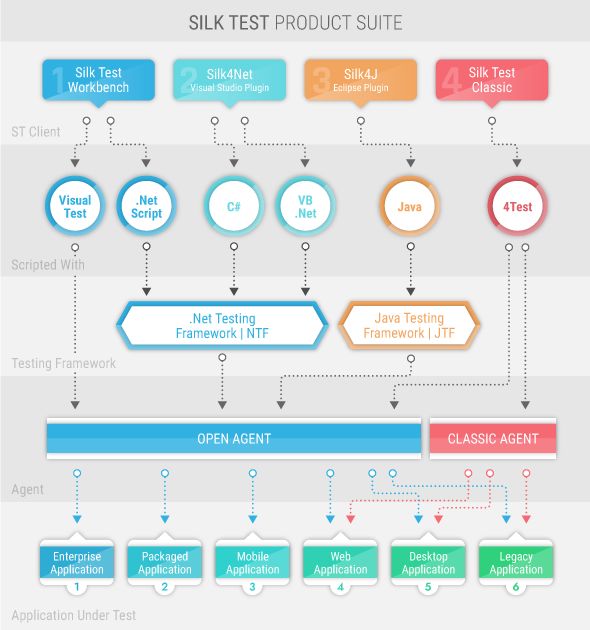
The Silk Test product suite includes the following components:
• Silk Test Workbench – Silk Test Workbench is the quality testing environment that offers .NET scripting
for power users and easy to use visual tests to make testing more accessible to a broader audience.
• Silk4NET – The Silk4NET Visual Studio plug-in enables you to create Visual Basic or C# test scripts
directly in Visual Studio.
• Silk4J – The Silk4J Eclipse plug-in enables you to create Java-based test scripts directly in your Eclipse
environment.
• Silk Test Classic – Silk Test Classic is the Silk Test client that enables you to create scripts based on
4Test.
• Silk Test Agents – The Silk Test agent is the software process that translates the commands in your
tests into GUI-specific commands. In other words, the agent drives and monitors the application you are
testing. One agent can run locally on the host machine. In a networked environment, any number of
agents can run on remote machines.
Silk Test Product Suite |5The sizes of the individual boxes in the image above differ for visualization purposes and do not reflect the
included functionality.
The product suite that you install determines which components are available. To install all components,
choose the complete install option. To install all components with the exception of Silk Test Classic, choose
the standard install option.
6 | Silk Test Product SuiteSystem Requirements and Prerequisites
The following section identifies the system requirements for installing and running Silk Test.
Hardware Requirements
Micro Focus recommends the following hardware:
System Area Requirement
Processor Intel or AMD dual-core processor running at 2 GHz.
RAM 1 GB free memory.
Hard disk space 2 GB of free disk space.
Note: The recommended hardware reflects the minimum requirements for Silk Test. Depending on
the requirements of the application under test or the requirements of your test environment, you might
require additional hardware.
When testing on an iOS device, Micro Focus recommends using a device with 1 GB RAM or more.
To test a web application on Apple Safari or a mobile application on iOS, a Mac with the following hardware
is required:
System Area Requirement
Operating system OS X El Capitan 10.11.3 or later.
Hard disk space 1 GB of free disk space.
Software Requirements
To install and execute Silk Test, the following software needs to be installed:
• Microsoft .NET Framework 4.6 (Full setup)
• Windows Update 3118401 for Universal C RunTime in Windows
• Silk Test by default ships the JRE that is included in the AdoptOpenJDK. This JRE runs only on 64bit
operating systems. If you want to install Silk Test on a 32bit operating system, you must have your own
JRE installed. For additional information, refer to the Silk Test Installation Guide.
System Requirements and Prerequisites |7What's New in Silk Test
Silk Test supports the following new features:
UI Automation Support
Silk Test 19.5 offers Microsoft UI Automation (UI Automation) as a new fallback support.
To better recognize controls when recording against Windows-based applications that have implemented
the UI Automation provider interface, you can enable the UI Automation support on machines that run on
Microsoft Windows 8 or later. This provides fallback support for applications that are based on the following
technologies:
• WPF
• WinForms
• Oracle JavaFX*
• QT
• PowerBuilder
• Delphi
• Microsoft Office
* JavaFX applications are detected out-of-the-box, without the need to manually enable the UI Automation
support.
Cross-Platform Resulting
When running tests, Silk Test now creates an easily shareable HTML report that you can view in your
favorite browser.
The report includes summary information about the test run, as well as detailed information about the
executed actions.
By default, Silk Test writes both a TrueLog and an HTML report when running a test.
Asset Comparison in Silk Test Workbench
With Silk Test Workbench 19.5, you can compare two different assets of the same type or two versions of
the same asset to easily spot the differences between the two assets or between the asset versions.
You can compare assets or asset versions for the following asset types:
• Visual test
• .NET script
• Object map
Usability Enhancements
This section lists usability enhancements that have been made in Silk Test 19.5.
8 | What's New in Silk TestText recognition for WebDriver-based browsers
Silk Test now supports text recognition for WebDriver-based browsers.
Text recognition includes the following methods:
• TextCapture
• TextClick
• TextExists
• TextRectangle
Dynamically invoking methods when testing native mobile apps
To call Appium WebDriver methods that are not exposed through the API of your Silk Test client, Silk Test
now enables dynamically invoking methods on mobile devices.
Storing ActiveData files in the database
You can now store ActiveData files in the Silk Test Workbench database.
Viewing includes for object maps
In Silk Test Workbench, you can now view which assets include an object map, so that you can update
these assets when renaming or changing the object map.
Pausing test execution
While playing back a test in Silk Test Workbench, you can now pause the test execution at the current
action by pressing Alt+F11.
Enhanced image recognition support in Silk Test Classic
Silk Test Classic now enables you to better interact with applications that contain highly customized
controls, which cannot be identified using object recognition or text recognition. You can now use the
ImageExistsFile method of the AnyWin class to verify that an image in a specific file exists and looks
as expected in the application under test, and you can use the ImageClickFile method of the same
class to click on an image, which is saved in a file, in the application under test.
Technology Updates
This section lists the significant technology updates for Silk Test 19.5.
New Microsoft Windows Versions
You can now leverage your test set by simply executing all your existing functional, regression, and
localization tests on the Windows 10 October 2018 Update and on Windows Server 2019.
New Mozilla Firefox Versions
In addition to the versions of Mozilla Firefox, which have been tested with the previous version of Silk Test,
Silk Test has now been tested with the following new versions of Mozilla Firefox:
• Mozilla Firefox 61
• Mozilla Firefox 62
• Mozilla Firefox 63
What's New in Silk Test |9Note: This list includes the new versions of Mozilla Firefox that have been tested with Silk Test 19.5
until the release date of Silk Test 19.5. Silk Test 19.5 should be able to support newer versions of
Mozilla Firefox, even if these versions have been released after the release date of Silk Test 19.5.
New Google Chrome Versions
In addition to the versions of Google Chrome, which have been tested with the previous version of Silk
Test, Silk Test has now been tested with the following versions of Google Chrome:
• Google Chrome 68
• Google Chrome 69
• Google Chrome 70
Note: This list includes the versions of Google Chrome that have been tested with Silk Test 19.5 until
the release date of Silk Test 19.5. Silk Test 19.5 should be able to test with newer versions of Google
Chrome, even if these versions have been released after the release date of Silk Test 19.5.
New Microsoft Edge Version
In addition to the versions of Microsoft Edge, which have been tested with the previous version of Silk Test,
Silk Test has been tested for recording and replay with Microsoft Edge 44.17763, the Microsoft Edge
version for the Windows 10 October 2018 Update.
New Apple Safari Version
In addition to the versions of Apple Safari, which have been tested with the previous version of Silk Test,
Silk Test has now been tested with Apple Safari 12.
New Android Version
In addition to the Android versions, which have been tested with the previous version of Silk Test, Silk Test
has now been tested with Android 9.
New iOS Version
In addition to the iOS versions, which have been tested with the previous version of Silk Test, Silk Test has
now been tested with iOS 12.
New macOS Version
You can now leverage your test set by simply executing all your existing functional, regression, and
localization tests for Apple Safari or iOS on macOS Mojave (10.14).
Java 11 Support
Silk Test now supports testing applications that are based on Java 11.
New Eclipse Version
Silk4J now supports Eclipse Photon (4.8).
New Java SWT Versions
Silk Test now supports testing applications that are based on Java SWT 4.8 and 4.9.
10 | What's New in Silk TestKnown Issues
Depending on the Silk Test client that you are using, click on the corresponding link for a list of the known
issues for the client and their resolutions:
Silk Test Workbench Known Issues for Silk Test Workbench
Silk4J Known Issues for Silk4J
Silk4NET Known Issues for Silk4NET
Silk Test Classic Known Issues for Silk Test Classic
Known Issues | 11Resolved Issues and Customer-Driven
Enhancements
The following issues have been resolved:
SI # RPI # Description
D29020 Silk Test Workbench: References to other .NET scripts are removed when renaming
a .NET script.
D30008 Silk Test Workbench might crash when opening and closing .NET scripts that
reference each other.
D34001 Silk Test might crash when testing against Internet Explorer on a machine on which
Symantec is installed.
3146796 1113571 Align the discovery of dlls in the Open Agent with the Classic Agent.
3155657 1114033 Silk Test Workbench: Large increase in execution times after installing Silk Test 18.5
Hotfix 1.
3154397 1114107 Silk4J: Problem connecting to Open Agent on remote machine.
3160132 1114381 Silk Test Workbench: Building a verification for a visual test fails when pasting the
locator.
3160172 1114384 Silk4J and Silk Performer: Using a headless Mozilla Firefox within a GUI-level test
causes an error.
3161521 1114543 Silk Test Workbench: Playback error Could not find object.
3162002 1114577 Silk4J: Android Emulator error: Android Appium Server did not start within 24 s.
3162230 1114604 Error on javascript window.confirm() dialog.
3162641 1114626 Silk4NET: Problem connecting to mobile device.
3161588 1114636 Silk Test Workbench cannot identify QT-framework-based objects with Accessibility.
3162794 1114665 Silk Test Workbench: Error when upgrading database schema to Silk Test 19.0.
3163484 1114673 Silk Test Classic: Random failures when executing a test case against a remote agent.
3163854 1114720 SYS_Execute hangs when running a batch file with the pause statement.
3164082 1114862 Silk Test Workbench: Using splwow64.exe dialog interrupts script execution.
3164907 1114992 Silk Test processes are not aborted when keyword-driven tests are executed from Silk
Central.
3165014 1114813 Silk Test Workbench 19.0 might crash when duplicating a script.
3165141 1114818 Silk Test Workbench 19.0 might crash when clicking End on a playback error.
3165872 1114880 Silk4J: Unknown server-side error when testing a website on mobile only.
3166589 1115025 Unable to replay a recorded test.
3168586 1115129 Silk Central result does not match with Silk Test result.
3169197 1115161 Silk Test Classic: Parameters that contain double forward slashes in the test case are
truncated.
3170097 1115239 Silk Test Workbench might crash after an error in a .NET script.
12 | Resolved Issues and Customer-Driven EnhancementsSI # RPI # Description
3170299 1115282 WPFButton.Select returns Object reference not set to an
instance of an object.
3171918 1115414 Silk Test Workbench: Functions do not display to be selected.
3172055 1115463 After Upgrading to Silk Test 19.0, Silk Test is unable to add application configuration to
AS400 Terminal application.
3173450 1115531 TextCapture is not returning French special characters on Terminal Emulator.
Resolved Issues and Customer-Driven Enhancements | 13Contacting Micro Focus
Micro Focus is committed to providing world-class technical support and consulting services. Micro Focus
provides worldwide support, delivering timely, reliable service to ensure every customer's business
success.
All customers who are under a maintenance and support contract, as well as prospective customers who
are evaluating products, are eligible for customer support. Our highly trained staff respond to your requests
as quickly and professionally as possible.
Visit http://supportline.microfocus.com/assistedservices.asp to communicate directly with Micro Focus
SupportLine to resolve your issues, or email supportline@microfocus.com.
Visit Micro Focus SupportLine at http://supportline.microfocus.com for up-to-date support news and access
to other support information. First time users may be required to register to the site.
Information Needed by Micro Focus SupportLine
When contacting Micro Focus SupportLine, please include the following information if possible. The more
information you can give, the better Micro Focus SupportLine can help you.
• The name and version number of all products that you think might be causing an issue.
• Your computer make and model.
• System information such as operating system name and version, processors, and memory details.
• Any detailed description of the issue, including steps to reproduce the issue.
• Exact wording of any error messages involved.
• Your serial number.
To find out these numbers, look in the subject line and body of your Electronic Product Delivery Notice
email that you received from Micro Focus.
14 | Contacting Micro FocusSilk Test Licensing
This section describes how to obtain a license policy for Silk Test and how to install Silk Meter. You must
have administrator privileges to install Silk Meter.
Note: Silk Test requires Silk Meter version 2008 or later as well as a Silk Test license policy.
Install Silk Meter once per license server. If you have multiple license servers, you need multiple license
policy files, each one tied to a particular license server. A single Silk Meter license server can administer
license policies for multiple products.
If you have received a Silk Test license policy, install the license policy on your license server. If you have
not received a license policy, generate a license policy.
Licensing Information
Unless you are using a trial version, Silk Test requires a license.
Note: A Silk Test license is bound to a specific version of Silk Test. For example, Silk Test 19.5
requires a Silk Test 19.5 license.
The licensing model is based on the client that you are using and the applications that you want to be able
to test. The available licensing modes support the following application types:
Licensing Mode Application Type
Mobile Native • Mobile web applications.
• Android
• iOS
• Native mobile applications.
• Android
• iOS
Full • Web applications, including the following:
• Apache Flex
• Java-Applets
• Mobile web applications.
• Android
• iOS
• Apache Flex
• Java AWT/Swing, including Oracle Forms
• Java SWT and Eclipse RCP
• .NET, including Windows Forms and Windows
Presentation Foundation (WPF)
• Rumba
• Windows API-Based
Note: To upgrade your license to a Full license,
visit http://www.microfocus.com.
Premium All application types that are supported with a Full
license, plus SAP applications.
Silk Test Licensing | 15Licensing Mode Application Type
Note: To upgrade your license to a Premium
license, visit http://www.microfocus.com.
Mobile Native Add-On In addition to the technologies supported with a Full or
Premium license, the mobile native add-on license offers
support for testing native mobile applications on Android
and iOS.
16 | Silk Test LicensingTested Software
This section lists the software with which Silk Test 19.5 has been tested.
Operating Systems
Silk Test 19.5 has been tested with the following operating systems:
• Microsoft Windows Server 2008 R2
• Microsoft Windows 7 SP1
• Microsoft Windows 8 (No Windows Store apps)
• Microsoft Windows 8.1 (No Windows Store apps)
• Microsoft Windows Server 2012
• Microsoft Windows Server 2012 R2
• Microsoft Windows 10 (No Universal Windows Platform apps)
• Microsoft Windows Server 2016
• Microsoft Windows Server 2019
Web Applications
For the Open Agent, Silk Test 19.5 has been tested with the following browsers and web technologies:
Technology Type Tested Version
Mozilla Firefox** 41, 42, 43, 44, 45 (ESR*), 46, 47.0.1, 47.0.2, 52 (ESR*)***, 53*** , 54***,
55***, 56***, 57***, 58***, 59***, 60***, 61***, 62***, 63***
Note: For compatibility reasons, Silk Test 19.5 does not support
Mozilla Firefox 48, 49, 50, and 51.
Google Chrome** 52, 53, 54, 55, 56, 57, 58, 59, 60, 61, 62, 63, 64, 65, 66, 67, 68, 69, 70
Chrome for Android
Original Stock Android Browser
(AOSP)
Apple Safari on iOS 9, 10.1, 11, 12
Apple Safari on Mac 9, 10.1, 11, 12
Mac OS (Used for testing Apple 10.11.3, 10.12, 10.13, 10.14
Safari or iOS)
Internet Explorer 8, 9, 10, 11
Microsoft Edge Windows 10 Anniversary Update (38.14393), Windows 10 Creators Update
(40.15063), Windows 10 Fall Creators Update (41.16299), Windows 10 April
2018 Update ( 42.17134), Windows 10 October 2018 Update (44.17763)
Android 4.4, 5.x, 6.x, 7.x, 8.x, 9.x
iOS 9.3, 10.x, 11.x, 12.x
Xcode Xcode 8.3.x, Xcode 9.x, Xcode 10.x
Silverlight 3 (Silverlight Runtime 4), 4 (Silverlight Runtime 4 and Silverlight Runtime 5)
Tested Software | 17Technology Type Tested Version
Note: Microsoft has committed to support Silverlight 5.0 until 2021,
but has made no concrete announcement about the future roadmap of
Silverlight. Whilst we endeavour to maintain the highest levels of
support for our customers, we are occasionally limited in the support
we can obtain from Microsoft on this platform.
Apache Flex (Only for Internet Silk Test 19.5 has been tested with Apache Flex version 3.5 to Apache Flex
Explorer) version 4.14.1, and with Adobe AIR 2.0 or later (built with Apache Flex 4.x)
Silk Test supports Adobe Flash Player 10 or later.
Java Applets (Only for Internet Silk Test supports Applets for web applications running in Internet Explorer.
Explorer)
HTML5
Oracle Forms 10g and 11g for Internet Explorer.
* Extended Support Release.
** This list includes the browser versions that have been tested with Silk Test 19.5 until the release date of
Silk Test 19.5. Nevertheless, Silk Test 19.5 should be able to support the newest versions of these
browsers, as soon as they are available.
*** In comparison to the previous versions of Mozilla Firefox, testing on Mozilla Firefox 52 and later
versions includes some additional limitations. For detailed information on the limitations, refer to the
documentation of your Silk Test client.
Native Mobile Applications
For the Open Agent, Silk Test 19.5 has been tested with the following mobile operating systems:
Technology Type Tested Version
Mac OS (Used for testing Apple 10.11.3, 10.12, 10.13, 10.14
Safari or iOS)
Android 4.4, 5.x, 6.x, 7.x, 8.x, 9.x
iOS 9.3, 10.x, 11.x, 12.x
Desktop Applications
For the Open Agent, Silk Test 19.5 has been tested with desktop applications that are developed in one of
the following technologies:
Technology Type Tested Version
Java AWT/Swing (including Java Java 6, Java 7, Java 8, Java 9, Java 10, Java 11
Foundation Classes)
Java SWT Java 6, Java 7, Java 8, Java 9, Java 10, Java 11
Silk Test 19.5 has been tested with Java SWT version 3.2 or later.
Silk Test supports standalone and Rich Client Platform (RCP) applications.
JavaFX Microsoft Windows 8 or later.
SAP* SAPGUI client 7.10, SAPGUI client 7.20, SAPGUI client 7.30, SAPGUI client 7.40,
SAPGUI client 7.50
18 | Tested SoftwareTechnology Type Tested Version
Rumba 8.1, 8.2, 8.3, 9.0, 9.1, 9.2, 9.3, 9.4, 9.5
MFC 14.11
Visual COBOL
Win 32 any
WinForms .NET 3.0, 3.5, 3.5 SP1, 4.0, 4.5, 4.6
WPF .NET 3.5 SP1, 4.0, 4.5, 4.6
* To avoid issues when testing SAP applications, Micro Focus recommends installing the latest patch set.
Silk Test Workbench
Silk Test 19.5 has been tested with the following databases for Silk Test Workbench asset storage:
• Microsoft SQL Server 2008 (SP2) + Express
• Microsoft SQL Server 2012
• Microsoft SQL Server 2012 SP1
• Microsoft SQL Server 2014
• Microsoft SQL Server 2016
• Microsoft SQL Server 2017
• Oracle 11.1.
Note: The Oracle 11 ODBC driver needs to be at least at patch level 4 (11.2.0.4.0). Oracle patch
13390677 includes the correct driver. You can download the patch from Here.
• Oracle 11.2
Note: The Oracle 11 ODBC driver needs to be at least at patch level 4 (11.2.0.4.0). Oracle patch
13390677 includes the correct driver. You can download the patch from Here.
• Oracle 12.1. Silk Test Workbench supports Oracle 12.1 databases with the AL32UTF8 character
encoding.
• Microsoft Access 2000 (as a single-user database)
Note: Micro Focus recommends using Microsoft SQL Server.
Silk4J
You can integrate Silk4J in Eclipse 4.4.2 or later, both 32 and 64 bit. Version 4.9 is shipped with Silk Test.
To work with Silk4J 19.0 or later, Java 8 or later is required to be installed on the system where Silk4J is
installed.
Silk4NET
You can integrate Silk4NET into the following editions of Microsoft Visual Studio:
Version Editions
Visual Studio 2012 • Professional
• Ultimate
Visual Studio 2013 • Community
• Professional
• Premium
Tested Software | 19Version Editions
• Ultimate
Visual Studio 2015 • Community
• Professional
• Enterprise
Visual Studio 2017 • Community
• Professional
• Enterprise
Silk Test Classic
Silk Test Classic's Data Driven Workflow has been tested with:
• Text files and comma separated value files (*.txt and *.csv files)
• MS Excel
• MS Access
• MS SQL Server
• Oracle (partial support)
• SyBase SQL Anywhere
Silk Test Classic accesses the preceding databases using ODBC and therefore has been tested with the
versions of those databases that have a working ODBC driver.
The Silk Test Classic Select Data Source dialog box allows you to choose either the Silk DDA Excel or the
Segue DDA Excel data source. For new data driven test cases, choose the Silk DDA Excel data source.
Choose the Segue DDA Excel data source for backward compatibility. This allows existing .g.t files that
reference Segue DDA Excel to continue to work.
Important: Whilst we endeavour to keep pace with new releases and runtime versions of supported
software and technology, the information given in this document is limited to what was known and
could be tested at the point in time when this version of Silk Test was released. If you have questions
about newer releases and versions of supported software or generally about software not mentioned
here, please don't hesitate to contact Micro Focus for guidance.
20 | Tested SoftwareYou can also read


