TRANSFORMINGEXAMS.COM - e-Exams Workshop Mathew Hillier, Monash University - Macquarie ...
←
→
Page content transcription
If your browser does not render page correctly, please read the page content below
TRANSFORMINGEXAMS.COM
          A Scalable Examination Platform for BYOD Invigilated Assessment

e-Exams Workshop
Mathew Hillier,
Monash University

Macquarie University, 21 Sep 2018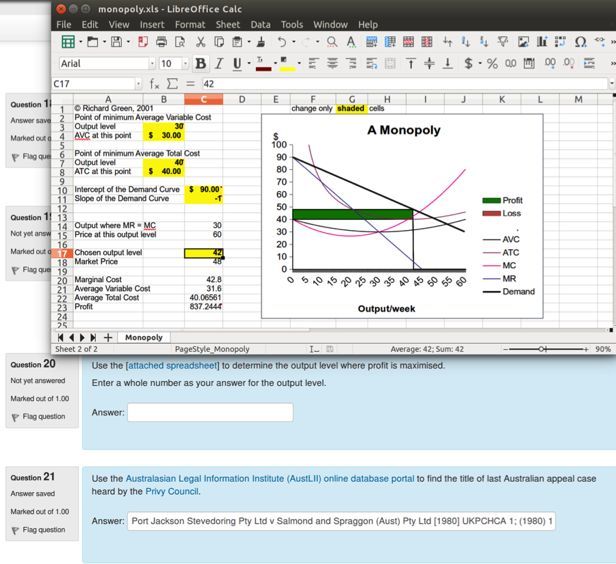
Acknowledgements
Project Partners                                 Academics hosting trials
• Monash University: Dr Mathew Hillier (PI),     • Monash college: Nathaniel Lyons (Globalisation +
  Prof. Marilyn Baird, Dr Scott Grant              Geography)
• University of Tasmania: Dr Andrew Fluck.       • Monash Uni: Dr Shani Tobias (Translation), Dr
• Central Queensland University: Dr Michael        Charanjit Kaur (Bus Stats).
  Cowling, Kenneth Howah, Mary Tom.              • UQ: Dr Amy Hubbell (French language).
• Australian National University: Brandon        • CQU: Dr Rahat Hossain (KM in IT).
  Colquhoun, Beth Harris                         • UTAS: Dr Wendy Balassa (Education)
• Edith Cowan University: Assoc. Prof. Paul      • ECU: Dr Jeremy Pagram (Programming/Python)
  Newhouse (deceased)                            • UNSW/ADFA: Andrew Gilbert (Air Power).
• Macquarie University: Assoc. Prof. Matthew     Project staff
  Bower, Prof Dominic Verity                     Martin Coleman (lead software developer)
• RMIT University: Assoc. Prof. Shona Leitch     Vilma Simbag (project manager/admin)
• University of South Australia: Dr Ruth Geer,   Former staff: Lubos Rendek (software dev).
  Bruce White                                    Students (summer/winter projects and casual RAs):
• University of Queensland: Dominic McGrath      Chao Wang, Kim Martinow, Sayumi Umeda, Annie
• University of New South Wales (Canberra)/      (Yunyi Yang), Yi Zheng.
  ADFA: Dr David Meacheam, Emma Betts
Problems with current exams
Paper based exam features…
   Limited pedagogical scope… MCQ/TF, short/essay response, static
   diagrams.
   Tendency to examine end product (final response) rather than process.
   Harder to examine deep/higher order skills – tends to lower order
   Hand-written pen-on-paper is much less common as a problem solving
   and information presentation tool.
   But, computerised MCQ and a text box isn’t making pedagogical
   progress!
   Not reflective of the modern world of work.
Is this limiting our ability to accredit graduates as being able to operate
in the world of today, immersed in technology, information and
complexity? Other problems you know of?
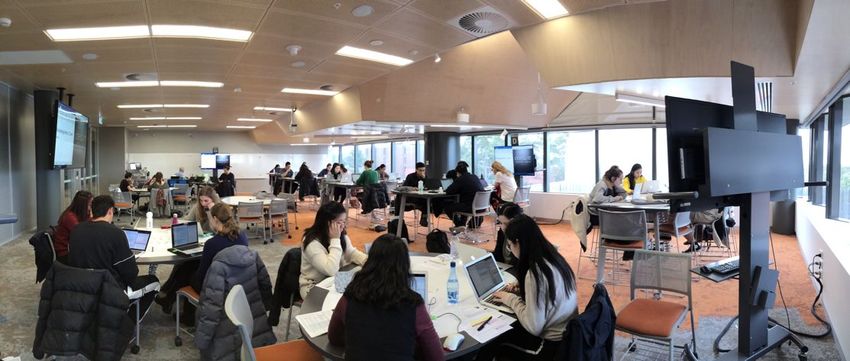
Why keep exams?

    Discuss!

               4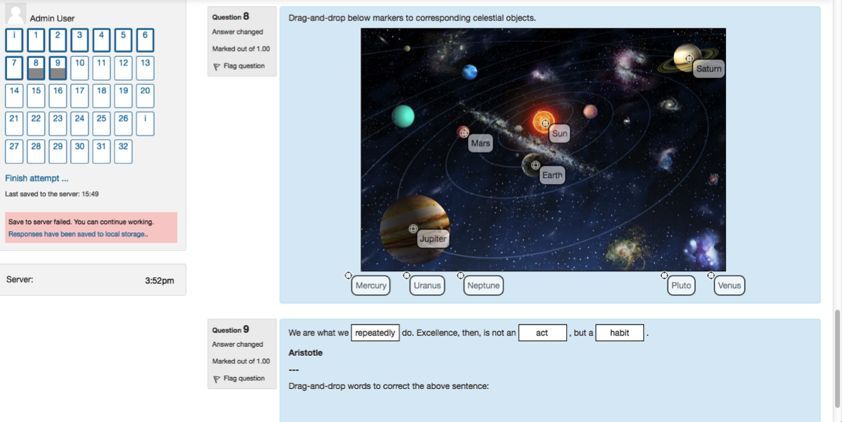
Why keep exams?
High stakes, supervised testing is still needed because:
  Qualification identify verification (be sure it is the student’s work
  – rise of contract cheating)
  A test of the student’s ‘metal’ under pressure.
  Accreditation requirements.
  Social/political stakeholder expectations.
  Time and workload efficiencies?
  Other reasons … ?

                                               5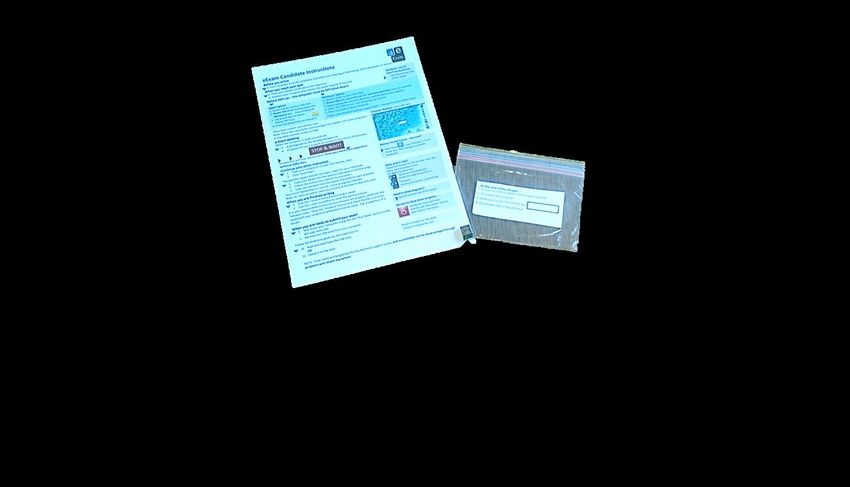
e-Exam Types
Types - Phased implementation strategy
Start >                > > >              >>>                  >>>               >>>            > Future >
  Get Ready           Phase 1            Phase 2              Phase 3           Phase 4           Phase 5

                   Paper equivalent Post-paper small to   Medium to large    Whitelisted and    Open but fully
                     small scale.        medium.              scale.         logged Internet   logged Internet
  Ins1tu1onal
   approvals,
                                       Expanding the      Adding the power                     Network mixed
research ethics,   Basic doc exams                                           Network BYOD
                                       landscape with        of an LMS                          mode BYOD
 hardware and          to begin.                                                 exam.
                                      apps and media.        (Moodle).                             exam.
 infrastructure.

                      Crawling           Walking             Running           Jumping            Flying!

                                                                  http://ta.vu/e-exam-roadmap

                                                                        7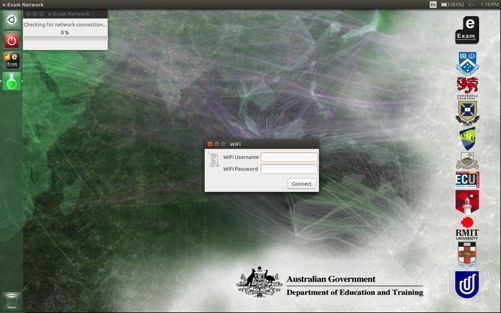
e-Exam types now in use
 The e-Exam platform features in use now:
 1: Paper-equivalent doc or spreadsheet ‘form’ based exam
 2: Post-paper word doc centric exam (multimedia,
 programming, spreadsheets as math tools)
 3: Moodle based exam (client/server with ‘offline’)
 Features under development ~ 2018-2019+
 4: White-listed online exam with logging (half done!)
 5: Open online exam with logging
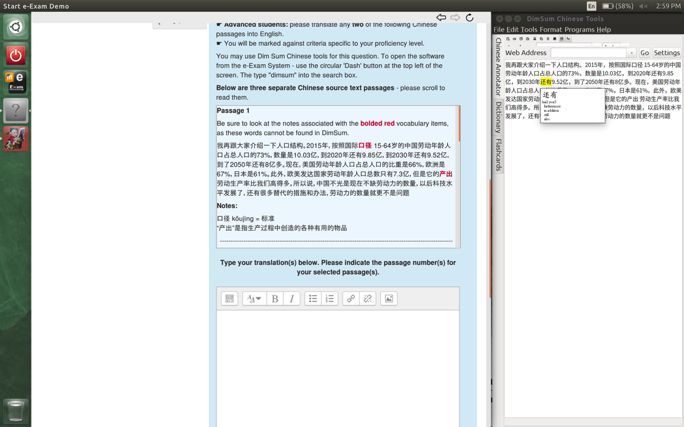
e-Exam Trials: Towards ‘post-paper’ (phase 1 to 2)
Start simple and build up!
              Start! Exam doc   Video

Scratch SDK                                         Spreadsheets as ‘forms’ or
                                                    as calculation and analysis.
                                                           Specialist applications

                                        PDF

                                         Sims   9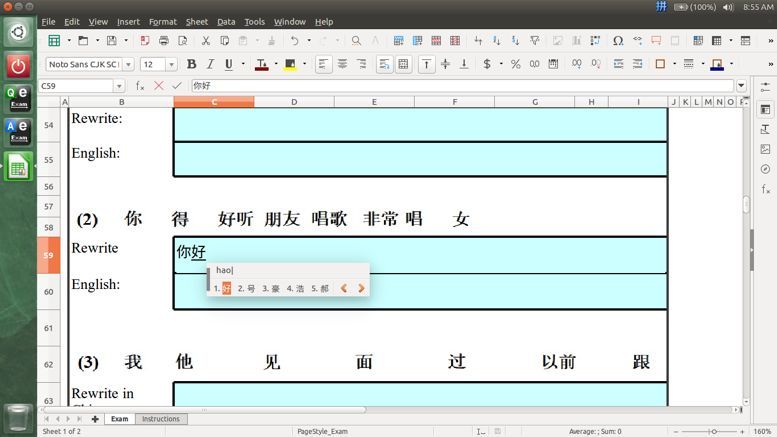
e-Exam trials
 Exams     Typists   Pen       Weight   Minutes            Recent e-Exams 2017 and 2018
                                                  Monash   • Business Statistics
Sum        1750      1309        ~      4145               • Chinese online media (‘Robust’ online).
                                                           • Geography x 3 classes [Monash college 2016]
Mean         40       37       32%       106               • Globalisation x 4 classes [Monash college 2017]
                                                           • Language Translation (some NAATI)
Smallest     1        ~         5%        15               • Introductory Chinese language (offline,
Largest     166       ~        50%       180                 Spreadsheet used as a form)
                                                           • Introduction to Chinese (‘Robust’ online).
Typists:                                          UQ       • French language translation
I would recommend the e-Exam system to others.    CQU      • Knowledge Management Principles (IT)
                                                           • Ethics and Social Issues (IT)
                            70% recommend it!              • IT management
                                                  UTAS     • ICT in Education (post-paper exams)
                                                           • Environmental Chemistry
                                                  MqU      • ICT in Education
                                                  UNSW     • Air power (ADFA)
                                                  ECU      • Teaching Introductory Computer Programming
                                                           • OHS for trades
                                                  UniSA    • Science & Math for secondary teaching
Paper equivalent using word documents Suitable format adjustments were made to cater for both paper and screen.
e-Exam trial feedback – Macquarie U
 “I would recommend the e-Exam system to others”.
 ICT in Educa1on, 80 min 40% Final exam                              (MQU. Post. S1, 2017)

 Word document: 10 x MCQ and 1 x Essay                      12

                                                            10

                                          Number of users
                                                             8

                                                             6

                                                             4

                                                             2

                                                             0
                                                                 Strongly Disagree Neutral   Agree   Strongly
                                                                 Disagree                             Agree

                                                                                                                12
e-Exam trial feedback – case studies
“I would recommend the e-Exam system to others” ~ Sem 1, 2017.
UTAS Educa1on (mul1 media) UQ French transla1on (doc)
14 8
7
12
6
10
Number of users
5
8
4
6
3
4
2
2
1
0
0
Strongly Disagree Neutral Agree Strongly Strongly Disagree Neutral Agree Strongly
Disagree Agree Disagree Agree
13Offline Spread sheet as a Form
Intro to Chinese (first year): 2017 Semester 2.
22 students at pre-exam practice.
16 typed the exam. 7 females and 9 males.
I would recommend the e-Exam system to others
10
8
6
4
2
0
Strongly Disagree Neutral Agree Strongly
Disagree Agree
Caveat: sample was small and not random - descriptive of these groups only.Spread sheet as a Form
Language tools available
according to LOTE selection
Respond in designated cells
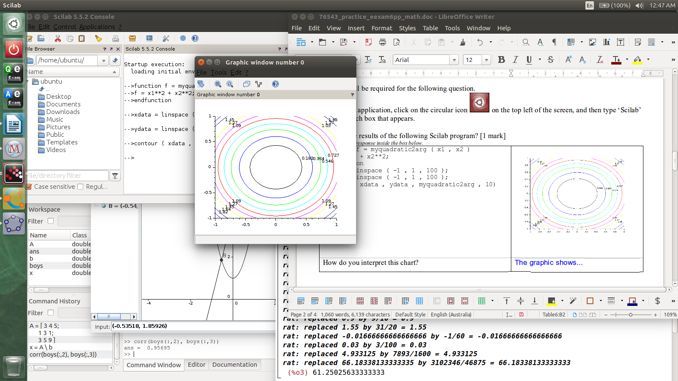
(other cells are locked).Mathematics example
Candidates can access wxMaxima, SciLab, GeoGebra, GNU Octave (like MatLab), R (statistics
package) alongside the standard LibreOffice suite (word processor, spread sheet etc), media,
plus programming tools such as Python, Scratch etc. Responses via documents or Moodle LMS.e-Exam trial feedback – ECU case studies
“I would recommend the e-Exam system to others”.
Teaching Python Programming exam: ECU: CSE & DTE Post-survey 2017 S2
Word document + Python IDLE 10
8
Number of users
6
4
2
0
Strongly Disagree Neutral Agree Strongly
Disagree Agree
17e-Exam trial feedback – UQ
“I would recommend the e-Exam system to others”.
French language. 120 min 30%. UQ. Post. S1 & S2, 2017
Word document: ar1cle transla1on 12
10
Number of users
8
6
4
2
0
Strongly Disagree Neutral Agree Strongly
Disagree Agree
18Case studies – hand out (double sided!) UTAS – Post-paper word document based eexam Monash – ‘robust’ online e-exam in Moodle Your help …. Any suggestions to improve these cases? Anything we left out that you would like to know?
e-Exam trial – Robust Moodle (Monash case):
Monash – Chinese language – two units
(1st year and 3rd Year)                                         “I would recommend the e-Exam system to others”
                                                                Sem 1, 2018.
Early days for Moodle mode!
                                                           20
Robust Moodle worked to rescue network
outages (double layered backup!)
                                                           15
Select 3rd party socware carefully
(can be limited).

                                         Number of users
                                                           10

                                                           5

                                                           0
                                                                 Strongly   Disagree   Neutral   Agree   Strongly
                                                                 Disagree                                 Agree
e-Exam Process – Trials at Monash… 1) Two weeks prior: practice session + pre-survey. 2) Exam day: In-class, graded, supervised assessment task + post survey.
Pre and post response trends (preliminary)
                                                     Strongly Disagree 11       22   33   44   55 Strongly Agree
                                     Written instructions were easy to follow
              It was easy to start my computer using the e-Exam USB stick
      I can use the e-Exam system just as well as my own laptop system
                                                                                                              N
        It was easy to use the office suite (word processor/spread sheet)
    It was easy to use software applications beyond the word processor
                It was easy to save my response files into the correct place                         Pre      38
 It was easy to answer multiple-choice questions in the e-Exam system
                             Overall, I feel the e-Exam System is easy to use                        Post 1   37
             I feel the e-Exam System is reliable against technical failures
                        I feel the e-Exam System is secure against cheating                          Post 2   39
           I now feel relaxed about using the e-Exam system for my exam
                           I would recommend the e-Exam System to others                             Post 3   40
                       My laptop is reliable for use in a computerised exam
                   My typing skills are fast enough for a computerised exam
 Computerised exams make me more stressed than handwritten exams
                     I would like to use a computer for exams in the future
               I am concerned about network outages impact ing my exam
I am reassured the e-Exam system was robust against network outages
                             The included software was useful [e.g DimSum]
                                Moodle worked well as an exam environment

 Caveat: Not random samples – descriptive of these groups only.
Some Key Findings a) The e-Exam system was rated well by the typists: 4+ out of 5. b) Robust network features worked (at least one obvious wifi outage) Responses were auto saved to USB, retrieved following exam and re-joined the e-workflow in Moodle. c) Time saved in marking essay responses: 20% to 30% over that of paper responses. d) Students need transition opportunity: roughly 30% preferred paper! What else do you want to ask about findings?
Logis1cs – UTAS e-Exams

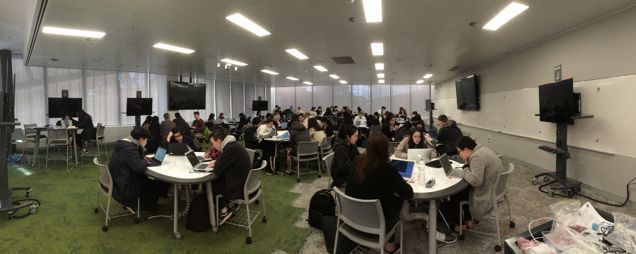
  The Exam room –
 What is on the desks!
A student’s exam desk

 eExam Candidate
 instructions

                                         Plastic
                                         ziplock bag

                        USB stick
                        contains
                          the
                                    25
                         eExam
What do Supervisors get?
Security image.
To match student
computer desktop
before starting.
Backup
Question papers
(or from PDF)
26Staff professional development (UTAS) Invigilators/Supervisors Hand out & collect USBs, not papers Note USB numbers with ID checks Modified announcements to candidates BYOD computers start up as candidates sit down (staggered) Start-up check – desktop picture from BACK of room Revert to paper if necessary Informa;on Technology Officers (basic IT skills sufficient) Assist with laying power (UTAS: < 50% of candidates used it!) Don’t touch keyboards when verifying files How to reboot/resume from the eExam USB IT support staff to be advised/follow exam room protocol ALL University eExam reference web-site eExam procedure manual (Academic professional development for authen1c e-exams!) 27
e-Exam process: robust online Moodle (Phase 3)
Pre-exam: prepare learning materials                                     Pre-session:                Exam content
                 2. Configure, load and test:                             4. Student laptop           resides on a server.
                 Moodle quiz + Gateway USB                               setup &
                                                                         prac1ce.
                                                                   5. Network setup
1. Teacher creates exam:               3. Deploy quiz to Moodle.   and USBs to
                                                                   venue                               Network Moodle.
Moodle quiz, media, selects apps.      Gateway USBs duplicated.
                                    6. Exam venue:                                                   Linux Live USB
                                     a. Students enter room                                          SEB + e-tools:
                                     b. Given USB (s.o.s. WIFI dongle)                               Libre Office, apps,
                                     c. Start laptop from USB                                        SDK, sims, PDFs,
                                        & connect to Moodle with key                                 large media.
                                     d. Do exam in Moodle                                            Local cache of Moodle
                                     e. Finalise and shutdown
                                     f. Return USB & dongle                                          content. Response
                                     g. Leave room                                                   backup to USB in case
                                                                                                     of network outage.
                  7B In case of network           Post-exam: assessment                             Recycle USB & dongle for
                  outage: Get backup                          9. e-responses            10.         next exam. Gateway
                  responses from USBs.                        available to              Results     USBs can be reused as-is
   7. Responses
                                                              teacher.                  submission, (from step 5) or updated
   autosave to 8 Responses
                                                              Auto and                  analy1cs & (step 2).
                finalised to server                            manual                    repor1ng
   server
                                                              marking.
   (each 1 min) (USB resets *)
                                                     11. e-Feedback via network                     * USB auto reset still under
                                                                                                    development.
Hands-on:
Try an e-Exam USB s1ck.
Follow the ‘quick start’ guide to:
• Boot to USB…
• PINK USBs ONLY: you join EduRoam using
(yourusername@youruni.edu.au)
• GREEN and Black/RED: will auto join WiFi.
• Logon to our demo Moodle
user1, user2… user50
Passw0rd!Start up
Select LOTE
(if applicable)
Connect to WiFi
Eduroam networkStarting the exam at the same time - password
Log into
Moodle
server
Password given
out in class at the
exam start time.Third party software included.
This is an offline
dictionary tool
Moodle ‘Dim Sum’
questions in
Safe Exam
BrowserQuestions
Lecture test 1
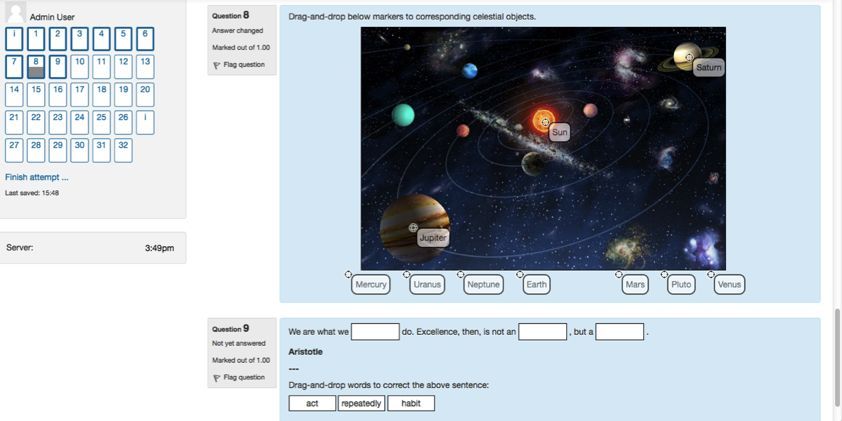
A range of form based question
types were used in these e-exams.Questions
Listening test 1 Audio data files cached at the
start of the exam.
Students used headsets to listen.Questions
Constructed 2. Software
application used
enquiry to interrogate
and construct a
response.
1. Download file
3. Respond via formQuestions
1. Open software
Constructed
response
(file upload)
2. Use software
application to
construct a
response.
3. Respond by file uploadMulti layered backup - Network Outage
I
a) Whilst there is a
network connection
student data is saved to
the server each minute.
b) If there is a network outage, then
student response data is saved to the
USB drive in an encrypted file.Multi layered backup - Network Outage at Submission
I
• If at submission time there is a network outage,
then student response data is saved to the USB
drive.
• Ideally the student should try again or call
an exam supervisor for help.
• If the connection cannot be reinstated then
after the exam the response file is retrieved
from the USB and uploaded to Moodle.Successful Submission
Immediate feedback
(optional setting)
Confirmed submission
to server triggers USB
self clean up
ready for
next exam.Thank you For further information contact: Mathew.Hillier@monash.edu TransformingExams.com eExamSymposium.eventbrite.com.au Sat 24 Nov, Melbourne, Australia. Two international speakers: 1) Head of e-Learning Service at Alpen-Adria Please University, Klagenfurt, Austria, A university with 40% uptake of e-exams. complete our 2) Senior specialist in e-exams at the national feedback Matriculation Examinations Board of Finland. survey! Speaking about the roll out of their national e-exams project.
You can also read


