WESTERN INTERNATIONAL HIGH SCHOOL - WORLD LANGUAGES BIENVENIDOS - Detroit Public ...
←
→
Page content transcription
If your browser does not render page correctly, please read the page content below

WELCOME TO WESTERN INTERNATIONAL HIGH SCHOOL WORLD LANGUAGES BIENVENIDOS أھﻼ ﺑك 'ahlaan bik

Objectives

               Use Clever to access district applications including Teams, Schoology, Edgenuity, Yabla,
    Use        Newsela, Polly Lingual, and Savvas Realize

 Navigation    Navigate to the learning platforms that students will use this year for Spanish.

 Description   Describe how their children will use the district applications in Clever this year

               Assist students and families with logging on and basic navigation of these applications in
 Assistance    the first weeks of school
Objetivos

               Usar Clever para acceder las aplicaciones del distrito que incluyen Teams, Schoology,
    Uso        Edgenuity, Yabla, Newsela, Polly Lingual, y Savvas Realize

               Navegar las plataformas de aprendizaje que los estudiantes utilizan este año para
 Navegación    estudiar español

 Descripción   Describir cómo los estudiantes usan las aplicaciones en Clever este año

               Ayudar a los estudiantes y a las familias a iniciar sesión y a navegar de forma básica por
 Connexión     estas aplicaciones en las primeras semanas de clases.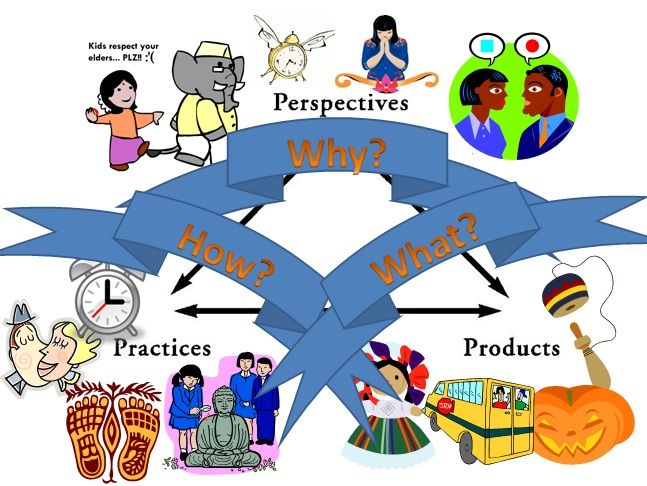
ا
ﻷھداف Al’ahdaf
اﺳﺗﺧدمClever ﻟﻠوﺻول إﻟﻰ ﺗطﺑﯾﻘﺎت اﻟﻣﻧطﻘﺔ ﺑﻣﺎ ﻓﻲ ذﻟكTeams وSchoology وEdgenuity وYabla وNewsela وPolly Lingual
اﺳﺗﻌﻣﺎل
aistakhdam Clever lilwusul 'iilaa tatbiqat almintaqat bima fi dhalik Teams w Schoology w Edgenuity w Yabla w Newsela w Polly Lingual w Savvas
aistiemal Realize
اﻟﺗﻧﻘل اﻧﺗﻘل إﻟﻰ ﻣﻧﺻﺎت اﻟﺗﻌﻠم اﻟﺗﻲ ﺳﯾﺳﺗﺧدﻣﮭﺎ اﻟطﻼب ھذا اﻟﻌﺎم ﻟﻠﻐﺔ اﻹﺳﺑﺎﻧﯾﺔ
altanaqul aintaqil 'iilaa minasat altaealum alty sayastakhdimuha altullab hdha aleam lilughat al'iisbania
وﺻف ﺻف ﻛﯾف ﺳﯾﺳﺗﺧدم أطﻔﺎﻟﮭم ﺗطﺑﯾﻘﺎت اﻟﻣﻧطﻘﺔ ﻓﻲClever ھذا اﻟﻌﺎم
wasaf safi kayf sayustakhdim 'atfalahum tatbiqat almintaqat fi Clever hdha aleam
ﻣﺳﺎﻋدة ﺳﺎﻋد اﻟطﻼب واﻷﺳر ﻓﻲ ﺗﺳﺟﯾل اﻟدﺧول واﻟﺗﻧﻘل اﻷﺳﺎﺳﻲ ﻟﮭذه اﻟﺗطﺑﯾﻘﺎت ﻓﻲ اﻷﺳﺎﺑﯾﻊ اﻷوﻟﻰ ﻣن اﻟﻣدرﺳﺔ
musaeada saeid altullab wal'asar fi tasjil aldukhul waltanaqul al'asasii lihadhih altatbiqat fi al'asabie al'uwlaa min almadrasa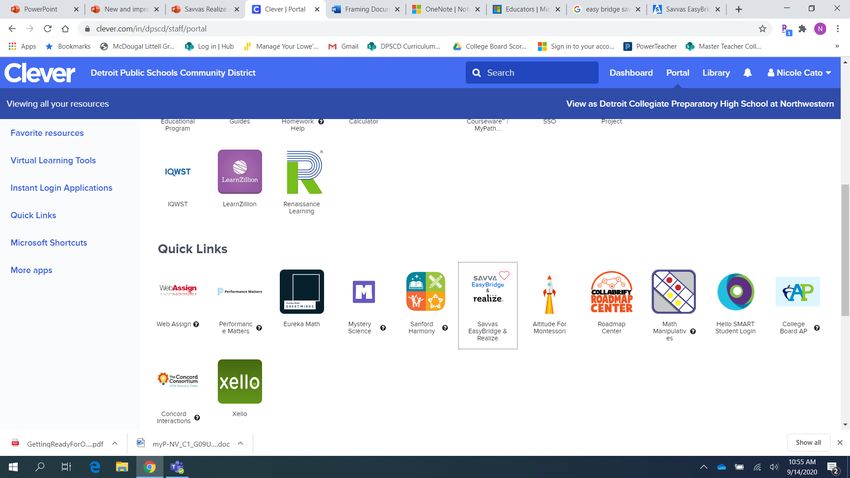
11/19/20

       World Languages in the 21st Century

       Develop proficiency in multiple skills:

       Interpretive Reading and Listening
           Interpersonal Listening and Speaking
                Presentational Writing
                 Presentational Speaking
                    Cultural Comparison
                       Community Elements
                           Connect Self to World
                               Using Technology

                                                   5
World Language students

 • Interpret the purpose of unique products
  • Explain how people do their practices
• Analyze why people have their perspectives
New Curriculum
     Apps
      for
 9-12 Spanish
   Learners

          •   Students access Edgenuity, Newsela, and Yabla through Clever
          •   Each app syncs with Clever
          •   Work can be completed digitally, allows for easy submission to the teacher
          •   Instant feedback and self-progress-monitoring engage students
How do I access Edgenuity, Newsela, and
Yabla?

 1. Students access these apps through
    Clever.

 2. The teacher programs assignments
    and the Students simply click on a tile.

 3. The tiles take students directly to their
    class site

 4. Students see assignments in the
    course map
Welcome to Edgenuity!
                            ¡Bienvenido a tu clase de español!
With 36 thematic units to   I'm your advisor and I will be
study, your child is        helping you throughout this
guided by the class         course. I'll give you directions and
                            guidance through all the wonderful
teacher and a virtual       activities that are in the course.
advisor from the
beginning to the end. He    You are about to begin an exciting
                            Spanish adventure. In this course
introduces the unit,        you will explore the Spanish
models pronunciation of     language through stories, songs,
vocabulary, explains        puzzles, lectures, vocabulary sets,
grammar, and gives          videos, and more. You will also
                            explore cultures of Spanish-
language learning advise.   speaking countries through videos,
                            CultureGrams, and more.
Student Class & Course Map
                                   Unit 1
1. Sign in to Clever               Getting Started in Spanish I       Getting Started in Spanish I
   and open Edgenuity              Greetings Part 1                   Academic Integrity Statement
                                   Greetings Part 2                   Welcome to Spanish!
2. Click on the home               Greetings Part 3                   Weekly Objectives
                                                                      Introduction: Vocabulary
   button that looks like a        Greetings Review and Quiz
                                                                      Listening: Introduction to Greetings
   house                                                              Pronunciation: Greetings
                                                                      Vocabulary Reference: Greetings
3. Click on the Course                                                Pronunciation: Greetings
   Map to see Units with                                              Vocabulary: Review
   Modules lists                    Unit 35                           Introduction: Sancho and Bolsa
                                    Computers Part 1                  Reading and Listening: Sancho and Bolsa 1.1
4. Go to the unit and               Computers Part 2                  Quiz: Sancho and Bolsa 1.1 Answers
                                                                      Reading and Listening: Sancho and Bolsa 1.2
   module your teacher              Computers Part 3
   instructs you to do              Computers Part 4
                                    Computers Review and Quiz

                  https://www.edgenuity.com/resources/edgenuity-help-for-families/
                                                                                                             10
Current events with Newsela!
Newsela brings
detailed news to
students in Spanish and ¡El Hombre Araña! Por qué México creó un Spider-
English. The articles are Man alternativo en los años 70
at all reading levels and
connect students to the
world. Teachers assign
articles with writing
and question activities.
Open this app in Clever. Guatemalan indigenous designs win new respect
La fama flamenca de Rosalía, ganadora de Grammy Latino, es
cuestionada por comunidad gitana de España
11Authentic culture videos with Yabla!
Series
Yabla shows students
real culture. Videos in
this app teach
vocabulary related to
cultural products,
Videos
practices, and Maria Manuela - Pueblito Viejo
perspectives. Teachers Difficulty: Beginner Colombia
can assign videos or set Eight-year-old María Manuela tells us a bit about herself
weekly goals for before treating us to her rendition of one of Colombian
students to watch folklore's best-known melodies, "Pueblito viejo" [Little Old
Town] by composer José Alejandro Morales.
videos.
12Student Grades and Feedback
Power School contains students’
class grades. Students use this app
to see class grades. This app is
separate from Clever.
Schoology shows how to do
assignments and teachers give
students immediate feedback for
work submitted here. This app is in
Clever.
Teams meetings are where
Teachers and Students chat about
grades and lessons. This app is in
Clever.
13Resources
Detroit Public Schools Community District You Tube Channel:
• Clever Login to DPSCD and Teams
• DPSCD Online Learning Walk-through Fall 2020
14Homework and Online Learning Hotlines
To Contact The Hotline
Please call 1-833-466-3978 during operating hours and follow the prompts.
Homework Hotline
The Detroit Public Schools Community District Homework Hotline is a free resource available for all DPSCD students that
encourages outstanding achievement by giving students an additional platform to ask for help and emphasize problem solving
skills. Students and families can call in for help with Literacy and/or Math homework.
The Homework Hotline will be offered during the academic year on Monday – Thursday, from 5:00 p.m. – 8:00 p.m.
Online Learning Help Hotline
The Online Learning Help Hotline has been launched to assist families during the day with challenges they may be facing with
online learning platforms and technology.
The Online Learning Help Hotline will be offered on Monday - Friday, from 8:30 a.m. - 4:30 p.m. while most District students
are engaged in online learning and getting started.
15Ancillary Reading Resources
Culture of Literacy Initiatives
      The District encourages the recognition of bi-literacy by
      awarding the State of Michigan Seal of Biliteracy to qualifying
      candidates.

      •   Our World Language teachers are ready to identify your
          child’s language other than English.
      •   The Avant Stamp 4S assessment in listening, reading, writing
          and speaking is recommended for qualification.
      •   Our counselors are willing to analyze transcripts for 6th grade
          or higher from schooling outside the United States.
      •   We celebrate qualified bi-literate candidates in a ceremony
          that takes place in the spring.
      •   Michigan Seal of Biliteracy for more information.

                                                                            17
Our Teachers: Molly Coulibaly Karen Marroquin Maríamagdalena Vela-García Kelsey Waterman Contact by email: molly.coulibaly@detroitk12.org karen.marroquin@detroitk12.org mariamagdalena.vela-Garcia@detroitk12.org kelsey.waterman@detroitk12.org
You can also read


