Assembly School Management System - By - www.delunecorp.com - De Lune IT
←
→
Page content transcription
If your browser does not render page correctly, please read the page content below
Assembly School Management System
               By

                                    www.delunecorp.com
Content

  Introduction

      Key Features

          Features

          Engagement Model

          Clients

      Testimonials

  Contact Us
                             2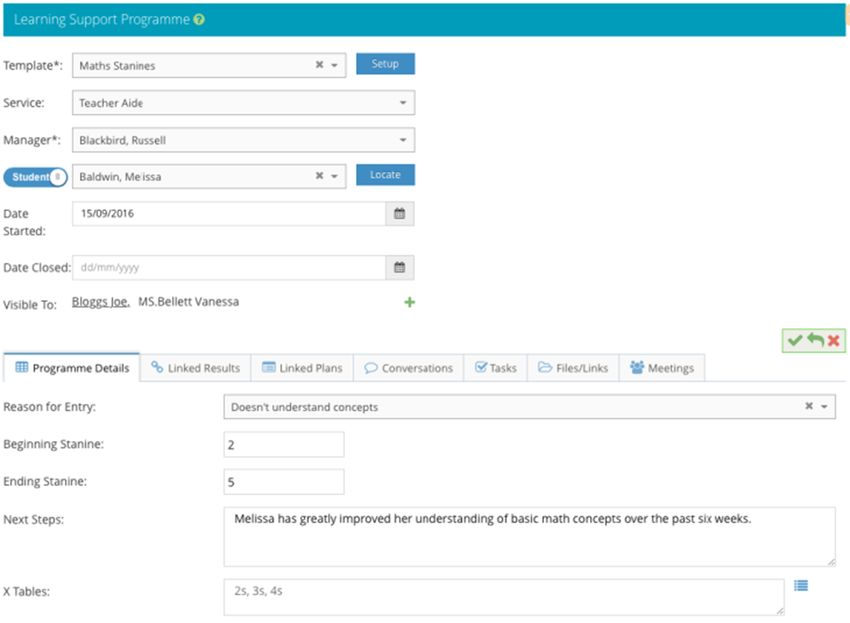
Introduction
Assembly

A school management system shouldn't be defined by a set of rigid rules and requirements. Instead, it should be
defined by what you, the school, need it to be.

At De Lune IT Solutions, we recognize that every school is different, that you can't just create a single application and
expect every school to fit into a defined box.

Why shouldn’t you expect your school management system to cater to your specific needs without having to resort to
third party software?

Our challenge was to create an application that allowed that true flexibility without compromising on ease-of-use;
software that easily manages simple, every-day tasks right through to complex record management; a system that can
print straight-forward reports as well as analyze data across visualizations that can be changed at the press of a button.

Assembly is that system. A school management system that can work as is, without any changes, or can be completely
customized to suit your own requirements.

                                                                                                                             3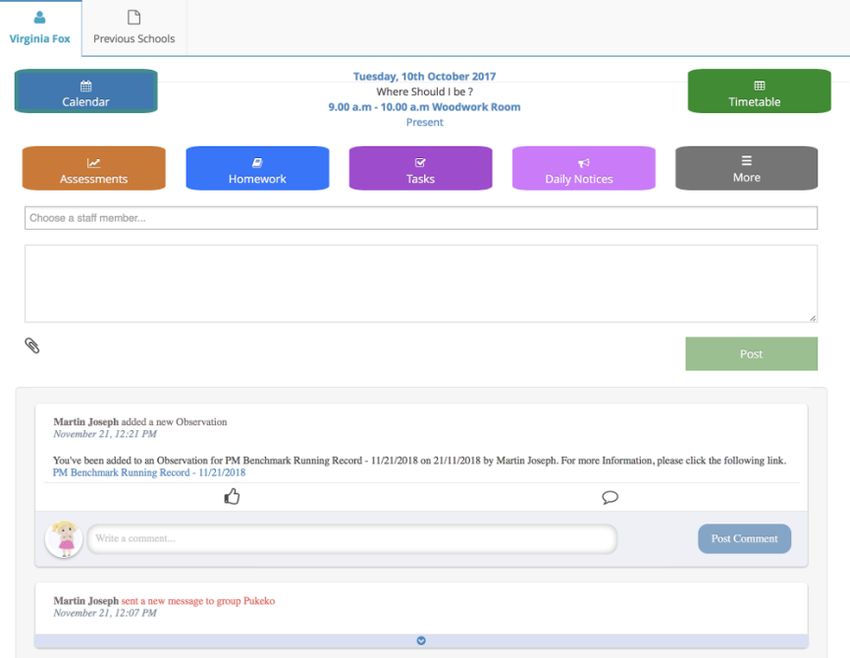
Key Features
Assembly
Assembly is a versatile school management system
Our approach is to create solutions designed around your requirements
We treat the data you entrust to us with care and take data privacy seriously
We ensure your student data is always at your fingertips
We provide extensive student support and follow-up
We are flexible, adaptable and customizable
Our dedicated team can provide you excellent support to achieve your objectives
4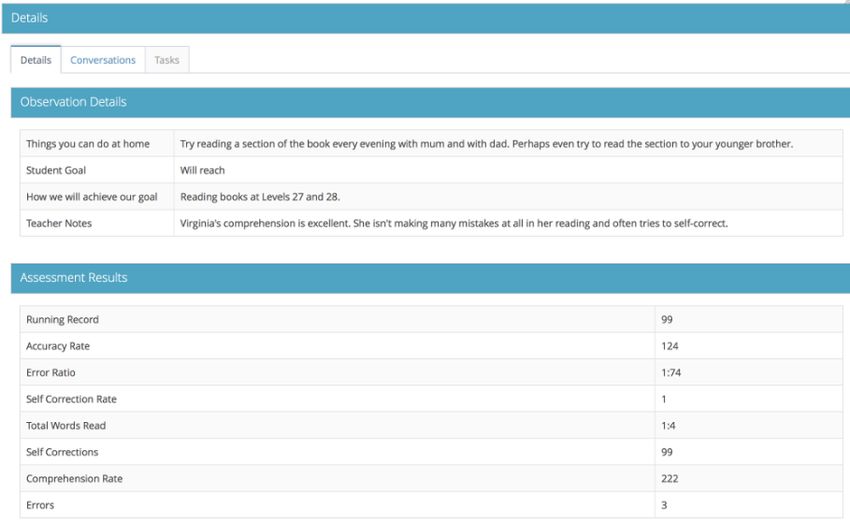
Features
Assembly

           Administration             Customization

           Attendance                 Integrated Planning

           Class-at-a-Glance          Student Support

           Accounts Receivable        Ubiquitous Reporting

           Comprehensive Assessment   Student/Caregiver Portals

                                                                  5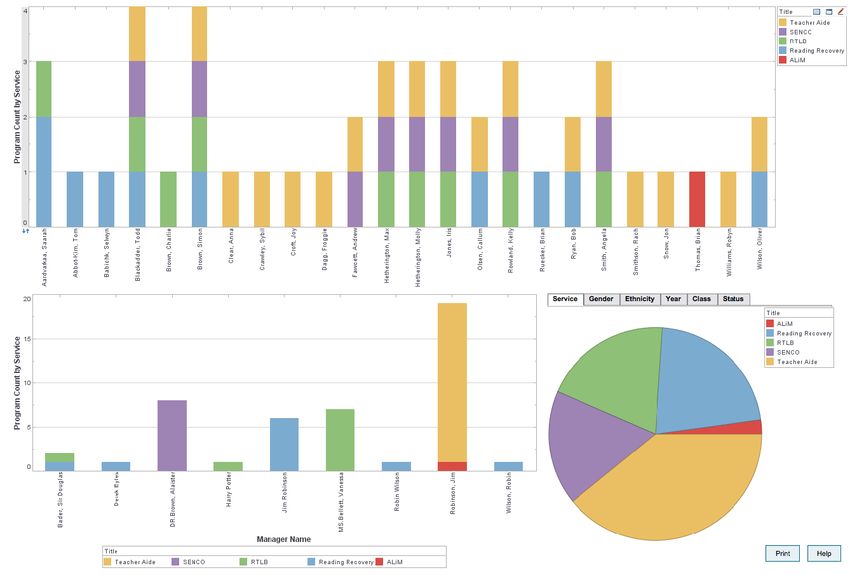
Administration
Tailored to suit your school
A complete student administration package including:
Student Records
Family and Account details
Student Contacts
Staff Members
Customizable Groups
School management systems come in all different shapes and sizes, but wouldn't it be good to have a system that can be easily
tailored to suit your needs?
With Assembly's administration module you can do exactly that.
Need a new field added to your student records? Just add one. Want to include dropdown choices? No problem.
Want to change the order of the fields on your page? Not an issue. Want to quickly create ad-hoc reports and lists with or
without blank columns? Easily sorted and saved for reusing whenever you want.
De Lune IT recognizes that every school is different so we have put together an extremely comprehensive student administration
system that, whilst very easy to manage and use, allows the flexibility to be tailored to suit your specific school requirements.
6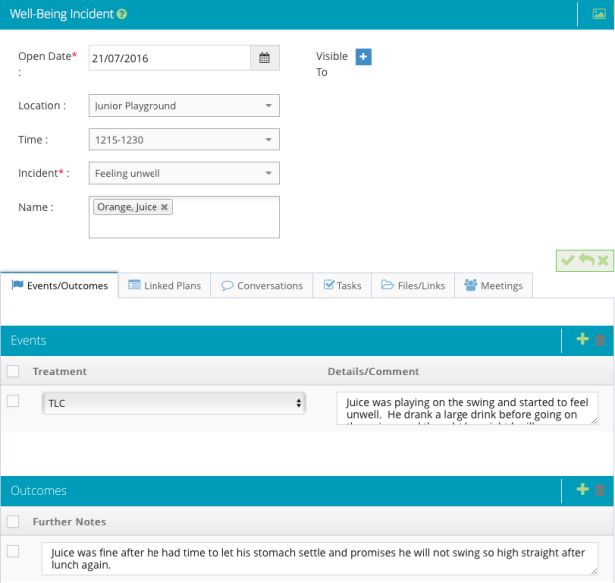
Attendance
Know where the students are

A complete student attendance solution including:

- Custom attendance module based on how you need to track attendance

- Notifications if the student is not in class

- Follow up reports on attendance

- Real-time data on student absenteeism

Assembly boasts an intuitive and extensive attendance feature. Teachers complete attendance registers in a few clicks, and
administration staff have real-time absence information.

Assembly links with early notification providers, allowing you to install a caregiver texting service when your pupils are absent.

Keep on top of absenteeism with automated notifications. Our attendance module will give you a complete and quick analysis
across the school, class, or specific student, with our comprehensive reporting.

                                                                                                                                     7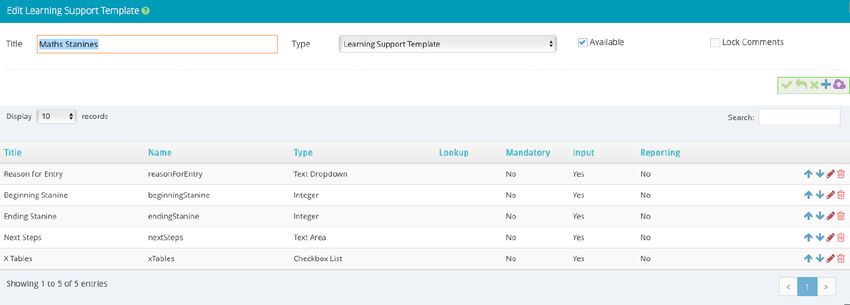
Class-at-a-Glance
Everything at your fingertips

The Teacher Dashboard is a fantastic way to be able to see exactly what is happening with all the students in your class, in one
place.

Often, as teachers work with the small details of day-to-day tasks, it is difficult to sit back and have a full view of your class as a
whole, to be able to identify students who need more support and those who need to be challenged. The class-at-a-glance page
gives you all the information you need, all on one page.

Other than the access to each student's details, photos, assessment results and attendance counts, hovering over the student icons
give even more up-to-date information on your students.

We understand that teachers are very busy and need information on their students as quickly as possible, in an easy-to-read format.

That's why Assembly uses a one-click system that allows teachers to access and view everything related to their students.
From the front dashboard of Assembly, teachers are able to:

-   Fill in the class attendance
-   View and complete any current or outstanding assessments
-   View any daily notices
-   Access student/ caregiver portals
-   View the details of any student in their class
                                                                                                                                          8
Accounts Receivable
Everything at your fingertips
Assembly accounts is a feature-rich accounts receivable system written specifically for schools and their unique accounting
requirements.
The ability to record both single and bulk transactions allow parents to pay before they are invoiced, separate fees and transactions.
Assembly accounts has been written with you in mind, including many fast actions right from the dashboard. And, because we are
aware that anyone can make mistakes, we have also provided some excellent account adjustment tools.
The Assembly package includes a full Accounts Receivable module. Here you can invoice, request donations, receipt and report with
ease. Enjoy the benefit of having the Accounts package linked to your school roll, reducing your database administration time.
Other features include the ability to link multiple students to a single account, invoice accounts en masse, write off, reverse, credit
and refund items, print donation and regular statements, bank reconciliations and manage automatic payments.
The maintenance options allow you to create your own set of invoice items and prices, as well as linking general ledger codes and
categories.
9Customization
Extending Assembly
At De Lune IT we recognize that every school is different, that you can't just create a single application and expect every school
to fit into a defined box.
Why shouldn't you expect your school management system to cater to your specific needs without having to go to third party
software?
Our challenge was to create an application that allows that true flexibility without compromising on ease-of-use;
A software that easily manages simple, every-day tasks right through to complex record management; a system that can print
straight-forward reports as well as analyze data across visualizations that can be changed at the press of a button.
Assembly is that system- a school management system that can work as is, without any changes, or can be completely
customized to suit your own requirements.
Whether it is an integrated plan, a learning support program, a behavioral incident, a reward, an individual education plan, all of
these tasks can be set up how you would like them to be, without having to leave your Assembly application.
10Customization
Designing your form
Customization in Assembly can occur with assessment types, well-being records (accidents, rewards, behavior, pastoral care),
learning support, integrated planning and individual planning.
Once you have worked out what you would like your form to look like, you can work with one of our account managers to set
your form up as a template within the appropriate module.
Forms, depending on the module, may include, amongst other things: Text Areas, Integers Checkboxes, Selection lists, Sections
Incidents, Events and/or Outcomes Linked to the curriculum.
Setting up the form is a simple matter of adding your properties into a template and giving each property a name and a type
(e.g. text area).
You can have as many properties as you want, each with their own specifications.
Alternatively, you can take a look in our communal resource, the Assembly Bank, and download a form from there.
Downloaded forms can also be customized.
11Customization
Designing your form
12Customization
Filling in your form
Now that you have designed or downloaded a form from the Assembly Bank, it is time for you and your staff to use it.
Firstly, you would go into the applicable module and create a new record. You would then select the correct template or form from
the dropdown list and press the Setup button.
Your form will now appear on your page and you can fill in all the details. Note, if your form contains a section, you will be able to
add as many rows to the section as you like by clicking on the Plus icon in the section header. This means that, even within the form
itself, there is still a lot of flexibility.
If you have linked your form to the curriculum, you will be able to select the curriculum items that apply. You will also be able to
decide whether or not you want to formally assess on those items. From there, you will be able to click on the Assess icon and
record results against the framework items you have selected to be formally assessed, just like you would with any other standard
assessment.
13Customization
Filling in your form
14Customization
Printing your results
Filling in forms serves little purpose if you cannot print and analyze your results. With Assembly, once your data has been entered
into your application, you can view your data in multiple ways through reports and visualizations.
As long as your data is tied back to a student, we can fully analyze your results. Analysis can occur across multiple selection criteria
including: by student, by class, by year, by ethnic group, by gender, and so on. Results can be viewed as a static report, or
manipulated with instant feedback via our versatile visualization tools.
Where applicable, results can be compared over time, showing individual and group student progress.
15Customization
Printing your results
16Integrated Planning
Customized Integration
An integrated curriculum can be described as one that connects different areas of learning by cutting across subject lines and
emphasizing unifying concepts.
Integration focuses on making connections for students, allowing them to engage in relevant, meaningful activities that can be
connected to real life.
Integration can use a multidisciplinary approach or an interdisciplinary approach. The former focuses primarily on the disciplines
where standards are organized around a theme.
The latter organizes the curriculum around common leanings across disciplines which emphasize interdisciplinary skills and
concepts.
The problem with the range of possibilities in setting up integrated plans is that there is never a one-size that fits all. Consequently
teachers often turn to third-party software to either locate a design that comes close to what they are trying to achieve, or create a
form that more closely suits what they want. Either way, these forms and plans are not often directly associated with the school
management system, which leads to double-handling and/ or the inability to analyze student data collected from these applications
outside of the SMS.
With Assembly, we provide an answer to these issues - a customizable integration tool that can be set up the way you want, whilst
still being completely connected to all the other student data in your SMS.
17Integrated Planning
Designing a plan
Assembly incorporates the ability to create planning templates. These templates, though simple to set up, allow for a wide variety of
options including:
- Headings
- Standard text, dropdown and numeric properties
- Multiple sections, which can include multiple columns
- Access to your school's customizable curriculum for simple inclusion in the teaching process in addition to the option of assessing on any
included outcome
When designing templates, users are able to mix standard input formats as well as multiple sections, headings and more, as needed.
Templates can be created for individual students as well as for groups of students.
18Integrated Planning
Customizing the curriculum
The backbone to integrated planning is the curriculum.
Assembly includes standard curriculum documents with the ability to import new curriculums in a specified format.
Once included, each curriculum item can be edited or removed and new curriculum items can be added.
For example, the curriculum document may include achievement objectives, and teachers may then add their own learning outcomes.
Each curriculum item is linked to an assessment format that is set up specifically for the school.
For example, you might choose to assess by a 5-point scale. You might want to include an Effort score. You might want to include a
comment. Your assessment format can be set up exactly how you want it, which gives you the freedom to assess any way you like.
19Integrated Planning
Working with your plan
Once the template has been created, teachers are able to access the template and fill in exactly what is needed for their own integrated
plan, after selecting their students.
Users are able to enter headings and plan details, select from the curriculum, choose which curriculum items need to be formally assessed,
enter teaching plans and so much more, as long as the template allows it.
With sections, users are able to have a single row in the section. Alternatively they can add as many rows as they want and fill in each row as
required. Rows can also be removed.
Once your plan has been created and filled in, you will then be able to assess students against the plan, just like with any other assessment.
Any curriculum item that has been set to be formally assessed will be selectable on the assessment page and can then be completed for
your group of students.
20Student Support
Customizable & Flexible
A comprehensive range of customizable and flexible support modules including:
- Rewards
- Accidents
- Pastoral care
- Behavioural incidents
- Learning support programs
- Individual education and behaviour plans
At De Lune IT, we recognize that, though all schools may wish to record different aspects of student support, each school has
different needs.
And, even within the school, you might want to store different information, depending on the type of record.
With this in mind, we have created a seamless, template-driven system which allows you to design your own forms and fill in the
information exactly the way you want.
What's even better is that, even with this wonderful customization and flexibility, Assembly still retains its unique ease-of-use,
making it a great system for everyone, from simply filling in a form, right through to full and comprehensive data analysis.
21Student Support
Well-Being
Our comprehensive well-being module takes note of all aspects of student well-being including: pastoral care, rewards, accidents,
redemptions, behavioral incidents (both positive and negative) and anything else you can think of.
With our template/ form designer, you can create any kind of form you like.
Choose one for everything, or design a different form for the many different aspects of student well-being. Forms can simply cover
an incident, or can be more comprehensive to include multiple events and outcomes.
Teachers quickly choose and fill in the form that is most appropriate for what they are recording.
Data can then be analyzed across individual students, groups or for the whole school.
22Student Support
Well-Being
23Student Support
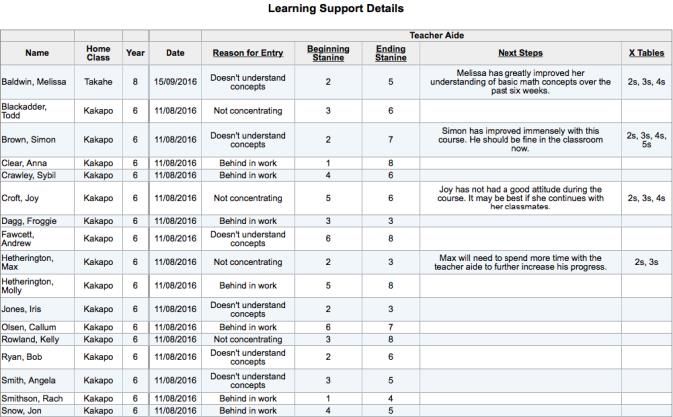
Learning Support
Assembly's learning support program allow you to keep track of every program a student is involved in as long as they are at the
school, whether they are still in the program or have completed the program.
One or more learning support programs can be entered for individual students, or for groups of students.
Along with the program details, which can be customized to suit your school, you can also quickly link and view relevant linked
assessments or behavior plans, keep track of conversations and tasks associated with the program.
In addition, a record can be kept of any meetings that are held in relation to the learning support program.
For continuity, these features are also available in other modules. Reporting on and analyzing your data is a simple process which
can be achieved by a selection of individual and group reports, as well as through a range of comprehensive visualizations.
24Student Support
Learning Support
25Student Support
Individual Plans
With individual education and behavior plans, Assembly has the ability to record individual student data and progress over a period
of time.
As with well-being and learning support, individual plans can be completely customized.
Individual plans can be linked directly to your curriculum framework, allowing you to keep track of student progress and, from
there, analyze your results from within the plan or across all your student's assessments.
Once your plan has been created and filled in, you will then be able to assess against the plan, just like with any other assessment.
But with an individual plan, you can fill in multiple results for the same assessment, letting you track your student's progress over
their time in the plan.
26Student Support
Individual Plans
27Ubiquitous Reporting
‘No Surprises’ Reporting
With access to modern technology, internet, smart phones and more, being able to keep parents and caregivers informed on their
child's progress on an ongoing basis has become more of a reality.
Combining the Assembly customizable assessment system together with our observation module and the Assembly portals, parents
are able to view ongoing student assessment together with photographs or samples of what their child is doing in the classroom.
‘No surprises’ reporting keeps caregivers informed regularly and often on their child's progress.
It is important, though, that the teacher doesn't become overburdened with an excessive workload that, while catering to the
needs of individual students, requires too much time and effort to complete.
This is where Assembly observation module will help the school achieve it's aim of keeping parent's informed, without making the
workload too great for the teachers.
With the flexibility that is such an important part of Assembly, you will be able to set goals for both standard assessments and
overall teacher judgments as well as allowing teachers to put more emphasis on the importance of values.
28Student/Caregiver Portals
Our portals don't just passively supply information to parents and students such as assessment results, account balances, daily
notices, attendance, well-being, learning support and more; they are also interactive portals, allowing interaction between the
student and their classmates or teacher, the caregiver and school staff and more.
Conversations and interaction occur in monitored environments, specific to the particular focus, and they will be closed when the
focus is closed, keeping conversations pertinent to the current aims of the school.
Caregivers are be able to receive notifications from the school as well as post comments to teachers and staff, helping keep
everyone informed where necessary.
With a simple click of a button, the school can decide whether or not an assessment or an observation should be automatically or
manually sent to the portals for a parent to view.
29Student/Caregiver Portals
30Comprehensive Assessment
Assessments you can manage
Assembly boasts a comprehensive assessment module - not just a place to record your test results and observations. Record
your assessment results once, and utilize these for internal, board and caregiver reporting.
You can record results, track your students at any time, produce reports and graphs from within the program that allows you
to see results across your class, year, school and over time. Output your results as PDFs so they can be electronically sent to
others or export your data as a CSV file.
Assembly provides a complete, managed assessment package. You can quickly set up school-wide assessments in advance,
or enter assessments ad hoc. Assessments can be grouped together for cohesive reporting. Assessments can be viewed as
graphs, tables or exported.
Assembly can easily give you statistics on a student group’s progress over time — imagine when reporting to the board, all
you needed to do is click on a dataviz dashboard — its all there.
The Assembly curriculum frameworks are completely customizable. You can build your school’s curriculum with any
standardized tests that you want, quickly and easily and they can be re-edited at any time, giving you total control.
31Clients
Our Clients
Assembly is currently trusted and used by over 400 schools in New Zealand and is among the few School Management Systems
approved by the Ministry of Education of New Zealand
Be a part of the Assembly story along with the following schools, our happy customers.
Aberfeldy School Brooklyn School (Wellington) Fairhaven School Halfmoon Bay School
Addington School Carew Peel Forest School Fernridge School Halfway Bush Primary School
Allenton School Carisbrook School Fernworth Primary School Hatea-A-Rangi School
Andersons Bay School Christ The King School (Burnside) Firth School Heathcote Valley School
Ashbrook Primary School Clarkville Primary School Flemington School Heddon Bush School
Avalon Intermediate School Clinton School Frankton School Hikurangi School
Balclutha School Clyde School George Street Normal School Hillcrest School
Balfour School Concord School Gladstone School (Masterton) Hillside Primary School
Beach Haven School Crawshaw School Glenham School Huia Range School
Bell Block School Drummond Primary School Gonville School Hukanui School
Birkdale Primary School Dunedin North Intermediate Gorge Road School Insoll Avenue School
Bledisloe School School Greenacres School Kahutara School
Bluestone School Duntroon School Greenmeadows Intermediate Kairanga School
Bradford School Ebbett Park School School Kaitangata Primary
Brandon Intermediate Eltham School Greytown School Kakanui School
Broad Bay School Fairhall School Gulf Harbour School
32Kaniere School Millers Flat School Panmure Bridge Selwyn Ridge School
Karoro School Moanataiari School Papakowhai School Solway School
Kokopu School Morrinsville School Paparimu School South End School
Leigh Primary School Motumaoho School Parkside Christian School South Featherston School
Levin Intermediate Motu School Paroa School (Greymouth) Springbank School
Levin North School Mt.Cook School Pembroke School Springdale School
Liberton Christian School Mt Eden Normal Primary School Pine Hill School (Dunedin) St Patrick's School (Waimate)
Little River School Musselburgh School Portobello School St Andrew's School
Lochiel School New Brighton Catholic School Postgate School St Annes School (Newtown)
Lucknow School Newfield Park School Prebbleton School St Anthony's School (Pahiatua)
Macleans Primary School New River Primary Pt England School St Bernadette's (Forbury)
Mahinawa Specialist School Te Kura o Ngati Haua School Pukehou School St Brigid's School (Tainui)
Makarewa School Ngati Toa School Pukekohe Intermediate School St Clair School
Makikihi Primary School Ngunguru School Raumati Beach School Stella Maris Primary School
Mangatawhiri School Norfolk School Raumati South School St Francis School (Thames)
Mangawhai Beach School North Loburn School Rawhitiroa School St Francis Xavier School (Tawa)
Mangorei School Omakere School Redwoodtown School Stirling School
Maraekakaho School Omarama School Richmond View School St James School (Aranui)
Maranatha Christian School Omarumutu School Riverlands School St Joseph's Catholic School (Te
Mararoa School Opaki School Rotherham School Aroha)
Matamata Christian School Opawa School Rotokawa School St Joseph's School (Feilding)
Matamata Intermediate School Opoho School Rotorua Intermediate School St Joseph's School (Hawera)
Matata School Otari School Sacred Heart Cathedral School St Joseph's School (New
Mayfair School Otautau School (Thorndon) Plymouth)
Medbury School Our Lady of the Assumption Sacred Heart School (Dunedin) St Joseph's School (Papanui)
Methven Primary School School Sacred Heart School St Joseph's School (Port Chalmers)
Midhirst School Our Lady of Lourdes School Selwyn House School St Joseph's School (Upper Hutt
33St Leonards School Tamatea Primary School Waihola District School Oteha Valley School
St Mark's School (Pakuranga) Taradale Primary School Waihopai School Taoroa School
St Martins School Target Road Primary School Waimairi School Pirinoa School
St Mary's Catholic School Tauranga Adventist School Waimana School Tokoiti School
(Otorohanga) Te Horo School (Otaki) Waimate Centennial School Pukete Primary School
St Mary's School (Carterton) Te Kura Maori-a-Rohe o Waiohau Wainuioru School Benneydale School
St Matthew's Primary School Te Kura o Waikaremoana Waitara Central School Egmont Village School
(Hastings) Te Pohue School Waiwera South School Moawhango School
St Michael's School (Taita) Te Puke Intermediate Wakaaranga School Ongarue School
St Patrick's Catholic School Te Puke Primary School Wakari School San Antonio School (Eastbourne)
(Taumarunui) Te Puru School Weston School View Hill School
St Patrick's School (Greymouth) Thames South School Westshore School Garston School
St Patrick's School (Panmure) Thornbury School Te Wainui a Rua TKKM o Tapere-Nui-A-Whatonga
St Peter Chanel School (Green Thorndon School Whareama School Sara Cohen School
Island) Timaru Christian School Winton School Mokoia School
St Pius X Catholic School (Melville) Timaru South School Irongate School Warrington School
St Teresa's School (Featherston) Tinwald School Breens Intermediate School Lake Tekapo School
St Teresa's School (Riccarton) TKKM o Bernard Fergusson Paraparaumu School Linkwater School
St Theresa's School (Invercargill) TKKM o Manawatu Bluff School Upper Harbour Primary School
Summerland Primary TKKM o Toku Mapihi Maurea Salford Primary School Ascot Community School
Sunnybrae Normal School Toko School Manakau School Pukeokahu School
Sunnynook School Totara Park School Hauroko Valley Primary School Whitney Street School
Tahuna Normal Intermediate Tui Glen School Pukehina Primary School Tua Marina School
Taieri Beach School Twyford School Henry Hill School Mayfield School (Blenheim)
Takapau School Upper Atiamuri School St Gerard's School (Alexandra) Wallacetown School
Takitimu Primary School Waianiwa School Highfield Primary School Picton School
Tamahere Model Country School Waiharara School Avon School Renwick School
34Grovetown School Te Kura Kaupapa Māori o Tuia te Belmont School (Auckland) Te Rapa School
Inglewood School Matangi Sir Douglas Bader Intermediate Brandon Intermediate - Tech and
Our Lady of Snows School Otama School School Arts
(Methven) West Spreydon School Kirkwood Intermediate Hillview Christian School
Waihao Downs School Spreydon School Ponatahi Christian School Lee Stream School
Waitoriki School Fitzroy School Cosgrove School Big Rock Primary School
Woodlands Full Primary School Three Kings School Waingaro School Fairlie School
Newtown School Emmanuel Christian School Everglade School Dalefield School
Auroa School Te Kura Maori o Waatea Arrowtown School
Opunake School Dairy Flat School Belmont Intermediate
35Engagement
Model
UNDERSTANDING DATA MIGRATION CONTINUOUS
CLOUD HOSTED
YOUR AND TRAINING ENHANCEMENTS
INFRASTRUCTURE
REQUIREMENTS YOUR STAFF AND UPGRADES
DE LUNE IT EXTENDED OFFICE MODEL
UNDERSTAND ANALYZE PLAN REALIZE &
SUSTAIN
36Testimonials
Another great year of
using Assembly and
I am impressed with the having wonderful Our caregiver reports
system and how support on the end of went really smoothly.
easy it is to use, even for emails and phone My staff gives the Since I am the
someone who is calls. They have reporting on Assembly one who deals with
consistently helped me a big thumbs up them, and hears about
technologically
with many random it if the teachers have
challenged like me
questions about -Peter Bertram- problems, I really
assessments during the Ponatahi Christian appreciated how it all
-Dawn Koning- year and are always so School went.
St Leonards School helpful and patient. A big
thank you! -Sherryl Prangley-
Oteha Valley School
-Sherryl Prangley-
Oteha Valley School
37Contact Us
Assembly
Whether it is an integrated plan, a learning support program, a behavioral incident, a reward, an individual education plan, all of
these tasks can be set up the way you would like them to be, without having to leave your Assembly application.
Give us a call and let us demonstrate how De Lune school management solutions can work for you.
Email : Solutions@delunecorp.com
Telephone : 703 495 2702
Website : www.delunecorp.com
38You can also read


