TRAINING GOALS Understand the student online experience Learn how to access real-time student data to plan instruction Determine how to ...
←
→
Page content transcription
If your browser does not render page correctly, please read the page content below

TEACHER
                                                                                                         TEACHER TRAINING
                                                                                                                     TRAINING
                                                                                                                          GUIDE GUIDE
                                                        3                                            1

                                                            Resources for            Independent,
                                                             Face-to-Face           Student-Driven
                                                              Instruction              Learning

                                                                    Ongoing Data to Drive
                                                                    Instructional Priorities

                                                                               2

TRAINING GOALS
• Understand the student online experience
• Learn how to access real-time student data to plan instruction
• Determine how to enhance student learning with instructional resources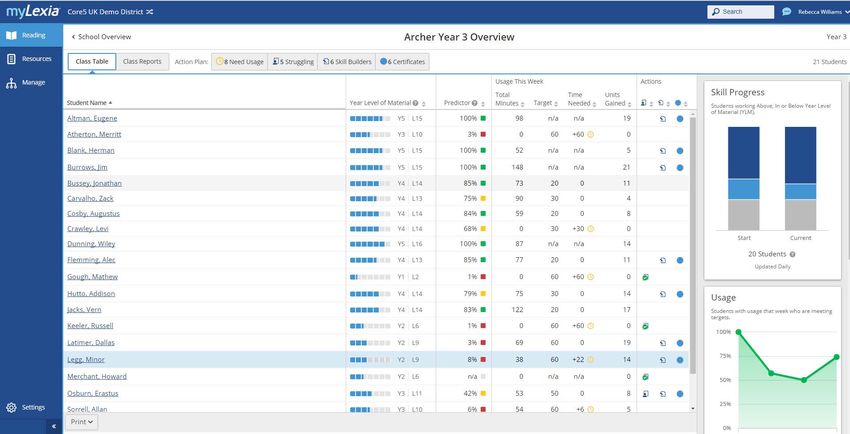
What Is Lexia Reading Core5
                             Lexia Reading Core5® is a personalised reading curriculum for Reception through
                             Year 6 students of all abilities.

                             • Students learn, practice, and consolidate fundamental literacy skills by interacting with the online,
                               adaptive program, receiving teacher-led Lexia Lessons® and Lexia® Connections, and by completing
                               independent, paper-based activities using Lexia Skill Builders.®
                             • Real-time student data is captured and made available in actionable reports on www.myLexia.com to
                               help educators make informed instructional decisions that help students achieve year-level
                               benchmarks.
                             • The program includes activities that focus on six components of reading (Phonological Awareness,
                               Phonics, Structural Analysis, Automaticity/Fluency, Vocabulary, and Comprehension).

             Scope and Sequence                                                                                       SKILL

                                                                                                                                                        COMPREHENSION
                                               The six components of reading are
                                                                                     PHONOLOGICAL

                                                                                                                           AUTOMATICITY/

                                                                                                                                           VOCABULARY
                                                                                                              STRUCTURAL
                                                                                      AWARENESS
                                          represented by these colour-coded

                                                                                                               ANALYSIS
                                                                                                    PHONICS

                                                                                                                             FLUENCY
                                          icons used throughout the program.

                               Rec      Level 1      A Picnic in the Woods               •            •                         •             •             •
                                        Level 2      A Day at the Beach                  •            •                         •             •             •
                               Year 1
                                        Level 3      A Snow Day in the City              •            •                         •             •             •
                                        Level 4      The Amazon Rainforest               •            •                         •             •             •
                                        Level 5      The Scottish Cliffs                              •                         •                           •
                                        Level 6      A Day in Paris                                   •                         •             •             •
                                        Level 7      The African Serengeti                            •                         •                           •
    YEAR LEVEL OF MATERIAL

                               Year 2
                                        Level 8      The South Pole                                   •                         •             •             •
                                        Level 9      The Egyptian Desert                              •                         •             •             •
                                        Level 10     An English Garden                                •           •             •                           •
                               Year 3   Level 11     The Swiss Alps                                   •                         •             •             •
                                        Level 12     A Russian Circus                                 •           •             •             •             •
                               Year 4
                                        Level 13     The Indian Rainforest                                        •             •             •             •
                                        Level 14     A Japanese Garden                                            •             •             •             •
                               Year 5
                                        Level 15     The Great Barrier Reef                                       •             •             •             •
                                        Level 16     A Hawaiian Paradise                                          •             •             •             •
                               Year 6
                                        Level 17     A Southwest Fiesta                                           •             •             •             •
                                        Level 18     The Ancient Greek Countryside                                •             •             •             •

1                                                   LEXIA READING CORE5 | TEACHER TRAINING GUIDE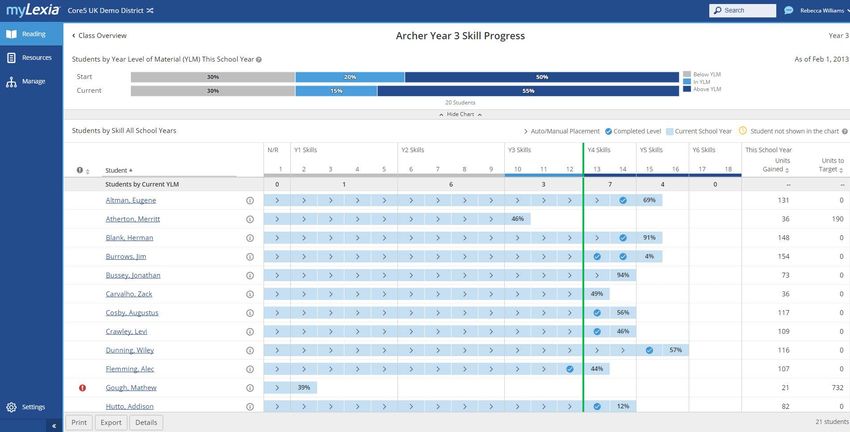
Lexia Reading Core5: Getting Started
Getting Ready to Use Core5
 • Identify how students will access the program.
      a. If using a browser, consider bookmarking your site’s
         unique url, which can be found on www.myLexia.com.

      b. If using a desktop-installed version or a tablet, find
         the Core5 icon.

 • P
    rint login cards for students from the Manage tab in
   myLexia.
 • E
    nsure that students have working headphones that fit
   properly and provide adequate volume.

                                      ou can use your myLexia username
                                     Y
                                     and password to log in to Core5®
                                     Educator Mode, where you can
                                     explore all levels and activities.

Auto Placement
 • When logging in for the first time, students will
   complete a set of placement activities. Students will
   be automatically placed at their appropriate starting
   level in the program according to their performance.
 • Students begin with their Year-level skills and branch
   up or down to a level that is not too easy, or too hard.
 • Students are assessed on both word identification
   and comprehension skills at each level.
 • Most students finish the Auto Placement within 20
   minutes. If the session is interrupted, data will be
   saved, and students will start where they left off next
   time.

    lways encourage your students to do their best
   A
   on the placement test, as this will determine where
   they will start in the program.

                                          www.lexialearning.com           2
                                                                          2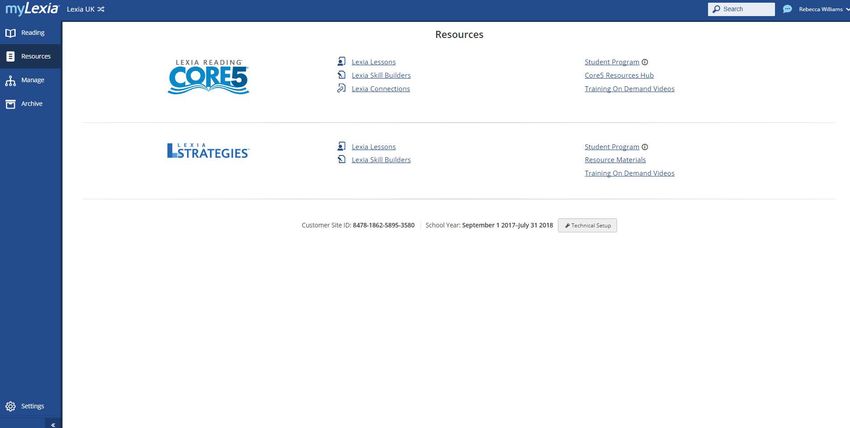
Lexia Reading Core5: The Student Experience

    Student Dashboard                                                   A
                                                                                   D
    Students can monitor their usage and unit                       B
    progress at login and logout.
                                                             C
    On the Student Dashboard, students can see:
    A  Weekly usage goal
    B Total minutes completed for week
    C Minutes needed to meet weekly goal
    D Total units completed for week                                                    E           F
     E Minutes added during current session                                       G         H
     F Units added during current session
    G Logout
    H Return to activities

    Automaticity Warm-ups
    Students begin each session with a warm-up.
    The goal is to promote speed of processing
    and automaticity for previously acquired
    skills. The student will choose one of two
    warm-ups and try to beat his or her
    highest score.

    Activity Selection Screen                                      he warm-up will take roughly
                                                                  T
    A Activity—Students choose a picture to                      one minute to complete.
        enter an activity focused on a specific skill.

    B Unit Meter—Unit boxes fill in as students
        complete units in the activity.                                 A                                F
    C Phase Indicator—To pace students through a
        level, the first half of all activities must be                        B             D
                                                                                        C
        completed before the second half is unlocked.

    D Skill Badge—When an activity is finished,
        a skill badge appears in place of the
        completed activity.                                                                      E

     E Fun Facts—Clickable images appear on the
        Activity Selection Screen to enhance con-
        textual knowledge and increase engagement.
                                                           evel 1 has four activities and
                                                          L
    F Logout—Returns students to home screen.            Levels 2–18 have five.

3                            LEXIA READING CORE5 | TEACHER TRAINING GUIDE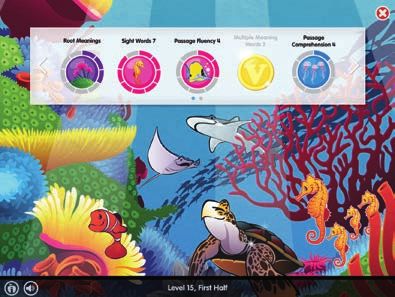
Activity Screen
The following buttons and tools are available in every                                                                 G
activity:

A Information Apple—This indicates program status with
   three colours: blue, white, or red. It will be blue when
   completing Auto Placement, white when working through
   the program, and red when the student needs support.
   Click the apple for more details.
B Volume
C Unit Metre—This indicates completion of units in
   the current activity and matches the unit metre on
   the Activity Selection Screen.

D Look Back at Text (Passage Comprehension activities
   only).
E Repeat Prompt                                                  A B                       C                        D E F
F Rehear Directions
                                              ata is captured when the Current Unit Bar is filled (unit complete)
                                             D
G Leave Activity                             or when the student moves within the unit from one step of
                                             Instructional Branching to another (see below).

               foot                                      foot

               foots          feet                feet          feets           feetses          Hop on one foot.
              feetses         feets

                   Standard Step                         Guided Practice Step                    Instruction Step

    3-Step Instructional Branching
    Units adapt based on each student’s individual performance.

    • Standard—This step is indicated by a green bar and is the first and most complex step in a
      unit. Students must complete it successfully to progress.
    • Guided Practice—This step is indicated by a blue bar and is reached if errors are made at
      Standard. It contains tailored, scaffolded practice based on those errors. If successful, the
      student returns to Standard.
    • Instruction—This step is indicated by a yellow bar and is reached if errors are made in Guided
      Practice. It explicitly teaches the specific skill and provides scaffolded practice. Upon
      completion of this step, the student returns to Standard.

                                               www.lexialearning.com                                                        4
                                                                                                                            4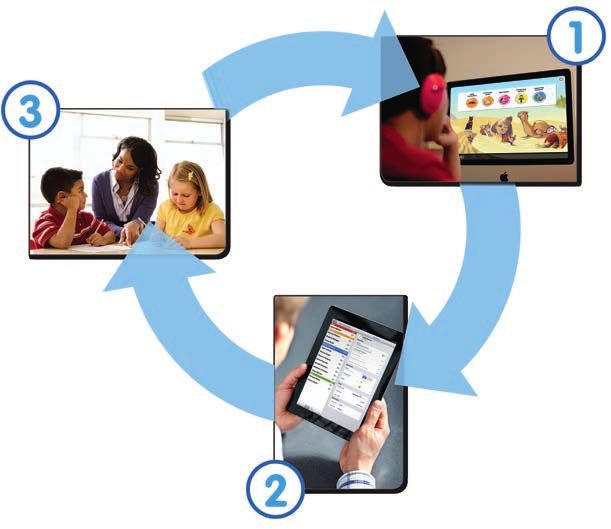
Actionable Data to Inform Instruction
    Class Action Plan
    The Class Action Plan provides you with a “to-do” list to support your students. Use these 4 tabs to see:

    Who needs more computer time this week?
    The Need Usage tab shows the number of students in the class who need more time on the student
    program. The Needs column tells you how many more minutes on Core5 that each student needs in
    order to meet their recommended usage for this week (Monday-Sunday).

    Who is struggling and needs a Lexia Lesson?
    The Struggling tab lists the students who have dropped to the Instructional Step of Core5 at least twice
    and may need teacher support. Here, you can access the PDF lesson. You can mark the lesson as
    “delivered”, though the student will remain on the list until they have successfully mastered the skill in
    Core5.

    Who is ready for a Lexia Skill Builder?
    The Skill Builders tab lists the students who have finished a program level and are ready for
    independent practice with a Lexia Skill Builder. Here, you can access the PDF worksheets and mark the
    Lexia Skill Builders as “delivered” to remove the student from the list.

    Who is ready to celebrate success with a certificate?
    The Certificates tab lists the students who have finished a program level and are ready to celebrate
    success with an achievement certificate. Here, you can access the PDF certificate and mark the
    Certificates as “delivered” to remove the student from the list.

        www.myLexia.com is Lexia’s reporting website for
        educators. Log in to plan your week, check student
        usage, monitor progress, and celebrate success.

5                            LEXIA READING CORE5 | TEACHER TRAINING GUIDE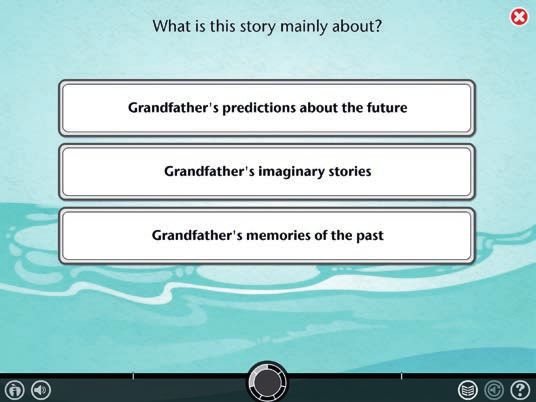
Class Skill Progress
How is my class progressing?
The Class Skill Progress report allows you to see the progress your
class has made during this school year. You can see where your
students started in terms of being above, in, or below their Year Level
of Material (YLM), and compare that to where your students are
currently placing.

Click into the Skill Progress report in order to see progress details for
each student in the class. The green line in the table marks the end-of-
year benchmark target for your students (according to the class’ year).
You can see where students are in Core5 in relation to their target, and
order students by clicking the “Units to Target” column header.

  Digging Deeper into the myLexia Reports
  In the Class Reports, you can click a student’s name to view student-level reports, which offer
  detailed diagnostic data to allow you to best support that student.

  For more information on using the reports, refer to the reports guide and training videos available in
  the myLexia Resources section.

  Lexia also provides data coaching to help you get the most out of Core5. You can schedule data
  coaching training for a more in-depth look at your reports that will enable you to fully utilise the
  powerful data that myLexia provides.

                                          www.lexialearning.com                                            6
                                                                                                           6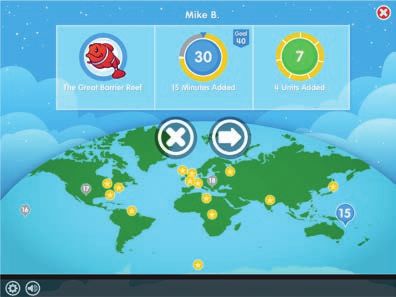
Targeted Instructional Materials
The Lexia Reading Core5® program provides Instructional Materials to ensure students
receive personalised and comprehensive instruction and practice in all skill areas. These
materials can be incorporated into classroom routines in a variety of ways, including
whole class instruction, small group activities, and independent work.
Recommended in myLexia based on performance Available as additional resources in myLexia
Supplemental
Lexia Comprehension
Lexia Lessons® Lexia® Connections
Skill Builders® Lessons
Scripted, explicit Practice worksheets Activity suggestions to Scripted instruction
Description instruction for for application and introduce, reinforce, to enhance reading
targeted intervention generalisation of skills or extend a skill comprehension
Students who are Students who have All students to All students to
Focus struggling with a completed an supplement supplement
skill in an online online activity instruction instruction
activity
• Individual • Individual • Individual • Individual
Grouping • Small group • Peer or adult partner • Small group • Small group
• Whole class • Whole class • Whole class
Primarily independent
with opportunities Teacher-mediated with
Delivery Teacher-led for peer collaboration opportunities for Teacher-led
peer collaboration
Scope 161 lessons 431 pages 144 pages 35 lessons
Student All Instructional Materials offer multi-sensory activities that reinforce and extend
Experience online learning and provide opportunities for oral expression, writing, and
collaboration.
Lexia® Close Reads Text Type: Narrative,
Lexile® Level: 760L
Core5 Level: 15
Folktale
LEXIA® CLOSE READ
Target Skill: Narrative
Text Structure
S
The Tr
ARTICLE
avels of M The Crowded House
• Full-colour student readers can be used to arco Polo : A Folktale
L, ENCYCLOPEDIA
“Here are seen
760L
huge serpe SUMMAR Y
The jaws are nts, ten pace KEY VOCABU LARY
s in length.
LEXILE® MEASURE
wide enou ... In this folktale, a large
gh to swallo family is
This description w a man.” unhappy about living • cramped (adjective)
INFORMATIONA
build fluency and comprehension.
in a small Cramped means uncomfort
of crocodiles house. The village small. ably
books ever comes from wise man
written. Its one of the provides the family burst (verb) To burst
author, Marc most influe with a solution •
is to suddenly split
o Polo, lived ntial that teaches them or break open.
Marco Polo from 1254 a valuable • eagerly (adverb) Eagerly
was born in to 1324. lesson. means in an interested
•
Venice, a hopeful way. or
LEVEL 15
•
leading centre
LEVEL 18
uncle were of trade. His trembled (verb) To
wealthy mert fa city in prese FOCUS QUESTIO
•
tremble means to
the Polo nt-day N shake.
brans to visit was a chants eand the Italy tha opether and
• Accompanying teacher guide provides
• spacious (adjective)
What lesson does Spacious means having
again,year- first Eur China
old Marothers the court of Kubla the village wise of space. a lot
TGrhe Polos i Khan, ruler . When man teach the Rubin
set off from ofat Khan family?
took an17-
co went with Venice to
them. visit the the
Mongol
A Folktale murderous
overland route
. They brave PREVIEW
vocabulary, graphic organisers, and open-
bandits to d many dang
and through flooded rivers ers, from Identify the text. This
deserts, finally . They trave text is a folktale. Explain
led over moun narratives, or stories, to students that folktales
journey of arriving at tains that were told to teach are
are registered
Kubla
respective
three and a
and
half years. i Khan’s court in nature. a lesson or explain
after a what happens
Lexia®, Core5®,
in a little house
lived Kubla
property of their
s of the Rubin family i Khan took Point out key vocabulary
use only. All other Additional trademarks included and/or its subsidiaries, and
L ong ago, eight member
(in bold). Discuss definitions
ended questions to promote critical thinking
. Papa, Mama,
languages their four a liking to Marco Introduce the focus with students.
cramped and crowded Polo. The young
Stone company.
and was a sharp question. Have students
that seemed terribly man spoke
a Rosetta Stone company.
consider the question
Rubin were alwaysa trustegetting observer. Kubla
herein are the
several
and are registered
the property of Rosetta Stone herein are the property of their respective
as they read.
and Grandmother
Lexia®, Core5®, and
d ambassado i Khan made READ
children, Aunt Gert, y that
beyoone day they r and sent him Marco Polo
Learning, a Rosetta
They complained unhappil
States and abroad.
nd, to repor to the provi
Ltd.
each other’s way. to thet back abou nces of China INDEPENDENT READ
in becamwent
and other countries.the property of Rosetta Stone
and Mama t the lands and
Not for resale.
Ltd. and/or its subsidiaries,
the walls. So Papa e members and customs. Annotate the text.
and peer discussions.
might burst right through
a Rosetta Stone company.
of Kublai Khan The Polos Encourage students
for advice. to identify key ideas,
© 2017 Lexia Learning,
Reb Solman, to ask returned home ’s court. When and questions they
names, and logos Reading Core5®. © 2017 Lexia
have as they read. connections,
wisest man in the village, to Venice, they the three merc
rights reserved.
registered in the United
reserved. Not for resale.
Then had been gone hants TEACHER-GUIDED
ully as he listened. for 24 years READ
Additional trademarks included
his beard thoughtf .
Reb Solman stroked Explore narrative text
used herein are
reserved. Not for resale.
no
do exactly as I say,
© 2017 Lexia Learning,
structure. Draw attention
help you, but you must the key elements. Then, to how the folktale
he said, “Yes, I can is organized and
of Lexia Reading Core5®.
work with students
agreed. can annotate the key to answer the questions
and Mama eagerly
Lexia
MetaMetrics, Inc., and is
elements of the text. below. Students
use only. All other rights
questions asked.” Papa
the United States
a component of
for classroom
• Materials reinforce passages presented in
• Who is the
told Mama, “is to invite
story about? (Main
use only. All other rights
Characters
of Lexia Reading Core5®.
must do,” Reb Solman
States and other countries.
) 2
and logos used herein are
• Where and
when does the story
“The first thing you take place? (Setting)
other trademarks,
owners. Reprinted
• What is
This material is
the problem or goal?
and/or used in
1
family to visit.”
This material is a component
your sister and her • What happens?
(Problem/Goal) 3
LEXILE® is a trademark of
(Major Event) 4
Reprinted for classroom
, “my sister and brother-
owners. Reprinted for classroom
• How does
said Mama worriedly the story end? (Solution)
This material is a component
“But, Reb Solman,” more people in our
5
and/or used in the United
other trademarks, names,
• What is
the story mainly about?
Levels 15–18 of Core5 online activities.
sons, so how will five
in-law have three big Answer the focus question.
Work together to answer:
our problem?” wise man teach the
crowded house solve Rubin family? (Be content What lesson does
the village
bad as they seem; with what you have.
they could be worse.) Things are not as
LEXIA® CLOSE
READS
NARRATIVE, FOLKTALE
LEXIA® CLOSE
READS
LEXIA® CLOSE READS page 1 of 4
7 LEXIA READING CORE5 | TEACHER TRAINING GUIDE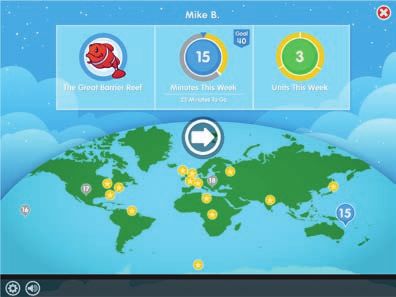
Additional Instructional Resources
Accessing Instructional Resources • ➂ Visit the Core5
• Log in to www.myLexia.com. Resources Hub
to find additional
• To access specific Lexia Lessons® or Lexia resources:
Skill Builders® by student, view the Class
Overview. • Teacher’s Manual
• ➀ To access a complete listing of Lexia Lessons, • Quick Guides ➂
Lexia Skill Builders, and Lexia Connections, view • Supplemental
the Resources tab at www.myLexia.com. Comprehension
• ➁ Training on Demand modules provide Lessons
useful information about Core5 from getting
• Lexia® Close
started to utilising reports. Simply click on the Reads
Training on Demand link in the Resources tab.
• Achievement Certificates
• School-to-Home Materials
➀ • Flashcards and Letter Tiles
➁ • Comprehension and Fluency Passages
• Alignment Documents
• Pedagogy Papers
• Printed reference sets of Lexia Lessons and
Lexia Skill Builders for purchase
Tips: Organisation and Distribution of Materials
Lexia Lessons Lexia Skill Builders
• Have a full, printed set available by the copier. • Create individual student binders or folders.
• Save paper: • Save paper:
• Print only reproducibles and view Lesson • Use page protectors or laminate to make reusable
scripts online. with dry erase markers.
• Laminate and reuse reproducible pages. • Consider annotation apps that allow students to
• Project reproducible graphic organisers. work electronically.
Lexia Reading Core5 LEVEL 12 | Comprehension Lexia Reading Core5 LEVEL 12 | Comprehension Lexia Reading Core5 Level 17 | Structural Analysis
LEXIA LESSONS Using Context, Lesson 1 LEXIA LESSONS Using Context, Lesson 1 Lexia Reading Core5 LEVEL 2 | Phonological Awareness Name: SKILL BUILDERS Greek Combining Forms 1
Name: SKILL BUILDERS Blending & Segmenting
Read the definition. Choose the Greek combining forms to make the word that matches the definition.
Write the combining forms in the correct order on the lines. Then write the whole word on the line below.
Description Cut out the pictures. Count the syllables in each word. Glue the pictures onto the correct number.
This lesson is designed to help students understand new vocabulary by looking for meaning in
Adaptations 1
psych ology psych
the words and sentences that surround the unfamiliar word. Strategic readers think about words the study of the mind ology
psychology
in context, evaluating their own understanding as they read. For Students Who Need More Support For Students Ready to Move On two three sphere
Teacher Tips Option 1: Provide practice with the concept Option 1: As students read textbooks syllables syllables 2 path
of context by displaying sentences with and informational books and articles, they
The following steps show a general strategy lesson for using context to figure out meanings blanks for missing words. Encourage encounter new terms. Often, academic texts the study of disease auto
of unfamiliar and multiple-meaning words. The lesson may be expanded to include particular students to suggest words that fit in the provide particular kinds of context clues that ology
context clues often found in informational and academic texts. blank. Talk about the other words in the students can learn to look for.
During discussions, remind students to listen to others, take turns and speak in complete sentences. sentence that helped them make their 3 naut
Display the Context Chart shown on the last an instrument to see things
suggestions.
page of this lesson. Review the chart with scope
Preparation/Materials Examples of sentences: students and have them give meanings for that are far away tele
• A copy of the four “Using Context” steps used in Direct Instruction. the underlined words in the examples.
•Raymond was the youngest ___ in his
family. (son, boy, child) Discuss how they knew the meaning and 4 anti
• Copies of the sample texts at the end of this lesson. a person who navigates
what kind of clue they found in the context. naut
•He had two sisters and one ___. (brother)
Expand the lesson by using this chart during through the stars astro
•The family ___ in a little house. (lived) students’ own readings to identify context
Direct Instruction •The ___ was on a busy street. (house) clues. Encourage students to look for other 5 chron
examples.
Today, we are going to learn how to figure out the meaning of an unfamiliar word using the Option 2: When reading aloud to students, the study of time phobia
context of what we are reading. The context includes the words and sentences around the word pause to check comprehension of unfamiliar Option 2: Expand the lesson to present
ology
we don’t know. There are steps we can take to use the context. When we come across a word we vocabulary. Use the term context when other strategic behaviors that proficient
don’t know, we can do these four things. discussing how to figure out likely meanings readers use when meeting a new word. Use 6 graph
and model how to use the four steps. examples from students’ own reading to ask a person’s own written
Display the following four steps shown below in bold. Read and explain each step. and answer these questions together: auto
Step One: Reread and read ahead. When you find a word you don’t know, stop and re-
signature derma
•Do I need to understand the meaning of
read the other words that come before it and after it. this word to understand the text? (If the
answer is no, keep reading. If the answer 7 path
Step Two: Identify context clues. Think about the meaning of the other words in the text. a written message sent
is yes, try using the context to get a gram
Step Three: Decide on a meaning. Use what you know from the context to decide what the likely meaning.) from far away
unfamiliar word means. tele
•Does the context help me understand
Step Four: Check that meaning in the context. The meaning you decided on should the word meaning? (If the answer is 8 phobia
make sense in the sentence. yes, keep reading. If the answer is no,
a fear of books meter
use a dictionary or other source to
Display Sample Text 1 and have students follow along as you read: biblio
get meaning.)
The lion grabbed the mouse in its huge paw. The little mouse’s body shook with terror.
“Oh, please, Mr. Lion, don’t hurt me,” the mouse cried in fear. 9 audio
an instrument for measuring
meter
umbrella, hamburger, apple, gumball, banana, candle
Point to each step as you model the following.
a person’s hearing geo
In Sample Text 1, point to the underlined word terror.
I’m not sure what terror means. So I am going to use these four steps to use the context of the 10 theo
story to help me figure it out. First, I’ll reread and read ahead.
the study of sound phon
Re-read Sample Text 1. ology
Students who complete this lesson should return to the online activities in Lexia Reading Core5.
1 Choose two words and write sentences for each word on the back.
For further development of automaticity with these skills, provide students with Lexia Skill Builders. 4
Script page 1 Script page 4
www.lexialearning.com 8
8
Implementation Models
    Where and When Can I Use Lexia with My Students?
    Think about your school, class, and student needs and resources to determine
    which implementation models will work best in your school.

                  eep in mind that a combination of models
                 K
                 may maximize student gains.

    Classroom (Centre Rotations)
    In a typical reading block, there is usually a significant amount of time for centre rotations.
    Here is one way Core5 can be used in a rotational model:

    • Use a student’s Prescription of Intensity to prioritise which students should spend time on
      the computer.
    • Use small group time to teach Lexia Lessons to struggling students.
    • Allow independent practice and peer work using Lexia Skill Builders to further develop automaticity and
      expand expressive skills.
    • Set up collaborative group activities to reinforce skills using Lexia Connections.

    Computer Lab
    In a computer lab, a whole class can use Core5, allowing each student to work on skills appropriate to his or her
    needs. Struggling students can also be pulled for a Lexia Lesson, either right in the lab or back in the classroom
    with a teacher or support personnel.

    Intervention Block/Special Education
    An intervention block can be used to deliver the Lexia Lesson(s) specific to each student’s needs. On
    myLexia.com, the student can be assigned to multiple classes so that all teachers working with a student can
    view data and identify appropriate Lexia Lessons.

    Before/After School
    For students who need additional time based on their Prescription of Intensity, before- and after-school
    programs provide another opportunity to spend time on the computer. This additional time can also be used
    for targeted instruction using Lexia Lessons, or for practice with Lexia Skill Builders. Remember, student data
    is always tracked on myLexia.com regardless of when or where the work is completed.

    Home Use
    To solidify skills already completed online, Lexia Skill Builders can be used as homework for all students. Use the
    Home Use letter on myLexia.com to communicate with parents about using Core5 at home. This is an important
    way for students to gain additional time to meet their Prescription of Intensity.

9                              LEXIA READING CORE5 | TEACHER TRAINING GUIDE
Implementation
Best Practices and Tips for Successful Implementation
➀ Students consistently meet weekly
recommended usage.
• Develop a schedule using all available
technology resources in your school
(classroom computers, computer lab,
laptop carts).
• Teach students how to monitor their
own usage using Student Dashboard.
• Consider alternate times for students who
need additional minutes (before/after school
programs, home use, intervention block).
➀ Teachers monitor student progress at
www.myLexia.com and plan instruction based
on students’ needs.
• Set a regular time to check reports at least once a week.
• Schedule data conversations with other teachers, parents, and
students.
• Consider printing some reports for data conversations.
➀ Students receive targeted instruction with Lexia Lessons
and practice opportunities with Lexia Skill Builders.
• Visit www.myLexia.com to view the Class Overview and identify students who need a Lexia Lesson
or Lexia Skill Builder (independent practice).
• Designate specific times during the day for instruction and practice (centre rotations, intervention
block, homework).
• Set aside time to explore, prepare, and organise materials. View Lexia Lessons online, and only
print necessary reproducible pages. Use binders, folders, or systems for storing printed materials,
including Lexia Skill Builders.
Check out Lexia’s Training on Demand modules
in the Resources tab on www.myLexia.com.
www.lexialearning.com 10 10#
Your www.myLexia.com username is your school email address.
username |
password |
Lexia Customer Support
1 800 • 507 • 2772 • support@lexialearning.com
Additional Support
The 5-minute check-in!
www.myLexia.com has the data that can help you.
In just five minutes, find out the answers to the
following questions:
ho needs help?
■ W Check the Struggling tab in the Class Overview to see
which students require a teacher-led lesson.
ho needs more time online?
■ W Schedule additional time for students who are not
meeting usage targets.
ho is ready to celebrate?
■ W Print out certificates to help celebrate
student success.
■ What are my next steps?
Access Lexia Lessons, Lexia Skill Builders, and
Lexia Connections under the Resources tab.
School-to-Home Tips
• Encourage Lexia Reading Core5 for home use. This is a great way for
students who are behind in skills to catch
up to their grade level.
• Use the parent letters (available under the Resources tab)
to communicate with parents. Parent letters are available in
7 languages.
• Emphasise that home use of Lexia Reading Core5 is for the enrolled
student only—not siblings or parents.
Use the Parent Report link in the Student Skills Report to share results 300 Baker Avenue
•
Suite 320 • Concord, MA 01742
with parents—in English and Spanish—during conferences. For a visual
report, use the Student Progress Report to show a student’s www.lexialearning.com
performance. tel: 800-435-3942 / 978-405-6200
fax: 978-287-0062
TRC5TTG-1017You can also read


