ChatBeacon Pro Live Chat for Work and Working Remotely!
←
→
Page content transcription
If your browser does not render page correctly, please read the page content below

ChatBeacon Pro
                                                   ®

Live Chat for Work and Working Remotely!

                                                                                                              With no download required, simply login into
                                                                                                              the FREEDOM app with any browser and
           Bijou                                                                                              service your customers from anywhere, anytime.
                                                                                                              Included with all plans.
           Visitor
           Michelle
           Visitor
           Jerry

                                                                                                                         For Additional details download our
                                                                                                                           ChatBeacon Freedom brochure:
                                                                                                                        www.chatbeacon.io/freedom#brochure

   CHATBEACON CONVERSATIONS
   Bring chats back to life with Conversations!
   A customizable chat window with a live
   conversational chat dasboard for your website.
   We have optimized the window for mobile
   devices to keep visitors chatting on the go.
   With one-click, your visitors can now pickup
   conversations where they left off on your website.

                                                                                                 Effortless and Streamlined, our new Interactive Screen
                                                                                                 Share provides a collaborative approach to your visitors
                                                                                                 and customers as they browse through your website.
                                                                                                 With nothing to download for your visitor, you can
                                                                                                 provide immediate assistance when they need it with
                                                                                                 the ability to browse, scroll and click together.

                              © 2021 SmartMax Software. ChatBeacon Freedom, ChatBeacon, ChatBeacon.io and the ChatBeacon logos are the registered
                      trademarks of SmartMax Software, Inc. All rights reserved. Permission to reprint and translate is granted provided this copyright notice.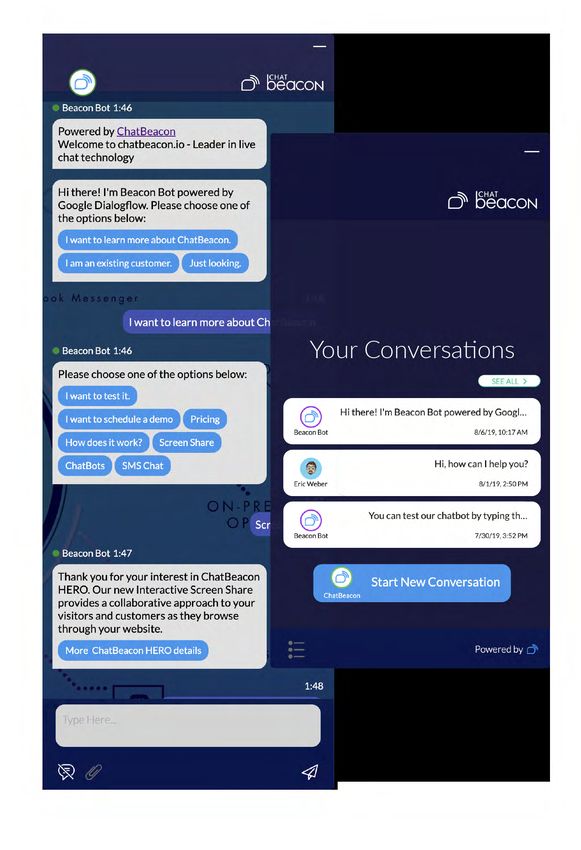
ChatBeacon Pro
                                                    ®

Live Chat for Work and Working Remotely!
                                                                                                                          MANAGEMENT PORTAL
                                                                                                                          WITH VIEWPORT 360º
                                                                                                                          Through the management portal you are able
                                                                                                                          to access your chat information; giving you
                                                                                                                          a full look at all agents & their productivity.

    Embrace customer relationships in a no-contact situation with
    our new Video Chat that connects you to your customers in
    the way they communicate in everyday life. Without having to
    download anything, operators can quickly initiate Video Chat
    with just 1-click in the fully integrated ChatBeacon visitor chat
    window. We also work on all the popular mobile devices to
    provide your visitors help on the go.

                                                                                                        ChatBeacon ChatBot
                                                                                                        ARTIFICIAL INTELLIGENCE CHAT BOT
                                                                                                        (AUTO-ATTENDANT)

                                                                                                        The ChatBeacon ChatBot is your ultimate assistant! By
                                                                                                        providing automated answers to common questions you
                                                                                                        streamline the process, directing visitors to Operators and
                                                                                                        Departments as needed. They work so you don’t have to.

                                                                                                            Together with Dialogflow by Google we bring you our best
                                                                                                                                  Chatbot yet.

                                                                                                                            by Google       +

2                              © 2021 SmartMax Software. ChatBeacon Freedom, ChatBeacon, ChatBeacon.io and the ChatBeacon logos are the registered
                       trademarks of SmartMax Software, Inc. All rights reserved. Permission to reprint and translate is granted provided this copyright notice.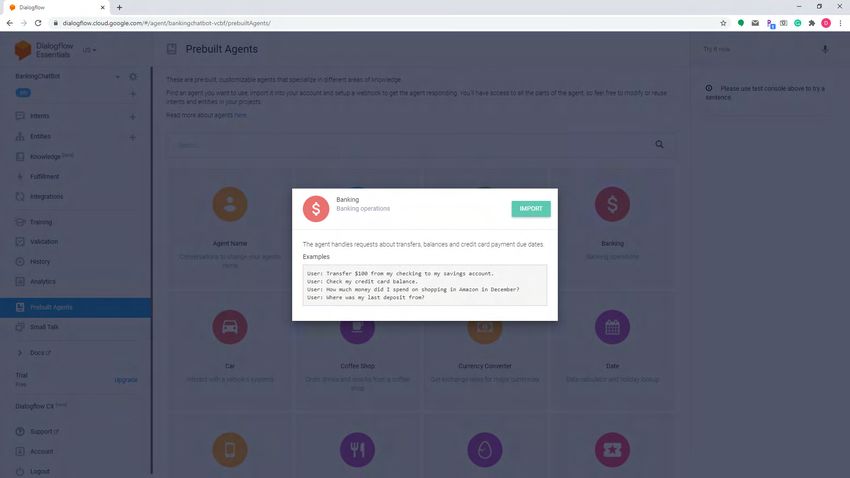
ChatBeacon Pro
                                                 ®

HIGHLIGHTED FEATURES

    CHATBEACON CHATBOTS AND                                                                ▪ Mobile Agents can accept new chat requests and chat
    CHATBEACON VIRTUAL ASSISTANT                                                             transfers from their respective departments via email
    Automatically serve your website visitors without a                                      or SMS and set their chat availability with hashtag
    subscription to a third-party chatbot platform. Active 24/7,                             commands (#online, #offline, and #status).
    or set to a specific schedule, the ChatBeacon Virtual
    Assistant uses quick replies, triggers, and actions from the
                                                                                           CHATBEACON KNOWLEDGE BASE
    Business Rules feature to auto-answer commonly asked
    questions sent from your chat window.                                                  Deploy a knowledge base portal with KB articles and
                                                                                           FAQs in an instant. Lightning fast knowledge base
    ▪ One, two, or multiple departments or websites                                        integration will add your KB Articles
    ▪ FREE with ChatBeacon PRO                                                             and Categories within the chat
                                                                                           window. This self-service option
                                                                                           will empower your website
    SMS CHAT MESSAGING                                                                     visitors and Agents by giving quick                  Live Chat      FAQ

    With SMS Chat, people can                                                              access to articles and other
                                                                                                                                              HELP CENTER
    chat without visiting the                                                              informative content.
    website. They simply send a                                                            ▪ Within seconds, you can add your        Search the Knowledge Base...

    SMS text message to a                                                                    KB articles in the ChatBeacon
    designated phone number                                918-388-5900
                                                                                             Management Portal and they will
                                                                                                                                                 MOST ASKED
    (associated with a Dept) and                                                             be automatically published in the
                                                                                                                                    What to include in your documents?
    that will trigger a chat                                                                 Knowledge Base portal and              How can I submit my documents?

    request for your chat agents                                                             ChatBeacon chat window.                How long does it take to withdraw
                                                                                                                                    my funds?
    in the Agent Application.                                                              ▪ KB Articles and categories are
                                                                                                                                    How long does it take to settle?
                                                                                             easily managed via the
    ▪ When chat is offline, the                                                                Management Portal and can
      SMS Chat messages will be                                                              be added per website.                               CATEGORIES
      delivered via email to the                                                                                                                   First Aid Kit                     30

      specified Department’s                                                                                                                        Payments                           9

                                                                                                                                                   Promotions & Shop                 13
      email address.
                                                                                                                                                   Registration & Verifications        6
    ▪ Enable for any existing                                                                                                                      Service Updates                    3
      landline numbers or                                                                                                                          Welcome Offer                       1

      toll-free numbers without
      any downtime, or changes
      to your voice service or
      phone systems. We can
      also provide new SMS
      Phone numbers with any
      area codes or we can                                                                                                                                                       Powered by

      provide Toll-free numbers.

    CHATBEACON AGENT CHANNELS
    SMS Chat and Email Chat for Agents. Agents can answer
    chats on the go, without the need to login into the desktop
    console or download an app, or login into new Web app.

    ▪ The ChatBeacon ChatBot can automatically answer all
      incoming messages, then (if needed) transfer them to a                               CHATBEACON ONBOARDING
      specific department, where Agents can conveniently
                                                                                           ChatBeacon Pro includes Agent Training, ChatBot setup
      reply to chats from their cell phones (via SMS or email
                                                                                           assistance and a designated account manager.
      application).

3                    © 2021 SmartMax Software. ChatBeacon Freedom, ChatBeacon, ChatBeacon.io and the ChatBeacon logos are the registered
             trademarks of SmartMax Software, Inc. All rights reserved. Permission to reprint and translate is granted provided this copyright notice.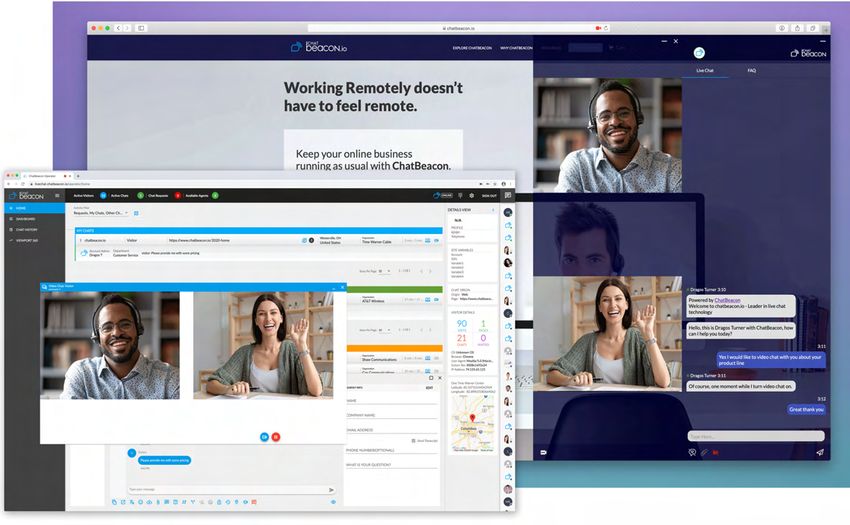
ChatBeacon Pro
                                                 ®

REPORTING AND ANALYTICS

    MANAGEMENT PORTAL
    WITH VIEWPORT 360º
    Management Portal gives the Admins the ability
    to manage:
    ▪ canned responses
    ▪ password policies
    ▪ operators, passwords and chat permissions
    ▪ website and departments chat settings
    ▪ business hours
    ▪ business rules (chat invites, automated instant chats and
    more)
    ▪ ChatBots, SMS Video, Screen Share, Voice and
    Translation integrations.
    ▪ chat routing, chat limits, business hours
    ▪ chat window customizations
    ▪ reports via ViewPort360
    ▪ GDPR compliance
    ▪ Knowledgebase Articles
    ▪ other advanced settings.

    Business Rules Manager
    ▪ Our latest update includes tons of new triggers and actions.
    ▪ Automatically transfer or route chats based on the visitor's
      profile (geolocation, chat origin, chat messages and more).
    ▪ Enable marquee messages with custom invites or                                       ANALYTICS
    content-specific messages on different website pages.
                                                                                           We can track all (website) visitor activity on the website
                                                                                           including the following stats:
                                                                                           ▪ New or Returning Visitor
                                                                                           ▪ Number of Previous Visits
                                                                                           ▪ Number of previous chats along with all chat transcripts
                                                                                           ▪ What page the visitor is currently viewing
                                                                                           ▪ Location on the Map
                                                                                           ▪ How many pages they visited in the current session
                                                                                           ▪ How many chat invites they received
                                                                                           ▪ Total time on the website, plus idle time
                                                                                             (time since their last click)
                                                                                           ▪ IP address
                                                                                           ▪ With the visitor's approval, we can also track the
                                                                                             physical address in real-time.

                                                                                           ADVANCED REPORTING CAPABILITIES
                                                                                           ▪ ChatBeacon stores all the visitor and chat information in
                                                                                             a database and can be accessed via the ChatBeacon
                                                                                             Agent Application and Management Portal.
    Business Hours                                                                         ▪ Access 8 types of reports and sub-reports to view relevant
    ▪ Scheduled chat status customizable per department based                                chat metrics.
      on your hours of operations.                                                         ▪ Reporting data can be easily exported to CSV, Excel or
    ▪ Never worry about the Agents forgetting to set their                                   PDF documents.
      status to Online, or Offline.                                                          ▪ Agent Login/Logout and status change reports in the
                                                                                             Management Portal

4                    © 2021 SmartMax Software. ChatBeacon Freedom, ChatBeacon, ChatBeacon.io and the ChatBeacon logos are the registered
             trademarks of SmartMax Software, Inc. All rights reserved. Permission to reprint and translate is granted provided this copyright notice.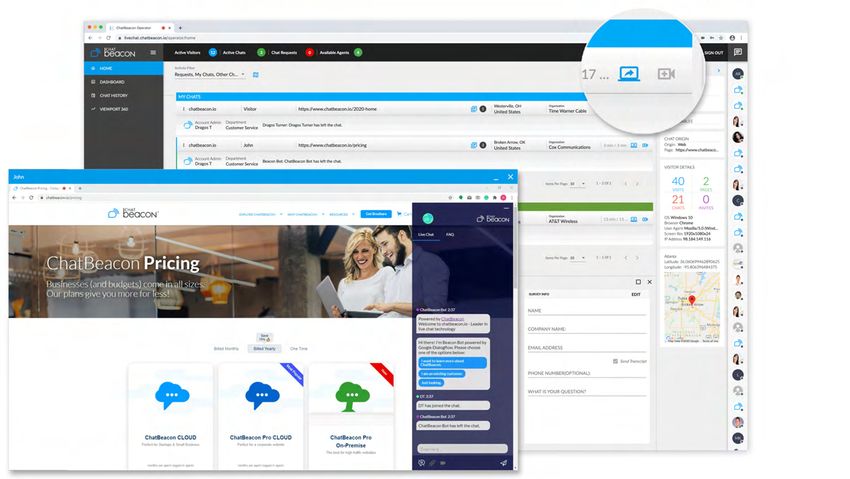
ChatBeacon Pro | A LOOK INSIDE
                                            ®

Designed to make chat easy

                                                                                                                        VISITOR GEOLOCATION
                                                                                                                        AND FIRMOGRAPHICS

                                                                                                                The Visitor Details tab (accessed
                                                                                                            through the Blue Arrow Button)
                                                                                                        contains the Visitor Profile and will
                                                                                                        automatically display the Referrer
                                                                                                        Details, IP Details, Session Details and
                                                                                                        Customer Variables.

                                                                                                        ChatBeacon detects the Visitor's IP
                                                                                                        address, geolocation information and
                                                                                                        many other details By using the
                                                                                                        company name associated with the IP
                                                                                                        address, we are presenting additional
                                                                                                        information related to the company and
                                                                                                        customer, including their social media
                                                                                                        profiles (if available).

                              INTERNAL AGENT MESSAGING SYSTEM

                              Agents can use our secure internal messaging
                              system to send private messages to other
                              agents. This is a great feature to be used for
                              chat escalation, or before making a chat
                              transfer to another agent.

                              The messaging is accessible from the right side no
                              matter the tab you are in so you can see it while
                              still chatting with a visitor or looking at chat
                              history.

5               © 2021 SmartMax Software. ChatBeacon Freedom, ChatBeacon, ChatBeacon.io and the ChatBeacon logos are the registered
        trademarks of SmartMax Software, Inc. All rights reserved. Permission to reprint and translate is granted provided this copyright notice.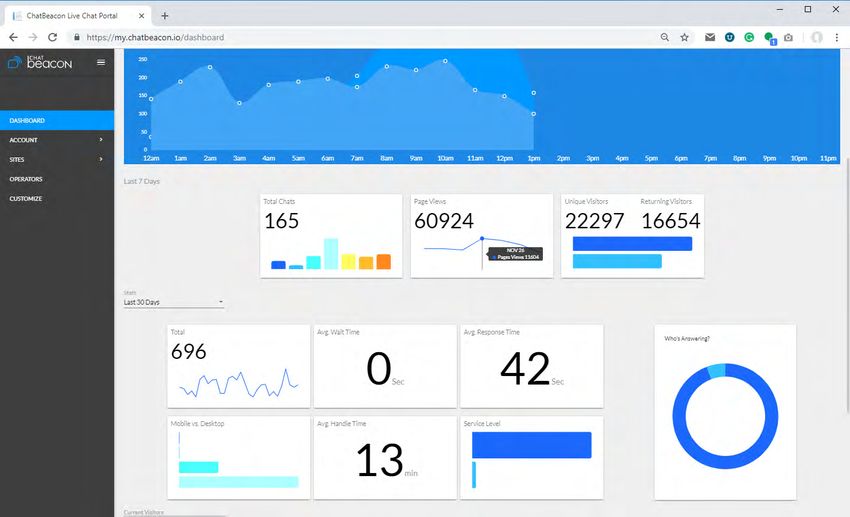
ChatBeacon Pro | A LOOK INSIDE
                                                 ®

Designed to make chat easy

Push URL            Translation                   Send File                Transfer - New Operator                      Join Chat                Lock Chat

    Upload File               Emojis               Canned Responses                       Transfer - New Queque                         Coach            Leave Chat
    CHAT HUB FEATURES
    The ChatHub can be accessed while navigating through                                     the Agent via simple drag and drop in their chat window.
    different areas of the application. You can easily switch                              ▪ Optionally, the transferred files can be stored and these
    from the home page, to the dashboard and chat history                                    files can be accessible via Chat History.
    without losing your active conversations.                                              ▪ By default, the files transferred are only kept for the
                                                                                             duration of the chat and they will be discarded once the
    Push URL                                                                                 Visitor leaves the website.
    ▪ Agents can automatically redirect the customer’s browser
      to a new web page without their interaction (even if the                             Canned Responses (account& operator canned responses)
      visitor is not in a chat conversation).                                              ▪ Agents can create and manage their own predefined
    ▪ Website visitors can be manually pushed to new pages,                                  shortcut messages.
      but they can also be automatically pushed to other web                               ▪ The ChatBeacon Admin can also create Account Canned
      pages via our business rules (based on predefined triggers).                           Responses that are visible to all the Agents in the Account.

    Automated Language Translation                                                         Chat Transfer to Operators, Departments, other sides
    ▪ ChatBeacon scans the first chat segments from the Visitor                            ▪ You may transfer a visitor while in a live chat to another
    and detects the language automatically.                                                  queue or domain by clicking on the 'Transfer button' in the
    ▪ ChatBeacon supports 52 languages and translation is                                    ChatHub panel. Then select from your available options.
    done on the fly, automatically via the Google API.                                     ▪ Allows you to transfer chats from one operator to another,
    ▪ The Agents can easily enable the language translation                                  as well as across sites and across queue/departments.
    manually and select a language from the list.
                                                                                           Request To Join (ask other departments to join your chat,
    Emojis                                                                                 even if you don't have permissions in other departments).
    ▪ Our collection of emojis provide operators and visitors a                            ▪ Ex. Sales agent needs help from the Support queue, so the
     tool too add a feeling of familiarity that can overcome the                             agent will send a Request To Join to Support, even if
     tone-less communination that can arise with chatting,                                   he/she doesn't have permissions in the Support Queue.
     adding a human touch.
                                                                                           Join
    File Transfer (Agent:send file and Visitor:upload file)                                ▪ Click on the chat you wish to join (in the Chats panel) and
    ▪ Allows the Visitor to send files/images and documents to                               click 'Join Chat icon' in the ChatHub.

6                    © 2021 SmartMax Software. ChatBeacon Freedom, ChatBeacon, ChatBeacon.io and the ChatBeacon logos are the registered
             trademarks of SmartMax Software, Inc. All rights reserved. Permission to reprint and translate is granted provided this copyright notice.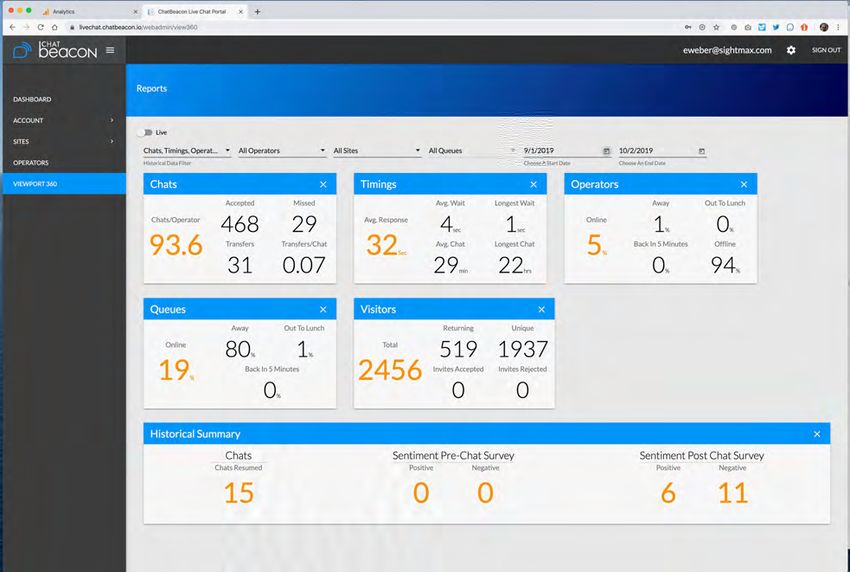
ChatBeacon Pro
                                                 ®

Core Features

    Coach                                                                                  ▪ Text Chat Invites are also available which pop up a short
    A coach can send private messages to the other operator in                               message to your website visitors offering a discount,
    the chat. The visitor will NOT know that you have entered                                coupon or custom message hence providing a “call to
    the chat and are chatting with the operator.                                             action” without active chat taking place.

    Lock Chat (make it private so only Operators with specific                             Mobile Chat Window
    rights can view it)                                                                    ▪ Chat window optimized for all devices and screens
    ▪ Chats can be taken “private” providing true privacy of the                             (mobile, desktop)
      chat and will remain so throughout the session. For                                  ▪ Mobile friendly and responsive chat window is compatible
      instance, upon escalation of the chat to a supervisor or                               with all websites (Wordpress, Shopify, Magento, PHP, .NET
      tiered support.                                                                        websites, and more) and all modern browsers.
                                                                                           ▪ Legacy support for all previous chat windows, including
    Multiple Departments with Routing                                                        previous graphic customizations
    ▪ Operators can have multiple chats at the same
      time and be assigned to one or more departments                                      Technology Updates
      or websites.                                                                         ▪ ChatBeacon uses .NET 4.8 Framework
    ▪ Routing from one operator to another, as well as
      across sites and across queue/departments.                                           Agent Application Themes and Improvements
                                                                                           ▪ Modern Agent Application UI theme
    Canned Responses (account and operator                                                 ▪ Complete overhaul of the ChatBeacon Agent Application
    canned responses)                                                                      ▪ Visitors are now organized based on their website and
    ▪ Agents can create and manage their own predefined                                      chat activity (In Chat, Requested, Ended, Returning and
      shortcut messages.                                                                     Everyone Else)
    ▪ The ChatBeacon Admin can also create Account                                         ▪ Windows 10 support for the ChatBeacon Agent Application
      Canned Responses that are visible to all the Agents in
      the Account.                                                                         Chat Features and Enhancements
                                                                                           ▪ Cross-site chat transfers
    Spell-checker                                                                          ▪ Improved formula for the Intelligent Chat Routing
    ▪ The spell-checker is available for all the chats with the                            ▪ User-friendly website variables in the ChatBeacon
      Visitors and the Agent IM messages.                                                    Agent Application
    ▪ Within the Agent Application misspelled words are                                    ▪ Single Sign-On Options
      underlined so the Agent can right click on the word                                  ▪ Windows 10 app notification system was added in the
      and select the correct spelling.                                                       new Operator Console.

    Searchable Chat History                                                                Advanced Development
    ▪ With the power of our creative data mining development                               ▪ Open Architecture System
      processes, you can search chats, offline messages &                                  ▪ Easily use the new ChatBeacon API to integrate an
      offline SMS messages by chat name, email address, terms                                existing Phone system, so it automatically synchronizes
      contained in the body of chat sessions, chat tags or on any                            the agent status between the phone system and the
      combination of the search fields, for Example: search for                               ChatBeacon account.
      chat name, "Eric", with an email address sales@ChatBeacon.io;                        ▪ Financial institutions can integrate ChatBeacon with their
      search term of "iPhone™"; date range of June 1, 2013                                   existing online banking portals to automatically pass
      through June 9, 2014. ChatBeacon will then begin the                                   customer information from Server to Server while
      search, bringing up chats that match the exact criteria.                               bypassing the customer's browser.

    Chat Invites with Automation
    ▪ Automate chat invites via business rules by predefining                              CHATBEACON LIVE CHAT INTEGRATION
      conditions that trigger chat invites.                                                ▪ Integration of ChatBeacon to your website is done simply
    ▪ Agents can also send manual chat invites.                                              by adding our chat javascript to your website.
    ▪ The chat Invite graphics are customizable to reflect                                 ▪ You can monitor website visitors on multiple websites,
      look and feel of your websites and brand.

7                     ©2021 SmartMax Software. ChatBeacon Freedom, ChatBeacon, ChatBeacon.io and the ChatBeacon logos are the registered
             trademarks of SmartMax Software, Inc. All rights reserved. Permission to reprint and translate is granted provided this copyright notice.
ChatBeacon Pro
®
Core Features
answer chat requests from multiple websites, all while 2. If Active Chat count is equal > then it will use the
being logged into the same ChatBeacon Agent Average Chat Duration for their Active Chats >
Application. lowest Active Chat Duration gets the next chat. If
▪ In regards to the Chat Window itself, you can either use they don't have any Active Chats, then it will check
our Inline Chat Window, the Static Chat button or the last ended chat duration. Lowest duration gets
“Live Chat” text link anywhere on your website. the chat.
▪ The “Live Chat” text link can also be added on third-party 3. If this is a returning customer, chat goes to the same
portals hosted by your vendors. The text links are simple operator if they are available (Signed into the queue,
hyperlinks that point to the ChatBeacon Chat Server operator status online) > applied at all times.
using HTTPS encrypted via SSL). 4. No Consecutive Chats > An Operator will not receive
▪ Fully customizable chat window: you can customize the 2 consecutive chats unless the chat comes from a
images, CSS and javascript files. returning customer (Rule 3 has priority over this).
▪ All customizations can be done per website, including
having a different chat window “look and feel” for each Forced Chats
website. ▪ Gives the Agent the ability to start a chat with the Visitor,
without an invite or interaction from the Visitor.
Website Integration Options:
▪ Inline Chat Window: This chat window shows in the Business Rules and Triggers
bottom right corner of the website and will follow the ▪ Combine 32 rules and triggers that will automatically run
visitor as they navigate through the website without and invite customers to chat, push them to other pages,
interrupting an active chat. send emails and more.
▪ Pop-up Chat Window: A new browser window will appear ▪ Some important triggers: Visitor Idle on website, Idle in
and is not be blocked by popup blockers. Chat, Visitor Lands on a specific URL, geolocation triggers.
▪ Static Chat button: You may place the chat button icon ▪ Email scripting that will send automated messages
anywhere on your website. containing chat information and transcripts.
▪ Live Chat text link that can be added anywhere on the ▪ The Custom Site Variables have been added to the
website; when clicked, it will show the Popup Chat Window. Business Rules as Rule Triggers Profile Variables where an
Agent with Admin rights can create automatic Business
Rules that will proactively invite the Visitor to chat, push
ADVANCED CUSTOMER ENGAGEMENT the them to another URL, send an email, send chat invites
(regular and custom text invites), alert Agents and much more.
Intelligent Chat Routing
▪ Automated chat routing based upon an Agent Priority list,
Hide the Chat Window
or based on the previous Agent chat activity.
▪ Our advanced options will enable you to hide the chat
▪ Chat distribution that will make sure all the Agents are
window on your website when there are no Agents
used evenly
available for chat, or when you wish to engage the website
visitors when you are ready.
Algorithm details
▪ You can hide the chat window when the chat is Online
Phase 1: Operators with 0 chats will receive 1 chat. After
or Offline
all Operators received a chat, then phase 2 kicks in.
▪ The Visitor will only be able to chat after you invite them
Phase 2: ChatBeacon will create a list of candidates
to chat if you hide the online chat window.
based on: status online, signed into the queue, under
the concurrent chat limit, outside of the wrap up time
Customized Sound Notifications
since the last ended chat, then will go through the
▪ Different sound notifications for new chat requests can be
following factors and rules:
set for specific departments.
1. Active Chat Count in real-time > lowest chat count
▪ Distinguish chats from premium or paid customers with
gets the next chat. This doesn't use login time and it
specific new chat requests sounds.
is calculated in real-time.
8 ©2021 SmartMax Software. ChatBeacon Freedom, ChatBeacon, ChatBeacon.io and the ChatBeacon logos are the registered
trademarks of SmartMax Software, Inc. All rights reserved. Permission to reprint and translate is granted provided this copyright notice.ChatBeacon Pro
®
Core Features
IMPROVED AGENT FUNCTIONS AND INSIGHT Chat Overflow
▪ This feature transfers any unanswered chat to another
Web Based Agent Application
department automatically if the Agents in the first
▪ Web based Agent Application compatible with all
department did not answer in the allotted time, and will
modern browsers.
continue to do so until the chat is answered.
Agent Aliases
QuickView HyperChat (Dynamic Canned Response Engine)
▪ Agents can set a custom Agent name that differs from
▪ During a live chat session and based on the first few
their Active Directory username, or their Login Name.
characters typed by the Agent, a list of common
▪ The Agent Alias will be visible in the Visitor chat,
responses used in previous chats will pop up and the
while both Alias name and Login name will be visible
Agent will select the appropriate response. This speeds
to all Agents.
up the Agent's response time and increases the Agent's
Agent Custom Status ability to handle more concurrent chats. Consider this
▪ Agents can set a custom status in the Agent Application a real-time dynamic Canned Response Engine.
reflecting their current status or chat availability.
Peek Messaging (Spy)
Agent Avatars ▪ This cool feature allows Agents to get a head start on
▪ Manageable from the ChatBeacon Admin App, the their answers while in chat by letting them view each
Admin can upload photos into the Admin App. and every character that the visitor types in real-time...
▪ An Agent’s photo will appear in the Visitor Chat before it's actually sent! Agents can prepare responses
Window when the chat request is accepted. as visitors' type, which saves valuable time.
▪ The Agent photo will update if the chat is transferred
to a different Agent. Chat Notes and Chat Keywords Tagging
▪ This great new feature has actually three different
Enhanced Visitor Panel functions: First, it allows Agents to write "wrap-up"
▪ Monitor your website(s) traffic in real-time and see notes/comments regarding their chats. Second, these
where the visitors are going on your website. “chat” notes can be keyword “tagged” for easy search
▪ You will be able to see what website they are on, their later on via the Agent Application (found under
previous chat history, previous chat name, what keywords Historical Chat History). Third, Agents can write notes
they used to get to your website, referring domain, and tags regarding visitors even if they haven't chatted.
organization name, country, state, city, the URL of their
current page, plus many other session details (idle time, Ban Visitors from chat
number of pages visited, operating system details ▪ Prevent certain website visitors from being able to
and much more). start a new chat.
▪ This panel also enables you to see additional customer ▪ Manual or automated chat bans can be set directly
variables from the customer’s authenticated session on from the Agent Application.
your website. Example: Your online banking customer
logged in on your portal; the Visitor panel will display Customizable Chat Surveys
their Account number, SSN, email address and any ▪ PreChat, PostChat and Offline Surveys are available in
other variables that you connected with ChatBeacon. the Chat Window.
▪ You can customize all of the survey fields and make them
Enhanced Chat Transcripts optional or required.
▪ Time stamps available in the emailed chat transcripts. ▪ Advanced survey reports are available based on the Visitor
▪ The PreChat Survey information is included in all selection in the survey.
emailed chat transcripts. ▪ The Surveys can also be auto-populated with customer
▪ Customers can request the chat transcript to be variables and they can also be skipped, or
emailed to them. automatically submitted.
Bad Word filter (Block Visitor, Agent & Database)
▪ Customizable regular expression engine.
▪ Can block foul language.
9 ©2021 SmartMax Software. ChatBeacon Freedom, ChatBeacon, ChatBeacon.io and the ChatBeacon logos are the registered
trademarks of SmartMax Software, Inc. All rights reserved. Permission to reprint and translate is granted provided this copyright notice.ChatBeacon Pro
®
Core Features
PUSH Pages AND MORE...
▪ Agents can automatically redirect the customer’s browser ▪ Unlimited chats.
to a new web page without their interaction (even if the ▪ Operators can have multiple chats at the same time and
visitor is not in a chat conversation). be assigned to one or more departments or websites.
▪ Website visitors can be manually pushed to new pages, ▪ Unlimited chat data storage.
but they can also be automatically pushed to other web ▪ Ability to capture offline messages from the Web Chat
pages via our business rules (based on predefined triggers). Window, Offline SMS messages and respond via SMS
directly from the Agent application.
▪ Hide the Chat Button or Inline chat window when offline.
STREAMLINED THIRD-PARTY INTEGRATION ▪ You can set the maximum number of chats per Operator.
▪ Deploy chat across unlimited domains.
Zapier.com Bridge to connect ChatBeacon to over 300
▪ Manual and automated chat invites.
third party applications
▪ Auto-invite based on time on site.
▪ With our new Zapier integration ChatBeacon now
▪ Real-time visitor monitoring - View all Visitors on the
connects to over 300 third-party applications allowing you
website in real-time, where they are coming from, what
to automate CRM, Email, and Ticketing with ease! By using
pages they are visiting and much more).
the visitor data collected via ChatBeacon the process is
▪ Email transcript - Email the chat transcript automatically at
completely automated!
the end of the chat.
▪ Customizable Agent Notifications
ChatBeacon API available for developers
▪ Cobrowse (passive) - Displays the webpage the Visitor is
▪ Developers can use our API to integrate with third-party
currectly viewing on the website.
applications, such as CRMs, phone systems and
▪ Chat Data Purging - Removes data automatically after a
other databases.
certain number of days.
▪ Phone system integration: You can easily synchronize the
▪ Display multiple departments in the Prechat Survey; chat
Agent Chat Status with the Agent Phone status.
requests will be routed based upon the customer's selection.
▪ Agents have the ability to override or update the survey
information with the information they collect during
their conversations.
Customer Service
10 ©2021 SmartMax Software. ChatBeacon Freedom, ChatBeacon, ChatBeacon.io and the ChatBeacon logos are the registered
trademarks of SmartMax Software, Inc. All rights reserved. Permission to reprint and translate is granted provided this copyright notice.ChatBeacon Pro
®
Security Features
Security Features LIVE CHAT SECURITY
▪ FIPS Certification support for the ChatBeacon Server and
ChatBeacon CLOUD Servers are hosted with Google Cloud.
ChatBeacon Admin App Federal Information Processing
SOC3 Certified, Google Cloud provide the highest security,
Standards (FIPS) are publicly announced standards high performance, fast and resilient Servers globally. Here is
developed by the United States federal government for some information for your review:
use in computer systems by non-military government
agencies and government contractors. Google Cloud Compliance
https://cloud.google.com/security/compliance
Credit Card and Account numbers filtering
▪ Filter credit card numbers in the database, Agent Google Cloud SOC3 Report
Applications and chat window (###) https://cloud.google.com/files/Google_SOC3_2016.pdf
▪ Filter credit card information and account numbers in the
chat transcripts sent via email All communication from your website to our ChatBeacon
▪ Agents can also specify an Alias or a Display name when CLOUD Server and the connection between your Agents
and the Server is based upon standard HTTP (port 80) and
using their AD credentials.
HTTPS (port 443). Website visitors do not need to install
any software or use any special protocols in order to chat.
Lock Chat (Private chats) All the chat/visitor data is encrypted and then stored in a
▪ Chats can be taken “private” providing true privacy of the SQL database residing on a private SQL Server (not facing
chat and will remain so throughout the session. For the public). Live chat sessions are encrypted with a SSL
instance, upon escalation of the chat to a supervisor or Certificate, using a trusted public certificate authority (CA)
tiered support. to ensure the authenticity of the ChatBeacon CLOUD
Server to both parties.
Agent Group Abilities (Enable/disable features per Agent group)
▪ The ChatBeacon Admin has the ability to create Group 1. The ChatBeacon CLOUD also has the Advanced
Levels and assign special abilities and/or Restrictions. Expression Engine that can block credit cards,
SSN numbers and many other expressions.
▪ Chat abilities: Join chat, Accept New Chats, View
Non-participating Chats, Send link, Coach Chats,
2. ChatBeacon Single SignOn: ChatBeacon has
Lock Chat, Push Page, Transfer chat developed a new Single SignOn (SSO) feature where
▪ Session abilities: Co browse, Release Visitor Ban, your authenticated member's session is verified
Send Invites, Virtual Earth, Ban Visitors, Send Text Invites, before starting a new chat and ChatBeacon will
Lockup Session Chats receive all the information regarding their account.
▪ Agent Abilities: Manage Business Rules, Retrieve Reports,
View Private Chats, use Twitter, Login to Facebook, 3. Advanced website variables allow for easy
Perform Chat history search. automation of the PreChat Survey using the Visitor's
existing account information from your website.
Website Custom Variables Automation “ChatBeacon Live Chat”, and the ChatBeacon.
▪ View additional visitor account information from their
Personal Information Masking
website authenticated session.
Masking Private Non-Public Information - All information
▪ Website Variables (Ex. Username, first name, last name,
handled by SSI is considered private and held to the highest
Customer ID) can be added to the ChatBeacon Admin App level of security. With the built-in masking feature
at the “site level”. By doing this, additional customer/visitor developed in ChatBeacon LOCAL, SSI is able to
information will automatically be displayed in the Agent accommodate your security and privacy requirements, e.g.
Application Visitor Panel when your customers are logged Gramm-Leach-Bliley Act (GLBA), Payment Card Industry
into your website. Data Security Standard (PCI-DSS).
▪ Website Variables can be used as “triggers” in the When private non-public information is collected from your
Automated Business Rules. web site visitors it can be masked before the data transfers
▪ Website Custom Variables are also available in the to our SSI hosted databases. To accomplish this objective,
Reporting Dashboard and Visitor Activity Report. SSI has developed a configurable masking method that
alters every string of classified information defined by you
▪ Agents can add Website Variables to the Agent
Application Visitor Panel.
11 ©2021 SmartMax Software. ChatBeacon Freedom, ChatBeacon, ChatBeacon.io and the ChatBeacon logos are the registered
trademarks of SmartMax Software, Inc. All rights reserved. Permission to reprint and translate is granted provided this copyright notice.ChatBeacon Pro
®
Security Features
as non-public (such as credit card or Social Security transferred from the visitor’s browser to the ChatBeacon
Numbers) to characters that have no special meaning (i.e. CLOUD Server using the HTTPS protocol. All the
xxx). For example, you may opt to define every string of chat/visitor data is encrypted and then stored in a SQL
numbers in credit card format as data that requires masking. database residing on a private SQL Server (not facing the
In such cases the credit card number will be replaced with a public). Live chat sessions are encrypted with SSL
string of characters when it is transferred to the SSI Certificate, using a trusted public certificate authority (CA)
database. Thus, 0000-1111-2222-3333 will become to ensure the authenticity of the ChatBeacon CLOUD
xxxx-xxxx-xxxx-- xxxx. Server to both parties.
Note: The masking process is irreversible and once To summarize, all the chat communications are encrypted
executed, the data will no longer be available nor will it be via HTTPS with a SSL Certificate. The connection between
stored in its original format. This masking feature helps to the Agents to the ChatBeacon CLOUD Server is encrypted;
support PCI-DSS requirements. the connection between the website visitor chat window to
the ChatBeacon CLOUD Server is also encrypted. The
Agents can use their login credentials (username and
LIVE CHAT AGENT SECURITY - LOGIN POLICY password) or they can use the Active Directory
In order to maintain secure User management of the direct authentication for the ChatBeacon Agent Application login
users of ChatBeacon Live Chat, Agents and Administrators window.
access the system with their own unique User Name and
Password. According to the individuals’ skill set and
authorization level, permissions are also established and SECURE DATA STORAGE -
controlled. This also allows for activity audit trails and full
All live chat transcripts and visitor information collected
reporting of each user.
from ChatBeacon Live Chat is encrypted and stored within
the ChatBeacon CLOUD Server for an unlimited amount of
All chat Agents will login in the ChatBeacon Agent
time unless specified. In order to provide your company
Application via HTTPS and their connection to the
with the upmost management security, access to data is
ChatBeacon CLOUD Server will be encrypted with a SSL
managed solely by SmartMax Software, Inc., thus eliminating
Certificate.
unauthorized access to confidential and secure data.
Each Agent will have their own login credentials and will
authenticate with a username and password.
INFRASTRUCTURE AND NETWORK SECURITY
Additionally, ChatBeacon CLOUD Server offers Active The ChatBeacon CLOUD Servers are hosted with Google
Directory integration for the Agent logins providing superior Cloud, including network, infrastructure and architecture
Agent Access Security. The Agents can login with their have multiple protection layers of security the ensure the
existing Windows session credentials and the ChatBeacon highest level of protection. Network uptime is 99.89% with
CLOUD Server will check their credentials against your no more than 10 hours of downtime annually. In reality,
Active Directory domain. there is no significant downtime for the ChatBeacon
CLOUD solution.
Chat and Data Encryption
The service provided by ChatBeacon Live Chat is “live chat” All communication via ChatBeacon CLOUD Servers passes
for websites. This process includes all live chat sessions that through access list enabled routers and by doing so, blocks
take place between your live chat Agents and website the majority of suspicious or unwanted website traffic, as
visitors. It also includes the monitoring of visitors on any well as, network based attacks and protects the next layers
page of your website to which you have placed the of security in place. Website traffic that is allowed in by the
“ChatBeacon Monitor Code.” routers has been screened and confirms live chat session
integrity as only HTTP and HTTPS protocols are allowed
into or out of the network.
All data collected from live chat sessions and visitors
browsing pages on your website is collected for the purpose
of determining which visitors to engage. This can be based
upon current visitor history, potential customers, geographic
information, keywords, zip code and more. Data is
12 ©2021 SmartMax Software. ChatBeacon Freedom, ChatBeacon, ChatBeacon.io and the ChatBeacon logos are the registered
trademarks of SmartMax Software, Inc. All rights reserved. Permission to reprint and translate is granted provided this copyright notice.You can also read


