Improving the Learning and Teaching Experience - First Steps Waseda University New LMS
←
→
Page content transcription
If your browser does not render page correctly, please read the page content below
Waseda University New LMS

       First Steps

Improving the Learning and
   Teaching Experience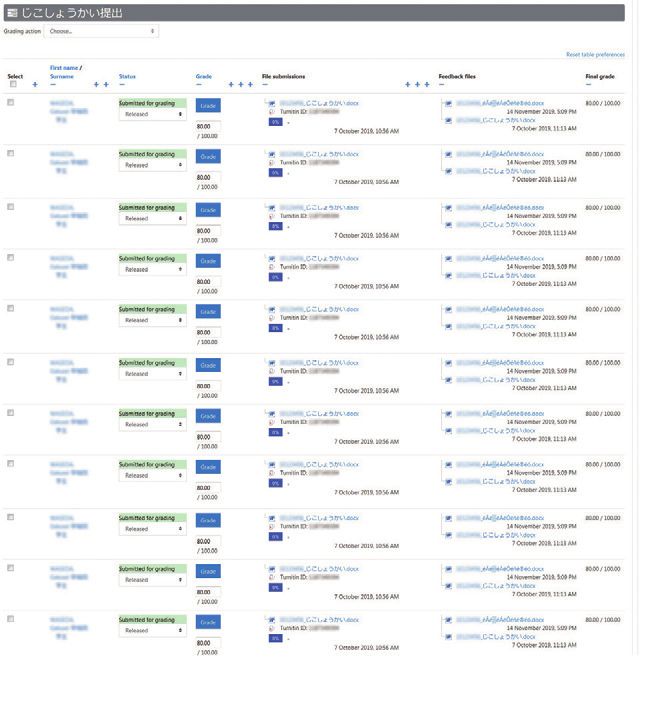
Anything you could do before, you can still do now!

Course N@vi Waseda Moodle
        Comparison

Sharing/
Publishing Data
                                              URL          File
                     Documentation                                           Trial Tester Comments
                                              Page         Label             I was able to post a lot of
                                                                             documents at once using
                     On-demand                CCS Contents Creation Studio   drag & drop!
                                                                              School of Fundamental Science and Engineering
                     Content                  URL         Media millvi

Communication
                     Announcements            Announcement

                     Mailbox mail             Message My teacher
                                                                             Trial Tester Comments
                                                                             The surveys were visually easy
                     Questionnaire            Questionnaire                  to see and students had an
                                                                             easy time answering them!
                                                                                                       School of Education

                     Discussion               Forum

                                        NEW   Workshop

Verifying
Student Progress
                     Review Sheet             Quiz         Assignment        Trial Tester Comments
                                                                             The Question bank lets me use
                     Quiz                     Quiz                           the same problems across
                                                                             different courses!
                                                                             School of Fundamental Science and Engineering

                     Reporting                Assignment

Student Management
                     Attendance               Attendance
                                                                             Trial Tester Comments
                                                                             The new system let me grade
                     Managing Grades          Grades                         using decimals, and changing
                                                                             score weights was easy!
                                                                              School of Advanced Science and Engineering

                     Group Management         Groups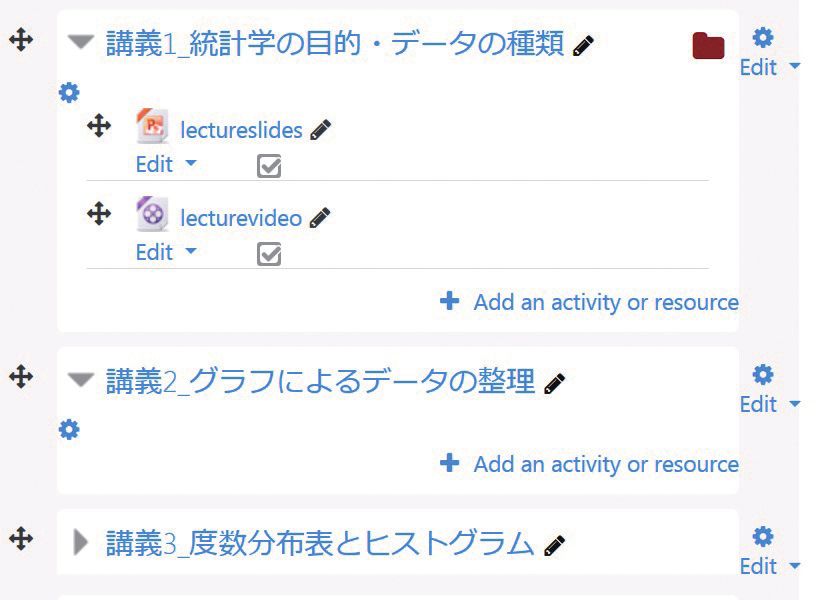
Waseda Moodle is the name of the new
                                                                                  What is Moodle?
Learning Management System (LMS) which will be replacing
                                                                                  Moodle is short for
Waseda-net Course N@vi, Waseda University s LMS since 2007.                        Modular Object-Oriented
                                                                                  Dynamic Learning Environment .
It is based on Moodle , an open-source platform used world-wide                   First developed in Australia,
                                                                                  it continues to be improved by
in over 230 countries with over 70 million users.                                 programmers and users within the
The transition to Waseda Moodle will allow                                        Moodle community around the world.
                                                                                  New releases are published
our university to continue to adapt to new advances                               biannually, and various examples of
                                                                                  usage are available online.
in information technology and changes to educational paradigms.

                            Why                                                   ?

       Multi-Device                                            Multilingual
       Compatibility                                          User Interface
                                                                                 いいね       Like
                                                                       赞     좋아요             J’aime     贊
                                                                  Vind ik leuk                     Gefällt mir
                                                             Мне нравится                          Mi piace Me Gusta

  With multi-device compatibility, students and          Various language options are available for
  faculty members can access Waseda Moodle               non-Japanese speakers. Switch between
  from anywhere, anytime using any smart                 Japanese, English or any of the 9 other
  device including personal computers, tablets or        language settings.
  even smartphones.

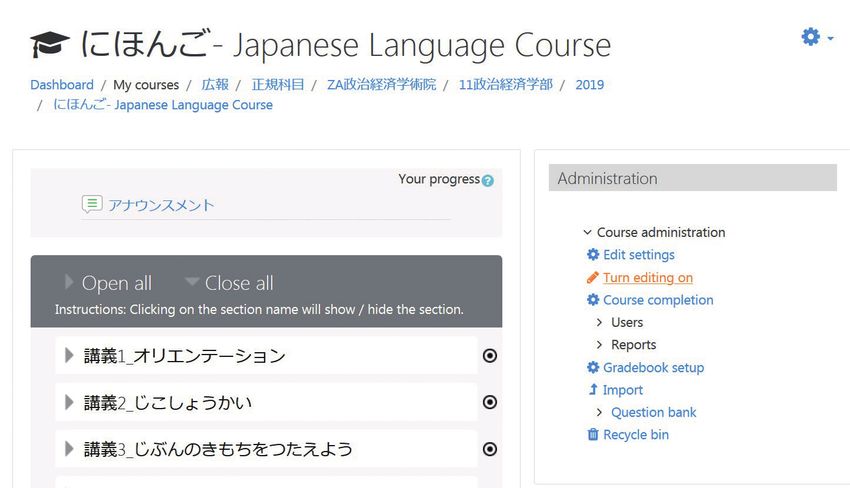
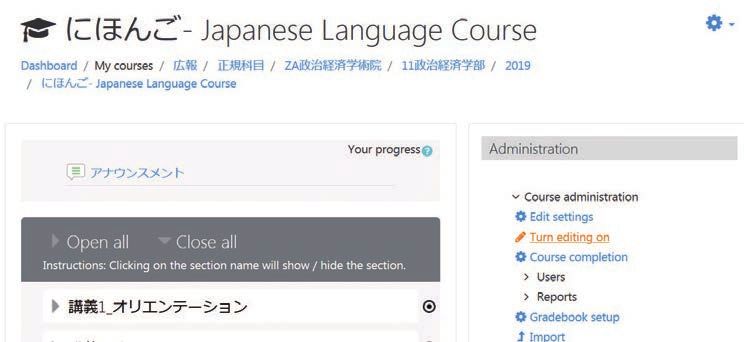
                                                    Click on Turn editing on
            Enhanced                                to Add, Edit,
            Usability                               or Remove Functions!                                      See website
                                                                                                                for more
                                                                                                              information

  The user interface is intuitive and easy to       Within your course management page,
                                                    click on Turn editing on from the
  understand, which allows users to rearrange       Administration menu on the right to add,
  or show/hide content with ease and speed.         edit, or remove various items and functions.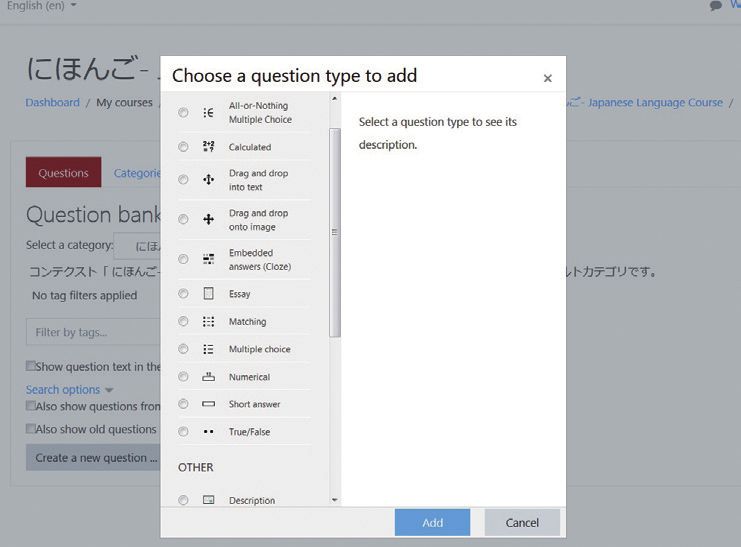
4 Functions Worth a Try
With an intuitive and easy to use user interface, when logging in to Waseda
Moodle you will find the same functions from Course N@vi but enhanced, as
well as various new functions to support your teaching and student learning.
1 File
Easier File Transfers
3 Quiz
Diverse Quiz Designs
The File module lets you post lecture slides, supplementary materials, and more. See website The Quiz module provides many options for creating the “perfect” quiz. See website
for more for more
information information
Trial Tester Comments Trial Tester Comments
I thought the transition would take time, I have more options now, including
but transferring the files was easy! various question types and the ability
School of Commerce to shuffle the orders around!
School of Fundamental Science and Engineering
Arrange your windows so you can access
the console, then simply drag and drop
your files to upload to the appropriate
course folder. No additionalsteps required! Instructors can choose from numerous question
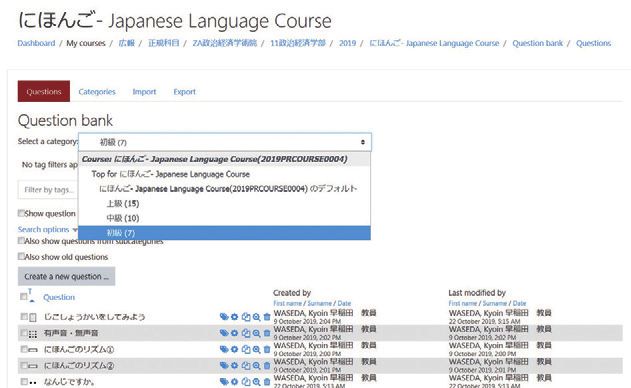
types including multiple choice, true or false, Questions can be saved in the Question
Once the data has been uploaded, click on short answer etc., as well as various settings bank by category. They can be copied and
Edit to replace, show or hide files. such as deadlines or trial limits. used across different courses.
2 Assignment
Quick and Easy Feedback
4 Forum
Enhanced Student Engagement
Uploading feedback is no longer time-consuming. See website Instructors and students can communicate with each other using the Forum. See website
for more for more
information information
Trial Tester Comments Trial Tester Comments
Being able to return proofread/scored Group work was more efficient
Word or PDF files to individual students with the forums!
all at once is convenient! School of Political Science and Economics
Global Education Center
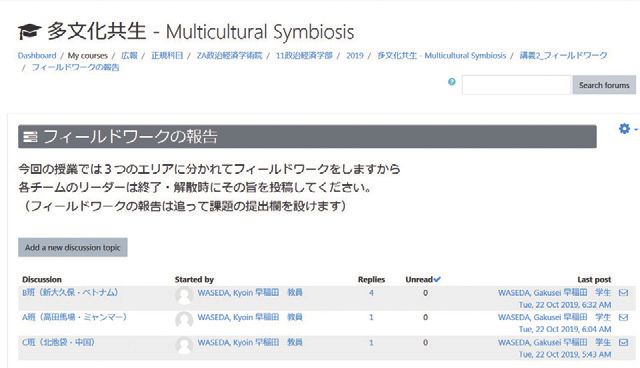
Select Upload multiple feedback files in a The forums facilitate discussions between
ZIP to send feedback files to all students students and/or instructors as well as the
at once, rather than uploading each file sharing of data and information.
individually.
Students can use the detailed feedback to
improve their academic performance.
*Screenshots are for reference purposes only.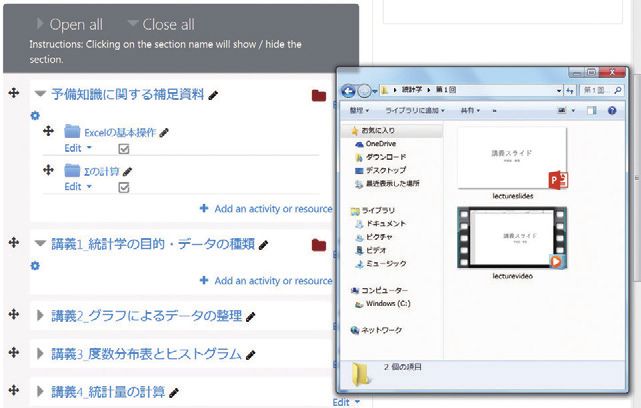
To all Faculty Members

         Regarding
  Preparations for the 2020
Implementation of the New LMS
The process of implementing Waseda Moodle will being late November 2019,
and will be open for use by the 2020 academic year.
Please make sure that any tasks required to transition your courses
from Course N@vi to Waseda Moodle are completed by April 2020.
Please provide the following contact information to any students with inquiries regarding Waseda Moodle.
*New students beginning April 2020 will be taking their New Student Start-up courses via Waseda Moodle. *Course N@vi will be operational until March 2021.

                       Please make use of the Useful Content for Faculty and Staff course and materials.
                            (You can copy and paste the sample content to help create quizzes, etc.)

                     Please feel free to ask us any questions

1.         Please see
           the Waseda Moodle page
           linked from the IT Service
           Navigation page.

          http://www.waseda.jp/navi/wsdmoodle/

2.         Moodle Docs (English) and
           the Instructor Manual can be
           accessed from the link
           at the top right corner
           of your dashboard.

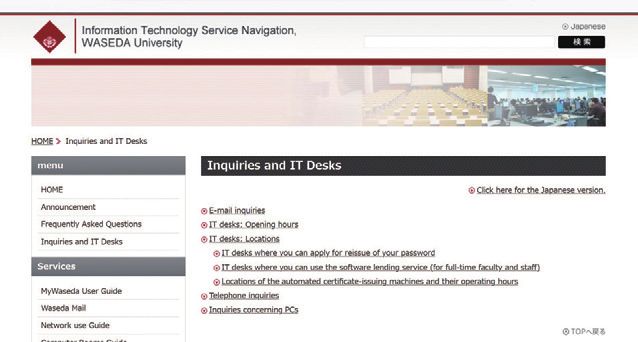
3.         Inquiries: Please see
           contact info (email, phone)
           at the following link.
           *Please direct inquiries to the branch
            office located at your campus.

           http://www.waseda.jp/navi/inquiry.html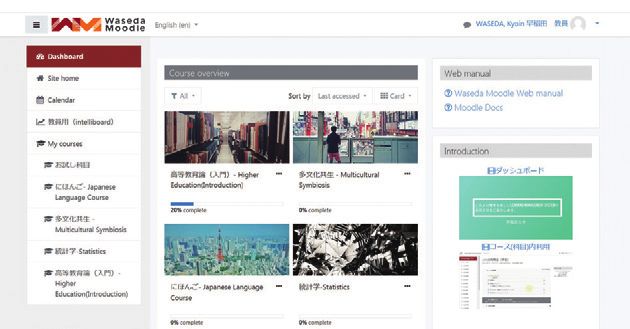
You can also read


