Global Information Assurance Certification Paper - GIAC Certifications
←
→
Page content transcription
If your browser does not render page correctly, please read the page content below
Global Information Assurance Certification Paper

                            Copyright SANS Institute
                            Author Retains Full Rights
   This paper is taken from the GIAC directory of certified professionals. Reposting is not permited without express written permission.

Interested in learning more?
Check out the list of upcoming events offering
"Hacker Tools, Techniques, Exploits, and Incident Handling (Security 504)"
at http://www.giac.org/registration/gcih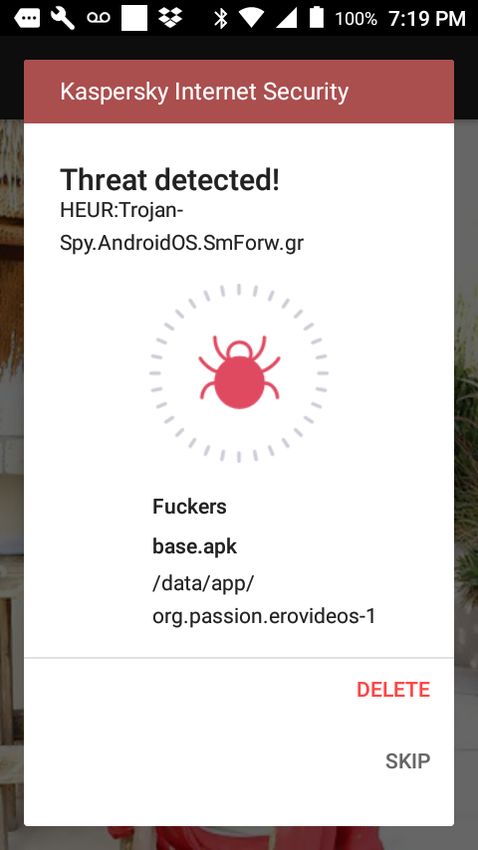
ts
                                                                                                   gh
                                                                                               Ri
                                        Mobile A/V: Is it worth it?

                                                                                           ll
                                                                                      Fu
                                                                                ns
                                GIAC (GCIH) Gold Certification and ISE 5501

                                                                             ai
                                                                         et
                                Author: Nicholas Dorris, Nicholas.r.dorris@gmail.com

                                                                   rR
                                               Advisor: Johannes Ulllrich

                                                              ho
                                                          ut
                                                     ,A
                                                   Accepted: 5/18/19
                                                 te
                                            itu
                                                        Abstract
                                        st

               In the mid 2010’s, mobile devices such as smartphones and tablets have become
                                     In

               ubiquitous with users employing these gadgets for various applications. While this
                              NS

               pervasive adoption of mobile devices offers numerous advantages, attackers have
               leveraged the languid attitude of device owners to secure the owner’s gadgets. The
                        SA

               diversity of mobile devices exposes them to a variety of security threats, as the industry
                     e

               lacks a comprehensive solution to protect mobile devices. In a bid to secure their assets
                Th

               and informational resources, individuals and corporations have turned to commercial
          19

               mobile antivirus software. Most security providers present mobile versions of their PC
     20

               antivirus applications, which are primarily based on the conventional signature-based
               detection techniques. Although the signature-based strategy can be valuable in
 ©

               identifying and mitigating profiled malware, it is not as effective in detecting unknown,
               new, or evolving threats, as it lacks adequate information and signature regarding these
               infections. Mobile attackers have remained ahead via obfuscation and transformation
               methods to bypass detection techniques. This paper seeks to ascertain whether current
               mobile antivirus solutions are effective, in addition to which default Android settings
               assist in the prevention or mitigation of various malware and their consequences.

                                                                                                            1

© 2019 The SANS Institute                                                                          Author retains full rights.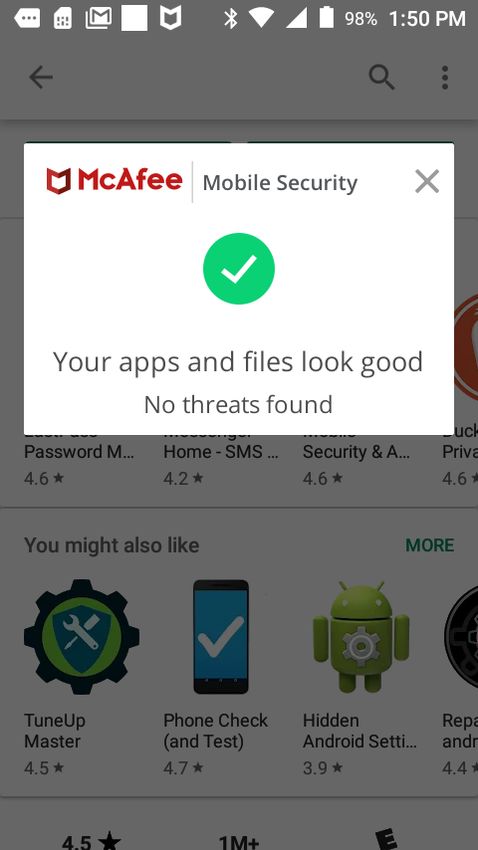
ts
                                                                                                   gh
                                                            Mobile AV: An Unsponsored Perspective 2

                                                                                               Ri
                                                                                             ll
                                                                                      Fu
                                                                                ns
               1. Introduction

                                                                             ai
                                                                         et
                       Mobile security breaches have increased steadily, which aligns with the increase

                                                                   rR
               in the number of mobile device users. For most organizations that rely on their networked
               resources, the mobile devices in use serve as both key assets and threat entry points. Such

                                                              ho
               devices are considered assets, as they not only enable the swift flow of information across

                                                          ut
               employees, branches, and regions but also remotely facilitate in the ongoing management

                                                     ,A
               of organizational operations. On the contrary, mobile devices serve as a threat entry point
                                                  te
               should they fail to implement appropriate information security or cybersecurity
                                                 itu

               mechanisms. A direct consequence of such a failure could be an easy entry of malware
                                           st

               into the organizational network to inflict harm. Indeed, damage is not limited to theft of
                                       In

               information but extends beyond to include damage to the operational and technical
                               NS

               environment, causing a stoppage of the information and communication technology
                         SA

               infrastructure in its entirety.
                     e

                       It is also worth noting that consequences are linked with personal use of mobile
                Th

               devices in the absence of rigorous security measures. Here, mobile devices primarily
          19

               refer to smartphones and Tablet PCs that typically comprise an LED or OLED
     20

               touchscreen. Nonetheless, regardless of the type of mobile device in use, security threats
               remain unrestricted. According to the Verizon Mobile Security Index, “Mobile devices
 ©

               now have access to much of the same valuable corporate data—customer lists, bank
               details, employee personal data, billing information and much more—as those using
               fixed connections. And many also hold the credentials that we use to access other
               resources, including the numerous cloud services that employees now depend on to do
               their jobs” (Verizon Mobile Security Index, 2019). The “mobile phone as an appendage”
               is more apparent than ever, whether or not an individual is “on the clock.”

               According to a recent research report, approximately one fifth of the total IT professionals
               working for different organizations experienced some form of data breach involving a
               mobile device (Hamblen, 2016). Most of these breaches were linked to an abrupt increase

                                                                                                            2

© 2019 The SANS Institute                                                                          Author retains full rights.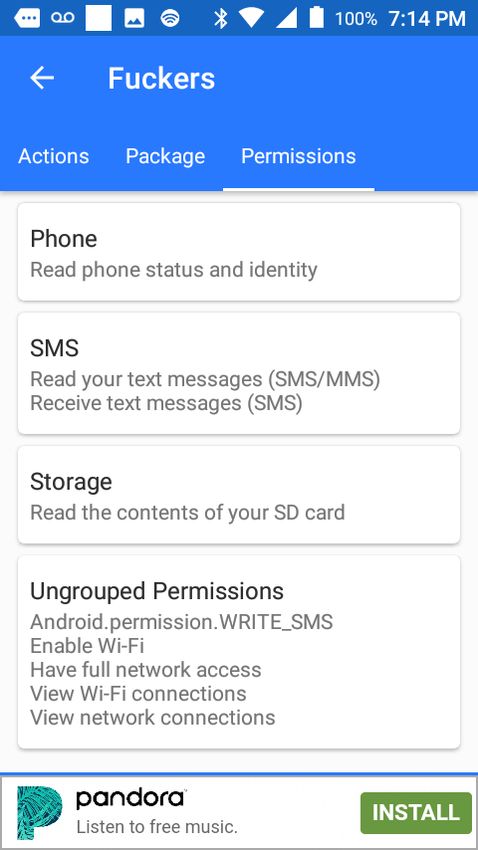
ts
                                                                                                     gh
                                                             Mobile AV: An Unsponsored Perspective 3

                                                                                                 Ri
                                                                                             ll
                                                                                        Fu
                                                                                  ns
               in mobile devices usage, including smartphones and tablets within the workplace

                                                                              ai
               (Hamblen, 2016). This research further highlights that at least 24% of the participants

                                                                           et
               reported connecting their mobile devices to malicious Wi-Fi hotspots, while 39% had

                                                                     rR
               downloaded malware through their mobile devices while at work (Hamblen, 2016).

                                                               ho
               Concerns related to the lack of controls on the Bring Your Own Device policy were raised

                                                           ut
               as part of the research study (Hamblen, 2016). In 2017, a major breach involving mobile

                                                      ,A
               devices occurred via the free-to-play mobile game called Family Farm Seaside, resulting
                                                  te
               in the exposure of user-specific information of 3.3 million users (DiGiacomo, 2018).
                                             itu

               During the same year, the Malaysian Telcos and mobile virtual network operators were
                                         st

               targeted with a massive hack attack that leaked the information of 46.2 million mobile
                                     In

               phone users, including phone numbers, names, and addresses, along with the IMEI
                              NS

               numbers of mobile devices (DiGiacomo, 2018). Additionally, Reliance Jio, a prominent
               mobile service provider in India, was struck by a similar attack that exposed user IDs,
                        SA

               phone numbers, email addresses, and other personally identifiable information of 120
                     e

               million customers via the mobile network (DiGiacomo, 2018). With the current culture of
                Th

               everything being tied to a virtual identity, this presents problems at several levels, such as:
          19

               personal business, professional business and social media.
     20

                      1.1 A Brief Overview of Mobile Antivirus
 ©

                      A mobile antivirus is essentially an antivirus software developed exclusively for
               the respective mobile operating system. The purpose of a mobile antivirus is to protect
               against malware, Trojans, viruses, hacking, and other forms of data breaches. Commonly-
               used mobile operating systems include Android, iOS, and Windows, while less -
               commonly- used systems include Blackberry, Bada, MeeGo, Palm OS, and Symbian OS.
               Although each of these operating systems possesses distinct features and interactive
               attributes, their general purpose is homogenous: to enable mobile device users to interact
               with the mobile devices and perform a range of computing operations. As with any
               conventional antivirus program, a mobile device antivirus software repeats the same task

                                                                                                             3

© 2019 The SANS Institute                                                                             Author retains full rights.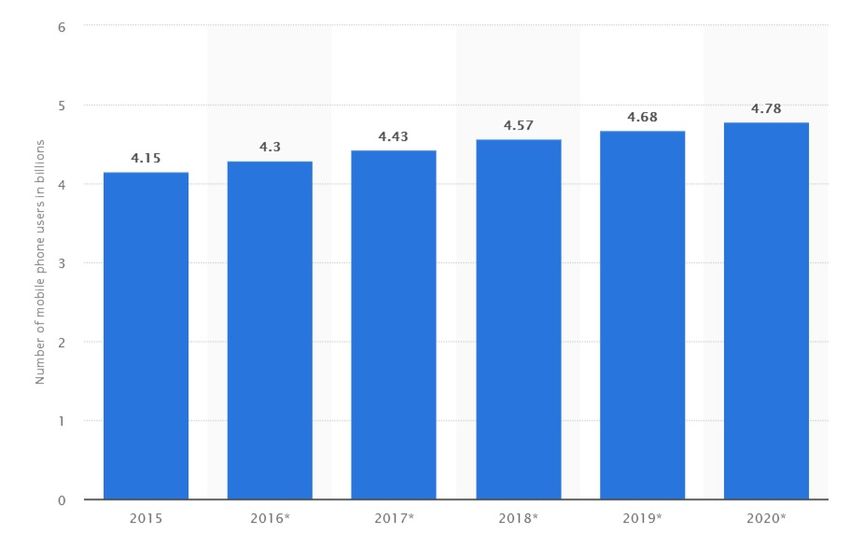
ts
                                                                                                      gh
                                                            Mobile AV: An Unsponsored Perspective 4

                                                                                                Ri
                                                                                            ll
                                                                                        Fu
                                                                                 ns
               of continuously screening the system to promptly identify, avoid, and neutralize external

                                                                              ai
               threats that could otherwise result in an information security breach.

                                                                          et
                       Antivirus programs functions in a systematic and sequential manner. First, the

                                                                    rR
               mobile device antivirus scans the directories and partitions within the internal and

                                                               ho
               external storage drives of the device in question (Rosencrance, 2018). It comprises a set

                                                           ut
               of known malicious patterns, which it uses to automatically compare the directories, files,

                                                      ,A
               and folders to detect threats. Second, it allows the end user to schedule daily, weekly or
                                                  te
               monthly scans to perform similar functions (Rosencrance, 2018). Some antivirus software
                                             itu

               even allows users to schedule scans on a per-install basis, in which each application is
                                         st

               scanned for malware upon the first installation. Third, the antivirus allows users to
                                      In

               manually initiate virus or malware scans at any time while selecting specific directories,
                              NS

               files, or folders that are likely to be breached (Rosencrance, 2018). Finally, it allows users
                        SA

               to quarantine and completely remove the identified malware to ensure a more secure user
               experience (Rosencrance, 2018).
                     e
                Th

                      Recognized as signature-based detection, almost all antivirus programs function
               similarly. However, nominal differences could still exist based on the mobile operating
          19

               system involved. Considering that Android OS is the most used mobile device OS in the
     20

               world, used by 65.53% of global users as opposed to 32.34% of iOS users, this paper
 ©

               focuses on Android OS and the mobile antivirus software designed for it (Mybroadband
               Staff Writer, 2017).

                      One may also argue as to which types of mobile devices require an antivirus.
               From this perspective, it is debatably true that mobile devices that are engaged for
               personal and professional purposes are both susceptible to threats. Information security
               breaches, hacking, malware attacks, and Trojan viruses are only a few of the more
               common threats, in addition to man-in-the-middle attacks and ransomware. Undoubtedly,
               mobile devices that are either lost or stolen also are susceptible to prominent threats.
               Mobile devices used for personal reasons contain both generic and classified information

                                                                                                             4

© 2019 The SANS Institute                                                                             Author retains full rights.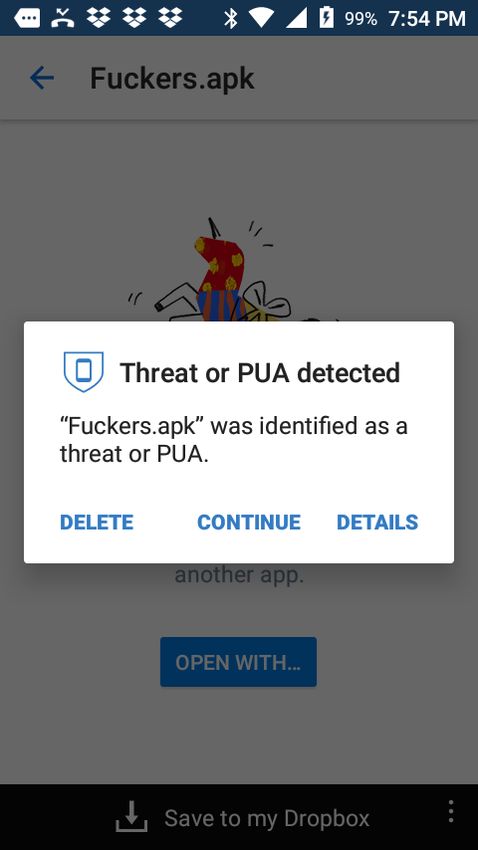
ts
                                                                                                     gh
                                                             Mobile AV: An Unsponsored Perspective 5

                                                                                                 Ri
                                                                                              ll
                                                                                        Fu
                                                                                  ns
               that, if leaked, could be severely damaging. They generally contain information such as

                                                                               ai
               images, videos, text messages, entire social media conversations, and other private data,

                                                                           et
               that is not intended to be exposed to third parties. Contacts, emails, email attachments,

                                                                     rR
               downloaded files, and sensitive mobile applications, such as mobile banking applications

                                                                ho
               in which the usernames and passwords are stored are also among significant types of

                                                            ut
               information that could be breached, stolen, and even sold over the dark web. According

                                                      ,A
               to Google Inc., its trademark Google Photos application that allows users to back up and
                                                  te
               store their images and videos on the cloud, was used by 500 million users who had
                                             itu

               uploaded approximately 2.1 billion photos on a daily basis (Matney, 2017).
                                         st

                      Mobile devices used for professional purposes are at a greater risk of the
                                     In

               aforementioned threats, primarily due to the highly sensitive and classified information
                              NS

               that they carry. For instance, client-specific data, details on suppliers, inventory, plans for
                        SA

               growth and development of the organization, manufacturing secrets, and financial data
               could be breached in the absence of antivirus software. This could eventually result in
                     e
                Th

               dire outcomes. It is therefore viable to argue that mobile devices, whether they are for
               personal or professional use, must have an antivirus software installed to protect against
          19

               the rising threats and vulnerabilities. A research report by Ismail (2017), published on the
     20

               Information Age website, highlighted the absence of up-to-date security patches across
 ©

               Android mobile devices as a major reason behind rising security breaches and the use of
               custom ROMs, Jailbroken ROMS, and cracked Country Locks, which are common across
               major Android smartphone manufacturers. The lack of proper physical protection of
               digital intellectual property, including mobile devices, while at the workplace is yet
               another loophole that can best be addressed by certain antivirus software that
               automatically lock the devices after a few seconds or minutes, depending on the user
               preferences assigned. In the absence of such physical protection, official mobile devices
               that are left with several files running could be compromised by a guest or an insider
               while the data owner is unaware.

                                                                                                             5

© 2019 The SANS Institute                                                                             Author retains full rights.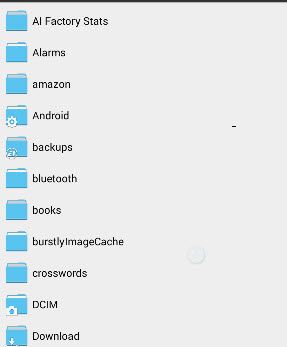
ts
                                                                                                  gh
                                                           Mobile AV: An Unsponsored Perspective 6

                                                                                                Ri
                                                                                           ll
                                                                                      Fu
                                                                                ns
                      1.2 Thesis Statement

                                                                            ai
                                                                         et
                      The current research study contends that the existing state of mobile device

                                                                   rR
               security is weak. By installing strong mobile antivirus software, end users of Android-

                                                               ho
               based mobile devices can implement a series of settings and security tweaks, including
               anti-malware, anti-theft capabilities, remote data wipe, SMS blocking, private space, and

                                                          ut
                                                     ,A
               traffic monitoring, among others. In addition, several antivirus software accompany a
               stock lock screen that mandates the use of a device lock, pin, pattern, or password.
                                                 te
                                            itu
               Intruder detection is yet another key, built-in feature of many mobile antivirus software
               that could be implemented to quickly take a picture of any intruders and send the picture
                                        st
                                     In

               via email to notify the owner. Thus, this research aims to determine the extent of the
               effectiveness of some well-known mobile antivirus programs while also identifying the
                              NS

               set of innate—default—Android OS security settings that could facilitate in both the
                        SA

               mitigation and prevention of malware attacks.
                     e

               2 Background Study
                Th

                      2.1 Use of Mobile Devices
          19
     20

                      The nature and severity of the problem which requires an effective resolution can
 ©

               be best comprehended by elaborating the widespread use and adoption of mobile devices.
               In 2016, 62.9% of the world’s population possessed a smartphone (Statista.com, 2019).
               This penetration of mobile phone ownership is projected to increase by at least 5%, to
               reach 67%, by the end of 2019 (Statista.com, 2019). According to the most recent
               statistics, the total number of mobile phone users reached 5 billion worldwide
               (Statista.com, 2019). This depicts a 4.68% increase in the number of global smartphone
               users compared to 2017, when this number was lower (Statista.com, 2019). Consider
               Figure 1 below:

                                                                                                             6

© 2019 The SANS Institute                                                                             Author retains full rights.
ts
gh
Mobile AV: An Unsponsored Perspective 7
Ri
ll
Fu
ns
ai
et
rR
ho
ut
,A
te
itu
st
In
Figure 1 Increase in Smartphone Usage (Statista.com, 2019)
NS
While Figure 1 depicts the widespread use and adoption of smartphones, the same survey
further projects that this number will continue to grow in the coming years. Among
SA
countries with the highest number of smartphone owners and users, China and India
e
represent the top of the list with 1.5 billion and 1 billion users, respectively (Statista.com,
Th
2019). Much of this growth is attributed to the increasing popularity of smartphones
19
(Statista.com, 2019). Thirty-eight percent of global mobile phone users were smartphone
20
users in 2014, while this percentage has increased to 50% as of 2018 (Statista.com, 2019).
The trend is somewhat similar: at least 25 million Android tablet PCs were sold by
©
Samsung alone in 2017, while the total number of tablet PC users on a global scale reached
1.49 billion in the same year (Statista.com, 2019). The widespread use and ownership of
tablet PCs is depicted in Figure 2 below:
7
© 2019 The SANS Institute Author retains full rights.ts
gh
Mobile AV: An Unsponsored Perspective 8
Ri
ll
Fu
ns
ai
et
rR
ho
ut
,A
te
itu
st
In
Figure 2 Increase in Tablet PC Usage in Billions (Statista.com, 2019)
NS
Based on Figure 2, the substantial increase in use and ownership of tablet PCs is evident:
SA
this number increased from 0.66 billion users in 2013 to 1.23 billion users in 2019
(Statista.com, 2019). This number further projects to increase in the coming years to reach
e
Th
1.28 billion in 2021 (Statista.com, 2019).
19
2.2 Android OS Structure
20
2.2.1 File Structure
©
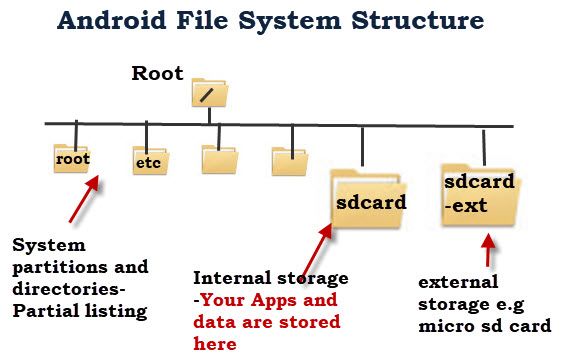
The Android OS leverages the capabilities of the Linux file system structure with
a single root, as depicted in Figure 3 below:
8
© 2019 The SANS Institute Author retains full rights.ts
gh
Mobile AV: An Unsponsored Perspective 9
Ri
ll
Fu
ns
ai
et
rR
ho
ut
,A
te
itu
st
In
Figure 3 Overview of Android OS File Structure (Steve, 2017)
NS
In general, the Android OS protects the directories and partitions unless the end users have
SA
rooted their devices, which provides easy access to these components (Steve, 2017).
Contrary to the Windows OS that uses drive letters, the Android OS presents partitions and
e
Th
physical disks under the root as directories, similarly to UNIX (Steve, 2017). Generally,
no default file manager accompanies the OS; however, certain device manufacturers using
19
newer versions of Android OS provide a file explorer. Otherwise, end users must download
20
third-party file managers to access, manage, and organize file structures (Steve, 2017).
©
User files and data are stored in the sdcard partition, which also is also comprised of
application settings and data (Steve, 2017). Regardless of the presence of an external
sdcard, the Android OS still possesses an sdcard partition. Opening the sdcard partition
presents a list of files and folders, similar to Figure 4 below:
9
© 2019 The SANS Institute Author retains full rights.ts
gh
Mobile AV: An Unsponsored Perspective 10
Ri
ll
Fu
ns
ai
et
rR
ho
ut
,A
te
itu
st
In
NS
SA
Figure 4 Overview of SDCARD Partition in Android (Steve, 2017)
e
Key data and files included within these file directories and partitions include images,
Th
audio files, documents, videos, and other forms of multimedia. Regarding file associations,
19
the Android OS uses an application to open specific file extensions and types, such as .doc,
20
.docx, pdf, and .RAR files. As soon as the file extension is tapped, it might prompt a
©
message to select the preferred program from the “Complete Action Using” dialog box, in
which clicking the “Always” button causes the default application to open similar file types
in the future.
2.2.2 Permission Structure
Similar to every major operating system, Android OS requires end users to allow
a series of permissions before they can use the underlying applications and features.
These permissions pertain to hardware-related and software-related permissions.
Hardware-related permissions prompt the end user to allow or deny access to various
hardware components of the mobile device, including cameras, the microphone, GPS,
10
© 2019 The SANS Institute Author retains full rights.ts
gh
Mobile AV: An Unsponsored Perspective 11
Ri
ll
Fu
ns
and sensors. On the other hand, software-related permissions could include the ability to
ai
read/write text messages and access multimedia files in the Gallery application, among
et
others. While these permissions are generally mandatory for a variety of applications to
rR
function swiftly, others could require needless access to hardware or software, which
ho
must be manually regulated by the end user.
ut
The central purpose of embedding permissions within the Android OS is to ensure
,A
that the mobile user's data is always kept private and confidential. However, users need to
te
be wary in allowing or denying these permissions, as some permissions could grant access
itu
to unnecessary user-specific data. Alternatively, denying permissions to certain programs
st
and settings within the Android OS might render the mobile device vulnerable to key
In
threats. By default, the permission structure across all the Android OS versions is that no
NS
application is allowed permission to access any hardware/software, which could also serve
SA
as a precautionary measure.
e
2.3 Evaluation of Mobile Malware
Th
Key insights into the effectiveness of mobile antivirus will be best achieved by evaluating
19
mobile malware. This necessitates the identification and evaluation of common threats,
20
their origins, and the underlying consequences.
©
2.3.1 Common Threats to Mobile Devices, Origins, and Consequences
Considering empirical evidence gathered from a highly reliable source, the
common threats to mobile devices include data leakage, unsecured Wi-Fi, network
spoofing, and spyware (Kaspersky, 2019). This list extends to include malware infections
and identity theft.
2.3.2 Data Leakage
The history of data leakages or breaches dates to when users began storing their
data across computing devices (Kaspersky, 2019). Perhaps the most prominent threat to
11
© 2019 The SANS Institute Author retains full rights.ts
gh
Mobile AV: An Unsponsored Perspective 12
Ri
ll
Fu
ns
mobile devices is data leakage, which could eventually result in identity theft. Data leakage
ai
is almost always inadvertent and occurs when a user downloads and installs mobile
et
applications (Kaspersky, 2019). Certain mobile applications are identified as “riskware,”
rR
as they demand the end users to provide permission to almost all the hardware embedded
ho
within the mobile device and linked software, thereby opening access to private data
ut
(Kaspersky, 2019). Such mobile applications are known to report personal and
,A
organizational data to their respective remote servers, where it is vulnerable to further
te
mining and planning cybercrimes such as identity theft (Kaspersky, 2019). Moreover,
itu
hostile enterprise-signed mobile applications powered by specialized malware could result
st
in data leakage via the distribution of a unique code that exploits internal—unspecified—
In
vulnerabilities to spread the confidential data across a variety of corporate networks
NS
without prompting any warnings or anomalies (Kaspersky, 2019).
SA
2.3.3 Unsecured Wi-Fi
e
Another major threat to today’s mobile devices arises when the devices connect to
Th
an unsecured Wi-Fi network or a network that is poorly secured through the default
19
network password. The absence of WPA and WPA2 PSK leaves the Wi-Fi networks open,
20
upon which cybercriminals can capitalize. Connecting to an unsecured Wi-Fi network
indicates that all the data, files, communications, and transactions being performed through
©
the device could become compromised. According to the report by Kaspersky (2019), a
practical experiment involving three British politicians resulted in their social media,
PayPal, and VoIP conversations being compromised.
2.3.4 Network Spoofing
First identified in 1989 by Steve Bellovin of AT&T as a security risk, network
spoofing, or IP spoofing, involving fake access points established by hackers, has increased
remarkably (Kaspersky, 2019). As soon as a mobile device connects to the fake access
point, the device’s data and communications can be easily intercepted by the hackers in
12
© 2019 The SANS Institute Author retains full rights.ts
gh
Mobile AV: An Unsponsored Perspective 13
Ri
ll
Fu
ns
whatever manner they planned. Some attackers might even lure a potential victim into
ai
creating an account to access the free access point; several users employ the same user
et
accounts and passwords across multiple services, which allows hackers to easily guess their
rR
login details on mobile banking services. A direct consequence is the breach of highly
ho
confidential details, including credit card numbers, bank account numbers, financial status,
ut
and streams of income, among others.
2.3.5 Spyware
,A
te
itu
Initially described in 1995 by Usenet, spyware can be defined as a program whose purpose
is to monitor or track the online activities of an end user (Kaspersky, 2019). Such spyware
st
In
is commonly utilized by spouses, bosses, and coworkers to keep track of the activities,
conversations, and transactions in which their counterpart is involved (Kaspersky, 2019).
NS
Tracking internet habits, monitoring the number of website visits, and even revealing
SA
personal details of users are some prominent consequences of this threat.
e
Th
2.4 Discussion of Mobile Antivirus
19
2.4.1 History of Mobile Antivirus
20
The history of mobile antivirus is as old as the first reports of the mobile malware
©
dubbed Cabir in 2004, which was essentially a worm transmitted via Bluetooth and
displayed the message “Caribe” upon phone startup, followed by the reports of
CommWarrior in 2005 and RedBrowser in 2006 (ESET, 2016). In an attempt to neutralize
mobile malware, the first mobile antivirus programs were developed. However, it was not
until 2017 that the complete and dedicated mobile antivirus software, such as AVG, Avast,
and McAfee, had been completed.
2.4.2 The Development of Mobile Antivirus
A report by Tripwire highlighted the potential inability of openly securing mobile devices
via an antivirus due to SDK and other available toolkits (Tripwire, 2013). However, it is
13
© 2019 The SANS Institute Author retains full rights.ts
gh
Mobile AV: An Unsponsored Perspective 14
Ri
ll
Fu
ns
reasonable to argue that the steady increase in mobile malware and threats triggered the
ai
development of mobile antivirus software. Originally developed to identify, detect, and
et
remove viruses, Trojans, and malware from traditional computers, antiviruses were further
rR
diversified to support the more innovative mobile computing powered by Android-based
ho
smartphones and tablet PCs (Tripwire, 2013). Unlike computer antivirus programs, mobile
ut
antivirus programs were developed to offer limited functionality¾Specifically, the ability
,A
to protect against ransomware, denial of service, and distributed denial of service attacks.
te
Over time, as mobile device breaches witnessed a steady increase, mobile antivirus
itu
software also began to diversify regarding capability and functionality. Today, mobile
st
antivirus software has been developed to such an extent that companies offer rigorous
In
security accompanied by a variety of security features that suit today’s needs. These
NS
include remote data wipe, password protection, real-time virus and malware scanning,
virus removal, Wi-Fi network scanning and protection, multimedia vaults, find-my-phone,
SA
anti-theft functionality, and remote locking capabilities.
e
Th
2.5 Popular Mobile Antivirus Applications
19
2.5.1 Avast Antivirus
20
According to a recent report, the Avast Antivirus application was declared the top
©
mobile antivirus platform (Drake, 2019). Key features include the ability to remotely
wipe the mobile device’s data in the event of theft or should the device be lost (Drake,
2019). Additionally, it offers a mobile firewall enhancement accompanied by basic
antivirus functions such as call blocking, an anti-theft feature, and VPN (Drake, 2019).
Most importantly, the antivirus is free to download from the Google Play Store.
2.5.2 BitDefender
Similar to Avast Antivirus, BitDefender also is free to download from the Play
Store and offers automatic, scheduled, and manual antivirus scans to end users. The
antivirus remains running in the background, frees up storage space and resources, and
14
© 2019 The SANS Institute Author retains full rights.ts
gh
Mobile AV: An Unsponsored Perspective 15
Ri
ll
Fu
ns
enables longer battery life (Drake, 2019). Additionally, a built-in privacy advisor tool that
ai
provides an added layer of security to the end users is included.
et
rR
2.5.3 Kaspersky Lab
ho
Kaspersky Lab is another high-quality antivirus application available on the
Google Play Store that effectively sniffs out and neutralizes malware (Drake, 2019).
ut
,A
Moreover, it allows end users to block malicious links or websites and boasts a detection
rate of 99.9%, as revealed by the AV-Test trials conducted in 2017 (Drake, 2019).,
te
itu
Automatic and scheduled scanning is available in addition to anti-theft, spam protection,
and privacy advisor (Drake, 2019).
st
In
NS
SA
e
Th
19
20
©
15
© 2019 The SANS Institute Author retains full rights.ts
gh
Mobile AV: An Unsponsored Perspective 16
Ri
ll
Fu
ns
3. Analysis
ai
3.1 Tools Utilized in the Experiment
et
rR
The current research study utilized an array of tools, including Alcatel Raven LTE
ho
smartphones, Android 7.1.1 Nougat OS, mobile malware samples websites such as
ut
Koodous, VirusTotal, Kaspersky, Sophos, and McAfee Mobile Antivirus. There was also
,A
a service plan utilized for each phone and additional apps to perform basic diagnostics.
te
3.1.1 Alcatel Raven LTE Smartphones
itu
Also recognized with the model number A574BL, Alcatel Raven LTE
st
smartphones are powered by the Android 7.1.1 Nougat operating system and offer a
In
compact design, a 5-inch TFT-TN Display, 16GB of internal storage, and 2GB of RAM
NS
(TFGuide.com, 2019). Powering the phone is the Qualcomm Snapdragon 210 chipset,
SA
clocked at 1.1 GHZ in a quad-core setting. The rear camera is a 5MP shooter, while the
front camera boasts a 2MP lens. A 2200 mAh battery allows users to enjoy a seven-day
e
Th
standby time and up to 15 hours of talk time (TFGuide.com, 2019). Additional features
19
include accelerometer and proximity sensors and hearing aid compatibility.
20
3.1.2 Android 7.1.1 Nougat
©
Released in August 2016, the 7.1.1 Nougat is one of the most -used Android
versions across smartphones and tablets. It is the seventh major version of the Android
OS that offers the split-screen multitasking feature, the Doze power saving mode, a
recent applications button, a picture-in-picture mode, a refreshed notifications panel,
bundled notifications, and direct reply features (Android Beat, 2016). The QuickSettings
tile API, along with the redesigned settings menu, also are among the prominent
enhancements of this OS version, in addition to Night Mode and Data Saver mode.
Features that are relevant this research study include a strong file explorer, DPI scaling,
and call blocking capabilities (Android Beat, 2016).
16
© 2019 The SANS Institute Author retains full rights.ts
gh
Mobile AV: An Unsponsored Perspective 17
Ri
ll
Fu
ns
3.1.3 Websites for Mobile Malware Sampling
ai
Since this research involves determining the effectiveness of mobile antivirus, the
et
collection of mobile malware samples is a major aspect. To accomplish this, the following
rR
websites are utilized:
ho
Koodous: This website serves as a rich resource for mobile malware samples, as it currently
ut
enlists 8,305,110 malware samples that perform various types of malicious activities.
,A
VirusTotal: This website serves as a resource both for analyzing mobile malware and for
te
itu
retrieving key resources linked with mobile malware.
st
3.1.4 Mobile Antiviruses
In
For the current research study, three mobile antivirus platforms are used, including
NS
Kaspersky Lab, Sophos, and McAfee Mobile Antivirus. Sophos Mobile Security for
SA
Android is a real-time antivirus and threat-scanning software that protects mobile devices
while also ensuring high performance and increased battery life. The McAfee Mobile
e
Th
Antivirus is developed by McAfee Labs and offers a unique set of tools and features that
enable strong device protection against a range of malware. Kaspersky Lab, previously
19
mentioned above, also provides similar features. The effectiveness of each of these
20
antivirus platforms is tested.
©
3.2 Lab Setup
The process to baseline the smartphone was simple. Readying the smartphone
entailed simply powering on, creating a Gmail account, updating to the available updates,
enabling all of Google’s services/protections, and activating the SIM. Three of the four
phones tested had installed an A/V solution mentioned above, and a fourth phone was used
as a control. After some consideration on how to best gather the technical information, it
was necessary to install three additional applications to collect information regarding data.
Two diagnostic applications, Phone Doctor Plus and Test your Android, were used to
17
© 2019 The SANS Institute Author retains full rights.ts
gh
Mobile AV: An Unsponsored Perspective 18
Ri
ll
Fu
ns
provide CPU utilization, battery temperature, memory utilization, and other relevant data.
ai
Those statistics were collected and logged in an Excel spreadsheet for tracking purposes.
et
The third installation was Dropbox, which is deemed the most effective method of
rR
transporting malicious APKs (Android Package). Perhaps the most vital setting
ho
modification to note was "allowing" installations of applications from unknown sources.
ut
This would allow the phone to install any application not included on the Google Play
,A
Store. The reasoning behind each decision during APK installation was that if the A/V
te
notified me, then I would follow that advice, save for on the control phone. However, if an
itu
APK requested permissions or settings modifications, then those also would be followed.
st
There would not be any priority on which is first, based on the expectation that an A/V
In
would quickly detect the malware. This rule was ignored for the control.
NS
3.2.1 Malware Samples
SA
The malicious APKs were easily searchable on the Koodous database. The
e
selected malware included different discovery dates, behaviors, uses, and demographic
Th
targets to best broaden the change at successful infection. Additionally, these were
19
filtered via "rating=>-1" to search for samples rated as malicious. The list below contains
20
either the name or the tag of the APKs used to best identify the behaviors.
©
Fuckers: An application that simply received a negative score.
Luck.APK: Metasploit/MSFVenom Reverse TCP shell.
MetaMask: An application tagged as an SMS Clipper (i.e., forwarding SMS
messages to an outside resource).
Confirmacion: SMS/Hidden App Tagged APK: Tagged as an SMS and hidden
application, the intent is to utilize the SMS functionality while also hiding from
the user’s gaze.
Flexnet Variant: An Android botnet.
18
© 2019 The SANS Institute Author retains full rights.ts
gh
Mobile AV: An Unsponsored Perspective 19
Ri
ll
Fu
ns
Free Bitcoin: Anubis Variant: A variant of Anubis, a popular banking Trojan.
ai
Exodus Variant: A recent spyware that is likely linked to the Italian government.
et
rR
3.2.2 Fuckers
ho
This APK had a “date submitted” of Sep 20, 2017, so the expectation was for the
ut
A/V to detect the malware quickly. On the control phone, Google Play Protect displays a
,A
notification warning a potential user prior to installation. After installation, the
te
application then requests permissions that should not have been necessary for its
itu
functionality, but these are enabled for the purpose of this study. Shortly afterward, the
st
application was no longer observed on the home screen or anywhere easily visible via
In
normal operating conditions. The application was, however, still located via meticulous
NS
searching.
SA
e
Th
19
20
©
Figure 3 Malicious APK Permissions
The A/V-enabled phones produced better results, which appeared to be the beginning of a
pattern. Both Kaspersky and McAfee allowed the application to download/install;
19
© 2019 The SANS Institute Author retains full rights.ts
gh
Mobile AV: An Unsponsored Perspective 20
Ri
ll
Fu
ns
however, detection of a threat occurred within approximately five seconds. The approach
ai
of the Sophos differed in two aspects. First, an option was offered to "scan the link," which
et
appears to scan the URL of the hosted file. Scanning the link would not be necessary, as
rR
the APKs were transported via Dropbox. Second, Sophos would scan the APK prior to
ho
installation, which would detect this APK as a PUA, a “potentially unwanted application,”
ut
and would successfully not allow the download.
,A
te
itu
st
In
NS
SA
e
Th
19
20
©
20
© 2019 The SANS Institute Author retains full rights.ts
gh
Mobile AV: An Unsponsored Perspective 21
Ri
ll
Fu
ns
ai
et
rR
ho
ut
,A
te
itu
st
In
NS
SA
e
Th
Figure 4 Most Consistent Interactions with Malicious APK
3.2.3 Luck.apk (msfvenom/metasploit)
19
20
This APK, titled “Luck.apk,” was created via msfvenom and intended to create a reverse
shell that could be accessed via meterpreter. The injection was successful on the control
©
phone, though Google Play Protect did provide a prompt prior to installing again, advising
against downloading/installation. The A/V-enabled phones again proved successful. The
Kaspersky and McAfee A/Vs allowed the APK to install and then promptly displayed a
notification of the threat and the prompt for deletion. However, it is important to note that
a meterpreter session was still established prior to the APK’s removal. Sophos once again
did not allow installation due to its scanning functionality.
21
© 2019 The SANS Institute Author retains full rights.ts
gh
Mobile AV: An Unsponsored Perspective 22
Ri
ll
Fu
ns
3.2.4 MetaMask (SMSclipper)
ai
The MetaMask application was tagged as SMSclipper, which indicates it would clip SMS
et
messages from a user’s mobile device and forward the results to a third party. At one point,
rR
this application was available on the Google Play Store but was recently removed due to
ho
the discovery of malicious behavior. When attempting to install on any of the phones,
ut
Google Play Protect presented a different notification. It refused to allow the installation,
and there was no way to bypass this.
,A
te
itu
st
In
NS
SA
e
Th
19
20
©
Figure 5 Google Play Protect in Action
3.2.5 Confirmacion (SMS)
This APK was selected due to it being discovered more recently than the others
(March 9). On the control phone, after the Google Play Protect notification and eventual
installation, the application presented a screen displaying “Hello World”, requested SMS
permissions to read/send, and shortly vanished from the application screen or home
22
© 2019 The SANS Institute Author retains full rights.ts
gh
Mobile AV: An Unsponsored Perspective 23
Ri
ll
Fu
ns
screen. The results differed for each of the A/V devices. Kaspersky detected the threat
ai
and deleted it after the installation, as it had done previously. Likewise, Sophos reacted
et
similarly to its previous uses. McAfee, on the other hand, allowed the application
rR
installation and did not detect it as a threat. Interestingly, over several days, 50 or more
ho
SMS messages were sent from the McAfee phone to an unknown phone, whose contents
ut
included the IP and MAC address of the phone. This is attributed to Confirmacion due to
,A
an Android-based warning regarding the application's involvement. The control phone
te
did successfully send one message, but no others.
itu
st
In
NS
SA
e
Th
19
20
©
Figure 6 McAfee Failing to Detect Confirmacion
23
© 2019 The SANS Institute Author retains full rights.ts
gh
Mobile AV: An Unsponsored Perspective 24
Ri
ll
Fu
ns
ai
et
rR
ho
ut
,A
te
itu
st
In
NS
SA
e
Th
Figure 7 McAfee Phone Sending SMS Messages to an Unknown Recipient
19
20
©
3.2.6 Flexnet Variants (botnet)
These results were similar to those of MetaMask in that the APK was not allowed
to install due to Google Play Protect. Two separate applications were tested, and the
results were consistent across all phones for both cases.
3.2.7 FreeBitcoin (Anubis Variant)
This application caused the most interesting interaction between the APKs
observed, as it forces the user to take action to modify new settings. On the control
phone, after installation, the application noticeably forces the user to enable a previously
24
© 2019 The SANS Institute Author retains full rights.ts
gh
Mobile AV: An Unsponsored Perspective 25
Ri
ll
Fu
ns
non-existent setting known as “Android Security”, and normal functionality is not
ai
restored until this is enabled.
et
rR
ho
ut
,A
te
itu
st
In
NS
SA
e
Th
19
Figure 8 Android Security Permissions
20
Both Kaspersky and McAfee reacted identically, albeit detecting the threat. However, due
©
to the study’s restraints, the Android Security setting was enabled because it not only
appeared first but also redirected the phone's screen while fighting the A/V notification.
After enabling this setting, a flurry of notifications appeared on the phone and were
unable to be observed due to the various screens opening and closing too quickly. Both
McAfee and Kaspersky still detected the threat, but they were unable to uninstall due to
the window to click "delete" quickly disappearing. Sophos reacted as it had previously;
therefore, no installation had ever occurred.
25
© 2019 The SANS Institute Author retains full rights.ts
gh
Mobile AV: An Unsponsored Perspective 26
Ri
ll
Fu
ns
ai
et
rR
ho
ut
,A
te
itu
st
In
NS
SA
e
Figure 9 Unable to Remove the Application
Th
19
3.2.9 Exodus Variants
20
The APK had been tagged as variants of Exodus, whose open source research indicates a
©
link to the Italian government. The control phone once again displayed a warning via
Google Play Protect but allowed the installation. The application then vanished from the
home or application screen. The A/Vs had performed as they had previously, with
Kaspersky and McAfee both installing and then detecting while Sophos never allowed the
installation due to its scanning functionality.
3.3 Examination of Secondary Effects
Most attributes such as storage, memory, and CPU were consistent between the
beginning and end of the study. Though variations occurred, they were well within
26
© 2019 The SANS Institute Author retains full rights.ts
gh
Mobile AV: An Unsponsored Perspective 27
Ri
ll
Fu
ns
typical increases and decreases of daily use, though is interesting to note that the battery
ai
temperature moved from 31C to 27.6C; however, several unnecessary modifiers existed,
et
such as moving the lab to another building in addition to normal outdoor temperature
rR
transitioning from winter to spring.
ho
ut
4. Results and Discussion
,A
te
4.1 A/V Mitigation and Prevention
itu
Malicious APKs that circumvented the Google Play Protect were generally
st
installed and quickly detected via the Kaspersky and McAfee A/Vs. Although it is
In
encouraging to note the speed of detection, the possibilities should a malicious
NS
application modify any important settings, as in the case of the "FreeBitcoin” interaction
SA
with McAfee and Kaspersky, are concerning. Although not exclusive to mobile A/Vs,
this is akin to allowing a burglar into the cash register and then sounding the alarm.
e
Th
Sophos, which scans an APK prior to installation, is the ideal process. This mitigated the
potential threat before it could ever gain a foothold onto the smartphone. Another benefit,
19
with Sophos in particular, was the link-checking functionality, which is believed to have
20
prior scanned the URL.
©
4.2 Native Android Settings
If followed, two commonalities could prove to be more invaluable than any antivirus:
Google Play Protect and the prompting of permissions before an application could use a
function, such as SMS, internet, and location, among others. Google Play Protect was not
an expected boon, as none of the packages would originate from the Play Store; however,
numerous examples exist of Google Play Protect displaying a warning and even blocking
the downloads of some APK. This was not expected but is a desirable result when applied
outside the scope of this study. Next is the granularity of an Android application to
request permissions to a function of a smartphone. Similar to the User Access Control of
27
© 2019 The SANS Institute Author retains full rights.ts
gh
Mobile AV: An Unsponsored Perspective 28
Ri
ll
Fu
ns
Windows Vista, an application that requires access to a service, this would perform a
ai
single request for that service. Although functionality would be hindered if a required
et
access is not permitted, the phone provides more control to the user than of what an
rR
application is capable. These permissions were prompted on many APK installations that
ho
were successful, generally on the control smartphone, as that is where most of the
ut
successful installations occurred.
5. Results and Discussion
,A
te
itu
Though the research indicates that mobile antivirus is generally successful when
st
confronted with malware, it is not a necessary software for non-careless users. With the
In
recommendations below in addition to a more security-oriented mindset, a smartphone is
NS
not likely to be compromised outside of any forthcoming methods. However, that is not
SA
always the case, and in those scenarios, antivirus software serves as viable control to secure
an individual or an organization.
e
Th
5.1 A/V Recommendations
19
Analysis prior to installation is the most important feature observed in the
20
employed A/V software. The ability to scan a threat proved invaluable in protecting the
phone and prevented any possible interaction a malware could provide to a user, such as
©
enabling malicious settings. The only tested solution that provided this feature was
Sophos, although surely other do as well. An additional requested feature would be the
capability of quarantining an APK during the installation process or shortly thereafter.
This would alleviate some of the fear in which the A/V solutions would allow an APK to
install prior to being detected as a threat.
5.2 Native Android Settings Recommendations
The setting of "allowing installations of apps from unknown sources" proves to be
the most important setting on an Android phone regarding defense from malicious APKs.
28
© 2019 The SANS Institute Author retains full rights.ts
gh
Mobile AV: An Unsponsored Perspective 29
Ri
ll
Fu
ns
Though enabling this setting does remove possible access to legitimate applications, none
ai
of the malicious APKs tested would have been possible without this setting enabled,
et
which is disabled “out of the box.” Another feature worth noting is Google Play Protect,
rR
which must be enabled. Though it does not necessarily scan a malicious APK prior to
ho
installation, it does notify the user prior to installation, which is more desirable than the
ut
typical A/V actions of allowing an APK to install and detecting the threat post-
,A
installation. Last, providing granular permissions regarding what an application can
te
read/write should always be as restrictive as possible. If a user follows the
itu
recommendation above, the most likely vector would be via the Google Play Store, which
st
although not perfect, is consistently monitored. The final recommendation is to not grant
In
access to an unknown application, a known application, or a service that is not required.
NS
If an application is not explicitly linked to SMS functionality, then it should not have
access to SMS.
SA
e
Th
19
20
©
29
© 2019 The SANS Institute Author retains full rights.ts
gh
Mobile AV: An Unsponsored Perspective 30
Ri
ll
Fu
ns
References
ai
et
Android Beat. (2016). Android 7.0 – 7.1.1 Nougat: All the New and Hidden Features.
rR
Retrieved from http://www.androidbeat.com/new-hidden-android-n-features/
ho
ut
Callaham, J. (2018). The history of Android OS: its name, origin and more. Android
,A
Authority. Retrieved from https://www.androidauthority.com/history-android-os-
te
name-789433/
itu
st
DiGiacomo, J. (2018). Data Beach Statistics For 2018 Plus Totals From 2017 | Revision
In
Legal %. Revision Legal. Retrieved from https://revisionlegal.com/data-
NS
breach/2018-statistics/
SA
DMR. (2016). 140 Amazing Smartphone Statistics and Facts (2018). Retrieved from
e
Th
https://expandedramblings.com/index.php/smartphone-statistics/9/
19
Drake, N. (2019). Best Android antivirus app of 2019. TechRadar. Retrieved from
20
https://www.techradar.com/best/best-android-antivirus-app
©
ESET. (2016). A history of mobile malware from Cabir to SMS Thief | WeLiveSecurity.
WeLiveSecurity. Retrieved from
https://www.welivesecurity.com/2016/11/01/history-mobile-malware-cabir-sms-
thief/
30
© 2019 The SANS Institute Author retains full rights.ts
gh
Mobile AV: An Unsponsored Perspective 31
Ri
ll
Fu
ns
Express.co.uk. (2017). Revealed: Top uses of our smartphones - and calling doesn't even
ai
make the list. Retrieved from https://www.express.co.uk/life-style/science-
et
rR
technology/778572/Smartphone-phone-common-reason-use-call
ho
Hamblen, M. (2019). One-fifth of IT pros say their companies had mobile data
ut
breach. Computerworld. Retrieved from
,A
te
https://www.computerworld.com/article/3048799/one-fifth-of-it-pros-say-their-
itu
companies-had-mobile-data-breach.html
st
In
Ismail, N. (2017). Common security vulnerabilities of mobile devices - Information
NS
Age. Information Age. Retrieved from https://www.information-
SA
age.com/security-vulnerabilities-mobile-devices-123464616/
e
Kaspersky. (2019). Top 7 Mobile Security Threats: Smart Phones, Tablets, & Mobile
Th
Internet Devices – What the Future has in Store. Retrieved from
19
20
https://www.kaspersky.com/resource-center/threats/top-seven-mobile-security-
©
threats-smart-phones-tablets-and-mobile-internet-devices-what-the-future-has-
in-store
Mybroadband Staff Writer. (2017). The most popular operating systems for smartphones
and PCs. Mybroadband.co.za. Retrieved from
https://mybroadband.co.za/news/software/232485-the-most-popular-operating-
systems-for-smartphones-and-pcs.html
31
© 2019 The SANS Institute Author retains full rights.ts
gh
Mobile AV: An Unsponsored Perspective 32
Ri
ll
Fu
ns
Rosencrance, L. (2018). What is antivirus software (antivirus program)? - Definition from
ai
WhatIs.com. Retrieved from
et
rR
https://searchsecurity.techtarget.com/definition/antivirus-software
ho
Security Innovation Europe. (2015). The Rise of Mobile Security: Are you at risk?
ut
Securityinnovationeurope.com. Retrieved from
,A
te
https://www.securityinnovationeurope.com/storage/app/media/downloads/ISPA/
itu
The-Rise-of-Mobile-Security.pdf
st
In
Statista.com. (2018). Number of mobile phone users worldwide 2015-2020 | Statista.
NS
(2019). Statista. Retrieved 24 March 2019, from
SA
https://www.statista.com/statistics/274774/forecast-of-mobile-phone-users-
e
worldwide/
Th
Steven, C. (2017). Android File System and Directory Structure
19
20
Explained. Stevesandroidguide.com. Retrieved from
©
http://www.stevesandroidguide.com/android-files/
Tripwire, I. (2013). Mobile Antivirus: FUD, Fact and Fiction. The State of Security.
Retrieved from https://www.tripwire.com/state-of-security/security-data-
protection/is-mobile-antivirus-just-a-myth/
Mobile Security Index 2019. (2019). Retrieved, from
https://enterprise.verizon.com/resources/reports/mobile-security-index/
32
© 2019 The SANS Institute Author retains full rights.Last Updated: March 17th, 2020
Upcoming Training
SANS Oslo March 2020 Oslo, Norway Mar 23, 2020 - Mar 28, 2020 CyberCon
SANS Seattle Spring 2020 Seattle, WA Mar 23, 2020 - Mar 28, 2020 CyberCon
SANS Philadelphia 2020 Philadelphia, PA Mar 30, 2020 - Apr 04, 2020 CyberCon
OnDemand Dedicated Recording - SEC504 Providence, RI Mar 31, 2020 - Apr 01, 2020
Mentor Session - SEC504 Denver, CO Apr 03, 2020 - Apr 24, 2020 Mentor
SANS 2020 Orlando, FL Apr 03, 2020 - Apr 10, 2020 CyberCon
SANS Bethesda 2020 Bethesda, MD Apr 14, 2020 - Apr 19, 2020 CyberCon
SANS Minneapolis 2020 Minneapolis, MN Apr 14, 2020 - Apr 19, 2020 CyberCon
SANS Boston Spring 2020 Boston, MA Apr 20, 2020 - Apr 25, 2020 CyberCon
CS-Cybersecure Catalyst New Career Academy SEC504 Brampton, ON Apr 20, 2020 - Apr 25, 2020 Community SANS
SANS Brussels April 2020 Brussels, Belgium Apr 20, 2020 - Apr 25, 2020 Live Event
CS-Cybersecure Catalyst New Canadians Academy SEC504 Brampton, ON Apr 20, 2020 - Apr 25, 2020 Community SANS
SANS London April 2020 London, United Apr 20, 2020 - Apr 25, 2020 Live Event
Kingdom
CS Cybersecure Catalyst Women Academy SEC504 Brampton, ON Apr 20, 2020 - Apr 25, 2020 Community SANS
SANS Pen Test Austin 2020 Austin, TX Apr 27, 2020 - May 02, 2020 CyberCon
SANS Baltimore Spring 2020 Baltimore, MD Apr 27, 2020 - May 02, 2020 CyberCon
SANS Bucharest May 2020 Bucharest, Romania May 04, 2020 - May 09, 2020 Live Event
SANS Security West 2020 San Diego, CA May 06, 2020 - May 13, 2020 CyberCon
SANS Hong Kong 2020 Hong Kong, Hong Kong May 11, 2020 - May 16, 2020 Live Event
SANS Amsterdam May 2020 Amsterdam, Netherlands May 11, 2020 - May 18, 2020 Live Event
SANS San Antonio 2020 San Antonio, TX May 17, 2020 - May 22, 2020 CyberCon
SANS Northern Virginia- Alexandria 2020 Alexandria, VA May 17, 2020 - May 22, 2020 CyberCon
SANS Autumn Sydney 2020 Sydney, Australia May 18, 2020 - May 23, 2020 Live Event
SANS London May 2020 London, United May 18, 2020 - May 23, 2020 Live Event
Kingdom
SANS Dublin May 2020 Dublin, Ireland May 25, 2020 - May 30, 2020 Live Event
Community SANS Toronto SEC504 Toronto, ON May 25, 2020 - May 30, 2020 Community SANS
SANS Atlanta Spring 2020 Atlanta, GA May 26, 2020 - May 31, 2020 CyberCon
Cloud Security Summit & Training 2020 CyberCast, May 27, 2020 - Jun 03, 2020 CyberCon
Rocky Mountain HackFest Summit & Training 2020 Denver, CO Jun 01, 2020 - Jun 08, 2020 Live Event
SANS Chicago Spring 2020 Chicago, IL Jun 01, 2020 - Jun 06, 2020 Live Event
Community SANS Scottsdale SEC504 Scottsdale, AZ Jun 01, 2020 - Jun 06, 2020 Community SANSYou can also read


